
by Contributed | Nov 16, 2020 | Uncategorized
This article is contributed. See the original author and article here.
Over the past year, the pandemic has dramatically changed the way we live and work. Organizations around the world adopted tools like Microsoft Teams to support working-from-home and hybrid work. Today, over 115 million people use Teams every day. And while video conferencing was a key driver for Teams rapid growth and adoption, our customers quickly realized the need to digitally transform beyond meetings to support a new way of…
The post Enhancing your Microsoft Teams experience with the apps you need appeared first on Microsoft 365 Blog.
Brought to you by Dr. Ware, Microsoft Office 365 Silver Partner, Charleston SC.
by Contributed | Nov 16, 2020 | Technology
This article is contributed. See the original author and article here.
Many Microsoft customers like Lumen Technologies and Etihad are embracing low code tools in Microsoft Teams to accelerate their digital transformation. Also, companies such as Office Depot and Suffolk turned to low code apps to quickly adapt to the changing realities of the world over the past year.
Today we are excited to announce the General Availability of the next evolution of low code tools in Teams with the new Power Apps and Power Virtual Agents apps to help our customer continue their low cod journey. Also generally available today is Microsoft Dataverse for Teams (formerly known as Project Oakdale), a low code built-in data platform for Teams.
Build custom low code apps without leaving Teams
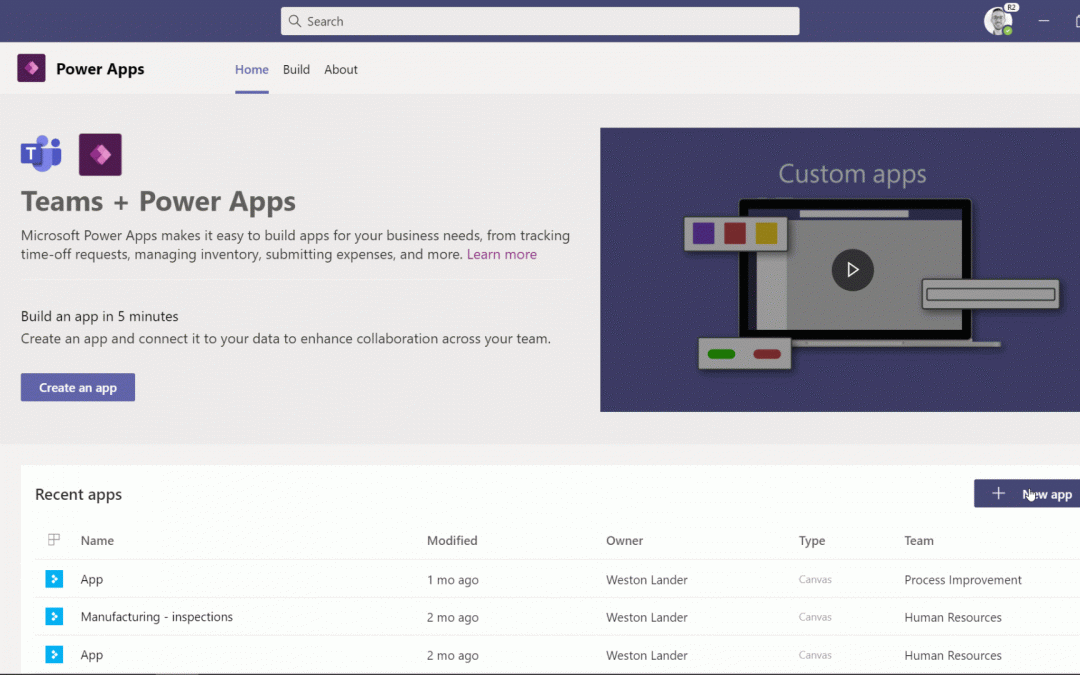
The new Power Apps app for Teams allows users to build and deploy custom apps without leaving Teams. With the simple, embedded graphical app studio, it’s never been easier to build low code apps for teams. You can also harness immediate value from built in teams app templates like the great ideas or inspections apps, which can be deployed in one click and customized easily.
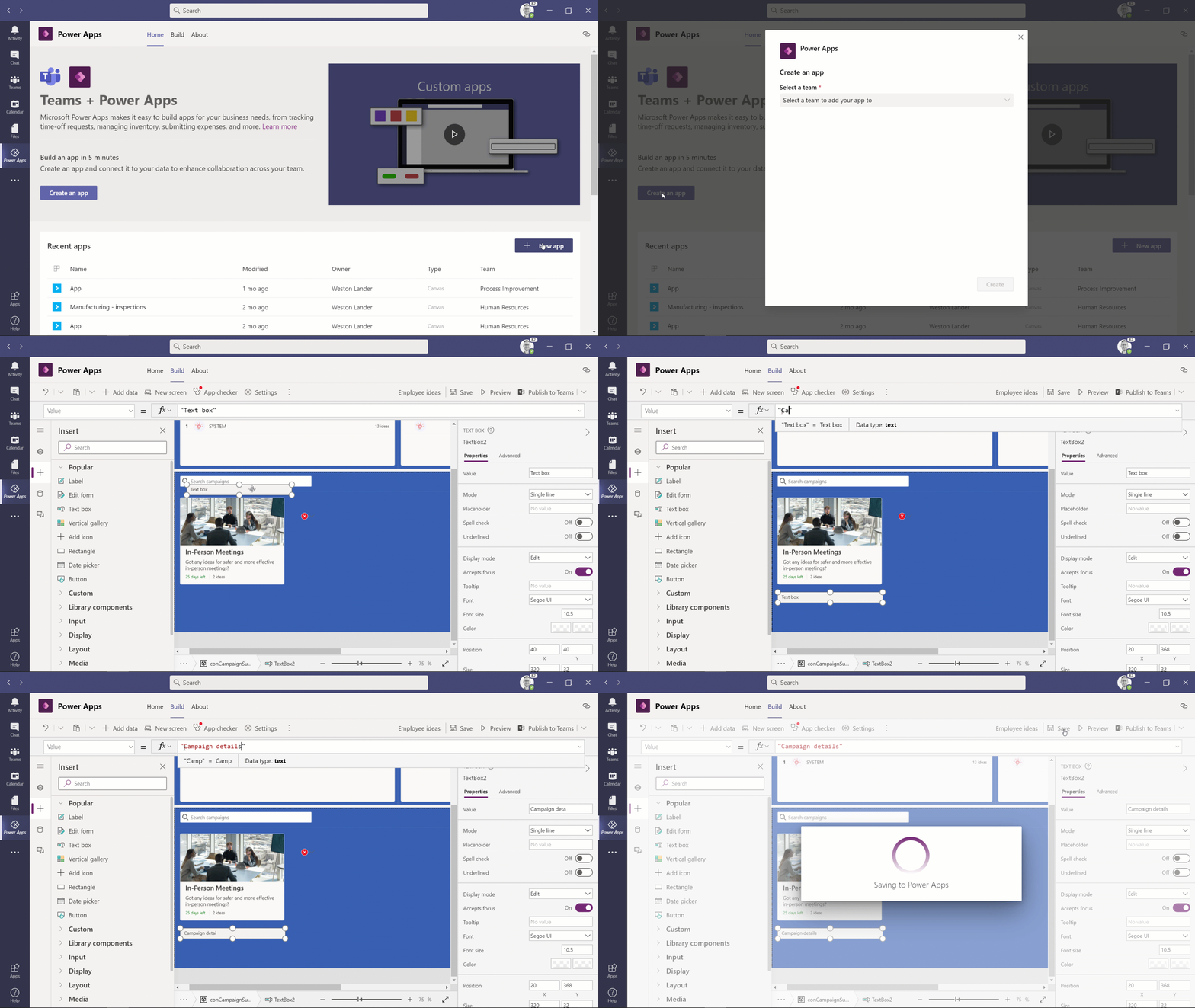
Soon, you’ll be able to distribute apps to anyone in your organization. People on your team can collaborate to build apps and then share with everyone in their organization by publishing in the Teams app store. Also, we’re excited to announce that the apps you build with Power Apps will be natively responsive across all devices for an enhanced end to end user experience.
Low code chatbots in Teams are here to help
Chatbots are a great way to improve how users get work done. They are especially useful in Teams as they conversational nature of these bots blend into the flow of the chats you have with your teammates – chatting with a bot is as simple as chatting with your colleague. Some common uses for these bots within an organization include IT helpdesk, HR self-service, and onboarding help. These bots help you free up time, allowing people to focus on more high-value work.
Power Virtual Agents empower people in your organization to make bots with a simple no code graphical user interface. Starting today, with the now generally available Power Virtual Agents app for Teams, you can make bots within Teams with the embedded bot studio. You can now deploy these bots to teams or your entire organizations with just a few clicks.
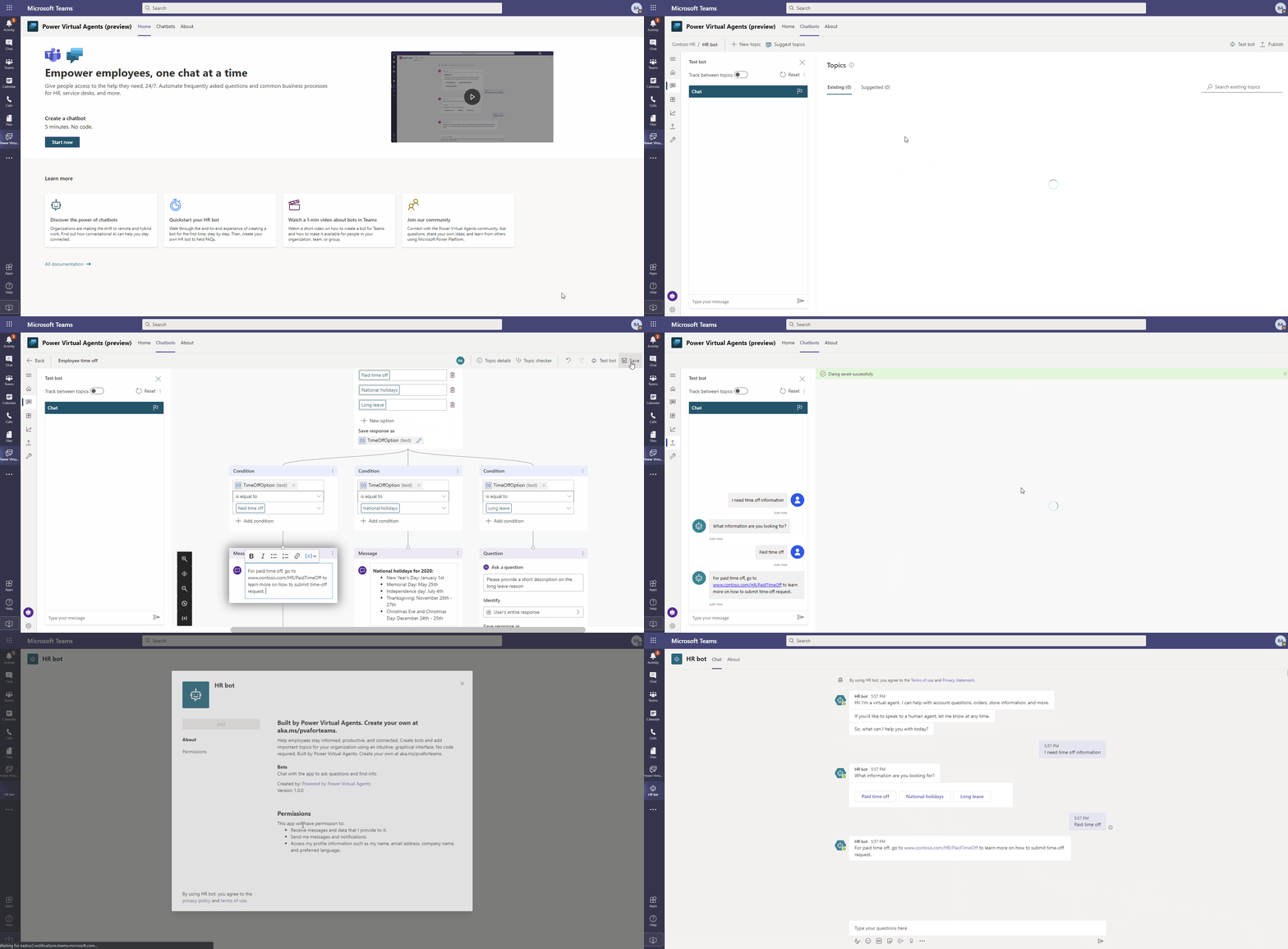
With this more approachable way to create and manage bots, subject matter experts can build and use bots to help address common department-level needs that maybe weren’t substantial enough to get addressed by busy IT departments. Customers with select Office 365 subscriptions that include Power Apps and Power Automate will have access to Power Virtual Agents’ capabilities for Teams at no additional cost.
Dataverse for Teams – A new low code data platform for Teams
The new Power Apps and Power Virtual Agents apps for Teams can be backed by a new relational datastore – Dataverse for Teams. Dataverse for Teams provides a subset of the full Microsoft Dataverse (formerly known as CDS) capabilities but more than enough to get started building apps and bots for your organizations. Dataverse for Teams also improves application lifecycle management, allowing customers seamless upgrades to more robust offerings when their apps and data outgrow what comes with their Office 365 or Microsoft 365 licenses.
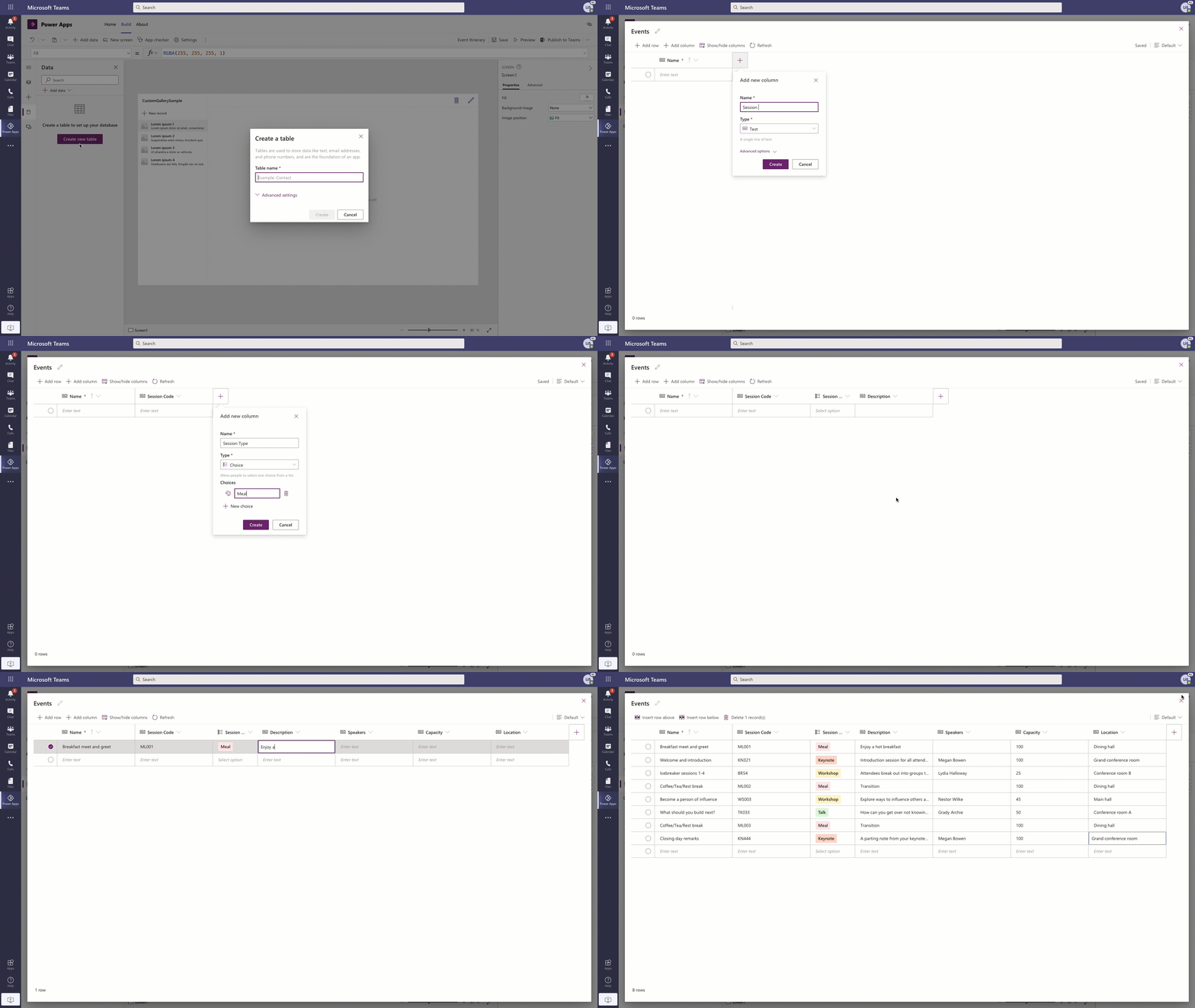
Also, IT professionals and Professional developers, can now use the Azure API Management connector and connect to data stored on Azure as part of their Microsoft and Office 365 licenses*.
Admin, security, and governance for your low code solutions in Teams
Microsoft Dataverse for Teams follows existing data governance rules established by the Power Platform and enables access control in the Teams Admin Center like any other Teams feature. Within the Teams Admin center, you can allow or block apps created by users at the individual level, group level, or org level – you can learn more here. The Power Platform admin center provides more detail on Power Platform solutions use and control, including monitoring dedicated capacity utilization.
Accelerate your transformation with Teams and Power Platform
We hope you are ready to start your Power Apps and Power Virtual Agents journey. For additional information on the content shared above and on the latest Teams platform news, please visit:
*Azure costs still apply
by Contributed | Nov 16, 2020 | Technology
This article is contributed. See the original author and article here.
Welcome to our SC ’20 virtual events blog. In this blog we share all the related Microsoft content at SC ’20 to help you discover relevant content more quickly.
Note: There are 2 categories for SC ’20 registration. The virtual booth and linked sessions from our booth are free to access, but some of the content, such as the Quantum workshop, require a paid registration.
Technical content, workshops, and more
Visualizing High-Level Quantum Programs
Wednesday, Nov 11th | 12 PM – 12:20 PM ET
Complex quantum programs will require programming frameworks with many of the same features as classical software development, including tools to visualize the behavior of programs and diagnose any issues encountered. We present new visualization tools being added to the Microsoft Quantum Development Kit (QDK) for visualizing the execution flow of a quantum program at each step during its execution. These tools allow for interactive visualization of the control flow of a high-level quantum program by tracking and rendering individual execution paths through the program. Also presented is the capability to visualize the states of the quantum registers at each step during the execution of a quantum program, which allows for more insight into the detailed behavior of a given quantum algorithm. We also discuss the extensibility of these tools, allowing developers to write custom visualizers to depict states and operations for their high-level quantum programs. We believe that these tools have potential value for experienced developers and researchers, as well as for students and newcomers to the field who are looking to explore and understand quantum algorithms interactively.
Exotic Computation and System Technology: 2006, 2020 and 2035
Tuesday, Nov 17th | 11:45 – 1:15PM ET
SC06 introduced the concept of “Exotic Technologies” (http://sc06.supercomputing.org/conference/exotic_technologies.php) to SC. The exotic system panel session predicted storage architectures for 2020. Panelists posed one set of technology to define complete systems and their performance. The audience voted for the panelist with the most compelling case and awarded a bottle of wine to the highest vote. The SC20 panel “closes the loop” for the predictions; what actually happened; and proposes to continue the activity by predicting what will be available for computing systems in 2025, 2030 and 2035.
In the SC20 panel, we will open the SC06 “time capsule” that has been “buried” under the raised floor in the NERSC Oakland Computer Facility. We will take another vote by the audience for consensus on the prediction closest to where we are today. The panelist with the highest vote tally will win the good, aged wine.
Lessons Learned from Massively Parallel Model of Ventilator Splitting
Tuesday, Nov 17th | 1:30 – 2:00 PM ET
There has been a pressing need for an expansion of the ventilator capacity in response to the recent COVID19 pandemic. To help address this need, a patient-specific airflow simulation was developed to support clinical decision-making for efficacious and safe splitting of a ventilator among two or more patients with varying lung compliances and tidal volume requirements. The computational model provides guidance regarding how to split a ventilator among two or more patients with differing respiratory physiologies. There was a need to simulate hundreds of millions of different clinically relevant parameter combinations in a short time. This task, driven by the dire circumstances, presented unique computational and research challenges. In order to support FDA submission, a large-scale and robust cloud instance was designed and deployed within 24 hours, and 800,000 compute hours were utilized in a 72-hour period.
ZeRO: Memory Optimizations Toward Training Trillion Parameter Models
Tuesday, Nov 17th | 1:30 – 2:00 P ET
Large deep learning models offer significant accuracy gains, but training billions of parameters is challenging. Existing solutions exhibit fundamental limitations fitting these models into limited device memory, while remaining efficient. Our solution uses ZeroRedundancy Optimizer (ZeRO) to optimize memory, vastly improving throughput while increasing model size. ZeRO eliminates memory redundancies allowing us to scale the model size in proportion to the number of devices with sustained high efficiency. ZeRO can scale beyond 1 trillion parameters using today’s hardware.
Our implementation of ZeRO can train models of over 100b parameters on 400 GPUs with super-linear speedup, achieving 15 petaflops. This represents an 8x increase in model size and 10x increase in achievable performance. ZeRO can train large models of up to 13b parameters without requiring model parallelism (which is harder for scientists to apply). Researchers have used ZeRO to create the world’s largest language model (17b parameters) with record breaking accuracy.
Distributed Many-to-Many Protein Sequence Alignment using Sparse Matrices
Wednesday, Nov 18th | 4:00 – 4:30 PM ET
Identifying similar protein sequences is a core step in many computational biology pipelines such as detection of homologous protein sequences, generation of similarity protein graphs for downstream analysis, functional annotation and gene location. Performance and scalability of protein similarity searches have proven to be a bottleneck in many bioinformatics pipelines due to increases in cheap and abundant sequencing data. This work presents a new distributed-memory software, PASTIS. PASTIS relies on sparse matrix computations for efficient identification of possibly similar proteins. We use distributed sparse matrices for scalability and show that the sparse matrix infrastructure is a great fit for protein similarity searches when coupled with a fully-distributed dictionary of sequences that allows remote sequence requests to be fulfilled. Our algorithm incorporates the unique bias in amino acid sequence substitution in searches without altering the basic sparse matrix model, and in turn, achieves ideal scaling up to millions of protein sequences.
HPC Agility in the Age of Uncertainty
Thursday, Nov19 | 10:00 – 11:30 AM ET
In the disruption and uncertainty of the 2020 pandemic, challenges surfaced that caught some companies off guard. These came in many forms including distributed teams without access to traditional workplaces, budget constraints, personnel reductions, organizational focus and company forecasts. The changes required a new approach to HPC and all systems that enable and optimize workforces to function efficiently and productively. Resources needed to be agile, have the ability to pivot quickly, scale, enable collaboration and be accessed from virtually anywhere.
So how did the top companies respond? What solutions were most effective and what can be done to safeguard against future disruptions? This panel asks experts in various fields to share their experiences and ideas for the future of HPC.
Azure HPC SC ’20 Virtual Booth and related Sessions
You can access the Microsoft SC ’20 virtual booth . The on-demand sessions listed below can be easily found from our booth along with additional links and content sources.
On-Demand Sessions at SC20
We’ve prepared a number of recorded sessions to share our perspectives about where HPC behaviors are heading juxtaposed with the increase of AI development and edge-based, real-time machine learning. Don’t miss out!
HPC, AI, and the Cloud
Steve Scott, Technical Fellow and CVP Hardware Architecture for Microsoft Azure, opines on how the cloud has evolved to support the massive computational models across HPC and AI workloads that, previously, has only been possible with dedicated on-premises solutions or supercomputing centers.
|
Azure HPC Software Overview
Rob Futrick, Principal Program Manager, Azure HPC gives an overview of the Azure HPC software platform, including Azure Batch and Azure CycleCloud, and demonstrates how to use Azure CycleCloud to create and use an autoscaling Slurm HPC cluster in minutes.
|
Running Quantum Programs at Scale through an Open-Source, Extensible Framework
We present an addition to the Q# infrastructure that enables analysis and optimizations of quantum programs and adds the ability to bridge various backends to execute quantum programs. While integration of Q# with external libraries has been demonstrated earlier (e.g., Q# and NWChem [1]), it is our hope that the new addition of a Quantum Intermediate Representation (QIR) will enable the development of a broad ecosystem of software tools around the Q# language. As a case in point, we present the integration of the density-matrix based simulator backend DM-Sim [2] with Q# and the Microsoft Quantum Development Kit. Through the future development and extension of QIR analyses, transformation tools, and backends, we welcome user support and feedback in enhancing the Q# language ecosystem.
|
Cloud Supercomputing with Azure and AMD
In this session Jason Zander (EVP – Microsoft), and Lisa Su (CEO – AMD) as well as Azure HPC customers talk about the progress being made with HPC in the cloud. Azure and AMD reflect on their strong partnership, highlight advancements being made in Azure HPC and express mutual optimism of future technologies from AMD and corresponding advancements in Azure HPC.
|
Accelerate your Innovation with AI at Scale
Nidhi Chappell, Head of Product and Engineering at Microsoft #Azure HPC, shares a new approach to AI that is all about lowering barriers and accelerating AI innovation, enabling developers to re-imagine what’s possible and employees to achieve their potential with the apps and services they use every day.
|
Azure HPC Platform At-A-Glance
A thorough yet condensed walkthrough of the entire Azure HPC stack with Rob Futrick, Principal Program Manager for Azure HPC, Evan Burness, Principal Program Manager for Azure HPC, Ian Finder, Sr. Product Marketing Manager for Azure HPC, and Scott Jeschonek, Principal Program Manager for Azure Storage.
|
Microsoft in Intel Sessions
HPC in the Cloud – Bright Future
Nidhi Chappell, Head of Product and Engineering at Microsoft #Azure HPC, is a panelist in Leaders of HPC in the cloud that discusses the future of HPC, the opportunities cloud can offer and the challenges ahead.
Learn how NXP Semiconductors is planning to extend silicon design workloads to Azure cloud using Intel based virtual machines
When NXP Semiconductors design silicon for demanding automotive, communication and IOT use cases, NXP needs performance, security and cost management in their HPC workloads. In this fireside chat, you will hear how NXP uses their own datacenters and plan to utilize Intel VMs at Azure cloud to meet their shifting demands for Electronic Design Automation (EDA) workloads.
Intel sessions will be copied to their HPCwire microsite on Nov 17th.
by Contributed | Nov 16, 2020 | Technology
This article is contributed. See the original author and article here.
Strategic investments bolster versatility and relevance of Azure HPC for Microsoft
As I look at SC20 quickly approaching on my calendar, I cannot help but reflect on what has happened since the last one. And there is a lot to think about. So many changes to our lifestyle, our environment, and our safety. But, despite everything that has happened over the last year, we continue to be amazed per our customers and people who continually put their best foot forward to drive and solve complex problems across all industries.
Overview
You’ll hear us refer to Azure HPC as purpose-built. What we mean is that, instead of figuring out how to apply commodity hardware toward complex HPC & AI workloads, Azure’s formula for HPC/AI customer success starts with infrastructure that is purpose-built for scalable HPC & AI workloads. For example, our solutions can deliver a 10x performance or higher advantage compared to products elsewhere on the public cloud, which gives us a really strong foundation of performance and scale leadership. We ensure this level of performance by aligning with partners like Intel, so our HPC instances provide the most powerful architecture available to accelerate both HPC and AI workloads. Our team of HPC experts then add on a broad set of Azure technologies to leverage that infrastructure in an agile and secure manner. That’s what leads to big impact for customers. These are the pillars of HPC & AI on Azure. Some great examples are customers who are modelling complex problems like drug discovery, weather simulation, crash test analysis, and state of the art AI training.
To better understand Microsoft’s vision and strategy that led to their HPC investments, check out the video links below:
Azure HPC Overview, featuring Nidhi Chappell, Head of Product and Engineering at Azure HPC, summarizes Microsoft’s recent investments into building their comprehensive HPC cloud platform.
Azure HPC Vision, featuring Andrew Jones, Lead, Future HPC & AI Capabilities at Microsoft, outlines how we see the future of HPC and its convergence with AI in the cloud.
Industry Alignment
Many people will adapt their behaviors to capitalize on new capabilities offered by technology advancements. Often times, the technologies themselves will establish new lifestyle patterns and practices. But in HPC, it is the other way around. Technologies must clearly identify, align, and support the traditional behaviors of HPC engineers and service managers in order to be deemed relevant or useful. This is one reason the ramp to HPC in the cloud has been slower than some expected…cloud platforms have taken a long time to become engineered in line and in step with how veteran HPC organizations expect to be able to work.
These videos illustrate a much deeper understanding and alignment of Azure HPC relevance to specific application workloads within known industry verticals:
Financial Services
Link to video: How to bring your risk workloads to Azure
Presented by: Stephen Richardson, EMEA HPC & AI Technology Specialist at Microsoft, and Greg Ulepic, FSI Lead for Risk Workloads at Microsoft.
Summary: The pandemic has not just hit our health, but also our pockets. Financial institutions need to re-invent how they help their clients mitigate and manage risk across their portfolios. To do that, many institutions are examining both a movement of their workload to the cloud as well as setting up native cloud-based architectures to operate moving forward. This video illustrates how the financial services marketplace is evolving towards cloud-driven solutions, and how Azure is well-furnished to support that model.
Autonomous Vehicle Development
Link to video: Accelerating Autonomous Vehicle Development
Presented by: Kurt Niebuhr, Principal Program Manager for Azure HPC
Summary: There’s few other areas in modern digital transformation that have more buzz than self-driving cars. Given the miniscule room for error when it comes to driving safely, the very notion of self-driving cars can easily raise concerns even in the most liberal mind. In this video, Kurt Niebuhr discusses how Microsoft Azure provides an end-to-end autonomous driving development and engineering solution with Azure HPC, giving carmakers an excellent understanding of how they need to plan for the next phases of automobile development and manufacturing.
Academic Research
Link to video: Building a cloud-based HPC environment for the research community
Presented by: Tim Carroll, Director of HPC and AI for Research for Microsoft Azure
Summary: The global community of researchers has come into greater spotlight recently with the rise in large scale health and environmental issues. When data scientists and researchers are incumbered by IT limitations, they are being denied their potential to innovate and discover new remedies. This video illustrates how Microsoft is better enabling universities and research institutions around the world to massively speed up their processing tasks without building out their hardware data centers, thereby eliminating barriers of limitation for scientists and researchers everywhere.
Energy
Link to video: Empowering exploration and production with Azure
Presented by: Hussein Shel, Principal Program Manager for Azure Global Energy
Summary: One of the biggest areas of digital transformation in energy is optimizing how companies explore and discover new untapped reservoirs of fossil fuels. Additionally, the energy industry as a whole has been put under a giant microscope in recent decades with more voices calling for a phase out of fossil fuel production and transitioning to clean & renewable energy. These are all initiatives that can be enabled by Azure HPC. In this video, Hussein Shel discusses some of Azure HPC’s offerings in exploration and production for the oil and gas industry.
Semiconductor Engineering
Link to video: Azure accelerates cloud transformation for the Semiconductor Industry
Presented by: Prashant Varshney, Sr. Director, Product Management for Azure Engineering
Summary: The semiconductor industry is the best example of technology dependence on itself. The pace at which micro-processing architectures increase in density and capability has direct impact on the viability of entire product and service ecosystems. As such, silicon engineering & manufacturing companies must be highly capable, yet highly nimble, with their electronic design automation (EDA) to remain competitive. In this video, Prashant Varshney outlines how Azure HPC has been built with some of these considerations in mind, touching on how semiconductor companies can build the best chips by using Azure for their EDA processes.
Manufacturing
Link to video: Microsoft Azure HPC discrete Manufacturing
Presented by: Karl Podesta, HPC Technical Specialist, AzureCAT
Summary: Manufacturers are being asked to visualize real-time products and product performance from anywhere. We also need to understand what’s happening more with physical products and use things like digital twins to really understand what could happen in those products and to really optimize the products. In this session we will discuss how customers are leveraging Azure HPC to solve these types of challenges in the Manufacturing industry.
Guides & Demos
The Azure HPC stack is comprehensive and full featured: purpose-built infrastructure, high performing storage options, fast & secure networking, workload orchestration services, and data science tools integrated across cloud, hybrid, and the edge make Azure a force with which to be reckoned. It is important to see where your opportunity is in this stack, to understand what Azure can do for your HPC needs.
The following videos are excellent deep dives into some of the infrastructure and services well-aligned for HPC use case scenarios:
Azure HPC Software Overview
Presented by: Rob Futrick, Principal Program Manager, Azure HPC
Summary: This is an excellent summary of all the HPC oriented services residing on Azure, and how you can take advantage of them for your needs.
Azure Batch with Containers
Presented by: Mike Kiernan, Sr. Program Manager for Azure HPC
Summary: Learn how you can use the Azure Batch Service with Containers to better orchestrate your workload in the cloud
Deploy an end-to-end environment with Azure Cycle Cloud
Presented by: Cormac Garvey, Sr. Program Manager for Azure HPC
Summary: This video outlines the basics for you to be able to stand up an end-to-end HPC environment using Azure CycleCloud.
Storage options for HPC Workloads
Presented by: Scott Jeschonek, Cloud Storage Specialist at Microsoft Azure
Summary: This video provides an overview of a variety of different storage options to run HPC workloads on including Blob Storage, Azure NetApp Files, Azure HPC Cache, and others.
Things are shaping up to be a very productive 2021, and we are tremendously excited and honored to participate!
#azurehpc

by Contributed | Nov 16, 2020 | Technology
This article is contributed. See the original author and article here.
Article contributed by Andy Byers, Strategic Partnership Director, Ansys
Small chips, Big problems
Ansys has developed simulation software tools for over 50 years, helping their customers virtually prototype their products within a simulation before they ever build a physical prototype and test in the real world. This simulation process is critical in designing high performance electronics from cell phones to computers to complex radar systems. The integrated circuits (ICs) in these systems have steadily increased in density and speed to handle the growing needs of computation, data handling, and communication. The problems are exacerbated in RF (radio-frequency) IC’s, which operate at incredibly high frequencies and require very precise noise isolation between digital and analog blocks. With the advent of 5G+ communication products, these problems are not going away.
Ansys provides a portfolio of products that enable electrical engineers to calculate the electrical properties of these ICs and determine if they will meet their stringent performance requirements. Whether it is extracting the inductance of a resonant circuit or understanding the unwanted and unavoidable coupling between two adjacent blocks, engineers need to be able to simulate these effects to approve a “tape-out” of a chip. Historically, engineers have tackled this in two ways:
- Simulate a full IC using a tool with a medium level of accuracy which is sufficient for early-stage design or lower-frequency applications.
or
- Simulate a partial IC using a tool with a high level of accuracy, ideal for late-stage validation studies or higher-frequency applications (like 5G).

Figure 1: Top and Angled view of Integrated Circuit in HFSS.
Today, more and more companies are pushing for the ability to simulate a full RF IC using the highest-level accuracy tool possible. Until recently, this was impossible due to the computational complexity required and limitations of the meshing technology.
It was impossible, until now.
It’s true – a Full Chip Solved in HFSS!
I am excited to announce that Ansys HFSS has solved an entire RFIC (5.5 x 5.5mm) (see figure 1) at 5GHz in under 12 hours. We were able to do this by bringing together two new significant technologies:
- HFSS Layout automated IC-specific meshing in Ansys HFSS
- Ansys Cloud on Microsoft Azure
This work represents a huge leap forward in raw power and capability for IC designers, and anyone who has solved computational electromagnetic problems will share my astonishment at the numbers in this blog (for the rest of you, bear with us as we dip into some statistics here). Here are a few:
- Compute cores used: 704 cores (Intel Xeon Platinum 8168, Azure “HC44” VM)
- RAM: 2.6TB (yes, TERA bytes)
- Mesh size at adaptive pass 15: 23.5M Tetrahedron and 93M unknowns
- Initial Mesh Time: 1h55m
- Adaptive Mesh Time: 29h47m
HC44 VM features 100 Gb/sec EDR InfiniBand, the same HPC interconnect technology featured in the world’s most powerful supercomputer. Ansys is leveraging Azure’s unique InfiniBand fabrics of our H-series VMs to host this HFSS workload.
Azure InfiniBand fabrics is based on non-blocking fat trees with a low-diameter design for consistent low latencies – together with SRIOV – it allows partners such as Ansys to use standard Mellanox/OFED drivers just like they would on a bare metal HPC cluster.
The first technology required was the meshing. Advanced meshing and geometry preparation capability in HFSS Layout enables the adaptive mesh algorithms in HFSS to efficiently handle the layered 3D structures in the IC. Approaching the problem from a layout-centric viewpoint enables an initial mesh to be efficient and sufficient, and thus a final mesh that accurately capture the physics.
The second technology is the ability to easily solve on the cloud. Even with this improved mesh, solving this kind of problem is constrained by the amount of available RAM on a compute node. By leveraging HFSS distributed direct matrix solve, we were able to harness all the required RAM across 16 HC compute nodes. The Ansys Cloud R&D teams partnered with Microsoft Azure engineers to create a robust and user-friendly way for customers to request and use this compute power.
“It is so rewarding to see a problem of this size and complexity solved on Azure, putting this level of HPC power in the hands of engineers when they need it the most.”, says Merrie Williamson, Microsoft VP Azure Apps and Infrastructure. “This is a great example of two partners blending their strengths to serve their joint customers, and I’m eager to see the impact this will make on companies tackling the new wave of IC-design challenges posed by 5G and beyond.”
Ansys Cloud’s simple GUI gives the user the ability to choose the machines and region, providing supercomputing-like capability on-demand to companies of all sizes. The Intel Xeon Platinum 8168 CPU’s on the Azure HC-series machines provide the performance (speed) boost, and Ansys developers regularly work with Intel to benchmark their simulations on upcoming Intel chips to provide feedback for future architectural decisions. Ansys Cloud provides flexible on-demand HPC access for most mainstream Ansys solvers – HFSS, Maxwell, SIwave, Mechanical, Fluent, LSDyna, Discovery – and more on the way.
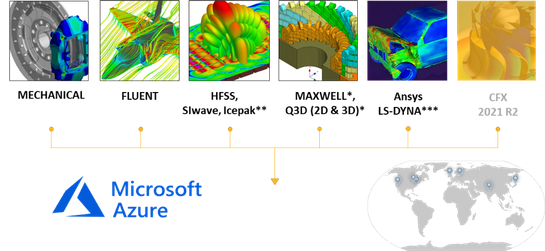
Figure 2: Ansys Cloud, available on Azure.
Sleep better at the 11th hour
So, what does all this mean?
If you design RFICs and you are approaching crunch-time for a tape-out, you need to ensure that you have no surprises when you get that first chip back. Mistakes or missed problems can hit companies with millions of dollars in unplanned NRE cost and, more importantly, weeks or months of product delay to market.
A full-IC HFSS simulation can provide that 11th hour peace of mind.
Until now, this kind of simulation was not possible. It is not like we are saying, “look, we can now run this normal simulation 25% faster.” Companies had to make approximations with their simulation technology or only look at sub-sections of an RFIC. But now, thanks to advancements in HFSS meshing and breakthroughs in ease of cloud computing via Azure, it is possible to envision the full-wave electromagnetic activity, and extract the coupled models, for an entire RFIC. Imagine the possibilities.
And we have the feeling that a few of you reading this will be eager to test this out as soon as possible…
—————————————————–
For more info, visit www.ansys.com or email sales@ansys.com

by Contributed | Nov 16, 2020 | Technology
This article is contributed. See the original author and article here.
This past year has been one of tremendous adversity and disruption – dramatically changing the way we live and work. Organizations responded in turn by quickly adopting to tools like Microsoft Teams to support their people and ensure business continuity. Now, as organizations look to the future, they are seeking ways to advance their digital transformation – where they can bring apps and workflows into how they work and to better serve customers, streamline work, and improve employee productivity and wellbeing.
This digital transformation will be enabled through the creativity and determination of developers and IT professionals and admins who will drive the next generation of apps that will be used by the workforce. With this, we’ve made tremendous investments and progress in providing best in class developer tools and streamlined app management & enablement – extending the power of Teams platform.
Bringing developers the tools they need to build modern Teams apps
Teams apps for meetings now generally available!
This year at Ignite, we gave a sneak peek into the new capabilities we would soon be opening to partners and developers to customize and extend the meeting experience with apps. Today, we are thrilled to announce the general availability of Teams apps for meetings – providing you access to new surfaces and meetings APIs to further expand the capabilities of your apps across the entire meeting lifecycle and giving you a canvas to create new scenarios that will enhance your customers’ meeting experience. Get started by accessing our developer docs here.
We are also excited to share that nearly 20 new Teams apps for meetings, created by our partners, will be released by the end of this month!
Monday.com, for example, has built a seamless integration of their work operating system into the meeting lifecycle – allowing customers to plan, track, and follow up on tasks directly within Teams meetings.

And with Teamflect, managers can maintain high performing and engaged employees by bringing in the feedback loop directly into meetings – allowing for more effective one-on-one’s and engagement with staff.
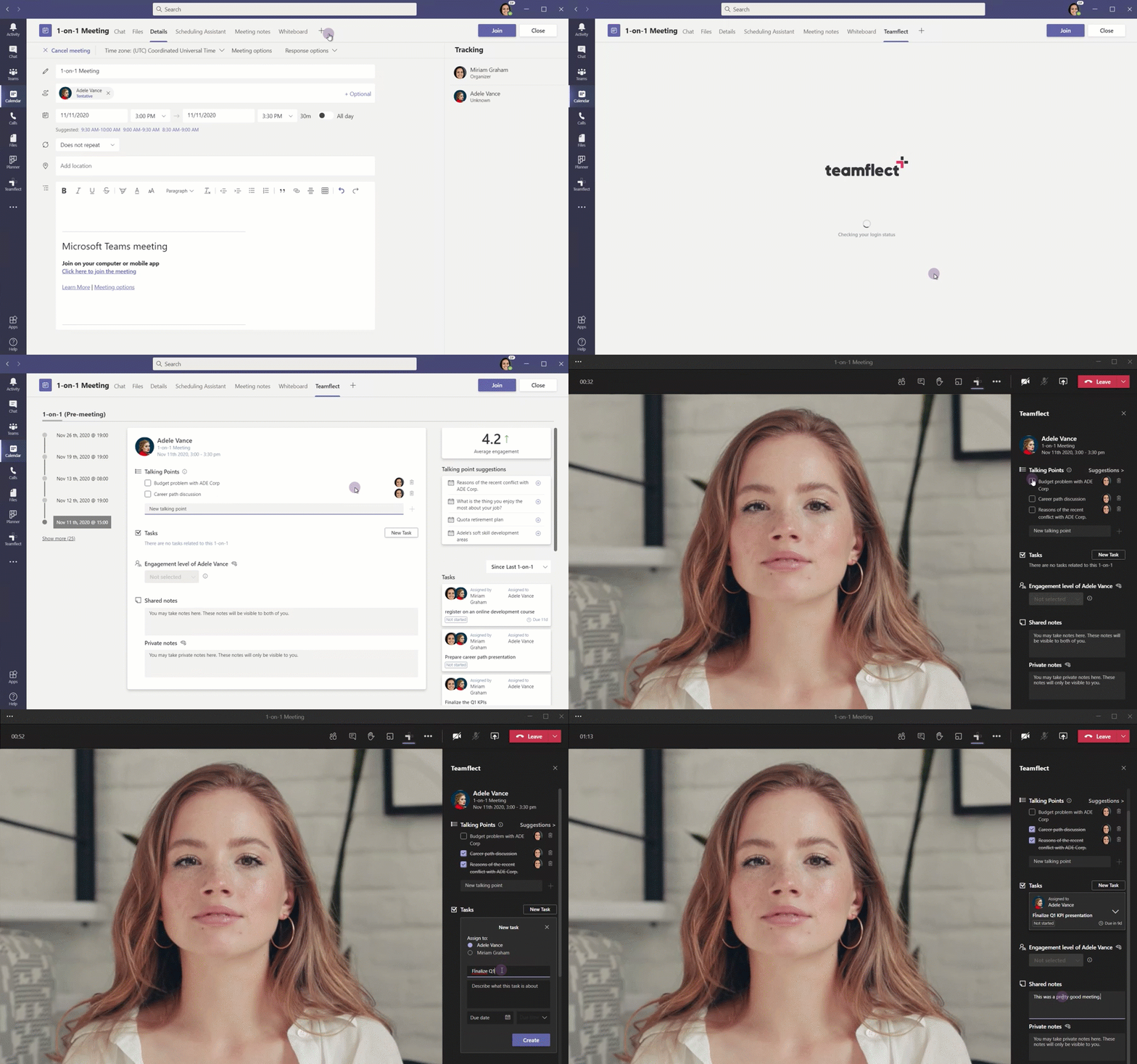
New Teams Fluent UI Design Kit coming soon
Designing a great Teams app requires you to understand the scenarios you’re trying to achieve, the capabilities & integration points within the platform, and following best practice design principles to really drive the experience your want your customer to have. But we know that this is easier said than done, and so we are excited to share that, coming soon, designers will be able to access our new Teams UI Design Kit which includes UI components, templates, best practices, and other resources to help create your Teams app.
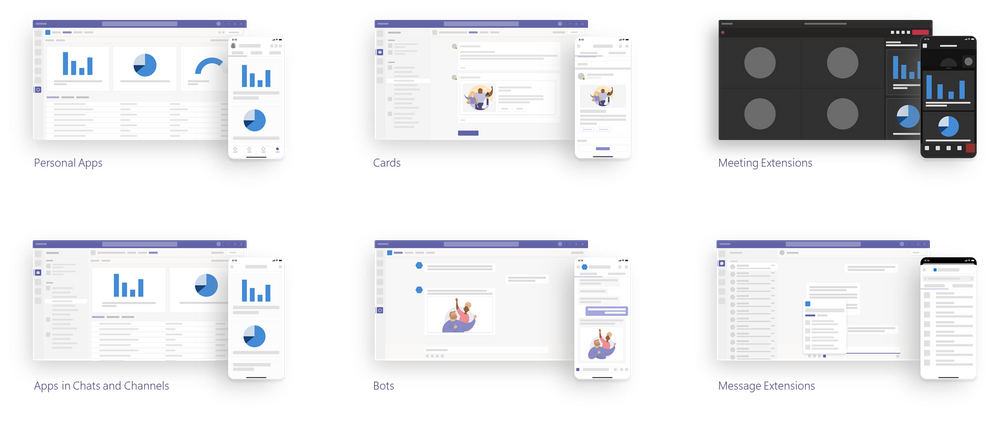
Enhancements to developer tools and apps enablement
We want to make your experience building Teams apps as frictionless as possible, so we’ve built comprehensive developer tools, Teams Graph APIs, and SDKs to help you get started building with ease.
Microsoft Teams Toolkit for Visual Studio and Visual Studio Code – provides you an all-in-one experience for building Teams apps including technical docs, project setup, configuration, validation, and publishing. Recently we added the integration of VSCode authentication, streamlined deployment, and debugging with the new “F5” experience, enhanced bot creation tools. Coming soon, you will be able to build tab-based apps that leverage the power of Microsoft Graph and single-sign-on right from the toolkit. Learn more on how to kick-start building apps with the Teams toolkits.
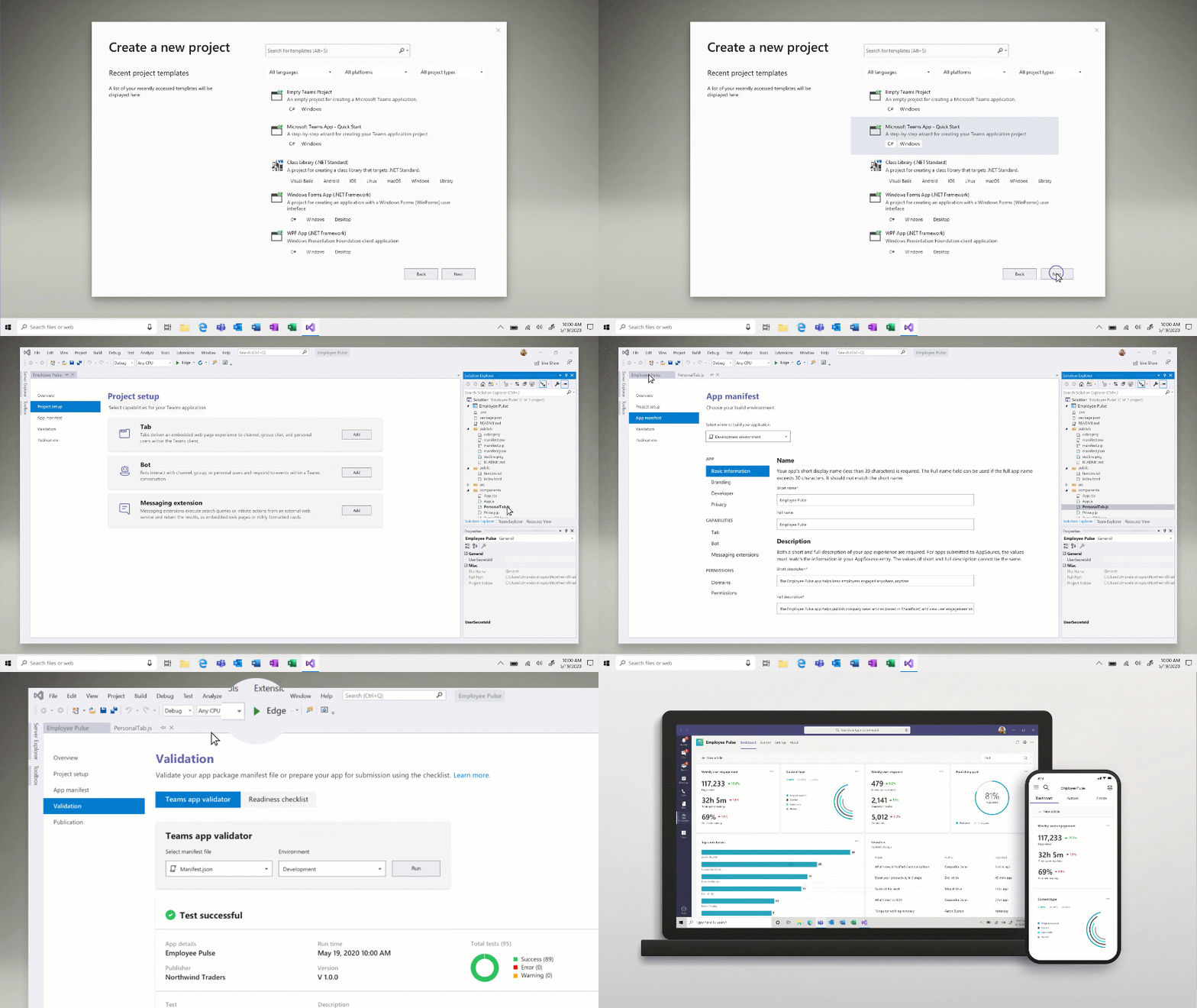
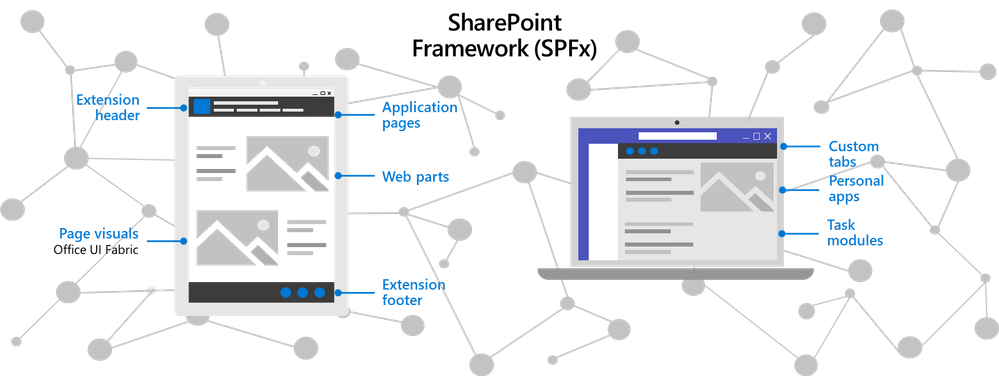
The SharePoint Framework (SPFx) has been used by developers across the globe to build thousands of enterprise line-of-business solutions we’ve made tremendous strides over the last couple of years in enhancing the integration with SPFx and enabling the capabilities and functionality for SharePoint developers to extend Teams. By building Teams apps using SPFx, IT can save costs on hosting infrastructure and simplify the deployment and operation process – while SharePoint developers can expand the breadth and use of their solutions and reach customers where they are and work. Learn more on how to build Teams apps using SPFx.
The Microsoft Graph APIs for Teams enables developers and admins to leverage the power of the Microsoft Graph for apps and enablement. For example, we recently made generally available one of the most common requests from developers with Resource-Specific Consent (RSC), which enables team owners to grant consent for an application to access and/or modify a specific team’s data. Another commonly requested API has been with respect to change notifications for Teams messages, which we made generally available earlier this fall and allows apps to listen to Teams messages in near-real time, without polling, to enable scenarios such as data loss prevention, enterprise information archiving, and bots that listen to messages they aren’t @mentioned on. And lastly, another significant development was the availability of our Teams App Submission API from this summer, which allows all users at an organization to develop on the platform of their choice and submit their apps into Teams with zero friction. In turn, relieving the burden of discovering, approving, packaging, and deploying these apps by IT.
Support for Single Sign-On (SSO) for Bots
Users today expect a frictionless sign-on experience across devices – where they don’t have to repeatedly enter their username and password each time they interact with their bot. That’s why we are thrilled that Single Sign-on (SSO) support for bots is now available. SSO authentication in Azure Active Directory (Azure AD) minimizes the number of times users need to enter their login credentials by silently refreshing the authentication token. If users agree to use your app, they will not have to consent again on another device and will be signed in automatically. Learn more on how to enable SSO for bots.
Microsoft Teams App Development Challenge
We’re also continuously planning new events and ways to connect with the developer community. For example, Microsoft is launching the Microsoft Teams App Development Challenge. Starting November 16, 2020 through February 8, 2021, developers, partners, and organizations can participate in a challenge to develop a new and innovative Teams App for publishing to AppSource, to be eligible to win a share of $45,000 in cash and prizes. For full challenge details visit http://microsoftteams.devpost.com
Streamlining Teams app management and enablement for IT
Viewing app permissions and granting admin consent
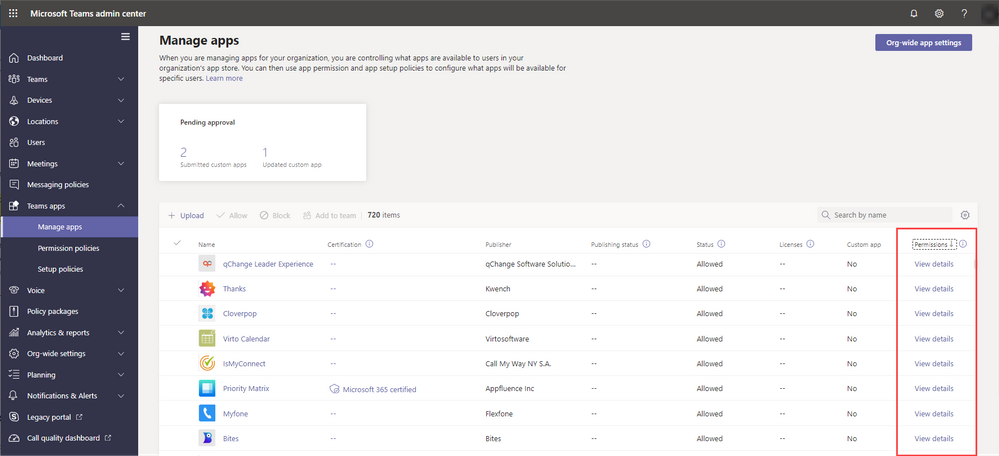
Admins have the important responsibility of managing apps and safeguarding company data, so we’ve made the experience managing different types of app permissions simpler for them inside the Teams admin center. Now, global admins will be able to review and grant consent to Graph API permissions registered in Azure Active Directory, on behalf of the entire tenant for the permissions an app is requesting. IT admins will also be able to review resource-specific consent (RSC) permissions for the apps within Teams admin center. With that admins will be able to unblock their users for the third-party apps they have already reviewed and approved to use in their organization. Learn more on app permissions.
Adding apps to teams
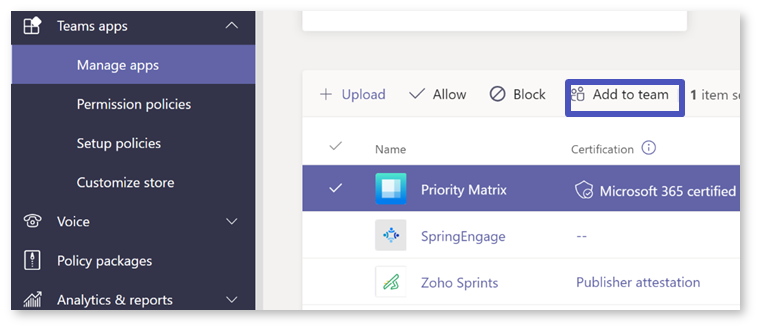
Another feature that has been highly requested by customers has been the ability to add apps to specific teams. Now, admins can add apps (that are eligible in team scope) to specific teams to help streamline the process and relieving team owners with the need to do so. Learn more on adding apps to teams.
Managing Power Platform apps in Microsoft Teams admin center
With the increasing usage of apps built using our low code solutions in Teams, admins can now control whether Microsoft Power Platform apps are listed in ‘Built by your colleague’s’ on the Apps page in Teams. You can collectively block or allow all apps created in Power Apps or all apps created in Power Virtual Agents at the org level on the Manage apps page or for specific users using app permission policies. Learn more on managing shared Power Platform apps on Teams.
Customized branding for line-of-business Teams app catalog
Each organization has their own line of business apps that they rely on for their unique business needs, and Teams enables customers the capability of bringing in those solutions directly to where their people work. Today, line of business apps show up in the Teams app store as apps built for their organization and we’re thrilled to share that now IT Admins will be able to customize their Teams line-of-business app store look using their organization’s branding. This will enhance the user experience for end users and increase organic discovery and use of an organization’s line-of-business apps.
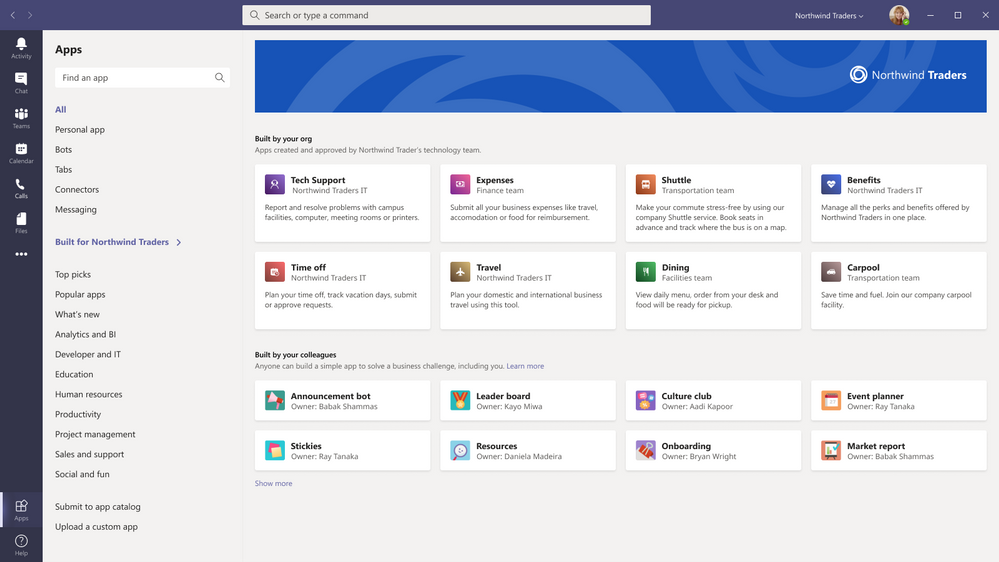
We are humbled by the engagement and feedback from our developer ecosystem, and IT professionals and admins. Teams enables a new way of work, and our Teams apps integrations make work even easier.
Learn more on how you can build Teams apps.
by Contributed | Nov 16, 2020 | Technology
This article is contributed. See the original author and article here.
In Azure, availability zones are physically separate locations within an Azure region. Each availability zone is made up of one or more datacenters equipped with independent power, cooling, and networking. So, deploying virtual machines across availability zones along with high-availability framework can provide you the best SLA in Azure. But as the Azure regions developed and extended rapidly over the last years, the topology of the different Azure regions, number of physical datacenters, distance among those datacenters, and the distance between Azure availability zones may be different. That means, network latency may vary between availability zones.
With that in mind, choosing the correct zones for SAP Application in cross availability zone deployment is important. This article is focused on addressing this concern where we will discuss on methods to identify the network latency between zones, and brainstorm different options to deploy SAP system across Azure availability zones.
Step 1: Identify Network Latency across Availability Zones
An Azure region, which offers availability zones has a minimum of three separate zones to ensure resiliency. The availability zone identifiers (Zone 1, Zone 2, and Zone 3) are logically mapped to the actual physical zones for each subscription independently. That means, availability zone 1 in one subscription can refer to a different physical zone than availability zone 1 in a different subscription. So, the network latency between Zone 1 and Zone 2 can be different between different subscriptions used in the same Azure region. Therefore, it is recommended not to rely on availability zone IDs across different subscriptions for virtual machine placement within one Azure region.
To identify the network latency and throughput across availability zones within a region, provision a virtual machine in each availability zone with accelerated networking enabled. Run network measurement tools (like qperf, niping) to test latency and throughput between availability zones. The result will help you identify the availability zones which have the lowest latency and highest throughput. To simplify this task, one of our colleague Philipp Leitenbauer has developed a script which automates this entire scenario. You can find the script on GitHub.
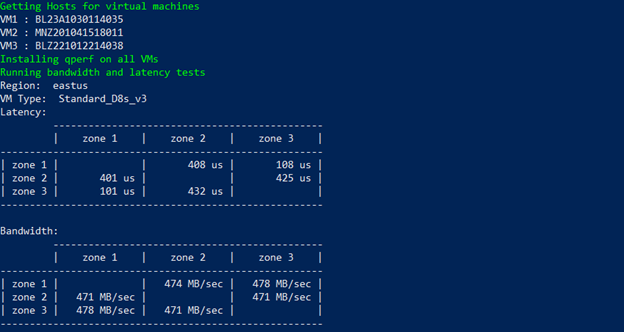
Below is the output of the script for Subscription 1 on “eastus” region. It indicates zone 1 <> zone 3 offers lowest latency for Subscription 1. As mentioned earlier, availability zone identifiers are logically mapped to the actual physical zones for each subscription, which means the lowest network latency that is show below between zone 1 <> zone 3 for subscription 1, may not be the same for my other subscriptions. So, if you are planning to deploy SAP systems in multiple subscriptions, it is essential that you follow the guidelines mentioned in this article to identify the best zones for each subscription.
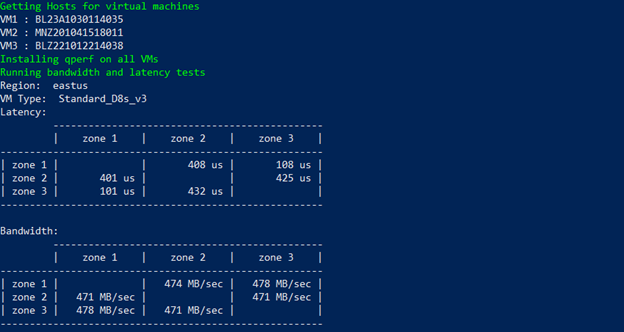
Alongside identifying the network latency across availability zones, you need to measure the network latency between two virtual machines within zones. You can refer Test VM network latency article which describe method to perform the test. It is important to get this insight as it helps to understand the delta between network latency within zones and cross zone latency.
Step 2: Different options for SAP deployment across Availability Zones
The distance between availability zones in the different region can be different and with that network latency across AZs as well. One SAP deployment strategy fit all regions cannot be implied, when brainstorming SAP implementation in multiple regions. Based on the network latency across AZs, different architecture strategies may need to be adopted for cross-zone deployment. You can either have active/active deployment where the delta between network latency within zones and cross-zone latency is not too large, or active/passive deployment where cross-zone network latency is high.
Scenario 1: Active/Active Deployment
In this deployment where cross-zone network latency is low, you can deploy and run SAP application servers across different zones as the network latency from one zone to active database virtual machine is acceptable for SAP business processes. The SAP Central Service instances that uses enqueue replication, and the database instances that performs replication will be distributed across two availability zones. The delta in runtime of business process or batch jobs for the in-zone and cross-zone workload should not be too large. The architecture for this type of active/active deployment between two zones could look like below –
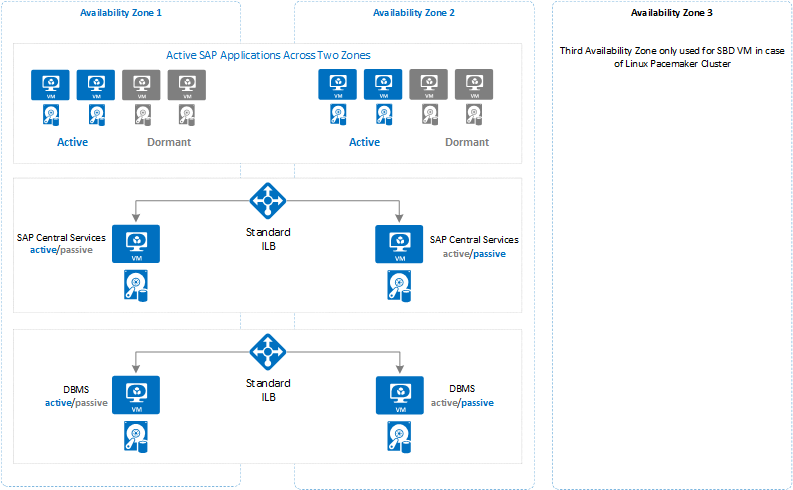
The idea to deploy dormant dialog instance in each availability zones can help business to run system with former resource capacity, when the zone that runs part of SAP application instances becomes unavailable due to zone failure.
IMPORTANT: In active/active scenario, there is extensive data transfer between SAP application server (zone 2) and database (zone 1) which can result in higher bandwidth cost. Check Bandwidth Pricing Details for more information.
Scenario 2: Active/Passive Deployment
This deployment can be leveraged when cross-zone network latency is high. Instead of distributing SAP application servers across availability zones, you can deploy and run all SAP application servers on one active zone. The SAP Central Services instances that uses enqueue replication, and database instances that performs replication will be distributed across two availability zones. In this configuration there should be no delta in runtime of business process or batch jobs for cross-zone workload as all the active SAP application servers and database will be running on one availability zone. The layout of this type of architecture could look like below –
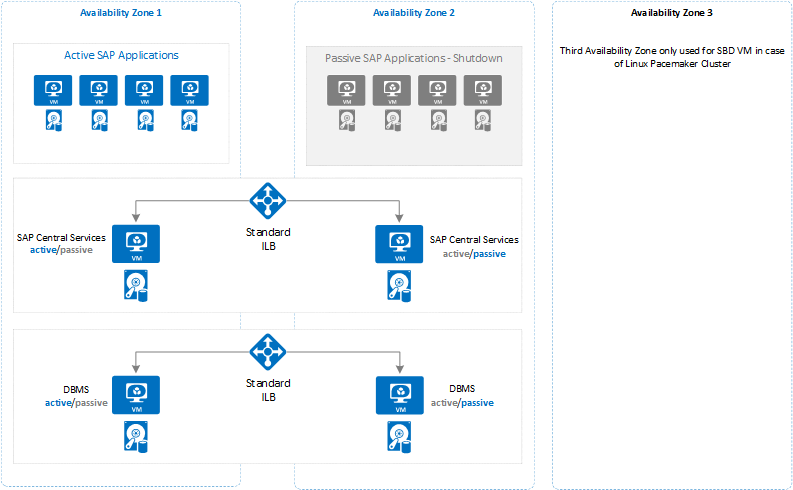
The important thing to consider while using this architecture is that you need to closely monitor your system to keep the active database and SAP central services in the same zone as the deployed application servers. So that in case of failover of database or SAP central services, you need to make sure that you manually fail them back as soon as possible into the zone where SAP application servers are deployed.
To prevent SAP application instances unavailability due to zone failure, you should deploy dormant dialog instances in other availability zone.
IMPORTANT: Alongside the option you choose for SAP deployment across availability zones, there are some important considerations on Azure for SAP system configuration that applies to both options, which is described in following section.
Step 3: Important Consideration for SAP Deployment across Availability Zones
For deployment across availability zones, there are some important consideration to note with respect to Azure Services that you use to build SAP system.
- The concepts of Azure Availability zones and Azure availability sets are mutually exclusive. That means, you can either deploy a pair or multiple VMs into a specific Availability zone or an Azure Availability Set. But not both. To compensate for that, you can use Azure proximity placement groups as documented in the article Azure Proximity Placement Groups for optimal network latency with SAP applications.
- There are VMs like M/Mv2 families, which are deployed only in a subset of the regions. You can find out what exact VM, types, Azure storage types or, other Azure Services are available in which of the regions with the help of the site Products available by region.
- Distributing VMs across Availability zones, will only take care of virtual machines redundancy. Consider the scope of other Azure Services for zone redundancy which are part of SAP Application. For example, storage, load balancer and so on.
- Use Standard SKU Load Balancer to load balancer failover cluster for SAP central services and database.
- Virtual network span across availability zones. So, you do not need separate virtual network for each zone.
- Use Azure Managed Disks for all virtual machines. Unmanaged disks are not supported for zonal deployments.
- Azure Premium storage and Ultra SSD storage do not support any type of storage replication across zones. So, the application must replicate important data.
- Even for shared directory like sapmnt, which is either shared disk (Windows), or CIFS share (Windows), or NFS share (Linux) do not replicate data across zones.
by Contributed | Nov 16, 2020 | Technology
This article is contributed. See the original author and article here.
With the fall term underway in the United States and with many undergraduate and graduate students considering internships or thinking about jobs they’ll apply for after graduation, many are asking questions about technical skills and certifications. At Microsoft, we’re frequently asked about the value of Microsoft training and certification for our customers and partners. For companies, they’re a great way to evaluate employees’ skills beyond what a manager might see. And when it comes to the interview process, potential hires can show organizations industry-proven validation of technical skills. But what about college students and recent college graduates who are just entering the workforce? How might Microsoft technical skills be a differentiator for them?
To investigate these questions, we used data from job postings in the United States to examine areas of technical skill growth and demand, in addition to salary data. In an analysis done with Labor Insights, an industry data set from Burning Glass for understanding the job market, the findings are simple: skills and certifications in Microsoft Azure provide a differentiated way to help not only find a job but also to help attain a higher salary than the market average.
For anyone looking for a job, the first question is really around demand. How much demand is there for the skills I may have? In general, there has been significant growth in the demand for cloud skills. However, when we look at the demand for cloud skills for people with a bachelor’s degree and zero to two years of experience, demand for Azure skills has surpassed the market.
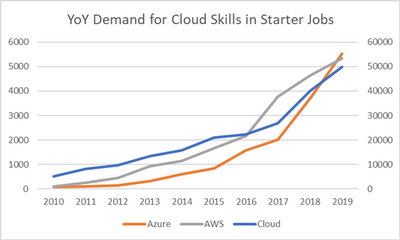
Figure 1 illustrates the year-over-year (YoY) growth trends in job postings for cloud skills in general, requests for Azure skills, and requests for AWS skills. Since the cloud skills data set is so large, the cloud line is normalized to the secondary Y axis on the right and Azure and AWS to the primary Y axis on the left. As shown, Azure has had a much steeper growth rate than the market or AWS, especially over the last three years, and even surpassed AWS in total job posting requests in the United States at the end of 2019. To put numbers against those plots, YoY growth for Azure demand has been 58 percent annually since 2017, compared to cloud skills in general (29 percent) and AWS (14 percent).
Figure 1. Year-over-year demand trends for cloud skills. (Source: Analytics compiled through Labor Insights from Burning Glass, evaluating jobs in the United States requiring zero to two years of experience and skills in Azure, AWS, or the cloud in general.)
The world has shifted since the onset of the global pandemic in 2020, and the job market is no exception. Yet, in the last 12 months, the demand for Azure skills in this space has remained strong. In fact, it’s up 15 percent.
However, the rest of the cloud skills job market has not fared as well when it comes to jobs for recent graduates—those requiring a bachelor’s degree and zero to two years of experience. Demand for cloud skills, in general, is down 30 percent over the last 12 months. Demand for AWS cloud skills is down 17 percent in this same time frame.
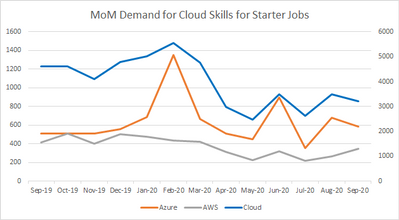
Figure 2. Month-over-month (MoM) demand trends for cloud skills for the past year. (Source: Analytics compiled through Labor Insights from Burning Glass, evaluating jobs in the United States requiring zero to two years of experience and skills in Azure, AWS, or the cloud in general.)
As noted, cloud skills are in demand among jobs tailored more for recent college graduates or college students with limited experience. But what about technical certifications?
Technical certifications are popular for the cloud space. In fact, according to additional analysis compiled in Labor Insights from Burning Glass for September 2020, 24 percent of all job postings in the past 12 months list some industry-standard certification in their descriptions and details. Listings for Azure and AWS certifications are slightly outpacing what’s generally seen in the cloud space, with 28 percent and 27 percent, respectively.
As students are working to get real-world experience, technical certifications are a great way to demonstrate not only the coursework but also the validation of the skills in general. Even if the demand is only a portion of the total volume of job postings, the reality is that certifications can be a differentiator for students among employers—even if the employers weren’t explicitly looking for it.
There’s also the question of salary. According to the analytics referenced earlier in this piece (compiled through Labor Insights from Burning Glass), the average posted annual salary for jobs requiring a college degree and zero to two years of experience in the cloud skills market is $79,027. For job postings for Azure skills and a college degree, that annual salary is $90,750. Furthermore, according to a March 2020 IDC Survey Spotlight, “Certified IT professionals get promoted more than 50 percent faster than non-certified IT professionals.”*
The data is clear. If you’re looking for a path to greater job demand, higher-than-average salary, and the potential for faster promotion, picking up your Azure skills and Azure certifications can help give you that competitive edge in the market.
*IDC, Do IT Certifications Increase Promotion Opportunities?, doc #US46090620, March 2020

by Contributed | Nov 16, 2020 | Technology
This article is contributed. See the original author and article here.
This morning, Microsoft Teams announced new apps to make your meetings more productive and engaging. As a key component of this story, Microsoft Forms is excited to support you in customizing and improving the Teams meeting experience to suit your team’s needs.
As we had announced at Ignite, Forms’ integration with Teams brings the power of polls to your meetings. We are delighted to inform you that we are rolling out Polls in Teams Meetings.
These polls leverage the infrastructure and capabilities of the Forms product to enhance your virtual meeting experiences. Whether you are running a large-scale training session, leading your monthly all hands, or teaching in a remote classroom , Polls in Teams meetings enables meeting presenters to get real time feedback and turn attendees into active participants.
Prepare for an Engaged Meeting
As the meeting presenter or organizer, you can prepare polls in advance. Simply go to your Teams meeting chat or Teams meeting details view and add (+ button) the Forms app as a tab to start creating polls. This tab will be automatically named “Polls.”
When creating these polls , you might notice Forms’ intelligence kicking in. As of today, we support answer suggestions based on text of the poll question. Soon, we will bring the same intelligent features within Forms’ surveys to Polls in Teams Meetings, so that poll creation is as frictionless as possible.
Unless you are designated as the meeting presenter or meeting organizer, you will not be able to add the Forms app as a tab and cannot create and manage polls. Thus, presenters are given control of their meeting experience, as attendees are only able to respond to polls.
Manage a Seamless and Interactive In-Meeting Experience
During the meeting, the presenter or organizer can launch a poll without leaving the meeting window by first clicking the Forms icon at the top of your Teams window. All your prepared polls appear on the right pane, from which you can choose which poll to “launch.”
 Launch Polls During the Teams Meeting
If you have new questions to ask as your meeting progresses, you can quickly head back to the original “Polls” tab, then create and launch your poll. When you want to stop collecting responses, you can close the poll.
Attendees will receive a pop-up bubble with the poll question. They can respond via this bubble or via the chat pane if they have it open. If the presenter has enabled non-anonymous poll results, attendees can view these results in the chat pane in real time.
 Vote in Polls During the Teams Meeting
Evaluate and Take Action After the Meeting
After the meeting, you can evaluate poll results in the “Polls” tab directly. You can even export them into an Excel workbook to run any analysis or share with colleagues, or view them on the web in the Forms app.
Trusted Security and Compliance
As Polls in Teams Meetings shares the infrastructure of Forms, it meets the same important compliance and privacy standards that Forms meets. Data collected from polls are encrypted and stored on servers in the U.S. or Europe (Europe if you are a European-based tenant).
Get Started
If your organization has a Microsoft 365 Enterprise, Business, Education, or Firstline Workers F3 plan, or an Office 365 Enterprise plan, you can soon, if not already, use polls in your Teams meetings on desktop and the web.
For more details on how to add polls in Teams Meeting and on other questions you might have, please visit our support page. If you have additional questions or feedback on Forms’ surveys, quizzes, or polls, please visit our Forms UserVoice site.
by Contributed | Nov 16, 2020 | Technology
This article is contributed. See the original author and article here.
Azure Cloud Advocates at Microsoft are pleased to offer a 12-week, 24-lesson curriculum all about JavaScript, CSS, and HTML basics. Each lesson includes pre- and post-lesson quizzes, written instructions to complete the lesson, a solution, an assignment and more. Our project-based pedagogy allows you to learn while building, a proven way for new skills to ‘stick’.
See more at: https://github.com/microsoft/Web-Dev-For-Beginners
Content Round Up
Datacenter Migration & Azure Migrate – Sarah Lean
Sarah Lean
In this Skylines Summer Session, Sarah Lean, #Microsoft #Cloud Advocate, is interviewed by Richard Hooper and Gregor Suttie and discusses
How to setup and run Azure Cloud Shell locally
Pierre Roman
Scripts running in Azure Cloud Shell can exceed the 20 minute timeout. Learn how to run it locally to avoid this restriction.
CODE Magazine – Project Tye: Creating Microservices in a .NET Way
Shayne Boyer
Project Tye: Creating Microservices in a .NET Way
Azure Stack Hub Partner Solutions Series – RFC
Thomas Maurer
This week in our Azure Stack Hub Partner solution video series, I am going to introduce you to Azure Stack Hub Partner RFC.
microsoft/Web-Dev-For-Beginners
Yohan Lasorsa
24 Lessons, 12 Weeks, Get Started as a Web Developer – microsoft/Web-Dev-For-Beginners
Introduction to #WebXR with Ayşegül Yönet
Aysegul Yonet
? WebXR is the latest evolution in the exploration of virtual and augmented realities. Sounds interesting, right? Dive into the Basics of WebXR with Ayşegül…
Connect your React app to Microsoft 365
Waldek Mastykarz
With the Microsoft Graph Toolkit, you’ll be able to connect your app to Microsoft 365 in a matter of minutes. Here is how you’d do it.
Debug Node.js app with built-in or VS Code debugger
Yohan Lasorsa
Learn how to use built-in or VS Code debugger to fix bugs in your Node.js apps more efficiently with this series of bite-sized videos for beginners.
Microsoft 365 PnP Weekly – Episode 104 – Microsoft 365 Developer Blog
Waldek Mastykarz
Connect to the latest conferences, trainings, and blog posts for Microsoft 365, Office client, and SharePoint developers. Join the Microsoft 365 Developer Program.
How to build an audit Azure Policy with multiple parameters
Sonia Cuff
Learn how to build an audit mode Azure Policy, to show resources that don’t have all of your required tags.
Azure Functions via GitHub Actions with No Publish Profile
Justin Yoo
Throughout this series, I’m going to show how an Azure Functions instance can map APEX domains, add an SSL certificate and update its public inbound IP
Deploy to GitHub Packages With GitHub Actions | LINQ to Fail
Aaron Powell
Let’s look at how to automate releases to GitHub Packages using GitHub Actions
DevOps and Machine Learning, with Henk Boelman
Henk Boelman
DevOps and Machine Learning, with Henk Boelman – Codecamp_The One with DevOps 2020 With machine learning becoming more and more an engineering problem the ne…
C# Corner Azure Learning and Microsoft Certification – AMA ft. Thomas Maurer
Thomas Maurer
Last week I had the honor to be a guest in the C# Corner Live AMA (Ask Me Anything) about Azure Learning and Microsoft Certification.
Azure Functions – Tartine & Tech
Yohan Lasorsa
Les Azure functions font partie de la stack Server less d’Azure. Dans cet épisode, Yohan vous explique en quoi ça consiste et comment créer votre premier pro…
OpenAPI Extension to Support Azure Functions V1
Justin Yoo
This post shows how Azure Functions v3 runtime works as a proxy to Azure Functions v1 runtime, to enable the Open API extension.
Wayve | Disrupting Autonomous Driving
Adi Polak
Join us for an exceptional conversation with Alex Kendall, co-founder, and CEO of Wayve, who raised more than 40M$ to kickstart the biggest vehicle academy.
Using Immutable Objects with SQLite-Net
Brandon Minnick
SQLite-NET has become the most popular database, especially amongst Xamarin developers, but it hasn’t supported Immutable Objects, until now! Thanks to Init-Only Properties in C#9.0, we can now use Immutable Objects with our SQLite database!


Recent Comments