by Contributed | Dec 23, 2020 | Technology
This article is contributed. See the original author and article here.
Microsoft Learn Student Ambassadors never stop learning and pushing themselves to reach the next step.
What do they hope to achieve while they’re in the program? What skills have they already learned, and what’s next as they chart their course? What keeps them going through long study sessions and coding sprints? They’re here to tell you.
“While you’re in the Learn Student Ambassador program, how do you plan to make a positive difference? What have you been working on already?”
Whether they’re working with their Leagues on big group projects, planning events, or making their impact more generally, this group of Student Ambassadors is passionate about making a difference in their communities.
“I will try to bring about a positive change by organizing events and forwarding and imparting my knowledge to others. I will try new Microsoft Learn paths so that I can enhance my knowledge. I am also starting to plan my first event for the beta milestone with a co-Ambassador.”
Eva Thakran, final-year student at Manav Rachna International Institute of Research and Studies
|
“I have organized events and represented Student Ambassadors (as mentor and judge) in Major League Hacking. I am planning to organize more events, reach out to more people, and learn.”
Sushant Gaurav, second-year student at the Lakshmi Narain College of Technology Bhopal
|
I have done many technical and non-technical events and organized a global AI gaming tournament with my team, and I’m currently running an initiative named Voice of Code (started in April 2020), which is a global technical blogging community that focuses on the importance of content creation and organizes global contests and events.”
Nancy, fourth-year student at KIET Group of Institutions
|
“The Microsoft Learn Student Ambassadors program provides you with ample opportunities to upskill yourself and make an impact in the community. Being a part of this program has given me a platform to make an impact in the lives of other students. I am continuously seeking to expand my knowledge with Microsoft technologies and become an expert with them. My future footprints as a Student Ambassador are to upskill the students with these technologies and provide them with learning resources so that every student grows and achieves more in their career.”
Rohit Yadav, third-year student at IMS UC Campus, Ghaziabad, Uttar Pradesh
|
“While I am part of the Microsoft Learn Student Ambassador program, I plan to make a positive difference by helping others find their place in tech. My motto is ‘Don’t Fear the Code,’ so I like to demystify tech through workshops—like Intro to Python and GitHub—to give people a strong start in their tech journey. What I am working on now is a series of events called ‘Microsoft Learn Parties,’ where I help participants go through my favorite Microsoft Learn modules as a community of avid learners.”
Darren Butler, third-year student at Philander Smith College
|
“The way I work is through events. I am currently organizing, together with my work team, a diploma based on the IC3 Certification that is focused on the student public. This will allow them to have a good base of the topics they should know in order to continue with their certifications, but already in more advanced topics.”
Leydi Rosmery Aylas Curi, tenth-round student at Universidad Peruana de las Américas
|
“What skills did you learn in school that have become important to you now? What do you want to learn next?”
One of the great things about the Student Ambassador program is that it helps participants bridge the gap between their formal education and the things they’re capable of as mentors and professionals. And with a group this passionate about technology, there’s always something new to learn. Here’s what they brought to the program and what they plan to dive into next.
“My school taught me discipline, time management, and leadership. I have anchored some school-level events, which helped me to develop public speaking skills and overcome stage fright.”
Sushant Gaurav, second-year student at the Lakshmi Narain College of Technology Bhopal, studying Computer Science (B.Tech)
|
“The skills that I got a good opportunity to showcase and practice now are leadership, teamwork, problem solving, communication skills, and many more. I have been working in cloud, web, and application development domains. I want to learn and explore more about Microsoft Power Platform. The whole idea of Power Apps is something that is really fascinating and interesting to explore.”
Nancy, fourth-year student at KIET Group of Institutions
|
“During my schooling, I have learned numerous skills which have become important to me now. I learned the basics of programming in languages like C and Java, and I learned numerous skills like managing my school’s Azure Active Directory and building Power Apps, which have helped me a lot now. In my next steps, I want to explore cloud-powered technologies like serverless computing, containers, and orchestration and deploy them on Microsoft Azure. I am exploring AI and am working towards deploying my code on Azure. In that step, I want to explore different cognitive services and use them in my projects.”
Rohit Yadav, third-year student at IMS UC Campus, Ghaziabad, Uttar Pradesh
|
“The skill that I have learned in school that has become most important to me is working with data structures, algorithms, and problem solving. Next, I want to learn how to apply machine learning and artificial intelligence solutions to mobile apps to create useful or entertaining apps.”
Darren Butler, third-year student at Philander Smith College
|
“I have learned several things in school, but the one that has always helped me to be encouraged, to learn, and to perform is teamwork. Every time, while we do a task, it has given me a new viewpoint and has given me multiple possibilities to learn and grow my skills. Every time, the next thing I want to learn is from my mistakes. I look for the ways through which I can avoid past mistakes and can give better results each time.”
Aditi Tewari, third-year student at the Birla Institute of Applied Sciences, Bhimtal
|
“What’s your favorite snack to eat or music to listen to while you study?”
It’s not all a grind, but when these Student Ambassadors hunker down to get some work done, most of them have go-to treats and tunes to help them stay focused. Of course, for some of them music is distracting, so they prefer to keep it off. It’s important to find what works for you and embrace it.
“I love eating chocolates and Lays chips in between my studies. Singing is my hobby, so I listen to music and sing a lot. Music makes me smile every time. :smiling_face_with_smiling_eyes:”
Sushant Gaurav, second-year student at the Lakshmi Narain College of Technology Bhopal, studying Computer Science (B.Tech)
|
“Music has always been among the most important parts of my life. I prefer to listen to soft, soothing kinds of music that help keep the mind calm. Occasionally some rock music works as well. Considering the fact that I am quite a foodie and always need something to eat, any spicy snacks would work.”
Nancy, fourth-year student at KIET Group of Institutions
|
“My favorite music to listen to while I study is lo-fi music. Occasionally, during intensive coding sessions, rap and pop helps as well.”
Rohit Yadav, third-year student at IMS UC Campus, Ghaziabad, Uttar Pradesh
|
“Actually, I am a very easily distracted person, so when I study, I prefer not to listen to music. As for food, with good alfajores (a sandwich cookie), I’m able to study happily.”
Leydi Rosmery Aylas Curi, tenth-round student at Universidad Peruana de las Américas
|
“I like listening to house music when I study, but most of the time it makes me sleepy, so I compromise and listen to rap.”
Ilias Eleta, fourth-year student at the University of Macedonia
|
“My favorite snack to eat between studying topics is a cookie. I just love to eat chocolate or chocolate cookies and I also listen to music in between, such as my favorite artist, Maluma (Colombian artist), and to walk around.”
Eva Thakran, final-year student at Manav Rachna International Institute of Research and Studies, studying Computer Science (B.Tech)
|
“I’m from the Bahamas and I love jazzy sounds, so my favorite snack and music to enjoy while studying are plantain chips and lo-fi hip hop.”
Darren Butler, third-year student at Philander Smith College
|
Your turn! As a Student Ambassador, how would you build your skills and pay it forward?
Students in the Microsoft Learn Student Ambassador program gain access to all kinds of opportunities to learn and grow. As you become an expert in the technology that sparks your passion, how would you share that knowledge with your community?
by Contributed | Dec 23, 2020 | Technology
This article is contributed. See the original author and article here.
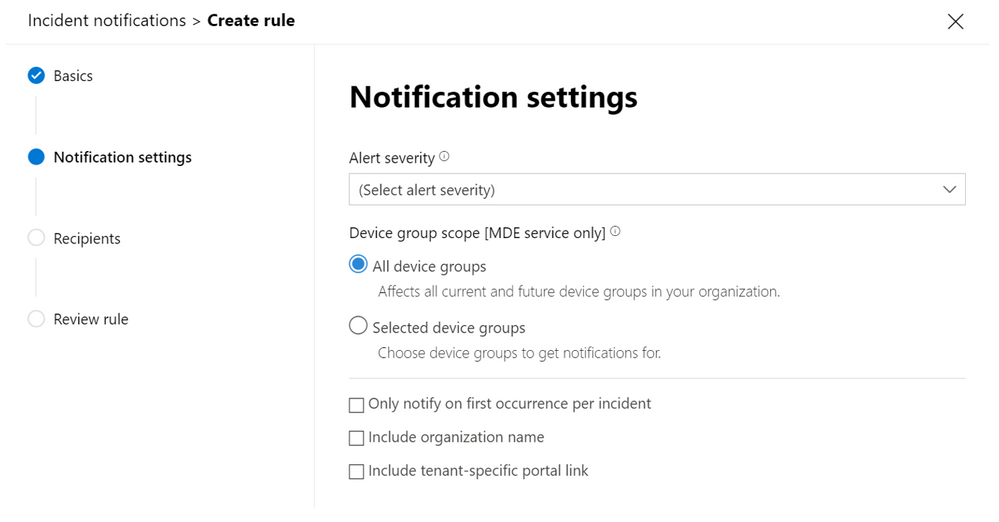
A new Microsoft 365 Defender feature now lets you receive notification emails directly to your mailbox for each new incident or incident update, this will help you to stay on top of the incident queue.
Get notifications based on incident severity or by device group. You can also choose to only be notified on the first update for each incident.
The notification email contains important details like the incident name, severity, and category.
This notification email enables you to review your incidents effectively, without requiring any trouble ticketing system or API integrations. It can be a big help in transitioning your security operations processes and leveraging the great efficiency improvements provided through the incident’s alert correlation capabilities
Once you get the notification, you can go directly to the incident and start your investigation right away. For more information on investigating incidents, see Investigate incidents in Microsoft 365 Defender.
If you are looking for more information on how to set up incident email notification in Microsoft 365 Defender, see the full instructions.
by Contributed | Dec 23, 2020 | Technology
This article is contributed. See the original author and article here.
Intro:
Visualizing your data is a great way to gain insight and quickly learn what you need from your logs.
We have improved our chart tab in Log Analytics offering a new way to control your visualization making it easier for you to reach the exact visualization you need.
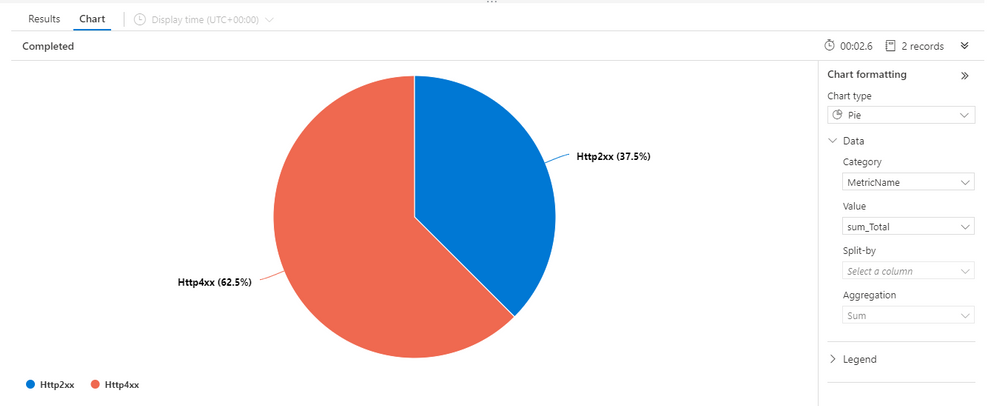
The new control pane:
The new control pane for visualization is located to the right hand side of the visual:
The new pane offers a clean, modern look and offers a more intuitive way to manage your visual.
The new pane may also be collapsed to allow focus on the visualization and save screen real-estate.
Feedback
We appreciate your feedback! comment on this blog post and let us know what you think of the new visualizations control pane.
by Contributed | Dec 23, 2020 | Technology
This article is contributed. See the original author and article here.
When calling a REST API service with a JSON payload from Logic Apps, Logic Apps reorders JSON elements alphabetically, while some services expects the elements to be in a fixed order causing the service call to fail with an error.
This behavior happens when constructing the JSON payload inside a compose action or the HTTP action body field; after save, the elements are automatically reordered alphabetically.
The standard definition of a JSON object is:
An object is an unordered collection of zero or more name/value pairs, where a name is a string and a value is a string, number, boolean, null, object, or array.
For Example:
A service expects the following JSON object:
{
“Name”: “XXX XXXX”,
“Age”: “XX”
}
Logic Apps reorder the elements of the JSON object to become as follows:
{
“Age”: “XX”,
“Name”: “XXX XXXX”
}
To workaround this, please use the following steps:
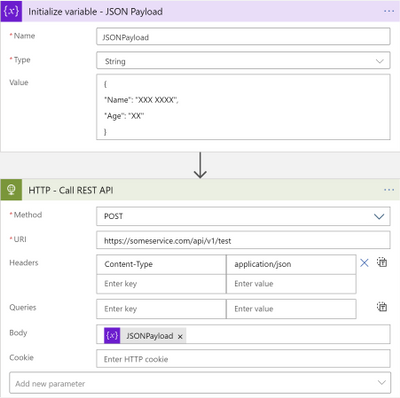
- Use Variables – initialize variable action to initialize a string variable setting the value to the JSON object string.
- Use the initialized variable as the body for the HTTP action calling the service.
Your workflow should look as follows:
by Contributed | Dec 23, 2020 | Technology
This article is contributed. See the original author and article here.
Hello all! This is Chris Cartwright from Directory Services. I had a coworker, Eric Jansen, reach out to me from the field and ask about an incident on site he was looking into a scenario where “the PDCE (Primary Domain Controller Emulator) and DNM (Domain Naming Master) mysteriously moved…” to a DC in another site. He said what was weird was who the logs said performed it. He also said that the other site used their own procedures to build their DCs, which apparently included using Windows Servers Essentials for the base OS. Now, I have never heard of anyone doing that in an enterprise environment, but it got us curious…
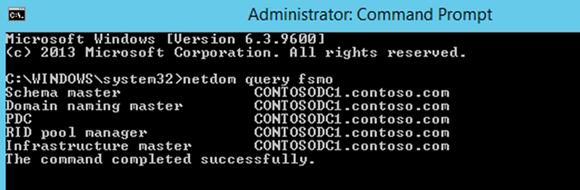
Administrators are running the beautiful, pristine Contoso domain forest, (with 2 DCs of course…because two is one, and one is none!). They were built with Windows Server 2012 R2 Datacenter. They know that the FSMOs are still on the first DCs built, and can see that by running “netdom query fsmo“:
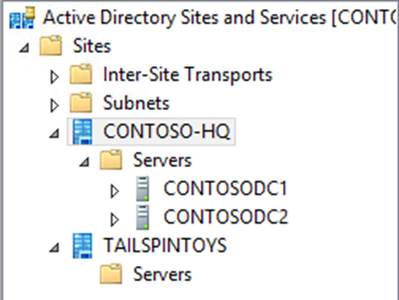
One day, Contoso-HQ has a new subsidiary, Tailspin Toys that needs Active Directory services for their store. Per Contoso’s Organizational Policy, this company will exist on the same domain, and they have authorized admins at that site to promote the new DCs for that site. In preparation for this, the Contoso admins create the site and subnets for the new company’s location.
30 days go by and the admins at Contoso notice something odd:
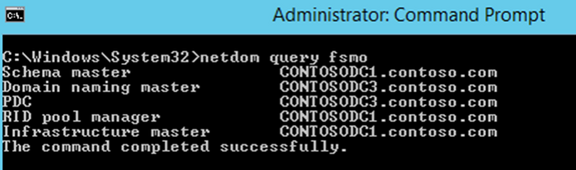
The problem is…nobody authorized that change. They call the admins at Tailspin Toys and asked if they knew anything about this, and they didn’t…. Not good.
So, the first thing that they did was figure out when the change occurred. To do that they used Repadmin.exe with the /ShowObjMeta switch, to see when the FSMORoleOwner attribute changed for the roles that they were interested in. The timestamp for the last modification to that attribute can be found by looking at the object metadata for that attribute at the following DN locations (for each respective role):
- RID Master – “cn=Rid Manager$,cn=system,dc=contoso,dc=com”
- Infrastructure Master – “cn=infrastructure, dc=contoso,dc=com”
- PDC Emulator – “dc=contoso,dc=com“
- Domain Naming Master – “cn=partitions,dc=configuration, dc=contoso,dc=com“
- Schema Master – “cn=schema,dc=configuration, dc=contoso,dc=com“
In this case, they were interested in the Domain Naming Master, and the PDCE Emulator role movements operations.
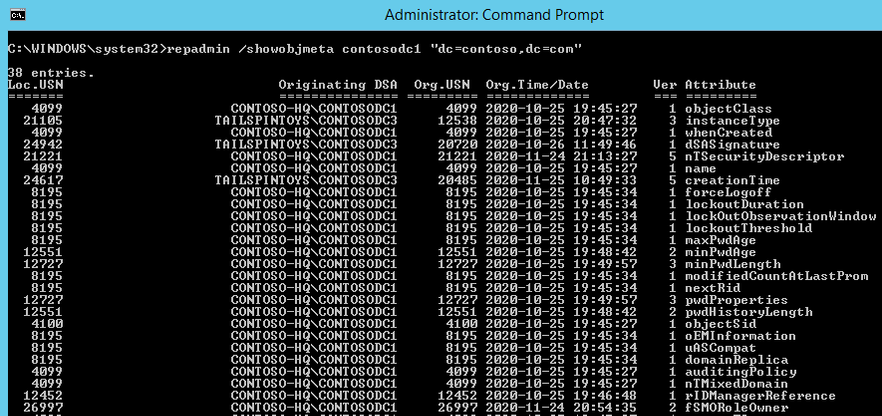
Once the Contoso Admins figured out when the role was moved and where the change originated from, they now know where to start their search in the event logs. With that said, the Contoso admins transfer the roles back, and then start digging through the logs.
They find these two events in the Directory Services logs on ContosoDC1:
(PDC)
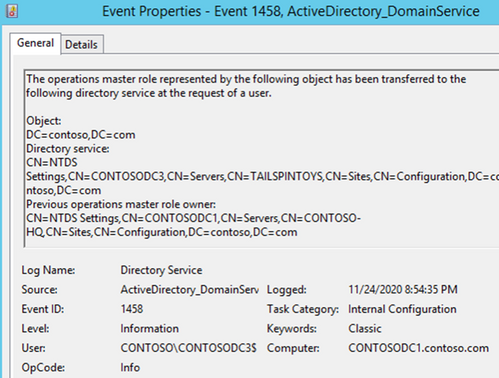
(Domain Naming Master)
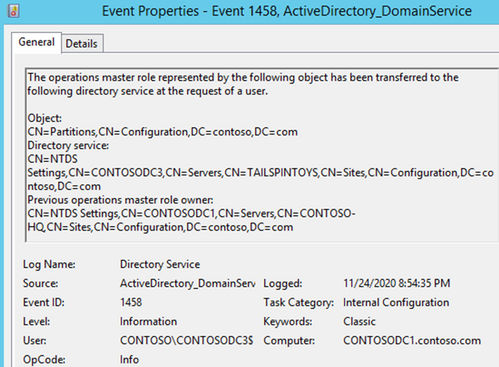
So, the change did come from ContosoDC3, but the admins know that they can look at the logs on DC3 to see what user account initiated this, because it’s listed with “User.”
So, they take a look at ContosoDC3…but what they see isn’t exactly what they expected:
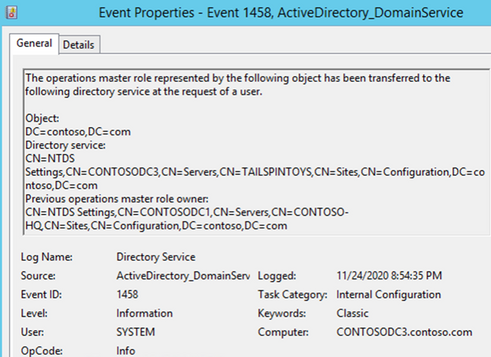
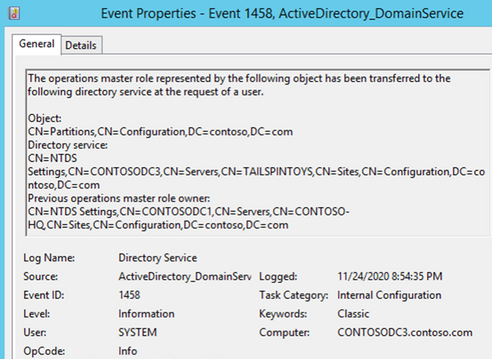
The user is SYSTEM. Has ContosoDC3 become self-aware? Should we expect robots from the future? The administrators continue digging, now focusing on the security logs during the same timeframe. At 8:54:35 PM, the same time that they saw the roles move in the Directory Services log, they now find the following in the security logs on ContosoDC3:
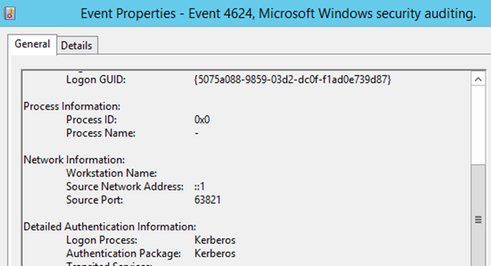
Note the Login ID…
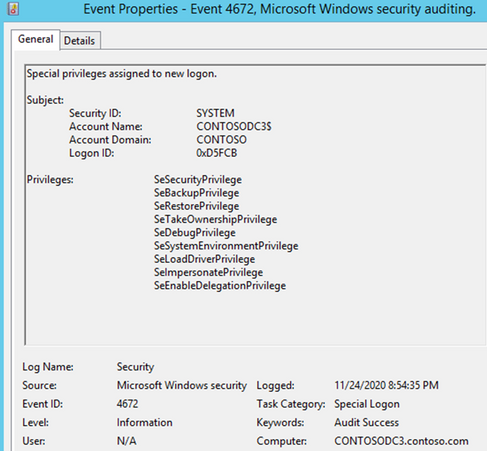
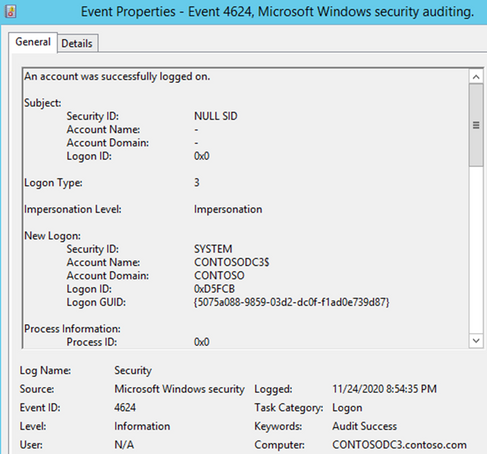
This log entry continued…
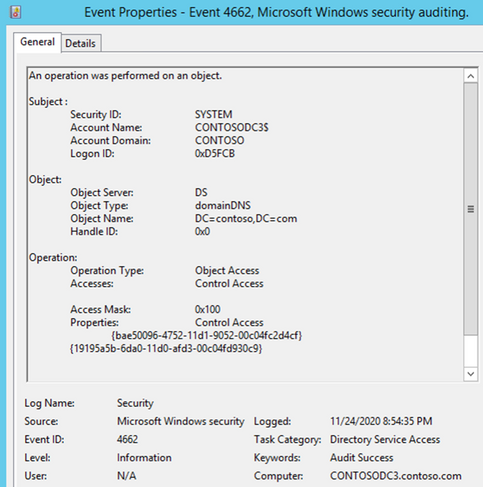
This event looks interesting. “An operation was performed on an object.” The operation in this case was a “Change PDC Operation” (https://docs.microsoft.com/en-us/openspecs/windows_protocols/ms-adts/99dd371d-9ede-417f-beb1-a065c10ef68f)
This just goes to show how important it is to have proper auditing in place...you DO have proper auditing setup, enabled, and verified in your environment, don’t you? If not, I suggest you take a look at Michael Hildebrand’s blog that discusses this in more detail, here.
So, what happened? Well, answering that would have taken a little more logging. Procmon, for example, would have shown that the source port used above came from the silsvc.exe process on the same server.
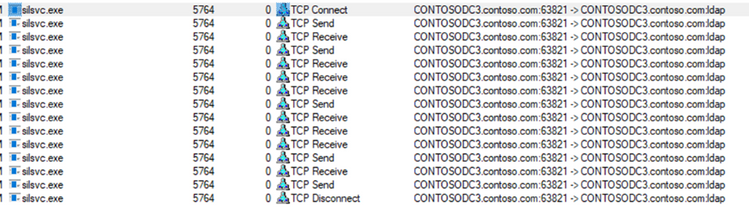
So, what is this silsvc.exe you ask? That’s the Server Infrastructure Licensing Service, and fortunately, it has its own log:
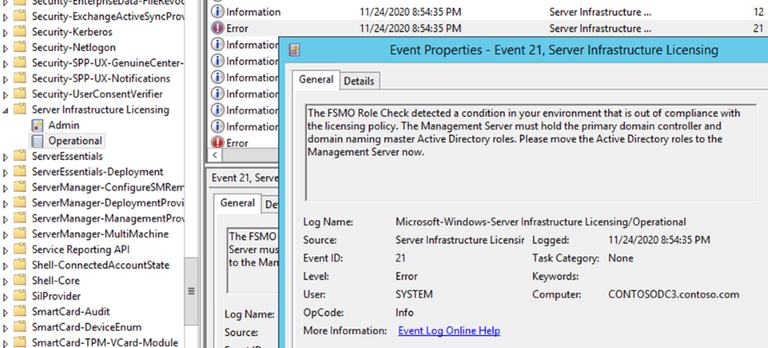
And the final nail in the coffin is the very next event – “The Correction”
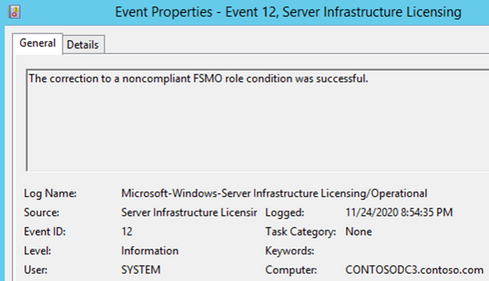
To sum everything up, do not put Windows Server Essentials into an existing large enterprise – it was never meant to co-exist, and all of the folks (at least that I talked to in both CSS and PFE) had never seen this scenario before. In the real-world scenario where this happened, those remote ‘spoke site’ DC’s were only meant to be stood up temporarily, and they were. They were stood up just long enough for the compliance threshold to be met, which moved the roles unknowingly to the ‘spoke site’, and the next day those DC’s were taken offline permanently. It just happened that those DC’s were removed on a Friday afternoon and the repercussions weren’t felt until the following week.
We tested this with Server 2012 R2 Essentials and Server 2016 Essentials while manually moving the time forward and saw the same results. Server 2019 Essentials has the same warning, however we were unable to reproduce the issue just by simply moving the time 30 days into the future:
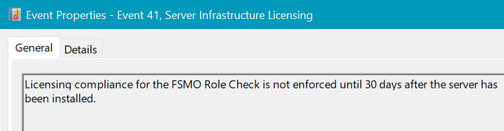
So, it’s being tested the old-fashioned way, and we’ll update on that later in 2021!
by Contributed | Dec 23, 2020 | Technology
This article is contributed. See the original author and article here.
Why not use some of the upcoming days to learn something new? Azure Sentinel is a scalable, cloud-native, security information event management (SIEM) and security orchestration automated response (SOAR) solution. Azure Sentinel delivers intelligent security analytics and threat intelligence across the enterprise, providing a single solution for alert detection, threat visibility, proactive hunting, and threat response. To get started and learn more about Azure Sentinel, we now have a full learning path on Microsoft Learn.
Cloud-native security operations with Azure Sentinel Learning Path on Microsoft Learn
This learning path describes basic architecture, core capabilities, and primary use cases of its products. You’ll also learn about differences and Get familiar with Azure Sentinel, a cloud-native, security information and event management (SIEM) service. This learning path includes the following modules:
If you have any questions, fee free to leave a comment! With that I want to so happy learning and a good start in the new year, Thomas.
by Contributed | Dec 22, 2020 | Technology
This article is contributed. See the original author and article here.
NOTE: ASP.NET Membership, including the ActiveDirectoryMembershipProvider, are deprecated and no longer recommended for use. For new development please using more modern authentication methods, such as ADFS, OAuth, etc.
Under-the-hood, the ASP.NET ActiveDirectoryMembershipProvider uses System.DirectoryServices (S.DS) APIs to do the legwork. A lot of the work in the S.DS namespace is done by the Win32 AD DS APIs. During the initialization phase of the provider, some APIs are called that use RPC-over-SMB when communicating with a DC. Port 445 is designated for SMB.
Note: using other classes to perform LDAP communication doesn’t require port 445, but 445 is still required when supplying an LDAP URI to the provider.
You cannot use the ActiveDirectoryMembershipProvider on the Azure App Service platform because outgoing traffic to port 445 is blocked, regardless of the destination. When attempting to use the provider on that platform, you will encounter an error that looks something like this:
Message: Access is denied.
(D:homesitewwwrootweb.config line 78)
Exception type: System.Configuration.ConfigurationErrorsException
Stack trace:
at System.Web.Security.Membership.Initialize()
at [redacted]
Message: Access is denied.
Exception type: System.UnauthorizedAccessException
Stack trace:
at System.DirectoryServices.ActiveDirectory.DirectoryContext.IsContextValid(DirectoryContext context, DirectoryContextType contextType)
at System.DirectoryServices.ActiveDirectory.DirectoryContext.isServer()
at System.DirectoryServices.ActiveDirectory.Domain.GetDomain(DirectoryContext context)
at System.Web.Security.DirectoryInformation.InitializeDomainAndForestName()
at System.Web.Security.ActiveDirectoryMembershipProvider.Initialize(String name, NameValueCollection config)
at [redacted]
at System.Web.Configuration.ProvidersHelper.InstantiateProvider(ProviderSettings providerSettings, Type providerType)
Message: Access is denied.
Exception type: System.Runtime.InteropServices.COMException
Stack trace:
at System.DirectoryServices.DirectoryEntry.Bind(Boolean throwIfFail)
at System.DirectoryServices.ActiveDirectory.DirectoryContext.IsContextValid(DirectoryContext context, DirectoryContextType contextType)
If you’re using this provider and there’s a firewall dropping/blocking port 445, then you’ll see something like this error:
Exception type: System.DirectoryServices.ActiveDirectory.ActiveDirectoryObjectNotFoundException
Message: The specified domain or server could not be contacted.
(this actually results in a System.Configuration.Provider.ProviderException to be thrown once the above is caught internally)
at System.Web.Security.DirectoryInformation.InitializeDomainAndForestName()
at System.Web.Security.ActiveDirectoryMembershipProvider.Initialize(String name, NameValueCollection config)
at System.Web.Security.Membership.InitializeSettings(Boolean initializeGeneralSettings, RuntimeConfig appConfig, MembershipSection settings)
at System.Web.Security.Membership.Initialize()
at System.Web.Security.Membership.get_Provider()
Both failures actually occur at the same place, but the result for the two scenarios is slightly different due to the internal exception-handling code.
If you want to work around using port 445, then I believe (not tested myself) you can point the provider to an ADAM/AD LDS instance instead. However, getting this up and running probably costs way more management overhead and time vs. using more modern auth methods in the first place.
by Contributed | Dec 22, 2020 | Technology
This article is contributed. See the original author and article here.
When did the Year of Yammer begin? When did it end? Depends on how you cut the numbers, but if 2019 was the #YearOfYammer announcements, then 2020 is absolutely the year when Yammer delivered.
The first taste (or tease) about the Year of Yammer came from Mike Holste in May 2019 causing a stir in Digital Workplace circles. Yammer at that stage was a much loved platform that Microsoft had taken under its wing, but there had been a hiatus in progress and much debate about where it fit within the Microsoft 365 toolset.
Fast forward to October 2019 and Ignite, where #YearOfYammer was officially launched and the pillars of Connection, Leadership, Inclusion, Knowledge and Community. The Future of Yammer was announced with a long list of feature releases to be expected in the coming year.
I spent some time with the Yammer team in early 2020 as they rounded out Ignite the Tour in Australia. At that time we in the community had only just started to see the big changes that had been announced the year before. Now, as 2020 reaches a close the new Yammer is generally available and has been since July.
Connection
Yammer always been about connection, but keeping that at the core is something which the Yammer team feel passionate about. When I spoke to Jason Mayans (Head of Product and Analytics for Yammer) he spoke about how giving people a way to feel more connected and have a voice at work drives what they do.
“Yammer has a really unique opportunity to make them feel better about their work, make them feel better about the organisation they are a part of, feel connected, feel that they have a voice. For me the ability to kind of impact that every day experience that I as an employee have at work is pretty powerful.”
You can make a connection with Yammer by:
- Create and nurture Yammer communities
- Host Yammer Live Events to bring your events to life
- Use @mention to let a colleague know about an interesting conversation
Resources to help make a connection:
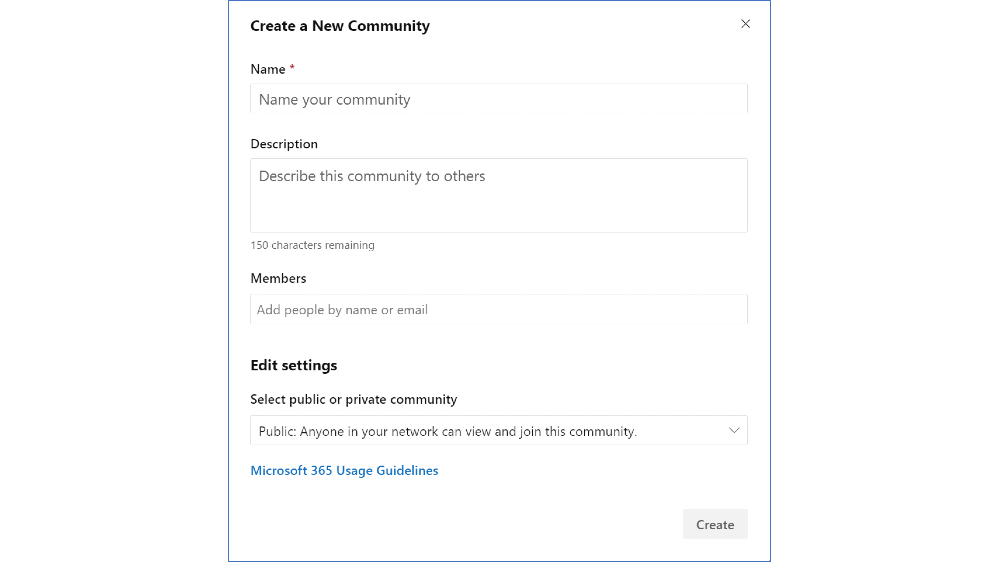
Image: Create a new community in Yammer
Leadership
The key to Yammer, has and likely always will be, strong leadership from the top down. This can be achieved in big or small organisations.
At NEXTDC we are an SME (small to medium enterprise) size, but have strong and visible support from our CEO and CXO who are present and engaged in Yammer. This has been the case since we first began using Yammer 4 years ago. Our CEO Craig Scroggie created, and runs a community called ‘CEO – Ask Me Anything’ where anyone can ask a question that he will personally answer.
Even the big corporates can leverage the value of Yammer through leadership. Steve Nguyen, Principal Program Manager with Yammer, speaks admirably about the tremendous ANZ (Australian Bank) have achieved with Yammer.
“I think they have a great culture from a leadership perspective with respect to how they engage and how they are curious… that’s strong and it’s somewhat unique not all organisations have that level of leadership engagement.”
ANZ work hard to build community through leadership as they experience the value that allows them to connect their people and amplify company culture.
You can build leadership with Yammer by:
- Talking to your leaders about the benefits of Yammer
- Encourage them to share news and updates in All Company
Resources to help build leadership:
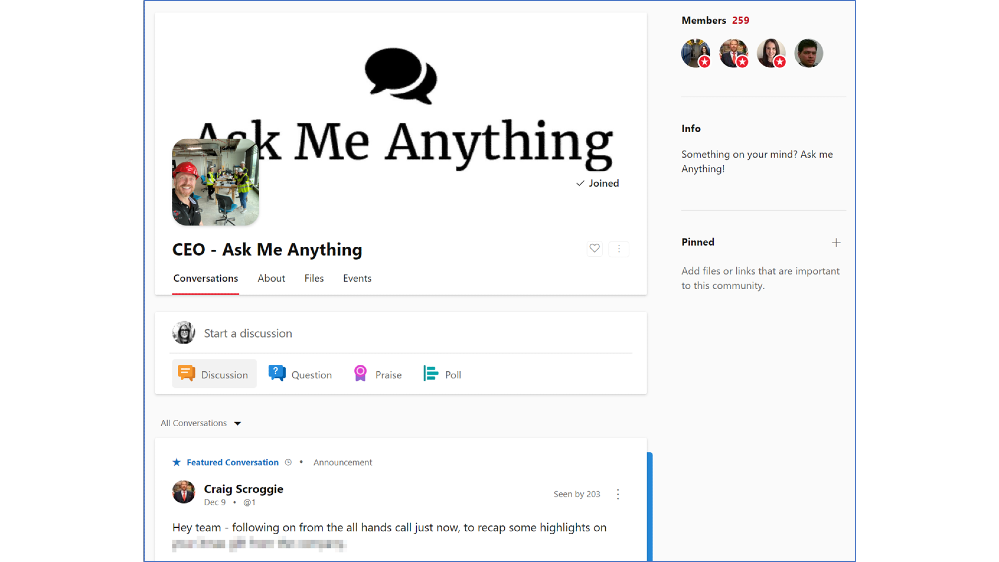 Image: NEXTDC’s ‘CEO – Ask Me Anything’ community in Yammer
Inclusion
Inclusion is part of Yammers DNA. It was built as a platform anyone could start and nurture, and still today anyone can have a voice on Yammer.
The team are taking that even further by introducing features that will help everyone feel like they have a home on Yammer. You asked and the product team listened, as Angus Florance, Product Marketing Manager, shared:
“At MVP summit a few years ago we got a lot of feedback that Yammer felt a bit corporate, it’s supposed to be a social network. It should be fun it should be engaging it shouldn’t feel like email.”
You can foster inclusion in Yammer by:
- Nurture communities and conversations that encourage inclusive and diverse ideas and thoughts
- Adopt features such as reactions and Gifs to bring fun to your network
- Promote new features such as dark mode and skin tone reactions
Resources to help foster inclusion:
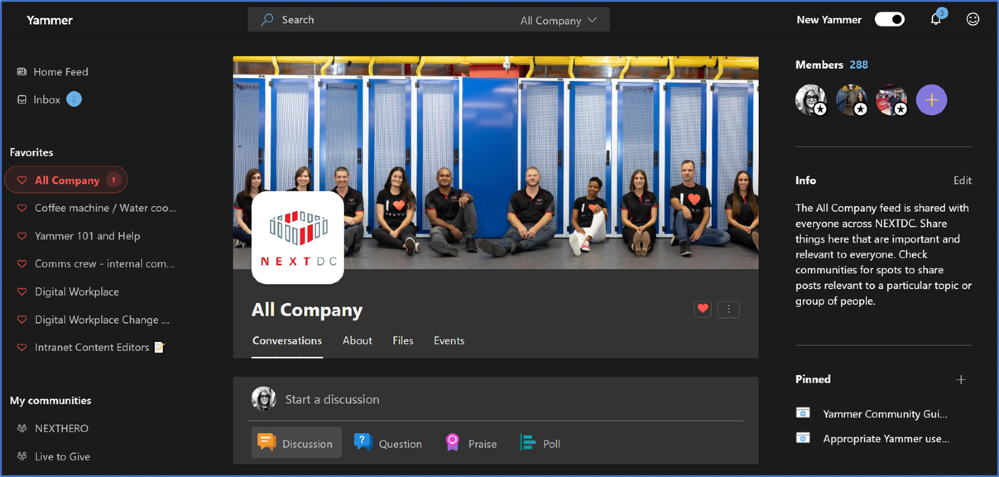 Image: Yammer in Dark Mode at NEXTDC
Knowledge
Capturing tacit knowledge is absolutely a Yammer superpower. The focus is often on the “Knowledge Worker” but we see now many great features being introduced for “First-Line”. This comes from a recognition that we are all knowledge workers who have different needs.
Steve Nguyen challenges our mindset around the knowledge worker, “The term ‘knowledge worker’ could almost be insulting the first-line worker, insinuating that first-line workers do not have any knowledge. When in some cases they have more knowledge, very real and direct knowledge, different knowledge… Yammer lets that first line worker the ability to share that knowledge.”
You can capture knowledge in Yammer by:
- Encourage the use of the ‘question’ feature and ‘best answer’
- Set ‘question’ as the default post type in a community
- Make a poll to seek opinions on an interesting topic
Resources to help capture knowledge in Yammer:
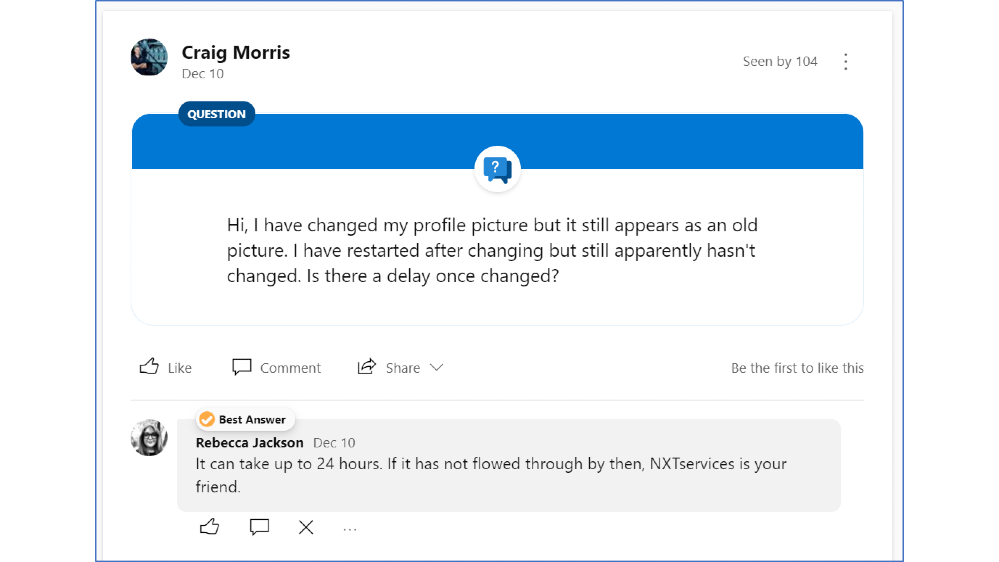 Image: Yammer question feature with an answer marled ‘Best Answer’ at NEXTDC
Community
A simple but profound change we have seen in the Year of Yammer is that ‘groups’ are now called ‘communities’. With this product change, the purpose of Yammer becomes clear.
From Jason Mayans: “Our goal is that when and end user thinks ‘I want to build a community’ or ‘I want to find a community’ they know where to go.”
Build community in Yammer by:
- Use a branded cover photo to give your community a personality
- Pin important posts to get attention
- Feature posts to amplify the message
Resources to help build communities:
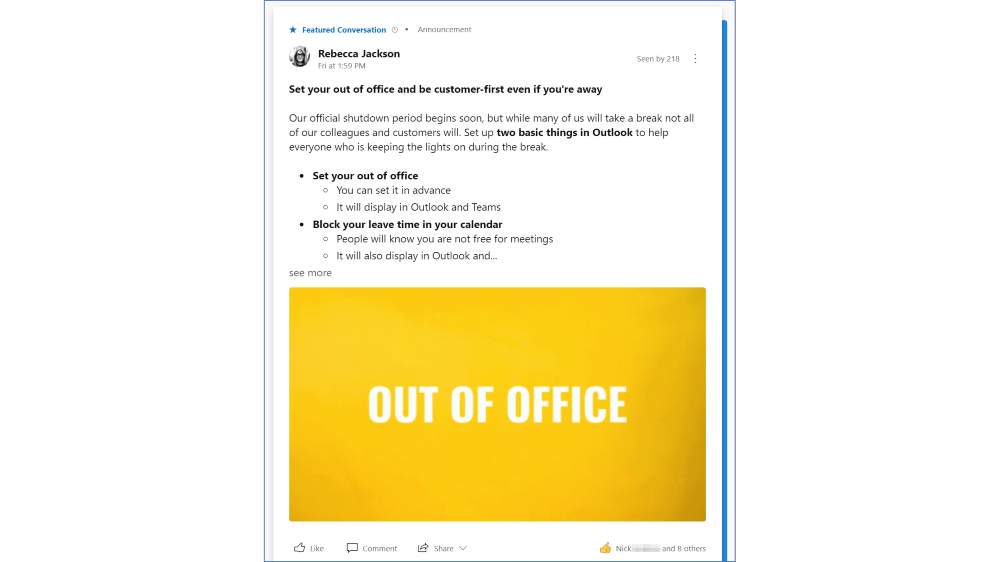 Image: A featured conversation in NEXTDC’s Yammer network
What’s next after the Year of Yammer?
I think it is safe to say that 2020 was the Year of Yammer. So what’s next?
Scanning through the public Microsoft 365 Roadmap for Yammer, it is clear that there is a lot being shipped and a lot to come. But what is the broader direction, and as the #YearOfYammer finishes… what do we call 2021 for Yammer?
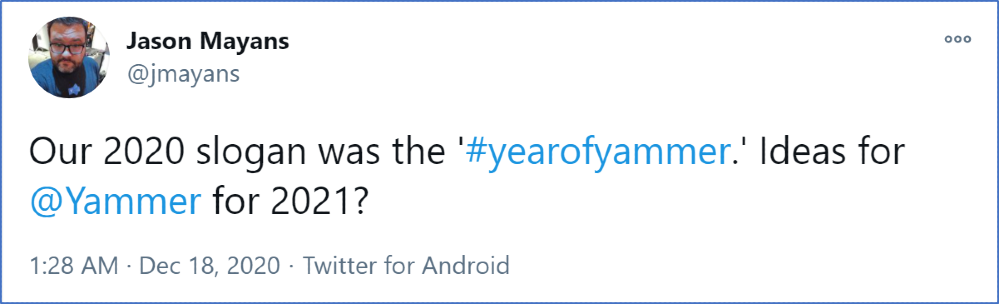 Image: Tweet by @JMayans – Our 2020 slogan was the ‘#yearofyammer.’ Ideas for @Yammer for 2021?
Head of Product and Analytics for Yammer, Jason Mayans asked the question on Twitter – What should the 2021 slogan for Yammer be?
Here are my ideas.
#YammerForKnowledge
I am excited for the possibilities for Yammer as Microsoft 365 generally moves deeper into using intelligence to build business knowledge. Particularly around search.
Steve Nguyen pointed out that,
“Customers that have been using Yammer for 8-10 years now they will tell us that Yammer is the brain of their organization. And because the institutional knowledge has been stored up, I think Project Cortex is an opportunity to help extract that.”
Jason Mayans predicts,
“I think you’ll see us go a lot deeper in knowledge. So, both kind of natively in Yammer as well as integrated with a larger Project Cortex effort. There is so much knowledge there captured in Yammer through these conversations but there are so many more ways we can leverage it and make it valuable for the broader organisation”
So watch this space for Yammer and Cortex coming closer together.
#YammerForCommunity
We have seen great steps for community managers in the Year of Yammer, but what is next?
Further to what has already been delivered, Jason Mayans wants “to continue to make communities more engaging, help you find communities in easier ways, recognise people who contribute, welcome new members’ as well as helping to enable larger and larger conversations.”
More ways to grow and nurture your communities.
#YammerForAll
Improvements for everyone. Continuing to build Yammer as a tool for sharing, building culture, fostering diversity and inclusion. And, being inclusive in ways that mean people can access from anywhere in the way that they need.
As Jason Mayans put it, “we want to continue to drive all of these capabilities as capabilities of the suite available anywhere you need them and in the context that makes sense.”
Do you have any Yammer predictions or desires? Share them in the comments below.
Big thanks to Jason Mayans, Steve Nguyen and Angus Florence who took the time to let me nerd out about Yammer with them, back at the beginning of the #YearOfYammer, when travel was a thing.
I’m Rebecca Jackson, a digital and visual communicator specialising in the digital workplace. I’ve been working with intranets, online communities and the digital workplace since 2009 and am a Microsoft Office Apps and Services MVP. I first began using Yammer around 2010 and have been a member and community manager of many Yammer networks since then. I work for NEXTDC as Digital Workplace Manager where I am the product owner of multiple Microsoft 365 tools including Yammer, Teams and SharePoint (where our Intranet lives). I enjoy learning and sharing by blogging, sketching, speaking and participating in industry events. It’s an exciting opportunity to be a contributor to the Yammer blog and work collaboratively with other Yammer practitioners.
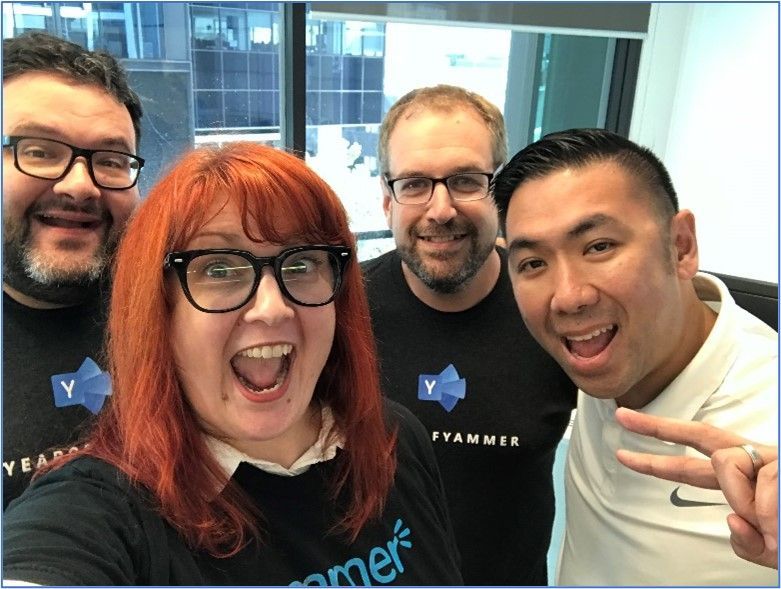 Image: Jason Mayans, Rebecca Jackson, Angus Florence and Steve Nguyen.
by Contributed | Dec 22, 2020 | Technology
This article is contributed. See the original author and article here.
Microsoft Cloud App Security (MCAS) versus Microsoft Information Protection (MIP): Do I use MCAS or MIP?
December 2020
Hi everyone! Welcome to the third blog of my MCAS Data Protection Blog Series! If this is your first time seeing this blog, check out my landing page for some more information about me and what I’ll be covering!
Well, Happy December! For this month, I won’t be focusing on a specific app but more so on deciding when to use our information protection services. There’s a lot of overlap, integration, and separate components that go into these two services.
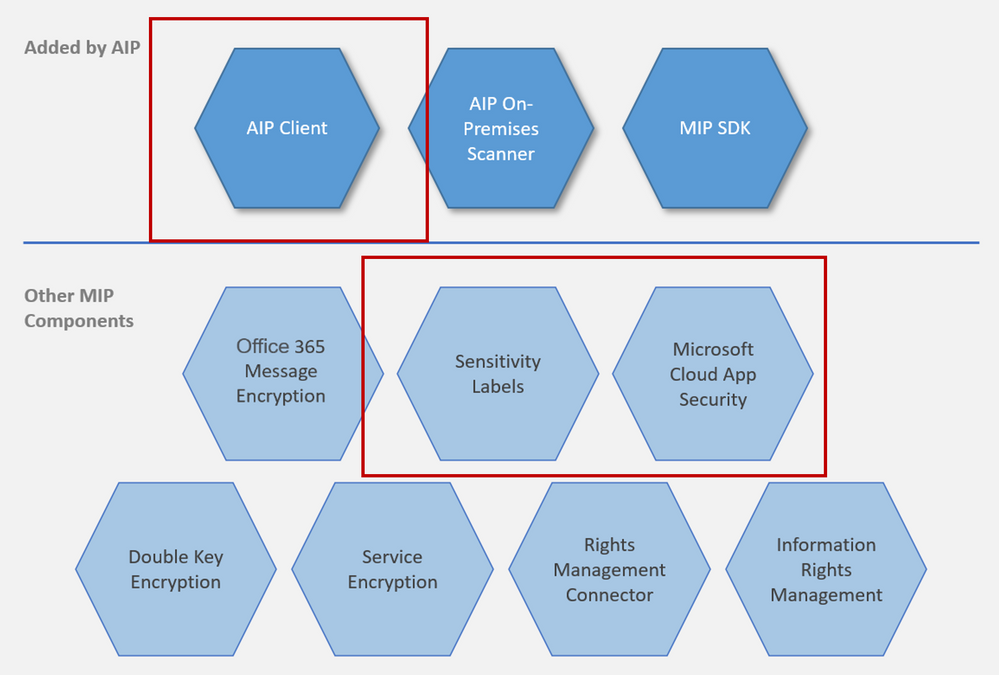
Overview: At a high level, AIP is a cloud-based solution that enables organizations to discover, classify, and protect documents and emails by applying labels to content. AIP is part of the Microsoft Information Protection (MIP) solution, and extends the labeling and classification functionality provided by Microsoft 365. MIP is the common information protection stack that’s leveraged by AIP’s unified labeling client. For more information, see the Microsoft 365 documentation. For information on AIP versus MIP, please check out our documentation.
MCAS and AIP are both a part of our MIP Offering. For this blog, I’ll be using MIP to identify all the non-MCAS components.
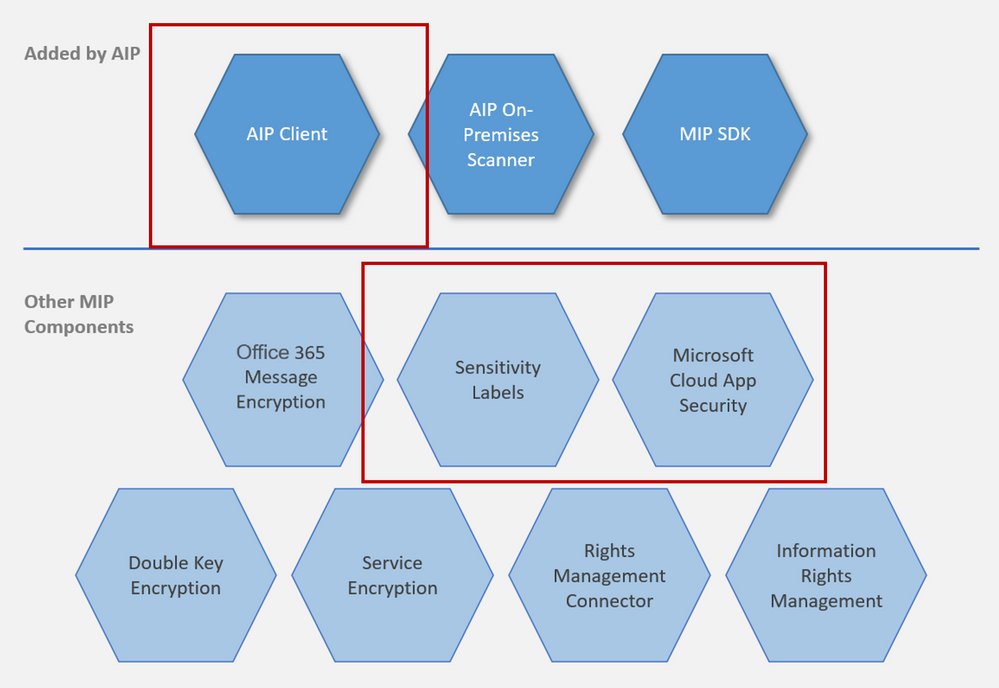
NOTE: To provide a unified and streamlined customer experience, AIP client (classic) and Label Management in the Azure Portal are being deprecated as of March 31, 2021. This timeframe allows all current AIP customers to transition to our unified labeling solution using the Microsoft Information Protection Unified Labeling platform. Learn more in our official deprecation notice.
NOTE: This blog is also relevant for Office 365 unified sensitivity labels if you already migrated your classification labels for the Office 365 Security and Compliance Center. If you did not migrate your existing classification labels, and you begin to create new labels in the Office 365 Security and Compliance Center, Microsoft Cloud App Security will only use the preexisting labels configured in the Azure Information Protection portal.
Before we begin, it is important to know that we love our portals and you can do quite a few of the same activities on each of these portals. This can get confusing for a lot of folks. For the purpose of the integration of MCAS with AIP, I’ve called out some of the capabilities within these portals that have been of importance for many of my customers. In additional, the portals have different links based on if you’re using non-commercial instances.
Important Portals
Name |
Portal |
Colloquial Names |
What can you access? (Non-Exhaustive List) |
Office 365 Security and Compliance Center |
Protection.office.com
GCC-High: scc.office365.us
DOD: scc.protection.apps.mil |
SCC, Security and Compliance Center, Unified Labeling portal, New AIP Portal |
- Sensitivity Labels
- Custom and Built-in Information Types
- Test Custom Information Types
- DLP Policies (includes Teams)
|
Microsoft 365 Security Center |
Security.microsoft.com
GCC-High: security.microsoft.us
DOD: security.apps.mil |
Security Center, Security Portal |
- Sensitivity Labels
- Custom and Built-in Information Types
- Test Custom Information Types
- Label Analytics
|
Microsoft 365 Compliance Center |
Compliance.microsoft.com
GCC-High: compliance.microsoft.us
DOD: compliance.apps.mil |
Compliance Center, Compliance Portal |
- Sensitivity Labels
- Custom and Built-in Information Types
- Test Custom Information Types
- Trainable Classifiers
- Content Explorer
- Activity Explorer
- Endpoint DLP
|
Azure Information Protection Portal |
Portal.azure.com -> Azure Information Protection |
AIP Portal |
- AIP Labels
- Central Reporting
- AIP Scanner
|
Microsoft Cloud App Security |
Portal.cloudappsecurity.com
GCC-High: portal.cloudappsecurity.us |
MCAS, Microsoft CAS, Microsoft CASB |
- File Policies
- Threat Detection Policies
- Information Protection Policies
- Cloud Discovery Policies
|
In addition, to see more guidance on integrating MCAS with AIP, check out our documentation.
MCAS has two different ways of inspecting data in your environment. You have the built-in inspection as well as the Data Classification Service (our example is using AIP Classification Labels or Sensitivity Labels from MIP). When you set up the integration between AIP and MCAS, there are a few dependencies.
NOTE: If you’re using the classic AIP client, those labels will populate in MCAS. If you’ve migrated over to unified labeling, you’ll be using the sensitivity labels from the Security and Compliance Center (protection.office.com) or the Compliance Center (see above for a high-level overview of a few portals).
The MCAS integration with AIP enables an added level of protection by automatically encrypting files. When AIP encrypts files, applications that support AIP like Office 365, know how to open the files and honors permissions set in the classification labels. Use labels to apply specific protection rules. For example, set a file that can be opened but not shared, printed, forwarded, or edited.
This strong level of protection travels with the file. The file is still protected if you send the file, copy it, or store it in your online storage app. If one of your employees loses a thumb drive with the file on it, the file will be locked. Should someone try to open the file, the file owner will receive an alert. With MCAS, you can apply protection automatically. For example, set all files that have credit card numbers, or were uploaded by the finance department and are shared externally, to be automatically protected with a classification label.
Please see below for some of the limitations and the most asked questions regarding these two service offerings. I’ve put together the product to use and some deployment guidance.
Scenarios
Scenario |
MCAS or MIP? |
Deployment Guidance |
I want to label all the files in a specific folder. |
Depends on number of files being labeled |
MCAS has a limitation of 100 labels per app per tenant per day (can be increased through a support ticket). If this specific folder is from SPO or ODFB, the recommendation is to use MIP to create the auto-labeling policies, especially if you’re labeling thousands of files. SCC has a “Sensitive by default” setting that would take care of this situation. An exception to this recommendation would be with having multiple sensitive information types as one sensitive information type. For example, you want to find the files that have credit card data, social security numbers, AND a custom information type. This example would be MCAS as the engine. |
I want to search EDM in non-365 data repositories (Box, Dropbox, G-Suite). |
MCAS |
You would use MIP to create your EDM information type (General availability of EDM user interface in Microsoft 365 compliance center) and then create a file policy in MCAS to search this information type in your connect apps that support files. |
I want to create a custom sensitive information type. |
MIP |
Please use the Security and Compliance center to create a custom information type. |
Where can I see the custom information type I created in SCC in MCAS? |
MCAS |
After creating your custom information type in SCC, you should see it populate in MCAS within hours. You would go to a file policy, click “Data Classification Service” for inspection type, click “Sensitive Information Type” to see all the information types from SCC, and then filter on “Custom” to see what you created. |
I want to find all files with labels in my third party applications. |
MCAS |
The MCAS Automatic scan does not scan existing files until they are modified again. To scan existing files for Azure Information Protection classification labels, you must have at least one File policy that includes content inspection. If you have none, create a new File policy, delete all the preset filters, under Inspection method select Built-in DLP. In the Content inspection field, select Include files that match a preset expression and select any predefined value, and save the policy. This enables content inspection, which automatically detects Azure Information Protection classification labels. MCAS can find files with labels if the connected app has an API that supports pulling this information (i.e. Box). |
I want to label 15,000+ files in SPO or ODFB. |
MIP |
MCAS has a limitation of 100 labels per app per tenant per day. For SPO or ODFB, the recommendation is to use MIP to create the auto-labeling policies, especially if you’re labeling thousands of files. |
I want to add a label to files downloaded on unmanaged devices. |
MCAS |
MCAS Conditional Access App Control (Protect on download): Instead of blocking the download of sensitive documents, you can require documents to be labeled and protected with Azure Information Protection. This action ensures the document is protected and user access is restricted in a potentially risky session (unmanaged device). |
I want to create a sensitive type with multiple “and” components instead of “or” components. |
MCAS |
Although you’re not creating a sensitive information type with multiple “and” properties, you are able to search for all files within your connected apps that support file APIs for matches when multiple information types are found in one file. When choosing your sensitive information types for a file policy, choose all the sensitive information types you want to find in the files (example: credit card data, social security numbers, AND a custom information type). |
How do scanner nodes play into my strategy and when should I set them up? |
MIP |
The AIP scanner is for on-prem (local drives and shares) labeling. You should set these up if you want to label files or discover sensitive information for on-prem. |
How can I label PDFs? |
MIP or MCAS |
PDFs require Sensitive Labels and can only be used with unified labeling. |
How does protection work in Teams (chat and channel messages)? |
Depends |
MCAS protects using our reverse proxy for browser based sessions (uploads, downloads, messages, and copy/pasting). If your browser-based session is being proxied (you should see your URL being suffixed), MCAS will be able to proxy both the channels and messages. MCAS can only control access to the thick client (Access Policies). Thick client protection comes from MIP DLP. |
When do I use MIP versus using MCAS? |
Depends |
MCAS is mainly for the cloud and for third party applications. MIP is for 365 or endpoint DLP. MCAS is for comb |
Is MCAS the AIP scanner for the cloud? |
MCAS |
Yes, it can only scan files in your files repository (Investigate -> Files). These files are pulled from the file APIs from your connected apps in MCAS. If you use the MCAS Reverse Proxy, MCAS does real time scanning of your files when they’re being uploaded or downloaded. |
Can MCAS apply more than one label to a file? |
|
Users can select just one label at a time for each file, this then results in just one classification. If a sublabel is applied, this actually applies two labels at the same time; a primary label and a secondary label. By using sublabels, a file can have two classifications that denote a parentchild relationship for an additional level of control. |
Can MCAS remove labels that were applied by MIP/AIP? |
MIP |
No, it can only remove labels applied by MCAS. |
Limitations
Behavior/Limitation |
Additional Information/Mitigation |
Cloud App Security currently supports applying Azure Information Protection classification labels for the following file types:
Word: docm, docx, dotm, dotx
Excel: xlam, xlsm, xlsx, xltx
PowerPoint: potm, potx, ppsx, ppsm, pptm, pptx
PDF (Unified Labeling Required) |
Please turn on the integration between MCAS and AIP to enable labels in MCAS. |
Labeling is is currently available for files stored in Box, G Suite, SharePoint Online, and OneDrive for Business. |
More cloud apps will be supported in future releases. |
Files that were labeled with protection outside of Cloud App Security can’t be changed by Cloud App Security. |
You can scan these files by granting permissions to inspect content for protected files. |
Cloud App Security retrieves the list of all the classification labels used in your tenant. This action is performed every hour to keep the list up-to-date. |
|
External labels, classification labels set by someone external to your tenant, are added to the list of classification labels. |
If you don’t want to scan for these, select the Only scan files for Azure Information Protection classification labels from this tenant check box. |
Automatic scan does not scan existing files until they are modified again. |
To scan existing files for Azure Information Protection classification labels, you must have at least one File policy that includes content inspection. |
By default, Cloud App Security scans classification labels that were defined in your organization as well as external ones defined by other organizations. |
You can ignore external labels by configuring your MCAS Information Protection settings. If you’re unsure of which route to take, a good question to ask is “when external files enter my information boundary, is my company responsible for the protection of that file?” |
The file exceeded the maximum of 1 million characters. For the part of the content that was scanned, relevant policy matches were applied. |
|
Cloud App Security can apply Azure Information Protection on files that are up to 50 MB |
|
You can remove labels only if they do not include protection, and they were applied from within Cloud App Security, not labels applied directly in Information Protection. |
MCAS cannot remove labels applied by Azure Information Protection (the client or another app). |
To protect customers from mistakenly applying a label to a large number of files, as a safety precaution there is a daily limit of 100 Apply label actions per app, per tenant. |
After the daily limit is reached, the apply label action pauses temporarily and continues automatically the next day (after 12:00 UTC). To raise the limit for your tenant, open a support ticket. |
When Azure Information Protection labels are disabled on a file, the disabled labels appear as disabled in Cloud App Security. |
Deleted labels are not displayed. |
When a document is labeled by using Cloud App Security, visual markings are not immediately applied but are applied when that document is opened in an Office app and the document is first saved. |
For more information, see How to configure a label for visual markings for Azure Information Protection. |
Azure Information Protection cannot classify and protect structured data such as database files, calendar items, Yammer posts, Sway content, and OneNote notebooks. |
|
Power BI now supports classification by using sensitivity labels and can apply protection from those labels to data that is exported to the following file formats: .pdf, .xls, and .ppt. |
For more information, see Data protection in Power BI. |
Sublabels are actually 2 labels. |
MIP: For example, the label Confidential might contain sublabels such as Legal and Finance. You can apply different classification visual markings and different Rights Management templates to these sublabels. A user cannot select the Confidential label by itself; only one of its sublabels, such as Legal. As a result, the label that they see set is Confidential Legal. The metadata for that file includes one custom text property for Confidential, one custom text property for Legal, and another that contains both values (Confidential Legal).
When you use sublabels, don’t configure visual markings, protection, and conditions at the primary label. When you use sublevels, configure these setting on the sublabel only. If you configure these settings on the primary label and its sublabel, the settings at the sublabel take precedence. |
How do we regain access to files that were protected by an employee who has now left the organization? |
MIP: Use the super user feature, which grants the Full Control usage rights to authorized users for all documents and emails that are protected by your tenant. Super users can always read this protected content, and if necessary, remove the protection or reprotect it for different users. This same feature lets authorized services index and inspect files, as needed. |
By not granting the Copy usage right, Rights Management can prevent screen captures from many of the commonly used screen capture tools on Windows platforms (Windows 7, Windows 8.1, Windows 10, Windows 10 Mobile) and Android. However, iOS and Mac devices do not allow any app to prevent screen captures. In addition, browsers on any device cannot prevent screen captures. Browser use includes Outlook on the web and Office for the web. |
MIP: Preventing screen captures can help to avoid accidental or negligent disclosure of confidential or sensitive information. But there are many ways that a user can share data that is displayed on a screen, and taking a screenshot is only one method. For example, a user intent on sharing displayed information can take a picture of it using their camera phone, retype the data, or simply verbally relay it to somebody.
As these examples demonstrate, even if all platforms and all software supported the Rights Management APIs to block screen captures, technology alone cannot always prevent users from sharing data that they should not. Rights Management can help to safeguard your important data by using authorization and usage policies, but this enterprise rights management solution should be used with other controls. For example, implement physical security, carefully screen and monitor people who have authorized access to your organization’s data, and invest in user education so users understand what data should not be shared. |
Please let me know if you have any questions regarding MCAS vs MIP in the comments. I’ll do my best to answer and provide you with additional resources.
This blog will also be a part of our newly published MCAS Ninja Training, check it out at aka.ms/MCASNinja (Update Coming January/February 2021).
by Contributed | Dec 22, 2020 | Technology
This article is contributed. See the original author and article here.
In the interest of helping customers concerned about the Solorigate attacks we are publishing a new workbook in the Azure AD admin portal to assist investigations into the Identity Indicators of Compromise related to the attacks. The information in this workbook is available in Azure AD audit and sign in logs, but the workbook helps you collect and visualize the information in one view.
The workbook is split into 5 sections, each aimed at providing information associated with the attack patterns we have identified:
- Modified application and service principal credentials/authentication methods
- Modified federation settings
- Azure AD STS Refresh token modifications by service principals and applications other than DirectorySync
- New permissions granted to service principals
- Directory role and group membership updates for service principals
First, we’ll detail how to access the workbook and then walk through each of these in turn.
Accessing the workbook
If you organization is new to Azure Monitor workbooks, you’ll need to integrate your Azure AD sign-in and audit logs with Azure Monitor before accessing the workbook. This allows you to store, and query, and visualize your logs using workbooks for up to 2 years. Only sign-in and audit events created after Azure Monitor integration will be stored, so the workbook will not contain insights prior to that date. Learn more about the prerequisites to Azure Monitor workbooks for Azure Active Directory. If you have previously integrated your Azure AD sign-in and audit logs with Azure Monitor, you can use the workbook to assess past information.
To access the workbook:
- Sign into the Azure portal
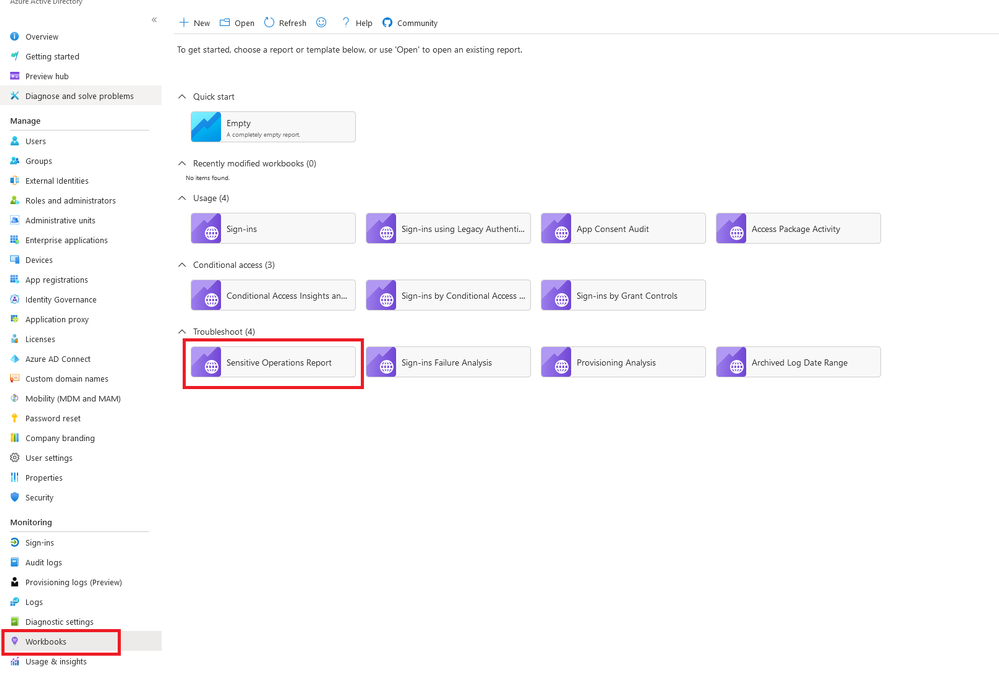
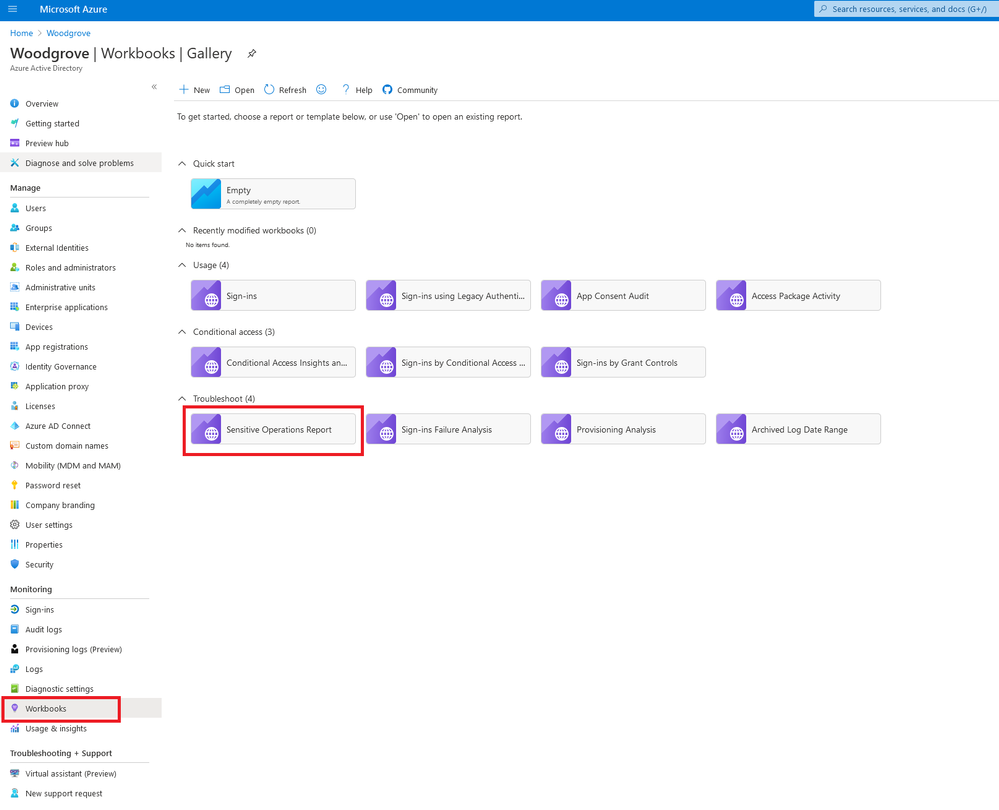
- Navigate to Azure Active Directory > Monitoring > Workbooks
In the Troubleshoot section, open the Sensitive Operations Report
Modified application and service principal credentials/authentication methods
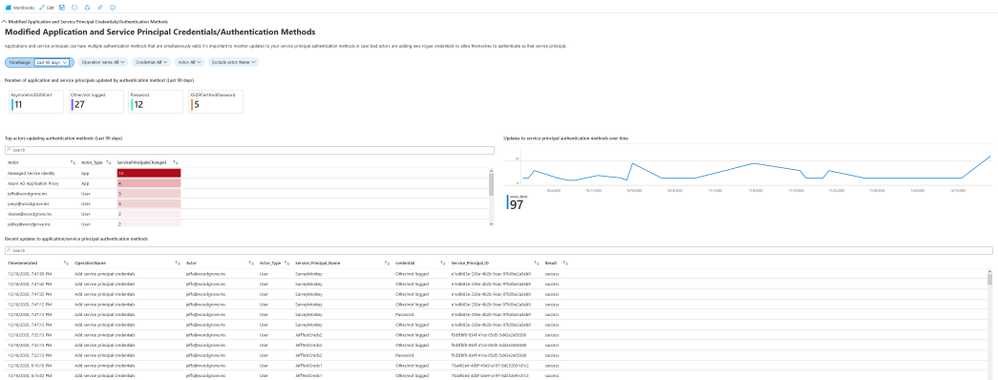
One of the most common ways for attackers to gain persistence in the environment is by adding new credentials to existing applications and service principals. This allows the attacker to authenticate as the target application or service principal, granting them access to all resources to which it has permissions.
This section includes the following data to help you detect such actions:
- All new credentials added to apps and service principals, including the credential type
- Top actors and the amount of credentials modifications they performed
- A timeline for all credential changes
You can use the filters present in this section to further investigate any of the suspicious actors or service principals that were modified.
For more information: Apps & service principals in Azure AD – Microsoft identity platform
Modified federation settings
Another common approach to gaining a long-term foothold in the environment is modifying the tenant’s federated domain trusts and effectively adding an additional, attacker controlled, SAML IDP as a trusted authentication source.
This section includes the following data:
- Changes performed to existing domain federation trusts
- Addition of new domains and trusts
Any actions which modify or add domain federation trusts are rare and should be treated as high fidelity to be investigated as soon as possible.

For more information: What is federation with Azure AD?
Azure AD STS refresh token modifications by service principals and applications other than DirectorySync
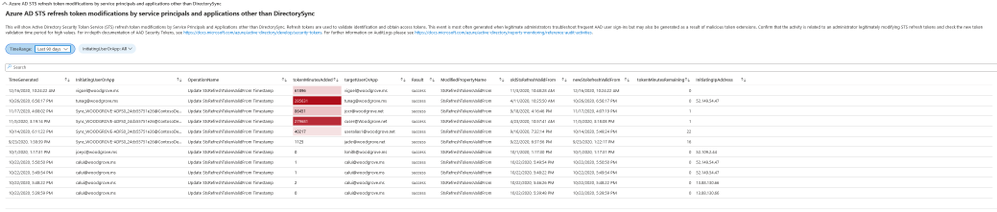
Refresh tokens are used to validate identification and obtain access tokens. Manual modifications of these tokens may be legitimate but have also been observed to be generated as a result of malicious token extensions.
When reviewing the data in this section the admin should check new token validation time period with high values and investigate whether this was a legitimate change or an attempt to gain persistence by the attacker.
For more information: Refresh tokens in Azure AD
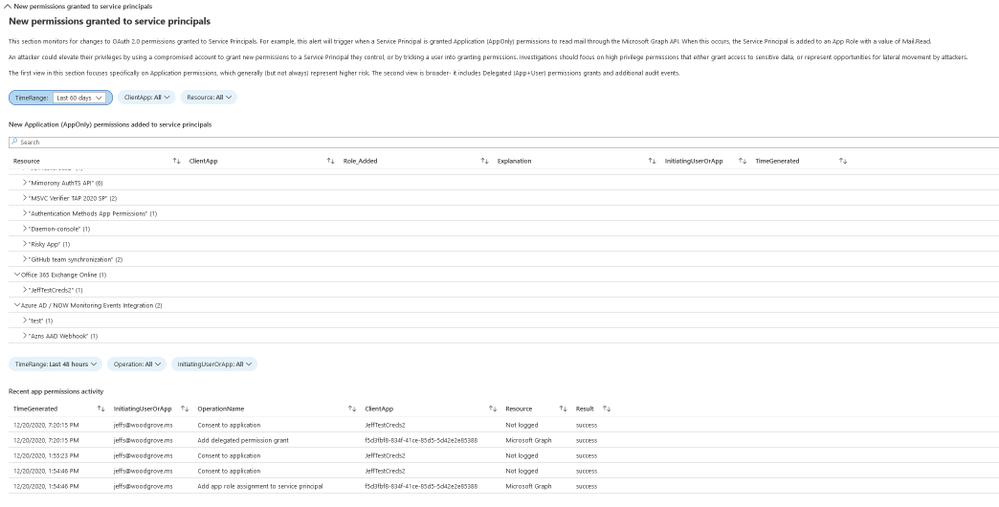
New permissions granted to service principals
In cases where the attacker cannot find a service principal or an application with a high privilege set of permissions through which to gain access, they will often attempt to add the permissions to another service principal or app.
This section includes a breakdown of the AppOnly permissions grants to existing service principals. Admins should investigate any instances of excessive high permissions being granted, including, but not limited to, Exchange Online, Microsoft Graph and Azure AD Graph
For more information: Microsoft identity platform scopes, permissions, and consent
Directory role and group membership updates for service principals
Following the logic of the attacker adding new permissions to existing service principals and applications, another approach is adding them to existing directory roles or groups.
This section includes an overview of all changes made to service principal memberships and should be reviewed for any additions to high privilege roles and groups.

Conclusion
This workbook includes an overview of some of the common attack patterns in AAD, not only in Solorigate, and should be used as an investigation aid in conjunction with the steps described in the articles linked at the beginning to ensure your environment is safe and protect is from malicious actors.
For additional hunting with Azure Sentinel see http://aka.ms/sentinelsolorigatehunt.
The Solarwinds attack is an ongoing investigation, and our teams continue to act as first responders to these attacks. As new information becomes available, we will make updates through our Microsoft Security Response Center (MSRC) blog at https://aka.ms/solorigate.
Please reach out to me on twitter at @Alex_t_weinert if you have questions or suggestions for improvement.


Recent Comments