This article is contributed. See the original author and article here.
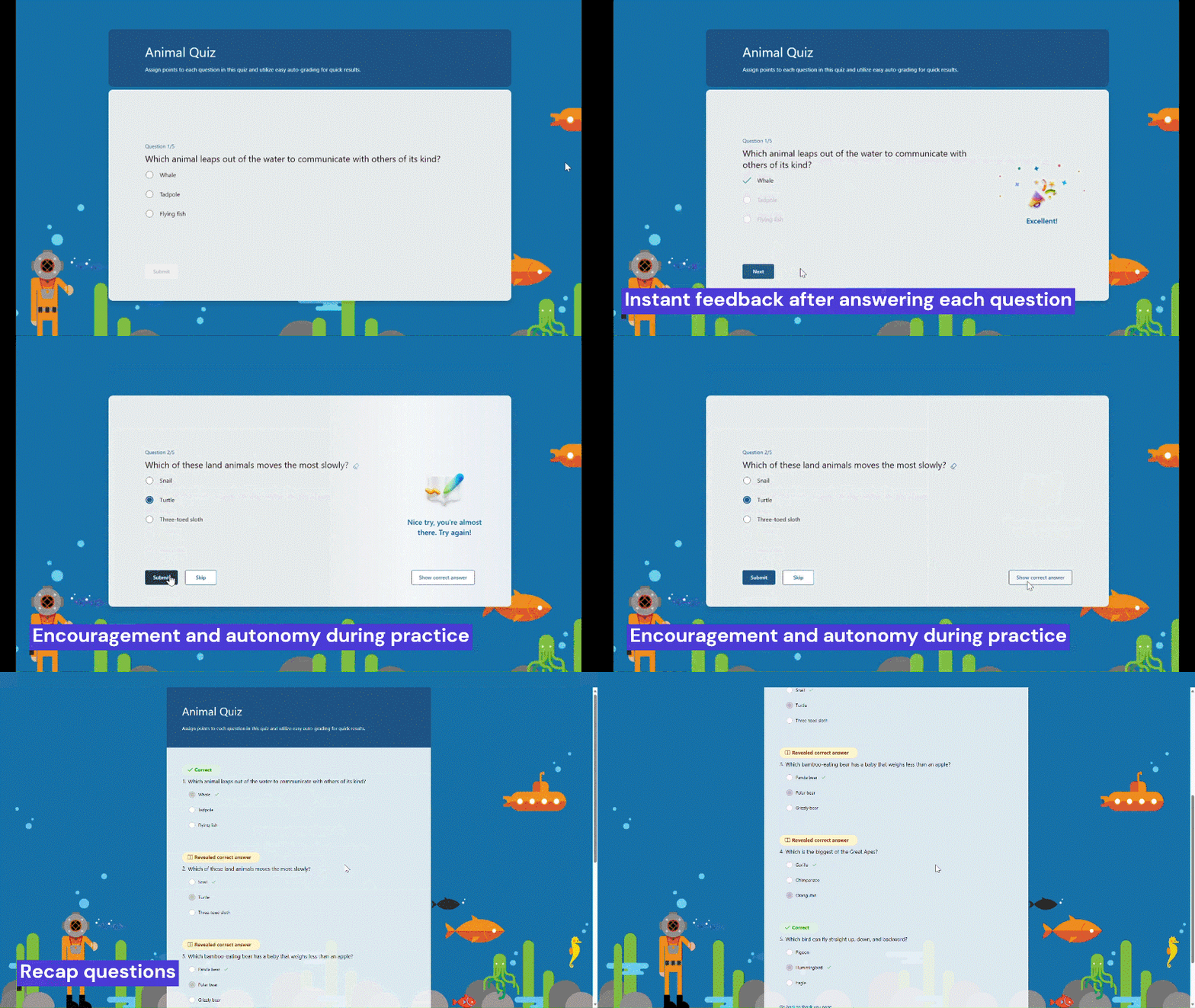
Practice mode is now available in Forms. It’s tailored for EDU users, particularly students, offering a new way for students to review, test, and reinforce their knowledge. Follow me, let’s check out more details of practice mode. You can just try it from this template. (Note: Practice mode is only available for quizzes. )
Practice mode
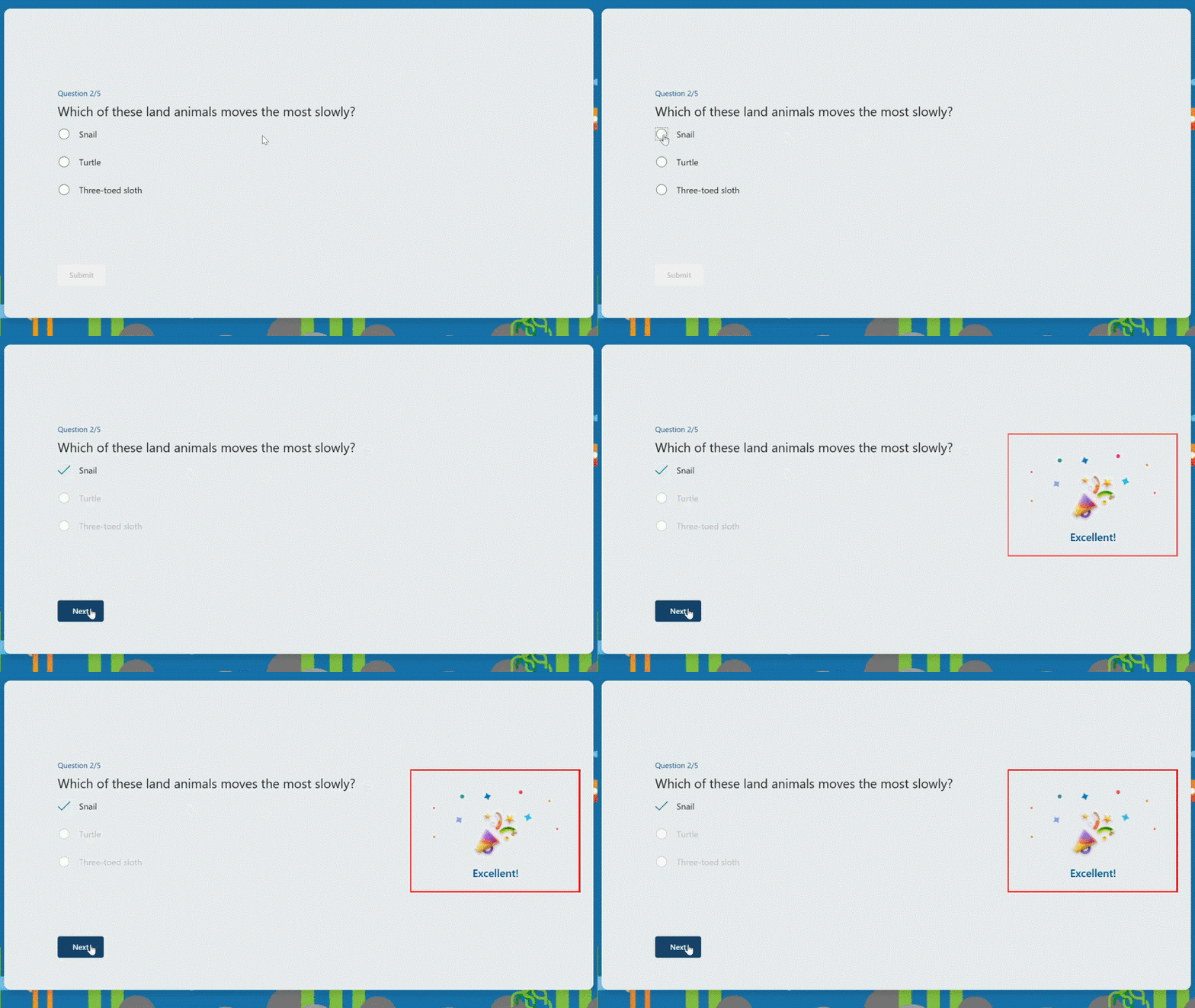
Instant feedback after answering each question In practice mode, questions will be shown one at a time. Students will receive immediate feedback after submitting each question, indicating whether their answer is right or wrong.
Instant feedback after answering each question
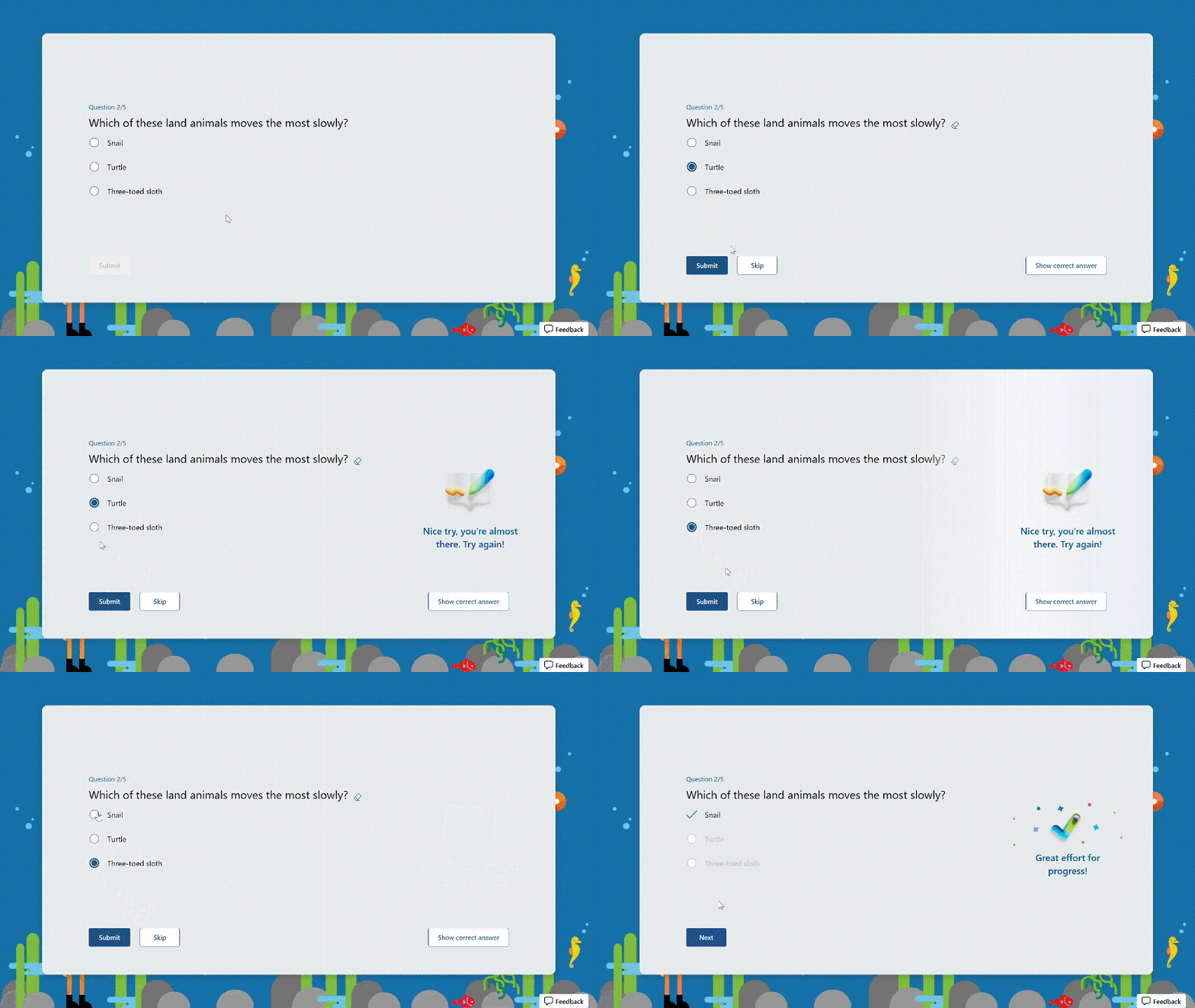
Try multiple times for the correct answer Students can reconsider and try a question multiple times if they answer it incorrectly, facilitating immediate re-learning, and consequently strengthening their grasp of certain knowledge.
Try multiple times to get the correct answer
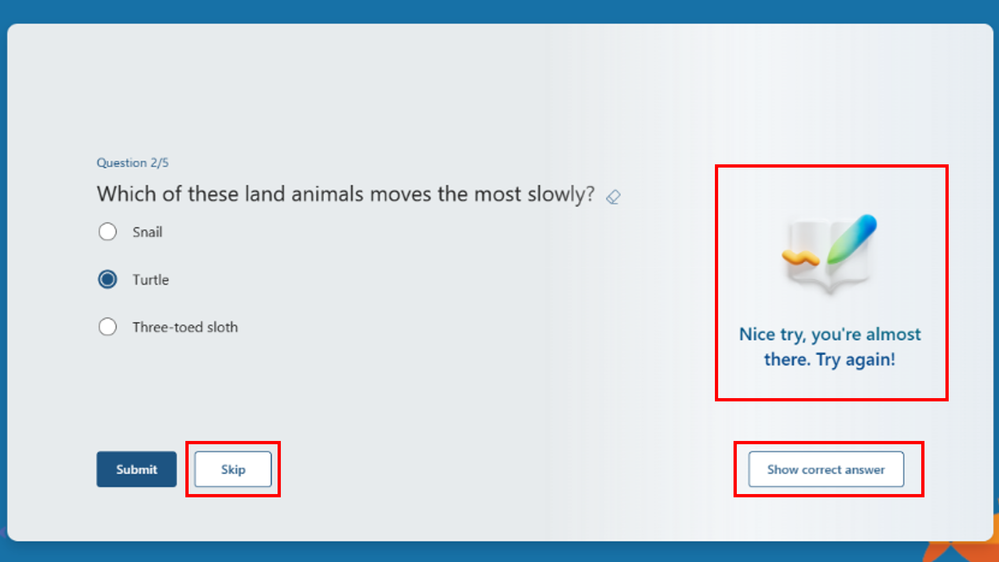
Encouragement and autonomy during practice Students will receive an encouraging message after answering a question, whether their answer is correct or not, giving them a positive practice experience. And They have the freedom to learn at their own pace. If they answer a question incorrectly, they can choose to retry, view the correct answer, or skip this question.
Encouragement message and other options
Recap questions After completing the practice, students can review all the questions along with the correct answers, offering a comprehensive overview to assess their overall performance.
Recap questions
Enter practice mode Practice mode is only available for quizzes. You can turn it on from the “…” icon in the upper-right corner. Once you distribute the quiz recipients will automatically enter practice mode. Try out practice mode from this template now!
This article is contributed. See the original author and article here.
During the 1st quarter of 2024, D365 Sales conversation intelligence data will migrate from its current storage location (Microsoft provided storage) across to each customer’s Dataverse organization. This blog post describes this change and provides answers to questions raised by admins when preparing their organizations for this data migration.
Sales conversation intelligence data is the general term for any outcome of the processing of phone calls made through the embedded Teams dialer within Dynamics 365. This includes files, such as the audio recording file or transcript file, as well as all the insights collected during a call. Examples include:
Sentiment
Tracked keywords
Asked questions
Summary suggestions
Important: during the migration, no data will be transferred outside of your tenant.
Moving the data into Dataverse allows you to meet the highest data management standards, such as data encryption using Customer Managed Key (CMK) – and management of customer data using Lockbox.
The migration also allows for granular control over the conversation intelligence data: orgs can now allow access to specific types of data only for specific security roles. For example, the admin can assign privileges to the ‘sentiment’ entity in Dataverse only for sales managers. This granular control also allows for deletion of specific types of data while retaining others. For example, the admin can store sentiment data for only 1 month, while storing the transcript of the call for 1 year, and by this maximizing the Dataverse storage capacity.
Having conversation intelligence stored in Dataverse also allows organizations and 3rd party apps to consume the data per the organization’s needs. For example, organizations can create tailored dashboards and visualizations based on the data. Furthermore, the admin can allow third-party apps to access the conversation intelligence data and to provide extensible services based on it.
Storage location by type
The following table describes the storage location of conversation intelligence data before and after the change:
Current storage
Type of data
Before the change
After the migration
Microsoft provided storage
Files (recording, transcript)
Microsoft provided storage
Organization’s Dataverse1
Conversation intelligence insights
Microsoft provided storage
Organization’s Dataverse1
Your own Azure blob storage
Files (recording, transcript)
Your own Azure blob storage
Your own Azure blob storage2
Conversation intelligence insights
Microsoft provided storage
Organization’s Dataverse1
1 After the data is successfully migrated, it will be deleted from the Microsoft-provided storage.
2 No change. This data is not migrated.
After the successful migration of existing data, data from new calls will be automatically saved to Dataverse.
Action required by admins:
For all organizations:
Check the solution version (mandatory): Make sure you have the latest version of the conversation intelligence solution (msdyn_Conversation_Intelligence version 9.0.1.1139 or higher) installed in your organization.
Provide access to new Dataverse entities (mandatory): Make sure the relevant security roles have read and write privileges to the new Dataverse entities (see below a list of entities).
Make sure you have sufficient storage space in Dataverse (mandatory):
Database storage: Multiply the number of calls by 160KB.
File storage (only relevant for orgs previously using Microsoft provided storage): Multiply the number of calls by 0.93MB.
For example: if you had 20,000 calls, and you previously used the Microsoft provided storage, you will need to have 32GB of DB storage and 18.6GB of file storage for the migrated data.
Note: The above numbers are based on average call duration and number of insights per call. Actual sizes may vary.
Set a retention policy (optional): Previously, conversation intelligence data was automatically deleted according to the retention policy set by the admin in the conversation intelligence settings. By default, data saved into Dataverse does not have an automatic retention policy like this. If you wish to set a retention policy for your conversation intelligence data in Dataverse, you can do so by following this documentation.
For organizations currently using own Azure blob storage:
Set up Service principal (mandatory): To allow conversation intelligence access to your blob storage in a more secure way. See this article to learn more on this setup.
Opting out of migrating the existing data into Dataverse
By default, your existing data will be migrated to Dataverse. If you wish to opt out of the migration, (because your organization is no longer using conversation intelligence or you don’t want to migrate the existing files or insights for example), you will need to send an email, containing your first and last name and the organization ID to this email address: CI-data-migration@microsoft.com before January 31st 2024. The data of organizations which opted-out of the migration will be permanently deleted by April 1st 2024.
Frequently asked questions
Here are some answers for questions you might have on this process:
What will happen to my organization’s saved data? The data will be transferred from where it is stored today (Microsoft provided storage) to your organization’s Dataverse database. After verifying the transfer and customer confirmation, the data will be permanently deleted from the previous storage location (data will not be automatically deleted from your Azure blob storage). Note that data older than 90 days will not be migrated.
What type of Dataverse storage will be used? Conversation intelligence uses 2 types of Dataverse storage: File storage will be used for storing the recording and transcript files (unless stored in your org’s Azure blob storage), while DB storage will be used for storing the conversation intelligence insights.
What are the expected implications of moving the data into Dataverse?
Migrating data into your Dataverse will require free Dataverse storage space. See above on how to calculate the required storage space.
Who will have access to the transferred data?
Out-of-the-box security roles (such as Salesperson and Sales Manager) will automatically receive privileges to the new entities where the data is stored. If your org uses custom security roles, make sure you assign them with the required privileges for the new Dataverse tables as listed below. You can do this prior to the migration of the data. List of new Dataverse entities:
Conversation Action item
Conversation Aggregated Insights
Conversation Comment
Conversation Participant Insights
Conversation Participant Sentiment
Conversation Question
Conversation Segment Sentiment
Conversation Sentiment
Conversation Signal
Conversation Subject
Conversation Summary Suggestion
Conversation System Tag
Conversation Tag
Ocrecording
Recording
SCI Conversation
Sci Environment Settings
Sci User Settings
Transcript
Will users in my organization be able to continue using the conversation intelligence app?
Once the data is migrated into Dataverse, the conversation intelligence app will no longer work. The aggregated conversation intelligence data will be available through a new Power BI based dashboard.
How to opt-out of moving my organization’s existing data into Dataverse? You can opt-out of moving the existing data by sending an email to: CI-data-migration@microsoft.com before January 31st 2024. If you chose to do so, the existing data of your organization which is currently saved in the Microsoft-provided storage will be permanently deleted by April 1st 2024.
What’s next? If you don’t choose to opt-out, your organization’s conversation intelligence data will be transferred to Dataverse between February 1st 2024 and March 30th 2024. You will receive an email with a confirmation of successful data migration. After the moves to Dataverse, all new conversation intelligence data will be saved to Dataverse as well.
This article is contributed. See the original author and article here.
Frontline managers have gained greater control, on a team-level, over the capabilities offered in Microsoft Shifts.
With the latest releases now available on the Shifts settings page, we have made updates to improve the end-user experience for frontline manager and workers. The updates are as follows:
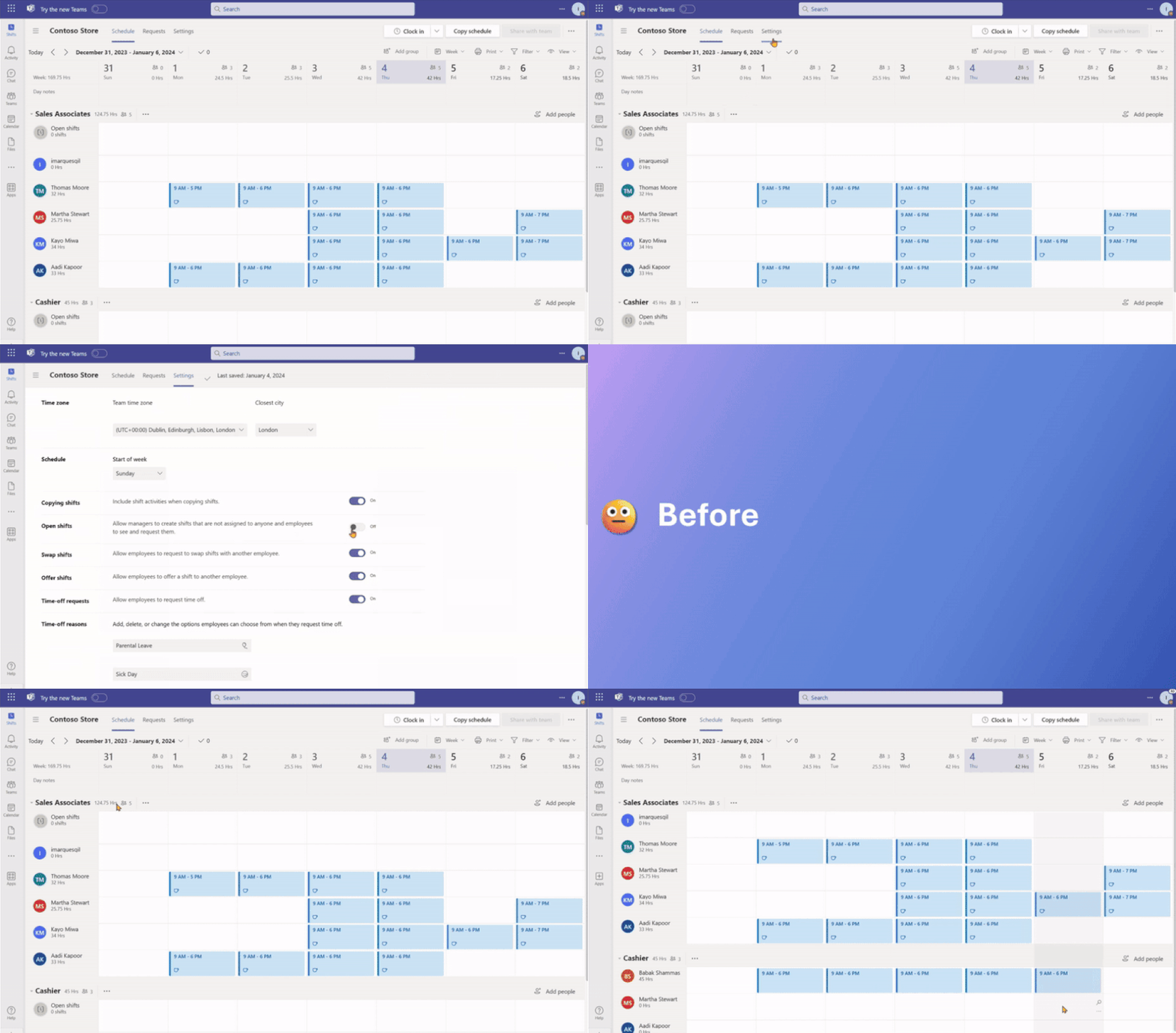
Open shifts
Previously, when the Open Shifts setting was off, frontline managers could create but not publish open shifts. Also, they could view open and assigned shifts listed on their team’s schedule (including when workers are scheduled for time off).
Now, when the setting is turned off, frontline managers can’t create open shifts and can only view on their team’s schedule the assigned shifts (including scheduled time off).
See the differences from the past and new experience for frontline managers:
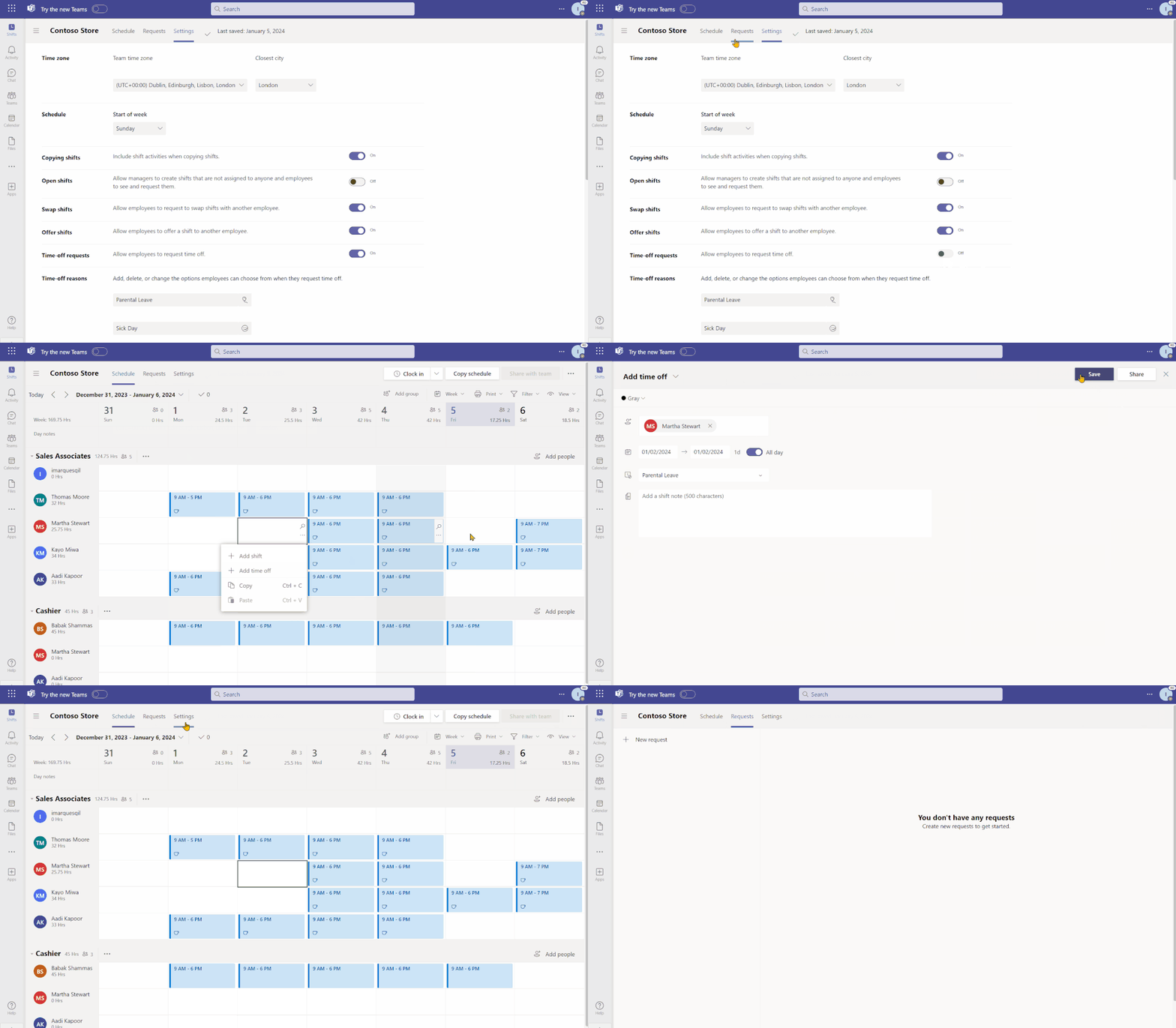
Time-off requests
Previously, when the time-off request setting was turned off, frontline managers couldn’t assign time off to their team members; more over, frontline workers couldn’t request time-off.
Now, when the setting is turned off, frontline managers can continue to assign time off to their team members. However, frontline workers will not have the ability to create time-off requests if this setting remains off.
Your organization can leverage Shifts as the place where the frontline may view their working and non-working schedules despite not using Shifts as your leave management tool.
See the new experience for frontline managers:
Open shifts, swap shifts, offer shifts and time-Off requests
Previously, when any of the request-related setting toggled between on to off, frontline managers couldn’t manage previous requests that were submitted when the setting was on.
Now, frontline managers can directly manage previous requests on the Requests page while frontline workers can view status and details of their individual requests.
This article is contributed. See the original author and article here.
Introduction:
The start of the new year has brought a wave of exciting enhancements to the Demand Planning module in Dynamics 365 Supply Chain Management. We’re thrilled to introduce you to five groundbreaking features that will redefine the way you approach demand planning. In this blog post, we’ll look into each feature, highlighting their benefits and showcasing live demos hosted by the expert, Anders Girke.
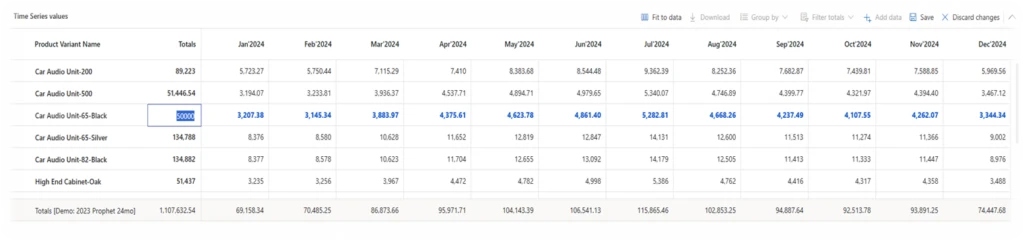
Feature 1: Edit on Total Level
The new feature in our January release is the revolutionary “Edit on Total Level” functionality. This empowers planners to expedite their planning workflows through effective edits on a broader scale. Let’s swiftly explore the advantages:
✨ Edit on Total Level: Accelerate planning with efficient edits on a larger scale.
? Date Filters: Navigate and analyze data effortlessly.
? Distribute Proportional Over Time: Streamline workflows with proportional changes.
? Allocate Proportional Amongst Dimensions: Optimize precision in planning.
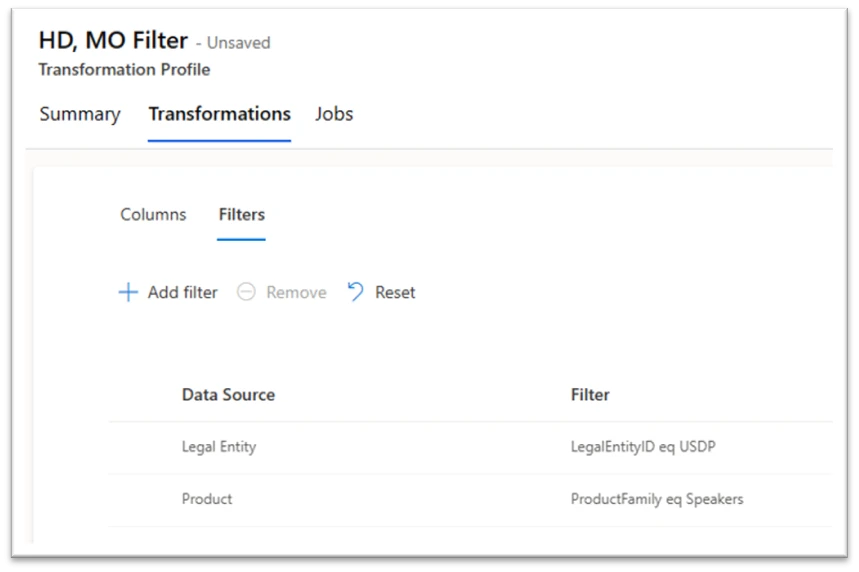
The second feature in our January release series is “Filter in Transformation.” This powerful tool allows precise data transformation for enhanced what-if analysis and forecasting on a focused dataset. Here are the key benefits:
? Perform What-if forecasts on a filtered sub-set of data
? Filter staging data prior to transformation
? Ensure secure performance
? Experiment with Dimensions to refine your planning
Witness the possibilities unfold as you perform What-if forecasts, filter staging data, ensure secure performance, and experiment with dimensions to refine your planning. Your demand planning just got a whole lot smarter!
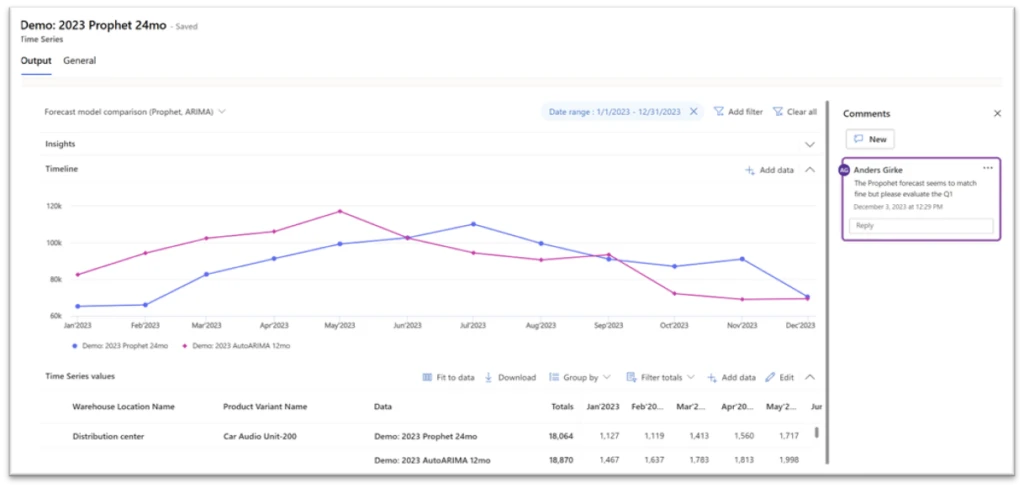
The third installment of our January release series introduces “Comments.” This feature is set to transform collaboration and communication within the demand planning application. Key highlights include:
? Enhanced Communication: Provide detailed explanations for changes, fostering transparency.
? Real-time Collaboration: Facilitate consensus-building among team members.
Feature 4: System Administrator Role for Demand Planning
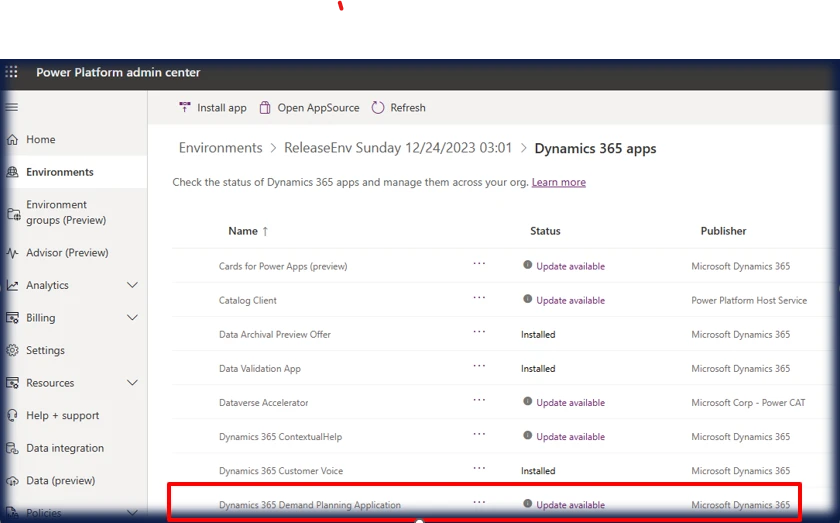
In this release, we introduce the pivotal role of the System Administrator for Demand Planning. This role is responsible for installing the app, assigning roles, managing teams, and overseeing critical operations. Highlights include:
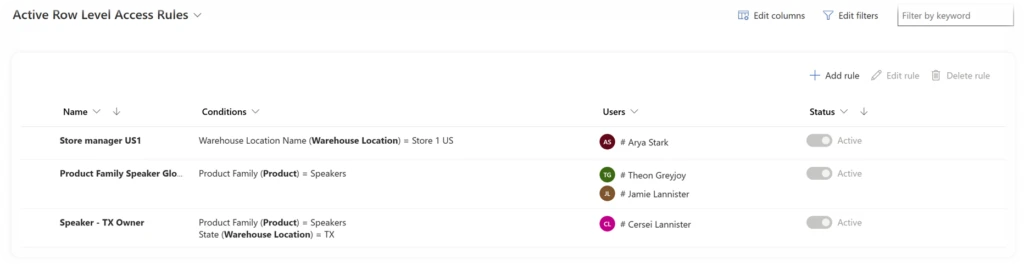
? Role Level Access for Contributors: Empower limited users with the ability to view shared worksheets, create personalized views, and edit data within their permissions.
? Row Level Access Rules: Define conditions for specific tables, columns, and operators for unparalleled flexibility.
? Editing Demand Plans with Flexibility: Highlighting the power of role level access, added experience, and disaggregation in editing demand plans.
Get a sneak peek into the upcoming February release, emphasizing the balance between limiting filters for optimal performance and ensuring an exceptional user experience.
In conclusion, the recent January release of Dynamics 365 Supply Chain Management Demand Planning has brought forth a wave of transformative features, including “Edit on Total Level,” “Filter in Transformation,” and “Comments,” redefining the landscape for planners with tools that enhance efficiency and collaboration. The incorporation of the System Administrator role, Role Level Access for Contributors, Row Level Access Rules, and advanced security features positions the platform as a robust and secure solution for demand planning needs. With increased flexibility in editing demand plans and promising additions in the upcoming February release, Dynamics 365 is shaping a future of more streamlined and user-friendly demand planning experiences. This release marks a substantial leap forward, promising organizations worldwide a future characterized by smarter and more precise demand planning. As we embrace this evolution in demand planning, Dynamics 365 Supply Chain Management stands as a pioneer, leading the way with innovative features. Stay tuned for ongoing updates and enhancements that will continuously elevate your planning processes to unprecedented heights!
?North America Demand Planning Workshop?
Join us at the forthcoming Demand Planning Workshop, hosted at Microsoft’s state-of-the-art facility – Microsoft in Redmond, WA (98052). This event is tailored to introduce the innovative Demand Planning application to both our valued Customers and Partners.
This article is contributed. See the original author and article here.
We are updating our Microsoft Copilot product line-up with a new Copilot Pro subscription for individuals; expanding Copilot for Microsoft 365 availability to small and medium-sized businesses; and announcing no seat minimum for commercial plans.
This article is contributed. See the original author and article here.
Starting January 19, 2024, Microsoft Copilot in Dynamics 365 Customer Service will be automatically installed and enabled in your Dynamics 365 Customer Service environment. This update will install the case summarization and conversation summarization features. These features are available to all users with a Dynamics 365 Customer Service Enterprise license, and/or digital messaging or Voice add-on license for conversation summary enablement.
If your organization has already enabled Copilot in Customer Service, there will be no change to your environment.
Key dates
Disclosure date: December 2023 Administrators received a notification about the change in the Microsoft 365 admin center and Power Platform admin center.
Installation date: January 19 – February 2, 2024 Copilot in Customer Service is installed and enabled by default.
Please note that specific dates for messages and auto-installation will vary based on the geography of your organization. The date applicable to your organization is in the messages in Microsoft 365 admin center and Power Platform admin center. Copilot auto-installation will occur only if your organization is in a geography where all Copilot data handling occurs “in geo.” These regions are currently Australia, United Kingdom, and United States. Organizations where Copilot data handling does not occur “in geo” must opt in to cross-geo data transmission to receive these capabilities.
What is Copilot in Dynamics 365 Customer Service?
Copilot in Customer Service is a key part of the Dynamics 365 Customer Service experience. Copilot provides real-time, AI-powered assistance to help customer support agents solve issues faster. By relieving them from mundane tasks such as searching and note-taking, Copilot gives them time for more high-value interactions with customers. Contact center managers can also use Copilot analytics to view Copilot usage and better understand how it impacts the business.
Why is Microsoft deploying this update?
We believe this update presents a significant opportunity to fundamentally alter the way your organization approaches service by quickly improving and enhancing the agent experience. The feedback we have received from customers who are already using Copilot has been overwhelmingly positive. Generative AI-based service capabilities have a profound impact on efficiency and customer experience, leading to improved customer satisfaction. This update applies only to the Copilot summarization capabilities, which integrate with service workflows and require minimal change management.
Learn more about Copilot in Dynamics 365 Customer Service
This article is contributed. See the original author and article here.
Problem:
===========
Assume that you have tables with Identity columns declared as datatype INT and you are using Auto Identity management for those articles in a Merge Publication.
This Publication has one or more subscribers and you tried to re-initialize one subscriber using a new Snapshot.
Merge agent fails with this error:
>> Source: Merge Replication Provider
Number: -2147199417
Message: The Publisher failed to allocate a new set of identity ranges for the subscription. This can occur when a Publisher or a republishing Subscriber has run out of identity ranges to allocate to its own Subscribers or when an identity column data type does not support an additional identity range allocation. If a republishing Subscriber has run out of identity ranges, synchronize the republishing Subscriber to obtain more identity ranges before restarting the synchronization. If a Publisher runs out of identit
Cause:
============
Identity range Merge agent is trying to allocate, exceeds maximum value an INT datatype can have.
Resolution
=================
Assume that publisher database has only one Merge publication with 2 subscribers, and your merge articles have this definition:
As you see from above diff_pub_range_end_max_used column is zero for tblCity.
When Merge agent runs depending on how many servers are involved it has to allocate 2 ranges for each.
In the example above we have Publisher and 2 subscribers and @identity_range is 1000. So, we will have to allocate range for 3 servers i.e., 3 * (2*1000) = 6000
Our diff_pub_range_end_max_used should be greater than 6000, only then we will be able to allocate a new range for all the servers.
To resolve the issue.
Remove tblCity table from publication.
Change the datatype from int to bigint and add this table back to publication.
Then generate a new snapshot. It will generate snapshots for all articles, but only this 1 table will be added back to the existing Subscribers.
This article is contributed. See the original author and article here.
TL;DR: This post navigates the intricate world of AI model upgrades, with a spotlight on Azure OpenAI’s embedding models like text-embedding-ada-002. We emphasize the critical importance of consistent model versioning ensuring accuracy and validity in AI applications. The post also addresses the challenges and strategies essential for effectively managing model upgrades, focusing on compatibility and performance testing.
Introduction
What are Embeddings?
Embeddings in machine learning are more than just data transformations. They are the cornerstone of how AI interprets the nuances of language, context, and semantics. By converting text into numerical vectors, embeddings allow AI models to measure similarities and differences in meaning, paving the way for advanced applications in various fields.
Importance of Embeddings
In the complex world of data science and machine learning, embeddings are crucial for handling intricate data types like natural language and images. They transform these data into structured, vectorized forms, making them more manageable for computational analysis. This transformation isn’t just about simplifying data; it’s about retaining and emphasizing the essential features and relationships in the original data, which are vital for precise analysis and decision-making.
Embeddings significantly enhance data processing efficiency. They allow algorithms to swiftly navigate through large datasets, identifying patterns and nuances that are difficult to detect in raw data. This is particularly transformative in natural language processing, where comprehending context, sentiment, and semantic meaning is complex. By streamlining these tasks, embeddings enable deeper, more sophisticated analysis, thus boosting the effectiveness of machine learning models.
Implications of Model Version Mismatches in Embeddings
Lets discuss the potential impacts and challenges that arise when different versions of embedding models are used within the same domain, specifically focusing on Azure OpenAI embeddings. When embeddings generated by one version of a model are applied or compared with data processed by a different version, various issues can arise. These issues are not only technical but also have practical implications on the efficiency, accuracy, and overall performance of AI-driven applications.
Compatibility and Consistency Issues
Vector Space Misalignment: Different versions of embedding models might organize their vector spaces differently. This misalignment can lead to inaccurate comparisons or analyses when embeddings from different model versions are used together.
Semantic Drift: Over time, models might be trained on new data or with updated techniques, causing shifts in how they interpret and represent language (semantic drift). This drift can cause inconsistencies when integrating new embeddings with those generated by older versions.
Impact on Performance
Reduced Accuracy: Inaccuracies in semantic understanding or context interpretation can occur when different model versions process the same text, leading to reduced accuracy in tasks like search, recommendation, or sentiment analysis.
Inefficiency in Data Processing: Mismatches in model versions can require additional computational resources to reconcile or adjust the differing embeddings, leading to inefficiencies in data processing and increased operational costs.
Best Practices for Upgrading Embedding Models
Upgrading Embedding – Overview
Now lets move to the process of upgrading an embedding model, focusing on the steps you should take before making a change, important questions to consider, and key areas for testing.
Pre-Upgrade Considerations
Assessing the Need for Upgrade:
Why is the upgrade necessary?
What specific improvements or new features does the new model version offer?
How will these changes impact the current system or process?
Understanding Model Changes:
What are the major differences between the current and new model versions?
How might these differences affect data processing and results?
Data Backup and Version Control:
Ensure that current data and model versions are backed up.
Implement version control to maintain a record of changes.
Questions to Ask Before Upgrading
Compatibility with Existing Systems:
Is the new model version compatible with existing data formats and infrastructure?
What adjustments, if any, will be needed to integrate the new model?
Cost-Benefit Analysis:
What are the anticipated costs (monetary, time, resources) of the upgrade?
How do these costs compare to the expected benefits?
Long-Term Support and Updates:
Does the new model version have a roadmap for future updates and support?
How will these future changes impact the system?
Key Areas for Testing
Performance Testing:
Test the new model version for performance improvements or regressions.
Compare accuracy, speed, and resource usage against the current version.
Compatibility Testing:
Ensure that the new model works seamlessly with existing data and systems.
Test for any integration issues or data format mismatches.
Fallback Strategies:
Develop and test fallback strategies in case the new model does not perform as expected.
Ensure the ability to revert to the previous model version if necessary.
Post-Upgrade Best Practices
Monitoring and Evaluation:
Continuously monitor the system’s performance post-upgrade.
Evaluate whether the upgrade meets the anticipated goals and objectives.
Feedback Loop:
Establish a feedback loop to collect user and system performance data.
Use this data to make informed decisions about future upgrades or changes.
Upgrading Embedding – Conclusion
Upgrading an embedding model involves careful consideration, planning, and testing. By following these guidelines, customers can ensure a smooth transition to the new model version, minimizing potential risks and maximizing the benefits of the upgrade.
Use Cases in Azure OpenAI and Beyond
Embedding can significantly enhance the performance of various AI applications by enabling more efficient data handling and processing. Here’s a list of use cases where embeddings can be effectively utilized:
Enhanced Document Retrieval and Analysis: By first performing embeddings on paragraphs or sections of documents, you can store these vector representations in a vector database. This allows for rapid retrieval of semantically similar sections, streamlining the process of analyzing large volumes of text. When integrated with models like GPT, this method can reduce the computational load and improve the efficiency of generating relevant responses or insights.
Semantic Search in Large Datasets: Embeddings can transform vast datasets into searchable vector spaces. In applications like eCommerce or content platforms, this can significantly improve search functionality, allowing users to find products or content based not just on keywords, but on the underlying semantic meaning of their queries.
Recommendation Systems: In recommendation engines, embeddings can be used to understand user preferences and content characteristics. By embedding user profiles and product or content descriptions, systems can more accurately match users with recommendations that are relevant to their interests and past behavior.
Sentiment Analysis and Customer Feedback Interpretation: Embeddings can process customer reviews or feedback by capturing the sentiment and nuanced meanings within the text. This provides businesses with deeper insights into customer sentiment, enabling them to tailor their services or products more effectively.
Language Translation and Localization: Embeddings can enhance machine translation services by understanding the context and nuances of different languages. This is particularly useful in translating idiomatic expressions or culturally specific references, thereby improving the accuracy and relevancy of translations.
Automated Content Moderation: By using embeddings to understand the context and nuance of user-generated content, AI models can more effectively identify and filter out inappropriate or harmful content, maintaining a safe and positive environment on digital platforms.
Personalized Chatbots and Virtual Assistants: Embeddings can be used to improve the understanding of user queries by virtual assistants or chatbots, leading to more accurate and contextually appropriate responses, thus enhancing user experience. With similar logic they could help route natural language to specific APIs. See CompactVectorSearch repository, as an example.
Predictive Analytics in Healthcare: In healthcare data analysis, embeddings can help in interpreting patient data, medical notes, and research papers to predict trends, treatment outcomes, and patient needs more accurately.
In all these use cases, the key advantage of using embeddings is their ability to process and interpret large and complex datasets more efficiently. This not only improves the performance of AI applications but also reduces the computational resources required, especially for high-cost models like GPT. This approach can lead to significant improvements in both the effectiveness and efficiency of AI-driven systems.
Specific Considerations for Azure OpenAI
Model Update Frequency: Understanding how frequently Azure OpenAI updates its models and the nature of these updates (e.g., major vs. minor changes) is crucial.
Backward Compatibility: Assessing whether newer versions of Azure OpenAI’s embedding models maintain backward compatibility with previous versions is key to managing version mismatches.
Version-Specific Features: Identifying features or improvements specific to certain versions of the model helps in understanding the potential impact of using mixed-version embeddings.
Strategies for Mitigation
Version Control in Data Storage: Implementing strict version control for stored embeddings ensures that data remains consistent and compatible with the model version used for its generation.
Compatibility Layers: Developing compatibility layers or conversion tools to adapt older embeddings to newer model formats can help mitigate the effects of version differences.
Baseline Tests: Create few simple baseline tests, that would identify any drift of the embeddings.
Azure OpenAI Model Versioning: Understanding the Process
Azure OpenAI provides a systematic approach to model versioning, applicable to models liketext-embedding-ada-002:
Regular Model Releases:
New models are released periodically with improvements and new features.
Model version mismatches in embeddings, particularly in the context of Azure OpenAI, pose significant challenges that can impact the effectiveness of AI applications. Understanding these challenges and implementing strategies to mitigate their effects is crucial for maintaining the integrity and efficiency of AI-driven systems.
References
“Learn about Azure OpenAI Model Version Upgrades.” Microsoft Tech Community.Link
This article is contributed. See the original author and article here.
In recent scenarios encountered with our customers, we have come across a specific need: restricting certain users from using SQL Server Management Studio (SSMS) or other applications to connect to a designated database in Azure SQL Database. A common solution in traditional SQL Server environments, like the use of LOGIN TRIGGERS, is not available in Azure SQL Database. This limitation poses a unique challenge in database management and security.
To address this challenge, I’d like to share an alternative that combines the power of Extended Events in Azure SQL Database with PowerShell scripting. This method effectively captures and monitors login events, providing administrators with timely alerts whenever a specified user connects to the database using a prohibited application, such as SSMS.
How It Works
Extended Events Setup: We start by setting up an Extended Event in Azure SQL Database. This event is configured to capture login activities, specifically focusing on the application name used for the connection. By filtering for certain applications (like SSMS), we can track unauthorized access attempts.
PowerShell Script: A PowerShell script is then employed to query these captured events at regular intervals. This script connects to the Azure SQL Database, retrieves the relevant event data, and checks for any instances where the specified users have connected via the restricted applications.
Email Alerts: Upon detecting such an event, the PowerShell script automatically sends an email notification to the database administrator. This alert contains details of the unauthorized login attempt, such as the timestamp, username, and application used. This prompt information allows the administrator to take immediate corrective measures.
Advantages
Proactive Monitoring: This approach provides continuous monitoring of the database connections, ensuring that any unauthorized access is quickly detected and reported.
Customizable: The method is highly customizable. Administrators can specify which applications to monitor and can easily adjust the script to cater to different user groups or connection parameters.
No Direct Blocking: While this method does not directly block the connection, it provides immediate alerts, enabling administrators to react swiftly to enforce compliance and security protocols.
This article provides a high-level overview of how to implement this solution. For detailed steps and script examples, administrators are encouraged to tailor the approach to their specific environment and requirements.
Extended Event
CREATE EVENT SESSION Track_SSMS_Logins
ON DATABASE
ADD EVENT sqlserver.sql_batch_starting(
    ACTION(sqlserver.client_app_name, sqlserver.client_hostname, sqlserver.username, sqlserver.session_id)
    WHERE (sqlserver.client_app_name LIKE '%Management Studio%')
)
ADD TARGET package0.ring_buffer
(SET max_events_limit = 1000, max_memory = 4096)
WITH (EVENT_RETENTION_MODE = NO_EVENT_LOSS, MAX_DISPATCH_LATENCY = 5 SECONDS);
GO

ALTER EVENT SESSION Track_SSMS_Logins ON DATABASE STATE = START;
Query to run using ring buffers
	 SELECT
    n.value('(@timestamp)[1]', 'datetime2') AS TimeStamp,
    n.value('(action[@name="client_app_name"]/value)[1]', 'varchar(max)') AS Application,
    n.value('(action[@name="username"]/value)[1]', 'varchar(max)') AS Username,
    n.value('(action[@name="client_hostname"]/value)[1]', 'varchar(max)') AS HostName,
    n.value('(action[@name="session_id"]/value)[1]', 'int') AS SessionID
FROM
    (SELECT CAST(target_data AS xml) AS event_data
     FROM sys.dm_xe_database_session_targets
     WHERE event_session_address =
         (SELECT address FROM sys.dm_xe_database_sessions WHERE name = 'Track_SSMS_Logins')
     AND target_name = 'ring_buffer') AS tab
     CROSS APPLY event_data.nodes('/RingBufferTarget/event') AS q(n);
Powershell Script
# Connection configuration
$Database = "DBNAme"
$Server = "Servername.database.windows.net"
$Username = "username"
$Password = "pwd!"

$emailFrom = "EmailFrom@ZYX.com"
$emailTo = "EmailTo@XYZ.com"
$smtpServer = "smtpservername"
$smtpUsername = "smtpusername"
$smtpPassword = "smtppassword"
$smtpPort=25


$ConnectionString = "Server=$Server;Database=$Database;User Id=$Username;Password=$Password;"

# Last check date
$LastCheckFile = "c:tempLastCheck.txt"
$LastCheck = Get-Content $LastCheckFile -ErrorAction SilentlyContinue
if (!$LastCheck) {
    $LastCheck = [DateTime]::MinValue
}


# SQL query
$Query = @"
SELECT
    n.value('(@timestamp)[1]', 'datetime2') AS TimeStamp,
    n.value('(action[@name="client_app_name"]/value)[1]', 'varchar(max)') AS Application,
    n.value('(action[@name="username"]/value)[1]', 'varchar(max)') AS Username,
    n.value('(action[@name="client_hostname"]/value)[1]', 'varchar(max)') AS HostName,
    n.value('(action[@name="session_id"]/value)[1]', 'int') AS SessionID
FROM
    (SELECT CAST(target_data AS xml) AS event_data
     FROM sys.dm_xe_database_session_targets
     WHERE event_session_address =
         (SELECT address FROM sys.dm_xe_database_sessions WHERE name = 'Track_SSMS_Logins')
     AND target_name = 'ring_buffer') AS tab
     CROSS APPLY event_data.nodes('/RingBufferTarget/event') AS q(n)
WHERE
    n.value('(@timestamp)[1]', 'datetime2') > '$LastCheck'
"@

# Create and open SQL connection
$SqlConnection = New-Object System.Data.SqlClient.SqlConnection
$SqlConnection.ConnectionString = $ConnectionString
$SqlConnection.Open()

# Create SQL command
$SqlCommand = $SqlConnection.CreateCommand()
$SqlCommand.CommandText = $Query

# Execute SQL command
$SqlAdapter = New-Object System.Data.SqlClient.SqlDataAdapter $SqlCommand
$DataSet = New-Object System.Data.DataSet
$SqlAdapter.Fill($DataSet)
$SqlConnection.Close()

# Process the results
$Results = $DataSet.Tables[0]

# Check for new events
if ($Results.Rows.Count -gt 0) {
    # Prepare email content
    $EmailBody = $Results | Out-String
    $smtp = New-Object Net.Mail.SmtpClient($smtpServer, $smtpPort)
    $smtp.EnableSsl = $true
    $smtp.Credentials = New-Object System.Net.NetworkCredential($smtpUsername, $smtpPassword)
    $mailMessage = New-Object Net.Mail.MailMessage($emailFrom, $emailTo)
    $mailMessage.Subject = "Alert: SQL Access in database $Database"
    $mailMessage.Body = "SQL Access Alert in database $Database on server $Server at $LastCheck."
    $smtp.Send($EmailBody)

    # Save the current timestamp for the next check
    Get-Date -Format "o" | Out-File $LastCheckFile
}

# Remember to schedule this script to run every 5 minutes using Windows Task Scheduler
Of course, that using SQL auditing o Log analytics will be another alternative.
You’re in for a treat! The world of e-commerce has undergone a massive transformation over the past few years, and it’s all thanks to the revolutionary concept of composable commerce. This approach has taken the industry by storm, and it’s not hard to see why. Composable commerce is versatile, scalable, and innovative approach, allowing businesses of all sizes to provide exceptional customer experiences across various platforms and devices.
In this article, we’ll look closer at the intricacies of composable commerce, exploring its core benefits and examining how it’s changing the game for the e-commerce industry. Get ready to be blown away by the possibilities of composable commerce!
Image: Multiple Ecommerce Channels
Many organizations have started adopting Dynamics 365 Commerce, a composable commerce engine to enable customers to unify back office, in-store and e-commerce channels. While also serving as the single integration point for third-party channel solutions. This gives customers the key advantage of using a variety of best of breed commerce solutions to engage and deliver goods and services to their customers.
What is Composable Commerce:
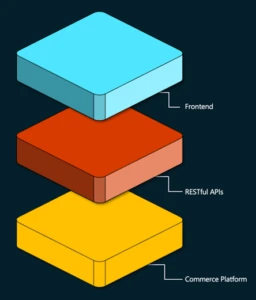
Composable commerce is a contemporary approach to e-commerce that separates the front-end (presentation layer) and back-end (commerce logic) of an e-commerce platform. Unlike traditional e-commerce systems, where changes to one component can affect the other, composable commerce decouples these two layers, enabling independent development and greater flexibility. This separation allows for greater agility, faster innovation, and the ability to adapt quickly to changing market demands.
Image: Composable Commerce Diagram
In contrast, traditional e-commerce systems often have monolithic front and back ends, leading to certain limitations. Modifying the underlying codebase to change the front-end design or user experience can be complex and time-consuming. Additionally, traditional systems are not easily scalable across different devices or channels. Composable commerce addresses these challenges by allowing businesses to easily update their website’s design or incorporate new features without disrupting the core e-commerce functionality.
What options do companies have:
Businesses have two powerful options to customize their e-commerce experiences: headless commerce and composable commerce. Headless commerce allows companies to develop and update front-end and back-end components independently, enabling quick adaptation to market changes and experimentation with innovative features. Composable commerce takes flexibility and customization to the next level by enabling businesses to select modular components from different vendors, providing the ultimate flexibility to create an e-commerce ecosystem that is tailored to their unique needs.
Benefits of Composable Commerce:
To start with, the flexibility and agility of a digital environment is continuously evolving, thus using a decouple architecture business can quickly adapt to customers changing preferences. Separating the front-end from the back end ensures that branding, user experience, and functionality stay consistent across various channels. By having cohesive experience across web, mobile, social, media, voice assistant and other Artificial Intelligence (AI), Virtual Reality (VR), Augmented Reality (AR), Voice Commerce, based emerging technologies lead to higher customer satisfaction, engagement, and loyalty.
Image: With composable commerce, businesses can provide cohesive experience to customers on various channels
In addition, scalability and performance are also greatly enhanced because businesses can independently scale each layer resulting in better resource allocation. Websites can now handle increased traffic, sales volume, and complex operations leading to faster page upload time and better user experience.
End-user Benefits:
Whether customers interact with your brand through a website, mobile app, voice assistant, marketplace, or social media platform, composable commerce ensures a seamless and tailored experience. In addition, faster loading times and improved website performance reduce the long wait time for the entire page to load, resulting in a smoother and more responsive user interface. More importantly customers are browsing via desktop, smartphone, tablet, or using voice assistants to access your products and services seamlessly. This omni-channel capability enhances convenience and accessibility for customers, meeting their expectations for a seamless cross-channel experience. Dynamics 365 Commerce enables businesses to build this experience.
Empowering Vision: ABB Optical Group’s Intelligent Contact Lens Ordering Platform with Microsoft Dynamics 365″
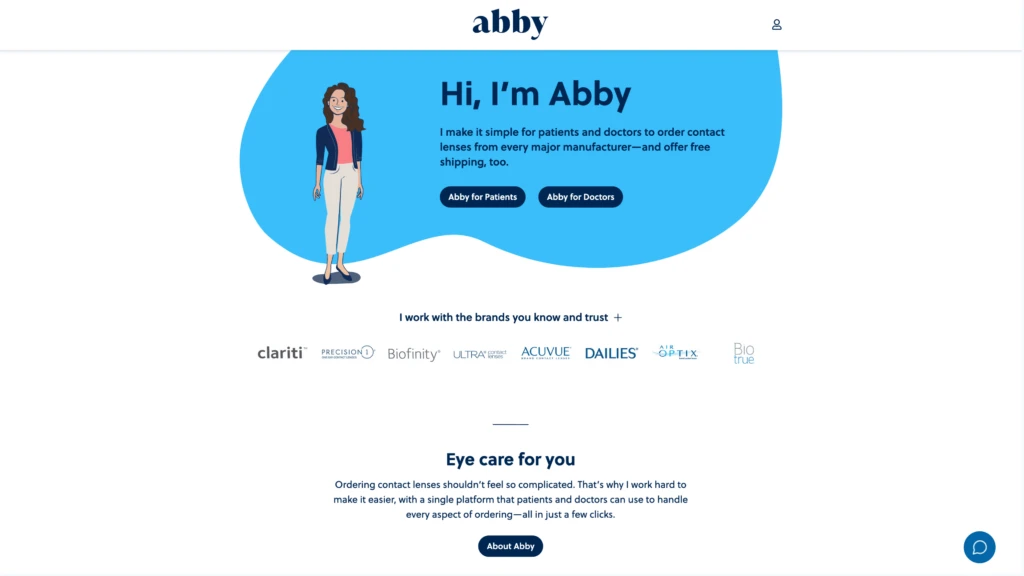
Embarking on a technological evolution, ABB Optical Group introduces its Intelligent Contact Lens Ordering Platform, a game-changer crafted in collaboration with Visionet Systems Inc. and Microsoft. This innovation involved the implementation of Microsoft Dynamics 365 Finance and Operations, Azure Cloud, and Data Lake, providing a solid technological foundation. ABB Optical aimed to transcend its legacy Patient Ordering Platform, yourlens.com, seeking a modern, intelligent, and scalable user experience. This vision materialized through the development of a robust Minimum Viable Product(MVP), introducing a microservices headless experience and harnessing the capabilities of Microsoft D365 Retail and HQ APIs, alongside Proof of Concepts.
The outcome was nothing short of transformative. The MVP’s successful pilot garnered positive feedback, propelling the rapid development of additional customer-demanded features. In just six months, Visionet spearheaded the launch of phase two of the Abby Platform, seamlessly integrating a data analytics component through Data Lake with Dynamics 365 F&O and Power BI. ABB Optical Group now stands at the forefront of innovation, offering eyecare providers and patients an intelligent, forward-thinking ordering system.
Conclusion:
In conclusion, the emergence of composable commerce signifies a pivotal shift in the digital marketplace. This approach, distinguished by its modular structure, cloud-native integration, and technology-independent capabilities, provides businesses with unparalleled flexibility and adaptability. It enables businesses to customize their digital experiences, integrate seamlessly with best of breed solution providers for individual capabilities, and respond swiftly to market changes and complexities.
Learn more
Dynamics 365 Commerce delivers a comprehensive, yet composable, set of capabilities for both consumer and business-facing organizations seeking to expand beyond traditional digital commerce limitations and improve customer engagement, build brand awareness, streamline purchasing, and deliver exceptional customer experiences.








Recent Comments