by Contributed | Mar 19, 2021 | Technology
This article is contributed. See the original author and article here.
Build client web apps with “Prolog”
Jun-ichi Sakamoto is a Japanese MVP for Developer Technologies. The 10-time MVP title holder specializes in C#, ASP.NET, Blazor, Azure Web Apps, TypeScript. Jun-ichi’s publication of NuGet packages – like Entity Framework Core, helper, testing tools, Blazor components, and more – have been downloaded more than 18 million times. For more on Jun-ichi, check out his Twitter @jsakamoto

How to request to Azure Event Hubs with Apache JMeter™
Kuniteru Asami is an Azure MVP and core staff member of the Japan Azure User Group. Kuniteru has been providing technical consulting for Microsoft Azure for more than 10 years since its initial release. Moreover, the Japanese Azure expert is the CEO of a company with six Azure MVPs on its staff. Follow him on Twitter @kunyami

Microsoft Ignite 2021: Important Announcements and Updates
Mohamed El-Qassas is a Microsoft MVP, SharePoint StackExchange (StackOverflow) Moderator, C# Corner MVP, Microsoft TechNet Wiki Judge, Blogger, and Senior Technical Consultant with +10 years of experience in SharePoint, Project Server, and BI. In SharePoint StackExchange, he has been elected as the 1st Moderator in the GCC, Middle East, and Africa, and ranked as the 2nd top contributor of all the time. Check out his blog here.

A Brief MVP Summit History
Hal Hostetler is an Office Apps and Services MVP who has been in the MVP program since 1996. Now retired, Hal is a Certified Professional Broadcast Engineer and remains the regional engineer for Daystar Broadcasting and a senior consultant for Roland, Schorr, & Tower. He lives in Tucson, Arizona. For more on Hal, check out his Twitter @TVWizard

C#.NET: HOW TO COPY SYSTEM FOLDER(S)
Asma Khalid is an Entrepreneur, ISV, Product Manager, Full Stack .Net Expert, Community Speaker, Contributor, and Aspiring YouTuber. Asma counts more than 7 years of hands-on experience in Leading, Developing & Managing IT-related projects and products as an IT industry professional. Asma is the first woman from Pakistan to receive the MVP award three times, and the first to receive C-sharp corner online developer community MVP award four times. See her blog here.
by Contributed | Mar 19, 2021 | Technology
This article is contributed. See the original author and article here.
Which community project do you maintain?
Sharing is Caring
How does it help people?
It helps by providing guidance and confidence for community members to know how and where they can get more involved and collaborate.
It is co-maintained by Hugo, Emily and April.
What have you been working on lately?
Increasing the session topic spectrum and finding other ways for folks in the community to get involved, no matter what their skill and talent is.
What do you do at work?
Development and also provide guidance on M365 Architecture
Why are you a part of the M365 community?
I love the collaborative feeling and inclusiveness within the community.
What was you first community contribution?
List Formatting definition. Chris was amazing, helpful and supportive.
One tip for someone who’d like to start contributing
Don’t be afraid to ask others to collaborate. You will be amazed at the new friends you make!
by Contributed | Mar 19, 2021 | Technology
This article is contributed. See the original author and article here.
The Office Add-ins developer platform team has new updates to share this month on Office Add-ins Patterns and Practices. PnP is a community effort, so if you are interested in contributing, see our good first issue list.
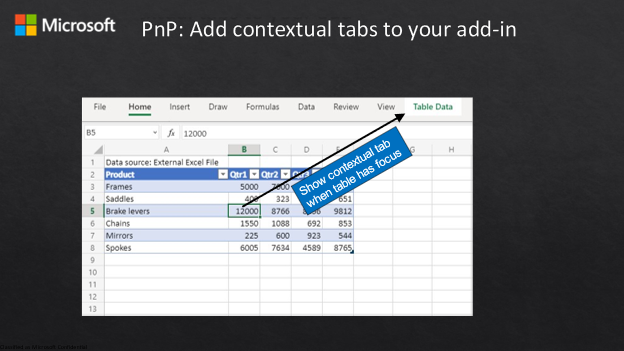
Create custom contextual tabs on the ribbon
This sample shows how to create a custom contextual tab on the ribbon in the Office UI. The sample creates a table, and when the user moves the focus inside the table, the custom tab is displayed. When the user moves outside the table, the custom tab is hidden.
Contributors
Thank you to our contributors who are actively helping each month with the PnP-OfficeAddins community effort.
Want to contribute?
PnP is a community effort by developers like you. Check out our good first issue list as a great place to help with some samples. Feel free to contribute to existing samples or create new ones.
About Office Add-ins Patterns & Practices (PnP)
Office Add-ins PnP is a Microsoft-led, community driven effort that helps developers extend, build, and provision customizations on the Office platform the right way by providing guidance and help through official documentation and open source initiatives. The source is maintained in GitHub where anyone can participate. You can provide contributions to the samples, reusable components, and documentation. Office Add-ins PnP is owned and coordinated by Office engineering teams, but the work is done by the community for the community.
You can find code samples for Office Add-in development in the Office Add-ins PnP repo. Some samples are also documented in the Office Add-ins docs, such as Open in Excel.
Additional resources
Learn more by joining the monthly Office Add-ins community call.
by Contributed | Mar 19, 2021 | Technology
This article is contributed. See the original author and article here.
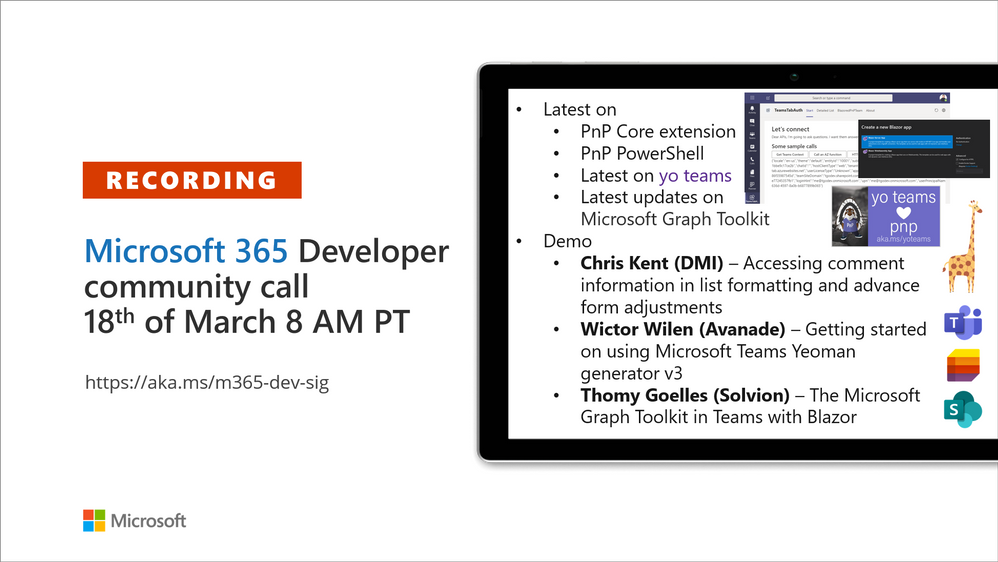
Recording of the Microsoft 365 – General M365 development Special Interest Group (SIG) community call from March 18, 2021.
Call Summary
Latest news from Microsoft 365 engineering and updates on open-source projects: PnP .NET libraries, PnP PowerShell, modernization tooling, on yo Teams, on Microsoft Graph Toolkit, and on Microsoft Teams Samples.
Announcing the GA release of SharePoint Framework v1.12 along with a host of other GA releases – PnP .NET Libraries – PnP Framework v1.3.0, PnP Core SDK v1.0.0 and PnP PowerShell v1.4.0. yo Teams generator-teams (apps generator) v3.0.3 GA and 3.1.0 Preview, yo teams-build-core (gulp tasks) v1.0.1 + v1.1.0 Preview, and msteams-react-base-component (React UI helpers) v3.1.0, have been released. In development – MSAL 2.0 provider and preview of OneDrive file components in Microsoft Graph Toolkit. Released new Microsoft Graph Toolkit training in Microsoft Learn, Register now for March/April trainings on Sharing-is-caring. The host of this call was Vesa Juvonen (Microsoft) | @vesajuvonen. Q&A takes place in chat throughout the call.
Actions:
Microsoft Teams Development Samples: (https://aka.ms/TeamsSampleBrowser)
“Hello Community”
Demos delivered in this session
Accessing comment information in list formatting and advance form adjustments – draw people’s attention to discussions around selected list items by more prominently displaying the number of comments on each item. Accomplish this by using CommentCount, a fluent UI icon and formatting. Be aware of and adjust for differences between how icon containing number renders slightly differently in forms, lists and tiles views. Use sample script in your list today!
Getting started on using Microsoft Teams Yeoman generator v3 – get newest Microsoft Teams App Project Generator – #YoTeams at the Repo. Presenter takes viewer from generator installation, project creation – scaffolding of files, to VS code and explains created files. Note: not using class based React components but using functional components and React hooks. Then create a build and install app – a configurable tab, in Teams. New V3 capabilities called out through demo.
The Microsoft Graph Toolkit in Teams with Blazor – more comfortable in C#, Server-side, .NET development as opposed to React, then this Blazor demo is for you. The demo focuses on using the Microsoft Graph Toolkit (MGT) in Server-side Blazor via SignalR in Teams App Dev. Authentication is handled by providers from MGT. Blazor components call Microsoft Graph functions to get list of teams, agenda, usernames and roles.
Thank you for your work. Samples are often showcased in Demos.
Topics covered in this call
Resources:
Additional resources around the covered topics and links from the slides.
General resources:
Upcoming Calls | Recurrent Invites:
General Microsoft 365 Dev Special Interest Group bi-weekly calls are targeted at anyone who’s interested in the general Microsoft 365 development topics. This includes Microsoft Teams, Bots, Microsoft Graph, CSOM, REST, site provisioning, PnP PowerShell, PnP Sites Core, Site Designs, Microsoft Flow, PowerApps, Column Formatting, list formatting, etc. topics. More details on the Microsoft 365 community from http://aka.ms/m365pnp. We also welcome community demos, if you are interested in doing a live demo in these calls!
You can download recurrent invite from http://aka.ms/m365-dev-sig. Welcome and join in the discussion. If you have any questions, comments, or feedback, feel free to provide your input as comments to this post as well. More details on the Microsoft 365 community and options to get involved are available from http://aka.ms/m365pnp.
“Sharing is caring”
Microsoft 365 PnP team, Microsoft – 19th of March 2021
by Contributed | Mar 19, 2021 | Technology
This article is contributed. See the original author and article here.
Another exciting week is in the books. News our team is covering this week includes Microsoft’s commitment to expand Azure Availability Zones to more regions, Monitor your spending through forecasted cost alerts with Azure Cost Management and Billing, Make workloads on AMD-backed virtual machines confidential without recompiling code, Long-term backup retention (LTR) for Azure SQL Managed Instance in public preview, Machine Learning Services on Azure SQL Managed Instance now generally available and an enterprise-scale Microsoft Learn module of the week.
Microsoft’s commitment to expand Azure Availability Zones to more regions
Microsoft continues to build Azure to support customer needs for low-latency, high-availability cloud services and with the ability to both store and process data within a country or geography. In 2021, Microsoft continued thier plans to expand datacenter regions to new markets like Indonesia and grow in existing markets in the United States and China. As the continued effort to bring local cloud services to more countries moves along, resiliency and high availability has become top of mind.
Microsoft has announced that by end of 2021, every country in which they operate a datacenter region will deliver Azure Availability Zones. More information surrounding new Availability Zone capabilities coming to your region can be found here: Microsoft’s commitment to expand Azure Availability Zones
Forecasted cost alerts with Azure Cost Management and Billing now Generally Available
Manage cloud spending with confidence by using the newly generally available forecasted cost alerts. Azure Cost Management and Billing can prevent cost overruns with Azure budget alerts on forecasted costs.
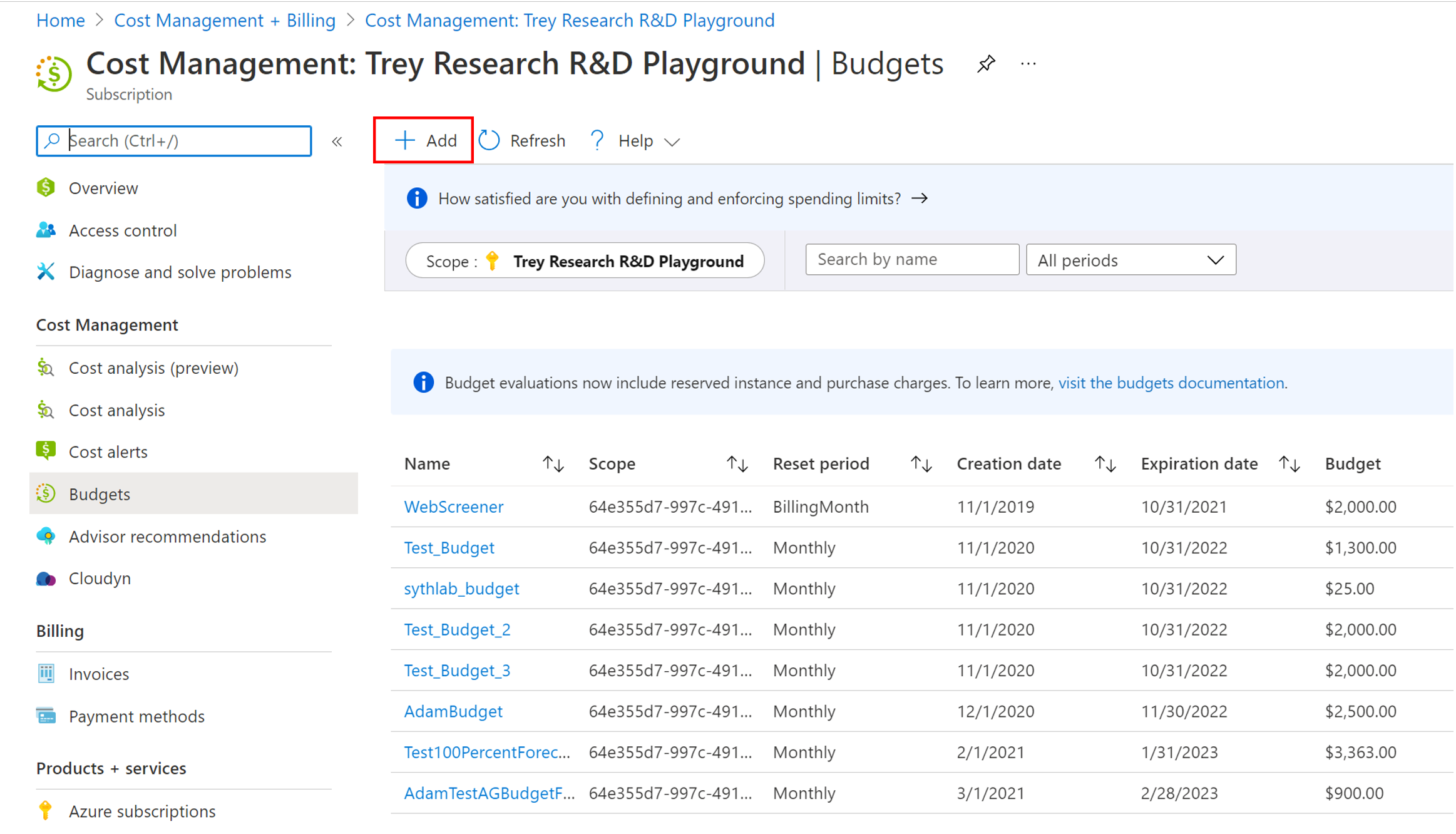
Learn more here: Prevent exceeding Azure budget with forecasted cost alerts
Make workloads on AMD-backed virtual machines confidential without recompiling code
Microsoft announced the limited preview of AMD-backed Azure confidential computing virtual machines. Microsoft is further broadening the confidential computing options available to Azure customers through our technology partnership with AMD, specifically by being the first major cloud provider to offer confidential virtual machines on the new AMD EPYC™ 7003 series processors. This new approach complements existing Azure confidential computing solutions such as confidential containers for Azure Kubernetes Service and opens the possibility to create new confidential applications without requiring code modifications which in turn substantially simplifies the process of creating confidential applications.
Sign up for the preview here
Long-term backup retention for Azure SQL Managed Instance in public preview
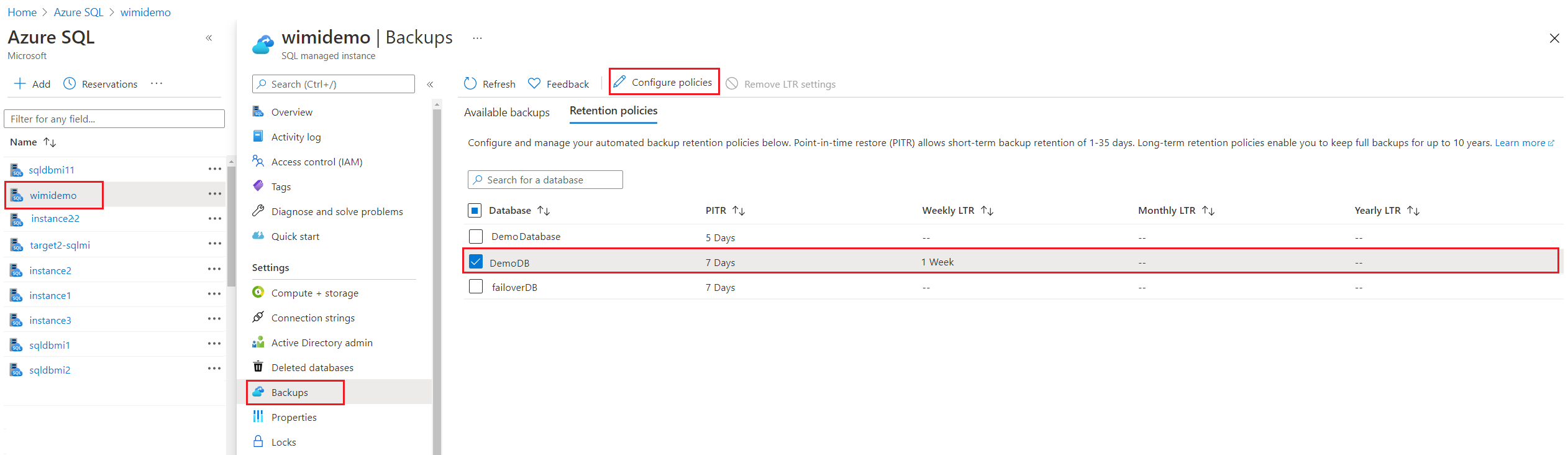
Many applications have regulatory, compliance, or other business purposes that require you to retain database backups beyond the 35 days provided by Azure SQL Managed Instance automatic backups. When using the LTR feature, you can automatically retain specified SQL Managed Instance full backups in separate Azure Blob storage with configured redundancy for up to 10 years. You can then restore any backups as a new database. LTR may be configured on both single and pooled instances.
Machine Learning Services on Azure SQL Managed Instance now generally available
Microsoft’s goal is to continue making investments in Machine Learning Services across all SQL Server products in such platforms as Windows, Linux, Virtual Machines, Edge, Synapse, and Managed Instance, with feature parity and consistent user experience. To start this endeavour, Microsoft has enabled machine learning capabilities to operate R or Python runtime with increased performance on a preconfigured SQL Managed Instance.
The Machine Learning Services with R or Python support in Azure SQL Managed Instance can now be used to:
- Data preparation and general purpose data processing
- Deploy models and scripts into production in stored procedures.
- Train machine learning models in database.
Community Events
- Hello World – Special guests, content challenges, upcoming events, and daily updates
- Patch and Switch – Patch and Switch are back to share thier “from the trenches” stories
- Extend to the cloud with Azure VMware solution – Delivered in partnership with Intel and VMware— learn how to easily shift your VMware workloads to the cloud on your own terms and modernize your investments
MS Learn Module of the Week

Creating enterprise-scale architecture in Azure
Learn how Microsoft Cloud Adoption Framework for Azure enterprise-scale landing zones can help organizations accelerate cloud adoption from months to weeks. This learning path will explore how to create Azure landing zone architecture at enterprise-scale. Learn about landing zone critical design areas to build and operationalize your Azure environment.
Learn more here: Create an enterprise-scale architecture in Azure

Let us know in the comments below if there are any news items you would like to see covered in the next show. Be sure to catch the next AzUpdate episode and join us in the live chat.
by Contributed | Mar 18, 2021 | Technology
This article is contributed. See the original author and article here.
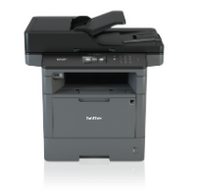
Universal Print is now available on select Brother devices to help organizations manage their print infrastructure through Universal Print services from Microsoft. These Brother printers are Universal Print ready with compatible firmware, which provides native support to Universal Print device registration. With an eligible Microsoft 365 subscription, users can leverage the Universal Print console to:
- Monitor printer status, configurations, and availability.
- Monitor users and number of print jobs.
- Configure user permissions.
No need for the Universal Print connecter with select Brother devices
We are committed to providing industry leading cloud-based printing solutions which meet the needs of our Microsoft 365 customers both in the office and working from home.
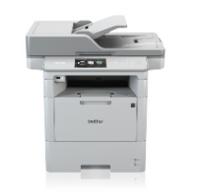
Brother is pleased to announce our first Universal Print native compatible MFC and DCP monochrome laser models. Firmware is available at the following links to update existing devices in the field.
Firmware update tools
DCP-L5500DN
DCP-L5600DN
DCP-L5650DN
MFC-L5700DW
MFC-L5800DW
MFC-L5850DW
MFC-L5900DW
MFC-L6700DW
MFC-L6750DW
MFC-L6800DW
MFC-L6900DW
Our integration for select Brother devices is still ongoing. Please stay tuned and check the Brother section on the Partner Integrations page.
by Contributed | Mar 18, 2021 | Technology
This article is contributed. See the original author and article here.
As we talk with our customers that are using Microsoft Endpoint Manager to deploy, manage, and secure their client devices, we often get questions regarding co-managing devices and hybrid Azure Active Directory (AD) joined devices. Many customers confuse these two topics – the first is a management option, while the second is an identity option. In this blog, I hope to clear up any confusion and give guidance and scenarios on how to use both to manage and protect your devices.
Let’s start with the basics: management
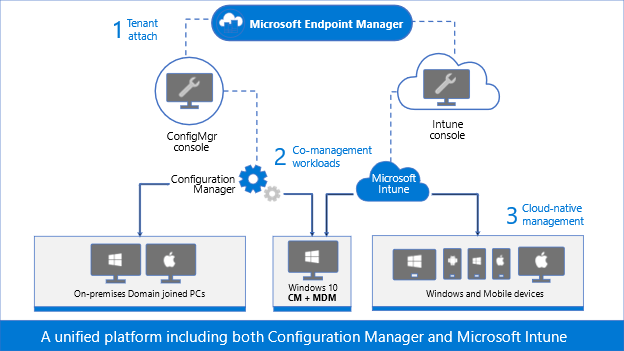
Microsoft Endpoint Manager is the combination of Configuration Manager – the on-premises management tool that you’ve been using for decades – and Microsoft Intune – the cloud-based management solution used for modern device security and management. Endpoint Manager’s goal is unifying both of your management solutions and bringing the power of the cloud to your entire endpoint estate.
To accomplish this goal, we first launched tenant attach to provide an easy and low-risk path to cloud attach your Configuration Manager infrastructure to your Intune tenant. This is an on-premises to cloud attachment like you’ve seen before when connecting your Exchange Server on-premises infrastructure to Exchange online and sync’d those mailboxes, and when you connected Active Directory to Azure Active Directory and sync’d those user accounts and other objects. Tenant attach is the same idea: attach the Configuration Manager infrastructure to Intune and sync the Windows 10 Configuration Manager managed devices to the cloud-based Intune tenant. Creating this connection brings the value of remote actions and analytics, immediately.
During or after the initial attachment, you can start moving certain workloads from Configuration Manager to Intune, either one at a time or en masse. You choose the path that’s right for you. Co-management is the act of moving workloads from Configuration Manager to Intune and telling the Windows 10 client who the management authority is for that particular workload. For example, you might move Compliance Policies and Device Configuration workloads to Intune while leaving all other workloads set to Configuration Manager. This tells the Windows 10 client to listen to Configuration Manager for app deployment and security policies, for example, while listening to Intune for compliance policies and device configuration policies.
Figure 1: Graphic representation of Microsoft Endpoint Manager, Configuration Manager, and Microsoft Intune.
As you continue to modernize, continue moving workloads to Intune until you are managing everything in the cloud, or keep all of the workloads directed to Configuration Manager and stay on the tenant attach step. Or you can even start in Intune as cloud-native. With tenant attach and co-management, you choose the path and the end state.
Let’s start with the basics: identity
Active Directory Domain Services (AD DS) has been around since 2000, with the release of Windows 2000 Server. Traditionally, we join our Windows devices to Active Directory to take advantage of Group Policies, security settings, and even to give permissions to resources that are stored in a different Active Directory environment – either in the same Active Directory forest or a different forest. Devices can be joined to only one AD DS environment.
Like we said earlier, though, it’s possible to connect the on-premises AD DS environment to Azure Active Directory (Azure AD). When this connection is made, the devices that are joined to AD DS may then be registered in Azure AD. This connection and registration is known as hybrid Azure AD joined.
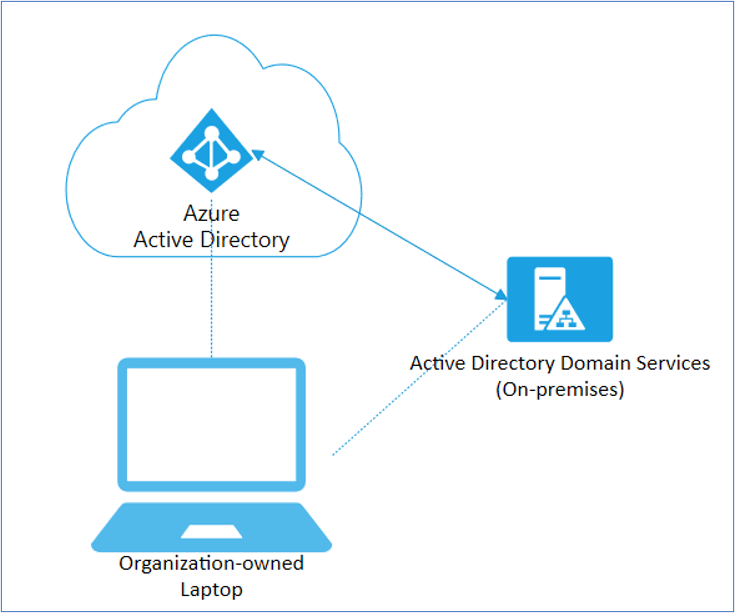 Figure 2: Diagram depicting a Hybrid Azure AD joined corporate laptop.
Devices that are co-managed, or devices that are enrolled in in Intune, may be joined directly to Azure AD, or they may be hybrid Azure AD joined but they must have a cloud identity.
Our guidance
Not all devices in your organization need to be managed the same. Each device serves a different purpose, as such has different management and identity requirements. For example, new devices may not need to be joined to AD DS, and instead can be initially provisioned as Azure AD joined, being managed either by Intune natively or by co-management. Starting this device as hybrid Azure AD joined will introduce challenges later as you adopt more modern solutions, such as migrating user data, user profiles, and determining which group policies are assigned to the device. So before joining any new devices to AD DS and deciding on that hybrid approach, ask yourself, “Does this device need to be hybrid Azure AD joined? What are the benefits of joining this device to my AD DS environment?”
Hybrid Azure AD joining a device is great for uplifting your existing AD DS joined devices, but Azure AD is the Microsoft recommended path for most new or repurposed devices, especially when using modern deployment tools like Windows Autopilot.
Scenarios
Many of our customers have been using AD DS for 20 years, joining client (and server) operating systems from Windows 2000, Windows XP, Windows 7, Windows 8/8.1, Windows 10, and everything in between (I’m looking at you Windows Vista!). Because of how long AD DS has been around, you may have Group Policy Objects (GPOs) that you need to leverage, or Win32 authentication, or other scenarios that will make moving to a pure Azure AD environment challenging. Let’s look at some of these scenarios and our guidance with each one.
Scenario #1: User profile migration
Scenario
When a device is joined to Azure AD, it creates a new profile for the logged-on user, and does not reference any existing profiles. In a new device scenario, this won’t be an issue as there are no profiles yet on the endpoint. User profiles typically include the following local directories:
- Local files in the Desktop, Documents, Pictures folders
- Start menu and Taskbar customizations
- Favorites
- Browser settings
- Cached credentials
- Outlook cache and settings
- Third-party app settings
But if the devices were previously AD DS joined or joined to its own workgroup, you may need a profile migration, as seen in the table below:
Original device state
|
Once joined to Azure AD
|
New or re-imaged/repurposed device
|
No profile migration needed
|
Local workgroup
|
User profiles need to be migrated
|
AD DS joined
|
User profiles need to be migrated
|
Table 1. User profile migration needs when joining a device to Azure AD.
Guidance
Our guidance in the case where a user profile migration is needed is to:
- Manually copy/paste to migrate profiles, or use a third-party profile migration tool
- Re-map existing files and settings to the new profile
- Preserve all cache settings
- Use Enterprise State Roaming
- Force synchronization of browser data
- Moving your on-premises file shares to SharePoint Online
- Use OneDrive for Business Known Folder Move
Scenario #2: Group Policy Objects
Scenario
Though we are constantly adding configuration service providers (CSPs) settings that Windows supports into Intune and making configuration of settings easier for you, some of the GPOs that are configured on-premises may not have equivalent CSPs in Intune. These GPOs typically revolve around very specific user-based configurations, such as:
- Start menu and Taskbar customizations
- Desktop wallpaper and screensaver settings
- Some registry settings
- Other Group Policy Preferences
Guidance
- Run Group Policy Analytics to analyze these GPOs and determine your level of modern management support.
- Do a thorough assessment of supported settings in MDM – do you still need them? Are there alternative technologies with higher security? Are the registry changes covered by a KB article? Is the policy still required? Do a hard rationalization with your team!
- If you are setting Registry to configure apps, re-evaluate if the configuration is supported via ADMX (Administrative Templates).
- Migrate those GPO settings that have equivalent CSPs to an Intune policy. For devices born in the cloud, use Security baselines to configure Windows 10 devices in Intune as these have recommended MDM configurations.
- Re-evaluate the necessity of those GPO settings that do not have an equivalent CSP and report to us.
Scenario #3: Win32 apps and legacy authentication
Scenario
Some Win32 apps have a need for some legacy form of authentication. Any apps that require AD DS machine authentication will not work.
The apps that work are the apps that support NT LAN Manager (NTLM), Modern Auth, and Kerberos TGT.
Guidance
- Once you have a better idea of who is using legacy authentication in your directory and which applications depend on it, the next step is upgrading your users to use modern authentication.
- Migrate these apps to apps that support modern types of authentication.
- Re-evaluate the necessity of AD DS machine authentication.
- Get application compatibility assistance at no additional cost.
Scenario #4: Printing
Scenario
Your users are using printers that are directly connected to their devices or that have a direct path in the Printer settings. And some may be using AD Printer Discovery to find the printer closest to them. Because there are many printer-type scenarios, consider the following in the table below:
Printer scenario
|
Result
|
User has a printer directly connected
|
This will continue to work
|
User has a direct path to a printer
|
This will continue to work
|
User uses AD Printer Discovery
|
This will not work
|
Table 2. Printer scenarios when migrating a device to Azure AD.
Guidance
- Notify users of a direct printer path, when possible
- Deploy a PowerShell script from Intune to map the printers
- Best: Use Universal Print, our driverless cloud-based, print service
Conclusion
Hybrid Azure AD joining a device is a device identity scenario, which has your device joined to the on-premises AD DS domain, and registered in Azure AD. This is a good scenario when starting your identity and security migration from on-premises to the cloud.
Co-management is a device management scenario, which has your device being managed by both Configuration Manager and Microsoft Intune, with each being the management authority of specific workloads.
Consider the points in this table as our recommendations to realize the benefits of cloud management.
Identity
|
Management
|
Provisioning
|
Cloud modernization
|
AD DS only
|
Configuration Manager + Tenant Attach
|
Operating System Deployment
|
Low
|
Hybrid Azure AD joined
|
Tenant Attach + Co-management
|
Operating System Deployment
|
Medium
|
Azure AD only
|
Co-management
Or
Microsoft Intune
|
Windows Autopilot
|
High
|
Table 3. Recommended Windows client management strategy based on device Identity
As you start to move from your legacy AD DS and Configuration Manager environments, we’re here to help! Reach out to our FastTrack team and follow us on Twitter @IntuneSuppTeam! And bookmark the Microsoft Endpoint Manager community for more blogs and information on managing all of your devices, including iOS, iPad OS, macOS, Android, and Windows!

by Contributed | Mar 18, 2021 | Technology
This article is contributed. See the original author and article here.

The two half-day event will feature speakers from all over the country sharing their knowledge and insight around XR.
The Extended Reality (XR) at Michigan 2021 Summit
This virtual event will span two half-days on April 6 and April 7 and will feature speakers from all over the country sharing their knowledge and insight around XR, including:
• ALAN SMITHSON, Event Emcee, Co-Founder of MetaVRse, and Host of the XR for Business Podcast
• NICK KLINGENSMITH, Mixed Reality Academy Lead Engineer, Microsoft
• MARK MINE, Director, Technology Innovation group, The Walt Disney Studios
• JOANNA POPPER, Global Health of Virtual Reality for Location-Based Entertainment, Hewlett Packard
• JEREMY BAILENSON, Founding Director, Stanford University’s Virtual Human Interaction Lab
• 13 faculty, students, and staff from the University of Michigan
Please visit our registration page for a full list of speakers and sessions.
The XR at Michigan Summit will utilize virtual event platforms, Hopin, for the majority of the speaker sessions, and AltspaceVR, for a networking reception.
REGISTER HERE
Proudly Supported By
Platinum

Additional Resources
For an Introducing MRTK for Unity – Mixed Reality | Microsoft Docs.
by Contributed | Mar 18, 2021 | Technology
This article is contributed. See the original author and article here.
Call Summary:
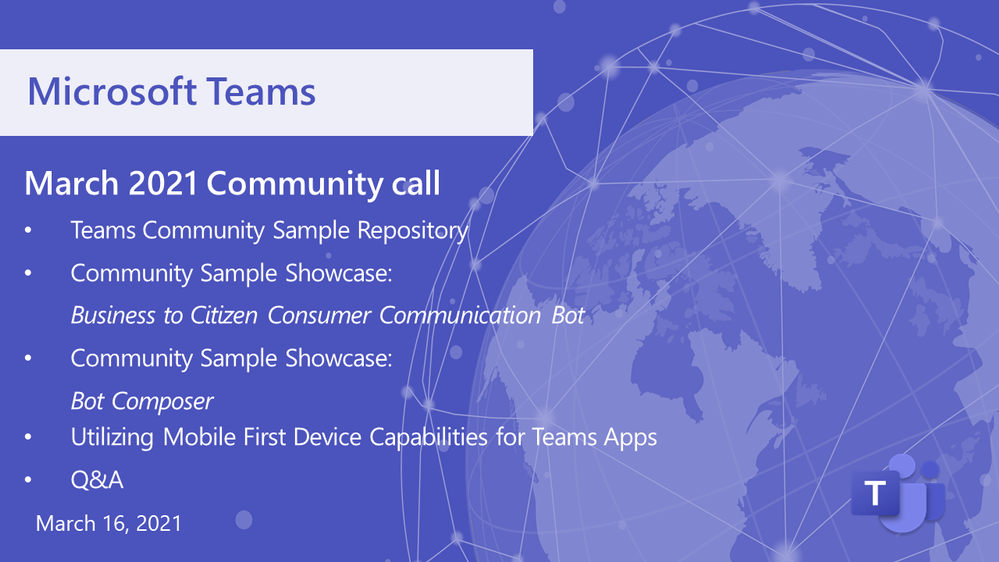
This month’s community call featured latest look at the Teams Community Sample Repository (consolidated sample code Repo for Teams platform), then two Community Sample Showcase entries: Business to Citizen Consumer Communication Bot (allows citizen end-users with no Teams license to engage a business licensed user in a real-time Teams chat), and Bot Composer (create a simple bot, install it in Teams and have it calling the Graph in 15 minutes!), followed by a presentation on Utilizing Mobile First Device Capabilities for Teams Apps (how developers are able to extend hardware capabilities in mobile devices to build richer mobile apps), and a 10-minute Q&A. The call was hosted by Jun Pak (Microsoft). Microsoft presenters included Wajeed Shaikh, Sathya Raveendran, Arun Kumar Anaparthi, Bob German, Anuj Bahl and Shubham Chauhan. Recorded on February 16, 2021. Thank for attending the call or viewing on demand.

Demos:
Business to Citizen Consumer Communication Bot – sample allows citizen end-users with no Teams license to engage a business licensed user in a real-time Teams chat and vice versa, using a consumer chat channel. Chat conversations may be escalated into a call/meetings with anonymous (guest) users. Allows quick and easy file/image transfers and handling of multiple chat sessions in parallel with clear user attribution in each chat thread. Uses Graph APIs for chat and file transfers.
Bot Composer – create a simple bot, install it in Teams and have it calling the Graph in 15 minutes! Step-by-step – Name your bot, add a trigger, use ngrok to make bot work in Teams, register bot, create an app (in App Studio), install bot locally, connect it to the Graph, create trigger to respond with person’s title from profile, ask question in Teams!
Utilizing Mobile First Device Capabilities for Teams Apps – four device capabilities (Image, Location, Mic, and Scanner APIs) now in Teams Client JS SDK that developers can utilize for extending bots, tabs, messaging extensions and personal apps, in mobile apps. Reviewed mobile device capabilities Roadmap, 3 UI demos, and scenarios with API configurations. Have a look at the mobile People Picker Control in development. API documentation with code snippets is current.
Resources:
Actions:
General Resources:
Stay connected:

by Contributed | Mar 18, 2021 | Dynamics 365, Microsoft 365, Technology
This article is contributed. See the original author and article here.
Projects used to be a discrete subset of work people did every day, but the way we work is transforming. Organizations and individuals have taken incredible leaps to implement digital innovations to help employees work better together now that so many are working from home. Today, all work is project work, and everyone works on projects. Projects can range from ad hoc, involving a couple of people, to years’ long efforts and entire portfolios. “Today, all work is project work, and everyone works on projects.” Howard Crow, Head of Product for Microsoft Planner and Microsoft Project The transformation of projects from discrete activities to the work each of us does every day requires new approaches and a new generation of tools that can span an organization and meet people where they are working. To answer these challenges, Microsoft’s vision is connected project experiences that are simple enough for everyone to use and powerful enough to be a catalyst for business success across the world’s largest organizations. In a time when projects are the unifying thread woven throughout the fabric of modern work, Microsoft delivers the platform, tools, and capabilities teams need to eliminate complexity, clarify priorities, stay on top of tasks, and work together to achieve key strategic objectives. Our solutionsincluding Microsoft Planner, Microsoft Project, and Microsoft Dynamics 365 Project Operationsprovide the end-to-end management capabilities that teams and organizations of all sizes need to tackle projects of every level of complexity. Cut through complexity with connected project experiences Cutting through complexity starts with visibility, and Microsoft’s connected project experiences are designed to help you organize and view projects, schedules, and tasksor dive more deeply into all the details. They provide intelligent, data-driven operational insights so you can address emerging issues before they become problems and seize new opportunities quickly. They’re built so it is easy to take advantage of flexible solutions that map to your business processes and adapt to the way your teams work best. Microsoft’s connected project experiences help provide clear expectations about budgets and timelines, enable you to set your teams up to drive strategic outcomes that improve customer satisfaction, increase profitability, and reduce costs. Reducing complexity and increasing clarity will help you take an important step forward toward achieving the kinds of successful results that lead to happier, more engaged teams. We also know that solving today’s complexity challenges alone isn’t enough. Long-term business success is also built on a modern technology platform that supports a culture of innovation and offers the flexibility to grow and adapt. Microsoft’s connected project experiences also deliver a unified approach that brings together all your company’s data, to help you uncover insights. With simplified IT management and the security of Microsoft’s trusted cloud to protect your processes and intellectual propertyPlanner, Project, and Dynamics 365 Project Operationsmark the beginning of a new era of project experiences that will transform how teams and organizations manage their work. Join us for Reimagine Project Management with Microsoft Learn more about the connected project experience at Reimagine Project Management with Microsoft, now available as a free, on-demand event. You’ll learn the latest on Microsoft Planner, Microsoft Project, and Dynamics 365 Project Operationsthree solutions built to address and solve for your unique business needs. Although the event is completely digital, you’ll have opportunities to connect with Microsoft experts, technology partners, and peers to expand your network. Register for Reimagine Project Management with Microsoft to: Discovernew features and best practices from live demos and product walkthroughs with more than six hours of on-demand content. Connect with other attendees through round tables and board rooms. Don’t miss out on an opportunity to find the Microsoft connected project experience to equip your organization with everything needed to cut through complexity and successfully complete your project. Register now and watch on demand
The post Reimagine project management at our free digital event appeared first on Microsoft Dynamics 365 Blog.
Brought to you by Dr. Ware, Microsoft Office 365 Silver Partner, Charleston SC.


Recent Comments