by Contributed | Apr 13, 2021 | Technology
This article is contributed. See the original author and article here.
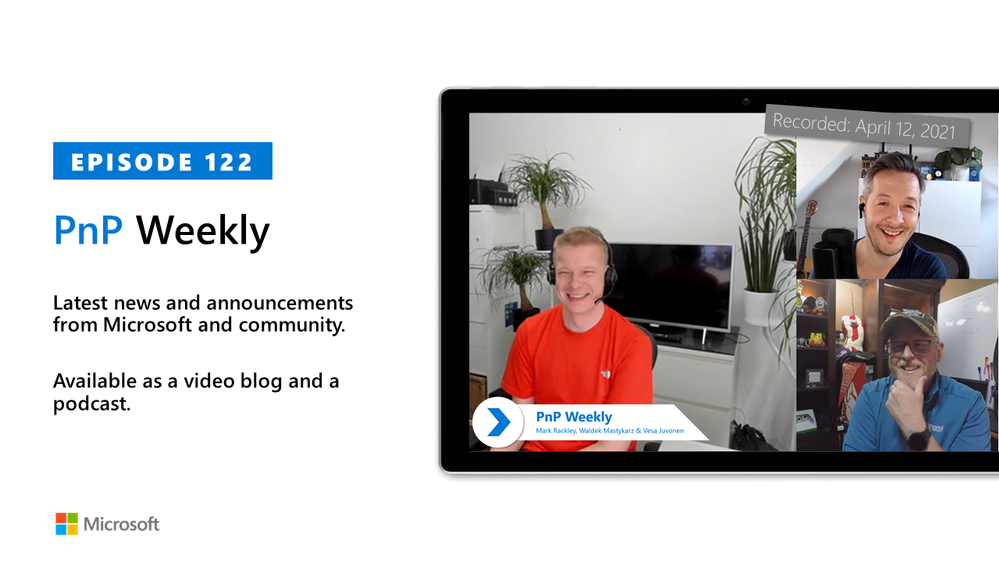
In this installment of the weekly discussion revolving around the latest news and topics on Microsoft 365, hosts – Vesa Juvonen (Microsoft) | @vesajuvonen, Waldek Mastykarz (Microsoft) | @waldekm are joined by a Partner at the US-based consultancy PAIT Group and Microsoft 365 MVP Mark Rackley | @mrackley.
Topics discussed in this session include: Hillbilly tabs, North American Collaboration Summit, how the transition from on-Prem to Cloud along with a talented PnP community has impacted the need to customize applications. Hiring based on who’s available, managing the pace of change and customer expectations, deployment planning, and the business unit customer’s interest in Microsoft Viva experience.
Covering also 20 articles from Microsoft and the Community.
This episode was recorded on Monday, April 12, 2021.
These videos and podcasts are published each week and are intended to be roughly 45 – 60 minutes in length. Please do give us feedback on this video and podcast series and also do let us know if you have done something cool/useful so that we can cover that in the next weekly summary! The easiest way to let us know is to share your work on Twitter and add the hashtag #PnPWeekly. We are always on the lookout for refreshingly new content. “Sharing is caring!”
Here are all the links and people mentioned in this recording. Thanks, everyone for your contributions to the community!
Events:
Microsoft articles:
Community articles:
Additional resources:
If you’d like to hear from a specific community member in an upcoming recording and/or have specific questions for Microsoft 365 engineering or visitors – please let us know. We will do our best to address your requests or questions.
“Sharing is caring!”
by Contributed | Apr 13, 2021 | Technology
This article is contributed. See the original author and article here.
All Around Azure is the amazing show you may already know to learn everything about Azure services and how they can be utilized with different technologies, operating systems, and devices. Now, the show is expanding! We’re excited to bring you All Around Azure: DevOps with GitHub.
When Developers and IT operations teams work together, organizations win. Learn the patterns, practices, and tooling that bring out the DevOps capabilities in your organization
Agenda
World Wide Event
07:30 – 10:00 IST
12:00 – 14:30 AEST
03:00 – 05:30 GMT
19:00 – 21:30 PDT
|
11:00 – 13:30 GMT
15:30 – 18:00 IST
20:00 – 22:30 AEST
03:00 – 05:30 PDT
|
12:00 – 14:30 PDT
20:00 – 22:30 GMT
12:30 – 03:00 IST
05:00 – 07:30 AEST
|
Register Now
https://aaa-devopsgitub.splashthat.com/
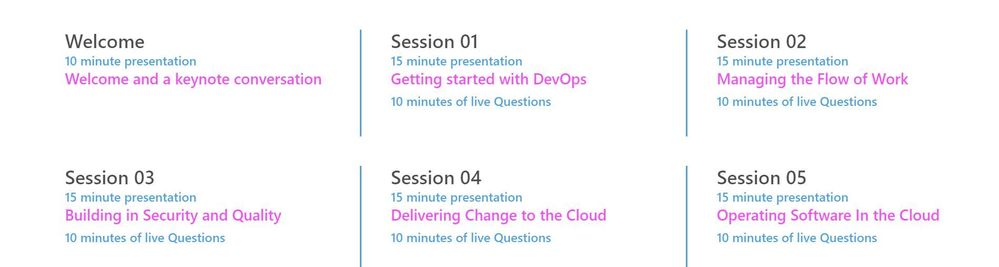
The DevOps Learning Path is designed for those who develop and operate software and need to increase collaboration, performance, and reliability. The content is comprised of 5 modules that approach topics ranging from getting started with DevOps, to delivering change, to operating software in the cloud.
Each session includes a curated selection of associated modules from Microsoft Learn that can provide an interactive learning experience for the topics covered and may also contribute toward preparedness for the official AZ-400 Designing and Implementing Microsoft DevOps Solutions Certification.
by Contributed | Apr 13, 2021 | Technology
This article is contributed. See the original author and article here.
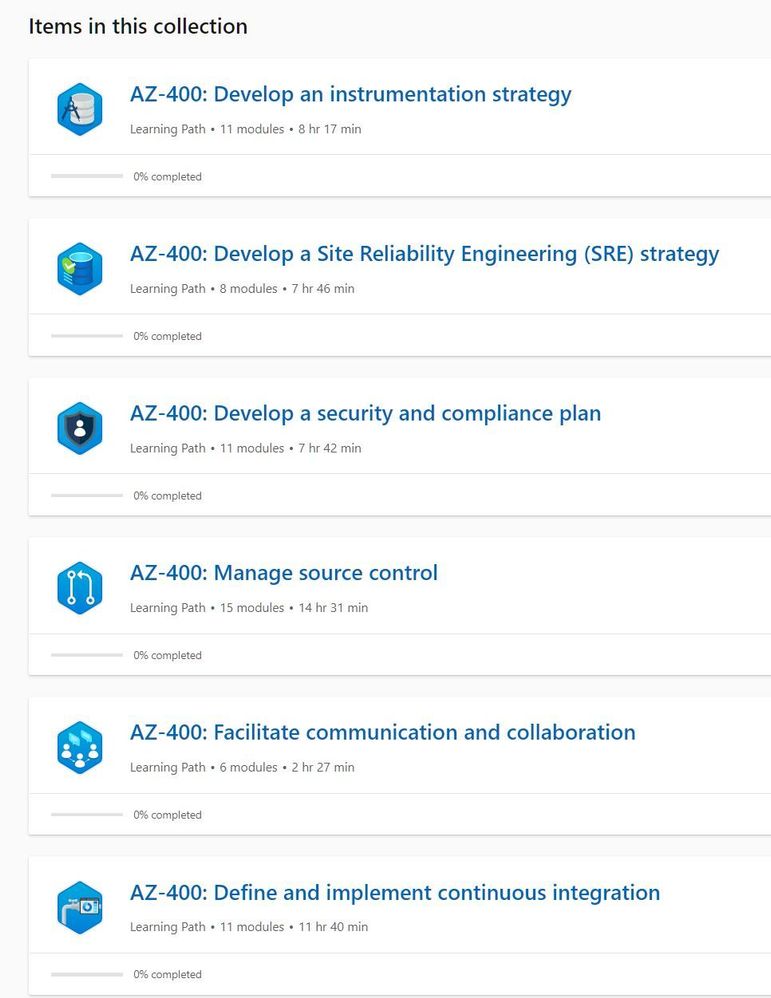
In this latest episode of Azure Unblogged, I am chatting to Vijay Nagarajan from the Azure Update Management team.
I’ve long been a fan and user of Azure Update Management both in my own environments and encouraging customers to adopt it, chatting to Vijay I ask about where Azure Update Management fits in on a customer’s cloud adoption journey and how it can be leveraged.
Patching servers and applications is a bit part of an IT department’s “business as usual (BAU)” activities and there are well established method’s for patching Windows and Linux servers but I raise the question about third party product patching and where Microsoft’s WSUS or Azure Update Management solutions can help in this area.
Vijay and I delve into the cost of implementing Azure Update Management (spoiler alert, Azure Update Management is a free solution) and explain how to look at that in a wider context when pricing up your Azure environment.
And lastly Vijay shares some information about the roadmap features he and the team are working on and the current private preview.
So grab a comfy seat and your favourite drink and join Vijay & I here or on Channel 9.
Resources:
– Azure Update Management Overview
– MS Learn: Manage Azure Updates
– WSUS Package Publisher
by Contributed | Apr 12, 2021 | Technology
This article is contributed. See the original author and article here.
Several customers have approached me on how to configure Splunk antivirus exclusions for processes, folders, and files within Microsoft Defender for Endpoint on RedHat Enterprise Linux. This quick reference article has been created to address this common question.
Note: This blog is in support of Microsoft Defender for Endpoint on Red Hat Enterprise Linux 7.9.
Disclaimer: This may not work on all versions of Linux. Linux is a third-party entity with its own potential licensing restrictions. This content is provided to assist our customers to better navigate integration with a 3rd party component or operating system, and as such, no guarantees are implied. Process and folder exclusions could potentially be harmful because such exclusions increase your organizational exposure to security risks.
- First let’s check if any file or folder exclusions are already configured on your RedHat Enterprise Linux clients by running the following command
mdatp exclusion list
- In the following example, we see that we do not have any exclusions configured for the device
[azureuser@redhat /]$ mdatp exclusion list
=====================================
No exclusions
=====================================
[azureuser@redhat /]$
- To review Microsoft Defender for Endpoint on Linux exclusions information, visit our public documentation.
- Splunk exclusions list is noted in their respective documentation.
- Here is a simplified list of the recommended exclusion from the link above:
version:
|
Directories to exclude:
|
Processes to exclude:
|
Splunk Enterprise (*nix)
|
/opt/splunk ($SPLUNK_HOME) and all sub-directories
/opt/splunk/var/lib/splunk ($SPLUNK_DB) and all sub-directories
|
· bloom
· btool
· btprobe
· bzip2
· cherryd
· classify
· exporttool
· locktest
· locktool
· node
· python*
· splunk
· splunkd
· splunkmon
· tsidxprobe
· tsidxprobe_plo
· walklex
|
Splunk universal forwarder (*nix)
|
/opt/splunkforwarder ($SPLUNK_HOME) and all subdirectories
|
· Same as Splunk Enterprise (*nix)
|
- To add an exclusion manually for a process running on RHEL 7.9, you need to run the following command:
mdatp exclusion process add –name [nameofprocess]
- Since we have 17 processes to exclude, we will have to run the command 17 times, one for each process.
sudo mdatp exclusion process add –name bloom
sudo mdatp exclusion process add –name btool
sudo mdatp exclusion process add –name btprobe
sudo mdatp exclusion process add –name bzip2
sudo mdatp exclusion process add –name cherryd
sudo mdatp exclusion process add –name classify
sudo mdatp exclusion process add –name exporttool
sudo mdatp exclusion process add –name locktest
sudo mdatp exclusion process add –name locktool
sudo mdatp exclusion process add –name node
sudo mdatp exclusion process add –name python*
sudo mdatp exclusion process add –name splunk
sudo mdatp exclusion process add –name splunkd
sudo mdatp exclusion process add –name splunkmon
sudo mdatp exclusion process add –name tsidxprobe
sudo mdatp exclusion process add –name tsidxprobe_plo
sudo mdatp exclusion process add –name walklex
[azureuser@redhat /]$ sudo mdatp exclusion process add –name bloom
Process exclusion added successfully
- Once we run through the 17 processes, we can check the exclusions list again.
[azureuser@redhat /]$ mdatp exclusion list
=====================================
Excluded process
Process name: bloom
—
Excluded process
Process name: btool
—
Excluded process
Process name: btprobe
—
Excluded process
Process name: bzip2
—
Excluded process
Process name: cherryd
—
Excluded process
Process name: classify
—
Excluded process
Process name: exporttool
—
Excluded process
Process name: locktest
—
Excluded process
Process name: locktool
—
Excluded process
Process name: node
—
Excluded process
Process name: python*
—
Excluded process
Process name: splunk
—
Excluded process
Process name: splunkd
—
Excluded process
Process name: splunkmon
—
Excluded process
Process name: tsidxprobe
—
Excluded process
Process name: tsidxprobe_plo
—
Excluded process
Process name: walklex
=====================================
[azureuser@redhat /]$
Note: Now that we have all 17 processes excluded. We can move on to the folder exclusions.
- To add folder exclusions manually for RedHat Enterprise Linux 7.9, you need to run the following commands:
sudo mdatp exclusion folder add –path “/opt/splunk/”
Note: This will exclude all paths and all sub directories under /opt/splunk.
[azureuser@redhat /]$ sudo mdatp exclusion folder add –path “/opt/splunk/”
Folder exclusion configured successfully
- We can check the folder exclusions list again and verify the folders are excluded.
[azureuser@redhat /]$ mdatp exclusion list
=====================================
[azureuser@redhat /]$ mdatp exclusion list
=====================================
Excluded folder
Path: “/opt/splunk/”
—
- Now that we have added the folder exclusions for the application and verified it with mdatp exclusion list we are good to go.
Hopefully this article provides you with added clarity around the common task of adding Splunk exclusions on Linux clients protected by Microsoft Defender for Endpoint on Linux.
Disclaimer
The sample scripts are not supported under any Microsoft standard support program or service. The sample scripts are provided AS IS without warranty of any kind. Microsoft further disclaims all implied warranties including, without limitation, any implied warranties of merchantability or of fitness for a particular purpose. The entire risk arising out of the use or performance of the sample scripts and documentation remains with you. In no event shall Microsoft, its authors, or anyone else involved in the creation, production, or delivery of the scripts be liable for any damages whatsoever (including, without limitation, damages for loss of business profits, business interruption, loss of business information, or other pecuniary loss) arising out of the use of or inability to use the sample scripts or documentation, even if Microsoft has been advised of the possibility of such damages.
by Contributed | Apr 12, 2021 | Technology
This article is contributed. See the original author and article here.
In the last blog we discussed how to deploy AKS fully integrated with AAD. Also we discussed deploying add-on for Azure Pod Identity and Azure CSI driver. In the article we will discuss how to create an application that using Pod Identity to access Azure Resources.
What is Pod Identity?
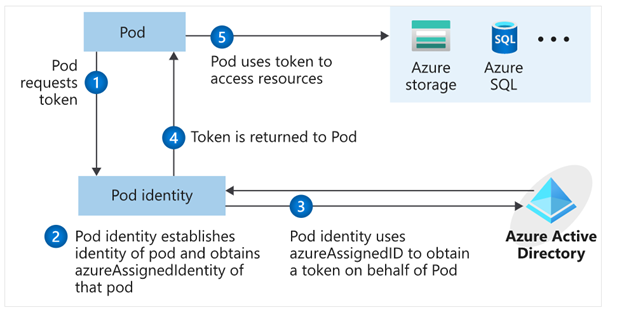
Pod Identity is a feature allows applications deployed to communicate with AAD, request a token then use the token to access Azure resources. The simplified workflow for pod managed identity is shown in the following diagram:
You can review Microsoft docs about pod identity best practice here
How to Create an application using Pod Identity?
In order to use pod identity in our code we will need AKS cluster to be configured with Azure AAD and Pod Identity deployed as we discussed in our pervious post.
Depending on the application, we will need to use an authentication MSI library to request a token from AAD. You can review example here
In our pervious post we show after deploying Pod Identity addon, terraform script deployed a managed Identity to namespace “demo” and updated the Key Vault access policy to include this managed identity.
In our demo today, we will show how to build application access Azure Key Vault to retrieve secrets using Pod Identity. Sample code exists here. The repo contains sample codes using C#, Java and Python.
Before staring we need to double check out environment to make sure all necessary deployment are deployed
- AAD Azure Identity Pods under Kube-System namespace:
kubectl get pods -n kube-system| grep aad”
- Azure Identity resource under target namespace
kubectl get azureIdentity -n demo
- Azure Identity Binding resource under target namespace
kubectl get azureIdentity -n demo
Once we confirm the resources then we are ready to start coding.
Java Demo
Source Code Review
The Java demo is a sample java spring boot RestAPI application. Here are few points about the code
Helm Chart Review
The helm chart will be the same chart for all demos (java/C#/Python) we will override the values.yaml during the pipeline run to fit every demo needs. The chart will deploy the following:
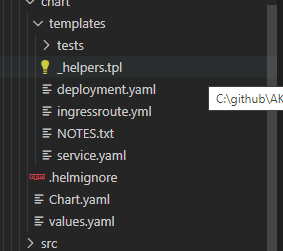
- Applications pods deployment: we can control how many replica from values.yaml
- Service deployment:
- Ingress deployment: map incoming request to app services
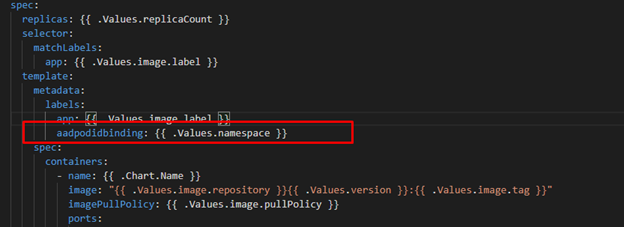
The main area we point here will be the metadata label aadpodbinding. The pod deployment file MUST have this label. In our environment we deployed the AzureIdentity and AzureIdentityBinding with same name like environment namespace hence we passing the namespace as value for aadpodbinding
Pipeline Review
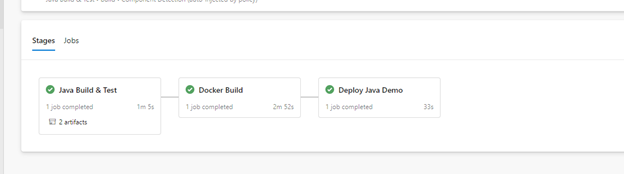
The pipeline “azure-pipelines-java-kv.yml” has 3 stages as shows in the following figure
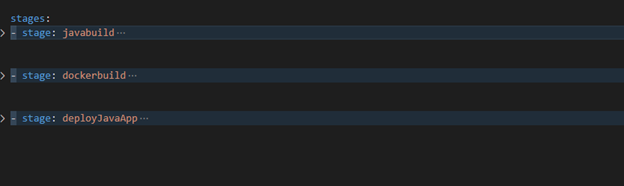
- Java Build: using Maven will package the app and publish it with chart
- Docker Build: using docker will build an image and publish it to ACR
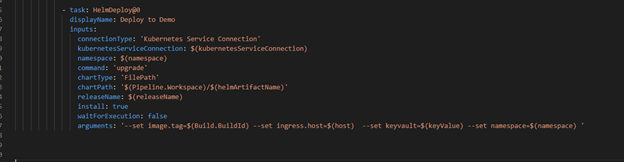
- Helm Deployment: using helm will connect to AKS then install helm chart under namespace “demo”. Please notice how we passing new chart values as argument
Once it runs, we should see the following:
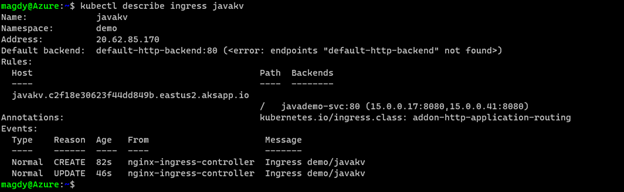
Check our work:



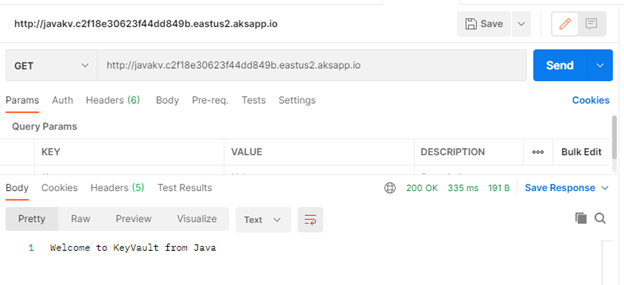
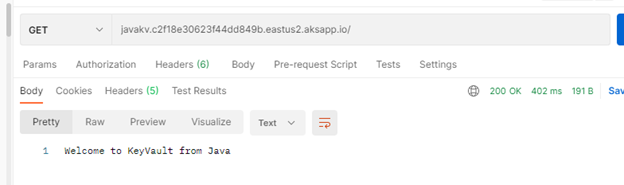
Finally Use Postman and query the Java app.
C# Demo
Source Code Review
Demo is identical to Java code. Rest API service that shows secret from KV. The API class is under controller folder and it expect KV URL to pass as environment variable exactly like Java example.
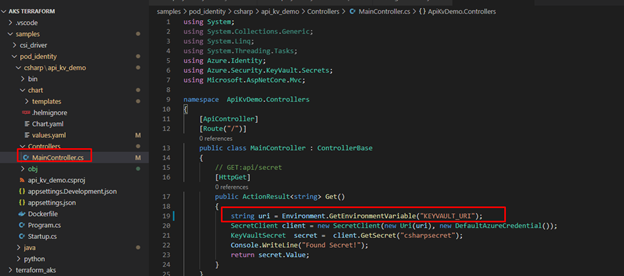
The pipeline for “azure-pipelines-csharp-kv.yml” is follow same structure of 3 stages
- CSharp Build: using dotnet will package the app and publish it with chart
- Docker Build: using docker will build an image and publish it to ACR
- Helm Deployment: using helm will connect to AKS then install helm chart under namespace “demo”. Please notice how we are passing new chart values as arguments
Python Demo
Source Code Review
Python code is a FlaskRest API example.
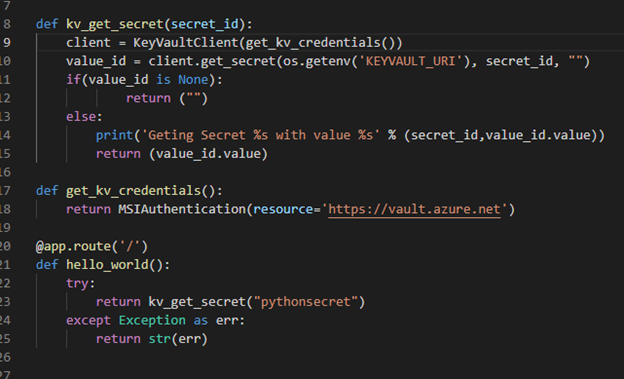
The pipeline for “azure-pipelines-python-kv.yml” is follow same structure of 2 stages.
- Docker Build: using docker will build an image and publish it to ACR
- Helm Deployment: using helm will connect to AKS then install helm chart under namespace “demo”. Please notice how we are passing new chart values as arguments.
Check our work:
Once we get pipelines deployed for all application, we can review the deployed resources.
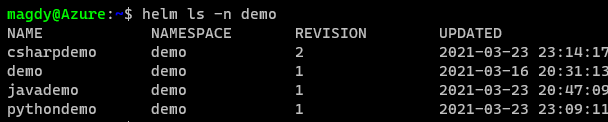
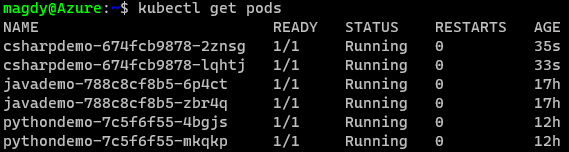
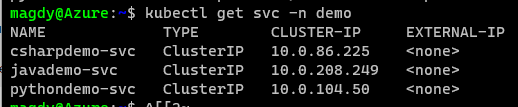

Use Postman to call apps using ingress host.
Java Demo
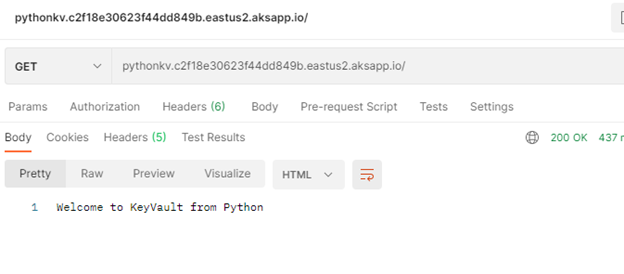
Python Demo
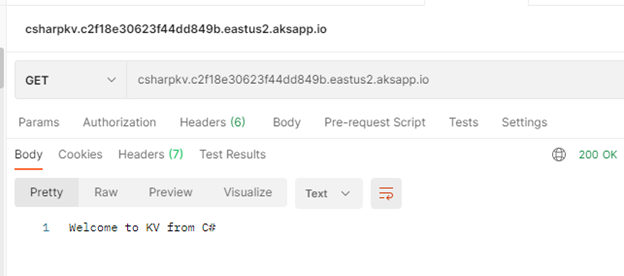
C# Demo
Summary
We discussed in detail how to setup and configure your application to use Pod Identity. It is great feature to utilize Azure Managed Identity to access Azure resources. In our next blog will discuss Azure secret store provider for csi driver
by Contributed | Apr 12, 2021 | Technology
This article is contributed. See the original author and article here.
Getting an approval on your work items is an essential part of almost every workflow. The approval can be a written acknowledgement from your manager, a formal authorization from a diverse group of stakeholders, or an official signature from a customer. Regardless of the type of approval needed, it can be hard to track and manage the requests when many systems and people are involved and often leads to unnecessary delays.
Approvals in Microsoft Teams enables everyone, from frontline workers to corporate headquarters employees, to easily create, manage, and share approvals directly from Teams.
We’ve been listening to your feedback and have added new capabilities to streamline your approval request and get faster results.
Create an approval request with an electronic signature
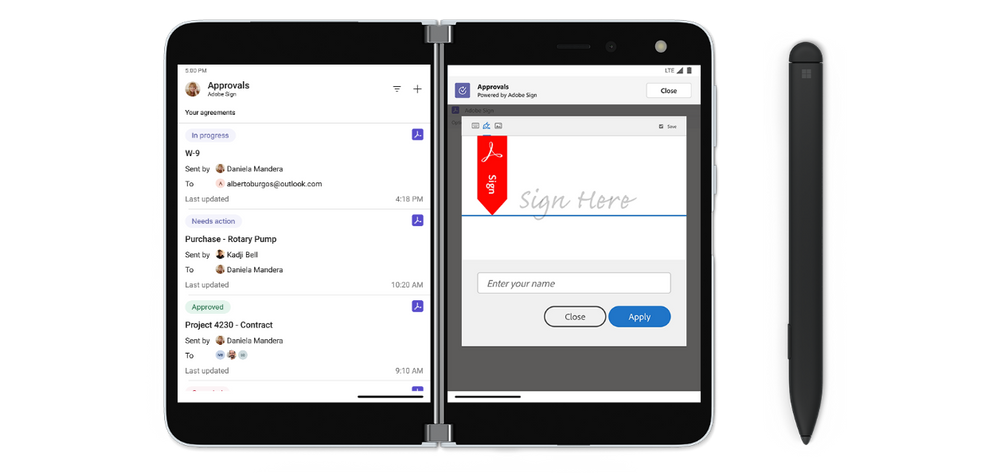
There may be times when you need a more formal attestation and require the approvers’ signatures. Now, key partners like Adobe Sign, DocuSign and other 3rd party providers allow you to create an electronic signature approval natively within the Approval app. With this new feature, approvers can add their signature without leaving Teams, enabling an efficient and faster approval process. Once the approval process is completed, the information is stored in Teams, and you can easily access the approval record and view the eSignatures.
To request the approver’s eSignature, choose eSign as your request type. Then choose your electronic signature provider, select the file that needs to be signed, and include additional details needed. Once submitted, internal signers are sent a notification via Teams and an email asking for their signature. If the signer is external to the organization, they will be notified with an email, in which they can easily review the details and sign. Approvals will keep track of the entire audit trail right in context of Teams, so you are able to track who already signed the approval and when it was signed. This feature will start rolling out at the end of April.
Create an approval template
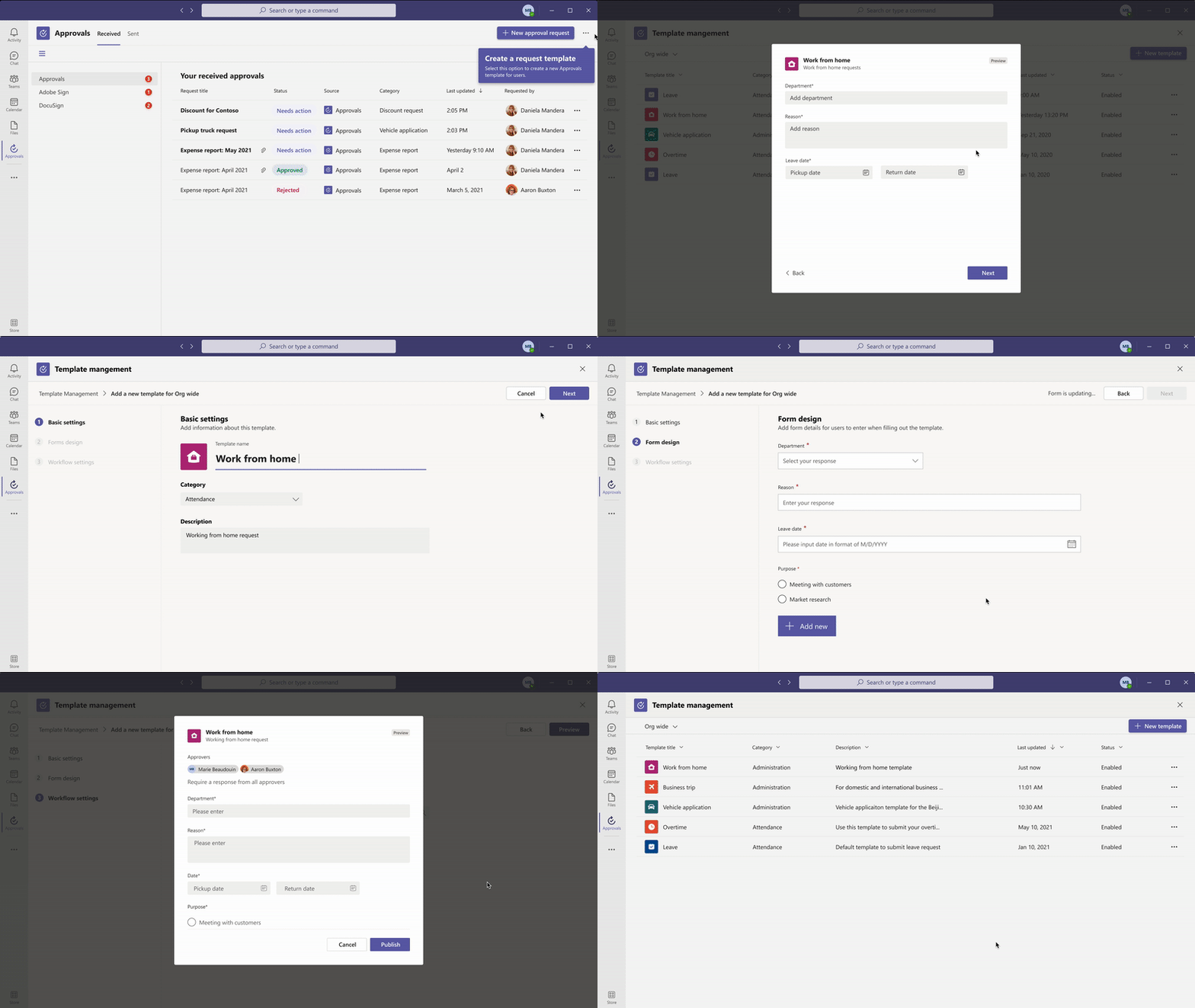
To streamline workflows, new out of the box templates provide a repeatable structure for common approvals like filling out expense reports or requesting overtime. Admins and team owners can use these as is, customize, or create new templates for their organization and teams.
Teams admins and teams owners can also create approval templates by clicking on template management in the overflow menu and following the instructions. Enter the name of your template, select the approvers, add in the necessary form fields and the workflow settings. When done, hit publish.
Once you create your first organizational template, it will create a new admin team. From there, you can add additional admins that can manage the organizational templates, right from the Approvals App.
This feature will be rolling out in April.
Create an approval request with templates
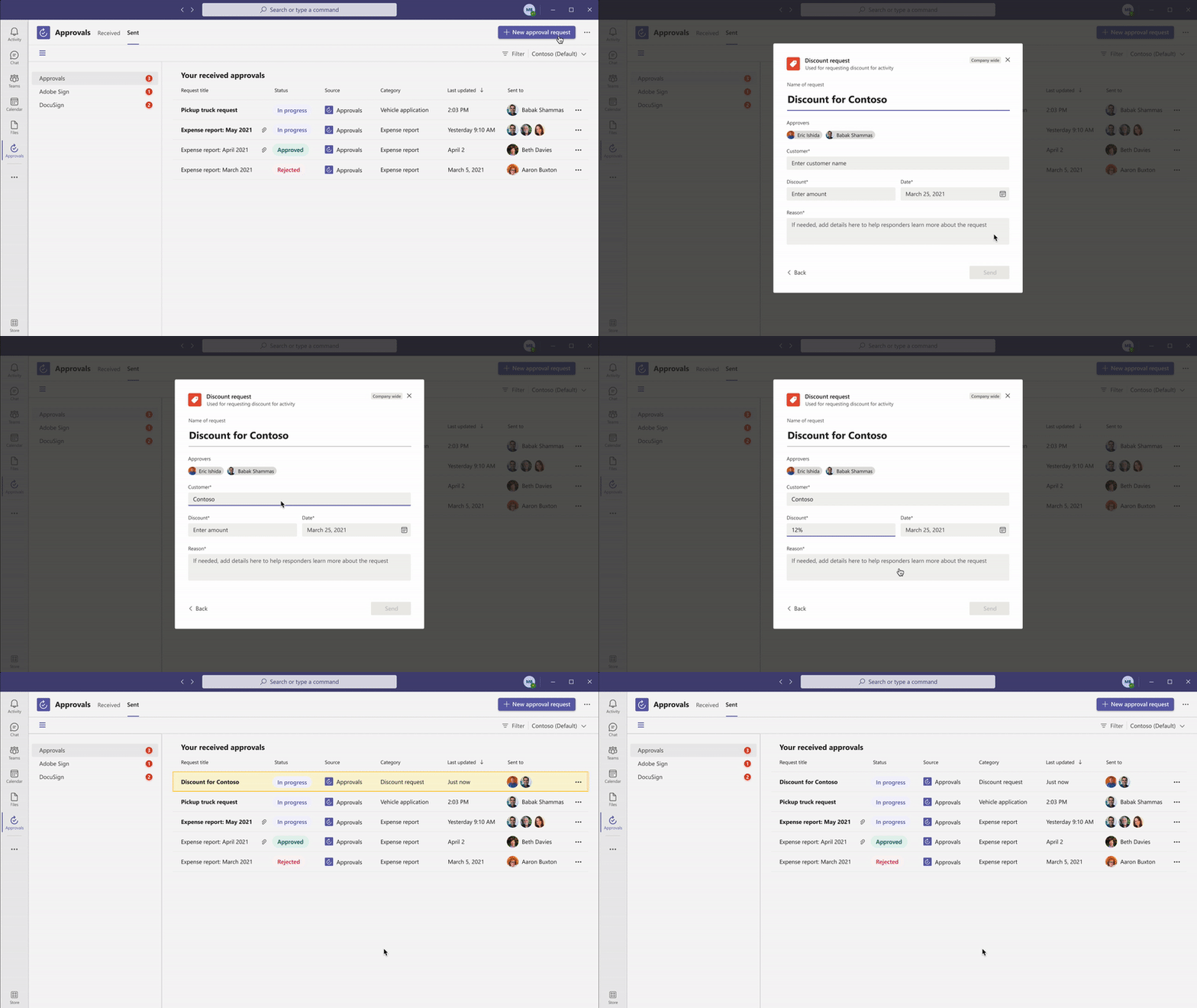
Leverage the templates your admin or team owner enabled for you and make it easier to create an approval request. Use the structured form to input all the necessary information and eliminate back and forth on missing data for a faster approval.
New attachment capabilities
Approval hub enables you to attach files directly from OneDrive and SharePoint, as well as attach a generic link for content that is hosted outside of Microsoft 365. This will ensure your approval is connected to the latest version of the file, reflecting any changes. This feature is available now.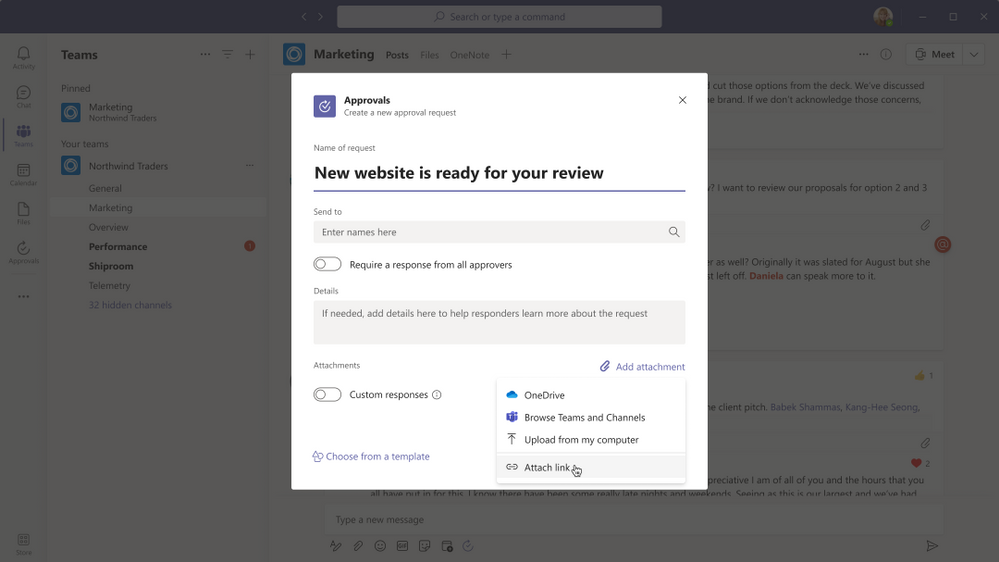
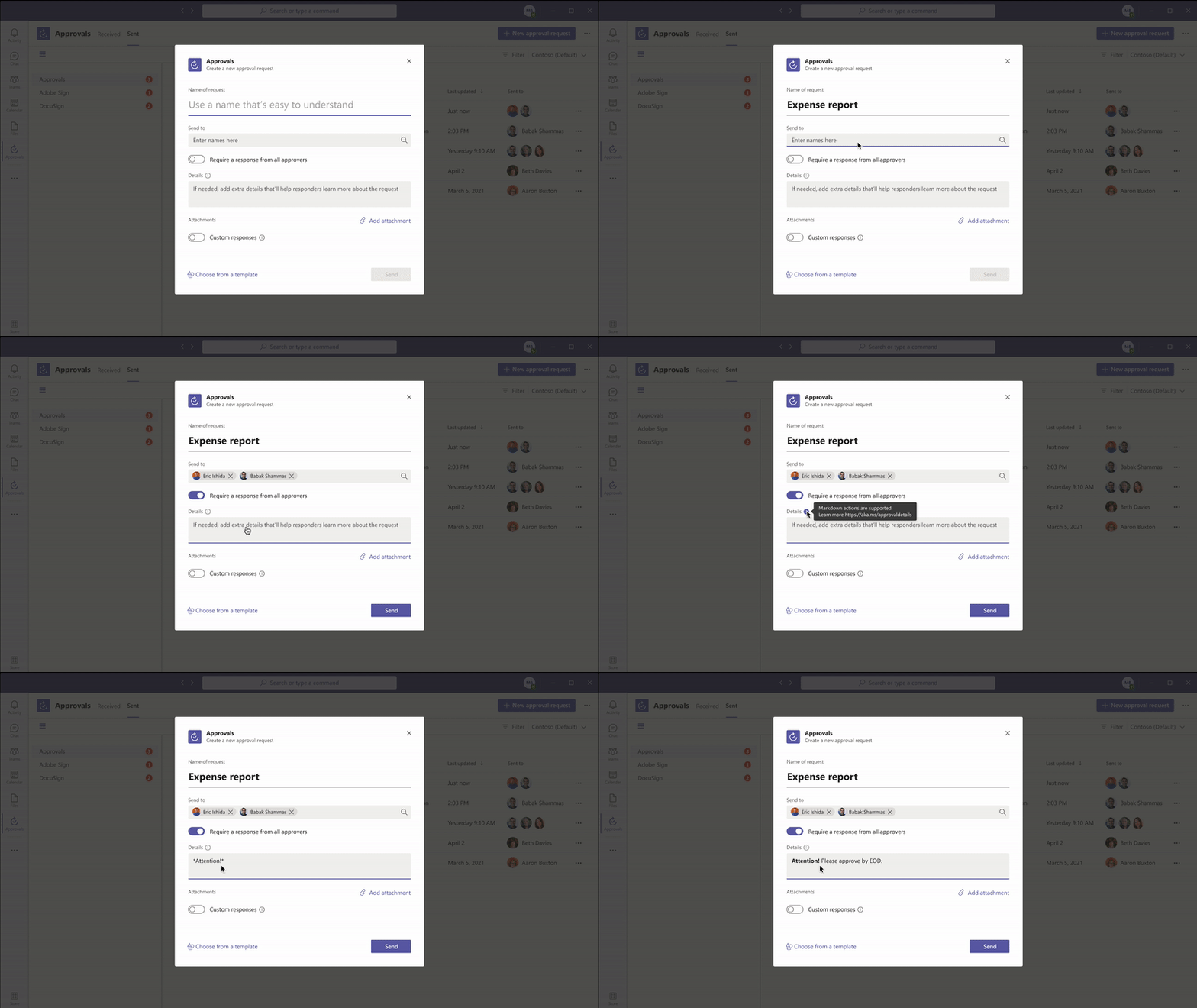
Markdown support
We are also adding full Markdown support in both adaptive cards and the detail’s view, so you can ensure all your approvals are formatted correctly for all your approval processes. This feature is available now.
Approve or reject an approval request inline
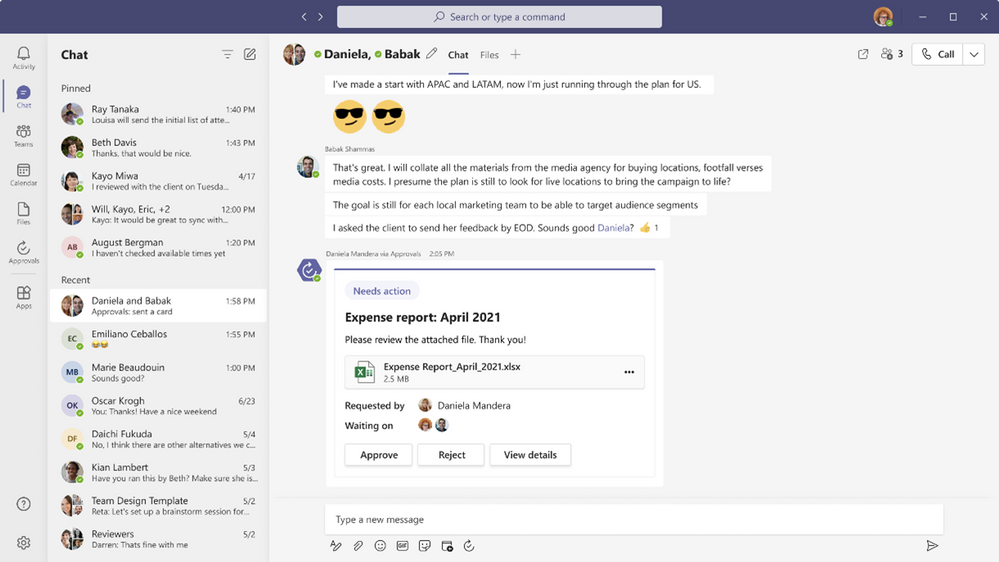
Approvals role based adaptive cards enable you to quickly respond to an approval request right from within the chat or channel without having to view the details. If you do not have permission to respond to the request, you will not see the “Approve” or “Reject” buttons on the card. This feature is available now.
Resources
Getting your request approved just got easier with the new features coming to approvals in Microsoft Teams. Learn more and get the most out of approvals in Microsoft Teams using these resources:
by Contributed | Apr 12, 2021 | Technology
This article is contributed. See the original author and article here.
Getting an approval on your work items is an essential part of almost every workflow. The approval can be a written acknowledgement from your manager, a formal authorization from a diverse group of stakeholders, or an official signature from a customer. Regardless of the type of approval needed, it can be hard to track and manage the requests when many systems and people are involved, leading to unnecessary delays.
Approvals in Microsoft Teams enables everyone, from frontline workers to corporate headquarters employees, to easily create, manage, and share approvals directly from Teams.
We’ve been listening to your feedback and have added new capabilities to streamline your approval request and get faster results.
Create an approval request with an electronic signature
There may be times when you need a more formal attestation, requiring the approvers’ signatures. Now, key partners like Adobe Sign, DocuSign and other 3rd party providers allow you to create an electronic signature approval natively within the Approval app. With this new feature, approvers can add their signature without leaving Teams, enabling an efficient and faster approval process. Once the approval process is completed, the information is stored in Teams, and you can easily access the approval record and view the eSignatures.
To request the approver’s eSignature, choose eSign as your request type. Then choose your electronic signature provider, choose a file that needs to be signed, and add any additional details needed. Once submitted, internal signers are sent a notification via Teams and an email asking for their signature. If the signer is external to the organization, they will be notified with an email, in which they can easily review the details and sign. Approvals will keep track of the entire audit trail right in context of Teams, so you are able to track who already signed the approval and when. This feature will start rolling out at the end of April.
Create an approval template
To streamline workflows, new out of the box templates provide a repeatable structure for common approvals like filling out expense reports or requesting overtime. Admins and team owners can use these as is, customize or create new templates for their organization and teams.
Teams admins and teams owners can create approval templates by clicking on template management in the overflow menu and following the instructions. Enter the name of your template, select the approvers, add in the necessary form fields and the workflow settings. When done, hit publish.
Once you create your first organizational template, it will create a new admin team. From there, you can add additional admins that can manage the organizational templates, right from the Approvals App.
This feature will be rolling out in April.
Create an approval request with templates
Leverage the templates your admin/team owner enabled for you, making it easier to create an approval request. Use the structured form to input all the necessary information and eliminate back and forth on missing data for a faster approval.
New attachment capabilities
Approval hub enables you to attach files directly from OneDrive and SharePoint, as well as attach a generic link for content that is hosted outside of Microsoft 365. This will ensure your approval is connected to the latest version of the file, reflecting any changes. . This feature will be rolling out in April. This feature is available now.
Markdown support
We are also adding full Markdown support in both adaptive cards and the detail’s view, so you can ensure all your approvals are formatted correctly for all your approval processes. This feature is available now.
Approve or reject an approval request inline
Approvals role based adaptive cards enables you to quickly respond to an approval request right there from within the chat or channel without having to view the details. If you do not have permission to respond to the request, you will not see the “Approve” or “Reject” buttons on the card. This feature is available now.
Resources
Getting your request approved just got easier with the new features coming to approvals in Microsoft Teams. Learn more and get the most out of approvals in Microsoft Teams using these resources:
by Contributed | Apr 12, 2021 | Technology
This article is contributed. See the original author and article here.
Customers rely on Microsoft Data Loss Prevention(DLP) to enforce policies that identify and prevent risky or inappropriate sharing, transfer or use of sensitive information across cloud, on-premise and endpoints. Alerts, which can be configured as a part of the DLP policy authoring experience are an effective tool for customers to get notified whenever a DLP policy is violated.
Microsoft announces the General Availability of the Microsoft Data Loss Prevention Alerts Dashboard. This latest addition in the Microsoft’s data loss prevention solution provides customers with the ability to holistically investigate DLP policy violations across :
- Exchange
- SharePoint Online
- OneDrive
- Teams
- Devices
- Cloud apps
- On-premises file shares
Advance alert configuration options are available in the existing DLP policy configuration flow. These provide eligible DLP customers with the ability to tailor how they organize DLP policy alerts along with exhaustive information that they need to investigate and address DLP policy violations quickly. Historical workflow information for alerts is available in the Management log.
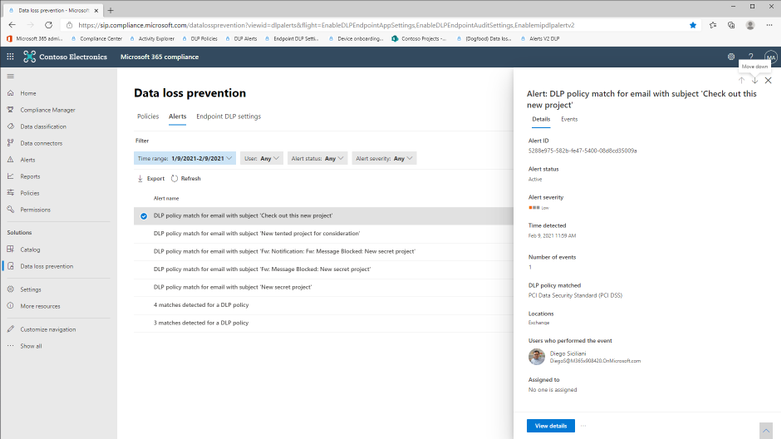
The alerts dashboard provides a list view of all DLP alerts and clicking on an alert will display the relevant details.
Figure 1 : Data Loss Prevention Alerts Dashboard
Clicking on ‘View Details’ will display the alert page with exhaustive information associated with the DLP policy violation, ability to change alert status (Active, Investigating, Dismissed or Resolved), include additional comments and define workflow actions such as assigning alerts to individuals for follow up.
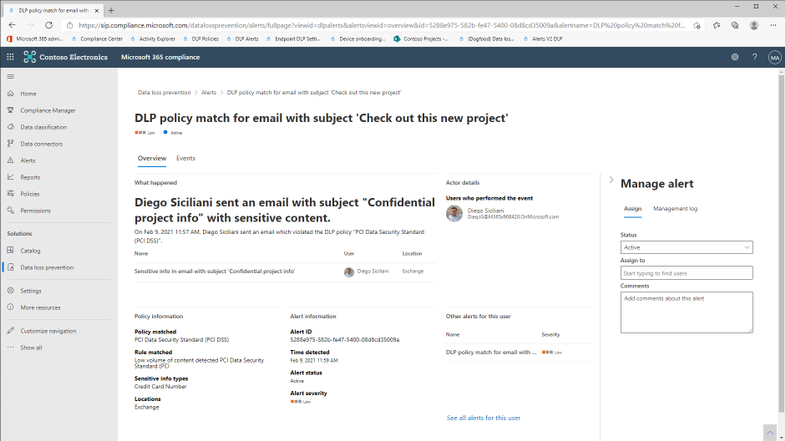
Figure 2 : Alert details with manage alert options
Clicking on the ‘Events’ tab will display the actual user activity along with details including :
- Source view (requires E5 or related subscriptions) : This will allow customers to view the email or the file involved in the DLP policy alert. Source view in the DLP Alerts Dashboard will be available for content(email/files) belonging to the following workloads :
- Exchange (Email body only)
- SharePoint Online
- One Drive
This feature is available only for licenses in the following subscriptions :
– Microsoft 365 (E5)
– Office 365 (E5)
– Advanced Compliance (E5) add-on
– Microsoft 365 E5/A5 Info Protection & Governance
– Microsoft 365 E5/A5 Compliance
- Matched sensitive terms and context : This will allow customers to view the sensitive terms in the content due to which the DLP policy was violated. You will also be able to view up to 300 characters surrounding the detected sensitive term. This information will be available for detections for the following workloads :
- Exchange (both email body and attachments)
- SharePoint Online
- OneDrive
- Teams
For both features : Source View and Matched sensitive terms and context, the role group “Content Explorer Content Viewer” should be assigned. This role group has the role “data classification content viewer” pre-assigned.
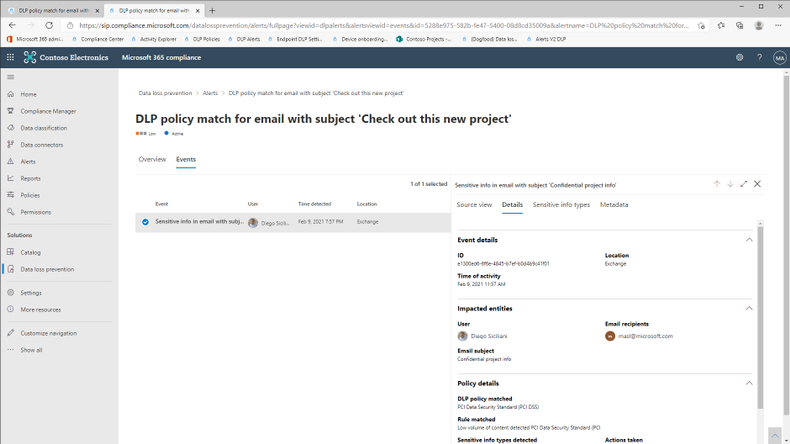
Figure 3 : Exhaustive metadata for each user event
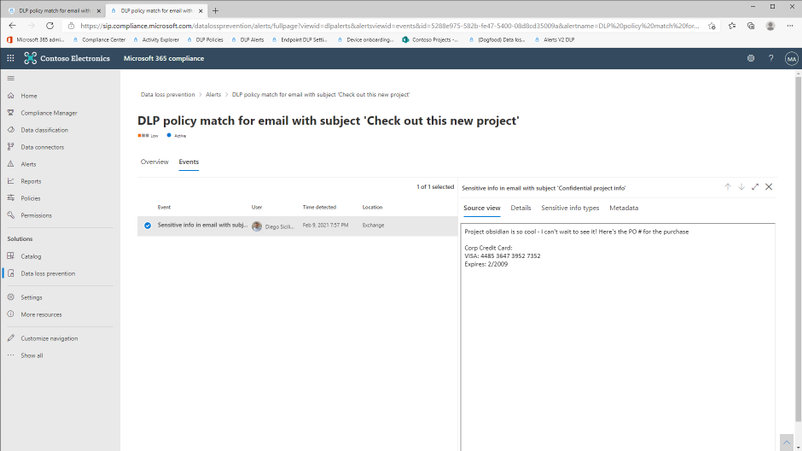
Figure 4 : View the content of the email(body) or file
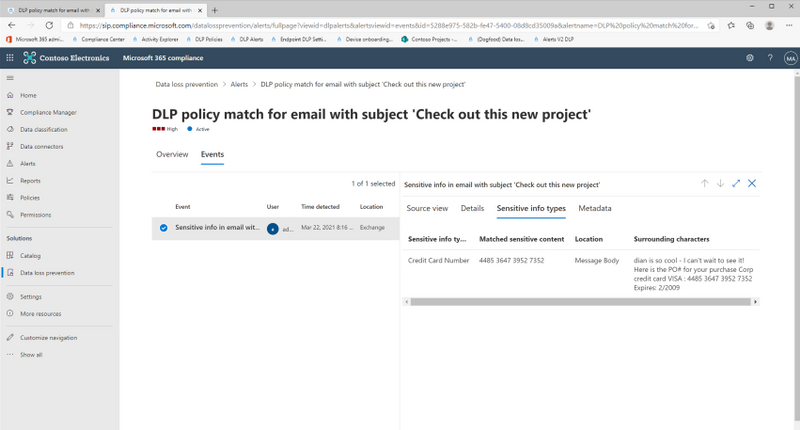
Figure 5 : View matched sensitive terms and surrounding characters
Get Started
Microsoft’s DLP solution is part of a broader set of Information Protection and Governance solutions that are part of the Microsoft 365 Compliance Suite. You can sign up for a trial of Microsoft 365 E5 or navigate to the Microsoft 365 compliance center to get started today.
Additional resources:
- For more information on DLP Alerts Management, please this
- For more information on Data Loss Prevention, please see this
Thank you,
The Microsoft Information Protection Team
by Contributed | Apr 12, 2021 | Technology
This article is contributed. See the original author and article here.
Want to get Started learning GitHub and DevOps?
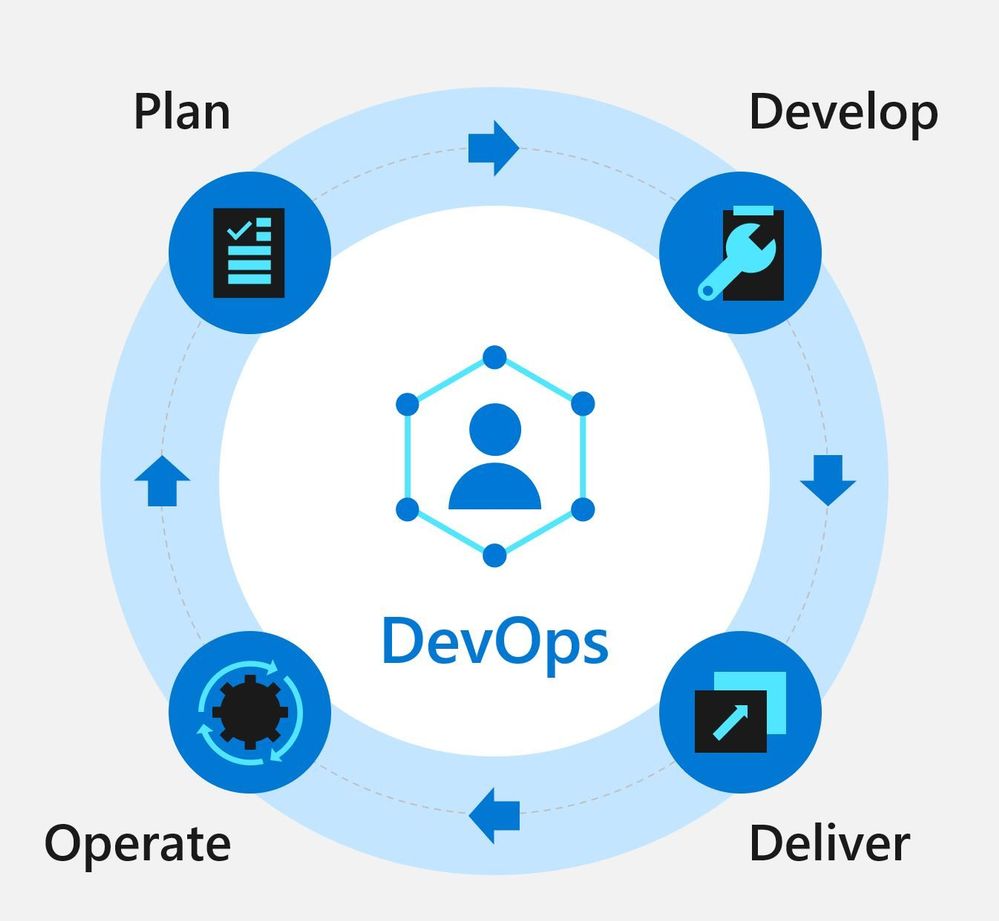
Well look now further we have a dedicated rep to help you get skilled in DevOps using GitHub.
microsoft/DevOps-with-GitHub-Event-Learning-Path:The DevOps with GitHub Event Learning Path shows the DevOps journey using Azure and GitHub tools.
Explore overviews, tutorials, samples, and more
http://aka.ms/all-things-devops
Learning Path Description:
Tailwind Traders loves building software and working in the cloud. Their team is growing and becoming more specialized. In this learning path, you’ll work along with the Tailwind development and operations teams as they figure out how to work better together using DevOps patterns and practices.
Sessions:
Listed below are 5 sessions and all resources associated with them so you can redeliver them in your technical community
There are no demos, however video recordings of demos have been provided
[ADO10] Getting started with DevOps
Abstract:
As teams grow, finding ways to effectively work together is vital. Communication across teams is challenging. We need to enable discovery of conversations and related information. Source code, scripts, configuration files, deployment docs and other related content also need to be centralized and versioned. Finally, teams need tooling that not only works across multiple project types and languages, but also facilitates remote-first collaboration.
Attendee Takeaways:
- Make communication centralized and discoverable.
- Everything that can be versioned goes in source control.
- Pick tools that support your team’s workflow – including source control, remote collaboration, and language and project types.
Resources:
[ADO20] Managing the Flow of Work
Abstract:
DevOps is all about continuously delivering value. Before we can even begin thinking about CI/CD, we need to make sure we do the right work. Sprint after sprint, iteration after iteration, we need to plan our work and manage our workflows.
This includes planning and tracking all units of work for the project. With frequent small iterations, there is no time to waste. Careful planning needs to happen to ensure the correct work gets done for each iteration. With the compressed time frame for each iteration, team members must work and coordinate their activities. Thus cross (functional) team visibility of work becomes vital for that coordination and allocation of resources. Visibility also ensures problems or bottlenecks get surfaced and addressed quickly.
Managing source control changes are also important. We need to be in a deployable state at the end of every sprint. The main branch should be protected, yet changes being introduced should not be overly hampered and slowed down by the process. Being able to iterate quickly and safely is vital.
And Finally, we need automation surrounding all our workflows to help enable everything as well as add consistency in what we do.
Attendee Takeaways:
- Make work in progress visible with Azure boards.
- Use trunk-based development to keep integration pain down and master ready to ship.
- Automate your workflow to add consistency and remove drudgery.
Resources:
[ADO30] Building in Security and Quality
Abstract:
Security and compliance are core concerns for organizations. Adopting DevOps practices and delivering software faster can increase those concerns. We can take steps to increase security and compliance as part of our DevOps lifecycle.
Attendee Takeaways:
- Shift security left by enabling security at the earliest possible point.
- Keep your container images current and be aware hidden dangers in base images.
- Use infrastructure as code and policy as code to provide consistency in environments.
Resources:
[ADO40] Delivering Change to the Cloud
Abstract:
The team at Tailwind Traders has a problem – they’re still too dependent on manual processes and key individuals to bring their ideas to customers! While they have successfully implemented a raft of practices that result in trusted builds ready for deployment to the cloud, actually delivering the changes in an effective, trustworthy way is the next challenge.
Tailwind Traders realises they need to automate their deployments, just as they automated their builds. It’s important that they can deliver value quickly, but just as important they catch issues before they get to production with robust pipelines that can deploy to the variety of services their projects require.
Attendee Takeaways:
- Deployment automation enables repeatability.
- ChatOps and similar patterns enable control and automation.
- Keep secrets in as few places as possible.
Resources:
[ADO50] Operating Software in the Cloud
Abstract:
DevOps doesn’t stop when you deploy. Incident response, identity management, and controlling access to production are all part of learning to run software well.
Attendee Takeaways:
- For incidents to be effectively managed, someone needs to be responsible for responding.
- No magic people or machines! Reduce the dependence on individual user accounts or environments with service principals and managed identities.
- Use automation to deliver change into the environment – remove manual steps.
Resources:
Certification Resources
Explore Microsoft Learn Content for the AZ-400 Certification
http://aka.ms/getting-started-devops
Designing and Implementing Microsoft DevOps Solutions
http://aka.ms/az400-cert

by Contributed | Apr 12, 2021 | Technology
This article is contributed. See the original author and article here.
Today, we continue to strike a balance between many of our current conditions, where most frontline workers are strained and socially distant, and tomorrow, where there is the possibility of a safe return to the more traditional ways of working. As we continue supporting frontline workers and organizations in this digital transformation balance, we are releasing new enhancements for frontline workers and corporate teams to continue to communicate more effectively, digitize processes and make data and workers more secure no matter the work conditions.
Richer communication and community
Coming soon, Teams for RealWear headsets will make it easier for workers to show what they see – with voice commands for using the device flashlight and adjusting zoom levels with their outgoing video. Learn more about RealWear and Teams here.
Coming soon: RealWear Camera Zoom & Flashlight
For organizations with thousands of employees scattered across different locations, internal communications can grow quite complex. Connect your entire workforce to drive deeper connection and insights across your organization while keeping everyone informed. Now you can share important community announcements for all members of your community and notify them to make sure they see the message, even if it’s outside of their preferred notification settings, with Yammer essential announcements.
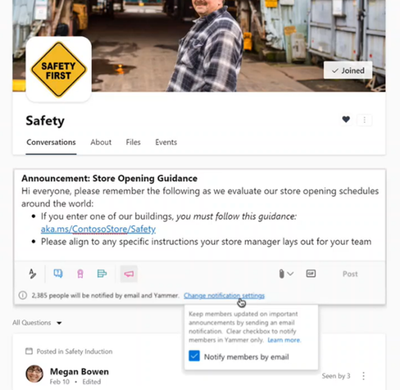 Now Available: Yammer Essential Announcements
Manage and moderate content shared with your entire organization faster with Yammer community insights. These key metrics help admins and corporate teams measure activity, understand engagement, and find valuable insights about how frontline workers are engaging as a community.
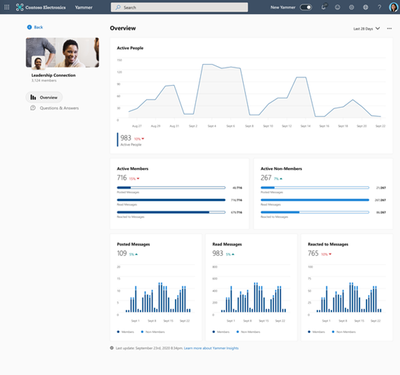 Available now: Community insights
Dig deeper and see which conversations and content performs the best. Conversation insights provide real-time visibility into impressions, total views, click-through rate, and a break-down of reactions.
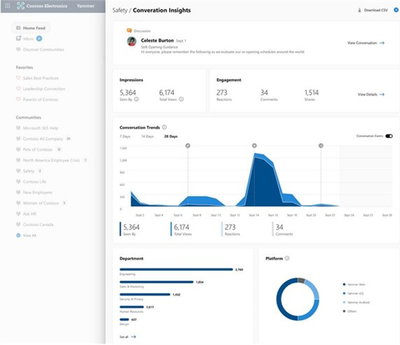 Coming soon: Conversation insights
Improve your live events viewership by monitoring attendance, to understand which audience has the greatest viewership, and see where those views are coming from with live events insights in Yammer. All geared to help you optimize your current and future events with your frontline workforce and entire organization.
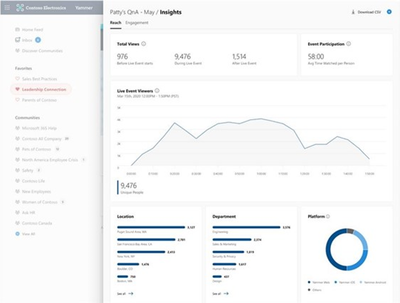 Now available: Live event insights
Finally, improve the sense of community for your frontline workers with new suggested communities on the right rail of the Yammer homepage that will suggest relevant communities for frontline workers to discover and join.
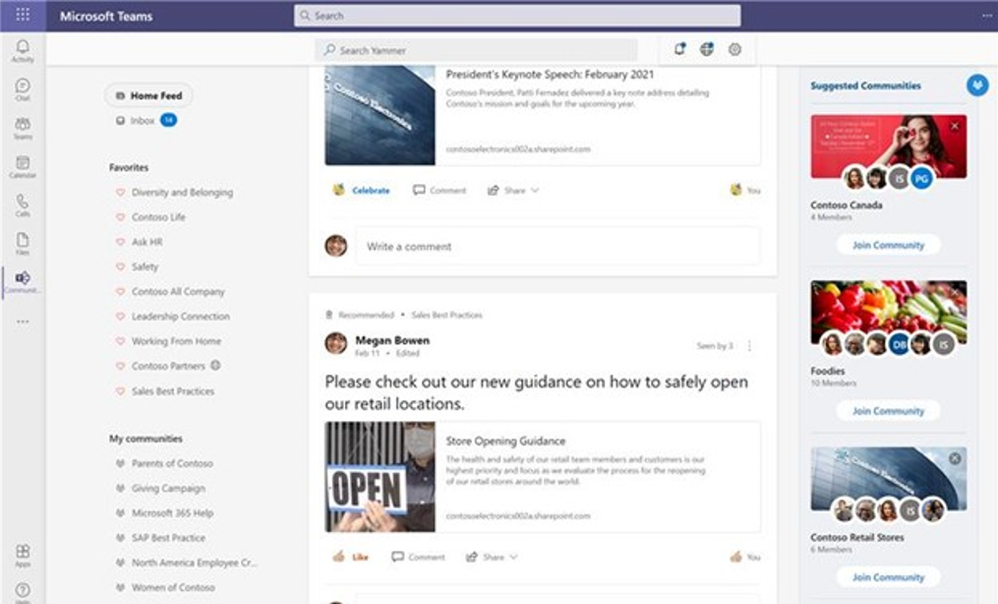 Now Available: Yammer Suggested Communities
Learn more about all the new features coming to Yammer here.
Automated business workflows
As work conditions continue to fluctuate, it has become increasingly important to make sure repeatable but still critical processes are automated and have the right systems and owners connected to the workflow.
New APIs for Time Clock will notify your organization’s Time & Attendance system and determine if the clock in/out is valid and prevent it if it is not. This helps organizations create rules for how early or late someone can clock-in/out without requiring manager approval. It can also enable new business workflows around clocking in/out such a health screening survey that must be completed before clocking-in for the day. All these clock-ins will be automatically shared to your existing payroll system to provide even more visibility and alignment. Learn more about frontline relevant APIs here.
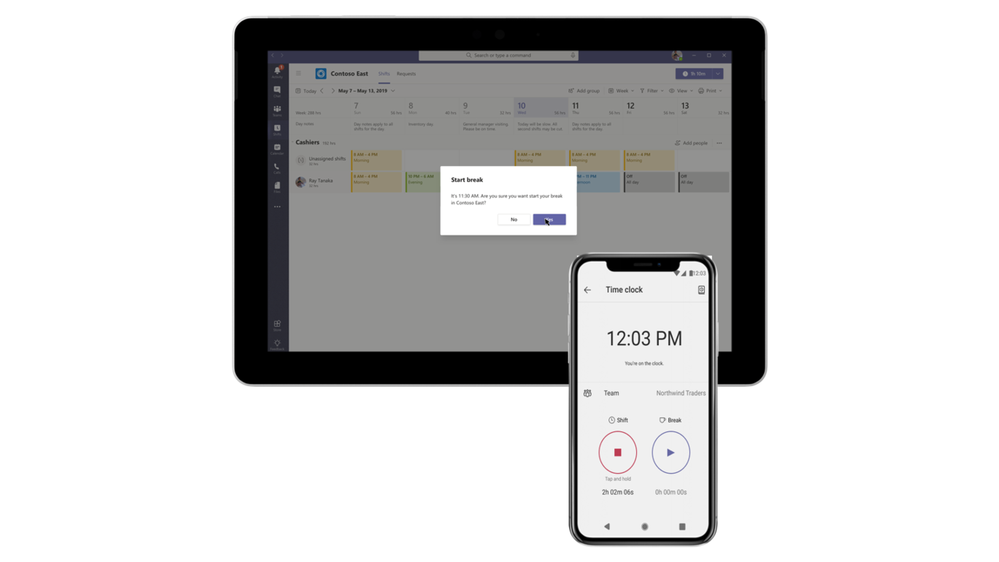 Now available: Time Clock APIs
With the schedule owner permission setting on TeamsShiftsPolicy, the organization can identify which users should be able to modify a Shifts schedule while still protecting the ownership of Teams that they are members of. It allows users who aren’t the owner of a Team to be able to edit and manage Shift schedules, approve swaps and authorize time off requests. This enables users such as managers and supervisors to have schedule ownership without having to be the owners of the entire Teams, reducing instances of accidentally deleting or modifying the Team without realizing the effects it has on other users. Learn more about how to set up Shifts here.
Now available: schedule owner permissions
Approvals are a critical component of how frontline workers get the right permissions for anything from delivering fast customer service to making speedy repair decisions on the factory floor. To streamline workflows, new Approvals templates provide a repeatable structure for common approvals such as when employees are reporting leave, filling out expense reports or requesting overtime. Admins and Team owners can use these as is, customize, or create new templates for their organization and teams.
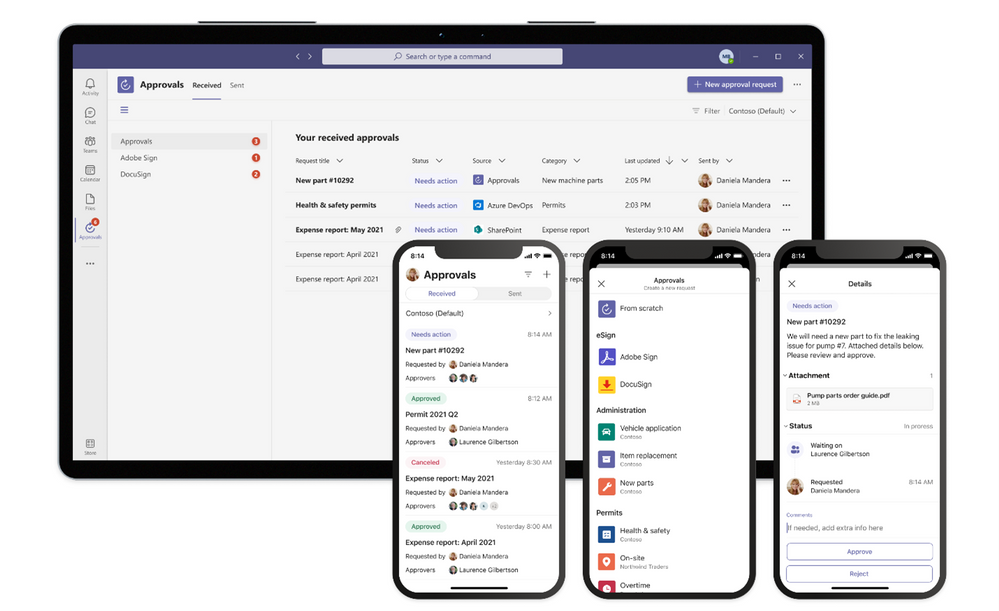 Now available: Approvals templates
Often frontline processes need more formal attestation and require the approvers’ signatures in the process. Now, key partners like Adobe Sign, DocuSign, and other 3rd party providers allow teams to create an electronic signature approval natively within the Approvals app. With this new feature, approvers can add their e-signature without leaving Teams, enabling an efficient and faster approval process. Once the approval process is completed, the information is stored in Teams, and you can easily access the approval record and view the eSignatures.
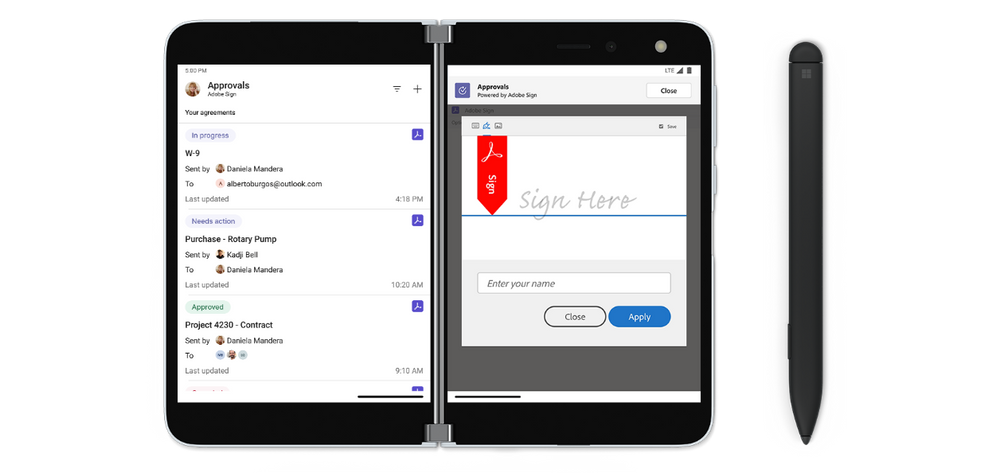 Now available: Approvals with electronic signature
Finally, we have enhanced our task publishing feature in Tasks in Teams so operations and corporate teams can more clearly manage their Task lists and drive alignment with frontline locations. A member of a publishing team can now see separate Drafts, Published, and Unpublished sections to easily see which task lists are at which stage of their lifecycle. We’ve also made it easier to see the impact of publishing tasks at a glance. Teams will see an updated summary that prominently displays the number of tasks and the number of recipient teams, so they can easily confirm that everything looks right. Learn more about task publishing here.
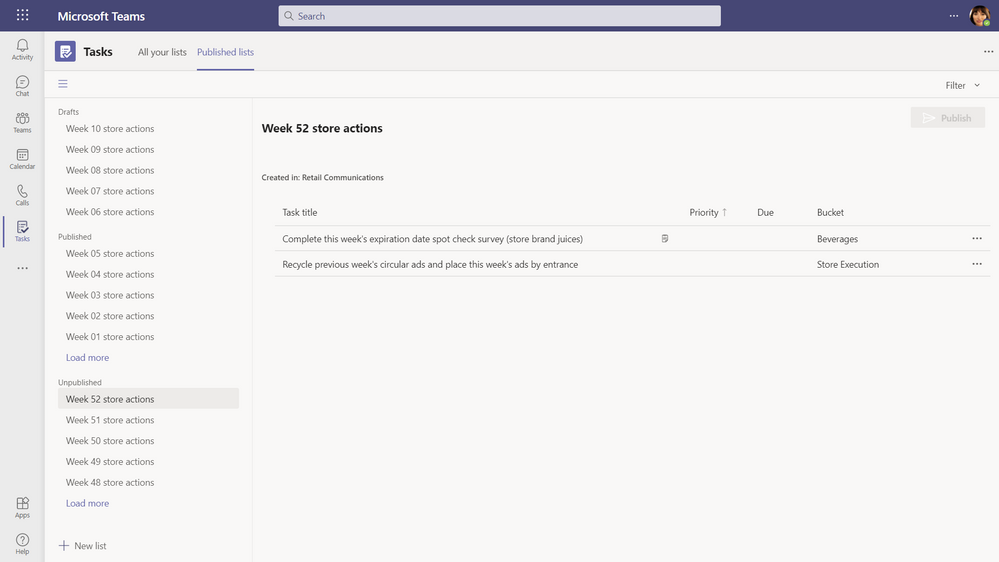 Now available: Publish list confirmation screen summary & unpublished lists section in task publishing
More secure with simple management
Like frontline workers day-to-day job, we know their roles, tasks and devices can vary. Whether your organization empowers workers to bring their own devices or provides shared devices, we have you covered with secure and simple tools to make sure the experience is seamless.
You can now provision shared devices at scale with Microsoft Intune and Configuration Manager now a part of a unified management platform known as Microsoft Endpoint Manager. IT admins can choose to enroll their organization’s Android Enterprise (AE) dedicated devices into Microsoft Intune with Azure AD shared mode automatically configured, making it easier to set up and customize how frontline workers use shared devices.
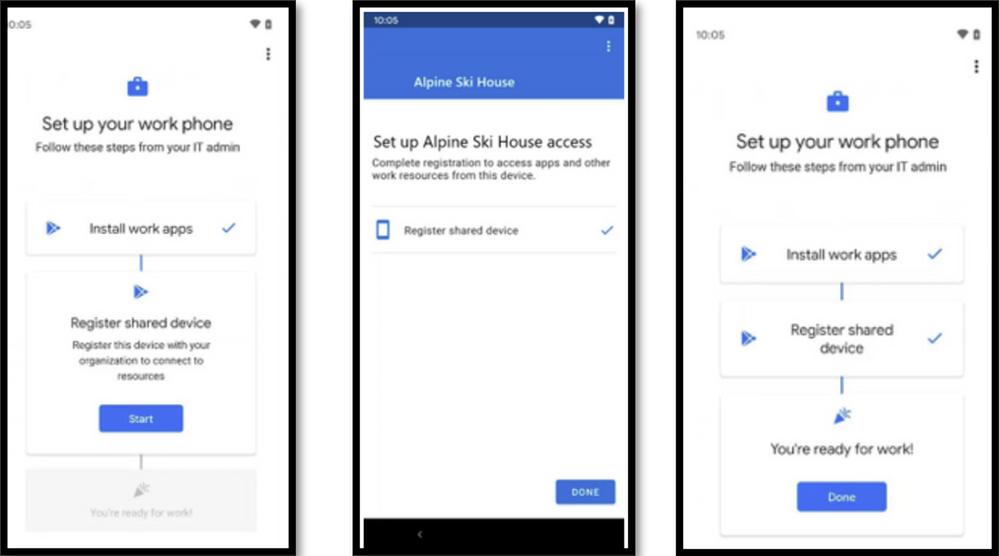 Now Available: Identity – Provisioning Shared Devices at Scale
IT admins can now enforce Zero Trust security policies such as device-based Conditional Access, using device compliance to secure corporate data for shift-based frontline users signing in and out of apps on shared devices. These policies enable organizations to secure their frontline workers and organizational data from identity risk with powerful, adaptive risk detection.
Now Available: Identity – Device Based Conditional Access for Shift Workers
Now, IT admins can now use Managed Home Screen to create a customized sign-in and sign-out experience across all apps, including Microsoft Teams, that participate with shared device sign-out. Improve user experience by customizing a single screen for frontline users to easily sign-in, configure a session PIN for the duration of the shift, and configure timers for automatic sign-out for added security during shift handovers. To see the full list of configurations available with Managed Home Screen, see the documentation.
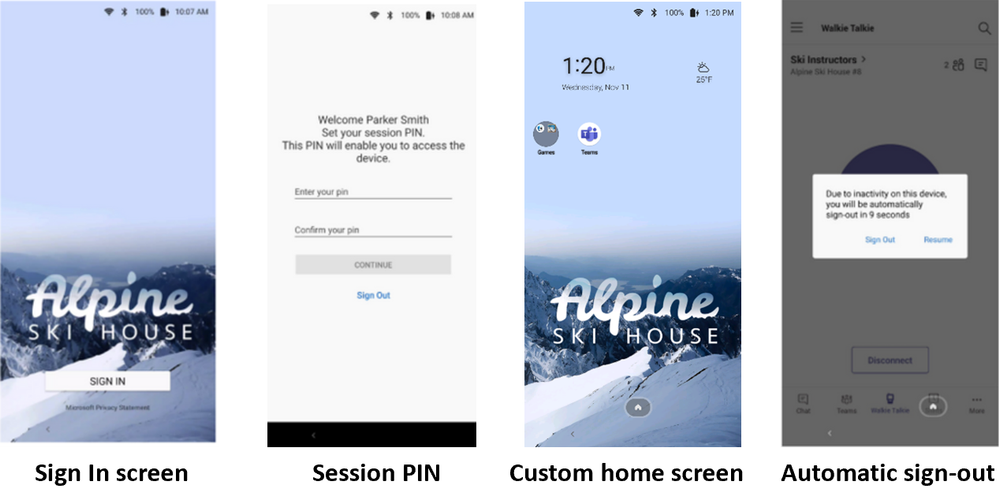 Now Available Identity – Customized Sign-in Experience with Microsoft Managed Home Screen
Frontline workers are the backbone of the world’s economy, and in today’s rapidly evolving landscape, yesterday’s tools are often not enough to get today’s job done. Don’t wait for the future with yesterday’s tools, innovate today with Microsoft Teams and bring all the tools your entire workforce needs into one platform.




Recent Comments