by Contributed | Apr 16, 2021 | Technology
This article is contributed. See the original author and article here.
As mobile usage becomes more prevalent, so does the need to protect your work or school data on those devices. In March 2020, we introduced the App Protection Policy Data Protection Framework to help organizations determine which Intune app protection policy settings they should deploy to protect work or school account data within the apps.
In June 2020, we expanded the framework by including recommendations for enrolled Android Enterprise devices by introducing the Android Enterprise Security Configuration Framework to manage device compliance and device restriction settings.
Today, I am happy to announce that we’re expanding the framework to also include recommendations for enrolled iOS/iPadOS devices. iOS/iPadOS supports several enrollment scenarios, two of which are covered as part of this framework:
When configuring device compliance and configuration policies, the number of various settings and options enable organizations to tailor protection to their specific needs. Due to this flexibility, it may not be obvious which permutation of policy settings is required to implement a complete scenario. To help organizations prioritize client endpoint hardening, Microsoft has introduced a new taxonomy for security configurations in Windows 10, and Intune is leveraging a similar taxonomy for its iOS/iPadOS security configuration framework.
The iOS/iPadOS security configuration framework is organized into several distinct configuration scenarios, providing guidance for personally owned and supervised devices.
For personally owned devices:
- Basic security (Level 1) – Microsoft recommends this configuration as the minimum security configuration for personal devices where users access work or school data. This is done by enforcing password policies, device lock characteristics, and disabling certain device functions (e.g., untrusted certificates).
- Enhanced security (Level 2) – Microsoft recommends this configuration for devices where users access sensitive or confidential information. This configuration enacts data sharing controls. This configuration is applicable to most mobile users accessing work or school data on a device.
- High security (Level 3) – Microsoft recommends this configuration for devices used by specific users or groups who are uniquely high risk (users who handle highly sensitive data where unauthorized disclosure causes considerable material loss to the organization). This configuration enacts stronger password policies, disables certain device functions, and enforces additional data transfer restrictions.
For supervised devices:
- Basic security (Level 1) – Microsoft recommends this configuration as the minimum security configuration for supervised devices where users access work or school data. This is done by enforcing password policies, device lock characteristics, and disabling certain device functions (e.g., untrusted certificates).
- Enhanced security (Level 2) – Microsoft recommends this configuration for devices where users access sensitive or confidential information. This configuration enacts data sharing controls and blocks access to USB devices. This configuration is applicable to most mobile users accessing work or school data on a device.
- High security (Level 3) – Microsoft recommends this configuration for devices used by specific users or groups who are uniquely high risk (users who handle highly sensitive data where unauthorized disclosure causes considerable material loss to the organization). This configuration enacts stronger password policies, disables certain device functions, enforces additional data transfer restrictions, and requires apps to be installed through Apple’s volume purchase program.
To see the specific recommendations for each configuration level, reviewiOS/iPadOS Security Configuration Framework.
As with any framework, settings within a corresponding level may need to be adjusted based on the needs of the organization as security must evaluate the threat environment, risk appetite, and impact to usability.
We hope this framework helps you when evaluating what iOS/iPadOS settings to deploy in your environment. As always, if you have questions, please let us know.
Ross Smith IV
Principal Program Manager
Customer Experience Engineering
by Contributed | Apr 16, 2021 | Technology
This article is contributed. See the original author and article here.
What is Web Application Firewall (WAF) config?
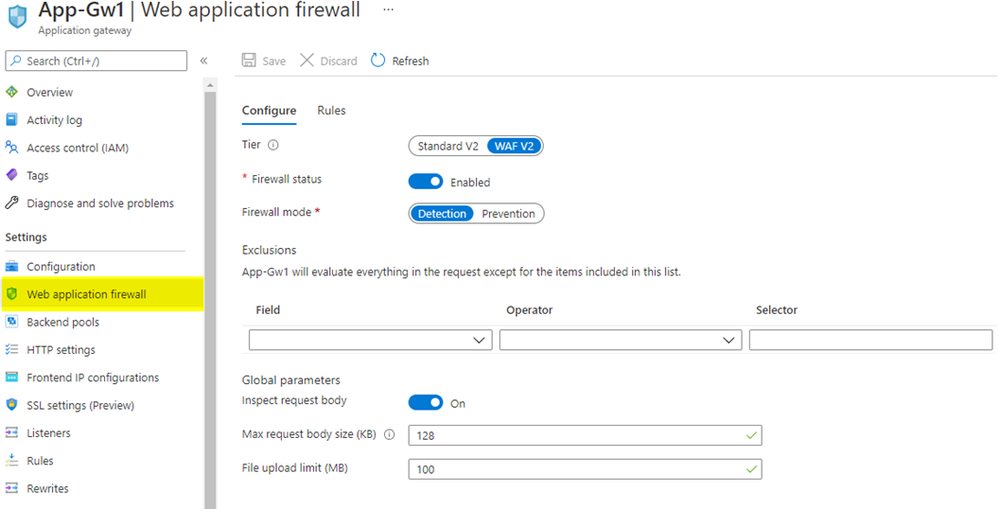
WAF config is the built-in method to configure WAF on Azure Application Gateway, and it is local to each individual Azure Application Gateway resource. When you create an Azure Application Gateway with either the WAF or the WAF_v2 SKU, you will see a new item on the menu blade called “Web application firewall” that displays WAF configuration options.
The biggest drawback of using WAF config is that not all WAF settings are displayed in the portal UI. For example, you cannot configure or manage custom rules in the portal: you must use PowerShell or Azure CLI for that. Additionally, WAF config is a setting within an Azure Application Gateway resource. For this reason, each WAF config must be managed individually, and its configuration applies globally for everything within that specific Azure Application Gateway resource. WAF config does not exist on Azure Front Door.
Image: WAF config on Azure Application Gateway
What is WAF policy?
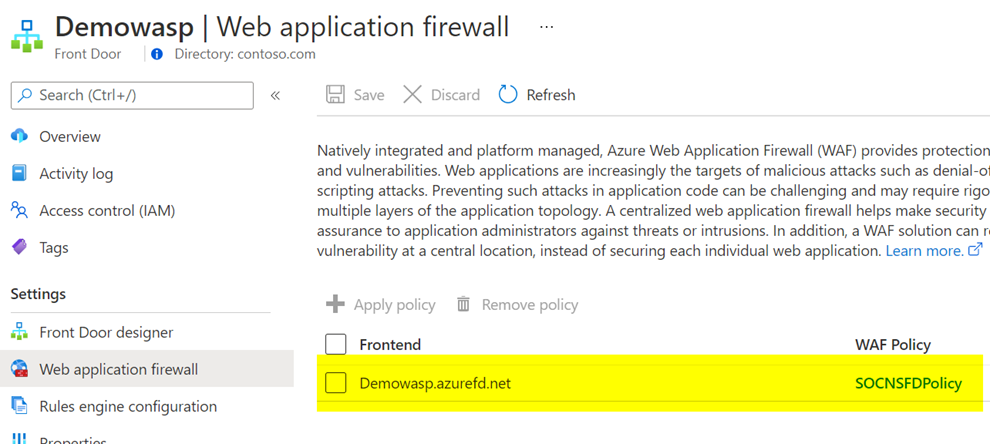
WAF policy is a standalone resource type. It is not a built-in configuration within the Azure Application Gateway resource. A WAF policy is managed independently, and it can be attached to either Azure Application Gateway or Azure Front Door resources. When checking the “Web application firewall” option on the menu blade for Azure Application Gateway or Azure Front Door, you will notice that it simply displays a link to the attached WAF policy, rather than the full WAF configuration settings.
A benefit of using WAF policy for Azure Application Gateway or Azure Front Door is that all generally available WAF settings exist in the portal UI, such as exclusions, custom rules, managed rules and more. You can configure and visualize the WAF policy settings in the portal, in addition to PowerShell and Azure CLI. Another useful benefit of WAF policy when it comes to Azure Application Gateway is that it offers more granularity in scope. You can associate a WAF policy at a global level by assigning it to an Azure Application Gateway resource, at a website level by assigning it to an HTTP listener, or even at a URI level by assigning it to a specific route path. For example, you could use a global WAF policy to apply the baseline security controls that meet your organization’s security policy and attach it to all your Azure Application Gateways. From there, based on individual application needs, you can apply a different WAF policy that contains more (or less) strict security controls at a website level or at a URI level.
Would you like more information on different WAF policy association levels for Azure Application Gateway? Refer to our Azure Web Application Firewall (WAF) policy overview documentation.
Image: WAF policy on Azure Application Gateway
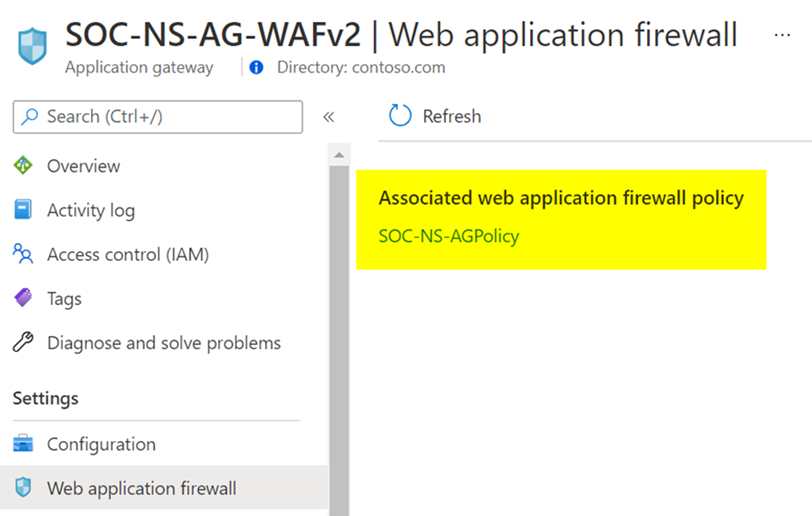
Image: WAF policy on Azure Front Door
What types of rules are available in Azure WAF?
1. Azure-managed rule sets
The Azure-managed rulesets for Azure WAF on Azure Application Gateway and Azure Front Door are based on OWASP ModSecurity Core Rule Set (CRS). This set of rules protect your web applications against most top 10 OWASP web application security threats, such as SQL injection and cross-site scripting.
When using Azure WAF with Azure Application Gateway, you will see the managed rule sets represented as OWASP_3.2 (Preview), OWASP_3.1, OWASP_3.0, and OWASP_2.2.9. Here, the Azure WAF uses the anomaly scoring mode, which means all rules in these rule sets are evaluated for each request, and the request is only blocked when the anomaly scoring threshold is reached.
When using Azure WAF with Azure Front Door, you will see the managed rule sets represented as Microsoft_DefaultRuleSet_1.1 and DefaultRuleSet_1.0. The Microsoft_DefaultRuleSet_1.1 rule set includes Microsoft-authored rules in addition to the rules based on OWASP ModSecurity CRS. In this case, Azure WAF uses the traditional mode, which means that as soon as there is a rule match the WAF stops processing all other subsequent rules.
More information on Azure-managed rule sets for Azure WAF on Azure Application Gateway
More information on Azure-managed rule sets for Azure WAF on Azure Front Door
2. Bot protection rule sets
Bot protection rule sets provide safety against bots doing scraping, scanning, and looking for vulnerabilities in your web application. These rule sets are powered by our own Microsoft Threat Intelligence feed, which is used by multiple Azure services, including Azure Firewall and Azure Security Center.
When using Azure WAF with Azure Application Gateway, you will see the bot protection rule set represented as Microsoft_BotManagerRuleSet_0.1. This rule set can detect known bad bots based on IP reputation.
When using Azure WAF with Azure Front Door, you will see the bot protection rule set represented as Microsoft_BotManagerRuleSet_1.0. This rule set can detect bad bots, good bots, and unknown bots based on IP reputation, user-agent headers, and other indicators that compose signatures managed by Microsoft.
More information on Bot protection rule set for Azure WAF on Azure Application Gateway
More information on Bot protection rule sets for Azure WAF on Azure Front Door
3. Custom rules
Azure WAF provides the ability to create custom rules. This allows you to either fine-tune your WAF policy or create rules with specific logic to address your unique application requirements. The rule conditions can be based on many variables, such as IPs, geolocation, request URIs, post arguments, and more. Custom rules can trigger based on a simple match for Azure WAF on Azure Application Gateway and Azure Front Door, or additionally, they can trigger based on rate-limiting thresholds for Azure WAF on Azure Front Door.
If you’d like to see some WAF custom rule examples, check out our blog post on Azure WAF Custom Rule Samples and Use Cases
More information on Custom rules for Azure WAF on Azure Application Gateway
More information on Custom rules for Azure WAF on Azure Front Door
What are the feature distinctions between WAF config and WAF policy?
As you can see based on the information we have shared this far, there are a few important differences between the capabilities of WAF depending on the associated resource type. You can consult these tables to get a quick comparison and make an informed decision when deploying Azure WAF.
In the table below, we’re sharing the feature availability on WAF config for Azure Application Gateway WAF and WAF_v2 SKUs.
WAF Config Features
|
WAF SKU
|
WAF_v2 SKU
|
OWASP_3.2 (Preview)
|
Unavailable
|
Unavailable
|
OWASP_3.1
|
Unavailable
|
Available
|
OWASP_3.0
|
Available
|
Available
|
OWASP_2.2.9
|
Available
|
Available
|
Microsoft_BotManagerRuleSet_0.1
|
Unavailable
|
Unavailable
|
Geo-Location Rules
|
Unavailable
|
Available
|
Per-Site Policy
|
Unavailable
|
Available
|
Per-Uri Policy
|
Unavailable
|
Available
|
In the table below, we are detailing the feature availability on WAF policy for Azure Application Gateway WAF_v2 and Azure Front Door. Note that WAF policy cannot be used with Azure Application Gateway WAF SKU.
WAF Policy Features
|
Azure Application Gateway (WAF_v2 SKU)
|
Azure Front Door
|
OWASP-Based Rule Set
|
Available
|
Available
|
Microsoft-Authored Rule Set
|
Unavailable
|
Available
|
Bot Protection Rule Set
|
Available
|
Available
|
Custom Rules with Geo-Location support
|
Available
|
Available
|
Custom Rules with Rate-Limiting support
|
Unavailable
|
Available
|
Per-Website WAF Policy
|
Available
|
Available
|
Per-URI WAF Policy
|
Available
|
Unavailable
|
Are there other key differences worth mentioning?
Here are a few more things to consider:
- Rule actions for custom rules: In a WAF policy for Azure Front Door, rule actions can be set to Allow, Deny, Log or Redirect. In a WAF policy for Azure Application Gateway, rule actions can be set to Allow, Block or Log. Redirect is not an available rule action for the latter.
- Rule actions for managed rules: In a WAF policy for Azure Front Door, rule actions can be set to Allow, Deny, Log or Redirect. In a WAF policy for Azure Application Gateway, rules can be either enabled or disabled. It is not possible to change the rule action.
- Types of custom rules: In a WAF policy for Azure Front Door, you can create custom rules based on Match type or Rate Limit type. Rate-limiting custom rules allow you to respond to abnormally high traffic from any given source IP, based on a customized quantity of web requests within a time frame. In a WAF policy for Azure Application Gateway, you can configure Match type custom rules, and rate-limiting type is not available.
- Exclusion lists: In a WAF policy for Azure Front Door, you can create exclusion lists at a rule level, at a rule group level, and at a rule set level. You can apply exclusions for matches on request header name, request cookie name, query string args name and request body post args name, and the exclusions can be applied to specific rules, rule groups or rule sets. In a WAF policy for Azure Application Gateway, the exclusions are a global setting. This means the exclusions will apply to all active rules within the scope of your WAF policy. You can apply exclusions for matches on request header name, request cookie name and request args name. You could alternatively apply a dedicated WAF policy at different association levels in your Azure Application Gateway, using per-site WAF policy or per-URI WAF policy.
In this article, we provided a snapshot of the current Azure WAF feature set. We’d love to hear more from you. Feel free to leave comments below or let us know more about new features you need in our Microsoft Azure Feedback forum.
by Contributed | Apr 16, 2021 | Technology
This article is contributed. See the original author and article here.
Today wraps up Hannover Messe 2021, one of the world’s leading industrial trade shows. This annual event attracts more than 200,000 visitors and highlights the latest in technology across six topic areas: Automation, Motion & Drive, Digital Ecosystems, Logistics, Energy Solutions, Engineered Parts & Solutions, and Future Hub. With over 6,500 exhibitors, and 1,400 events spread across five days, the show is an incredible opportunity to showcase our technology, learn from those in the industry and hear from our customers.
Due the on-going global pandemic, this year the trade show was hosted virtually and featured as “HM Digital Edition”. As much as the Microsoft team missed joining with our customers and partners in Germany to participate, the team was excited to still host virtual sessions showcasing several innovative solutions.
The IoT team walked customers through how to build more agile factories through the use of Industrial IoT, Cloud, AI and Mixed Reality solutions. The current challenge for many organizations is to create safer, more secure and agile “factories of the future.” To provide insight into this transformation, we had our customers and partners talk about how they are scaling their solutions with the Microsoft cloud and edge platforms and describe their best practices as they prepare for the “new normal” across hundreds of factories worldwide.
We also had a joint session with McKinsey where we were able to share the learnings from work on the World Economic Forum’s Global Lighthouse Network and the accelerating adoption of digital technologies in daily manufacturing and supply chain operations. Digital transformation as explored in these sessions is powered by the intelligent edge and intelligent cloud. These technologies can be quickly and easily integrated into your Windows IoT devices with our upcoming General Availability of Azure IoT Edge for Linux on Windows.
Azure IoT Edge for Linux on Windows, also often referred to as ‘EFLOW’, allows organizations to deploy production Linux-based cloud-native workloads on Windows IoT and retain existing Windows management assets at the edge. This opens a world of capabilities for commercial IoT as well as AI/ML with the availability of pre-built modules from the Azure Marketplace such as Live Video Analytics, SQL Edge, and OPC Publisher as a few examples. Customers can benefit from the power of Windows IoT for applications that require an interactive UX and high-performance hardware interaction without having to choose between Windows or Linux and leverage the best of Windows and Linux together.
A lot of customers want to deploy these Linux workloads but do not want to introduce a new operating system in their environment that they are unable to manage with existing infrastructure or expertise. To learn more about EFLOW, check out the following blog, video and documentation.
by Contributed | Apr 16, 2021 | Technology
This article is contributed. See the original author and article here.
The following two procedures guide on how to properly collect a memory dump to study a process crash. This post complements my article about how exceptions are handled and how to collect memory dumps to study them.
Both tools below – ProcDump and DebugDiag – work similarly: they can attach themselves as debuggers to a process, then monitor and log exceptions for that process. Optionally, these tools can collect a memory dump for the monitored process under certain conditions – such as when specific exceptions occur.
Both tools need administrative rights to be run.
DebugDiag is the preferred tool, since it automates some steps, adds more explicit context, and includes automated memory dump analysis capabilities too.
Using the command-line ProcDump
ProcDump does not require installation. But one needs to be specific about the PID to which it is attaching. That PID needs to be determined prior to starting ProcDump. This may be tricky when the respective process is crashing and restarting frequently, with a different PID; such as when Asp.Net apps are causing their w3wp.exe to crash and restart. If the w3wp.exe is crashing very fast, then it is advisable to use the DebugDiag method.
- Download the tool and copy it on a disk folder, for example D:Temp-Dumps
https://docs.microsoft.com/en-us/sysinternals/downloads/procdump
- Open an administrative console from where to run commands.
Navigate to the disk folder above (D:Temp-Dumps).
- Find the process ID, the PID, of the IIS w3wp.exe worker process executing your application.
Use the AppCmd IIS tool to list processes for application pools:
C:WindowsSystem32InetSrvappcmd.exe list wp
- Execute the following command to collect dump(s):
D:Temp-Dumps> procdump.exe -accepteula -ma -e 1 -f “ExceptionNameOrCodeOrMessageExcerpt” [PID]
You may want to redirect the console output of ProcDump to a file, to persist the recording of the encountered exceptions:
D:Temp-Dumps> procdump.exe -accepteula -ma -e 1 -f “ExceptionNameOrCodeOrMessageExcerpt” [PID] > Monitoring-log.txt
Replace [PID] with the actual Process ID integer number identified at the step 2.
Please make sure that there is enough disk space on the drive where dumps are collected. Each process dump will take space in the disk approximately the same size the process uses in memory, as seen in Task Manager. For example, if the process’ memory usage is ~1 GB, then the size of a dump file will be around 1 GB.
- Start reproducing the problem: issue a request from the client (browser) that you know it would trigger the exception.
Or simply wait or make requests to the IIS/Asp.Net app until the exception occurs.
You should end up with a memory dump file (.DMP) in the location where ProcDump.exe was saved (example: D:Temp-Dumps).
- Compress the dump file(s) – .DMP – before uploading the dumps to share for analysis.
Using the UI tool DebugDiag, Debug Diagnostics Collection
DebugDiag requires installation, but it is able to determine itself the whatever process instance – PID – happens to execute for an application pool at some point in time; even when that process may occasionally crash, hence restart with different PID.
1.
Download Debug Diagnostic and install it on IIS machine:
https://www.microsoft.com/en-us/download/details.aspx?id=49924 v2.2 (if 32-bit system)
https://www.microsoft.com/en-us/download/details.aspx?id=102635 v2.3.1 (only supports 64-bit)
2.
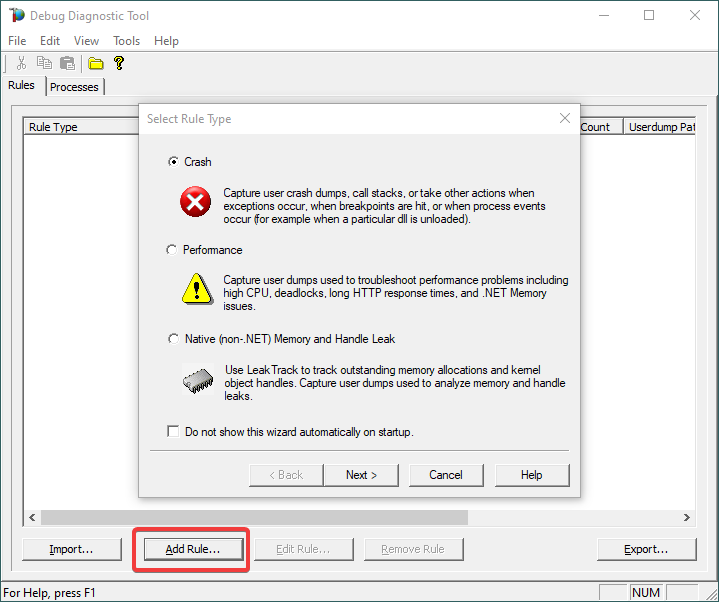
Open Debug Diagnostic Collection.
If a wizard does not show up, click Add Rule.
3.
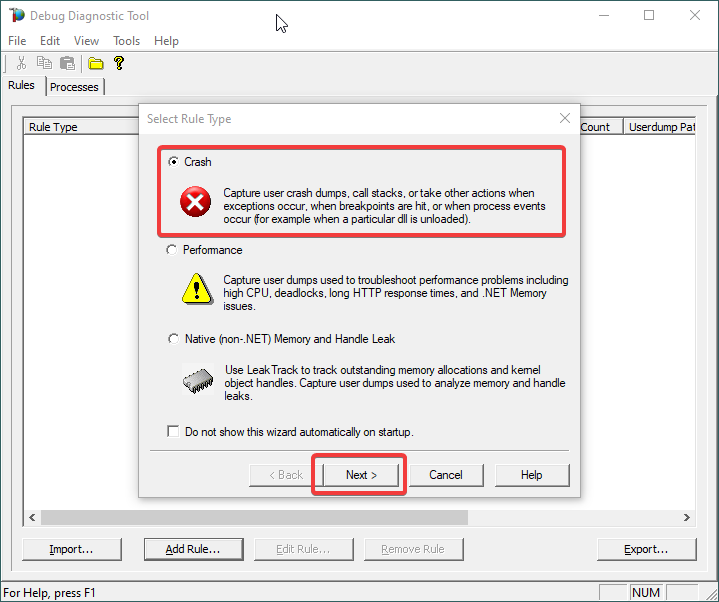
Choose Crash and click Next.
4.
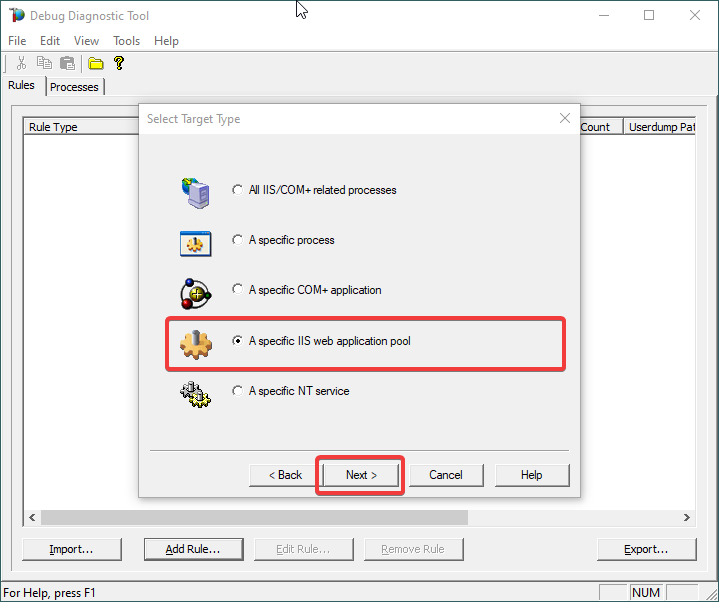
Choose “A specific IIS web application pool” and Next.
5.
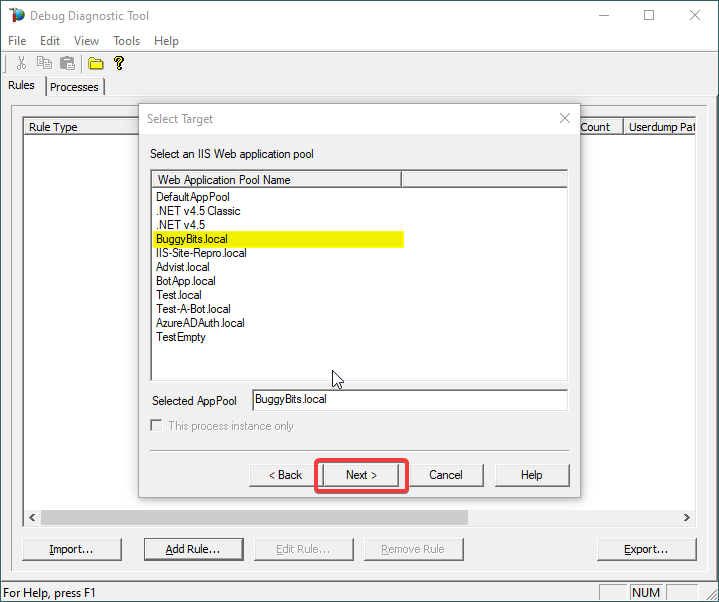
Select the application pool which runs the problematic application and then click Next.
6.
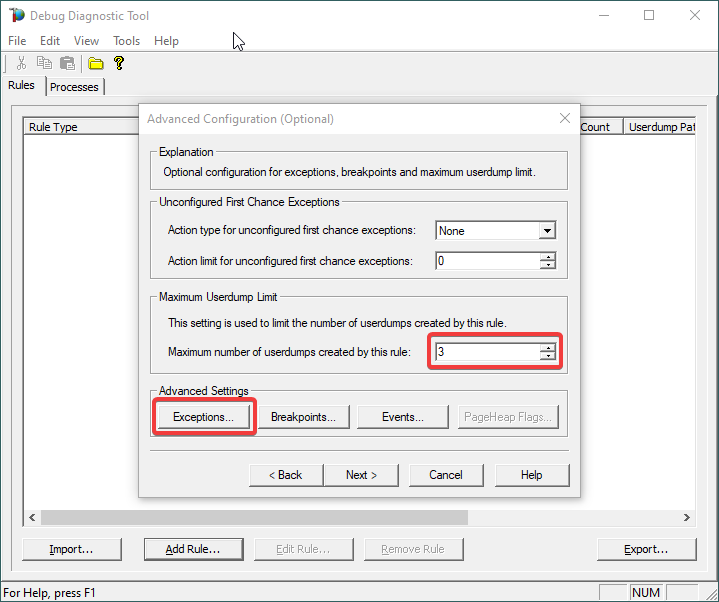
Lower the Maximum number of userdumps created by the rule to 3 (up to 5; there is no need to collect more).
Then click on Exceptions under Advanced Settings, to add the one(s) we are interested in for analyzing.
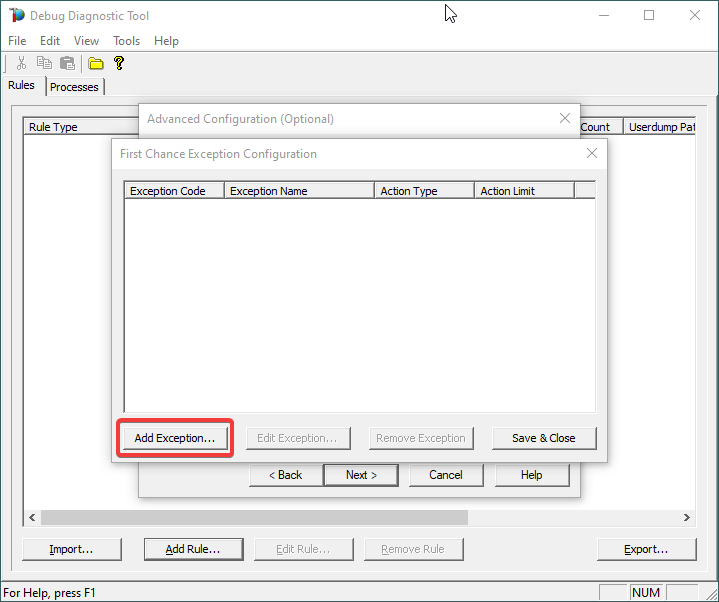
7.
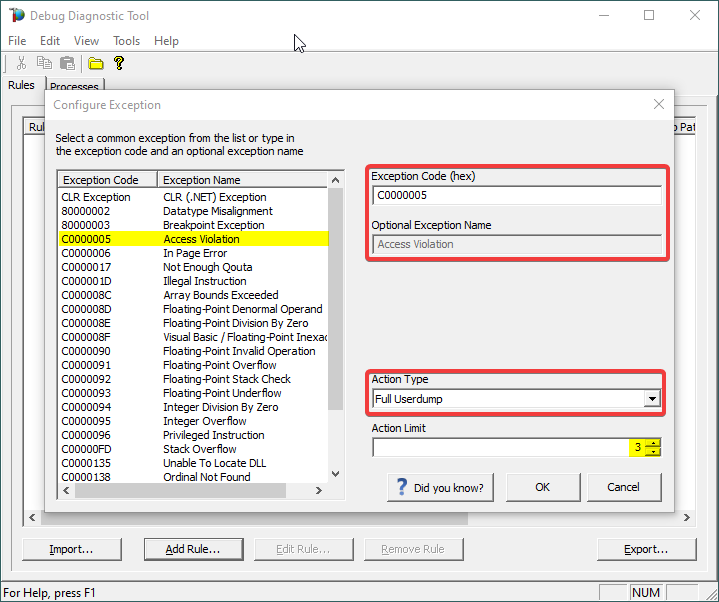
A list of common native exceptions is presented; all managed (C#/.NET exceptions) would be under the CLR Exception umbrella.
Select the native exception that affects our app/process or simply type its hex code: C0000005 Access Violation.
Notice that the exception code does not include the hexadecimal prefix “0x“.
Or
Select CLR (.NET) Exception and type its fully qualified name (Exception Type Equals…).
Make sure you’re not including any prepended or trailing space characters. Case is sensitive!
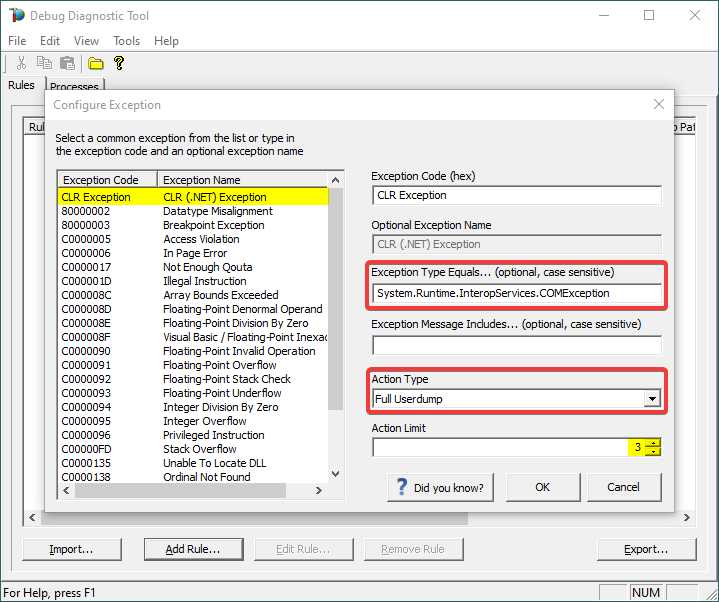
We need full memory dumps, so select the according value in Action Type.
It is always better if we get more than one memory dump, so you may increase the Action Limit field value.
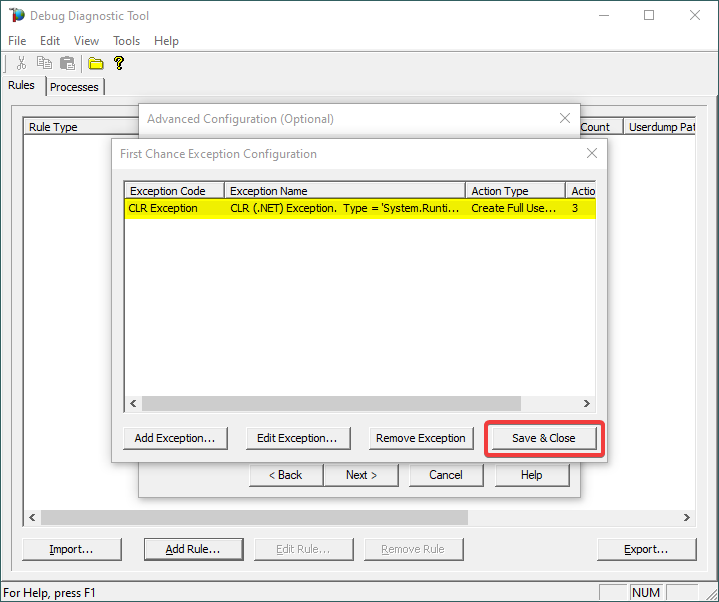
8.
Confirm that our exception of interest is added, then click Save & Close:
9.
Click Next…
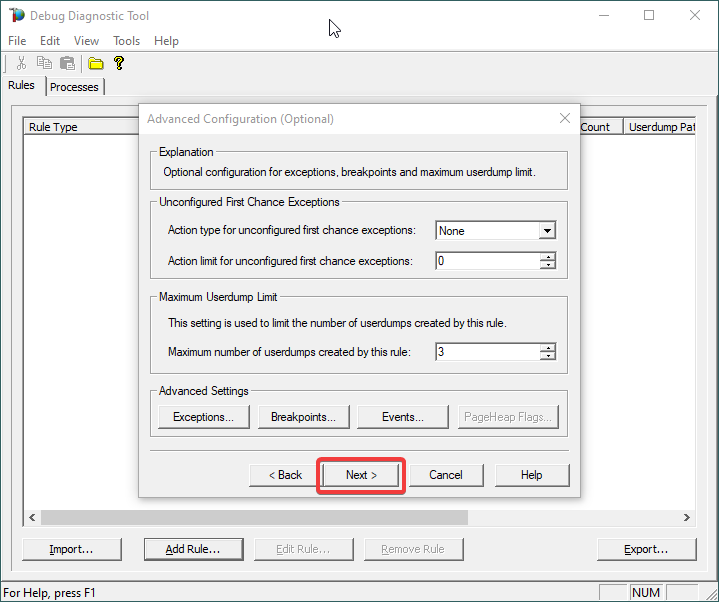
10.
Configure the file location where the dump file(s) will be generated/written.
Please note that a dump file is a snapshot of the process memory, written in disk; size will be similar to process memory as seen in the Task Manager. For example, if you see that w3wp.exe uses around 5 GB of memory in Task Manager, then the dump of that process will be around 5 GB on the disk; if you multiply by number of dumps, then… choose a disk with enough free space.
Please do not choose a disk in network/UNC; choose a local disk.
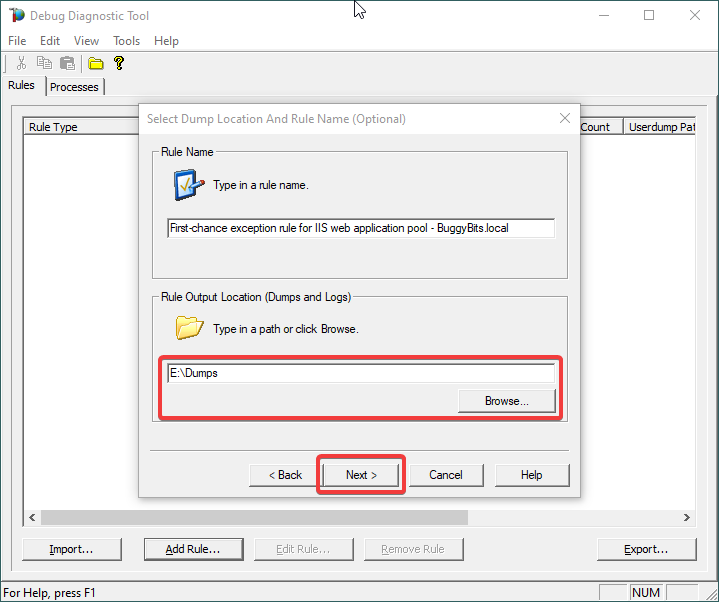
11.
Click Next and Finish by selecting to Activate the rule now.
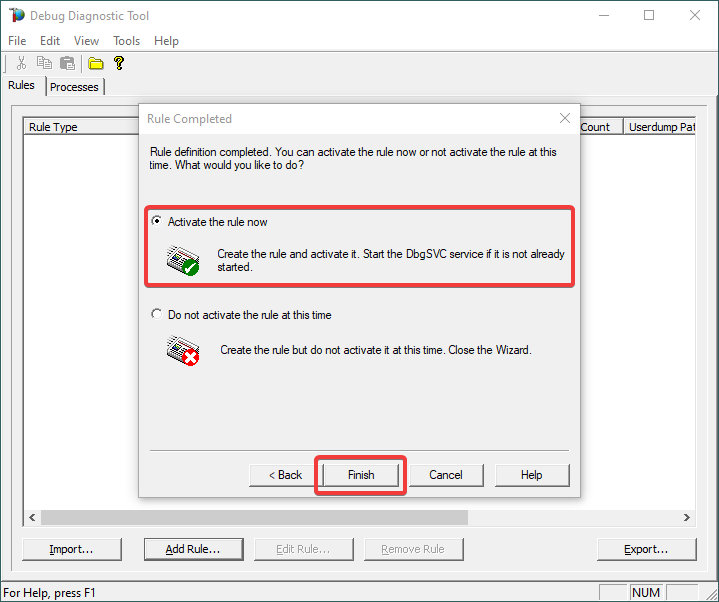
12.
When the configured exception occurs, a dump file (or files) should be created in the user-dump location selected above.
Please archive in a ZIP and prepare to hand over to the support engineer; upload in a secure file transfer space.
If we don’t get dumps, then we probably don’t have the configured first-chance memory occurring. Remember my article about how exceptions are handled and how to collect memory dumps to study them.

by Contributed | Apr 16, 2021 | Technology
This article is contributed. See the original author and article here.
Step by Step Manage Windows Server in Azure with Windows Admin Center
Robert Smit is a EMEA Cloud Solution Architect at Insight.de and is a current Microsoft MVP Cloud and Datacenter as of 2009. Robert has over 20 years experience in IT with experience in the educational, health-care and finance industries. Robert’s past IT experience in the trenches of IT gives him the knowledge and insight that allows him to communicate effectively with IT professionals. Follow him on Twitter at @clusterMVP

Create your classroom lab with Azure Lab Services!
Sergio Govoni is a graduate of Computer Science from “Università degli Studi” in Ferrara, Italy. Following almost two decades at Centro Software, a software house that produces the best ERP for manufacturing companies that are export-oriented, Sergio now manages the Development Product Team and is constantly involved on several team projects. For the provided help to technical communities and for sharing his own experience, since 2010 he has received the Microsoft Data Platform MVP award. During 2011 he contributed to writing the book: SQL Server MVP Deep Dives Volume 2. Follow him on Twitter or read his blogs in Italian and English.

Backing up all Azure Key Vault Secrets, Keys, and Certificates
Tobias Zimmergren is a Microsoft Azure MVP from Sweden. As the Head of Technical Operations at Rencore, Tobias designs and builds distributed cloud solutions. He is the co-founder and co-host of the Ctrl+Alt+Azure Podcast since 2019, and co-founder and organizer of Sweden SharePoint User Group from 2007 to 2017. For more, check out his blog, newsletter, and Twitter @zimmergren

Azure: Deploy Bastion Host Using Terraform
George Chrysovalantis Grammatikos is based in Greece and is working for Tisski ltd. as an Azure Cloud Architect. He has more than 10 years’ experience in different technologies like BI & SQL Server Professional level solutions, Azure technologies, networking, security etc. He writes technical blogs for his blog “cloudopszone.com“, Wiki TechNet articles and also participates in discussions on TechNet and other technical blogs. Follow him on Twitter @gxgrammatikos.

Teams Real Simple in Pictures: Disabling List Item Comments in the Web App and in Teams
Chris Hoard is a Microsoft Certified Trainer Regional Lead (MCT RL), Educator (MCEd) and Teams MVP. With over 10 years of cloud computing experience, he is currently building an education practice for Vuzion (Tier 2 UK CSP). His focus areas are Microsoft Teams, Microsoft 365 and entry-level Azure. Follow Chris on Twitter at @Microsoft365Pro and check out his blog here.
by Contributed | Apr 16, 2021 | Technology
This article is contributed. See the original author and article here.
We are pleased to announce the enterprise-ready release of the security baseline for Microsoft Edge, version 90!
We have reviewed the new settings in Microsoft Edge version 90 and determined that there are no additional security settings that require enforcement. The settings from the Microsoft Edge version 88 package continues to be our recommended baseline. That baseline package can be downloaded from the Microsoft Security Compliance Toolkit.
Microsoft Edge version 90 introduced 9 new computer settings, 9 new user settings. We have attached a spreadsheet listing the new settings to make it easier for you to find them.
As a friendly reminder, all available settings for Microsoft Edge are documented here, and all available settings for Microsoft Edge Update are documented here.
Please continue to give us feedback through the Security Baselines Discussion site or this post.
by Contributed | Apr 16, 2021 | Technology
This article is contributed. See the original author and article here.
Azure Synapse Analytics provides multiple query runtimes that you can use to query in-database or external data. You have the choice to use T-SQL queries using a serverless Synapse SQL pool or notebooks in Apache Spark for Synapse analytics to analyze your data.
You can also connect these runtimes and run the queries from Spark notebooks on a dedicated SQL pool.
In this post, you will see how to create Scala code in a Spark notebook that executes a T-SQL query on a serverless SQL pool.
Configuring connection to the serverless SQL pool endpoint
Azure Synapse Analytics enables you to run your queries on an external SQL query engine (Azure SQL, SQL Server, a dedicated SQL pool in Azure Synapse) using standard JDBC connection. With the Apache Spark runtime in Azure Synapse, you are also getting pre-installed driver that enables you to send a query to any T-SQL endpoint. This means that you can use this driver to run a query on a serverless SQL pool.
First, you need to initialize the connection with the following steps:
- Define connection string to your remote T-SQL endpoint (serverless SQL pool in this case),
- Specify properties (for example username/password)
- Set the driver for connection.
The following Scala code contains the code that initializes connection to the serverless SQL pool endpoint:
// Define connection:
Class.forName("com.microsoft.sqlserver.jdbc.SQLServerDriver")

val hostname = "<WORKSPACE NAME>-ondemand.sql.azuresynapse.net"
val port = 1433
val database = "master" // If needed, change the database
val jdbcUrl = s"jdbc:sqlserver://${hostname}:${port};database=${database}"

// Define connection properties:
import java.util.Properties

val props = new Properties()
props.put("user", "<sql login name>")
props.put("password", "<sql login password>")

// Assign driver to connection:
val driverClass = "com.microsoft.sqlserver.jdbc.SQLServerDriver"
props.setProperty("Driver", driverClass)
This code should be placed in some cell in the notebook and you will be able to use this connection to query external T-SQL endpoints. In the following sections you will see how to read data from some SQL table or view or run ad-hoc query using this connection.
Reading content of SQL table
The serverless SQL pool in Azure Synapse enables you to create views and external tables over data stored in your Azure Data Lake Storage account or Azure CosmosDB analytical store. With the connection that is initialized in the previous step, you can easily read the content of the view or external table.
In the following simplified example, the Scala code will read data from the system view that exists on the serverless SQL pool endpoint:
val objects = spark.read.jdbc(jdbcUrl, "sys.objects", props).
objects.show(10)
If you create view or external table, you can easily read data from that object instead of system view.
You can easily specify what columns should be returned and some conditions:
val objects = spark.read.jdbc(jdbcUrl, "sys.objects", props).
                            select("object_id", "name", "type").
                            where("type <> 'S'")
objects.show(10)
Executing remote ad-hoc query
You can easily define T-SQL query that should be executed on remote serverless SQL pool endpoint and retrieve results. The Scala sample that can be added to the initial code is shown in the following listing:
val tsqlQuery =
"""
select top 10 *
from openrowset(
    bulk 'https://pandemicdatalake.blob.core.windows.net/public/curated/covid-19/ecdc_cases/latest/ecdc_cases.parquet',
    format = 'parquet') as rows
"""

val cases = spark.read.jdbc(jdbcUrl, s"(${tsqlQuery}) res", props)
cases.show(10)
The text of T-SQL query is defined the variable tsqlQuery. Spark notebook will execute this T-SQL query on the remote serverless Synapse SQL pool using spark.read.jdbc() function.
The results of this query are loaded into local data frame and displayed in the output.
Conclusion
Azure Synapse Analytics enables you to easily integrate analytic runtimes and run a query from the Apache Spark runtime on the Synapse SQL pool. Although Apache Spark has built-in functionalities that enable you to access data on Azure Storage, there some additional Synapse SQL functionalities that you can leverage in Spark jobs:
- Accessing storage using SAS tokens or workspace managed identity. This way you can use serverless SQL pool to access Azure Data Lake storage protected with private endpoints or time limited keys.
- Using custom language processing text rules. Synapse SQL contains text comparison and sorting rules for most of the world language. If you need to use case or accent insensitive searches or filter text using Japanese, France, German, or any other custom language rules, Synapse SQL provides native support for text processing.
The samples described in this article might help you to reuse functionalities that are available in serverless Synapse SQL pool to load data from Azure Data Lake storage or Azure Cosmos DB analytical store directly in your Spark Data Frames. Once you load your data, Apache Spark will enable you to analyze data sets using advanced data transformation and machine learning functionalities that exist in Spark libraries.
by Contributed | Apr 16, 2021 | Technology
This article is contributed. See the original author and article here.
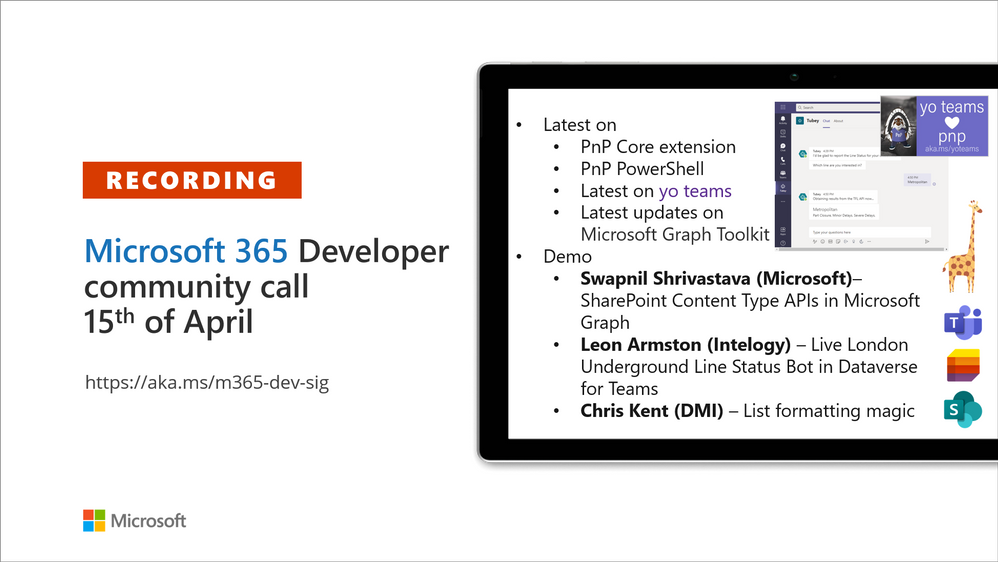
Recording of the Microsoft 365 – General M365 development Special Interest Group (SIG) community call from April 15, 2021.
Call Summary
Latest news from Microsoft 365 engineering and updates on open-source projects: PnP .NET libraries, PnP PowerShell, modernization tooling, on yo Teams, on Microsoft Graph Toolkit, and on Microsoft Teams Samples.
The Microsoft 365 developer community survey is now open, visit the Microsoft Teams samples gallery to get started with Microsoft Teams development, preview the new Microsoft 365 Extensibility look book gallery, and register now for April trainings on Sharing-is-caring. Recent PnP project updates include – PnP .NET Libraries – PnP Framework v1.4.0 and PnP Core SDK v1.1.0 and PnP PowerShell v1.5.0 (new commandlets for Microsoft Viva Connections and Syntex). yo Teams generator-teams (apps generator) v3.0.3 GA and 3.1.0 Preview, yo teams-build-core (gulp tasks) v1.0.1 + v1.1.0 Preview, and msteams-react-base-component (React UI helpers) v3.1.0, have been released. Microsoft Graph Toolkit try out the new OneDrive file components (Preview). The host of this call was Vesa Juvonen (Microsoft) | @vesajuvonen. Q&A takes place in chat throughout the call.
Actions:
Microsoft Teams Development Samples: (https://aka.ms/TeamsSampleBrowser)

It’s together time – Super comfy seats!
Demos delivered in this session
SharePoint Content Type APIs in Microsoft Graph – Classic SharePoint APIs are now showing up in Microsoft Graph. In this demo, step through beta API methods, properties and responses for creating a content type (CT), adding CT to list, adding a column, copying to default location, updating a CT, publishing a CT, and associating CT to a hub site. API permission requirements are called out and differ slightly by API.
Live London Underground Line Status Bot in Dataverse for Teams – the next stage in the evolution of the presenter’s Tube Status solution. An interactive Tube bot in Power Virtual Agents, using Power Automate, and configuring your Azure environment for Azure API Management and Azure Functions. Dataverse for Teams allows users to leverage Azure API Management service using a custom connector in Power Platform. See solution architecture, execution triggers, rules, calls and more.
Microsoft list formatting with header and footer settings – we are reminded that there are layers of formatting options for lists and that there is sample code for each layer. Here we look at header and footer settings, for groups and entire list, beyond the vanilla capabilities delivered 2 weeks ago. This session looks at Collapsed Simple formatting used for Q&A. Uses groupProps, aggregates, hiding, tips on double nesting and more.
Thank you for your work. Samples are often showcased in Demos.
Topics covered in this call
Resources:
Additional resources around the covered topics and links from the slides.
General resources:
Upcoming Calls | Recurrent Invites:
General Microsoft 365 Dev Special Interest Group bi-weekly calls are targeted at anyone who’s interested in the general Microsoft 365 development topics. This includes Microsoft Teams, Bots, Microsoft Graph, CSOM, REST, site provisioning, PnP PowerShell, PnP Sites Core, Site Designs, Microsoft Flow, PowerApps, Column Formatting, list formatting, etc. topics. More details on the Microsoft 365 community from http://aka.ms/m365pnp. We also welcome community demos, if you are interested in doing a live demo in these calls!
You can download recurrent invite from http://aka.ms/m365-dev-sig. Welcome and join in the discussion. If you have any questions, comments, or feedback, feel free to provide your input as comments to this post as well. More details on the Microsoft 365 community and options to get involved are available from http://aka.ms/m365pnp.
“Sharing is caring”
Microsoft 365 PnP team, Microsoft – 16th of April 2021
by Contributed | Apr 16, 2021 | Technology
This article is contributed. See the original author and article here.
AzUpdate celebrates its first-year anniversary, and the team would like to thank all of you for supporting the show! News the team will be covering this week includes Log analytics workspace name uniqueness, Azure IoT Central new and updated features for March 2021, Surface Laptop 4 and Microsoft accessories announcements, Azure Blob storage supports objects up to 200 TB in size and our Microsoft Learn Module of the week.
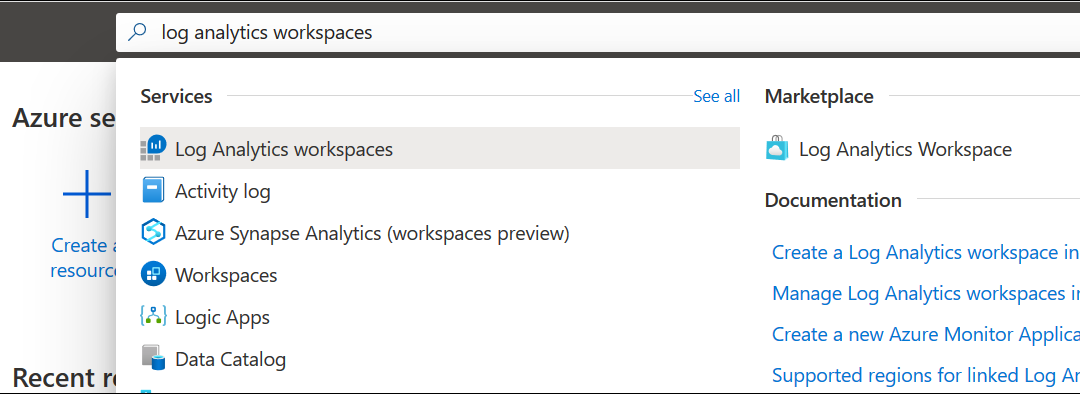
Log analytics workspace name uniqueness is now per resource group
When a workspace name was used by one customer or user in the same organization, it couldn’t be used again by others as Azure Monitor log analytics workspace name uniqueness was maintained within the subscription.
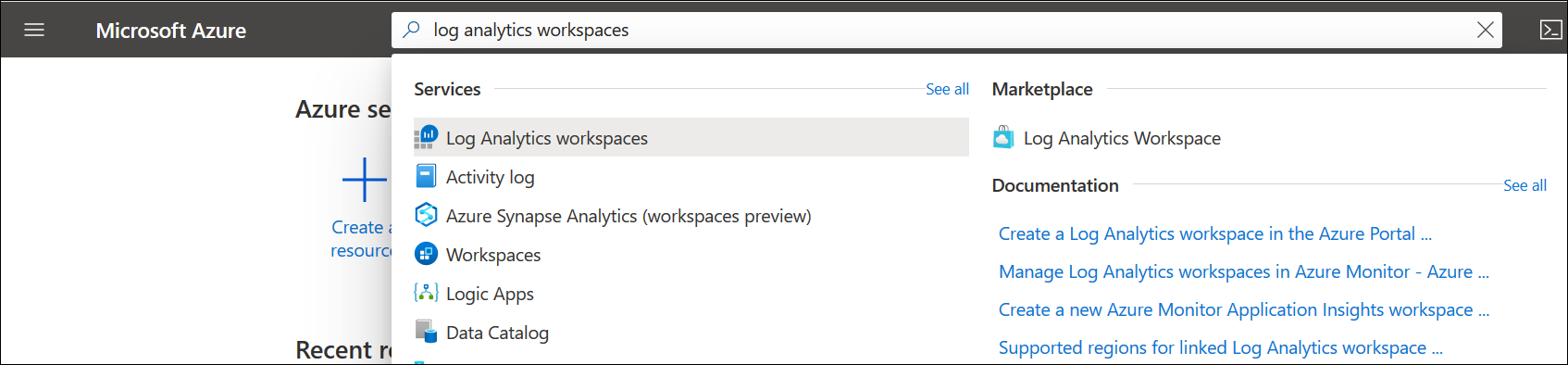
Microsoft has changed the way they enforce workspace name uniqueness and it’s now maintained inside of the resource group context and allows use of the same workspace name in deployments across multiple environments for consistency.
Workspace uniqueness is maintained as follow:
- Workspace ID – global uniqueness remained unchanged.
- Workspace resource ID – global uniqueness.
- Workspace name – per resource group
Learn More
Azure IoT Central new and updated features for March 2021
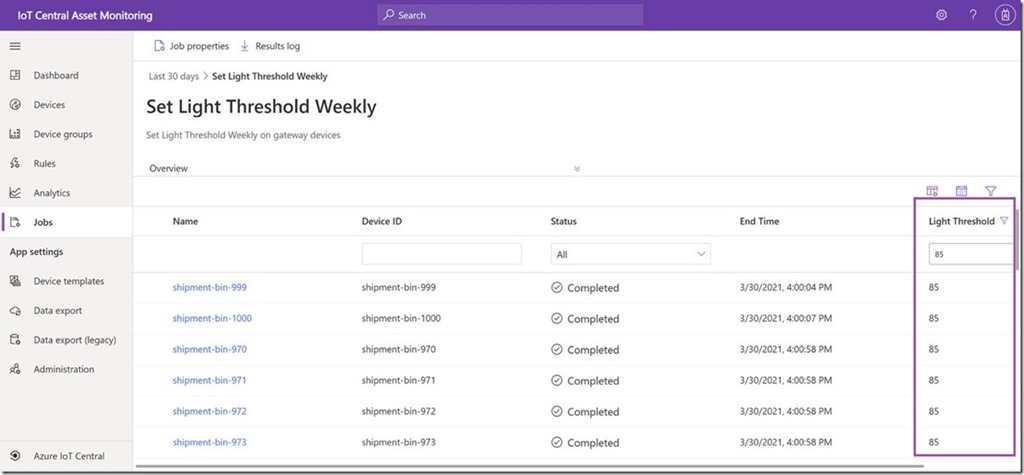
Filter jobs results on reported properties
IoT Central now supports filtering on reported properties in the jobs results grid which lets you view a subset of devices based device state for a current running job or a completed job and helps you view job metrics in production scenarios.
Export device lifecycle and device template events
New data export capabilities allow you export device lifecycle events and device template events. Export these new types of data and get notified when devices are registered or deleted, or when device templates are published or deleted. You can use filters and enrichments and export to the existing destinations. To learn more, see Export data from Azure IoT Central.
Application usage monitoring improvements
IoT Central metrics provided through Azure Monitor can now improve the ability to monitor and diagnose the health and usage of your IoT Central application and the devices connected to it. With the new set of metrics made available this month, it’s now easier to monitor and troubleshoot provisioned devices, device data usage, telemetry messages, commands, and more. For a complete list of available platform metrics, see Supported metrics with Azure Monitor.
IoT Central documentation improvements
Documentation content updates, including new overview articles for administrators and operators, and added more content about multi-component device models including a refresh of the Create and connect a client application tutorials.
New Surface Laptop 4 and Productivity Peripherals
Microsoft announced this week the latest forth generation Surface Laptop sporting your choice of a New Quad Core 11th Gen Intel® Core™ processors and Intel® Iris® Xe graphics or a Custom AMD Ryzen™ Microsoft Surface® Edition processor with 8 CPU cores. Models include either 13.5” or 15” PixelSense displays

Microsoft also introduced the Surface Headphones 2+ carring over all of the features from the existing Surface Headphones customers; 13 levels of active noise cancellation, innovative earcup dials, an advanced 8-microphone system for incredible voice clarity, 18.5 hours of music listening time or up to 15 hours of voice calling time, and the all-day comfort to help you through the day’s virtual meetings.
More information on the plethora of devices that were announced can be found here: Introducing Surface Laptop 4 and new accessories for enhanced meeting experiences
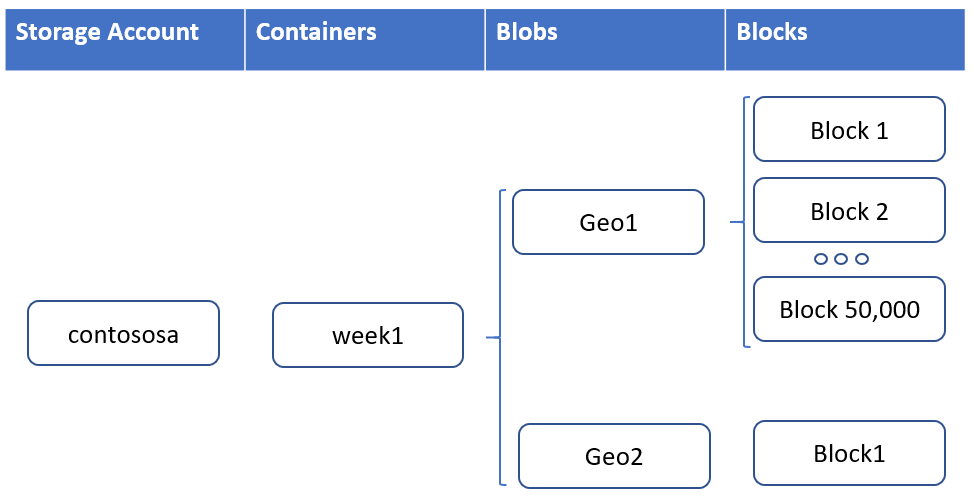
Azure Blob storage supports objects up to 200 TB in size
Workloads that utilize larger file sizes such as backups, media, and seismic analysis can now utilize Azure Blob storage and ADLS Gen2 without breaking these large files into separate blobs. Each blob is made up of up to 50,000 blocks. Each block can now be 4GBin size for a total of 200 TB per blob or ADLS Gen2 file.
Learn more
Community Events
- Global Azure 2021 – April 15th to 17th, communities around the world are organizing localized live streams for everyone around the world to join and learn about Azure from the best-in-class community leaders.
- Hello World – Special guests, content challenges, upcoming events, and daily updates.
- Patch and Switch – It has been a fortnight and Patch and Switch are back to share the stories they have amassed over the past two weeks.
MS Learn Module of the Week

Architect storage infrastructure in Azure
Learn how to architect storage solutions for your applications in Azure.

Modules include:
- Choose a data storage approach in Azure
- Create an Azure Storage account
- Upload, download, and manage data with Azure Storage Explorer
- Connect an app to Azure Storage
- Make you application storage highly available with read-access geo-redundant storage
- Secure your Azure Storage account
- Store and share files in your app with Azure Files
- Choose the right disk storage for your virtual machine workload
- Monitor, diagnose, and troubleshoot your Azure storage
Learn more here: Architect storage infrastructure in Azure

Let us know in the comments below if there are any news items you would like to see covered in the next show. Be sure to catch the next AzUpdate episode and join us in the live chat.
by Contributed | Apr 16, 2021 | Technology
This article is contributed. See the original author and article here.
@ArnabGanguly


Recent Comments