by Contributed | May 3, 2021 | Technology
This article is contributed. See the original author and article here.
We’re pleased to announce that the Microsoft Information Protection SDK version 1.9 is now generally available via NuGet and Download Center.
Highlights
In this release of the Microsoft Information Protection SDK, we’ve focused on quality updates, enhancing logging scenarios, and several internal updates.
- Full support for CentOS 8 (native only).
- When using custom
LoggerDelegate you can now pass in a logger context. This context will be written to your log destination, enabling easier correlation and troubleshooting between your apps and services and the MIP SDK logs.
- The following APIs support providing the logger context:
LoggerDelegate::WriteToLogWithContext
TaskDispatcherDelegate::DispatchTask or ExecuteTaskOnIndependentThread
FileEngine::Settings::SetLoggerContext(const std::shared_ptr<void>& loggerContext)
FileProfile::Settings::SetLoggerContext(const std::shared_ptr<void>& loggerContext)
ProtectionEngine::Settings::SetLoggerContext(const std::shared_ptr<void>& loggerContext)
ProtectionProfile::Settings::SetLoggerContext(const std::shared_ptr<void>& loggerContext)
PolicyEngine::Settings::SetLoggerContext(const std::shared_ptr<void>& loggerContext)
PolicyProfile::Settings::SetLoggerContext(const std::shared_ptr<void>& loggerContext)
FileHandler::IsProtected()
FileHandler::IsLabeledOrProtected()
FileHanlder::GetSerializedPublishingLicense()
PolicyHandler::IsLabeled()
Bug Fixes
- Fixed a memory leak when calling
mip::FileHandler::IsLabeledOrProtected().
- Fixed a bug where failure in
FileHandler::InspectAsync() called incorrect observer.
- Fixed a bug where SDK attempted to apply co-authoring label format to Office formats that don’t support co-authoring (DOC, PPT, XLS).
- Fixed a crash in the .NET wrapper related to
FileEngine disposal. Native PolicyEngine object remained present for some period and would attempt a policy refresh, resulting in a crash.
- Fixed a bug where the SDK would ignore labels applied by older versions of AIP due to missing SiteID property.
For a full list of changes to the SDK, please review our change log.
Links
by Contributed | May 3, 2021 | Technology
This article is contributed. See the original author and article here.
Overview
In 2021, each month there will be a monthly blog covering the webinar of the month for the Low-code application development (LCAD) on Azure solution.
LCAD on Azure is a solution to demonstrate the robust development capabilities of integrating low-code Microsoft Power Apps and the Azure products you may be familiar with.
This month’s webinar is ‘Unlock the Future of Azure IoT through Power Platform’.
In this blog I will briefly recap Low-code application development on Azure, provide an overview of IoT on Azure and Azure Functions, how to pull an Azure Function into Power Automate, and how to integrate your Power Automate flow into Power Apps.
What is Low-code application development on Azure?
Low-code application development (LCAD) on Azure was created to help developers build business applications faster with less code.
Leveraging the Power Platform, and more specifically Power Apps, yet helping them scale and extend their Power Apps with Azure services.
For example, a pro developer who works for a manufacturing company would need to build a line-of-business (LOB) application to help warehouse employees’ track incoming inventory.
That application would take months to build, test, and deploy. Using Power Apps, it can take hours to build, saving time and resources.
However, say the warehouse employees want the application to place procurement orders for additional inventory automatically when current inventory hits a determined low.
In the past that would require another heavy lift by the development team to rework their previous application iteration.
Due to the integration of Power Apps and Azure a professional developer can build an API in Visual Studio (VS) Code, publish it to their Azure portal, and export the API to Power Apps integrating it into their application as a custom connector.
Afterwards, that same API is re-usable indefinitely in the Power Apps’ studio, for future use with other applications, saving the company and developers more time and resources.
IoT on Azure and Azure Functions
The goal of this webinar is to understand how to use IoT hub and Power Apps to control an IoT device.
To start, one would write the code in Azure IoT Hub, to send commands directly to your IoT device. In this webinar Samuel wrote in Node for IoT Hub, and wrote two basic commands, toggle fan on, and off.
The commands are sent via the code in Azure IoT Hub, which at first run locally. Once tested and confirmed to be running properly the next question is how can one rapidly call the API from anywhere across the globe?
The answer is to create a flow in Power Automate, and connect that flow to a Power App, which will be a complete dashboard that controls the IoT device from anywhere in the world.
To accomplish this task, you have to first create an Azure Function, which will then be pulled into Power Automate using a “Get” function creating the flow.
Once you’ve built the Azure Function, run and test it locally first, test the on and off states via the Function URL.
To build a trigger for the Azure Function, in this case a Power Automate flow, you need to create an Azure resources group to check the Azure Function and test its local capabilities.
If the test fails it could potentially be that you did not create or have an access token for the IoT device. To connect a device, IoT or otherwise to the cloud, you need to have an access token.
In the webinar Samuel added two application settings to his function for the on and off commands.
After adding these access tokens and adjusting the settings of the IoT device, Samuel was able to successfully run his Azure Function.
Azure Function automated with Power Automate
After building the Azure Function, you now can build your Power Automate flow to start building your globally accessible dashboard to operate your IoT device.
Samuel starts by building a basic Power Automate framework, then flow, and demonstrates how to test the flow once complete.
He starts with a HTTP request, and implements a “Get” command. From there it is a straightforward process, to test and get the IoT Device to run.
Power Automate flow into Power Apps
After building your Power Automate flow, you develop a simple UI to toggle the fan on and off. Do this by building a canvas Power App and importing the Power Automate flow into the app.
To start, create a blank canvas app, and name it. In the Power Apps ribbon, you select “button”, and pick the button’s source, selecting “Power Automate” and “add a flow”.
Select the flow that is connected to the Azure IoT device, its name should be reflected in the selection menu.
If everything is running properly your IoT device will turn on.
FYI in the webinar Samuel is running out of time, so he creates a new Power Automate flow, which he imports into the canvas app.
Summary
Make sure to watch the webinar to learn more about Azure IoT and how to import Azure Functions into your Power Apps.
Additionally, there will be a Low-code application development on Azure ‘Learn Live’ session during Build, covering the new .NET x Power Apps learning path, covering integrations with Azure Functions, Visual Studio, and API Management.
Lastly, tune in to the Power Apps x Azure featured session at Build on May 25th, to learn more about the next Visual Studio extensions, Power Apps source code, and the ALM accelerator package. Start registering for Microsoft Build at Microsoft Build 2021.

by Contributed | May 3, 2021 | Technology
This article is contributed. See the original author and article here.
Citus is an extension to Postgres that lets you distribute your application’s workload across multiple nodes. Whether you are using Citus open source or using Citus as part of a managed Postgres service in the cloud, one of the first things you do when you start using Citus is to distribute your tables. While distributing your Postgres tables you need to decide on some properties such as distribution column, shard count, colocation. And even before you decide on your distribution column (sometimes called a distribution key, or a sharding key), when you create a Postgres table, your table is created with an access method.
Previously you had to decide on these table properties up front, and then you went with your decision. Or if you really wanted to change your decision, you needed to start over. The good news is that in Citus 10, we introduced 2 new user-defined functions (UDFs) to make it easier for you to make changes to your distributed Postgres tables.
Before Citus 9.5, if you wanted to change any of the properties of the distributed table, you would have to create a new table with the desired properties and move everything to this new table. But in Citus 9.5 we introduced a new function, undistribute_table. With the undistribute_table function you can convert your distributed Citus tables back to local Postgres tables and then distribute them again with the properties you wish. But undistributing and then distributing again is … 2 steps. In addition to the inconvenience of having to write 2 commands, undistributing and then distributing again has some more problems:
- Moving the data of a big table can take a long time, undistribution and distribution both require to move all the data of the table. So, you must move the data twice, which is much longer.
- Undistributing moves all the data of a table to the Citus coordinator node. If your coordinator node isn’t big enough, and coordinator nodes typically don’t have to be, you might not be able to fit the table into your coordinator node.
So, in Citus 10, we introduced 2 new functions to reduce the steps you need to make changes to your tables:
alter_distributed_table
alter_table_set_access_method
In this post you’ll find some tips about how to use the alter_distributed_table function to change the shard count, distribution column, and the colocation of a distributed Citus table. And we’ll show how to use the alter_table_set_access_method function to change, well, the access method. An important note: you may not ever need to change your Citus table properties. We just want you to know, if you ever do, you have the flexibility. And with these Citus tips, you will know how to make the changes.
Altering the properties of distributed Postgres tables in Citus
When you distribute a Postgres table with the create_distributed_table function, you must pick a distribution column and set the distribution_column parameter. During the distribution, Citus uses a configuration variable called shard_count for deciding the shard count of the table. You can also provide colocate_with parameter to pick a table to colocate with (or colocation will be done automatically, if possible).
However, after the distribution if you decide you need to have a different configuration, starting from Citus 10, you can use the alter_distributed_table function.
alter_distributed_table has three parameters you can change:
- distribution column
- shard count
- colocation properties
How to change the distribution column (aka the sharding key)
Citus divides your table into shards based on the distribution column you select while distributing. Picking the right distribution column is crucial for having a good distributed database experience. A good distribution column will help you parallelize your data and workload better by dividing your data evenly and keeping related data points close to each other. However, choosing the distribution column might be a bit tricky when you’re first getting started. Or perhaps later as you make changes in your application, you might need to pick another distribution column.
With the distribution_column parameter of the new alter_distributed_table function, Citus 10 gives you an easy way to change the distribution column.
Let’s say you have customers and orders that your customers make. You will create some Postgres tables like these:
CREATE TABLE customers (customer_id BIGINT, name TEXT, address TEXT);
CREATE TABLE orders (order_id BIGINT, customer_id BIGINT, products BIGINT[]);
When first distributing your Postgres tables with Citus, let’s say that you decided to distribute the customers table on customer_id and the orders table on order_id.
SELECT create_distributed_table ('customers', 'customer_id');
SELECT create_distributed_table ('orders', 'order_id');
Later you might realize distributing the orders table by the order_id column might not be the best idea. Even though order_id could be a good column to evenly distribute your data, it is not a good choice if you frequently need to join the orderstable with the customers table on the customer_id. When both tables are distributed by customer_id you can use colocated joins, which are very efficient compared to joins on other columns.
So, if you decide to change the distribution column of orders table into customer_id here is how you do it:
SELECT alter_distributed_table ('orders', distribution_column := 'customer_id');
Now the orders table is distributed by customer_id. So, the customers and the orders of the customers are in the same node and close to each other, and you can have fast joins and foreign keys that include the customer_id.
You can see the new distribution column on the citus_tables view:
SELECT distribution_column FROM citus_tables WHERE table_name::text = 'orders';
How to increase (or decrease) the shard count in Citus
Shard count of a distributed Citus table is the number of pieces the distributed table is divided into. Choosing the shard count is a balance between the flexibility of having more shards, and the overhead for query planning and execution across the shards. Like distribution column, the shard count is also set while distributing the table. If you want to pick a different shard count than the default for a table, during the distribution process you can use the citus.shard_count configuration variable, like this:
CREATE TABLE products (id BIGINT, name TEXT);
SET citus.shard_count TO 20;
SELECT create_distributed_table ('products', 'id');
After distributing your table, you might decide the shard count you set was not the best option. Or your first decision on the shard count might be good for a while but your application might grow in time, you might add new nodes to your Citus cluster, and you might need more shards. The alter_distributed_table function has you covered in the cases that you want to change the shard count too.
To change the shard count you just use the shard_count parameter:
SELECT alter_distributed_table ('products', shard_count := 30);
After the query above, your table will have 30 shards. You can see your table’s shard count on the citus_tables view:
SELECT shard_count FROM citus_tables WHERE table_name::text = 'products';
How to colocate with a different Citus distributed table
When two Postgres tables are colocated in Citus, the rows of the tables that have the same value in the distribution column will be on the same Citus node. Colocating the right tables will help you with better relational operations. Like the shard count and the distribution column, the colocation is also set while distributing your tables. You can use the colocate_with parameter to change the colocation.
SELECT alter_distributed_table ('products', colocate_with := 'customers');
Again, like the distribution column and shard count, you can find information about your tables’ colocation groups on the citus_tables view:
SELECT colocation_id FROM citus_tables WHERE table_name IN ('products', 'customers');
You can also use default and none keywords with colocate_with parameter to change the colocation group of the table to default, or to break any colocation your table has.
To colocate distributed Citus tables, the distributed tables need to have the same shard counts. But if the tables you want to colocate don’t have the same shard count, worry not, because alter_distributed_table will automatically understand this. Then your table’s shard count will also be updated to match the new colocation group’s shard count.
How to change more than one Citus table property at a time
Here is a tip! If you want to change multiple properties of your distributed Citus tables at the same time, you can simply use multiple parameters of the alter_distributed_table function.
For example, if you want to change both the shard count and the distribution column of a table here’s how you do it:
SELECT alter_distributed_table ('products', distribution_column := 'name', shard_count := 35);
How to alter the Citus colocation group
If your table is colocated with some other tables and you want to change the shard count of all of the tables to keep the colocation, you might be wondering if you have to alter them one by one… which is multiple steps.
Yes (you can see a pattern here) the Citus tip is that you can use the alter_distributed_table function to change the properties of all of the colocation group.
If you decide the change you make with the alter_distributed_table function needs to be done to all the tables that are colocated with the table you are changing, you can use the cascade_to_colocated parameter:
SET citus.shard_count TO 10;
SELECT create_distributed_table ('customers', 'customer_id');
SELECT create_distributed_table ('orders', 'customer_id', colocate_with := 'customers');
-- when you decide to change the shard count
-- of all of the colocation group
SELECT alter_distributed_table ('customers', shard_count := 20, cascade_to_colocated := true);
You can see the updated shard count of both tables on the citus_tables view:
SELECT shard_count FROM citus_tables WHERE table_name IN ('customers', 'orders');
How to change your Postgres table’s access method in Citus
Another amazing feature introduced in Citus 10 is columnar storage. This Citus 10 columnar blog post walks you through how it works and how to use columnar tables (or partitions) with Citus—complete with a Quickstart. Oh, and Jeff made a short video demo about the new Citus 10 columnar functionality too—it’s worth the 13 minutes to watch IMHO.
With Citus columnar, you can optionally choose to store your tables grouped by columns—which gives you the benefits of compression, too. Of course, you don’t have to use the new columnar access method—the default access method is “heap” and if you don’t specify an access method, then your tables will be row-based tables (with the heap access method.)
It would not be fair to introduce this cool new Citus columnar access method without also giving you a way to convert your tables to columnar. So Citus 10 also introduced a way to change the access method of tables.
SELECT alter_table_set_access_method('orders', 'columnar');
You can use alter_table_set_access_method to convert your table to any other access method too, such as heap, Postgres’s default access method. Also, your table doesn’t even need to be a distributed Citus table. You can also use alter_table_set_access_method with Citus reference tables as well as regular Postgres tables. You can even change the access method of a Postgres partition with alter_table_set_access_method.
Under the hood: How do these new Citus functions work?
If you’ve read the blog post about undistribute_table, the function Citus 9.5 introduced for turning distributed Citus tables back to local Postgres tables, you mostly know how the alter_distributed_table and alter_table_set_access_method functions work. Because we use the same underlying methodology as the undistribute_table function. Well, we improved upon it.
The alter_distributed_table and alter_table_set_access_method functions:
- Create a new table in the way you want (with the new shard count or access method etc.)
- Move everything from your old table to the new table
- Drop the old table and rename the new one
Dropping a table for the purpose of re-creating the same table with different properties is not a simple task. Dropping the table will also drop many things that depend on the table.
Just like the undistribute_table function, the alter_distributed_table and alter_table_set_access_method functions do a lot to preserve the properties of the table you didn’t want to change. The functions will handle indexes, sequences, views, constraints, table owner, partitions and more—just like undistribute_table.
alter_distributed_table and alter_table_set_access_method will also recreate the foreign keys on your tables whenever possible. For example, if you change the shard count of a table with the alter_distributed_table function and use cascade_to_colocated := true to change the shard count of all the colocated tables, then foreign keys within the colocation group and foreign keys from the distributed tables of the colocation group to Citus reference tables will be recreated.
Making it easier to experiment with Citus—and to adapt as your needs change
If you want to learn more about our previous work which we build on for alter_distributed_table and alter_table_set_access_method functions go check out our blog post on undistribute_table.
In Citus 10 we worked to give you more tools and more capabilities for making changes to your distributed database. When you’re just starting to use Citus, the new alter_distributed_table and alter_table_set_access_method functions—along with the undistribute_table function—are all here to help you experiment and find the database configuration that works the best for your application. And in the future, if and when your application evolves, these three Citus functions will be ready to help you evolve your Citus database, too.

by Scott Muniz | May 3, 2021 | Security, Technology
This article is contributed. See the original author and article here.
Official websites use .gov
A .gov website belongs to an official government organization in the United States.

Secure .gov websites use HTTPS A
lock ( )
) or
https:// means you’ve safely connected to the .gov website. Share sensitive information only on official, secure websites.
by Contributed | May 3, 2021 | Technology
This article is contributed. See the original author and article here.
Deprecated accounts are the accounts that were once deployed to a subscription for some trial/pilot initiative or some other purpose and are not required anymore. The user accounts that have been blocked from signing in should be removed from subscriptions. These accounts can be targets for attackers finding ways to access your data without being noticed.
The Azure Security Center recommends identifying those accounts and removing any role assignments on them from the subscription, however, it could be tedious in the case of multiple subscriptions.
Pre-Requisite:
– Az Modules must be installed
– Service principal created as part of Step 1 must be having owner access to all subscriptions
Steps to follow:
Step 1: Create a service principal
Post creation of service principal, please retrieve below values.
- Tenant Id
- Client Secret
- Client Id
Step 2: Create a PowerShell function which will be used in generating authorization token
function Get-apiHeader{
[CmdletBinding()]
Param
(
 [Parameter(Mandatory=$true)]
 [System.String]
 [ValidateNotNullOrEmpty()]
 $TENANTID,
 [Parameter(Mandatory=$true)]
 [System.String]
 [ValidateNotNullOrEmpty()]
 $ClientId,
 [Parameter(Mandatory=$true)]
 [System.String]
 [ValidateNotNullOrEmpty()]
 $PasswordClient,
 [Parameter(Mandatory=$true)]
 [System.String]
 [ValidateNotNullOrEmpty()]
 $resource
)
$tokenresult=Invoke-RestMethod -Uri https://login.microsoftonline.com/$TENANTID/oauth2/token?api-version=1.0 -Method Post -Body @{"grant_type" = "client_credentials"; "resource" = "https://$resource/"; "client_id" = "$ClientId"; "client_secret" = "$PasswordClient" }
$token=$tokenresult.access_token
$Header=@{
  'Authorization'="Bearer $token"
  'Host'="$resource"
  'Content-Type'='application/json'
  }
return $Header
}
Step 3: Invoke API to retrieve authorization token using function created in above step
Note: Replace $TenantId, $ClientId and $ClientSecret with value captured in step 1
$AzureApiheaders = Get-apiHeader -TENANTID $TenantId -ClientId $ClientId -PasswordClient $ClientSecret -resource "management.azure.com"
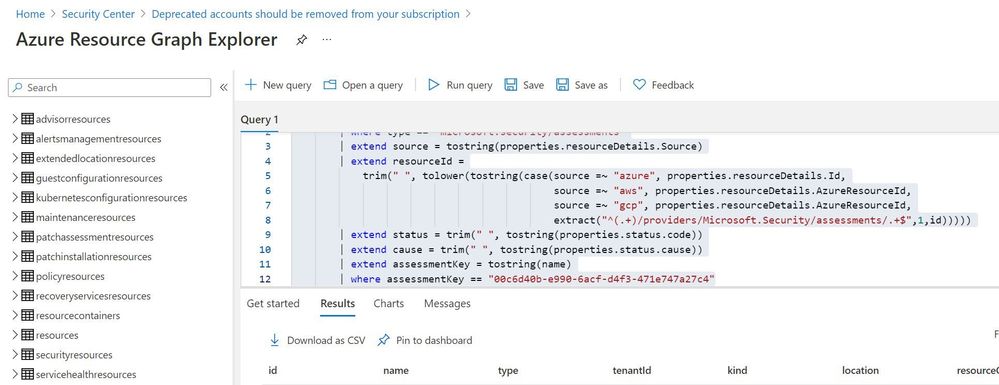
Step 4: Extracting csv file containing list of all deprecated accounts from Azure Resource Graph
Please refer: https://github.com/MicrosoftDocs/azure-docs/blob/master/articles/governance/resource-graph/first-query-portal.md
Azure Resource graph explorer: https://docs.microsoft.com/en-us/azure/governance/resource-graph/overview
Query:
securityresources
        | where type == "microsoft.security/assessments"
        | extend source = tostring(properties.resourceDetails.Source)
        | extend resourceId =
            trim(" ", tolower(tostring(case(source =~ "azure", properties.resourceDetails.Id,
            extract("^(.+)/providers/Microsoft.Security/assessments/.+$",1,id)))))
        | extend status = trim(" ", tostring(properties.status.code))
        | extend cause = trim(" ", tostring(properties.status.cause))
        | extend assessmentKey = tostring(name)
        | where assessmentKey == "00c6d40b-e990-6acf-d4f3-471e747a27c4"
Click on “Download as CSV” and store at location where removal of deprecated account script is present. Rename the file as “deprecatedaccountextract“
Set-Location $PSScriptRoot
$RootFolder = Split-Path $MyInvocation.MyCommand.Path
$ParameterCSVPath =$RootFolder + "deprecatedaccountextract.csv"
if(Test-Path -Path $ParameterCSVPath)
{
$TableData = Import-Csv $ParameterCSVPath
}

foreach($Data in $TableData)
{
  #Get resourceID for specific resource
  $resourceid=$Data.resourceId
  #Get control results column for specific resource
  $controlresult=$Data.properties
  $newresult=$controlresult | ConvertFrom-Json
  $ObjectIdList=$newresult.AdditionalData.deprecatedAccountsObjectIdList
  $regex="[^a-zA-Z0-9-]"
  $splitres=$ObjectIdList -split(',')
  $deprecatedObjectIds=$splitres -replace $regex
  foreach($objectId in $deprecatedObjectIds)
  {
    #API to get role assignment details from Azure
    $resourceURL="https://management.azure.com$($resourceid)/providers/microsoft.authorization/roleassignments?api-version=2015-07-01"
    $resourcedetails=(Invoke-RestMethod  -Uri $resourceURL -Headers $AzureApiheaders -Method GET)
    if( $null -ne $resourcedetails )
    {
     foreach($value in $resourcedetails.value)
     {
      if($value.properties.principalId -eq $objectId)
      {
       $roleassignmentid=$value.name
       $remidiateURL="https://management.azure.com$($resourceid)/providers/microsoft.authorization/roleassignments/$($roleassignmentid)?api-version=2015-07-01"
       Invoke-RestMethod  -Uri $remidiateURL -Headers $AzureApiheaders -Method DELETE
      }
     }
    }
    else
    {
     Write-Output "There are no Role Assignments in the subscription"
    }
   }
}
References:
https://github.com/Azure/Azure-Security-Center/blob/master/Remediation%20scripts/Remove%20deprecated%20accounts%20from%20subscriptions/PowerShell/Remove-deprecated-accounts-from-subscriptions.ps1
https://docs.microsoft.com/en-us/azure/security-center/policy-reference#:~:text=Deprecated%20accounts%20are%20accounts%20that%20have%20been%20blocked%20from%20signing%20in.&text=Virtual%20machines%20without%20an%20enabled,Azure%20Security%20Center%20as%20recommendations.
by Contributed | May 3, 2021 | Technology
This article is contributed. See the original author and article here.
Deprecated accounts are the accounts that were once deployed to a subscription for some trial/pilot initiative or some other purpose and are not required anymore. The user accounts that have been blocked from signing in should be removed from subscriptions. These accounts can be targets for attackers finding ways to access your data without being noticed.
The Azure Security Center recommends identifying those accounts and removing any role assignments on them from the subscription, however, it could be tedious in the case of multiple subscriptions.
Pre-Requisite:
– Az Modules must be installed
– Service principal created as part of Step 1 must be having owner access to all subscriptions
Steps to follow:
Step 1: Create a service principal
Post creation of service principal, please retrieve below values.
- Tenant Id
- Client Secret
- Client Id
Step 2: Create a PowerShell function which will be used in generating authorization token
function Get-apiHeader{
[CmdletBinding()]
Param
(
 [Parameter(Mandatory=$true)]
 [System.String]
 [ValidateNotNullOrEmpty()]
 $TENANTID,
 [Parameter(Mandatory=$true)]
 [System.String]
 [ValidateNotNullOrEmpty()]
 $ClientId,
 [Parameter(Mandatory=$true)]
 [System.String]
 [ValidateNotNullOrEmpty()]
 $PasswordClient,
 [Parameter(Mandatory=$true)]
 [System.String]
 [ValidateNotNullOrEmpty()]
 $resource
)
$tokenresult=Invoke-RestMethod -Uri https://login.microsoftonline.com/$TENANTID/oauth2/token?api-version=1.0 -Method Post -Body @{"grant_type" = "client_credentials"; "resource" = "https://$resource/"; "client_id" = "$ClientId"; "client_secret" = "$PasswordClient" }
$token=$tokenresult.access_token
$Header=@{
  'Authorization'="Bearer $token"
  'Host'="$resource"
  'Content-Type'='application/json'
  }
return $Header
}
Step 3: Invoke API to retrieve authorization token using function created in above step
Note: Replace $TenantId, $ClientId and $ClientSecret with value captured in step 1
$AzureApiheaders = Get-apiHeader -TENANTID $TenantId -ClientId $ClientId -PasswordClient $ClientSecret -resource "management.azure.com"
Step 4: Extracting csv file containing list of all deprecated accounts from Azure Resource Graph
Please refer: https://github.com/MicrosoftDocs/azure-docs/blob/master/articles/governance/resource-graph/first-query-portal.md
Azure Resource graph explorer: https://docs.microsoft.com/en-us/azure/governance/resource-graph/overview
Query:
securityresources
        | where type == "microsoft.security/assessments"
        | extend source = tostring(properties.resourceDetails.Source)
        | extend resourceId =
            trim(" ", tolower(tostring(case(source =~ "azure", properties.resourceDetails.Id,
            extract("^(.+)/providers/Microsoft.Security/assessments/.+$",1,id)))))
        | extend status = trim(" ", tostring(properties.status.code))
        | extend cause = trim(" ", tostring(properties.status.cause))
        | extend assessmentKey = tostring(name)
        | where assessmentKey == "00c6d40b-e990-6acf-d4f3-471e747a27c4"
Click on “Download as CSV” and store at location where removal of deprecated account script is present. Rename the file as “deprecatedaccountextract“
Set-Location $PSScriptRoot
$RootFolder = Split-Path $MyInvocation.MyCommand.Path
$ParameterCSVPath =$RootFolder + "deprecatedaccountextract.csv"
if(Test-Path -Path $ParameterCSVPath)
{
$TableData = Import-Csv $ParameterCSVPath
}

foreach($Data in $TableData)
{
  #Get resourceID for specific resource
  $resourceid=$Data.resourceId
  #Get control results column for specific resource
  $controlresult=$Data.properties
  $newresult=$controlresult | ConvertFrom-Json
  $ObjectIdList=$newresult.AdditionalData.deprecatedAccountsObjectIdList
  $regex="[^a-zA-Z0-9-]"
  $splitres=$ObjectIdList -split(',')
  $deprecatedObjectIds=$splitres -replace $regex
  foreach($objectId in $deprecatedObjectIds)
  {
    #API to get role assignment details from Azure
    $resourceURL="https://management.azure.com$($resourceid)/providers/microsoft.authorization/roleassignments?api-version=2015-07-01"
    $resourcedetails=(Invoke-RestMethod  -Uri $resourceURL -Headers $AzureApiheaders -Method GET)
    if( $null -ne $resourcedetails )
    {
     foreach($value in $resourcedetails.value)
     {
      if($value.properties.principalId -eq $objectId)
      {
       $roleassignmentid=$value.name
       $remidiateURL="https://management.azure.com$($resourceid)/providers/microsoft.authorization/roleassignments/$($roleassignmentid)?api-version=2015-07-01"
       Invoke-RestMethod  -Uri $remidiateURL -Headers $AzureApiheaders -Method DELETE
      }
     }
    }
    else
    {
     Write-Output "There are no Role Assignments in the subscription"
    }
   }
}
References:
https://github.com/Azure/Azure-Security-Center/blob/master/Remediation%20scripts/Remove%20deprecated%20accounts%20from%20subscriptions/PowerShell/Remove-deprecated-accounts-from-subscriptions.ps1
https://docs.microsoft.com/en-us/azure/security-center/policy-reference#:~:text=Deprecated%20accounts%20are%20accounts%20that%20have%20been%20blocked%20from%20signing%20in.&text=Virtual%20machines%20without%20an%20enabled,Azure%20Security%20Center%20as%20recommendations.

by Contributed | May 3, 2021 | Business, Microsoft 365, Technology
This article is contributed. See the original author and article here.
Recently, Microsoft unveiled new devices and accessories to help people do their best work from anywhere. The future of work is hybrid. To empower people to thrive in this new world of work, business leaders will need to provide everyone with a plan for enabling that work, as well as spaces and technology that help…
The post Equipping everyone with the right devices and accessories for hybrid work appeared first on Microsoft 365 Blog.
Brought to you by Dr. Ware, Microsoft Office 365 Silver Partner, Charleston SC.
by Contributed | May 3, 2021 | Technology
This article is contributed. See the original author and article here.
What You’ll Learn:
– How to build re-usable, scalable ETL work in the Power BI Service
– Learn how Power BI Dataflows can support your team and enterprise BI goals
– To understand the role of the Common Data Model and integration with other Azure Data Services, including Azure Data Lake Gen2
Register here for Power BI Dataflows with Pragmatic Works

by Contributed | May 3, 2021 | Technology
This article is contributed. See the original author and article here.
This past March marked the one-year anniversary of the covid-19 pandemic. I found myself reflecting on the changes I’ve gone through, both personally and professionally. One of the bright spots was realizing how much progress our customers have made with Azure IoT Edge and the number of improvements our team has been able to add to the product. Let’s take a moment to celebrate some of the successes in a year that most of us would prefer never happened.
Product maturity
COVID has caused a noticeable change in the types of scenarios in which customers are using Azure IoT Edge; however, it hasn’t dampened the market’s embrace of our product. In the past year, we documented over 25 new case studies of customers using Azure IoT Edge in their digital transformation. While these case studies are a sampling of the many customers using Azure IoT Edge, they are a great example of how widely used our product is. There is representation from a gamut of industries including: automotive, banking, energy, farming, healthcare, HVAC, industrial automation, manufacturing, packaging, real estate, recycling, retail, and shipping.
Azure IoT Edge hit an important milestone in March with the 1.1.0 release. It is our first long term servicing (LTS) release and will only be serviced with fixes to critical security issues and regressions. All other bug fixes and new feature work goes into our rolling feature releases (1.2.0 and greater). The limited number of changes in makes 1.1.0 it our most stable release and ideal for extended periods of use in production.
Security
Notable security exploits and data breaches continued in the tech industry last year. Azure IoT is a leader in edge security; however, we realize that we cannot rest on our laurels. To that end, we’ve shipped features specifically intended to increase the security posture of Azure IoT Edge.
First, we’ve updated the runtime to acquire needed certificates from EST standard infrastructure. Some customers require that certs come from their on-prem PKI infrastructure and leveraging the EST standard allows the product to integrate with compatible infrastructure.
Simply allowing customers to create their own certs is not enough. These certs must be protected from tampering, or theft, once on the device. Azure IoT Edge now uses the EST standard to integrate with hardware security modules (eg. TPM) to protect these valuable certs.
Just because a device starts off secure does not mean it remains secure. New vulnerabilities are discovered daily. Updating devices is a critical capability in the quest to keep assets protected from the latest threats. IoT Edge already does a great job of allowing customers to update the workload running on a device; however, patching the OS or even updating native components of the runtime was a job left up to the user. No more! Device Update for IoT Hub is in public preview. Customers can update IoT Edge devices, use an IoT Edge device as an update cache for downstream devices, and all of this works in a nested hierarchy often found in ISA 95 networks.
Observability
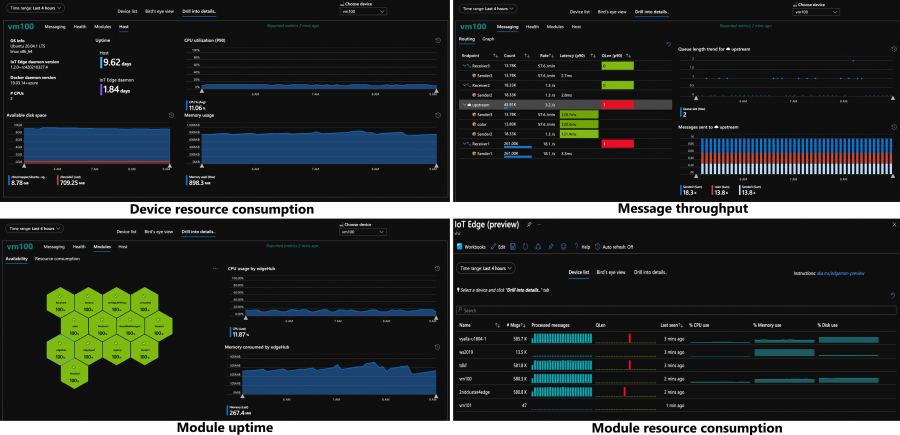
The ability to remotely monitor devices, understand how they are operating, and proactively identify problems is critical for solutions running in production. The IoT Edge runtime is now instrumented to produce metrics like resource consumption, message throughput, and module uptime. There’s a private preview detailing how customers can harvest these metrics and send them to the cloud to create intuitive dashboards, and we’re already working on making this default functionality you get out of the box.
The support experience has also been improved. Once you realize there is an issue which needs more investigation, customers must collect logs from various components and upload them to the cloud. Now the runtime is smart enough to automatically collect the pertinent logs and upload them on the customer’s behalf via the support-bundle command.
Industrial
Over a year ago we undertook a feature set aimed at unblocking industrial customers. We’re now starting to see the benefits of that work. Many industrial customers have ISA 95 networks, a standard that creates a hierarchical topology where networks are layered on top of each other. Devices in one layer can only talk to devices in the previous or subsequent layer. This throws a wrench in IoT Edge solutions because the IoT Edge devices cannot send telemetry, receive updates, or do anything else that requires the internet unless they are in the topmost layer.
IoT Edge in a nested configuration allows customers to create a daisy chain of IoT Edge devices that traverses the network hierarchy. The devices in isolated network levels leverage the connection of their parent to eventually gain access to the internet.
Nesting of IoT Edge devices doesn’t only solve the industrial problem of ISA 95 networks, it’s useful for any customer who wants to run analytics in any type of hierarchy. For example, a customer in smart buildings could use nested edge for granular optimization of energy usage. An IoT Edge device could be used to run a machine learning model which optimizes energy usage for a single floor. This device could then supply data to a parent IoT Edge device which is running AI that optimizes energy usage for the entire building.
Edge analytics
Digital transformation has multiple phases: Connect & Monitor, Analyze & Improve, Transform & Expand. While many customers are still working through the first phase, there are others who have graduated to running analytics on the edge. Azure IoT Edge continues to invest in this area so that we have powerful features available when customers are ready to leverage them. For example, the LTS branch of IoT Edge supports native integration with Nvidia deepstream so that customers can create devices which score AI models on multiple video streams in real time!
The development story for edge analytics is also being moved forwards in leaps and bounds. Recently the Percept family of products was announced. These are best in class dev kits which are built on Azure IoT Edge.
MQTT
We have heard the desire for an MQTT broker that supports customer defined topics, pub/sub semantics, and existing MQTT devices. Azure IoT Hub and Azure IoT Edge are working together to provide this capability in the cloud and on the edge. The beginning of this functionality is available on the edge in a public preview.
Azure IoT Edge on Windows
Windows has a long history of security and best in class manageability. These are key reasons that some customers want to run Azure IoT Edge on a Windows host machine. Unfortunately, using these two products together create issues which are not present when running Azure IoT Edge on Linux. For example, the base image of Azure IoT Edge modules must match the Windows host OS image and RS5 was the only supported OS. Or, partners had to maintain two versions of their modules, both a Linux container and Windows container, to target all Azure IoT Edge devices.
Azure IoT Edge For Linux On Windows, a technology in public preview, fixes these issues. It transparently spins up a Linux VM and runs Azure IoT Edge in the context of this Linux VM. Since the VM is transparent, customers continue to manage the Windows host as they would any other Windows device. Partners writing modules for Azure IoT Edge now only have to create and maintain Linux container versions of their modules since Azure IoT Edge now runs in a Linux environment, regardless of the OS used by the host.
Supporting features
The very large investments detailed above should not overshadow a handful of smaller point improvements that add critical functionality to Azure IoT Edge solutions.
- Message priority ensures that high priority messages are synced to the cloud before lower priority messages after a period of no connectivity.
- Module boot order provides information to the runtime used to try and start modules in a particular order. Please note, that this order is not binding (a module which is started first may take a while to initialize and a subsequent module could begin running before it). Module boot order also does not apply to restarts of individual modules (if the first module crashes, all subsequent modules continue to run and are not restarted with the failed module).
- Module twins now support arrays. This provides module authors to more data structures for syncing information in module twins and prevents them from (serializing/deserializing) arrays (into/out of) module twins.
The work produced by the IoT Edge team over the past year is nothing short of amazing. It’s even more impressive when one realizes that it was delivered under such stressful conditions. Lorenzo and I are truly grateful to lead such a talented and motivated team. Working with them has been a highlight in a year where so many people have struggled. We have many more great innovations coming this year, and we can’t wait to see the solutions our customers continue to build with Azure IoT Edge.
by Contributed | May 3, 2021 | Technology
This article is contributed. See the original author and article here.
Claire Bonaci
You’re watching the Microsoft us health and life sciences, confessions of health geeks podcast, a show that offers Industry Insight from the health geeks and data freaks of the US health and life sciences industry team. I’m your host Claire Bonaci. As part of our 2021 nurses week series today, I welcome Sarah Romotsky, from headspace to the podcast, Sarah and I discussed self care and meditation and how it fits into the healthcare industry. Hi, Sarah, and welcome to the podcast.
Sarah Romotsky
Hi, thanks for having me.
Claire Bonaci
So it is nurses week, and may is also Mental Health Awareness Month, do you mind sharing your background and why you feel like normalizing mental health is so important?
Sarah Romotsky
Sure, I have a unique background, I am a registered dietician, by training, and I spent many years working on helping people change their their eating habits, to adopt healthier lifestyles. And what I kept running into with clients and patients was that there were all these psychological factors were that were at the beneath the surface of why people were eating certain things, why people were acting out certain behaviors around food and health. And I realized unless we really address the the emotional and mental factors that are at play, we can’t really change health overall. And so I’m at headspace to impact health on a much larger scale. So you know, while I still care deeply about getting people to eat a healthy diet, it’s also equally as important to focus on our mental health issues or physical health. And so I think normalizing mental health and conversations about mental health are just so important today, it’s so critical to everyone’s health and your own health and your relationships with others. Whatever that whatever behavior you’re acting out, there’s, it’s important that we address the mental and the emotional struggles below. And I think that’s really important. And that’s we know that mindfulness and meditation can help us improve our mental health, and really help us show up as a better as a better me. And as a better mother, as a better wife, as a better friend, as a better co worker, a better employee, all of these things are crucial. And mental health is really at the core of that.
Claire Bonaci
And I’m curious, so you started out as a dietitian, what made you want to go to a meditation company, it seems like such a large jump, obviously, it does play a role. But I’m curious how you ended up at headspace.
Sarah Romotsky
It is quite a large jump and not clear to a lot of my family why I was making that move to begin with. But it made sense to me and it still does. You know, nutrition is just is one eating behavior. That’s it’s it’s really important that we have healthy eating behaviors. And nutrition is a really big core that of course. And exercise is also one of those established behaviors that we know is helpful in having a healthy lifestyle. But to me, meditation and mindfulness are equally as important. They’re the research is there on meditation and mindfulness. And so I started meditating with headspace, before I was employee headspace during actually when I was having some serious problems with my postpartum depression after my child, and I started meditation and I realized, wow, I’m, I’m eating all this healthy things, I’m exercising, but I’m still not really taking care of my mind in the right way. Those two things weren’t really comprehensive enough. And then I added mindfulness and meditation to my routine. And I really felt a profound change in how I was showing up in the world and my emotional and my physical health. And so I decided that you know, while I still love nutrition, I there’s another healthy behavior out there that I really want to help promote. And it all runs together. There’s, you know, meditation and mindfulness can be mental mindfulness can be incorporated to many aspects of our of our lifestyle, you can have integrate mindfulness into eating, we have a whole course on mindful eating, you can have the just the act of being present and aware and having compassion can be added to everything we do at every part of our day. And so, to me, going to headspace a meditation company was just a was just looking at health on a larger scale, and still working on promoting healthy behaviors. And I will, at dinner parties, I still tell people about gluten and I talk about mindfulness because it’s they’re equally as important.
Claire Bonaci
Well, I think that’s so interesting that you just bring up that parallel between one being healthy and whether that comes just with eating well and exercising. But that side piece of your mental health is just as important as your physical health. So I think that’s honestly forgotten many times. So that is, that’s great that you brought that parallel, and you brought it up just a little bit about the healthcare industry. So how do you think meditation and self care fits into the healthcare industry, especially with the noting that this week is nurses week?
Sarah Romotsky
Yeah. You know, I think self care used to be one of those like luxuries that only people who worked a certain amount or put in invested certain amount could could have the luxury of self care. And we used to think of self cares, you know, bubble baths, and maybe massage or maybe reading a book. But those still totally can be self cared. But my message in our message is headspace is self care is not a luxury, it’s a necessity. And the research shows that meditation and mindfulness in the form of self care is one that can truly have huge impact on mental and physical health, reduce stress, reduce anxiety, depression, improve sleep, better management of chronic conditions. I mean, these are things that have been proven in the research that mindfulness can affect and so while certainly take all the bubble baths you want, it’s really important that we think about other other ideas of self care that can that can truly improve our mental health Who would ever thought that sitting and doing deep breathing for 10 minutes was actually a necessity, right? Like, I don’t know if we’ve ever would have really thought that as a culture, but I think we’re getting to that place. And especially with a pandemic, we’re all really realizing how important it is to develop those self care routines. And when it comes to National Nurses week, I mean, I can’t think of health care professionals that are more in need and deserving of taking that time for self care when you care for others all day. And many of them also care for family members at home, too, when they come back from work. It can be hard to find that time for yourself. But it is so needed, we often fall to the bottom of the list of priorities, you know, of everything we need to do the day but it is the most needed, because that’s how we can show up the best for everyone around us. And so 10 minutes a day of meditation, 10 minutes, even three times a week, can really have such a great impact on your health, because the stressors and the triggers in our life are never are not going to go away. The pandemic might go away, but we’ll still have jobs we’ll still have children will still have finances will still have work. But it’s how we respond to those stressors that are really important. And so finding a self care routine that can really help you react better to those stressors is what’s key. But I think that we should expand the idea of self care and really think about how that can fit into modern mainstream medicine and health care today.
Claire Bonaci
I 100% agree with everything you said you made some really great points. I think definitely, especially with the pandemic happening, people really realize that their mental health is completely affected by what’s going on in the world, and especially what’s going on at home when everything switched to virtual. Think just so much pressure, so much added stress was put on everyone no matter kind of what role you’re in, but especially in the healthcare industry, especially those frontline workers and those nurses and doctors. I know you briefly mentioned just the the research on that. Do you have any research that says that this would help with prevention of kind of healthcare events or just help overall in the healthcare space?
Sarah Romotsky
Yeah, there’s been, you know, there’s so many studies out there on the benefits of meditation. And then also headspace has 27 published studies itself that have really looked at the efficacy of our product, on on mental health and emotional well being. But you know, there’s one study that showed that using headspace can reduce stress in 10 days by 14%. Another one with healthcare workers specifically showed reduce burnout with nurses. And so the best thing about headspace is that there it’s available for you at anytime you need it right in between a shift. I know a lot of healthcare professionals who use headspace right before rounds with their team. I mean, there’s so many different ways you can utilize it. And there’s so many different types of content. The benefit is all of them are based in science and based in the authentic practice of meditation,
Claire Bonaci
when definitely, especially in the healthcare space, especially addressing burnout, I think we always talk about clinician burnout, but this is like a clear, actionable way to help reduce that. And what are some actions or takeaways that you want to leave our listeners with?
Sarah Romotsky
Yeah, I mean, I think there’s three things. Number one, meditation is for everyone. You don’t need to be you don’t need to have a diagnosis, a mental disorder, you don’t need to have a chronic condition, but you can and have had those and also find benefit. Anyone can do it. The second my second thing I want people to know is that it doesn’t have to be daily. And to give it time, it’s not a you know, just like let’s say trying to be on a weight loss journey. You can’t eat a salad and then expect next day to see the pounds change on your scale. And it’s the same thing with meditation you really need to put in the time be consistent with it but you will get to a point where you feel you feel that change you feel different. There’s a difference there that you can, you might not be able,it may not be tangible, but you Like I said, maybe before you used to scream at people in traffic, maybe you know, six weeks later of using headspace and meditation, you feel a little bit more resilient to some of those stressors that usually would really get under your skin. So that’s my second thing. It doesn’t have to be daily, it just has to be consistent. And, and the third thing would be that this is a legitimate practice that healthcare leaders, business leaders, medical experts, scientists, doctors are on board with, because the research is there. So headspace works with healthcare organizations, like the American Medical Association, and others, because they know that meditation can improve your health and well being
Claire Bonaci
even the first point that you made about it is for everyone, I do think that there’s still kind of a weird, taboo stereotype around meditation. And honestly, myself, I was a convert, I did not meditate up until probably last few years. And once I switched to it, I did notice the difference. And I did realize, yes, this is for everyone. This is not just for someone that’s diagnosed with a condition. It really is for anyone in everyone. And I want to thank you again, Sarah, for being part of the podcast, I have one final question for you something a little fun. What is one unexpected kind thing that someone did for you or your family during the pandemic?
Sarah Romotsky
I love that question. You know, you don’t often sit and think, Hmm, what did what did people done for me? And I love that question. And I, the first thing that comes to mind is, um, have a really wonderful neighbor Lupita. And the other day, I had flowers on my doorstep. And it was and it said, you know, to Sarah from Lupita, and I was, wait, it’s not my birthday. It’s not Mother’s Day, like, what would this is, and I realized, it’s because she’s probably watched me every day for the last nine months a year during this pandemic struggle. I mean, we’re gonna put it up in front of our house, she’s watched me, you know, try to shove my kids into the car or watch my four year old run down the street without holding hands, or, you know, watch probably my, my baby run out without any underwear on diapers on you know, and like, she’s, she’s seen, she’s been so close to my life for the last nine months, because we’ve all been home that she’s probably seen, you know, front and center, the what’s been happening in my family, and what’s been happening is just what’s happening in everyone’s family. We’re making it work. We’re trying our best. And just the fact that she just put flowers on my doorstep for no specific reason. But no even caught note note to say why but I know it’s because she has seen and knows and understands and appreciates what we’re going through what I’m going through as a working mom.
Claire Bonaci
this is real life. This is what life is right now, and we’re all getting through it together. So, again, thank you so much, Sarah, and hopefully everyone takes this as a sign to go get headspace and start meditation. Thank you all for watching. Please feel free to leave us questions or comments below. And check back soon for more content from the HLS industry team.



























Recent Comments