by Contributed | May 10, 2021 | Technology
This article is contributed. See the original author and article here.
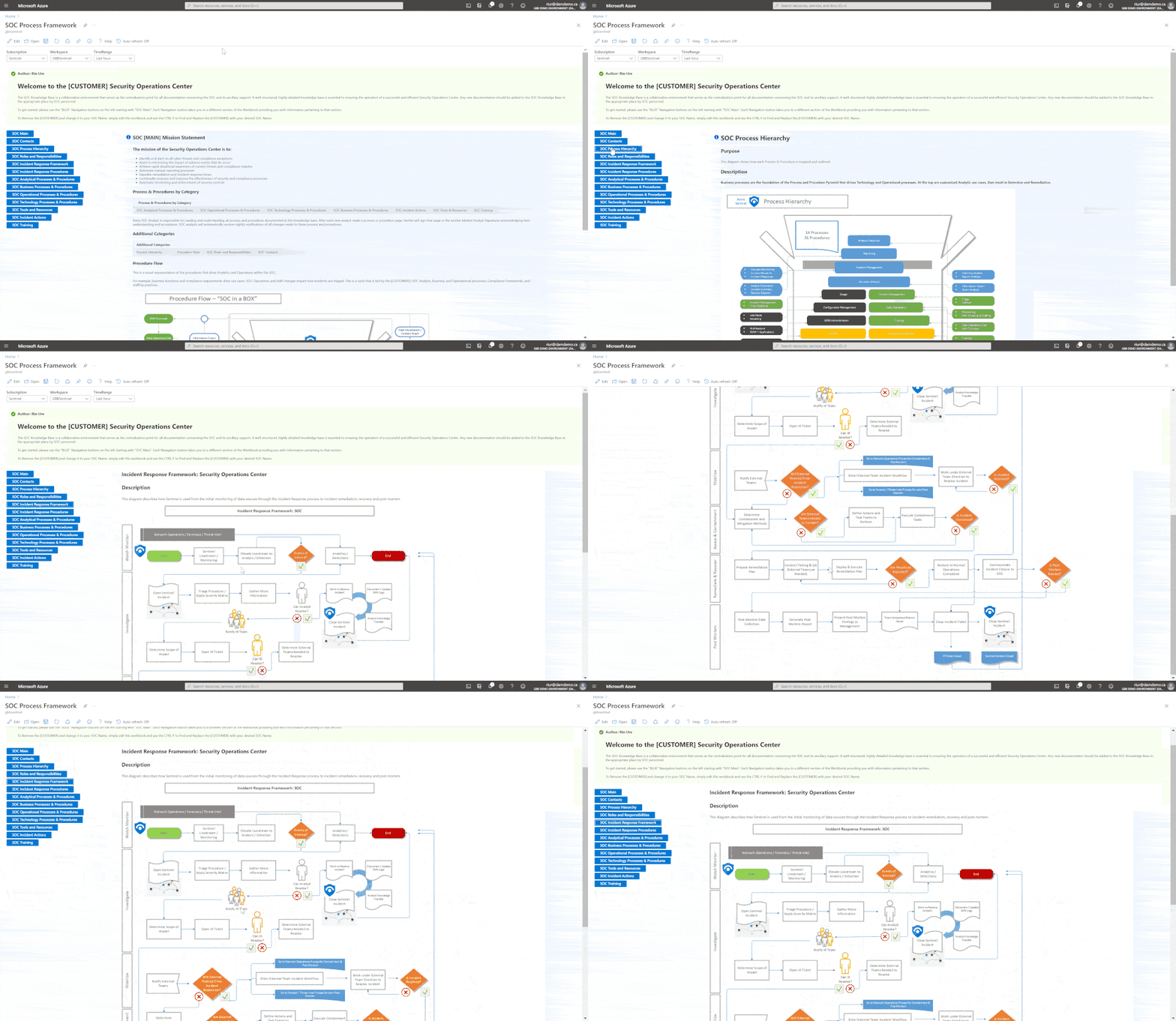
If you are like me, you are probably excited with how fast Azure Sentinel has grown. This means more capabilities, functions and integrations to work with. So with all that power, how do I build a SOC and operationalize my Security Operations to keep up? At long last, there is a new Workbook to help you do just that… I have spent over a decade helping to build SOCs and together at Microsoft my team of GBB’s, built a SOC Process Framework Workbook that combines SOC industry standards and best practices and applied them to Azure Sentinel.
A special thanks to my team members who helped me on this project. (Clive Watson, Beth Bischoff, Chuck Enstall, Josh Heizman, Matthew Littleton) Each one of you brought a wealth of knowledge and a unique perspective. A heart felt Thank you to you all!!
Deploying the Workbook
It is recommended that you have a working instance of Azure Sentinel get the full benefit of the SOC Process Framework Workbook, but the workbook will deploy regardless of your available log sources. Follow the steps below to enable the workbook:
Requirements: Azure Sentinel Workspace and Security Reader rights.
1) From the Azure portal, navigate to Azure Sentinel.
2) Select Workbooks > Templates.
3) Search SOC Process Framework and select Save to add to My Workbooks.
NOTE: If the workbook is not yet available in your Azure Sentinel Workbook Templates, you can pull down a copy by going to my GitHub repo: https://github.com/rinure-msft/Azure-Sentinel/blob/master/Workbooks/SOCProcessFramework.json and simply open a New Workbook and paste in the Gallery Code.
If you need steps on manually deploying the workbook after copying the code from GitHub, I suggest following the instructions from this article that has them outlined: https://docs.microsoft.com/en-us/azure/azure-monitor/visualize/workbooks-automate.
There are 14 Processes and 36 Procedures broken into detail to help deliver a comprehensive start to operationalizing Azure Sentinel and applying a SOC methodology.
Working Example of SOC Process Framework Workbook
This workbook is built so that SOC practices can deploy this workbook and edit the following Parameters:
– [CUSTOMER] Simply replace with your customer SOC Name.
– Upload Diagrams and or Docs under the Technology sections.
– Make any necessary changes to fit the way your SOC operates and use this workbook as your Central SOC Operational Process and Procedures Knowledge Base.
This workbook has a TON of features (too many to mention) so go grab this workbook and find out how easy it is to build your SOC processes around Azure Sentinel, XDR, Azure Security Center, or any of our Security tools.
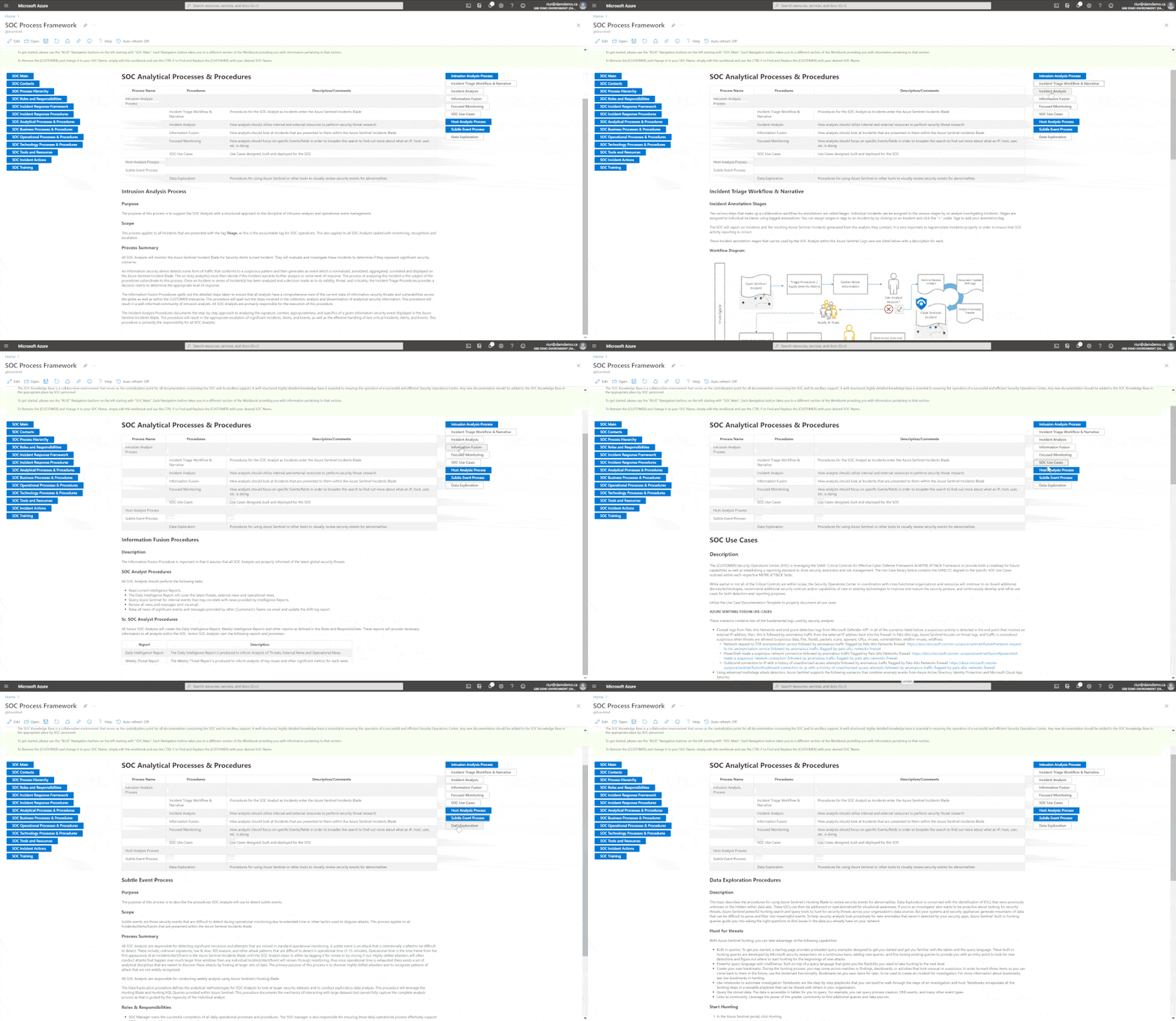 SOC Process Framework – Analytical Processes
There are a couple of other artifacts that are complimentary to this workbook that were uploaded recently! Here they are:
– Get-SOCActions Playbook – Azure-Sentinel/Playbooks/Get-SOCActions at master · rinure-msft/Azure-Sentinel (github.com)
– SocRA Watchlist – https://github.com/rinure-msft/Azure-Sentinel/blob/master/docs/SOCAnalystActionsByAlert.csv
The Get-SOCActions Playbook with “SocRA” Watchlist gives SOCs the ability to onboard SOC Actions for their Analysts to follow that snap to the SOC Process Framework Workbook. As they onboard Use-Cases and apply triage steps, this playbook can then be run to add those steps to the Incident for an Analyst to follow to closure.
I am positive this workbook will help you build a successful SOC framework needed to mature your SOC around Azure Sentinel.
Happy SOC Building!
by Contributed | May 10, 2021 | Technology
This article is contributed. See the original author and article here.
Hello everyone, Chris Vetter Customer Engineer at Microsoft. I am writing to talk about creating OneDrive for Business profiles with Microsoft Endpoint Manager Configuration Manager (MEMCM). Let us start with the why. Since more businesses are allowing remote work these days what better way to allow your workforce to access their files from any device when their files are synchronized with OneDrive for Business. This can also lower the dependency on the company provided devices and provide less data loss in the case of faulty hard drives or if a machine needs a refreshed image. By using OneDrive for Business Profiles, we also automatically synchronize the content of the known folders unlike when we use folder redirection. Why should we do this with MEMCM when we can just set it with Group Policy? Two reasons number one: If you are like most organizations your On-Premises Active Directory environment already has plenty GPO (Group Policy Objects) settings being applied which can cause things like long logon times and waiting for all the Group Policies to process and refresh. Number two: The path to fully Azure Active Directory joined environment is to move away from group policy and apply these settings with Microsoft Endpoint Manager being that is one dependency a lot of environments have on staying hybrid joined is that Azure Active Directory does not have group policy like On-Premises Active Directory. So let us begin!!
Create OneDrive for Business Profile
This feature was introduced into Configuration Manager with Current Branch 1902 so if you are not on at least CB (Current Branch). 1902 (You are in an unsupported state since 1902 is no longer supported) you will need to upgrade to the latest version of MEMCM Current Branch. See my blog post on how to do this here.
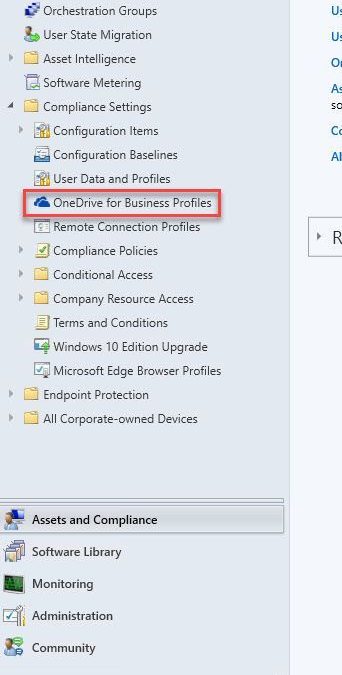
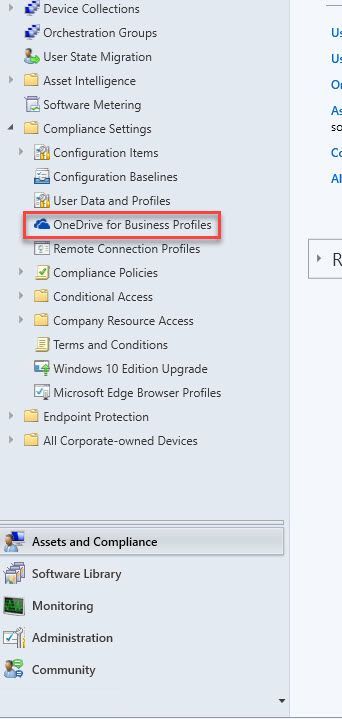
From the Assets and Compliance tab expand the Compliance Settings Folder and click on the OneDrive for Business Profiles Node. From the ribbon select Create OneDrive for Business Profile,
On the General Tab we name our Profile and give it a brief description then we select next, this brings up the Supported Platforms Tab Select any Operating systems you will be supporting in your environment then select next.
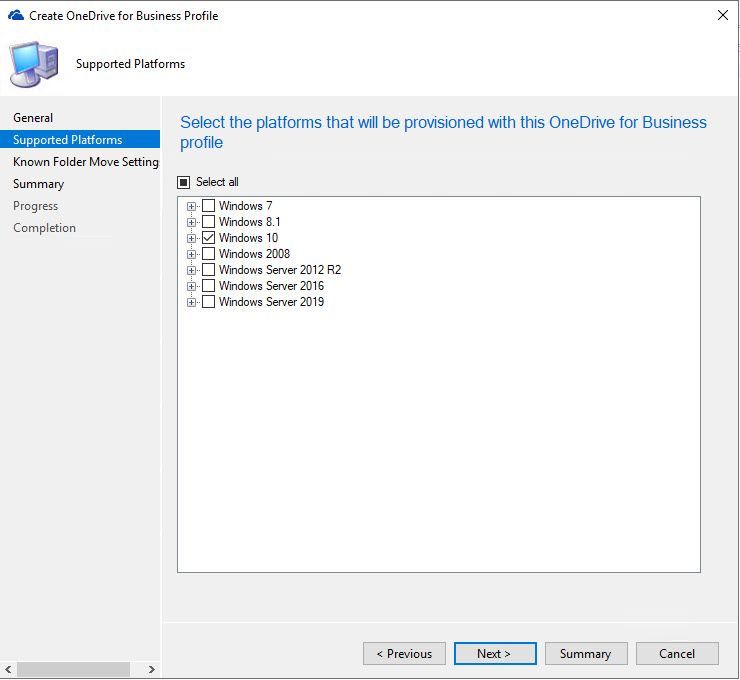
The next tab is the Known Folder Move Settings. You can select what will work best for your environment or create multiple Profiles with different settings if you have dissimilar needs for different users. You will also need to add your tenant ID for your M365 subscription which can be found by following this link,
https://docs.microsoft.com/en-us/onedrive/find-your-office-365-tenant-id
Here is a brief explanation of the settings on this tab:
- Prompt users to move Windows known folders to OneDrive: With this option, the user sees a wizard to move their files. If they choose to postpone or decline moving their folders, OneDrive periodically reminds them.
- Silently move Windows known folders to OneDrive: When this policy applies to the device, the OneDrive client automatically redirects the known folders to OneDrive for Business.
- Show notification to users after folders have been redirected: If you enable this option, the OneDrive client notifies the user after it moves their folders.
- Prevent Users from redirecting their Windows known folders back to their PC: This disables the option for users to be able to move their folders back to being local on the device.
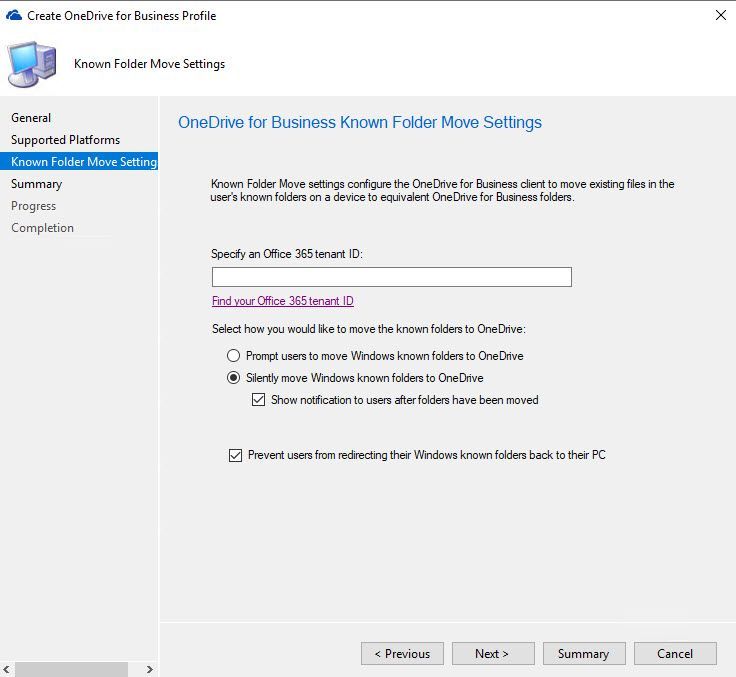
Select next to get to the Summary Tab then next again to begin the creation process. When you are finished select close.
Next, we will select our newly created Profile and deploy it to our desired device collection.
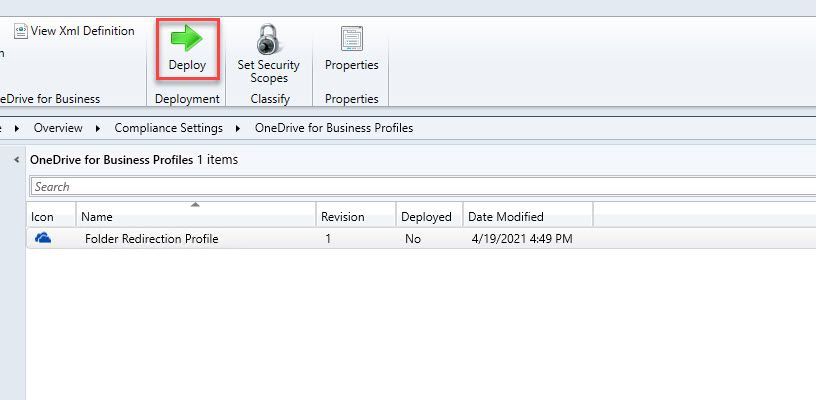
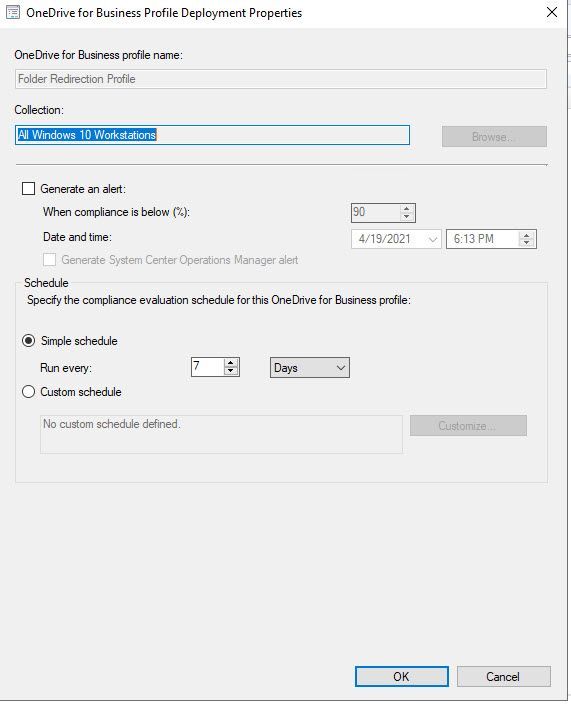
When the Deployment Wizard opens select your Device Collection you wish to target as well as if want an alert generated for non-compliance and the schedule in which you want this profile to evaluate.
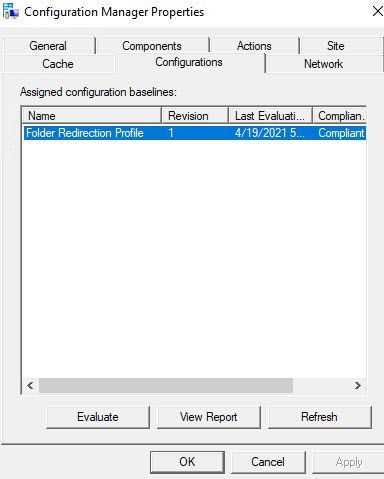
From the Windows Client this looks like a Configuration Baseline in the Configuration Manager control panel applet.
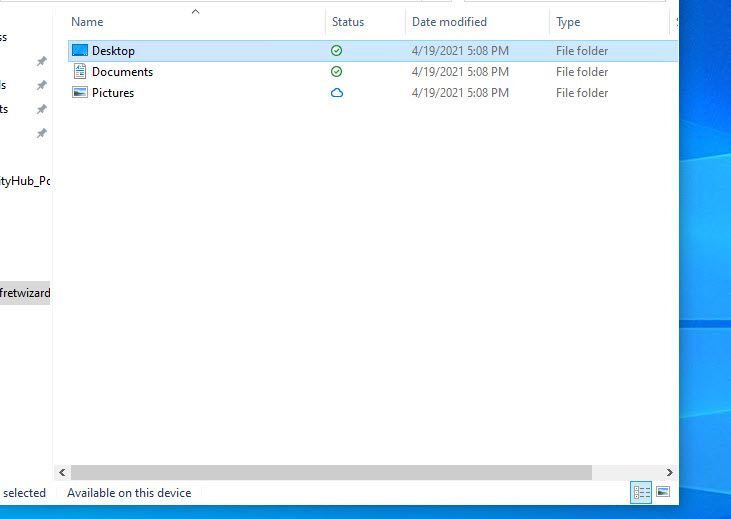
The experience in my lab was delivered on the next log on and I saw my known folders were now redirected to my OneDrive section in File Explorer.
Disclaimer
All screenshots and folder paths are from a non-production lab environment and can/will vary per environment. All processes and directions are of my own opinion and not of Microsoft and are from my years of experience with the configuration manager product in multiple customer environments.
Resources
OneDrive for Business Profiles – Configuration Manager | Microsoft Docs

by Jenna Restuccia | May 10, 2021 | Business, Knowledge Base, Uncategorized
American Sign Language (ASL) is the primary non-written language of Deaf people in the U.S. and many of Western Canada. ASL is an expressive and non-syntactic verbal language conveyed by facial movement and gestures with the hands and face. Data shows that over 33 million Americans use ASL to communicate with each other and a wide range of friends, family, and professionals. Many colleges and universities offer ASL courses and programs. They are provided primarily to individuals who wish to learn or improve their communication skills to serve their communities better and be of greater value in their personal, professional, and social lives.
There are many reasons that one would want to learn ASL. Some individuals have learned the language by observing spoken speech in Sign Language, while others have learned it from receiving hand signals from a caregiver or a book of signs. Many people take American Sign Language classes to become certified CNAs (Certified Nursing Assistant). Others sign up for audiotapes and videos of ASL expressions and gestures to memorize. Several people learn American Sign Language simply because they love the language and wish to improve their communication skills.
The National Association of Special Education Programs (NASEP) estimates that approximately 1.6 million Americans communicate in ASL. Of those individuals, about half are certified to administer American Sign Language at home or in a school/community setting. Sign language is becoming more popular throughout the United States as people learn the language or take ASL classes for personal or community benefit. There are many benefits to learning ASL:
One of the most obvious benefits of learning American Sign Language is that it is a hands-on skill that anyone can perform with any level of fluency. Compared to other common languages such as English and Spanish, learning American Sign Language has a higher retention rate because almost anyone can perform it. Individuals of all ages and from all walks of life can learn how to sign. Sign language users do not necessarily speak but rather make facial expressions, emotions, and body motions that look like words or sentences. Sign language users can communicate verbally with each other using only hand motions.
In addition to ASL visual elements, learners also benefit from speaking the language. Many studies show that reading books containing written speech improves reading comprehension skills, similarly, achieved by reading audiobooks. However, in today’s world, more individuals are reading text on the Internet. Because of this, many individuals are now able to perform “word by word” communication via the computer. Learning American Sign Language provides individuals the ability to read and understand spoken languages and allows them to communicate on a deeper level that only the spoken language can provide.
One of the main reasons people begin learning ASL is that they plan to take an American Sign Language exam, such as training from the American deaf exposure program. The information courses in ASL include a fundamental understanding of the language, posture statements, and vocabulary exercises. The position statement is essential in spoken languages, and it instructs individuals on how to position themselves physically to hold a conversation in an everyday setting. A posture statement is also helpful because it demonstrates how people who speak ASL stand in relation to one another, which is vital for an American Sign Language test.
by Contributed | May 10, 2021 | Technology
This article is contributed. See the original author and article here.
Guest blog by Antoinette Davis, Training Manager & Curriculum Developer for the Technology Career Program at TechBridge, Inc.

As a nonprofit, our mission is to break the cycle of generational poverty through the innovative use of technology to transform nonprofits and community impact. Our vision is to measurably alleviate poverty within communities in the United States.
My journey to education has been an interesting one as most of my background is solely in Web Development. I have always had a passion for sharing my knowledge with others, and being a part of their journey to becoming better developers. My deep dive into education, and understanding how I can make a difference in this space, began in June 2020. During this short amount of time I have had the opportunity to lead delivering AZ 900 at TCP with a current pass rate of 85%. My work does not stop here though! I am always looking for ways to better the experience for our students.
I have to stop and say thank you to my amazing team at TechBridge and my mentor, Sheena Allen, for always pushing me to be better. Because of their leadership, I have the confidence and drive to be the instructor I need to be for my students! They expect greatness from me and I expect the same from ALL students of TCP!
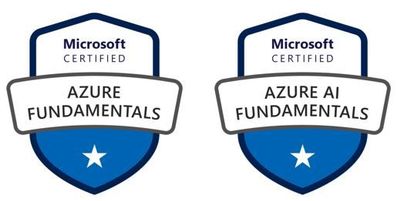
TechBridge was granted access to the MSLE program via Microsoft Accelerate: Atlanta; Microsoft’s initiative to help communities close the digital skills gap. With this partnership TCP added Azure Fundamentals to our curriculum in June 2020. It has shown to be a great entry level point for most of our Cloud courses. Here is what some of my students have to say about the AZ 900 course:
“I am so grateful for my wonderful support network that I found through TechBridge, Inc. & Antoinette Davis for introducing me to cloud, as it has opened up a new world for me.” – Zenaida Johnson
“I came into the Technology Career Program with little to no knowledge about technology. Having Toni as an instructor helped blaze a path towards my first certification, Microsoft Azure Fundamentals. She was a stern but fair leader. Our feedback on her teaching style was taken into consideration, followed by immediate action. She did not allow us to come to her with surface level inquiries outside of class time. You had to show proof that you dug deep within yourself and the plethora of resources provided before asking for one on one help. She had high expectations of the class and constantly reminded us that success was the only option. Success is what my peers and I have achieved under her leadership.” Christa Davoll
“Toni was my instructor for Azure Fundamentals. During my matriculation through the Technology Careers Program Toni displayed an unrivaled knowledge of the source material which allowed her to present it in an easily digestible format. Under her tutelage I went from not understanding what exactly a “cloud” was to passing my proctored exam on the first try. Without the leadership & guidance from Toni I’m not sure I would have obtained the same results and I will forever be grateful for all that she did for our class.” – Curtis Guyton
Microsoft Learn for Educators gave me the tools and training material I needed to successfully teach our Azure Fundamentals course. Our students feel prepared to enter the job market using their certificates and knowledge gained during our cohort. Our success thus far can be attributed to:
- Up-to-date information and resources provided by MSLE
- High quality reading material and hands on labs through the Microsoft Learn platform
- Freedom to customize curriculum to meet the needs of our learners (Some programs do not allow this)
- Continuous support from the MSLE team
Breaking Barriers For Our Students
Because of the mission of our non-profit, the perfect candidate for our program does not look like your typical college or “tech” student. Their ages range from 18 – 50+ and the amount of tech experience varies in every class. Most have never dealt with a computer before. Others have never heard of the cloud. For a lot of them, TCP is the first step to getting familiar with technology, and this makes our job as instructors…. interesting. The way I would talk to one of my colleagues about how the terms Virtual Machine and a server are connected, is TOTALLY different than the way I would have to teach it to one of our students.
The first step to creating success for our students is meeting them exactly where they are. Addressing the gaps in their understanding of the basics before we dig into AZ 900 content. Our AZ 900 course is normally taught in 45 hours with the first 9 hours or so being an introduction to common tech practices and the cloud in general. When I review different resources, the first question I have to ask myself is, “What terminology do I already understand because of my years of experience in this industry?” Once I am able to answer that, I have a pretty good idea of where to start. The course is taught at a very fast pace, but everyone leaves with a good understanding of all topics.
On day one we cover what an on premise solution looks like for someone with a need for a private server. They build an on premise ( private cloud ) solution, giving them insights to building complete solutions, cost, security for assets purchased, etc. I always get really weird looks when I assign this assignment! Once the students get the assignment done, and I explain how what they built in class can be done in Azure, the light bulbs start going off. We spend the next couple of days talking about the different components of their on premise solution, then we move on to Azure content starting with basic Cloud Concepts.
Thorough content and quality labs give our students an understanding of the why and how of Azure. Simple questions like: “Why do I need a VM?” & “Now that I know why, how do I spin up that resource?” is how I recommend my students approach learning the material. The goal is employment for all, and having this mindset when it comes to learning is how we get it done.
“As a former TCP student turned instructor, understanding how to effectively solve problems was a huge part of doing well in the cohort and how I deliver content now. I cannot recall the amount of errors I’ve encountered or have been clueless about how to initially solve a problem. In talking about some of her previous experience, Toni would say “I may not know the answer now, but I know where to find the answers.” I have taken on a lot of this confidence myself and stress to others how much this attitude is important in gaining success”. – Kharee Smith
Our Plans For The Future
The courses we deliver depend on what’s needed in the job market. I am constantly meeting with my team to understand the needs of our market so I can give my input on content needs and probability of success for our students. We have interest in teaching more Administrator, Developer, DevOps, and AI courses. I am personally looking forward to learning more about the Developer and DevOps tracks. Being a student first allows me to take in the content from a different perspective. Developing a curriculum for TCP students based on my own experience allows me to make our classes a little more personable. I think our students appreciate the fact that their instructor took the course before they did. We try our best to always be open to sharing how we were able to successfully pass the exam.
Our next Cloud course will begin this summer and I am super excited to continue impacting the lives of our community. The students will be challenged to learn AZ 900 Azure Fundamentals and AZ 104 Azure Administrator in 12 weeks. The goal is an 85% pass rate on both exams and employment! Want to know how they finish up? Connect with me on LinkedIn to keep up with their journey! I encourage you to sign up for Microsoft Learn for Educators (MSLE) program here.
by Contributed | May 10, 2021 | Technology
This article is contributed. See the original author and article here.
The Azure SQL and Cloud Advocacy teams at Microsoft are interested to learn how students and faculty use and perceive database technologies such as Azure SQL. The user research surveys below were created to offer school staff and students the opportunity to provide us with relevant feedback and help shape the future of data products at Microsoft:
To learn more about Azure SQL / SQL Server, below is a set of helpful resources:
Plan and implement a high availability and disaster recovery environment
Migrate SQL workloads to Azure Managed Instances
Migrate SQL workloads to Azure SQL Databases
Explore Azure Synapse serverless SQL pools capabilities
Create metadata objects in Azure Synapse serverless SQL pools
Build data analytics solutions using Azure Synapse serverless SQL pools
Migrate on-premises MySQL databases to Azure Database for MySQL
Query data in the lake using Azure Synapse serverless SQL pools
Secure data and manage users in Azure Synapse serverless SQL pools
Migrate SQL workloads to Azure virtual machines
Configure automatic deployment for Azure SQL Database
Migrate SQL workloads to Azure
Introduction to Azure SQL Edge
Getting started on Azure SQL
Azure SQL documentation – Azure SQL | Microsoft Docs
Webinar and Virtual Events
Azure SQL Fundamentals – Episode 1 – Introduction to Azure SQL
Azure SQL Fundamentals – Episode 2 – Deploy and configure servers, instances, and…
Azure SQL Fundamentals – Episode 3 – Secure your data with Azure SQL
Azure SQL Fundamentals – Episode 4 – Deliver consistent performance with Azure SQL
Azure SQL Fundamentals – Episode 5 – Deploy highly available solutions by using Azure SQL
Azure SQL Fundamentals – Episode 6 – Putting it all together with Azure SQL
by Contributed | May 10, 2021 | Technology
This article is contributed. See the original author and article here.
IoT Hub support for Azure Active Directory (Azure AD) and Role-Based Access Control (RBAC) is now generally available for service APIs. This means you can secure your service connections to IoT Hub with much more flexibility and granularity than before.
Existing shared access policy users, including users with Owner and Contributor roles on an IoT hub, are not affected. For better security and ease of use, we encourage everyone to switch to using Azure AD whenever possible.
Granular access control to service APIs
For example, you have a service the needs read access to device identities and device twins. Before, you must give this service access to your IoT hub by using shared access policy to include both the registryRead and the serviceConnect permissions. This works fine, but your service now also has permission to send direct methods and update twin desired properties (as part of serviceConnect). The unnecessary additional privileges can be used by an attacker to mess with your devices, if the credentials are compromised.
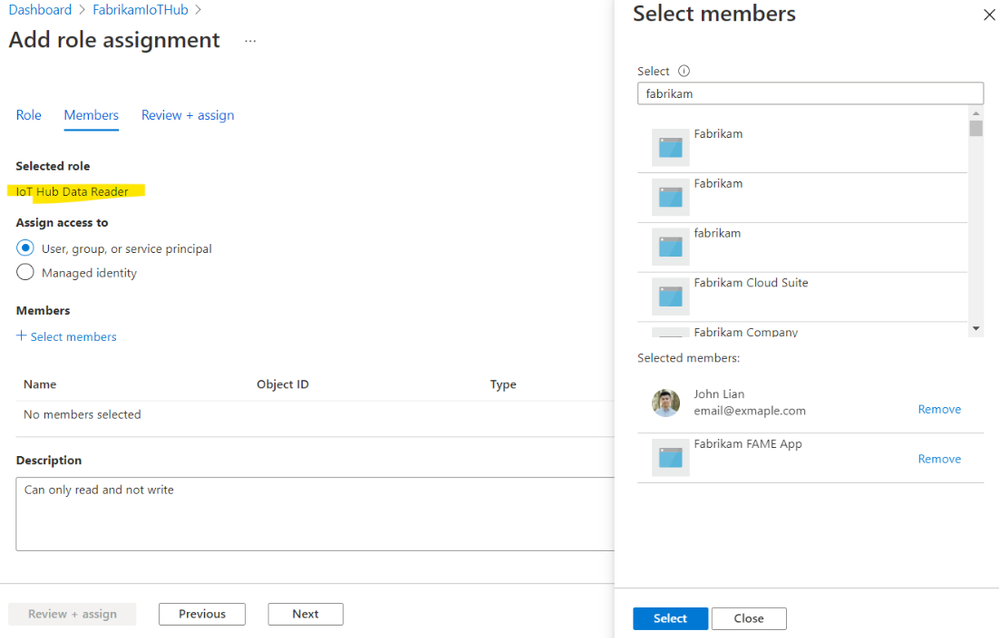
For additional security, the industry best practice is to follow the principle of least privilege. With Azure AD and RBAC support, you can grant granular permissions to achieve this. If you want your service to be able to read twins, and nothing else, assign its service principal or managed identity a role with Microsoft.Devices/IotHubs/twin/read permission. And that’s it! This service cannot update twin or send direct methods. You’ve achieved least privilege.
Getting started
To get started, grant your users, groups, service principals or managed identities roles with the new permission. The built-in roles, permissions, and links to samples are published on our documentation page Control access to IoT Hub with Azure AD.
by Contributed | May 10, 2021 | Technology
This article is contributed. See the original author and article here.
According to industry experts, threat intelligence (TI) is a key differentiator when evaluating threat protection solutions.
But IoT/OT environments have unique asset types, vulnerabilities, and indicators of compromise (IOCs). That’s why incorporating threat intelligence specifically tailored to industrial and critical infrastructure organizations is a more effective approach for proactively mitigating IoT/OT vulnerabilities and threats.
Today we’re announcing that TI updates for Azure Defender for IoT can now be automatically pushed to Azure-connected network sensors as soon as updates are released, reducing manual effort and helping to ensure continuous security[1].
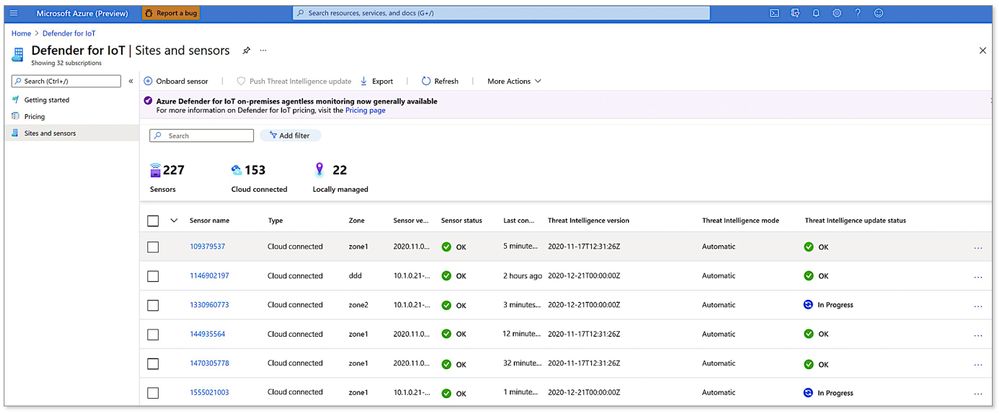
To get started, simply go to the Azure Defender for IoT portal and enable the Automatic Threat Intelligence Updates option for all your cloud-connected sensors. You can also monitor the status of updates from the “Sites and Sensors” page as shown below.
Viewing the status of network sensors and threat intelligence updates from the Azure portal
Threat intelligence curated by IoT/OT security experts
Developed and curated by Microsoft’s Section 52, the security research group for Azure Defender for IoT, our TI update packages include the latest:
- IOCs such as malware signatures, malicious DNS queries, and malicious IPs
- CVEs to update our IoT/OT vulnerability management reporting
- Asset profiles to enhance our IoT/OT asset discovery capabilities
Section 52 is comprised of IoT/OT-focused security researchers and data scientists with deep domain expertise in threat hunting, malware reverse engineering, incident response, and data analysis. For example, the team recently uncovered “BadAlloc,” a series of remote code execution (RCE) vulnerabilities covering more than 25 CVEs that adversaries could exploit to compromise IoT/OT devices.
Leveraging the power of Microsoft’s broad threat monitoring ecosystem
To help customers stay ahead of ever-evolving threats on a global basis, Azure Defender for IoT also incorporates the latest threat intelligence from Microsoft’s broad and deep threat monitoring ecosystem.
This rich source of intelligence is derived from a unique combination of world-class human expertise — from the Microsoft Threat Intelligence Center (MSTC) — plus AI informed by trillions of signals collected daily across all of Microsoft’s platforms and services, including identities, endpoints, cloud, applications, and email, as well as third-party and open sources.
Threat intelligence enriches native behavioral analytics
IOCs aren’t sufficient on their own. Enterprises regularly contend with threats that have never been seen before, including ICS supply-chain attacks such as HAVEX; zero-day ICS malware such as TRITON and INDUSTROYER; fileless malware; and living-off-the-land tactics using standard administrative tools (PowerShell, WMI, PLC programming, etc.) that are harder to spot because they blend in with legitimate day-to-day activities.
To rapidly detect unusual or unauthorized activities missed by traditional signature- and rule-based solutions, Defender for IoT incorporates patented, IoT/OT-aware behavioral analytics in its on-premises network sensor (edge sensor).
Threat intelligence complements and enriches the platform’s native analytics, enabling faster detection of IOCs such as known malware and malicious DNS requests, as shown in the threat alert examples below.
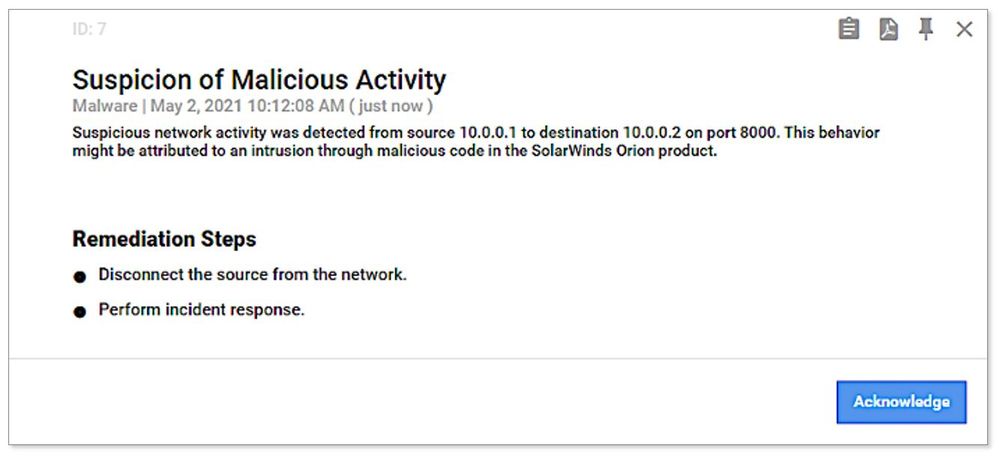 Example of SolarWinds threat alert generated from threat intelligence information
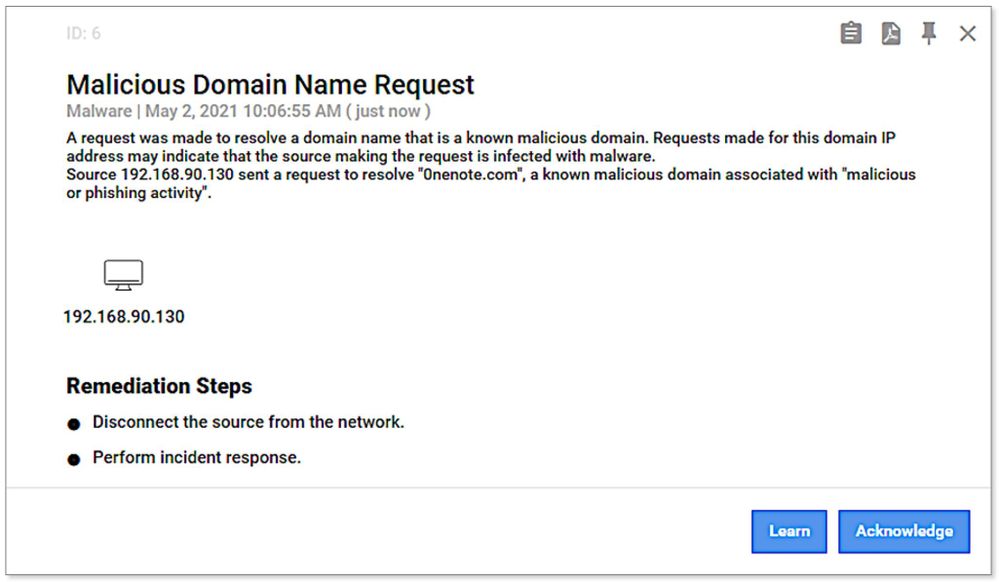 Example of malicious DNS request alert generated from threat intelligence information
Summary — Detecting Known and Unknown Threats
Effective IoT/OT threat mitigation requires detection of both known and unknown threats, using a combination of IoT/OT-aware threat intelligence and behavioral analytics.
With new cloud-connected capabilities provided with v10.3 of Azure Defender for IoT, industrial and critical infrastructure organizations can now ensure their network sensors always have the latest curated threat intelligence to continuously identify and mitigate risk in their IoT/OT environments.
Learn more
Go inside the new Azure Defender for IoT including CyberX
Update threat intelligence data – Azure Defender for IoT | Microsoft Docs
What’s new in Azure Defender for IoT – Azure Defender for IoT | Microsoft Docs
See the latest threat intelligence packages
About Azure Defender for IoT
Azure Defender for IoT offers agentless, IoT/OT-aware network detection and response (NDR) that’s rapidly deployed (typically less than a day per site); works with diverse legacy and proprietary OT equipment, including older versions of Windows that can’t easily be upgraded; and interoperates with Azure Sentinel and other SOC tools such as Splunk, IBM QRadar, and ServiceNow.
Gain full visibility into assets and vulnerabilities across your entire IoT/OT environment. Continuously monitor for threats with IoT/OT-aware behavioral analytics and threat intelligence. Strengthen IoT/OT zero trust by instantly detecting unauthorized or compromised devices. Deploy on-premises, in Azure-connected, or in hybrid environments.
[1] Of course, clients with on-premises deployments can continue to manually download packages and upload them to multiple sensors from the on-premises management console (aka Central Manager).

by Contributed | May 10, 2021 | Technology
This article is contributed. See the original author and article here.
Kahua provides project management and collaboration software focused on real estate, engineering, construction, and operations industries. Kahua’s solution helps manage project and program costs, documents, and processes from inception through implementation to improve efficiency and reduce risk.
Recently Kahua has been selected by US General Services Administration (GSA) Public Building Service for its new management information system to manage 8600+ assets, with 370 million square feet of workspace for 1.1 million federal employees and preserve 500+ historic properties.
The Challenge & Technical Requirements
Kahua needed a future-proof solution which builds on its legacy desktop application, while using C#, XAML and Azure skillsets of its developers. Kahua had a short timeline and a recurring imperative to bring new features to market quickly, on different devices – from desktop to web and mobile. In addition, Kahua’s developers wanted to reduce the time to market by maintaining a single codebase application which prevents re-implementing the same functionality for different platforms.
Due to the nature of managing access for users in high-security environments such as financial institutions and government agencies, security was a major requirement. Additionally, the solution had to enable accessibility and localization.
For users, the UI had to be modern and intuitive, providing simple onboarding and consistent, immersive experience for users on all devices.
The Solution
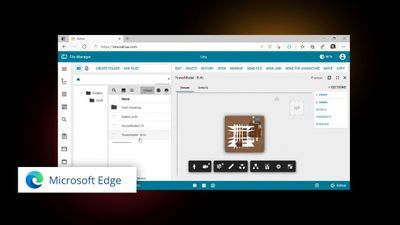
Kahua selected WinUI 3 – Reunion, Uno Platform and Azure to rapidly develop and deploy a multi-platform solution.
On Windows, Kahua uses WinUI 3 to deliver a delightful and modern user experience on Windows. To achieve a pure web experience, Kahua is utilizing the Uno Platform to provide a solution that is built with and runs on top of the Microsoft technology stack of Azure, .NET 5&6, and WinUI 3. To reach additional platforms such as macOS, iOS and Android, Kahua is also using Uno Platform to provide user experiences specific to mobile devices and smaller form factors.
By utilizing WinUI 3 – Reunion, Uno Platform and Azure, Kahua is meeting its requirements for security and accessibility. The Web application provides for a zero-installation experience, allowing IT departments to breathe easier and approve application updates without extensive investigation and review. Kahua can scale its operations quickly and reach users internationally.
The users can access the solution on any device, be it through any modern browser or native app on the device of their choice. The user interface across devices is modern, familiar, and consistent as it is built with the same UI technology.
Code and Skill Reuse
The Kahua development team experienced 4X productivity compared to alternative solutions evaluated. New functionality is developed once, in a single codebase. The team benefited from a mature Windows developer ecosystem and skillset on hand.
The Kahua development team was able to reuse a significant amount of the code from its legacy application, as well as utilize over 45 controls from WinUI and Windows Community Toolkit as well as 3rd party controls by Syncfusion.
“By combining Microsoft WinUI 3 and Uno Platform we are able to provide our customers with features, functionality and security that is simply unachievable with any other solution” – said Colin Whitlatch, CTO of Kahua.
by Contributed | May 10, 2021 | Technology
This article is contributed. See the original author and article here.
At Microsoft Azure, along with our partners, we obsess over solving our customers’ biggest problems in a wide range of areas such as manufacturing, energy sustainability, weather modeling, autonomous driving, and more.
Microsoft and Altair have collaborated in multiple areas ranging from EDA optimization, AI in the Cloud, and high-end simulation. Microsoft Azure is participating in the Altair HPC summit on 11th and 12th May 2021- we will be showcasing some of our recent collaborative projects as follows:
Event
|
Microsoft participant
|
Why you should tune in
|
Roundtable: AI Takes to the Clouds
|
Nidhi Chappell, GM Azure Compute
|
As companies find more ways to deploy AI for real-time predicting and prescribing, the resource requirement for training data-heavy models will yield increased demand for HPC infrastructure in the cloud. Additionally, organizations are exploring the application of AI to HPC, using AI to augment HPC optimization and even automate cloud migration.
In this panel we speak with chip industry leaders and cloud service providers to get their take on the impact and trends they are seeing from companies who are taking an AI-first approach and how it’s driving the move to the cloud.
|
Microsoft Azure: Using I/O Profiling to Migrate and Right-size EDA Workloads in Microsoft Azure
|
Michael Requa, Sr. Program Manager, Microsoft
|
When one of the largest semiconductor companies asked for help using Azure to run its EDA workloads, Microsoft teamed up with Altair.
The semiconductor company was running a relatively large design of 100 million transistors. We used Altair Breeze™, an I/O profiling tool, to troubleshoot and tune the company’s workload before and after migrating it to Azure. Breeze revealed I/O patterns that had previously gone unnoticed and showed us how to significantly improve application run time.
This presentation will outline how Microsoft used Breeze to diagnose I/O patterns, choose the workflow segments best suited for the cloud, and right-size the Azure infrastructure. The result was better performance and lower costs for our customer.
|
Microsoft, Altair nanoFluidX on Azure’s new NDv4
|
Jon Shelley, Principal PM Manager, Microsoft Azure
|
In this session Microsoft will showcase Azure’s new ND A100 v4 VM series running Altair nanoFluidX™. By leveraging Azure’s most powerful and massively scalable AI VM, available on demand from eight to thousands of interconnected Nvidia GPUs across hundreds of VMs, users can scale nanoFluidX to over 100M particles with ease.
|
About Altair:
Altair is a global technology company that provides software and cloud solutions in the areas of simulation, high-performance computing (HPC), and artificial intelligence (AI). Altair enables organizations across broad industry segments to compete more effectively in a connected world while creating a more sustainable future
References
by Contributed | May 10, 2021 | Technology
This article is contributed. See the original author and article here.
By Christine Alford, Director, Business Program Management
User-generated content has an ever-expanding impact in today’s age of online connectivity. Azure Marketplace partners like Squigl are applying user-generated content to more than just its familiar marketing business cases, bringing it into the corporate learning space. Squigl for Enterprise uses AI assistance to rapidly transform existing content into training videos. These videos are designed to increase viewer attention and boost information retention, facilitating learning.
Andrew Herkert, Vice President of GTM at Squigl, shares five tactics below for user-generated content in corporate learning and human resources environments:
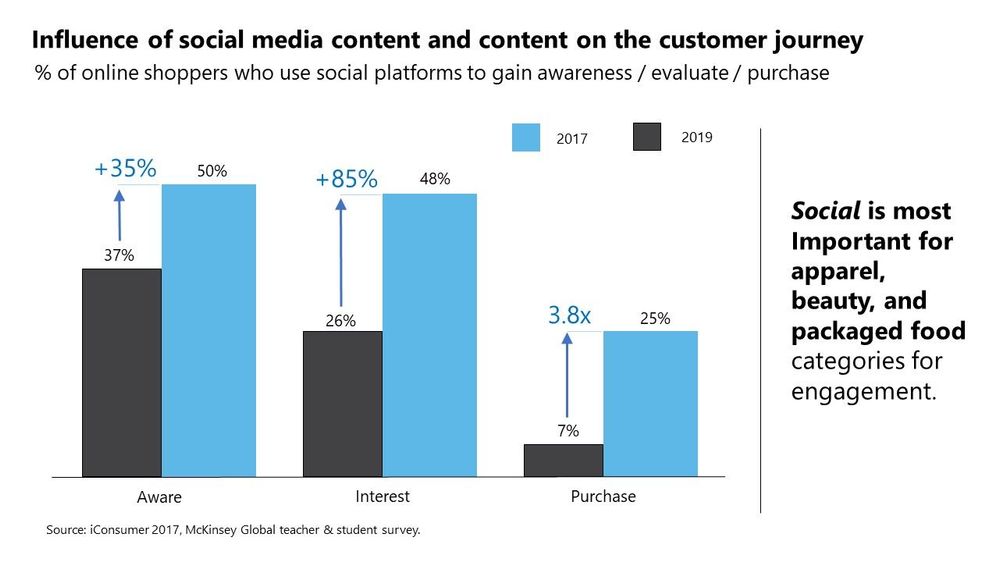
Brand leaders worldwide are crowd-sourcing creative via user-generated content (UGC). This means audio clips, advertorials, social proof, video, textual content, and other forms of media are being amassed by the petabyte. This content has immense value. When used tactically, these troves of content can yield considerable ROI (10x-20x or more, according to Forrester). When making buying decisions, consumers are highly impressed by key opinion leaders and social engagement, byproducts of UGC.
Businesses can translate marketing value drivers from UGC to the disciplines of human resources or learning and development with the help of Microsoft Azure and Microsoft Cognitive Services. With the correct UGC strategies, businesses can tactically execute design and delivery of a valuable solution. More than a year into the COVID-19 pandemic, the idea of engaging with distributed teams needs to become a reality.
“In today’s remote work environments, it is more important than ever to meet employees’ varied learning and communications needs, wherever they are,” said Jake Zborowski, general manager BO&PM management at Microsoft. “Squigl, a highly innovative content creation solution available in Azure Marketplace, enables business professionals to meet those needs quickly and with demonstrable ROI. Sharing relevant, engaging, just-in-time Squigl videos will enable the remote workforce to achieve their objectives and create market value.”
Below are five example tactics taken from the Squigl install base and deployed globally, often across multiple customer instances, with considerable returns generally above 20x:
1. Storytelling: Users respond to prompts to create content on an integrated PaaS environment, combining Squigl with existing front-end content management system elements, while Squigl’s AI processes the content. AI amplifies and elevates the resonance (impact) of the message. Culturally sensitive, AI-driven media containing user stories can now be crowd-sourced from around the world with greater impact than ever.
2. Creative competition: Squigl users are given incentive to create something in the style of, or similar to, a model set forth by the brand leaders. Brand leaders create a 3-to-5-minute content piece, then prompt users to create a story of their own in response to the original content.
3. Analyst’s day: Squigl users produce meta brand content used in conjunction with fiduciary reporting to add a “human element” to index valuation discussions and beyond. Predictable growth ensued in a Fortune 10 company when deployed consistently.
4. Brand fan: Brand leaders create sequences of UGC tactics and begin to attribute and publicly recognize contributions made by power users over time. Reddit’s Karma system originated this in the mainstream. The same principles apply in B2C as in B2B.
5. FAQ and product advertisements: Brands can now rely on end users to create ”tips and tricks” and other ”power user” content oriented at accelerating product evangelism curves.
The above campaign tactics apply near-unilaterally at the global level, and are proven playbooks to drive growth from zero base as well as in established channels.
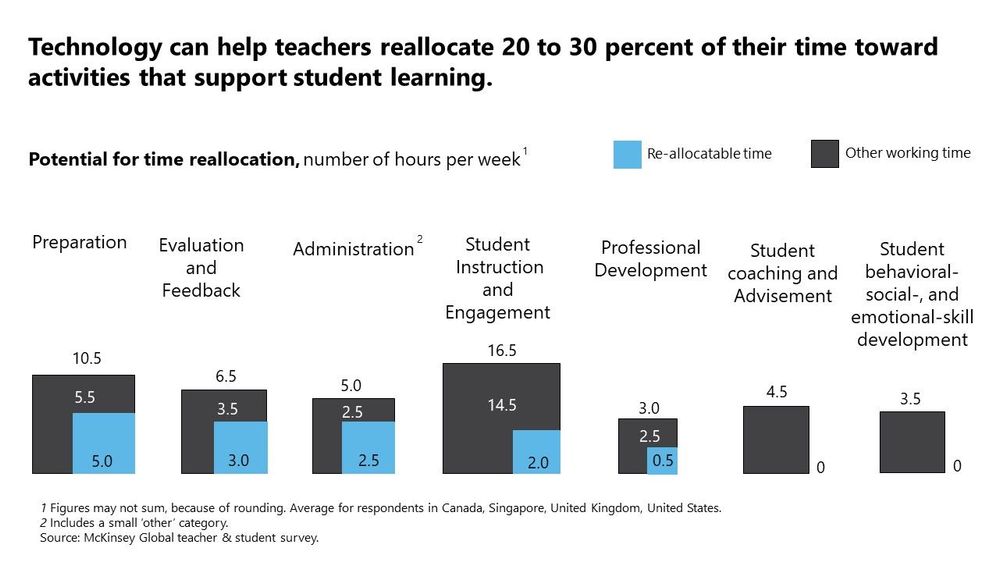
In combining AI and UGC and bringing this stack in-house, key metrics can grow by 200 percent or more if the right models are trained against the right data sets with the right outcomes in mind. The below chart illustrates how AI can reallocate time for teachers, generally showing potential to reallocate as much as 20 percent to 30 percent of their time to more meaningful interactions.
Neural networks customize delivery of content timing, process language (translate, speak, interpret, etc.), and execute event triggers. This means when applied to UGC, artificial intelligence automation (AutoML) can enhance business impact drastically. McKinsey has shown that 50 percent to 150 percent engagement uplifts driven by AI are the new benchmark.
This is an ongoing and rapidly developing trend, and Squigl is fervently pursuing this outcome for millions of end users at hundreds of multinationals worldwide.


Recent Comments