by Contributed | May 11, 2021 | Technology
This article is contributed. See the original author and article here.
Today we’re announcing the general availability (GA) of Azure Service Fabric managed clusters. Azure Service Fabric managed clusters remove the complexity associated with owning and operating Service Fabric clusters by simplifying deployment and management operations.
Azure customers use Service Fabric to manage both stateless and stateful microservices at scale. While our customers love the reliability, scalability, and richness of Service Fabric’s features, they have asked us to simplify the cluster deployment experience. Our customers have also requested simpler Service Fabric certificate management and scaling operations to facilitate deployments, testing, and scaling of their Service Fabric environment.
Service Fabric managed clusters provide a simplified ARM resource model for easier deployments. This resource model eliminates the need to define individual resources such as Virtual Machines (VMs), storage, or Virtual Networks that make up the cluster. Service Fabric managed clusters also eliminate the need for cluster certificate management by providing certificates that are fully managed by Azure. This ensures that customers don’t run into incidents caused by expired cluster certificates. With Service Fabric managed clusters, operations like removing a node type that previously required multiple steps, can now be completed in a single step. In addition, Service Fabric managed clusters provide full support for Service Fabric’s features. All these improvements together allow our customers to focus on their applications instead of infrastructure management.
“We recently started using Service Fabric and given our scale, we were concerned about the operational overhead of setting up our environments. We onboarded to Service Fabric managed clusters and were pleasantly surprised by the ease of deployment. It was a lot easier to read the simplified ARM template, add extensions, and deploy the cluster.” – Azure Usage Billing
“We operate multiple Service Fabric clusters. Rotating cluster certificates was a time-consuming yearly activity that took time away from application development. We were really excited to learn about the fully managed certificates enabled via Service Fabric managed clusters. Our operations team is elated that we no longer worry about an expired certificate bringing our environment down!” – Azure WAN
“Removing node types from a Service Fabric cluster required lots of steps, and time, which made it difficult to plan for our scaling needs. Service Fabric managed clusters make it really easy to add and remove node types with a single operation enabling us to scale on demand!” – Azure SQL Telemetry
Get started with Azure Service Fabric managed clusters
You can use Quickstart templates to get started with Service Fabric managed clusters or see the Azure Service Fabric managed clusters documentation to learn more. Additionally, you can learn more about all the new features in the release notes and submit feedback on the Service Fabric GitHub repository.
by Contributed | May 11, 2021 | Technology
This article is contributed. See the original author and article here.
As we prepare to ship version 1.0 of Windows Package Manager, we wanted to provide guidance on how to manage Windows Package Manager using Group Policy.
We first announced the existence of Windows Package Manager at Microsoft Build in 2020. Designed to save you time and frustration, Windows Package Manager is a set of software tools that help automate the process of getting packages (applications) on Windows devices. Users can specify which apps they want installed and the Windows Package Manager does the work of finding the latest version (or the exact version specified) of that application and installing it on the user’s Windows 10 device.
Announcing Group Policy for Windows Package Manager
When we released the Windows Package Manager v0.3.1102 preview, we provided an initial set of “Desktop App Installer Policies” Group Policy Administrative Template files (ADMX/ADML)—making it easy for you review and configure Group Policy Objects targeting your domain-joined devices. To download these ADMX files today, visit the Microsoft Download Center.
Not only to these new policies empower you to enable Windows Package Manager, they enable you to control certain commands and arguments, and configure the sources to which your devices connect.
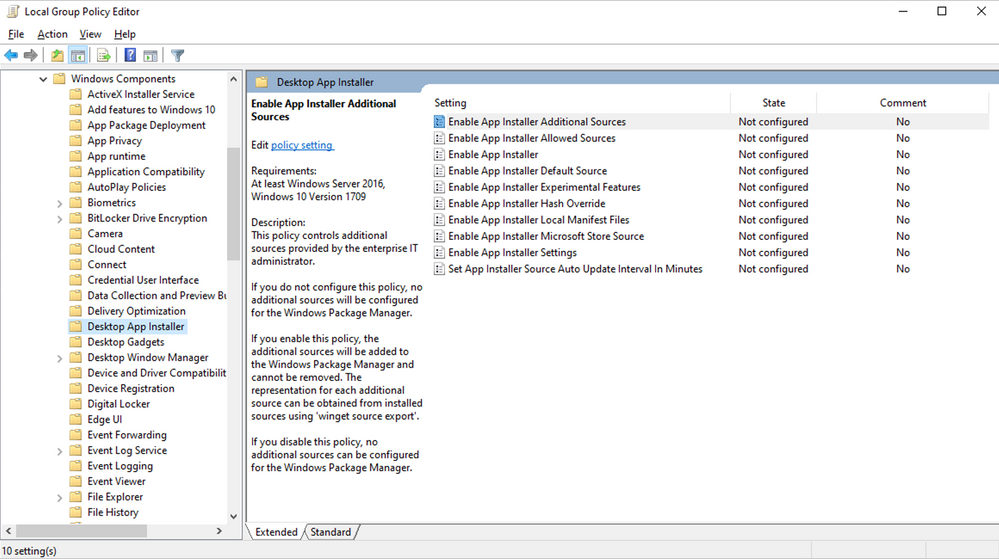
The new Desktop App Installer policies are accessible via the Local Group Policy Editor in Windows 10 as shown here:
Group Policy settings
Any policies that have been enabled or configured will be shown when a user executes winget –info. The goal is to assist users in troubleshooting unexpected behaviors they may encounter in the Windows Package Manager because of any policies that are enabled or configured. For example, a user may attempt to modify a setting controlled by policy and not be able to understand why the device does not appear to honor their setting.
Before we proceed further, let’s clarify two basic terms used with respect to Windows Package Manager:
- A package represents an app, application, or program.
- A manifest is a file (or set of data) containing meta-data providing descriptive elements for a package as well as the location of the installer, and the installers SHA256 hash. The Windows Package Manager obtains manifests from sources such as the default source available for the community repository. Additional sources may be a REST API-based service provided by an enterprise or other party. It is also possible to use a manifest from a path available locally on the machine.
Enable App Installer
This policy controls whether Windows Package Manager can be used by users. Users will still be able to execute the winget command. The default help will be displayed, and users will still be able to execute winget -? to display the help as well. Any other command will result in the user being informed the operation is disabled by Group Policy.
If you enable or do not configure this setting, users will be able to use the Windows Package Manager.
If you disable this setting, users will not be able to use the Windows Package Manager.
Enable App Installer settings
This policy controls whether users can change their settings. The settings are stored inside of a .json file on the user’s system. It may be possible for users to gain access to the file using elevated credentials. This will not override any policy settings that have been configured by this policy.
If you enable or do not configure this setting, users will be able to change settings for Windows Package Manager.
If you disable this setting, users will not be able to change settings for Windows Package Manager.
Enable App Installer Hash Override
This policy controls whether Windows Package Manager can be configured to enable the ability to override SHA256 security validation in settings. Windows Package Manager compares the installer after it has downloaded with the hash provided in the manifest.
If you enable or do not configure this setting, users will be able to enable the ability to override SHA256 security validation in Windows Package Manager settings.
If you disable this setting, users will not be able to enable the ability to override SHA256 security validation in Windows Package Manager settings.
Enable App Installer Experimental Features
This policy controls whether users can enable experimental features in Windows Package Manager. Experimental features are used during Windows Package Manager development cycle to provide previews for new behaviors. Some of these experimental features may be implemented prior to the Group Policy settings designed to control their behavior.
If you enable or do not configure this setting, users will be able to enable experimental features for Windows Package Manager.
If you disable this setting, users will not be able to enable experimental features for Windows Package Manager.
Enable App Installer Local Manifest Files
This policy controls whether users can install packages with local manifest files. If a user has a manifest available via their local file system rather than a Windows Package Manager source, they may install packages using winget install -m <path to manifest>.
If you enable or do not configure this setting, users will be able to install packages with local manifests using Windows Package Manager.
If you disable this setting, users will not be able to install packages with local manifests using Windows Package Manager.
Set App Installer Source Auto Update Interval in Minutes
This policy controls the auto-update interval for package-based sources. The default source for Windows Package Manager is configured such that an index of the packages is cached on the local machine. The index is downloaded when a user invokes a command, and the interval has passed (the index is not updated in the background). This setting has no impact on REST-based sources.
If you disable or do not configure this setting, the default interval or the value specified in settings will be used by Windows Package Manager.
If you enable this setting, the number of minutes specified will be used by Windows Package Manager.
Enable App Installer Default Source
This policy controls the default source included with Windows Package Manager. The default source for Windows Package Manager is an open-source repository of packages located at https://github.com/microsoft/winget-pkgs.
If you enable or do not configure this setting, the default source for Windows Package Manager will be available and can be removed.
If you disable this setting, the default source for Windows Package Manager will not be available.
Enable App Installer Microsoft Store Source
This policy controls the Microsoft Store as a source included with Windows Package Manager.
If you enable or do not configure this setting, the Microsoft Store source for Windows Package manager will be available and can be removed.
If you disable this setting, the Microsoft Store source for Windows Package Manager will not be available.
Enable App Installer Additional Sources
This policy controls additional sources configured for Windows Package Manager.
If you do not configure this setting, no additional sources will be configured for Windows Package Manager.
If you enable this setting, additional sources will be added to Windows Package Manager and cannot be removed. The representation for each additional source can be obtained from installed sources using winget source export.
If you disable this setting, no additional sources can be configured by the user for Windows Package Manager.
Enable Windows Package Manager Allowed Sources
This policy controls additional sources approved for users to configure using Windows Package Manager.
If you do not configure this setting, users will be able to add or remove additional sources other than those configured by policy.
If you enable this setting, only the sources specified can be added or removed from Windows Package Manager. The representation for each allowed source can be obtained from installed sources using winget source export.
If you disable this setting, no additional sources can be configured by the user for Windows Package Manager.
When will Windows Package Manager be available?
Version 1.0 of Windows Package Manager will soon ship as an automatic update via the Microsoft Store for all devices running Windows 10, version 1809 and later and we look forward to hearing your feedback. For more information on Windows Package Manager, please see the following resources:
Continue the conversation. Find best practices. Visit the Windows Tech Community.
Stay informed. For the latest updates on new releases, tools, and resources, stay tuned to this blog and follow us @MSWindowsITPro on Twitter.
by Scott Muniz | May 11, 2021 | Security, Technology
This article is contributed. See the original author and article here.
This Advisory uses the MITRE Adversarial Tactics, Techniques, and Common Knowledge (ATT&CK®) framework, Version 9. See the ATT&CK for Enterprise for all referenced threat actor tactics and techniques.
The Cybersecurity and Infrastructure Security Agency (CISA) and the Federal Bureau of Investigation (FBI) are aware of a ransomware attack affecting a critical infrastructure (CI) entity—a pipeline company—in the United States. Malicious cyber actors deployed DarkSide ransomware against the pipeline company’s information technology (IT) network.[1] At this time, there is no indication that the entity’s operational technology (OT) networks have been directly affected by the ransomware.
CISA and FBI urge CI asset owners and operators to adopt a heightened state of awareness and implement the recommendations listed in the Mitigations section of this Joint Cybersecurity Advisory, including implementing robust network segmentation between IT and OT networks; regularly testing manual controls; and ensuring that backups are implemented, regularly tested, and isolated from network connections. These mitigations will help CI owners and operators improve their entity’s functional resilience by reducing their vulnerability to ransomware and the risk of severe business degradation if impacted by ransomware.
Click here for a PDF version of this report.
Note: the analysis in this Joint Cybersecurity Advisory is ongoing, and the information provided should not be considered comprehensive. CISA and FBI will update this advisory as new information is available.
After gaining initial access to the pipeline company’s network, DarkSide actors deployed DarkSide ransomware against the company’s IT network. In response to the cyberattack, the company has reported that they proactively disconnected certain OT systems to ensure the systems’ safety.[2] At this time, there are no indications that the threat actor moved laterally to OT systems.
DarkSide is ransomware-as-a-service (RaaS)—the developers of the ransomware receive a share of the proceeds from the cybercriminal actors who deploy it, known as “affiliates.” According to open-source reporting, since August 2020, DarkSide actors have been targeting multiple large, high-revenue organizations, resulting in the encryption and theft of sensitive data. The DarkSide group has publicly stated that they prefer to target organizations that can afford to pay large ransoms instead of hospitals, schools, non-profits, and governments.[3],[4]
According to open-source reporting, DarkSide actors have previously been observed gaining initial access through phishing and exploiting remotely accessible accounts and systems and Virtual Desktop Infrastructure (VDI) (Phishing [T1566], Exploit Public-Facing Application [T1190], External Remote Services [T1133]).[5],[6] DarkSide actors have also been observed using Remote Desktop Protocol (RDP) to maintain Persistence [TA0003].[7]
After gaining access, DarkSide actors deploy DarkSide ransomware to encrypt and steal sensitive data (Data Encrypted for Impact [T1486]). The actors then threaten to publicly release the data if the ransom is not paid.[8],[9] The DarkSide ransomware uses Salsa20 and RSA encryption.[10]
DarkSide actors primarily use The Onion Router (TOR) for Command and Control (C2) [TA0011] (Proxy: Multi-hop Proxy [1090.003]).[11],[12] The actors have also been observed using Cobalt Strike for C2.[13]
CISA and FBI urge CI owners and operators to apply the following mitigations to reduce the risk of compromise by ransomware attacks.
- Require multi-factor authentication for remote access to OT and IT networks.
- Enable strong spam filters to prevent phishing emails from reaching end users. Filter emails containing executable files from reaching end users.
- Implement a user training program and simulated attacks for spearphishing to discourage users from visiting malicious websites or opening malicious attachments and re-enforce the appropriate user responses to spearphishing emails.
- Filter network traffic to prohibit ingress and egress communications with known malicious IP addresses. Prevent users from accessing malicious websites by implementing URL blocklists and/or allowlists.
- Update software, including operating systems, applications, and firmware on IT network assets, in a timely manner. Consider using a centralized patch management system; use a risk-based assessment strategy to determine which OT network assets and zones should participate in the patch management program.
- Limit access to resources over networks, especially by restricting RDP. After assessing risks, if RDP is deemed operationally necessary, restrict the originating sources and require multi-factor authentication.
- Set antivirus/antimalware programs to conduct regular scans of IT network assets using up-to-date signatures. Use a risk-based asset inventory strategy to determine how OT network assets are identified and evaluated for the presence of malware.
- Implement unauthorized execution prevention by:
- Disabling macro scripts from Microsoft Office files transmitted via email. Consider using Office Viewer software to open Microsoft Office files transmitted via email instead of full Microsoft Office suite applications.
- Implementing application allowlisting, which only allows systems to execute programs known and permitted by security policy. Implement software restriction policies (SRPs) or other controls to prevent programs from executing from common ransomware locations, such as temporary folders supporting popular internet browsers or compression/decompression programs, including the
AppData/LocalAppData folder.
- Monitor and/or block inbound connections from Tor exit nodes and other anonymization services to IP addresses and ports for which external connections are not expected (i.e., other than VPN gateways, mail ports, web ports). For more guidance, refer to Joint Cybersecurity Advisory AA20-183A: Defending Against Malicious Cyber Activity Originating from Tor.
- Deploy signatures to detect and/or block inbound connection from Cobalt Strike servers and other post exploitation tools.
CISA and FBI urge CI owners and operators to apply the following mitigations now to reduce the risk of severe business or functional degradation should their CI entity fall victim to a ransomware attack in the future.
- Implement and ensure robust network segmentation between IT and OT networks to limit the ability of adversaries to pivot to the OT network even if the IT network is compromised. Define a demilitarized zone that eliminates unregulated communication between the IT and OT networks.
- Organize OT assets into logical zones by taking into account criticality, consequence, and operational necessity. Define acceptable communication conduits between the zones and deploy security controls to filter network traffic and monitor communications between zones. Prohibit industrial control system (ICS) protocols from traversing the IT network.
- Identify OT and IT network inter-dependencies and develop workarounds or manual controls to ensure ICS networks can be isolated if the connections create risk to the safe and reliable operation of OT processes. Regularly test contingency plans such as manual controls so that safety critical functions can be maintained during a cyber incident. Ensure that the OT network can operate at necessary capacity even if the IT network is compromised.
- Regularly test manual controls so that critical functions can be kept running if ICS or OT networks need to be taken offline.
- Implement regular data backup procedures on both the IT and OT networks. Backup procedures should be conducted on a frequent, regular basis. The data backup procedures should also address the following best practices:
- Ensure that backups are regularly tested.
- Store your backups separately. Backups should be isolated from network connections that could enable the spread of ransomware. It is important that backups be maintained offline as many ransomware variants attempt to find and encrypt or delete accessible backups. Maintaining current backups offline is critical because if your network data is encrypted with ransomware, your organization can restore systems to its previous state. Best practice is to store your backups on a separate device that cannot be accessed from a network, such as on an external hard drive. (See the Software Engineering Institute’s page on ransomware).
- Maintain regularly updated “gold images” of critical systems in the event they need to be rebuilt. This entails maintaining image “templates” that include a preconfigured operating system (OS) and associated software applications that can be quickly deployed to rebuild a system, such as a virtual machine or server.
- Retain backup hardware to rebuild systems in the event rebuilding the primary system is not preferred. Hardware that is newer or older than the primary system can present installation or compatibility hurdles when rebuilding from images.
- Store source code or executables. It is more efficient to rebuild from system images, but some images will not install on different hardware or platforms correctly; having separate access to needed software will help in these cases.
- Ensure user and process accounts are limited through account use policies, user account control, and privileged account management. Organize access rights based on the principles of least privilege and separation of duties.
If your organization is impacted by a ransomware incident, CISA and FBI recommend the following actions:
- Isolate the infected system. Remove the infected system from all networks, and disable the computer’s wireless, Bluetooth, and any other potential networking capabilities. Ensure all shared and networked drives are disconnected, whether wired or wireless.
- Turn off other computers and devices. Power-off and segregate (i.e., remove from the network) the infected computer(s). Power-off and segregate any other computers or devices that shared a network with the infected computer(s) that have not been fully encrypted by ransomware. If possible, collect and secure all infected and potentially infected computers and devices in a central location, making sure to clearly label any computers that have been encrypted. Powering-off and segregating infected computers and computers that have not been fully encrypted may allow for the recovery of partially encrypted files by specialists. (See Before You Connect a New Computer to the Internet for tips on how to make a computer more secure before you reconnect it to a network.)
- Secure your backups. Ensure that your backup data is offline and secure. If possible, scan your backup data with an antivirus program to check that it is free of malware.
- Refer to Joint Cybersecurity Advisory: AA20-245A: Technical Approaches to Uncovering and Remediating Malicious Activity for more best practices on incident response.
Note: CISA and the FBI do not encourage paying a ransom to criminal actors. Paying a ransom may embolden adversaries to target additional organizations, encourage other criminal actors to engage in the distribution of ransomware, and/or may fund illicit activities. Paying the ransom also does not guarantee that a victim’s files will be recovered. CISA and FBI urge you to report ransomware incidents to your local FBI field office.
CISA offers a range of no-cost cyber hygiene services to help CI organizations assess, identify and reduce their exposure to threats, including ransomware. By requesting these services, organizations of any size could find ways to reduce their risk and mitigate attack vectors.
Resources
by Contributed | May 11, 2021 | Technology
This article is contributed. See the original author and article here.
During 2016, Microsoft introduced a new product that allowed organizations to implement a sensitivity label taxonomy and empower information workers to leverage these and apply them to documents or emails as part of daily work. This product is known as “Azure Information Protection (AIP)” and uses a client application for the Windows platform which deployed an add-in within Office apps including introducing a new “Sensitivity” button that can be used by information workers to flag documents and emails according to their sensitivity.
Since then, Microsoft’s information protection platform has evolved, implemented across all common platforms (MacOS, iOS, Android, Web) and the Azure Information Protection Client with rich capabilities across Microsoft 365 and is now under the wide umbrella of Microsoft Information Protection offering.
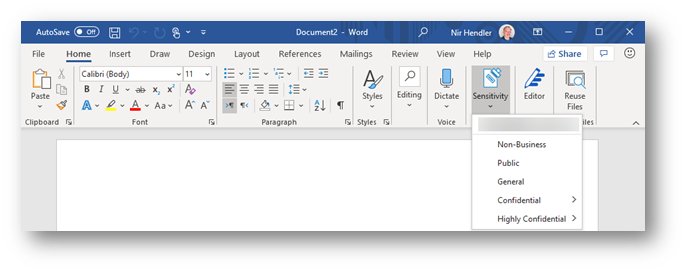
The main change as part of the transition to Microsoft Information Protection is that sensitivity labels are available across all common platforms and do not require an add-in or additional implementation, they are just part of the service offering. If you are using Microsoft 365 apps for Enterprise (formerly known as Office 365 Professional Plus) and you deployed sensitivity labels within your organization, no additional deployment stage is required. The same “Sensitivity” button is now exposed within the application ribbon. This integration is applicable consistently to all supported platforms. Moving forward, this integrated capability is to be known as “Built-in sensitivity labeling.”
Fig. 1: Built-in labeling within Microsoft 365 apps for Enterprise
Benefits to moving from client-based labeling to built-in labeling.
Using built-in labeling is seamless and does not require any management overhead in addition to cloud-based policy configuration. As part of your existing Microsoft 365 apps deployment, the bits are already available for every information worker without the need for installing additional components. The important aspects to consider are:
- No need to test, deploy and update another application or add-in within your endpoints. You leverage the deployment stage as part of ongoing or existing Microsoft 365 app project.
- Microsoft 365 apps will work with improved performance since no add-in needs to be loaded and all labeling functionality runs inside the application itself.
- Updates are being pushed as part of Microsoft 365 apps releases.
- Seamless experience across all Microsoft 365 platforms.
This is in line with other initiatives at Microsoft to provide built-in functionality that reduces or eliminates the need to deploy and maintain add-ins and plugins for other security and compliance-related functionality, which can potentially reduce an IT department’s challenges while providing a better user experience with more performance and stability to end users across workloads.
So, what is the Azure Information Protection Client, and should I continue to use it (or consider deploying it)?
Azure Information Protection Client (or Unified Labeling Client) is an application package for the Windows platform that include 4 components:
- Azure Information Protection add-in for Microsoft 365 apps
- Classify and protect (Ability to apply and consume labels outside Microsoft 365 apps) via a File Explorer extension
- Azure Information Protection viewer (to consume Non-Microsoft protected documents)
- Azure Information Protection PowerShell cmdlets to apply and consume labels.
Using built-in labeling replaces the first item in the list which is the Azure Information Protection add-in. Other components (described in number two, three, and four) can still be deployed without any dependency on the add-in portion of Azure Information Protection.
If you are using the Azure Information Protection add-in today and wish to use built-in sensitivity labeling instead to gain the benefits described above, then you can disable the add-in, uninstall the complete client, or control the behavior with a group policy. You have the choice to select the best approach which fits your business use cases and needs.
If you are NOT using the Azure Information Protection add-in today and looking to implement sensitivity labels across your organization, we recommend starting directly with built-in sensitivity labeling and deploy Azure Information Protection Client components (items described in number two, three, and four) if desired, but without enabling the AIP plugin for Office apps.
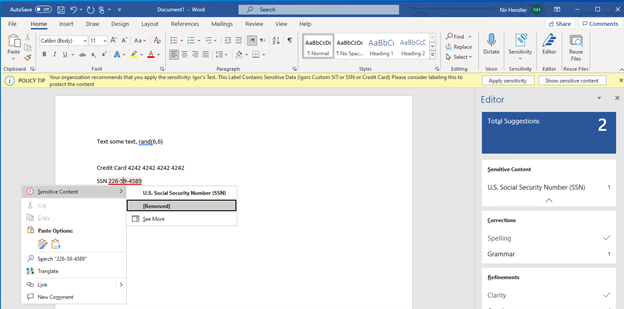 Fig. 2: Built-in labeling within Microsoft 365 apps highlight the sensitive information identifies within a Word document.
Where is built-in labeling available today?
Built-in labeling is already available and in use as part of your deployment of sensitivity labels in MacOS, iOS, Android, and web apps. If you deployed your sensitivity labels policies then these are already enabled and deployed (Web apps integration need to be enabled separately as documented). The main requirement here is to ensure that you are using the right Microsoft 365 apps for Windows that support this capability.
Built-in labeling in Microsoft 365 apps for Windows is available in all updated releases with versions newer than 1910+. (How to check your version of Microsoft 365 apps). If you are using an up to date version, no matter if you use Current Channel or Semi-Annual Channel, the capability is there and operational.
We do recommend ensuring your organization Microsoft 365 apps update channel is set to Current Channel or Monthly-Enterprise channel. These channels get the latest and greatest features in a shorter time frame. If your organization is using the Semi-Annual channel, then updates are deferred for a later period. Read more about Microsoft 365 Apps update channels here.
Deployment method
Once you have ensured you are using a version of Microsoft 365 apps that is released after 1910 in your organization, all you need to do is to implement your labeling taxonomy in the Microsoft 365 Compliance portal and publish your labels. You can use the official documentation to understand more on the backend configurations that need to be done.
If you do want to use Azure Information Protection client capabilities side by side with built-in labeling (referring to PowerShell module, Classify & Protect app and, AIP Viewer), you can download and deploy the Azure Information Protection unified labeling client (available to be downloaded from this link). Then configure a Group Policy to ensure that built-in labeling will always override and disable the Azure Information Protection add-in component. Read more about how to configure the group policy here. With this deployment approach you can enjoy both from the benefits of using built-in labeling and additional components.
Feature parity
Azure Information Protection Client and built-in labeling for Microsoft 365 apps do not have feature parity today. As we move forward, built-in labeling will add more capabilities which are currently available in the Azure Information Protection client. It is important to understand that the key features available, which include:
Feature marked as :star: are exclusive to built-in labeling with Microsoft 365 apps.
Read more about the feature comparison between Azure Information Protection Client and built-in labeling for Microsoft 365 apps here.
In addition, see complete roadmap and timelines for additional features within built-in labeling for Microsoft 365 apps here.
Additional considerations
In perpetual versions of Microsoft 365 apps (Office 2013, 2016, 2019) built-in labeling is not included, so if you are using one of these versions you will need to use the Azure Information Protection client and add-in for Office instead.
Do note that using built-in labeling does require sensitivity labels to be configured and published in the M365 Compliance portal (or Office 365 Security and Compliance portal). If your sensitivity labels are deployed as part of the Classic platform in Azure, please ensure you are migrating to unified sensitivity labels as documented here.
Additional resources:
by Contributed | May 11, 2021 | Technology
This article is contributed. See the original author and article here.
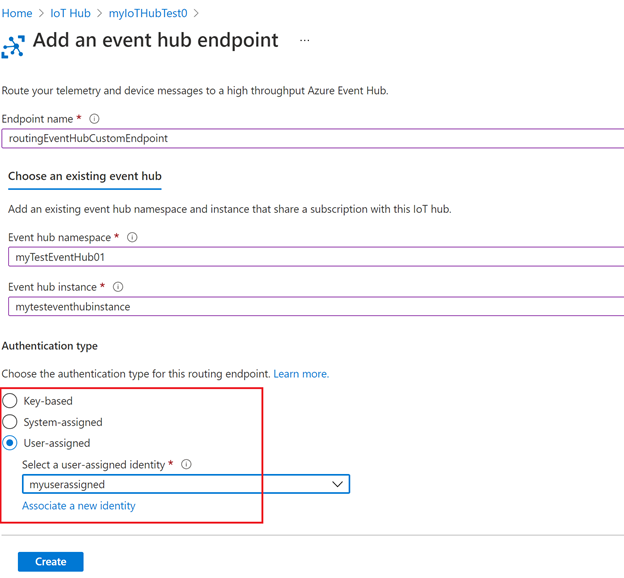
Azure support for user-assigned managed identity is now generally available! With today’s release, you can now use the user-assigned managed identity to connect your hubs to resources that support Azure Active Directory (Azure AD) authentication.
There are two different types of managed identities: system-assigned and user-assigned managed identity. In IoT Hub, managed identities can be used for egress connectivity from IoT Hub to Azure blob storage, event hub and service bus resources for message routing, file upload, and bulk device import/export. IoT Hub has the existing support for the system-assigned managed identity, and now we are adding support for user-assigned managed identity as well.
- User-assigned managed identity. It is created as a standalone resource and can be shared across Azure resources and instances. For example, if there are multiple IoT Hubs that require the same access permissions to a storage account, you can create a single user-assigned managed identity, use the RBAC role assignment to control the identity’s access and add this identity to multiple IoT Hubs. In this way, you no longer need to manage multiple identities for different IoT Hubs. In addition, user-assigned managed identity has its own independent life cycle. If one of your IoT Hubs is recycled, the identity remains unchanged and permissions stay consistent.
- System-assigned managed identity. Unlike user-assigned managed identity, system-assigned managed identity is tied to your IoT Hub instance. Therefore, the system-assigned managed identity cannot be shared across different hubs, and it has a shared lifecycle with the associated hub instance. System-assigned can be used when your hub requires an independent identity.
Both system-assigned and user-assigned managed identity come with the common benefits of using the managed identities:
- You don’t need to manage secret keys.
- You can use managed identities to authenticate to any resource that supports Azure Active Directory (Azure AD) authentication.
- Managed identities can be used without additional charge.
With the support for both system-assigned and user-assigned managed identity in IoT Hub, you’re able to select different types based on your scenarios and requirements.
Getting started
To get started, create a user-assigned managed identity as a standalone resource and add the identity to your IoT Hub. Instructions and samples are published on our documentation page IoT Hub support for managed identities.
by Scott Muniz | May 11, 2021 | Security, Technology
This article is contributed. See the original author and article here.
CISA and the Federal Bureau of Investigation (FBI) have released a Joint Cybersecurity Advisory (CSA) on a ransomware-as-a-service (RaaS) variant—referred to as DarkSide—recently used in a ransomware attack against a critical infrastructure (CI) company.
Cybercriminal groups use DarkSide to gain access to a victim’s network to encrypt and exfiltrate data. These groups then threaten to expose data if the victim does not pay the ransom. Groups leveraging DarkSide have recently been targeting organizations across various CI sectors including manufacturing, legal, insurance, healthcare, and energy.
Prevention is the most effective defense against ransomware. It is critical to follow best practices to protect against ransomware attacks, which can be devastating to an individual or organization and recovery may be a difficult process. In addition to the Joint CSA, CISA and FBI urge CI asset owners and operators to review the following resources for best practices on strengthening cybersecurity posture:
Victims of ransomware should report it immediately to CISA, a local FBI Field Office, or a Secret Service Field Office.
by Contributed | May 11, 2021 | Technology
This article is contributed. See the original author and article here.
In 2020, Artificial Intelligence (AI) Specialist was named the top emerging job, and according to Forbes, we are likely to witness an even more accelerated adoption of AI over the next year. Microsoft and Udacity have collaborated in the past to bring in-demand Azure skilling opportunities. Today, we are excited to announce the new AI Fundamentals free course on Udacity.
What to expect from AI Fundamentals
AI Fundamentals offers learners a basic foundational understanding of machine learning (ML) and AI concepts. This course also prepares learners to implement ML and AI workloads using Azure. There is no prerequisite for the course as AI Fundamentals is intended for learners with both technical and non-technical backgrounds.
Upon completing the AI Fundamentals free course, learners will have a foundational understanding of the following:
- AI workloads and considerations
- Fundamental principles of ML on Azure
- Computer vision workloads on Azure
- Natural Language Processing (NLP) workloads on Azure
While Udacity enables students to learn at their own pace, the AI Fundamentals course can be completed in as little as one month at 20 hours a week.
You completed the AI Fundamentals course, now what?
After completing this course with Udacity, learners will be prepared to take the AI-900 exam and become certified in Microsoft Azure AI Fundamentals. Whether a learner is looking for new roles or wanting to upskill in their current role, being adept in Microsoft Azure and having a certification to prove it is a competitive advantage. In fact, according to the Value of IT Certification Survey by Pearson Vue, almost thirty-five percent of technical professionals said getting certified led to salary or wage increases, and twenty-six percent reported job promotions.
While the AI Fundamentals course and the AI-900 certification exam will teach and test learners on their foundational understanding of AI on Azure, learners who are interested in furthering their learning can enroll in the Machine Learning Engineer for Microsoft Azure Nanodegree program with Udacity.
Enroll in the AI Fundamentals free course on Udacity today!

by Contributed | May 11, 2021 | Technology
This article is contributed. See the original author and article here.
Windows Holographic, version 21H1 is now available! In this article, we showcase some of the release highlights, but if you’re interested in more details on the full list of features, you can read our official release notes.
Features continually evolve in Windows 10 Holographic based on your feedback. We packed this new update with features for both end-users and IT admins with the goal of making the day-to-day usage of your HoloLens 2 more intuitive and customizable.
To get the 21H1 build now, go to Settings > Update & Security > Windows Update Select > Check for updates. IT Admins can use Windows Update for Business (WUfB) and MDM policy to update their fleet of HoloLens. Note that you must upgrade to Windows Holographic, version 20H2 February Update ( before you can upgrade to Windows Holographic, version 21H1. Another important note is that with the introduction of Windows Holographic version 21H1, we are discontinuing monthly servicing updates (for bug and security fixes) for Windows Holographic version 1903. We will now offer servicing updates for the following releases:
- Windows Holographic, version 21H1 (Build 20346.1002+)
- Windows Holographic, version 20H2 (Build 19041.1128+)
- Windows Holographic, version 2004 (Build 19041.1103+)
Release highlights
The new, Chromium-based Microsoft Edge is now available and will be the default browser for HoloLens users, offering better compatibility for customers and less fragmentation for web developers. The addition of WebXR and 360 Viewer make it possible to explore immersive web experiences. You can also use the new Edge to install web apps alongside Microsoft Store apps. For example, you can install the Microsoft Office web app from https://www.office.com to view and edit files hosted on SharePoint or OneDrive.

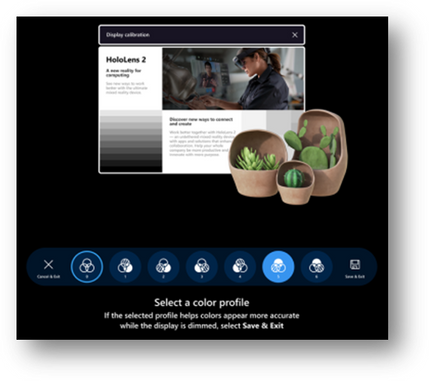
The Settings app has been updated to provide more granular control and customizability through additional settings. You can now search for specific settings and explore new options for Sound, Power & sleep, Network & Internet, Apps, Accounts, Ease of Access, and more. Some examples include selecting an alternative color profile for your HoloLens 2 display with the display color calibration tool, resetting default apps using the default app picker, and enabling Battery Saver Mode and Airplane Mode for your HoloLens 2.
We are also adding a new interaction for the holographic keyboard by introducing ‘Swipe to type’, similar to your mobile device. You can pass your fingertip through the plane of the keyboard, create the shape of the word, and then withdraw your finger from the plane.
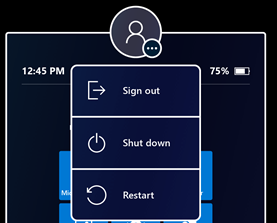
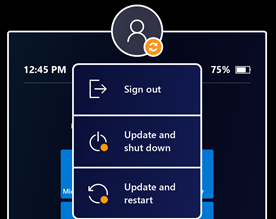
The new Power menu allows you to Sign out, Shut down and Restart your device from the Start menu by tapping the user profile icon. There will also be an indicator when there is a system update available.
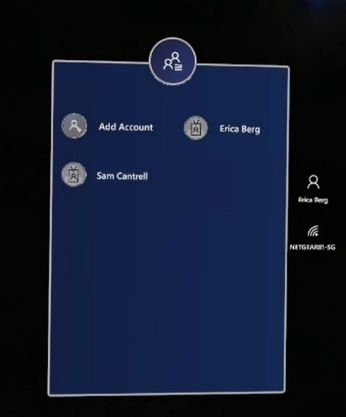
For our customers that share a HoloLens 2 across several users, multiple user accounts will now be visible on the sign-in screen, quashing the need to constantly retype usernames and passwords to change users. Before this build, you would just see one user or the generic ‘Other User’.
For IT admins, we continue to deliver features that enable seamless control and management of your devices. To highlight a few, Visitor Auto-logon for Kiosk mode will now be on by default for visitors but can be managed or turned off. Additionally, we improved error handling to help end-users get unblocked in case of a Kiosk mode failure. Instead of displaying an empty menu on startup if no Azure AD (Azure Active Directory) membership is found, a global kiosk configuration will be displayed (if available).
The Delivery Optimization Preview aims to reduce network bandwidth consumption for downloads from multiple HoloLens devices. Read Delivery Optimization for Windows 10 updates for more information on this feature.
Upgrade Today
As mentioned above, you can check out the full release notes on the HoloLens 2 release notes page. Update your HoloLens 2 devices so today to take advantage of the most recent features. If you are an IT administrator, we also created an IT Admin – Update Checklist to help you track and implement the features of this update.
Use the Feedback Hub app on your HoloLens to submit your feedback and report any issues. We love getting your feedback and take it all into consideration, so please keep it coming!
![Back in the Office with Microsoft Teams [M365 Meetup for Government]](https://www.drware.com/wp-content/uploads/2021/05/fb_image-90.jpeg)
by Contributed | May 11, 2021 | Technology
This article is contributed. See the original author and article here.
Back in the Office with Microsoft Teams – Professional woman is depicted in an office using teams.
As many organizations start to return to in-person office environments, how can we best leverage Microsoft Teams not only as a virtual work environment, but to enable and support more traditional office space scenarios? Discuss and explore real world adoption techniques and customer pain points – with solutions – to help keep your team on track. Live Q&A with expert deployment and workforce adoption experts.
Session Registration Link – Sign Up Here!
Presenter:
Doug Deitterick, Microsoft Federal
https://www.linkedin.com/in/dougdeitterick/
Live Q&A Panel with:
Jennifer Mason – Vice President Workforce Transformation and Learning, Planet Technologies
https://www.linkedin.com/in/jennifer-mason-5aa84b4/
Adam Ochs – Cloud Architect, Planet Technologies
https://www.linkedin.com/in/aochs/
Julie White – Evolve 365 Learning Strategist Manager, Planet Technologies
https://www.linkedin.com/in/julie-white-868a4a13/
by Contributed | May 11, 2021 | Technology
This article is contributed. See the original author and article here.
Microsoft has released security updates for vulnerabilities found in:
- Exchange Server 2013
- Exchange Server 2016
- Exchange Server 2019
These updates are available for the following specific builds of Exchange Server:
- Exchange Server 2013 CU23
- Exchange Server 2016 CU19 and CU20
- Exchange Server 2019 CU8 and CU9
The May 2021 security updates for Exchange Server address vulnerabilities responsibly reported by security partners and found through Microsoft’s internal processes. Although we are not aware of any active exploits in the wild, our recommendation is to install these updates immediately to protect your environment.
These vulnerabilities affect on-premises Microsoft Exchange Server, including servers used by customers in Exchange Hybrid mode. Exchange Online customers are already protected and do not need to take any action.
More details about specific CVEs can be found in Security Update Guide (filter on Exchange Server under Product Family).
Known issues in May 2021 security updates
During the release of April 2021 SUs, we received some reports of issues after installation. The following issues reported for April 2021 SUs also apply to May SUs and have the following workarounds:
- Administrator/Service accounts ending in ‘$’ cannot use the Exchange Management Shell or access ECP. The only workaround at this time is to rename Admin accounts or use accounts with no ‘$’ at the end of the name.
- Some cross-forest Free/Busy relationships based on Availability address space can stop working (depending on how authentication was configured) with the error: “The remote server returned an error: (400) Bad Request.” Please see this KB article for how to work around this problem.
- After application of the Exchange Server April or May security updates, cmdlets executed against the Exchange Management Console using an invoked runspace might fail with the following error message: The syntax is not supported by this runspace. This can occur if the runspace is in no-language mode. Please see this KB article for more information.
New security functionality in May 2021 security updates
We are making one additional change in May SU to make it easier for Exchange administrators and cybersecurity teams to quickly inventory the update state of the Exchange Servers on their networks. Specifically, we have added a protocol reply header containing Exchange Server version information to http responses that can be used by defenders to validate security update status of servers on your networks.
Update installation
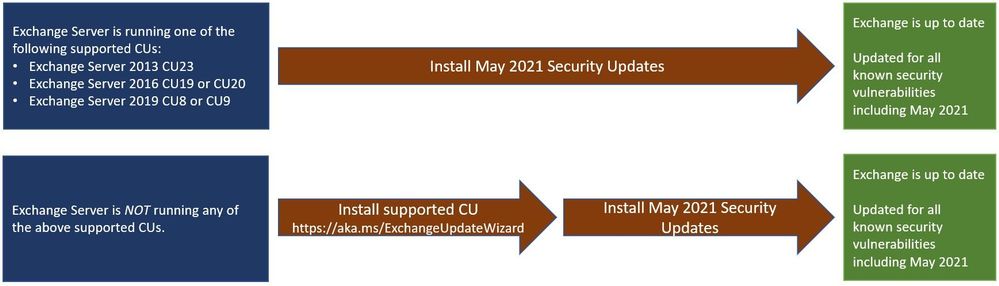
Two update paths are available:
Inventory your Exchange Servers
Use the Exchange Server Health Checker script (use the latest release), to inventory your servers. Running this script will tell you if any of your Exchange Servers are behind on updates (CUs and SUs).
Update to the latest Cumulative Update
Go to https://aka.ms/ExchangeUpdateWizard and choose your currently running CU and your target CU. Then click the “Tell me the steps” button, to get directions for your environment.
If you encounter errors during or after installation of Exchange Server updates
If you encounter errors during installation, see the SetupAssist script. If something does not work properly after updates, see Repair failed installations of Exchange Cumulative and Security updates.
FAQs
My organization is in Hybrid mode with Exchange Online. Do I need to do anything?
While Exchange Online customers are already protected, the May 2021 security updates do need to be applied to your on-premises Exchange Server, even if it is used only for management purposes. You do not need to re-run the Hybrid Configuration Wizard (HCW) after applying updates.
Do the May 2021 security updates contain the April 2021 security updates for Exchange Server?
Yes, our security updates are cumulative. Customers who installed the April 2021 security updates for supported CUs can install the May 2021 security updates and be protected against the vulnerabilities that were disclosed during those months.
Do I need to install the updates on ‘Exchange Management Tools only’ workstations?
Servers or workstations running only Microsoft Exchange Management Tools (no Exchange services) do not need to apply these updates.
NOTE: This post might receive future updates; they will be listed here (if available).
The Exchange Team


Recent Comments