by Contributed | May 20, 2021 | Technology
This article is contributed. See the original author and article here.
On October 31, 2021, Windows Server Update Services (WSUS) 3.0 Service Pack 2 (SP2) will no longer synchronize and download updates.
WSUS is key to the Windows servicing process for many organizations. Whether being used standalone or as a component of other products, it provides a variety of useful features including automating the download and installation of Windows updates.
Extended support for WSUS 3.0 SP2 ended on January 14, 2020, in alignment with the end of support dates for Windows Server 2008 SP2 and Windows Server 2008 R2. It is, however, still possible to synchronize and download updates from Microsoft using WSUS 3.0 SP2.
WSUS relies on several different components for secure communication. The protocol that is used for a given connection depends on the capabilities of the associated components. If any component is out of date, or not properly configured, the communication might use an older, less secure protocol. Microsoft is transitioning all endpoints to the more secure TLS 1.2 cryptographic protocol. WSUS 3.0 SP2 does not support this newer protocol. As a result, any organizations still using WSUS 3.0 SP2 must migrate to a currently supported version of WSUS by October 31, 2021.
For guidance, see Deploy Windows Server Update Services.
by Contributed | May 20, 2021 | Technology
This article is contributed. See the original author and article here.
Final Update: Thursday, 20 May 2021 12:25 UTC
We’ve confirmed that all systems are back to normal with no customer impact as of 05/20, 11:50 UTC. Our logs show the incident started on 05/20, 11:21 UTC and that during the 29 minutes that it took to resolve the issue some of the customers may have experienced data latency issue in China East 2 region.
We understand that customers rely on Application Insights as a critical service and apologize for any impact this incident caused.
-Srikanth
by Contributed | May 20, 2021 | Technology
This article is contributed. See the original author and article here.
Call Summary:
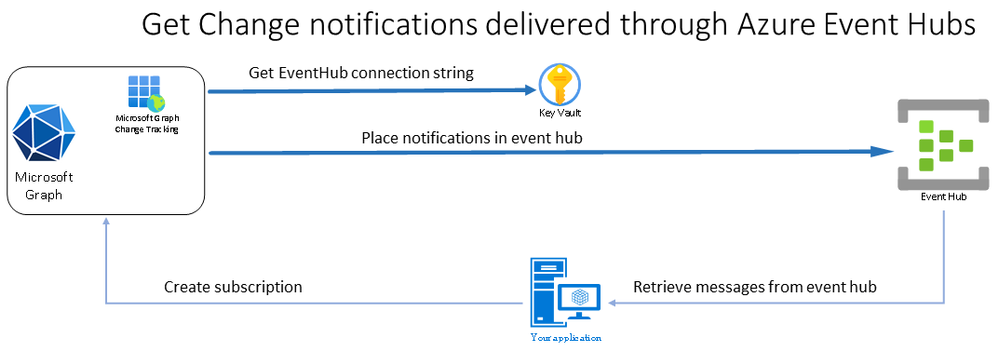
This month’s in-depth topic: Get Change notifications delivered via Azure Event Hubs. Brief introduction to Graph change notification (webhooks) and Change notifications delivered via Azure Event hubs. Microsoft Program Manager presenters – George Juma and Kalyan Krishna. This session was delivered and recorded on April 15, 2021. Live and in chat Q&A throughout call.
In-depth topic:
Get Change notifications delivered via Azure Event Hubs
A new Microsoft Graph platform capability gives developers using change notification features in Microsoft Graph the option to get change notifications delivered to their applications more quickly and at scale using Azure Event hub. With Microsoft Graph, changes (in data in Microsoft Graph) are tracked with webhooks, a.k.a., change notifications. Presently you get change notifications via a API REST end-point exposed on the internet.
Azure Event Hub is a real-time events ingestion and distribution service built for scale. Ideal for high throughput (no dropped notifications due to timeouts), no public URL (security), no missed notifications if temporally off-line. Operationally, Microsoft Graph Change Tracking places notifications in Event Hub and your app retrieves messages from Event Hub rather than from publicly exposed end points on the internet. You need not poll for changes, change notifications are pushed to your app. You need only subscribe to notifications.
In the end-to-end demo, the presenter steps through app registration, provisioning of an Azure Event Hub, an Azure Storage and a container, add a Shared Access Policy, create an Azure Key Vault (secure connection strings), add subscription connection string and IDs of resources to the app.
Resources:
Actions:
Stay connected:

by Contributed | May 20, 2021 | Technology
This article is contributed. See the original author and article here.
This month’s community call features presentations on Application Consent Deep Dive (demystifying permissions and consent when accessing Microsoft Graph) and on Considerations for Creating Online Meetings (Integration into Outlook or into other 3rd party experiences). Q&A in this call after demos, at end and in chat. The call was hosted by Brian T. Jackett (Microsoft) | @BrianTJackett. Microsoft Presenters were Philippe Signoret and Fabian Williams. Recorded on May 4, 2021.
Topics:
App Consent Deep Dive – demystifying permissions and consent when accessing Microsoft Graph. Most Graph permissions allow access to lots of data. Learn how apps and services access Microsoft Graph resources – application permissions and delegated permissions, requesting permissions, granting permissions, and restricting data access scope. General concepts – direct access, access on behalf of user, app and user authorizations, permission types, service principals, consents and more.
Considerations for creating Online Meetings – Based on specific meeting requirements, create an Online Meeting through the Calendar Events API or through the Cloud Communications API (Teams). Step through 7 questions to ask yourself to decide when to use what method. The decision is largely based on the need for a rich integrated Microsoft client (Outlook/Teams) experience vs 3rd party application integration including Microsoft chat integration.
Actions:
Resources:
From demos:
From Q&A
General Resources:
Stay Connected:

by Contributed | May 20, 2021 | Technology
This article is contributed. See the original author and article here.
Microsoft Endpoint Manager and Delivery Optimization
Hello everyone! I´m Stefan Röll, Customer Engineer at Microsoft Germany for Microsoft Endpoint Manager. In my last Delivery Optimization Blog, I wrote about how you can test Delivery Optimization in your Organization. After many discussions with customers, I have noticed that it is not always clear when Delivery Optimization can be used, so I made a couple of tests and here are my results.
TL;DR
Delivery Optimization can be used to optimize setup and update downloads for various products. However, it is important to understand in which scenarios it can be used to optimize traffic. The table below will give you a quick overview. For more details continue reading.
What is Delivery Optimization?
Delivery Optimization (DO) is a service that consists of multiple components. It has the goal to minimize the traffic that is downloaded from internet to your internal network by caching and sharing content internally.
The Delivery Optimization service is hosted in the cloud and the Delivery Optimization downloader on Windows 10 uses information provided by the cloud service to find peers in the local network.
However, the Delivery Optimization Downloader can also be used to download Content without seeking for Peers or without contacting the cloud service.
For example, in VPN scenarios the Delivery Optimization Downloader is still downloading the content, but not sharing content with peers. When a different download method like Background Intelligent Transfer Service (BITS) is used, the download will never be optimized via Delivery Optimization.
What is Microsoft Connected Cache?
Microsoft Connected Cache (MCC) is an extra component that you can install in your company network. It provides an additional caching source inside your network for your clients to have even better caching results. Right now, the MCC is only available as an additional component on Configuration Manager (ConfigMgr) Distribution Points but might be available as standalone container in the future.
The challenge with MCC is that clients need to find this caching server. In a ConfigMgr environment it can be automatically configured via the Boundary Group configuration. If you don’t use ConfigMgr, you can manually configure the MCC to be used by clients via Group Policy or Configuration profiles in Intune.
However, these entries are always static and not ideal for roaming clients. But the solution to this is already here. For Windows 10 2004 and above you can configure an DHCP Option to provide the clients the nearest MCC.
Which content can I download over Delivery Optimization?
Now the things can get a little difficult. It is always important to remember which downloader is used for content – DO or BITS.
ConfigMgr uses BITS by default but can be forced to use DO in some scenarios.
Windows Update in Windows 10 uses DO by default – every content that is downloaded via the Windows Update agent can be optimized via DO. Office Click2Run (2019 + 365) can use DO since version 1912 for the installation. Office Updates work with DO for quite a while now. Unfortunately, not everything works with MCC yet, so let’s get into the details:
Product
|
Workload managed via Intune
|
Workload managed via ConfigMgr
|
Microsoft Updates
|
DO + MCC
|
DO 1
|
Windows 10 Upgrades
|
DO + MCC
|
DO (via Servicing) 1
|
Office 365 Installs
|
DO + MCC
|
DO + MCC (via CDN) 2
|
Office 365 Updates
|
DO + MCC
|
DO not supported 3
|
Store and Store for Business Installs/Updates
|
DO + MCC
|
DO + MCC 4
|
Intune Win32 Apps
|
DO + MCC
|
N/A
|
Microsoft Edge Updates
|
DO not supported 5
|
DO 6
|
Defender Definition Updates
|
DO + MCC
|
DO (via MECM) / DO + MCC (via WU) 7
|
All tests were performed on Win 10 20H2 19042.928 and ConfigMgr 2103 5.00.9049.1010 in May 2021
1) Microsoft Updates and Upgrades via ConfigMgr
For Microsoft Updates and Upgrades, DO can only be used if you enable ‘download delta content’ in the Client settings and the content is not available on internal DPs. See my other Blog post for details.
2) O365 Installs via ConfigMgr
Office 365 Installs can only be optimized via DO in ConfigMgr if the Content is downloaded from the Content Delivery Network (CDN) and not from internal Distribution Points. See my other Blog post for details.
3) O365 Updates via ConfigMgr
When you deploy O365 Updates over ConfigMgr, DO will never be used. The current implementation of the Delta Downloader does not support O365 content.
4) Store and Store for Business Installs and Updates via ConfigMgr
Microsoft Store Apps deployed via ConfigMgr use DO + MMC when deployed in Online mode. Offline Apps (where the content is stored on your local DPs) cannot use DO + MCC.
5) Microsoft Edge Updates via Intune
If you don´t mange Microsoft Edge Updates via ConfigMgr, the internal Updater from Microsoft Edge is used. Unfortunately, this Updater doesn’t support DO.
6) Microsoft Edge Updates via ConfigMgr
If you use ConfigMgr to Update Microsoft Edge you need to disable automatic Updates inside Edge. Updates for Microsoft Edge are deployed as regular Microsoft Updates via ConfigMgr and therefore DO can only be used if you enable ‘download delta content’ in the Client settings and when the content is not available on internal DPs.
7) Defender Definition Updates via ConfigMgr
If you manage Defender Definition Updates via ConfigMgr, it depends on which Update Source you configured if DO can be use. If you configure ‘Microsoft Update’ as source, DO+MCC can be used. But keep in mind that you might need to reduce the File Size cached by DO via Group Policy or Configuration profiles in Intune. If you configure ‘Configuration Manager’ as source, DO can only be used if you enable ‘download delta content’ in the Client settings and the content is not available on internal DPs.
Summary
When you manage your Clients over Intune, DO and MCC can be used for almost all scenarios without complex configuration. If you manage your Clients with ConfigMgr, you need to know in which situations DO + MCC can be used.
I hope my blog helps you to understand the behavior a bit better.
Happy Caching!
Stefan Röll
Customer Engineer – Microsoft Germany
Resources:
Stay current while minimizing network traffic: The power of Delivery Optimization
https://myignite.techcommunity.microsoft.com/sessions/81680?source=sessions
Delivery Optimization reference
https://docs.microsoft.com/en-us/windows/deployment/update/waas-delivery-optimization-reference
Delivery Optimization and Office 365 ProPlus
https://docs.microsoft.com/en-us/deployoffice/delivery-optimization
Optimize Windows 10 update delivery with Configuration Manager
https://docs.microsoft.com/en-us/configmgr/sum/deploy-use/optimize-windows-10-update-delivery
Microsoft Connected Cache in Configuration Manager
https://docs.microsoft.com/en-us/configmgr/core/plan-design/hierarchy/microsoft-connected-cache
Modern Content Distribution: Microsoft Endpoint Manager and Connected Cache
https://techcommunity.microsoft.com/t5/core-infrastructure-and-security/modern-content-distribution-microsoft-endpoint-manager-and/ba-p/1148669
Disclaimer:
This posting is provided “AS IS” with no warranties and confers no rights
by Contributed | May 20, 2021 | Technology
This article is contributed. See the original author and article here.
Neural Text-to-Speech (Neural TTS), part of Speech in Azure Cognitive Services, enables you to convert text to lifelike speech for more natural user interactions. One emerging solution area is to create an immersive virtual experience with an avatar that automatically animates its mouth movements to synchronize with the synthetic speech. Today, we introduce the new feature that allows developers to synchronize the mouth and face poses with TTS – the viseme events.
What is viseme
A viseme is the visual description of a phoneme in a spoken language. It defines the position of the face and the mouth when speaking a word. With the lip sync feature, developers can get the viseme sequence and its duration from generated speech for facial expression synchronization. Viseme can be used to control the movement of 2D and 3D avatar models, perfectly matching mouth movements to synthetic speech.
Traditional avatar mouth movement requires manual frame-by-frame production, which requires long production cycles and high human labor costs.
Viseme can generate the corresponding facial parameters according to the input text. It greatly expands the number of scenarios by making the avatar easier to use and control. Below are some example scenarios that can be augmented with the lip sync feature.
- Customer service agent: Create an animated virtual voice assistant for intelligent kiosks, building the multi-mode integrative services for your customers;
- Newscast: Build immersive news broadcasts and make content consumption much easier with natural face and mouth movements;
- Entertainment: Build more interactive gaming avatars and cartoon characters that can speak with dynamic content;
- Education: Generate more intuitive language teaching videos that help language learners to understand the mouth behavior of each word and phoneme;
- Accessibility: Help the hearing-impaired to pick up sounds visually and “lip-read” any speech content.
How viseme works with Azure neural TTS
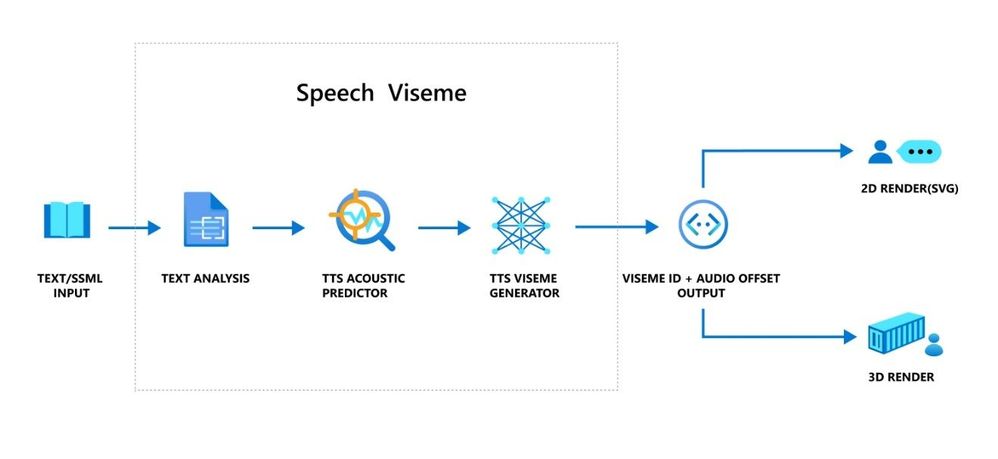
The viseme turns the input text or SSML (Speech Synthesis Markup Language) into Viseme ID and Audio offset which are used to represent the key poses in observed speech, such as the position of the lips, jaw and tongue when producing a particular phoneme. With the help of a 2D or 3D rendering engine, you can use the viseme output to control the animation of your avatar.
The overall workflow of viseme is depicted in the flowchart below.
The underlying technology for the Speech viseme feature consists of three components: Text Analyzer, TTS Acoustic Predictor, and TTS Viseme Generator.
To generate the viseme output for a given text, the text or SSML is first input into the Text Analyzer, which analyzes the text and provides output in the form of phoneme sequence. A phoneme is a basic unit of sound that distinguishes one word from another in a particular language. A sequence of phonemes defines the pronunciations of the words provided in the text.
Next, the phoneme sequence goes into the TTS Acoustic Predictor and the start time of each phoneme is predicted.
Then, the TTS Viseme generator maps the phoneme sequence to the viseme sequence and marks the start time of each viseme in the output audio. Each viseme is represented by a serial number, and the start time of each viseme is represented by an audio offset. Often several phonemes correspond to a single viseme, as several phonemes look the same on the face when pronounced, such as ‘s’, ‘z’.
Here is an example of the viseme output.
(Viseme), Viseme ID: 1, Audio offset: 200ms.
(Viseme), Viseme ID: 5, , Audio offset: 850ms.
……
(Viseme), Viseme ID: 13, Audio offset: 2350ms.
This feature is built into the Speech SDK. With just a few lines of code, you can easily enable facial and mouth animation using the viseme events together with your TTS output.
How to use the viseme
To enable viseme, you need to subscribe to the VisemeReceived event in Speech SDK (The TTS REST API doesn’t support viseme). The following snippet illustrates how to subscribe to the viseme event in C#. Viseme only supports English (United States) neural voices at the moment but will be extended to support more languages later.
using (var synthesizer = new SpeechSynthesizer(speechConfig, audioConfig))
{
    // Subscribes to viseme received event
    synthesizer.VisemeReceived += (s, e) =>
    {
        Console.WriteLine($"Viseme event received. Audio offset: " +
            $"{e.AudioOffset / 10000}ms, viseme id: {e.VisemeId}.");
    };

    var result = await synthesizer.SpeakSsmlAsync(ssml));
}
After obtaining the viseme output, you can use these outputs to drive character animation. You can build your own characters and automatically animate the characters.
For 2D characters, you can design a character that suits your scenario and use Scalable Vector Graphics (SVG) for each viseme ID to get a time-based face position. With temporal tags provided by viseme event, these well-designed SVGs will be processed with smoothing modifications, and provide robust animation to the users. For example, below illustration shows a red lip character designed for language learning. Try the red lip animation experience in Bing Translator, and learn more about how visemes are used to demonstrate the correct pronunciations for words.

For 3D characters, think of the characters as string puppets. The puppet master pulls the strings from one state to another and the laws of physics will do the rest and drive the puppet to move fluidly. The Viseme output acts as a puppet master to provide an action timeline. The animation engine defines the physical laws of action. By interpolating frames with easing algorithms, the engine can further generate high-quality animations.

(Note: the character image in this example is from Mixamo.)
Learn more about how to use the viseme feature to enable text-to-speech animation with the tutorial video below.
Get started
With the viseme feature, Azure neural TTS expands its support for more scenarios and enables developers to create an immersive virtual experience with automatic lip sync to synthetic speech.
Let us know how you are using or plan to use Neural TTS voices in this form. If you prefer, you can also contact us at mstts [at] microsoft.com. We look forward to hearing about your experience and developing more compelling services together with you for the developers around the world.
See our documentation for Viseme
Add voice to your app in 15 minutes
Build a voice-enabled bot
Deploy Azure TTS voices on prem with-Speech Containers
Build your custom voice
Improve synthesis with the Audio Content Creation tool
Visit our Speech page to explore more speech scenarios
by Contributed | May 20, 2021 | Technology
This article is contributed. See the original author and article here.
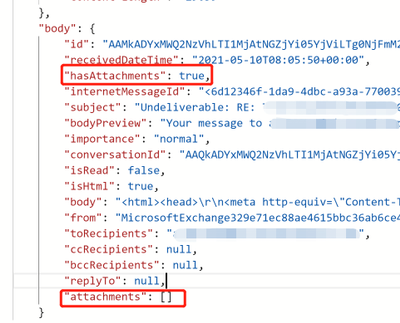
If you tried to use logic app to pick up all attachments with “When an email is received” Office 365 trigger, we might notice that some of the attachments are not able to be retrieved from this trigger. By checking the raw output from the trigger, you might find even “hasAttachments” is “true”, the “attachments” is an empty array.
This is caused by Office 365 connector does not support “item attachment”. From our official document, we should use HTTP with Azure AD connector to work around such limitation.
Reference:
Office 365 connector limitation: https://docs.microsoft.com/en-us/connectors/office365/#known-issues-and-limitations
To workaround it, you could follow the steps below:
- First of all, using a “When a new email arrives V3” trigger to monitor if an email arrived, and get the message id of emails received. And then use HTTP to call Graph API and list attachments from the message id retrieved from the trigger.
Reference:
Graph API list attachments: https://docs.microsoft.com/en-us/graph/api/message-list-attachments?view=graph-rest-1.0&tabs=http
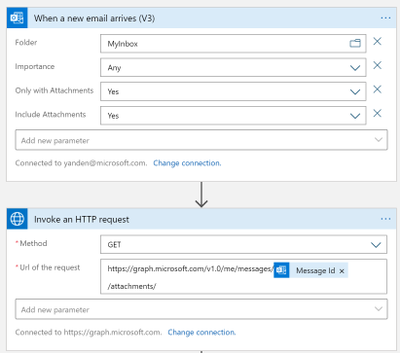
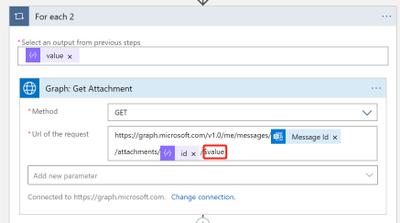
- Then for each attachments listed from the email, we get the attachment raw contents from the attachment id. Note that we added “$value” in the request to get attachment raw contents.
Reference:
https://docs.microsoft.com/en-us/graph/api/attachment-get?view=graph-rest-1.0&tabs=http#example-6-get-the-raw-contents-of-a-file-attachment-on-a-message
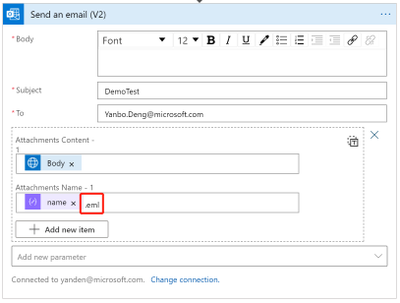
- The last step is to send this attachment in an email. We need to add an extension “.eml” to the attachment name, so our outlook could recognize it as an valid attachment.
Sample:
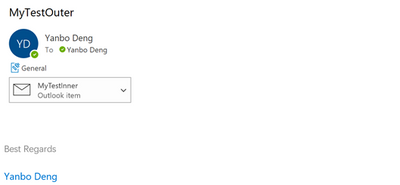
The original email received:
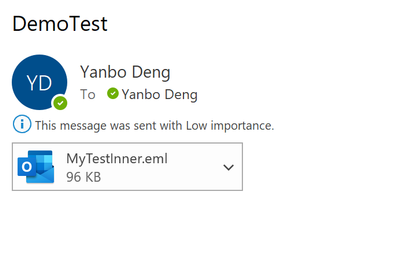
The new email sent by logic app:
by Contributed | May 19, 2021 | Technology
This article is contributed. See the original author and article here.
Isn’t it time for a better search? We are increasingly turning to search engines to accomplish tasks and make decisions – in fact over half the internet population will start their internet experience with a search engine.
Microsoft Search transforms the way people in your organization find the info they need—no matter where you are in your cloud journey. Either integrated with Microsoft 365 or as a standalone solution. Microsoft Search is a secure, easily managed, enterprise search experience that works across all your applications and services to deliver more relevant search results and increase productivity – and search works best when measured.
In this article, we’ll share some details on how to measure how well search is working for you in SharePoint.
NOTE To learn more about tenant-wide Microsoft Search usage reports visit Search Usage Reports | Microsoft Docs. Learn more about classic SharePoint usage reports at Classic usage and popularity reports to be discontinued – SharePoint | Microsoft Docs. For information on modern SharePoint usage reports see View usage data for your SharePoint site – SharePoint (microsoft.com).
If you are a site collection administrator, we’ve recently made several improvements to search usage reporting to help you understand:
- What are the top queries on a site collection per day or per month?
- How many search queries are users performing on average?
- Which queries are getting low clicks as they are simply not showing up in any results?
Modern site collection search usage reports with Microsoft Search provide a few graphs and tables generated from searches that are executed from search in modern sites. You can see data from the past 31 days (about 1 month), per day, or monthly for the previous year. These reports are just rolling out so it will take time to accrue historical data.
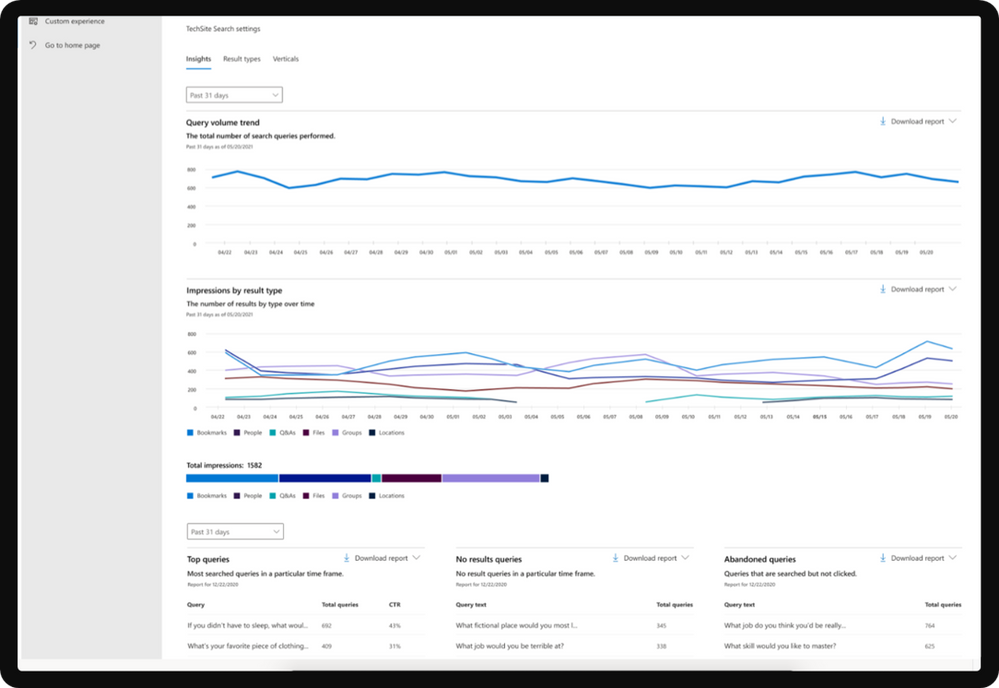
Overview of search reports
Report
|
Description
|
Query Volume
|
This report shows the number of search queries performed. Use this report to identify search query volume trends and to determine periods of high and low search activity.
|
Top Queries
|
This report shows the most popular search queries. A query is added to this report when it is searched at least three times with a click on a result. Use this report to understand what types of information your users are searching for.
|
Abandoned Queries
|
This report shows popular search queries that receive low click-through. Use this report to identify search queries that might create user dissatisfaction and to improve the discoverability of content.
|
No Results Queries
|
This report shows popular search queries that returned no results. Use this report to identify search queries that might create user dissatisfaction and to improve the discoverability of content.
|
Impression distribution
|
This report shows impressions over various timeframes. The timeline shows the daily number of impressions for a result type. Determine which result type is most frequently, or infrequently, used. Use this report to understand what result types users are using and any changes in user behavior over a period of time.
|
Viewing reports
To get started with search usage reports in modern sites, navigate to Microsoft search | Configure search settings | Insights under Site collection settings.
The first date picker lets you pick past 31 days (about 1 month) or past 12 months for the first 2 graphs. The second date picker lets you select a particular day or month for the bottom 3 tables (top, abandoned, no results). Downloading a report will allow you to see reports from a broader range of time. Click on the download arrow and select past 31 days (about 1 month) or past 12 months. The report is downloaded as an Excel spreadsheet. If you selected the past 31 days (about 1 month), the spreadsheet will have an individual tab for each day. The past 12 months download will have a tab for each month.
If you have any feedback on search usage reports in SharePoint, let us know in the comments below.
by Contributed | May 19, 2021 | Technology
This article is contributed. See the original author and article here.
We are getting close to the upcoming GA of Azure IoT Edge for Linux on Windows, also known as EFLOW, in the next few weeks. Over the past few months, we have had many conversations with customers and partners on how EFLOW enables them for the first time to run production Linux-based cloud-native workloads on Windows IoT.
During those conversations it became clear that many organizations simply do not have the knowledge in-house or on their remote locations to manage and deploy Linux systems but that they would love to take advantage of Linux workloads in their environment. With EFLOW they can retain their existing Windows IoT assets plus benefit from the power of Windows IoT for applications that require an interactive UX and high-performance hardware interaction. There is no longer a need to choose between Windows or Linux; customers can now leverage the best of both platforms.
EFLOW provides the ability to deploy Linux IoT Edge modules onto a Windows IoT device. This opens a world of capabilities for commercial IoT as well as AI/ML with the availability of pre-built modules from the Azure Marketplace such as Live Video Analytics, SQL Edge, and OPC Publisher as a few examples. As a developer, you may also choose to implement your own custom modules using the Linux distribution of your choice to address specific business requirements. Running Linux modules on Windows IoT becomes a seamless of your solution.
Windows IoT is deployed in millions of intelligent edge solutions around the world in numerous industries including manufacturing, retail, medical equipment and public safety. Customers choose Windows to power their edge devices because it is an out of the box that provides a rich platform to create locked-down, interactive user experiences with natural input, provides world class security, enterprise grade device management, and 10 years of servicing allowing you to build a solution that is designed to last. In addition to all these features, customers also want to benefit from existing Linux workloads and leverage the advances in cloud-native development.
Since many of you tried out EFLOW during the Public Preview, we would like to invite you to join us, the EFLOW engineering team, during Build next week and bring any questions and feedback you might have. There are two sessions that will discuss EFLOW:
Ask the Experts: Bringing Azure Linux workloads to Windows
Azure IoT Edge for Linux, also known as EFLOW allows you to manage and deploy your Linux workloads on Windows devices using your existing Microsoft management resources and technology to efficiently optimize all your computing assets. Develop your Linux solutions, publish them on the Azure IoT Edge Marketplace and run them on Windows IoT.
When? Tuesday, May 25 3:30 PM – 4:00 PM Pacific Daylight Time
Talking Industry Trends in AI for Computer Vision Applications
Industries across the globe are getting disrupted to the digital and AI transformations. While this trend is already underway, the tremendous potential for the businesses is fueling constant innovations and demanding solutions that are flexible, scalable and efficient across multiple industries. In this discussion, we will cover interesting current trends across various industries including Retail, Industrial, Healthcare and more, as well as explore what is next in these industries.
When? Wednesday, May 26 1:00 PM – 1:30 PM Pacific Daylight Time
We hope to see you in one of those sessions. Want to get started with EFLOW and get your feet wet before then?
EFLOW is available on all Hyper-V capable Windows 10 installations. This makes 100s of millions of existing devices EFLOW capable, which can easily be managed and connected through Azure.
Start by watching the IoT Show: IoT Edge for Linux on Windows 10 IoT Enterprise on Channel9.
Detailed documentation to get started is available at https://aka.ms/AzIoTEdgeforLinuxOnWindows
If you want to stay up to date and get notified of future updates to Azure IoT Edge for Linux on Windows, you can register using this link. Note that the information you will share will only be used by Microsoft for the purpose of keeping you informed about this product.
by Contributed | May 19, 2021 | Technology
This article is contributed. See the original author and article here.
We are very happy to announce the availability of a new solution to run the IBM WebSphere Application Server (Traditional) Network Deployment on Azure Linux Virtual Machines. The solution is jointly developed and supported by IBM and Microsoft. The solution enables easy migration of WebSphere workloads to Azure by automating most of the boilerplate resource provisioning tasks to set up a highly available cluster of WebSphere servers on Azure Virtual Machines. Evaluate the solution for full production usage and reach out to collaborate on migration cases.
IBM and Microsoft Partnership
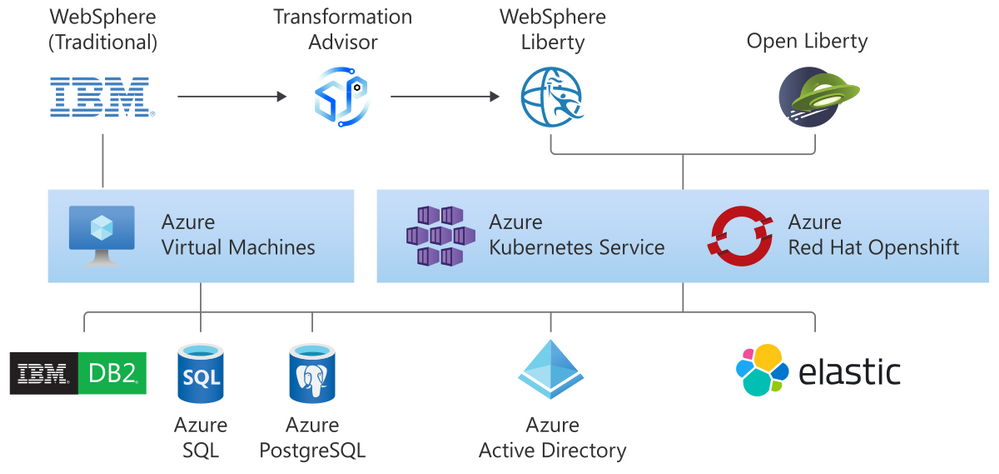
The solution is part of a broader partnership between IBM and Microsoft to enable the WebSphere product portfolio on Azure. WebSphere products are key components in enabling enterprise Java workloads. The partnership aims to cover a range of use cases from mission critical existing traditional workloads to cloud-native applications. Offers target Open Liberty on Azure Red Hat OpenShift (ARO), WebSphere Liberty on ARO, WebSphere Application Server on Virtual Machines, Open Liberty on the Azure Kubernetes Service (AKS), and WebSphere Liberty on AKS.
As part of the partnership, we previously released guidance for running WebSphere Liberty and Open Liberty on ARO in December, 2020. We also released guidance for running WebSphere Liberty and Open Liberty on AKS in March 2021.
All offers enable further integration with services such as databases (Db2, Azure SQL, Azure PostgreSQL, Azure MySQL), Azure App Gateway, Azure Active Directory, and ELK.
Solution Details and Roadmap
The WebSphere on Virtual Machines solution is aimed at automatically provisioning several Azure resources quickly. The automatically provisioned resources include virtual network, storage, network security group, Java, Linux, and WebSphere. With minimal effort, you can set up a fully functional n-node WebSphere cluster including the Domain Manager and Console. The solution supports WebSphere 9.0.5 on Red Hat Enterprise Linux (RHEL) 8.3.
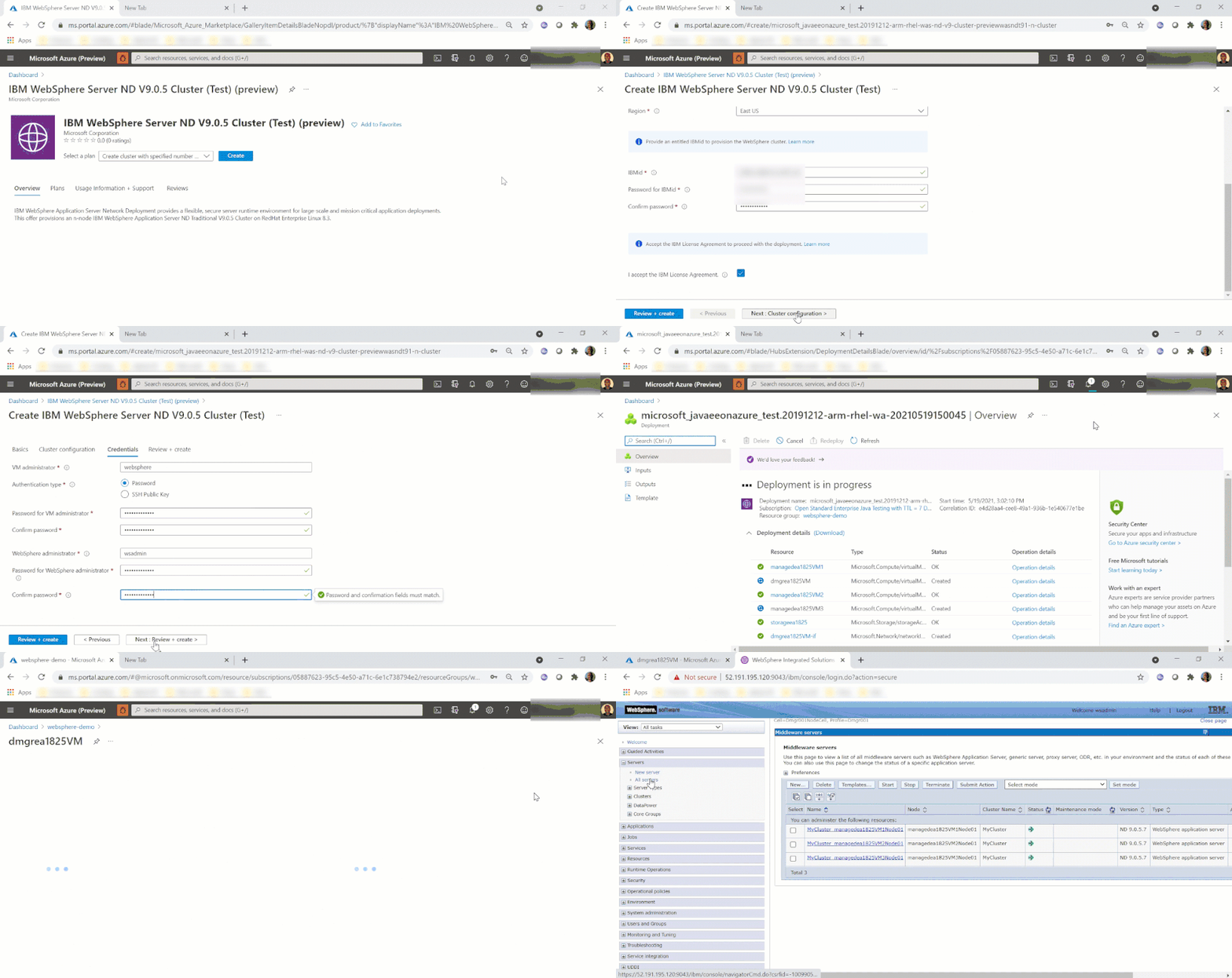
The solution enables a variety of robust production-ready deployment architectures. Once the initial provisioning is completed by the solution, you are free to further customize the deployment including integrating with more Azure services.
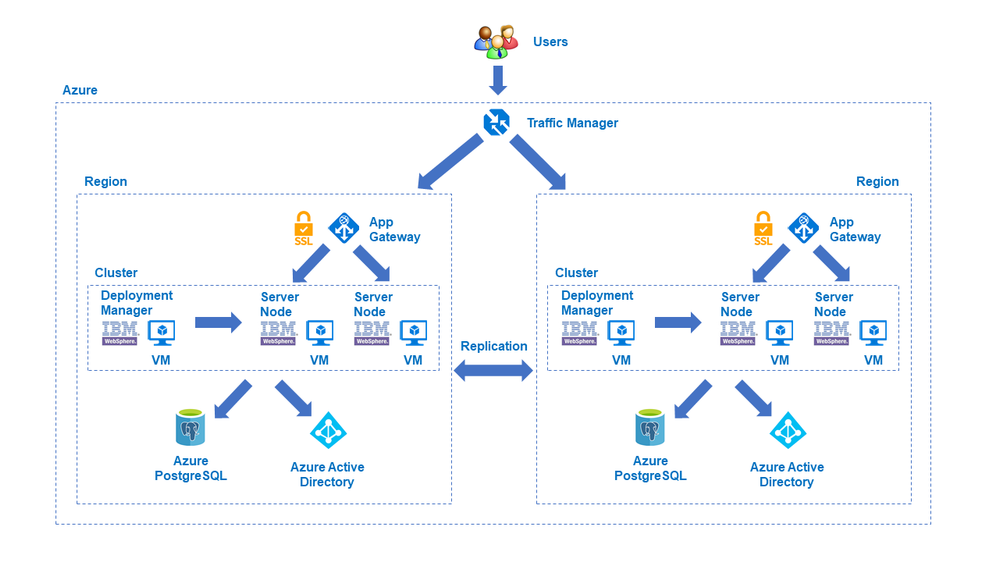
In the next few months, IBM and Microsoft will also provide jointly developed and supported Marketplace solutions targeting WebSphere Liberty/Open Liberty on ARO and WebSphere Liberty/Open Liberty on AKS.
The WebSphere on Virtual Machines solution follows a Bring-Your-Own-License model. You must have the appropriate licenses from IBM and be properly licensed to run offers in Azure. Customers are also responsible for Azure resource usage.
Get started with WebSphere on Azure Virtual Machines
Explore the solution, provide feedback, and stay informed of the roadmap. You can also take advantage of hands-on help from the engineering team behind these efforts. The opportunity to collaborate on a migration scenario is completely free while solutions are under active initial development.


Recent Comments