MidDay Café Episode 11 – Microsoft Teams Webinars Deep Dive

MidDay Café Episode 11 – Microsoft Teams Webinars Deep Dive

This article is contributed. See the original author and article here.

HLS Mid-Day Café3.pngIn episode 11 of MidDay Café the MidDay crew is joined by Microsoft’s Johnathan Wynn. In this episode MidDay takes an in-depth look at the newly rolled out Teams Webinar capabilities with a special emphasis on the setup, and customization, of the Webinar Registration Page. The crew also touches on setup requirements and other features like the View Only Meeting Experience.


Tune in and see how organizations can leverage the power of Microsoft Teams Webinars and grab the resource links below as well.


Next week the crew will be taking a deep dive into some of PowerPoints least known, but most powerful features including: PowerPoint Present in Teams, Present Online, Closed Captions, Translation, Record, and more.


Resources:


Keep up to date with MidDay Café:


Thanks for visiting – Michael Gannotti   LinkedIn | Twitter 


Michael GannottiMichael Gannotti


Auto Transcript:


00:00:00.000 –> 00:00:28.790
Michael Gannotti
Hey there, welcome to midday Cafe. We are here on May 24th episode 11. I’m your host Mike Janati today coming to you from the bowels of the hotel room in my allowed to say that bowels of a hotel room here in Ohio. I said it anyways with my hotel coffee in hand and I am joined by an awesome panel today so we have starting with Mr Pete.


00:00:17.650 –> 00:00:18.450
Pete Anello
It just did.


00:00:30.060 –> 00:00:40.160
Pete Anello
Hey Pete, Anello teams technical specialist for Microsoft Healthcare on the East and I’ll send it over to Kendra.


00:00:41.150 –> 00:00:47.360
Kendra Burgess
Hi everybody, I’m Kendra Burgess. I’m an intelligence technical specialist here at Microsoft. I specialize in power BI.


00:00:49.570 –> 00:00:50.190
Michael Gannotti
2.


00:00:50.960 –> 00:01:07.610
Sue Vencill
My name is Sue Wencel. This is my my third mid day cafe. Pretty excited yeah #3. Pretty excited about it. I am one of the newer members of the team. I’m also a technical team specialist and now I’m going to toss it over to one of my faves Jonathan.


00:01:07.980 –> 00:01:21.660
Jonathan Wynn
Thanks sue. I’m Jonathan. When I’m a customer success manager on modern work and healthcare as well, and I’m excited today to be the first to join the mid day cafe with a great group of amazing professionals.


00:01:24.770 –> 00:01:25.560
Pete Anello
We pay them.


00:01:24.990 –> 00:01:26.020
Kendra Burgess
Speak for yourself.


00:01:25.030 –> 00:01:25.850
Michael Gannotti
I love you.


00:01:26.390 –> 00:01:30.630
Michael Gannotti
Yeah, well start laughing. Well, we’re professionals.


00:01:26.960 –> 00:01:27.440
Sue Vencill
Sorry.


00:01:32.130 –> 00:01:32.730
Michael Gannotti
So.


00:01:32.240 –> 00:01:33.730
Jonathan Wynn
Smartest group in the bunch.


00:01:33.970 –> 00:01:43.330
Michael Gannotti
We have, so I was pretty excited about today. So because you came to me saying you had something you wanted to talk about, so why don’t you go ahead? Team this up.


00:01:43.620 –> 00:02:13.550
Sue Vencill
So I, as one of the newer members of the team, I get to shadow a lot of customer calls, an out of all my ways of learning. That’s my favorite way and I got to see Jonathan and Pete in action on a customer call and they were showing off and highlighting some of the features with the webinar that’s been added, added functionality to Microsoft Teams. I think it was announced around May 11th, so it’s still fairly new and it was just.


00:02:13.600 –> 00:02:43.690
Sue Vencill
As they were going through and showing it off, it was just light bulbs were clicking for our customer and it was just wonderful to see and again it leads onto the why have anything else when I can do all of this for Microsoft Teams? So and what was great about it too is that Jonathan at well he’ll share, but as a CSM he works directly with the customers, making sure they get the value. So we’re showing him all these added values that are being added. You know to.


00:02:44.030 –> 00:02:51.380
Sue Vencill
They already have, so I thought it would be great to try to do a redo of that, and I think people will be wowed.


00:02:53.030 –> 00:02:55.090
Sue Vencill
So that’s why I was thinking, what do you think?


00:02:54.500 –> 00:02:57.690
Michael Gannotti
We like wow. So how do we wanna get this going?


00:02:55.840 –> 00:02:56.400
Sue Vencill
Yeah.


00:02:58.510 –> 00:03:07.310
Sue Vencill
Yeah right, you want to take it from here. Jonathan and Pete and I’ll just. I’ll sprinkle some some comments throughout it.


00:03:05.000 –> 00:03:06.750
Pete Anello
Thank goodness, yeah, sure.


00:03:08.080 –> 00:03:08.760
Pete Anello
Sounds good.


00:03:08.380 –> 00:03:10.880
Michael Gannotti
And Kendra and I’ll sit back and be wowed.


00:03:11.360 –> 00:03:13.490
Sue Vencill
Oh buckle up. Buckle up.


00:03:14.320 –> 00:03:44.150
Jonathan Wynn
Well, so you’re really nailed it it. We released webinars couple of weeks ago. I’ve been sort of dogfooding it over the last several months and this is amazing feature right? Allow me to host my own webinars, registration, right event registration, something we always experience. We had difficult in the past. Share it right. Organizers will have and be able to promote that event like you could have a really nice email. Cool formatting and then lay in all and then click here to join and then you get your own.


00:03:14.510 –> 00:03:14.910
Kendra Burgess
OK.


00:03:32.350 –> 00:03:32.720
Kendra Burgess
Yeah.


00:03:44.370 –> 00:03:59.580
Jonathan Wynn
Registration page as an attendee for outside and then the organizer knows exactly when you’ve registered your information key. Really, really key and you’ll have that downloadable ICS calendar invite.


00:04:00.140 –> 00:04:03.760
Jonathan Wynn
Right in your outlook and I’m ready to join, so it’s really hands off.


00:04:04.900 –> 00:04:05.560
Sue Vencill
Would you say?


00:04:04.980 –> 00:04:06.220
Jonathan Wynn
And plus trackability.


00:04:06.590 –> 00:04:15.090
Sue Vencill
And would you say that from what I see based on customer reactions, it’s the registration piece that is the the lightbulb? Would you agree with that?


00:04:15.960 –> 00:04:16.220
Jonathan Wynn
Yeah.


00:04:16.270 –> 00:04:46.160
Jonathan Wynn
Yeah, in the past you might have had a you know third party handling of for you or you had to build something special here. This gives you an opportunity to customize it, have your own logo, ASCII information, like if you’ve been to the webinar before so you can gain some knowledge. Maybe you want first name, last name, email, maybe organization. Maybe the department they work in and the end goal is obviously can get this into dynamics for key marketing in the future, right? That’s the problem. We all have these.


00:04:46.280 –> 00:04:54.210
Jonathan Wynn
Events that we’re hosting. There’s never that. What do I do after and that’ll can allow you to do that as a follow up with or without dynamics.


00:04:55.450 –> 00:04:56.150
Jonathan Wynn
Yeah, Mike.


00:04:56.490 –> 00:04:57.890
Michael Gannotti
I have my hand up. Thank you.


00:04:58.510 –> 00:05:03.370
Michael Gannotti
So for this registration piece, since you know.


00:05:04.060 –> 00:05:11.450
Michael Gannotti
They’re not gonna need a third party that they would have paid for to do that. So what do we charge in a good zillion jillion?


00:05:12.180 –> 00:05:14.380
Michael Gannotti
Million per user per month.


00:05:15.570 –> 00:05:18.890
Sue Vencill
This is your softball Jonathan. Here it is.


00:05:16.990 –> 00:05:19.280
Michael Gannotti
Is my softball P?


00:05:17.720 –> 00:05:18.000
Pete Anello
Yeah.


00:05:20.700 –> 00:05:32.800
Pete Anello
It’s included in the in the Enterprise SKU for users, so if the user has an enterprise QE, 1 E 3 E 5 their entitled to this capability.


00:05:33.100 –> 00:05:33.680
Michael Gannotti
That’s awesome.


00:05:33.270 –> 00:05:33.720
Jonathan Wynn
Yeah.


00:05:34.170 –> 00:05:34.700
Kendra Burgess
Nice.


00:05:34.870 –> 00:05:35.350
Jonathan Wynn
Yeah.


00:05:34.960 –> 00:06:05.550
Pete Anello
The other thing I just want to throw out, you know, so excuse me D webinar. Large meeting has been something that we’ve been talking about for a very long time. Customers have been asking for for an even longer time, and engineering worked feverishly to get it done, and at first will supposed to be end of Q1 and it kind of slipped into a little bit in the Q2. And as soon Jonathan said, we actually released it GA.


00:06:05.870 –> 00:06:13.230
Pete Anello
Uh, May 11th an engineering is told us that it should have reached every tenant by May 15th.


00:06:14.810 –> 00:06:24.050
Pete Anello
Every tenant should have it. It’s there today, it does, just like with the ability to have the meetings automatically spill over when that limit is hit.


00:06:24.680 –> 00:06:45.690
Pete Anello
This has to be enabled within your tenant. We don’t just turn it on, so there’s a couple. Right now it’s in the meeting policy via PowerShell, there’s parameters there. I’m assuming that it’s going to come to the the web UI soon in the teams portal. We can share those links, but you do have to go an turn it on.


00:06:32.580 –> 00:06:33.060
Jonathan Wynn
I.


00:06:46.330 –> 00:06:46.820
Sue Vencill
Good point.


00:06:46.430 –> 00:06:46.880
Jonathan Wynn
Yeah.


00:06:48.210 –> 00:07:17.080
Jonathan Wynn
Yeah, so there was always a challenge for us 300 right now and I’ve got 1000 and then 1001. We’ve got broadcast only up to 10,000 really huge gap that we’re filling that we’ve really struggled in the past. Now all of your meetings, meetings as well as webinar can get you to 10,000 with that change that Pete just talked about into the tenant 10,000. That’s great, right? And then in the summer there is other future plans.


00:07:18.420 –> 00:07:28.910
Jonathan Wynn
You know to take us to 20,000 which we don’t know that yet, but it’s out on the road map, so check, keep your eyes up to you on the Office 365 road map where everything you need to know about what’s coming is there.


00:07:30.910 –> 00:07:31.510
Sue Vencill
Awesome.


00:07:31.740 –> 00:07:32.730
Jonathan Wynn
Should we dig in?


00:07:32.730 –> 00:07:33.870
Sue Vencill
Let’s do it. Let’s show him.


00:07:33.110 –> 00:07:35.680
Michael Gannotti
Dig in, I’m hungry. Let’s dig in.


00:07:35.850 –> 00:07:45.310
Jonathan Wynn
Alright, I’m going to do a little quick share show Intel here and I’m going to share all of this is set up via my teams calendar, so you can.


00:07:39.160 –> 00:07:39.290
Kendra Burgess
Yeah.


00:07:44.280 –> 00:07:47.480
Michael Gannotti
By the way, that’s a stellar picture of you that popped up first.


00:07:49.010 –> 00:07:51.670
Michael Gannotti
That’s that’s quite heroic looking.


00:07:49.080 –> 00:07:49.720
Jonathan Wynn
Thank you.


00:07:51.820 –> 00:07:52.560
Sue Vencill
It was.


00:07:53.930 –> 00:07:55.020
Jonathan Wynn
So here we are.


00:07:57.420 –> 00:08:13.930
Jonathan Wynn
You’ll notice here is I’ve got some reoccurring meetings, but look at this one here. I’m highlighting. It’s got me sitting in front of a podium. That’s a new icon that we have, so I wanted to show you what it looks like. But also I’ll just come here.


00:08:14.700 –> 00:08:33.440
Jonathan Wynn
And there it is. So it’s underneath the new meeting and I’ve got the option for webinars, but I want to show you this older one that’s coming up in June. This is one that I set up a couple of weeks ago for a platform roadshow that we’re hosting. But check this out. This is where it gets super exciting.


00:08:16.260 –> 00:08:16.750
Michael Gannotti
Yeah.


00:08:35.150 –> 00:08:38.570
Jonathan Wynn
As soon as this comes alive and turns away here.


00:08:40.150 –> 00:08:40.890
Jonathan Wynn
Luck.


00:08:40.230 –> 00:08:41.590
Sue Vencill
I am already excited.


00:08:41.890 –> 00:08:48.000
Jonathan Wynn
I’ve got all the registration right here, so anyone who’s received my invite?


00:08:48.630 –> 00:09:19.490
Jonathan Wynn
I’ve got the registration right here and this is a downloadable CSV file I can open and I can see all the information. What’s a little different is that I’ve got my presenters who I’m presenting and then I have my attendees. Really, I’ve got 2 links that I’m going to be setting up, so let me go show you that you’ll see right here. Attendees must register, so I’ve got a custom registration form like. This is something that would nearly impossible in the past, right? It just didn’t work right. It was a I would say maybe.


00:09:19.610 –> 00:09:36.720
Jonathan Wynn
A bubble gum and baling wire solution, right and now we’ve got an all-in-one, so I’m going to jump into this customized form and show you what that experience looks like, so that’s going to open up over here. I’m going to drag that guy across three screens, and here you go.


00:09:37.980 –> 00:09:49.250
Jonathan Wynn
And this is like a professional looking something you would have paid for in the past. Somebody was have to build this for you from scratch. They’re going to manage that registration. Ah, look at cool, this looks.


00:09:50.040 –> 00:09:50.680
Jonathan Wynn
So.


00:09:50.580 –> 00:09:51.570
Michael Gannotti
It does look good.


00:09:52.380 –> 00:09:55.170
Jonathan Wynn
Yeah, I was able to upload a nice photo here.


00:09:55.340 –> 00:09:55.870
Michael Gannotti
Yeah.


00:09:56.880 –> 00:10:28.730
Jonathan Wynn
And this is customizable, all customizable. I’ve got my event details, maybe a little quick agenda and about this I’ve got the speakers and their LinkedIn profiles. This is customizable so I could add maybe a little quick bio about them, but instead I just dropped in their LinkedIn so everybody can go out to the external and this form is going to ask for first name, last name, email, job title. I often want to have a targeted where they work, see who I’m hitting in a marketing or HR Corp com.


00:10:08.580 –> 00:10:09.300
Sue Vencill
Nice touch.


00:10:08.600 –> 00:10:09.290
Michael Gannotti
Nice.


00:10:28.970 –> 00:10:38.540
Jonathan Wynn
An what organization and I’m making these mandatory so I know I’m going to get a little bit of feedback that I can now use to further my discussions.


00:10:40.490 –> 00:10:48.960
Sue Vencill
And real quick. This is the exact moment where the customer said four based on the customer said wow, why would I use any other platform?


00:10:49.980 –> 00:10:51.500
Jonathan Wynn
Super exciting.


00:10:50.240 –> 00:10:51.880
Sue Vencill
It happened right there at that point.


00:10:53.060 –> 00:10:56.090
Kendra Burgess
I’m already going through use cases in my mind.


00:10:53.160 –> 00:10:55.710
Pete Anello
Today question actually said that’s a good question.


00:10:53.270 –> 00:10:54.640
Jonathan Wynn
Yeah, this is where it gets fun.


00:10:53.270 –> 00:10:53.810
Sue Vencill
It.


00:10:58.520 –> 00:11:13.090
Jonathan Wynn
Yeah, this is where it gets really really exciting. So it get to use this technology so I can. Then you know this was the and then you’ll see if I come out here I’ll use this registration link.


00:11:01.850 –> 00:11:02.190
Kendra Burgess
No.


00:11:13.700 –> 00:11:20.590
Jonathan Wynn
I’m going to and I’ll be able to copy this registration link and this is the link that I used to send out to the general public.


00:11:21.210 –> 00:11:40.200
Jonathan Wynn
But I also have these new meeting options and I’ll show you that in a moment, but I want to dive in and maybe want to dive into sort of some of the changes that are coming around. The meeting options that we have. And this is super important to us, right as a differentiator for very large meetings?


00:11:38.500 –> 00:11:39.450
Michael Gannotti
Hey Jonathan.


00:11:40.870 –> 00:11:41.710
Pete Anello
Yeah, what’s up Mike?


00:11:41.060 –> 00:11:52.550
Michael Gannotti
Quick quick question. So you said that I sent out to the general public so you’re able to do these then for public facing audiences the registration can be public facing.


00:11:53.940 –> 00:12:01.700
Michael Gannotti
And then you could just embed this as a link or whatever to your website, or use it within marketing materials, etc.


00:11:58.780 –> 00:11:59.920
Jonathan Wynn
Exactly.


00:12:02.290 –> 00:12:03.650
Jonathan Wynn
That’s exactly right, Mike.


00:12:03.810 –> 00:12:05.070
Michael Gannotti
Perfect awesome.


00:12:08.880 –> 00:12:12.600
Pete Anello
Nothing like a real time live demonstration.


00:12:13.290 –> 00:12:15.570
Pete Anello
With your dog food account, Jonathan.


00:12:16.710 –> 00:12:18.480
Sue Vencill
I’ll just do a little tap dance.


00:12:17.480 –> 00:12:19.370
Kendra Burgess
Everybody knew what dog food is.


00:12:19.900 –> 00:12:21.260
Sue Vencill
That’s a good point Kendra.


00:12:21.360 –> 00:12:32.650
Pete Anello
Yeah, I mean, I think I find most of our customers do know dog food, but dog food is early. Early early teams ring where we have some bits that are a little bit.


00:12:33.430 –> 00:12:34.150
Pete Anello
Uhm?


00:12:35.330 –> 00:12:38.020
Pete Anello
Under bait, we can say sometimes.


00:12:37.120 –> 00:12:38.630
Michael Gannotti
We call it Canary.


00:12:38.610 –> 00:12:38.980
Jonathan Wynn
Sorry.


00:12:39.190 –> 00:12:39.740
Pete Anello
Yep.


00:12:40.930 –> 00:12:42.600
Michael Gannotti
The Canary in the mine.


00:12:43.730 –> 00:12:51.500
Sue Vencill
I can’t think of a better way to test things out though, then to give access to those technical folks that that definitely.


00:12:46.630 –> 00:12:47.010
Michael Gannotti
Yeah.


00:12:47.340 –> 00:12:47.590
Kendra Burgess
Yeah.


00:12:50.670 –> 00:12:51.840
Michael Gannotti
I gotta see this.


00:12:51.440 –> 00:13:24.590
Pete Anello
Yeah, this so there’s there’s two things that I love about this. One is if you notice it automatically makes your presenters the people you specifically invite presenters and the people who register attendees so you don’t have to worry about. You know people coming in hot people coming in with capabilities that they shouldn’t have people coming in, you know, blaring their Mike having their video on, etc. You know if you’re going to have 780 people on here?


00:12:52.100 –> 00:12:52.680
Sue Vencill
Test it.


00:12:52.290 –> 00:12:52.700
Kendra Burgess
Yeah.


00:13:24.700 –> 00:13:27.130
Pete Anello
You want that joining process to be quiet.


00:13:27.990 –> 00:13:38.750
Pete Anello
You know it should essentially be transparent to everyone that you’re having hundreds and hundreds of people joining, so this we kind of baked that rating right into it from the get go.


00:13:28.910 –> 00:13:29.240
Michael Gannotti
Yeah.


00:13:34.500 –> 00:13:35.120
Jonathan Wynn
Yeah.


00:13:38.870 –> 00:13:39.240
Michael Gannotti
Now.


00:13:39.260 –> 00:13:39.660
Jonathan Wynn
Yeah.


00:13:39.420 –> 00:13:49.160
Michael Gannotti
Can you describe each ’cause we have? People who are actually listen going to listen in not see. So can you describe each of the fields options we see here?


00:13:51.390 –> 00:14:03.490
Jonathan Wynn
Yeah, so going forward all of these options will allow you to either for webinars or just plain teams meetings. So we’ve taken all of this capability and moved it right into meetings as well.


00:13:51.550 –> 00:13:54.130
Pete Anello
Sure, you want to do that. Jonathan yeah.


00:14:04.260 –> 00:14:35.110
Jonathan Wynn
So I thought that was an interesting point. Yeah, who can bypass the lobby? Right now? I’ve set it to everyone. There’s nothing worse than having to let everybody in, you know, hundreds of people let in, and that could be a sort of a long process. But what I’m doing is I’m letting every bypass the lobby. I’m going to mute their microphone and I’m going to disable their video. No distractions. Like Michael said, jump in right? There’s no excess chatter. I don’t have to sort of mute everybody, and this really allows me to get down.


00:14:06.180 –> 00:14:06.200
Pete Anello
Uh.


00:14:06.430 –> 00:14:06.850
Sue Vencill
Hello.


00:14:35.160 –> 00:14:39.850
Jonathan Wynn
And actually have a really dynamic well orchestrated webinar.


00:14:40.830 –> 00:14:41.400
Sue Vencill
Yep.


00:14:42.520 –> 00:14:53.990
Jonathan Wynn
And the one of my favorite new features were chord automatically. So whenever an organizer a person starts the meeting, it already starts my recording. So I never forget.


00:14:54.650 –> 00:14:59.780
Jonathan Wynn
Who’s got that meeting? I’m going to record that for Prosperity Kendra, you’ve got a question.


00:15:00.060 –> 00:15:12.350
Kendra Burgess
I do, what about chat? Sometimes when I’m on our Microsoft calls, our leadership calls, I notice that the that the chat is disabled. What happens here in this use case?


00:15:13.100 –> 00:15:42.230
Jonathan Wynn
Well, I get to have a lot of control here, right? So I can control it by allowing it totally disabled, so that way I’m not seeing any Chad this is just purely sort of like a live event without meeting all of the live event capabilities. And here I can just disable that chat so I’m not seeing a lot of activity in that pain. It’s disabled so it would be really a one to many. And I de love that feature. That way you’re not seeing all the chat as necessary or just in the meeting only or enable.


00:15:26.800 –> 00:15:27.150
Kendra Burgess
Uh huh.


00:15:35.650 –> 00:15:35.980
Kendra Burgess
Yeah.


00:15:42.340 –> 00:15:52.550
Jonathan Wynn
So I’ve got a couple of options here as well as I could stop any reactions right? Like we don’t know emojis, so if you really wanted to be a hard, you know.


00:15:44.260 –> 00:15:44.710
Kendra Burgess
Great.


00:15:53.330 –> 00:15:55.010
Jonathan Wynn
You can disable that as well.


00:15:56.810 –> 00:15:58.600
Sue Vencill
But we’re all about collaboration.


00:15:59.390 –> 00:16:00.430
Jonathan Wynn
Exactly.


00:15:59.760 –> 00:16:15.170
Pete Anello
Yeah, if your message is really meant to be one directional right, you can turn all of these things off because you’re you’re trying to broadcast a message to a larger audience. But if you want that collaboration, you want that feedback, then you’re going to have.


00:16:04.460 –> 00:16:04.890
Jonathan Wynn
Yeah.


00:16:16.270 –> 00:16:21.350
Pete Anello
I mean I, I love being able to do emotions during a meeting. We we use them.


00:16:21.970 –> 00:16:26.160
Pete Anello
You know, claps and thumbs up and hearts and raised hands all the time.


00:16:26.730 –> 00:16:27.320
Jonathan Wynn
Yeah.


00:16:26.770 –> 00:16:27.340
Sue Vencill
And I.


00:16:26.840 –> 00:16:54.200
Kendra Burgess
I I like the options, I just to be able to do. Sometimes there are times where you’re just trying to blast a message out, or you’re trying to do some training and you don’t have time for feedback or you don’t have time to. You know, give people the the collaboration time that you want. Maybe in another use case, but the option mix is fabulous. That’s that’s going to be like a game changer for people that want one place to do whatever they need. However, they need it to be done.


00:16:55.340 –> 00:17:24.810
Jonathan Wynn
And what I’m showing now is actually the registration form. This is the fill it out registration form. So I’ve got the first name and email and you’ll see all of that, and when I’m done, I register and soon as that happens, I’ll get the ICS file. I’ll get a nice email back from Microsoft with the calendar invite I just opened up hit save. Now I’ve got my ready to go and I’ve got it in my outlook calendar for the next important meeting you’ve got coming up. So I think this is a great solution.


00:16:57.660 –> 00:16:57.680
Pete Anello
Uh.


00:17:27.850 –> 00:17:59.100
Sue Vencill
Something else too. I really like to highlight what we do better. I have dabbled every single meeting platform you can think of. I’ve used it. You name it, none of them create a way to interact with the presenter. None of them do it as well as Microsoft. Microsoft Teams. For example, when Kendra had her question, it’s so clear to be able to see that oftentimes that’s hidden off somewhere and not viewable, or when everyone chooses to.


00:17:59.380 –> 00:18:12.280
Sue Vencill
You know, clap. You can see the clapping going all over the place and the presenter gets real life feedback. I love how Microsoft Teams does that. It’s better than any of the others, and as a presenter that’s so important to me.


00:18:08.590 –> 00:18:08.910
Kendra Burgess
Uh huh.


00:18:12.930 –> 00:18:18.400
Sue Vencill
Yeah, ’cause we’re not in front of people. We can’t read their body language. We need something back.


00:18:18.260 –> 00:18:18.740
Pete Anello
Yeah.


00:18:19.020 –> 00:18:21.790
Sue Vencill
See exactly I love that.


00:18:19.350 –> 00:18:29.750
Kendra Burgess
Yeah, I’m doing it. The reason I even I even started using it. I notice that Mike was, you know, doing the hands up. Hey I have a question. I have a question I thought oh I’m gonna use that new feature.


00:18:19.650 –> 00:18:20.440
Pete Anello
Exactly.


00:18:31.930 –> 00:18:38.780
Sue Vencill
Exactly I I really like how it works on our PC. Look at that. Don’t don’t you all just feel the love with all these claps?


00:18:35.850 –> 00:18:36.360
Kendra Burgess
Yeah.


00:18:37.560 –> 00:18:37.990
Kendra Burgess
Yeah.


00:18:38.880 –> 00:18:39.370
Kendra Burgess
Yeah.


00:18:39.730 –> 00:18:55.250
Pete Anello
I think it’s great an not to jump into another topic, but when we do talk about the new presenter mode capabilities in in PowerPoint and I you know anyone who knows me knows that PowerPoint is not my first love.


00:18:57.430 –> 00:19:13.710
Pete Anello
It really makes a huge difference when you’re presenting PowerPoint over a teams meeting. The new presenter options, because you can actually start the. You can still see you know the the reactions that video had that interaction, the collaboration with people.


00:19:15.420 –> 00:19:16.690
Pete Anello
Just like sharing it.


00:19:17.510 –> 00:19:22.440
Pete Anello
Full screen and then you’re kind of blind to almost everything else that’s going on in the meeting.


00:19:23.290 –> 00:19:24.280
Jonathan Wynn
Yeah, good point.


00:19:25.130 –> 00:19:25.650
Sue Vencill
Agreed.


00:19:25.270 –> 00:19:27.930
Jonathan Wynn
I want to highlight two other features look.


00:19:28.620 –> 00:19:32.530
Jonathan Wynn
Attendance report cool. So when the.


00:19:33.190 –> 00:20:04.140
Jonathan Wynn
Webinars done, I can click on the attendance. I’ll see who joined when they came when they left, right, how long the meeting was and some very basic information. So I think and you also see Whiteboard, which is something that’s popping up new. Plus I could add a bunch of other applications. The next thing I love is look. I’ve got a way to create an agenda down here so I can just add this agenda, add some additional information I can put. You’ll see it’s starting to cook up now.


00:19:43.300 –> 00:19:43.720
Michael Gannotti
Do you?


00:20:06.970 –> 00:20:11.460
Jonathan Wynn
An I could put in tasks I can at mention people.


00:20:12.090 –> 00:20:13.450
Jonathan Wynn
And then when I’m done.


00:20:14.310 –> 00:20:44.970
Jonathan Wynn
And everything is come up, everything is now in one note. So we’re moving these meeting notes into one note, and then you just go to www.onenote.com front slash meetings and you’ll see all of your meetings there that you’ve had, so I can use the agenda. Any notes in any tasks. So we’ve taken all these rich capabilities. You can see how the OneNote is being created, and I’ll have a really good way to set my agenda right? Any follow up notes during the meeting.


00:20:44.360 –> 00:20:44.710
Michael Gannotti
You


00:20:45.100 –> 00:20:54.050
Jonathan Wynn
And maybe I’ll assign a task to somebody as an outcome. We’re really thinking about meetings and much different experience. We got a lot of meetings every day, every week, every month.


00:20:54.760 –> 00:21:05.450
Jonathan Wynn
Outcomes or something? I always see a huge gap on right? We can talk about them, but having follow-ups in execute on them seems to be a gap. And this is one way that we’re going to solve that problem.


00:21:06.900 –> 00:21:07.850
Sue Vencill
I love that.


00:21:08.170 –> 00:21:08.730
Kendra Burgess
Me too.


00:21:09.410 –> 00:21:13.540
Sue Vencill
I mean and that speaks to the platform no one else is going to be able to do this.


00:21:15.080 –> 00:21:40.660
Jonathan Wynn
Yeah yeah, I agree. Yeah with this capability baked in right neeser and so you’ll start to see all of this now for every meeting doesn’t have to be a webinar, just want you to make sure that’s understood. It can be any just plain teams meeting with two or three to 500,000. So keep on going so pretty exciting. That’s, you know that’s being rolled out immediately so everybody should be able to take advantage of it. Now start hosting your own webinars.


00:21:41.070 –> 00:21:41.780
Michael Gannotti
Kendra.


00:21:42.230 –> 00:21:43.490
Sue Vencill
just to reiterate.


00:21:42.550 –> 00:21:52.550
Kendra Burgess
Hi, another question from Kendra. I I saw a what did I see live webinar or something? When you click the drop down arrow for the webcast?


00:21:51.700 –> 00:21:51.830
Jonathan Wynn
Yeah.


00:21:52.120 –> 00:21:52.410
Jonathan Wynn
Yeah.


00:21:53.260 –> 00:21:54.250
Kendra Burgess
What’s the difference?


00:21:56.500 –> 00:22:02.100
Jonathan Wynn
Uh, you mean for my team meeting, so between meeting.


00:22:00.860 –> 00:22:10.000
Kendra Burgess
Yeah yeah, when you started, yeah, when you started this web at our option, you click the down arrow on the right Navigation Pane. Yep, new meeting.


00:22:04.460 –> 00:22:04.890
Jonathan Wynn
Yeah.


00:22:08.050 –> 00:22:08.530
Michael Gannotti
Yeah.


00:22:10.510 –> 00:22:11.590
Jonathan Wynn
Yep, services.


00:22:13.760 –> 00:22:14.630
Jonathan Wynn
Come on.


00:22:16.130 –> 00:22:18.010
Jonathan Wynn
Feed feed the mice.


00:22:18.710 –> 00:22:25.360
Kendra Burgess
Nothing better than a live demo. Yeah, live event. What’s the difference between the live event and the webinar?


00:22:19.180 –> 00:22:19.930
Jonathan Wynn
There you go.


00:22:19.320 –> 00:22:19.460
Michael Gannotti
Yeah.


00:22:20.920 –> 00:22:21.490
Jonathan Wynn
Yeah.


00:22:25.640 –> 00:22:54.970
Jonathan Wynn
Well, lot of that is really a one to many right? I’m not going to get the rich features like you know the the two way dialogue right? If I have a question through the pain, I just send my question. We’ve got somebody who can moderate it. Maybe it’s a question that’s be good for what everybody. Somebody might reply back and then post it back. And it’s really meant for large town halls, whereas the webinar is much more interactive and we can scale.


00:22:44.880 –> 00:22:45.190
Kendra Burgess
OK.


00:22:53.960 –> 00:22:54.350
Kendra Burgess
Oh


00:22:56.320 –> 00:22:58.800
Jonathan Wynn
Pete, how big in live events now? Or Michael?


00:22:59.490 –> 00:23:02.160
Pete Anello
right now it’s 20,000 till the end of the year.


00:23:02.230 –> 00:23:29.450
Michael Gannotti
Unless unless you get live events assistance, in which case they can scale. Scale it up. I mean, technically it’s all those spill over or based on Azure Media services, so it’s the same tech that runs the Olympics, the World Cup, the largest two largest single largest recurring events on the planet for streaming are those an.


00:23:04.680 –> 00:23:06.600
Pete Anello
Unless it’s an assisted live event.


00:23:07.280 –> 00:23:07.810
Pete Anello
Yeah.


00:23:29.540 –> 00:24:01.080
Michael Gannotti
It’s on the same exact backbone, so while we cap it, you know at 10,000 and if you use live events assistance, they can in the background just crank it up to 100,000. Cap that from a technical standpoint that’s not even beginning to strain the system right? They could. They could ratchet that up to 1,000,000 if they want it, but obviously there’s cost associated, so we do that, but I just want to add one other thing ’cause I’ve been talking.


00:23:50.440 –> 00:23:50.990
Kendra Burgess
Wow.


00:24:01.510 –> 00:24:17.280
Michael Gannotti
About this exact topic Kendra I keep getting asked that, and one of the real differentials, Jeff differentiators I see between the web and R, which is really anybody who knows how to run a teams meeting can run a webinar.


00:24:05.800 –> 00:24:06.300
Kendra Burgess
Yeah.


00:24:17.980 –> 00:24:49.760
Michael Gannotti
In a live event is 1. There’s domain expertise around broadcasting and the other is typically if you’re doing a live event of polished corporate, you know that one or few. To many. It’s it’s a highly polished and you’re using external encoders, right? So feeding that in? And that’s a that’s a whole different ball game then hey, I’m running teams. Let me share my desktop. Let me so it is a bit different. That way it’s so structured versus.


00:24:31.350 –> 00:24:32.480
Jonathan Wynn
What are they?


00:24:41.690 –> 00:24:42.110
Kendra Burgess
OK.


00:24:45.910 –> 00:24:46.210
Kendra Burgess
OK.


00:24:50.590 –> 00:24:51.120
Michael Gannotti
You know?


00:24:52.530 –> 00:24:53.160
Michael Gannotti
Anybody?


00:24:52.650 –> 00:25:10.630
Kendra Burgess
Yeah, now I think that’s a great explanation in the power BI world. I work an awful lot with customers that have center of excellence is around business intelligence, and in my mind Derek. I’m thinking about you. I’m not going to say what company you’re working at, but I’m thinking of you right here.


00:25:02.680 –> 00:25:02.760
Michael Gannotti
Yeah.


00:25:12.170 –> 00:25:41.380
Kendra Burgess
That I definitely see those centers of excellence using that web and R feature to host for large scale training and education and awareness opportunities that they probably had to do manually and piece meal before. I love the interaction, the options, the notes, the tagging. I think that’s going to just go crazy an I am going to turn after this call and talk to Derek about this feature. ’cause I know he’s going to want to run with it.


00:25:41.740 –> 00:25:42.180
Michael Gannotti
Yeah.


00:25:43.100 –> 00:25:43.830
Kendra Burgess
Thinking of you.


00:25:43.290 –> 00:25:43.760
Sue Vencill
Awesome.


00:25:43.330 –> 00:25:53.220
Jonathan Wynn
And I think Michael this does a nice job, right? Laying out sort of the differentiation between meetings, webinars and live events.


00:25:46.800 –> 00:25:47.190
Michael Gannotti
Yeah.


00:25:54.650 –> 00:25:55.170
Sue Vencill
It is good.


00:25:54.800 –> 00:25:55.250
Kendra Burgess
That’s great.


00:25:55.470 –> 00:25:57.690
Michael Gannotti
Yeah it does. It does a great job.


00:25:59.670 –> 00:26:00.180
Jonathan Wynn
Yeah.


00:26:00.810 –> 00:26:09.800
Jonathan Wynn
Right, so here is 10,000 right up till 20,000 an with live events assistance up to I thought I saw 100,000.


00:26:10.560 –> 00:26:18.040
Michael Gannotti
That’s through the live events assistance, yeah. And then that advanced production with RTMP. That’s really that external encoder.


00:26:11.010 –> 00:26:11.540
Jonathan Wynn
Ah.


00:26:18.680 –> 00:26:19.350
Jonathan Wynn
Yeah.


00:26:19.920 –> 00:26:20.380
Michael Gannotti
Yep.


00:26:21.340 –> 00:26:45.590
Jonathan Wynn
So this is a good differentiation right in these sort of comparisons and what you’re getting right? So this is a little bit old, but you’ll see that things are now being released. You know, Q1Q2 custom layouts, presenters between the webinars and the live events, so this really gives you a nice looking chart. And as Pete mentioned, right? Good for RE 3 E 58385, right?


00:26:32.710 –> 00:26:33.010
Michael Gannotti
Yep.


00:26:46.400 –> 00:26:49.230
Jonathan Wynn
So webinars is covered in this licensing.


00:26:50.530 –> 00:26:51.140
Kendra Burgess
That’s great.


00:26:52.140 –> 00:26:52.850
Michael Gannotti
Awesome.


00:26:54.200 –> 00:26:54.780
Jonathan Wynn
Thank you.


00:26:55.390 –> 00:26:56.990
Michael Gannotti
Anything else folks?


00:26:55.630 –> 00:26:57.390
Jonathan Wynn
Yes, it’s great. Very exciting.


00:26:55.650 –> 00:26:56.130
Sue Vencill
Awesome.


00:26:58.950 –> 00:27:16.700
Sue Vencill
I just want to reiterate something that Pete said earlier is that the web and are functional. You seem today has to be turned on, so if you haven’t reached out and hugged your administrator lately, today might be a good day to do that. And if you don’t have that available to you, that’s easy to reach out talk to.


00:27:18.320 –> 00:27:20.050
Kendra Burgess
Hug your administrator day.


00:27:20.210 –> 00:27:21.660
Sue Vencill
Hunger administrator day.


00:27:21.610 –> 00:27:21.960
Michael Gannotti
Yeah.


00:27:21.660 –> 00:27:23.130
Jonathan Wynn
Your teams administrator.


00:27:23.560 –> 00:27:24.110
Sue Vencill
That’s right.


00:27:27.120 –> 00:27:27.950
Sue Vencill
I think that’s it.


00:27:27.240 –> 00:27:27.890
Jonathan Wynn
Awesome.


00:27:27.350 –> 00:27:28.920
Michael Gannotti
Anything up, Pete, you’re muted.


00:27:30.480 –> 00:27:42.560
Pete Anello
I got it. Thanks Mike. Both view only meeting. So in the meeting spills over from that 1000 user to 101 to 1001 to 20,000.


00:27:43.110 –> 00:27:48.050
Pete Anello
Uh, view only meeting experience that has to be enabled, as does the webinars so.


00:27:48.930 –> 00:28:05.930
Pete Anello
The documentation on Microsoft Docs Docs Dot Microsoft is updated, will share the links, but if you just search for view only meeting experience or setup webinars in Microsoft Teams should be one of the first hits that you get.


00:28:08.170 –> 00:28:08.820
Michael Gannotti
Awesome.


00:28:09.790 –> 00:28:13.040
Michael Gannotti
Anything else from anybody that they want to quickly share?


00:28:14.720 –> 00:28:15.440
Michael Gannotti
Well, I think.


00:28:14.920 –> 00:28:15.460
Sue Vencill
This is.


00:28:16.550 –> 00:28:23.530
Sue Vencill
This has been great. I think next week we will talk about the PowerPoint presenting from within PowerPoint maybe next week if we have time.


00:28:17.920 –> 00:28:18.310
Michael Gannotti
Yeah.


00:28:18.110 –> 00:28:18.680
Jonathan Wynn
Thank you.


00:28:24.250 –> 00:28:25.030
Michael Gannotti
Abby called.


00:28:25.430 –> 00:28:26.620
Pete Anello
Yep, that’s a good one.


00:28:25.590 –> 00:28:27.870
Sue Vencill
So more stuff to come.


00:28:28.450 –> 00:28:39.180
Michael Gannotti
Yeah so I PowerPoint yes yes, we’re going to do that. That’s a good one, alright and Kendra, you know what you can embed in PowerPoint?


00:28:37.070 –> 00:28:37.490
Kendra Burgess
Yeah.


00:28:40.570 –> 00:28:41.790
Kendra Burgess
I don’t know what.


00:28:42.770 –> 00:28:45.020
Michael Gannotti
Awesome analytics pieces.


00:28:45.740 –> 00:28:47.680
Kendra Burgess
Power be I I know.


00:28:47.960 –> 00:29:02.350
Michael Gannotti
Yeah, so we’ll. We’ll jump into all that awesome. Well, so I want to thank everybody for joining us today for our mid day cafe. You know whether you’re listening to this or watching it on VR?


00:29:03.820 –> 00:29:04.120
Michael Gannotti
Man.


00:29:05.360 –> 00:29:36.170
Michael Gannotti
I can’t even talk today, I’m just gonna be a lot weather here. Watching this from the blog today. Or you’re listening via podcasting on Apple, iTunes, Spotify, Google podcasts? We are out there, so feel free to take us on the go, but we thank you very much. If you have questions around anything you heard today, you can put it on the post or find all of us on LinkedIn. And finally, if you have suggestions or requests for content you’d like.


00:29:06.740 –> 00:29:07.550
Sue Vencill
You got this.


00:29:08.270 –> 00:29:08.780
Sue Vencill
You got.


00:29:08.940 –> 00:29:09.740
Kendra Burgess
The hotel


00:29:36.220 –> 00:29:55.580
Michael Gannotti
US or others to talk about ’cause we can bring it like we brought Jonathan. He came in as our special guest. They were more than happy to bring in whoever so you know let us know what we can do. We want to serve you. This is for you and your time. And with that this is Mike.


00:29:57.310 –> 00:29:57.950
Pete Anello
P.


00:30:00.360 –> 00:30:01.170
Jonathan Wynn
Jonathan.


00:30:02.150 –> 00:30:02.920
Sue Vencill
Sue


00:30:04.360 –> 00:30:04.950
Kendra Burgess
Kendra.


00:30:06.090 –> 00:30:13.780
Michael Gannotti
We already have a great day. Take care and is always inviting you from my hotel in Ohio, Ciao.

What is Azure Maps? – Welcome to the Tech Blog

What is Azure Maps? – Welcome to the Tech Blog

This article is contributed. See the original author and article here.

AzureMapsLogo.pngAzure Maps is a set of geospatial APIs, a Platform-as-a-Service (PaaS) that offers many features to add intelligence location to your applications. This global Azure native service can be used in any type of subscription, if you are new to Microsoft Azure you can start a free account here.


Almost every application needs location capabilities, to look up or validate an address, visualize a map control, calculate routes or even more advance scenarios like integration with Internet of Things (IoT) for indoor mapping in Smart Building solutions. For whatever you need it, Azure Maps is here for you. In the following image, are some of the features you can get when you create an Azure Maps account:


AzureMapsFeatures.png


Azure Maps introduced a new pricing model just last month (April 2021) providing a key advantage for companies adopting Cloud technologies, which is the dynamic cost, as you pay for what you use, here you can get more details about the new Pricing Gen 2 and the different tiers available.


In less than a minute you can create your Azure Maps account in your Azure Subscription, having a scale and reliability GIS solution with a 99.9% SLA.


AzureMapsAccount.gif


In this Tech Blog you will get frequent tips and tricks about Azure Maps, but here you can find some of the resources we have available for you:


AzureMapsSampleCode.png


 If you have any question feel free to leave us a comment below, we are here to help you. Thank you for your attention.

Hot, Warm, and Cold data paths with IoT on Azure

Hot, Warm, and Cold data paths with IoT on Azure

This article is contributed. See the original author and article here.

This year our winter season was one of the coldest I’ve ever experienced, bringing an array of winter related issues. One of the more costly winter issues I’ve seen are busted water faucets. I knew this was not something I wanted to face this year, so I started thinking about the preventable problem and a smarter solution than the traditional foam cover. After considering the design of a foam cover and its inability to fully protect against freezing temperatures, I constructed two insulated thermal units to cover each faucet of my home. Each unit contains an incandescent light to warm the surrounding surface wall of the water pipe connected to the faucet. To monitor effectiveness and alert of potential failures, I built an IoT based solution using an ESP8226 and Azure to monitor, store, and provide insight on the temperature from within the units.


To keep this solution lean and efficient, I went with a serverless architecture and implemented Hot, Warm, and Cold data paths. This serverless architecture makes use of serverless resources in Azure, Functions, IoT Hub, Data Explorer, App Service, and Signal R, to ease the management and cost of the overall solution. To learn more about the power of serverless services and architectures on Azure, look here.


If you’re not familiar with Hot, Warm, and Cold data paths, take a look at the following breakdown to understand the differences between each path as well as which Azure services in this solution enable them:


Hot Path


  • For processing or displaying data in real-time

  • Real time alerting and streaming operations are performed using this data

  • An Azure Function App, Signal R, and web app hosted on an Azure App Service are used here alert and stream data in real-time

    • Azure Function App provides a consumption based and elastic resource to ingest all incoming data for processing, alerting, and sending to Azure Signal R

    • Azure Signal R and the web app hosted on an Azure App Service enable the ability to stream data through a WebSocket based connection. 


Warm Path


  • For storing or displaying only a recent subset of data

  • Small analytic and batch processing operations are performed on this data

  • A web app hosted on an Azure App Service is used here as it can query and display the last 24 hours worth of temperature data per device from Azure Data Explorer 


Cold Path


  • For long-term storage of data

  • Time consuming analytics and batch processing is performed on this data

  • Azure Data Explorer is used here as it efficiently stores data for long periods of time, currently with a default of 100 years, and is an easy-to-use analytic engine, built on top of the Kusto Query Language (KQL)


Now each unit contains an ESP8266 with a DHT11 temperature sensor which can either send temperature data to my field gateway, IoT Edge running on a raspberry pi, or directly to Azure IoT Hub. This temperature data is then ingested, monitored, and displayed in real time using the following process:


niswitze_0-1621373297130.png


  1. An Azure Data Explorer instance ingests all temperature data for long-term storage (Cold data path)

  2. An Azure Function broadcasts all temperature data to an Azure SignalR instance (Hot data path)


    • This Azure Function also sends out a text alert if the temperature falls below a defined threshold


  3. The Azure SignalR instance broadcasts temperature data to all clients listening on a WebSocket based connection

  4. An App Service hosts a web app, displaying the latest temperature data record per device from the last 24 hours from Azure Data Explorer (Warm data Path)

  5. Finally, the web app creates a WebSocket connection to the Azure SignalR instance to receive temperature data in real time (Hot data path)


    • If set up correctly, the web app will look like the following:


niswitze_1-1621373297134.png


If you would like to recreate this solution, you can review my GitHub, link below, for instructions on how to set it up end-to-end.

https://github.com/niswitze/Hot-Warm-Cold-On-Azure-IoT


Create and Publish OpenAPI enabled Azure Functions with Visual Studio and .NET

Create and Publish OpenAPI enabled Azure Functions with Visual Studio and .NET

This article is contributed. See the original author and article here.

Today, we are announcing a preview NuGet package, template, and Visual Studio v16.10 publishing support for creating OpenAPI enabled Azure Functions.


The OpenAPI Specification is an API description format for REST APIs and has become the leading convention for describing HTTP APIs. An OpenAPI description effectively describes your API surface; endpoints, operation parameters for each, authentication methods, and other metadata. As a part of the ecosystem already rich with tools and open-source packages for .NET, we wanted to extend this capability to Azure Functions.


In the early days of Azure Functions, there was a preview feature that allow you to use the OpenAPI specification to document your functions or endpoints. This feature experience was built into the Azure Portal, but never realized in the GA version of the product.


Brady Gaster showed the benefit of a well-designed API using ASP.NET Core and OpenAPI in this post on the ASP.NET Blog.


Getting Started


Using Visual Studio 16.10 or later, create a new Azure Functions project and choose the HttpTrigger template – “Http Trigger with OpenAPI”.


spboyer_0-1621528108312.png


The new function is bootstrapped with the necessary implementation for OpenAPI support. When running the application, notice not only does the function emit the “Function1” endpoint as expected but also additional routes for a dynamic endpoint for OpenAPI document, Swagger document in JSON or YAML, Authentication redirects and the Swagger UI interactive app.


spboyer_1-1621528172363.png


The additional routes are encapsulated when the function app is deployed, meaning that they are there but not exposed as public viewable routes.


Browsing to the `/api/swagger/ui` endpoint show the Swagger UI page which can be thought of as interactive documentation


spboyer_2-1621528214013.png


The dynamic endpoint for the OpenAPI document accepts the version (v2 or v3) of the specification and the extension preferred (json or yaml). In the following example /api/openapi/v2.json returns the appropriate version of the specification in JSON. Note that the emitted JSON includes the operationId, an attribute used to provide a unique string-based identifier for each operation in the API. See more about generating HTTP API clients using Visual Studio Connected Services.


spboyer_3-1621528250281.png


Publish and CI/CD support


As you can imagine, yes right click publish support is here for you. Using the known publishing dialog, pushing your OpenAPI enable function to AppService or Containers and provisioning the needed Azure resources are all handled.


spboyer_4-1621528465090.png


Nothing has changed with the publishing of a new Azure Function, unless you want to also want to use this as a custom connector for your Power Apps. In Visual Studio 16.9 we added support for publishing to an existing Azure API Management service instances and creating new Consumption-mode instances of Azure API Management so you can use the monitoring, security, and integration capabilities of API Management.


In Visual Studio 16.10, the functionality is extended to support the Azure Function project that includes OpenAPI capabilities. When you are publishing an Azure Function with OpenAPI, the API Management tab allowing for selecting an existing instance or creating a new one.


spboyer_5-1621528548348.png


Once the publish operation completes, you’ll be able to view and test the API operations within the API Management portal blade.


As an additional option, the provisioning and deployment of the Azure Function and related resources is now also available as a GitHub Action if your code in committed to a repository.


spboyer_6-1621528607002.png


On finishing the publish dialog, a GitHub Action is created and committed to the repository triggered by a push of any change.


spboyer_7-1621528702524.png


Using either method publishes or updates your Azure Function, creates or updates the API Management instance AND imports the function for you.


Azure API Management


Typically when adding a new API to the API Management instance you would have to manually define names, operations, parameters, endpoints and other metadata. When using the OpenAPI Extension, this is all done for you and any subsequent updates are also handled automatically. The following image shows the “Run” operation from the Azure Function along with all the configuration complete.


spboyer_8-1621528752477.png


Add OpenAPI support to existing projects


For adding OpenAPI support to your existing Azure Functions, the Microsoft.Azure.WebJobs.Extensions.OpenApi package is available for .NET functions using the HttpTrigger. With just a few method decorators, the package makes your existing functions endpoints optimized for discovery.


public static class SayHello 
{ 
    [FunctionName("SayHello")] 
    [OpenApiOperation(operationId: "Run", tags: new[] { "name" })] 
    [OpenApiParameter(name: "name", In = ParameterLocation.Query, Required = true, Type = typeof(string), Description = "Who do you want to say hello to?")] 
    [OpenApiResponseWithBody(statusCode: HttpStatusCode.OK, contentType: "text/plain", bodyType: typeof(string), Description = "The OK response")] 
    public static async Task<IActionResult> Run( 
        [HttpTrigger(AuthorizationLevel.Anonymous, "get", "post", Route = null)] HttpRequest req, 
        ILogger log) 
    { 
        log.LogInformation("C# HTTP trigger function processed a request."); 
        string name = req.Query["name"]; 
        … 
        return new OkObjectResult(responseMessage); 
        } 
    } 
} 


In this example, the AuthorizationLevel is set to “Anonymous”, however with the OpenApiSecurity decorator, using either “code” through querystring or “x-functions-key” through headers; additional security can be applied.


Summary 


To learn more about the Azure Functions OpenAPI extension, visit the project on GitHub and checkout the preview documentation. As always. We’re interested in your feedback, please comment below and/or provide more in the issues tab on the repository. 


We can’t wait to see what you build.  

Autodesk class type is available

Autodesk class type is available

This article is contributed. See the original author and article here.

Autodesk is popular for engineering classes in both universities and K-12 schools.  We recently published a new class type that that shows how to set up a lab with Inventor and Revit for 3D design.


This class type includes the following information:


  • Recommended VM size for the lab.

  • How to setup Autodesk, including the licensing server.

  • Example costing for the class.


Here is where you can find the new Autodesk class type: Set up a lab with Autodesk using Azure Lab Services – Azure Lab Services | Microsoft Docs


To see how Autodesk can be set up in a lab for Project Lead the Way, read the following class type: Set up Project Lead The Way labs with Azure Lab Services – Azure Lab Services | Microsoft Docs


Thanks!


Azure Lab Services team


nicolehaugen_0-1620072789081.png


Apple Releases Security Updates

Apple Releases Security Updates

This article is contributed. See the original author and article here.

Dot gov

Official websites use .gov
A .gov website belongs to an official government organization in the United States.

SSL

Secure .gov websites use HTTPS A lock (lock icon) or https:// means you’ve safely connected to the .gov website. Share sensitive information only on official, secure websites.
Microsoft 365 PnP Weekly – Episode 128

Microsoft 365 PnP Weekly – Episode 128

This article is contributed. See the original author and article here.

Thumb-Ep128.png


In this installment of the weekly discussion revolving around the latest news and topics on Microsoft 365, hosts – Vesa Juvonen (Microsoft) | @vesajuvonen, Waldek Mastykarz (Microsoft) | @waldekm are joined by US-based, Microsoft Senior Product Designer on the SharePoint Team, Katie Swanson (Microsoft) | @kswansondesign.   Topics discussed in this session include:  The art of the possible, the design process and baking in customer feedback, accessibility testing, evolution of and possible future updates to SharePoint look book, diversity and inclusion in the PnP community and in IT generally.    Microsoft and the Community delivered 16 articles in the last week!   


Please remember to keep on providing us feedback on how we can help on this journey. We always welcome feedback on making the community more inclusive and diverse.


This episode was recorded on Monday, May 24, 2021.


These videos and podcasts are published each week and are intended to be roughly 45 – 60 minutes in length.  Please do give us feedback on this video and podcast series and also do let us know if you have done something cool/useful so that we can cover that in the next weekly summary! The easiest way to let us know is to share your work on Twitter and add the hashtag #PnPWeekly. We are always on the lookout for refreshingly new content. “Sharing is caring!” 


Here are all the links and people mentioned in this recording. Thanks, everyone for your contributions to the community!


Events:


Microsoft articles:


Community articles:


Additional resources:


If you’d like to hear from a specific community member in an upcoming recording and/or have specific questions for Microsoft 365 engineering or visitors – please let us know. We will do our best to address your requests or questions.


“Sharing is caring!”

CAS block TOR browser (anonymous IP)

CAS block TOR browser (anonymous IP)

This article is contributed. See the original author and article here.

Hi all, Alan here again with a new article, I’m a Customer Engineer from Italy on Identity and Security.


In the past months I had several customers requesting about how to block sign-in from anonymous IP Addresses, one example would be someone using TOR Browser. So I thought this would help understand how to achieve this. 


To do this we will use Azure AD “Conditional Access policy” with Session Control together with “Cloud App Security Conditional Access App Control”. Well yes sound the same but are quite different. Let’s see the details.


You will need access to you tenant’s Azure AD (portal.azure.com) and Cloud App Security (mycompany. portal.cloudappsecurity.com).


Thirst thing to do is create an Azure AD Conditional Access policy:


1. Navigate to your Azure Active Directory


2. Under Manage click on Security


Immagine1.png


Immagine3.png


3. Click on Conditional Access


4. Select New Policy


Immagine4.png


5. Give it a Name


6. Select to which users will apply


7. Select the cloud application, for this demo I will select Office 365


Immagine5.png


8. Go to Session and select Use Conditional Access App Control


9. Select Use Custom Policy


Immagine6.png


10. Click Select


11. Enable the policy and click Create


Immagine7.png


Once this is done the first time users log in Office 365 suite the application will be integrated in Cloud App Security


Open Cloud App Security portal : https://mycompany. portal.cloudappsecurity.com


On the top right side you have the configuration wheel, click and select “IP Address ranges” as shown below


Immagine8.png


One this interesting is that if you filter for one of the following Tags “Tor, Anonymous Proxy or Botnet” you will see it matches the following rule


Immagine9.png


So CAS has the “intelligence” to know which are these suspicious IP Addresses or networks


Here some more details Create anomaly detection policies in Cloud App Security | Microsoft Docs


  • Activity from anonymous IP addresses

  • Activity from suspicious IP addresses, Botnet C&C

  • Activity from a TOR IP address


So back to our Connected Apps:


1. Go to Connected Apps


Immagine10.png


2. In the middle pane you will have three tabs, select “Conditional Access App Control apps”.


Below you will have a list of applications for which you can start creating CAS policies


Immagine11.png


3. Now browse to Control menu and select “Policies”


Immagine13.png


4. Select “ + Create policy”


Immagine14.png


Immagine15.png


5. The important part here is FILTERS and ACTIONS


Immagine16.png


 6. Click on Create in order to create the policy and it will show it in the list


Immagine17.png


7. Access Office portal from the TOR Browser (use a valid user account from your Azure AD)


Immagine18.png


you will get the following error showing that you were blocked


Immagine19.png


Hope this article gives some hints on how to use Cloud App Security which I think is a great tool, simple and powerful and can really help enhance your security posture.


Have a good read :


Alan @CE


Customer Engineer – Microsoft Italy


Now available: Apache Spark 3.0 runtime in Azure Synapse Analytics

Now available: Apache Spark 3.0 runtime in Azure Synapse Analytics

This article is contributed. See the original author and article here.

Starting today, the Apache Spark 3.0 runtime is now available in Azure Synapse. This version builds on top of existing open source and Microsoft specific enhancements to include additional unique improvements listed below. The combination of these enhancements results in a significantly faster processing capability than the open-source Spark 3.0.2 and 2.4.


The public preview announced today starts with the foundation based on the open-source Apache Spark 3.0 branch with subsequent updates leading up to a Generally Available version derived from the latest 3.1 branch.


euanga_0-1621903669010.png


Performance Improvements


In large-scale distributed systems, performance is never far from the top of mind, “to do more with the same” or “to do the same with less” are always key measures. In addition to the Azure Synapse performance improvements announced recently, Spark 3 brings new enhancements and the opportunity for the performance engineering team to do even more great work.


Predicate Pushdown and more efficient Shuffle Management build on the common performance patterns/optimizations that are often included in releases. The Azure Synapse specific optimizations in these areas have been ported over to augment the enhancements that come with Spark 3.


Adaptive Query Execution (AQE)


There is an attribute of data processing jobs run by data-intensive platforms like Apache Spark that differentiates them from more traditional data processing systems like relational databases. It is the volume of data and subsequently the length of the job to process it. It’s not uncommon for queries/data processing steps to take hours or even days to run in Spark. This presents unique challenges and opportunities to take a different approach to optimize and access the data. Over several days the query plan shape can change as estimates of data volume, skew, cardinality, etc., are replaced with actual measurements.


Adaptive Query Execution (AQE) in Azure Synapse provides a framework for dynamic optimization that brings significant performance improvement to Spark workloads and gives valuable time back to data and performance engineering teams by automating manual tasks.


AQE assists with:


  • Shuffle partition tuning: This is a major source of manual work data teams deal with today.

  • Join strategy optimization: This requires human review today and deep knowledge of query optimization to tune the types of joins used based on actual rather than estimated data.


Dynamic Partition Pruning


One of the common optimizations in high-scale query processors is eliminating the reading of certain partitions, with the adage that the less you read, the faster you go. However, not all partition elimination can be done as part of query optimization; some require execution time optimization. This feature is so critical to the performance that we added a version of this to the Apache Spark 2.4 codebase used in Azure Synapse. This is also built into the Spark 3.0 runtime now available in Azure Synapse.


ANSI SQL


Over the last 25+ years, SQL has become and continues to be one of the de-facto languages for data processing; even when using languages such as Python, C#, R, Scala, these frequently just expose a SQL call interface or generate SQL code.


One of SQL’s challenges as a language, going back to its earliest days, has been the different implementations by different vendors being incompatible with each other (including Spark SQL). ANSI SQL is generally seen as the common definition across all implementations. Using ANSI SQL leads to supporting the least amount of rework and relearning; as part of Apache Spark 3, there has been a big push to improve the ANSI compatibility within Spark SQL.


With these changes in place in Azure Synapse, the majority of folks who are familiar with some variant of SQL will feel very comfortable and productive in the Spark 3 environment.


Pandas


While we tend to focus on high-scale algorithms and APIs when working on a platform like Apache Spark, it does not diminish the value of highly popular and heavily used local-only APIs like pandas. In fact, for some time, Spark has included support for User Defined Functions (UDF’s) which make it easier and more scalable to run these local only libraries rather than just running them in the driver process.


Given that ~70% of all API calls on Spark are Python, supporting the language APIs is critical to maximize existing skills. In Spark 3, the UDF capability has been upgraded to include a capability only available in newer versions of Python, type hints. When combined with a new UDF implementation, with support for new Pandas UDF APIs and types, this release supports existing skills in a more performant environment.


Accelerator aware scheduling


The sheer volume of data and the richness of required analysis have made ML a core workload for systems such as Apache Spark. While it has been possible to use GPUs together with Spark for some time, Spark 3 includes optimization in the scheduler, a core part of the system, brought in from the Hydrogen project to support more efficient use of (hardware) accelerators. For hardware-accelerated Spark workloads running in Azure Synapse, there has been deep collaboration with Nvidia to deliver specific optimizations on top of their hardware and some of their dedicated APIs for running GPUs in Spark.


Delta Lake


Delta Lake is one of the most popular projects that can be used to augment Apache Spark. Azure Synapse uses the Linux Foundation open-source implementation of Delta Lake. Unfortunately, when running on Spark 2.4, the highest version of Delta Lake that is supported is Delta Lake 0.6.1. By adding support for Spark 3, it means that newer versions of Delta Lake can be used with Azure Synapse. Currently, Azure Synapse is shipping with support for Linux Foundation Delta Lake 0.8.


The biggest enhancements in 0.8 versus 0.6.1 are primarily around the SQL language and some of the APIs. It is now possible to perform most DDL and DML operations without leaving the Spark SQL language/environment. In addition, there have been significant enhancements to the MERGE statement/API (one of the most powerful capabilities of Delta Lake) expanding scope and capability.


Get Started Today


Customers with *qualifying subscription types can now try the Apache Spark pool resources in Azure Synapse using free quantities until July 31st, 2021 (up to 120 free vCore-hours per month).


euanga_1-1621876249290.png


Bringing the best of Azure and PostgreSQL innovation to developers

Bringing the best of Azure and PostgreSQL innovation to developers

This article is contributed. See the original author and article here.

PostgreSQL continues to be extremely popular and is leveraged for a variety of use cases, particularly for modern applications requiring feature rich enterprise database, high performance, and scale. Our commitment to developers is to make Microsoft Azure the best cloud for PostgreSQL by bringing together the community and Azure innovations to help you innovate faster while ensuring that your data is secure. This extends to ensuring you can enjoy these similar innovations anywhere with Arc enabled Postgres Hyperscale.


This week at Microsoft Build, we’re excited to announce new capabilities, offers, and features that make it easier and more cost effective for developers to get started with PostgreSQL and receive support for the latest community innovation on Azure!


Azure-Database-for-PostgreSQL.gif


Making it easier and more cost effective to get started with Azure Database for PostgreSQL


During Ignite 2020 we announced Azure Database for PostgreSQL Flexible Server (Preview) deployment. I called out that there is a better way, and it is our strong belief that developers never have to make the hard tradeoff between using a managed solution and self-hosting on IaaS just to get more control of their databases or save costs. Fast forward, it turns out that our belief continues to be validated. We’ve had an overwhelming response from developers sharing their excitement around the ease of development, high performance, and the ability to optimize development costs with burstable pricing and stop/start capability. Furthermore, the flexibility with zone-redundant high-availability, and custom maintenance windows has enabled our customers to run their mission critical applications with piece of mind.


Ruben Schreurs, Group Chief Product Officer at Ebiquity Plc shared how Flexible Server is supporting their performance and scale requirements of their media analysis application.


“Our Azure Database for PostgreSQL Flexible Server has delivered incredible performance improvements across our client clusters. It was easy to set up and the native environment on Linux VM, High Availability support and a radical increase in storage scalability sets us up for the next phase of growth as Azure power users.”

Today, we are excited to announce that we’re making it even easier and more cost effective for developers to get started by introducing a free, 12-month offer for our new Flexible Server (Preview) deployment option. You can take advantage of this offer to use Flexible Server to develop and test your applications and run small workloads in production for free. This offer will be available with an Azure Free Account starting June 15th, 2021 and it provides up to 750 hours of Azure Database for PostgreSQL – Flexible Server and 32GB of storage per month for the first 12 months.


Over the last few months, we’ve continued to invest in Flexible Server by bringing support for the PostgreSQL 13 and popular PostgreSQL extensions, including pglogical, pg_partman, and pg_cron, in addition to another 50+ extensions. So, you can build with new open-source innovations while leveraging the benefits of a fully managed, flexible PostgreSQL service on Azure.


You can also take advantage of a built-in PgBouncer, which provides a built-in connection pooler to optimize the number of your connections, as well as expanded security capabilities with Private DNS Zone, which allows you to create a custom domain name and resolution within the current VNET or any in-region peered VNET.


Whether you’re building a new application or migrating an existing one, it should be easier than ever to get started and ensure your data is highly available, performant, and secure at the lowest TCO. Look at this quick demo, which illustrates just how easy it is to connect your application to an instance of Azure Database for PostgreSQL.


Postgres Flexible Server DemoPostgres Flexible Server Demo


Bringing the best of PostgreSQL innovations to Azure Database for PostgreSQL – Hyperscale (Citus)


When developing modern, cloud native applications, it’s critical to ensure that your application can scale as it grows. With Azure Database for PostgreSQL – Hyperscale (Citus), you can leverage high-performance horizontal scaling to achieve near limitless scale. Hyperscale (Citus) enables this by scaling queries across multiple machines using sharding, which provides greater scale and performance. 


HSL transit authority shared how they improved traffic monitoring with Azure Database for PostgreSQL – Hyperscale (Citus). Sami Räsänen, Product Owner and Team Lead said 


“Along with much better performance, moving to Hyperscale has reduced operational costs by over 50 percent.”


We’re excited to expand our offering so that you can now shard Postgres on a single Hyperscale (Citus) node using the new Basic tier. This means that you can start small and cost-effectively while being ready to easily scale out your database horizontally as your application grows. Learn more about this in the blog post Sharding Postgres with Basic tier in Hyperscale (Citus), how why & when.


Azure Database for PostgreSQL Hyperscale (Citus) supports the latest release, Citus 10 extension in preview. In addition to bringing the ability to shard Hyperscale (Citus) on a single node using the Basic tier, we are also providing columnar storage, which allows you compress your PostgreSQL and Hyperscale (Citus) tables to reduce storage cost and speed up your analytical queries. Learn more about the features and functionality in the blog post New Postgres superpowers in Hyperscale (Citus) with Citus 10.


We’ve added support for PostgreSQL 13, which provides major enhancements including de-duplication of B-tree index entries, increased performance for queries using aggregates or partitioned tables, better query planning when using extended statistics, parallelized vacuuming of indexes, incremental sorting, and more. 


There are two easy ways to get started with Citus 10 and Hyperscale (Citus):


  • Leverage the Basic Tier as the best way to try Citus 10 in Hyperscale (Citus) managed service.

  • Run Citus open source on your computer as a single Docker container. Not only is the single docker run command an easy way to try out Citus—it gives you functional parity between your local dev machine and using Citus in the cloud.


Building together with the community


Our approach is not only to build the best PostgreSQL on Azure, but also to be fully integrated with the open-source community and to contribute to that community.  Our team at Microsoft is contributing innovation, code, and leadership into the global PostgreSQL open-source project. Our PostgreSQL experts have committed key capabilities to the upcoming PostgreSQL release, including significantly faster crash recovery and increased connection scalability.


In addition, we continue to make the most contributions to the open-source community on GitHub of any cloud vendor. Some of our notable contributions include the PostgreSQL extension for Visual Studio Code and the Azure Data Studio PostgreSQL extension. You can also use the Citus open-source extension, which to date has had over 1.7 million downloads by customers who use it to scale-out PostgreSQL into a distributed database.


Bringing Advanced Security Capabilities to PostgreSQL


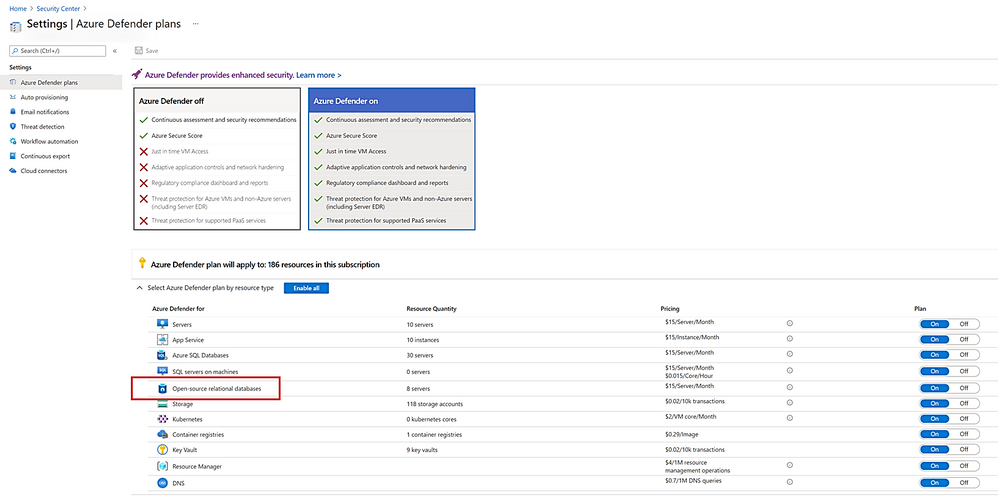
We continue to invest in bringing the latest security and compliance features to PostgreSQL. And are excited to share that Azure Defender for Open-source Relational Database is now generally available, offering comprehensive security for PostgreSQL. Azure Defender constantly monitors your PostgreSQL servers for security threats and detects anomalous database activities indicating potential threats to PostgreSQL resources.


We recommend protecting production instances of PostgreSQL with Azure Defender as part of your overall security strategy.


Looking ahead


With Azure Database for PostgreSQL, we’re on a mission to provide greater flexibility and make your application development easier and more affordable. In upcoming months, we plan to extend our support to Terraform deployment and automation, expand into additional Azure regions, and look forward to the announcement of General Availability for Azure Database for PostgreSQL Flexible Server.


Take the time to learn more about our Azure Database for PostgreSQL managed service. If you’re interested in diving deeper, Flexible Server docs, Hyperscale (Citus) docs, are a great place to start. Lastly, do not miss out on taking advantage of the free 12-month offer. We remain curious about hearing how you plan to use Flexible Server and Hyperscale (Citus) deployment options to drive innovation to your business and applications. We’re always eager to get your feedback, so please reach out via email to Ask Azure DB for PostgreSQL.