by Contributed | May 27, 2021 | Technology
This article is contributed. See the original author and article here.
This blog post contains important information about TLS certificate changes for Azure IoT Hub and DPS endpoints that will impact IoT device connectivity.
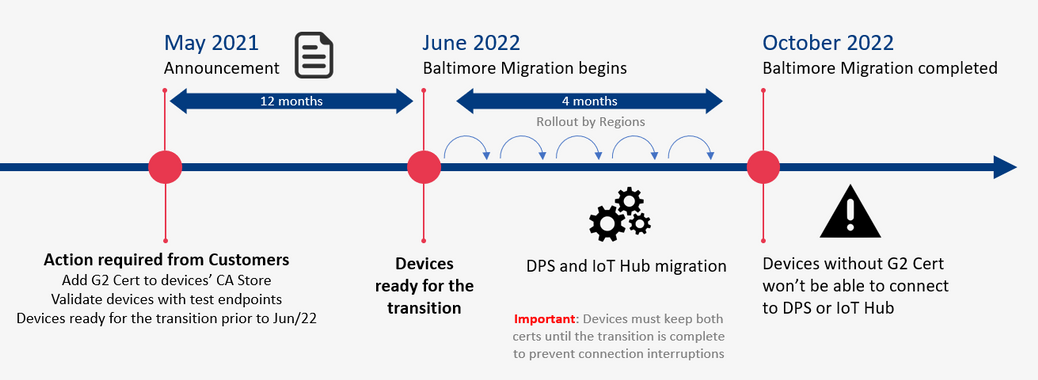
In 2020 most Azure services were updated to use TLS certificates from Certificate Authorities (CAs) that chain up to the DigiCert Global G2 root. However, Azure IoT Hub and Device Provisioning Service (DPS), remained on TLS certificates issued by the Baltimore CyberTrust Root. The time has come now to switch from the Baltimore CyberTrust CA Root for Azure IoT Hub and DPS, which will migrate to the DigiCert Global G2 CA root starting in June 2022, and finish by or before October 2022. This change is for these services in public Azure cloud and does not impact sovereign clouds.
Why is this important? After the migration is complete, devices that don’t have DigiCert Global G2 won’t be able to connect to Azure IoT anymore. You must make certain your IoT devices include the DigiCert Global G2 root cert by June 30, 2021 to ensure your devices can connect after this change.
We expect that many Azure IoT customers have devices which will be impacted by this IoT service root CA update; specifically, smaller, constrained devices that specify a list of acceptable CAs.
The following services used by Azure IoT devices will migrate from the Baltimore CyberTrust Root to the DigiCert Global G2 Root starting June 1, 2022 completing on or before Oct 2022.
- Azure IoT Hub
- Azure IoT Hub Device Provisioning Service (DPS)
If any client application or device does not have the DigiCert Global G2 Root in their Certificate Stores, action is required to prevent disruption of IoT device connectivity to Azure.
Action Required
- Keep using Baltimore in your device until the transition period is completed (necessary to prevent connection interruption).
- In addition to Baltimore, add the DigiCert Global root G2 to your trusted root store.
- Make sure SHA384 for Server certificate processing is enabled on the device.
How to check
- If your devices use a connection stack other than the ones provided in an Azure IoT SDK, then action is required:
- To continue without disruption due to this change, Microsoft recommends that client applications or devices trust the DigiCert Global G2 root:
DigiCert Global Root G2
- To prevent future disruption, client applications or devices should also add the following root to the trusted store:
Microsoft RSA Root Certificate Authority 2017
(Thumbprint: 73a5e64a3bff8316ff0edccc618a906e4eae4d74)
- If your client applications, devices, or networking infrastructure (e.g. firewalls) perform any sub root validation in code, immediate action is required:
- If you have hard coded properties like Issuer, Subject Name, Alternative DNS, or Thumbprint, then you will need to modify this to reflect the properties of the new certificates.
- This extra validation, if done, should cover all the certificates to prevent future disruptions in connectivity.
- If your devices (a) trust the DigiCert Global G2 root CA among others, (b) depend on the operating system certificate store that has OS updates enabled for getting these roots or (c) use the device/gateway SDKs as provided, then no action is required, but validation of compatibility would be prudent:
- Please verify that your respective store contains both the Baltimore and the Global G2 roots for a seamless transition:
- Instructions for Windows here
- Instructions for Ubuntu here
- Ensure that the device SDKs in use, if relying on hard coded certificates or on language runtimes have the DigiCert Global G2 root as appropriate.
Validation
We ask that you perform basic validation to mitigate any unforeseen impact to your IoT devices connecting to Azure IoT Hub and DPS. We are providing test environments for your convenience to verify that your devices can connect before we update these certificates in production environments.
This test can be performed using one of the endpoints provided (one for IoT Hub and one for DPS).
A successful TLS connection to the test environment indicates a positive result outcome – that your infrastructure and devices will work as-is and can connect with these changes. The credentials contain invalid data and are only good to establish a TLS connection, so once that happens any run time operations (e.g. sending telemetry) performed against these services will fail. This is by design since these test resources exist solely for customers to validate device TLS connectivity.
The credentials for the test environments are:
- IoT Hub endpoint: g2cert.azure-devices.net
- Connection String: HostName=g2cert.azure-devices.net;DeviceId=TestDevice1;SharedAccessKey=iNULmN6ja++HvY6wXvYW9RQyby0nQYZB+0IUiUPpfec=
- Device Provisioning Service (DPS):
- Global Service Endpoint: global-canary.azure-devices-provisioning.net
- ID SCOPE: 0ne002B1DF7c
- Registration ID: abc
If the test described above with the TLS connection is not sufficient to validate your scenarios, you can request the creation of devices or enrollments for tests in special canary regions by contacting the Azure support team (see Support below).
The test environments will be available until all public cloud regions have completed their update to the new root CA.
Support
If you have any technical questions on implementing these changes or to request the creation of your own device or enrollment for tests, please open a support request with the options below and a member from our engineering team will get back to you shortly.
- Issue Type: Technical
- Service: Internet of Things/IoT SDKs
- Problem type: Connectivity
- Problem subtype: Unable to connect.
Certificate Summary
The table below provides information about the certificates that are being updated. Depending on which certificate your device or gateway clients use for establishing TLS connections, action may be needed to prevent loss of connectivity.
Certificate
|
Current
|
Post Update (June 1, 2022 – October 1, 2022)
|
Action
|
Root
|
Thumbprint: d4de20d05e66fc53fe1a50882c78db2852cae474
Expiration: Monday, May 12, 2025, 4:59:00 PM
Subject Name:
CN = Baltimore CyberTrust Root
OU = CyberTrust
O = Baltimore
C = IE
|
Thumbprint: df3c24f9bfd666761b268073fe06d1cc8d4f82a4
Expiration: Friday, January 15, 2038 5:00:00 AM
Subject Name:
CN = DigiCert Global Root G2
OU = www.digicert.com
O = DigiCert Inc
C = US
|
Required
|
Intermediates
|
Thumbprints:
CN = Microsoft RSA TLS CA 01
Thumbprint: 417e225037fbfaa4f95761d5ae729e1aea7e3a42
———————————————————————————
CN = Microsoft RSA TLS CA 02
Thumbprint: b0c2d2d13cdd56cdaa6ab6e2c04440be4a429c75
———————————————————————————
Expiration: Tuesday, October 8, 2024 12:00:00 AM;
Subject Name:
O = Microsoft Corporation
C = US
|
Thumbprints:
CN = Microsoft Azure TLS Issuing CA 01
Thumbprint: 2f2877c5d778c31e0f29c7e371df5471bd673173
——————————————————————————–
CN = Microsoft Azure TLS Issuing CA 02
Thumbprint: e7eea674ca718e3befd90858e09f8372ad0ae2aa
——————————————————————————–
CN = Microsoft Azure TLS Issuing CA 03
Thumbprint: 6c3af02e7f269aa73afd0eff2a88a4a1f04ed1e5
——————————————————————————–
CN = Microsoft Azure TLS Issuing CA 04
Thumbprint: 30e01761ab97e59a06b41ef20af6f2de7ef4f7b0
——————————————————————————–
Expiration: Friday, June 28, 2024 5:29:59 AM
Subject Name:
O = Microsoft Corporation
C = US
|
Required
|
Leaf (IoT Hub)
|
Subject Name:
CN = *.azure-devices.net
|
Subject Name:
CN = *.azure-devices.net
|
Required
|
Leaf (DPS)
|
Subject Name:
CN = *.azure-devices-provisioning.net
|
Subject Name:
CN = *.azure-devices-provisioning.net
|
Required
|
Note: Both the intermediate and leaf certificates are expected to change frequently. We recommend not taking dependencies on them and instead trust the root certificate.
by Contributed | May 27, 2021 | Technology
This article is contributed. See the original author and article here.
Like many of our customers, you are probably facing multiple challenges with your ERP systems. Perhaps first and foremost are issues of security and compliance: somehow, your security team never seems large enough to provide the peace of mind you need. Then there is the matter of cost: building a certified data center is expensive, and most organizations overprovision to cover potential needs for growth and scale.
Traditional ERP systems are not easy to change. On-premise or hosted infrastructure is highly preplanned, with a three- to five-year planning cycle. It is simply not built for today’s fast-paced innovation cycles, which may require you to launch new applications or business processes in days. Further, it is difficult to scale these systems up or down quickly to meet unexpected needs.
You may also feel you are not reaping enough insight from your data. Your data sources are varied and no longer just in your ERP: data can be unstructured, from social and web sources or newer applications such as the Internet of Things. Manual processes that pull SAP data into spreadsheets or other systems no longer cut it. The high volume of customization in your ERP system may make it hard to move to newer versions as you look to replace technical debt with an innovation platform.
Even before the COVID-19 pandemic, many organizations running SAP solutions on premise had become aware of the need to be more agile and responsive to real-time business needs. Now, as enterprises across every industry adjust to the new normal, they are realizing that moving their SAP systems to the cloud can provide the resilience they need. The ideal solution is to adopt SAP S/4HANA running on an agile cloud platform to help you meet urgent customer demands, empower employees to make quick decisions, and plan for the future.
Moving a mission-critical workload like an SAP landscape to the cloud can be complicated. But the benefits are worth the effort, especially when you choose Microsoft Azure.
SAP customers broadly favor Microsoft Azure . As global organizations seek agility, cost savings, risk reduction, and immediate insights by moving their SAP solutions to the cloud, thousands are choosing Microsoft Azure as their trusted platform. They value our robust set of security solutions and migration tools, the ability to unlock immediate insights from their data in SAP software, and our partnership with SAP that spans more than 25 years including the latest initiative to invest in new offerings around cloud automation and integration for SAP S/4HANA on Microsoft Azure and integrating Microsoft Teams across SAP solutions.
By moving to our proven cloud platform built for mission-critical systems, you gain:
- World-class security, compliance, and business continuity: We have 3,500 cyber security experts on the job working for you. Most customers tell us they can achieve stronger security running in Azure than on premise.
- Cloud automation, scale, and OPEX flexibility for greater cost efficiency: With Azure, it’s easier to scale up and down to fit business needs. And cloud automation can take the place of repetitive IT tasks, freeing up your staff to add value in other areas.
- Agility and automation: Cloud automation and increased agility can help you speed transactions and deliver a better customer experience.
- Real-time and predictive insights from all your data: By running SAP solutions on Azure, you can provide a unified view of your data across the enterprise that combines SAP and third-party data in the cloud.
- Comprehensive integration of SAP and Azure services: Shift your customization to SAP Integration Suite and integrate with innovative cloud services in Azure. For example, new integrations between Microsoft Teams and SAP solutions can help your people collaborate and increase productivity.
Learn more in Microsoft’s session at Sapphire 2021
Discover some of the latest tools and resources from Microsoft that simplify and accelerate your move to the cloud. Please join Matt Ordish, our Head of Product, SAP solutions on Azure, at SAPPHIRE NOW session IT614 to hear more about our partnership with SAP, our latest migration tools, and how you can extract more out of your SAP software data to achieve better business outcomes.
Visit our Web site to learn more about how Azure offers a trusted path to enterprise-ready innovation in the cloud.
by Contributed | May 27, 2021 | Technology
This article is contributed. See the original author and article here.
Data Consistency Score (DCS) is a (somewhat) new feature for Office 365 migrations that scores the fidelity of migrated data, allowing admins to identify inconsistencies and integrity issues between source and target data when performing a migration to or from Office 365 (onboarding and offboarding). DCS is meant to replace the existing Bad Item Limit and Large Item Limit (BIL / LIL) model and related shortcomings.
The DCS model identifies and tracks data that cannot be successfully migrated from an on-premises source environment to Office 365 (e.g., corrupt data, items larger than the service allows, or data that is found to be missing in the target but present in the source). The DCS model examines this data based on quantity (count of the items that cannot be migrated and must be skipped by the MRS service) and quality or importance (DCS differentiates between user data and metadata / system data). We then calculate a score based on the total amount of data that might be skipped during migration and how significant it is for the user.
This means that the admin is no longer required to guess the number to use for Bad Item Limit (BIL) or Large Item Limit (LIL) in advance, as the DCS mechanism takes care of this automatically. The admin is therefore better informed of the possibility of data loss during migration and can take necessary actions when appropriate. DCS allows admins to only have to deal with approvals at the end of the migration, when they have all of the information that they need to make an informed decision. Previously, there was a hard choice to make between data resiliency and efficiency. The best option for data resiliency was to interrupt the admin every time the migration process encountered an item that could not be migrated and request approval to continue. But the best option for efficiency was for admins to try to guess a number of items that they could skip without any regard to the scenario behind skipping them, and then hopefully remember to come back afterwards to review what was skipped. Avoiding carte blanche BIL and LIL values encourages the admin to look at the information they have about the items that could not be migrated and come up with their own policies for next steps, such as what to approve, what to work around, what to tell their users, and what to escalate to support.
We are constantly tuning the various thresholds used to determine the DCS to ensure that problematic data loss does not occur during migrations. Exchange Online administrators do not have access to thresholds details (this is done service side).
Here are a couple of examples of bad item types that are not considered as impactful and will trigger a DCS of “Good” (instead of “Investigate”) when encountered:
- Orphaned delegate permissions where the user was removed from Active Directory (for example, the delegate left the company) but the delegate’s permission was not removed from the mailbox being migrated and the permission cannot be mapped to a valid user account. We will dig more into this later in the article where we discuss source/target principal mapping exceptions.
- Corrupted Search Folder criteria where you might see something like this in the Bad Items failure: “Unable to set restriction on table, Operation: StorageDestinationFolder.ApplyRestrictions”
The DCS model tracks 3 main categories of items that would be skipped by the MRS in Exchange Online:
- Bad items (corrupt data / properties of the items or orphaned permissions);
- Large items (for example, in a Hybrid migration, the maximum item size is 150MB; an item above this size is considered too large for the Office 365 service and cannot be migrated to Exchange Online. In an IMAP migration or public folder migration, the default MaxReceiveSize is 35MB for Exchange Online user mailboxes and public folder mailboxes (a size that can be increased up to 150MB); and
- Missing items (for example, in an IMAP migration where a user or automated process like MRM retention policies or a mobile device (wiping data) would delete (or move data to archive mailbox or even to another folder in the same primary mailbox) from the live target mailbox to where you are migrating, but the migration process is still syncing from the source IMAP mailbox). See this reference here on Missing Items.
As a good practice, before starting a migration, you can check for items that might cause issues. Here are some suggestions:
Get-Mailbox -ResultSize Unlimited | Get-MailboxFolderStatistics -IncludeAnalysis -FolderScope All | Where-Object {(($_.TopSubjectSize -Match “MB”) -and ($_.TopSubjectSize -GE 35.0)) -or ($_.TopSubjectSize -Match “GB”)} | Select-Object Identity, TopSubject, TopSubjectSize, DisplayName | Export-CSV -path “C:tempreport.csv” -notype
And set, for example, the TopSubjectSize to 35MB or 150MB (depending on the type of migration and the MaxReceiveSize on the Office 365 mailbox). For example, public folder migration will be limited by MaxReceiveSize that you see on the PF mailbox via Get-Mailbox -PublicFolder <Mailbox01> | FL MaxReceiveSize, and by default it is 35MB. For a hybrid migration or PST import, the limit is 150MB.
If you didn’t check these prior to migration, the good news is that DCS will detect the bad/large/missing items and you can identify them from the migration reports and migration GUI.
Transitioning to DCS
While the new DCS feature was introduced, DCS and BIL/LIL models coexisted to avoid breaking any scripts in use by admins. When one would specify a BIL or LIL, the old model would be triggered which prevented the use of DCS.
If you still see or use BIL/LIL, we recommend not using them and instead using DCS. DCS will take the guesswork out of migration and will help you avoid large data loss (in cases where BIL/LIL parameters are set very high).
Once a batch is submitted without BIL/LIL, that batch will use the DCS method and cannot be switched to use BIL/LIL. This means that even if you set bad item limit when DCS is in Investigate status due to bad items, the manually set limit will be ignored, and you still need to approve the items flagged by DCS. Similarly, batches submitted with BIL/LIL cannot switch to use DCS.
Note that the BIL and LIL parameters will eventually be replaced by DCS.
In what types of migrations is DCS used?
DCS supports the following types of migration to Exchange Online:
- Mailbox migrations (hybrid onboarding and offboarding, cutover, staged, IMAP, Google Workplace (G-Suite), cross-tenant MRS moves);
- Public folder migrations; and
- Mailbox restore requests.
At this time, PST imports don’t use DCS, but they will in the future. This will have no impact on PST import when using DCS, as admins are not required to approve skipped items when importing data from a PST file.
Admins are prompted for intervention and approval when DCS status is Investigate and the admin is performing a hybrid migration, Google Workspace (G-Suite) migration, or public folders migration. These are the only migration types that need completion (Complete-MigrationBatch); thus, for such migrations where we have a risk of data loss admins must approve to complete the migration.
As a side note, the DCS model and especially DCS failures are frequently seen in the context of mailbox restores in Exchange Online, but this is expected and you don’t need to worry about it. There is more information on this later in the article.
More information on DCS can be found here:
DCS says Investigate? Let’s investigate!
Now let’s focus on troubleshooting low scores; that is when things are bad and significant data is skipped, and how admins can overcome this.
With regard to how we calculate the score for migration batches, the DCS of the batch is equal to the worst DCS of any user within the batch. This behavior helps administrators know immediately whether there is data loss that should be investigated.
We will focus on an “Investigate” score as this is within the admin’s control, whereas for a “Poor” score you will have to contact Microsoft Support for assistance. In general, you don’t need to worry about a Poor score because they are rare.
When you get a score that is too low (Investigate) on migration, you may see a similar error in the move request failures in PowerShell or the keyword “Investigate” and in the Skipped item details view in the classic Exchange admin center (EAC) you might see “DataConsistencyTransientException: The data consistency score (Investigate) for this request is too low…”
If the migration receives a grade of Investigate, you have a few options:
- Be aware of the skipped items, and communicate with the affected user;
- Approve skipped items manually to allow the migration to succeed (hybrid, Google Workplace (G-Suite) and PF migrations); or
- Correct the situation and re-migrate or resume/retry when possible.
Checking the skipped items
Like the score says, we should Investigate skipped items. There are 2 ways to retrieve the skipped items: (1) from the classic Exchange admin center – we will focus on that in this post; and (2) with Exchange Online PowerShell.
Classic Exchange Admin Center
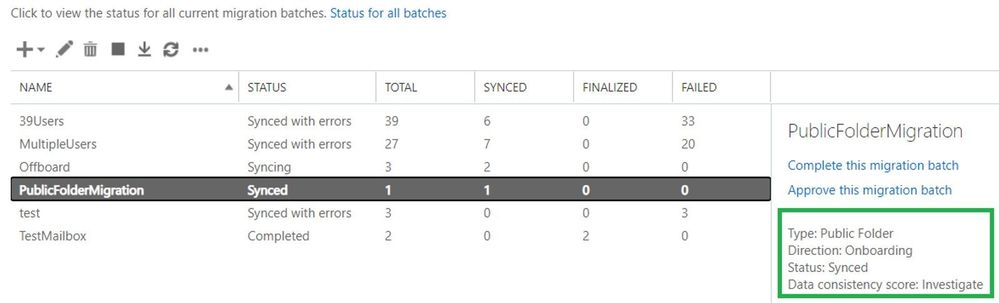
Here is a reference of the Migrations tab in the classic EAC using a public folder migration example:
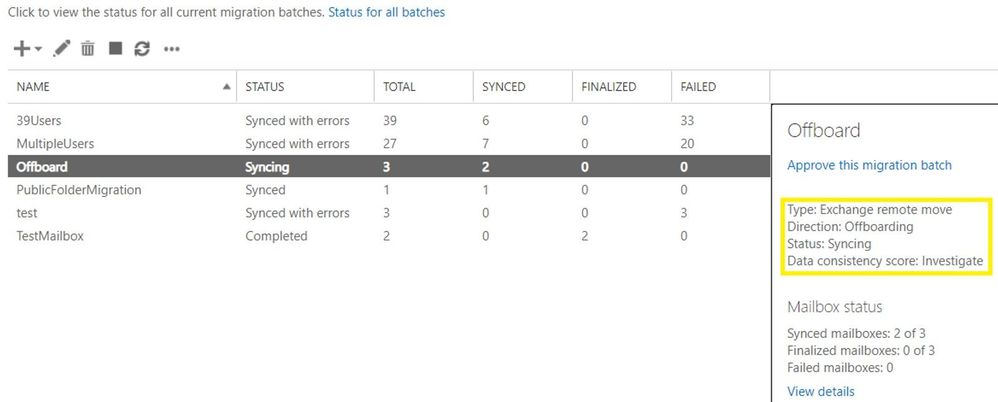
Mailbox offboarding example:
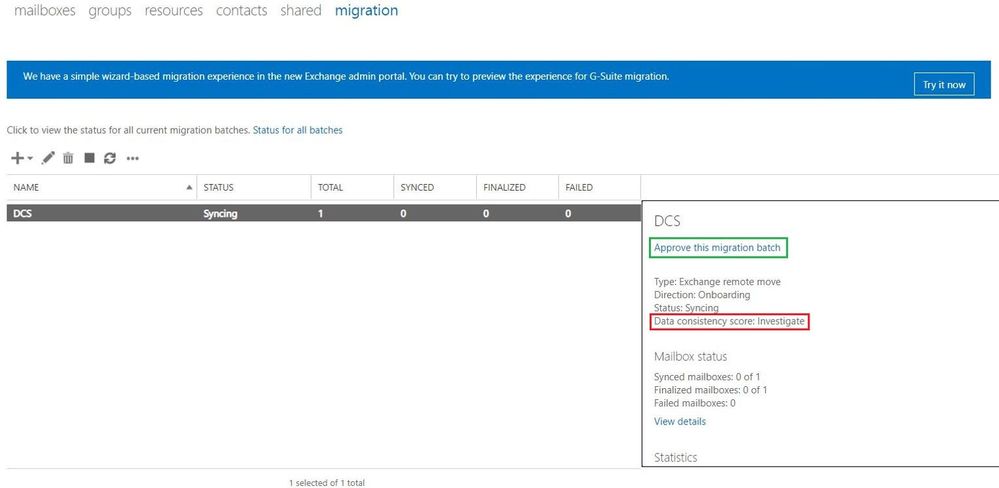
Mailbox onboarding example:
View details of the migration batch and skipped item details:
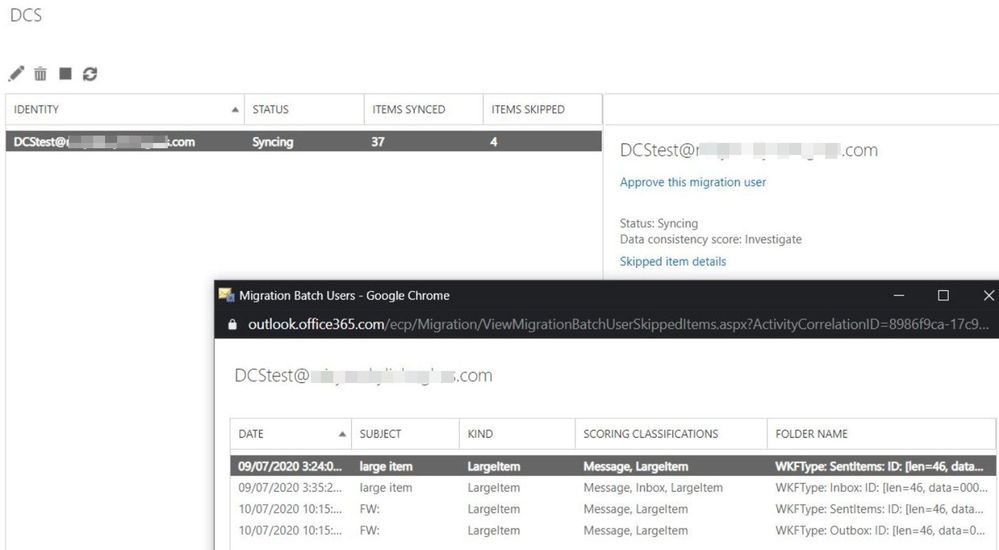
Let us comment a bit on the screenshots above for onboarding scenario:
- There is a migration batch called “DCS” with a type of “Exchange Remote Move” (hybrid migration) which has an Investigate score.
- The batch contains only 1 migration user (DCStest) with the Investigate score.
- In “Skipped Item details” view, we see 4 items that were skipped.
- The “Subject” column is very useful in identifying those large items that were skipped; in real life, you should be able to find items based on this.
- The column “Kind” indicates the type of the skipped item (bad / large / missing) and not the “kindness” or “niceness” level of the item (heh).
- The “Scoring classifications” indicates that these are IPM.Notes that are Large items type and the Large item that is found in Inbox is considered more significant than the ones in Sent items or Outbox (as seen in “Folder Name” column).
- Speaking of “Folder Name” column, in this example, all the folders where these large items reside (Inbox, Sent items, Outbox) are categorized as Well-Known Folders types (WKFType) because these are the default folders in a mailbox. However, if there was a large item in a user-created folder (e.g., a custom folder called “Training”), the folder name might not be as user friendly since in some cases a hexadecimal folder ID is displayed.
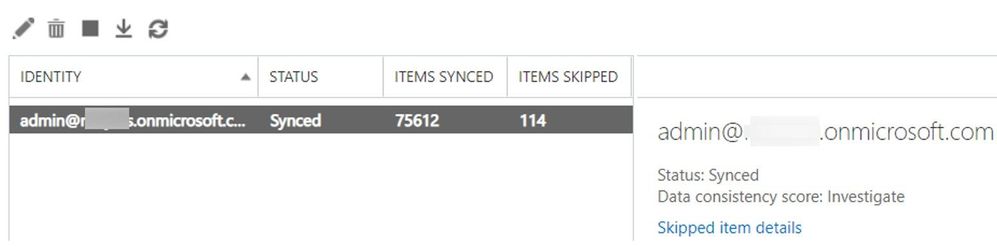
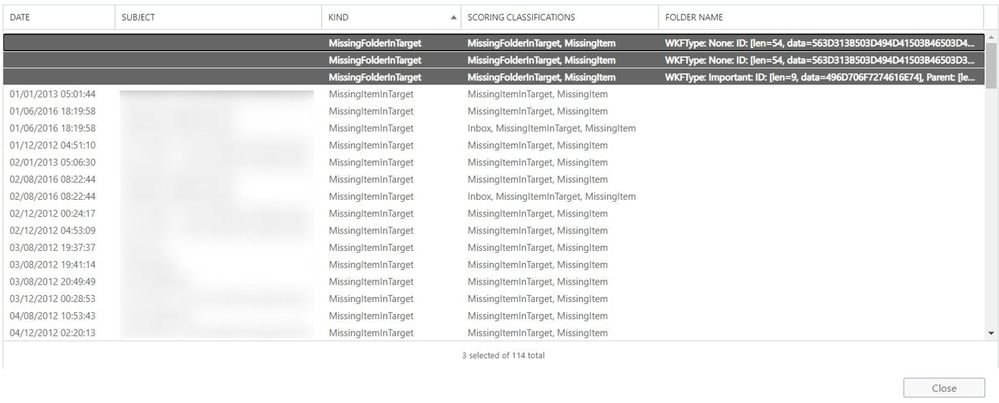
NOTE: In a situation where we have Missing Folders, the items that were inside of these folders are not counted individually against Items Skipped Column.
Example: in these 114 skipped items, the 3 missing folders are counted as 3 items.
PowerShell log collection and analysis
In this section we will show you how to retrieve the Skipped Items using PowerShell for your scenario (migration, PST import).
First, generate XML reports for the move request / sync request / mailbox import request / public folder mailbox move request or migration user statistics or a restore request to analyze. Note that you will need to connect to Exchange Online PowerShell and have the appropriate permissions to export these reports. If engaging with Microsoft Support, please provide these XML reports so that we can have a better understanding of your problem.
Migration user for Cutover/Staged/IMAP/Google Workplace (G Suite)/Public Folder/Hybrid migrations
Get-MigrationUserStatistics <user@contoso.com> -IncludeSkippedItems -IncludeReport -DiagnosticInfo verbose | Export-Clixml C:TempEXO_MigrationUserStatistics_User1.xml
Hybrid moves
Get-MoveRequestStatistics user@contoso.com -IncludeReport -DiagnosticInfo verbose | Export-Clixml C:TempEXO_MoveRequestStatistics_User1.xml
IMAP/Google Workplace (G Suite) migrations
Get-SyncRequest -Mailbox <user@contoso.com> | Get-SyncRequestStatistics -IncludeReport -DiagnosticInfo verbose | Export-Clixml C:TempEXO_SyncReqStats.xml
Public folder migrations
Get-PublicFolderMailboxMigrationRequest | where {$_.TargetMailbox -eq “<Mailbox1>”} | Get-PublicFolderMailboxMigrationRequestStatistics -IncludeReport -DiagnosticInfo verbose | Export-Clixml C:TempEXO_PFMailbox1.xml
PST imports using Office 365 import service
$i = Get-MailboxImportRequest -Mailbox <user@contoso.com> | Select Mailbox, RequestGuid, Status
$path = ‘C:temp’
$i | foreach { Get-MailboxImportRequestStatistics $_.RequestGuid -IncludeReport -DiagnosticInfo verbose | Export-Clixml “$pathEXO_Import_$($_.Mailbox)_$($_.RequestGuid).xml” }
Mailbox restores
Get-MailboxRestoreRequestStatistics <user@contoso.com> -IncludeReport -DiagnosticInfo verbose | Export-Clixml C:TempEXO_RestoreReq.xml
Checking the logs
Import the XML data into a variable. For example:
$ustats = Import-Clixml C:TempEXO_MigrationUserStatistics_User1.xml
$r = Import-Clixml C:TempEXO_MoveRequestStatistics_User1.xml
Whether we are looking at the migration user statistics or move request statistics, we can retrieve the logs to see if we have any large/bad/missing items encountered, if we have any limits set (BIL/LIL), information related to data consistency score, and the factors causing the low scores.
You can either use the XML files or you use Exchange Online PowerShell without exporting to XML. For example:
- Migration User Statistics: $ustats=Get-MigrationUserStatistics user@contoso.com -IncludeSkippedItems -IncludeReport -DiagnosticInfo “Verbose”
- Move Request Statistics: $r= Get-MoveRequestStatistics user@contoso.com -IncludeReport -DiagnosticInfo Verbose
For Migration User Statistics we will use the $ustats variable to extract the information and that will shed more light on our investigation.
To check the DCS value and why the score is Investigate, use this command:
$ustats| fl data*

The above output shows that the score is Investigate because of large item(s) found in the mailbox.
To check how many items are skipped, use this command:
$ustats | fl *item*
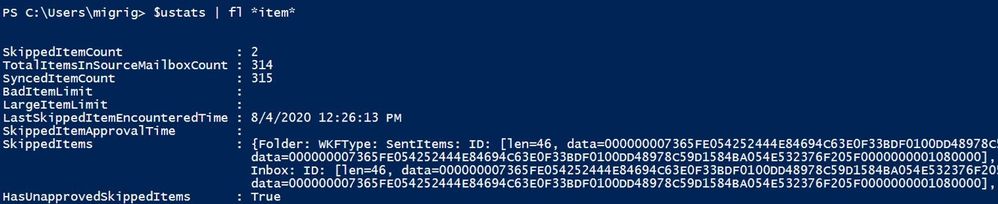
Based on the screenshots above, we can see that:
- We have no large/bad items limits set (we are using DCS).
- We have 2 skipped items.
- We did not approve the skipped items yet.
- We have a preview of skipped items.
- We have a score of Investigate due to large items encountered.
To investigate further, run the following command:
$ustats.Report.LargeItems | fl Kind,Folder,Subject,MessageSize,ScoringClassifications,DateSent,DateReceived,Failure
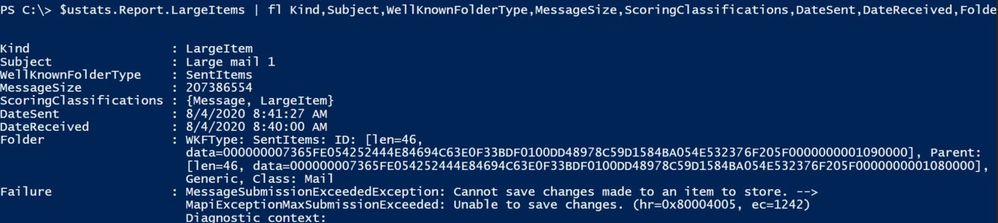
For bad items, run a similar command:
$ustats.Report.BadItems | FT foldername,subject,failure
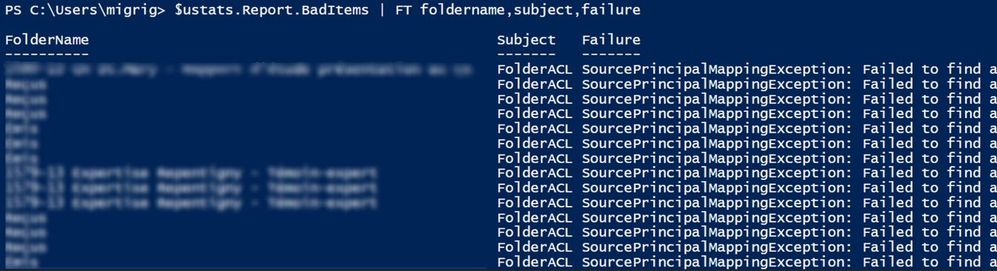
We can see all the bad items grouped by their type, using this command:
$ustats.report.BadItems | group kind

As you can see, every large/bad item has a failure associated with it.
To get more information on a specific bad/large item failure, use the following command (where 0 is the index of item):
$ustats.Report.LargeItems[0].Failure

Or you can check the failures report:
$ustats.Report.Failures[0]
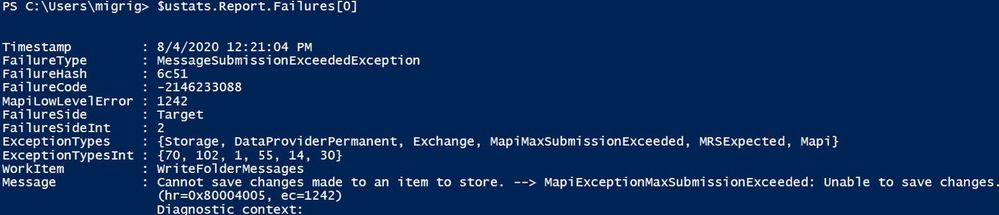
The following command should index all the failures so you can easily check the details of a specific failure:
$i=0;
$ustats.report.Failures | foreach { $_ | Select-Object @{name=”index”;expression={$i}},timestamp,failurecode,failuretype,failureside;$i++} | ft
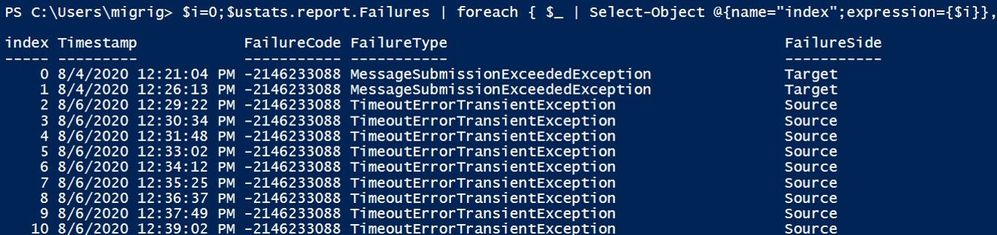
To see all failures grouped by their type, use this command:
$ustats.Report.Failures | group FailureType | ft -AutoSize

The same information about large/bad items that were skipped can be seen in skipped items:
$ustats.SkippedItems | group Kind

To get a quick overview of the skipped items, run this command:
$ustats.SkippedItems |ft Kind,Subject,MessageSize,ScoringClassifications,DateSent,DateReceived,FolderName,Failure -AutoSize

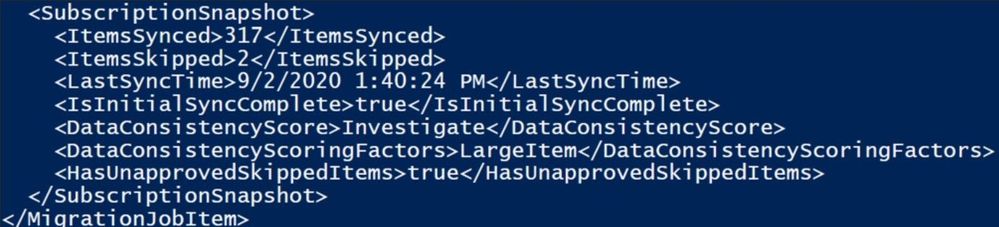
We can see some of the information from command $ustats | fl *item*, data* also in SubscriptionSnapShot in DiagnosticInfo :
$ustats.DiagnosticInfo
Now that we have checked the Migration User Statistics, let’s see what we have for our Move Request Statistics. Please keep in mind that most of the commands used above can be also used for the $r variable as well.
$r=Get-MoveRequestStatistics dcs@contoso.com -IncludeReport -DiagnosticInfo “verbose”
Check what failures are present for the migration; for this demo, we took as an example the move request statistics XML file. This command should provide a list with all errors and the count (number of bad/large items that have an associated failure).
$r.Report.Failures | group FailureType

To check the entire message for a failure, take them one by one. Normally, the last encountered error is a PermanentException:
Index Failures:
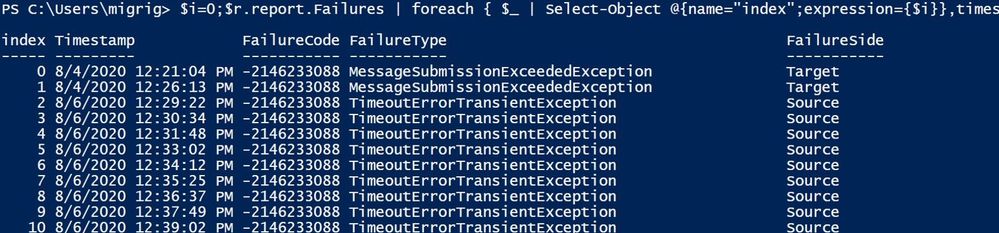
$i=0;
$r.report.Failures | foreach { $_ | Select-Object @{name=”index”;expression={$i}},timestamp,failurecode,failuretype,failureside;$i++} | ft
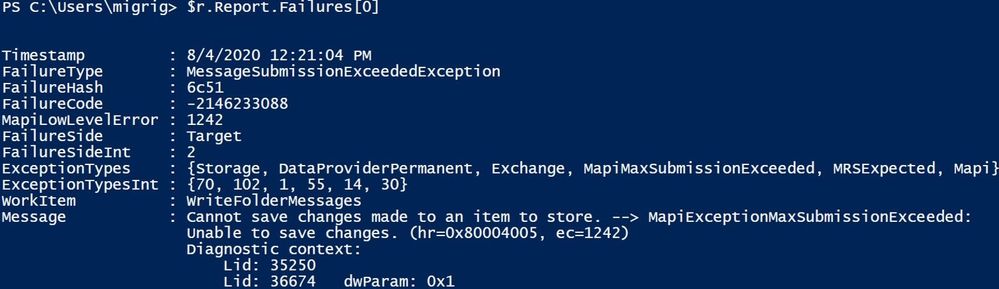
Get more details about one of the failures using the index number:
$r.Report.Failures[0]
Let’s take another example of DiagnosticInfo in which we will do a breakdown of all parameters:

Optionally, you can copy paste this section of <SkippedItemCounts> </SkippedItemCounts> to an XML file editor to see it more clearly:

In the report above, we have 15697 Corrupt items and 11 Large Items.
The Corrupt Items are the following: 4 calendar, 11 large items / user created (probably a custom form), 7 messages, 15695 bad folder permissions, 2 folder rules.
Focusing on majority of skipped items (FolderACL) most of them (12642) are Source Principal Mapping errors and the rest (3055) are Target Principal Mapping errors.
In short, the Source Principal Mapping Exception means that the user with permissions over the user mailbox which is being migrated is not found on the source side (on-premises Exchange / AD in an onboarding scenario). The user(s) with permissions that were tied to some SIDs are not found in AD and their related SIDs are orphaned SIDs since we cannot map them to the associated users that had permission over the mailbox being migrated. You can check / clean these permissions on-premises, but this is not normally impacting migration as they are skipped anyway (we assume that permissions are not needed since those users cannot be found).
The Target Principal Mapping Exception means the user with permissions over the user mailbox that is being migrated is not found on the Target (Office 365 in the case of onboarding). This can be the case if the user is not synced from on-premises to Office 365.
These permission failures (Source/Target Principal Mapping Exceptions) will typically not cause a score of Investigate. We will get migration failed when reaching 100,000 corrupt ACLs.
More details on Source and Target Principal error can be found here.
When it comes to the Missing items we can use $stats.MissingItemsEncountered or we can check the MailboxVerification report by using this pretty long command:
$ver = $r.report.MailboxVerification
$ver | ? {$_.FolderTargetPath-match $folderName} | select @{Name=”MissingItemInTargetCount”; Expression={$_.MissingItemsInTargetBucket.BucketCountAndSize.Count}} , @{Name=”ItemCountBeforeMove”; Expression={$_.Source.Count}}, @{Name=”ItemCountAfterMove”; Expression={$_.Target.Count}},WKFType, FolderTargetPath | ?{$_.ItemCountBeforeMove -gt 0 -or $_.ItemCountAfterMove -gt 0} | ft –a

To take a peek at some samples that were found to be missing in the target, use the command in PowerShell or Exchange admin center (Items Skipped):
$r.Report.MailboxVerification.MissingItemsInTargetBucket.DivergentItemsSamples | ft Kind, Subject, WellKnownFolderType, DateReceived
If you’ve analyzed these reports but still require assistance from Microsoft Support, please open a support case and send us the relevant logs for your scenario.
Poor score can happen
Note that this example is a manufactured one, created intentionally for the purpose of this blog post. In real life, if you get a Poor score for DCS, please raise a support case with Microsoft. We don’t allow completing the migration with a Poor score; when you try to approve / complete, you will see a warning similar to the one shown below and will need to contact Support.
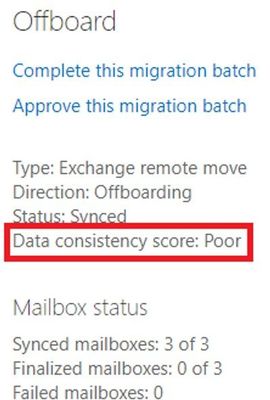
Here we have a migration batch with “Poor” score: 1 Migration User (Mailbox1) has Poor Score, the other two users have Perfect Score. Batch score is Poor, based on the lowest score:
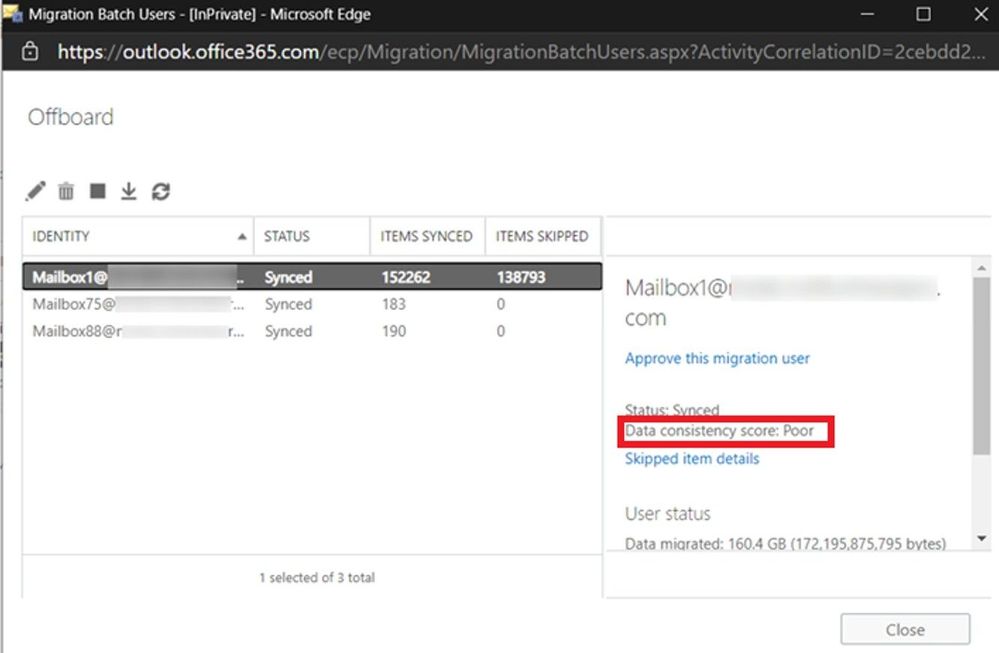
A quick view of the DCS on the Move Request Statistics for Mailbox1:

If you try to approve / complete this batch, you will get the warning because of Mailbox1 Poor’s DCS score:
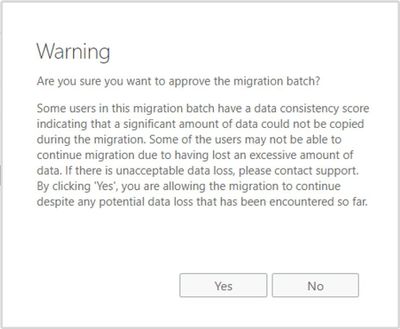
If you click on Yes, you will see the following:
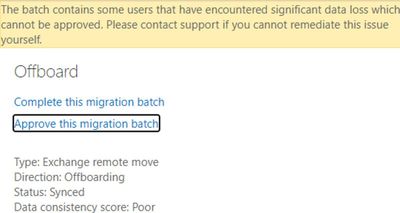
In the end, the Batch is “Completed with errors” and you need to contact support for the Migration User where the DCS is Poor if you want to complete that migration.
Approving skipped items
Now that you are aware of the items skipped and why we have the Investigate score and considering you can go ahead and complete the migration, you would need to Approve these skipped items.
Let’s say that you are doing a hybrid migration using migration batches and you have received a score of Investigate; you would run the following commands in PowerShell to approve the finalization of the mailbox migration or approve them through the classic Exchange admin center (easier way):
Set-MigrationBatch -ApproveSkippedItems or Set-MigrationUser -ApproveSkippedItems
If you are using MoveRequests directly, without using Migration Batches (applicable to hybrid moves), then run:
Set-MoveRequest -SkippedItemApprovalTime $([DateTime]::UtcNow)
If you are using hybrid remote moves with migration batches, we don’t recommend making changes on the individual moves as you will have inconsistency between batch / migration user and the move request status and you might also encounter an error related to SkippedItemApprovalTime being in the future (ApprovalTimeInFutureException) – depending on the regional settings on the admin who created the batch. If you still want to approve skipped items at the move request level and not batch / migration user level and you get the time error, you can try using this command (setting 5 minutes in the past or more):
Set-MoveRequest -SkippedItemApprovalTime $([DateTime]::UtcNow.AddMinutes(-5))
Note: For hybrid migrations, public folder migration, Google Workspace (G-Suite), approval is required.
How to see if we approved?
There might be situations when admin approved the skipped items but there are still Skipped items pending approval.
In DiagnosticInfo of the MRS request statistics (for example GetMoveRequestStatistics for hybrid and Get-SyncRequestStatistics for IMAP), you will see <timestamps> under <TimeTracker> for the request. In the example below we can see that the admin approved skipped items two times, first on October 25th but as we last encountered a skipped item 2 days later, the admin would need to approve again, and this was done on November 2nd.
<Timestamp Type=”SkippedItemApprovalTime” Time=”2020-11-02T10:34:12.0507654Z” />
<Timestamp Type=”LastSkippedItemEncounteredTime” Time=”2020-10-27T17:09:42+00:00″ />
<Timestamp Type=”SkippedItemApprovalTime” Time=”2020-10-25T07:37:25.4262119Z”></Timestamp>
<Timestamp Type=”LastSkippedItemEncounteredTime” Time=”2020-10-27T17:09:42+00:00″></Timestamp>
A note about mailbox restores and DCS
Mailbox restores often fail during mailbox verification because the target mailbox is a “live” mailbox. When other clients move items as they are being restored, it prevents MRS from being able to find these items during mailbox verification. Previously, restores would have failed with TooManyMissingItemsPermanentException or TooManyBadItemsPermanentException. Now they fail with DataConsistencyPermanentException instead. Restores do not stop their progress when these errors are hit – they are only flagged at the very end of the restore. This means that all of the content has already been restored by the time you see this message. This is really informational that items were moved during the restore. It does not require any action on behalf of the admin. You can see which folders were missing the items by getting the restore report and looking at the MailboxVerification section.
$stats = Get-MailboxRestoreRequestStatistics -Identity <id> -IncludeReport
This command will show you which folders didn’t have the same count between source and destination (thus, MRS counted them as missing).
$stats.Report.MailboxVerification | where { $_.Source.Count -ne $_.Target.Count }
I would like to thank you for reading this article and many thanks to the contributors to this blog post: Mirela Buruiana, Sruthi Sreeram, William Rall, Angus Leeming, Nino Bilic, Brad Hughes, Zacharie Zambalas.
Mihai Grigoruta
by Contributed | May 27, 2021 | Technology
This article is contributed. See the original author and article here.
(part 4 of my series of articles on security principles in Microsoft SQL Servers & Databases)
Security principle: Separation of Privilege
The Principle of Separation of Privilege, aka Privilege separation demands that a given single control component is not sufficient to complete a task. A different, more generic description is that multiple conditions need to be met in order to gain access to a given process or object. A control could be a permission, for example.
Privilege separation is sometimes (but not necessarily) implemented with a form of dual control and requires a certain level of compartmentalization of a process or program to facilitate multiple access checks.
This approach together with the Principle of Least Privilege reduces
- Folks with an affinity for history may like to use “Divide and conquer” or even more original, “divide et impera” as a memory hook :) .
Incidentally, OpenSSH has a security option called UsePrivilegeSeparation (https://linux.die.net/man/5/sshd_config), turned on by default, that has the effect that an unprivileged child process without root privileges to deal with incoming network traffic. However, this is more a case of classical PoLP and Privilege bracketing, as discussed here (The Principle of Least Privilege (POLP)) and here (Delegation of Authority). As you can see its easy to get confused when doing research. And I am not saying that is wrong. What matters is that you know what you want to reach and why.
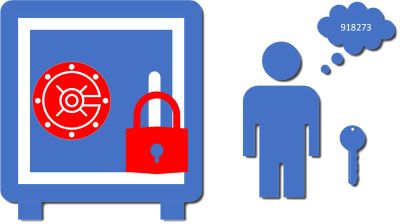
More classical examples would be scenarios where 2 keys are required like certain types of safes. They may or may not be held by different people.
Privilege Separation with 2 keys
If we look at the authentication process, Azure AD Multifactor authentication (MFA) could be considered an example of multiple controls involved: Even if an attacker gains knowledge of the password, he would still need to gain access to an additional piece, like the (unlocked) phone.
Note on Separation of Privilege vs Separation of Duties
As some will notice, there is a great overlap with Separation of Duties (SoD): Depending on the exact implementation, Privilege Separation can directly enable SoD.
For example, the same way “Dual control”-mechanisms can be used to implement Privilege Separation, such a mechanism can also be used to implement SoD.
Depending on which sources you consult (I will even include such in the references below), you may read that Separation of Privileges is equivalent to SoD. But I find it important to distinguish and keep in mind the fine line between those two principles. And that is that Separation of Duties requires separate persona.
This is why in my view dual control does not necessarily solve Separation of Duties. Dual control could be solved involving but not necessarily SoD.
: Therefore, if you want to express the SoD-requirement to involve different persona, using the terms “Two-person control” or “4 eyes principle” is less prone to confusion than the more generic term “dual control”.
Separation of Privilege in the SQL realm
In SQL Server, privilege separation is not commonly built-in by design, but there are some examples that perfectly fit the criteria.
Example 1, Object-creation
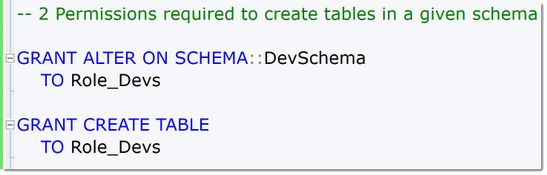
One example is that to create tables, a User needs to have at least both the ALTER-Permission on the schema and the CREATE TABLE-Permission on the database. Other than that, this is a rare case within the SQL engine.
 2PermissionsToCreateObjects
Example 2, querying across objects
There is another way one can implement privilege separation in SQL Server and Azure SQL: normally, when multiple objects are accessed within one query, the SQL Server engine honors the so-called “ownership-chain”. This is a concept unique to SQL Server and has the effect that so long as any referenced object within a query is owned by the same principal as the first one in the chain, no further permission checks occur. This means a single SELECT (or INSERT-, UPDATE-, DELETE) -permission is required to access, for example, a View “AggregatedSales” if that view accesses a table “Orders” and the view and the table have the same owner. It is not required to grant SELECT on the table if the intention is to solely grant access to the accumulated data from the view. This is a built-in behavior.
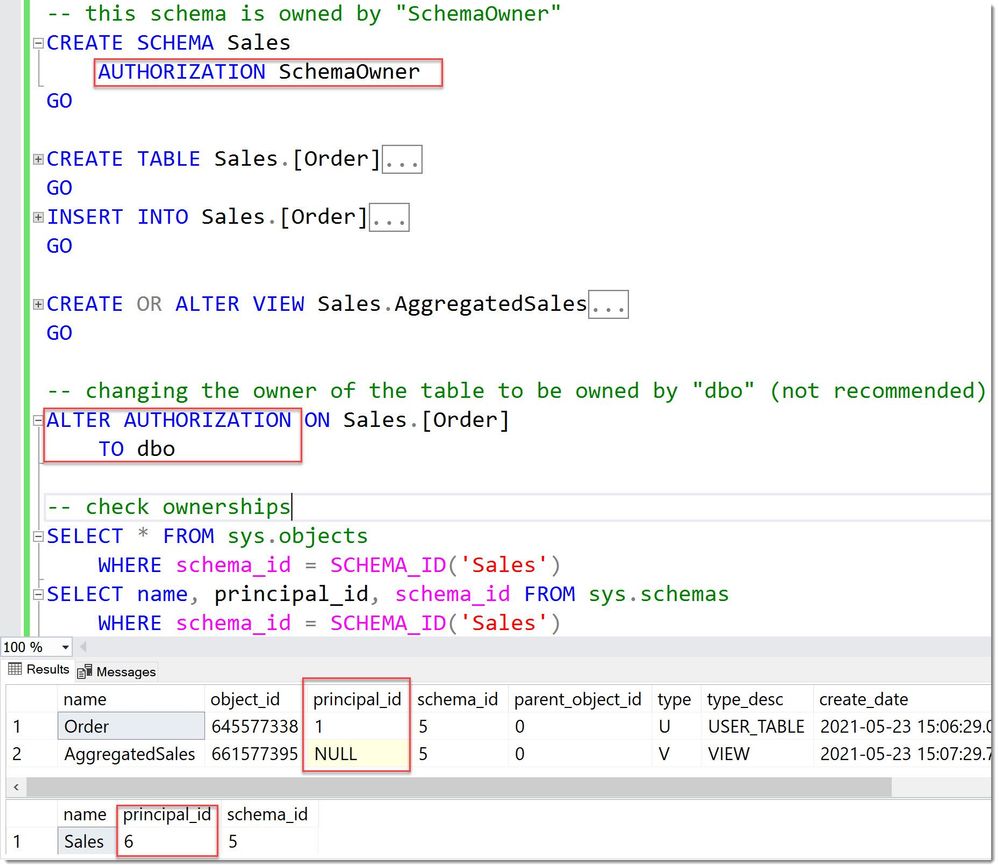
However, one can intentionally break this ownership-chain and change the owner of the table or the view (for example, by placing them into different schemas and with different schema-owners, a recommended practice over changing owners at object-level), which then would require the calling user to have the SELECT-permissions on both the view and the table to use the view. In other words, the user would need two permissions. So, there you have another scenario of technically privilege separation, as one permission is not sufficient alone any more to access the view. But to be fair, this applies only to accessing the view: to query the table alone, one still only requires one SELECT-permission.
This is how this looks like in code:
 BrokenOwnershipChain
We can see that the table is owned by a “dbo” (principal_id =1 ) whereas the view is still owned by the overall Schema owner “SchemaOwner”.
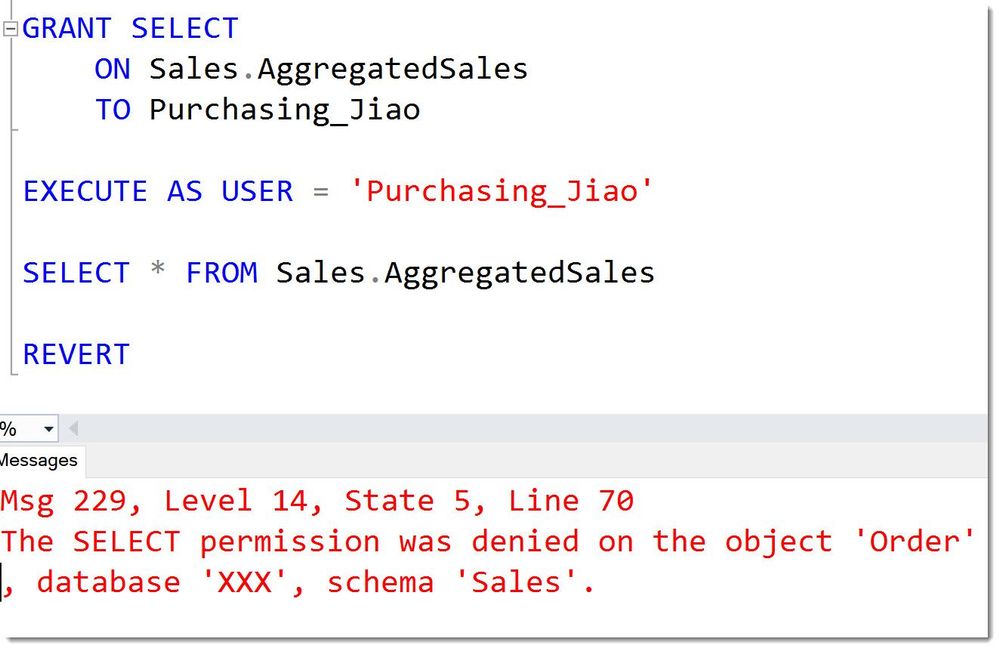
Hence the SELECT-permission on the view alone is not sufficient for User Jiao to query it, as is accesses the table.
 BrokenOwnershipChainMissingPermission
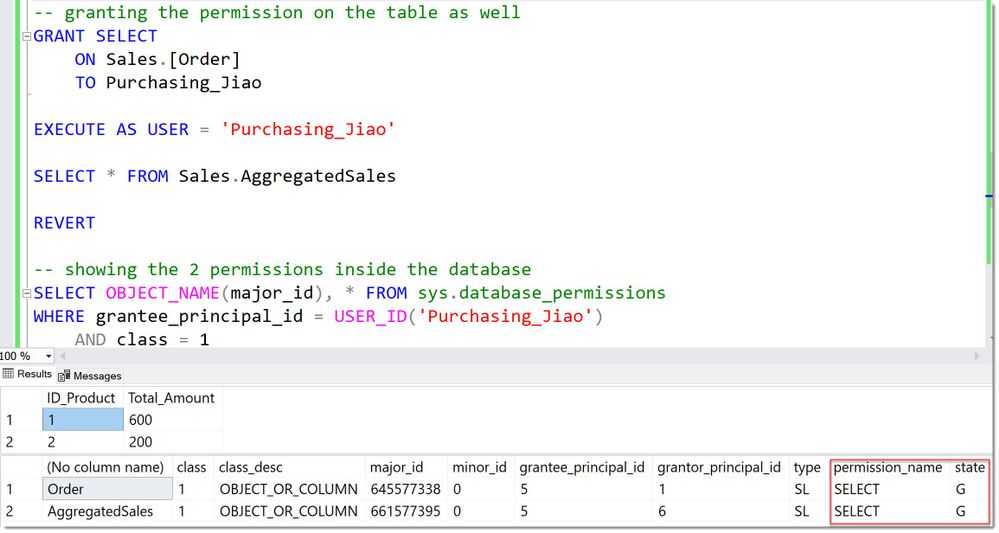
After granting the SELECT on the table as well, the User can use the View:
 BrokenOwnershipChainPermissionsComplete
In many if not most cases, it makes sense to have ownership-chains set up. But there are cases where you will want to explicitly break them. In general, it is advisable to always make conscious decisions around this and use a different owner than the built-in dbo.
Ownership-chaining by itself is a topic that surely deserves its own articles, but this is where it connects with Separation of Privilege.
Divide and be more secure :)
Andreas
Thank you to my Reviewers:
Rohit Nayak, Senior Program Manager in SQL Security
Raul Garcia, Principal Security Program Manager
Resources
by Contributed | May 27, 2021 | Technology
This article is contributed. See the original author and article here.
At Microsoft Build 2021 we launched the public preview of 2.0 CLI and REST APIs for Azure Machine Learning, enabling users to accelerate the iterative model training and deployment process while tracking the model lifecycle, enabling a complete MLOps experience.
Azure Machine Learning (Azure ML) has evolved organically over the past few years. With our 2.0 CLI and ARM REST APIs, we offer a streamlined experience for model training and deployment optimized for ISVs and ML professionals.
What’s new?
Announcing the 2.0 CLI, backed by durable ARM APIs
The ml extension to the Azure CLI is the improved interface for Azure Machine Learning users. It enables you to train and deploy models from the command line, with features that accelerate scaling the data science process up and out, all while tracking the model lifecycle.
Using the CLI enables you to run distributed training jobs on GPU compute, automatically sweep hyperparameters to improve your results, and then monitor jobs in the AML studio user interface to see all details including important metrics, metadata and artifacts like the trained model, checkpoints and logs.
Additionally, the CLI is optimized to support YAML-based job, endpoint, and asset specifications to enable users to create, manage, and deploy models with proper CI/CD (or GitOps) best practices for an end-to-end MLOps solution.
To get started with the 2.0 machine learning CLI extension for Azure, please check the link here .
Streamlined concepts
Train models (create jobs) with the 2.0 CLI – Azure Machine Learning | Microsoft Docs
What are endpoints (preview) – Azure Machine Learning | Microsoft Docs
Job
A job in Azure ML enables you to prepare and train machine learning models. It enables you to configure:
- What to run: your code
- How to run it: either an optimized prebuilt docker container from AML or one of your choice from your own docker registry
- Where to run it: either fully managed, scalable compute in Azure, locally on your desktop or (via Azure Arc if we want to call this out)
Train a machine learning model by creating a training job
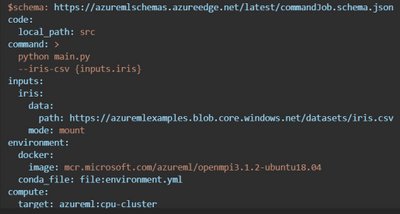
Here is an example training job which invokes the user’s python script from a local directory and automatically mounts data in Azure Storage.
Easy to optimize the model training process with Sweep Jobs
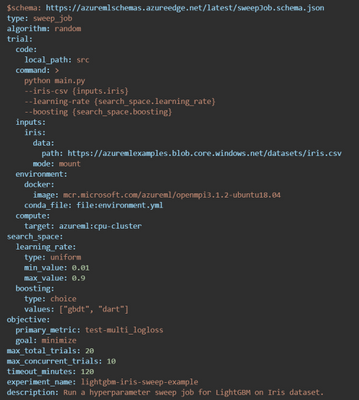
Azure Machine Learning enables you to tune the hyperparameters more efficiently for your machine learning models. You can configure a hyperparameter tuning job, called a sweep job, and submit it via the CLI. For more information on Azure Machine Learning’s hyperparameter tuning offering, see the Hyperparameters tuning a model.
You can modify the job.yml into job-sweep.yml to sweep over hyperparameters:
VS Code support for job authoring and resource creation
The Azure Machine Learning extension for VS Code has been revamped for 2.0 CLI compatibility, with added features such as completions and diagnostics for your YAML-based specification files. You can continue to manage resources directly from within the editor and create new ones with starting templates. Within the template files, you can use the extension language support to fetch completions, previews, and diagnostics for machine learning resources in your workspace.
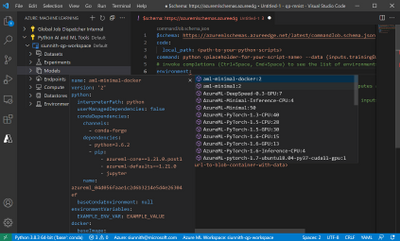
Once you are finished authoring the specification file, you can submit via the CLI from directly within VS Code (tip: right-click in the file itself to view the ‘Azure ML: Create Resource’ command). The extension will streamline invoking the right CLI commands on your behalf. To get started with the extension for creating, authoring, and submitting 2.0 CLI specification files, please follow this documentation.
OSS-based examples for training and deployment
Azure ML is announcing a new set of YAML-based examples for training and deploying models using popular open-source libraries like PyTorch, LightGBM, FastAI, R, and TensorFlow. All examples leverage open-source logging via the MLFlow library and do not require Azure-specific code inside of the user training script.
Examples are tested and validated using GitHub Actions against the latest Azure ML release. Official documentation on docs.microsoft.com leverages these tested snippets to ensure a smooth, working experience for users to get started.
You can find the new examples here: azureml-examples/cli at main · Azure/azureml-examples (github.com) .
ARM REST APIs, templates, and examples
With full ARM support for model training jobs and endpoint creation, ISVs can use Azure ML to create and manage machine learning resources as first-class Azure entities.
Examples using ARM REST APIs
Additional documentation on REST APIs is available here:
Summary
In summary, the new Azure ML REST APIs and helps ML teams focus more on the business problem than the underlying infrastructure. It provides a simple developer interface to train, deploy and score models and help in the operational aspects of the end-to-end MLOps lifecycle.
Please try our new examples and templates and share your feedback with us. You can use az feedback directly from the new CLI :)
by Contributed | May 27, 2021 | Dynamics 365, Microsoft 365, Technology
This article is contributed. See the original author and article here.
For many businesses, success increasingly depends on having the agility to innovate and adapt to rapid change, responding to customer needs, competitive pressure, and industry trends. But this is a difficult challenge when employees are buried in time-consuming busywork like repetitive tasks or complex processes.
That’s why we are dedicated to helping organizations like yours automate manual business processes, across both legacy and modern applications, so you can focus on what’s most important for your business and customers. In March, we released robotic process automation (RPA) capabilities in Microsoft Power Automate Desktop for Windows 10 users.
This month, we are introducing enhanced workplace automation capabilities for Microsoft Dynamics 365a set of prebuilt RPA solution templates, now available for public preview, that seamlessly integrate with select Dynamics 365 applications
Initially available for Dynamics 365 Customer Service, Dynamics 365 Supply Chain Management, and Dynamics 365 Finance, the prebuilt automation templates enable teams to rapidly automate common business scenariosfreeing time from day-to-day manual, repetitive, and error-prone tasks.
Developers can further extend any of those solutions by using custom actions, custom connectors, Microsoft Azure services, and APIs to take full advantage of Microsoft’s one cloud and data ecosystem.
Save time across customer service, finance, and supply chain roles
Explore some of the ways that RPA can help streamline processes and save valuable time across the workforce.
Dynamics 365 Customer Service: Helping call center agents rapidly validate customer credentials
Most contact centers require agents to validate or authenticate customer identities before proceeding with the service engagement. By enhancing Dynamics 365 Customer Service with RPA, agents can automate steps of the validation process, streamlining call times and helping agents to troubleshoot and solve customer issues faster.
Dynamics 365 Supply Chain Management: Streamline ordering of replacement parts for manufacturing line equipment
We’ve heard from manufacturing customers about the need to improve the process of ordering replacement parts for equipment on the factory floor. Often, technicians who identify defective parts on the manufacturing line need to write down part numbers, and then place the orders into the tracking system one by one. This is an inefficient and error-prone process. By integrating RPA processes into Dynamics 365 Supply Chain Management, technicians can simply scan or enter part details and submit orders on the spot, saving time and effort. Since Power Automate natively integrates with Azure IOT connectors, this solution can be easily extended to use the Azure IoT management system.
Watch a video to learn more about the new capabilities included in the latest update to Dynamics 365 Supply Chain Management.
Dynamics 365 Finance: Perform end of cycle financial close tasks, such as report generation and account validation
At the end of each financial period, finance team members perform standard recurring tasks in order to close the period (month-end, quarter-end, year-end). Many of these tasks include end-of-cycle report generation for the purpose of account validation and documentation. By integrating RPA capabilities in Power Automate, Dynamics 365 Finance helps streamline many of these manual and time-consuming processes, freeing up finance team members to focus on more critical strategic tasks while at the same time maintaining the accuracy that is highly demanded by the more and more restrictive finance audit regulations.
Next steps
Take the first step to enable your customer service, supply chain, and finance teams to automate processes in Dynamics 365. Get a free Power Automate RPA trial license and install Power Automate Desktop, and then import the three solutions mentioned above into your environment to set it up. Check out the documentation for steps to get started.
Send us your feedback, and we’ll work hard to address your feedback and improve the preview experience.
The post Enhance workplace automation with prebuilt RPA templates for Dynamics 365 (preview) appeared first on Microsoft Dynamics 365 Blog.
Brought to you by Dr. Ware, Microsoft Office 365 Silver Partner, Charleston SC.
by Contributed | May 27, 2021 | Technology
This article is contributed. See the original author and article here.
As you may be aware, Microsoft announced the general availability of the Azure-connected Hyper-Converged Infrastructure, Azure Stack HCI. Previously Azure Stack HCI was built off Windows Server which is a great general-purpose operating system that allows you to run your virtualized workloads. The new and improved Azure Stack HCI OS however is a purpose-built, cloud-connected infrastructure, intended to run your Azure Stack HCI workloads in the modern data center (for more information, start here, then go here, then see what’s coming next over here).
Azure Stack HCI is a subscription service that, like Office 365 or Windows 10, continually get free updates. The next update available to Azure Stack HCI subscribers will be 21H2 which is in preview right now! With this update comes a new feature called Network ATC, which simplifies the deployment and management of networking on your HCI hosts.
If you’ve deployed Azure Stack HCI previously, you know that network deployment can pose a significant challenge. You might be asking yourself:
- How do I configure or optimize my adapter?
- Did I configure the virtual switch, VMMQ, RDMA, etc. correctly?
- Are all nodes in the cluster the same?
- Are we following the best practice deployment models?
- (And if something goes wrong) What changed!?
So, what does Network ATC actually set out to solve? Network ATC can help:
- Reduce host networking deployment time, complexity, and errors
- Deploy the latest Microsoft validated and supported best practices
- Ensure configuration consistency across the cluster
- Eliminate configuration drift
Network ATC does this through some new concepts, namely “intent-based” deployment. If you tell Network ATC how you want to use an adapter, it will translate, deploy, and manage the needed configuration across all nodes in the cluster. For more details, please see our Network ATC preview documentation.
Let’s take a quick look at Network ATC in action. In this video, we deploy the host networking configuration across an 8-node cluster, each with two physical adapters (16 total) – with a single command. By the end, these two physical adapters are ready to run Storage Spaces Direct (storage intent) and provide the compute infrastructure (compute intent) needed run your virtual machines all in under 5 minutes.
One of the greatest benefits of Network ATC is that it remediates configuration drift. Have you ever wondered “who changed that?” or said, “we must have missed this node.” You’ll never worry about this again with Network ATC at the helm. Expanding the cluster to add new nodes? Just install the service on the new node, join the cluster and rest assured that in a few minutes, the expected configuration will be deployed.
As you can see, Network ATC greatly reduces the deployment time, complexity, and errors with host networking for Azure Stack HCI as it manages the lifecycle of the cluster. Whether you’re building out a new cluster, expanding the cluster, or just want the peace-of-mind that the network configuration is in steady-state, Network ATC can make this a breeze.
Please take a look at our preview documentation, give Network ATC a try, and as always, let us know what you think! Next, enjoy your newfound free time now that Network ATC is managing the host networking!
Thanks for reading
Dan “Network ATC helps me sleep at night” Cuomo
by Contributed | May 27, 2021 | Technology
This article is contributed. See the original author and article here.
Analytics and data are key to understand the impact of our efforts. Over the last few months, we’ve shipped new ways to measure activity happening in Yammer across Communities, Knowledge, and Live Events.
Today we are thrilled to announce the general availability of Conversation Insights. These insights empower authors and community managers to measure the reach and engagement of their conversations and announcements to understand what content resonates best with audiences.
Conversation Insights is available on Yammer.com on the web, and through the Yammer Communities App in Microsoft Teams.
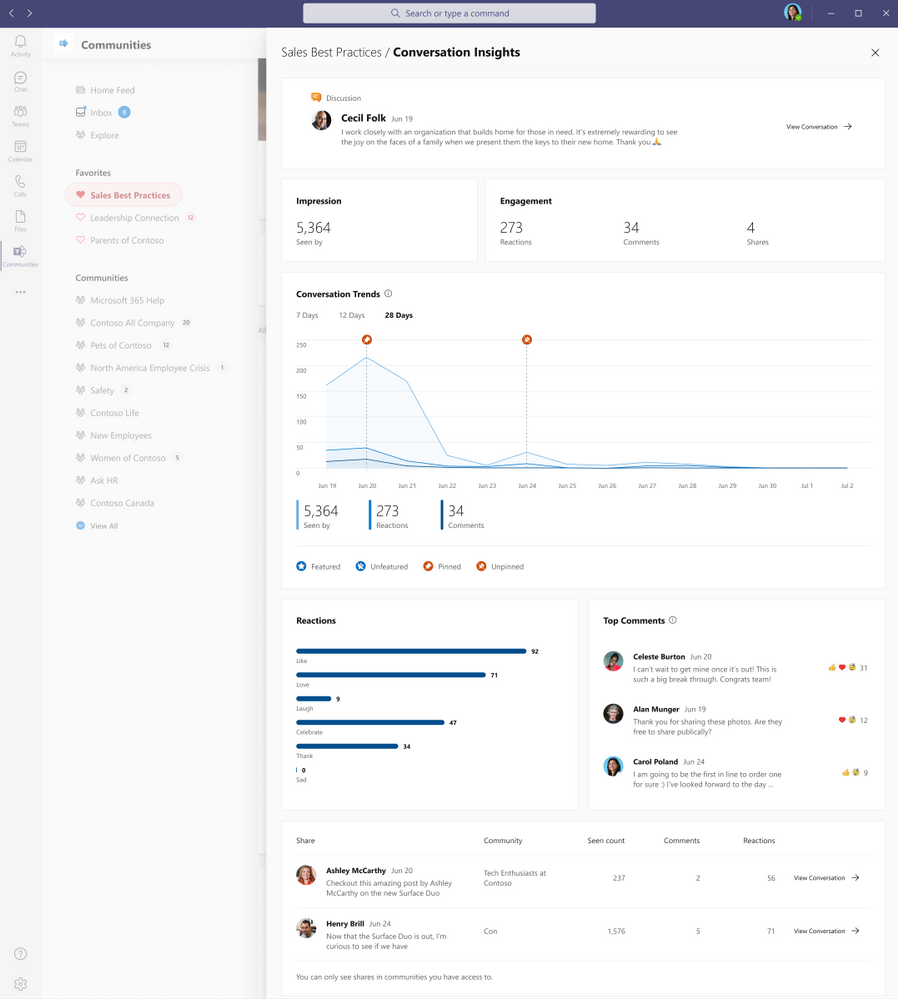 Conversation Insights
Impressions and Engagement
Get a topline summary of the metrics that matter most – the number of people that have seen this conversation and their engagement through comments, reactions, and shares.
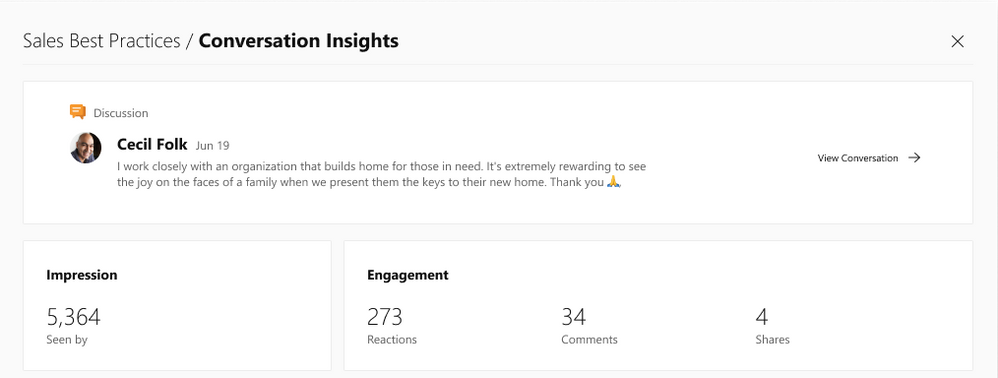 Impressions and engagement
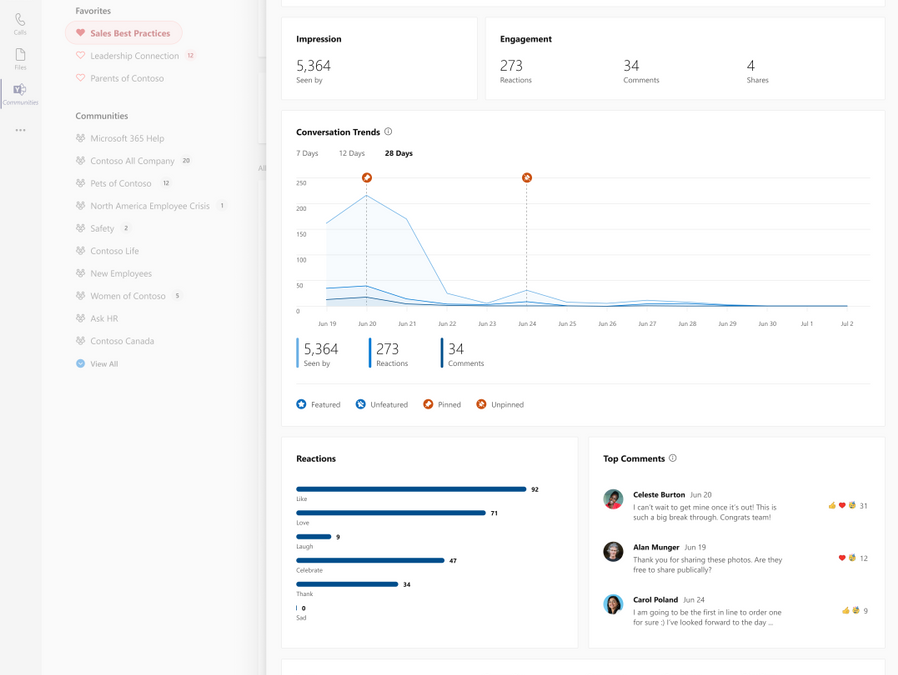
Recognize Trends
Understand the engagement impact of taking actions to pin the conversation in a community or feature it across the network.
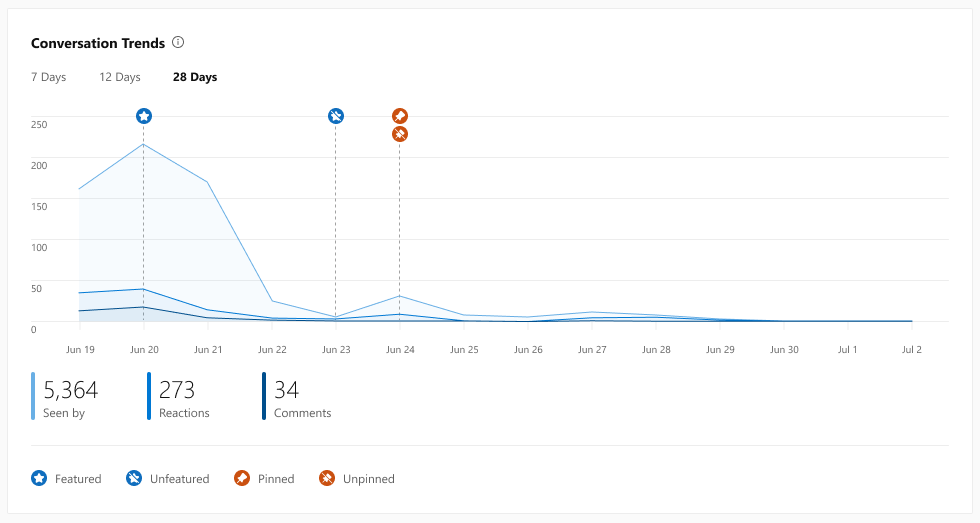 Conversation Trends
See how people react
Get a breakdown of reaction types on the conversation to get a measure of how people felt, and see which comments people most are interested in engaging with.
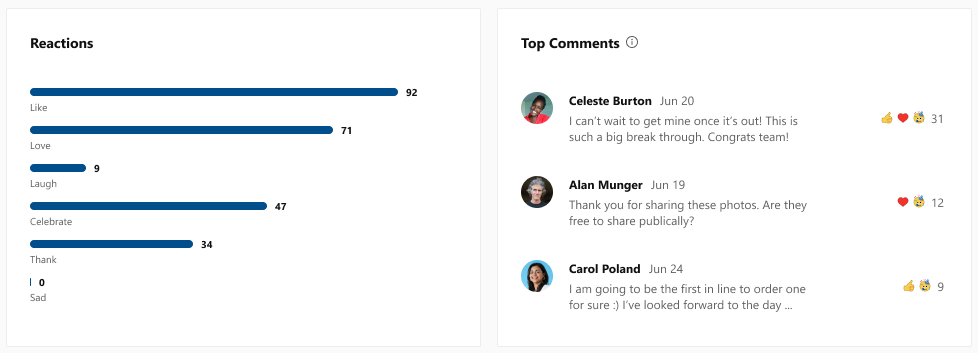 Reactions and comments
Measure spiraling engagement
See if your conversation went “viral” through the number of shares, how many people saw it, comments, and reactions, all in an easy-to-use dashboard.
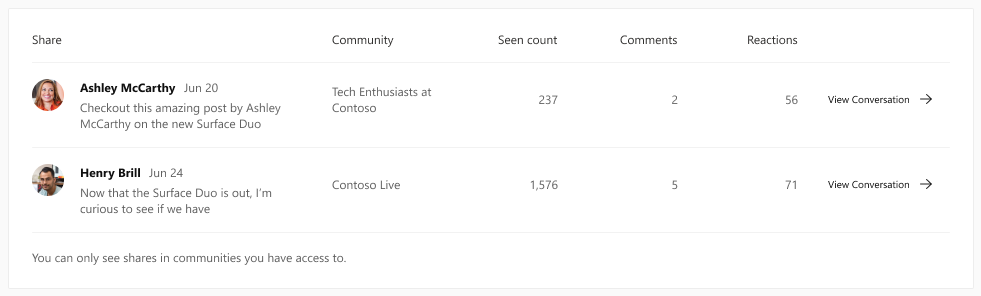 Shares
A new tool for corporate communicators and community managers
These new conversation insights provide a new way for corporate communications teams to track their internal campaigns and announcements. And partnered with the Yammer Communities app for Microsoft Teams, it paves the way for communicators to reach everyone wherever they work, and track the effectiveness of their messages in a whole new way.
See the official documentation.
We’re continuing to strengthen the integration between communities and Microsoft 365 to give everyone the tools and information they need to stay connected and thrive. Keep an eye on our blog for more news coming soon.
Sameer Sitaram
Sameer is a Product Manager on the Yammer team
by Contributed | May 27, 2021 | Technology
This article is contributed. See the original author and article here.
Welcome to docs.microsoft.com/javascript.
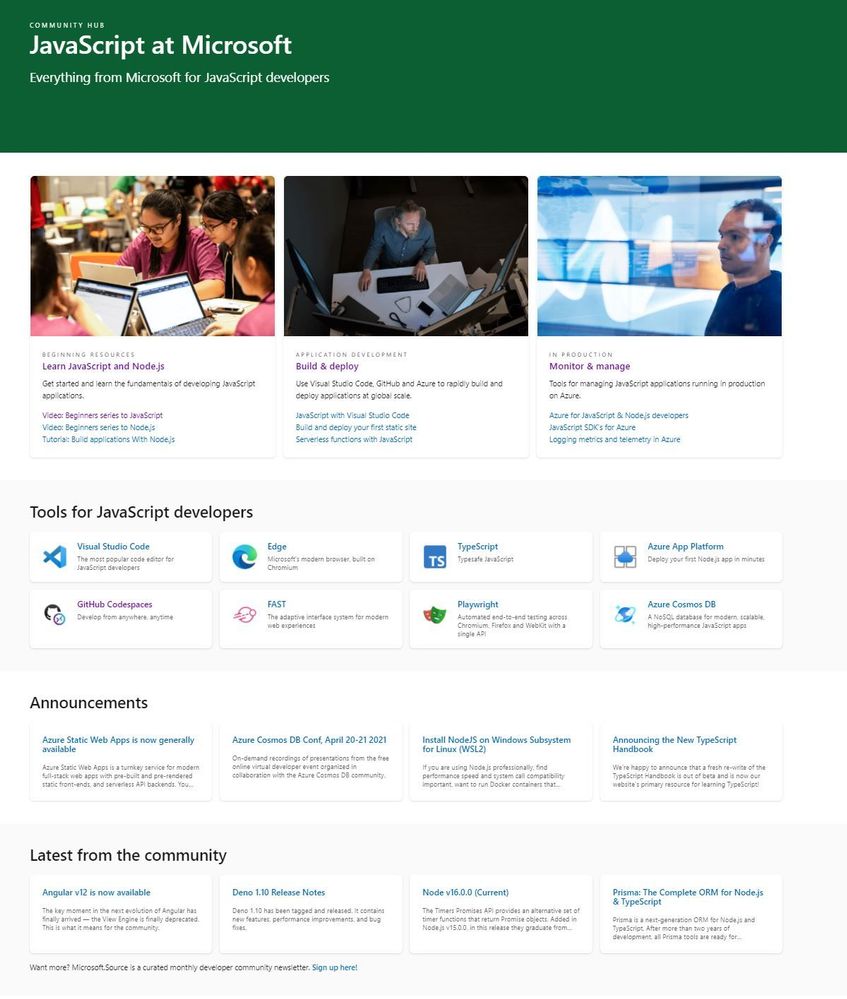
This is a new landing page designed to be a front-door to our end-to-end tools, services and runtimes for JavaScript developers.
Some of the resources which support Educators and Students.
BEGINNING RESOURCES
by Contributed | May 27, 2021 | Technology
This article is contributed. See the original author and article here.
Azure Synapse now enables you to query data stored in Apache Delta Lake format. This is one of the top feedback requests and we are happy to announce that this feature is now available in public preview.
In this article you will learn how to run the T-SQL queries on a Delta Lake storage from your Synapse workspace.
What is Delta Lake?
Delta Lake is an open-source data format that enables you to update your big data sets with guaranteed ACID transaction behavior. Delta Lake is a layer placed on top of your existing Azure Data Lake data that can be fully managed using Apache Spark APIs available in both Azure Synapse and Azure Databricks.
Delta Lake is one of the most popular updateable big data formats in big data solutions, and frequently used by many data engineers who need to prepare, clean, or update data stored in data lake, or apply machine learning experiments.
Why would you query Delta Lake with Azure Synapse?
Azure Synapse provides a serverless endpoint with every Synapse workspace. This provides a few key benefits when it comes to querying Delta Lake data:
- Easy data sharing between Azure Synapse and Azure Databricks without the need to copy and transform data.
- Connecting a large ecosystem of reporting and analysis tools with your data stored in Delta Lake format.
- Favorable pay-per-use consumption model where you don’t need to pre-provision resources. You are paying only for the queries that you are executing.
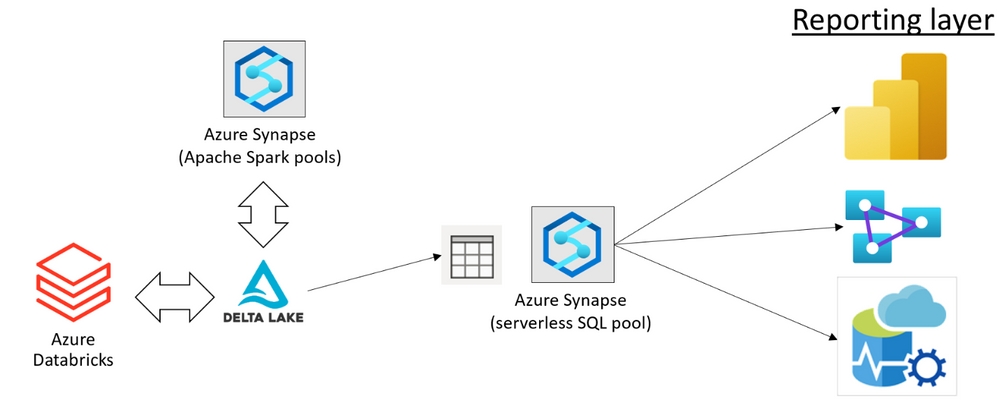
You can use Azure Synapse and Azure Databricks to prepare and modify your Delta Lake data sets placed in the Azure Data Lake storage. Once your data engineers have prepared the data, your data analysts can create reports using the tools such as Power BI.
Using the serverless query endpoint in Azure Synapse, you can create a relational layer on top of your Delta Lake files that directly references the location where Azure Synapse and Azure Databricks are used to modify data. This way, you can get the real-time analytics on top of the Delta Lake data set without any need to wait for a pipeline to copy and prepare data.
Data sharing without copy, load, or transformation of Delta Lake files is the main benefit of serverless SQL pools. The serverless endpoint in Azure Synapse represents a bridge between a reporting/analytics layer where you use Power BI or Azure Analysis Services, and your data stored in Delta Lake format. This enables a variety of tools that work on T-SQL endpoints to access Delta Lake data.
In this solution, every role in your organization that works with big data can use the preferred tools to complete their tasks:
- Data engineers can keep using the standard tools for data preparation and transformation (for example the notebooks in Azure Synapse or Jupyter environment).
- Data analysts can keep using their favorite reporting tools such as Power BI to analyze data and present the reports to the end users.
Azure Synapse enables your teams to implement end-to-end solutions on top of Delta Lake files with no friction or a need to change their standard tools.
How to query Delta Lake in Azure Synapse?
The serverless endpoint in Azure Synapse (serverless SQL pool) enables you to easily query data stored in Delta Lake format. You just need to provide a URI of the Delta Lake folder to the OPENROWSET function and specify that the format is DELTA. If you have plain parquet files, you can easily convert them to Delta Lake format using Apache Spark.
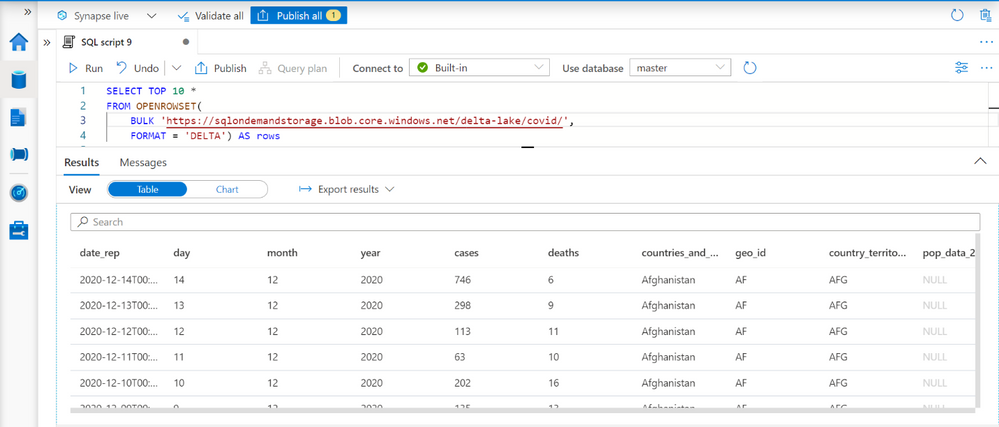
This query enables you to explore data in your Delta Lake data sets. The OPENROWSET function will automatically determine the columns in Delta Lake format and their data types by inspecting Delta Lake folder.
When you complete exploration, you can create views or external tables on top of your Delta Lake folder. The partitioned views are preferred approach if you have partitioned Delta Lake structure because they can more optimally execute your queries and eliminate the partitions that do not contain the data that should be returned in the queries.
Tools and applications such as Power BI or Azure Analysis Service can read data from these views or external tables, without need to know that the underlying data is stored in Delta Lake format.
Learn more about Delta Lake query capabilities in Synapse documentation.
Feedback
This feature is currently in public preview, and the Azure Synapse team is happy to hear your feedback.
Some features such as temporal/time-travel queries, automatic synchronization of Delta Lake tables created in Spark pools, and updates of Delta Lake data are still not available in the public preview. We would be happy to get your feedback related to the new features in this scenario, so you can post your ideas in Azure Feeback site.


Recent Comments