by Contributed | Jun 10, 2021 | Technology
This article is contributed. See the original author and article here.
Today and every Wednesday Data Exposed goes live at 9AM PT on LearnTV. Every 4 weeks, we’ll do a News Update. This month is an exception, as we’re actually streaming on a Thursday. We’ll include product updates, videos, blogs, etc. as well as upcoming events and things to look out for. We’ve included an iCal file, so you can add a reminder to tune in live to your calendar. If you missed the episode, you can find them all at https://aks.ms/AzureSQLYT.
You can read this blog to get all the updates and references mentioned in the show. Here’s the June 2021 update:
Product updates
We had a ton of guests on this episode, which made it a fast-paced, deeply entertaining and informative show (yes, I am biased). Let’s start with who came on and what was announced.
At Microsoft Build, Rohan Kumar announced the public preview of Azure SQL Database ledger capabilities. Jason Anderson, from the Azure SQL team, did a demo which you can view here. Jason also came on the show to tell us more about the new capabilities. For more information, you can review the documentation, announcement blog, whitepaper (must read!), and you can join us again on Data Exposed Live on June 16th for the next Azure SQL Security deep dive live. Also, a great place to learn and read about deep dive topics or updates like this one is in the SQLServerGeeks magazine run by the community. You can subscribe here. Next month, Jason is contributing a fascinating article on Ledger!
We had a special guest on the show, Kaza Sriram, from the Azure Resource Mover team which was recently released. Azure Resource Mover is built to provide customers with the flexibility to move their resources from one region to another and operate in the location that best suits their needs. With Azure Resource Mover, you can now take advantage of Azure’s growth in new markets and regions with Availability Zones and move resources including Azure SQL. You can learn more with resources including tutorials, and videos on Azure Unplugged, Azure Friday, and a whiteboarding video.
Mara-Florina Steiu, PM on the Azure SQL team, also came on the show to talk about the recent public preview release of Change Data Capture (CDC) in Azure SQL Database. Here are some references to go as deep as you desire:
Next, Pedro Lopes, PM on the SQL Server team, came on the talk about some of the latest announcements related to Intelligent Query Processing (IQP). This included the recent public preview of Query Store Hints (announcement blog here and Data Exposed episode here) and some references to demos.
Finally, related to announcements we had Alexandra Ciortea on the show again to talk more about Oracle migrations and related tooling. This included the release of SSMA 8.20 including automatic partition conversion (there is also a Data Exposed episode on this topic!), DAMT 0.3.0 including support for DB2 source databases, and DMA 5.4 with new SKU recommendations.
Other announcements include enhancements for Azure SQL Managed Instance backups, increased storage limit in Azure SQL Managed Instance (now 16 TB limit in General Purpose), Azure Active Directory only authentication for Azure SQL DB and MI, and using Azure Resource Health to troubleshoot connectivity to Azure SQL Managed Instance.
Videos
We continued to release new and exciting Azure SQL episodes this month. Here is the list, or you can just see the playlist we created with all the episodes!
- Venkata Raj Pochiraju: Migrating to SQL: Cloud Migration Strategies and Phases in Migration Journey (Ep. 1)
- Venkata Raj Pochiraju: Migrating to SQL: Discover and Assess SQL Server Data Estate Migrating to Azure SQL (Ep. 2)
- Alexandra Ciortea: Migrating to SQL: Introduction to SSMA (Ep. 3)
- Alexandra Ciortea and Xiao Yu: Migrating to SQL: Validate Migrated Objects using SSMS (Ep. 4)
- Alexandra Ciortea and Xiao Yu: Migrating to SQL: Enabling Automatic Conversions for Partitioned Tables (Ep. 5)
- [MVP Edition] with John Morehouse: Disaster Recovery for Azure SQL Databases (special Star Wars episode!)
- Joe Sack: Query Store Hints in Azure SQL Database
We’ve also had some great Data Exposed Live sessions. Subscribe to our YouTube channel to see them all and get notified when we stream. Here are some of the recent live streams.
- Deep Dive: How to set up Azure Monitor for SQL Insights
- Azure SQL Virtual Machines Reimagined: Storage (Ep. 2)
- Something Old, Something New: That’s really Deep
Blogs
As always, our team is busy writing blogs to share with you all. Blogs contain announcements, tips and tricks, deep dives, and more. Here’s the list I have of SQL-related topics you might want to check out.
- Azure Blog, data-related
- SQL Server Tech Community
- Azure SQL Tech Community
- Azure SQL Devs’ Corner
- Microsoft SQL Server Blog
- Azure Database Support (SQL-related posts)
Special Segment: SQL in a Minute with Cheryl Adams
Cheryl and Mike Ray came on to do a segment on documentation focused on how to look for information using the Table of Contents. You can access the docs at https://aka.ms/sqldocs and the contributors guide at https://aka.ms/editsqldocs.
Upcoming events
As always, there are a lot of events coming up this month. Here are a few to put on your calendar and register for from the Azure Data team:
June 6 – 11: Microsoft SQL Server and Azure SQL Conference
June 8: DevDays Europe 2021
June 25: Women Data Summit
June 29: Azure Hybrid and Multicloud Digital Event
In addition to these upcoming events, here’s the schedule for Data Exposed Live:
June 16: Azure SQL Security Series
June 23: Something Old, Something New with Buck Woody
June 30: Deep Dive: Azure Cloud Experience for Data Workloads Anywhere
Plus find new, on-demand Data Exposed episodes released every Thursday, 9AM PT at aka.ms/DataExposedyt
Featured Microsoft Learn Module
Learn with us! This month I highlighted the module: Putting it all together with Azure SQL. Check it out!
By the way, did you miss Learn Live: Azure SQL Fundamentals? On March 15th, Bob Ward and I started delivering one module per week from the Azure SQL Fundamentals learning path (https://aka.ms/azuresqlfundamentals ). Head over to our YouTube channel https://aka.ms/azuresqlyt to watch the on-demand episodes!
Anna’s Pick of the Month
This month I am highlighting the new learning path Build serverless, full stack applications with Azure. Learn how to create, build, and deploy modern full stack applications in Azure by using the language of your choice (Python, Node.js, or .NET) and with a Vue.js frontend. Topics covered include modern database capabilities, CI/CD and DevOps, backend API development, REST, and more. Using a real-world scenario of trying to catch the bus, you will learn how to build a solution that uses Azure SQL Database, Azure Functions, Azure Static Web Apps, Logic Apps, Visual Studio Code, and GitHub Actions. Davide Mauri and I streamed this live at Microsoft Build, so you can access the recording here!
Until next time…
That’s it for now! Be sure to check back next month for the latest updates, and tune into Data Exposed Live every Wednesday at 9AM PST on LearnTV. We also release new episodes on Thursdays at 9AM PST and new #MVPTuesday episodes on the last Tuesday of every month at 9AM PST at aka.ms/DataExposedyt.
Having trouble keeping up? Be sure to follow us on twitter to get the latest updates on everything, @AzureSQL. You can also download the iCal link with a recurring invite!
We hope to see you next time, on Data Exposed :)
–Anna and Marisa
by Contributed | Jun 10, 2021 | Technology
This article is contributed. See the original author and article here.
In this episode of Data Exposed, Joe Sack, Principal Group Program Manager of SQL Server engine and SQL Hybrid, and Anna Hoffman, Data & Applied Scientist, talk about a new way in Azure SQL Database to optimize the performance of queries when you are unable to directly change the original query text. They will cover the new public preview feature Query Store Hints, which leverages queries already captured in Query Store to apply hints that would have originally required modifications to the original query text through the OPTION clause.
Watch on Data Exposed
Feedback? Email QSHintsFeedback@microsoft.com
by Contributed | Jun 10, 2021 | Technology
This article is contributed. See the original author and article here.
Howdy folks!
With the growing trend of more applications and services moving to the cloud, there’s an increasing need to improve the governance of identities used by these workloads. Today, we’re announcing the public preview of access reviews for service principals in Azure AD. Many of you are already using Azure AD access reviews for governing the access of your user accounts and have expressed the desire for extending this capability to your service principals and applications.
With this public preview, you can require a review of service principals and applications that are assigned to privileged directory roles in Azure AD. In addition, you can also create reviews of roles in your Azure subscriptions to which a service principal is assigned. This ensures a periodic check to make sure that service principals are only assigned to roles they need and helps you improve the security posture of your environment.
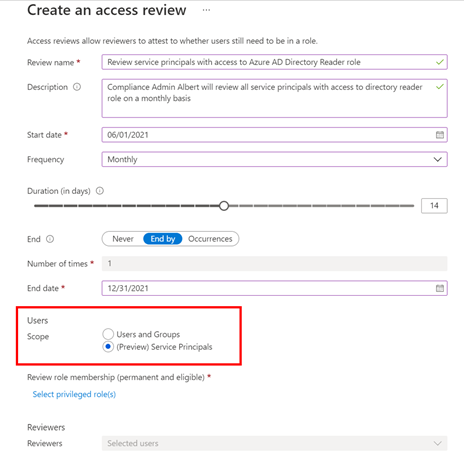
Setting up an access review for service principals in your tenant or Azure subscriptions is easy -select “service principals” during the access review creation experience, and the rest is the same as any other access review!
To set up this new Azure AD capability in the Azure portal:
- Navigate to Identity Governance.
- Choose Azure AD roles or Azure resources followed by the resource name.
- Locate the Access Reviews blade to create a new access review.
- Set the Scope to Service Principals.
The selected reviewers will receive an email directing them to review access from the Azure portal.
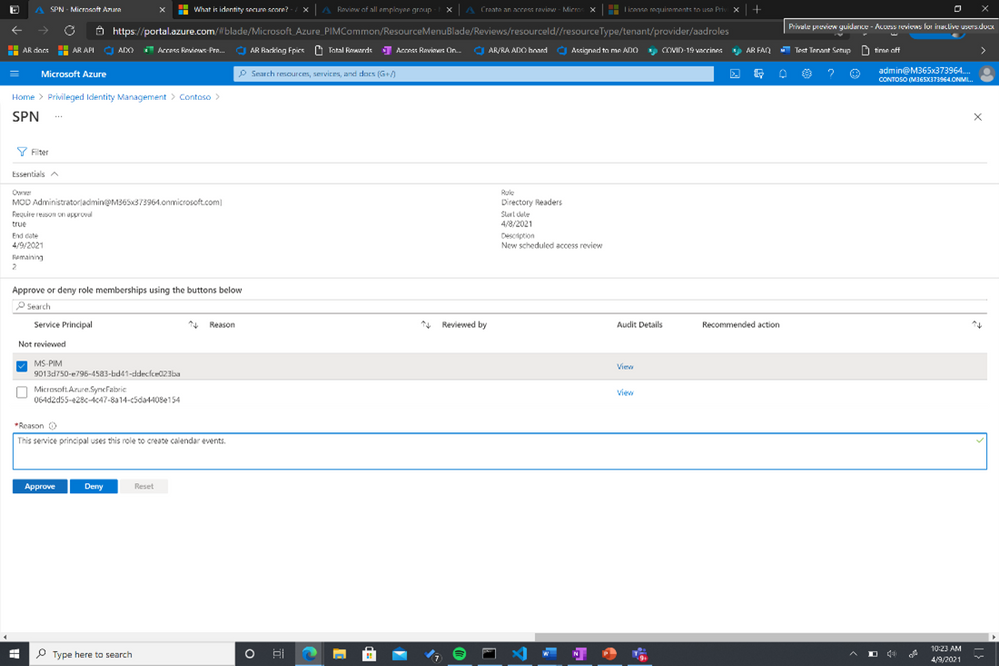
You can also use MS Graph APIs and ARM (Azure Resource Manager) APIs to create this access review for Azure AD roles and Azure AD resource roles, respectively. To learn more about this feature, visit our documentation on reviewing Azure AD roles and assigning Azure resource roles.
As we work on the expanding the set of identity capabilities for workloads, we will use this preview to collect customer feedback for identifying the optimal way of making these capabilities commercially available.
Learn more about Microsoft identity:
by Contributed | Jun 10, 2021 | Technology
This article is contributed. See the original author and article here.
The Project team is excited to announce that you can now import your Project Desktop files to Project for the web. Once imported, your .mpp files will act as normal Project for the web projects.
How it works
To import your project:
- Go to Project Home (project.microsoft.com)
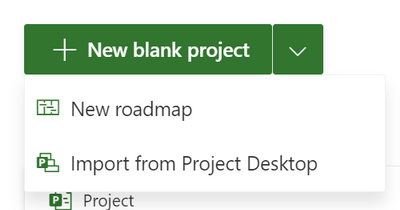
- Click on the arrow next to the New blank project button
- Click on Import from Project desktop
- Select a .mpp file (from Project 2016 or later) that you would like to import
- Follow the steps outlined by the Import wizard
- Share and start working on your project!
You can import any .mpp files that do not violate Project for the web limits. Once your project has been imported, you will be able to use any of the features currently available in Project for the web.
Scenarios to try
- Sharing: Project Desktop does not allow users to share live versions of their projects with their teammates. By importing your .mpp file, you can share it with any of your Microsoft Groups. People with Project licenses will have full access to edit these projects, while people with Office 365 licenses will be able to view your project in a read only view.
- Reporting: Use PowerBI to create live reports that pull data directly from your projects. Share these reports with project stakeholders so they can have a live view of what your team is working on.
- Archiving: Import your old project files so you can have all your Project information in one place & easily find all your old projects.
What gets imported?
Project for the web does not have all the same features as Project Desktop. However, we try to import all your relevant information so you can still effectively work on your projects.
- Project: Your project name and start date will be imported.
- Tasks: Your tasks will be imported with the correct hierarchy, start & finish dates, duration, effort, effort completed, and % complete.
- Dependencies: All finish-to-start dependencies will be imported.
- Constraints: ASAP, start no earlier than, and finish no earlier than constraints will be imported.
- Custom Fields: You can import up to 10 local custom fields from your .mpp file.
Is there anything I can’t import?
Any .mpp files from Project Desktop 2016 or later should be importable into Project for the web.
Keep in mind that Project for the web has lower limits than Project Desktop. To learn more about Project for the web limits, you can check out our documentation here. Any .mpp files that violate a limit will not be importable.
Feedback
If you have feedback about this or any other feature, you can let us know, either in the comments of this blog post or through our in-app feedback button. To submit feedback through the in-app button, click on the smile icon in the ribbon in Project. This will display three feedback options through which you can submit feedback. Please be sure to include your email so we can reach out to you if we have any follow ups about your comment.
by Contributed | Jun 10, 2021 | Technology
This article is contributed. See the original author and article here.
Today, we’re happy to announce that Exam AZ-140: Configuring and Operating Microsoft Azure Virtual Desktop is now live. Passing this exam is the only requirement to earn the new Azure Virtual Desktop Specialty certification.
In related news, our blog post a few days ago, Azure Virtual Desktop: The flexible cloud VDI platform for the hybrid workplace, announced new capabilities in the platform, along with the name change from Windows Virtual Desktop service to Azure Virtual Desktop. In alignment with this broader vision, we’re updating the associated certification and exam, beginning with the name change.
The shift to hybrid work is an opportunity for organizations to rethink everything from the employee experience and talent to digital sales and events. It starts with empowering employees for a more flexible work world. Earning the new Azure Virtual Desktop Specialty certification puts the spotlight on your skills in this evolving work environment, proving that you have subject matter expertise in planning, delivering, and managing virtual desktop experiences and remote apps, for any device, on Azure.
Although we’re changing the name, the job role and exam objective domains remain the same. As with other exams and certifications in our portfolio, we’ll continue to regularly review and update Exam AZ-140 and the Azure Virtual Desktop Specialty certification as needed to keep them aligned to the job skills required by the new capabilities in the platform.
If you took the beta exam with the original name, what now?
You should be receiving your scores in about 10 business days, if you took Exam AZ-140 in beta.
If you passed the beta exam, the new certification and exam names will be reflected on your online transcript. After you receive your score, you don’t need to do anything—just check your Microsoft Certification Dashboard, where you’ll also find your new digital badge.
Don’t forget to celebrate and share your achievement. Add your newly acquired skills and badge to your LinkedIn profile to stand out in your network. Follow the instructions in the congratulations email you received. Or find your badge on your Certification Dashboard, and follow the instructions there to share it. (You’ll be transferred to the Credly website.)
Considering this certification?
To help you prepare, today we’re releasing Course AZ-140T00: Configuring and Operating Azure Virtual Desktop. This brand-new, four-day instructor-led training will help you skill up for Exam AZ-140 with a series of demonstrations and hands-on labs where you deploy virtual desktop experiences and apps. To discuss training solutions customized to your project plans and goals, connect with a Microsoft Learning Partner.
If you prefer to learn on your own, explore this learning path on Microsoft Learn, along with other self-paced learning:
Plus, watch this space for additional training content we plan to release in mid-July.
With today’s mobile and remote work environments, organizations around the world need professionals who have what it takes to plan, implement, monitor, and maintain an Azure Virtual Desktop architecture and infrastructure. And these pros know how to help ensure that this virtualization platform is secure, scalable, and easy to manage. If this sounds like you, skill up, pass Exam AZ-140, and celebrate your Azure Virtual Desktop Specialty certification, as you become part of the solution to empower organizations and to deliver seamless, high-performance experiences on Azure.
Related posts
Finding the right Microsoft Azure certification for you

by Contributed | Jun 10, 2021 | Technology
This article is contributed. See the original author and article here.
This is the next installment of our blog series highlighting Microsoft Learn Student Ambassadors who achieved the Gold milestone and have recently graduated from university. Each blog in the series features a different student and highlights their accomplishments, their experience with the Student Ambassadors community, and what they’re up to now.
Today we meet Yash Jain who is from the United States and just graduated from Virginia Polytechnic Institute and State University in May with a master’s degree in computer science as a part of the Computer Science BS/MS Program.
Responses have been edited for clarity and length.
When you joined the Student Ambassador community in 2019, did you have specific goals you wanted to reach, such as a particular skill or quality? How has the program impacted you in general?
I wanted to grow as a developer, meet more like-minded individuals across the world, and make an impact in the community. I have hosted 20+ hackathons at my college, met engineers from every continent, and helped spark the interest of coding in primary school kids. This program has not just made me a better developer and engineer but also a better person.
What are the accomplishments that you’re the proudest of and why?
Over the past 2 and half years, I have fostered a large community, but I will focus here on what I have done over the last year. I created the first Microsoft-focused hackathon at Virginia Tech focused on the benefits of using Azure. At these hackathons, I have consistently gotten 25-30 students at every event, providing the students at Virginia Tech with an opportunity to explore the world of Microsoft Azure bi-monthly, and an opportunity that before at the school only came once a year and never focused on Azure. I increased the number of hackathons from 1 to 5 yearly. When the pandemic hit, to continue to host hackathons at my college, I found a way to host them virtually and still make them engaging to the students.
I shared my advice and skills on the Student Ambassador community’s Teams site to help other Ambassadors host events virtually. I worked with the AI Gaming team to help test their new games and provided specific feedback over calls and Teams to help them improve their system. Within the program, I have also directly mentored 14 Ambassadors and helped them become Gold Ambassadors. I was also chosen as the Student Ambassador community’s North America Channel lead – when this was a feature – to assist in the North America channel to help provide advice and guidance to new Student Ambassadors. I have responded over chat and hopped on calls with numerous Ambassadors if they needed additional assistance. I have also helped Ambassadors start their projects such as speaking as a guest in a podcast with fellow Ambassador Sanjit Sharma going over the Ambassador program and my background in CS to help him build an audience.
As a Gold Ambassador, I was selected to speak at Microsoft Ignite 2020 about “Getting started on your HealthTech Journey”. Here I represented the Student Ambassador community, sharing my knowledge with my colleagues. Over my time in the program, I have fostered a collaborative environment, lead other Ambassadors to success, and grew my community.
If you could redo your time as a Student Ambassador, is there anything you would have done differently?
I would have spent more time hosting events before Covid happened. I generally would hold 2-3 events per semester but I would have increased that to 4-5. The best part about this program is seeing the passion of creation in your peers and watching them come up with amazing ideas at your events. Fostering that growth is something that I will miss a lot but hope to continue as a Microsoft MVP eventually.
If you were to describe the community to a student who is interested in joining, what would you say about it to convince him or her to join?
This is a great opportunity to grow not only as a developer, but also as a person. The people you interact with and the engineers who you will work with will make a difference in your life and help you shape your career.
What advice would you give to new Student Ambassadors?
The road may seem long, and you will see many of your peers in your community and your life achieving great things, but if that’s all you focus on, you will become depressed. Take that motivation from your peers, and don’t endlessly scroll through LinkedIn and the news. Instead, focus on making yourself better and increasing your impact in your community, which is much more rewarding.
What is your motto in life, your guiding principle?
Always strive to make other people happy. Whether it be people who are important to you or strangers, if your goal is to make others happy, your life will be rewarding, and you will leave the world a better place than you came into it.
What is one random fact about you that few people are aware of?
I enjoy making animated films and fun short projects! You can check one out here.
Good luck to you in the future, Yash!
Fellow Student Ambassadors and community members, you can always reach Yash on LinkedIn.
by Contributed | Jun 10, 2021 | Technology
This article is contributed. See the original author and article here.
Monitoring and troubleshooting your Azure IoT Edge devices just became way simpler and efficient. We’re excited to launch the public preview of Azure IoT Edge monitoring solution with deep integration with Azure Monitor! Check out the IoT Show episode below for a guided tour of the new capabilities and get all the details from the docs site:
And now, without further ado here are 7 ways the solution can help make your IoT project successful and scale with confidence!
#1 Design the right architecture
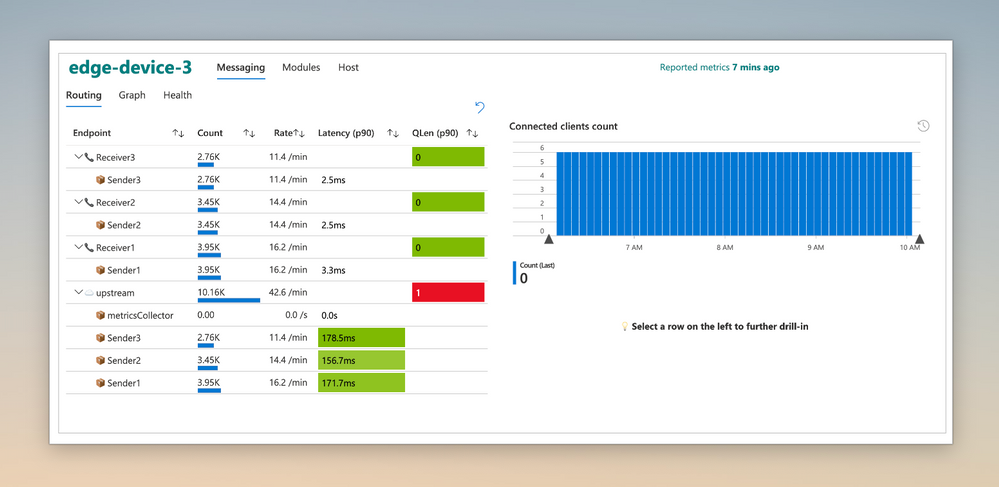
Built-in metrics and curated visualizations enable you to quickly and easily analyze the efficiency of your solution. Measure metrics like message latencies and throughput; both between local modules and Upstream communication. Upstream can be ingestion into the Azure IoT cloud or the parent IoT Edge device in a nested configuration.
These insights help you choose optimal message sizes and compute placement (local vs. cloud vs. parent) to best address your scenario and manage cloud spend.
#2 Right-size edge hardware
Often you’re left wondering how efficient your edge solution is at achieving its goals. Did I grossly over provision, leaving money on the table? or Am I running things too hot for comfort?
Take guess work out of the game and right-size your hardware by analyzing resource consumption data at both workload and host level.
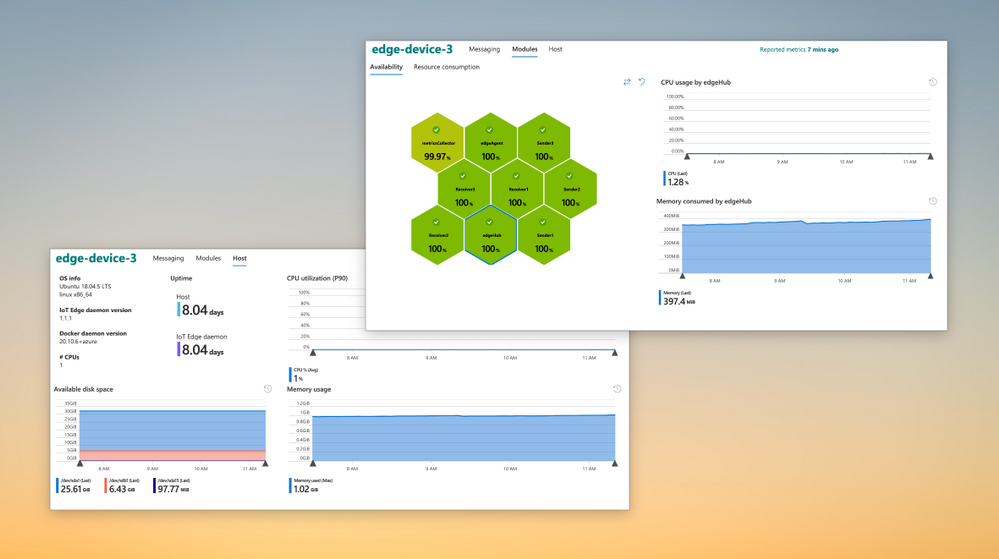
#3 Create custom metrics and visualizations
While built-in metrics provide a lot out-of-the-box, you may need some scenario specific information to complete the picture. You can integrate information from custom modules and enhance the solution to cater to your unique needs.
Learn how easy it is to integrate custom metrics from the feature docs.
#4 Monitor locked down assets
In some scenarios, you edge device’s only window to the outside world is an Azure IoT endpoint. An example is a nested edge configuration where the lower level devices are completely locked down and can only communicate upstream with their parent IoT Edge device. Monitoring this critical edge infrastructure has been a challenge — until today!
The solution can be configured to transport metrics using IoT message telemetry path using the IoT Edge Hub. This path enables monitoring data from assets deep in your network to securely and seamlessly make its way up to the cloud, providing unprecedented observability.
To handle metrics data arriving at IoT Hub in the cloud, we’ve built an open source sample called IoT Edge Monitoring and Logging Solution (ELMS). ELMS lets you deploy a cloud workflow easily, even on existing resources to get started quickly.
#5 Unify cloud and edge monitoring
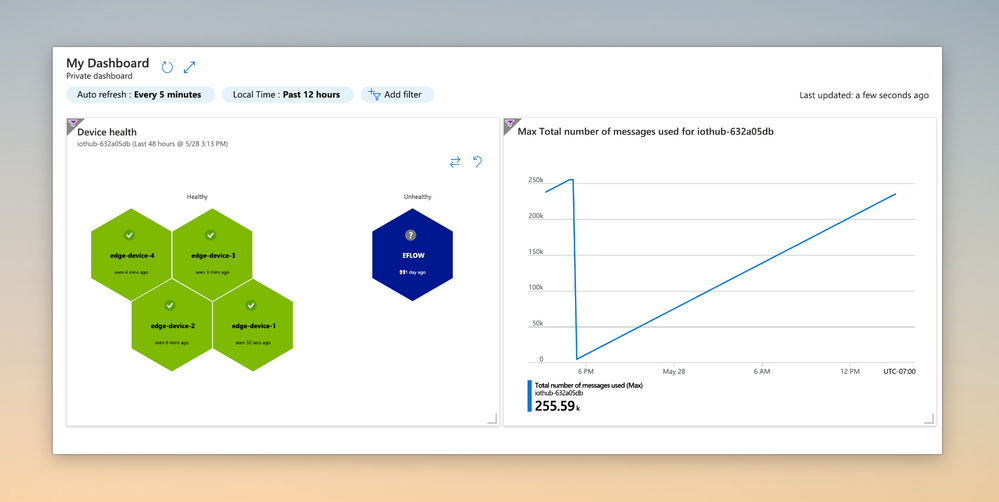
Azure Monitor Workbooks allow pinning visualizations, enabling your Ops teams to monitor both your edge and cloud resources with a unified dashboard. For example in the dashboard below the chart on the left is displaying the health of your IoT Edge devices, while the chart on the right is tracking the IoT Hub message quota usage:
#6 Monitor across resources with Alerts
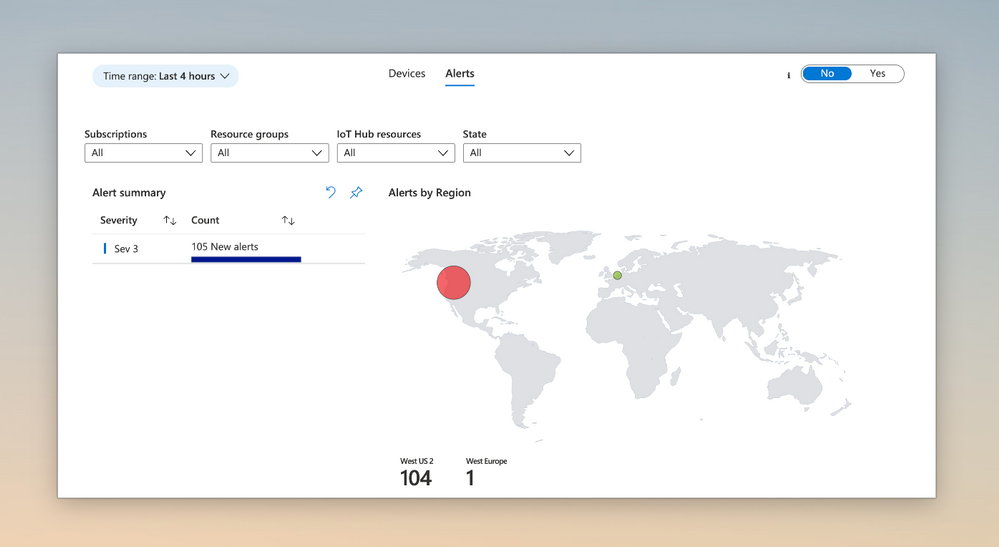
Azure Monitor Log Analytics allows you to create alert rules at a resource group or subscription level. These broadly-scoped alert rules can be used to monitor IoT Edge devices from multiple IoT Hubs. Use the ‘Alerts’ tab from the ‘IoT Edge Fleet View’ workbook to see alerts from multiple IoT Hubs at a glance.
#7 Rapidly and efficiently troubleshoot
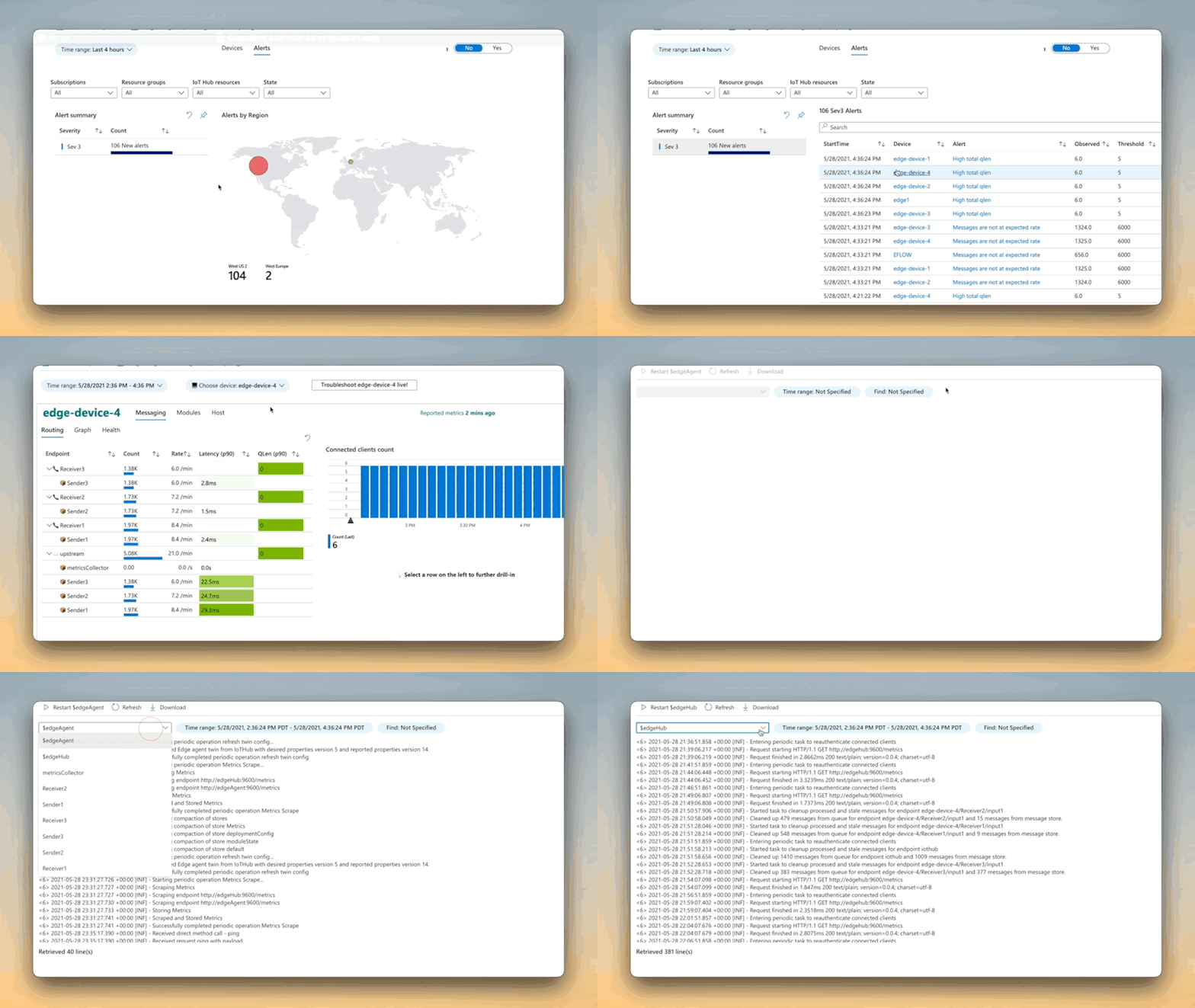
We’ve integrated the on-demand log pull feature of the IoT Edge runtime right into the Portal for quick and easy troubleshooting. If you enable metrics-based monitoring, the experience gets even better!
With just a couple of clicks, you can seamlessly move from reviewing device metrics in response to an alert firing to quickly pulling logs on-demand, automatically adjusted to the time range of interest.
Learn more
See the documentation for the detailed architecture, deployment steps, and more! We look forward to your feedback.
by Scott Muniz | Jun 10, 2021 | Security
This article was originally posted by the FTC. See the original article here.
If you’re looking for a job, there are lots of things to think about, from wages and commute time to benefits and employee resources. To make your job search safe and successful, learn how to spot and avoid job scams.
Especially with the ongoing pandemic, lots of people are focusing more on work-from-home jobs. Scammers know this and post the perfect work-from-home jobs, claiming you can be your own boss and set your own schedule, all while making a lot of money in a short amount of time and with little effort. (Sounds great, right?) But when you respond, the scammer will end up asking for your personal information or for money.
How can you avoid these job scams? Here are a few things to keep in mind as you’re searching:
- Don’t pay for the promise of a job. Only scammers will ask you to pay to get a job.
- Do your own research. Look online for independent sources of information. Although the company’s website or ad may show testimonials or reviews from satisfied employees, these may be fake. Instead, look up the name of the company or the person who’s hiring you, plus the words “scam,” “review,” or “complaint.”
- Take your time. Before you accept an offer or send a potential employer your personal information, run the job offer or posting by someone you trust.
- Don’t send money “back” to your new boss. Here’s the scene: a potential employer or new boss sends you a check. She asks you to deposit it and then buy gift cards, or send some money back to her — or on to someone else. That, my friend, is a scam. The check may look like it “cleared,” and the funds look available in your account. But that check was fake, and once the bank discovers that, the money is already gone.
If you come across a job scam, tell us about it at ReportFraud.ftc.gov.
Brought to you by Dr. Ware, Microsoft Office 365 Silver Partner, Charleston SC.

by Scott Muniz | Jun 10, 2021 | Security
This article was originally posted by the FTC. See the original article here.
Were you an Amazon Flex driver from late 2016 to August 2019?
If so, you may be able to get the tips you earned that Amazon previously withheld. Several months ago, we told you the FTC filed a case against Amazon for keeping $61.7 million in tips drivers made while delivering for the Amazon Flex program.
Today, the FTC announced a final settlement order in which Amazon will pay the full amount – $61.7 million – back to drivers. In addition, Amazon agreed to change its business practices and will be fined up to $43,792 per incident if it violates the order in the future.
So, if you were a Flex driver, how can you get your money? Well, you don’t have to do anything. The FTC’s Office of Claims and Refunds will distribute the money based on information in Amazon’s records. The FTC expects to send payments to affected drivers within six months of getting both the funds and the data from Amazon. If you were an Amazon Flex driver, you can sign up to get email updates about the status of the refund process in the case.
If you’re considering becoming a gig worker, here are some things to consider.
- Do your research. Search for information about the company online, like how it pays its workers and any other conditions of the job.
- Compare earnings. Will you be paid hourly? By gig? Will you get every dollar a customer tips you? And will the company reduce your pay based on the tips you receive? Once you’re on the job, ask the company for a breakdown of your earnings so you can be sure you’re getting what they promised.
- Report your concerns. If a company doesn’t deliver on its promises, report it to the FTC at ReportFraud.ftc.gov.
Brought to you by Dr. Ware, Microsoft Office 365 Silver Partner, Charleston SC.
by Contributed | Jun 10, 2021 | Technology
This article is contributed. See the original author and article here.
Introduction
A persona is a visual representation of a person across products, typically showcasing the image that person has chosen to upload themselves. This control includes an individual’s avatar (an uploaded image or a composition of the person’s initials on a background color), their name or identification, and so on. for more details refer to this.
Scenario
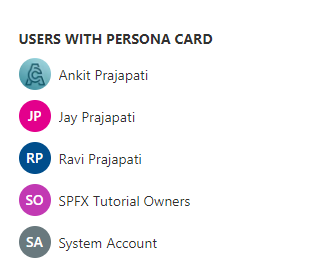
We will create an SPFx web part in the way to fetch users from any specific group and render these users using a persona. so let’s see step-by-step implementation.
In the end, our output will be like this,
Implementation
Open a command prompt
Move to the path where you want to create a project
Create a project directory using:
md spfx-persona
Move to the above-created directory using:
cd spfx-persona
Now execute the below command to create an SPFx solution:
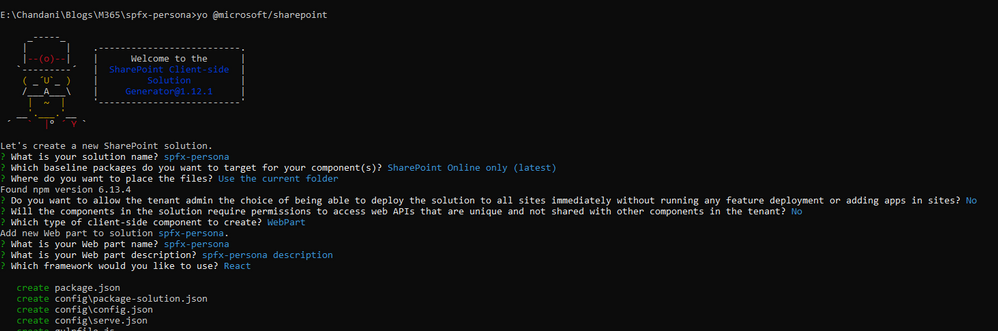
yo @microsoft/sharepoint
It will ask some questions, as shown below,
Now we will install pnpjs as shown below:
npm install @pnp/sp –save
After a successful installation, we can open a project in any source code tool. Here, I am using the VS code, so I will execute the command:
code .
1. Move to the src/webparts/spfxpersona/components/ISpfxpersonaProps.ts and create a context property as below,
import { WebPartContext } from "@microsoft/sp-webpart-base";

export interface ISpfxpersonaProps {
  description: string;
  context: WebPartContext
}
2. Now move to the SpfxpersonaWebPart.ts file and here we initialize an SP context and pass it in the property.
import * as React from 'react';
import * as ReactDom from 'react-dom';
import { Version } from '@microsoft/sp-core-library';
import {
  IPropertyPaneConfiguration,
  PropertyPaneTextField
} from '@microsoft/sp-property-pane';
import { BaseClientSideWebPart } from '@microsoft/sp-webpart-base';

import * as strings from 'SpfxpersonaWebPartStrings';
import Spfxpersona from './components/Spfxpersona';
import { ISpfxpersonaProps } from './components/ISpfxpersonaProps';
import { sp } from "@pnp/sp/presets/all";

export interface ISpfxpersonaWebPartProps {
  description: string;
}

export default class SpfxpersonaWebPart extends BaseClientSideWebPart<ISpfxpersonaWebPartProps> {

  public onInit(): Promise<void> {
    return super.onInit().then(_ => {
      sp.setup({
        spfxContext: this.context
      });
    });
  }

  public render(): void {
    const element: React.ReactElement<ISpfxpersonaProps> = React.createElement(
      Spfxpersona,
      {
        description: this.properties.description,
        context: this.context,
      }
    );

    ReactDom.render(element, this.domElement);
  }

  protected onDispose(): void {
    ReactDom.unmountComponentAtNode(this.domElement);
  }

  protected get dataVersion(): Version {
    return Version.parse('1.0');
  }

  protected getPropertyPaneConfiguration(): IPropertyPaneConfiguration {
    return {
      pages: [
        {
          header: {
            description: strings.PropertyPaneDescription
          },
          groups: [
            {
              groupName: strings.BasicGroupName,
              groupFields: [
                PropertyPaneTextField('description', {
                  label: strings.DescriptionFieldLabel
                })
              ]
            }
          ]
        }
      ]
    };
  }
}
3. Create a common component means folder called RenderProfilePicture inside src/webparts/spfxpersona/Common/Components. And inside this folder create a file RenderProfilePicture.tsx .
At here we will pass a property as an argument and render it and in the main component, we will call API to get items so they will be set through the property.
import * as React from 'react';
import { Persona, PersonaSize } from 'office-ui-fabric-react/lib/Persona';
interface IProfilePicProps {
    loginName: string;
    displayName: string;
    getUserProfileUrl?: () => Promise<string>;
}

export function RenderProfilePicture(props: IProfilePicProps) {

    const [profileUrl, setProfileUrl] = React.useState<string>();
    let { displayName, getUserProfileUrl } = props;

    React.useEffect(() => {
        getUserProfileUrl().then(url => {
            setProfileUrl(url);
        });
    }, [props])

    return (
        <div>
            <Persona
                imageUrl={profileUrl}
                text={displayName}
                size={PersonaSize.size32}
                imageAlt={displayName}
                styles={{ primaryText: { fontSize: '14px' }, root: { margin: '10px' } }}
            />
        </div>);
}
4. Now move to the Spfxpersona.tsx our main component. here we will call APIs and render the child component here.
Create a state interface and initialize a user state.
At here we are getting the user from a particular group ID so first call API to get users from the group.
And then we will get user profile properties to get users’ profile picture so after calling the get users method we will call API to get user profile properties.
And then render the component.
import * as React from 'react';
import styles from './Spfxpersona.module.scss';
import { ISpfxpersonaProps } from './ISpfxpersonaProps';
import { escape } from '@microsoft/sp-lodash-subset';
import { sp } from "@pnp/sp/presets/all";
import { RenderProfilePicture } from '../Common/Components/RenderProfilePicture/RenderProfilePicture'

export interface ISpfxpersonaWebPartState {
  users: any[]
}
export default class Spfxpersona extends React.Component<ISpfxpersonaProps, ISpfxpersonaWebPartState> {

  constructor(props: ISpfxpersonaProps) {
    super(props);
    this.state = {
      users: []
    }
  }

  private async getUserProfileUrl(loginName: string) {
    const userPictureUrl = await sp.profiles.getUserProfilePropertyFor(loginName, 'PictureURL');
    return userPictureUrl;
  }

  private async getSiteUsers() {
    const grpUsers = await sp.web.siteGroups.getById(3).users();
    this.setState({ users: grpUsers })
  }

  public componentDidMount() {
    this.getSiteUsers()
  }

  public render(): React.ReactElement<ISpfxpersonaProps> {
    return (
      <div className={styles.spfxpersona}>
        <span>USERS WITH PERSONA CARD</span>
        {this.state.users.map(m =>
          <RenderProfilePicture
            loginName={m.LoginName}
            displayName={m.Title}
            getUserProfileUrl={() => this.getUserProfileUrl(m.LoginName)}  ></RenderProfilePicture>
        )}
      </div>
    );
  }
}
Now serve the application using the below command,
gulp serve
Now test the webpart in SharePoint-SiteURL + /_layouts/15/workbench.aspx.
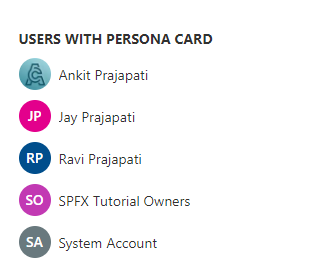
Output
Find the full source code here.
Summary
In this article, we have seen the step-by-step implementation of how to use a persona card to show the users’ profile picture.
I hope this helps, if this helps you then share it with others.
Sharing is caring!



Recent Comments