by Contributed | Jun 14, 2021 | Technology
This article is contributed. See the original author and article here.
If you would like to download the azure app service contents to on-prem server and restore back to azure app service using powershell script, you can refer following steps.
First, we can use KUDU Zip REST API download the folders as ZIP files.
GET /api/zip/{path}/
For more details, here is a document for your reference.
https://github.com/projectkudu/kudu/wiki/REST-API#zip
Since we need to use automated method way to do this, we can use service principal to connect azure account, then generate the token to call REST API.
For service principal, you can refer following document to create service principal.
https://docs.microsoft.com/en-us/azure/active-directory/develop/howto-create-service-principal-portal
In order to call REST API, powershell usually use the Invoke-RestMethod module to call API.
However, Invoke-RestMethod may have some problem when the site contains a lot of files.
This was raised in github issue as following link.
https://github.com/projectkudu/kudu/issues/1448#issuecomment-253796347
There is a workaround posted in above link you can refer.
It looks like it’s tied to Invoke-RestMethod and Invoke-WebRequest though, it seems to work fine when using System.Net.WebClient instead, so that can be a workaround for this.
So the final script would be as following:
$resourceGroupName = "henryapprg"
$webAppName = "freewinhe"
$slotName =  ""
$localPath = "c:testhenry.zip"
$ClientSecret = "serviceprincipalclientsecret"
$ApplicationID = "serviceApplicationID"
$TenantID = "tenantid"

#use service principal to connect Azure Account
$passwd = ConvertTo-SecureString $ClientSecret -AsPlainText -Force
$pscredential = New-Object System.Management.Automation.PSCredential($ApplicationID, $passwd)
Connect-AzAccount -Credential $pscredential -Tenant $TenantID -ServicePrincipal

#generate token with Azure Account.
$azProfile = [Microsoft.Azure.Commands.Common.Authentication.Abstractions.AzureRmProfileProvider]::Instance.Profile
$context =Get-AzContext
$profileClient = New-Object Microsoft.Azure.Commands.ResourceManager.Common.RMProfileClient($azProfile)
Write-Debug ("Getting access token for tenant" + $currentAzureContext.Subscription.TenantId)
$token = $profileClient.AcquireAccessToken($context.Subscription.TenantId)
$token.AccessToken
$kuduApiAuthorisationToken = 'Bearer {0}' -f $token.AccessToken


    if ($slotName -eq ""){
        $kuduApiUrl = "https://$webAppName.scm.azurewebsites.net/api/zip/site/wwwroot/"
    }
    else{
        $kuduApiUrl = "https://$webAppName`-$slotName.scm.azurewebsites.net/api/zip/site/wwwroot/"
    }
    $virtualPath = $kuduApiUrl.Replace(".scm.azurewebsites.", ".azurewebsites.").Replace("/api/zip/site/wwwroot", "")
    Write-Host " Downloading File from WebApp. Source: '$kuduApiUrl'. Target: '$localPath'..." -ForegroundColor DarkGray


#Call zip Rest API to download the Zip file from webapp.
`
$WebClient = New-Object System.Net.WebClient
$WebClient.Headers.Add('Authorization', $kuduApiAuthorisationToken)
$WebClient.Headers.Add('ContentType', 'multipart/form-data')
$WebClient.DownloadFile($kuduApiUrl, $localPath)
Second, there is a document that introduce a powershell command to zip deploy.
https://docs.microsoft.com/en-us/azure/app-service/deploy-zip#with-powershell
Publish-AzWebapp -ResourceGroupName <group-name> -Name <app-name> -ArchivePath <zip-file-path>
So the restore script would be like this:
$localPath = "c:testhenry.zip"
$ClientSecret = "serviceprincipalclientsecret"
$ApplicationID = "serviceApplicationID"
$TenantID = "tenantid"

#use service principal to connect Azure Account
$passwd = ConvertTo-SecureString $ClientSecret -AsPlainText -Force
$pscredential = New-Object System.Management.Automation.PSCredential($ApplicationID, $passwd)
Connect-AzAccount -Credential $pscredential -Tenant $TenantID -ServicePrincipal


Publish-AzWebapp -ResourceGroupName "henryapprg" -Name "phpwinhenry" -ArchivePath $localPath -Force

by Contributed | Jun 13, 2021 | Technology
This article is contributed. See the original author and article here.
This is the next segment of our blog series highlighting Microsoft Learn Student Ambassadors who achieved the Gold milestone and have recently graduated from university. Each blog in the series features a different student and highlights their accomplishments, their experience with the Student Ambassadors community, and what they’re up to now.
Today we meet Chetan Madan who is from India and just graduated from Gharati Vidyapeeth’s College of Engineering.
Responses have been edited for clarity and length.
When you joined the Student Ambassador community in the fall of 2019, did you have specific goals you wanted to reach, such as a particular skill or quality? How has the program impacted you in general?
My initial goal was to be able to reach a wide range of people to share my knowledge, to share opportunities, to provide a direction to young students for them to be able to gain new skills without having to rely on their schools or pay a hefty amount to gain a skill that they could have learnt themselves anyway. For myself, I wanted to work on my social skills. I wanted to be able to talk to a group of people without constantly worrying. The program definitely helped me achieve my goal since a large part of being in any community involves interacting with people you have never met before.
What are the accomplishments that you’re the proudest of and why?
The achievement that I am proudest of is the formation of the Microsoft Learn Student Ambassador chapter in my college. When I got selected into the program, there was just one other Ambassador from my college. We knew that every new Ambassador that enters the program has some questions about how to reach people, how to engage students, etc. I am focused on sharing knowledge and skills with others. Hence, the idea came up of a college chapter to support new Ambassadors as well as people who were planning to apply to the program.
I handled the whole process of arranging the permissions from the college authorities, convinced the current Student Ambassadors to join the chapter, talked to the program’s Community Program Managers, and handled the formalities. Once we were an official chapter, I held an introductory session for the new Student Ambassadors to familiarize them with the program. I also helped some Alpha Student Ambassadors to organize their first student engagement [editor’s note: this is one of the early milestones for Student Ambassadors; they are asked to host an event to move to the next level in the program]. I am really proud that we established the chapter, held events in collaboration, and have reached a level where the number of Student Ambassadors from my institute has doubled.
What do you have planned now that you’ve graduated? What’s next for you after the university?
My current plan is to work and gain some experience with software development, and after I get an idea of how things work in a professional environment, I plan to go for a master’s degree. I believe that some work experience will give me a better sense of how I want to pursue my post-graduation. In the long run, I hope to have a full-time career in machine learning and AI research, but for the time being, I think I’ll start with software engineering for now. Other than that, I have been associated with OpenMined as a mentor for their “Private AI Series” in a part-time role for a while now, and I plan to stay connected and work on some Open-Source privacy-preserving AI tools.
If you could redo your time as a Student Ambassador, is there anything you would have done differently?
I would probably try to make more friends in the community! I do regret treating the Student Ambassador community as a workplace instead of a general fun place to socialize with people. When I started with the community, being the introvert I am, I used to have very limited interaction with my fellow Student Ambassadors, particularly in the first six months or so. Of course, I wasn’t trying to hold back, but looking back, I think I should have been more socially active within the community.
If you were to describe the community to a student who is interested in joining, what would you say about it to convince him or her to join?
I would probably tell them about the kind of opportunities that the community offers. We have leagues covering almost every major technical and non-technical field, and with every field and team, you find people who are interested in the same things as you. I cannot think of any other platform where a student can develop their technical skills, soft skills, organizing skills, and grow as a person. And you get to share your journey with a community of amazingly supportive program managers who are there to support you in every step of your journey and your fellow Ambassadors who are growing with you. It completes your student journey and gives you everything that a school or a university doesn’t.
What advice would you give to new Student Ambassadors?
I would very strongly recommend joining all the regional and the “All hands” calls, which highlight the very essence of the community.
Secondly, I would advise any new member to focus on their growth rather than just doing the bare minimum that they have to do to advance through the program. Set goals for yourself and have a clear idea of what you want to achieve. This will make it easier to track your progress and keep you from feeling lost or directionless.
What is your motto in life, your guiding principle?
Never restrict yourself! Never place an upper limit on what you think you are capable of. I believe that everyone is capable of achieving amazing things and reaching incredible heights. This has been my guiding principle, and all my achievements have been a direct result of its application. Do not be afraid of trying out something, even if you feel you will fail. Not trying is way worse than not succeeding.
What is one random fact about you that few people are aware of?
I am a music lover. I literally charge myself with music to function through the day. Music to me serves the same purpose that coffee serves for a lot of people.
Good luck to you in the future, Chetan!
by Contributed | Jun 12, 2021 | Technology
This article is contributed. See the original author and article here.
Update: Saturday, 12 June 2021 20:35 UTC
We continue to investigate issues within Activity Log Alerts. Root cause is not fully understood at this time. Some customers continue to experience difficulties to view or edit existing alert rules. We are working to establish the start time for the issue, initial findings indicate that the problem began at 06/12 17:45 UTC. We currently have no estimate for resolution.
- Work Around: <none or details>
- Next Update: Before 06/12 22:00 UTC
-chandar
Initial Update: Saturday, 12 June 2021 20:27 UTC
We are aware of issues within Activity Log Alerts and are actively investigating. Activity Log alerts customers in the Europe region would not be able view or update existing rules.
- Work Around:
- Next Update: Before 06/12 21:30 UTC
We are working hard to resolve this issue and apologize for any inconvenience.
-Chandar

by Contributed | Jun 11, 2021 | Technology
This article is contributed. See the original author and article here.
This series highlights Microsoft Learn Student Ambassadors who achieved the Gold milestone and have recently graduated from university. Each blog features a different student and highlights their accomplishments, their experience with the Student Ambassadors community, and what they’re up to now.
Today we’d like to introduce Arpita Gupta, who is from India and recently graduated from Vellore Institute of Technology in Vellore, India.
Responses have been edited for clarity and length.
When you became a Student Ambassador in the fall of 2019, did you have any specific goals you wanted to reach, like attain a skill or work on a particular quality? What were they, and did being a Student Ambassador help you achieve them?
My main aim when I joined the program was to enhance my technical skills and knowledge. I wanted to explore different fields and then choose the right one for me. I particularly found my interest in the field of machine learning and learnt a lot of new things.
The program has also helped me in my overall personality development. I have become more confident and tenacious. The Student Ambassador community provided me a lot of opportunities to interact with like-minded people all across the globe which helped me grow as an individual.
What are the accomplishments that you’re the proudest of and why?
In April 2020, I got a chance to conduct a session in the Global AI Virtual Tour where I covered the basics of machine learning. The main purpose was to pique interest of students unaware of the field. I wanted my session to be not just informative but to pave the way for beginners. While preparing for the talk, I learnt a lot of new things. For example, I got to know about different libraries, their usage and working, and I understood machine learning through real-life examples, like that even in minute things like filtering spam and non-spam mails, machine learning is used. Machine Learning is such a vast field that has absolutely no bounds. The more we dive into it, the more there is to learn.
In the session, I also covered how to complete a Microsoft Learn path [editor’s note: this is one of the initial milestones of the Student Ambassador program]. A lot of new Student Ambassadors wanted to know how to complete a Learning path and the correct approach to it. As my session was specifically for beginners and students who wanted to get into the field of machine learning, I decided to cover a learning path along with some basic explanations in my session. Not only it would help the students understand the subject theoretically but practically as well.
Apart from this, I have also conducted other events in college and online as well. All of them were a huge success with a good number of audience members. I am just glad that I was able to help so many students who wanted to learn and are passionate about tech.
Another accomplishment that I am proud of is when my team got ranked as first runner-up in one of the web-a-thons hosted by my college when I was in my sophomore year. We made a comparative e-commerce website user interface. Although I didn’t know a lot of things back then, I tried to develop something new with whatever knowledge I had. While working on this project, I learnt a lot of things like integrating APIs with the website and worked on a lot of new technologies like Javascript, bootstrap etc.
What do you have planned now that you’ve graduated? What’s next for you after university?
After my graduation, I will be joining F5 Networks, an American company that specializes in application delivery networking and application security. I’ll be in Hyderabad working as a Software Engineer where I will get to experience the ins and outs of the corporate world. Understanding and working on different networking technologies is absolutely amazing, and I am looking forward to this amazing experience.
If you could redo your time with the Student Ambassadors community, is there anything you would have done differently?
My only regret is that I didn’t join this community sooner. I got to know about this program in my third year. If I had known about this program earlier, I would have joined it before. As a result, I missed a lot of sessions and informative workshops which I could have attended.
Another thing that I would redo is to spend more time in this program’s activities in my fourth year. Due to certain circumstances during lockdown and also because of my placements, I was not able to spend enough time conducting events and sessions or attending them. If I could turn back time, I would manage my time more efficiently in order to take part in more sessions and events.
If you were to describe the community to a student who is considering joining, what would you say to convince them to join?
I would like to say that if you are passionate enough about technology, then this is the right platform for you. There is a lot to learn, and there are a lot of opportunities that this program provides. So come join us, grab them, and become a better version of yourself.
And what advice would you give to new Student Ambassadors?
There are mainly 2 things that I would like to advise all the newly joined Student Ambassadors:
- Be active in the community: Taking my own example, it took me quite some time to open up to my peers and to become active in the community. But the more you interact, the more you learn. All the students in this community are here to help one another. So interact with others, learn and grow together.
- Don’t be scared of making mistakes: No one is perfect. We all make mistakes. Someone who is afraid to fail has never tasted success. So embrace your failures instead of backing out of hard work. Mistakes hone your skills.
Do you have a motto in life, a guiding principle that drives you?
We learn more from failures than from success. Don’t let it stop you. Failure builds character.
Lastly, on a lighter note, can you share one random fun fact about you that not many people know?
A fun fact about me is that I love travelling and exploring new places. It helps me to relax and take some time off from my daily routine. I also get to know about the culture and lifestyle of the people living in different regions of the country. Hence, traveling is fun.
Thank you, Arpita, and good luck to you in all your future endeavors!
by Contributed | Jun 11, 2021 | Technology
This article is contributed. See the original author and article here.
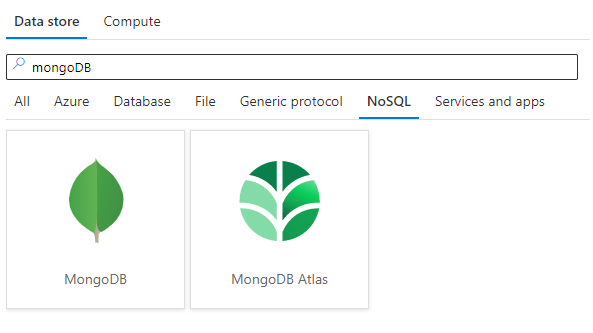
Azure Data Factory is continuously enriching the connectivity to enable you to easily integrate with diverse data stores. Now MongoDB and MongoDB Atlas are supported as both source and sink for copy. With this, you can copy data from any supported source data store to MongoDB or MongoDB Atlas database; or copy data from MongoDB or MongoDB Atlas to any supported sink data store. Besides, it’s also supported to import and export JSON documents as-is to achieve schema-agnostic copy.
Learn more from ADF MongoDB connector and MongoDB Atlas connector documentation. For a full list of data stores that are supported in ADF, see this connector overview article.
by Contributed | Jun 11, 2021 | Technology
This article is contributed. See the original author and article here.
Microsoft Teams offers scheduling capabilities through the Shifts app built into the native Teams experience. The idea is to empower teams to create, update, and manage schedules for a tighter collaborative experience. This functionality is heavily used by first-line worker groups, especially on the clinical floor. With a rich API extensibility and tight coupling with other M365 products, Shifts offers a way to truly automate the schedule management process – eliminating paper trails and removing redundancies in communication.
Process owners often struggle with adding business logic to the process of scheduling. The following use-case illustrates how Shifts can be paired with a data model (maintained in a SharePoint List), and elevated with business logic (set up using Power Automate) to create a role/eligibility-based scheduling process.
Let’s envision a scenario where we are looking to automate a Covid volunteer scheduling process for a vaccination clinic. In this clinic we likely have volunteers who are filling multiple, unique roles. Each of these roles may have defined shifts that are available to be volunteered for. For a volunteer to sign up for a specific shift they must meet a defined set of qualifications.
Clinic Roles:
- Vaccinator
- Observer
- Runner
- Check-In Support
- Documenter
Now for a volunteer to register for a vaccinator shift at the clinic they might have to be a RN, LPN, MA DO, or have some other qualification that allows them to administer vaccines. On the other hand, someone volunteering for a Check-In Support shift would not have to meet any qualifications.
Storing the Data
The first step to automating this process is determining where we want to store our volunteer data. In this example, I will be using a SharePoint list; however, any tabular data structure would work well.
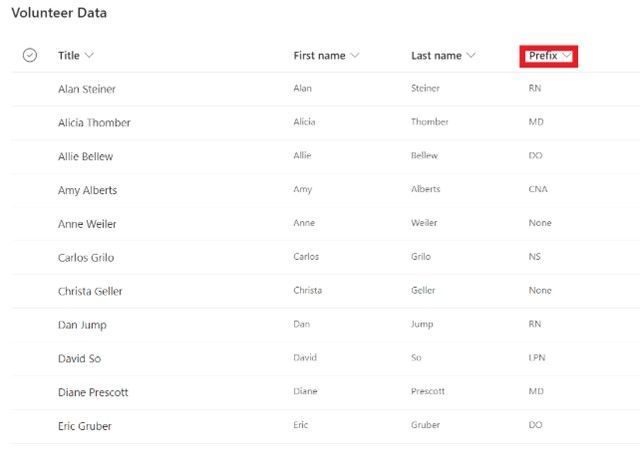
You can see the list stores basic information about the volunteer, including the UPN of the user (not pictured in screenshot), along with a prefix denoting their qualifications relevant to scheduling a shift.
Creating a Teams Shift Schedule
Before you can create a shifts schedule, you must create a Team! Once you have your team you can create a shifts schedule for that team by opening the Shifts app in Teams and creating a new team schedule.
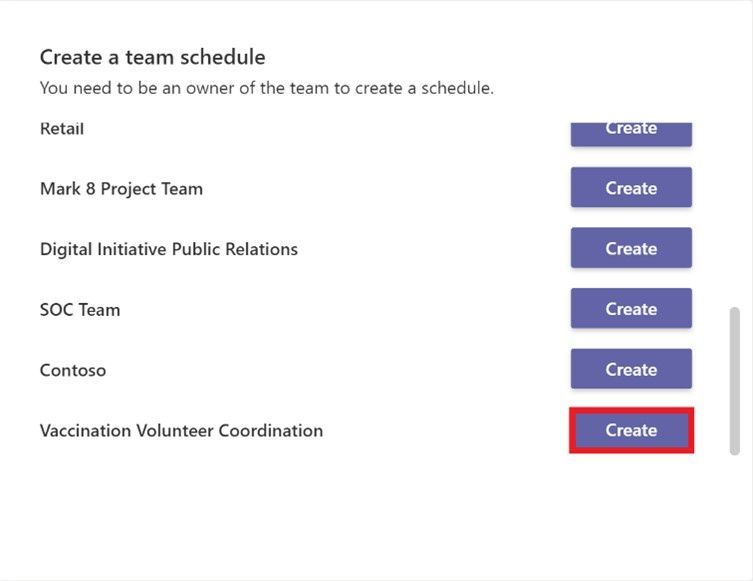
Once you have your Teams Schedule and you have added all volunteers to the team, you can create a new group within your schedule. Each group in the teams Shift Schedule can have its own unique schedule, so we will create a group for our vaccination clinic.
Creating a schedule group
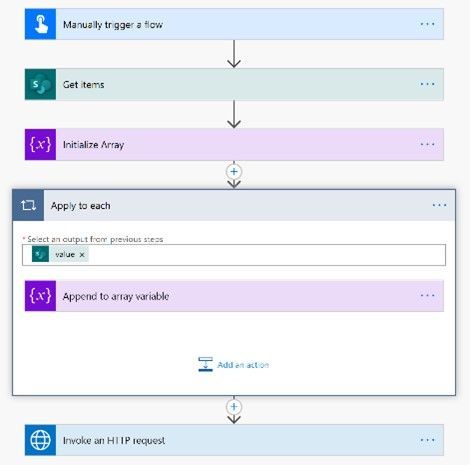
If you have only a few team members it is easy to create a schedule group and add the appropriate members through the Shifts app UI. However, if you have enough members (like in our volunteer example) it makes more sense to add members in a more automated fashion. To do this you can create a simple Power Automate that calls a Microsoft Graph API endpoint for creating a scheduling group.
A sample Power Automate is pictured below. You can see the flow loops through the volunteer data that is stored in the SharePoint list and creates an array of UPNs. The last step is calling the Microsoft Graph API endpoint to create the group with the array of users (documentation below).
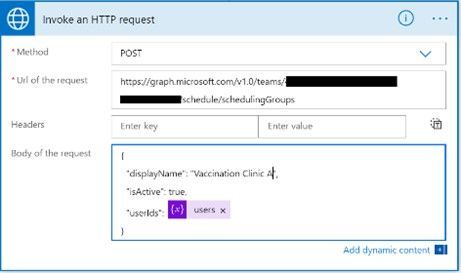
Create schedulingGroup – Microsoft Graph v1.0 | Microsoft Docs
Creating Shifts
After you have run your Power Automate to add your users to the Shifts group, you are ready to create some shifts! Create shifts that can be claimed by volunteers by using the open shifts functionality and specifying how many open slots there are for each open shift. You can also add a custom label and color theming to differentiate between your shift types.
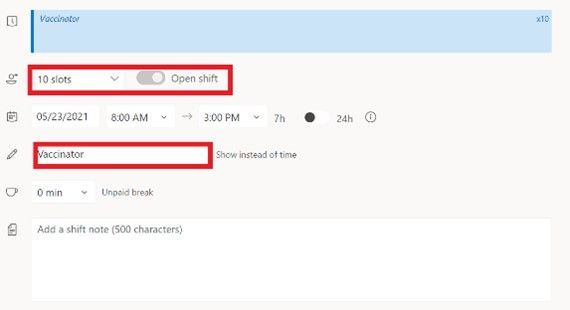

Once you have your open shifts created your team members will be able to sign up to volunteer!
Remember to share your changes with the team.
Automating Shift Approval
Once a volunteer signs up for a shift we need to make sure they are qualified for the shift. To automate this approval process again we will turn to Power Automate!
Your approval process will be specific to a set of requirements; however, in almost all cases the Power Automate will be triggered when the Open Shift request is created (a volunteer requests a shift) and will end with the Open Shift request being approved or rejected!
The beginning of my approval Power Automate for this volunteer example is pictured below. After you get some details about the open shift request, the type of shift, and validate the request was created (not deleted or updated), all you need to do is add your own business logic to validate the team member meets the requirements for the shift!
For more information on how to get started with power automate check out:
Get started with Power Automate – Power Automate | Microsoft Docs
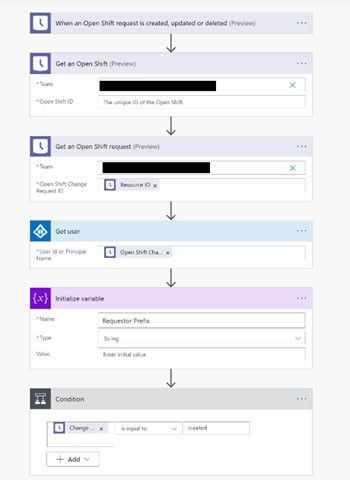
And that’s all! Now you can use Shifts in Teams and Power Automate to quickly design a fully automated role-based scheduling solution!
*Please note that different connectors in Power Automate have different throttling limits. Keep this in mind when designing your approval solution.
Author:

Andrew Roger
Technical Architect
Microsoft Technology Center
by Contributed | Jun 11, 2021 | Technology
This article is contributed. See the original author and article here.
As announced in a previous blog post, dynamic search ads can be created within search campaigns via the use of ad group type. Within a search campaign, you now have the option to create a standard ad group (containing expanded text ads, responsive search ads, and keywords) or a dynamic ad group (containing dynamic search ads and auto targets).
Starting this month you can no longer add, update, or retrieve campaigns that only support dynamic search ads. The campaign type of your existing campaigns has been updated from “DynamicSearchAds” to “Search”. The ad groups are now considered “dynamic” ad groups, but there are no structural changes i.e., they contain the same auto targets and dynamic search ads as before.
As always please feel free to contact support or post a question in the Microsoft Advertising developer Q&A forum.
![Records Management and Driving Compliance [M365 Meetup for Government]](https://www.drware.com/wp-content/uploads/2021/06/fb_image-74.jpeg)
by Contributed | Jun 11, 2021 | Technology
This article is contributed. See the original author and article here.
How are organizations digitally transforming to become leaders in records management, information protection, and eDiscovery? Microsoft 365 provides integrated and intelligent capabilities to help you discover, protect, and govern your business-critical information across your digital estate. At this session we will hear from subject matter experts and their lessons learned for success.
When: Tuesday, June 15th, 2021 @ 5pm EDT
Register for the session today!
Presenters:
Matt Littleton, Compliance Global Blackbelt, Microsoft
https://www.linkedin.com/in/matt-littleton/
Tim Shinkle, VP, Millican & Associates, Inc.
https://www.linkedin.com/in/tim-shinkle-4583121/
https://millican-assoc.com/
by Contributed | Jun 11, 2021 | Technology
This article is contributed. See the original author and article here.
We are pleased to announce the general availability of our Elevation API. For any given point on the Earth’s surface, the Elevation API returns its elevation measured from the mean sea level. Azure Maps Elevation API will provide pole to pole coverage with <4M absolute and <2m relative accuracy. The elevation data uses a digital terrain model (DTM), man-made entities (e.g., buildings) are artificially flattened and elevation is measured to the ground surface.
Use cases & API Types
Azure Maps Elevation API is designed to make it easy for developers to build various scenarios leveraging elevation data. The following options are offered along with POST methods to support input of large data.
Get Elevation for Point(s)
|
Get Elevation for Bounding Box
|
Get Elevation for Path/ Profile
|
|

|
|
Solar power plant planners can measure elevation across large number of points to determine ideal locations for placing solar panels.
|
Mining engineers can measure elevation at specified intervals in each given grid and perform cut/ fill analysis.
|
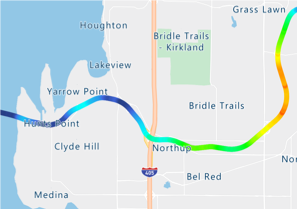
Fleet managers can measure elevation gain across routes and take appropriate safeguards e.g., refrigeration, braking etc.
|
API documentation and code samples

by Contributed | Jun 11, 2021 | Technology
This article is contributed. See the original author and article here.
Written by Patrick Chao, the Teaching Assistant for the course

In the spring semester of 2021, 19 students from The University of Texas at Austin took the Introduction to Machine Learning course taught Patrick Chao, Teaching Assistant for the course and Professor Danna Gurari

Before taking the course, nearly half of the students had no programming background. By the end of the course, the students learned the foundations of Machine Learning and gained hands-on experience developing many machine learning models for different problems in Python. As part of the course, the students also paired up to develop final projects of their own design, with many groups achieving their research goals using the power of Microsoft Azure.
In one of team’s final project, their goal was to solve a problem for small family-owned businesses with Optical Character Recognition (OCR) powered by Azure. The problem they aimed to address is that many business owners must manually enter data from printed or handwritten tickets to spreadsheets, which can be time-consuming. In the experimental results, the team explains that there is lower accuracy for tickets of certain types and provide possible solutions to improve the performance.
Another team aimed to develop a model for poetry classification based on time period. The problem is that it is not easy for human readers to grasp the characteristics of poetry in all periods. Moreover, the classification of time periods is an intense debate topic in the fields of humanities. The team used natural language processing techniques to analyze the title and content of poetry. With text analytics in the Azure Cognitive Services, they extracted key phrases from each poem as a helpful feature to train their model. Ultimately, their model could distinguish the period of poetry better than most English majors. The next step is to understand how the model can support the study of English literature today.
Lastly, another team aimed to address that vaccine hesitancy is a problem, and it slows down the speed of the population receiving the vaccine. They proposed a chatbot to answer questions and lessen worries. The chatbot detects a person’s sentiment from input questions and returns the appropriate information in a way that is tailored towards the person’s sentiment. Azure Sentiment Analysis API is used to detect the sentiment.
Detailed documentation and an easy-to-use interface are big advantages of Azure. After a brief introduction to Azure, most students could explore the Azure services on their own and leverage the services in their final projects.
Interested in Learning more see the following Microsoft Learn Modules
How to build a basic chatbot – Learn | Microsoft Docs
Create Intelligent Bots with the Azure Bot Service – Learn | Microsoft Docs
Build a chat bot with the Azure portal – Learn | Microsoft Docs
Discover sentiment in text with the Text Analytics API – Learn | Microsoft Docs
Explore Natural Language Processing in Microsoft Azure – Learn | Microsoft Docs
Evaluate text with Azure Cognitive Language Services – Learn | Microsoft Docs
Process natural language with Azure Cognitive Language Services – Learn | Microsoft Docs
Introduction to Natural Language Processing with PyTorch – Learn | Microsoft Docs
Read Text in Images and Documents with the Computer Vision Service – Learn | Microsoft Docs




Recent Comments