by Contributed | Jun 23, 2021 | Technology
This article is contributed. See the original author and article here.
When your team members are working on multiple projects using Project for the Web, it can be difficult for them to know what tasks they are assigned, and when they should be completed across all their projects. This blog shows you how to create a My Tasks experience using Power Apps to help your team stay on track.
Step 1: Create a new View for Project in Power Apps
- Go to Powerapps.com and sign in.
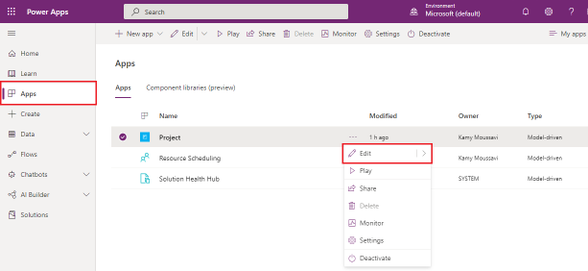
- Click on Apps on the left navigation menu.
- Locate the Project App in the Apps list and click the More Commands ellipses menu and click Edit.
4. Click the + Add button on the top left, and then select Views.
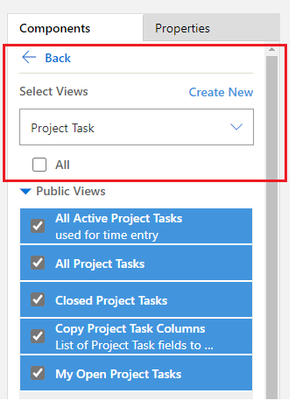
5. On the right options pane, use the drop-down menu to select Project Task.
6. Press the Create New button above the drop-down menu.
Step 2: Create a filter for Tasks Assigned to You
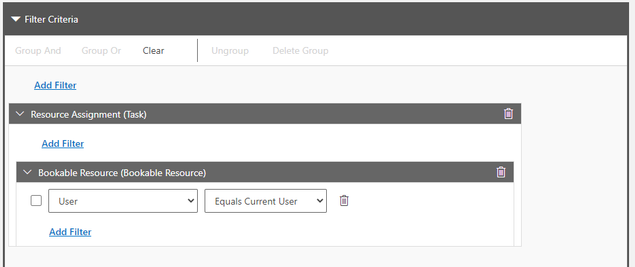
- Create a new filter by opening the Filter Pane and pressing Add Filter.
- Select Resource Assignment (Task) in the drop-down menu.
- In the Resource Assignment (Task) box, Press Add Filter.
- Select Bookable Resource (Bookable Resource) in the drop-down menu.
- In the Bookable Resource (Bookable Resource) box, Press Add Filter.
- Select User in the drop-down menu.
- In the drop-down menu that says Equals, select Equals Current User.
Step 3: Add Columns Attributes for more details on your View
- In the right pane, select the Components tab and press Column Attributes: Primary Entity.
- Drag and drop any new column attribute necessary for you in the Columns section in the bottom left.
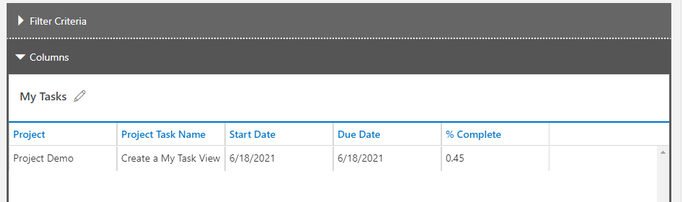
- We recommend adding Project, Start Date, Due Date, % Complete.
- Once satisfied with this view, press Save on top right, the name your view My Tasks.
Step 4: Add the Project Task view to your Project Site Map
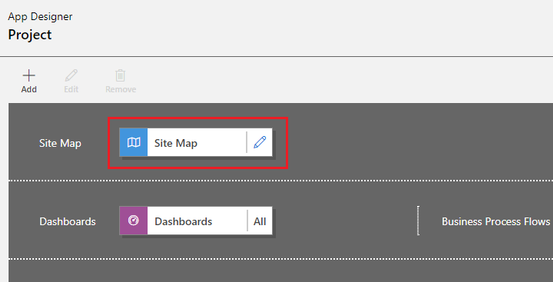
- On the App Designer landing page, press the edit icon on the Site Map (the first tile in the canvas)
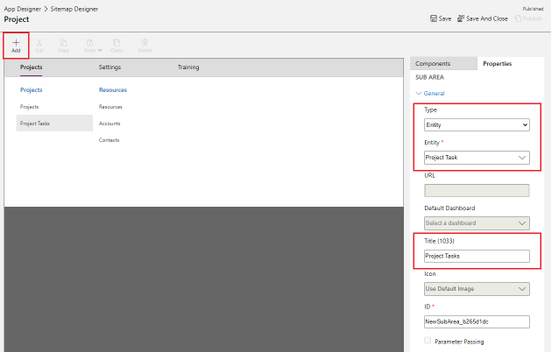
2. Select the blue Projects text under the Projects Tab press + Add to add a Subarea.
3. Use the Type drop-down menu to select Entity.
4. Use the Entity drop-down menu to select Project Task.
5. In the Title text field, name this Entity Project Tasks.
6. Press Save, then Publish, then Save and Close.
Step 5: Try out your new My Tasks view in Project Power Apps
- In the App Designer landing page, press Play in top right to launch Project.
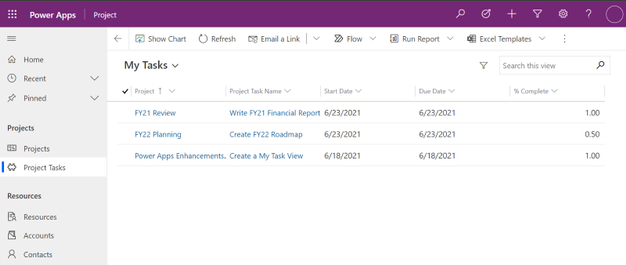
- Select the new Project Tasks subarea under Projects in the left menu.
- In the view selector at the top left defaulted to My Open Project Tasks, select your My Tasks view.
- Voila! You can now see all tasks assigned to you across all projects, and click either the task name or the project name to go the respective project.
FAQ
What license do users need to view this My Tasks view once it is created?
All users with Office, P1, P3 and P5 will be able to view this My Task View.
What license do I need to be able to create this My Tasks view?
Project P1, P3 and P5 all have access to Power Apps and can design this custom My Tasks view.
How can I add more details to the My Tasks view?
You can customize the view by going through Step 3 and adding any column attribute to this view.
by Contributed | Jun 23, 2021 | Technology
This article is contributed. See the original author and article here.
The 21.06 Azure Sphere OS quality update is now available in the Retail feed. This release includes bug fixes in the Azure Sphere OS; it does not include an updated SDK. If your devices are connected to the internet, they will receive the updated OS from the cloud.
21.06 includes updates and enhancements in the following areas.
- Open-source code can now be built in a manner that better reflects its use in the Azure Sphere OS. Previously wpa_supplicant did not properly link to wolfSSL.
- When writing to flash devices over SPI from high level apps, corruption was possible under certain conditions due to using byte aligned writes instead of word aligned writes. This issue is resolved, and writes are now optimized for cases smaller and larger than 1 word.
For more information on Azure Sphere OS feeds and setting up an evaluation device group, see Azure Sphere OS feeds and Set up devices for OS evaluation.
For self-help technical inquiries, please visit Microsoft Q&A or Stack Overflow. If you require technical support and have a support plan, please submit a support ticket in Microsoft Azure Support or work with your Microsoft Technical Account Manager. If you would like to purchase a support plan, please explore the Azure support plans.
by Contributed | Jun 23, 2021 | Technology
This article is contributed. See the original author and article here.
Today, Microsoft is announcing the general availability of Android Enterprise corporate-owned devices with a work profile in Endpoint Manager. With this release, Endpoint Manager now supports the complete set of Android Enterprise management scenarios, including dedicated devices, fully managed devices, and personally-owned devices with a work profile.
Nowadays, it is not uncommon for many of us to use our corporate-owned devices for personal use. Employees want to be sure that their personal data and information remains private, and organizations want to be confident that corporate devices are secure and compliant with company policies. Corporate-owned devices with a work profile is the best of both worlds: the work profile provides the same data separation capabilities available on personally-owned work profile, with added device management capabilities designed for a corporate device. Once enrolled, this will automatically keep corporate applications, data, and contacts in the work container (work profile) and personal applications, data, and contacts in the personal container (personal profile). This corporate-owned personally-enabled (COPE) scenario offers end users confidence that their company administrators will not have visibility into the data and applications in the personal profile.
As more and more employees work from home or in hybrid office environments, corporate-owned devices with a work profile can help enable people to stay securely connected to their work and personal data from virtually anywhere. Employees can easily transition from checking company email to monitoring the status of personal deliveries and then back to their work apps, seamlessly and securely on the same device. During the preview over the past few months, we have seen incredible growth and satisfaction in customer adoption of these capabilities. Let’s dive into the details of enabling Android Enterprise corporate-owned devices with a work profile in Endpoint Manager:
Device Enrollment
Corporate-owned devices with a work profile is available for Android 8+ (Oreo and higher). Endpoint Manager supports these popular provisioning methods:
- Knox Mobile Enrollment
- Zero Touch Enrollment
- NFC – Near Field Communications (only supported on Android 8-10 for COPE devices)
- Token Entry (only supported on Android 8-10 for COPE devices)
- QR code
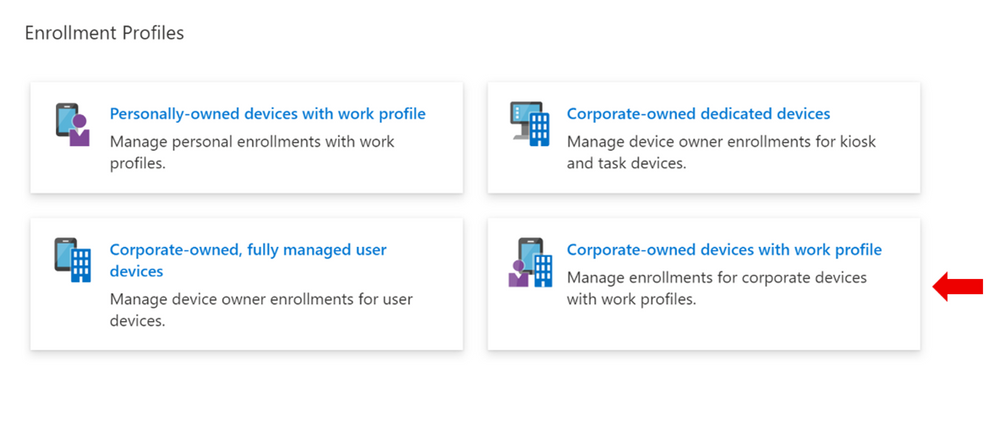
IT Administrators can enable enrollment for this scenario by selecting the “Corporate-owned devices with a work profile” enrollment tile (indicated with the red arrow below). They can create multiple enrollment profiles with unique tokens that do not expire.
End User Enrollment
The experience for end users to enroll corporate-owned devices with a work profile includes new screens that inform them about the functionality of the work and personal profiles on the device. For example:
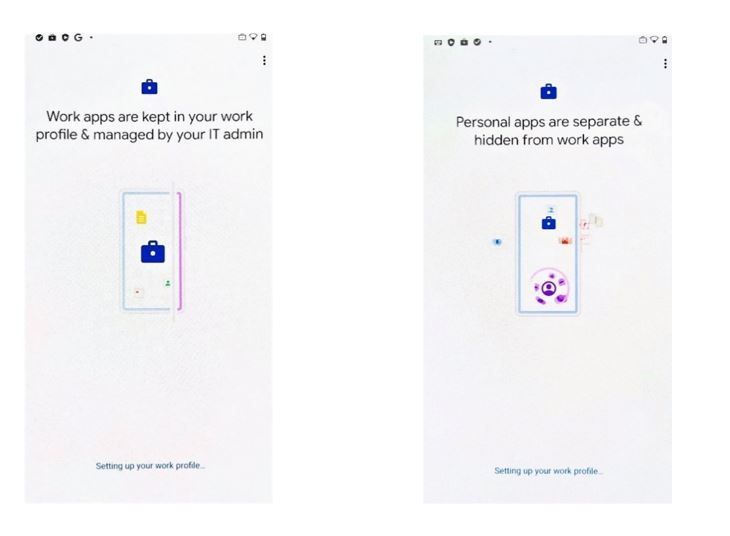
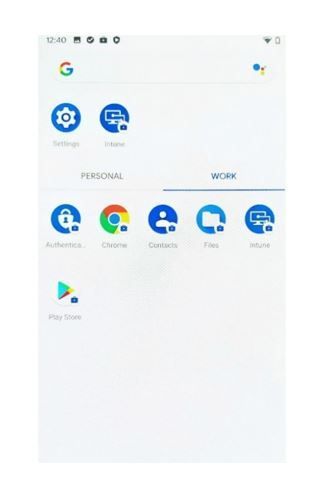
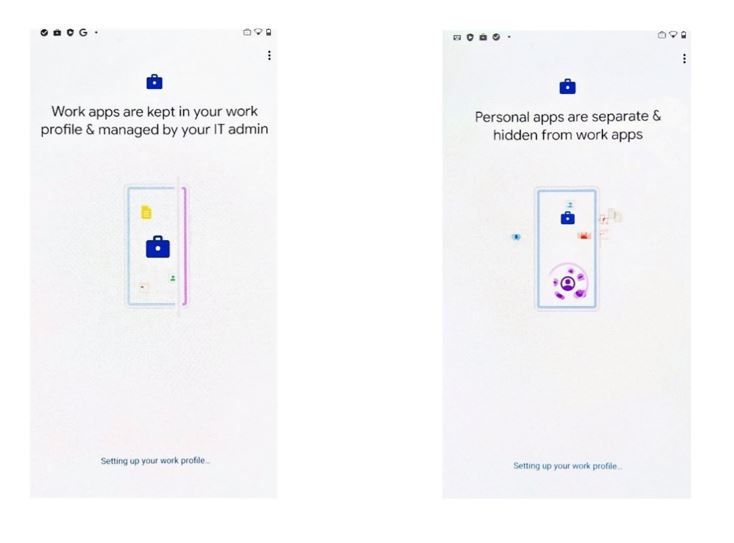
Additionally, the experience will guide end users through setting up administration requirements such as creating a device password, installing work applications, and registering the device. Once successfully set up, users will have two sections labeled work and personal in their full application list.
Device Configuration
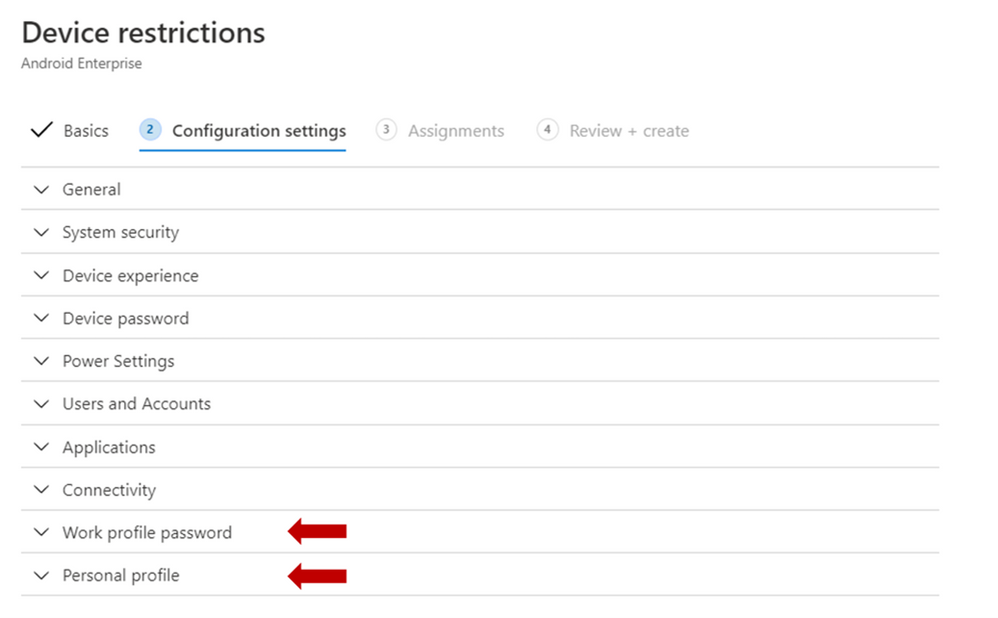
A subset of the existing settings for fully managed and dedicated devices are available for corporate-owned devices with a work profile. Additionally, we’ve added new settings to configure the work profile password and capabilities in the personal profile (indicated with the red arrows below).
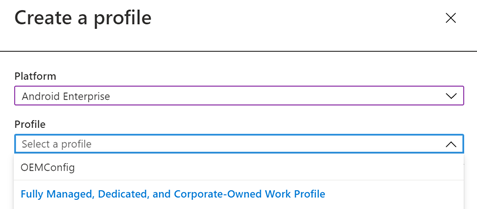
You can create device configuration profiles under the “Fully Managed, Dedicated, and Corporate-Owned Work Profile” category and assign them to corporate-owned devices with a work profile to disable device features, assign certificates, or configure Wi-Fi or VPN. These device configuration profiles can be applied to fully managed, dedicated, and corporate-owned work profile devices.
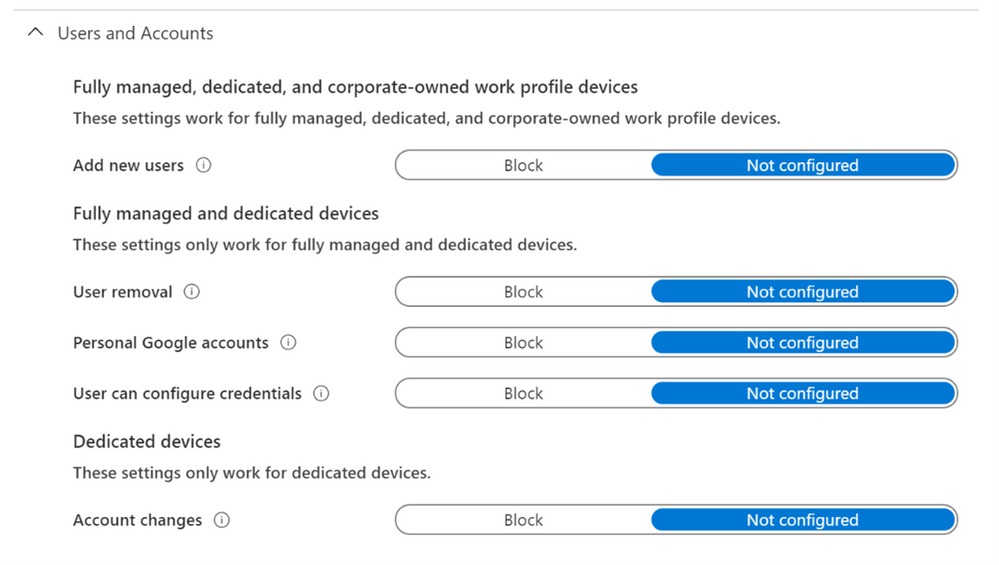
Some of the settings in the Device Restrictions profile do not apply to corporate-owned devices with a work profile; however, there are headers under each setting category that indicate which device types a particular setting can be applied to. Below is an example of these headers used in the Users and Accounts category.
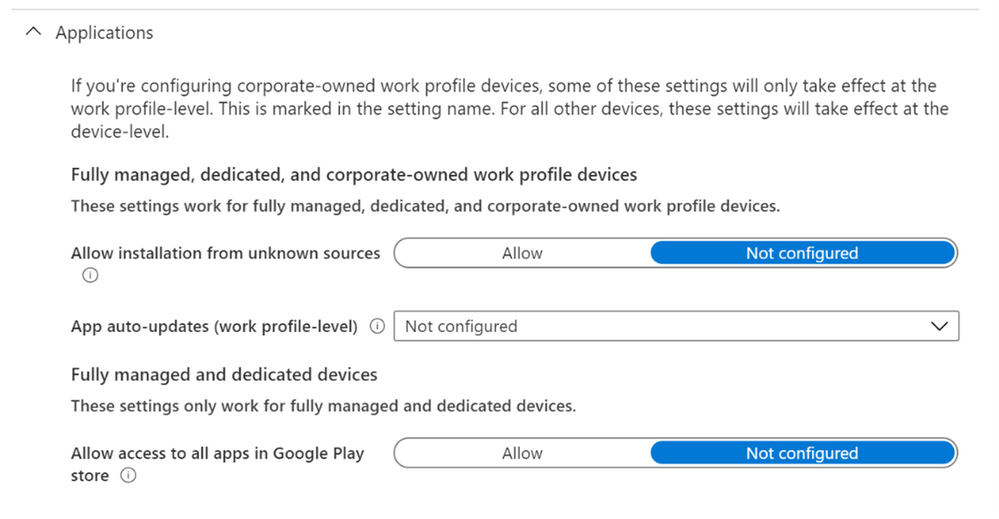
Some settings that apply device wide on fully managed and dedicated devices only apply at the work-profile level for corporate-owned devices with a work profile. These settings are marked with the “work profile-level” descriptor in the setting name, as shown in the example below.
Device Compliance
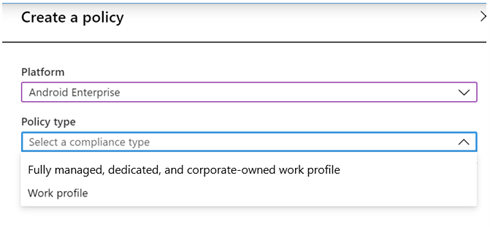
The compliance settings and Conditional Access capabilities that are available for fully managed and dedicated devices will also apply to corporate-owned devices with a work profile. IT administrators should select “Android Enterprise” as the platform and “Fully managed, dedicated, and corporate-owned work profile” as the policy type.
App Management
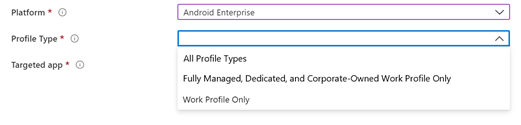
IT administrators can deploy apps and utilize app configuration and app protection policies for corporate-owned devices with a work profile. IT administrators should select “Android Enterprise” as the platform and “Fully Managed, Dedicated, and Corporate-Owned Work Profile” as the profile type.
Device Actions
Wipe device (factory reset), lock device, and reset work profile passcode are available for corporate-owned devices with a work profile.
What new capabilities will be added?
We still plan to add a few new capabilities to the corporate-owned devices with a work profile in the coming months. This includes:
- Single sign-on during end user enrollment flow
- Separate device filtering for corporate-owned work profile, fully managed, and dedicated devices
- Block and allow apps in the personal profile
Get Started
If you have IT administrator credentials for your org, you can start enrolling devices here in the Microsoft Endpoint Manager admin center. Review the Product Documentation for instructions. There are known issues around Wi-Fi reporting documented here: Troubleshoot and review Wi-Fi device profile logs – Intune | Microsoft Docs
Customer Support
The available features are fully supported through our Microsoft Endpoint Manager support channels.
How Can You Reach Us?
Keep us posted on your experience with Android Enterprise corporate-owned devices with a work profile through comments on this blog post, through Twitter (@IntuneSuppTeam), and request any new features on UserVoice.
Android Enterprises Resources
For information about the new privacy protections on company-owned Android devices, refer to Google’s blog post.
Previous Blogs Posts
Microsoft Documentation
by Contributed | Jun 23, 2021 | Technology
This article is contributed. See the original author and article here.
With all of us figuring out how to do things remotely, this past year was not easy. But you made it—congratulations!
As many of you ease into summer break, we’re excited to share some new features coming up, to help you find everything you need for your school, faster and easier.
Here’s a sneak peek at what’s coming soon as part of the back-to-school offering. Our goal is to help make managing school work, assignments, and tasks as easy as searching the web—for you and your students.
Look up your assignments and classes
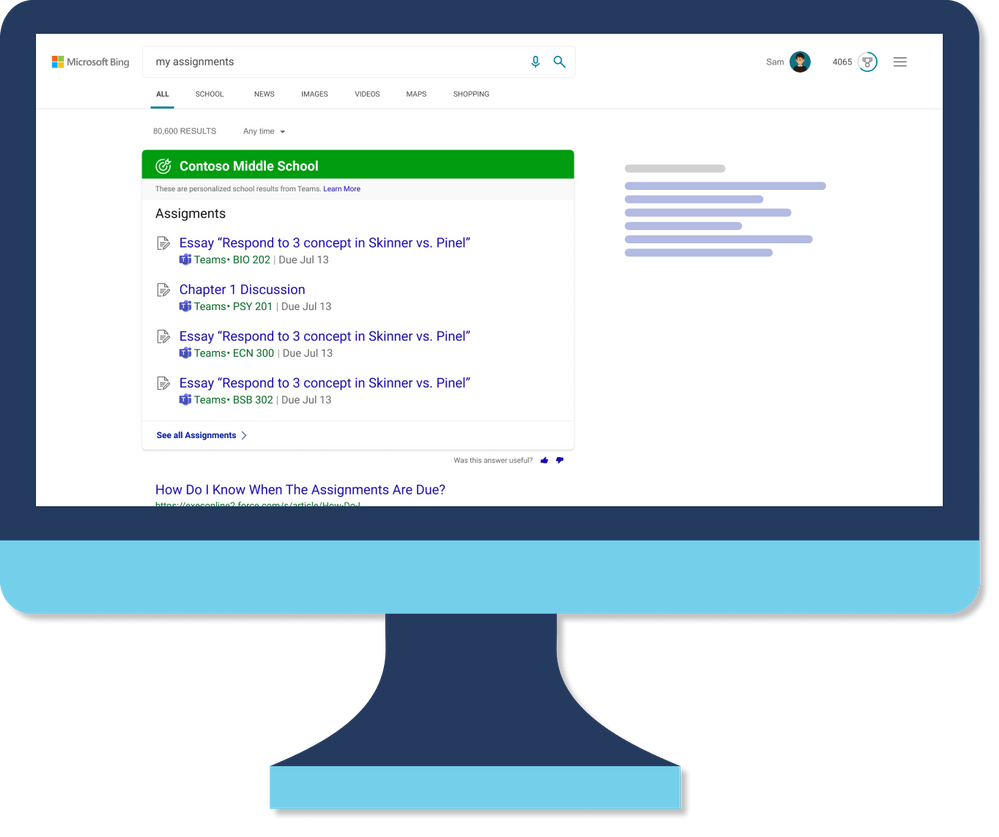
On Bing, you will be able to search and find your school specific information, like your classes and assignments from Teams, and much more.
Classes
See your upcoming classes and join them easily with Microsoft Teams.
Assignments
Students can find out which homework assignment is due next and start working on it with just a click.
Bookmarks
Find answers to common questions about your school and links to popular resources and tools.
People
See your profile, connect with other teachers, and more.
Pick up where you left off
On Bing, you will be able to look up and find files, conversations, site you access often easily, saving a lot of time having to location these.
Files
Get quick access to your documents and files, as well as files others have shared with you. To keep your school’s info private and secure, you can only find files you have access to.
Conversations
Read messages sent to you in private chats and see what other teachers and students have said in public conversations.
Sites
Find SharePoint sites and other school pages you have access to.
Get info and answers faster
Here are a few other things you can do on Bing to improve yours and your students productivity.
Acronyms
Look up definitions for acronyms and abbreviations used at your school.
Groups
See groups you and others are members of and learn more about them.
In addition to these, we understand your student’s privacy and safety is very important to you. We’ll be sharing more information soon about the new privacy and safety features as well as more details about all the new and upcoming features, so please stay tuned. Until then, whether you’re on a school break or in the classroom, stay safe and have a great time!
by Contributed | Jun 23, 2021 | Technology
This article is contributed. See the original author and article here.
This month, we’re releasing new productivity and security capabilities within Microsoft Endpoint Manager. You can view the complete list of What’s New in the 2106 (June) release for details. The three capabilities I highlight this month improve the experience for users and provide more flexibility and management options for organizations that support Android deployments. As usual, I appreciate your feedback. Comment on this post, connect with me on LinkedIn, or tag me @RamyaChitrakar on Twitter.
Improving security and productivity without compromising privacy on corporate-owned Android devices
Many IT organizations allow employees to use corporate-owned devices for some personal tasks to improve productivity so they won’t have to switch between devices. Because of this, organizations must make sure corporate devices are secure and managed while employees want to ensure their personal data and information remains private.
Enrollment with Android Enterprise corporate-owned devices with a work profile enables separation between corporate and personal applications, data, and settings. This month, we’re announcing general availability for management of Android Enterprise corporate-owned devices with a work profile in Endpoint Manager.
While many customers provided feedback on managing corporate-owned work profile devices during our public preview, several asked how to add this option to their portfolio in Endpoint Manager. Follow these steps to get started:
- Assess the Android devices in your environment. Are these devices mostly personally owned (BYOD) or company owned? Any task-specific devices? Review what you have today and foresee the needs of your organization.
- Review your security strategy. With Endpoint Manager, you can secure and manage all your endpoints, managed or unmanaged, corporate, or BYOD. You can protect work data with or without device enrollment. For example, your security strategy for kiosks in a public space will likely be different from that of an information worker in a corporate office.
- Evaluate the device enrollment strategy for each Android platform. There’s a great guide in docs on detailed manageability options – this just highlights the management options.
- BYOD: Personally owned devices with an Android Enterprise work profile.
- COBO: Corporate Owned, Business-use Only – Android Enterprise Fully managed device – Company owned devices fully managed and configured for business use only.
- COPE: Corp-Owned, Personally-Enabled – Enable corporate-owned devices with a work profile; this is what we’ve announced general availability for this month.
- COSU: Corp Owned, Single Use – Android Enterprise dedicated device – Corporate owned devices, managed and configured for a single, dedicated purpose such as a kiosk.
- DA: Device Administrator – Google has reduced support for the APIs on this platform; this type of management will be best suited for areas where Google services are not available or where the device type supports Device Administrator and not Android Enterprise.
- Provided you determine Android Enterprise corporate-owned work profile has a role in your environment, set policies to meet your organizational compliance requirements, such as assign certificates, or configure Wi-Fi or VPN. Keep in mind if you want to move to this device enrollment strategy, say from an Android Enterprise fully managed device, you’ll need to factory reset the devices.
- Deploy apps and utilize app configuration and app protection policies. You can configure these specifically for each platform.
The following screenshots show some of the screens in the enrollment workflow for Android Enterprise corporate-owned devices with a work profile – this is where we demonstrate the separation of work from personal apps.
Simplifying mobile security and preventing security breaches
The need to prevent security breaches within an organization is a priority for many of our customers as employees access work data from all their devices, and these days, from virtually anywhere. Organizations need to secure not only the data at rest and in transit but also the devices themselves. This month, the client app that integrates Microsoft Tunnel into Microsoft Defender for Endpoint moved from public preview to general availability on Android.
What is Microsoft Defender for Endpoint with Tunnel? It’s a secure, VPN connection for managed devices. Employees can download the Defender for Endpoint app on their Android mobile device to get a more holistic mobile threat defense solution that enables secure and productive remote work and is fully configurable from Endpoint Manager.
How do you get started? Here’s a very brief but prescriptive approach.
- Evaluate your strategy as it relates to VPN and endpoint security. Are you already using a VPN provider? If not, what are your organization’s specific VPN needs? Consider your requirements and validate Defender for Endpoint meets those needs with Microsoft Tunnel. The capabilities built into the new client app were based on customer feedback so let me know if there’s a capability missing.
- Assess your networking architecture and potential security weaknesses as it relates to corporate data access from Android devices. Do you want to allow data access through a more secure connection?
- Confirm if you are already using Defender for Endpoint and Endpoint Manager. Are your Android devices enrolled? If so, move forward with implementing the Microsoft Tunnel Gateway by following the documentation here.
- Once implemented, manage Microsoft Tunnel and Defender through Endpoint Manager just as you manage your other policies. Users just have one app to download from the Google Play store, which improves productivity.
Here’s a video of the user experience:
If you would like a bit more of the engineering backstory, I provided additional insight on our One Microsoft Approach Tunnel and Defender for Endpoint out on LinkedIn.
Making it easier to apply settings on different device types with filters
Filters let you maximize your current asset investments while protecting data on personal, company-owned, and shared devices. The settings catalog makes it easier to customize, set, and manage device and user policy settings. This month – we combined the two! Now, you can have a settings profile and then use filters when assigning it!
In addition, this month we have also deepened our investment in both filters and settings catalog by adding support for the Enrollment Profile Name property in filters for Android Enterprise. Use filters to target devices based on different properties, such as device name and manufacturer.
Last month, I shared what filters and settings catalog enables you to achieve. This month, I’d like to share more about our motivation to integrate these capabilities. Here’s what one of our customers specifically requested – just two examples of why we did this integration:
- Use filters in compliance policies, if for example, you have different compliance policies for Windows HoloLens devices than you do for Windows desktop endpoints.
- Use applicability rules in the settings catalog, in the event you have different configuration profiles for Windows HoloLens devices than you do for Windows desktop endpoints.
We keep our customers’ needs top of mind and invest in areas that improve the user experience and simplify IT administration. Questions? Feedback? Comment on this post, connect with me on LinkedIn, or tag me @RamyaChitrakar on Twitter.
![[Amplifying Black Voices] Over Time, a Journey Into Tech](https://www.drware.com/wp-content/uploads/2021/06/fb_image-172-737x675.jpeg)
by Contributed | Jun 23, 2021 | Technology
This article is contributed. See the original author and article here.
This blog was written by Microsoft Product Marketing Manager, Joshua West as part of the Amplifying Black Voices blog series. Joshua takes us through his career journey to Microsoft.
I used to think my journey into technology started on a late-night while completing a homework assignment for my MBA coursework. Or at least that’s the story I told myself or to others. It would go something like this.
 Late night study sessions were common during the first semester
It was early September in Rochester, NY, a time when the late summer breeze coming over Lake Ontario made you forget the crisp cold air and first snowfall were waiting right around the corner for you like a freight train coming around the bend.
I flipped open my Surface laptop and the bright backlight illuminated my already dim bedroom. I started on the assigned business case that we had to read, but the split screen quickly diverted my already short attention span to an article in The Wall Street Journal. The article spoke about how MBA graduates were increasingly moving to post graduation careers in technology rather than traditional paths in finance and consulting. The sector was looking to hire more graduates and offered competitive compensation as well. I was curious so I said, “why not me?”
 University of Rochester’s River Campus in Fall 2019
But that’s not where this story begins. It starts on a cold November weekend as the last of the fall foliage whittled away leaving bare trees and piles of leaves awaiting to be picked up by the city sanitation department. The dogs’ ears perked up as the familiar sound of the doorbell caused a flurry of rampant barking as he rushed to the door to investigate our visitor. My dad opened the door to the delivery driver who dropped off a large box with the words “fragile” on top. We opened the box and carefully lifted out a Windows 98 Gateway 2000 PC. My eyes instantly lit up as I stared at the computer. My mom came over and explained how she had looked everywhere for the right computer to order and that it was finally time for our family to have one after her job introduced computers to her workplace two years earlier. We immediately set the machine up and watched the green pasture come to life on the desktop.
That computer became the foundation for learning to type with Mavis Beacon, book reports, photo editors, train simulators, tying up the phone lines with dial-up internet, and so much more. It represented the first step into a technology that would change my life as I knew it. I suppose you could say the rest is history.
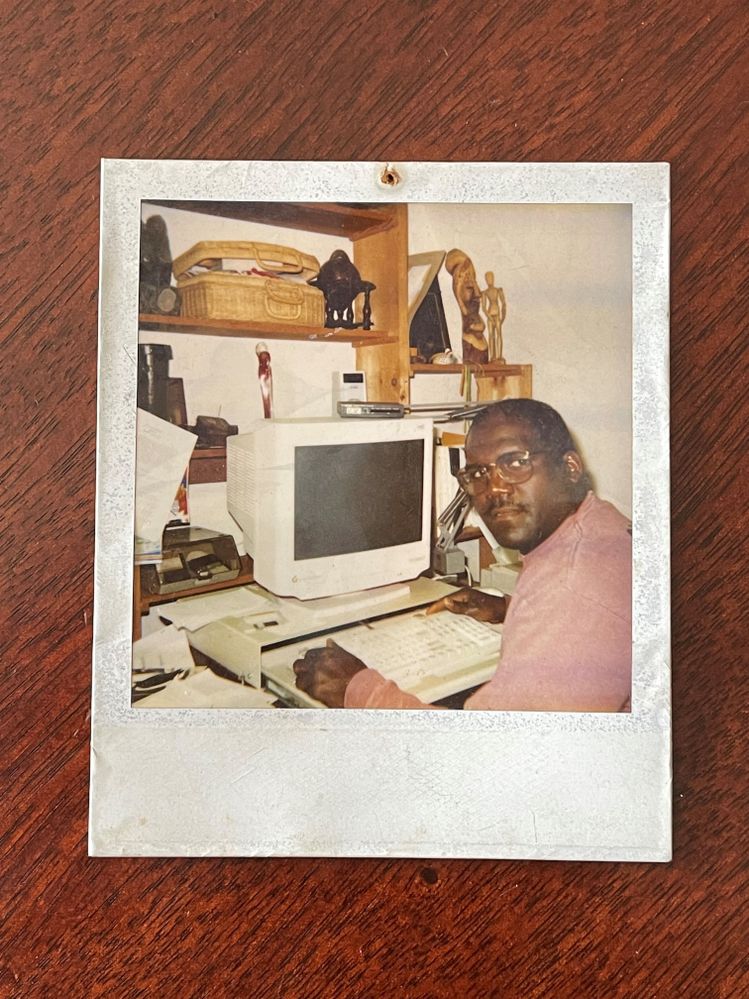 My dad in front of our first computer, a Windows Gateway 2000
Two decades later, I found myself as a Product Marketing Manager MBA summer 2019 intern with the same company that made it its mission to put a PC in every home. What I found was an organization that was truly working to put its culture into practice and was seemingly committed to advancing diversity and inclusion to make all voices heard and welcome.
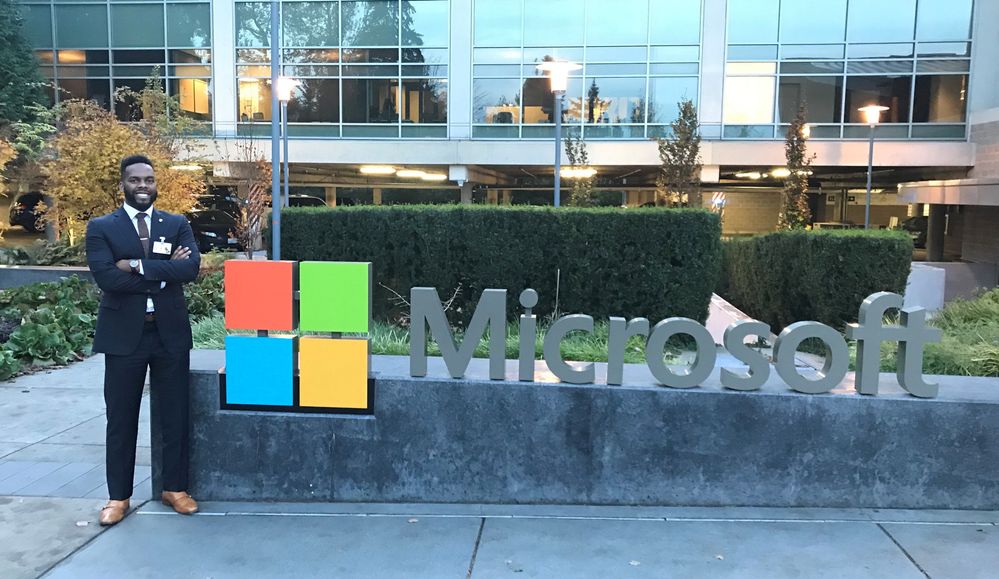 With MBA final round internship interviews complete, I could finally take some photos
For me, that truth manifested through an opportunity to co-lead a team discussion around Bryan Stevenson’s book, “Just Mercy” and share perspectives of my personal experience of growing up Black in America. It was a moment of open vulnerability for the team that gave everyone the opportunity to share how their unique personal experiences growing up in America contributed to their beliefs or misbeliefs about others.
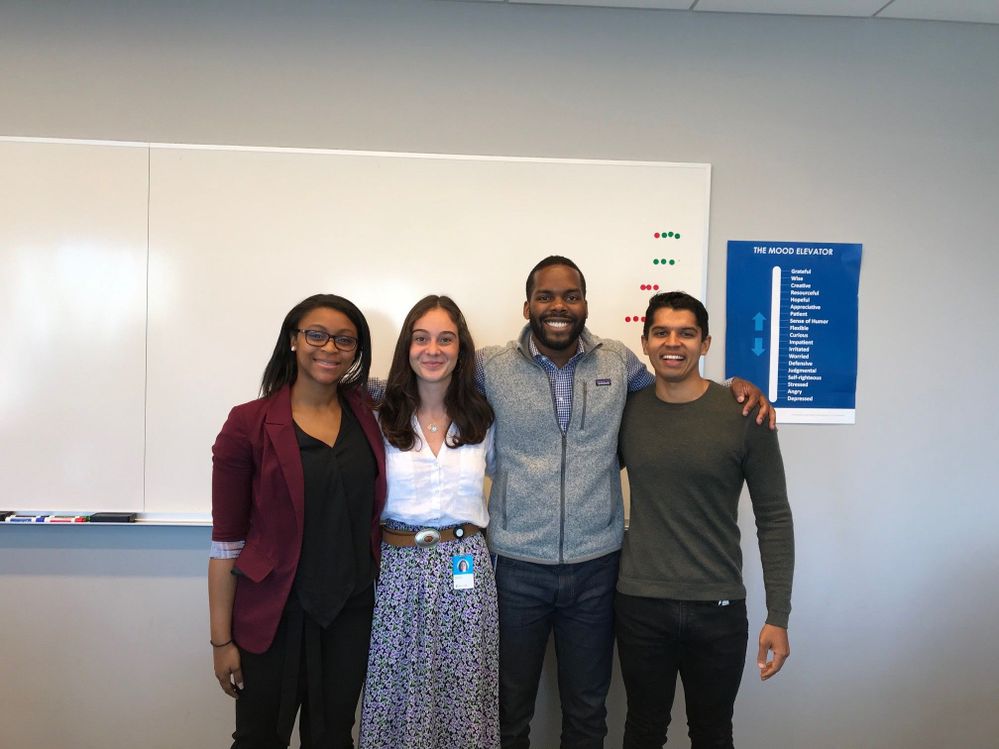 Final presentations for 2019 M&O Summer interns
That journey has continued into my full-time experience, having the opportunity to work with two incredible teammates to lead our US Business Applications team through creating a culture of daring leaders who lead with vulnerability and courage through the work of Brene Browns book, “Dare to Lead.”
But when I think about my journey, I must note that it wasn’t always easy. Starting any new job is difficult but starting a new position remotely during the apex of a global pandemic with the responsibility for marketing a product to an industry I had no prior experience working in, brought with it an entirely separate set of challenges. I struggled with imposter syndrome, wondering if I was truly the person for the role. I doubted that I would get up to speed and truly understand what it meant to be a product marketer and that I could be successful at my job. To put those notions to rest, I continued to talk to friends and mentors, realizing that the more I shared, I was not alone.
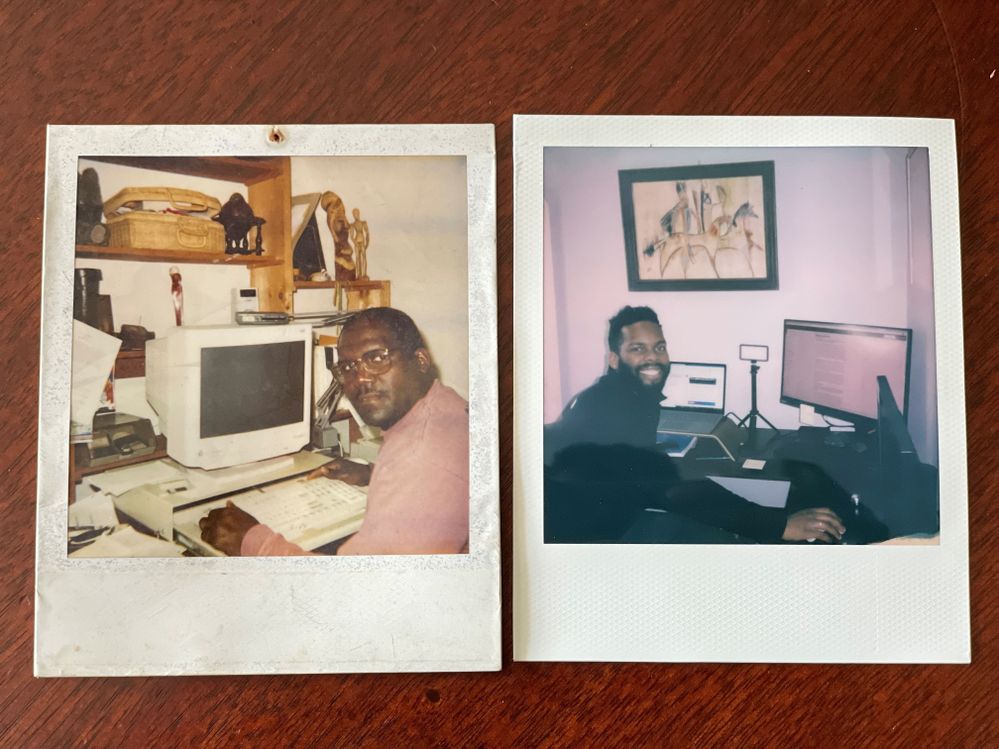 Two decades after our first computer, I find myself working for the company that started me on this journey
Within three months, that feeling was gone, and I realized that my job wasn’t to bring that knowledge of an insider, but that of an outsider to provide a new perspective on how we could grow the business. That has helped drive success in the beginning of my career journey with Microsoft. The ability to think differently, provide a new perspective, and incorporate my lived experience into my work are what gives me the ability to empower myself and those around me daily.
by Contributed | Jun 23, 2021 | Technology
This article is contributed. See the original author and article here.
Our guest blogger, Lex Thomas, writes about ASCENT cases that are escalated and require networking expertise, usually with tracing. He joins us today to hopefully save everyone some troubleshooting time. Edited with added context by Jarred Mooney, Customer Engineer.
Today I had an Issue that I want to share because I am hearing that it’s widespread. SQL Reporting Service (SSRS) “Fails to Connect”, but in this case the cause can take a while to track down.
In today’s security-minded environment companies are disabling support for TLS 1.0 and 1.1 and forcing TLS 1.2/1.3.
That’s a great thing.
But I have run into several situations where applications seem to break, and unless you understand the correlation between TLS restrictions being added and applications failing to connect to SQL Server Reporting Services, it’s easy to miss this one.
Setup:
I have added the registry keys to disable TLS, so if you do not have them, you do now.
Here is a decent Article on doing that.
Transport Layer Security (TLS) registry settings | Microsoft Docs
Now, back to our Reporting Services Issue…
SSRS Fails to Connect:
I got an Ascent Case and the issue appeared to be networking. Generally, when I hear the words “Can’t Connect,” I Immediately think Firewall or issue with a target service and I ask for a network trace.
That’s exactly what I asked for here.
Here is what I Look For, and why:
First, we have to Be able to Connect Via TCP. That means we have be able to do a 3 Way Hand shake: (Here is what that looks like):

The Client Sends a SYN request to the Endpoint ( ….S…. )
The Server Sends and ACK SYN (..A….S… )
And the Client Responds With an ACK (….A…..)
If that fails, we have one of 2 possibilities.
- A Firewall or
- The service we want to talk to is not running on the box at that IP address.
Second, we Need to Negotiate TLS. When that’s Successful, It looks like this:

In the Client Hello - We Send Information that the Server Needs to Understand the TYPE of TLS Request: TLS Version, Cipher Suites etc..
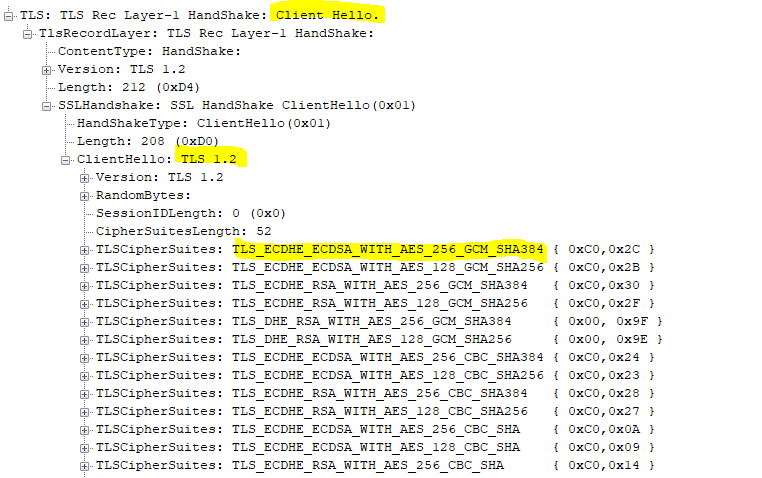
If the TCP Session succeeds, and the TLS Session Negotiation is successful, we connect!
Now the Strange Part:
When SSRS Fails in this specific case, you can see below that it opens the TCP session and immediately closes it.
Notice No TLS Handshake.
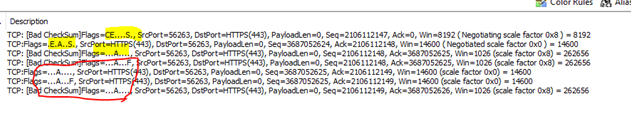
Why Does This Happen?
This happens because an application it trying to USE a TLS/SSL Version that is disabled.
In the above example, SSRS can connect to the target, TCP Works! But it immediately tears the TCP session down because the application is TRYING TO FORCE TLS 1.0.
TLS 1.0 is disabled on this box, so the Client Hello never gets sent and the application “SRSS” logs this as a Connection Failure.
It’s Important to understand that the TCP Connection worked but the TLS SESSION failed.
So again, why did this Happen?
It happened because in this case SRSS was using an older version of .NET Framework.
.NET Framework negotiates TLS/SSL independently of the O.S. by Default (at least this version), and I suspect anything written earlier than a couple years ago does the same.
So in this case:
- SRSS calls .NET and asks for a TLS Session
- .NET tries to use TLS 1.0 even though its Disabled at the system level.
- The TCP Session Is Established
- The Client Hello is Not Passed (because TLS 1.0 Is disabled)
- The TCP Session Gets Torn Down.
HOW TO FIX:
Note: While enabling TLS 1.0 would work here, it’s not the correct solution and should be avoided..)
Here is the Correct Solution:
Add SystemDefaultTLSVersions and Set that DWORD to 1. This instructs .NET to use the system–defined TLS Settings. The registry entries look similar to this (depending on your .NETFramework versions):
For 64-bit Apps:
[HKEY_LOCAL_MACHINESOFTWAREMicrosoft.NETFrameworkv4.0.30319] – “SystemDefaultTlsVersions”=dword:00000001
[HKEY_LOCAL_MACHINESOFTWAREMicrosoft.NETFrameworkv2.0.50727] – “SystemDefaultTlsVersions”=dword:00000001
For 32-bit Apps:
[HKEY_LOCAL_MACHINESOFTWAREWOW6432NodeMicrosoft.NETFrameworkv2.0.50727] – “SystemDefaultTlsVersions”=dword:00000001
[HKEY_LOCAL_MACHINESOFTWAREWOW6432NodeMicrosoft.NETFrameworkv4.0.30319] – “SystemDefaultTlsVersions”=dword:00000001
Making this change will allow .NET Apps to use the OS-Level TLS Settings.
There you have it!
by Contributed | Jun 23, 2021 | Technology
This article is contributed. See the original author and article here.
Starting today you no longer need to choose between Windows and Linux for your production IoT solutions. You can leverage the best of both platforms by running Linux workloads on Windows IoT devices using Azure IoT Edge for Linux on Windows, known as EFLOW, which is now generally available.
Enterprises have told us that they want to take advantage of the large number of Linux-based cloud-native containerized workloads on the edge, especially for AI/ML. Many of those same customers also value the unique benefits of Windows IoT, such as the ability to create interactive user interfaces with natural input, enterprise grade device management tools, world-class security, 10-years of long-term servicing from kernel to shell, and a worldwide update service. Yet deploying, managing, and maintaining both Linux and Windows IoT devices is time consuming and expensive. EFLOW allows existing Windows IoT customers to retain their existing devices, tooling, and application investments, while also running Linux containers on the same devices. Conversely, enterprises with existing Linux investments who are interested in the benefits of Windows IoT have a migration path to bring their Linux application code to Windows.
EFLOW is a lightweight Linux VM from Microsoft designed for production edge deployments. It is based on CBL-Mariner, a Linux distribution developed by Microsoft. It includes Azure IoT Edge to facilitate easy integration with the cloud and deployment of workloads from Azure IoT Hub to Windows IoT devices on the edge. It also supports access to commonly used hardware in IoT and embedded devices, including TPM, serial, and Nvidia T4 and Quadro/GeForce GPUs for AI/ML acceleration. We plan to extend support to Intel iGPUs for AI/ML use cases by the end of the year. Furthermore, EFLOW supports deployment of the VisionOnEdge (VoE) solution template, which illustrates how customers can create their own AI/ML solution, using third party or Azure technologies, such as Azure Video Analyzer. As a developer, you can use VoE as a starting point or you may choose to implement your own custom modules using the Linux distribution of your choice. You can develop the solution using the Windows Subsystem for Linux (WSL), which is based on the same CBL-Mariner Linux OS as EFLOW. Alternatively, the Azure Marketplace from Microsoft offers prebuilt 1P solutions, such as SQL Edge and OPC Publisher, as well as 3P modules from some of our Partners (eg. OpenVino) that can be deployed as-is. Either way, running Azure-connected Linux modules on Windows IoT becomes a seamless part of an intelligent edge solution.
Windows IoT is deployed in millions of devices around the world in numerous industries including manufacturing, retail, medical equipment, and public safety. Customers choose Windows to power their edge operations because it is an out-of-the-box platform to create locked-down, interactive user experiences with natural input, provides world class security, enterprise grade device management, and 10 years of servicing, allowing customers to build solutions that are designed to last. With EFLOW, customers will now be able to benefit from running Linux workloads on production Windows IoT deployments, leverage the advances in cloud-native development, and easily connect the solution to Azure.
EFLOW is available on all Hyper-V capable Windows 10 installations. This makes 100s of millions of existing devices EFLOW capable, which can easily be managed and connected through Azure.
Learn more about EFLOW by watching the IoT show:
Detailed documentation to get started is available at https://aka.ms/AzIoTEdgeforLinuxOnWindows
If you want to stay up to date and get notified of future updates to Azure IoT Edge for Linux on Windows, you can register using this link. Note that the information you will share will only be used by Microsoft for the purpose of keeping you informed about this product.
by Contributed | Jun 23, 2021 | Technology
This article is contributed. See the original author and article here.
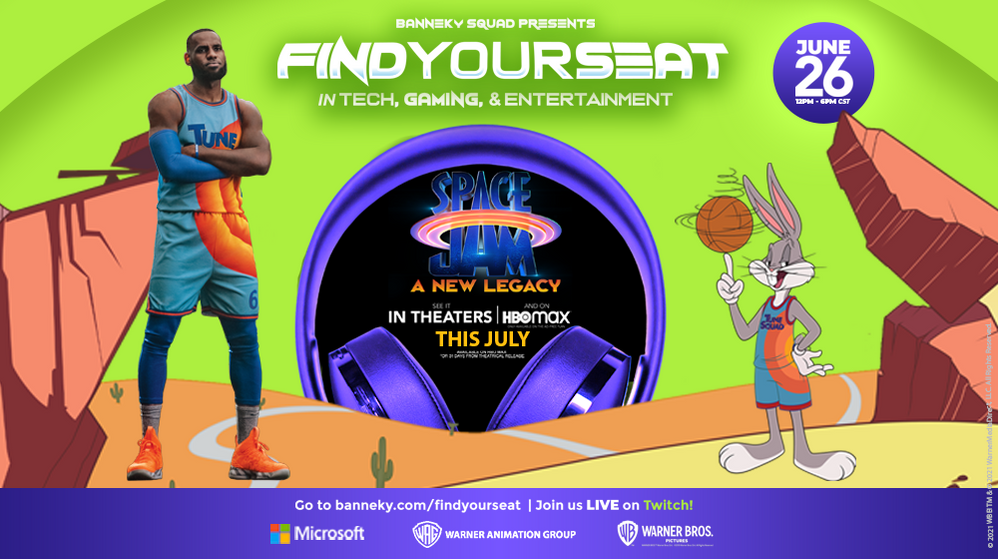
Join us on Saturday, June 26 from 10AM-4PM PT for a special virtual event in partnership with Warner Bros., Space Jam: A New Legacy, and Banneky. We’ll have athletes, gamers, game producers, and coders on hand to help you learn new coding skills and explore the intersection between sports, gaming, entertainment, and tech!
The event will feature Sceptic, a teen pro gamer, FaZe Clan, 27-time esports champions, Gaby Ponce, Leader of Team Xbox Latinx, and Microsoft Cloud Advocates Sana Ajani, Ornella Altunya, April Speight, and Chloe Condon in a mix of panels, live coding, and opportunities to learn something new!
You’ll have four topics to choose from – software engineering, sports, hardware engineering, and gaming – pick one, or attend them all! You can expect to hear about:
- Getting started with Visual Studio Code and the new Learn modules inspired by Space Jam: A New Legacy
- The future of careers in gaming
- Building gaming PCs and game consoles
- A day in the life of a content creator
- Diversity in careers in gaming and entertainment
On top of these awesome sessions, you’ll also have the chance to win FaZe Clan merchandise, Xbox controllers, and Surface books!
Check out https://banneky.com/FindYourSeat for more details.
A bit about our partners:
Warner Bros. is the home of Tune Squad and the upcoming film Space Jam: A New Legacy, but have you heard of Banneky? Banneky is an education tech platform for middle and high school students who love art, sports, and gaming. On their site, you’ll find fun math and science lessons and behind the scenes access to the brands and influencers you love.
A bit about the film:
Welcome to the Jam! Basketball champion and global icon LeBron James goes on an epic adventure alongside timeless Tune Bugs Bunny in the animated/live-action event “Space Jam: A New Legacy,” from director Malcom D. Lee and an innovative filmmaking team including Ryan Coogler and Maverick Carter.
This transformational journey is a manic mashup of two worlds that reveals just how far some parents will go to connect with their kids. When LeBron and his young son Dom are trapped in a digital space by a rogue A.I., LeBron must get them home safely by leading Bugs, Lola Bunny, and the whole gang of notoriously undisciplined Looney Tunes to victory over the A.I.’s digitized champions on the court: a powered-up roster of basketball starts as you’ve never seen them before. It’s Tunes versus Goons in the highest-stakes challenge of his life, that will redefine LeBron’s bond with his son and shine a light on the power of being yourself. The ready-for-action Tunes destroys convention, supercharge their unique talents and surprise even “Kin” James by playing the game their own way.
by Contributed | Jun 23, 2021 | Technology
This article is contributed. See the original author and article here.
Hello,
With the recent Executive Order on Improving the Nation’s Cybersecurity mandating Zero Trust Architecture and multifactor authentication, you may be wondering what those requirements are and how you can use the tools you have in Azure AD to meet the standards.
I am excited to share with you new guidance within our public documentation. This guidance is tailored to help you meet government and industry identity requirements using Azure Active Directory. Microsoft documents how we as a company meet many of these standards. While you can leverage our compliance, there are often “shared responsibilities” beyond what Microsoft accreditation provides. This new prescriptive guidance is designed to help you meet these identity requirements using Azure Active Directory.
As an example, let us consider meeting FedRAMP High controls IA-2 (1-4). To understand these requirements, one would have to start with FedRAMP Security Controls Baseline, dive into NIST SP 800-53 Rev. 4 which builds on NIST SP 800-63 Rev. 3 which in turn builds on NIST FIPS 140-2. You get the idea…lots of “light” reading. Alternatively, one could leverage the standards & compliance section which provides prescriptive guidance for meeting this control by:
(a) configuring Conditional Access (CA) policies to require MFA,
(b) configuring device management policies and CA policies such that sign-in to these managed devices would require MFA,
(c) viable MFA options meeting NIST Authentication Assurance Level (AAL) 3 as required by FedRAMP High and
(d) use of PIM to eliminate privileged local access without PIM activation.
I am happy to announce the first two content sets under the new standards & compliance area: Configure Azure Active Directory to meet NIST Authenticator Assurance Levels
We have started with NIST 800-63 – Digital Identity Guidelines which is a well understood framework for digital identities that many other standards and regulations use as a building block.
This guidance details how you can use Azure Active Directory to meet NIST Authentication Assurance Levels (AAL) and maps these AAL’s to all available authentication methods.
Configure Azure Active Directory to meet FedRAMP High Impact level
Many US federal agencies as well as cloud solution providers (CSPs) delivering cloud services to these agencies must meet requirements of the FedRAMP program. We anchored our guidance around the FedRAMP High baseline to cover the most stringent set of identify related controls. This approach allows customers who need to adhere to lower FedRAMP baselines to use this guidance as well.
US Government agencies will soon be required to have fully adopted multifactor authentication. Check out our resources to Enable MFA in your organization to verify explicitly as part of your Zero Trust approach.
We would love to hear more from all of you on what standards, regulations, or other compliance frameworks with identity requirements you would like to meet with Azure Active Directory. We will continue to review standards, regulations, or other compliance frameworks and where appropriate, produce guidance to help our customers meet their identity requirements using Azure Active Directory.
Learn more about Microsoft identity:


Recent Comments