This article is contributed. See the original author and article here.
Welcome back to Reconnect, the biweekly series that catches up with former MVPs and their current activities.
This week we are thrilled to be joined by none other than 10-time MVP titleholder Jonathan Kehayias! Based in Tampa, Florida, Jonathan counts more than 10 years of experience in database design, development, administration, virtualization, performance tuning, disaster recovery and consolidation.
Currently, Jonathan is employed as a Principal Consultant and Trainer for SQLskills, one of the best-known and most respected SQL Server training and consulting companies in the world.
Jonathan is a performance tuning expert for both SQL Server and hardware, and has architected complex systems as a developer and business analyst. He also has extensive development (T-SQL, C#, and ASP.Net), hardware and virtualization design expertise, Windows expertise, Active Directory experience, and IIS administration experience.
Jonathan is also keen to share this knowledge with the local community, with current projects including speaking at public events local to Tampa and taking part in the Tampa SQL Users Group.
Outside of tech, Jonathan is a Drill Sergeant in the US Army Reserves and is married with two young children. On most nights he can be found at the playground, in a swimming pool, or at the beach with his kids.
For more on Jonathan, check out his blog and Twitter @sqlpoolboy
This article is contributed. See the original author and article here.
If you’re a functional consultant or data analyst, or even a developer or solution architect, this is a very useful certification to have on your résumé and to help you earn the recognition that you deserve. In this post in our series on discovering your career path with Microsoft Power Platform certifications, we explore the benefits of achieving a Microsoft Certified: Power Platform Functional Consultant Associate certification. Use this Microsoft Certification to validate the applicable skills you’ve worked so hard to hone—whether you’re just starting out, looking to advance, or wanting to change to a new, in-demand career. And we point out other certifications you can earn, depending on your career path.
If you’re hoping that certification can help you advance your career, you’re not alone. In fact, 61 percent of respondents in the Nigel Frank Microsoft Dynamics Salary Survey believe that certifications give you an edge in the job market. In addition, a functional consultant certification from Microsoft is recognized worldwide, so you can let employers everywhere know that you have the skills they need.
The functional consultant role and certification
What does your workday look like? A typical day for a functional consultant might include gathering requirements for a Power Apps project and collaborating with solution architects, designers, and business stakeholders to understand and flesh out those requirements. As the project moves forward, functional consultants could be analyzing data, automating processes, creating and configuring application enhancements, building custom user experiences, creating virtual agents, or designing seamless integrations with third-party applications. Functional consultants iterate and incorporate feedback from the team to improve the product and add extensions as needed.
Does this sound like you? To qualify for this certification, you’re likely to be a functional consultant, a data analyst, a developer looking to hone your consulting and configuration skills, a solution architect, or an IT professional with knowledge and experience configuring Microsoft Power Platform. You can leverage your Dynamics 365 model-driven applications skills and data modeling principles. This certification lets the world know that you’re considered qualified to build and implement solutions that use Power Apps, Power BI, and Power Virtual Agents.
As a functional consultant, you can use this certification to market yourself more effectively for projects and other engagements. This certification lets organizations know that you can build solutions requiring no code or low code, which would normally require developer expertise.
Benefits of certification
In today’s rapidly evolving digital landscape, certifications can demonstrate that you’re technically agile. It’s important to have a holistic understanding of several domains. In Benefits of Role-Based Certifications,[1] IDC reports that skilled IT professionals typically have multiple roles and that certifications based on their roles better prepare them for real-world responsibilities. The research demonstrates that professionals with a role-based certification perform on average 26 percent better than their colleagues without certifications.
The Global Knowledge 2020 IT Skills and Salary Report[2] notes that 87 percent of IT professionals have at least one certification, and nearly 40 percent are pursuing another one. To remain competitive and prove to employers that your skills are up to date, certification makes a lot of sense.
In addition to highlighting your specific technical skills, certification also indicates that you’re willing to put forth effort to learn new technologies to get ahead and stay ahead. Employers are building tech-intensive organizations where people have not only the necessary skills but also a willingness to embrace a culture of learning.
Other certifications for you
As you can see, there are many paths to the functional consultant certification. Depending on your path, you might consider several different Microsoft Certifications. Many IT professionals hold multiple certifications—they indicate a breadth of knowledge and skills.
If you haven’t gotten the fundamentals certification yet, consider adding it to your portfolio. The Microsoft Certified: Power Platform Fundamentals certification proves your basic skills across Microsoft Power Platform. It highlights your familiarity with computer technology, data analytics, cloud computing, and the internet.
People who become functional consultants are flexible technical experts who love creating, building, and extending applications, and they understand the value of collaborative work between business and technology. As you’ve seen, there is more than one path to this role. However, if you aren’t far enough along to be ready for certification, there are several things you can do to prepare. Here are some suggestions:
Work on a Microsoft Power Platform or Dynamics 365 model-driven app implementation project.
Shadow a functional consultant or a solution architect who works with Power Apps.
Build a basic productivity app using Power Apps.
Create a basic productivity flow using Power Automate.
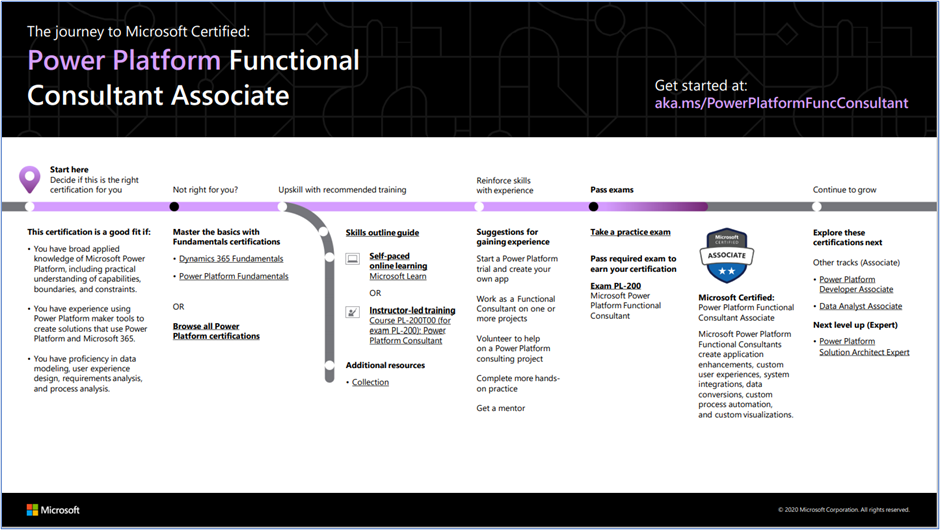
To plan out your path, follow the sequence on the Microsoft Power Platform Functional Consultant Associate journey map. Start by deciding whether this certification is a good fit for you.
Next, choose the training you’ll need to be prepared. To understand what you’ll be measured on when taking the exam, review the Exam PL-200 skills outline guide on the exam page. Then sign up for the training that fits your learning style and experience:
On the certification page, choose curated learning paths and modules for Microsoft Power Platform on Microsoft Learn. Explore hours of free, self-paced online learning to help you get ready.
After you pass the exam and earn your certification, you can continue to broaden your technical expertise by taking one of the other certifications described in this blog post or by exploring other certification offerings. Consider our intermediate and advanced certifications when you achieve the next milestones on your career journey. Map out the possibilities with Microsoft Power Platform and Dynamics 365 certification paths.
Where’s my community?
Join a community to network with other functional consultants, share ideas, and ask questions. You can also find news about Microsoft events and learning opportunities.
Celebrate with the world: Post your badge on LinkedIn
When you earn a certification or learn a new skill, it’s an accomplishment worth celebrating with your network. It often takes less than a minute to update your LinkedIn profile and share your achievements, highlight your skills, and help boost your career potential. Here’s how:
If you’ve earned a certification already, follow the instructions in the congratulations email you received. Or find your badge on your Certification Dashboard, and follow the instructions there to share it. (You’ll be transferred to the Acclaim website.)
To add specific skills, visit your LinkedIn profile and update the Skills and endorsements section. Tip: We recommend that you choose skills listed in the skills outline guide for your certification.
Plus, effective June 2021, a certification is valid for one year from the date you earned it. This shift aligns with the rapid evolution of cloud technology and skills. Get more information in our blog post Is your certification expiring soon? Renew it for free today!
Ready to discover your career path?
You’re a skilled technical professional. Are you ready to explore where Microsoft Certification can take you? See how a functional consultant certification can highlight your skills, as you innovate, turn good ideas into great solutions, and take the next steps on your Microsoft Power Platform career path.
There are 16 million developers in the world today. Roughly half of those, 8 million are web developers. Web development is therefore a good skill to have as you are looking to land that first job and build a career in tech. But where do you begin to learn all that? With this path
It covers everything from HTML, CSS, JavaScript to Accessibility.
Intro to programming
What even is programming? Well, it’s a way to instruct your machine to do things for you. By running statements, you can things like creating a web a page, a simple script or why not a computer game. The possibilities are endless. You do need some kind of text editor to type it all in, we provide that to in this first module.
Not everyone has perfect eyesight or see the colors you do or can even see at all. As a developer you need to realize that when you build programs, you should include everyone. There are specific tags and approaches you can use to make your app usable by anyone, regardless of disability. Be inclusive and build better apps.
One of the most popular programming languages right now is JavaScript. JavaScript can be used in the browser to create an interactive experience, but it can also be used on the backend to create APIs, application that can talk to other services and even databases. Learn how to think in programming by being introduced to the concept of variables and data types.
When you start out, you might have all your code statements in one file. But there is a way to organize your code so it can be made more readable but also reusable. What you can do is to create named areas, functions, which can be called whenever you need them to carry out a task for you.
Your code can execute differently depending on the values of different variables or some other condition. Having that flexibility makes your application useful in many different scenarios. Learn about IF, ELSE and much more.
Sometimes your data takes on the form of a list. Imagining a recipe, or an ice cream menu or why not a receipt of things. Lists make it possible to store more than one thing and there are constructs that make it possible to operate on lists and get what you need from them such as their sum, or maybe the highest value and so on.
This article is contributed. See the original author and article here.
It is our very great pleasure to announce the release of a new, free, MIT-licensed open-source curriculum all about classic Machine Learning:Machine Learning for Beginners. Brought to you by a team of Azure Cloud Advocates and Program Managers, we hope to empower students of all ages to learn the basics of ML. Presuming no knowledge of ML, we offer a free 12-week, 24-lesson curriculum, plus a bonus ‘postscript’ lesson to help you dive into this amazing field.
Travel around the world in this themed semester-long self-study course as we look at ML topics through the lens of world cultures.
Our curricula are structured with a modified Project-Based pedagogy and include:
a pre-lesson warmup quiz
a written lesson
video
knowledge checks
a project to build
infographics, sketchnotes, and visuals
a challenge
an assignment
a post-lesson quiz
a ‘PAT’ (see below)
opportunities to deepen your knowledge on Microsoft Learn
Meet the team!
What will you learn?
The lessons are grouped so that you can deep-dive into various important aspects of classic ML. We start with anintroductionto ML concepts, moving to itshistory, concepts offairnessin machine learning, and discussing the tools andtechniquesof the trade. We then move on toRegression,Classification,Clustering,Natural Language Processing,Time Series Forecasting,Reinforcement Learning, with two‘applied’lessons demonstrating how to use your models within web apps for inference. We end with a ‘postscript’ lesson listing“real-world” applicationsof ML, showing how these techniques are used “in the wild”.
To make it easy for new learners to get started with ML, we built the content so that it can be used offline and so that the exercises can be completed using .ipynb notebooks within Visual Studio Code. Grab your datasets and let’s go!
This curriculum is all about “classic Machine Learning”, so we tackle these basic concepts for the most part usingScikit-learn, a library that helps demystify and explain these concepts. We don’t discuss deep learning or neural networks in this ML curriculum, but please stay tuned as we release our AI for Beginners curriculum this Fall!
Travel with us to discover North American pumpkin market pricing (Regression), Pan-Asian cuisines (Classification), Nigerian musical tastes (Clustering), European Hotel Reviews (NLP), World electricity usage (Time Series) and the Russian story about Peter and the Wolf (Reinforcement Learning).
How to use this curriculum: meet PAT
This is a self-study course, but it works well in groups so consider finding study buddies and learning together. Warm up with a pre-lesson low-stakes quiz and work through the lessons and assignments together or solo. Test your knowledge with the post-lesson quiz.
New for this curriculum is the use ofProgress Assessment Toolsin the Discussion Board area. Once done with a lesson group, visit the Discussion Board and copy the template to a new Discussion using the “quote reply”. Fill in your learnings in the self-reflection box and respond to other students in the repo. Let’s learn together!
We are also open to PRs and Issue raising, following our Code of Conduct and templating systems. We hope the community will chip in with translations of the lessons, quizzes and assignments. Thank you for participating as we learn together.
A sneak peek
This curriculum is filled with a lot of art, created by our team. Take a look at this cool sketchnote created by@girlie_mac.
This article is contributed. See the original author and article here.
It is our very great pleasure to announce the release of a new, free, MIT-licensed open-source curriculum all about classic Machine Learning:Machine Learning for Beginners. Brought to you by a team of Azure Cloud Advocates and Program Managers, we hope to empower students of all ages to learn the basics of ML. Presuming no knowledge of ML, we offer a free 12-week, 24-lesson curriculum, plus a bonus ‘postscript’ lesson to help you dive into this amazing field.
Travel around the world in this themed semester-long self-study course as we look at ML topics through the lens of world cultures.
Our curricula are structured with a modified Project-Based pedagogy and include:
a pre-lesson warmup quiz
a written lesson
video
knowledge checks
a project to build
infographics, sketchnotes, and visuals
a challenge
an assignment
a post-lesson quiz
a ‘PAT’ (see below)
opportunities to deepen your knowledge on Microsoft Learn
Meet the team!
What will you learn?
The lessons are grouped so that you can deep-dive into various important aspects of classic ML. We start with anintroductionto ML concepts, moving to itshistory, concepts offairnessin machine learning, and discussing the tools andtechniquesof the trade. We then move on toRegression,Classification,Clustering,Natural Language Processing,Time Series Forecasting,Reinforcement Learning, with two‘applied’lessons demonstrating how to use your models within web apps for inference. We end with a ‘postscript’ lesson listing“real-world” applicationsof ML, showing how these techniques are used “in the wild”.
To make it easy for new learners to get started with ML, we built the content so that it can be used offline and so that the exercises can be completed using .ipynb notebooks within Visual Studio Code. Grab your datasets and let’s go!
This curriculum is all about “classic Machine Learning”, so we tackle these basic concepts for the most part usingScikit-learn, a library that helps demystify and explain these concepts. We don’t discuss deep learning or neural networks in this ML curriculum, but please stay tuned as we release our AI for Beginners curriculum this Fall!
Travel with us to discover North American pumpkin market pricing (Regression), Pan-Asian cuisines (Classification), Nigerian musical tastes (Clustering), European Hotel Reviews (NLP), World electricity usage (Time Series) and the Russian story about Peter and the Wolf (Reinforcement Learning).
How to use this curriculum: meet PAT
This is a self-study course, but it works well in groups so consider finding study buddies and learning together. Warm up with a pre-lesson low-stakes quiz and work through the lessons and assignments together or solo. Test your knowledge with the post-lesson quiz.
New for this curriculum is the use ofProgress Assessment Toolsin the Discussion Board area. Once done with a lesson group, visit the Discussion Board and copy the template to a new Discussion using the “quote reply”. Fill in your learnings in the self-reflection box and respond to other students in the repo. Let’s learn together!
We are also open to PRs and Issue raising, following our Code of Conduct and templating systems. We hope the community will chip in with translations of the lessons, quizzes and assignments. Thank you for participating as we learn together.
A sneak peek
This curriculum is filled with a lot of art, created by our team. Take a look at this cool sketchnote created by@girlie_mac.
This article is contributed. See the original author and article here.
It is our very great pleasure to announce the release of a new, free, MIT-licensed open-source curriculum all about classic Machine Learning:Machine Learning for Beginners. Brought to you by a team of Azure Cloud Advocates and Program Managers, we hope to empower students of all ages to learn the basics of ML. Presuming no knowledge of ML, we offer a free 12-week, 24-lesson curriculum, plus a bonus ‘postscript’ lesson to help you dive into this amazing field.
:globe_showing_americas: Travel around the world in this themed semester-long self-study course as we look at ML topics through the lens of world cultures. :globe_showing_americas:
Our curricula are structured with a modified Project-Based pedagogy and include:
a pre-lesson warmup quiz
a written lesson
video
knowledge checks
a project to build
infographics, sketchnotes, and visuals
a challenge
an assignment
a post-lesson quiz
a ‘PAT’ (see below)
opportunities to deepen your knowledge on Microsoft Learn
Meet the team!
What will you learn?
The lessons are grouped so that you can deep-dive into various important aspects of classic ML. We start with anintroductionto ML concepts, moving to itshistory, concepts offairnessin machine learning, and discussing the tools andtechniquesof the trade. We then move on toRegression,Classification,Clustering,Natural Language Processing,Time Series Forecasting,Reinforcement Learning, with two‘applied’lessons demonstrating how to use your models within web apps for inference. We end with a ‘postscript’ lesson listing“real-world” applicationsof ML, showing how these techniques are used “in the wild”.
To make it easy for new learners to get started with ML, we built the content so that it can be used offline and so that the exercises can be completed using .ipynb notebooks within Visual Studio Code. Grab your datasets and let’s go!
This curriculum is all about “classic Machine Learning”, so we tackle these basic concepts for the most part usingScikit-learn, a library that helps demystify and explain these concepts. We don’t discuss deep learning or neural networks in this ML curriculum, but please stay tuned as we release our AI for Beginners curriculum this Fall!
Travel with us to discover North American pumpkin market pricing (:jack_o_lantern: Regression), Pan-Asian cuisines (:steaming_bowl: Classification), Nigerian musical tastes (:musical_notes: Clustering), European Hotel Reviews (:hotel: NLP), World electricity usage (:high_voltage:️ Time Series) and the Russian story about Peter and the Wolf (:wolf_face: Reinforcement Learning).
How to use this curriculum: meet PAT
This is a self-study course, but it works well in groups so consider finding study buddies and learning together. Warm up with a pre-lesson low-stakes quiz and work through the lessons and assignments together or solo. Test your knowledge with the post-lesson quiz.
New for this curriculum is the use ofProgress Assessment Toolsin the Discussion Board area. Once done with a lesson group, visit the Discussion Board and copy the template to a new Discussion using the “quote reply”. Fill in your learnings in the self-reflection box and respond to other students in the repo. Let’s learn together!
We are also open to PRs and Issue raising, following our Code of Conduct and templating systems. We hope the community will chip in with translations of the lessons, quizzes and assignments. Thank you for participating as we learn together.
A sneak peek
This curriculum is filled with a lot of art, created by our team. Take a look at this cool sketchnote created by@girlie_mac.
This article was originally posted by the FTC. See the original article here.
COVID opened the door for scammers to double down on their worst practices, while preying on consumers during an unprecedented global pandemic. That includes some bad actors who have been taking advantage of online shoppers in search of hard-to-find items like face masks and other personal protective equipment (PPE).
Today, the Federal Trade Commission filed a complaint against one of those bad actors. The Commission alleged that Frank Romero (doing business as Trend Deploy) failed to deliver advertised PPE on time — if at all. What’s more, Romero didn’t tell customers about shipping delays, offer order cancellations, or give refunds. And even worse, although consumers thought Romero was selling them N95 masks, in reality Romero sent them cloth masks that did not have the protective qualities he promised. This case is part of the FTC’s continuing effort to address “online shopping” fraud that seeks to exploit high demand for PPE and other COVID-related products.
When you shop online, sellers are supposed to ship your order within the time stated in their ads, or within 30 days if the ads don’t give a time. If a seller can’t ship within the promised time, it has to give you a revised shipping date, with the chance to either cancel your order for a full refund or accept the new shipping date.
So before you shop online, especially from an unfamiliar retailer, remember these three things:
1.Check out the company or product. Search online for the name plus terms like “review,” “complaint,” or “scam.” See what other people say about it. Read the seller’s description of the product carefully. If the seller has name-brand goods at steeply discounted prices, they might be fakes.
2. Look at the terms of the sale. Make note of the total price, including taxes, shipping, and handling; the expected delivery date; and policies for refunds, including who pays for return shipping and if there is a restocking fee.
3. Pay by credit card. You’ll get protections under federal law, so you don’t have to pay for things you ordered but didn’t get.
Remember, if you see a scam, or want to report a problem about online shopping, tell the FTC at ReportFraud.ftc.gov.
Brought to you by Dr. Ware, Microsoft Office 365 Silver Partner, Charleston SC.
This article is contributed. See the original author and article here.
Welcome to the June edition of What’s new in Teams. This was another month where we released several features to make Teams even more useful for you. We also announced several new innovations coming later this year to empower people and organizations to succeed as we transition to hybrid work. Please check out this blog post by Jared Spataro, Corporate Vice President for Microsoft 365.
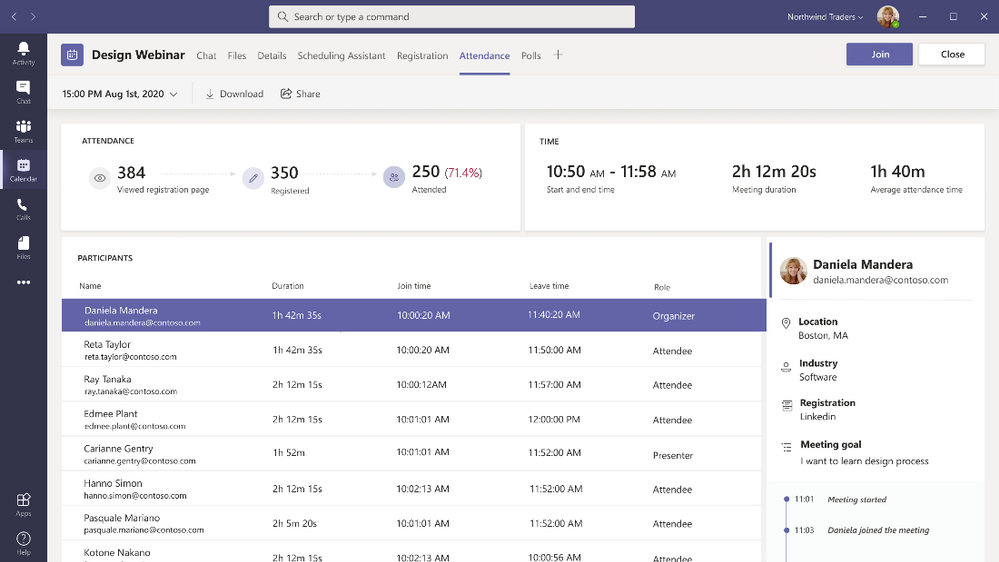
After finishing a meeting or webinar, organizers can view an attendance report that helps you understanding how many registered vs. attended, who attended the meeting, and whether they engaged for all or part of the meeting. This is now embedded directly within the Teams UI for your reporting and analytics needs. Click on the Attendance tab in your Meeting Details to find the attendee dashboard. Learn more.
Follow up with webinar participants via Dynamics 365 Marketing You are now able to follow up with webinar participants through the attendance tab after a webinar, if you as a webinar organizer have a Dynamics 365 Marketing license. From there, you can export your attendance data into Dynamics 365 Marketing, so you can create customer journeys and send personalized follow-up emails to your webinar attendees.
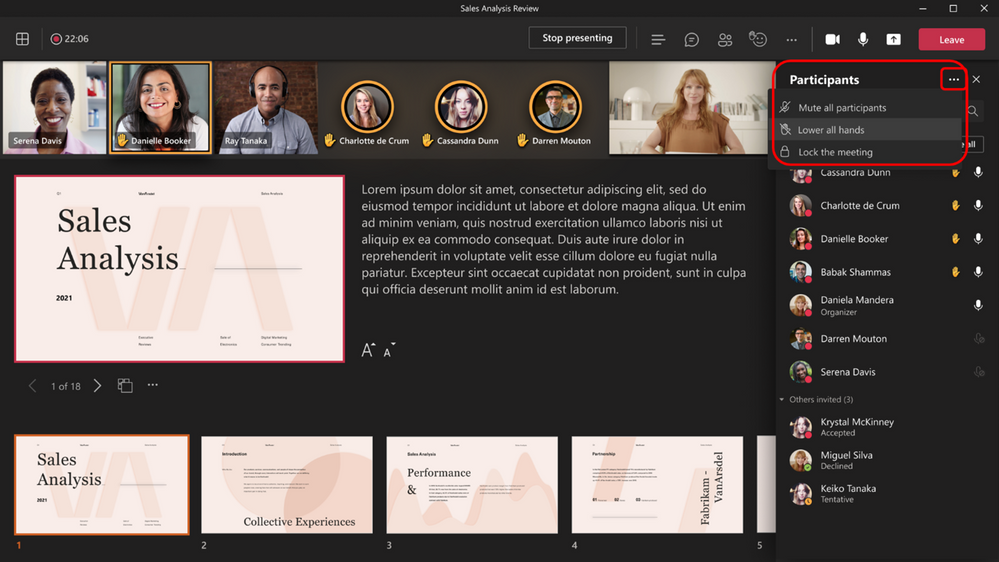
Lower all raised hands When at least one hand is raised, meeting organizers and presenters can now lower all raised hands with a single click. Simply navigate to the participant pane and click on the Lower all hands option. This helps quickly lower all hands when associated questions have been resolved to make way for new raised questions. Learn more.
Spotlighting multiple users in a meeting Organizers and presenters can now spotlight up to 7 participants simultaneously during meetings. Previously, while an attendee can pin multiple participants for their own private view, only one participant can be spotlighted for all attendees. Once a single participant has been spotlighted, simply click on the context menu of your additional participant(s) and select Add Spotlight. For meetings that have multiple speakers or presenters, this is great to focus all attendees’ view on those specific video feeds. Feature is available in both Desktop and Mobile. Learn more.
Chat bubbles Chats sent during a Teams meeting now surface on the screens of all meeting participants, making the chat more central to the conversation. You no longer need to manually open the chat window within a meeting to see what participants are typing. This feature is on by default. To turn off this feature, select Don’t show chat bubbles under more actions.
Inking and Laser Pointer in PowerPoint Live in Microsoft Teams Virtual laser pointer and ink annotations are now available in PowerPoint Live. Presenters can engage more with their audience by drawing attention or clarifying certain sections of the PowerPoint deck. Just as you would use a physical laser point in a room, PowerPoint Live allows you to effectively point at different places in the presentation so the audience can easily follow along what’s on the slide. Only the active “in control” presenter is able to see and make annotations via the annotation toolbar. Learn more.
Updated Large gallery view on Teams mobile When selecting Large gallery in meetings, we are introducing a mobile-optimized layout for Teams mobile users that allow you to swipe through all the participants in a meeting. With up to 10 participants per page on your screen, you can now see all participants clearly on your mobile device. This is available in iOS 13+ and Android OS 9+ or any version with more than 4GB RAM. All other devices continues to see the current Large gallery experience.
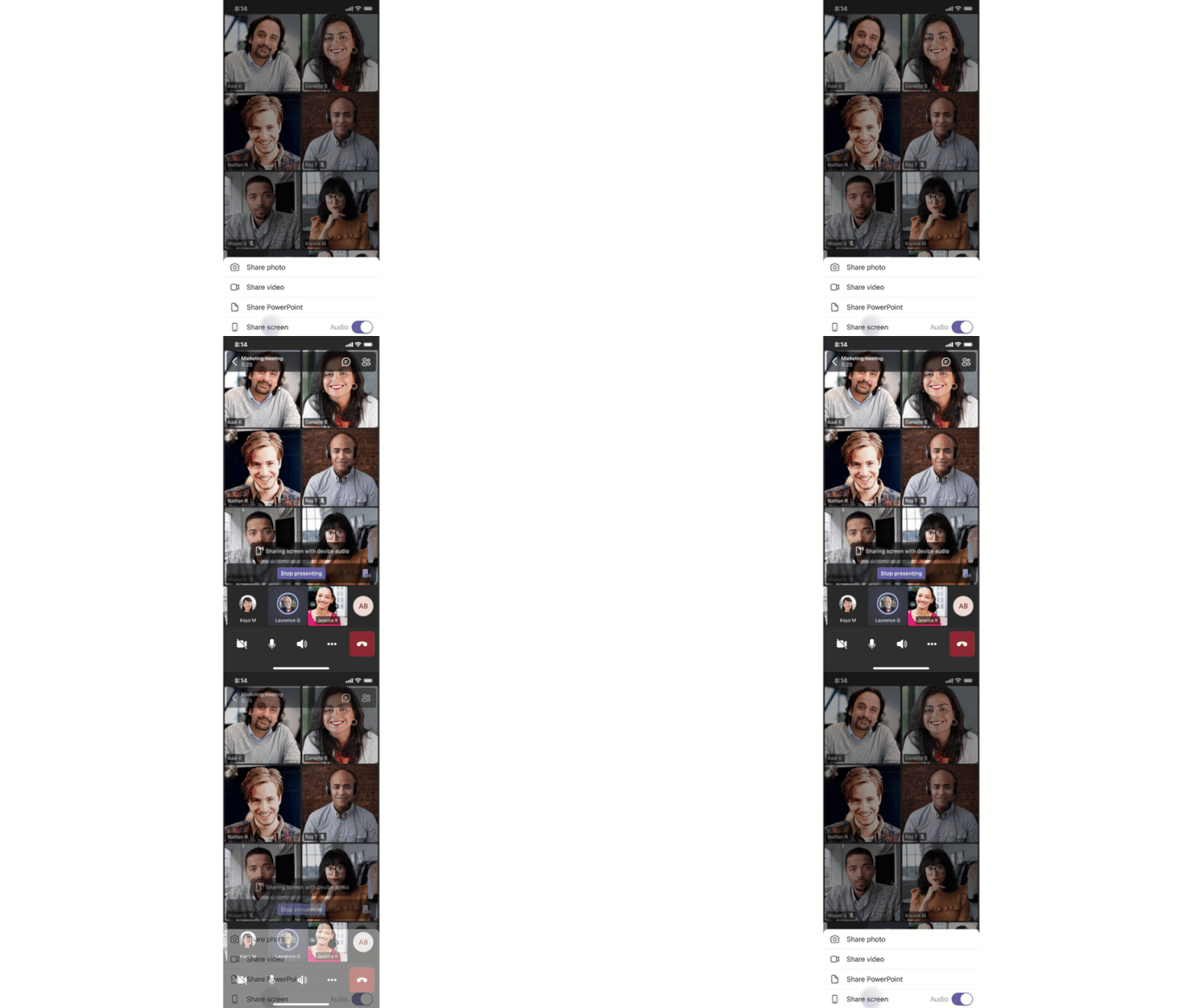
Include device audio when sharing on iOS and Android Now you can include audio when sharing on iOS and Android devices during a Teams meeting. This is great when sharing a video with voiceover and music. It allows everyone to watch simultaneously without echoes or sync issues. You can find this setting under More actions, Share screen with audio. It is available to devices with Android 10+ or iOS 13+.
Live Transcription with speaker attribution for additional licenses Live transcription allows you to follow and review conversations (in English-US) alongside the meeting video or audio in real time. Attendees who joined late, or missed the meeting, can easily catch up by reading what was discussed and searching the transcript by speaker. This feature was initially available to users with Office 365/Microsoft 365 E3/E5, Microsoft 365 Business Standard, and Microsoft 365 Business Premium licenses. We are now expanding this feature to users with Office 365 E1, Office 365 A1, Office 365/Microsoft 365 A3/A5, Microsoft 365 F1, Office 365/Microsoft 365 F3, and Microsoft 365 Business Basic licenses. Learn more.
Large Gallery for VDI The Large gallery feature is now available in Virtual Desktop Infrastructure (VDI). Now VDI users are able to expand their gallery, viewing up to 49 participants on the same screen during a Teams meeting.
Offer: Get Audio Conferencing for free Join Microsoft Teams meetings on the go with a global dial-in number or dial out to help others join a meeting with Audio Conferencing. Eligible customers purchasing via partners1 and web1 can take advantage of our free Audio Conferencing offer now extended through December 31, 2021. Learn more.
Offer: Microsoft 365 Business Voice promotion Business Voice is a cloud-based telephony solution built into Teams that combines essential telephony components into a single package. It is designed for businesses with up to 300 users and includes a phone system, audio conferencing and a domestic calling plan. Through December 31, 2021, customers can purchase Business Voice at a 25 percent discount for 12 months. Learn more.
Calling
1:1 PSTN Call Recording We have changed how 1:1 Call recording is enabled. By creating its own policy, Administrators can now delineate recording configurations between meetings and calling. Previously, 1:1 Call recording has been controlled by the CsTeamsMeetingPolicy / AllowCloudRecording attribute. Now, it is controlled by the CsTeamsCallingPolicy / allowCloudRecordingForCalls attribute. This feature is only available via PowerShell.
Devices
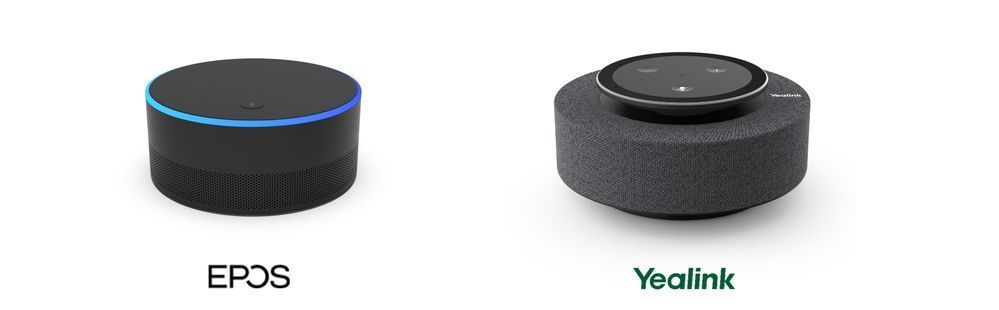
Intelligent speakers for Teams Rooms Intelligent speakers are designed for Teams Rooms and use Microsoft’s voice recognition technology to identify who is speaking and apply their name to the meeting transcript. This is great when you need to catch up on a meeting asynchronously and want to understand who said what during the meeting. The first two partners to launch intelligent speakers are EPOS and Yealink. Learn more about intelligent speakers for Teams Rooms and the speakers from our partners EPOS and Yealink.
Updates to Teams Rooms on Surface Hub The updated Microsoft Teams Rooms on Surface Hub experience has been redesigned to bring favorite features from the desktop and Microsoft Teams Rooms into the meeting space. Purpose built for teams to meet and co-create, the new Teams Rooms on Surface Hub experience is rolling out in preview to the Windows Insider Program for Surface Hub. Learn how to enroll in the program here.
Better together mode for calls on Teams phones and Teams displays Better Together mode allows users to pair their PC with their Teams phone or display allowing for audio and video to be streamed on their Teams device and content to be viewed on their PC. This capability now extends to calls on the Teams phones and displays, enhancing a user’s experience and streamlining their communications.
Newly certified devices
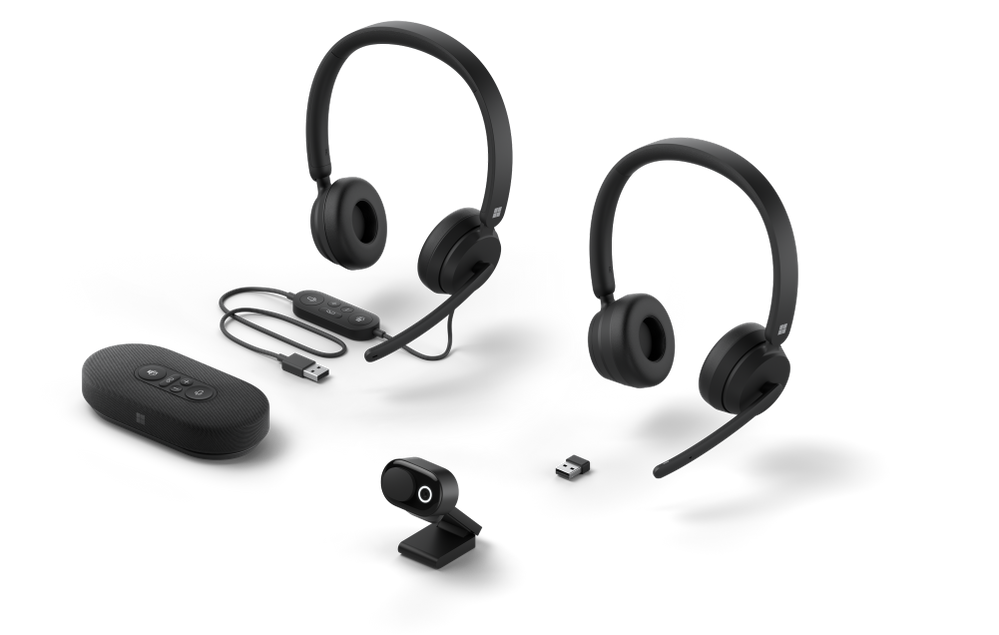
Microsoft PC accessories certified for Teams The first collection of hardware from Microsoft certified for Teams meetings and calling is now available for purchase. From a wired or wireless headset, speakerphone and web camera, there are more options at multiple price points for users to explore to enhance their collaboration experience. Lear more about the products in this video and get started using these devices today.
EPOS Adapt 200 headsets The Adapt 200 series of headsets from EPOS are now certified for Teams; this series is lightweight, affordable and comfortable making it ideal for people working in any environment. Whether at home, on the go, or at an office, you are able to be heard through a noise cancelling microphone, and can connect to two devices through Bluetooth. Check out this series and more at http://aka.ms/Teamsdevices.
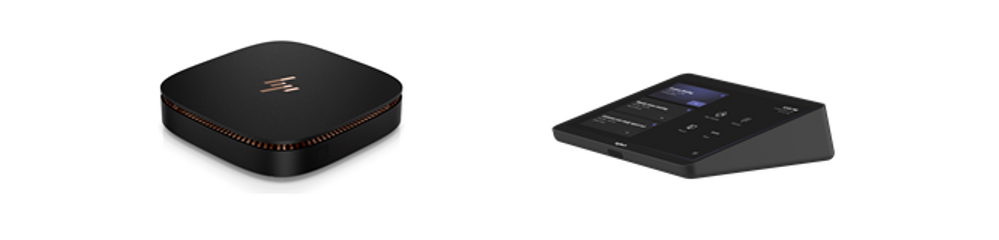
HP Elite Slice G2 Partner Ready The HP Elite Slice G2 Partner Ready is now available as part of a bundle solution with the Logitech Tap Controller for Microsoft Teams Rooms for small, medium and large meeting spaces with pre-installed drivers for the Logitech Tap Controller. Learn more.
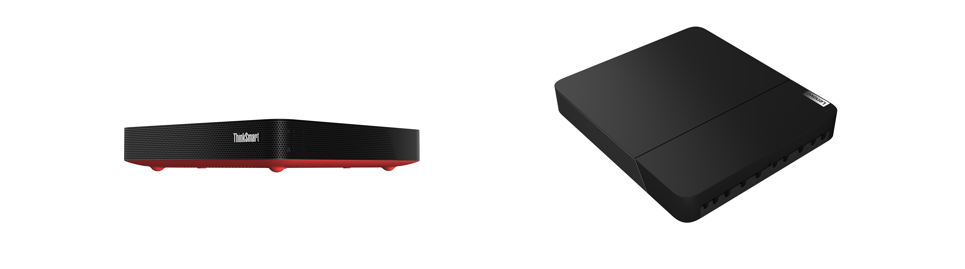
Lenovo ThinkSmart Core Kits ThinkSmart Core, Lenovo’s first modular room kit designed for flexibility and scalability in meeting spaces. It comes in two room kit configuration. TheThinkSmart Core + Controller is a kit for spaces with pre-existing audio-visual components certified for Teams and the ThinkSmart Core Full Room Kit that also adds the ThinkSmart Cam and ThinkSmart Bar. Learn more.
Logitech Rally Bar for Microsoft Teams Rooms on Android Logitech Rally allows you to set up your medium-sized conference rooms with fewer cables and components. It delivers an all-in-one video conferencing experience, featuring an Ultra-HD 4K camera, automated pan and tilt with up to 15X HD zoom, and audio for midsize meeting rooms. Learn more about Logitech Rally Bar.
Chat & Collaboration
Approval Templates To streamline workflows, new out of the box templates provide a repeatable structure for common approvals like filling out expense reports or requesting overtime. Admins and team owners can use these as is, customize, or create new templates for their organization and teams to use. Use the structured form to input all the necessary information and eliminate back and forth on missing data for a faster approval. Learn more.
Access files offline on Android The Teams mobile app on Android now allows you to access files even when you are offline or in bad network conditions. Simply select the files you need access to, and Teams will keep a downloaded version to use in your mobile app. You can find all your files that are available offline in the files section of the app. This feature was made available earlier this year for iOS.
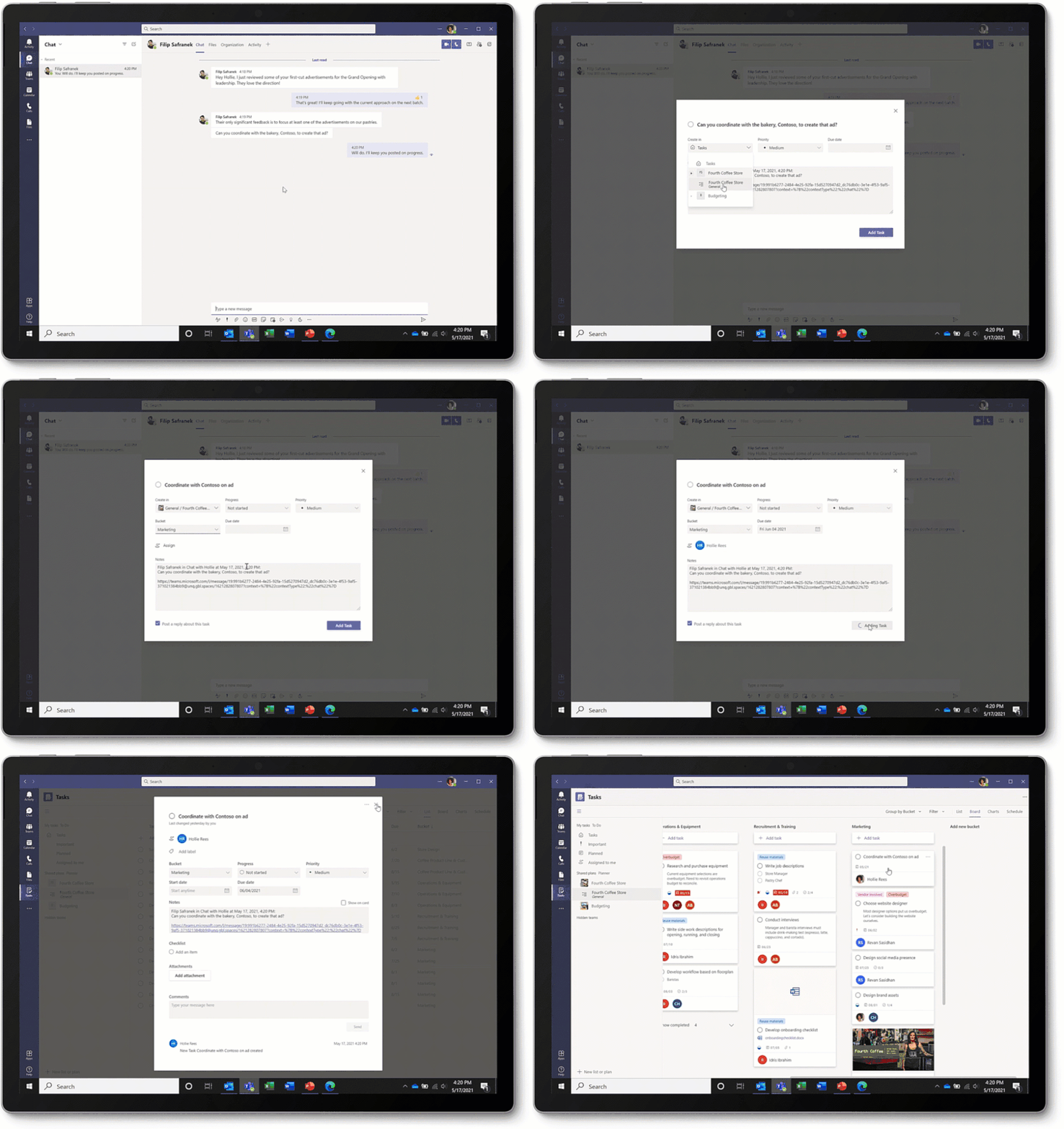
Create tasks in Teams Some messages result in follow-up actions. With this feature, you’ll be able to quickly create tasks right from any Microsoft Teams chat or channel conversation without having to switch apps or windows. To create a task, click the ellipses (…) in the pop-out menu, then select ‘More actions’ and choose ‘Create task’. Tasks created from Teams messages appears in the Tasks app for Teams. Learn more.
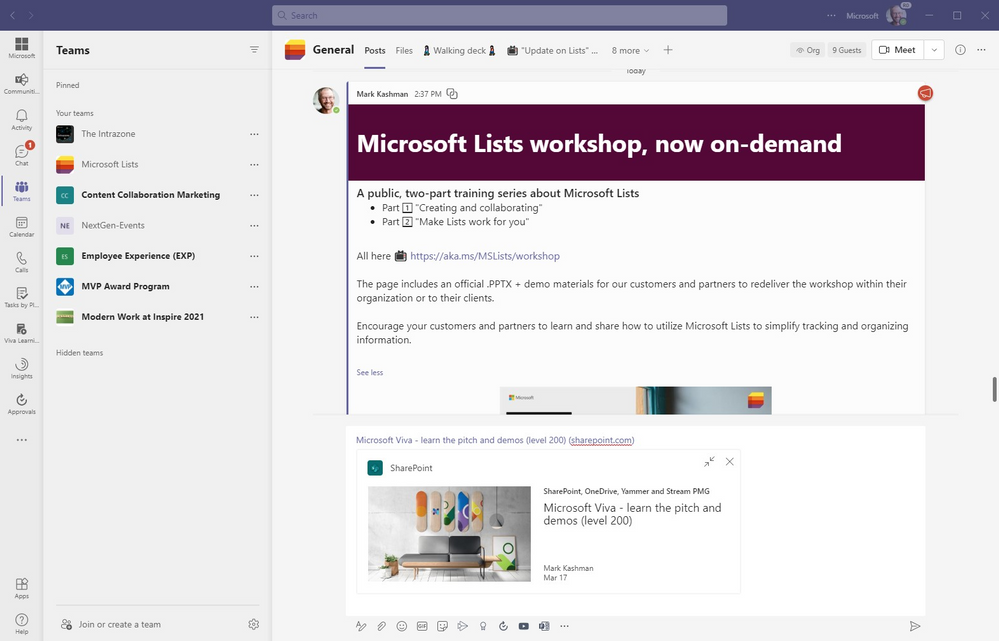
Rich previews for SharePoint pages and news articles When you paste a SharePoint news article or page link in a Teams chat, it automatically converts into a rich display card highlighting page title, thumbnail image, author and publish date. Learn how to create and use SharePoint pages (and news).
The example “Microsoft Viva – learn the pitch and demos (level 200” SharePoint page URL, after pasting it to the bottom of this chat, renders a preview of the page graphic, title, author and publish date.
Customize branding for the Yammer Communities app for Microsoft Teams Microsoft Teams admins can customize the branding for the Yammer Communities app for Microsoft Teams to suit their Yammer network with their preferred app logos, naming, accent color, and more. Learn more about the Communities app for Teams and how to customize it here.
MacOS native notifications in Teams Users can now choose to deliver Microsoft Teams notifications, either via Teams built-in notifications or via macOS native notifications. When choosing native notifications, Teams inherits the OS notifications settings and supports quiet hours, action center triaging and more native features. This is only available on MacOS 10.15 or later. Learn more.
Management
App risk evaluation Teams admins are now able to view the security, compliance, and data privacy details for apps coming from Microsoft Cloud App Security. This helps Teams admins save time on security reviews and enable a more focused selection-based security specifications, resulting in increased app quality. Learn more.
Device management automatic alerting in Teams Admin Center The feature enable IT Admin to identify devices issues by triggering notifications on device problem and device health check status that can be turned into an immediate correction action, Learn more.
Security, compliance, and privacy
Security, compliance, and data protection capabilities for apps For Microsoft 365 Certified Teams apps, admins can view security, compliance, and data protection capabilities in a new tab on the app’s detail page in the Teams Admin Center. This transparency gives Microsoft customers trust in the applications that run their organizations and ISVs an opportunity to showcase their hard work in becoming M365 Certified. Learn more about the Microsoft 365 App Compliance Program.
Government
These features currently available to Microsoft’s commercial customers in multi-tenant cloud environments are now rolling out to our customers in US Government Community Cloud (GCC), US Government Community Cloud High (GCC-High), and/or United States Department of Defense (DoD).
Together mode Together mode reimagines meeting experiences to help participants feel closer together even when you are apart. We are excited to introduce Together mode scene selections to transport your team to a variety of settings. Choose a scene to set the tone and create a unique experience for your meeting, whether it be a smaller conference room meeting, or an all-hands meeting held in an outdoor amphitheater. Available in GCC and GCC-High.
Updating settings for attendees’ video There are three new ways that you can now manage your attendees’ camera. First, meeting attendees are able to turn their camera on or off to share video by default. You can also configure to have all attendees’ camera disabled by setting Enable camera for attendees to Off from the Meeting Options web page before the meeting. Next, once this new setting is turned Off, you can also reverse this setting during the meeting to allow all attendees to turn their camera on. Finally, you can also enable or disable the camera for individual attendees. Note that these settings do not automatically turn on attendees’ camera or affect presenters and meeting organizers. This feature aims to focus on attendees to prevent disruptions during a meeting and help create a safe meeting environment. Available in GCC. Learn more.
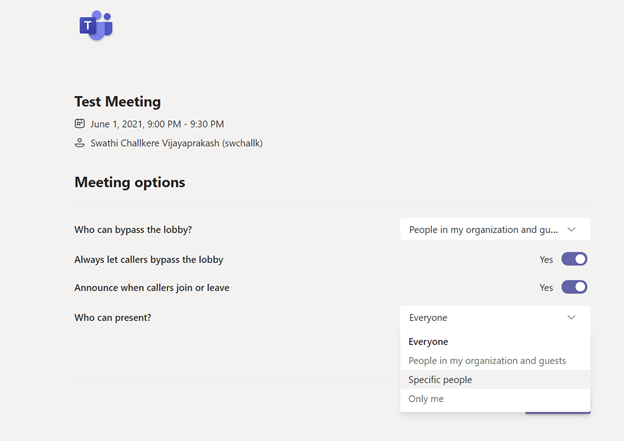
Assign the Presenter Role in Meeting Meeting organizers can now assign one or more Presenters in their meetings with “Who can present?” meeting option. The Everyone option is selected by default; enabling everyone who joins the meeting with Presenter permissions and capabilities. During the meeting, the organizer and presenters can also change an individual participant’s role. This new setting helps ensure all meeting participants have appropriate roles. Available in GCC-High. Learn more.
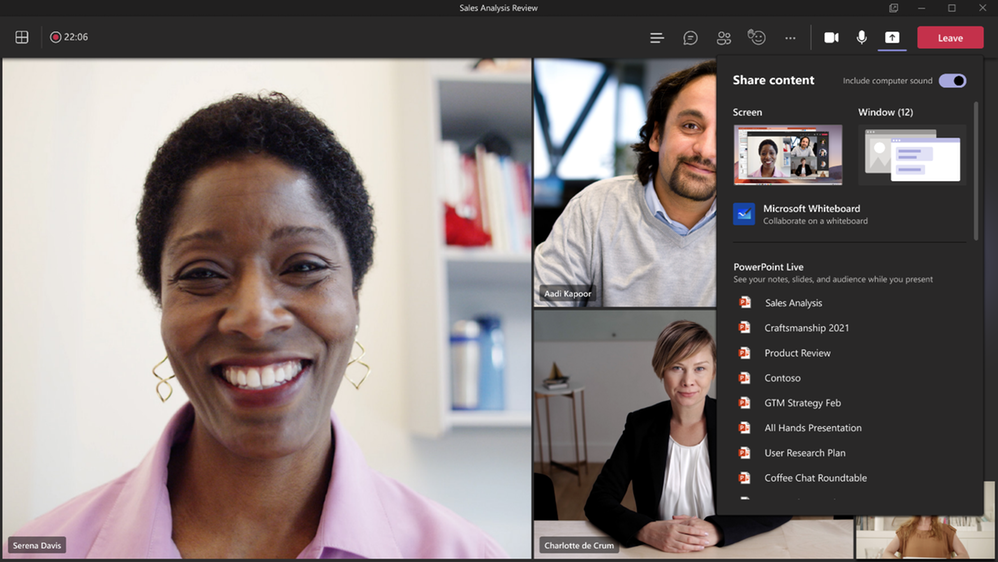
Include computer sound when sharing on Mac Mac desktop users can now include audio when sharing their desktop or window during a Teams meeting. This is great when sharing a video with voiceover and music. It allows everyone to watch simultaneously without echoes or sync issues. You can find this setting in the share content. Available in GCC. Learn more.
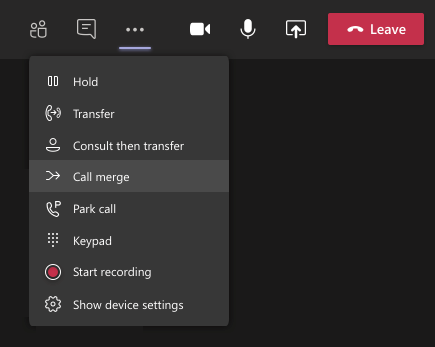
Call Merge Call Merge gives end users the capability to merge their active 1:1 call into another 1:1 or group call. For example, during a call with someone (or a group), you need to ask someone else a question. With this feature, you may add them directly into the first conversation seamlessly. This applies to Teams VOIP calls and PSTN calls. Available in GCC. Learn more.
Private channels Enable users to create channels within existing teams that can be viewed and accessed only by select members of that team. With Private channels you can create focused spaces for collaboration, and right-size the channel participation and exposure to associated conversations and content without having to create discrete teams to limit visibility. Available in GCC-High and DoD. Learn more.
Approvals in Teams Approvals in Microsoft Teams enables everyone, from frontline workers to corporate headquarters employees, to easily create, manage, and share approvals directly from your hub for teamwork. You can quickly start an approval flow from the same place you send a chat, in a channel conversation, or from the Approvals app itself. Just select an approval type, add details, attach files, and choose approvers. Once submitted, approvers are notified and can review and act on the request. Available in GCC. Learn more.
Tasks in Teams Tasks in Teams gives you a new unified view of your personal and team tasks, powered by Planner and To Do. It consolidates your tasks across Microsoft To Do, Planner, and Outlook. Smart lists like Assigned to me, bring tasks together across different task lists, whether you’re on desktop or mobile. Available in GCC. Learn more.
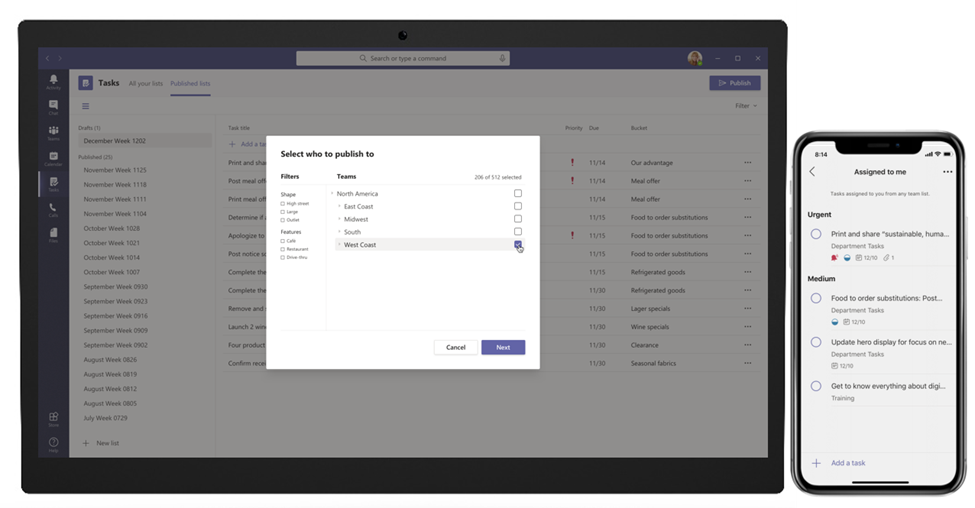
Task publishing Task publishing lets companies create tasks centrally and publish to targeted locations, specific store layouts, factory capabilities or other customizable attributes of your frontline teams. Frontline managers can easily assign tasks to individual employees, while frontline workers can see a simple prioritized list of those tasks on their personal or company-issued mobile device. Available in GCC. Learn more.
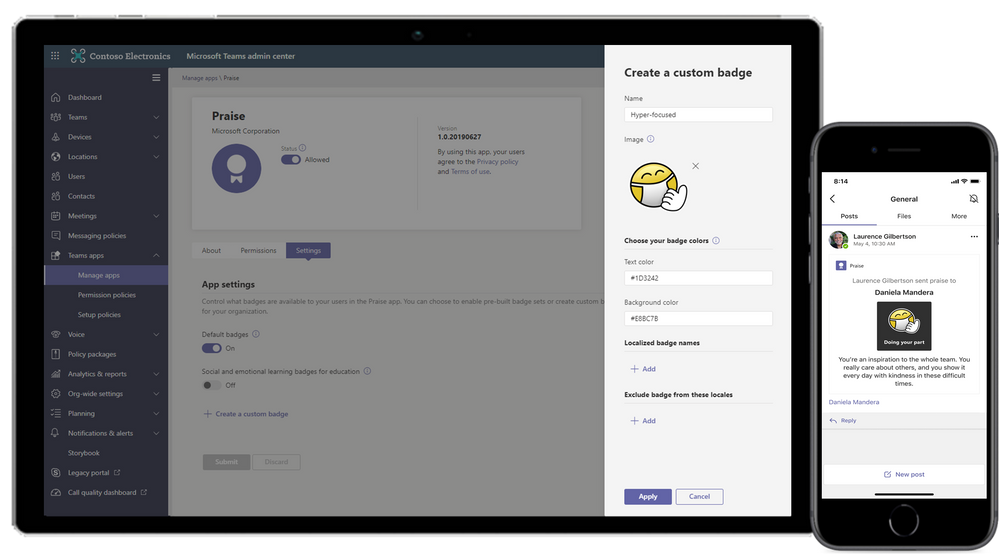
Praise Praise helps workers show appreciation to peers and employees to improve job satisfaction and promote a positive work culture. Send a Praise badge from a selection of badge sets or create company branded badges to express a company’s unique values. Available in GCC. Learn more.
Out of Office Set up a message to let others know you’re not working or on vacation so you’re not available to reply when they send a chat message. Your out of office status also syncs with Automatic Replies that are found in your Outlook calendar. Available in GCC-High and DoD.
Compliance capabilities for card content generated through apps in Teams messages We recently extended Microsoft 365 compliance capabilities to content generated through Teams apps including support for legal hold, eDiscovery, audit, retention, and communication compliance. Available in GCC.
Teams Device Management Our customers who have tenants in the GCCH environment can also manage their Teams devices from the Teams Admin Centre. Admins can now control the entire lifecycle of their Teams devices which include an increasing variety of supported device types – IP Phones, Collaboration bars, Teams displays, Teams Meeting Room devices. Available in GCC-High.
1 Get Audio Conferencing for free for 12 months. Available only for net new Audio Conferencing seats (defined as seats incremental to any existing seats as of August 1, 2020) for CSP or Web Direct customers with paid subscriptions that include Teams. Available now through December 31, 2021. Available worldwide with exceptions in China and India. The offer is subject to additional terms and conditions
This article is contributed. See the original author and article here.
We are pleased to announce two new Learning Paths available right now focused on Researchers. We have curated over 7 hours of content that will get you up and ready on Azure.
We want to hear from you. Make sure that you fill a quick survey so that we can ensure that the future learning paths we build are tailored for you.
Whether you need to get started from scratch or are only interested in more advanced topics, we’ve got everything you need to ensure you are productive as soon as possible. If you need to start from scratch let me introduce you to the first learning path.
The Introduction to Cloud Computing for Researchers will get you introduced to the fundamentals of Azure and cloud computing. This learning path will go through how resources are grouped, storing data in Azure, and how to allocate computing resources to run workloads on.
Then, if security and cost are more important to you, Cloud Security and Cost Management for Researchers is your next stop. You will learn how to secure your resources and your data as well as ensure that you are not exhausting all your Azure credits within the same day.
Don’t forget to fill this quick survey. Your feedback matters and future learning paths will be built based on that feedback. We want to hear from you. What can we do to empower you as a researcher?
This article is contributed. See the original author and article here.
Hello everyone, my name is Zoheb Shaikh and I’m a Solution Engineer working with Microsoft Mission Critical team (SfMC). Today I’ll share with you about an interesting issue related to Azure AD Quota limitation we came across recently.
I had a customer who exhausted there AAD quota which put them at a significant health risk.
Before I share more details on this let’s try to understand what your organization AAD Quota could be and why does it even matter.
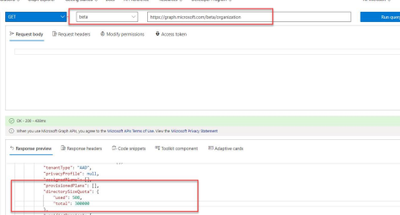
In simple words Azure AD has a defined quota of number of Directory objects/Resources that can be created and stored in AAD.
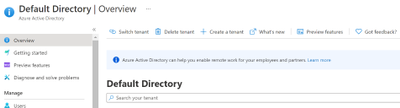
A maximum of 50,000 Azure AD resources can be created in a single tenant by users of the Free edition of Azure Active Directory by default. If you have at least one verified domain, the default Azure AD service quota for your organization is extended to 300,000 Azure AD resources. Azure AD service quota for organizations created by self-service sign-up remains 50,000 Azure AD resources even after you performed an internal admin takeover and the organization is converted to a managed tenant with at least one verified domain. This service limit is unrelated to the pricing tier limit of 500,000 resources on the Azure AD pricing page. To go beyond the default quota, you must contact Microsoft Support.
Now since you understand what AAD Quota is and how to view details let’s get back to the customer scenario and try to understand how AAD Quota affected them and what is in this for you to learn.
The customer was approximately a 100k Users organization using multiple Microsoft cloud related services like Teams, EXO, Azure IaaS, PaaS etc.
As a part of cloud modernization journey, they were doing a massive Rollout of Intune across the Organization post doing all the testing and PoC.
Our proactive monitoring and CXP teams did inform the customer that there Azure AD objects are increasing at an unusual speed, but the customer never estimated this could go beyond their AAD Quota.
One fine morning I got up with a call from our SfMC Critsit manager that my customer’s AAD Quota has exhausted and their AAD Connect is unable to Synchronize any new objects. As a part of Reactive arm of SfMC we got in a meeting with customer along with our Azure Rapid Response team to find what is the cause of the problem.
We decided on below approaches for the issue:
Confirm AAD Quota exhaustion and what objects are consuming AAD Resources
Remove stale objects from AAD.
Reach out to Product Group asking for a Quota increase for this specific customer.
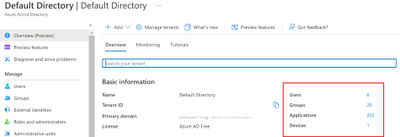
How to check what objects are consuming AAD Quota limit
While I was engaged in this case, we did it the hard way (by exporting all registered objects in Excel and then using Pivot Tables to analyze) but now there is an easy way to do as described below:
This will give you a nice overview of your Object Status of AAD
We created the below table to help us find what exactly is going on in the environment, in this we measured how many Objects are in total and how many were created in last few days.
Object
Count
New Count in last 24 hours
New Count in last 1 week
Users
#
#
#
Groups
#
#
#
Devices
#
#
#
Contacts
#
#
#
Applications
#
#
#
Deleted Applications
#
#
#
Service Principals
#
#
#
Roles
#
#
#
Extensionproperties
#
#
#
TOTAL
##
##
##
Not sharing numbers here but highlighting that we saw Devices consuming about 50 % of the AAD Object quota and increased in the last 24 hours to few thousands.
This output made us understand that thousands of devices are getting registered every day which has resulted in AAD Quota exhaustion.
Based on our analysis to come out of this situation we recommended the customer to delete stale devices that have not been used for more than 1 year. This itself enabled us to delete approximately 50k objects.
This 50k object deletion ensured that they are out of the critical situation giving them some breathing space to think and avoid this problem from reoccurring at least for the next couple of weeks till we figure out what exactly is going wrong.
Being part of the Microsoft Solution for Mission Critical team, we always go above and beyond to support our customers. The first step is always to quickly resolve the reactive issue, subsequently identify the Root Cause, and finally through our Proactive Delivery Methodology making sure this does not happen again.
We followed below approach to identify the root cause and ensure it will not happen again, below the steps:
Configuring Alerts for validation and Quota exhaustion
Daily alerts for Azure AD Object count
Alerts in case AAD Object Quota limit is exhausted.
More detailed review on the Root Cause of the issue.
Creating a baseline for AAD Objects needed in the organization.
Baseline to be created based on number of Objects in Organization (Users, computers etc.)
What is the expected count?
Increasing the Object Quota based on the baseline created if needed.
In the next sections we will go through each of the above actions for more explanation
Configuring Alerts for validation and Quota exhaustion
Option#1 using Azure Automation.
We wanted to add alerts to ensure the customer is notified if they are nearing the limit. We achieved this by using Azure Automation as below with the help of my colleague Eddy Ng from Malaysia.
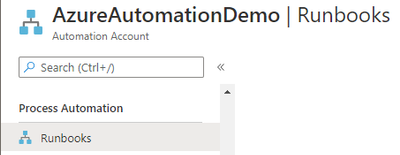
Below is the step-by-step process on how you can help achieve alerts post creating an Azure Automation account:
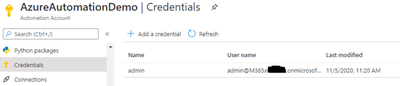
Create the credential in Credential vault. Click on the + sign, add a credential and input the information name. The credential must have the sufficient rights to connect to Azure AD and not have MFA prompt. The name used is important. It will be referenced from the script.
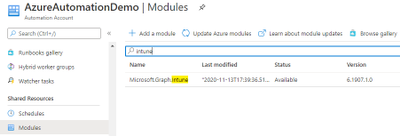
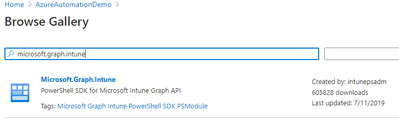
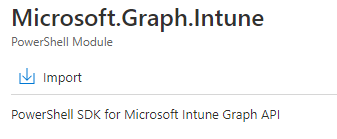
Next Install Microsoft Graph Intune under the Modules Resources. Click on Browse Gallery, search for Microsoft.Graph.Intune. Click on the result and Import.
Populate the schedule accordingly. For example, run daily at 12pm UTC.
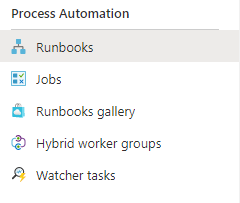
Results from each run job can be found under Jobs.
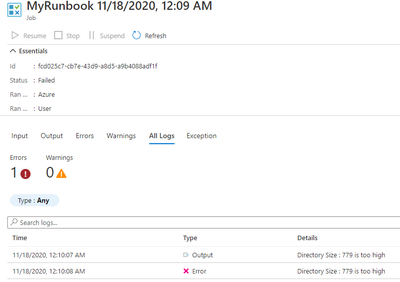
If above quota, the status will be failed as a result of the script -erroraction Stop.
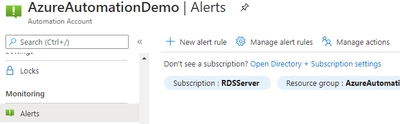
Setup Alerts to take advantage of this by creating New Alert Rule
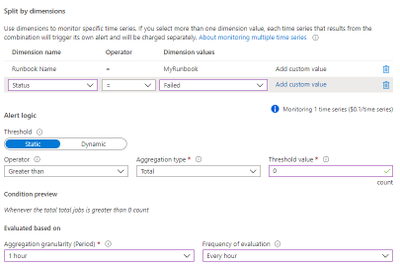
Click select condition. Signal name “Total Job”. Follow the below. Amend “MyRunbook” accordingly. When finished, click done
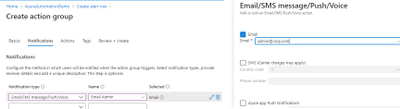
Select Action Group. Create Action Group.
Populate info accordingly for Basics.
Populate info similar to below for Notifications.
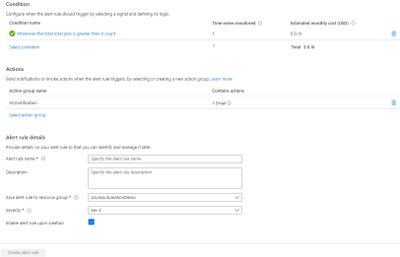
Click Review + Create
Once done, scroll below under Alert Rule Details, such as Name, Description and Severity.
Create Alert Rule
Results: When the Directory Quota Size breached the limit, you will get an alert via email to the admins.
You can then proceed to click on the Runbook and select Jobs. Click on All Logs to see the error output for each individual job run.
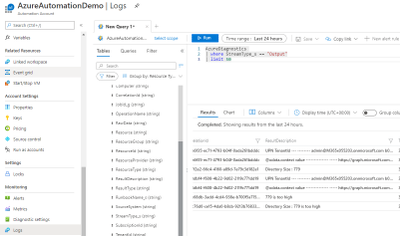
If you wish to monitor the previous results in bulk, go to Logs and run this Kusto Query below. Scroll to the right for ResultDescription. Assumption is that the schedule is set to run daily. A limit of 50 will then be for the past 50 days.
AzureDiagnostics
| where StreamType_s == “Output”
| limit 50
Option#2 Alternative wayConfiguring Alerts for validation and Quota exhaustion
While I was writing this blog, my colleague Alin Stanciu from Romania advised with probably better way to configure Alerts for Quota Exhaustion.
Replace the script in the Azure Automation account as below!
#get from credential vault the admin ID. Change “admin” accordingly to the credential vault name
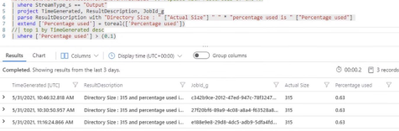
This can help you get an overview of percentage used
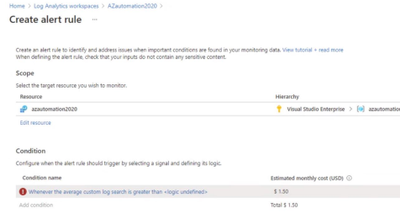
Alert configuration using Log Analytics can be done as shown in below screenshots:
You could define the threshold when to be alerted
2. More detailed review on the Root Cause of the issue
In this step we need to identify why so many devices are being registered every day.
We exported the list of all registered devices in AAD in excel and tried to filter based on what type of registrations they have had.
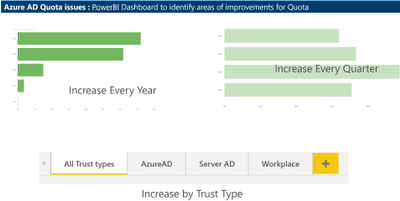
Thanks to Claudiu Dinisoara & Turgay Sahtiyan for helping create a nice dashboard in POWERBI based on these logs which helped us understand the Root Cause much better.
This dashboard helped us understand the type of Device registrations and the overall count across the years, we found that there has been a Significant increase in AAD Device registrations due to Intune Rollout across the organization.
We checked with customer’s Intune support team, and they confirmed that this increase was expected.
3. Creating a baseline on number of AAD objects we can have:
The trickiest part on this issue was coming up with a baseline number for AAD Objects.
So, the customer had approximately 100k users and we came up with the below table for the baseline.
Please note that this number was unique to customer scenarios and discussions and it may differ for your organization.
Object
Count
Why this number
Users
105000
Total number of Production users are 100k and other 5000 users could be used for Administration, To be deleted users or Guest users.
Groups
60000
We felt 60k is a high number but they were using Groups extensively for Intune and other Policy management tasks, we recommended them to work on reducing this number in future.
Devices
200000
We assumed there will be 2 devices registered per user (Mobile & Laptop) and few stale devices.
Contacts
16000
These objects were already low, so we considered the present values as Baseline
Applications
1500
These objects were already low, so we considered the present values as Baseline
Service Principals
3000
These objects were already low, so we considered the present values as Baseline
Roles
100
These objects were already low, so we considered the present values as Baseline
TOTAL
385600
These objects were already low, so we considered the present values as Baseline
We compared the expected baseline with their Quota limit was 5,00,000 and came up with the strategy for cleanups and strategy to maintain the object counts as per baseline.
4. Increasing the Object Quota based on the baseline created if needed.
Their AAD Quota limit was 500,000 objects however our baseline indicated that they need to be around 400,000 objects.












Recent Comments