by Contributed | Jul 7, 2021 | Technology
This article is contributed. See the original author and article here.

Microsoft 365 App Compliance Program is designed to provide assurance to organizations and enterprise IT admins like you, that when your data interacts with a certified application, that application has undergone a security and privacy review. Microsoft 365 Certification requires a thorough assessment of an app and its underlying infrastructure against a series of security controls under these security domains:
- Application Security
- Operational Security
- Data Handling Security and Privacy
- Optional External Compliance Frameworks Review
When an app undergoes Microsoft 365 Certification, a third-party assessor validates and assesses the app and its supporting infrastructure. An ISV must pass the controls in each of the following security domains to be awarded a certification:
1. Application Security:
The application security domain focuses upon the following three areas:
- GraphAPI Permission Validation – GraphAPI permission validation is carried out to validate that the app/add-in does not request overly ensures that the permissions requested are required for the functionality of the app.
- External Connectivity Checks – Analyst will perform a walkthrough of the applications functionality to identify connections outside of Microsoft 365. Any connections which are not identified as being Microsoft or any direct connections to a service will be flagged and discussed during the assessment.
- Application Security Testing – Application security testing in the form of penetration testing MUST be carried out if the application has any connectivity to any service not published by Microsoft. If the app operates standalone without connectivity to any non-Microsoft service or backend, then penetration testing is not required.
Learn More!
2. Operations Security:
This domain measures the alignment of an app’s supporting infrastructure and deployment processes with security best practices. There are various controls assessed in this layer like malware protection, patch management, vulnerability scanning and firewalls, account management and incident management, and change control to name a few.
Learn More!
3. Data Handling and Privacy:
Data in transit between the application user, intermediary services, and ISV’s systems will be required to be protected by encryption through a TLS connection. If an application retrieves and stores customer data, you will be required to implement a data storage encryption scheme that follows the specification as defined Here. This domain also tests controls like data at rest, data retention and disposal, data access management and GDPR.
Learn More!
4. Optional External Compliance Review
If external security frameworks have been included within the Publisher Attestation, certification analysts will need to check the validity of those compliance audit reports as part of the Microsoft 365 Certification assessment. These external frameworks can be leveraged in your certification assessment to expedite the process. Evidence for the following supported external compliance audits include:
If you have questions, please reach out to appcert@microsoft.com.
See the following resources to learn more about the Microsoft 365 App Compliance Program:
by Contributed | Jul 7, 2021 | Technology
This article is contributed. See the original author and article here.
Apply Zero Trust principles and policies to your network and infrastructure with this essentials episode. It’s a high-level overview of the principles of the Zero Trust security model, spanning identity, endpoints, applications, networks, infrastructure, and data.

Your network and its underlying configuration provides secure access to your resources. Infrastructure, whether on premises servers, local or cloud hosted VMs, containers, storage, or PaaS databases, all represent a critical threat vector. Jeremy Chapman, Director of Microsoft 365, walks you through how to apply the core Zero Trust tenets of verify explicitly, apply least privileged access, and assume breach for each of these layers, along with your options.
QUICK LINKS:
00:42 — Network: Verify explicitly
02:21 — Network: Least privileged access and assume breach
04:20 — Infrastructure: Verify explicitly
05:56 — Infrastructure: Least privileged access and assume breach
08:48 — Wrap up
Link References:
Check out our other shows on Zero Trust Essentials at https://aka.ms/zerotrustmechanics
Use Azure resource manager templates to deploy hands-on experiences in your Azure subscription at https://aka.ms/AZNetSec
Learn more at https://aka.ms/zerotrust
Unfamiliar with Microsoft Mechanics?
We are Microsoft’s official video series for IT. You can watch and share valuable content and demos of current and upcoming tech from the people who build it at Microsoft.
Keep getting this insider knowledge, join us on social:
Video Transcript:
-Welcome back to our series on Zero Trust on Microsoft Mechanics. In our Essentials episode, we gave you a high-level overview of the principles of the Zero Trust security model, spanning identity, endpoints, applications, networks, infrastructure, and data. In this episode, we’ll take a look at how you can apply Zero Trust principles and policies to your network and also your infrastructure. Now we’ll walk you through how to think about the core Zero Trust tenets of verify explicitly, apply least privileged access, and assume breach for each of these layers, along with your options. By the way, if you’ve missed our previous shows on Zero Trust Essentials, identity, endpoints, and devices, you can check those out at aka.ms/zerotrustmechanics.
-So let’s start with your network. So your network and its underlying configuration provides secure access to your resources. So beginning with the concept of verifying explicitly each interaction with resources on your network, whether that’s on-premises or on the cloud, should be verified. Now here, context-driven access controls can help you assess connections to the network and take action to grant or deny access. With Azure Front Door, our Layer 7 entry point to Microsoft cloud services, along with Application Gateway, our web traffic load balancer, and web application firewall, you can use policies to control unwanted traffic. Now here in the Azure portal, we’ve set up manage rules using an OWASP 3.1 standards along with custom rules. Now the first one you see here is an automated integration with Azure Sentinel, which uses information from attack logs to block suspicious IPs.
-There’s another one here to block inbound traffic based on geolocation, and a third to block traffic from IE 11. Now, switching to the experience that a hacker might attempt, I’m going to show you an example SQL injection attack in this case, which is looking for the first user in the database, often the admin account. So I’ll enter a password, it could be anything. And then this logs me in as the admin at full privilege, and I own the site. Now I’m going to show you the same experience, but using Azure Front Door with our WAF Application Gateway policies enabled. And I’ll enter the same SQL injection string and a password. And you’ll see that I get a 403 error that forbids access based on our policies. So with these controls, we’ve verified the user’s identity and we’ve prevented a SQL injection attacks.
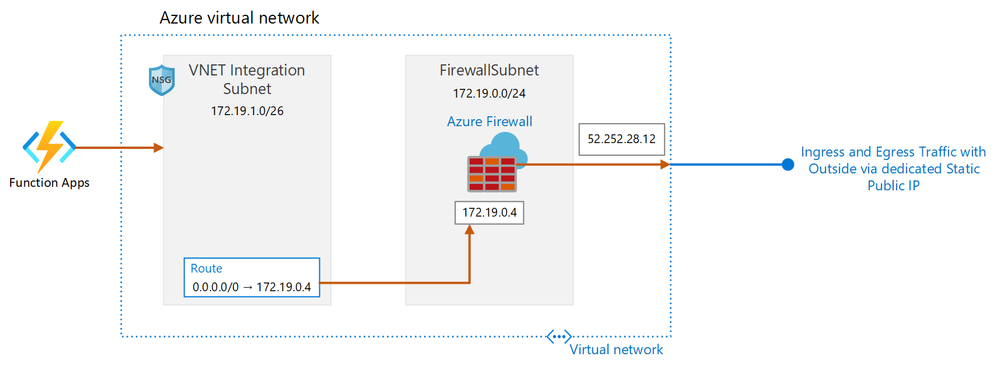
-So now let’s switch gears though, to the principles of least privilege access and assume breach, and how those apply to networking controls as well. And this is where our network segmentation should be used to prevent lateral movement in case of breach, or if an account has been compromised. So here, I’m looking at Azure firewall. In this case, you can see that we’ve set network rules. And as you can see here, these are like any firewall rules using source and destination IP ranges, ports and protocols. And with application roles, you can apply intelligence from the service, allowing certain web categories and also inspecting the TLS traffic through your firewall. Now here, you can see that the client can hit news and search engine sites. And there’s a list of curated and managed trusted sites here, as well as services that we’ve defined here, like Windows Update. Now, if I click into edit, you can see the types web categories with the things that you might allow or deny, such as categories that can lead to productivity loss, sites that are associated with liabilities or high bandwidth. Equally, for services like Windows Update or Azure Virtual Desktop, you can allow traffic based on fully qualified domain names, or FQDN, tags.
-Now this means that you don’t need to continually update your firewalls manually when IP ranges or addresses change to access these services. On top of that, the Azure Firewall Intrusion Detection and Prevention system, or IDPS, and threat intelligence detects and protects communication that passes through the firewall. And you can protect all of your public IPs from DDoS attacks using the Azure DDoS standard service. Of course, as part of the Zero Trust implementation, you’ll want to secure your networking protocols, deprecate outdated protocols, and use end-to-end encryption for data at rest and in transit for all of your internal, inbound and outbound traffic. And by the way, you can try most of this out by going to aka.ms/AZNetSec, and using the Azure Resource Manager templates to deploy hands-on experiences in your Azure subscription.
-Next, infrastructure, whether on-premises servers, other hardware devices, local, or cloud-hosted VMs, containers, storage, PaaS databases, and other services, these all represent a critical threat vector. Now here, you’re going to need to you ensure that there are adequate protections from the silicon all the way to the firmware and operating system platforms and their connectivity.
-Going back towards Zero Trust principles, let’s start with verify explicitly and how that relates to infrastructure. Now, this requires going beyond simple checks, for example, of computer name and IP address, both of which can be easily spoofed. In this case, access should be gated to unique immutable identifiers for your infrastructure resources, and these should be aligned to role-based access controls or RBAC. Also on your attribute-based access control, which is an extension of RBAC, allows you to authorize access at a more granular attribute level. Once you’ve defined a name or a tag on a resource, you can grant a user or a security principle access to resources based on their role and the attribute.
-Next, related to RBAC, is the practice of using just enough access, or JEA. And this can be used to limit what people can do when using a resource. For example, here, I’m managing a virtual machine running in Azure. In the Access Control tab, it will allow me to grant viewer deny access to the resource. If I click into add role assignment, I can reduce the number of administrators with owner or contributor roles who can perform privileged actions on behalf of regular users. Now if I view the details of a role, say for example, here, like dev test labs user, you can see that I can limit what users can do with that virtual machine running. Next, continuing on the themes of least privilege access and assume breach, the Azure Security Center provides a centralized monitoring and control of resources on-prem, in the Azure cloud, or across cloud providers.
-Now Azure Security Center is a unified infrastructure security management system that continually assesses and strengthens the security posture of your environment. By enabling Azure Defender, it then provides advanced threat protection across your hybrid workloads in the cloud, whether they’re an Azure or not. Brute force attacks of remote virtual machine connections are common. And using Azure Security Center, you can use just-in-time access controls to avoid extended RDP or SSH connection periods. Let me show you how this works. So here, I’m in a virtual machine in Azure. In the Configuration tab, I’ll enable just-in-time, also known as JIT. And with that set, all inbound connection requests over RDP port 3389 for Windows, or port 22 for Linux, will be rejected. Now in the Connect tab, I’ll click on Request Access. And by default, this will open up the connection for me for three hours. So I’ll connect over standard RDP and I’m in my VM.
-Now, once I’ve ended my session and three hours of time have elapsed, just-in-time will close port 3389 and block all other access requests. And for resources that can’t use JIT, you can use adaptive network hardening as part of Azure Defender. Now here, as you can see, it analyzes internet traffic communication patterns of your virtual machines, and will determine whether the existing rules in the network security groups that are associated with them are too permissive, so that you can proactively minimize your attack surface. This can occur when an IP address doesn’t communicate regularly with a resource, or if the IP has been flagged as malicious by the Security Center’s threat intelligence. Also adaptive application controls help you deal with malicious and unauthorized software by allowing only specific applications to run. Here, the security center will analyze data from applications to find machines with a consistent set of running applications to create a list of known, safe software.
-Then if an application runs that’s not on the known safe list, it will trigger an alert. Resolving identified vulnerabilities can also improve the security posture of your containerized environments and protect them from future attacks. Container image vulnerability assessment helps you by scanning your registry for security vulnerabilities and exposes detailed findings for each image. For example, if I click into a finding, I can see a detailed description along with remediation steps. And Azure Sentinel, Microsoft’s cloud native SIM gives you a bird’s-eye view across all of your infrastructure, apps and services used. You can collect data at cloud scale, use intelligence to detect uncovered threats, investigate and hunt down suspicious activities, all assisted by AI, and respond to incidents rapidly with built-in orchestration and automation.
-So that was a tour of the highlights for how the Zero Trust security model applies to protecting your network and infrastructure. Next in our series, we’ll be covering data, the core of what you’ll want to protect with the Zero Trust security model. And if you’ve missed any of our previous shows on the series, be sure to check out aka.ms/ZeroTrustMechanics, and you can also learn more at aka.ms/zerotrust. Thanks for watching.
by Contributed | Jul 7, 2021 | Technology
This article is contributed. See the original author and article here.
Due to virus lockdowns, many businesses have had to shift their customer engagement model away from the more traditional Brick & Mortar, in person experiences and either add or expand their online shopping experience to keep their customers. Azure Maps can help retailers realize these benefits through experiences created using features of Azure Maps such as:
 |
Store or Locker Locator
Find the closest locked delivery box to avoid box theft from front door delivery and return items to locked box location rather than brick and mortar store. Further Azure Search capability could be used to suggest the locations that have the specific item the customer wants in stock and pre-purchase so it is ready for curb-side pick-up
|
 |
Valid Address Entry
Avoid costly returned as undeliverable packages due to poorly completed addresses in web forms. Accepting only addresses that are populated in a drop down ensures the address is recognized within Azure Maps and is “routable” for delivery option offerings.
|
 |
Point of Interest Advertising
Want to have your business found organically by folks looking for businesses in Azure Maps, Bing Maps and TomTom? To ensure your business listing is correct on all Microsoft connected maps we have the following two suggested links:
|
In all cases, it is important for retail customers to know where the business is located and that is where Azure Maps pulls it all together.
As part of the Azure IoT Suite of offerings from Microsoft, Azure Maps exists to give you the ability to make your location-based scenarios a reality. In the case of retail these are pretty well known but there is always room to innovate!
For example, World-wide children’s clothes retailer and Azure Maps customer, Okaïdi, has created their own “LocateShop” experience using the store locator functionality offered through the Azure Maps Web SDK. Customers easily find the “Location” option and then can type any city or country worldwide in the edit box to find the closest store or web retail site. They can then get their expectation set for a trip to the physical store to shop and pick up or follow the link to an online shopping experience if there is no retail store in their region.
Okaïdi has created a completely blended online and off-line shopping experience for their customers based on where they live and immediately sets the expectation o which shopping experiences they have available to them through their location finder page.
|
 |
While this blog focused on how Azure maps can help within your Retail solution, I also wanted to let you know that Microsoft has initiatives to help businesses succeed including:
- https://startups.microsoft.com/ – You are doing big things. We are here to help! Accelerate growth with a customized set of offerings and resources that evolve with your startup from idea to exit.
- https://partner.microsoft.com/ – Members of the Microsoft Partner Network have access to resources, programs, tools, and connections. Discover a community designed to help businesses grow.
- https://www.microsoftiotinsiderlabs.com/ – Accelerate your AI and/or IOT Project with personalized help from our Microsoft technology experts.
To Find out more about Azure for Retail and Microsoft for Business check out these information-packed links:
Thank you for your interest in Azure Maps. All of the samples above are directly accessible through the links and have Github repositories for you to leverage the sample code within your solutions. If you need any assistance or have any questions feel free to post them in our Q&A section, we are here to help!
by Contributed | Jul 7, 2021 | Technology
This article is contributed. See the original author and article here.
We are happy to announce the GA of App Service Environment v3 (ASEv3) along with Isolated V2. The ASEv3 was developed in response to customer feedback and has many improvements over the earlier versions while still providing an isolated single tenant web application hosting platform. As part of the Azure App Service, the ASEv3 provides a PaaS experience to host your Windows or Linux applications. You can deploy Windows or Linux applications as code and Microsoft will manage the OS your applications run in. If you want greater control over your app, you have the ability to host Linux containers as well.
Just like with earlier versions, the ASEv3 deploys into a subnet in one of your Azure Virtual Networks (VNets). You can choose to deploy the ASE with an internal VIP in your VNet or with an external VIP that faces the internet. Apps that are deployed into an ASEv3 can access resources within the same VNet without any additional configuration. The inbound and outbound traffic to your apps can be controlled completely with Network Security Groups (NSGs) or any supported type of routes.
Pricing
Applications are hosted in App Service plans which are created in an App Service Environment. The App Service plan is essentially a provisioning profile for an application host. As you scale your App Service plan out, you create more application hosts with all of the apps in that App Service plan on each host. Pricing for ASEv3 is centered on the App Service plan Isolated v2 pricing with some variation based on deployment type. This is an improvement over the App Service Environment v2, which carried a stamp fee in addition to the App Service plan rate. While there is no stamp fee, there is a minimum charge for your ASEv3 based on the deployment type. These are minimum charges though and are not additive. Beyond selecting if you want an internal or external VIP, an ASEv3 can be deployed in one of three ways:
- Default ASEv3: If ASE is empty there is a charge as if you had one ASP with one instance of Windows I1v2. This is not an additive charge but only applies if the ASEv3 is totally empty. If the ASEv3 has one or more instances, you just pay for your Isolated v2 App Service plans.
- Availability Zone ASEv3: An AZ ASEv3 requires a minimum 9 Windows I1v2 instance charge. This is not an added charge but only applies if you have fewer than 9 total App Service plan instances. All App Service plans in an AZ ASEv3 have a minimum instance count of three. This ensures that customer workloads are zone redundant and are spread across each availability zone.
- Dedicated host ASEv3: With the dedicated host option, you pay for two dedicated hosts with a small percentage of the Isolated V2 per core charge as you scale. The dedicated host deployment does not support availability zone based deployments.
The App Service plan size options in ASEv3 are: 2 core 8 GB RAM, 4 core 16 GB RAM, 8 core 32 GB RAM. The larger sizes handle larger applications but also allows for holding more apps within a single App Service plan. Availability zone support is only available in select regions where all of the App Service dependencies are deployed zone redundant. Reserved instance pricing is available for Isolated v2 App Service plans. With reserved instance pricing you have 1 year and 3 year options that substantially reduce costs.
Networking differences between multi-tenant and ASEv3
In the multi-tenant App Service, there are a number of networking features that enable apps to be exposed on a private address or access resources within a VNet. Those features need to be enabled on at an app by app basis. If you want to enforce network access control on your app, then you need to configure that on each app that this is desired upon. In ASEv3 you do not need to enable anything on your apps for them to be in your VNet. All apps that are in Isolated v2 plans are already in your VNet.
With ASEv3 you can enforce your network access external to the application. Unlike the earlier versions of the App Service Environment (ASE), with ASEv3 there are no networking dependencies in your VNet. While it was possible to control application traffic with earlier versions of the ASE, you always needed to allow for the dependency traffic. With ASEv3 you can completely control your VNet making it far easier to manage.
If you have used earlier versions of the ASE, you will find that scaling is improved. While it isn’t as fast as in the multi-tenant service, it is substantially faster than earlier versions. Scaling now will only block other scale operations of the same OS and App Service plan size combination. You can simultaneously scale a Windows small I1v2 and a Linux medium I1v2 for example. There is also no need to manage the front end scaling as with earlier ASE versions. In ASEv3, the front ends that handle inbound HTTP/HTTPS are automatically scaled without any customer adjustment required.
The ASEv3 is available in most commercial regions now and will soon be in all commercial regions. To learn more about the App Service Environment v3, read:
by Contributed | Jul 7, 2021 | Technology
This article is contributed. See the original author and article here.
Today and every Wednesday Data Exposed goes live at 9AM PT on LearnTV. Every 4 weeks, we’ll do a News Update. We’ll include product updates, videos, blogs, etc. as well as upcoming events and things to look out for. We’ve included an iCal file, so you can add a reminder to tune in live to your calendar. If you missed the episode, you can find them all at https://aka.ms/AzureSQLYT.
You can read this blog to get all the updates and references mentioned in the show. Here’s the July 2021 update:
Product updates
Let’s start with what was announced and who came on the show.
The biggest launch we had this month was the announcement of the general availability of Azure Arc, including the General Availability of Azure Arc-enabled SQL Managed Instance (coming on July 30th). If you want to watch the launch event for Azure Arc, you can register here to view it on-demand. On Data Exposed Live last week, we had a special post-launch episode about how all this relates to SQL Server and Azure SQL. We brought on several members of the product group, and you can watch the session on-demand here.
Additionally, we made two public preview announcements, the first applies to Azure SQL Database and Azure SQL Managed Instance. This announcement was the support to use AAD-only authentication for SQL Database and Managed Instance to disable SQL authentication.
Last, but certainly not least, we announced the preview for using Azure SQL Database Hyperscale with named replicas to massively scale out read workloads and easily implement near-real time analytical solutions. We had the lead program manager of these capabilities, Davide Mauri, on the show to tell us more about it. In addition to the main blog post linked above, you can also find the announcement blog and security guidance for Named Replicas. I also referenced a Microsoft Mechanics episode, that you can find here.
Something that is relatively new that we got to dive into on the show is the Database Compare Utility. Mitch van Huuksloot came on and told us all about it. You can download the zip file that contains user guides, license information, notices, and a binary folder with a configuration file and spreadsheet input.
We also had our friend from Azure Data Factory, Wee Hyong Tok, on to talk about some of the latest updates in Azure Data Factory. One big announcement was the new and refreshing data factory home page, resulting in a more accessible and modern experience.
Videos
We continued to release new and exciting Azure SQL episodes this month. Here is the list, or you can just see the playlist we created with all the episodes!
- Mara-Florina Steiu: Track and Record Data Changes with Change Data Capture (CDC) in Azure SQL
- Jason Anderson: Azure SQL Database Ledger – The power of blockchain with the simplicity of SQL
- Rajesh Setlem: Migrating to SQL: Get Started w/ Azure SQL Readiness Assessments & Migrations from ADS (Ep. 6)
- [MVP Edition] with Monica Rathbun: Performance Tuning on Azure SQLDB and Readable Secondaries
We’ve also had some great Data Exposed Live sessions. Subscribe to our YouTube channel to see them all and get notified when we stream. Here are some of the recent live streams.
- Deep Dive: Azure Cloud Experience for Data Workloads Anywhere
- Something Old, Something New: Not really artificial, not really intelligence (Ethics and AI with Buck Woody)
- Azure SQL Security series: Data Protection (Ep. 3)
Blogs
As always, our team is busy writing blogs to share with you all. Blogs contain announcements, tips and tricks, deep dives, and more. Here’s the list I have of SQL-related topics you might want to check out.
- Azure Blog, data-related
- SQL Server Tech Community
- Microsoft SQL Server Blog
- Azure SQL Tech Community
- Azure SQL Devs’ Corner
- Azure Database Support (SQL-related posts)
Special Segment: SQL in a Minute with Cheryl Adams
Cheryl and Mark Ghanayem came on to do a segment on documentation focused on the new Azure Database Migration Guides which you can find at https://aka.ms/datamigration. The highlighted one new guide recently released which dives into how to migrate MySQL on-premises to Azure.
Special Guest: Hasura
Adron Hall from Hasura came to talk about some new updates and connectors for their GraphQL product that integrates with SQL Server and Azure SQL. To learn more, check out their documentation.
Upcoming events
As always, there are a lot of events coming up this month. Here are a few to put on your calendar and register for from the Azure Data team:
July 14: DELL Webinar
– Microsoft SQL Server is evolving… Is your company keeping pace?, Bob Ward
July 28: EightKB SQL Server Internals Conference
– Inside SQL Waits, Latches, and Spinlocks, Bob Ward
– Deep Dive: SQL Server on Azure Virtual Machine Storage, Pam Lahoud
July 28: Database Professionals Virtual Meetup Group
– Notebooks 101 for SQL People, Julie Koesmarno & Barbara Valdez
In addition to these upcoming events, here’s the schedule for Data Exposed Live:
July 14: Azure SQL Virtual Machines Reimagined: Measuring Performance & Monitoring Health (Ep.3)
July 21: Ask the Experts with Bob Ward and Buck Woody
July 28: Azure Data Studio Power Hour
Plus find new, on-demand Data Exposed episodes released every Thursday, 9AM PT at aka.ms/DataExposedyt
Featured Microsoft Learn Module
Learn with us! This month I highlighted the module: Architect modern applications using Azure SQL Database. In this module, you’ll break down a scenario for an application and build a multi-service solution based on the microservices approach. You’ll learn how to use modern database capabilities, like those found in the Azure SQL Database, to build a foundation for applications. You’ll also learn how to use GitHub Actions for CI/CD of databases.
Anna’s Pick of the Month
I know blockchain capabilities in Azure SQL Database technically launched in May, however, on Data Exposed we did a short episode and a deep dive. The more I learn about this technology and the scenarios it unlocks, the more I’m excited and impressed by it. Check out the videos for yourself and tell me I’m wrong!
Until next time…
That’s it for now! Be sure to check back next month for the latest updates, and tune into Data Exposed Live every Wednesday at 9AM PST on LearnTV. We also release new episodes on Thursdays at 9AM PST and new #MVPTuesday episodes on the last Tuesday of every month at 9AM PST at aka.ms/DataExposedyt.
Having trouble keeping up? Be sure to follow us on twitter to get the latest updates on everything, @AzureSQL. You can also download the iCal link with a recurring invite!
We hope to see you next time, on Data Exposed :)
–Anna and Marisa
by Contributed | Jul 7, 2021 | Technology
This article is contributed. See the original author and article here.
At Build, we shared how a new class of collaboration apps is needed to support the global structural changes for hybrid work. These apps provide a single collaborative layer to support synchronous and asynchronous working styles. We call this new class of applications collaborative apps.
The Salesforce app in Microsoft Teams is now Generally Available. Now, sales and service teams using Salesforce Sales Cloud or Service Cloud can bring account data and records into their Teams workspace for better collaboration. Sales and service reps no longer need to switch between windows to find key data; it’s all in one workspace so teams can stay aligned and work efficiently.
The integration supports the type of collaboration teams need in their current hybrid customer engagements. Sales teams need to have the most recent and relevant context about accounts as they interact with their teams and customers to provide a seamless buying experience. For service teams, it can create better coordination and faster response times to open cases, increasing customer satisfaction and reducing the support load on the team.

The Salesforce integration allows customers to access their Salesforce records in Teams channels, chat conversations, and meetings. This helps increase internal alignment and save time by no longer having to switch between applications.

With the Teams Integration, Salesforce users can:
- Pin records to Teams channel tabs and chats to make them easy to find
- Edit records directly within Teams.
- Post important conversation moments on the Salesforce Chatter feed of records pinned on Teams channel and chat tabs.
- Mention Salesforce records (opportunities, accounts, cases, contacts, and leads) in Teams channels and chats to facilitate collaboration.
- Preview more details about records mentioned in Teams channels and chats.
The integration has received a high volume of interest while in pilot and we’re excited to see a collaborative app meeting our joint customers where they work.
To get started:
Add the Salesforce App to your Teams tenant from the Teams Admin Center. The Salesforce integration with Microsoft Teams is available to Microsoft customers licensed with Teams, and Salesforce customers with Sales and Service licenses in Enterprise, or higher editions, orgs.
by Scott Muniz | Jul 7, 2021 | Security
This article was originally posted by the FTC. See the original article here.
While American servicemembers stand ready to defend the nation, smalltime scammers and large corporations alike have them in their sights. They follow the money — and they know that military personnel get a steady paycheck and valuable benefits from Uncle Sam. And the eventual transition back to civilian life gives the scammers even more opportunities to target the troops.
For instance, the FTC uncovered that the University of Phoenix (UOP), a massive for-profit university, targeted servicemembers and veterans, among others, by luring them with false promises. Under a settlement reached with the company, UOP paid $50 million in cash and canceled $141 million in debts owed to the school. In another FTC enforcement action, Career Education Corporation was required to return $30 million to students after its agents recruited patriotic Americans using phony government websites like “Army.com” and “NavyEnlist.com” — a ruse to get students in the door. These cases show that you can’t always trust slick websites, or schools that are eager to get you enrolled.
Earlier this year, Congress closed the so-called “90/10” loophole, which gave predatory schools an incentive to target veterans. But enforcers must continue to be vigilant. The FTC works closely with the Department of Veterans Affairs (VA) and refers unfair or deceptive practices to the VA as our investigations uncover them. Schools that prey on veterans should understand that they will face not only enforcement actions by the FTC but also the loss of eligibility for GI and Title IV funds.
There are tools to help veterans, servicemembers, and all kinds of students navigate the education marketplace and blow the whistle on bad actors. If you have a federal student loan and feel like a school misled you or broke the law, apply for loan forgiveness through the Department of Education’s (ED’s) Borrower Defense to Repayment procedures. If you’re getting started (or re-started), ED’s Opportunity Centers are designed to help prospective students (including people of modest means, first-generation college students, and veterans) apply for admission to college and arrange for financial aid and loans. Find one near you. Servicemembers: talk with your Personal Financial Manager to get hands-on help with your next steps. And vets can call the VA’s GI Bill Hotline to discuss questions about education benefits: 1-888-GIBILL (1-888-442-4551), or visit the VA site to learn more.
If you see deceptions like these — during Military Consumer Month, and every month — protect the military and veteran communities by reporting it. Use the VA’s feedback tool to file a complaint about a school and let the FTC know at ReportFraud.ftc.gov.
Brought to you by Dr. Ware, Microsoft Office 365 Silver Partner, Charleston SC.
by Contributed | Jul 7, 2021 | Technology
This article is contributed. See the original author and article here.
First things first. It’s OK to be nervous about the future. Or maybe you’re excited. Or maybe both!
We’ve been through a lot. The global pandemic has deeply impacted our lives, companies, and families. Now depending on location, we are getting ready to return to our offices. It’s important to note, especially if you are a leader, people manager or Adoption Specialist, that there will be varying degrees of anxiety, excitement, trepidation, and general angst about this process. But we do have some data on the topic from the Work Trend Index report:
Work Trend Index report showing 70% of workers want remote flexibility, 46% plan to move and 66% of leaders are planning to redesign physical spaces.
People need and want flexibility, especially now that they’ve seen how it can have a positive impact on their lives. Facility managers, leaders and IT professionals are discussing how to best redesign the physical space to truly embrace a hybrid workforce. While the pandemic sent many of us home overnight, this return to work will take place over many months and will be a journey as we determine what is best depending on our role, region, and organization. If we can agree that our goals are a) the psychological safety and health of our workers, b) the operational productivity of our organization as a whole and c) our ability to impact our customers, partners, and employees in a positive way then I have some ideas. Let me break it down into 3 specific areas where you can help your co-workers and organizations with this transition.
#HumansFirst – Create safety belonging
This change is about people: About how they collaborate and create an inclusive environment that is their lived, shared experience, no matter the person’s location or role. Let’s not make the collective mistake of thinking that our conference room technology or any meeting solutions is going to completely bridge the new gaps between those who return to the workplace facility and those who do not. It’s critical that we lead with empathy as we assist people with their return. Going to work will not feel the same as it did 16 months ago. That’s OK. It’s OK to be nervous especially given the lack of accepted standards regarding vaccination status.
Image of green, yellow and red wrist bands to indicate level of comfort with physical contact. Credit: James Osborne, LinkedIn Post
This unique and completely optional idea of color-coded bands depending on your comfort level with physical contact was recently shared by James Osborne on LinkedIn. While this may not be useful for your company culture it is worth having discussions, broadly or just within your team, about comfort levels and concerns.
Consider meeting 1 on 1 with your staff to gently discuss the topic of returning to the workplace. Each person will have their own experience and opinions which need to be respected while seeking balance for the whole of the organization. We can all lead from wherever we are in our organizations on this topic. If you want the outcome of productivity and talent retention, seek to create an environment of psychological safety to discuss these issues and others.
Regarding the physical return – give yourself and your staff time to reorient to the office environment. You may not remember where the sugar is, or the copy machine is located. That’s OK. You may experience random anxiety or feelings of being overwhelmed while another co-worker may be wildly excited to be able to concentrate while no longer managing remote education for their small children. We’ve been through a joint psychological trauma and depending on how much loss you personally experienced it may take some time to feel comfortable back at the office. Don’t rush it. Discuss with trusted allies and respect your own feelings and those of others.
Create Clarity – Communicate Company Policies
At Microsoft it has been clearly stated that we can return to the office once a given stage is attained and work from home up to 50% of the time without manager approval. Does your organization have clearly stated policies? We follow our states mask guidance and even when no longer required, it is perfectly acceptable to continue to wear a mask if that makes you comfortable. This comfort level may be different for everyone, especially for those of us who are caregivers to people with underlying conditions or may be concerned about the lack of knowledge regarding virus variants. That’s OK. What we need are clearly defined policies, communicated repeatedly and through multiple channels. If you aren’t doing that, I’d suggest that starting now would be helpful for you and your employees.
Communication is a key pillar of organizational change and service adoption. Now however many of us have hit the Covid-Information-Overload-Wall (my own term
). There has been so much discussion of the situation that many are tuning out what you are saying. Be brief, be bright and be gone. Rinse and repeat. Give employees short, actionable guidance for where they are in the return to workplace cycle. Consider creating a channel in Teams or Yammer for questions. Use email, video, chat, and town halls to land your guidance. You can not communicate too much in this situation. A single email is not a communications plan!
Use the Technology – Differently and with more precision
Not only do we have information overload regarding the Covid-19 situation, but we also have shared online meeting fatigue. That’s OK. As we return to the workplace we can once again meet over coffee, in a conference room or hallway. When we do, the old challenges will re-emerge – lack of information transfer, failure to include all who are impacted by decisions and more. Now more than ever we can utilize the other capabilities of Microsoft Teams (and other collaboration technology) to share updates, ideas, and decisions with our co-workers. Including a Teams meeting link in every meeting allows you to chat before, during and after a meeting, share files and notes as well as track action items. These best practices existed long before the global pandemic. As we return to the office and collaborate with those who work, at least part time, remotely it is even more important to utilize the tools that are available to us to improve our collaboration practices.
It’s also time to update your #HumansFirst meeting best practices for these new situations. Identify when you will use video, who is taking notes and how you will ensure those not in the physical room will feel included in the conversation. Adding to your agenda dedicated time for remote participants to give feedback and having all members join the Teams meeting to see chat are ways we can improve our inclusiveness in the phase we are now stepping into. As an Adoption Specialist now is the time to bring these adoption themes back out for broad consumption. We’ll be discussing this and more in our Microsoft 365 Champions program when we resume our monthly calls in August 2021. We hope you join us!
Of course, we believe it is also essential to review your meeting room technology to ensure you have what is necessary to create a productive, collaborative environment. New categories of Teams Devices from Microsoft and our partners will make this easier and more affordable than ever. It is extremely worthwhile to review your new and upcoming options in this area.
#BetterTogether – We can do this!
The last 16 months have permanently changed me and my approach to people management, technology adoption and solution architecture. I’m convinced that not only can we best succeed by approaching situations with a commitment to empathy and diversity but that we will create new opportunities by doing so together. I have always loved technology but my desire to be helpful to people is, for me, the most important thing. However you may be feeling about the next 16 months, just know you aren’t in it alone. We are with you and always ready to help. Join us in the Driving Adoption blog for more on this topic or read our Adoption Newsletter on LinkedIn. Whatever you do, give yourself time to adjust and talk with your trusted allies. Share your stories and let’s help each other reimagine the future of hybrid work together.
by Contributed | Jul 7, 2021 | Technology
This article is contributed. See the original author and article here.
By Masaki Iwamaru – Service Engineer | Microsoft Endpoint Manager – Intune
The Box – Cloud Content Management app (iOS/Android) by Box Inc. provides quick access to data in Box cloud storage for personal and enterprise use. Since October 2020, the app supports Intune app protection policies (APP) . These policies use data protection features, built with the Intune App SDK, to provide secure data access and use. For example, you can control data transfer between apps, restrict copy-paste between apps, set access requirements, and force conditional launch settings. You do not need to implement a mobile device management (MDM) solution or deploy app config policies to use Box app with Intune app protection policies.
This blog post provides step-by-step guidance on using the Box – Cloud Content Management app with Intune app protection policies.
Note
There is a separate Box for EMM app that you can use with Intune MDM. This article focuses on the Box – Cloud Content Management (iOS/Android) app for unmanaged devices. If you are interested in using the Box for EMM app for managed devices, see Integrating Box for EMM app with Intune app protection policies (APP).
Use the Box app with Intune app protection policies (without MDM)
Step 1. Enable Intune MAM feature in the Box admin console.
You need to enable the Intune mobile application management (MAM) feature in the Box admin console. Otherwise, the Box app won’t receive Intune app protection policies. This will require administrative privileges.
- Sign in to your Box tenant with a web browser.
- Go to Admin Console > Enterprise Settings > Mobile.
- Enable the toggle button next to Intune Mobile Application Management (Intune MAM) and select Save.
Screenshot of the Box admin portal with the “Intune Mobile Application Management (Intune MAM)” setting highlighted.
Step 2. Apply an app protection policy to the Box app.
You can create a new app protection policy or use an existing one.
- Sign in to the Microsoft Endpoint Manager admin center.
- Go to Apps > App configuration policies.
- Create a new app configuration policy or select an existing policy.
- Go to the Apps properties page for your policy, and confirm the following settings:
- In the Public apps list, make sure that the Box – Cloud Content Management app is included.
- Set Target to apps on all device types to Yes to avoid misconfigurations.
Screenshot of an Intune APP policy with the “Target to apps on all device types” setting highlighted.
5. Make sure the policy is assigned to the correct users. App protection policies should be assigned to users instead of devices.
Step 3. Install the Box – Cloud Content Management app.
If you set Target to apps on all device types to Yes in the app protection policy, end users can install the Box app either directly from Intune or from a public app store.
Note:
If you set this field to No and select Managed for Device types, users will need to install the app from Intune to receive an app config policy with the IntuneMAMUPN key. See the Intune documentation for more information about the iOS app configuration settings about and an example using this key.
Step 4. Launch the Box – Cloud Content Management app.
When an end user launches the app, they will see the Microsoft Azure Active Directory (Azure AD) sign-in screen. The user name is automatically populated. It should be the same as the user who enrolled the device. When they sign in to Azure AD, the app protection policy will be applied. The user will then see an app restart request.
Step 5. Relaunch the app.
When an end user relaunches the app, it might ask them to set an app PIN at sign in (if you configured it to require one). They can now use the app with Intune app protection.
FAQ
Here are common issues to be aware of when you’re integrating the Box app with Intune app protection policies:
- App protection policy is not applied after sign-in.
Make sure the policy is assigned to correct users. The app protection policy should be assigned to users, not devices.
Confirm that Target to apps on all device types is set to Yes.
It can take time for the policy to be applied if end users are signed in to the app before the policy assignment. This article provides more information about expected policy delivery timing.
- Do I need to deploy a Public ID app config key, which is required for Box for EMM?
No. You don’t need to deploy a Public ID app config key to use the Box – Cloud Content Management app with Intune app protection policies. Instead, you need to enable the Intune MAM feature in Box admin console.
- Should I set up single sign-on (SSO) between Azure AD and Box service?
You can use Box features without SSO integration. However, your end users must sign in with identical user names for both the Box app and Azure AD (Step 4 above). While it is optional, SSO provides a simplified and excellent user experience. Check out this article to learn about SSO integration guidance.
- Should I enroll devices to MDM to protect the Box app with Intune app protection policies?
No, you don’t need to enroll devices to MDM such as Intune. The Box – Cloud Content Management app supports app protection policies without MDM enrollment scenario.
- Can I use Box app with MDM managed devices?
Yes, you can use Box app with MDM managed devices. Intune app protection policies can be applied to the Box – Cloud Content Management app on MDM managed devices. Check out this article how to target app protection policies based on device management state.
More info and resources
For further resources on this subject, please see the links below.
iOS/iPadOS app protection policy settings
Android app protection policy settings in Microsoft Intune
Validate your app protection policy setup
Create and deploy app protection policies
Set up app protection policies for iOS devices
If you have any questions, reply to this post or reach out to @IntuneSuppTeam on Twitter.
by Contributed | Jul 7, 2021 | Technology
This article is contributed. See the original author and article here.
What is confidential computing?
Confidential computing is the protection of data in use by performing computation in a hardware-based Trusted Execution Environment (TEE). While cloud native workloads data is typically protected when in transit through networking encryption (i.e. TLS, VPN), and at rest (i.e. encrypted storage), confidential computing enables data protection in memory while processing. The confidential computing threat model aims at removing or reducing the ability for a cloud provider operator and other actors in the tenant’s domain to access code and data while being executed.
Technologies like Intel Software Guard Extensions (SGX), or AMD Secure Encrypted Virtualization (SEV-SNP) are recent CPU improvements supporting confidential computing implementations. These technologies are designed as virtualization extensions and provide feature sets including memory encryption and integrity, CPU-state confidentiality and integrity, and attestation, for building the confidential computing threat model.

Figure 1 – The three states of data protection.
When used in conjunction with data encryption at rest and in transit, confidential computing eliminates the single largest barrier of encryption – encryption in use – by moving sensitive or highly regulated data sets and application workloads from an inflexible, expensive on-premises IT infrastructure to a more flexible and modern public cloud platform. Confidential computing extends beyond just generic data protection. TEEs are also being used to protect proprietary business logic, analytics functions, machine learning algorithms, or entire applications.
 |
Customers like Signal, for example, adopt Azure confidential computing to provide a scalable and secure environment for its messenger app. Signal’s private contact discovery service efficiently and scalably determines whether the contacts in their address book are Signal users without revealing the contacts in their address book even to the Signal service, making contact data inaccessible to any unauthorized party, including staff at Signal or Microsoft as cloud provider.
|
“We utilize Azure confidential computing to provide scalable, secure environments for our services. Signal puts users first, and Azure helps us stay at the forefront of data protection with confidential computing.” Jim O’Leary, VP of Engineering, Signal
 |
Royal Bank of Canada (RBC) is currently piloting a confidential multiparty data analytics and machine learning pipeline on top of the Azure confidential computing platform, which ensures that participating institutions can be confident that their confidential customer and proprietary data is not visible to other participating institutions, including RBC itself.
|
“Now with Azure confidential computing, we can protect data not only at rest and in transit, but also while it is in use, which completes the life cycle around data privacy.” Bob Blainey, RBC Fellow, Royal Bank of Canada
Confidential computing use cases
We have observed a variety of use cases for protecting data in regulated industries such as Government, Financial services, and Healthcare institutes. For example, preventing access to PII (Personally Identifiable Information) data helps protect the digital identity of citizens when accessing public services from all parties involved in the data access, including the cloud provider that stores it. The same personally identifiable information may contain biometric data that can be used for finding and removing known images of child exploitation and prevent human trafficking, as well as in digital forensics investigations.
Business transactions and project collaboration require the sharing of information among multiple parties. Often, data being shared is confidential, whether it’s PII, financial records, medical records, private citizen data, etc. Public and private organizations require data protection from unauthorized access, including the people who regularly deal with that data. This includes computing infrastructure admins or engineers, security architects, business consultants, and data scientists.
The use of machine learning for healthcare services has grown massively with the broader access to large datasets and imagery of patients captured by medical devices. Disease diagnostic and drug development benefit from access to datasets from multiple data sources. Hospitals and health institutes can collaborate by sharing their patient medical records with a centralized trusted execution environment (TEE). Machine learning services running in the TEE aggregate and analyze data and can provide a higher accuracy of prediction by training their models on consolidated datasets, with no risks of compromising the privacy of their patients.

Figure 2 – Some of potential business use cases that confidential computing help address.
Navigating Azure confidential computing offerings
Microsoft’s offerings for confidential computing extend from Infrastructure as a Service (IaaS) to Platform as a Service (PaaS) and as well as developer tools to support your journey to data and code confidentiality in the cloud.

Figure 3 – The Azure Confidential Computing technology stack.
Azure offers different virtual machines for confidential computing IaaS workloads and customers can choose what’s best for them depending on their desired security posture. Figure 4 shows the “trust ladder” of what customers can expect from a security posture perspective on these IaaS offerings.

Figure 4 – The “trust ladder” of Azure confidential computing IaaS.
Our services currently generally available to the public include:
- Intel SGX-enabled Virtual Machines. Azure offers the DCsv2 series built on Intel SGX technology for hardware-based enclave creation. You can build secure enclave-based applications to run in the DCsv2-series of VMs to protect your application data and code in use.
- Enclave aware containers running on Azure Kubernetes Service (AKS). Confidential computing nodes on AKS use Intel SGX to create isolated enclave environments in the nodes between each container application.
- Microsoft Azure Attestation, a remote attestation service for validating the trustworthiness of multiple Trusted Execution Environments (TEEs) and verifying integrity of the binaries running inside the TEEs.
- Azure Key Vault Managed HSM, a fully managed, highly available, single-tenant, standards-compliant cloud service that enables you to safeguard cryptographic keys for your cloud applications, using FIPS 140-2 Level 3 validated Hardware Security Modules (HSM).
- Azure IoT Edge supports confidential applications that run within secure enclaves on an Internet of Things (IoT) device. IoT devices are often exposed to tampering and forgery because they are physically accessible by bad actors. Confidential IoT Edge devices add trust and integrity at the edge by protecting the access to telemetry data captured by and stored inside the device itself before streaming it to the cloud.
Additional services are currently in public preview, including our recent announcements at Microsoft Build 2021:
- Confidential Virtual Machines based on AMD SEV-SNP technology are currently in limited preview and available to selected customers. To sign up for access to the limited preview of Azure Confidential VMs, please fill in this form.
- Trusted Launch is a Generation 2 VM that is hardened with security features – secure boot, virtual trusted platform module, and boot integrity monitoring – that protects against boot kits, rootkits, and kernel-level malware.
- Always Encrypted with secure enclaves in Azure SQL. The confidentiality of sensitive data is protected from malware and high-privileged unauthorized users by running SQL queries directly inside a TEE when the SQL statement contains any operations on encrypted data that require the use of the secure enclave where the database engine runs.
- Azure Confidential Ledger. ACL is a tamper-proof register for storing sensitive data for record keeping and auditing or for data transparency in multi-party scenarios. It offers Write-Once-Read-Many guarantees which make data non-erasable and non-modifiable. The service is built on Microsoft Research’s Confidential Consortium Framework.
- Confidential Inference ONNX Runtime, a Machine Learning (ML) inference server that restricts the ML hosting party from accessing both the inferencing request and its corresponding response.
We have seen different workloads having different requirements based on their ability to modify their code, or when they would instead prefer to “lift and shift” to be confidential. Figure 5 can be useful to help navigate the Confidential IaaS, Containers, Enclaves and the PaaS offerings in Azure.

Figure 5 – Navigating the Azure confidential computing offerings.
Conclusion
Our vision with confidential computing is to transform the Azure Cloud to the Azure Confidential Cloud and move the industry from computing in the clear to computing confidentially in the cloud as well as the edge. Join us as we create this future!
For more information on the current services please visit https://aka.ms/azurecc or visit our docs.
Recent Comments