by Contributed | Sep 22, 2021 | Technology
This article is contributed. See the original author and article here.
Introduction
This article will show you how to use Azure Synapse (also works with Azure Data Factory) to build a pipeline that gets public data from YouTube using REST API’s and store it in parquet files in ADLS Gen2 and Azure Synapse Analytics. At the end, you should be able to connect to other social media platforms that support REST API’s.
In addition, we will have a look at different ways to analyze the data in Azure Synapse Analytics: using SQL Serverless, SQL Provisioned (SQL Pools) and Spark Clusters.
Considerations
The YouTube REST API calls used in this exercise use API Keys as credentials. Using OAuth 2.0 is not possible because we’re using an automated pipeline that runs without a UI, required for user interaction and sign-in. Managing these credentials is not covered here – please refer to each social media platform API official documentation.
The pipeline stores data in both ADLS Gen2 parquet files and Azure Synapse Analytics SQL Pool tables – this may or may not be a good implementation option. This decision is taken only to be able to demonstrate the two possibilities, between many – obviously, you should consider your own requirements.
What’s needed
Azure Key Vault – to store the API Key; optional but strongly advised.
Azure Synapse Analytics workspace – to build the pipeline (optionally Azure Data Factory can be used)
SQL Serverless – no need to be provision.
SQL Pool – as a provisioned SQL engine; one table and one procedure will be created here.
Spark Cluster – as a provisioned Spark engine to run spark notebooks.
YouTube API Key – to access the YouTube Rest API
1. Preparation
Azure key vault secret
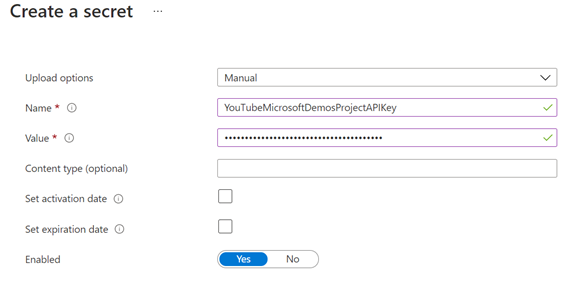
Create a new Azure key vault, or use an existing one, and create a new secret using:
Name: YouTubeMicrosoftDemosProjectAPIKey
Value: <YOUR-YOUTUBE-API-KEY>
Screenshots of getting the API Key value and creating the new secret:

Note: you need to grant the Azure Synapse Analytics workspace Managed Identity access to your Azure Key vault. Learn more here.

In this example, only “Get” and “List” are selected on the “Secret Permissions” list.
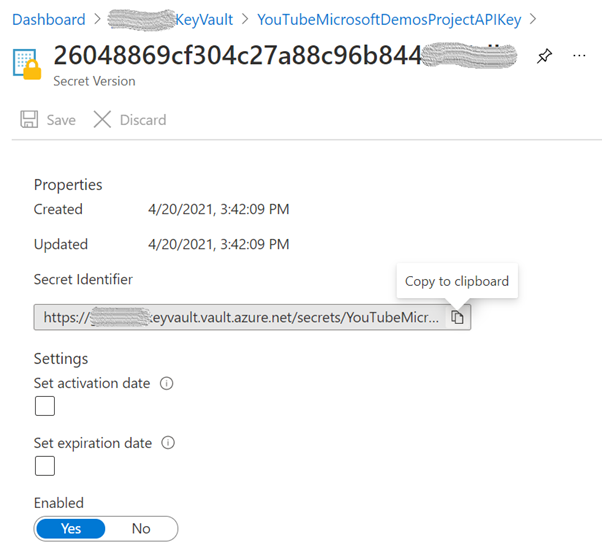
Next, open the current version of the secret and store the “Secret Identifier” as it will be used later:
Linked service to the Storage Account
Because we will be using the “Primary” Azure Data Lake Storage Gen2 storage account for the Azure Synapse Analytics workspace, specified when creating the workspace, the linked service is already created, and its name should be in this format: “<WORKSPACE-NAME>-WorkspaceDefaultStorage”.
Note: You need to create a new linked service if you want to use a storage account other than the “Primary” or if you’re using Azure Data Factory.
Linked service to the SQL Pool
Again, there’s no need to create a linked service to a SQL Pool in the same workspace because we will be using an activity that is unique to Azure Synapse Integrate pipelines: the “SQL pool stored procedure”.
Note: If you are using Azure Data Factory, then you need to create a linked service to the SQL Pool where you want to store your data. Refer to the “ADF linked service to Azure Synapse Analytics” section in the Azure Synapse SQL Pools Auto DR article.
Create YouTube video statistics table and related stored procedure
Create a new table in the SQL Pool you want to store the data. It will be used to store some fields from the REST API responses and well as the entire payload.
CREATE TABLE [dbo].[youtube_video_likes] (
  ITEM_ID            VARCHAR(100) NOT NULL,
  VIDEO_ID           VARCHAR(100) NOT NULL,
  LIKES              INT          NOT NULL,
  FULL_JSON_RESPONSE VARCHAR(MAX) NOT NULL,
  TS_INSERT          DATETIME     NOT NULL
)
WITH (DISTRIBUTION = ROUND_ROBIN, HEAP)
GO
In addition, create a new stored procedure. This will be called to insert the data in the table.
CREATE PROC [dbo].[p_youtube_video_likes_insert] @p_item_id [VARCHAR](100), @p_video_id [varchar](100), @p_likes [INT], @p_full_json_response [VARCHAR](MAX) AS
BEGIN
    INSERT INTO [dbo].[youtube_video_likes](item_id, video_id, likes, full_json_response, ts_insert)
    SELECT @p_item_id, @p_video_id, @p_likes, @p_full_json_response, SYSDATETIME();
END
GO
2. Create Datasets
We will use the Copy activity to store the REST API responses in parquet files, so we need to create two datasets for the source and sink.
Dataset for source
Create a file and upload it into your storage account. This file is a supporting file as the data we want to store is coming from the REST API calls and not from another file. The content is the simpler JSON snippet we can have, an empty JSON.
Filename |
oneLinerEmpty.JSON |
Content |
{} |
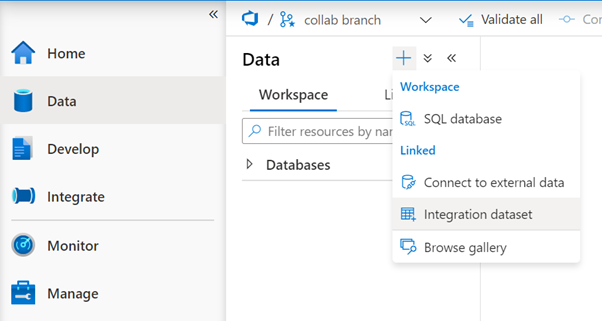
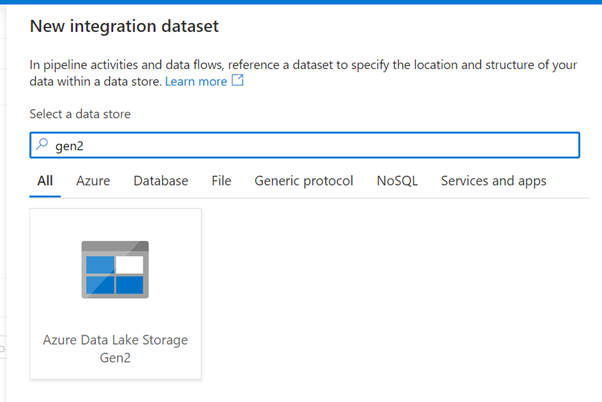
Then, create a new dataset for this file:
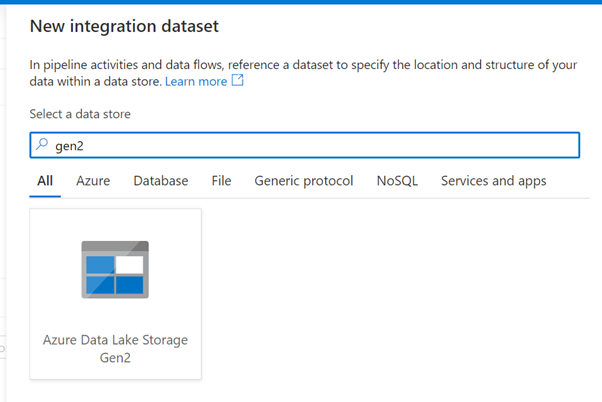
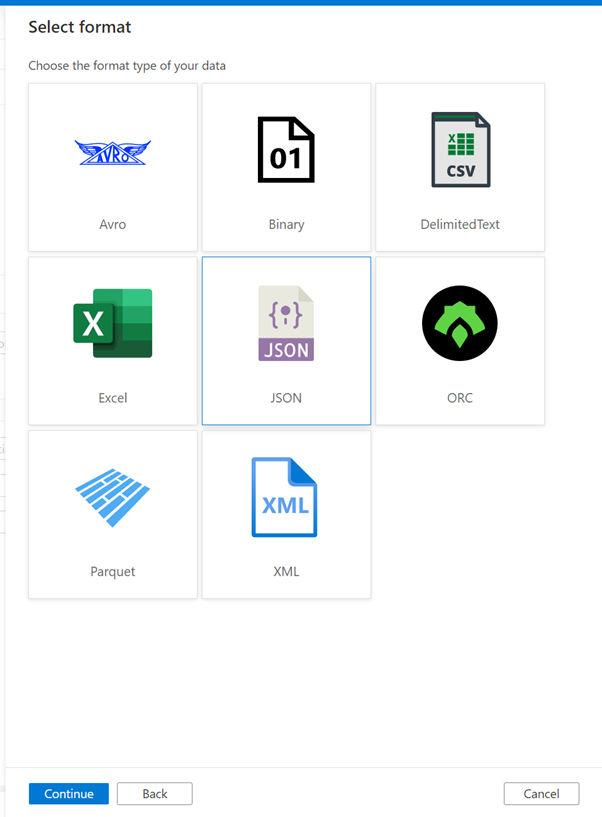
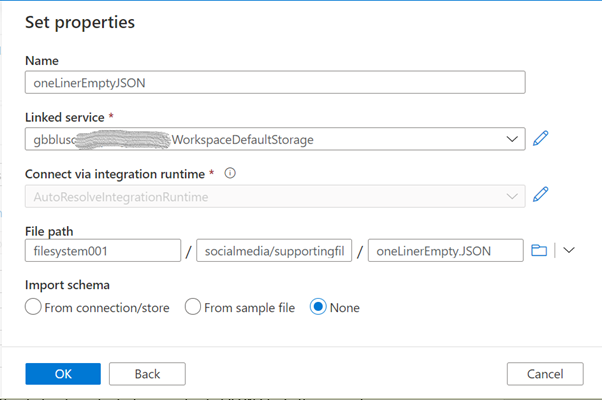
Data store |
Azure Data Lake Storage Gen2 |
Format |
JSON |
Name |
oneLinerEmptyJSON |
Linked service |
the linked service for your “Primary” storage account or another one |
File path |
use the browse button to locate and select your uploaded JSON file. In this example, “filesystem001” is the container name, “socialmedia/supportingfiles” is the folder, and “oneLinerEmpty.JSON” is the file name |
Dataset for sink
Create a new dataset that will be used to store the data in parquet format. This dataset will be parameterized because we will use it to create different files. Follow the same steps as above but select the Parquet format.
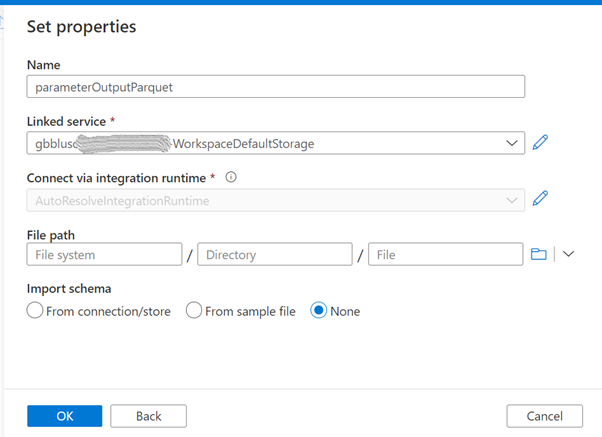
Name |
parameterOutputParquet |
Linked service |
the linked service for your “Primary” storage account or another one |
File path |
leave empty as this will be parameterized |
Import schema |
None |
Now it’s time to configure this dataset. In the Parameters tab, create 2 parameters as in this image:
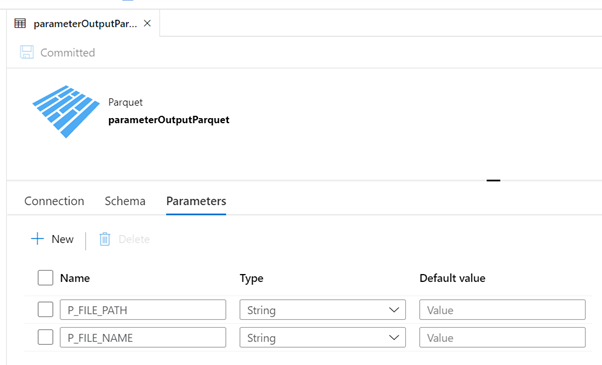
P_FILE_PATH |
String, no default value |
P_FILE_NAME |
String, no default value |
In the Connection tab, we will use these parameters:
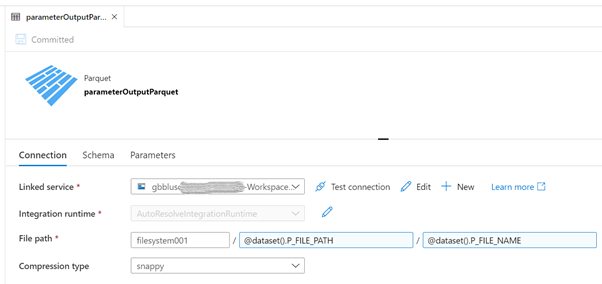
“filesystem001” is the name of the container: Replace accordingly.
Now we are ready to start developing the pipeline.
3. Pipelines
Create an auxiliary pipeline
The first pipeline is the one that uses the 2 datasets we created above and will only have a Copy activity. The objective of this pipeline is to receive a parameter and write that value in a parquet file. It will be called several times from the main pipeline, to store all the REST API responses.
Create a new pipeline, name it “Store Parameter in Parquet File” and create the following parameters, all with type String and no default value:
P_FILE_PATH |
P_FILE_NAME |
P_DATA |
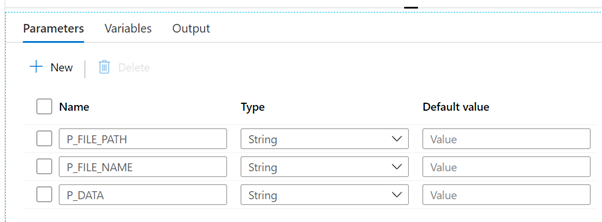
Add a Copy activity, name it “Store parameter P_DATA in Parquet” and configure the Source, Sink and Mapping tabs as shown in the following images.
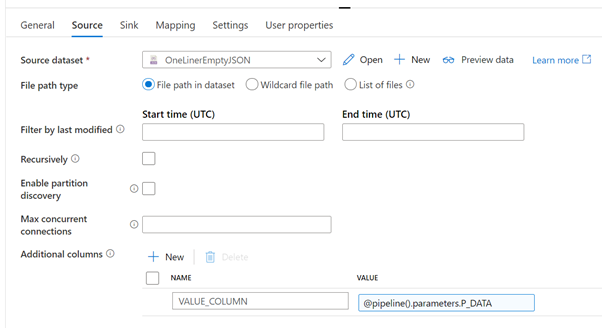
Source dataset |
the JSON file create in the preparation step |
File path type |
File path in dataset |
Recursively |
unchecked |
Additional columns |
create a new column “VALUE_COLUMN” and use the “Add dynamic content” of the VALUE field to add a reference to the parameter P_DATA (@pipeline().parameters.P_DATA).
The goal of this additional column is to create a new column with the content of the received parameter, as if it were read from the input file. This is a way to inject whatever values we want in columns of the Copy activity.
|
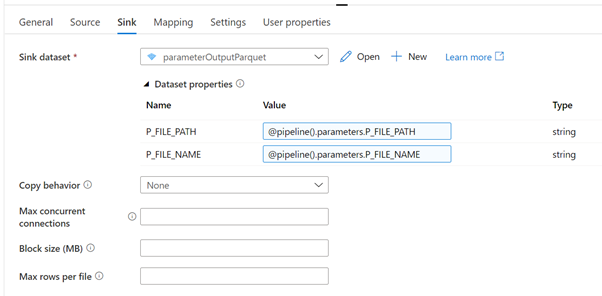
Sink dataset |
parameterOutputParquet |
P_FILE_PATH |
@pipeline().parameters.P_FILE_PATH |
P_FILE_NAME |
@pipeline().parameters.P_FILE_NAME |
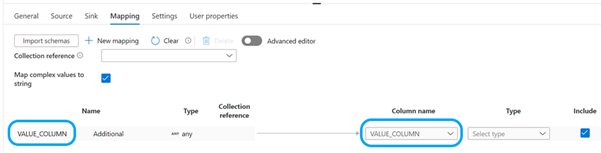
Map complex values to string |
checked |
Click on the “+ New mapping” to add a new mapping row. Rename the default column name “Column_1” to “VALUE_COLUMN” and map it to the same name in the right side of the mapping.
This pipeline is finished and should look like this:
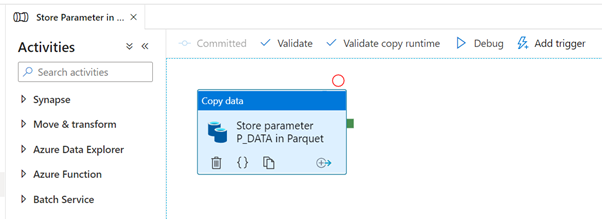
Create the main pipeline
The main pipeline has these steps:
- Get YouTube API Key from the secret in Azure Key Vault
- Get the playlist ID for a given channel ID
- Get the list of videos for a given playlist ID
- For each video, get video statistics
- Store results in the SQL Pool
In addition, the responses of all 3 YouTube REST API calls will also be stored in parquet files. This will allow us later to look at the data using different analytical/processing engines.
The complete pipeline and parameters will look like this:
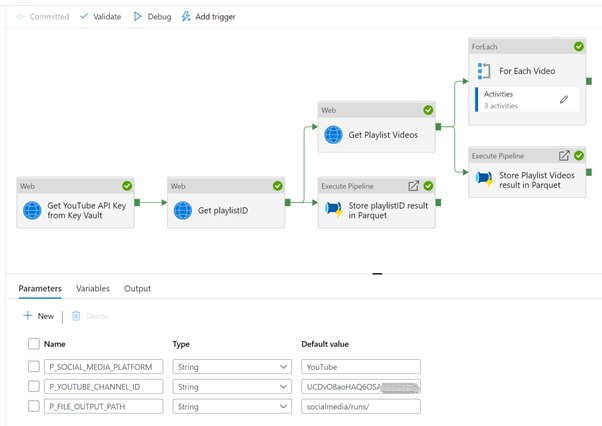
Start by creating a new pipeline, name it “YouTube REST API example with API Key” or whatever you want and add the following parameters and default values:
P_SOCIAL_MEDIA_PLATFORM |
YouTube |
P_YOUTUBE_CHANNEL_ID |
<YOUR-YOUTUBE-API-KEY> |
P_FILE_OUTPUT_PATH |
socialmedia/runs/ |
Add 3 Web activities, link them as shown in the previous picture and configure with the following properties. Only the non-default and important to mention properties are listed.
Web activity 1
The secure output option will hide the results from the API call, in this case it will hide the value we’re getting from the secret, as per the best practices. When we try to look at the result, it looks like this:
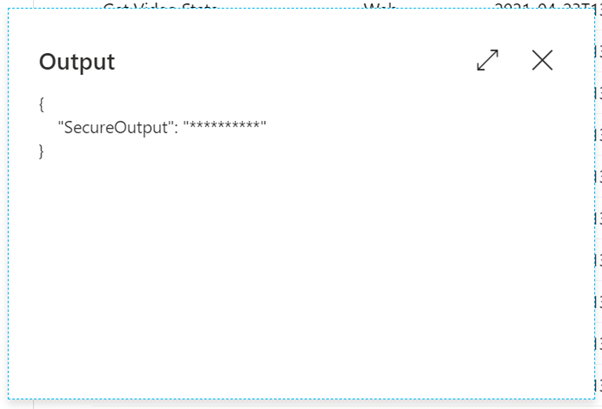
To access the value of the secret, we can now use this expression: activity(‘Get YouTube API Key from Key Vault’).output.value
Note: any developer can turn off the secure output option and see the value of the secret. This can happen in a development environment, where the sensitivity is not the same as in a production environment. Make sure that no sensitive information can be seen in a production environment, by including revision rules that validate that no pipelines can be promoted if proper settings for security are not met.
Web activity 2
The secure input option will hide the values sent to this activity, in this case it will hide the API Key used in the URL. If we try to see the runtime input, all we’ll see is this:
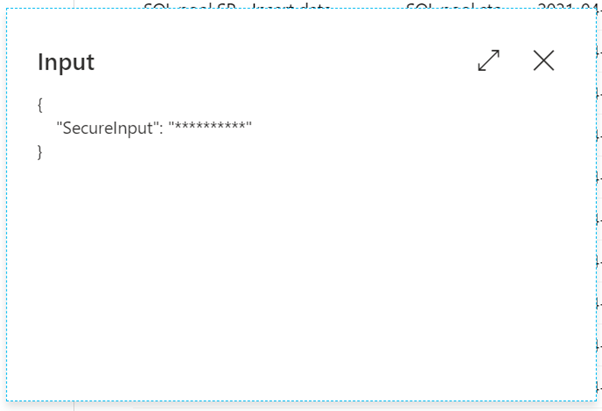
We now have the playlist ID for a channel, so we can request a list of videos for that playlist.
Web activity 3
The secure input option is also checked. Notice what we would see if this was not the case:

We want to store the responses of the 2 YouTube REST API calls in parquet format. We already have a pipeline to do that so we will now invoke it.
Add 2 Execute Pipeline activities to the canvas, link them as show in the complete pipeline design and configure as follows.
Execute Pipeline 1
Name |
Store playlistID result in Parquet |
Invoked pipeline |
Store Parameter in Parquet File, or any other name you gave to the auxiliary pipeline |
Wait on completion |
checked |
P_FILE_PATH |
@concat(
pipeline().parameters.P_FILE_OUTPUT_PATH,
pipeline().parameters.P_SOCIAL_MEDIA_PLATFORM
) |
P_FILE_NAME |
@concat(
‘getPlaylistID-‘,
utcnow(),
‘.parquet’
) |
P_DATA |
@string(activity(‘Get playlistID’).output) |
This activity will store the REST API response in a parquet file in the storage account. The file name will be similar to “getPlaylistID-2021-04-23T13:13:19.4426957Z.parquet”.
Execute Pipeline 2
Name |
Store Playlist Videos result in Parquet |
Invoked pipeline |
Store Parameter in Parquet File, or any other name you gave to the auxiliary pipeline |
Wait on completion |
checked |
P_FILE_PATH |
@concat(
pipeline().parameters.P_FILE_OUTPUT_PATH,
pipeline().parameters.P_SOCIAL_MEDIA_PLATFORM
) |
P_FILE_NAME |
@concat(
‘getPlaylistVideos-‘,
utcnow(),
‘.parquet’
) |
P_DATA |
@string(activity(‘Get Playlist Videos’).output) |
This activity will store the REST API response in a parquet file in the storage account. The file name will be similar to “getPlaylistVideos-2021-04-23T13:13:22.3769063Z.parquet”.
Now that we have a list of videos, we need to get the statistics for each one of them. To accomplish that, we add a ForEach activity to the pipeline, connect it to the output of the “Get Playlist Videos” activity and configure as:
Name |
For Each Video |
Sequential |
checked, but can also run in parallel |
Items |
@activity(‘Get Playlist Videos’).output.items |
Next, we add the remaining activities inside the loop, that will run for each video in the playlist. At the end it will look like this:
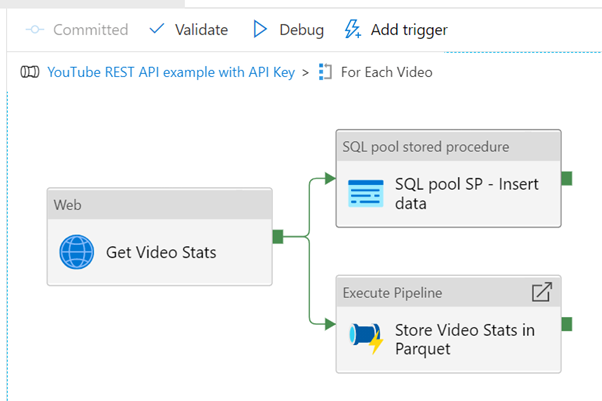
Web activity
This activity will request some statistics for a given video. Statistics include the number of views, likes, comments, and so on.
Execute pipeline activity
Name |
Store Video Stats in Parquet |
Invoked pipeline |
Store Parameter in Parquet File, or any other name you gave to the auxiliary pipeline |
Wait on completion |
checked |
P_FILE_PATH |
@concat(
pipeline().parameters.P_FILE_OUTPUT_PATH,
pipeline().parameters.P_SOCIAL_MEDIA_PLATFORM
) |
P_FILE_NAME |
@concat(
‘getVideoStats-‘,
utcnow(),
‘.parquet’
) |
P_DATA |
@string(activity(‘Get Video Stats’).output) |
This activity will store the REST API response in a parquet file in the storage account. The file name will be similar to “getVideoStats-2021-04-23T13:13:25.6924926Z.parquet”.
SQL Pool Stored Procedure
Name |
SQL pool SP – Insert data |
Azure Synapse dedicated SQL pool |
select the SQL pool where you created the table and stored procedure |
Stored procedure name |
[dbo].[p_youtube_video_likes_insert], or whatever you called it |
Stored procedure parameters (use the import button to list them):
p_item_id |
@item().id |
p_video_id |
@item().snippet.resourceId.videoId |
p_likes |
@activity(‘Get Video Stats’).output.items[0].statistics.likeCount |
p_full_json_response |
@string(activity(‘Get Video Stats’).output) |
The call to the stored procedure will make sure that some individual fields (item id, video id, count of likes) as well as the full response are stored in a table in a SQL pool. In a real scenario, we would need to create a model to hold the data, as per the requirements.
Note: if you use Azure Data Factory, the same goal can be achieved using the “Stored procedure” activity, but you would need to use a linked service to the target SQL pool.
We can now run the full pipeline and validate that several files were created in the storage account and some data inserted in the SQL pool table.
4. Look at the data
Because we stored our data in parquet files and tables in a SQL pool, we have several options to use to manipulate the data.
This table summarizes some of the options using Azure Synapse Analytics:
|
Data format and store |
Compute options |
Parquet files in ADLS Gen2 |
Tables in SQL Pools |
SQL Serverless
|
Y (*)
|
N
|
SQL Provisioned
|
Y
|
Y (*)
|
Spark Cluster
|
Y (*)
|
Y
|
Below we will look at short examples of the options marked with (*). The goal is not to go deep into technical details of JSON handling but rather have an idea of the possibilities to use.
a) SQL Serverless on Parquet files in ADLS Gen2
We can use the OPENROWSET function to read a parquet file and show its contents.
-- check file as-is
SELECT * FROM OPENROWSET(
    BULK 'https://mydatalake.dfs.core.windows.net/filesystem001/socialmedia/runs/YouTube/getVideoStats-2021-04-23T12:37:12.2853807Z.parquet',
    FORMAT='PARQUET'
) AS [result]
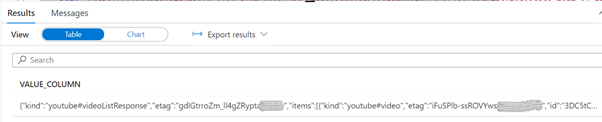
Since we have a JSON file, we can take advantage of the OPENJSON function to parse the elements in the first level of the file.
-- OPENJSON in action
SELECT [key], [value], [type]
FROM OPENROWSET(
    BULK 'https://mydatalake.dfs.core.windows.net/filesystem001/socialmedia/runs/YouTube/getVideoStats-2021-04-23T12:37:12.2853807Z.parquet',
    FORMAT='PARQUET'
) as [result2]
CROSS APPLY OPENJSON(VALUE_COLUMN)
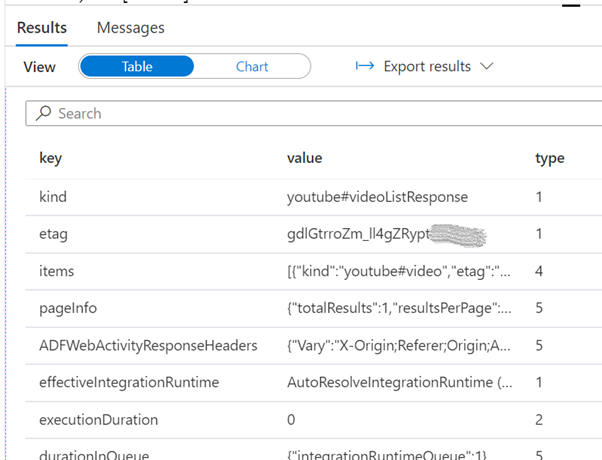
You can read more about OPENROWSET and OPENJSON here:
b) SQL Provisioned on Tables in SQL Pools
OPENJSON is also available on the SQL Provisioned engine.
-- check data as-is
SELECT *, isjson(full_json_response) as 'IS_JSON'
FROM [dbo].[youtube_video_likes]
GO
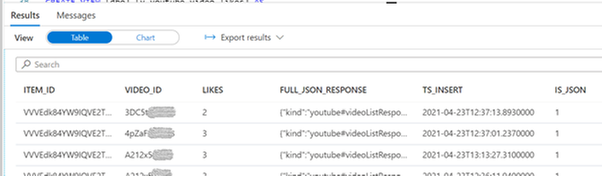
SELECT *
FROM [dbo].[youtube_video_likes]
cross apply openjson(full_json_response)
where video_id = 'A212x5XXXXX'
GO
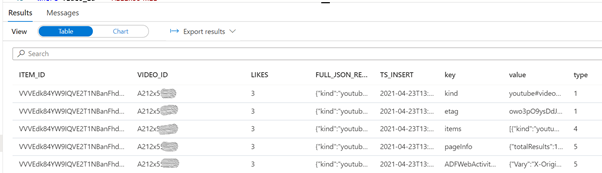
You can read more about OPENJSON for SQL Provisioned and JSON functions here:
c) Spark Cluster on Parquet files in ADLS Gen2
We can also use a Spark Cluster as a Spark processing engine to look at the data.
For this task, we create a new notebook. By default, the selected language is Python (Spark) and we can leave it like that, although we can use different languages by using Cell Magic Commands like %%pyspark or %%sql. We also need to attach the notebook to an existing Apache Spark Pool.
First, we load the data into a dataframe:
%%pyspark
df = spark.read.load('abfss://filesystem001@mydatalake.dfs.core.windows.net/socialmedia/runs/YouTube/getVideoStats-2021-04-23T12:37:12.2853807Z.parquet', format='parquet')
display(df)
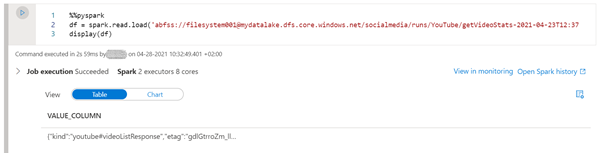
Since we have the data in a dataframe, we can use pyspark to manipulate the data:
%%pyspark
from pyspark.sql.functions import from_json, col
from pyspark.sql.types import StructType, StructField, StringType, ArrayType

statistics_schema = StructType([
    StructField('likeCount', StringType(), True)
])

items_schema = StructType([
    StructField('id',      StringType(), True),
    StructField('statistics', statistics_schema, True)
])

schema = StructType([
    StructField('kind',  StringType(),            True),
    StructField('etag',  StringType(),            True),
    StructField('items', ArrayType(items_schema), True)

])

display(
    df.withColumn('kind',     from_json(col('VALUE_COLUMN'), schema).getItem('kind'))
      .withColumn('etag',     from_json(col('VALUE_COLUMN'), schema).getItem('etag'))
      .withColumn('video_id', from_json(col('VALUE_COLUMN'), schema).getItem('items')[0].getItem('id'))
      .withColumn('likes',    from_json(col('VALUE_COLUMN'), schema).getItem('items')[0].getItem('statistics').getItem('likeCount'))
      .select('kind', 'etag', 'video_id', 'likes')
)
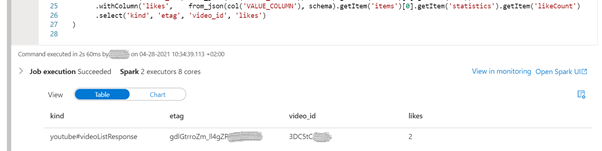
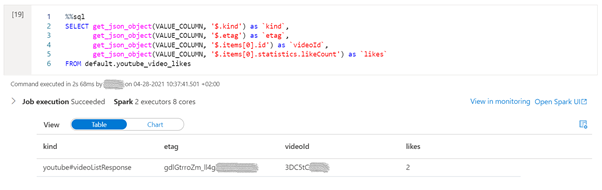
If SQL is the preferred way, we can create a table from the dataframe and use the get_json_object function to parse the json strings:
%%pyspark
df.write.mode("overwrite").saveAsTable("default.youtube_video_likes")

%%sql
SELECT get_json_object(VALUE_COLUMN, '$.kind') as `kind`,
       get_json_object(VALUE_COLUMN, '$.etag') as `etag`,
       get_json_object(VALUE_COLUMN, '$.items[0].id') as `videoId`,
       get_json_object(VALUE_COLUMN, '$.items[0].statistics.likeCount') as `likes`
FROM default.youtube_video_likes
Summary
It is easy to build an Azure Synapse Pipeline that gets information from social media.
In the example shown in this article, on how to get some data from YouTube, we covered the ingestion, storing and consumption using different techniques, and more can be used. There is not “the correct” way to do it but rather a way that makes sense in your environment.
You can find all the code in the attachment file below, including the pipelines and datasets, SQL scripts, notebooks and supporting files, as well as on GitHub under the repository name SynapseIntegrateSocialMedia.
by Scott Muniz | Sep 20, 2021 | Security, Technology
This article is contributed. See the original author and article here.
| elastic — enterprise_search_app |
Elastic Enterprise Search App Search versions before 7.14.0 was vulnerable to an issue where API keys were not bound to the same engines as their creator. This could lead to a less privileged user gaining access to unauthorized engines. |
2021-09-15 |
not yet calculated |
CVE-2021-22148
MISC
MISC |
elastic — enterprise_search_app
|
Elastic Enterprise Search App Search versions before 7.14.0 are vulnerable to an issue where API keys were missing authorization via an alternate route. Using this vulnerability, an authenticated attacker could utilize API keys belonging to higher privileged users. |
2021-09-15 |
not yet calculated |
CVE-2021-22149
MISC
MISC |
adminlte — adminlte
|
adminlte is vulnerable to Improper Neutralization of Input During Web Page Generation (‘Cross-site Scripting’) |
2021-09-17 |
not yet calculated |
CVE-2021-3812
CONFIRM
MISC |
adminlte — adminlte
|
adminlte is vulnerable to Improper Neutralization of Input During Web Page Generation (‘Cross-site Scripting’) |
2021-09-17 |
not yet calculated |
CVE-2021-3811
CONFIRM
MISC |
ansi-regex — ansi-regex
|
ansi-regex is vulnerable to Inefficient Regular Expression Complexity |
2021-09-17 |
not yet calculated |
CVE-2021-3807
MISC
CONFIRM |
any23 — any23
|
A Remote Code Execution (RCE) vulnerability was discovered in the Any23 YAMLExtractor.java file and is known to affect Any23 versions < 2.5. RCE vulnerabilities allow a malicious actor to execute any code of their choice on a remote machine over LAN, WAN, or internet. RCE belongs to the broader class of arbitrary code execution (ACE) vulnerabilities. |
2021-09-11 |
not yet calculated |
CVE-2021-40146
CONFIRM
MLIST |
any23 — streamutils.java
|
An XML external entity (XXE) injection vulnerability was discovered in the Any23 StreamUtils.java file and is known to affect Any23 versions < 2.5. XML external entity injection (also known as XXE) is a web security vulnerability that allows an attacker to interfere with an application’s processing of XML data. It often allows an attacker to view files on the application server filesystem, and to interact with any back-end or external systems that the application itself can access. |
2021-09-11 |
not yet calculated |
CVE-2021-38555
CONFIRM |
apache — http_server
|
ap_escape_quotes() may write beyond the end of a buffer when given malicious input. No included modules pass untrusted data to these functions, but third-party / external modules may. This issue affects Apache HTTP Server 2.4.48 and earlier. |
2021-09-16 |
not yet calculated |
CVE-2021-39275
MISC |
apache — http_server
|
A carefully crafted request uri-path can cause mod_proxy_uwsgi to read above the allocated memory and crash (DoS). This issue affects Apache HTTP Server versions 2.4.30 to 2.4.48 (inclusive). |
2021-09-16 |
not yet calculated |
CVE-2021-36160
MISC
MLIST
MLIST |
apache — http_server
|
Malformed requests may cause the server to dereference a NULL pointer. This issue affects Apache HTTP Server 2.4.48 and earlier. |
2021-09-16 |
not yet calculated |
CVE-2021-34798
MISC |
apache — http_server
|
A crafted request uri-path can cause mod_proxy to forward the request to an origin server choosen by the remote user. This issue affects Apache HTTP Server 2.4.48 and earlier. |
2021-09-16 |
not yet calculated |
CVE-2021-40438
MISC |
apache — jena
|
A vulnerability in XML processing in Apache Jena, in versions up to 4.1.0, may allow an attacker to execute XML External Entities (XXE), including exposing the contents of local files to a remote server. |
2021-09-16 |
not yet calculated |
CVE-2021-39239
MISC
MLIST |
apache — shiro
|
Apache Shiro before 1.8.0, when using Apache Shiro with Spring Boot, a specially crafted HTTP request may cause an authentication bypass. Users should update to Apache Shiro 1.8.0. |
2021-09-17 |
not yet calculated |
CVE-2021-41303
MISC |
apache — tomcat
|
Apache Tomcat 8.5.0 to 8.5.63, 9.0.0-M1 to 9.0.43 and 10.0.0-M1 to 10.0.2 did not properly validate incoming TLS packets. When Tomcat was configured to use NIO+OpenSSL or NIO2+OpenSSL for TLS, a specially crafted packet could be used to trigger an infinite loop resulting in a denial of service. |
2021-09-16 |
not yet calculated |
CVE-2021-41079
MISC |
apogee — mbc
|
A vulnerability has been identified in APOGEE MBC (PPC) (P2 Ethernet) (All versions >= V2.6.3), APOGEE MEC (PPC) (P2 Ethernet) (All versions >= V2.6.3), APOGEE PXC Compact (BACnet) (All versions < V3.5.3), APOGEE PXC Compact (P2 Ethernet) (All versions >= V2.8), APOGEE PXC Modular (BACnet) (All versions < V3.5.3), APOGEE PXC Modular (P2 Ethernet) (All versions >= V2.8), TALON TC Compact (BACnet) (All versions < V3.5.3), TALON TC Modular (BACnet) (All versions < V3.5.3). The web server of affected devices lacks proper bounds checking when parsing the Host parameter in HTTP requests, which could lead to a buffer overflow. An unauthenticated remote attacker could exploit this vulnerability to execute arbitrary code on the device with root privileges. |
2021-09-14 |
not yet calculated |
CVE-2021-27391
MISC |
ari — adminer
|
Cross Site Scripting (XSS) in Ari Adminer v1 allows remote attackers to execute arbitrary code via the ‘Title’ parameter of the ‘Add New Connections’ component when the ‘save()’ function is called. |
2021-09-15 |
not yet calculated |
CVE-2020-19156
MISC |
assyst — assyst
|
Assyst 10 SP7.5 has authenticated XXE leading to SSRF via XML unmarshalling. The application allows users to send JSON or XML data to the server. It was possible to inject malicious XML data through several access points. |
2021-09-15 |
not yet calculated |
CVE-2021-30137
MISC |
atftp — atftp
|
tftpd_file.c in atftp through 0.7.4 has a buffer overflow because buffer-size handling does not properly consider the combination of data, OACK, and other options. |
2021-09-13 |
not yet calculated |
CVE-2021-41054
MISC |
| atlassian — jira_server_and_data_center |
Affected versions of Atlassian Jira Server or Data Center using the Jira Service Management addon allow remote attackers with JIRA Administrators access to execute arbitrary Java code via a server-side template injection vulnerability in the Email Template feature. The affected versions of Jira Server or Data Center are before version 8.13.12, and from version 8.14.0 before 8.19.1. |
2021-09-16 |
not yet calculated |
CVE-2021-39128
MISC |
atlassian — jira_server_and_data_center
|
Affected versions of Atlassian Jira Server and Data Center allow remote attackers to discover the usernames and full names of users via an enumeration vulnerability in the /rest/api/1.0/render endpoint. The affected versions are before version 8.19.0. |
2021-09-14 |
not yet calculated |
CVE-2021-39118
MISC |
atlassian — jira_server_and_data_center
|
Affected versions of Atlassian Jira Server and Data Center allow anonymous remote attackers to view whitelist rules via a Broken Access Control vulnerability in the /rest/whitelist/<version>/check endpoint. The affected versions are before version 8.13.3, and from version 8.14.0 before 8.14.1. |
2021-09-14 |
not yet calculated |
CVE-2019-20101
N/A
N/A |
atlassian — jira_server_and_data_center
|
Affected versions of Atlassian Jira Server and Data Center allow anonymous remote attackers to discover the usernames of users via an enumeration vulnerability in the password reset page. The affected versions are before version 8.5.10, and from version 8.6.0 before 8.13.1. |
2021-09-14 |
not yet calculated |
CVE-2021-39125
MISC |
atlassian — jira_server_and_data_center
|
The Cross-Site Request Forgery (CSRF) failure retry feature of Atlassian Jira Server and Data Center before version 8.16.0 allows remote attackers who are able to trick a user into retrying a request to bypass CSRF protection and replay a crafted request. |
2021-09-14 |
not yet calculated |
CVE-2021-39124
MISC |
atlassian — jira_server_and_data_center
|
Affected versions of Atlassian Jira Server and Data Center allow unauthenticated remote attackers to impact the application’s availability via a Denial of Service (DoS) vulnerability in the /rest/gadget/1.0/createdVsResolved/generate endpoint. The affected versions are before version 8.16.0. |
2021-09-14 |
not yet calculated |
CVE-2021-39123
MISC |
autodesk — fbx_review
|
A Out-Of-Bounds Read/Write Vulnerability in Autodesk FBX Review version 1.4.0 may lead to remote code execution through maliciously crafted DLL files or information disclosure. |
2021-09-15 |
not yet calculated |
CVE-2021-27044
MISC |
autodesk — navisworks
|
A maliciously crafted DWG file in Autodesk Navisworks 2019, 2020, 2021, 2022 can be forced to write beyond allocated boundaries when parsing the DWG files. This vulnerability can be exploited to execute arbitrary code. |
2021-09-15 |
not yet calculated |
CVE-2021-40156
MISC |
autodesk — navisworks
|
A maliciously crafted PDF file in Autodesk Navisworks 2019, 2020, 2021, 2022 can be forced to read beyond allocated boundaries when parsing the PDF file. This vulnerability can be exploited to execute arbitrary code. |
2021-09-15 |
not yet calculated |
CVE-2021-27045
MISC |
autodesk — navisworks
|
A maliciously crafted DWG file in Autodesk Navisworks 2019, 2020, 2021, 2022 can be forced to read beyond allocated boundaries when parsing the DWG files. This vulnerability can be exploited to execute arbitrary code. |
2021-09-15 |
not yet calculated |
CVE-2021-40155
MISC |
autodesk — navisworks
|
A Memory Corruption vulnerability for PDF files in Autodesk Navisworks 2019, 2020, 2021, 2022 may lead to code execution through maliciously crafted DLL files. |
2021-09-15 |
not yet calculated |
CVE-2021-27046
MISC |
autodesk — navisworks
|
A user may be tricked into opening a malicious FBX file which may exploit an Untrusted Pointer Dereference vulnerability in FBX’s Review version 1.5.0 and prior causing it to run arbitrary code on the system. |
2021-09-15 |
not yet calculated |
CVE-2021-40157
MISC |
| aviatrix — controller |
An issue was discovered in Aviatrix Controller 6.x before 6.5-1804.1922. Unrestricted upload of a file with a dangerous type is possible, which allows an unauthenticated user to execute arbitrary code via directory traversal. |
2021-09-13 |
not yet calculated |
CVE-2021-40870
MISC
MISC |
beego — beego
|
Cross Site Scripting (XSS) vulnerability exists in the admin panel in Beego v2.0.1 via the URI path in an HTTP request, which is activated by administrators viewing the “Request Statistics” page. |
2021-09-14 |
not yet calculated |
CVE-2021-39391
MISC
MISC |
| big-ip — big-ip |
On version 16.0.x before 16.0.1.2, 15.1.x before 15.1.3.1, 14.1.x before 14.1.4.2, 13.1.x before 13.1.4.1, and all versions of 12.1.x, a stored cross-site scripting (XSS) vulnerability exists in an undisclosed page of the BIG-IP Configuration utility that allows an attacker to execute JavaScript in the context of the currently logged-in user. Note: Software versions which have reached End of Technical Support (EoTS) are not evaluated. |
2021-09-14 |
not yet calculated |
CVE-2021-23038
MISC |
| big-ip — big-ip |
On BIG-IP version 16.0.x before 16.0.1.2, 15.1.x before 15.1.3, 14.1.x before 14.1.4, 13.1.x before 13.1.4, and 12.1.x before 12.1.6, when an HTTP profile is configured on a virtual server, undisclosed requests can cause a significant increase in system resource utilization. Note: Software versions which have reached End of Technical Support (EoTS) are not evaluated. |
2021-09-14 |
not yet calculated |
CVE-2021-23042
MISC |
| big-ip — big-ip |
On BIG-IP version 16.0.x before 16.0.1.2, 15.1.x before 15.1.3, 14.1.x before 14.1.4.2, 13.1.x before 13.1.4.1, and all versions of 12.1.x, a DOM based cross-site scripting (XSS) vulnerability exists in an undisclosed page of the BIG-IP Configuration utility that allows an attacker to execute JavaScript in the context of the current logged-in user. Note: Software versions which have reached End of Technical Support (EoTS) are not evaluated. |
2021-09-14 |
not yet calculated |
CVE-2021-23041
MISC |
| big-ip — big-ip |
On BIG-IP AFM version 16.0.x before 16.0.1.2, 15.1.x before 15.1.3, 14.1.x before 14.1.4.2, 13.1.x before 13.1.4.1, and all versions of 12.1.x, a SQL injection vulnerability exists in an undisclosed page of the BIG-IP Configuration utility. This issue is exposed only when BIG-IP AFM is provisioned. Note: Software versions which have reached End of Technical Support (EoTS) are not evaluated. |
2021-09-14 |
not yet calculated |
CVE-2021-23040
MISC |
| big-ip — big-ip |
On version 16.0.x before 16.0.1.2, 15.1.x before 15.1.3, 14.1.x before 14.1.2.8, and all versions of 13.1.x and 12.1.x, when IPSec is configured on a BIG-IP system, undisclosed requests from an authorized remote (IPSec) peer, which already has a negotiated Security Association, can cause the Traffic Management Microkernel (TMM) to terminate. Note: Software versions which have reached End of Technical Support (EoTS) are not evaluated. |
2021-09-14 |
not yet calculated |
CVE-2021-23039
MISC |
| big-ip — big-ip |
On version 16.x before 16.1.0, 15.1.x before 15.1.3.1, 14.1.x before 14.1.4.4, and all versions of 13.1.x and 12.1.x, when a BIG-IP DNS system is configured with non-default Wide IP and pool settings, undisclosed DNS responses can cause the Traffic Management Microkernel (TMM) to terminate. Note: Software versions which have reached End of Technical Support (EoTS) are not evaluated. |
2021-09-14 |
not yet calculated |
CVE-2021-23032
MISC |
| big-ip — big-ip |
On BIG-IP Advanced WAF and BIG-IP ASM version 16.0.x before 16.0.1.2, 15.1.x before 15.1.3.1, 14.1.x before 14.1.4.3, 13.1.x before 13.1.4.1, and all versions of 12.1.x, when a WebSocket profile is configured on a virtual server, undisclosed requests can cause bd to terminate. Note: Software versions which have reached End of Technical Support (EoTS) are not evaluated. |
2021-09-14 |
not yet calculated |
CVE-2021-23030
MISC |
| big-ip — big-ip |
On version 16.0.x before 16.0.1.2, 15.1.x before 15.1.3, 14.1.x before 14.1.4.1, 13.1.x before 13.1.4, 12.1.x before 12.1.6, and 11.6.x before 11.6.5.3, an authenticated user may perform a privilege escalation on the BIG-IP Advanced WAF and ASM Configuration utility. Note: Software versions which have reached End of Technical Support (EoTS) are not evaluated. |
2021-09-14 |
not yet calculated |
CVE-2021-23031
MISC |
| big-ip — big-ip |
On version 16.0.x before 16.0.1.2, when a BIG-IP ASM and DataSafe profile are configured on a virtual server, undisclosed requests can cause the Traffic Management Microkernel (TMM) to terminate. Note: Software versions which have reached End of Technical Support (EoTS) are not evaluated. |
2021-09-14 |
not yet calculated |
CVE-2021-23036
MISC |
| big-ip — big-ip |
On BIG-IP 14.1.x before 14.1.4.4, when an HTTP profile is configured on a virtual server, after a specific sequence of packets, chunked responses can cause the Traffic Management Microkernel (TMM) to terminate. Note: Software versions which have reached End of Technical Support (EoTS) are not evaluated. |
2021-09-14 |
not yet calculated |
CVE-2021-23035
MISC |
| big-ip — big-ip |
On BIG-IP version 16.x before 16.1.0 and 15.1.x before 15.1.3.1, when a DNS profile using a DNS cache resolver is configured on a virtual server, undisclosed requests can cause the Traffic Management Microkernel (TMM) process to terminate. Note: Software versions which have reached End of Technical Support (EoTS) are not evaluated. |
2021-09-14 |
not yet calculated |
CVE-2021-23034
MISC |
| big-ip — big-ip |
On all versions of Guided Configuration before 8.0.0, when a configuration that contains secure properties is created and deployed from Access Guided Configuration (AGC), secure properties are logged in restnoded logs. Note: Software versions which have reached End of Technical Support (EoTS) are not evaluated. |
2021-09-14 |
not yet calculated |
CVE-2021-23046
MISC |
| big-ip — big-ip |
On BIG-IP version 16.x before 16.1.0, 15.1.x before 15.1.3.1, 14.1.x before 14.1.4.2, 13.1.x before 13.1.4.1, and all versions of 12.1.x and 11.6.x, when the Intel QuickAssist Technology (QAT) compression driver is used on affected BIG-IP hardware and BIG-IP Virtual Edition (VE) platforms, undisclosed traffic can cause the Traffic Management Microkernel (TMM) to terminate. Note: Software versions which have reached End of Technical Support (EoTS) are not evaluated. |
2021-09-14 |
not yet calculated |
CVE-2021-23044
MISC |
| big-ip — big-ip |
On BIG-IP Advanced WAF and BIG-IP ASM version 16.x before 16.1.0x, 15.1.x before 15.1.3.1, 14.1.x before 14.1.4.3, 13.1.x before 13.1.4.1, and all versions of 12.1.x, when a WebSocket profile is configured on a virtual server, undisclosed requests can cause bd to terminate. Note: Software versions which have reached End of Technical Support (EoTS) are not evaluated. |
2021-09-14 |
not yet calculated |
CVE-2021-23033
MISC |
| big-ip — big-ip |
On BIG-IP version 16.0.x before 16.0.1.2 and 15.1.x before 15.1.3, when the iRules RESOLVER::summarize command is used on a virtual server, undisclosed requests can cause an increase in Traffic Management Microkernel (TMM) memory utilization resulting in an out-of-memory condition and a denial-of-service (DoS). Note: Software versions which have reached End of Technical Support (EoTS) are not evaluated. |
2021-09-14 |
not yet calculated |
CVE-2021-23049
MISC |
| big-ip — big-ip |
On BIG-IP Advanced WAF and BIG-IP ASM version 16.0.x before 16.0.1.2 and 15.1.x before 15.1.3 and NGINX App Protect on all versions before 3.5.0, when a cross-site request forgery (CSRF)-enabled policy is configured on a virtual server, an undisclosed HTML response may cause the bd process to terminate. Note: Software versions which have reached End of Technical Support (EoTS) are not evaluated. |
2021-09-14 |
not yet calculated |
CVE-2021-23050
MISC |
big-ip — big-ip
|
On version 16.x before 16.1.0, 15.1.x before 15.1.3.1, 14.1.x before 14.1.4.3, and all versions of 13.1.x, 12.1.x and 11.6.x, when BIG-IP APM performs Online Certificate Status Protocol (OCSP) verification of a certificate that contains Authority Information Access (AIA), undisclosed requests may cause an increase in memory use. Note: Software versions which have reached End of Technical Support (EoTS) are not evaluated. |
2021-09-14 |
not yet calculated |
CVE-2021-23047
MISC |
big-ip — big-ip
|
On BIG-IP version 16.0.x before 16.0.1.2, 15.1.x before 15.1.3.1, 14.1.x before 14.1.4.3, 13.1.x before 13.1.4.1, and all versions of 12.1.x and 11.6.x, when GPRS Tunneling Protocol (GTP) iRules commands or a GTP profile is configured on a virtual server, undisclosed GTP messages can cause the Traffic Management Microkernel (TMM) to terminate. Note: Software versions which have reached End of Technical Support (EoTS) are not evaluated. |
2021-09-14 |
not yet calculated |
CVE-2021-23048
MISC |
big-ip — big-ip
|
On version 16.0.x before 16.0.1.2, 15.1.x before 15.1.3.1, 14.1.x before 14.1.4.2, and 13.1.x before 13.1.4, when JSON content profiles are configured for URLs as part of an F5 Advanced Web Application Firewall (WAF)/BIG-IP ASM security policy and applied to a virtual server, undisclosed requests may cause the BIG-IP ASM bd process to terminate. Note: Software versions which have reached End of Technical Support (EoTS) are not evaluated. |
2021-09-14 |
not yet calculated |
CVE-2021-23028
MISC |
big-ip — big-ip
|
BIG-IP version 16.0.x before 16.0.1.2, 15.1.x before 15.1.3, 14.1.x before 14.1.4.2, 13.1.x before 13.1.4.1, and all versions of 12.1.x and 11.6.x and all versions of BIG-IQ 8.x, 7.x, and 6.x are vulnerable to cross-site request forgery (CSRF) attacks through iControl SOAP. Note: Software versions which have reached End of Technical Support (EoTS) are not evaluated. |
2021-09-14 |
not yet calculated |
CVE-2021-23026
MISC |
big-ip — big-ip
|
On version 16.0.x before 16.0.1.2, insufficient permission checks may allow authenticated users with guest privileges to perform Server-Side Request Forgery (SSRF) attacks through F5 Advanced Web Application Firewall (WAF) and the BIG-IP ASM Configuration utility. Note: Software versions which have reached End of Technical Support (EoTS) are not evaluated. |
2021-09-14 |
not yet calculated |
CVE-2021-23029
MISC |
big-ip — big-ip
|
On version 15.1.x before 15.1.0.5, 14.1.x before 14.1.3.1, 13.1.x before 13.1.3.5, and all versions of 12.1.x and 11.6.x, an authenticated remote command execution vulnerability exists in the BIG-IP Configuration utility. Note: Software versions which have reached End of Technical Support (EoTS) are not evaluated. |
2021-09-14 |
not yet calculated |
CVE-2021-23025
MISC |
big-ip — big-ip
|
On all versions of 16.1.x, 16.0.x, 15.1.x, 14.1.x, 13.1.x, 12.1.x, and 11.6.x, a reflected cross-site scripting (XSS) vulnerability exists in an undisclosed page of the BIG-IP Configuration utility that allows an attacker to execute JavaScript in the context of the currently logged-in user. Note: Software versions which have reached End of Technical Support (EoTS) are not evaluated. |
2021-09-14 |
not yet calculated |
CVE-2021-23037
MISC |
big-ip — big-ip
|
On version 15.1.x before 15.1.3, 14.1.x before 14.1.3.1, and 13.1.x before 13.1.3.6, when the brute force protection feature of BIG-IP Advanced WAF or BIG-IP ASM is enabled on a virtual server and the virtual server is under brute force attack, the MySQL database may run out of disk space due to lack of row limit on undisclosed tables in the MYSQL database. Note: Software versions which have reached End of Technical Support (EoTS) are not evaluated. |
2021-09-14 |
not yet calculated |
CVE-2021-23053
MISC |
big-ip — big-ip
|
On version 14.1.x before 14.1.4.4 and all versions of 13.1.x, an open redirect vulnerability exists on virtual servers enabled with a BIG-IP APM access policy. This vulnerability allows an unauthenticated malicious user to build an open redirect URI. Note: Software versions which have reached End of Technical Support (EoTS) are not evaluated. |
2021-09-14 |
not yet calculated |
CVE-2021-23052
MISC |
big-ip — big-ip
|
On BIG-IP versions 15.1.0.4 through 15.1.3, when the Data Plane Development Kit (DPDK)/Elastic Network Adapter (ENA) driver is used with BIG-IP on Amazon Web Services (AWS) systems, undisclosed requests can cause the Traffic Management Microkernel (TMM) to terminate. This is due to an incomplete fix for CVE-2020-5862. Note: Software versions which have reached End of Technical Support (EoTS) are not evaluated. |
2021-09-14 |
not yet calculated |
CVE-2021-23051
MISC |
big-ip — big-ip
|
On BIG-IP, on all versions of 16.1.x, 16.0.x, 15.1.x, 14.1.x, 13.1.x, 12.1.x, and 11.6.x, a directory traversal vulnerability exists in an undisclosed page of the BIG-IP Configuration utility that allows an attacker to access arbitrary files. Note: Software versions which have reached End of Technical Support (EoTS) are not evaluated. |
2021-09-14 |
not yet calculated |
CVE-2021-23043
MISC |
big-ip — big-ip
|
On BIG-IP version 16.0.x before 16.0.1.2, 15.1.x before 15.1.3.1, 14.1.x before 14.1.4.3, 13.1.x before 13.1.4.1, and all versions of 12.1.x, when an SCTP profile with multiple paths is configured on a virtual server, undisclosed requests can cause the Traffic Management Microkernel (TMM) to terminate. Note: Software versions which have reached End of Technical Support (EoTS) are not evaluated. |
2021-09-14 |
not yet calculated |
CVE-2021-23045
MISC |
big-ip — big-ip
|
On version 16.0.x before 16.0.1.2, 15.1.x before 15.1.3.1, and 14.1.x before 14.1.4.3, a DOM based cross-site scripting (XSS) vulnerability exists in an undisclosed page of the BIG-IP Configuration utility that allows an attacker to execute JavaScript in the context of the currently logged-in user. Note: Software versions which have reached End of Technical Support (EoTS) are not evaluated. |
2021-09-14 |
not yet calculated |
CVE-2021-23027
MISC |
body-parser-xml — body-parser-xml
|
body-parser-xml is vulnerable to Improperly Controlled Modification of Object Prototype Attributes (‘Prototype Pollution’) |
2021-09-13 |
not yet calculated |
CVE-2021-3666
CONFIRM
MISC |
boost — note
|
static/main-preload.js in Boost Note through 0.22.0 allows remote command execution. A remote attacker may send a crafted IPC message to the exposed vulnerable ipcRenderer IPC interface, which invokes the dangerous openExternal Electron API. |
2021-09-17 |
not yet calculated |
CVE-2021-41392
MISC |
btcpayserver — btcpayserver
|
btcpayserver is vulnerable to Improper Neutralization of Input During Web Page Generation (‘Cross-site Scripting’) |
2021-09-10 |
not yet calculated |
CVE-2021-3646
CONFIRM
MISC |
cerberus — dms
|
A vulnerability has been identified in Cerberus DMS V4.0 (All versions), Cerberus DMS V4.1 (All versions), Cerberus DMS V4.2 (All versions), Cerberus DMS V5.0 (All versions < v5.0 QU1), Desigo CC Compact V4.0 (All versions), Desigo CC Compact V4.1 (All versions), Desigo CC Compact V4.2 (All versions), Desigo CC Compact V5.0 (All versions < V5.0 QU1), Desigo CC V4.0 (All versions), Desigo CC V4.1 (All versions), Desigo CC V4.2 (All versions), Desigo CC V5.0 (All versions < V5.0 QU1). The application deserialises untrusted data without sufficient validations, that could result in an arbitrary deserialization. This could allow an unauthenticated attacker to execute code in the affected system. The CCOM communication component used for Windows App / Click-Once and IE Web / XBAP client connectivity are affected by the vulnerability. |
2021-09-14 |
not yet calculated |
CVE-2021-37181
MISC |
clearance — clearance
|
This affects the package clearance before 2.5.0. The vulnerability can be possible when users are able to set the value of session[:return_to]. If the value used for return_to contains multiple leading slashes (/////example.com) the user ends up being redirected to the external domain that comes after the slashes (http://example.com). |
2021-09-12 |
not yet calculated |
CVE-2021-23435
CONFIRM
CONFIRM |
cms — made_simple
|
An issue was discovered in CMS Made Simple 2.2.8. It is possible to achieve unauthenticated path traversal in the CGExtensions module (in the file action.setdefaulttemplate.php) with the m1_filename parameter; and through the action.showmessage.php file, it is possible to read arbitrary file content (by using that path traversal with m1_prefname set to cg_errormsg and m1_resettodefault=1). |
2021-09-17 |
not yet calculated |
CVE-2019-9060
CONFIRM
CONFIRM
CONFIRM
CONFIRM |
code-server — code-server
|
code-server is vulnerable to Inefficient Regular Expression Complexity |
2021-09-17 |
not yet calculated |
CVE-2021-3810
CONFIRM
MISC |
cookie/deep — cookie/deep
|
This affects all versions of package @cookiex/deep. The global proto object can be polluted using the __proto__ object. |
2021-09-17 |
not yet calculated |
CVE-2021-23442
MISC
MISC
MISC |
cs-cart — cs-cart
|
In CS-Cart version 4.11.1, it is possible to induce copy-paste XSS by manipulating the “post description” filed in the blog post creation page. |
2021-09-14 |
not yet calculated |
CVE-2021-32202
MISC |
dahua — dahua
|
The identity authentication bypass vulnerability found in some Dahua products during the login process. Attackers can bypass device identity authentication by constructing malicious data packets. |
2021-09-15 |
not yet calculated |
CVE-2021-33044
MISC |
dahua — dahua
|
The identity authentication bypass vulnerability found in some Dahua products during the login process. Attackers can bypass device identity authentication by constructing malicious data packets. |
2021-09-15 |
not yet calculated |
CVE-2021-33045
MISC |
| delta — electronic_dopsoft2 |
Delta Electronic DOPSoft 2 (Version 2.00.07 and prior) lacks proper validation of user-supplied data when parsing specific project files. This could result in multiple out-of-bounds write instances. An attacker could leverage this vulnerability to execute code in the context of the current process. |
2021-09-17 |
not yet calculated |
CVE-2021-38406
MISC |
delta — electronic_dopsoft2
|
Delta Electronic DOPSoft 2 (Version 2.00.07 and prior) lacks proper validation of user-supplied data when parsing specific project files. This could lead to a stack-based buffer overflow while trying to copy to a buffer during font string handling. An attacker could leverage this vulnerability to execute code in the context of the current process. |
2021-09-17 |
not yet calculated |
CVE-2021-38402
MISC |
delta — electronic_dopsoft2
|
Delta Electronic DOPSoft 2 (Version 2.00.07 and prior) lacks proper validation of user-supplied data when parsing specific project files. This could result in a heap-based buffer overflow. An attacker could leverage this vulnerability to execute code in the context of the current process. |
2021-09-17 |
not yet calculated |
CVE-2021-38404
MISC |
desigo — cc
|
A vulnerability has been identified in Desigo CC (All versions with OIS Extension Module), GMA-Manager (All versions with OIS running on Debian 9 or earlier), Operation Scheduler (All versions with OIS running on Debian 9 or earlier), Siveillance Control (All versions with OIS running on Debian 9 or earlier), Siveillance Control Pro (All versions). The affected application incorrectly neutralizes special elements in a specific HTTP GET request which could lead to command injection. An unauthenticated remote attacker could exploit this vulnerability to execute arbitrary code on the system with root privileges. |
2021-09-14 |
not yet calculated |
CVE-2021-31891
MISC |
device42 — main_appliance
|
The Device42 Main Appliance before 17.05.01 does not sanitize user input in its Nmap Discovery utility. An attacker (with permissions to add or edit jobs run by this utility) can inject an extra argument to overwrite arbitrary files as the root user on the Remote Collector. |
2021-09-17 |
not yet calculated |
CVE-2021-41316
MISC
MISC
MISC |
device42 — remote_collector
|
The Device42 Remote Collector before 17.05.01 does not sanitize user input in its SNMP Connectivity utility. This allows an authenticated attacker (with access to the console application) to execute arbitrary OS commands and escalate privileges. |
2021-09-17 |
not yet calculated |
CVE-2021-41315
MISC
MISC |
digi — portserver
|
Properly formatted POST requests to multiple resources on the HTTP and HTTPS web servers of the Digi PortServer TS 16 Rack device do not require authentication or authentication tokens. This vulnerability could allow an attacker to enable the SNMP service and manipulate the community strings to achieve further control in. |
2021-09-17 |
not yet calculated |
CVE-2021-38412
MISC |
| ec-cube — ec-cube |
Cross-site scripting vulnerability in Order Status Batch Change Plug-in (for EC-CUBE 3.0 series) all versions allows a remote attacker to inject an arbitrary script via unspecified vectors. |
2021-09-17 |
not yet calculated |
CVE-2021-20828
MISC
MISC |
ec-cube — ec-cube
|
Cross-site scripting vulnerability in List (order management) item change plug-in (for EC-CUBE 3.0 series) Ver.1.1 and earlier allows a remote attacker to inject an arbitrary script via unspecified vectors. |
2021-09-17 |
not yet calculated |
CVE-2021-20825
MISC
MISC |
eclipse — equinox
|
In all released versions of Eclipse Equinox, at least until version 4.21 (September 2021), installation can be vulnerable to man-in-the-middle attack if using p2 repos that are HTTP; that can then be exploited to serve incorrect p2 metadata and entirely alter the local installation, particularly by installing plug-ins that may then run malicious code. |
2021-09-13 |
not yet calculated |
CVE-2021-41033
CONFIRM |
elastic — elasticsearch
|
Elasticsearch before 7.14.0 did not apply document and field level security to searchable snapshots. This could lead to an authenticated user gaining access to information that they are unauthorized to view. |
2021-09-15 |
not yet calculated |
CVE-2021-22147
MISC
MISC |
emlog — emlog
|
emlog v6.0 contains a Cross-Site Request Forgery (CSRF) via /admin/link.php?action=addlink, which allows attackers to arbitrarily add articles. |
2021-09-15 |
not yet calculated |
CVE-2020-21321
MISC |
enbra — ewm
|
Enbra EWM 1.7.29 does not check for or detect replay attacks sent by wireless M-Bus Security mode 5 devices. Instead timestamps of the sensor are replaced by the time of the readout even if the data is a replay of earlier data. |
2021-09-16 |
not yet calculated |
CVE-2021-34572
CONFIRM |
enbra — ewm
|
In Enbra EWM in Version 1.7.29 together with several tested wireless M-Bus Sensors the events backflow and “no flow” are not reconized or misinterpreted. This may lead to wrong values and missing events. |
2021-09-16 |
not yet calculated |
CVE-2021-34573
CONFIRM |
enbra — m-bus_devices
|
Multiple Wireless M-Bus devices by Enbra use Hard-coded Credentials in Security mode 5 without an option to change the encryption key. An adversary can learn all information that is available in Enbra EWM. |
2021-09-16 |
not yet calculated |
CVE-2021-34571
CONFIRM |
ericsson — ecm
|
In Ericsson ECM before 18.0, it was observed that Security Provider Endpoint in the User Profile Management Section is vulnerable to CSV Injection. |
2021-09-17 |
not yet calculated |
CVE-2021-41390
MISC |
ericsson — ecm
|
In Ericsson ECM before 18.0, it was observed that Security Management Endpoint in User Profile Management Section is vulnerable to stored XSS via a name, leading to session hijacking and full account takeover. |
2021-09-17 |
not yet calculated |
CVE-2021-41391
MISC |
expertpdf — expertpdf
|
A local file inclusion vulnerability in ExpertPDF 9.5.0 through 14.1.0 allows attackers to read the file contents from files that the running ExpertPDF process has access to read. |
2021-09-15 |
not yet calculated |
CVE-2020-35340
MISC |
feehi — feehi
|
An arbitrary file upload vulnerability in Feehi CMS v2.0.8 and below allows attackers to execute arbitrary code via a crafted PHP file. |
2021-09-15 |
not yet calculated |
CVE-2020-21322
MISC |
| fig2dev — fig2dev |
fig2dev 3.2.7b contains a global buffer overflow in the get_line function in read.c. |
2021-09-16 |
not yet calculated |
CVE-2020-21534
MISC |
| fig2dev — fig2dev |
fig2dev 3.2.7b contains a global buffer overflow in the conv_pattern_index function in gencgm.c. |
2021-09-16 |
not yet calculated |
CVE-2020-21531
MISC |
fig2dev — fig2dev
|
fig2dev 3.2.7b contains a stack buffer overflow in the bezier_spline function in genepic.c. |
2021-09-16 |
not yet calculated |
CVE-2020-21529
MISC |
fig2dev — fig2dev
|
fig2dev 3.2.7b contains a segmentation fault in the read_objects function in read.c. |
2021-09-16 |
not yet calculated |
CVE-2020-21530
MISC |
fig2dev — fig2dev
|
fig2dev 3.2.7b contains a global buffer overflow in the setfigfont function in genepic.c. |
2021-09-16 |
not yet calculated |
CVE-2020-21532
MISC |
fig2dev — fig2dev
|
fig2dev 3.2.7b contains a stack buffer overflow in the read_textobject function in read.c. |
2021-09-16 |
not yet calculated |
CVE-2020-21533
MISC |
fig2dev — fig2dev
|
fig2dev 3.2.7b contains a segmentation fault in the gencgm_start function in gencgm.c. |
2021-09-16 |
not yet calculated |
CVE-2020-21535
MISC |
flexnet — publisher
|
A Denial of Service vulnerability has been identified in FlexNet Publisher’s lmadmin.exe version 11.16.6. A certain message protocol can be exploited to cause lmadmin to crash. |
2021-09-17 |
not yet calculated |
CVE-2020-12080
MISC |
| geutebruck — geutebruck |
Multiple camera devices by UDP Technology, Geutebrück and other vendors are vulnerable to command injection, which may allow an attacker to remotely execute arbitrary code. |
2021-09-13 |
not yet calculated |
CVE-2021-33550
CONFIRM
CONFIRM |
| geutebruck — geutebruck |
Multiple camera devices by UDP Technology, Geutebrück and other vendors are vulnerable to command injection, which may allow an attacker to remotely execute arbitrary code. |
2021-09-13 |
not yet calculated |
CVE-2021-33551
CONFIRM
CONFIRM |
| geutebruck — geutebruck |
Multiple camera devices by UDP Technology, Geutebrück and other vendors are vulnerable to command injection, which may allow an attacker to remotely execute arbitrary code. |
2021-09-13 |
not yet calculated |
CVE-2021-33553
CONFIRM
CONFIRM |
| geutebruck — geutebruck |
Multiple camera devices by UDP Technology, Geutebrück and other vendors are vulnerable to command injection, which may allow an attacker to remotely execute arbitrary code. |
2021-09-13 |
not yet calculated |
CVE-2021-33548
CONFIRM
CONFIRM |
| geutebruck — geutebruck |
Multiple camera devices by UDP Technology, Geutebrück and other vendors are vulnerable to command injection, which may allow an attacker to remotely execute arbitrary code. |
2021-09-13 |
not yet calculated |
CVE-2021-33544
CONFIRM
CONFIRM |
geutebruck — geutebruck
|
Multiple camera devices by UDP Technology, Geutebrück and other vendors are vulnerable to a stack-based buffer overflow condition in the counter parameter which may allow an attacker to remotely execute arbitrary code. |
2021-09-13 |
not yet calculated |
CVE-2021-33545
CONFIRM
CONFIRM |
geutebruck — geutebruck
|
Multiple camera devices by UDP Technology, Geutebrück and other vendors are vulnerable to command injection, which may allow an attacker to remotely execute arbitrary code. |
2021-09-13 |
not yet calculated |
CVE-2021-33554
CONFIRM
CONFIRM |
geutebruck — geutebruck
|
Multiple camera devices by UDP Technology, Geutebrück and other vendors are vulnerable to a stack-based buffer overflow condition in the name parameter, which may allow an attacker to remotely execute arbitrary code. |
2021-09-13 |
not yet calculated |
CVE-2021-33546
CONFIRM
CONFIRM |
geutebruck — geutebruck
|
Multiple camera devices by UDP Technology, Geutebrück and other vendors are vulnerable to command injection, which may allow an attacker to remotely execute arbitrary code. |
2021-09-13 |
not yet calculated |
CVE-2021-33552
CONFIRM
CONFIRM |
geutebruck — geutebruck
|
Multiple camera devices by UDP Technology, Geutebrück and other vendors are vulnerable to a stack-based buffer overflow condition in the action parameter, which may allow an attacker to remotely execute arbitrary code. |
2021-09-13 |
not yet calculated |
CVE-2021-33549
CONFIRM
CONFIRM
MISC |
geutebruck — geutebruck
|
Multiple camera devices by UDP Technology, Geutebrück and other vendors are vulnerable to a stack-based buffer overflow condition in the profile parameter which may allow an attacker to remotely execute arbitrary code. |
2021-09-13 |
not yet calculated |
CVE-2021-33547
CONFIRM
CONFIRM |
geutebruck — geutebruck
|
Multiple camera devices by UDP Technology, Geutebrück and other vendors allow unauthenticated remote access to sensitive files due to default user authentication settings. |
2021-09-13 |
not yet calculated |
CVE-2021-33543
CONFIRM
CONFIRM |
gibbon — gibbon
|
Gibbon v22.0.00 suffers from a stored XSS vulnerability within the wall messages component. |
2021-09-13 |
not yet calculated |
CVE-2021-40214
MISC
MISC
MISC |
| glpi — glpi |
GLPI is a free Asset and IT management software package. Starting in version 9.2 and prior to version 9.5.6, the telemetry endpoint discloses GLPI and server information. This issue is fixed in version 9.5.6. As a workaround, remove the file `ajax/telemetry.php`, which is not needed for usual functions of GLPI. |
2021-09-15 |
not yet calculated |
CVE-2021-39211
CONFIRM
MISC |
glpi — glpi
|
GLPI is a free Asset and IT management software package. In versions prior to 9.5.6, a user who is logged in to GLPI can bypass Cross-Site Request Forgery (CSRF) protection in many places. This could allow a malicious actor to perform many actions on GLPI. This issue is fixed in version 9.5.6. There are no workarounds aside from upgrading. |
2021-09-15 |
not yet calculated |
CVE-2021-39209
CONFIRM
MISC |
glpi — glpi
|
GLPI is a free Asset and IT management software package. Starting in version 9.1 and prior to version 9.5.6, GLPI with API Rest enabled is vulnerable to API bypass with custom header injection. This issue is fixed in version 9.5.6. One may disable API Rest as a workaround. |
2021-09-15 |
not yet calculated |
CVE-2021-39213
CONFIRM
MISC |
glpi — glpi
|
GLPI is a free Asset and IT management software package. In versions prior to 9.5.6, the cookie used to store the autologin cookie (when a user uses the “remember me” feature) is accessible by scripts. A malicious plugin that could steal this cookie would be able to use it to autologin. This issue is fixed in version 9.5.6. As a workaround, one may avoid using the “remember me” feature. |
2021-09-15 |
not yet calculated |
CVE-2021-39210
CONFIRM
MISC
MISC |
gnu — mailman_postorius
|
An issue was discovered in views/list.py in GNU Mailman Postorius before 1.3.5. An attacker (logged into any account) can send a crafted POST request to unsubscribe any user from a mailing list, also revealing whether that address was subscribed in the first place. |
2021-09-10 |
not yet calculated |
CVE-2021-40347
CONFIRM
MISC
CONFIRM
MISC
MISC
DEBIAN |
| gpac — gpac |
The gf_odf_desc_copy function in GPAC 1.0.1 allows attackers to cause a denial of service (NULL pointer dereference) via a crafted file in the MP4Box command. |
2021-09-13 |
not yet calculated |
CVE-2021-32134
MISC
MISC |
| gpac — gpac |
Memory leak in the infe_box_read function in MP4Box in GPAC 1.0.1 allows attackers to read memory via a crafted file. |
2021-09-13 |
not yet calculated |
CVE-2021-33363
MISC
MISC |
| gpac — gpac |
Heap buffer overflow in the print_udta function in MP4Box in GPAC 1.0.1 allows attackers to cause a denial of service or execute arbitrary code via a crafted file. |
2021-09-13 |
not yet calculated |
CVE-2021-32136
MISC
MISC |
| gpac — gpac |
Heap buffer overflow in the URL_GetProtocolType function in MP4Box in GPAC 1.0.1 allows attackers to cause a denial of service or execute arbitrary code via a crafted file. |
2021-09-13 |
not yet calculated |
CVE-2021-32137
MISC
MISC |
gpac — gpac
|
The DumpTrackInfo function in GPAC 1.0.1 allows attackers to cause a denial of service (NULL pointer dereference) via a crafted file in the MP4Box command. |
2021-09-13 |
not yet calculated |
CVE-2021-32138
MISC
MISC |
gpac — gpac
|
Memory leak in the gf_isom_oinf_read_entry function in MP4Box in GPAC 1.0.1 allows attackers to read memory via a crafted file. |
2021-09-13 |
not yet calculated |
CVE-2021-33366
MISC
MISC |
gpac — gpac
|
The gf_isom_vp_config_get function in GPAC 1.0.1 allows attackers to cause a denial of service (NULL pointer dereference) via a crafted file in the MP4Box command. |
2021-09-13 |
not yet calculated |
CVE-2021-32139
MISC
MISC |
gpac — gpac
|
The abst_box_size function in GPAC 1.0.1 allows attackers to cause a denial of service (NULL pointer dereference) via a crafted file in the MP4Box command. |
2021-09-13 |
not yet calculated |
CVE-2021-32132
MISC
MISC |
gpac — gpac
|
Memory leak in the def_parent_box_new function in MP4Box in GPAC 1.0.1 allows attackers to read memory via a crafted file. |
2021-09-13 |
not yet calculated |
CVE-2021-33364
MISC
MISC |
gpac — gpac
|
Stack buffer overflow in the hevc_parse_vps_extension function in MP4Box in GPAC 1.0.1 allows attackers to cause a denial of service or execute arbitrary code via a crafted file. |
2021-09-13 |
not yet calculated |
CVE-2021-33362
MISC
MISC |
gpac — gpac
|
Memory leak in the afra_box_read function in MP4Box in GPAC 1.0.1 allows attackers to read memory via a crafted file. |
2021-09-13 |
not yet calculated |
CVE-2021-33361
MISC
MISC |
gpac — gpac
|
The trak_box_size function in GPAC 1.0.1 allows attackers to cause a denial of service (NULL pointer dereference) via a crafted file in the MP4Box command. |
2021-09-13 |
not yet calculated |
CVE-2021-32135
MISC
MISC |
gpac — gpac
|
Memory leak in the gf_isom_get_root_od function in MP4Box in GPAC 1.0.1 allows attackers to read memory via a crafted file. |
2021-09-13 |
not yet calculated |
CVE-2021-33365
MISC
MISC |
hashicorp — terraform_enterprise
|
HashiCorp Terraform Enterprise up to v202108-1 contained an API endpoint that erroneously disclosed a sensitive URL to authenticated parties, which could be used for privilege escalation or unauthorized modification of a Terraform configuration. Fixed in v202109-1. |
2021-09-15 |
not yet calculated |
CVE-2021-40862
MISC |
hestiacp — hestiacp
|
hestiacp is vulnerable to Use of Wrong Operator in String Comparison |
2021-09-15 |
not yet calculated |
CVE-2021-3797
CONFIRM
MISC |
hgiga — oaklouds
|
The HGiga OAKlouds mobile portal does not filter special characters of the Ethernet number parameter of the network interface card setting page. Remote attackers can use this vulnerability to perform command injection and execute arbitrary commands in the system without logging in. |
2021-09-15 |
not yet calculated |
CVE-2021-37912
CONFIRM |
hgiga — oaklouds
|
The HGiga OAKlouds mobile portal does not filter special characters of the IPv6 Gateway parameter of the network interface card setting page. Remote attackers can use this vulnerability to perform command injection and execute arbitrary commands in the system without logging in. |
2021-09-15 |
not yet calculated |
CVE-2021-37913
CONFIRM |
hunter — express
|
XSS Hunter Express before 2021-09-17 does not properly enforce authentication requirements for paths. |
2021-09-17 |
not yet calculated |
CVE-2021-41317
MISC
MISC
MISC |
| ibm — db2 |
IBM Db2 for Linux, UNIX and Windows (includes Db2 Connect Server) could disclose sensitive information when using ADMIN_CMD with LOAD or BACKUP. IBM X-Force ID: 204470. |
2021-09-16 |
not yet calculated |
CVE-2021-29825
XF
CONFIRM |
ibm — db2
|
IBM Db2 11.2 and 11.5 contains an information disclosure vulnerability, exposing remote storage credentials to privileged users under specific conditions. IBM X-Fporce ID: 201780. |
2021-09-16 |
not yet calculated |
CVE-2021-29752
CONFIRM
XF |
ibm — db2
|
IBM Db2 for Linux, UNIX and Windows (includes Db2 Connect Server) 11.1 and 11.5 under very specific conditions, could allow a local user to keep running a procedure that could cause the system to run out of memory.and cause a denial of service. IBM X-Force ID: 202267. |
2021-09-16 |
not yet calculated |
CVE-2021-29763
CONFIRM
XF |
ibm — financial_transaction_manager
|
IBM Financial Transaction Manager 3.2.4 is vulnerable to cross-site scripting. This vulnerability allows users to embed arbitrary JavaScript code in the Web UI thus altering the intended functionality potentially leading to credentials disclosure within a trusted session. IBM X-Force ID: 205045. |
2021-09-14 |
not yet calculated |
CVE-2021-29841
XF
CONFIRM |
ibm — qradar_siem
|
IBM QRadar SIEM 7.3 and 7.4 uses weaker than expected cryptographic algorithms that could allow an attacker to decrypt highly sensitive information. IBM X-Force ID: 201778. |
2021-09-15 |
not yet calculated |
CVE-2021-29750
CONFIRM
XF |
ibm — security_guardium
|
IBM Security Guardium 11.3 could allow a an authenticated user to obtain sensitive information that could be used in further attacks against the system. IBM X-Force ID: 196345. |
2021-09-15 |
not yet calculated |
CVE-2021-20433
CONFIRM
XF |
ibm — security_guardium
|
IBM Security Guardium 10.6 and 11.3 could allow a remote authenticated attacker to obtain sensitive information or modify user details caused by an insecure direct object vulnerability (IDOR). IBM X-Force ID: 202865. |
2021-09-15 |
not yet calculated |
CVE-2021-29773
CONFIRM
XF |
ibm — security_secret_server
|
IBM Security Secret Server up to 11.0 stores sensitive information in URL parameters. This may lead to information disclosure if unauthorized parties have access to the URLs via server logs, referrer header or browser history. IBM X-Force ID: 199328. |
2021-09-14 |
not yet calculated |
CVE-2021-20582
CONFIRM
XF |
ibm — security_secret_server
|
IBM Security Secret Server up to 11.0 could allow an attacker to enumerate usernames due to improper input validation. IBM X-Force ID: 199243. |
2021-09-14 |
not yet calculated |
CVE-2021-20569
XF
CONFIRM |
ibm — security_secret_server
|
IBM Security Secret Server up to 11.0 could allow a remote attacker to obtain sensitive information when a detailed technical error message is returned in the browser. This information could be used in further attacks against the system. IBM X-Force ID: 199322. |
2021-09-14 |
not yet calculated |
CVE-2021-20508
XF
CONFIRM |
ibm — websphere_application_server
|
IBM WebSphere Application Server 7.0, 8.0, 8.5, 9.0 and Liberty 17.0.0.3 through 21.0.0.9 could allow a remote user to enumerate usernames due to a difference of responses from valid and invalid login attempts. IBM X-Force ID: 205202. |
2021-09-16 |
not yet calculated |
CVE-2021-29842
CONFIRM
XF |
imagemagick — imagemagick
|
ImageMagick is free software delivered as a ready-to-run binary distribution or as source code that you may use, copy, modify, and distribute in both open and proprietary applications. In affected versions and in certain cases, Postscript files could be read and written when specifically excluded by a `module` policy in `policy.xml`. ex. <policy domain=”module” rights=”none” pattern=”PS” />. The issue has been resolved in ImageMagick 7.1.0-7 and in 6.9.12-22. Fortunately, in the wild, few users utilize the `module` policy and instead use the `coder` policy that is also our workaround recommendation: <policy domain=”coder” rights=”none” pattern=”{PS,EPI,EPS,EPSF,EPSI}” />. |
2021-09-13 |
not yet calculated |
CVE-2021-39212
CONFIRM
MISC
MISC |
industrial_edge — management
|
A vulnerability has been identified in Industrial Edge Management (All versions < V1.3). An unauthenticated attacker could change the the password of any user in the system under certain circumstances. With this an attacker could impersonate any valid user on an affected system. |
2021-09-14 |
not yet calculated |
CVE-2021-37184
MISC |
ionic_identity — vault
|
In Ionic Identity Vault before 5, a local root attacker on an Android device can bypass biometric authentication. |
2021-09-10 |
not yet calculated |
CVE-2021-3145
MISC
MISC |
| jfinal — cms |
Improper Access Control in Jfinal CMS v4.7.1 and earlier allows remote attackers to obtain sensitive information or cause a denial of service via the ‘FileManager.delete()’ function in the component ‘modules/filemanager/FileManagerController.java’. |
2021-09-15 |
not yet calculated |
CVE-2020-19150
MISC |
| jfinal — cms |
Cross Site Scripting (XSS) in Jfinal CMS v4.7.1 and earlier allows remote attackers to execute arbitrary code via the ‘Nickname’ parameter in the component ‘/jfinal_cms/front/person/profile.html’. |
2021-09-15 |
not yet calculated |
CVE-2020-19148
MISC |
jfinal — cms
|
Improper Access Control in Jfinal CMS v4.7.1 and earlier allows remote attackers to obtain sensitive information and/or execute arbitrary code via the ‘FileManager.rename()’ function in the component ‘modules/filemanager/FileManagerController.java’. |
2021-09-15 |
not yet calculated |
CVE-2020-19155
MISC |
jfinal — cms
|
Improper Access Control in Jfinal CMS v4.7.1 and earlier allows remote attackers to obtain sensitive infromation via the ‘getFolder()’ function in the component ‘/modules/filemanager/FileManager.java’. |
2021-09-15 |
not yet calculated |
CVE-2020-19147
MISC |
jfinal — cms
|
Improper Access Control in Jfinal CMS v4.7.1 and earlier allows remote attackers to obtain sensitive information via the ‘FileManager.editFile()’ function in the component ‘modules/filemanager/FileManagerController.java’. |
2021-09-15 |
not yet calculated |
CVE-2020-19154
MISC |
jfinal — cms
|
Command Injection in Jfinal CMS v4.7.1 and earlier allows remote attackers to execute arbitrary code by uploading a malicious HTML template file via the component ‘jfinal_cms/admin/filemanager/list’. |
2021-09-15 |
not yet calculated |
CVE-2020-19151
MISC |
jfinal — cms
|
Improper Access Control in Jfinal CMS v4.7.1 and earlier allows remote attackers to obtain sensitive information via the ‘TemplatePath’ parameter in the component ‘jfinal_cms/admin/folder/list’. |
2021-09-15 |
not yet calculated |
CVE-2020-19146
MISC |
jfinal — jfinal
|
Improper access control in Jfinal CMS 5.1.0 allows attackers to access sensitive information via /classes/conf/db.properties&config=filemanager.config.js. |
2021-09-15 |
not yet calculated |
CVE-2021-40639
MISC
MISC
MISC |
jitsi — meet
|
Jitsi Meet is an open source video conferencing application. Versions prior to 2.0.6173 are vulnerable to client-side cross-site scripting via injecting properties into JSON objects that were not properly escaped. There are no known incidents related to this vulnerability being exploited in the wild. This issue is fixed in Jitsi Meet version 2.0.6173. There are no known workarounds aside from upgrading. |
2021-09-15 |
not yet calculated |
CVE-2021-39205
MISC
MISC
MISC
CONFIRM |
jitsi — meet
|
Jitsi Meet is an open source video conferencing application. In versions prior to 2.0.5963, a Prosody module allows the use of symmetrical algorithms to validate JSON web tokens. This means that tokens generated by arbitrary sources can be used to gain authorization to protected rooms. This issue is fixed in Jitsi Meet 2.0.5963. There are no known workarounds aside from updating. |
2021-09-15 |
not yet calculated |
CVE-2021-39215
MISC
CONFIRM |
jizhicms — jizhicms
|
An arbitrary file upload vulnerability in Jizhicms v1.5 allows attackers to execute arbitrary code via a crafted .jpg file which is later changed to a PHP file. |
2021-09-15 |
not yet calculated |
CVE-2020-21483
MISC |
johnson — controls_kt-1
|
The KT-1 door controller is susceptible to replay or man-in-the-middle attacks where an attacker can record and replay TCP packets. This issue affects Johnson Controls KT-1 all versions up to and including 3.01 |
2021-09-15 |
not yet calculated |
CVE-2021-27662
CERT
CONFIRM |
kaden — picoflux_air
|
In Kaden PICOFLUX Air in all known versions an information exposure through observable discrepancy exists. This may give sensitive information (water consumption without distinct values) to third parties. |
2021-09-16 |
not yet calculated |
CVE-2021-34576
CONFIRM |
kitecms — kitecms
|
A cross-site request forgery (CSRF) in KiteCMS V1.1 allows attackers to arbitrarily add an administrator account. |
2021-09-13 |
not yet calculated |
CVE-2020-20671
MISC |
kitecms — kitecms
|
An arbitrary file upload vulnerability in /admin/upload/uploadfile of KiteCMS V1.1 allows attackers to getshell via a crafted PHP file. |
2021-09-13 |
not yet calculated |
CVE-2020-20672
MISC |
kooboo — cms
|
Kooboo CMS 2.1.1.0 is vulnerable to Insecure file upload. It is possible to upload any file extension to the server. The server does not verify the extension of the file and the tester was able to upload an aspx to the server. |
2021-09-14 |
not yet calculated |
CVE-2021-36581
MISC
MISC |
kooboo — cms
|
In Kooboo CMS 2.1.1.0, it is possible to upload a remote shell (e.g., aspx) to the server and then call upon it to receive a reverse shell from the victim server. The files are uploaded to /Content/Template/root/reverse-shell.aspx and can be simply triggered by browsing that URL. |
2021-09-14 |
not yet calculated |
CVE-2021-36582
MISC
MISC |
laiketui — laiketui
|
Cross Site Request Forgery (CSRF) in LaikeTui v3 allows remote attackers to execute arbitrary code via the component ‘/index.php?module=member&action=add’. |
2021-09-15 |
not yet calculated |
CVE-2020-19159
MISC |
| libde265 — libde265 |
libde265 v1.0.4 contains a heap buffer overflow in the put_weighted_bipred_16_fallback function, which can be exploited via a crafted a file. |
2021-09-16 |
not yet calculated |
CVE-2020-21602
MISC |
| libde265 — libde265 |
libde265 v1.0.4 contains a heap buffer overflow in the ff_hevc_put_unweighted_pred_8_sse function, which can be exploited via a crafted a file. |
2021-09-16 |
not yet calculated |
CVE-2020-21598
MISC |
| libde265 — libde265 |
libde265 v1.0.4 contains a heap buffer overflow in the mc_luma function, which can be exploited via a crafted a file. |
2021-09-16 |
not yet calculated |
CVE-2020-21595
MISC |
| libde265 — libde265 |
libde265 v1.0.4 contains a heap buffer overflow in the mc_chroma function, which can be exploited via a crafted a file. |
2021-09-16 |
not yet calculated |
CVE-2020-21597
MISC |
| libde265 — libde265 |
libde265 v1.0.4 contains a global buffer overflow in the decode_CABAC_bit function, which can be exploited via a crafted a file. |
2021-09-16 |
not yet calculated |
CVE-2020-21596
MISC |
libde265 — libde265
|
libde265 v1.0.4 contains a heap buffer overflow in the put_weighted_pred_avg_16_fallback function, which can be exploited via a crafted a file. |
2021-09-16 |
not yet calculated |
CVE-2020-21600
MISC |
libde265 — libde265
|
libde265 v1.0.4 contains a heap buffer overflow in the de265_image::available_zscan function, which can be exploited via a crafted a file. |
2021-09-16 |
not yet calculated |
CVE-2020-21599
MISC |
libde265 — libde265
|
libde265 v1.0.4 contains a segmentation fault in the apply_sao_internal function, which can be exploited via a crafted a file. |
2021-09-16 |
not yet calculated |
CVE-2020-21605
MISC |
libde265 — libde265
|
libde265 v1.0.4 contains a heap buffer overflow in the put_epel_hv_fallback function, which can be exploited via a crafted a file. |
2021-09-16 |
not yet calculated |
CVE-2020-21594
MISC |
libde265 — libde265
|
libde265 v1.0.4 contains a heap buffer overflow in the put_qpel_0_0_fallback_16 function, which can be exploited via a crafted a file. |
2021-09-16 |
not yet calculated |
CVE-2020-21603
MISC |
libde265 — libde265
|
libde265 v1.0.4 contains a heap buffer overflow fault in the _mm_loadl_epi64 function, which can be exploited via a crafted a file. |
2021-09-16 |
not yet calculated |
CVE-2020-21604
MISC |
libde265 — libde265
|
libde265 v1.0.4 contains a heap buffer overflow fault in the put_epel_16_fallback function, which can be exploited via a crafted a file. |
2021-09-16 |
not yet calculated |
CVE-2020-21606
MISC |
libde265 — libde265
|
libde265 v1.0.4 contains a stack buffer overflow in the put_qpel_fallback function, which can be exploited via a crafted a file. |
2021-09-16 |
not yet calculated |
CVE-2020-21601
MISC |
libmobi — libmobi
|
libmobi is vulnerable to Out-of-bounds Write |
2021-09-15 |
not yet calculated |
CVE-2021-3751
CONFIRM
MISC |
| libsixel — libsixel |
Libsixel 1.8.3 contains a heap-based buffer overflow in the sixel_encode_highcolor function in tosixel.c. |
2021-09-17 |
not yet calculated |
CVE-2020-21548
MISC |
| libsixel — libsixel |
Libsixel 1.8.2 contains a heap-based buffer overflow in the dither_func_fs function in tosixel.c. |
2021-09-17 |
not yet calculated |
CVE-2020-21547
MISC |
libsixel — libsixel
|
Libsixel prior to v1.8.3 contains a stack buffer overflow in the function gif_process_raster at fromgif.c. |
2021-09-14 |
not yet calculated |
CVE-2020-21050
MISC
MISC
MISC
MISC
MISC |
libsixel — libsixel
|
An invalid read in the stb_image.h component of libsixel prior to v1.8.5 allows attackers to cause a denial of service (DOS) via a crafted PSD file. |
2021-09-14 |
not yet calculated |
CVE-2020-21049
MISC
MISC
MISC
MISC
MISC |
libsixel — libsixel
|
An issue in the dither.c component of libsixel prior to v1.8.4 allows attackers to cause a denial of service (DOS) via a crafted PNG file. |
2021-09-14 |
not yet calculated |
CVE-2020-21048
MISC
MISC
MISC
MISC
MISC |
logo! — cmr2020
|
A vulnerability has been identified in LOGO! CMR2020 (All versions < V2.2), LOGO! CMR2040 (All versions < V2.2), SIMATIC RTU 3000 family (All versions). The underlying TCP/IP stack does not properly calculate the random numbers used as ISN (Initial Sequence Numbers). An adjacent attacker with network access to the LAN interface could interfere with traffic, spoof the connection and gain access to sensitive information. |
2021-09-14 |
not yet calculated |
CVE-2021-37186
MISC |
| maccms — maccms |
A cross-site scripting (XSS) vulnerability in the background administrator article management module of Maccms 8.0 allows attackers to steal administrator and user cookies via crafted payloads in the text fields for Chinese and English names. |
2021-09-14 |
not yet calculated |
CVE-2020-21082
MISC |
maccms — maccms
|
A cross-site request forgery (CSRF) in Maccms 8.0 causes administrators to add and modify articles without their knowledge via clicking on a crafted URL. |
2021-09-14 |
not yet calculated |
CVE-2020-21081
MISC |
| matrix-js-sdk — matrix-js-sdk |
A logic error in the room key sharing functionality of Element Android before 1.2.2 and matrix-android-sdk2 (aka Matrix SDK for Android) before 1.2.2 allows a malicious Matrix homeserver present in an encrypted room to steal room encryption keys (via crafted Matrix protocol messages) that were originally sent by affected Matrix clients participating in that room. This allows the attacker to decrypt end-to-end encrypted messages sent by affected clients. |
2021-09-13 |
not yet calculated |
CVE-2021-40824
MISC
MISC |
matrix-js-sdk — matrix-js-sdk
|
A logic error in the room key sharing functionality of matrix-js-sdk (aka Matrix Javascript SDK) before 12.4.1 allows a malicious Matrix homeserver present in an encrypted room to steal room encryption keys (via crafted Matrix protocol messages) that were originally sent by affected Matrix clients participating in that room. This allows the homeserver to decrypt end-to-end encrypted messages sent by affected clients. |
2021-09-13 |
not yet calculated |
CVE-2021-40823
MISC
MISC |
mcafee — data_loss_prevention_discover
|
A buffer overflow vulnerability in McAfee Data Loss Prevention (DLP) Discover prior to 11.6.100 allows an attacker in the same network as the DLP Discover to execute arbitrary code through placing carefully constructed Ami Pro (.sam) files onto a machine and having DLP Discover scan it, leading to remote code execution with elevated privileges. This is caused by the destination buffer being of fixed size and incorrect checks being made on the source size. |
2021-09-17 |
not yet calculated |
CVE-2021-31845
CONFIRM |
mcafee — data_loss_prevention_endpoint
|
A buffer overflow vulnerability in McAfee Data Loss Prevention (DLP) Endpoint for Windows prior to 11.6.200 allows a local attacker to execute arbitrary code with elevated privileges through placing carefully constructed Ami Pro (.sam) files onto the local system and triggering a DLP Endpoint scan through accessing a file. This is caused by the destination buffer being of fixed size and incorrect checks being made on the source size. |
2021-09-17 |
not yet calculated |
CVE-2021-31844
CONFIRM |
mcafee — endpoint_security
|
Improper privileges management vulnerability in McAfee Endpoint Security (ENS) Windows prior to 10.7.0 September 2021 Update allows local users to access files which they would otherwise not have access to via manipulating junction links to redirect McAfee folder operations to an unintended location. |
2021-09-17 |
not yet calculated |
CVE-2021-31843
CONFIRM |
mcafee — endpoint_security
|
XML Entity Expansion injection vulnerability in McAfee Endpoint Security (ENS) for Windows prior to 10.7.0 September 2021 Update allows a local user to initiate high CPU and memory consumption resulting in a Denial of Service attack through carefully editing the EPDeploy.xml file and then executing the setup process. |
2021-09-17 |
not yet calculated |
CVE-2021-31842
CONFIRM |
metinfo — metinfo
|
MetInfo 7.0.0 contains a SQL injection vulnerability via admin/?n=logs&c=index&a=dodel. |
2021-09-15 |
not yet calculated |
CVE-2020-21127
MISC |
metinfo — metinfo
|
MetInfo 7.0.0 contains a Cross-Site Request Forgery (CSRF) via admin/?n=admin&c=index&a=doSaveInfo. |
2021-09-15 |
not yet calculated |
CVE-2020-21126
MISC |
microsoft — azure
|
Azure Sphere Information Disclosure Vulnerability |
2021-09-15 |
not yet calculated |
CVE-2021-36956
MISC |
microsoft — dynamics_business
|
Microsoft Dynamics Business Central Cross-site Scripting Vulnerability |
2021-09-15 |
not yet calculated |
CVE-2021-40440
MISC |
microsoft — edge
|
Microsoft Edge (Chromium-based) Tampering Vulnerability |
2021-09-15 |
not yet calculated |
CVE-2021-38669
MISC |
microsoft — excel
|
Microsoft Excel Remote Code Execution Vulnerability |
2021-09-15 |
not yet calculated |
CVE-2021-38655
MISC
MISC |
| microsoft — office |
Microsoft Office Graphics Remote Code Execution Vulnerability This CVE ID is unique from CVE-2021-38660. |
2021-09-15 |
not yet calculated |
CVE-2021-38658
MISC
MISC |
| microsoft — office |
Microsoft Office Remote Code Execution Vulnerability |
2021-09-15 |
not yet calculated |
CVE-2021-38659
MISC
MISC |
microsoft — office
|
Microsoft Office Visio Remote Code Execution Vulnerability This CVE ID is unique from CVE-2021-38653. |
2021-09-15 |
not yet calculated |
CVE-2021-38654
MISC
MISC |
microsoft — office
|
Microsoft Office Graphics Component Information Disclosure Vulnerability |
2021-09-15 |
not yet calculated |
CVE-2021-38657
MISC |
microsoft — office
|
Microsoft Office Graphics Remote Code Execution Vulnerability This CVE ID is unique from CVE-2021-38658. |
2021-09-15 |
not yet calculated |
CVE-2021-38660
MISC |
microsoft — office
|
Microsoft Office Visio Remote Code Execution Vulnerability This CVE ID is unique from CVE-2021-38654. |
2021-09-15 |
not yet calculated |
CVE-2021-38653
MISC
MISC |
| microsoft — sharepoint |
Microsoft SharePoint Server Spoofing Vulnerability This CVE ID is unique from CVE-2021-38651. |
2021-09-15 |
not yet calculated |
CVE-2021-38652
MISC |
microsoft — sharepoint
|
Microsoft SharePoint Server Spoofing Vulnerability This CVE ID is unique from CVE-2021-38652. |
2021-09-15 |
not yet calculated |
CVE-2021-38651
MISC |
microsoft — visual_studio
|
Visual Studio Elevation of Privilege Vulnerability |
2021-09-15 |
not yet calculated |
CVE-2021-26434
MISC
MISC |
microsoft — visual_studio
|
Visual Studio Remote Code Execution Vulnerability |
2021-09-15 |
not yet calculated |
CVE-2021-36952
MISC
MISC |
microsoft — visual_studio
|
Visual Studio Code Spoofing Vulnerability |
2021-09-15 |
not yet calculated |
CVE-2021-26437
MISC |
microsoft — win32k
|
Win32k Elevation of Privilege Vulnerability This CVE ID is unique from CVE-2021-38639. |
2021-09-15 |
not yet calculated |
CVE-2021-36975
MISC |
| microsoft — windows |
Windows Redirected Drive Buffering SubSystem Driver Information Disclosure Vulnerability This CVE ID is unique from CVE-2021-36969, CVE-2021-38636. |
2021-09-15 |
not yet calculated |
CVE-2021-38635
MISC |
| microsoft — windows |
Windows SMB Information Disclosure Vulnerability This CVE ID is unique from CVE-2021-36960. |
2021-09-15 |
not yet calculated |
CVE-2021-36972
MISC |
| microsoft — windows |
Windows Common Log File System Driver Elevation of Privilege Vulnerability This CVE ID is unique from CVE-2021-36963, CVE-2021-38633. |
2021-09-15 |
not yet calculated |
CVE-2021-36955
MISC |
| microsoft — windows |
Open Management Infrastructure Elevation of Privilege Vulnerability This CVE ID is unique from CVE-2021-38645, CVE-2021-38649. |
2021-09-15 |
not yet calculated |
CVE-2021-38648
MISC |
| microsoft — windows |
Open Management Infrastructure Elevation of Privilege Vulnerability This CVE ID is unique from CVE-2021-38648, CVE-2021-38649. |
2021-09-15 |
not yet calculated |
CVE-2021-38645
MISC |
| microsoft — windows |
Windows Common Log File System Driver Elevation of Privilege Vulnerability This CVE ID is unique from CVE-2021-36955, CVE-2021-38633. |
2021-09-15 |
not yet calculated |
CVE-2021-36963
MISC |
| microsoft — windows |
Windows Ancillary Function Driver for WinSock Elevation of Privilege Vulnerability This CVE ID is unique from CVE-2021-38628. |
2021-09-15 |
not yet calculated |
CVE-2021-38638
MISC |
| microsoft — windows |
Windows Storage Information Disclosure Vulnerability |
2021-09-15 |
not yet calculated |
CVE-2021-38637
MISC |
| microsoft — windows |
Windows WLAN AutoConfig Service Remote Code Execution Vulnerability |
2021-09-15 |
not yet calculated |
CVE-2021-36965
MISC |
| microsoft — windows |
Windows Common Log File System Driver Elevation of Privilege Vulnerability This CVE ID is unique from CVE-2021-36955, CVE-2021-36963. |
2021-09-15 |
not yet calculated |
CVE-2021-38633
MISC |
| microsoft — windows |
Windows Event Tracing Elevation of Privilege Vulnerability This CVE ID is unique from CVE-2021-36964. |
2021-09-15 |
not yet calculated |
CVE-2021-38630
MISC |
| microsoft — windows |
Windows Print Spooler Elevation of Privilege Vulnerability This CVE ID is unique from CVE-2021-38671, CVE-2021-40447. |
2021-09-15 |
not yet calculated |
CVE-2021-38667
MISC |
| microsoft — windows |
Windows Print Spooler Elevation of Privilege Vulnerability This CVE ID is unique from CVE-2021-38667, CVE-2021-38671. |
2021-09-15 |
not yet calculated |
CVE-2021-40447
MISC |
microsoft — windows
|
Microsoft Windows Update Client Elevation of Privilege Vulnerability |
2021-09-15 |
not yet calculated |
CVE-2021-38634
MISC
MISC |
microsoft — windows
|
adminlte is vulnerable to Sensitive Cookie Without ‘HttpOnly’ Flag |
2021-09-15 |
not yet calculated |
CVE-2021-3706
MISC
CONFIRM |
microsoft — windows
|
Windows Redirected Drive Buffering SubSystem Driver Information Disclosure Vulnerability This CVE ID is unique from CVE-2021-38635, CVE-2021-38636. |
2021-09-15 |
not yet calculated |
CVE-2021-36969
MISC |
microsoft — windows
|
HEVC Video Extensions Remote Code Execution Vulnerability |
2021-09-15 |
not yet calculated |
CVE-2021-38661
MISC |
microsoft — windows
|
Windows Redirected Drive Buffering System Elevation of Privilege Vulnerability |
2021-09-15 |
not yet calculated |
CVE-2021-36973
MISC |
microsoft — windows
|
Windows SMB Elevation of Privilege Vulnerability |
2021-09-15 |
not yet calculated |
CVE-2021-36974
MISC |
microsoft — windows
|
Windows Print Spooler Elevation of Privilege Vulnerability This CVE ID is unique from CVE-2021-38667, CVE-2021-40447. |
2021-09-15 |
not yet calculated |
CVE-2021-38671
MISC |
microsoft — windows
|
Windows DNS Elevation of Privilege Vulnerability |
2021-09-15 |
not yet calculated |
CVE-2021-36968
MISC |
microsoft — windows
|
Open Management Infrastructure Elevation of Privilege Vulnerability This CVE ID is unique from CVE-2021-38645, CVE-2021-38648. |
2021-09-15 |
not yet calculated |
CVE-2021-38649
MISC |
microsoft — windows
|
Windows Key Storage Provider Security Feature Bypass Vulnerability |
2021-09-15 |
not yet calculated |
CVE-2021-38624
MISC |
microsoft — windows
|
Windows Redirected Drive Buffering SubSystem Driver Information Disclosure Vulnerability This CVE ID is unique from CVE-2021-36969, CVE-2021-38635. |
2021-09-15 |
not yet calculated |
CVE-2021-38636
MISC |
microsoft — windows
|
Windows Kernel Elevation of Privilege Vulnerability This CVE ID is unique from CVE-2021-38626. |
2021-09-15 |
not yet calculated |
CVE-2021-38625
MISC |
microsoft — windows
|
Open Management Infrastructure Remote Code Execution Vulnerability |
2021-09-15 |
not yet calculated |
CVE-2021-38647
MISC |
microsoft — windows
|
Microsoft Office Access Connectivity Engine Remote Code Execution Vulnerability |
2021-09-15 |
not yet calculated |
CVE-2021-38646
MISC |
microsoft — windows
|
Windows Kernel Elevation of Privilege Vulnerability This CVE ID is unique from CVE-2021-38625. |
2021-09-15 |
not yet calculated |
CVE-2021-38626
MISC |
microsoft — windows
|
Microsoft MPEG-2 Video Extension Remote Code Execution Vulnerability |
2021-09-15 |
not yet calculated |
CVE-2021-38644
MISC |
microsoft — windows
|
Windows Ancillary Function Driver for WinSock Elevation of Privilege Vulnerability This CVE ID is unique from CVE-2021-38638. |
2021-09-15 |
not yet calculated |
CVE-2021-38628
MISC |
microsoft — windows
|
Windows Ancillary Function Driver for WinSock Information Disclosure Vulnerability |
2021-09-15 |
not yet calculated |
CVE-2021-38629
MISC |
microsoft — windows
|
Win32k Elevation of Privilege Vulnerability This CVE ID is unique from CVE-2021-36975. |
2021-09-15 |
not yet calculated |
CVE-2021-38639
MISC |
microsoft — windows
|
BitLocker Security Feature Bypass Vulnerability |
2021-09-15 |
not yet calculated |
CVE-2021-38632
MISC |
microsoft — windows
|
Microsoft Office Spoofing Vulnerability |
2021-09-15 |
not yet calculated |
CVE-2021-38650
MISC |
microsoft — windows
|
Windows WLAN AutoConfig Service Elevation of Privilege Vulnerability |
2021-09-15 |
not yet calculated |
CVE-2021-36967
MISC |
microsoft — windows
|
Windows Bind Filter Driver Elevation of Privilege Vulnerability |
2021-09-15 |
not yet calculated |
CVE-2021-36954
MISC |
microsoft — windows
|
Windows Scripting Engine Memory Corruption Vulnerability |
2021-09-15 |
not yet calculated |
CVE-2021-26435
MISC |
microsoft — windows
|
Microsoft MSHTML Remote Code Execution Vulnerability |
2021-09-15 |
not yet calculated |
CVE-2021-40444
MISC |
microsoft — windows
|
Microsoft Accessibility Insights for Android Information Disclosure Vulnerability |
2021-09-15 |
not yet calculated |
CVE-2021-40448
MISC |
microsoft — windows
|
Windows Subsystem for Linux Elevation of Privilege Vulnerability |
2021-09-15 |
not yet calculated |
CVE-2021-36966
MISC |
microsoft — windows
|
Windows Authenticode Spoofing Vulnerability |
2021-09-15 |
not yet calculated |
CVE-2021-36959
MISC |
microsoft — windows
|
Windows Installer Denial of Service Vulnerability |
2021-09-15 |
not yet calculated |
CVE-2021-36961
MISC
MISC |
microsoft — windows
|
Windows Event Tracing Elevation of Privilege Vulnerability This CVE ID is unique from CVE-2021-38630. |
2021-09-15 |
not yet calculated |
CVE-2021-36964
MISC |
microsoft — windows
|
Windows Installer Information Disclosure Vulnerability |
2021-09-15 |
not yet calculated |
CVE-2021-36962
MISC |
microsoft — windows
|
Windows SMB Information Disclosure Vulnerability This CVE ID is unique from CVE-2021-36972. |
2021-09-15 |
not yet calculated |
CVE-2021-36960
MISC |
microsoft — word
|
Microsoft Word Remote Code Execution Vulnerability |
2021-09-15 |
not yet calculated |
CVE-2021-38656
MISC
MISC |
| misp — misp |
In MISP before 2.4.148, app/Lib/Export/OpendataExport.php mishandles parameter data that is used in a shell_exec call. |
2021-09-17 |
not yet calculated |
CVE-2021-41326
MISC
MISC |
mitmproxy — mitmproxy
|
mitmproxy is an interactive, SSL/TLS-capable intercepting proxy. In mitmproxy 7.0.2 and below, a malicious client or server is able to perform HTTP request smuggling attacks through mitmproxy. This means that a malicious client/server could smuggle a request/response through mitmproxy as part of another request/response’s HTTP message body. While a smuggled request is still captured as part of another request’s body, it does not appear in the request list and does not go through the usual mitmproxy event hooks, where users may have implemented custom access control checks or input sanitization. Unless one uses mitmproxy to protect an HTTP/1 service, no action is required. The vulnerability has been fixed in mitmproxy 7.0.3 and above. |
2021-09-16 |
not yet calculated |
CVE-2021-39214
CONFIRM |
| mobility — mobility |
The access controls on the Mobility read-write API improperly validate user access permissions; this API is disabled by default. If the API is manually enabled, attackers with both network access to the API and valid credentials can read and write data to it; regardless of access control group membership settings. This vulnerability is fixed in Mobility v12.14. |
2021-09-16 |
not yet calculated |
CVE-2021-40067
MISC |
mobility — mobility
|
The access controls on the Mobility read-only API improperly validate user access permissions. Attackers with both network access to the API and valid credentials can read data from it; regardless of access control group membership settings. This vulnerability is fixed in Mobility v11.76 and Mobility v12.14. |
2021-09-16 |
not yet calculated |
CVE-2021-40066
MISC |
mylittlebackup — mylittlebackup
|
The management tool in MyLittleBackup up to and including 1.7 allows remote attackers to execute arbitrary code because machineKey is hardcoded (the same for all customers’ installations) in web.config, and can be used to send serialized ASP code. |
2021-09-15 |
not yet calculated |
CVE-2021-39392
MISC
MISC |
nagios — xi
|
In Nagios XI before 5.8.6, XSS exists in the dashboard page (/dashboards/#) when administrative users attempt to edit a dashboard. |
2021-09-15 |
not yet calculated |
CVE-2021-38156
MISC
MISC |
| netgear — multiple_smart_switches |
Certain NETGEAR smart switches are affected by an authentication hijacking race-condition vulnerability by an unauthenticated attacker who uses the same source IP address as an admin in the process of logging in (e.g., behind the same NAT device, or already in possession of a foothold on an admin’s machine). This occurs because the multi-step HTTP authentication process is effectively tied only to the source IP address. This affects GC108P before 1.0.8.2, GC108PP before 1.0.8.2, GS108Tv3 before 7.0.7.2, GS110TPP before 7.0.7.2, GS110TPv3 before 7.0.7.2, GS110TUP before 1.0.5.3, GS308T before 1.0.3.2, GS310TP before 1.0.3.2, GS710TUP before 1.0.5.3, GS716TP before 1.0.4.2, GS716TPP before 1.0.4.2, GS724TPP before 2.0.6.3, GS724TPv2 before 2.0.6.3, GS728TPPv2 before 6.0.8.2, GS728TPv2 before 6.0.8.2, GS750E before 1.0.1.10, GS752TPP before 6.0.8.2, GS752TPv2 before 6.0.8.2, MS510TXM before 1.0.4.2, and MS510TXUP before 1.0.4.2. |
2021-09-13 |
not yet calculated |
CVE-2021-40867
MISC
MISC |
netgear — multiple_smart_switches
|
Certain NETGEAR smart switches are affected by a remote admin password change by an unauthenticated attacker via the (disabled by default) /sqfs/bin/sccd daemon, which fails to check authentication when the authentication TLV is missing from a received NSDP packet. This affects GC108P before 1.0.8.2, GC108PP before 1.0.8.2, GS108Tv3 before 7.0.7.2, GS110TPP before 7.0.7.2, GS110TPv3 before 7.0.7.2, GS110TUP before 1.0.5.3, GS308T before 1.0.3.2, GS310TP before 1.0.3.2, GS710TUP before 1.0.5.3, GS716TP before 1.0.4.2, GS716TPP before 1.0.4.2, GS724TPP before 2.0.6.3, GS724TPv2 before 2.0.6.3, GS728TPPv2 before 6.0.8.2, GS728TPv2 before 6.0.8.2, GS750E before 1.0.1.10, GS752TPP before 6.0.8.2, GS752TPv2 before 6.0.8.2, MS510TXM before 1.0.4.2, and MS510TXUP before 1.0.4.2. |
2021-09-13 |
not yet calculated |
CVE-2021-40866
MISC
MISC |
netgear — r6020_devices
|
setup.cgi on NETGEAR R6020 1.0.0.48 devices allows an admin to execute arbitrary shell commands via shell metacharacters in the ntp_server field. |
2021-09-17 |
not yet calculated |
CVE-2021-41383
MISC |
| netgear — smart_switches |
Certain NETGEAR smart switches are affected by a n injection in the web UI’s password field, which – due to several faulty aspects of the authentication scheme – allows the attacker to create (or overwrite) a file with specific content (e.g., the “2” string). This leads to admin session crafting and therefore gaining full web UI admin privileges by an unauthenticated attacker. This affects GC108P before 1.0.8.2, GC108PP before 1.0.8.2, GS108Tv3 before 7.0.7.2, GS110TPP before 7.0.7.2, GS110TPv3 before 7.0.7.2, GS110TUP before 1.0.5.3, GS308T before 1.0.3.2, GS310TP before 1.0.3.2, GS710TUP before 1.0.5.3, GS716TP before 1.0.4.2, GS716TPP before 1.0.4.2, GS724TPP before 2.0.6.3, GS724TPv2 before 2.0.6.3, GS728TPPv2 before 6.0.8.2, GS728TPv2 before 6.0.8.2, GS750E before 1.0.1.10, GS752TPP before 6.0.8.2, GS752TPv2 before 6.0.8.2, MS510TXM before 1.0.4.2, and MS510TXUP before 1.0.4.2. |
2021-09-16 |
not yet calculated |
CVE-2021-41314
MISC
MISC |
| netiq — access_manager |
Open Redirection vulnerability in NetIQ Access Manager prior to 5.0.1 and 4.5.4 |
2021-09-13 |
not yet calculated |
CVE-2021-22526
CONFIRM
CONFIRM |
| netiq — access_manager |
Injection attack caused the denial of service vulnerability in NetIQ Access Manager prior to 5.0.1 and 4.5.4 |
2021-09-13 |
not yet calculated |
CVE-2021-22524
CONFIRM
CONFIRM |
netiq — access_manager
|
Reflected Cross Site Scripting (XSS) vulnerability in NetIQ Access Manager prior to 5.0.1 and 4.5.4 |
2021-09-13 |
not yet calculated |
CVE-2021-22528
CONFIRM
CONFIRM |
netiq — access_manager
|
Information leakage vulnerability in NetIQ Access Manager prior to 5.0.1 and 4.5.4 |
2021-09-13 |
not yet calculated |
CVE-2021-22527
CONFIRM
CONFIRM |
ni-pal — ni-pal
|
Improper input validation in the National Instruments NI-PAL driver in versions 20.0.0 and prior may allow a privileged user to potentially enable escalation of privilege via local access. |
2021-09-17 |
not yet calculated |
CVE-2021-38304
MISC |
nitro — pro_pdf
|
An exploitable return of stack variable address vulnerability exists in the JavaScript implementation of Nitro Pro PDF. A specially crafted document can cause a stack variable to go out of scope, resulting in the application dereferencing a stale pointer. This can lead to code execution under the context of the application. An attacker can convince a user to open a document to trigger the vulnerability. |
2021-09-15 |
not yet calculated |
CVE-2021-21798
MISC |
nlight — eclypse
|
nLight ECLYPSE (nECY) system Controllers running software prior to 1.17.21245.754 contain a default key vulnerability. The nECY does not force a change to the key upon the initial configuration of an affected device. nECY system controllers utilize an encrypted channel to secure SensorViewTM configuration and monitoring software and nECY to nECY communications. Impacted devices are at risk of exploitation. A remote attacker with IP access to an impacted device could submit lighting control commands to the nECY by leveraging the default key. A successful attack may result in the attacker gaining the ability to modify lighting conditions or gain the ability to update the software on lighting devices. The impacted key is referred to as the SensorView Password in the nECY nLight Explorer Interface and the Gateway Password in the SensorView application. An attacker cannot authenticate to or modify the configuration or software of the nECY system controller. |
2021-09-17 |
not yet calculated |
CVE-2021-40825
MISC
MISC |
nodejs-tmpl — nodejs-tmpl
|
nodejs-tmpl is vulnerable to Inefficient Regular Expression Complexity |
2021-09-15 |
not yet calculated |
CVE-2021-3777
CONFIRM
MISC |
nth-check — nth-check
|
nth-check is vulnerable to Inefficient Regular Expression Complexity |
2021-09-17 |
not yet calculated |
CVE-2021-3803
MISC
CONFIRM |
| nx — 1980_series |
A vulnerability has been identified in NX 1980 Series (All versions < V1984). The IFC adapter in affected application contains a use-after-free vulnerability that could be triggered while parsing user-supplied IFC files. An attacker could leverage this vulnerability to execute code in the context of the current process. |
2021-09-14 |
not yet calculated |
CVE-2021-37202
MISC |
nx — 1980_series
|
A vulnerability has been identified in NX 1980 Series (All versions < V1984). The plmxmlAdapterIFC.dll contains an out-of-bounds read while parsing user supplied IFC files which could result in a read past the end of an allocated buffer. This could allow an attacker to cause a denial-of-service condition or read sensitive information from memory locations. |
2021-09-14 |
not yet calculated |
CVE-2021-37203
MISC |
object-path — object-path
|
object-path is vulnerable to Improperly Controlled Modification of Object Prototype Attributes (‘Prototype Pollution’) |
2021-09-17 |
not yet calculated |
CVE-2021-3805
CONFIRM
MISC |
onlyoffice — document_server
|
The Translate plugin 6.1.x through 6.3.x before 6.3.0.72 for ONLYOFFICE Document Server lacks escape calls for the msg.data and text fields. |
2021-09-10 |
not yet calculated |
CVE-2021-40864
MISC
MISC |
| opensis — community_edition |
OpenSIS Community Edition version <= 7.6 is affected by a local file inclusion vulnerability in DownloadWindow.php via the “filename” parameter. |
2021-09-16 |
not yet calculated |
CVE-2021-27341
MISC
MISC
MISC |
opensis — community_edition
|
OpenSIS Community Edition version <= 7.6 is affected by a reflected XSS vulnerability in EmailCheck.php via the “opt” parameter. |
2021-09-16 |
not yet calculated |
CVE-2021-27340
MISC
MISC
MISC |
openssh — openssh
|
OpenSSH through 8.7 allows remote attackers, who have a suspicion that a certain combination of username and public key is known to an SSH server, to test whether this suspicion is correct. This occurs because a challenge is sent only when that combination could be valid for a login session. |
2021-09-15 |
not yet calculated |
CVE-2016-20012
MISC
MISC
MISC
MISC |
| pardus — software_center |
A path traversal vulnerability on Pardus Software Center’s “extractArchive” function could allow anyone on the same network to do a man-in-the-middle and write files on the system. |
2021-09-18 |
not yet calculated |
CVE-2021-3806
CONFIRM
CONFIRM |
parlai — parlai
|
Due to use of unsafe YAML deserialization logic, an attacker with the ability to modify local YAML configuration files could provide malicious input, resulting in remote code execution or similar risks. This issue affects ParlAI prior to v1.1.0. |
2021-09-10 |
not yet calculated |
CVE-2021-24040
MISC
CONFIRM
MISC |
parlai — parlai
|
parlai is a framework for training and evaluating AI models on a variety of openly available dialogue datasets. In affected versions the package is vulnerable to YAML deserialization attack caused by unsafe loading which leads to Arbitary code execution. This security bug is patched by avoiding unsafe loader users should update to version above v1.1.0. If upgrading is not possible then users can change the Loader used to SafeLoader as a workaround. See commit 507d066ef432ea27d3e201da08009872a2f37725 for details. |
2021-09-10 |
not yet calculated |
CVE-2021-39207
MISC
MISC
CONFIRM |
pdftron — webviewer
|
PDFTron’s WebViewer UI 8.0 or below renders dangerous URLs as hyperlinks in supported documents, including JavaScript URLs, allowing the execution of arbitrary JavaScript code. |
2021-09-15 |
not yet calculated |
CVE-2021-39307
MISC
MISC |
peertube — peertube
|
peertube is vulnerable to Improper Neutralization of Input During Web Page Generation (‘Cross-site Scripting’) |
2021-09-15 |
not yet calculated |
CVE-2021-3780
CONFIRM
MISC |
phpgurukul — apartment_visitors_management_system
|
SQL injection vulnerability in PHPGurukul Apartment Visitors Management System (AVMS) v. 1.0 allows attackers to execute arbitrary SQL statements and to gain RCE. |
2021-09-13 |
not yet calculated |
CVE-2021-38833
MISC
MISC |
pimcore — pimcore
|
Pimcore is an open source data & experience management platform. In versions prior to 10.1.3, it is possible to enumerate usernames via the forgot password functionality. This issue is fixed in version 10.1.3. As a workaround, one may apply the available patch manually. |
2021-09-15 |
not yet calculated |
CVE-2021-39189
MISC
CONFIRM
MISC
MISC |
plesk — obsideian
|
The feature to preview a website in Plesk Obsidian 18.0.0 through 18.0.32 on Linux is vulnerable to reflected XSS via the /plesk-site-preview/ PATH, aka PFSI-62467. The attacker could execute JavaScript code in the victim’s browser by using the link to preview sites hosted on the server. Authentication is not required to exploit the vulnerability. |
2021-09-10 |
not yet calculated |
CVE-2021-35976
MISC
MISC
MISC |
pligg — cms
|
Pligg CMS 2.0.2 contains a time-based SQL injection vulnerability via the $recordIDValue parameter in the admin_update_module_widgets.php file. |
2021-09-15 |
not yet calculated |
CVE-2020-21121
MISC |
prism — prism
|
prism is vulnerable to Inefficient Regular Expression Complexity |
2021-09-15 |
not yet calculated |
CVE-2021-3801
CONFIRM
MISC |
prtg — network_monitor
|
PRTG Network Monitor before 21.3.69.1333 allows stored XSS via an unsanitized string imported from a User Object in a connected Active Directory instance. |
2021-09-13 |
not yet calculated |
CVE-2021-29643
MISC
MISC |
publiccms — publiccms
|
An issue in the BAT file parameters of PublicCMS v4.0 allows attackers to execute arbitrary code. |
2021-09-15 |
not yet calculated |
CVE-2021-40881
MISC |
| qualcomm — multiple_snapdragon_products |
A use after free can occur due to improper validation of P2P device address in PD Request frame in Snapdragon Auto, Snapdragon Compute, Snapdragon Connectivity, Snapdragon Consumer IOT, Snapdragon Industrial IOT, Snapdragon Voice & Music, Snapdragon Wearables, Snapdragon Wired Infrastructure and Networking |
2021-09-17 |
not yet calculated |
CVE-2021-1976
CONFIRM |
qualcomm — multiple_snapdragon_products
|
Possible Integer overflow to buffer overflow issue can occur due to improper validation of input parameters when extscan hostlist configuration command is received in Snapdragon Auto, Snapdragon Compute, Snapdragon Connectivity, Snapdragon Consumer Electronics Connectivity, Snapdragon Consumer IOT, Snapdragon Industrial IOT, Snapdragon IoT, Snapdragon Mobile, Snapdragon Voice & Music, Snapdragon Wired Infrastructure and Networking |
2021-09-17 |
not yet calculated |
CVE-2021-30260
CONFIRM |
qualcomm — multiple_snapdragon_products
|
Possible integer and heap overflow due to lack of input command size validation while handling beacon template update command from HLOS in Snapdragon Auto, Snapdragon Consumer IOT, Snapdragon Industrial IOT, Snapdragon IoT, Snapdragon Mobile, Snapdragon Voice & Music, Snapdragon Wearables |
2021-09-17 |
not yet calculated |
CVE-2021-30261
CONFIRM |
qualcomm — multiple_snapdragon_products
|
Use-after-free vulnerability in kernel graphics driver because of storing an invalid pointer in Snapdragon Compute, Snapdragon Connectivity, Snapdragon Industrial IOT, Snapdragon Mobile, Snapdragon Wearables, Snapdragon Wired Infrastructure and Networking |
2021-09-17 |
not yet calculated |
CVE-2021-1947
CONFIRM |
qualcomm — multiple_snapdragon_products
|
Null pointer dereference occurs due to improper validation when the preemption feature enablement is toggled in Snapdragon Auto, Snapdragon Compute, Snapdragon Connectivity, Snapdragon Consumer IOT, Snapdragon Industrial IOT, Snapdragon Wearables |
2021-09-17 |
not yet calculated |
CVE-2021-1939
CONFIRM |
realvnc — viewer
|
RealVNC Viewer 6.21.406 allows remote VNC servers to cause a denial of service (application crash) via crafted RFB protocol data. |
2021-09-17 |
not yet calculated |
CVE-2021-41380
MISC |
revoworks — browser
|
Improper control of program execution vulnerability in RevoWorks Browser 2.1.230 and earlier allows an attacker to execute an arbitrary command or code via unspecified vectors. |
2021-09-17 |
not yet calculated |
CVE-2021-20790
MISC
MISC |
revoworks — browser
|
Improper access control vulnerability in RevoWorks Browser 2.1.230 and earlier allows an attacker to bypass access restriction and to exchange unauthorized files between the local environment and the isolated environment or settings of the web browser via unspecified vectors. |
2021-09-17 |
not yet calculated |
CVE-2021-20791
MISC
MISC |
| rgcms — rgcms |
A cross-site scripting (XSS) vulnerability in RGCMS v1.06 allows attackers to obtain the administrator’s cookie via a crafted payload in the Name field under the Message Board module |
2021-09-15 |
not yet calculated |
CVE-2020-21482
MISC |
rgcms — rgcms
|
An arbitrary file upload vulnerability in RGCMS v1.06 allows attackers to execute arbitrary code via a crafted .txt file which is later changed to a PHP file. |
2021-09-15 |
not yet calculated |
CVE-2020-21481
MISC |
rgcms — rgcms
|
An arbitrary file write vulnerability in RGCMS v1.06 allows attackers to execute arbitrary code via a crafted PHP file. |
2021-09-15 |
not yet calculated |
CVE-2020-21480
MISC |
riot-os — riot-os
|
In RIOT-OS 2021.01, nonce reuse in 802.15.4 encryption in the ieee820154_security component allows attackers to break encryption by triggering reboots. |
2021-09-15 |
not yet calculated |
CVE-2021-41061
MISC |
| ruggedcom — rox_mx5000 |
A vulnerability has been identified in RUGGEDCOM ROX MX5000 (All versions < V2.14.1), RUGGEDCOM ROX RX1400 (All versions < V2.14.1), RUGGEDCOM ROX RX1500 (All versions < V2.14.1), RUGGEDCOM ROX RX1501 (All versions < V2.14.1), RUGGEDCOM ROX RX1510 (All versions < V2.14.1), RUGGEDCOM ROX RX1511 (All versions < V2.14.1), RUGGEDCOM ROX RX1512 (All versions < V2.14.1), RUGGEDCOM ROX RX1524 (All versions < V2.14.1), RUGGEDCOM ROX RX1536 (All versions < V2.14.1), RUGGEDCOM ROX RX5000 (All versions < V2.14.1). The affected devices do not properly handle permissions to traverse the file system. If exploited, an attacker could gain access to an overview of the complete file system on the affected devices. |
2021-09-14 |
not yet calculated |
CVE-2021-37175
MISC |
ruggedcom — rox_mx5000
|
A vulnerability has been identified in RUGGEDCOM ROX MX5000 (All versions < V2.14.1), RUGGEDCOM ROX RX1400 (All versions < V2.14.1), RUGGEDCOM ROX RX1500 (All versions < V2.14.1), RUGGEDCOM ROX RX1501 (All versions < V2.14.1), RUGGEDCOM ROX RX1510 (All versions < V2.14.1), RUGGEDCOM ROX RX1511 (All versions < V2.14.1), RUGGEDCOM ROX RX1512 (All versions < V2.14.1), RUGGEDCOM ROX RX1524 (All versions < V2.14.1), RUGGEDCOM ROX RX1536 (All versions < V2.14.1), RUGGEDCOM ROX RX5000 (All versions < V2.14.1). The affected devices have an exposure of sensitive information vulnerability, if exploited, it could allow an authenticated attacker to extract data via Secure Shell (SSH). |
2021-09-14 |
not yet calculated |
CVE-2021-37173
MISC |
ruggedcom — rox_mx5000
|
A vulnerability has been identified in RUGGEDCOM ROX MX5000 (All versions < V2.14.1), RUGGEDCOM ROX RX1400 (All versions < V2.14.1), RUGGEDCOM ROX RX1500 (All versions < V2.14.1), RUGGEDCOM ROX RX1501 (All versions < V2.14.1), RUGGEDCOM ROX RX1510 (All versions < V2.14.1), RUGGEDCOM ROX RX1511 (All versions < V2.14.1), RUGGEDCOM ROX RX1512 (All versions < V2.14.1), RUGGEDCOM ROX RX1524 (All versions < V2.14.1), RUGGEDCOM ROX RX1536 (All versions < V2.14.1), RUGGEDCOM ROX RX5000 (All versions < V2.14.1). The affected devices have a privilege escalation vulnerability, if exploited, an attacker could gain root user access. |
2021-09-14 |
not yet calculated |
CVE-2021-37174
MISC |
s — cms
|
Cross Site Scripting (XSS) in S-CMS build 20191014 and earlier allows remote attackers to execute arbitrary code via the ‘Site Title’ parameter of the component ‘/data/admin/#/app/config/’. |
2021-09-15 |
not yet calculated |
CVE-2020-19158
MISC |
sap — 3d_visual_enterprise_viewer
|
When a user opens manipulated files received from untrusted sources in SAP 3D Visual Enterprise Viewer version – 9, the application crashes and becomes temporarily unavailable to the user until restart of the application. |
2021-09-14 |
not yet calculated |
CVE-2021-38174
MISC
MISC |
sap — analysis_for_microsoft_office
|
SAP Analysis for Microsoft Office – version 2.8, allows an attacker with high privileges to read sensitive data over the network, and gather or change information in the current system without user interaction. The attack would not lead to an impact on the availability of the system, but there would be an impact on integrity and confidentiality. |
2021-09-14 |
not yet calculated |
CVE-2021-38175
MISC
MISC |
sap — business_client
|
When an attacker manages to get access to the local memory, or the memory dump of a victim, for example by a social engineering attack, SAP Business Client versions – 7.0, 7.70, will allow him to read extremely sensitive data, such as credentials. This would allow the attacker to compromise the corresponding backend for which the credentials are valid. |
2021-09-14 |
not yet calculated |
CVE-2021-38150
MISC
MISC |
sap — business_one
|
SAP Business One allows an attacker with business privileges to execute crafted database queries, exposing the back-end database. Due to framework restrictions, only some information can be obtained. |
2021-09-14 |
not yet calculated |
CVE-2021-33688
MISC
MISC |
sap — business_one
|
The Service Layer of SAP Business One, version – 10.0, allows an authenticated attacker to invoke certain functions that would otherwise be restricted to specific users. For an attacker to discover the vulnerable function, no in-depth system knowledge is required. Once exploited via Network stack, the attacker may be able to read, modify or delete restricted data. The impact is that missing authorization can result of abuse of functionality usually restricted to specific users. |
2021-09-15 |
not yet calculated |
CVE-2021-33704
MISC
MISC |
sap — business_one
|
SAP Business One, version – 10.0, allows a local attacker with access to the victim’s browser under certain circumstances, to login as the victim without knowing his/her password. The attacker could so obtain highly sensitive information which the attacker could use to take substantial control of the vulnerable application. |
2021-09-15 |
not yet calculated |
CVE-2021-33700
MISC
MISC |
sap — business_one
|
SAP Business One, version – 10.0, allows an attacker with business authorization to upload any files (including script files) without the proper file format validation. |
2021-09-15 |
not yet calculated |
CVE-2021-33698
MISC
MISC |
sap — business_one
|
SAP Business One version – 10.0 allows low-level authorized attacker to traverse the file system to access files or directories that are outside of the restricted directory. A successful attack allows access to high level sensitive data |
2021-09-14 |
not yet calculated |
CVE-2021-33685
MISC
MISC |
sap — business_one
|
Under certain conditions, SAP Business One version – 10.0, allows an unauthorized attacker to get access to some encrypted sensitive information, but does not have control over kind or degree. |
2021-09-14 |
not yet calculated |
CVE-2021-33686
MISC
MISC |
sap — business_one
|
SAP Business One version – 10, due to improper input validation, allows an authenticated User to gain access to directory and view the contents of index in the directory, which would otherwise be restricted to high privileged User. |
2021-09-14 |
not yet calculated |
CVE-2021-37532
MISC
MISC |
sap — businessobjects_bi_platform
|
The SAP BusinessObjects BI Platform version – 420 allows an attacker, who has basic access to the application, to inject a malicious script while creating a new module document, file, or folder. When another user visits that page, the stored malicious script will execute in their session, hence allowing the attacker to compromise their confidentiality and integrity. |
2021-09-14 |
not yet calculated |
CVE-2021-33679
MISC
MISC |
sap — businessobjects_business_intelligence_platform
|
SAP BusinessObjects Business Intelligence Platform (Crystal Report), versions – 420, 430, does not sufficiently encode user controlled inputs and therefore an authorized attacker can exploit a XSS vulnerability, leading to non-permanently deface or modify displayed content from a Web site. |
2021-09-15 |
not yet calculated |
CVE-2021-33696
MISC
MISC |
sap — businessobjects_business_intelligence_platform
|
Under certain conditions, SAP BusinessObjects Business Intelligence Platform (SAPUI5), versions – 420, 430, can allow an unauthenticated attacker to redirect users to a malicious site due to Reverse Tabnabbing vulnerabilities. |
2021-09-15 |
not yet calculated |
CVE-2021-33697
MISC
MISC |
| sap — cloud_connector |
SAP Cloud Connector, version – 2.0, allows the upload of zip files as backup. This backup file can be tricked to inject special elements such as ‘..’ and ‘/’ separators, for attackers to escape outside of the restricted location to access files or directories. |
2021-09-15 |
not yet calculated |
CVE-2021-33692
MISC
MISC |
sap — cloud_connector
|
SAP Cloud Connector, version – 2.0, allows an authenticated administrator to modify a configuration file to inject malicious codes that could potentially lead to OS command execution. |
2021-09-15 |
not yet calculated |
CVE-2021-33693
MISC
MISC |
sap — cloud_connector
|
SAP Cloud Connector, version – 2.0, does not sufficiently encode user-controlled inputs, allowing an attacker with Administrator rights, to include malicious codes that get stored in the database, and when accessed, could be executed in the application, resulting in Stored Cross-Site Scripting. |
2021-09-15 |
not yet calculated |
CVE-2021-33694
MISC
MISC |
sap — cloud_connector
|
Potentially, SAP Cloud Connector, version – 2.0 communication with the backend is accepted without sufficient validation of the certificate. |
2021-09-15 |
not yet calculated |
CVE-2021-33695
MISC
MISC |
sap — commoncryptolib
|
SAP CommonCryptoLib version 8.5.38 or lower is vulnerable to null pointer dereference vulnerability when an unauthenticated attacker sends crafted malicious data in the HTTP requests over the network, this causes the SAP application to crash and has high impact on the availability of the SAP system. |
2021-09-14 |
not yet calculated |
CVE-2021-38177
MISC
MISC |
sap — contact_center
|
Due to missing encoding in SAP Contact Center’s Communication Desktop component- version 700, an attacker could send malicious script in chat message. When the message is accepted by the chat recipient, the script gets executed in their scope. Due to the usage of ActiveX in the application, the attacker can further execute operating system level commands in the chat recipient’s scope. This could lead to a complete compromise of their confidentiality, integrity, and could temporarily impact their availability. |
2021-09-14 |
not yet calculated |
CVE-2021-33672
MISC
MISC |
sap — contact_center
|
Under certain conditions, SAP Contact Center – version 700,does not sufficiently encode user-controlled inputs and persists in them. This allows an attacker to exploit a Stored Cross-Site Scripting (XSS) vulnerability when a user browses through the employee directory and to execute arbitrary code on the victim’s browser. Due to the usage of ActiveX in the application, the attacker can further execute operating system level commands. |
2021-09-14 |
not yet calculated |
CVE-2021-33673
MISC
MISC |
sap — contact_center
|
Under certain conditions, SAP Contact Center – version 700, does not sufficiently encode user-controlled inputs. This allows an attacker to exploit a Reflected Cross-Site Scripting (XSS) vulnerability when creating a new email and to execute arbitrary code on the victim’s browser. |
2021-09-14 |
not yet calculated |
CVE-2021-33674
MISC
MISC |
sap — contact_center
|
Under certain conditions, SAP Contact Center – version 700, does not sufficiently encode user-controlled inputs. This allows an attacker to exploit a Reflected Cross-Site Scripting (XSS) vulnerability through phishing and to execute arbitrary code on the victim’s browser. |
2021-09-14 |
not yet calculated |
CVE-2021-33675
MISC
MISC |
sap — dmis_mobile
|
DMIS Mobile Plug-In or SAP S/4HANA, versions – DMIS 2011_1_620, 2011_1_640, 2011_1_700, 2011_1_710, 2011_1_730, 710, 2011_1_731, 710, 2011_1_752, 2020, SAPSCORE 125, S4CORE 102, 102, 103, 104, 105, allows an attacker with access to highly privileged account to execute manipulated query in NDZT tool to gain access to Superuser account, leading to SQL Injection vulnerability, that highly impacts systems Confidentiality, Integrity and Availability. |
2021-09-15 |
not yet calculated |
CVE-2021-33701
MISC
MISC |
sap — erp_financial_accouting
|
SAP ERP Financial Accounting (RFOPENPOSTING_FR) versions – SAP_APPL – 600, 602, 603, 604, 605, 606, 616, SAP_FIN – 617, 618, 700, 720, 730, SAPSCORE – 125, S4CORE, 100, 101, 102, 103, 104, 105, allows a registered attacker to invoke certain functions that would otherwise be restricted to specific users. These functions are normally exposed over the network and once exploited the attacker may be able to view and modify financial accounting data that only a specific user should have access to. |
2021-09-14 |
not yet calculated |
CVE-2021-38164
MISC
MISC |
| sap — netweaver |
Server-Side Request Forgery (SSRF) vulnerability has been detected in the SAP NetWeaver Development Infrastructure Component Build Service versions – 7.11, 7.20, 7.30, 7.31, 7.40, 7.50The SAP NetWeaver Development Infrastructure Component Build Service allows a threat actor who has access to the server to perform proxy attacks on server by sending crafted queries. Due to this, the threat actor could completely compromise sensitive data residing on the Server and impact its availability.Note: The impact of this vulnerability depends on whether SAP NetWeaver Development Infrastructure (NWDI) runs on the intranet or internet. The CVSS score reflects the impact considering the worst-case scenario that it runs on the internet. |
2021-09-15 |
not yet calculated |
CVE-2021-33690
MISC
MISC |
sap — netweaver
|
SAP NetWeaver (Visual Composer 7.0 RT) versions – 7.30, 7.31, 7.40, 7.50, without restriction, an attacker authenticated as a non-administrative user can upload a malicious file over a network and trigger its processing, which is capable of running operating system commands with the privilege of the Java Server process. These commands can be used to read or modify any information on the server or shut the server down making it unavailable. |
2021-09-14 |
not yet calculated |
CVE-2021-38163
MISC
MISC |
sap — netweaver
|
NWDI Notification Service versions – 7.31, 7.40, 7.50, does not sufficiently encode user-controlled inputs, resulting in Cross-Site Scripting (XSS) vulnerability.SAP NetWeaver Development Infrastructure Notification Service allows a threat actor to send crafted scripts to a victim. If the victim has an active session when the crafted script gets executed, the threat actor could compromise information in victims session, and gain access to some sensitive information also. |
2021-09-15 |
not yet calculated |
CVE-2021-33691
MISC
MISC |
sap — netweaver_application_server_java
|
SAP NetWeaver Application Server Java (JMS Connector Service) – versions 7.11, 7.20, 7.30, 7.31, 7.40, 7.50, does not perform necessary authorization checks for user privileges. |
2021-09-14 |
not yet calculated |
CVE-2021-37535
MISC
MISC |
sap — netweaver_enterprise_portal
|
SAP NetWeaver Enterprise Portal versions – 7.10, 7.11, 7.20, 7.30, 7.31, 7.40, 7.50, does not sufficiently encode user related data, resulting in Stored Cross-Site Scripting (XSS) vulnerability. This would allow an attacker with administrative privileges to store a malicious script on the portal. The execution of the script content by a victim registered on the portal could compromise the confidentiality and integrity of portal content. |
2021-09-14 |
not yet calculated |
CVE-2021-21489
MISC
MISC |
sap — netweaver_knowledge_management
|
SAP NetWeaver Knowledge Management XML Forms versions – 7.10, 7.11, 7.30, 7.31, 7.40, 7.50, contains an XSLT vulnerability which allows a non-administrative authenticated attacker to craft a malicious XSL stylesheet file containing a script with OS-level commands, copy it into a location to be accessed by the system and then create a file which will trigger the XSLT engine to execute the script contained within the malicious XSL file. This can result in a full compromise of the confidentiality, integrity, and availability of the system. |
2021-09-14 |
not yet calculated |
CVE-2021-37531
MISC
MISC |
sap — netweaver_portal
|
The SAP NetWeaver Portal, versions – 7.10, 7.11, 7.20, 7.30, 7.31, 7.40, 7.50, component Iviews Editor contains a Server-Side Request Forgery (SSRF) vulnerability which allows an unauthenticated attacker to craft a malicious URL which when clicked by a user can make any type of request (e.g. POST, GET) to any internal or external server. This can result in the accessing or modification of data accessible from the Portal but will not affect its availability. |
2021-09-15 |
not yet calculated |
CVE-2021-33705
MISC
MISC |
sap — sap
|
Due to improper input sanitization, an authenticated user with certain specific privileges can remotely call NZDT function modules listed in Solution Section to execute manipulated query to gain access to Backend Database. On successful exploitation the threat actor could completely compromise confidentiality, integrity, and availability of the system. |
2021-09-14 |
not yet calculated |
CVE-2021-38176
MISC
MISC |
sap — web_dispatcher
|
SAP Web Dispatcher versions – 7.49, 7.53, 7.77, 7.81, KRNL64NUC – 7.22, 7.22EXT, 7.49, KRNL64UC -7.22, 7.22EXT, 7.49, 7.53, KERNEL – 7.22, 7.49, 7.53, 7.77, 7.81, 7.83 processes allow an unauthenticated attacker to submit a malicious crafted request over a network to a front-end server which may, over several attempts, result in a back-end server confusing the boundaries of malicious and legitimate messages. This can result in the back-end server executing a malicious payload which can be used to read or modify any information on the server or consume server resources making it temporarily unavailable. |
2021-09-14 |
not yet calculated |
CVE-2021-38162
MISC
MISC |
seatd — seated-launch
|
seatd-launch in seatd 0.6.x before 0.6.2 allows privilege escalation because it uses execlp and may be installed setuid root. |
2021-09-17 |
not yet calculated |
CVE-2021-41387
MISC |
semver-regex — semver-regex
|
semver-regex is vulnerable to Inefficient Regular Expression Complexity |
2021-09-15 |
not yet calculated |
CVE-2021-3795
MISC
CONFIRM |
set-value — set-value
|
This affects the package set-value before 4.0.1. A type confusion vulnerability can lead to a bypass of CVE-2019-10747 when the user-provided keys used in the path parameter are arrays. |
2021-09-12 |
not yet calculated |
CVE-2021-23440
MISC
MISC
MISC
MISC
MISC |
sharpcompress — sharpcompress
|
SharpCompress is a fully managed C# library to deal with many compression types and formats. Versions prior to 0.29.0 are vulnerable to partial path traversal. SharpCompress recreates a hierarchy of directories under destinationDirectory if ExtractFullPath is set to true in options. In order to prevent extraction outside the destination directory the destinationFileName path is verified to begin with fullDestinationDirectoryPath. However, prior to version 0.29.0, it is not enforced that fullDestinationDirectoryPath ends with slash. If the destinationDirectory is not slash terminated like `/home/user/dir` it is possible to create a file with a name thats begins as the destination directory one level up from the directory, i.e. `/home/user/dir.sh`. Because of the file name and destination directory constraints the arbitrary file creation impact is limited and depends on the use case. This issue is fixed in SharpCompress version 0.29.0. |
2021-09-16 |
not yet calculated |
CVE-2021-39208
CONFIRM
MISC
MISC |
| siemens — teamcenter |
A vulnerability has been identified in Teamcenter V12.4 (All versions < V12.4.0.8), Teamcenter V13.0 (All versions < V13.0.0.7), Teamcenter V13.1 (All versions < V13.1.0.5), Teamcenter V13.2 (All versions < 13.2.0.2). The affected application contains Insecure Direct Object Reference (IDOR) vulnerability that allows an attacker to use user-supplied input to access objects directly. |
2021-09-14 |
not yet calculated |
CVE-2021-40355
MISC |
| siemens — teamcenter |
A vulnerability has been identified in Teamcenter Active Workspace V4.3 (All versions < V4.3.10), Teamcenter Active Workspace V5.0 (All versions < V5.0.8), Teamcenter Active Workspace V5.1 (All versions < V5.1.5), Teamcenter Active Workspace V5.2 (All versions < V5.2.1). A path traversal vulnerability in the application could allow an attacker to bypass certain restrictions such as direct access to other services within the host. |
2021-09-14 |
not yet calculated |
CVE-2021-40357
MISC |
siemens — teamcenter
|
A vulnerability has been identified in Teamcenter V12.4 (All versions < V12.4.0.8), Teamcenter V13.0 (All versions < V13.0.0.7), Teamcenter V13.1 (All versions < V13.1.0.5), Teamcenter V13.2 (All versions < 13.2.0.2). The “surrogate” functionality on the user profile of the application does not perform sufficient access control that could lead to an account takeover. Any profile on the application can perform this attack and access any other user assigned tasks via the “inbox/surrogate tasks”. |
2021-09-14 |
not yet calculated |
CVE-2021-40354
MISC |
siemens — teamcenter
|
A vulnerability has been identified in Teamcenter V12.4 (All versions < V12.4.0.8), Teamcenter V13.0 (All versions < V13.0.0.7), Teamcenter V13.1 (All versions < V13.1.0.5), Teamcenter V13.2 (All versions < 13.2.0.2). The application contains a XML External Entity Injection (XXE) vulnerability. This could allow an attacker to view files on the application server filesystem. |
2021-09-14 |
not yet calculated |
CVE-2021-40356
MISC |
simatic — cp_1543-1
|
A vulnerability has been identified in SIMATIC CP 1543-1 (incl. SIPLUS variants) (All versions < V3.0), SIMATIC CP 1545-1 (All versions). An attacker with access to the subnet of the affected device could retrieve sensitive information stored in cleartext. |
2021-09-14 |
not yet calculated |
CVE-2021-33716
MISC |
simatic — cp_343-1
|
A vulnerability has been identified in SIMATIC CP 343-1 (incl. SIPLUS variants) (All versions), SIMATIC CP 343-1 Advanced (incl. SIPLUS variants) (All versions), SIMATIC CP 343-1 ERPC (All versions), SIMATIC CP 343-1 Lean (incl. SIPLUS variants) (All versions), SIMATIC CP 443-1 (incl. SIPLUS variants) (All versions), SIMATIC CP 443-1 Advanced (incl. SIPLUS variants) (All versions). Sending a specially crafted packet to port 102/tcp of an affected device could cause a Denial-of-Service condition. A restart is needed to restore normal operations. |
2021-09-14 |
not yet calculated |
CVE-2021-33737
MISC |
simcenter — femap_v2020.2
|
A vulnerability has been identified in Simcenter Femap V2020.2 (All versions), Simcenter Femap V2021.1 (All versions). The femap.exe application lacks proper validation of user-supplied data when parsing modfem files. This could result in an out of bounds read past the end of an allocated buffer. An attacker could leverage this vulnerability to leak information in the context of the current process. (ZDI-CAN-14260) |
2021-09-14 |
not yet calculated |
CVE-2021-37176
MISC
MISC |
| simcenter — star-ccm+_viewer |
A vulnerability has been identified in Simcenter STAR-CCM+ Viewer (All versions < V2021.2.1). The starview+.exe application lacks proper validation of user-supplied data when parsing scene files. This could result in an out of bounds write past the end of an allocated structure. An attacker could leverage this vulnerability to execute code in the context of the current process. (ZDI-CAN-13700) |
2021-09-14 |
not yet calculated |
CVE-2021-25665
MISC
MISC |
sinec — nms
|
A vulnerability has been identified in SINEC NMS (All versions < V1.0 SP1). The web interface of affected devices is vulnerable to a Cross-Site Request Forgery (CSRF) attack. This could allow an attacker to manipulate the SINEC NMS configuration by tricking an unsuspecting user with administrative privileges to click on a malicious link. |
2021-09-14 |
not yet calculated |
CVE-2021-37201
MISC |
sinec — nms
|
A vulnerability has been identified in SINEC NMS (All versions < V1.0 SP1). An attacker with access to the webserver of an affected system could download arbitrary files from the underlying filesystem by sending a specially crafted HTTP request. |
2021-09-14 |
not yet calculated |
CVE-2021-37200
MISC |
| sinema — remote_connect_server |
A vulnerability has been identified in SINEMA Remote Connect Server (All versions < V3.0 SP2). An unauthenticated attacker in the same network of the affected system could brute force the usernames from the affected software. |
2021-09-14 |
not yet calculated |
CVE-2021-37191
MISC |
| sinema — remote_connect_server |
A vulnerability has been identified in SINEMA Remote Connect Server (All versions < V3.0 SP2). The affected software has an information disclosure vulnerability that could allow an attacker to retrieve a list of network devices a known user can manage. |
2021-09-14 |
not yet calculated |
CVE-2021-37192
MISC |
sinema — remote_connect_server
|
A vulnerability has been identified in SINEMA Remote Connect Server (All versions < V3.0 SP2). The status provided by the syslog clients managed by the affected software can be manipulated by an unauthenticated attacker in the same network of the affected system. |
2021-09-14 |
not yet calculated |
CVE-2021-37177
MISC |
sinema — remote_connect_server
|
A vulnerability has been identified in SINEMA Remote Connect Server (All versions < V3.0 SP2). The affected software allows sending send-to-sleep notifications to the managed devices. An unauthenticated attacker in the same network of the affected system can abuse these notifications to cause a Denial-of-Service condition in the managed devices. |
2021-09-14 |
not yet calculated |
CVE-2021-37183
MISC |
sinema — remote_connect_server
|
A vulnerability has been identified in SINEMA Remote Connect Server (All versions < V3.0 SP2). The affected software has an information disclosure vulnerability that could allow an attacker to retrieve VPN connection for a known user. |
2021-09-14 |
not yet calculated |
CVE-2021-37190
MISC |
sinema — remote_connect_server
|
A vulnerability has been identified in SINEMA Remote Connect Server (All versions < V3.0 SP2). An unauthenticated attacker in the same network of the affected system could manipulate certain parameters and set a valid user of the affected software as invalid (or vice-versa). |
2021-09-14 |
not yet calculated |
CVE-2021-37193
MISC |
sinema — server
|
A vulnerability has been identified in SINEMA Server (All versions < V14 SP3). Missing authentication for functionality that requires administrative user identity could allow an attacker to obtain encoded system configuration backup files. This is only possible through network access to the affected system, and successful exploitation requires no system privileges. |
2021-09-14 |
not yet calculated |
CVE-2019-10941
MISC |
| siprotec — 5 |
A vulnerability has been identified in SIPROTEC 5 relays with CPU variants CP050 (All versions < V8.80), SIPROTEC 5 relays with CPU variants CP100 (All versions < V8.80), SIPROTEC 5 relays with CPU variants CP200 (All versions), SIPROTEC 5 relays with CPU variants CP300 (All versions < V8.80). Specially crafted packets sent to port 4443/tcp could cause a Denial-of-Service condition. |
2021-09-14 |
not yet calculated |
CVE-2021-33720
MISC |
siprotec — 5
|
A vulnerability has been identified in SIPROTEC 5 relays with CPU variants CP050 (All versions < V8.80), SIPROTEC 5 relays with CPU variants CP100 (All versions < V8.80), SIPROTEC 5 relays with CPU variants CP200 (All versions), SIPROTEC 5 relays with CPU variants CP300 (All versions < V8.80). Specially crafted packets sent to port 4443/tcp could cause a Denial-of-Service condition or potential remote code execution. |
2021-09-14 |
not yet calculated |
CVE-2021-33719
MISC |
siprotec — 5
|
A vulnerability has been identified in SIPROTEC 5 relays with CPU variants CP050 (All versions < V8.80), SIPROTEC 5 relays with CPU variants CP100 (All versions < V8.80), SIPROTEC 5 relays with CPU variants CP200 (All versions < V8.80), SIPROTEC 5 relays with CPU variants CP300 (All versions < V8.80). Received webpackets are not properly processed. An unauthenticated remote attacker with access to any of the Ethernet interfaces could send specially crafted packets to force a restart of the target device. |
2021-09-14 |
not yet calculated |
CVE-2021-37206
MISC |
sita — software_azur
|
Multiple cross-site scripting (XSS) vulnerabilities exist in SITA Software Azur CMS 1.2.3.1 and earlier, which allows remote attackers to inject arbitrary web script or HTML via the (1) NOM_CLI , (2) ADRESSE , (3) ADRESSE2, (4) LOCALITE parameters to /eshop/products/json/aouCustomerAdresse; and the (5) nom_liste parameter to /eshop/products/json/addCustomerFavorite. |
2021-09-15 |
not yet calculated |
CVE-2021-28901
MISC |
spring — code_insight
|
A stored cross-site scripting issue impacts certain areas of the Web UI for Code Insight v7.x releases up to and including 2020 R1 (7.11.0-64). |
2021-09-17 |
not yet calculated |
CVE-2020-12082
CONFIRM |
spring — code_insight
|
An elevated privileges issue related to Spring MVC calls impacts Code Insight v7.x releases up to and including 2020 R1 (7.11.0-64). |
2021-09-17 |
not yet calculated |
CVE-2020-12083
CONFIRM |
taro — taro
|
taro is vulnerable to Inefficient Regular Expression Complexity |
2021-09-17 |
not yet calculated |
CVE-2021-3804
CONFIRM
MISC |
techradar — techradar
|
The TechRadar app 1.1 for Confluence Server allows XSS via the Title field of a Radar. |
2021-09-15 |
not yet calculated |
CVE-2021-37412
MISC |
| teleport — teleport |
Teleport before 4.4.11, 5.x before 5.2.4, 6.x before 6.2.12, and 7.x before 7.1.1 allows alteration of build artifacts in some situations. |
2021-09-18 |
not yet calculated |
CVE-2021-41394
MISC
MISC
MISC
MISC |
teleport — teleport
|
Teleport before 4.4.11, 5.x before 5.2.4, 6.x before 6.2.12, and 7.x before 7.1.1 allows forgery of SSH host certificates in some situations. |
2021-09-18 |
not yet calculated |
CVE-2021-41393
MISC
MISC
MISC
MISC |
teleport — teleport
|
Teleport before 6.2.12 and 7.x before 7.1.1 allows attackers to control a database connection string, in some situations, via a crafted database name or username. |
2021-09-18 |
not yet calculated |
CVE-2021-41395
MISC
MISC |
tinyfilemanager — tinyfilemanager
|
A Path Traversal vulnerability exists in TinyFileManager all version up to and including 2.4.6 that allows attackers to upload a file (with Admin credentials or with the CSRF vulnerability) with the “fullpath” parameter containing path traversal strings (../ and ..) in order to escape the server’s intended working directory and write malicious files onto any directory on the computer. |
2021-09-15 |
not yet calculated |
CVE-2021-40964
MISC
MISC |
tinyfilemanager — tinyfilemanager
|
A Cross-Site Request Forgery (CSRF) vulnerability exists in TinyFileManager all version up to and including 2.4.6 that allows attackers to upload files and run OS commands by inducing the Administrator user to browse a URL controlled by an attacker. |
2021-09-15 |
not yet calculated |
CVE-2021-40965
MISC
MISC |
tinyfilemanager — tinyfilemanager
|
A Stored XSS exists in TinyFileManager All version up to and including 2.4.6 in /tinyfilemanager.php when the server is given a file that contains HTML and javascript in its name. A malicious user can upload a file with a malicious filename containing javascript code and it will run on any user browser when they access the server. |
2021-09-15 |
not yet calculated |
CVE-2021-40966
MISC
MISC |
travis_ci — travis_ci
|
The activation process in Travis CI, for certain 2021-09-03 through 2021-09-10 builds, causes secret data to have unexpected sharing that is not specified by the customer-controlled .travis.yml file. In particular, the desired behavior (if .travis.yml has been created locally by a customer, and added to git) is for a Travis service to perform builds in a way that prevents public access to customer-specific secret environment data such as signing keys, access credentials, and API tokens. However, during the stated 8-day interval, secret data could be revealed to an unauthorized actor who forked a public repository and printed files during a build process. |
2021-09-14 |
not yet calculated |
CVE-2021-41077
MISC
MISC
MISC
MISC
MISC
MISC |
tremor — tremor
|
Tremor is an event processing system for unstructured data. A vulnerability exists between versions 0.7.2 and 0.11.6. This vulnerability is a memory safety Issue when using `patch` or `merge` on `state` and assign the result back to `state`. In this case, affected versions of Tremor and the tremor-script crate maintains references to memory that might have been freed already. And these memory regions can be accessed by retrieving the `state`, e.g. send it over TCP or HTTP. This requires the Tremor server (or any other program using tremor-script) to execute a tremor-script script that uses the mentioned language construct. The issue has been patched in version 0.11.6 by removing the optimization and always cloning the target expression of a Merge or Patch. If an upgrade is not possible, a possible workaround is to avoid the optimization by introducing a temporary variable and not immediately reassigning to `state`. |
2021-09-17 |
not yet calculated |
CVE-2021-39228
MISC
MISC
MISC
CONFIRM |
unsquash — squash-opendir
|
squashfs_opendir in unsquash-2.c in Squashfs-Tools 4.5 allows Directory Traversal, a different vulnerability than CVE-2021-40153. A squashfs filesystem that has been crafted to include a symbolic link and then contents under the same filename in a filesystem can cause unsquashfs to first create the symbolic link pointing outside the expected directory, and then the subsequent write operation will cause the unsquashfs process to write through the symbolic link elsewhere in the filesystem. |
2021-09-14 |
not yet calculated |
CVE-2021-41072
MISC
MISC |
| ureport — ureport |
UReport 2.2.9 allows attackers to execute arbitrary code due to a lack of access control to the designer page. |
2021-09-15 |
not yet calculated |
CVE-2020-21124
MISC |
| ureport — ureport |
An arbitrary file creation vulnerability in UReport 2.2.9 allows attackers to execute arbitrary code. |
2021-09-15 |
not yet calculated |
CVE-2020-21125
MISC |
ureport — ureport
|
UReport v2.2.9 contains a Server-Side Request Forgery (SSRF) in the designer page which allows attackers to detect intranet device ports. |
2021-09-15 |
not yet calculated |
CVE-2020-21122
MISC |
vim — vim
|
vim is vulnerable to Heap-based Buffer Overflow |
2021-09-15 |
not yet calculated |
CVE-2021-3778
MISC
CONFIRM |
vim — vim
|
vim is vulnerable to Use After Free |
2021-09-15 |
not yet calculated |
CVE-2021-3796
MISC
CONFIRM |
vmware — esxi
|
VMware ESXi (6.7 before ESXi670-202006401-SG and 6.5 before ESXi650-202005401-SG), Workstation (15.x before 15.5.5), and Fusion (11.x before 11.5.5) contain an out-of-bounds read vulnerability in NVMe functionality. A malicious actor with local non-administrative access to a virtual machine with a virtual NVMe controller present may be able to read privileged information contained in physical memory. |
2021-09-15 |
not yet calculated |
CVE-2020-3960
MISC |
vuelidate — vuelidate
|
vuelidate is vulnerable to Inefficient Regular Expression Complexity |
2021-09-15 |
not yet calculated |
CVE-2021-3794
CONFIRM
MISC |
wasmtime — wasmtime
|
Wasmtime is an open source runtime for WebAssembly & WASI. In Wasmtime from version 0.26.0 and before version 0.30.0 is affected by a memory unsoundness vulnerability. There was an invalid free and out-of-bounds read and write bug when running Wasm that uses `externref`s in Wasmtime. To trigger this bug, Wasmtime needs to be running Wasm that uses `externref`s, the host creates non-null `externrefs`, Wasmtime performs a garbage collection (GC), and there has to be a Wasm frame on the stack that is at a GC safepoint where there are no live references at this safepoint, and there is a safepoint with live references earlier in this frame’s function. Under this scenario, Wasmtime would incorrectly use the GC stack map for the safepoint from earlier in the function instead of the empty safepoint. This would result in Wasmtime treating arbitrary stack slots as `externref`s that needed to be rooted for GC. At the *next* GC, it would be determined that nothing was referencing these bogus `externref`s (because nothing could ever reference them, because they are not really `externref`s) and then Wasmtime would deallocate them and run `<ExternRef as Drop>::drop` on them. This results in a free of memory that is not necessarily on the heap (and shouldn’t be freed at this moment even if it was), as well as potential out-of-bounds reads and writes. Even though support for `externref`s (via the reference types proposal) is enabled by default, unless you are creating non-null `externref`s in your host code or explicitly triggering GCs, you cannot be affected by this bug. We have reason to believe that the effective impact of this bug is relatively small because usage of `externref` is currently quite rare. This bug has been patched and users should upgrade to Wasmtime version 0.30.0. If you cannot upgrade Wasmtime at this time, you can avoid this bug by disabling the reference types proposal by passing `false` to `wasmtime::Config::wasm_reference_types`. |
2021-09-17 |
not yet calculated |
CVE-2021-39218
MISC
CONFIRM
MISC |
wasmtime — wasmtime
|
Wasmtime is an open source runtime for WebAssembly & WASI. In Wasmtime from version 0.19.0 and before version 0.30.0 there was a use-after-free bug when passing `externref`s from the host to guest Wasm content. To trigger the bug, you have to explicitly pass multiple `externref`s from the host to a Wasm instance at the same time, either by passing multiple `externref`s as arguments from host code to a Wasm function, or returning multiple `externref`s to Wasm from a multi-value return function defined in the host. If you do not have host code that matches one of these shapes, then you are not impacted. If Wasmtime’s `VMExternRefActivationsTable` became filled to capacity after passing the first `externref` in, then passing in the second `externref` could trigger a garbage collection. However the first `externref` is not rooted until we pass control to Wasm, and therefore could be reclaimed by the collector if nothing else was holding a reference to it or otherwise keeping it alive. Then, when control was passed to Wasm after the garbage collection, Wasm could use the first `externref`, which at this point has already been freed. We have reason to believe that the effective impact of this bug is relatively small because usage of `externref` is currently quite rare. The bug has been fixed, and users should upgrade to Wasmtime 0.30.0. If you cannot upgrade Wasmtime yet, you can avoid the bug by disabling reference types support in Wasmtime by passing `false` to `wasmtime::Config::wasm_reference_types`. |
2021-09-17 |
not yet calculated |
CVE-2021-39216
MISC
MISC
CONFIRM |
wasmtime — wasmtime
|
Wasmtime is an open source runtime for WebAssembly & WASI. Wasmtime before version 0.30.0 is affected by a type confusion vulnerability. As a Rust library the `wasmtime` crate clearly marks which functions are safe and which are `unsafe`, guaranteeing that if consumers never use `unsafe` then it should not be possible to have memory unsafety issues in their embeddings of Wasmtime. An issue was discovered in the safe API of `Linker::func_*` APIs. These APIs were previously not sound when one `Engine` was used to create the `Linker` and then a different `Engine` was used to create a `Store` and then the `Linker` was used to instantiate a module into that `Store`. Cross-`Engine` usage of functions is not supported in Wasmtime and this can result in type confusion of function pointers, resulting in being able to safely call a function with the wrong type. Triggering this bug requires using at least two `Engine` values in an embedding and then additionally using two different values with a `Linker` (one at the creation time of the `Linker` and another when instantiating a module with the `Linker`). It’s expected that usage of more-than-one `Engine` in an embedding is relatively rare since an `Engine` is intended to be a globally shared resource, so the expectation is that the impact of this issue is relatively small. The fix implemented is to change this behavior to `panic!()` in Rust instead of silently allowing it. Using different `Engine` instances with a `Linker` is a programmer bug that `wasmtime` catches at runtime. This bug has been patched and users should upgrade to Wasmtime version 0.30.0. If you cannot upgrade Wasmtime and are using more than one `Engine` in your embedding it’s recommended to instead use only one `Engine` for the entire program if possible. An `Engine` is designed to be a globally shared resource that is suitable to have only one for the lifetime of an entire process. If using multiple `Engine`s is required then code should be audited to ensure that `Linker` is only used with one `Engine`. |
2021-09-17 |
not yet calculated |
CVE-2021-39219
MISC
MISC
CONFIRM |
webfocus — reporting_server
|
The WebFOCUS Reporting Server and WebFOCUS Client components of TIBCO Software Inc.’s TIBCO WebFOCUS Client, TIBCO WebFOCUS Installer, and TIBCO WebFOCUS Reporting Server contain easily exploitable Stored and Reflected Cross Site Scripting (XSS) vulnerabilities that allow a low privileged attacker to social engineer a legitimate user with network access to execute scripts targeting the affected system or the victim’s local system. A successful attack using this vulnerability requires human interaction from a person other than the attacker. Affected releases are TIBCO Software Inc.’s TIBCO WebFOCUS Client: versions 8207.27.0 and below, TIBCO WebFOCUS Installer: versions 8207.27.0 and below, and TIBCO WebFOCUS Reporting Server: versions 8207.27.0 and below. |
2021-09-14 |
not yet calculated |
CVE-2021-35493
CONFIRM
CONFIRM |
webuzo — webuzo
|
A Cross Site Scriptiong (XSS) vulnerability exists in the admin panel in Webuzo < 2.9.0 via an HTTP request to a non-existent page, which is activated by administrators viewing the “Error Log” page. An attacker can leverage this to achieve Unauthenticated Remote Code Execution via the “Cron Jobs” functionality of Webuzo. |
2021-09-15 |
not yet calculated |
CVE-2021-40238
MISC
MISC |
wenku — cms
|
Cross Site Scripting (CSS) in Wenku CMS v3.4 allows remote attackers to execute arbitrary code via the ‘Intro’ parameter for the component ‘/index.php?m=ucenter&a=index’. |
2021-09-15 |
not yet calculated |
CVE-2020-19157
MISC |
| wordpress — wordpress |
The create_post_page AJAX action of the Custom Post View Generator WordPress plugin through 0.4.6 (available to authenticated user) does not sanitise or escape user input before outputting it back in the response, leading to a Reflected Cross-Site issue |
2021-09-13 |
not yet calculated |
CVE-2021-24605
MISC |
| wordpress — wordpress |
The Book appointment online WordPress plugin before 1.39 does not sanitise or escape Service Prices before outputting it in the List, which could allow high privilege users to perform Cross-Site Scripting attacks even when the unfiltered_html capability is disallowed. |
2021-09-13 |
not yet calculated |
CVE-2021-24614
MISC |
| wordpress — wordpress |
The Software License Manager WordPress plugin before 4.4.8 does not sanitise or escape the edit_record parameter before outputting it back in the page in the admin dashboard, leading to a Reflected Cross-Site Scripting issue |
2021-09-13 |
not yet calculated |
CVE-2021-24560
MISC |
| wordpress — wordpress |
The WordPress Advanced Ticket System, Elite Support Helpdesk WordPress plugin before 1.0.64 does not sanitize or escape form values before saving to the database or when outputting, which allows high privilege users to perform Cross-Site Scripting attacks even when the unfiltered_html capability is disallowed. |
2021-09-13 |
not yet calculated |
CVE-2021-24623
MISC |
| wordpress — wordpress |
The Timetable and Event Schedule by MotoPress WordPress plugin before 2.3.19 does not sanitise some of its parameters, which could allow low privilege users such as author to perform XSS attacks against frontend and backend users when viewing the related event/s |
2021-09-13 |
not yet calculated |
CVE-2021-24724
MISC
MISC
CONFIRM |
| wordpress — wordpress |
The StopBadBots WordPress plugin before 6.60 did not validate or escape the order and orderby GET parameter in some of its admin dashboard pages, leading to Authenticated SQL Injections |
2021-09-13 |
not yet calculated |
CVE-2021-24727
MISC
MISC
CONFIRM |
| wordpress — wordpress |
The WordPress Simple Ecommerce Shopping Cart Plugin- Sell products through Paypal plugin through 2.2.5 does not check for the uploaded Downloadable Digital product file, allowing any file, such as PHP to be uploaded by an administrator. Furthermore, as there is no CSRF in place, attackers could also make a logged admin upload a malicious PHP file, which would lead to RCE |
2021-09-13 |
not yet calculated |
CVE-2021-24620
MISC |
wordpress — wordpress
|
The Language Bar Flags WordPress plugin through 1.0.8 does not have any CSRF in place when saving its settings and did not sanitise or escape them when generating the flag bar in the frontend. This could allow attackers to make a logged in admin change the settings, and set Cross-Site Scripting payload in them, which will be executed in the frontend for all users |
2021-09-13 |
not yet calculated |
CVE-2021-24431
MISC |
wordpress — wordpress
|
The BulletProof Security WordPress plugin is vulnerable to sensitive information disclosure due to a file path disclosure in the publicly accessible ~/db_backup_log.txt file which grants attackers the full path of the site, in addition to the path of database backup files. This affects versions up to, and including, 5.1. |
2021-09-17 |
not yet calculated |
CVE-2021-39327
MISC
MISC |
wordpress — wordpress
|
The Membership & Content Restriction – Paid Member Subscriptions WordPress plugin before 2.4.2 did not sanitise, validate or escape its order and orderby parameters before using them in SQL statement, leading to Authenticated SQL Injections in the Members and Payments pages. |
2021-09-13 |
not yet calculated |
CVE-2021-24728
CONFIRM
MISC
MISC |
wordpress — wordpress
|
The Per page add to head WordPress plugin before 1.4.4 is lacking any CSRF check when saving its settings, which could allow attackers to make a logged in admin change them. Furthermore, as the plugin allows arbitrary HTML to be inserted in one of the setting (feature mentioned by the plugin), this could lead to Stored XSS issue which will be triggered either in the backend, frontend or both depending on the payload used. |
2021-09-13 |
not yet calculated |
CVE-2021-24586
MISC |
wordpress — wordpress
|
The WP Simple Booking Calendar WordPress plugin before 2.0.6 did not escape, validate or sanitise the orderby parameter in its Search Calendars action, before using it in a SQL statement, leading to an authenticated SQL injection issue |
2021-09-13 |
not yet calculated |
CVE-2021-24726
MISC
MISC |
wordpress — wordpress
|
The Comment Link Remove and Other Comment Tools WordPress plugin before 2.1.6 does not have CSRF check in its ‘Delete comments easily’, which could allow attackers to make logged in admin delete arbitrary comments |
2021-09-13 |
not yet calculated |
CVE-2021-24725
MISC
MISC |
wordpress — wordpress
|
The Fileviewer WordPress plugin through 2.2 does not have CSRF checks in place when performing actions such as upload and delete files. As a result, attackers could make a logged in administrator delete and upload arbitrary files via a CSRF attack |
2021-09-13 |
not yet calculated |
CVE-2021-24491
MISC |
wordpress — wordpress
|
The Per page add to head WordPress plugin through 1.4.4 does not properly sanitise one of its setting, allowing malicious HTML to be inserted by high privilege users even when the unfiltered_html capability is disallowed, which could lead to Cross-Site Scripting issues. |
2021-09-13 |
not yet calculated |
CVE-2021-24619
MISC |
wordpress — wordpress
|
The WP Courses LMS WordPress plugin before 2.0.44 does not sanitise its Video Embed Code, allowing malicious code to be injected in it by high privilege users, even when the unfiltered_html capability is disallowed, which could lead to Stored Cross-Site Scripting issues |
2021-09-13 |
not yet calculated |
CVE-2021-24621
MISC |
wordpress — wordpress
|
The Email Artillery (MASS EMAIL) WordPress plugin through 4.1 does not properly check the uploaded files from the Import Emails feature, allowing arbitrary files to be uploaded. Furthermore, the plugin is also lacking any CSRF check, allowing such issue to be exploited via a CSRF attack as well. However, due to the presence of a .htaccess, denying access to everything in the folder the file is uploaded to, the malicious uploaded file will only be accessible on Web Servers such as Nginx/IIS |
2021-09-13 |
not yet calculated |
CVE-2021-24490
MISC |
wordpress — wordpress
|
The shopp_upload_file AJAX action of the Shopp WordPress plugin through 1.4, available to both unauthenticated and authenticated user does not have any security measure in place to prevent upload of malicious files, such as PHP, allowing unauthenticated users to upload arbitrary files and leading to RCE |
2021-09-13 |
not yet calculated |
CVE-2021-24493
MISC |
wordpress — wordpress
|
The Daily Prayer Time WordPress plugin before 2021.08.10 does not sanitise or escape some of its settings before outputting them in the page, leading to Authenticated Stored Cross-Site Scripting issues. |
2021-09-13 |
not yet calculated |
CVE-2021-24523
MISC |
wordpress — wordpress
|
The MF Gig Calendar WordPress plugin through 1.1 does not sanitise or escape the id GET parameter before outputting back in the admin dashboard when editing an Event, leading to a reflected Cross-Site Scripting issue |
2021-09-13 |
not yet calculated |
CVE-2021-24510
MISC |
wordpress — wordpress
|
The Smash Balloon Social Post Feed WordPress plugin before 2.19.2 does not sanitise or escape the feedID POST parameter in its feed_locator AJAX action (available to both authenticated and unauthenticated users) before outputting a truncated version of it in the admin dashboard, leading to an unauthenticated Stored Cross-Site Scripting issue which will be executed in the context of a logged in administrator. |
2021-09-13 |
not yet calculated |
CVE-2021-24508
MISC |
writeregistry — writeregistry
|
WriteRegistry function in TSSServiSign component does not filter and verify users’ input, remote attackers can rewrite to the registry without permissions thus perform hijack attacks to execute arbitrary code. |
2021-09-15 |
not yet calculated |
CVE-2021-37909
CONFIRM |
wuzhi — wuzhi
|
SQL Injection vulnerability exists in Wuzhi CMS 4.1.0 via the keywords iparameter under the /coreframe/app/order/admin/card.php file. |
2021-09-16 |
not yet calculated |
CVE-2021-40670
MISC |
wuzhi — wuzhi
|
SQL Injection vulnerability exists in Wuzhi CMS 4.1.0 via the keywords parameter under the coreframe/app/promote/admin/index.php file. |
2021-09-16 |
not yet calculated |
CVE-2021-40669
MISC |
| xiaomi — ax3600_router |
There is command injection in the addMeshNode interface of xqnetwork.lua, which leads to command execution under administrator authority on Xiaomi router AX3600 with rom versionrom< 1.1.12 |
2021-09-16 |
not yet calculated |
CVE-2020-14119
MISC |
| xiaomi — ax3600_router |
Some js interfaces in the Xiaomi community were exposed, causing sensitive functions to be maliciously called on Xiaomi community app Affected Version <3.0.210809 |
2021-09-16 |
not yet calculated |
CVE-2020-14130
MISC |
xiaomi — ax3600_router
|
There is a buffer overflow in librsa.so called by getwifipwdurl interface, resulting in code execution on Xiaomi router AX3600 with ROM version =rom< 1.1.12. |
2021-09-16 |
not yet calculated |
CVE-2020-14124
MISC |
xiaomi — ax3600_router
|
There is command injection in the meshd program in the routing system, resulting in command execution under administrator authority on Xiaomi router AX3600 with ROM version =< 1.1.12 |
2021-09-16 |
not yet calculated |
CVE-2020-14109
MISC |
yandex — browser
|
Yandex Browser for Android 20.8.4 allows remote attackers to perform SOP bypass and addresss bar spoofing |
2021-09-13 |
not yet calculated |
CVE-2020-27969
MISC |
yandex — browser
|
Yandex Browser before 20.10.0 allows remote attackers to spoof the address bar |
2021-09-13 |
not yet calculated |
CVE-2020-27970
MISC |
yourls — yourls
|
yourls is vulnerable to Improper Neutralization of Input During Web Page Generation (‘Cross-site Scripting’) |
2021-09-15 |
not yet calculated |
CVE-2021-3783
CONFIRM
MISC |
yourls — yourls
|
yourls is vulnerable to Improper Neutralization of Input During Web Page Generation (‘Cross-site Scripting’) |
2021-09-15 |
not yet calculated |
CVE-2021-3785
MISC
CONFIRM |
zenitel — alphacom_xe_audio_server
|
The web part of Zenitel AlphaCom XE Audio Server through 11.2.3.10, called AlphaWeb XE, does not restrict file upload in the Custom Scripts section at php/index.php. Neither the content nor extension of the uploaded files is checked, allowing execution of PHP code under the /cmd directory. |
2021-09-15 |
not yet calculated |
CVE-2021-40845
MISC
MISC
MISC
MISC |
zkeacms — zkeacms
|
An arbitrary file upload vulnerability in /admin/media/upload of ZKEACMS V3.2.0 allows attackers to execute arbitrary code via a crafted HTML file. |
2021-09-13 |
not yet calculated |
CVE-2020-20670
MISC |
zrender — zrender
|
ZRender is a lightweight graphic library providing 2d draw for Apache ECharts. In versions prior to 5.2.1, using `merge` and `clone` helper methods in the `src/core/util.ts` module results in prototype pollution. It affects the popular data visualization library Apache ECharts, which uses and exports these two methods directly. The GitHub Security Advisory page for this vulnerability contains a proof of concept. This issue is patched in ZRender version 5.2.1. One workaround is available: Check if there is `__proto__` in the object keys. Omit it before using it as an parameter in these affected methods. Or in `echarts.util.merge` and `setOption` if project is using ECharts. |
2021-09-17 |
not yet calculated |
CVE-2021-39227
CONFIRM
MISC
MISC |



 Each year, Hispanic Heritage Month celebrates the numerous contributions that Hispanic Americans and Latinos have made to our country. This year’s theme, Esperanza: A Celebration of Hispanic Heritage and Hope, encourages us to look forward to future contributions with optimism, hope, and a sense of community.


Recent Comments