This article is contributed. See the original author and article here.
VMware has released a security advisory to address a vulnerability in Workspace ONE UEM console. An attacker could exploit this vulnerability to obtain sensitive information.
CISA encourages users and administrators to review VMware Security Advisory VMSA-2021-0029 and apply the necessary mitigation.
This article is contributed. See the original author and article here.
CISA has announced the joint National Security Agency (NSA) and CISA publication of the final of a four-part series, Security Guidance for 5G Cloud Infrastructures. Part IV: Ensure Integrity of Cloud Infrastructure focuses on platform integrity, microservices infrastructure integrity, launch time integrity, and build time security to ensure that 5G cloud resources are not modified without authorization. This series was published under the Enduring Security Framework (ESF), a public-private cross-sector working group led by NSA and CISA.
CISA encourages 5G providers, integrators, and network operators to review the guidance and consider the recommendations. See CISA’s 5G Security and Resilience webpage for more information.
This article was originally posted by the FTC. See the original article here.
If you suddenly need to hire a lawyer, you might start searching online. When you do, you’re likely to see lawyers and law firms with fancy-looking seals and badges on their websites claiming they’re among the best in their field. Before you move forward, know that some of these seals or badges might be “vanity” or “ego” awards that lawyers can buy.
It can be tricky to tell whether an award is earned through merit or is simply a marketing ploy, but a few questions can help. How long has this award been in existence? What requirements does someone have to meet to earn the award? How many awards are given out each year? Is a marketing company awarding it? Try searching online for the name of whoever’s giving the award plus words like “vanity,” “ego,” “marketing,” and “scam” to find out.
When choosing a lawyer, be sure to look beyond any seals or badges on lawyers’ websites:
Ask for recommendations from people you trust who already have experience hiring lawyers. Online reviews can be made up or written by people with personal ties to the lawyers.
Lawyers must pass a state bar exam to practice law in the U.S., and they often have to be admitted to the bar in the state where they practice. Check the state bar association to see if the attorney is active, inactive, disciplined, or disbarred.
Look for actual accomplishments and past work experience. Many court documents are public record and you can see if the lawyer you’re considering has experience handling your type of legal issue.
And check out ftc.gov/hiring-lawyer for more information on how to hire the right kind of lawyer and what to ask about lawyers’ fees.
Brought to you by Dr. Ware, Microsoft Office 365 Silver Partner, Charleston SC.
This article is contributed. See the original author and article here.
Attack Simulation Training is an intelligent phish risk reduction tool that measures behavior change and automates the deployment of an integrated security awareness training program across an organization. It is available with Microsoft 365 E5 or Microsoft Defender for Office 365 P2 plan. In a phishing simulation, admins can use end user email notifications to inform targeted users about their participation in the campaign or to appreciate a successful phishing report.
We’re pleased to announce that these can now be localized, customized, and targeted based on the user’s locale. Security admin will be able to customize 2 different types of notifications:
Positive Reinforcement Notification
Simulation Notification
Positive Reinforcement Notification
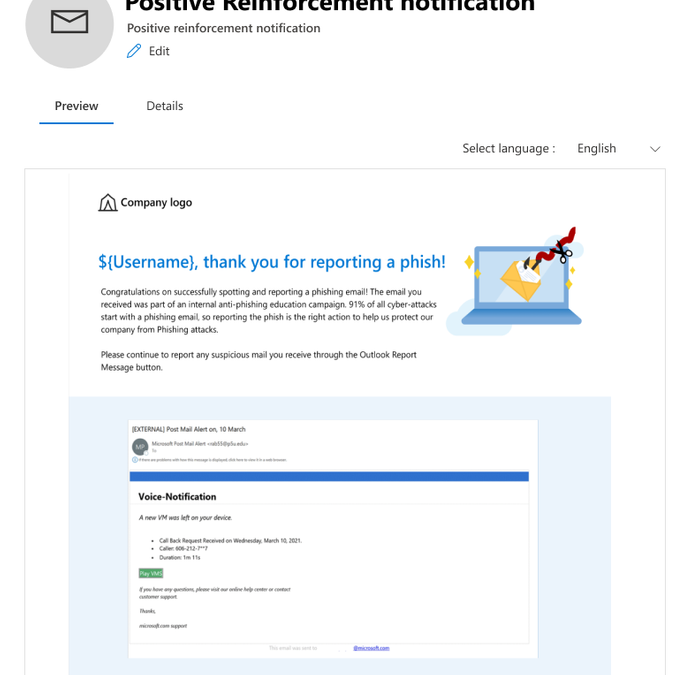
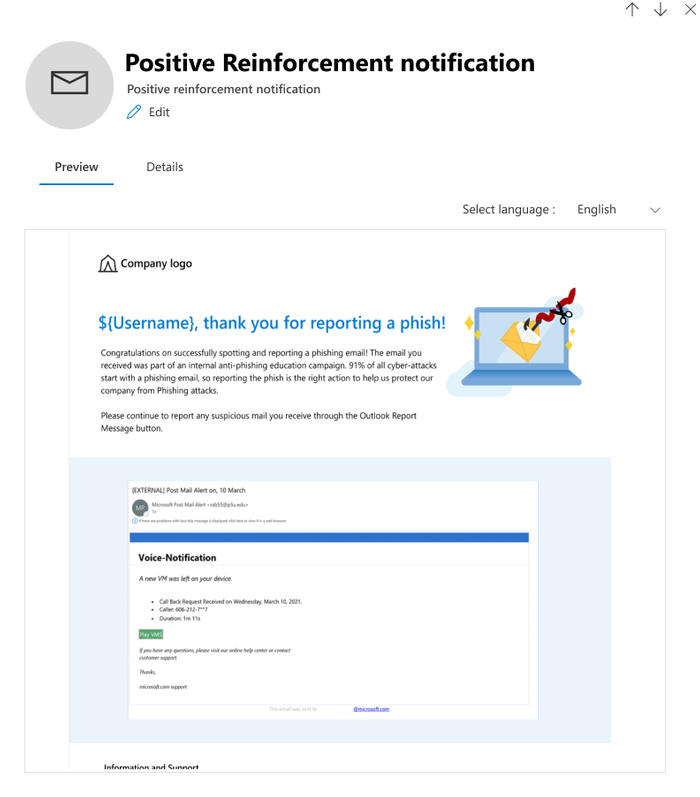
Positive Reinforcement Notification allows you to send an appreciation mail to the users who report a phish to reinforce positive behavior. You can choose to send these notifications during the campaign as well as after it completes.
Simulation Notification
Simulation Notification allows you to send a notification to the users to inform them about their participation in the phishing campaign when no trainings are assigned to them. You can assign this notification to all users, users who clicked, or to the users who were compromised, and a notification will be sent to those users after the campaign ends.
How to create or access these notifications?
A new library of notifications is provided under a new tab called ‘End user notifications’ which will be used to create, edit, copy and delete notifications. Notifications are either Microsoft curated or customized by a customer.
1. Microsoft curated notifications (Global)
Enables you to choose from Microsoft curated notifications in 12 languages for a ‘click and go’ experience.
2. Custom notification created by a tenant (Tenant)
Enables you to tailor the notification to your requirements in 12 languages. For example, include your own branding, messaging, code, and more.
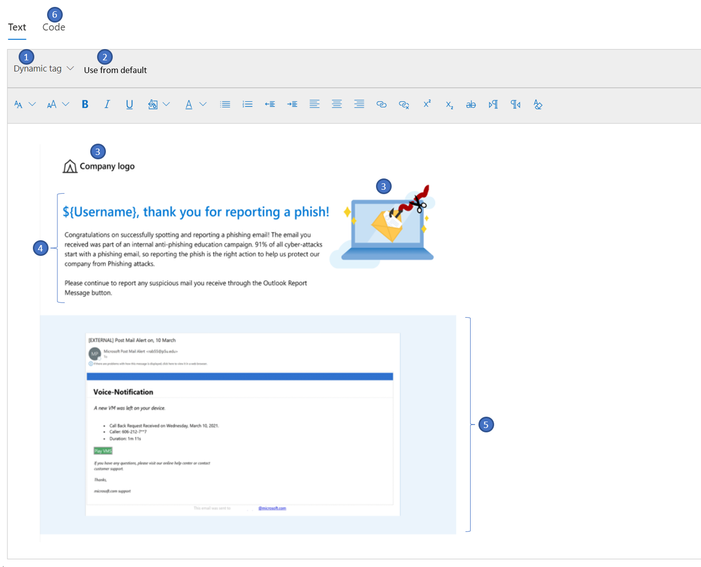
Creating a custom notification is a great option for enterprises who want to create a notification from scratch using Rich Text Editor. The notification can be created either by using the text tab (RTE) where the content can be created within the editor, copied from external sources, or by using the code tab to input the HTML code.
Dynamic tag: Allows you to choose the user’s first name, last name, UPN, email address, and payload dynamically.
Use from Default: Allows you to choose Microsoft defaults landing page with predefined formatting and make additional modifications as necessary.
Company Logo/images: Allows you to paste the image/logos of your choice and insert videos of up to 4MB.
Body: Allows you to create content/text of your choice.
Shows the content of the payload chosen
The “code” tab that comes along with the rich text editor can be leveraged for additional sophisticated design requirements using HTML code. The code can be saved and reused for new simulations.
How to use notifications in simulations?
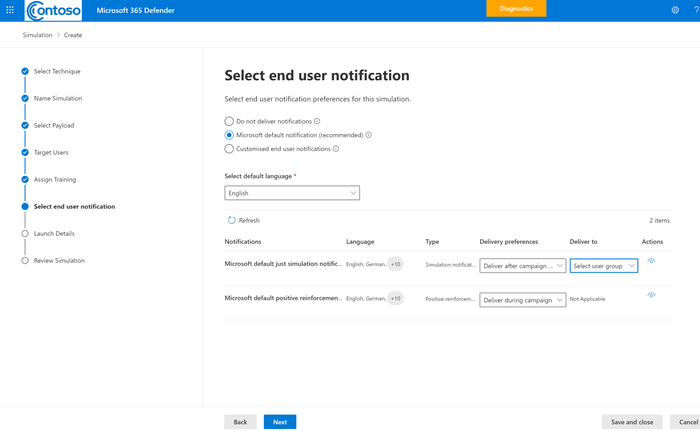
A new node called ‘Select end user notification’ is added to the launch simulation and simulation automation workflow where you can choose to not deliver any notification, choose from Microsoft defaults or customized end user notifications. Positive reinforcement notification can be delivered during the campaign or after the campaign whereas Simulation Notification would be delivered after the campaign ends as per the users’ actions-all users, clicked, and compromised.
We hope you enjoy using custom end user notifications in a simulation. Looking forward to your experience and feedback!
Want to learn more about Attack Simulation Training?
This article is contributed. See the original author and article here.
Organizations have an increasing need to interact with their customers to solicit feedback on products and services, building customer trust with process transparency. Dynamics 365 Customer Service has launched two capabilities in preview to enable organizations to invite customer suggestions and build vibrant communities.
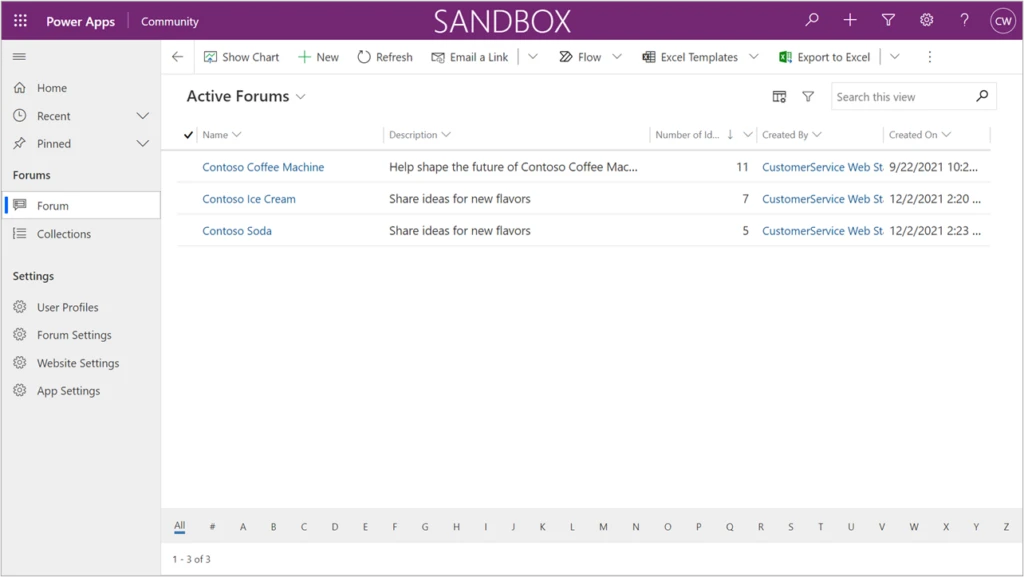
Community managers and moderators can use the first capability, the Dynamics 365 Customer Service Community Preview app, to crowdsource portfolios of ideas and quickly respond to community suggestions.
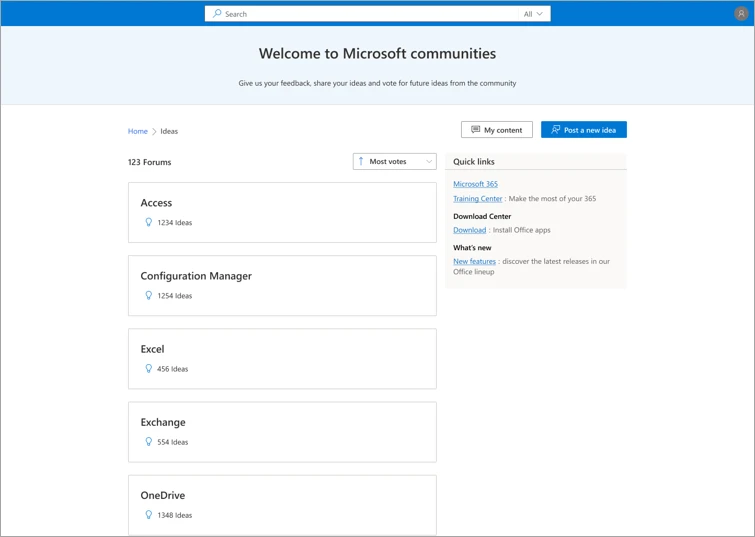
The second capability is offered with the Modern Community (preview) portal template, which enables organizations to provide their customers with delightful and engaging experiences for posting suggestions in community forums and collaborating to shape the future of products they use by upvoting, commenting, sharing, and flagging ideas posted in the community.
To see examples of these capabilities in action, check out the major public feedback portals for Microsoft Azure, Microsoft 365, and Microsoft Edge, which are now powered by Customer Service Community.
Capabilities for community managers and moderators
The Dynamics 365 Customer Service Community app provides community managers and moderators with the necessary capabilities to capture and evaluate ideas. They can be responsive and “close the loop” as community members give input. Now community managers can:
Configure the portal to fit their organization’s brand, including colors, custom header and footer, and quick links to digital assets.
Enforce acceptance of terms of use and privacy statements by users.
Create and manage idea forums.
Manage content, including content moderation and merging duplicate ideas.
Update the status of ideas or requests and respond to community feedback.
Manage users and assign security roles at the forum level.
Try out the Dynamics 365 Customer Service Community app in your sandbox environment first to learn about its capabilities.
Users experience a vibrant community
The Modern Community (preview) portal template offers all the functions needed to delight users as they share new ideas and collaborate at scale. Users can:
Browse, search, filter, and sort idea lists.
Post new ideas. This flow includes autosuggestion of existing ideas to prevent duplicates.
Collaborate and engage in a community that includes upvoting, commenting, sharing, and following ideas.
Flag inappropriate content.
Track the status of ideas that they are engaged with.
Next steps
Customer Service Community Preview has launched and is available to use in the public cloud. Refer to the documentation to learn how to install the Community app and get started.
To ask questions of our team, or to view questions that others have asked, use theDynamics 365 Customer Service Community forum. When posting your question, select Community from the Filters list in the form.
This article is contributed. See the original author and article here.
CISA has added two new vulnerabilities to its Known Exploited Vulnerabilities Catalog, based on evidence that threat actors are actively exploiting the vulnerabilities listed in the table below. These types of vulnerabilities are a frequent attack vector for malicious cyber actors of all types and pose significant risk to the federal enterprise.
CVE Number
CVE Title
Remediation Due Date
CVE-2021-43890
Microsoft Windows AppX Installer Spoofing Vulnerability
12/29/2021
CVE-2021-4102
Google Chromium V8 Engine Use-After-Free Vulnerability
Although BOD 22-01 only applies to FCEB agencies, CISA strongly urges all organizations to reduce their exposure to cyberattacks by prioritizing timely remediation of Catalog vulnerabilities as part of their vulnerability management practice. CISA will continue to add vulnerabilities to the Catalog that meet the meet the specified criteria.
This article is contributed. See the original author and article here.
At-scale data processing systems typically store a single table in storage as multiple files. In the Azure Purview data catalog, this concept is represented by using resource sets; a resource set is a single object in the catalog that represents many assets in storage.
For example, suppose your Spark cluster has persisted a DataFrame into an Azure Data Lake Storage (ADLS) Gen2 data source. In Spark, the table looks like a single logical resource, but on the disk there are likely thousands of Parquet files, each of which represents a partition of the total DataFrame’s contents.
IoT data and web log data have the same challenge. Imagine you have a sensor that outputs log files several times per second. It won’t take long until you have hundreds of thousands of log files from that single sensor. In Azure Purview, resource sets allow for these partitions to be handled as a single data asset, allowing for easy consumption and preventing oversaturation of the data catalog.
How Azure Purview detects resource sets
Azure Purview supports resource sets in Azure Blob Storage, ADLS Gen1, ADLS Gen2, Azure Files, and Amazon S3.
Azure Purview automatically detects resource sets when scanning. This feature looks at all the data that’s ingested via scanning and compares it to a set of defined patterns.
Note: Azure Purview intentionally doesn’t try to classify document file types such as Microsoft Word, Microsoft Excel, and PDFs as resource sets.
Advanced resource sets
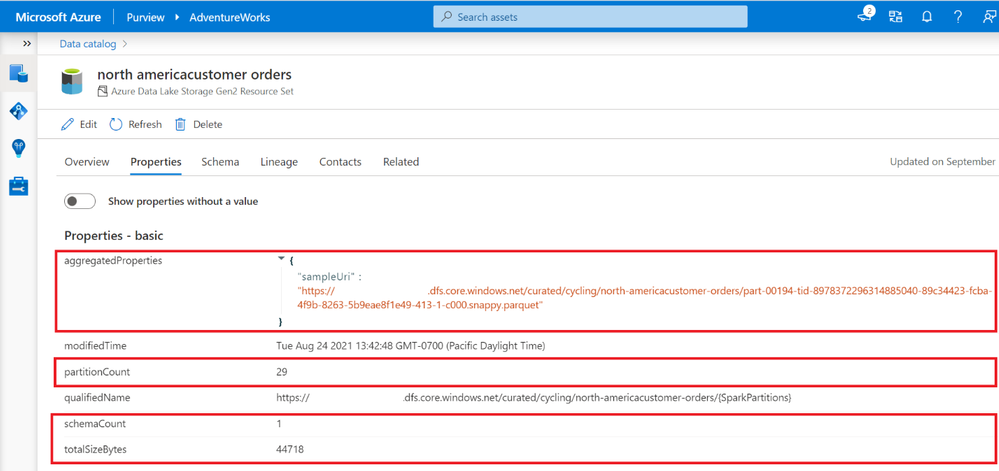
Azure Purview can customize and further enrich your resource set assets through the Advanced Resource Sets capability. When advanced resource sets are enabled, Azure Purview runs extra aggregations to compute the following information about resource set assets:
Up-to-date schema and classifications to accurately reflect schema drift from changing metadata.
Sample file paths of assets that comprise the resource set.
A partition count that shows how many files make up the resource set.
A schema count that shows how many unique schemas were found. This value is either a number between 1 and 5, or for values greater than 5, 5+.
A list of partition types when more than a single partition type is included in the resource set. For example, an IoT sensor might output both XML and JSON files, although both are logically part of the same resource set.
The total size of all files that comprise the resource set.
These properties can be found on the asset details page of the resource set.
Enabling advanced resource sets also allows for the creation of resource set pattern rules that customize how Azure Purview groups resource sets during scanning.
Enabling advanced resource sets
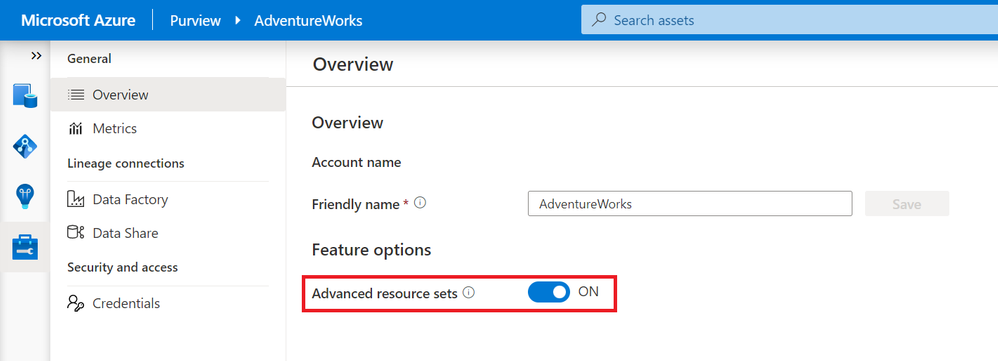
The advanced resource sets feature is off by default in all new Azure Purview instances. Advanced resource sets can be enabled from Account information in the management hub.
After enabling advanced resource sets, the additional enrichments will occur on all newly ingested assets. The Azure Purview team recommends waiting an hour before scanning in new data lake data after toggling on the feature.
Customizing resource set grouping using pattern rules
When scanning a storage account, Azure Purview uses a set of defined patterns to determine if a group of assets is a resource set. In some cases, Azure Purview’s resource set grouping might not accurately reflect your data estate. These issues can include:
Incorrectly marking an asset as a resource set
Putting an asset into the wrong resource set
Incorrectly marking an asset as not being a resource set
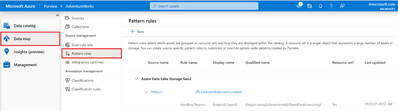
To customize or override how Azure Purview detects which assets are grouped as resource sets and how they are displayed within the catalog, you can define pattern rules in the management center. Pattern rules are only available when the advanced resource sets feature is enabled. For step-by-step instructions and syntax, please see resource set pattern rules.
Get started today!
Quickly and easily create an Azure Preview account to try the generally available features.
This article is contributed. See the original author and article here.
The business-to-business (B2B) landscape looks drastically different than it used to, thanks to digital acceleration that has reached every corner of our lives. Today’s B2B buyers, accustomed to fast, frictionless, and personalized experiences in their everyday lives, bring those heightened expectations to their roles as business decision-makers in enterprises large and small. To adapt, B2B organizations are taking a page out of the business-to-consumer (B2C) playbook and focusing on personalized experiences instead of a one-size-fits-all approachand Microsoft Dynamics 365 Customer Insights, Microsoft’s customer data platform (CDP), can help organizations gain a 360-degree view of the B2B customer essential for driving personalized engagement.
B2C-inspired personalized experiences
Not surprisingly, 73 percent of B2B buyers want a personalized, B2C-like experience and have come to expect offers and engagements across all channels to be tailored to their specific needs.1 Buyers are looking for personalized engagement relevant to their industry (think ads, content, or website) or specific to individual needs (think fine-tuned product recommendations or proactive service alert).
And 75 percent2 of B2B buyers say they now prefer digital self-serve and remote human engagement over face-to-face interaction, a sentiment that has steadily intensified even after pandemic lockdowns have ended.1 The most notable sign that the tide has turned is the ease B2B buyers display in making large new purchases and reorders online. The prevailing wisdom used to be that e-commerce was mainly for smaller-ticket items and fast-moving parts. Not so anymore. Notably, 70 percent of B2B decision-makers say they are open to making new, fully self-serve or remote purchases in excess of $50,000, and 27 percent would spend more than $500,000.2
As B2B buyers become increasingly more comfortable engaging via a multitude of digital channels as part of an often long and complex sales cycle, the resulting data ends up siloed across many different systems. Even a small B2B company today has dozens of systems holding different pieces of the customer data puzzle. Assembling those pieces into a complete picture is a complicated task that few B2B organizations and their customer relationship management (CRM) systems can handle.
Without the means to successfully unify all of this data, it’s nearly impossible for organizations and their sellers to deliver the personalized experiences B2B decision-makers expect. True B2B personalization means going the extra mile to understand each buyer’s priorities and add value to the decision-making process. To make that happen, you need accurate data about your customers as well as predictive insights for the buyer and the account.
Bringing the customer into focus
B2B organizations must have a deep understanding of the person on the other side of the table: their priorities, preferences, goals, motivations, communication preferences, etc. To gain these insights, organizations are turning to a 360-degree view of the buyer and the account, a “golden record” shared across business functions that includes real-time descriptive, predictive, and prescription insights including demographics, firmographics, activities, preferences, churn risk, lifetime value, and next best offer or interaction. This 360-degree view identifies individuals and companies over time, despite changes in their identifiers (such as a new email address or phone number). Unified customer data is the indispensable data foundation for generating insights and driving personalization.
How Microsoft can help
With Dynamics 365 Customer Insights, organizations can deliver on the heightened expectations of today’s B2B buyers and enable a personalized, omnichannel experience. The industry-leading CDP brings together account and contact data from across channels (including zero, first, second, and third-party data), enabling a single view of customers and unlocking AI-powered insights to create long-term relationships, while safeguarding customer data and honoring privacy and consent across the entire journey.
To learn how to unlock the value of your customer data to create B2B experiences that surpass expectations, visit Dynamics 365 Customer Insights.
This article was originally posted by the FTC. See the original article here.
If you have a federal student loan, you probably already know that the Coronavirus emergency relief program that has paused your payments is ending. Repayments will begin again after January 31, 2022. Scammers know it, too, and are looking for ways to take advantage: they’re calling, texting, and e-mailing to try to use any confusion around restarting your student loan payments to steal your money and personal information.
Check out what some of these scam calls sound like.
If you get a call, text, e-mail, or message on social media from someone about your federal student loan, here are some things to keep in mind:
Never pay an upfront fee. It’s illegal for companies to charge you before they help you. If you pay up front to reduce or get rid of your student loan debt, you might not get any help — or your money back. Also, remember that there’s nothing a company can do for you that you can’t do yourself for free. And you never have to pay to get help from the Department of Education.
Never give out your Federal Student Aid ID, your Social Security number, or other personal information to anyone who contacts you. Scammers posing as student loan servicers can use this information to log into your account, change your contact information, and even divert your payments to them. Instead of giving out your FSA ID, call or contact your servicer.
Don’t sign up for quick loan forgiveness. Scammers might say they can get rid of your loans before they know the details of your situation. Or they might promise a loan forgiveness program — that most people won’t qualify for. They might even say they’ll wipe out your loans by disputing them. But they can’t.
Scammers use fake seals and logos to lure people in. They promise special access to repayment plans, new federal loan consolidations, or loan forgiveness programs. It’s a lie. If you have federal loans, go to the Department of Education directly at StudentAid.gov.
This article is contributed. See the original author and article here.
In light of persistent and ongoing cyber threats, CISA urges critical infrastructure owners and operators to take immediate steps to strengthen their computer network defenses against potential cyberattacks. CISA has released CISA Insights: Preparing For and Mitigating Potential Cyber Threats to provide critical infrastructure leaders with steps to proactively strengthen their organization’s operational resiliency against sophisticated threat actors, including nation-states and their proxies.
CISA encourages leadership at all organizations—and critical infrastructure owners and operators in particular—to review the CISA Insights and adopt a heighted state of awareness.







Recent Comments