2022 release wave 1 brings true mobility to field service management

2022 release wave 1 brings true mobility to field service management

This article is contributed. See the original author and article here.

The pandemic has greatly influenced the way we work. For many of us, the option to work from home was a relatively smooth transition. Video calls, instant messaging, and other digital tools filled the colleague collaboration gapreplacing in-person meetings and chats around the water cooler. Office-based workers overcame a few technological speed bumps; however, business continued to hum along at a decent pace.

But what if the focus of your job is to physically interact with the customer and their equipment on site? This level of interaction is dependent on a whole new set of digital tools, and nowhere is this more important than in the delivery of field service. In fact, the most crucial aspect of field service is mobility.

For there to be true mobility, there must be complete and seamless functionality across any and all devices at the same time. These mobile devices keep the technician digitally tethered to operations by providing real-time access to dataincluding updated schedules, recommended travel routes, and key customer information. With the right technology and devices, offline mobile capabilities provide frontline workers what they need when they need it, even in the most remote locations.

On a mobile device (phone, tablet, or laptop), technicians can access knowledge articles, work orders, and task lists from anywhere. They can also add notes and images, which sync to the back office. If a problem is outside of his or her expertise, the technician can leverage videos and product guides, and even consult with experts by connecting with Microsoft Teams or via mixed reality tools like Microsoft Dynamics 365 Remote Assist and HoloLens 2.

About 75 percent of field service businesses that utilize mobility tools have observed increased employee productivity, while the rest have seen customer satisfaction rates rise.1

True mobility transforms the customer into a knowledgeable partner and enhances the customer experience with transparency into all facets of service delivery. Information is available for customers in real-time using an easy-to-use portal to navigate the service history and on-demand appointment scheduling. Customers can even track and trace the route of the technician enroute on any mobile device.

Connecting people, places, and things to consistently deliver customer-centric experiences is at the core of Dynamics 365 Field Service and is the foundation in transforming service delivery. And within this transformation is the art of true mobility through the Dynamics 365 Field Service mobile app.
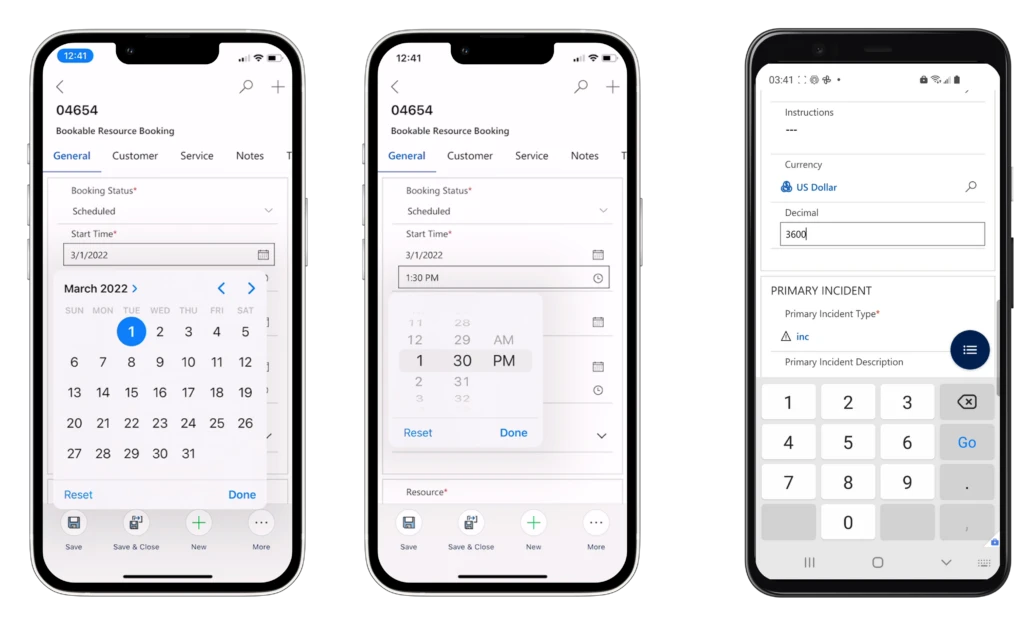
With the 2022 release wave 1, we have made notable enhancements in the Field Service mobile app. First, we improved how frontline workers perform actions, view, and update data to increase productivity and usability. These usability enhancements include:

  • Date and time input fields will leverage default input controls provided by the device operating system.
  • Mobile optimized device keyboards will be shown when interacting with numeric, phone, email, and URL input fields.
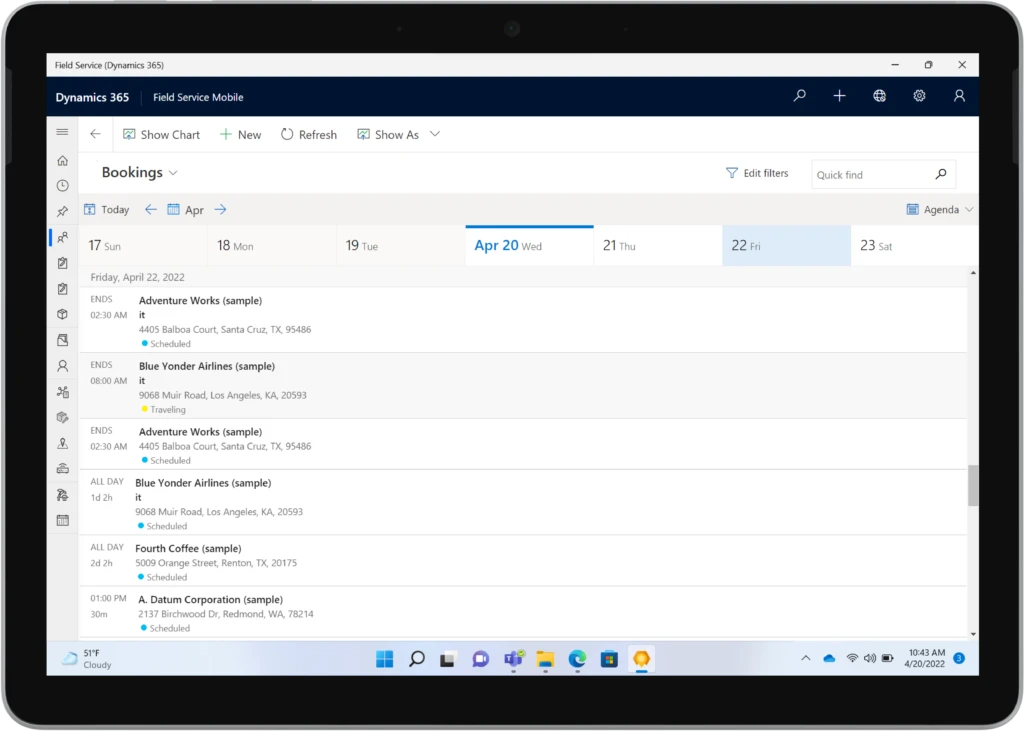
  • Large format devices (such as tablets and PCs) will have a streamlined agenda view available as part of their booking calendar.
  • Customers’ primary account phone numbers will be accessible directly on the Bookable Resource Booking Customer tab.

Field Service mobile app user interface showing technician bookings on iOS and Android devices.
A long list of enhancements to Dynamics 365 Field Service mobile are now available for iOS (left-center) and Android (right) devices.

In addition to usability enhancements, we have continued to invest in core functional and performance improvements such as:

  • Offline sync notifications to alert users when the offline-enabled application is downloading data from the cloud. This will provide clarity on the app status and feedback to the user when data is refreshing.
  • Offline Profile (Preview)configuration that will be available in the modern app designer and offer an improved experience to makers. The new offline profile can be assigned to an app module, removing the need to manually add users to the offline profile. This will greatly simplify app user management for makers and admins.

Mobility on every device

Not every frontline worker wants to perform work using their mobile device or carry multiple devices from location to location. For frontline workers that prefer working on a single tablet or laptop, or are required to use a PC for their business needs, we are pleased to announce the general availability of the Windows Dynamics 365 Field Service app. Technicians can do all of their work tasks on the same Windows device, such as a Microsoft Surface Go, without having to carry multiple devices. Technicians will be able to fulfill end-to-end scenarios without losing context or switching devices. They can view their bookings, manage their work orders, and perform inspections with this rich application that is deeply integrated with the rest of their Dynamics 365 applications.

The Field Service mobile app is now available on Windows laptops to enable seamless mobility across all devices.

This Windows Field Service app includes:

  • Offline support to keep the frontline worker productive even without internet access. While using the app offline, data is stored in the local device database and uploaded to the server when network access is restored.
  • Outlook-style calendar for bookings, with intuitive user interface which gives the frontline worker visibility into active and upcoming workincluding key information like scheduled times, duration, customer name, and address as well as the type of work to be done. The calendar can be further extended to include additional fields giving at-a-glance information a frontline worker needs to prepare for their day, such as assets they may be working on or the customer contact’s name.
  • Tailored user experiences available with Power Apps component framework with hundreds of powerful controls out of the box.
  • Access to device camera to take pictures and scan barcodes.
  • Deep-link support into the Dynamics 365 Field Service mobile app.

Field Service app provides access to detailed customer information.
Using a tablet, Surface, or laptop, frontline workers can access detailed customer information including a map showing the service account location using the Windows supported Dynamics 365 Field Service app.

Improve customer experiences with Dynamics 365 Field Service

The focus of this release was to further extend customer and worker mobility while acknowledging different work requirements and work styles. These enhancements come together to create a seamless workflow by enhancing the tools that increase productivity and optimize system operations. Our goal is to develop features to overcome barriers frontline workers experience every day when delivering superior serviceon or offsite. We will continue to laser focus on the customer experience by arming technicians with the right technology at the right time to do their job better, faster, and more efficiently.

For more on this release, visit our Dynamics 365 Field Service documentation.

Learn more by visiting the Dynamics 365 Field Service website.

Get started with a free Dynamics 365 Field Service trial.

Download the Field Service app for Windows.


Sources:

1- 111 Crucial Field Service Management Software Statistics: 2022 Market Share & Data Analysis, Finances Online

The post 2022 release wave 1 brings true mobility to field service management appeared first on Microsoft Dynamics 365 Blog.

Brought to you by Dr. Ware, Microsoft Office 365 Silver Partner, Charleston SC.
Activity Logs Insights (Preview)

Activity Logs Insights (Preview)

This article is contributed. See the original author and article here.

Activity Logs Insights is a centralised place to see all of the activities done in a resource or resource group, information such as who administrators deleted, updated or created resources, and whether the activities failed or succeeded. This article explains how to enable and use Activity log insights.


  • Note: This current version of Activity Log Insights is a preview, and offers basic Activity logs insights. The next version, planned for the upcoming months, will offer additional information and insights


To enable Activity Logs Insights, simply configure the Activity log to export to a Log Analytics workspace.


To view Activity logs insights on a resource group or a subscription level:


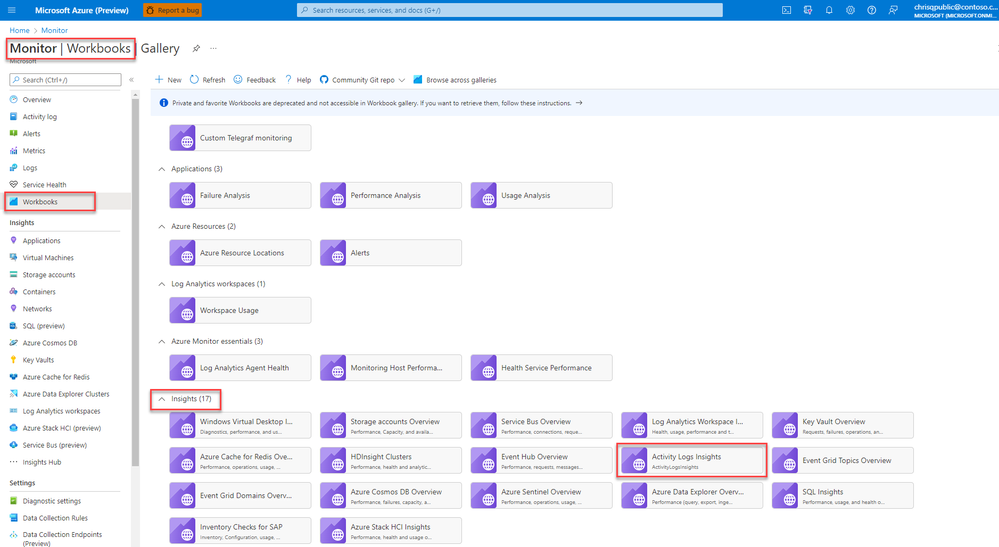
  1. In the Azure portal, select Monitor > Workbooks.


  2. Select Activity Logs Insights in the Insights section.


  3. open-activity-log-insights-workbook.png At the top of the Activity Logs Insights page, select:

    1. One or more subscriptions from the Subscriptions dropdown.

    2. Resources and resource groups from the CurrentResource dropdown.

    3. A time range for which to view data from the TimeRange dropdown.


o To view Activity Logs Insights on a resource level:


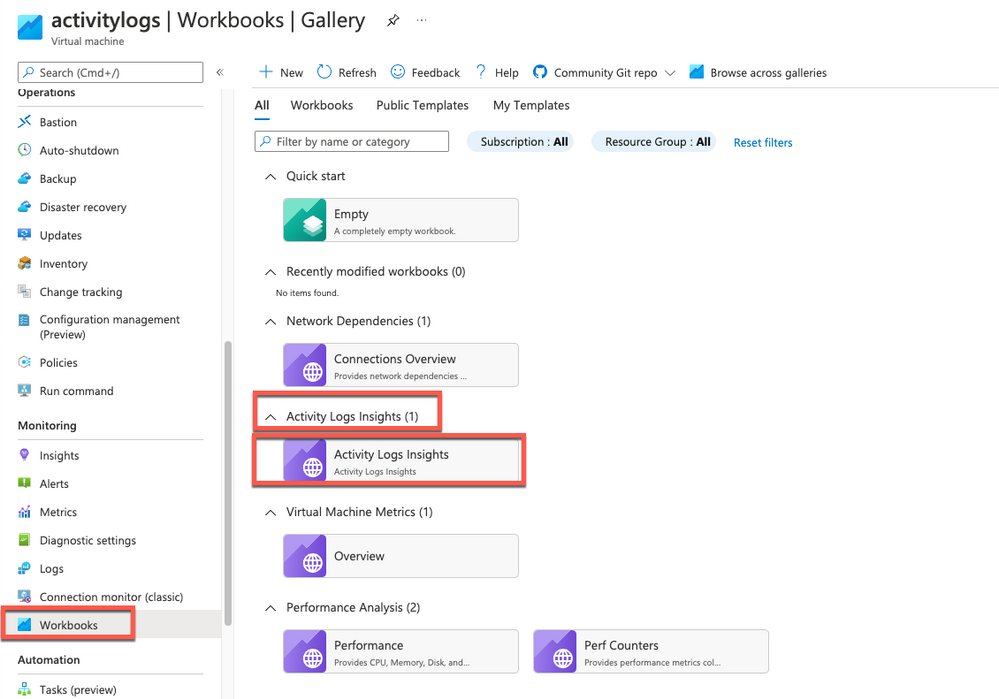
  1. In the Azure portal, go to your resource, select Workbooks.


  2. Select Activity Logs Insights in the Activity Logs Insights section.activity-log-resource-level (1).png


    At the top of the Activity Logs Insights page, select:


    1. A time range for which to view data from the TimeRange dropdown.


  • To learn more about Activity Logs Insights, see this article.

Build AlphaFold2 cluster on Azure CycleCloud

Build AlphaFold2 cluster on Azure CycleCloud

This article is contributed. See the original author and article here.

Since released from July last year, AlphaFold2 protein folding algorithm is often used by more researchers and companies to drive more innovations for molecular analysis, drug discovery & etc. To build an AlphaFold2 computing cluster rapidly on the cloud will be the necessary step to leverage agility of cloud computing without CAPEX ahead.


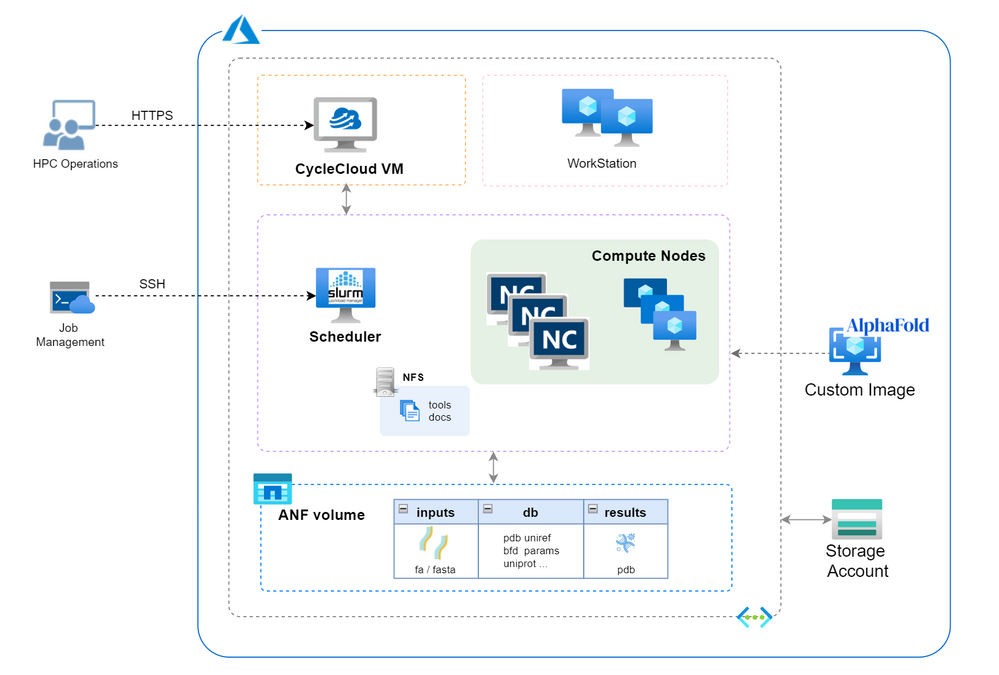
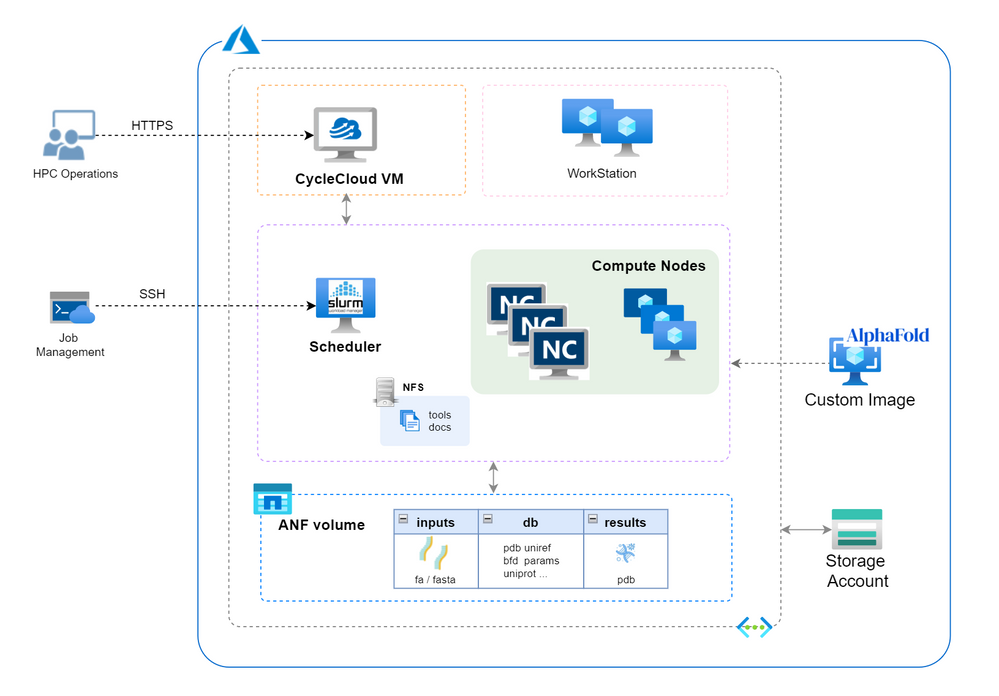
Azure HPC stack has complete portfolio suitable for running AlphaFold2 in large scale, including GPU, storage and orchestrator service. This blog brings detailed steps of building AlphaFold2 HPC cluster on Azure to fasten your process.


Architecture


AlphaFoldOnAzureArch.png


 Build Steps


  1. Prerequisites


    1. Check GPU quota and Azure NetApp Files(ANF) quota. SKU of NCsv3_T4 will be used in this building and NV_A10_v5 SKU (in preview) will also be suitable in the next.

    2. Create a storage account with unique name (eg. saAlphaFold2 ) for CycleCloud using.

    3. Prepare a SSH key pair in Azure portal.

    4. Determine your working region with consideration of ANF service availability (eg. Southeast Asia).

    5. Create a resource group in selected region (eg. rgAlphaFold).

    6. Set Azure Cloud Shell ready for use.


  2. Build CycleCloud environment following ARM template method. Set the VNet name as “vnetprotein“. Use the “saAlphaFold2” as the related storage account. After all the resources are built, you can find the CycleCloud UI portal address in console “Home->Virtual Machines->cyclecloud->Overview->DNS name”. Go through the first login process using your username and password.

  3. Config ANF storage. Follow the steps to set up an ANF volume. Consider the dataset size of AlphaFold2, suggest to set the capacity pool and volume size as 4TB at least. Set the volume name as “volprotein” and create a dedicate subnet with CIDR “10.0.2.0/24” in Visual Network “vnetprotein“. In “Protocol” settings, set file path also as “volprotein” and select “NFSv4.1”. After volume is ready, remember the “Mount path” info like “10.0.2.4:/volprotein“.

  4. Prepare the VM image.

    1. Boot a VM using the “CentOS-based 7.9 HPC – x64 Gen2” marketplace image and change the OS disk size as 128GB.

    2. Connect the VM by SSH and install AlphaFold2 components using below commands.

      sudo  yum install epel-release python3 -y
      sudo yum install aria2 -y
      sudo yum-config-manager --add-repo=https://download.docker.com/linux/centos/docker-ce.repo
      sudo yum repolist -v
      sudo yum install -y https://download.docker.com/linux/centos/7/x86_64/stable/Packages/containerd.io-1.4.3-3.1.el7.x86_64.rpm
      sudo yum install docker-ce -y
      sudo systemctl --now enable docker
      distribution=$(. /etc/os-release;echo $ID$VERSION_ID) 
         && curl -s -L https://nvidia.github.io/libnvidia-container/$distribution/libnvidia-container.repo | sudo tee /etc/yum.repos.d/nvidia-container-toolkit.repo
      sudo yum clean expire-cache
      sudo yum install -y nvidia-docker2
      sudo systemctl restart docker
      sudo usermod -aGdocker $USER
      newgrp docker
      docker run --rm --gpus all nvidia/cuda:11.0-base nvidia-smi
      sudo su
      cd /opt
      git clone https://github.com/deepmind/alphafold.git
      cd alphafold/
      sudo docker build -f docker/Dockerfile -t alphafold .
      sudo pip3 install -r docker/requirements.txt​

      Check the “docker images” to confirm the “alphafold:latest” is ready in the list.


    3. Build the custom image. Keep in the same SSH window and execute as below and go ahead with a ‘y’ confirmation. 

      sudo waagent -deprovision+user​

      Back to Cloud Shell. Execute these commands to produce the custom image. 

      export myVM=vmImgAlpha
      export myImage=imgAlphaFold2
      export myResourceGroup=Rampup-study
      az vm deallocate --resource-group $myResourceGroup --name $myVM
      az vm generalize --resource-group $myResourceGroup --name $myVM
      az image create --resource-group $myResourceGroup --name $myImage --source $myVM --hyper-v-generation V2​

      After accomplished, find the image’s “Resource ID” in console “Home->Images->Properties” page and remember it for further usage, which the form is as “/subscriptions/xxxx-xxxx-x…/resourceGroups/…/providers/Microsoft.Compute/images/imgAlphaFold2“.


  5. Create HPC cluster for Alphafold2. 

    1. Create a new cluster in CycleCloud and select “Slurm” as the scheduler type. Set parameter as below with other as is. Save the configuration then.

      • “Require setting” page – HPC VM Type: Standard_NC8as_T4_v3, Max HPC Cores: 24, Subnet ID: vnetprotein-compute.

      • “Network Attached Storage” page – Add NFS Mount: clicked, NFS IP: 10.0.2.4, NFS Mount point: /volprotein, NFS Export Path: /volprotein.

      • “Advanced Settings” page – Scheduler & HPC OS both with “Custom image” option clicked and stuff with custom image resource ID string in step 4.


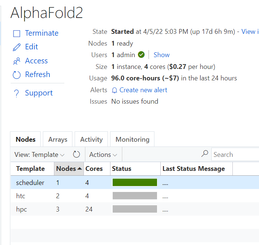
    2. Start the cluster and wait several minutes to wait cluster in ready.Xavier_Cui_1-1650704085533.png

    3. Login scheduler. Below steps aim to prepare dataset. Total size of the Alphafold2 dataset is ~2.2TB. Suggest to execute each download sentence in download_all_data.sh if you want to save some time, such as download_pdb70.sh, download_uniref90.sh & etc.. Dataset preparation may need several hours as expected.

      mkdir /volprotein/AlphaFold2
      mkdir /volprotein/AlphaFold2/input
      mkdir /volprotein/AlphaFold2/result
      sudo chmod +w /volprotein/AlphaFold2
      /opt/alphafold/scripts/download_all_data.sh /volprotein/AlphaFold2/​


  6. Run samples

    1. A sample Slurm job script is as below. Save it as run.sh.

      #!/bin/bash
      #SBATCH -o job%j.out
      #SBATCH --job-name=AlphaFold
      #SBATCH --nodes=1
      #SBATCH --cpus-per-task=4
      #SBATCH --gres=gpu:1
      INPUT_FILE=$1
      WORKDIR=/opt/alphafold
      INPUTDIR=/volprotein/AlphaFold2/input
      OUTPUTDIR=/volprotein/AlphaFold2/result
      DATABASEDIR=/volprotein/AlphaFold2/
      
      sudo python3 $WORKDIR/docker/run_docker.py --fasta_paths=$INPUTDIR/$INPUT_FILE --output_dir=$OUTPUTDIR --max_template_date=2020-05-14 --data_dir=$DATABASEDIR --db_preset=reduced_dbs​


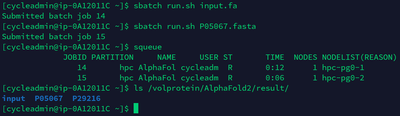
    2. Now we can submit the AlphaFold2 computing jobs! Submit this job with a test sample (*.fa or *.fasta) in /volprotein/AlphaFold2/input. At the first running, cluster need several minutes waiting compute nodes get ready. Parallel jobs can be submitted and will be running on different compute node according Slurm’s allocation. Then we can use “squeue” to check the Slurm queue status. Meanwhile, there are resource monitoring graphic in CycleCloud UI to grasp the performance status of this AlphaFold2 cluster. After certain job is done, check the info in .out file and the pdb result file in /volprotein/AlphaFold2/result.

      sbatch run.sh input.fa
      sbatch run.sh P05067.fasta​

      Xavier_Cui_2-1650704085535.png


    3. Tear down. When no need to use this cluster, directly delete the resource group “rgAlphaFold” will tear down the related resources in it.


Reference links


deepmind/alphafold: Open source code for AlphaFold. (github.com)


Azure CycleCloud Documentation – Azure CycleCloud | Microsoft Docs


Azure NetApp Files documentation | Microsoft Docs


New Reply-all Storm Protection Report, Settings UI, and Alert Policy

New Reply-all Storm Protection Report, Settings UI, and Alert Policy

This article is contributed. See the original author and article here.

The Reply-all Storm Protection feature in Exchange Online helps protect your organization from unwanted and disruptive reply-all storms. Last year we updated the feature to give admins the ability to customize key settings for reply-all storm detection and block duration, and in that announcement we noted that several additional updates were planned for a future date. We’re pleased to announce that we’re rolling out three updates:


  1. A Reply-all Storm Protection Report to track reply-all storms and the messages blocked by the feature.

  2. The ability to customize feature settings within the EAC (in addition to Remote PowerShell).

  3. A mail flow system alert policy to notify admins when a reply-all storm hits your organization.


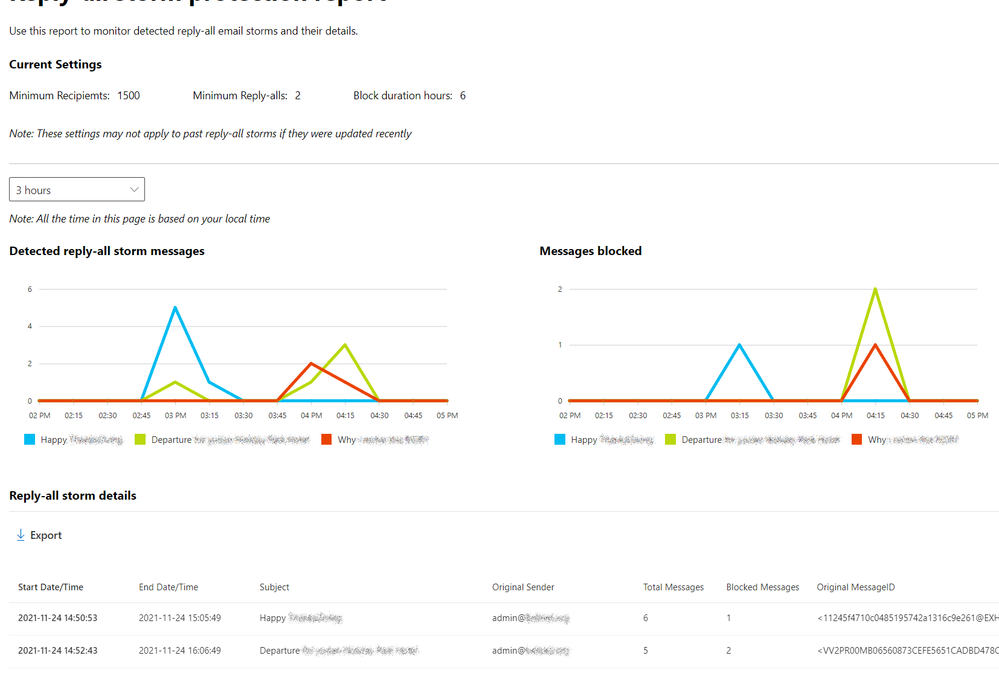
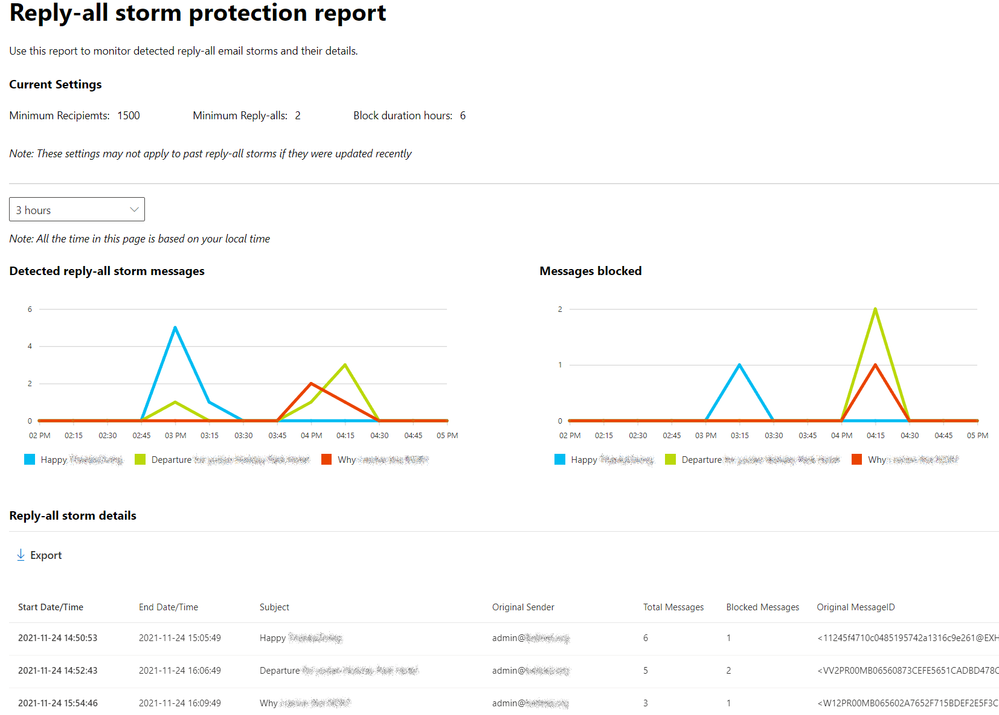
The report includes charts for detected reply-all storms and associated blocked messages, and a pop-out storm details panel available when you click on a storm name at the bottom of each chart. additional details about each storm, it also includes a CSV-exportable table with key details of each storm such as subject, original message, total messages, and message ID. The report is available in the new EAC under the Reports > Mail flow section. Here’s a sample report:


StormProtect01.png


Roll-out of the report starts this week and should finish by the end of May for the WW environments (including GCC), with availability in the GCC-High environment expected by the end of July. More information about the report can be found in Reply-all storm protection report in the new EAC in Exchange Online.


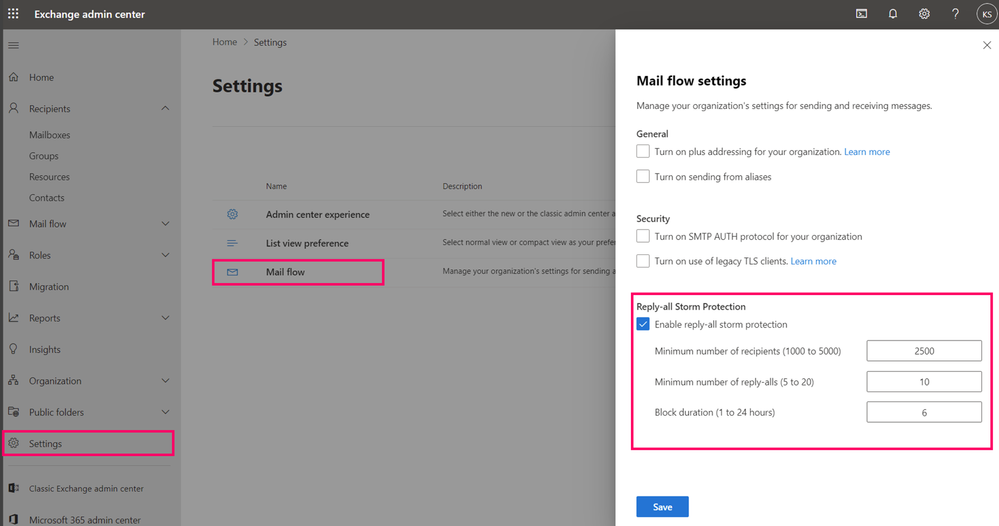
It’s been possible to customize key settings for the Reply-all storm protection feature using Remote PowerShell for over a year. Today, we’re happy to announce that you can now also customize these settings in the new EAC under the Settings > Mail flow panel, available now, as shown below:


StormProtect02.png


To change these settings, you must have permission to change Transport configuration information (e.g., Set-TransportConfig) as part of the Organization Transport Settings role group (and included as part of the Exchange Admin and Global Admin roles).


Lastly, we’re currently working on a mail flow system alert policy that will notify admins when a reply-all storm has been detected and at least one reply-all has been blocked. Like all mail flow alerts it will be customizable so you can configure who gets notified and other common alert parameters. When the Reply-all Storm Protection alert policy is release (by the end of July) it will appear in the Mail flow > Alert policies section of the new EAC.


We hope you find these new updates for the Reply-all Storm Protection feature useful, and we look forward to any feedback or suggestions for future updates you might have.


Exchange Transport Team

FBI Releases IOCs Associated with BlackCat/ALPHV Ransomware

This article is contributed. See the original author and article here.

The Federal Bureau of Investigation (FBI) has released a Flash report detailing indicators of compromise (IOCs) associated with attacks involving BlackCat/ALPHV, a Ransomware-as-a-Service that has compromised at least 60 entities worldwide.

CISA encourages users and administrators to review the IOCs and technical details in FBI Flash CU-000167-MW and apply the recommend mitigations.

Office Add-ins community call – April 13, 2022

Office Add-ins community call – April 13, 2022

This article is contributed. See the original author and article here.

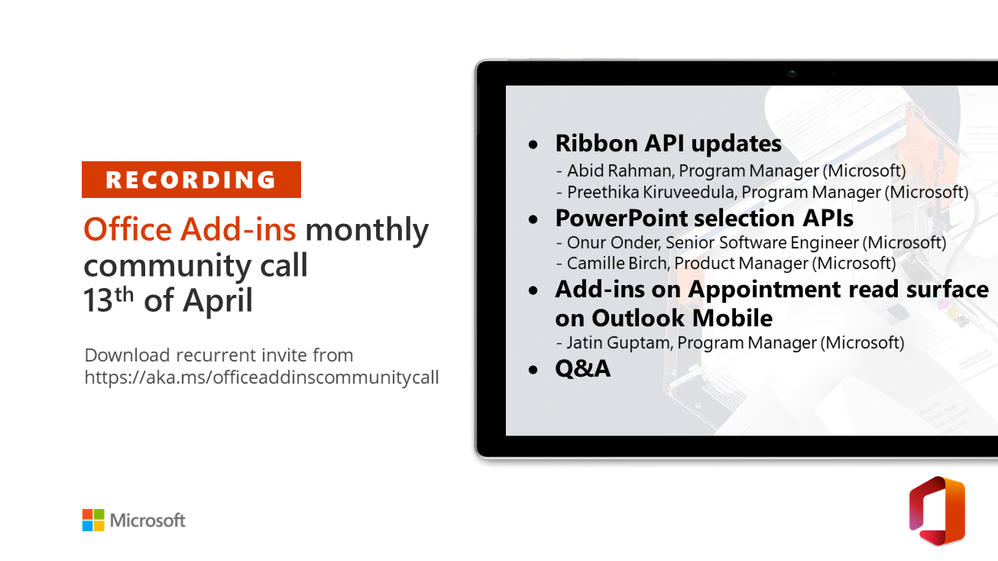
thumbnail image blog post titled Office Add-ins community call – April 13, 2022thumbnail image blog post titled Office Add-ins community call – April 13, 2022


Call Summary


This month’s community call features demos on Ribbon API updates (previewing enable/disable ribbon buttons and contextual tabs for PowerPoint and Word) – Abid Rahman, Program Manager (Microsoft) & Preethika Kiruveedula, Program Manager (Microsoft), PowerPoint selection APIs (previewing 17 new APIs for getting and setting slides, shapes and text range in PowerPoint) – Onur Onder, Senior Software Engineer (Microsoft) & Camille Birch, Product Manager (Microsoft), and Add-ins on Appointment read surface on Outlook Mobile (previewing appointment organizer APIs for logging event details to 3rd party applications) – Jatin Guptam, Program Manager (Microsoft). There was Q&A at end of call and in chat throughout call. The call was hosted by David Chesnut Senior Dev Writer (Microsoft) | @davidchesnut. Recorded April 13, 2022.


Agenda


  • Ribbon API updates – Abid Rahman, Program Manager (Microsoft) & Preethika Kiruveedula, Program Manager (Microsoft) – 1:19

  • PowerPoint selection APIs – Onur Onder, Senior Software Engineer (Microsoft) & Camille Birch, Product Manager (Microsoft) – 7:20

  • Add-ins on Appointment read surface on Outlook Mobile – Jatin Guptam, Program Manager (Microsoft) – 14:11

  • Q&A – 18:57


Actions


Next community call May 11th at 08:00am PT. Add call to your calendar: https://aka.ms/officeaddinscommunitycall.


Demo summaries


  • Ribbon API updates – previewing 2 capabilities – Enable/disable ribbon buttons and contextual tabs, along with timelines for their inclusion in PowerPoint and Word by platform. Enable/disable APIs used to set default state of your add-in command, change state of your add-in command programmatically, and change state in response to an event. Contextual tabs APIs used to create new tabs and show/hide existing tabs.

  • PowerPoint selection APIs – 17 new APIs focused on how to get and set selected information for slides, shapes, and text range in PowerPoint. Reviewed concepts of slide and shape scoped collections along with text range selection and showed functionality delivered by the APIs. The beta APIs are available now for you to trial and provide feedback.

  • Add-ins on Appointment read surface on Outlook Mobile – latest appointment organizer APIs now in preview. Delivering a new extension point with the ability to log event details to a 3rd party application, support for UI-less and task pane add-ins, semi-Contextual entry, discoverability, native UI, and status change from logging to viewing. Currently in preview on Android, GA by next month. We will share the timeline for iOS soon.


Q&A (Question & Answers)


When Microsoft deprecated User Voice there were a large number of great ideas lost. The replacement Microsoft 365 Developer Platform Ideas platform currently has New ideas = 535, Working on it = 2 and Need more information = 0 and Completed = 2! Even the most upvoted idea shows no responses from Microsoft. What value is there to posting ideas in this forum?


Unfortunately, we were unable to preserve all ideas when we moved from UserVoice to the new ideas site. We did get a capture of all ideas with more than 100 votes and those were migrated to the new forum which we do use internally for planning. We definitely need improve this experience for better engagement and transparency into our planning process. There’s currently a significant effort underway to reevaluate our community engagement on idea suggestions. We hope to share more details soon in an upcoming community call. Please understand that we absolutely value your suggestions and take them seriously. And thank you for raising this important issue!


When can we expect “insertWorksheetsFromBase64″ completely supported for Excel on the web? Currently Excel on the web doesn’t support source worksheets with PivotTable, Chart, Comment, or Slicer elements.”


We don’t have a plan to implement insertWorksheetsFromBase64 for Excel on the web at this time. There’s a dependency on a feature we require that is not yet in Excel on the web. There’s an existing idea request to implement insertWorksheetsFromBase64. We ask that any developers affected by this please upvote it. If you can provide comments, especially if you are blocked, this would be helpful to bump up the priority on this.


I’m trying to use the Shape API. In Script Lab, when I run the “Insert shape, line, and text box” sample code, some things work (e.g., insert hexagon) and others don’t (e.g., create shape with text). When I change the code on Script Lab, I’m able to play with position, dimensions, shape type, etc. but I can’t change colors, text, line weight and style, etc. Can you confirm whether all of this should work?


There was a bug in the “Insert shape, line, and text box” sample that we fixed based on this question. See the issue on GitHub for more details. If you’re still seeing issues, can you please create report them in the GitHub office-js-snippets repo? We can follow up there.


I have some questions about the Outlook add-ins and Outlook REST V2 decommission. We provide our customers with Outlook add-ins that use the On-send feature. We are wondering if it will be extended only to existing customers or to new customers as well.


The exemption for Outlook add-ins using Outlook REST V2 applies to any add-ins created before November 2022.


Case:


  • Tenant A has Outlook Add-in X using the On-send feature that was deployed before November 2022.

    • If you request an exemption for Outlook Add-in X before November 2022 it will continue to work.


  • After November 2022, what happens if we delete the add-in X and then register it again?


  • After November 2022, what happens if we register the add-in X for a new tenant B?


    • Registrations at https://aka.ms/RESTCheck will not be accepted after November 2022. Be sure to register your add-in before then if you need to continue using the Outlook REST APIs


  • Is there any difference between registration by side-loading or by centralized deployment?


    • We use the App ID that you register at https://aka.ms/RESTCheck to track apps and provide the exemption. Once registered your add-in will continue to work regardless of the deployment method you choose.


We develop an Office.js add-in for Outlook that can encrypt/decrypt emails. We’d like the compose window to disappear after our “Encrypt and Send” button is clicked. Or we need a toggle such that a user can enable/disable encryption, and subsequently, our encryption process is done after the user clicks on the Send button (thus, an extended on-send feature, not only for validation purposes). Is one of those two features planned to be implemented anytime soon, or is it wise to consider developing our addin within VSTO?


You can accomplish this scenario using web add-ins and smart alerts. We recommend you combine this handling of the send event with event-based add-ins so you can encrypt the attachments as they are added on the email while composing, so that your on-send processing takes less time. We have a sample that shows how to do this at https://github.com/OfficeDev/Office-Add-in-samples/tree/main/Samples/outlook-encrypt-attachments. 


Why is it not possible to use the mail in MIME format as payload in the request when trying to create a message within a mailFolder (via “POST /me/mailFolders/{id}/messages”), as it seems that only JSON is accepted here? But via /me/messages I can use MIME format.


The best place to ask Microsoft Graph questions is at https://aka.ms/askgraph. When creating a draft email, it is typically created in the Drafts folder using “POST /me/messages”. This supports the MIME format. You can use “POST /me/mailFolders/{id}/messages” to create messages in any folder, although they will always be in draft mode. This did not seem like a likely scenario to support MIME. If there is a need for this please let us know more about your scenario at https://aka.ms/askgraph.


In Word desktop, with WebView2, if I reject the consent for audio/video recording for the first time, how can I change it or raise this question again? And a similar question, how can I disable or change the spellcheck settings in WebView2 in Word desktop?


If consent was rejected, you need to clear the Office cache to raise the question again. For more information, see Clear the Office cache – Office Add-ins | Microsoft Docs


Spellcheck settings are controlled at the webview level. For example, “<div id=”content” spellcheck=”true”. 


Where can I go to request feature enhancements for outlook, such as controlling the width of an Outlook add in?


Please let us know about any feature enhancements or suggestions at the Microsoft 365 developer platform ideas site https://aka.ms/m365dev-suggestions.


Are there any plans to have contextual tabs available for PowerPoint?


We currently don’t have plans to extend to PPT, if you would like to have contextual tabs in PPT, please post more information around your scenario at https://aka.ms/m365dev-suggestions.


Are you planning to make the Mail Compose Surface available on mobile?


Yes, we’re planning to support it and are exploring various scenarios. We don’t have a timeline to share yet.


Is it possible to customize the save dialog in Office (PPT, Word)?


We don’t have any way to customize the save dialog with Office Add-ins. If you could post an idea request at https://aka.ms/m365dev-suggestions we’d like to learn more about the scenarios where you would need to customize the save dialog.


What’s the best place to store an “access token” in the Excel add-in? The access token is received by third-party app.


In general it’s not a good idea to store, or cache access tokens. You have to be very careful not to accidentally store the token in a way where malicious software could obtain it. Most libraries and APIs have a caching mechanism that you can take advantage of. For example, when calling the getAccessToken API in your Office Add-in, we recommend you call getAccessToken again whenever you need the token. Office caches it for you. If you are using the Microsoft Authentication Library, it also has caching that you can take advantage of. See Acquire and cache tokens with Microsoft Authentication Library (MSAL) – Microsoft identity platform | Microsoft Docs, and Enable single sign-on (SSO) in an Office Add-in – Office Add-ins | Microsoft Docs for more details.


When creating an office-js add-in in the context of a larger solution that also integrates with Teams, which UI package is recommended: Fluent UI React or Fluent UI React Northstar? Would either of those be fine with a view to getting those apps accepted in the store? I would like to develop a solution for both Office (Word and Excel) and Teams, so the question is what the best starting point would be. I would like to avoid having to use two libraries.


Fluent UI v8 is the current look of Office and other apps. Northstar is the system used by Microsoft Teams. We are building out Fluent UI v9 as a new system for both Teams and Office. v9 is still pretty early on, and still in release candidate for the initial base controls. For now, we recommend using Fluent UI v8.


Is there a roadmap for future PowerPoint APIs beyond the preview API sets?


We’ll be posting roadmaps for PowerPoint APIs and other features to the Microsoft 365 roadmap soon.


Resources


Ribbon API updates (demo)


PowerPoint selection APIs (demo)


Add-ins on Appointment read surface on Outlook Mobile (demo)


Office Add-ins community call


Office Add-ins feedback


More Office developer resources


A year of new connections—thank you Power Platform and Dynamics 365 Communities

A year of new connections—thank you Power Platform and Dynamics 365 Communities

This article is contributed. See the original author and article here.

Thousands of new relationships, one big communitythank you

To all communities, we’d like to say thank you. Over the last 12 months, whether you participated, helped, or cheered us on our amazing, community-owned, Microsoft-empowered user group experience, Microsoft Power Platform and Microsoft Dynamics 365 Communities celebrates a year of new connections and collaboration.

As social beings, it’s important for each of us to have the opportunity to connect emotionally with each othereven when we’re working with such impersonal-feeling things as databases, software apps, or business goals. In the big picture, it’s all about the people. That’s why we’re a community. We need each other to feel empowered, to achieve more, and to be part of something bigger. So beyond getting an additional place to turn when you’re looking for answers or help with challenges, you have a world of support for when you feel overwhelmed, or want to commiserate about the work you’re doing.

There are many user group experiences available to you, but no other gives you such direct connection to the heart of Microsoft and to fellow members of the Microsoft Power Platform and Dynamics 365 Communities. You’re key to making those connections happen and we really appreciate you for participating in this place to create, nurture, and grow your user groups with Microsoft.

We launched this cooperative global effort in April of 2021 to give all those who work with Microsoft Power Platform and Dynamics 365 a place to connect with each other and to connect directly with Microsoft. After all, as the biggest fans of the products, you deserve a great experience.

The connections you’ve made

Why did we launch these communities? There are almost as many reasons as there are members of the community itself. But it boils down to connections. Each of us needs different kinds of links to each other. The Microsoft Power Platform and Dynamics 365 Communities provides a free platform for bringing community members closer, as well as supporting independent user groups and users worldwide. We also provide advocacy across the globe for our leaders, members, and users. The community imparts a sense of continuity and a seamless experience across all the Microsoft community sites.

It’s been quite a year. Since launching we’ve grown to welcome and include:

  • Over 400 User Groups worldwide.
  • Groups in 90 different countries.
  • Representation from over 300 cities.

Most of the credit for all this growth goes to you, the members of our lively and supportive community. People are finding what they need in the groups, the connection to Microsoft andmost delightfullyto other community members.

Man on black background next to quote that says, “I try and inspire and help those people become the next user group members and user group leaders. That’s really what this is all about.”—Matt Collins-Jones, Solution Architect, User Group Leader.

Making connections with Microsoftand each other

Our community is a great way for both leaders and group members to connect to the vast wealth of Microsoft resources, guidance, and information. Leaders can grow and manage user groups with easy-to-use tools. Through your groups you can also connect with the Microsoft product team for support with products, on Microsoft community sites, and at Microsoft events, and team speakers as well as connecting directly with Microsoft.

Matt Collins-Jones has gone from individual assistance to global connections with user groups. He started back when Dynamics 365 was called Dynamics CRM. Now he’s working with the entire Microsoft Power Platform stack. But he started by assisting others through help desk. By starting a small firm consulting on customer relationship management (CRM), he quickly jumped into managing and maintaining systems on a global scale for a multinational organization. And now, he works with TSG, a Microsoft partner in the United Kingdom, as a solution architect for their Microsoft Power Platform and Dynamics 365 team building the solutions on which he started with the help desk.

Matt now makes thousands of connections through his YouTube channel. With over 3,000 subscribers, it’s a great source of connection through technical assistance. Building on the community he’s found through his channel, Matt has become a leader in the UK Power Platform User Group. His philosophy? “I try and inspire and help those people become the next user group members and user group leaders. That’s really what this is all about. You just have to have a passion for it.” 

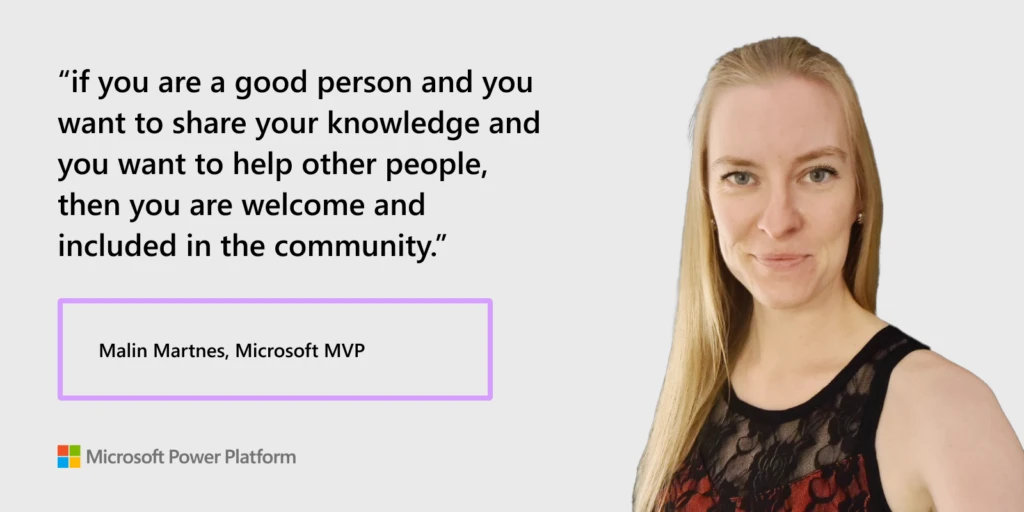
Woman on light gray background next to quote that says, “If you are a good person and you want to share your knowledge and you want to help other people, then you are welcome and included in the community.”—Malin Martnes, Microsoft MVP.

More than personalizedour community is personal

Community connections may only begin as technical support or looking for guidance from Microsoft. From there, they often take it further. That personal experience of support can naturally transform into lasting relationships with a worldwide group of like-minded people. It’s a great recipe for building friendships that go beyond professional connections.

Like many of our community members, Malin Martnes was looking for more than technical support. She found a community that welcomed her and helped her feel that she fit in. Originally from a small town in Norway, Malin grew up feeling alone and isolated. From the beginning, an online community has helped her find herself and realize she’s not different or alone because of her taste in music or interest in tech. Now as a single mom, she has found encouragement and strength from the user group community, in everything from COVID-19 to her personal life. She is a Microsoft MVP and a sought-after expert for other groups, conferences, and more.

“No matter who you are,” she says, “what gender you are, what type of color you are, what your ideas are; if you are a good person and you want to share your knowledge and you want to help other people, then you are welcome and included in the community. And that is just what I absolutely love about the community and why I do everything that I do.”

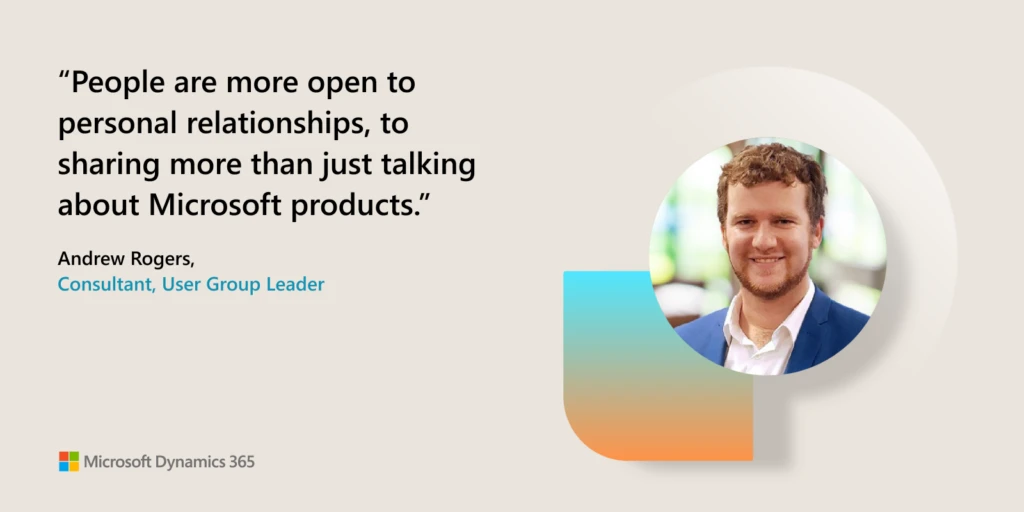
Man on tan background next to quote that says “People are more open to personal relationships, to sharing more than just talking about Microsoft products.”—Andrew Rogers, Consultant, User Group Leader.

Success at work is greatmaking friends can be life-changing

When you build your network and community recognition in a diverse and inclusive environment you’re so much more likely to succeed and do more at work. And beyond that. Through the supportive network of peers in the community you can learn from experts and leaders, build your own community status, and as we’ve seen, make lifelong friendships you’ll value forever.

When Andrew Rogers of Queensland, Australia moved from working with Office 365 support to consulting on Office, SharePoint, and Dynamics 365, he discovered that he needed more assistance to be able to help more of his colleagues. This led him to seek out like-minded people who could help him grow professionally. He found they offered more than professional guidance. “I found [a group] here in Queensland with a number of people that I already had so much to do with, and I was welcomed very easily into that space.”

User Groups became a place where he could not only benefit himself professionally, but he could share that insight and what he learned with others. “People are more open to personal relationships, to sharing more than just talking about Microsoft products that we all love using and building for others,” says Andrew about the way User Groups have grown beyond just a professional networking tool. 

He smiles when he talks about the User Group. “I really love doing this and I really love helping people connect to what they need.” He loves the satisfaction he finds in helping people find these connections. “Just seeing the joy on their faces or getting an email that says thanks so much. This makes my day.”

Project Connect: Supporting and inspiring our local communities

Introducing Project Connect: Your local Microsoft contact for your community

Project Connect is a new program that supports leaders and members who participate in our Microsoft Power Platform and Dynamics 365 community user group experience. It’s comprised of dedicated Microsoft volunteers, called Community Citizens, who engage directly with their local user group. 

Community citizens participate in these ways:

  • Support virtual and in-person user group meetings.
  • Explore customer needs, challenges, and aspirations.
  • Become the local face of our group and our products.

If you are part of the Microsoft experience, this is an added benefit for group leaders and members. To learn more and find out who your local Microsoft contact is, drop us a line at projconnect1@microsoft.com.

And again, whether you’re an active user group member, a leader, or just an outside supporter who sees the value of these deeper connections, thank you for helping, motivating, and inspiring us through this exciting first year of growth. We look forward to many more.

Join the Microsoft Dynamics 365 and Power Platform Communities today.

The post A year of new connections—thank you Power Platform and Dynamics 365 Communities appeared first on Microsoft Dynamics 365 Blog.

Brought to you by Dr. Ware, Microsoft Office 365 Silver Partner, Charleston SC.
Drupal Releases Security Updates

This article is contributed. See the original author and article here.

Drupal has released security updates to address vulnerabilities affecting Drupal 9.2 and 9.3. An attacker could exploit these vulnerabilities to take control of an affected system.

CISA encourages users and administrators to review Drupal security advisories SA-CORE-008 and SA-CORE-009 and apply the necessary updates.