This article is contributed. See the original author and article here.
This last March 23rd we had a great opportunity and honor to deliver the session A Hybrid SQL Journey: The daily routine of a Hybrid DBA with my colleague Juan Moreno Romo Support Escalation Engineer in Microsoft SQL Server Hybrid team. We covered several topics about best practices, tips and tricks on how to successfully use Azure SQL Database and SQL Managed Instance on production environments and how the DBA job changed versus administrating SQL Server.
Thanks to Data Driven Community for giving us this opportunity and we are happy to share the recording and materials of the meeting. Also, you could find more information here.
Video:
We have some plans to deliver additional sessions soon about Query Data Store and other topics about Azure SQL Database, Managed Instance and SQL Server Hybrid.
This article is contributed. See the original author and article here.
Join us for PyDay
PyDay
2 May, 2023 | 5:30 PM UTC
Are you a student or faculty member interested in learning more about web development using Python? Join us for an exciting online event led by experienced developer and educator Pamela Fox, where you’ll learn how to build, test, and deploy HTTP APIs and web applications using three of the most popular Python frameworks: FastAPI, Django, and Flask. This event is perfect for anyone looking to expand their knowledge and skills in backend web development using Python.
No web application experience is required, but some previous Python experience is encouraged. If you’re completely new to Python, head over to https://aka.ms/trypython to kickstart your learning!
PyDay Schedule:
Session 1: Build, Test, and Deploy HTTP APIs with FastAPI @ 9:30 AM PST
In this session, you’ll learn how to build, test, and deploy HTTP APIs using FastAPI, a lightweight Python framework. You’ll start with a bare-bones FastAPI app and gradually add routes and frontends. You’ll also learn how to test your code and deploy it to Azure App Service.
Session 2: Cloud Databases for Web Apps with Django @ 11:10 AM PST
In this session, you’ll discover the power of Django for building web apps with a database backend. We’ll walk through building a Django app, using the SQLTools VS Code extension to interact with a local PostgreSQL database, and deploying it using infrastructure-as-code to Azure App Service with Azure PostgreSQL Flexible Server.
Session 3: Containerizing Python Web Apps with Docker @ 1:50 PM PST
In this session, you’ll learn about Docker containers, the industry standard for packaging applications. We’ll containerize a Python Flask web app using Docker, run the container locally, and deploy it to Azure Container Apps with the help of Azure Container Registry.
This event is an excellent opportunity for students and faculty members to expand their knowledge and skills in web development using Python. You’ll learn how to use three of the most popular Python frameworks for web development, and by the end of the event, you’ll have the knowledge you need to build, test, and deploy web applications.
So, if you’re interested in learning more about web development using Python, register now and join us for this exciting online event! We look forward to seeing you there!
This article is contributed. See the original author and article here.
Sometimes success in life depends on little things that seem easy. So easy that they are often overlooked or underestimated for some reason. This also applies to life in IT. For example, just think about this simple question: “Do you have a tested and documented Active Directory disaster recovery plan?”
This is a question we, as Microsoft Global Compromise Recovery Security Practice, ask our customers whenever we engage in a Compromise Recovery project. The aim of these projects is to evict the attacker from compromised environments by revoking their access, thereby restoring confidence in these environments for our customers. More information can be found here: CRSP: The emergency team fighting cyber attacks beside customers – Microsoft Security Blog
Nine out of ten times the customer replies: “Sure, we have a backup of our Active Directory!”, but when we dig a little deeper, we often find that while Active Directory is backed up daily, an up-to-date, documented, and regularly tested recovery procedure does not exist. Sometimes people answer and say: “Well, Microsoft provides instructions on how to restore Active Directory somewhere on docs.microsoft.com: so, if anything happens that breaks our entire directory, we can always refer to that article and work our way through. Easy!”. To this we say, an Active Directory recovery can be painful/time-consuming and is often not easy.
You might think that the likelihood of needing a full Active Directory recovery is small. Today, however, the risk of a cyberattack against your Active Directory is higher than ever, hence the chances of you needing to restore it have increased. We now even see ransomware encrypting Domain Controllers, the servers that Active Directory runs on. All this means that you must ensure readiness for this event.
Readiness can be achieved by testing your recovery process in an isolated network on a regular basis, just to make sure everything works as expected, while allowing your team to practice and verify all the steps required to perform a full Active Directory recovery.
Consider the security aspects of the backup itself, as it is crucial to store backups safely, preferably encrypted, restricting access to only trusted administrative accounts and no one else!
You must have a secure, reliable, and fast restoration procedure, ready to use when you most need it.
Azure Recovery Services Vault can be an absolute game changer for meeting all these requirements, and we often use it during our Compromise Recovery projects, which is why we are sharing it with you here. Note that the intention here is not to write up a full Business Continuity Plan. Our aim is to help you get started and to show you how you can leverage the power of Azure.
The process described here can also be used to produce a lab containing an isolated clone of your Active Directory. In the Compromise Recovery, we often use the techniques described here, not only to verify the recovery process but also to give ourselves a cloned Active Directory lab for testing all kinds of hardening measures that are the aim of a Compromise Recovery.
What is needed
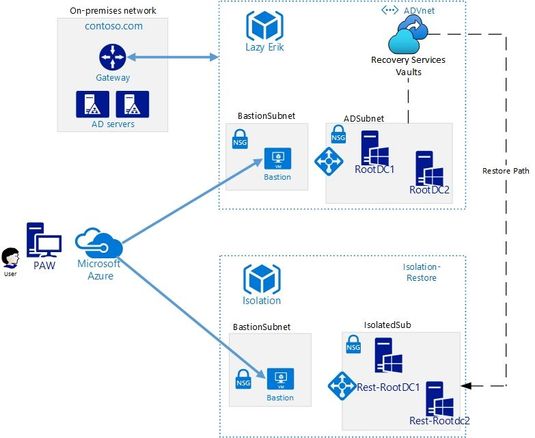
This high-level schema shows you all the components that are required:
At least one production DC per domain in Azure
We do assume that you have at least one Domain Controller per domain running on a VM in Azure, which nowadays many of our customers do. This unlocks the features of Azure Recovery Services Vault to speed up your Active Directory recovery.
Note that backing up two Domain Controllers per domain improves redundancy, as you will have multiple backups to choose from when recovering. This is another point in our scenario where Azure Recovery Vault’s power comes through, as it allows you to easily manage multiple backups in one single console, covered by common policies.
Azure Recovery Services Vault
We need to create the Azure Recovery Services Vault and to be more precise, a dedicated Recovery Services Vault for all “Tier 0” assets in a dedicated Resource Group (Tier 0 assets are sensitive, highest-level administrative assets, including accounts, groups and servers, control of which would lead to control of your entire environment).
This Vault should reside in the same region as your “Tier 0” servers, and we need a full backup of at least one Domain Controller per domain.
Once you have this Vault, you can include the Domain Controller virtual machine in your Azure Backup.
Recovery Services vaults are based on the Azure Resource Manager model of Azure, which provides features such as:
Enhanced capabilities to help secure backup data: With Recovery Services Vaults, Azure Backup provides security capabilities to protect cloud backups. This includes the encryption of backups that we mention above.
Central monitoring for your hybrid IT environment: With Recovery Services Vaults, you can monitor not only your Azure IaaS virtual machines but also your on-premises assets from a central portal.
Azure role-based access control (Azure RBAC): Azure RBAC provides fine-grained access management control in Azure. Azure Backup has three built-in RBAC roles to manage recovery points, which allows us to restrict backup and restore access to the defined set of user roles.
Soft Delete: With soft delete the backup data is retained for 14 additional days after deletion, which means that even if you accidentally remove the backup, or if this is done by a malicious actor, you can recover it. These additional 14 days of retention for backup data in the “soft delete” state don’t incur any cost to you.
Another thing we need is an isolated network portion (the “isolatedSub” in the drawing) to which we restore the DC. This isolated network portion should be in a separate Resource Group from your production resources, along with the newly created Recovery Services Vault.
Isolation means no network connectivity whatsoever to your production networks! If you inadvertently allow a restored Domain Controller, the target of your forest recovery Active Directory cleanup actions, to replicate with your running production Active Directory, this will have a serious impact on your entire IT Infrastructure. Isolation can be achieved by not implementing any peering, and of course by avoiding any other connectivity solutions such as VPN Gateways. Involve your networking team to ensure that this point is correctly covered.
Bastion Host in Isolated Virtual Network
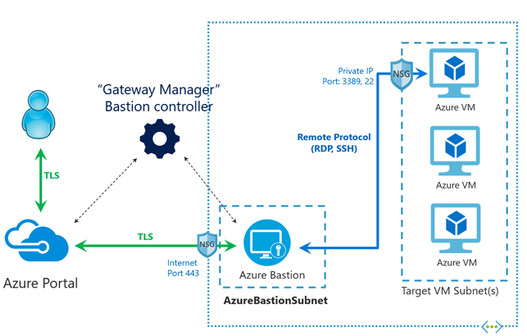
The last thing we need is the ability to use a secure remote connection to the restored virtual machine that is the first domain controller of the restore Active Directory. To get around the isolation of the restoration VNET, we are going to use Bastion Host for accessing this machine.
Azure Bastion is a fully managed Platform as a Service that provides secure and seamless secure connection (RDP and SSH) access to your virtual machines directly through the Azure Portal and avoids public Internet exposure using SSH and RDP with private IP addresses only.
Before Azure Recovery Vault existed, the first steps of an Active Directory recovery were the most painful part of process: one had to worry about provisioning a correctly sized- and configured recovery machine, transporting the WindowsImageBackup folder to a disk on this machine, and booting from the right Operating System ISO to perform a machine recovery. Now we can bypass all these pain points with just a few clicks:
Perform the Virtual Machine Backup
Creating a backup of your virtual machine in the Recovery Vault involves including it in a Backup Policy. This is described here:
Once you have performed the restoration of your Domain Controller virtual machine to the isolated Virtual Network, you can log on to this machine using the Bastion Host, which allows you to start performing the Active Directory recovery as per our classic guidance.
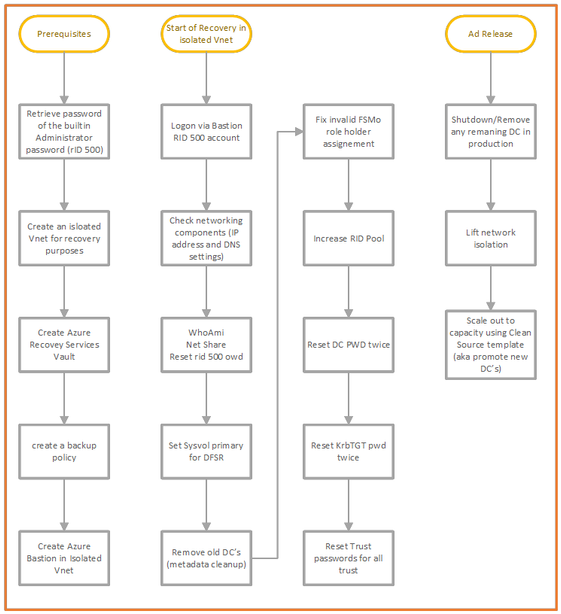
You login using the built-in administrator account, followed by the steps outlined in the drawing below under “Start of Recovery in isolated VNet” :
Studying the chart above, you will see that there are some dependencies that apply. Just think about seemingly trivial stuff such as the Administrator password that is needed during recovery, the one that you use to log on to the Bastion.
Who has access to this password?
Did you store the password in a Vault that is dependent on a running AD service?
Do you have any other services running on your domain controllers, such as any file services (please note that we do not recommend this)?
Is DNS running on Domain controllers or is there a DNS dependency on another product such as Infoblox?
These are things to consider in advance, to ensure you are ready for recovery of your AD.
Tips and Tricks
In order to manage a VM in Azure two things come in handy:
Serial console- this feature in the Azure portal provides access to a text-based console for Windows virtual machines. This console session provides access to the Virtual Machine independent of the network or operating system state. The serial console can only be accessed by using the Azure portal and is allowed only for those users who have an access role of Contributor or higher to the VM or virtual machine scale set. This feature comes in handy when you need to troubleshoot Remote Desktop connection failures; suppose you need to disable the Host Based Firewall or need to change IP configuration settings. More information can be found here: Azure Serial Console for Windows – Virtual Machines | Microsoft Docs
Run Command- this feature uses the virtual machine agent to run PowerShell scripts within an Azure Windows VM. You can use these scripts for general machine or application management. They can help you to quickly diagnose and remediate Virtual Machine access and network issues and get the Virtual Machine back to a good state. More information can be found here: Run scripts in a Windows VM in Azure using action Run Commands – Azure Virtual Machines | Microsoft Docs
Security
We remind you that a Domain Controller is a sensitive, highest-level administrative asset, a “Tier 0” asset (see for an overview of our Securing Privileged access Enterprise access model here: Securing privileged access Enterprise access model | Microsoft Docs), no matter where it is stored. Whether it runs as a virtual machine on VMware, on Hyper-V or in Azure as a IAAS virtual machine, that fact does not change. This means you will have to protect these Domain Controllers and their backups using the maximum level or security restrictions you have at your disposal in Azure. Role Based Access Control is one of the features that can help here to restrict accounts that have access.
Conclusion
A poorly designed disaster recovery plan, lack of documentation, and a team that lacks mastery of the process will delay your recovery, thereby increasing the burden on your administrators when a disaster happens. In turn, this will exacerbate the disastrous impact that cyberattacks can have on your business.
In this article, we gave you a global overview of how the power of Azure Recovery Services Vault can simplify and speed up your Active Directory Recovery process: how easy it is to use, how fast you can recover a machine into an isolated VNET in Azure, and how you can connect to it safely using Bastion to start performing your Active Directory Recovery on a restored Domain Controller.
Finally, ask yourself this question: “Am I able to recover my entire Active Directory in the event of a disaster? If you cannot answer this question with a resounding “yes” then it is time to act and make sure that you can.
Authors: Erik Thie & Simone Oor, Compromise Recovery Team
To learn more about Microsoft Security solutions visit our website. Bookmark the Security blog to keep up with our expert coverage on security matters. Also, follow us at @MSFTSecurity for the latest news and updates on cybersecurity.
This article is contributed. See the original author and article here.
As we continue to enhance the security of our cloud, we are going to address the problem of email sent to Exchange Online from unsupported and unpatched Exchange servers. There are many risks associated with running unsupported or unpatched software, but by far the biggest risk is security. Once a version of Exchange Server is no longer supported, it no longer receives security updates; thus, any vulnerabilities discovered after support has ended don’t get fixed. There are similar risks associated with running software that is not patched for known vulnerabilities. Once a security update is released, malicious actors will reverse-engineer the update to get a better understanding of how to exploit the vulnerability on unpatched servers.
Microsoft uses the Zero Trust security model for its cloud services, which requires connecting devices and servers to be provably healthy and managed. Servers that are unsupported or remain unpatched are persistently vulnerable and cannot be trusted, and therefore email messages sent from them cannot be trusted. Persistently vulnerable servers significantly increase the risk of security breaches, malware, hacking, data exfiltration, and other attacks.
We’ve said many times that it is critical for customers to protect their Exchange servers by staying current with updates and by taking other actions to further strengthen the security of their environment. Many customers have taken action to protect their environment, but there are still many Exchange servers that are out of support or significantly behind on updates.
Transport-based Enforcement System
To address this problem, we are enabling a transport-based enforcement system in Exchange Online that has three primary functions: reporting, throttling, and blocking. The system is designed to alert an admin about unsupported or unpatched Exchange servers in their on-premises environment that need remediation (upgrading or patching). The system also has throttling and blocking capabilities, so if a server is not remediated, mail flow from that server will be throttled (delayed) and eventually blocked.
We don’t want to delay or block legitimate email, but we do want to reduce the risk of malicious email entering Exchange Online by putting in place safeguards and standards for email entering our cloud service. We also want to get the attention of customers who have unsupported or unpatched Exchange servers and encourage them to secure their on-premises environments.
Reporting
For years, Exchange Server admins have had the Exchange Server Health Checker, which detects common configuration and performance issues, and collects useful information, including which servers are unsupported or unpatched. Health Checker can even create color-coded HTML reports to help you prioritize server remediation.
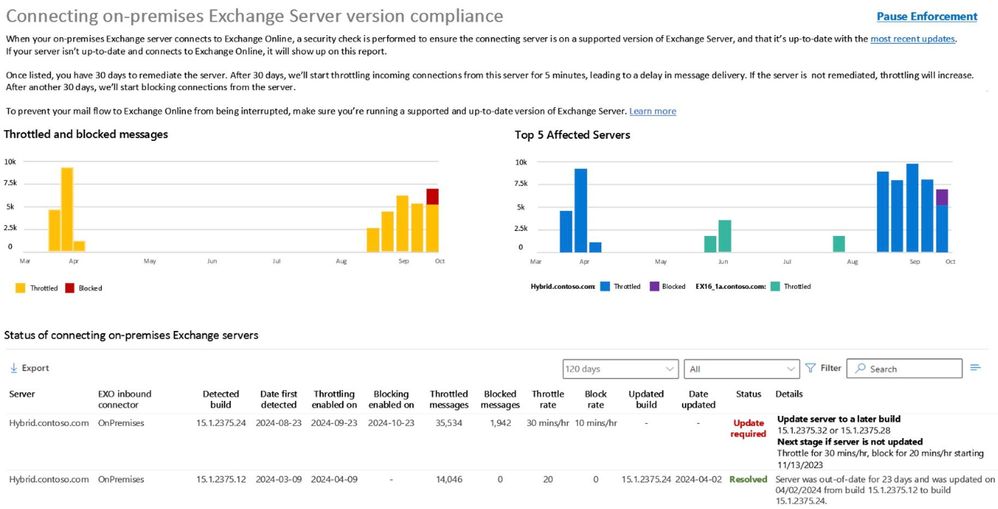
We are adding a new mail flow report to the Exchange admin center (EAC) in Exchange Online that is separate from and complementary to Health Checker. It provides details to a tenant admin about any unsupported or out-of-date Exchange servers in their environment that connect to Exchange Online to send email.
Figure 1 below shows a mockup of what the new report may look like when released:
The new mail flow report provides details on any throttling or blocking of messages, along with information about what happens next if no action is taken to remediate the server. Admins can use this report to prioritize updates (for servers that can be updated) and upgrades or migrations (for servers that can’t be updated).
Throttling
If a server is not remediated after a period of time (see below), Exchange Online will begin to throttle messages from it. In this case, Exchange Online will issue a retriable SMTP 450 error to the sending server which will cause the sending server to queue and retry the message later, resulting in delayed delivery of messages. In this case, the sending server will automatically try to re-send the message. An example of the SMTP 450 error is below:
450 4.7.230 Connecting Exchange server version is out-of-date; connection to Exchange Online throttled for 5 mins/hr. For more information see https://aka.ms/BlockUnsafeExchange.
The throttling duration will increase progressively over time. Progressive throttling over multiple days is designed to drive admin awareness and give them time to remediate the server. However, if the admin does not remediate the server within 30 days after throttling begins, enforcement will progress to the point where email will be blocked.
Blocking
If throttling does not cause an admin to remediate the server, then after a period of time (see below), email from that server will be blocked. Exchange Online will issue a permanent SMTP 550 error to the sender, which triggers a non-delivery report (NDR) to the sender. In this case, the sender will need to re-send the message. An example of the SMTP 550 error is below:
550 5.7.230 Connecting Exchange server version is out-of-date; connection to Exchange Online blocked for 10 mins/hr. For more information see https://aka.ms/BlockUnsafeExchange.
Enforcement Stages
We’re intentionally taking a progressive enforcement approach which gradually increases throttling over time, and then introduces blocking in gradually increasing stages culminating in blocking 100% of all non-compliant traffic.
Enforcement actions will escalate over time (e.g., increase throttling, add blocking, increase blocking, full blocking) until the server is remediated: either removed from service (for versions beyond end of life), or updated (for supported versions with available updates).
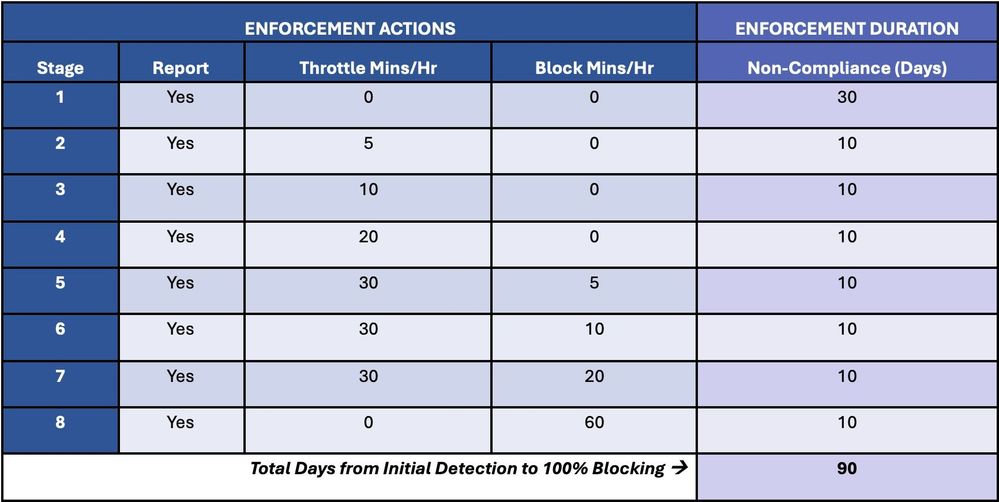
Table 1 below details the stages of progressive enforcement over time:
Stage 1 is report-only mode, and it begins when a non-compliant server is first detected. Once detected, the server will appear in the out-of-date report mentioned earlier and an admin will have 30 days to remediate the server.
If the server is not remediated within 30 days, throttling will begin, and will increase every 10 days over the next 30 days in Stages 2-4.
If the server is not remediated within 60 days from detection, then throttling and blocking will begin, and blocking will increase every 10 days over the next 30 days in Stages 5-7.
If, after 90 days from detection, the server has not been remediated, it reaches Stage 8, and Exchange Online will no longer accept any messages from the server. If the server is patched after it is permanently blocked, then Exchange Online will again accept messages from the server, as long as the server remains in compliance. If a server cannot be patched, it must be permanently removed from service.
Enforcement Pause
Each tenant can pause throttling and blocking for up to 90 days per year. The new mail flow report in the EAC allows an admin to request a temporary enforcement pause. This pauses all throttling and blocking and puts the server in report-only mode for the duration specified by the admin (up to 90 days per year).
Pausing enforcement works like a pre-paid debit card, where you can use up to 90 days per year when and how you want. Maybe you need 5 days in Q1 to remediate a server, or maybe you need 15 days. And then maybe another 15 days in Q2, and so forth, up to 90 days per calendar year.
Initial Scope
The enforcement system will eventually apply to all versions of Exchange Server and all email coming into Exchange Online, but we are starting with a very small subset of outdated servers: Exchange 2007 servers that connect to Exchange Online over an inbound connector type of OnPremises.
We have specifically chosen to start with Exchange 2007 because it is the oldest version of Exchange from which you can migrate in a hybrid configuration to Exchange Online, and because these servers are managed by customers we can identify and with whom we have an existing relationship.
Following this initial deployment, we will incrementally bring other Exchange Server versions into the scope of the enforcement system. Eventually, we will expand our scope to include all versions of Exchange Server, regardless of how they send mail to Exchange Online.
We will also send Message Center posts to notify customers. Today, we are sending a Message Center post to all Exchange Server customers directing them to this blog post. We will also send targeted Message Center posts to customers 30 days before their version of Exchange Server is included in the enforcement system. In addition, 30 days before we expand beyond mail coming in over OnPremises connectors, we’ll notify customers via the Message Center.
Feedback and Upcoming AMA
As always, we want and welcome your feedback. Leave a comment on this post if you have any questions or feedback you’d like to share.
On May 10, 2023 at 9am PST, we are hosting an “Ask Microsoft Anything” (AMA) about these changes on the Microsoft Tech Community. We invite you to join us and ask questions and share feedback. This AMA will be a live text-based online event with no audio or video. This AMA gives you the opportunity to connect with us, ask questions, and provide feedback. You can register for this AMA here.
FAQs
Which cloud instances of Exchange Online have the transport-based enforcement system? All cloud instances, including our WW deployment, our government clouds (e.g., GCC, GCCH, and DoD), and all sovereign clouds.
Which versions of Exchange Server are affected by the enforcement system? Initially, only servers running Exchange Server 2007 that send mail to Exchange Online over an inbound connector type of OnPremises will be affected. Eventually, all versions of Exchange Server will be affected by the enforcement system, regardless of how they connect to Exchange Online.
How can I tell if my organization uses an inbound connector type of OnPremises? You can use Get-InboundConnector to determine the type of inbound connector in use. For example, Get-InboundConnector | ft Name,ConnectorType will display the type of inbound connector(s) in use.
What is a persistently vulnerable Exchange server? Any Exchange server that has reached end of life (e.g., Exchange 2007, Exchange 2010, and soon, Exchange 2013), or remains unpatched for known vulnerabilities. For example, Exchange 2016 and Exchange 2019 servers that are significantly behind on security updates are considered persistently vulnerable.
Is Microsoft blocking email from on-premises Exchange servers to get customers to move to the cloud? No. Our goal is to help customers secure their environment, wherever they choose to run Exchange. The enforcement system is designed to alert admins about security risks in their environment, and to protect Exchange Online recipients from potentially malicious messages sent from persistently vulnerable Exchange servers.
Why is Microsoft only taking this action against its own customers; customers who have paid for Exchange Server and Windows Server licenses? We are always looking for ways to improve the security of our cloud and to help our on-premises customers stay protected. This effort helps protect our on-premises customers by alerting them to potentially significant security risks in their environment. We are initially focusing on email servers we can readily identify as being persistently vulnerable, but we will block all potentially malicious mail flow that we can.
Will Microsoft enable the transport-based enforcement system for other servers and applications that send email to Exchange Online? We are always looking for ways to improve the security of our cloud and to help our on-premises customers stay protected. We are initially focusing on email servers we can readily identify as being persistently vulnerable, but we will block all potentially malicious mail flow that we can.
If my Exchange Server build is current, but the underlying Windows operating system is out of date, will my server be affected by the enforcement system? No. The enforcement system looks only at Exchange Server version information. But it is just as important to keep Windows and all other applications up-to-date, and we recommend customers do that.
Delaying and possibly blocking emails sent to Exchange Online seems harsh and could negatively affect my business. Can’t Microsoft take a different approach to this? Microsoft is taking this action because of the urgent and increasing security risks to customers that choose to run unsupported or unpatched software. Over the last few years, we have seen a significant increase in the frequency of attacks against Exchange servers. We have done (and will continue to do) everything we can to protect Exchange servers but unfortunately, there are a significant number of organizations that don’t install updates or are far behind on updates, and are therefore putting themselves, their data, as well as the organizations that receive email from them, at risk. We can’t reach out directly to admins that run vulnerable Exchange servers, so we are using activity from their servers to try to get their attention. Our goal is to raise the security profile of the Exchange ecosystem.
Why are you starting only with Exchange 2007 servers, when Exchange 2010 is also beyond end of life and Exchange 2013 will be beyond end of life when the enforcement system is enabled? Starting with this narrow scope of Exchange servers lets us safely exercise, test, and tune the enforcement system before we expand its use to a broader set of servers. Additionally, as Exchange 2007 is the most out-of-date hybrid version, it doesn’t include many of the core security features and enhancements in later versions. Restricting the most potentially vulnerable and unsafe server version first makes sense.
Does this mean that my Exchange Online organization might not receive email sent by a 3rd party company that runs an old or unpatched version of Exchange Server? Possibly. The transport-based enforcement system initially applies only to email sent from Exchange 2007 servers to Exchange Online over an inbound connector type of OnPremises. The system does not yet apply to email sent to your organization by companies that do not use an OnPremises type of connector. Our goals are to reduce the risk of malicious email entering Exchange Online by putting in place safeguards and standards for email entering the service and to notify on-premises admins that the Exchange server their organization uses needs remediating.
How does Microsoft know what version of Exchange I am running? Does Microsoft have access to my servers? No, Microsoft does not have any access to your on-premises servers. The enforcement system is based on email activity (e.g., when the on-premises Exchange Server connects to Exchange Online to deliver email).
This article is contributed. See the original author and article here.
This is an exciting time in the evolution of AI, and you don’t have to look far to see the headlines on ways it is changing the world. From advanced machine learning models to breakthrough natural language technology, new opportunities to use AI to improve the way we work are surfacing daily. AI innovation can free employees from mundane, repetitive tasks and allow them to focus on the work that matters most, increasing job satisfaction and pushing productivity to new heights. According to our recent survey on business trends, 89 percent of those with access to automation and AI-powered tools feel more fulfilled because they can spend time on work that truly matters.1
Microsoft Dynamics 365 Business Central brings the power of AI to small and medium-sized businesses with features that help companies work smarter, adapt faster, and perform better. Let’s explore some of the ways that AI in Business Central is improving how work gets done, including:
Automating repetitive tasks
Improving customer service
Anticipating business challenges
Enhancing decision making
Automate repetitive tasks with Copilot in Business Central
Microsoft Dynamics 365 Copilot introduces the next generation of AI-powered experiences to Microsoft Dynamics 365 business applications. Dynamics 365 Copilot provides AI assistance directly in the flow of work using natural language technology, automating repetitive tasks, and unlocking creativity. Dynamics 365 Copilot is the world’s first copilot in both customer relationship management (CRM) and enterprise resource planning (ERP), ushering in the new age of productivity for businesses of all sizes.
With Copilot in Business Central, product managers can save time and drive sales with engaging AI-generated product descriptions. Banish writer’s block with unique, compelling marketing text created in seconds using product attributes such as color, material, and size. Tailor the descriptions to your brand by choosing a tone of voice, as well as format and length. Complete the process by publishing to Shopify or other ecommerce stores with just a few clicks. Copilot in Business Central makes launching new products fast and easy so you can focus on growing your business. Try Copilot in Business Central today.
This embed requires accepting cookies from the embed’s site to view the embed. Activate the link to accept cookies and view the embedded content.
Improve customer service with Sales and Inventory Forecasting
In a highly competitive business landscape, effective inventory management can be the key differentiator between a successful business and one that struggles to retain customers and remain profitable. Inventory management is a trade-off between customer service and managing your costs. While low inventory requires less working capital, inventory shortages can lead to missed sales. Using AI, the Sales and Inventory Forecast extension predicts future sales using historical data to help you avoid stockouts. Based on the forecast and inventory levels, the extension helps create replenishment requests to your vendors, helping you save time and improve inventory availability to keep your customers happy.
Anticipate business challenges with Late Payment Predictions
Effectively managing receivables is critical to the overall financial health of a business. The Late Payment Prediction extension can help you reduce outstanding receivables and fine-tune your collections strategy by predicting whether sales invoices will be paid on time. For example, if a payment is predicted to be late, you might decide to adjust the terms of payment or the payment method for the customer. By anticipating late payments and making adjustments, you can better manage and ultimately reduce overdue receivables.
Enhance decision-making with Cash Flow Analysis
Azure AI in Business Central helps you create a comprehensive cash flow forecast with Cash Flow Analysis, enhancing decision-making so you can stay in control of your cash flow. A company’s cash flow indicates its financial solvency and reveals whether the company can meet its financial obligations in a timely manner. To make sure that your company is solvent, a future-oriented planning instrument is necessary. With insights from AI, you can make proactive adjustments to ensure your company’s fiscal health, such as reducing credit when you have a cash surplus or borrowing to mitigate a cash deficit.
Innovate with Business Central
In today’s fast-paced market, AI has become essential for companies looking to stay ahead of the competition. The AI tools built into Business Central can help you improve the end-to-end customer experience, reduce costs, and boost financial success. With the ability to automate repetitive tasks, analyze data, and offer personalized recommendations, Business Central can help you operate more efficiently and grow your business.
Dynamics 365 Business Central
Adapt faster, work smarter, and perform better with Business Central.
This article is contributed. See the original author and article here.
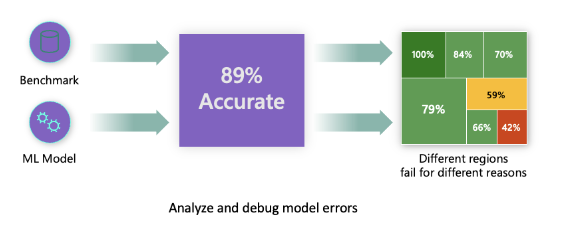
Traditional performance metrics for machine learning models focus on calculations based on correct vs incorrect predictions. The aggregated accuracy scores or average error loss show how good the model is, but do not reveal conditions causing model errors. While the overall performance metrics such as classification accuracy, precision, recall or MAE scores are good proxies to help you build trust with your model, they are insufficient in locating where in data the model has inaccuracies. Often, model errors are not distributed uniformly in your underlying dataset. For instance, if your model is 89% accurate, does that mean it is 89% fair as well?
Model fairness and model accuracy are not the same thing and must be considered. Unless you take a deep dive in the model error distribution, it would be challenging to discover the different regions of your data for where the model is failing 42% of the time (see the red region in diagram below). The consequence of having errors in certain data groups can lead to fairness or reliability issues. To illustrate, the data group with the high number of errors may contain sensitive features such as age, gender, disabilities, or ethnicity. Further analysis could reveal that the model has a high error rate with individuals with disabilities compared to ones without disabilities. So, it is essential to understand areas where the model is performing well or not, because the data regions where there are a high number of inaccuracies in your model may turn out to be an important data demographic you cannot afford to ignore.
This is where the error analysis component of Azure Machine Learning Responsible AI (RAI) dashboard helps in identifying a model’s error distribution across its test dataset. In the last tutorial, we created an RAI dashboard with a diabetes hospital readmission classification model we trained. In this tutorial, we are going to explore how data scientists and AI developers can use Error Analysis to identify the error distribution in the test records and discover where there is a high error rate from the model. In addition, we’ll learn how to create cohorts of data to investigate why a model is performing poorly in some cohorts and not others. Lastly, we will utilize the various methods available in the component for error identification: Tree map and Heat map.
Prerequisites
This is Part 4 of a tutorial series. You’ll need to complete the prior tutorial(s) below:
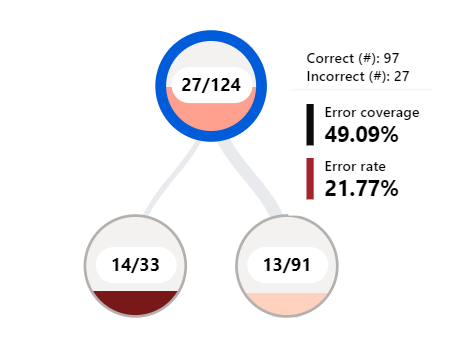
Before we start our analysis, let’s first understand how to interpret the data provided by the Tree map. The RAI dashboard illustrates how model failure is distributed across various cohorts with a tree visualization. The root node displays the total number of incorrect predictions from a model and the total test dataset size. The nodes are groupings of data (aka cohorts) that are formed by splits from feature conditions (e.g., “Time_In_Hospital < 5” vs “Time_In_Hospital ≥ 5”). Hovering the mouse over each node on the tree reveals the following information for the selected feature condition:
Incorrect vs Correctpredictions: The number of incorrect vs correct predictions for the datapoints that fall in the node.
Error Rate: represents the number of error occurrence in the node. The shade of red shows what percentage of this node’s datapoints are receiving erroneous predictions. The darker the red the higher the error rate.
Error Coverage: represents how many of your model’s overall errors are happening in a given node. The fullness of the node shows the coverage of errors the node has. The fuller the node, the higher error coverage it has.
Identifying model errors from a Tree Map
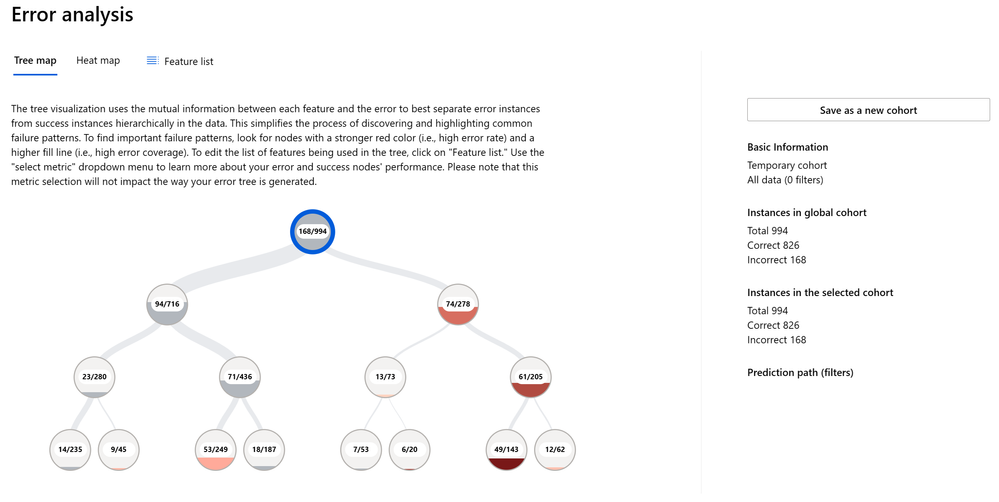
Now let’s start our analysis. The tree map displays how model failure is distributed across various data cohorts. For our diabetes hospital readmission model, one of the first things we observe from the root node is that out of the 994 total test records, the error analysis component found 168 errors while evaluating the model.
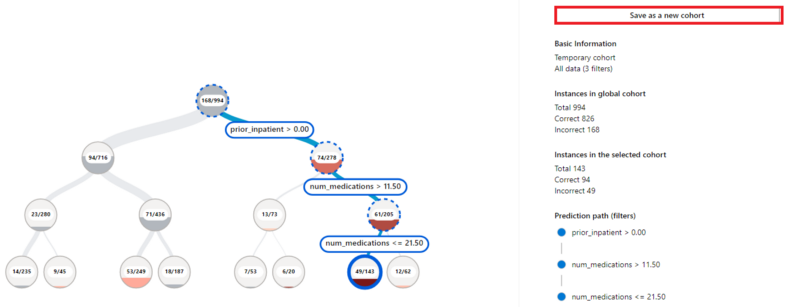
The tree map provides visual indicators to make locating nodes or tree path with the error rate quicker. In the above diagram, you can see the tree path with the darkest red color has a leaf-node on the bottom right-hand side of the tree. To select the path leading up to the node, double-click on the leaf node. This highlights the path and displays the feature condition for each node in the path. Since this tree path contains nodes with the highest error rate, it is a good candidate to create a cohort with the data represented in the path in order to later perform analysis to diagnose the root cause behind the errors.
According to this tree path with the highest error rate, diabetes patients that have prior hospitalization and taking several medications between 11 and 22 are a cohort of patients where the model has the highest number of incorrect predictions. To investigate what’s causing the high error rate with this group of patients, we will create a cohort for these groups of patients.
Cohort # 1: Patients with number of Prior_Inpatient > 0 days and number of medications between 11 and 22
To save the selected path for further investigation. We can use the following steps:
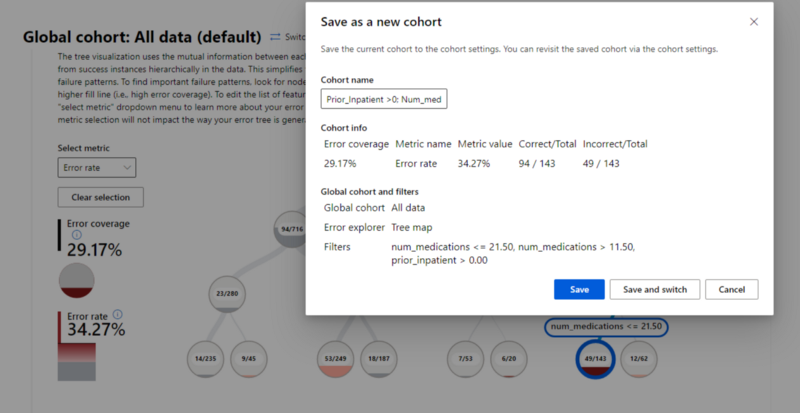
Click on the “Save as a new cohort” button on the upper right-hand side of the error analysis component. Note: The dashboard displays the “Filters” with the feature conditions in the path selection: num_medications 11.50, prior_inpatient > 0.00.
We’ll name the cohort: “Err: Prior_Inpatient >0; Num_meds >11.50 & <= 21.50”.
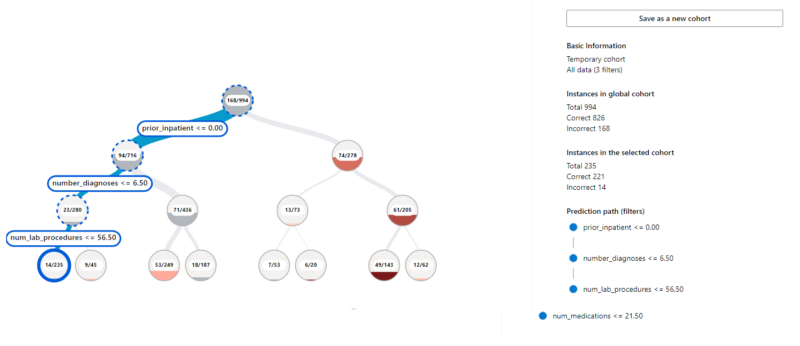
As much as it’s advantageous in finding out why the model is performing poorly, it is equally important to figure out what’s causing our model to perform well. So, we’ll need to find the tree path with the least number of errors to gain insights as to why the model is performing better in this cohort vs others. The leaf node with the feature condition on the far left-hand side of the tree, is the path of the tree with the least errors.
The tree reveals that diabetic patients with no prior hospitalization, the number of other health conditions equal or less than 7, and the number of lab procedures equal or less than 57 are a cohort with the lowest model errors. To analyze the factors that are contributing to this cohort performing better than others, we’ll create a cohort for these group of patients.
Cohort # 2: Patients with number of Prior_Inpatient = 0 days and number of diagnoses ≤ 7 and number of lab procedures ≤ 57
For comparison, we will create a cohort of feature condition with the lowest error rate. To achieve this, complete the following steps:
Double-click on the node to select the rest of the nodes in the tree path.
Click on “Save as a new Cohort” button to save the selected path in a cohort. Note: The dashboard displays the “Filters” with the feature conditions in the path selection: num_lab_procedures <= 56.50, number_diagnoses <= 6.50, prior_inpatient <= 0.00.
We’ll name the cohort: Prior_Inpatient = 0; num_diagnoses <= 6.50; lab_procedures <= 56.50
When we start investigating model inaccuracies, comparing the different features between top and bottom performing cohorts will be useful for improving our overall model quality (we’ll see this later in the next tutorial Part 5. Stay tuned).
Discovering model errors from the Feature list
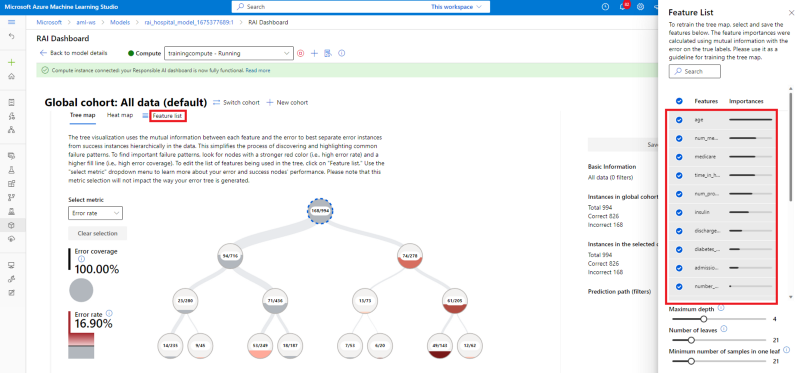
One of the advantages of using the RAI dashboard to debug a model is that it provides the “Feature List” pane, which is a list of feature names in the test dataset that are error contributors (included in the creation of your error tree map). The list is sorted based on the contribution of the features to the errors. The higher a feature is on this list, the higher its contribution importance to your model errors. Note: Not to be confused with the “Feature Importance” section that will later be described in tutorial Part 7 (which explains what features have contributed the most to model predictions). This sorted list is vital to know the problematic features that are causing issues with the model’s performance. It is also an opportunity to check if sensitive features such as age, race, gender, political view, religion, etc. are among top error contributors. This is an indicator to examine if your model encounters potential fairness issues.
In our Diabetes Hospital Readmission model, the “Feature List” indicates the following features to be among the top contributors of the model’s errors:
Age
num_medications
medicare
time_in_hospital
num_procedures
insulin
discharge_destination
Although, “Age” is a sensitive feature, we must check if there is a potential age bias with the model having a high inaccuracy with this feature. In addition, you may have noticed that not all the features on this list appeared on the Tree map nodes. The user can control how granular or high-level tree map should be displayed the error contributors, from the “Feature List” pane:
Maximum depth: controls how tall the error tree should be. Meaning the maximum number of nodes that can be displayed from the root node to the leaf node (for any branch)
Number of leaves: the total number of features with errors from the trained model. (e.g., 21 is the number of features highlighted on the bar to show the level of error contribution from the list)
Minimum number of samples in one leaf: controls the threshold for the minimum number of data samples to create one leaf.
Try adjusting the control levels for the minimum number of samples in one leaf field to different values between 1 and 100 to see how the tree expands or shrinks. If you want to see a more granular breakdown of the errors in your dataset, you should reduce the level for the minimum number of samples in one leaf field.
Investigating Model Errors using the Heat map
The Heat map is another visualization functionality that enables users to investigate the error rate through filtering by one or two features to see where most of the errors are concentrated. This helps you determine which areas to drill down further so you can start forming hypotheses of where the errors are originating.
From the Feature List, we saw that “Age” was the top contributor of the model inaccuracies. So, we’re going to use the Heat map to see which cohorts within the “Age” feature are driving high model errors.
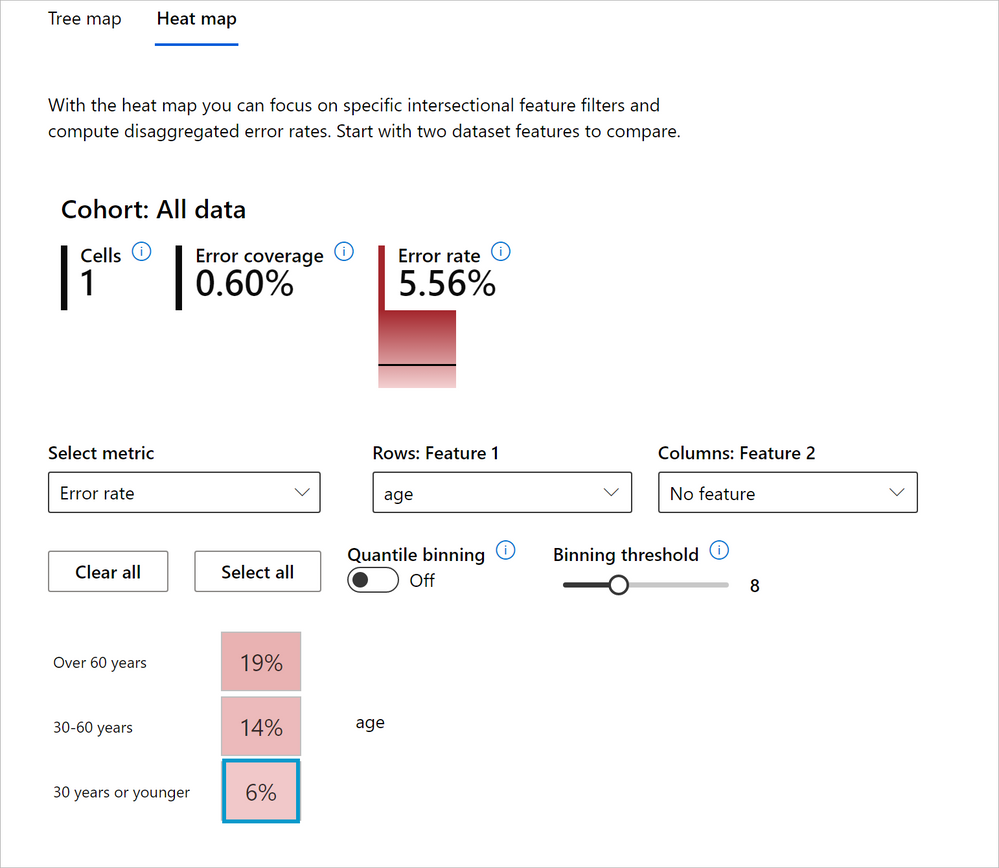
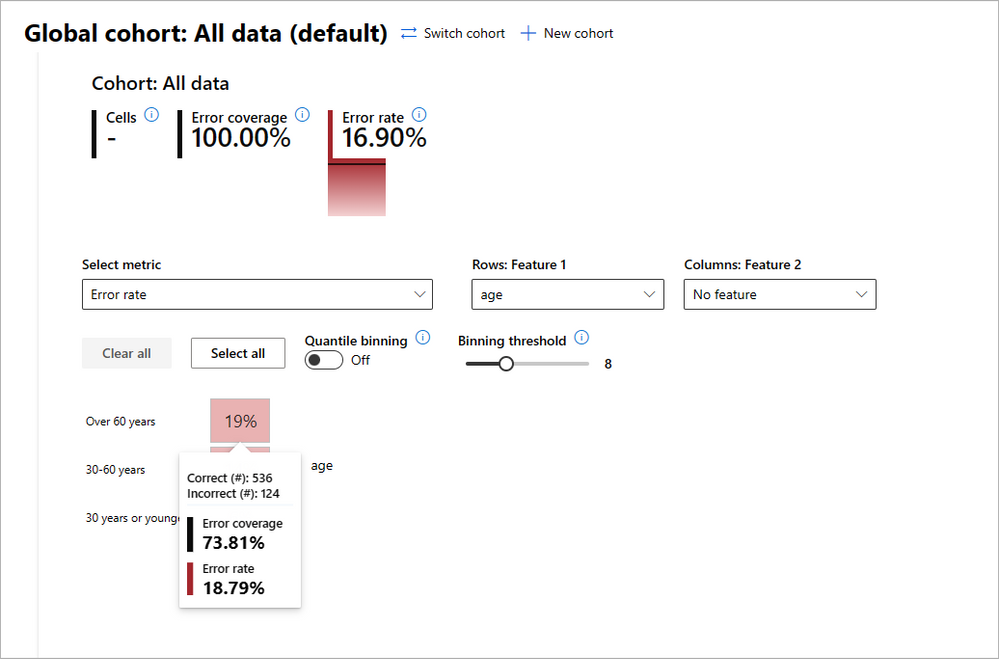
Under the Heat map tab, we’ll select “Age” in the “Rows: Feature 1” drop-down menu to see its influence in the model’s errors. The dashboard has a built-in intelligence to divide the feature into different cells with the possible data cohorts with the Age feature (e.g., “Over 60 years”, “30–60 years” and “30 years or younger”). By hovering over each cell, we can see the number of correct vs incorrect predictions, error coverage and error rate for the data group represented in the cell. Here we see:
The cell with “Over 60 years” has 536 correct and 126 incorrect model predictions. The error coverage is 73.81%, and error rate 18.79%. This means that out of 168 total incorrect predictions that the model made from the test data, 126 of the incorrect predictions came from “Age==Over 60 years”.
Even though the error rate of 18.79% is low, an error coverage of 73.81% is a huge number. That means a majority of the model’s inaccuracies come from data where patients are older than 60 years old. This is problematic.
The cell with “30–60 years” has 273 correct and 25 incorrect model predictions. The error coverage is 25.60%, and error rate 13.61%. Even though, the patients with “Age==30–60 years” have a very low error rate, the error coverage of 25.60% is a quarter of all the model’s error, which is an issue.
The cell with “30 years or younger” has 17 correct and 1 incorrect model predictions. The error coverage is 0.60%, and error rate 5.56%. Having 1 incorrect model prediction is insignificant. Plus, both the error coverage and error rate are low. It’s safe to say the model is performing very well in this cohort, however we must also consider that its total data size of 18 is a very small sample size.
Since our observation shows that Age plays a significant role in the model’s erroneous predictions, we are going to create cohorts for each age group for further analysis in the next tutorial.
Cohort #3: Patients with “Age == Over 60 years”
Similar to the Tree map, create a cohort from the Heat map by taking the following steps:
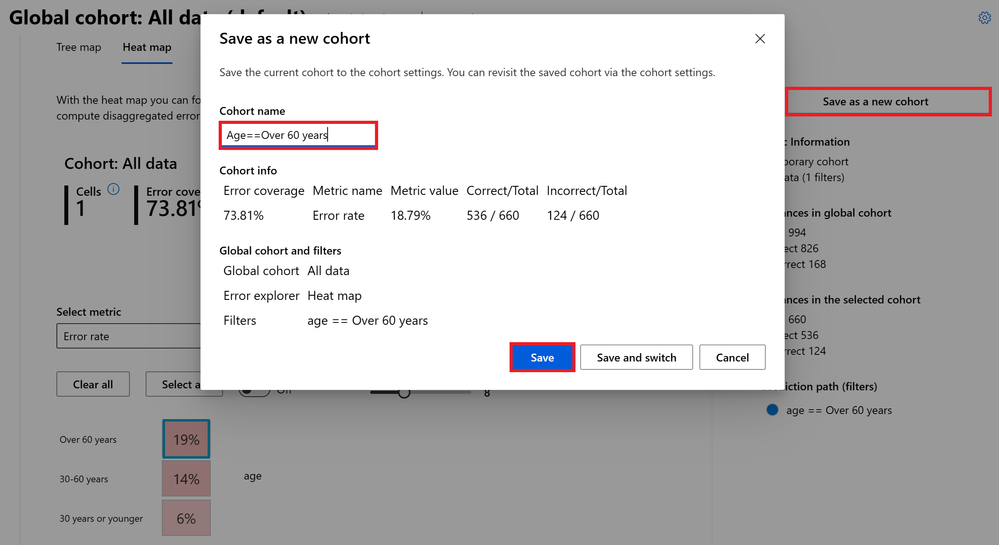
Click on the “Over 60 years” cell. You’ll see a blue border around the square cell.
Next, click on the “Save as a new cohort” button at the top right-hand corner of the Error Analysis section. A new pane will pop-up with a summary of new cohort, which includes error coverage, error rate, correct/incorrect prediction, total data size, and filters in the data feature.
In the “Cohort name” box, enter “Age==Over 60 years”.
Then click on the “Save” button to create the cohort.
To deselect the cell, click on it again or click on the “Clear all” button.
Repeat the steps to create a cohort for each of the other two Age cells:
Cohort #4: Patients with “Age == 30–30 years”
Cohort #5: Patients with “Age <= 30 years”
If Age is playing a major role in why the model is performing poorly, we can conduct further analysis to better understand this cohort and evaluate if it has an impact in patient returning to the hospital within 30 days or not.
Managing cohorts
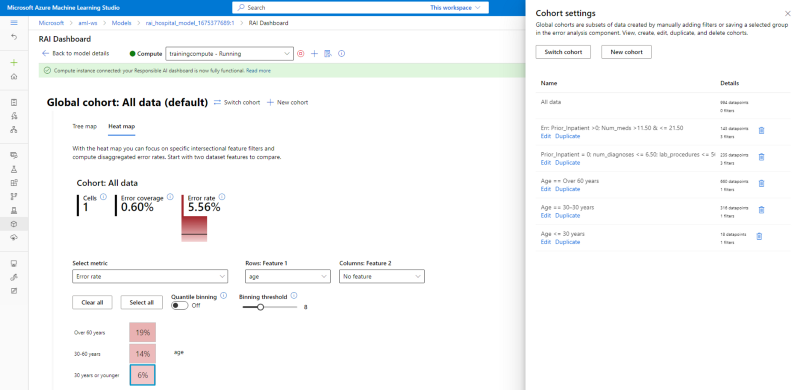
To view or manage all the cohorts you’ve created, click on the “Cohort Settings” gear icon on the upper right-hand corner of the Error Analysis section. In addition, the RAI dashboard creates a cohort called “All data” by default. This cohort contains all the test datasets used to evaluate the model.
Conclusion
As we have witnessed from using the Tree map, Feature List, and Heat map, the RAI dashboard provides multiple avenues of identifying features causing a model to be erroneous. Although, simply knowing which features are causing the error is not enough. It is beneficial for data scientists or AI developers to understand the number and magnitude of errors a feature has, when debugging a model. The dashboard helps in the process of elimination by pinpointing the error regions by providing the feature conditions to focus on as well as the number of correct/incorrect predictions, error coverage and error rates. This helps in measuring the influence the feature condition errors have on the overall model errors.
Discovering the correlation and dependencies between features helps in creating cohorts of data to investigate. Along with exploring the cohorts with the most errors, using the “Feature list” in conjunction with our investigations helps in understanding exactly which features are problematic. Since with found “Age” to be a top contributor on the “Feature List” and the Heat map also shows a high error coverage for diabetic patients that are Over 60 years in age, we can start forming a hypothesis that there may be an age bias with the model. We have to consider that given our use case; age plays a role in diabetic cases. Next, the Tree map enabled us to create data cohort where a model has high vs low inaccuracies. We found that diabetic patients with prior hospitalization were one of the features in the cohort with the highest error rate. On the other hand, patients with no prior hospitalization were one of the features in the cohort with the least error rate.
As a guide, use error analysis when you need to:
Gain a deep understanding of how model failures are distributed across a dataset and across several input and feature dimensions.
Break down the aggregate performance metrics to automatically discover erroneous cohorts in order to inform your targeted mitigation steps.
Awesome! Now…we’ll move on to the “Model Overview” section of the dashboard to start analyzing our cohorts and diagnosing issues with our model.
This article is contributed. See the original author and article here.
The first release wave of 2023 kicks off in just a few weeks! You’re invited to get a sneak preview of what’s new at the Microsoft Business Applications Launch Event, streaming live on April 4 at 9:00 AM Pacific Time. Tune in live, or on-demand after the live broadcast, for news and demos showcasing some of the hundreds of product features and innovation heading to Microsoft Dynamics 365 and Power Platform.
Sign up for the event today for reminders, agenda updates, and instructions to tune in live from your desktop or mobile device.
Business Applications Launch Event
The latest updates across Microsoft Dynamics 365 and Power Platform
What to expect at the Business Applications Launch Event
Featuring news and product demos, the event will cover updates launching between April and September 2023 across business rolesfrom marketing, sales, and service to supply chain and financeas well as low-code innovation for everyone in the organization. Tune in to learn about:
The very latest on AI-powered copilots that work alongside you to help create ideas and content faster, complete time-consuming tasks, and get insights and next best actions.
A preview of new ways to deliver more personalized and engaging customer experiences across marketing, sales, and service.
A host of new capabilities that will bring more insight, visibility, and automation across supply chain, operations, and finance roles.
New capabilities for low-code development to help teams manage building apps, storing data, and modernizing customer experiences with improved governance and scalability.
Updates across Microsoft Power Platform for governance and administration, pro development, ISV experiences, and data integration.
And there’s much more in store. You’ll also see how these solutions work for businesses like yours with demos hosted by Microsoft product experts. You’ll hear from Charles Lamanna, Microsoft Corporate Vice President of Business Applications and Platforms, about how to innovate with business applications to grow your business faster than ever. The team behind the Dynamics 365 and Microsoft Power Platform 2023 release wave 1 will also share insights and guide you through how all these updates, advancements, and new tech will help you:
Expand visibility, reduce time, and enhance creativity in your departments and teams with unified, AI-powered capabilities.
Empower your employees to focus on revenue-generating tasks while automating repetitive tasks.
Connect people, data, and processes across your organization with modern collaboration tools.
Innovate without limits using the latest in low-code development, including new next-generation AI capabilities.
AI innovations
A major theme of this digital event is the evolution of AI. Leaders in the field will show you some of the latest developments in AI that are leading the next generation of business applications. You’ll also have the opportunity to join us for a special session that includes a deep dive into the tech behind next-generation AI hosted by Dr. Walter Sun, Microsoft Vice President, AI in Business Applications. Throughout the event, you’ll receive expert guidance on how to build more agile, customer-focused teams by empowering your solutions with AI and see firsthand how to get more value out of your data, collaboration, and tools.
Insights from the experts
Find out how to enhance the customer experience and operational excellence across your business with a look at real-life scenarios in expert-led demos of new capabilities and features. Gain valuable insights for overcoming your current challenges from other Microsoft customers who will share their journeys. And if you have any questions for the experts, ask them during a live Q&A chat.
For a range of key best practices, strategies, and insights applicable to organizations across many industries, you don’t want to miss this digital launch event.
This article is contributed. See the original author and article here.
Nuance Gatekeeper is a biometric authentication and fraud prevention technology that can be integrated with Microsoft Dynamics 365 Customer Service. It offers a streamlined verification process that allows contact centers to identify customers through natural conversation without relying on specific questions, security codes, or secret questions and answers.
This technology provides a secure and seamless way to verify customer identities so call center agents can focus their attention on serving these individuals. The results include increased customer satisfaction and reduced average call handling times. By using voice biometrics, Nuance Gatekeeper can quickly and accurately verify a customer’s identity, significantly reducing the risk of fraud and protecting customers’ personal data from unauthorized access.
The integration of Nuance Gatekeeper into the Microsoft Digital Contact Center Platform (DCCP) is a significant step forward in improving the customer experience and enhancing contact center security. It allows businesses to provide fast, personalized service while maintaining the highest levels of security and compliance.
We are announcing the opportunity to preview Nuance Gatekeeper services for all customers using the voice channel in their contact centers. Microsoft is inviting interested customers to explore the capabilities of this technology and see how it can improve their operations. Customers must nominate themselves at the Dynamics Insider portal to experience the benefits of this innovative solution firsthand.
Biometric authentication
As part of DCCP and Dynamics 365 Customer Service, Nuance Gatekeeper uses strong biometric authentication to reduce friction and send customers on their way to a fast resolution. They won’t have to share sensitive personal data to authenticate themselves, and they can use voice authentication on an opt-in basis. Customers can opt out of biometric authentication at any time.
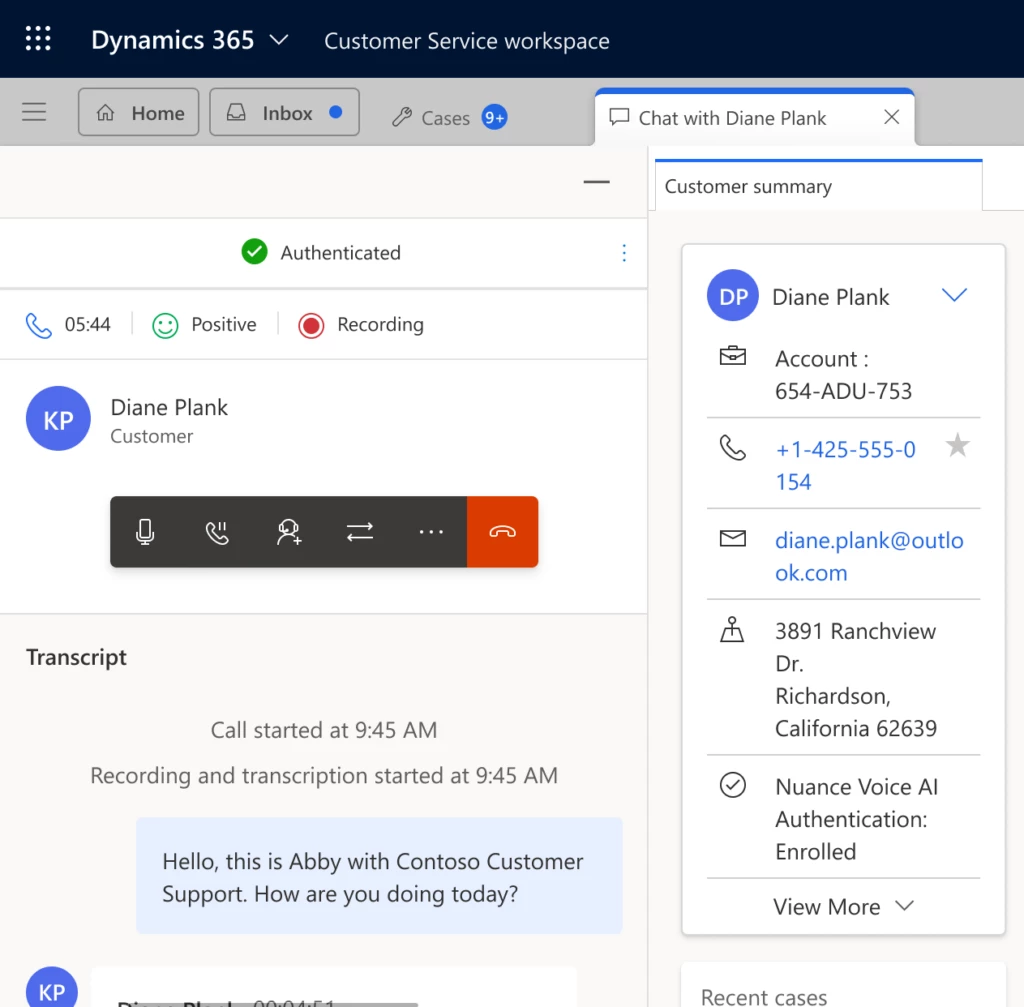
Dynamics 365 Customer Service agents can enroll customers in biometric authentication and verify customer identity in each subsequent call. Nuance Gatekeeper alerts agents to suspected fraudsters and flags fraudulent conversations. Agents have insight into the customer’s full consent history.
Contact center administrators can configure specific channels to use Nuance Gatekeeper services within their omnichannel environments and determine the parameters for authentication.
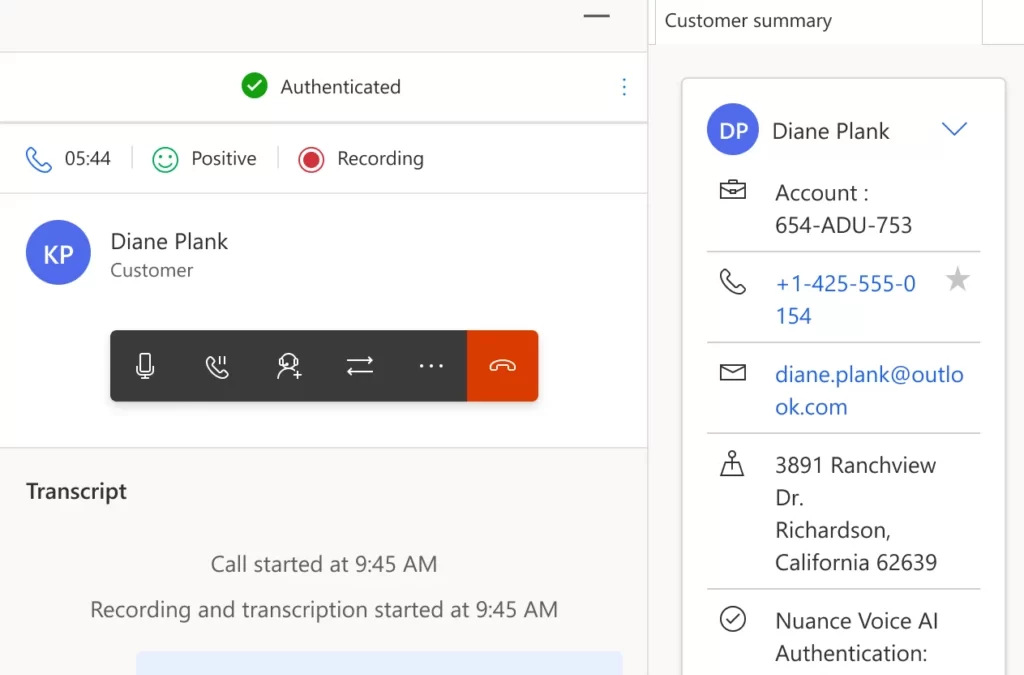
Conversation with an authenticated customer in Dynamics 365 Customer Service
Fraud prevention
Stop fraudsters in their tracks while kicking customer interactions into high gear. Nuance Gatekeeper can detect fraudulent calls before they reach the contact center agent while giving legitimate customers the greenlight for personalized support.
In addition to caller authentication, fraud detection capabilities prevent attackers from usurping your customers’ identities using layered methods including a suspected fraudsters watchlist, and synthetic speech and playback detectors. Additional factors like device, network, and location signals help identify suspicious activity.
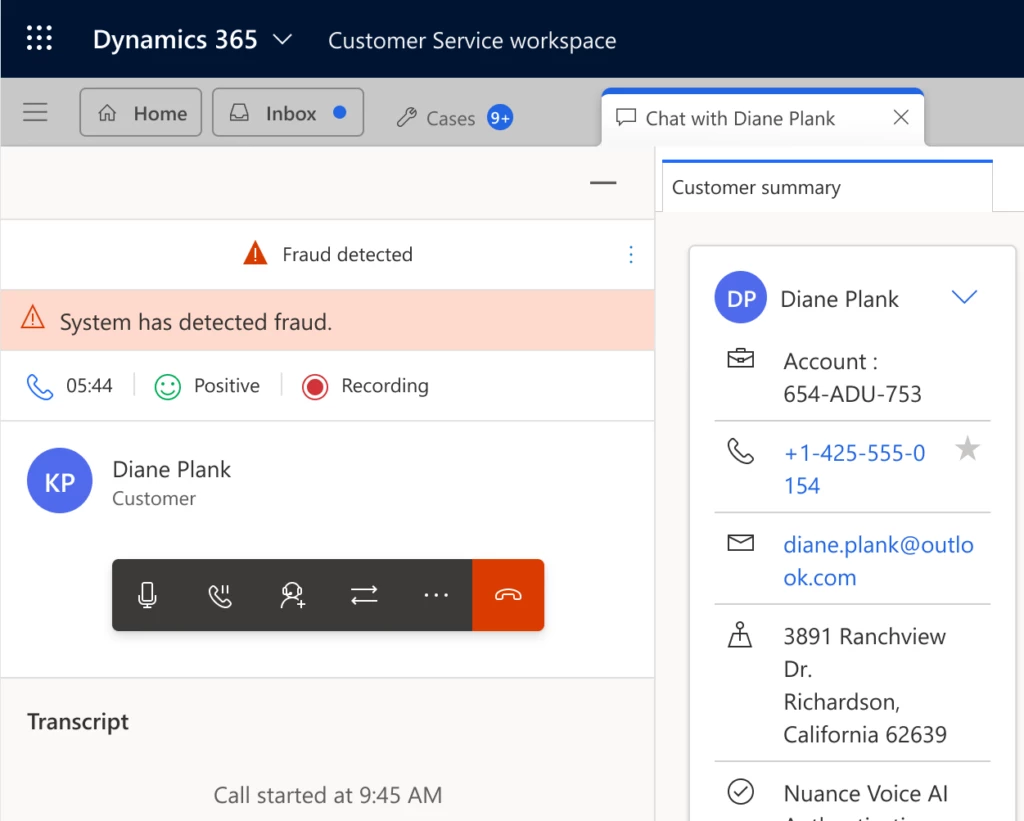
Nuance Gatekeeper checks caller voices against a watchlist to alert the contact center agent about known fraudsters. The agent can then take steps outlined in their organization’s fraud detection policy. If the caller isn’t flagged but the agent finds the caller suspicious, the agent can manually flag the conversation within their workspace in Dynamics 365 Customer Service.
Fraud teams can use the information gathered by contact center agents to block fraudsters, analyze fraud patterns and trends, and gather data to assist law enforcement.
Conversation with fraud detected in Dynamics 365 Customer Service






Recent Comments