by Scott Muniz | Sep 4, 2020 | Azure, Technology, Uncategorized
This article is contributed. See the original author and article here.
Recently Microsoft announced general availability of Azure Shared Disks.
We are happy to announce Azure Shared Disks support for SAP central services (ASCS/SCS) instance on Windows Failover Cluster!
Azure shared disks enable an Azure disk to be attached to multiple VMs in a cluster and supports the SCSI Persistent Reservations (PR) industry standard.
Shared Disk is a well-known option for running highly available SAP ACS/ASCS instances on WSFC. This is commonly used on-premises in both physical and virtual environments.
Features of the solution are:
- Simplicity
It is very simple solution: so overall complexity is reduced.
- Cost effective
You only need two VMs as Windows cluster nodes.
This will reduce Azure costs, and overall maintenance.
In a file share approach with SOFS (Scale Out File share) + S2D (Storage Space Direct), you need additional two or three VMs for SOFS, and multiple disks for S2D.
- Supported Windows releases
It is supported with Windows Failover Clustering on Windows Server 2016 & 2019 Datacenter OS versions.
- Windows release recommendation
It is recommended to use Windows Server 2019 Datacenter due to a number of key enhancements in WSFC on WS 2019, including:
- Windows 2019 Failover Cluster is Azure aware.
- There is added integration and awareness of Azure Host Maintenance, and improved experience by monitoring for schedule events.
- For the cluster virtual IP address, it is possible to use (default option) Distributed network name, where cluster network name (virtual hostname) use any cluster node local IP address. This is the same approach that Windows Scale Out File Server is using.
In this way there is no need to have a dedicated IP address for cluster network name, and there is no need to configure this IP address on the Azure Internal Load Balancer.
Therefore, overall management is easier.
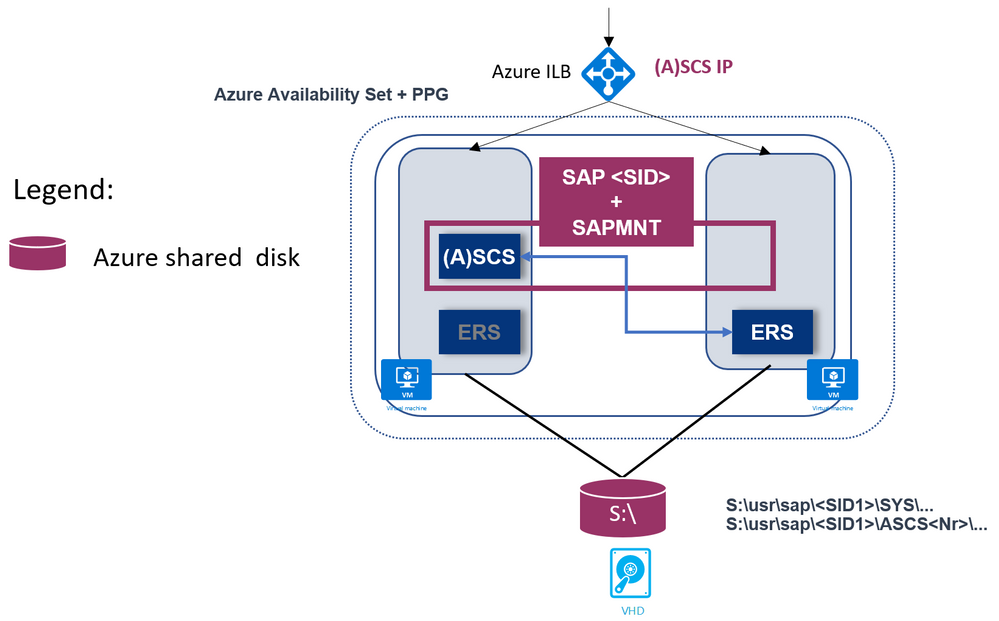
- SAP Enqueue Replication version 1 (ERS1)
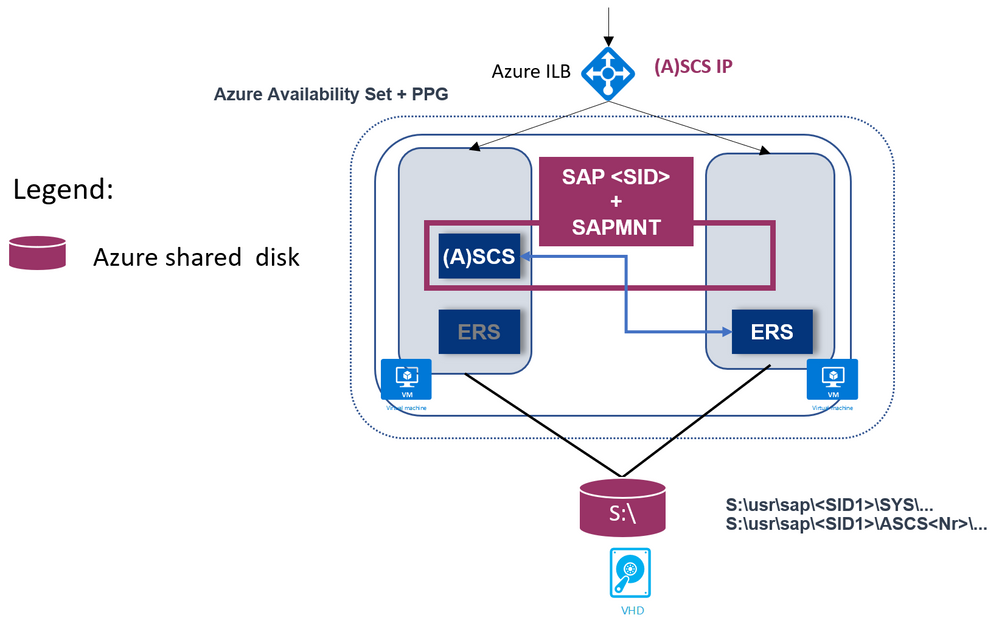
- SAP Enqueue Replication version 2 (ERS2) is also supported, as shown:
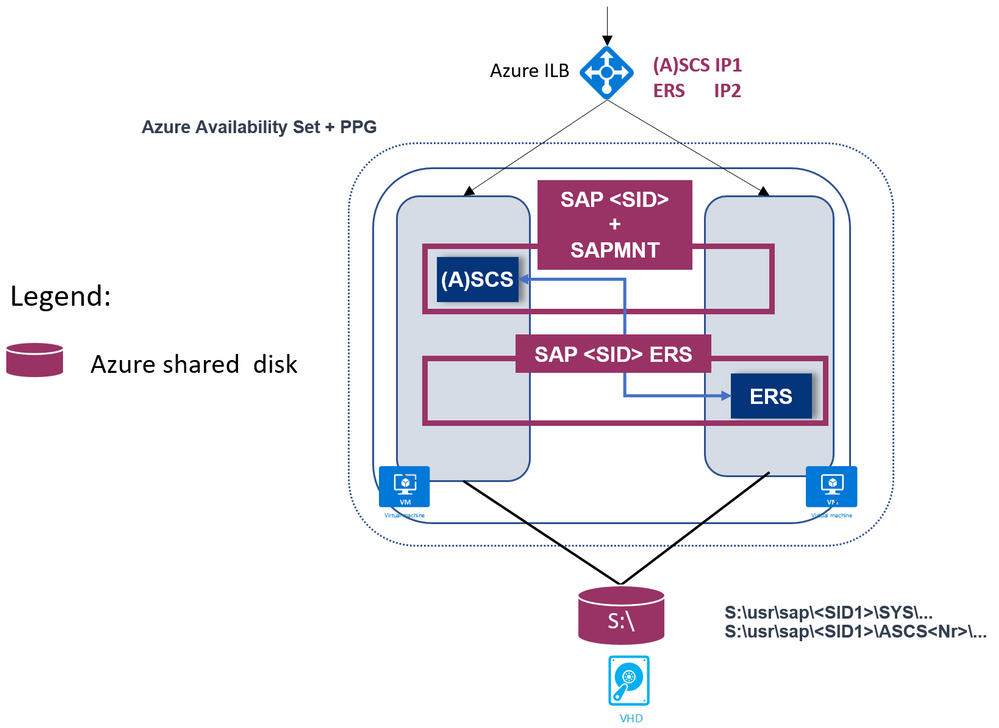
Here, SAP ERS instance is also clustered.
-
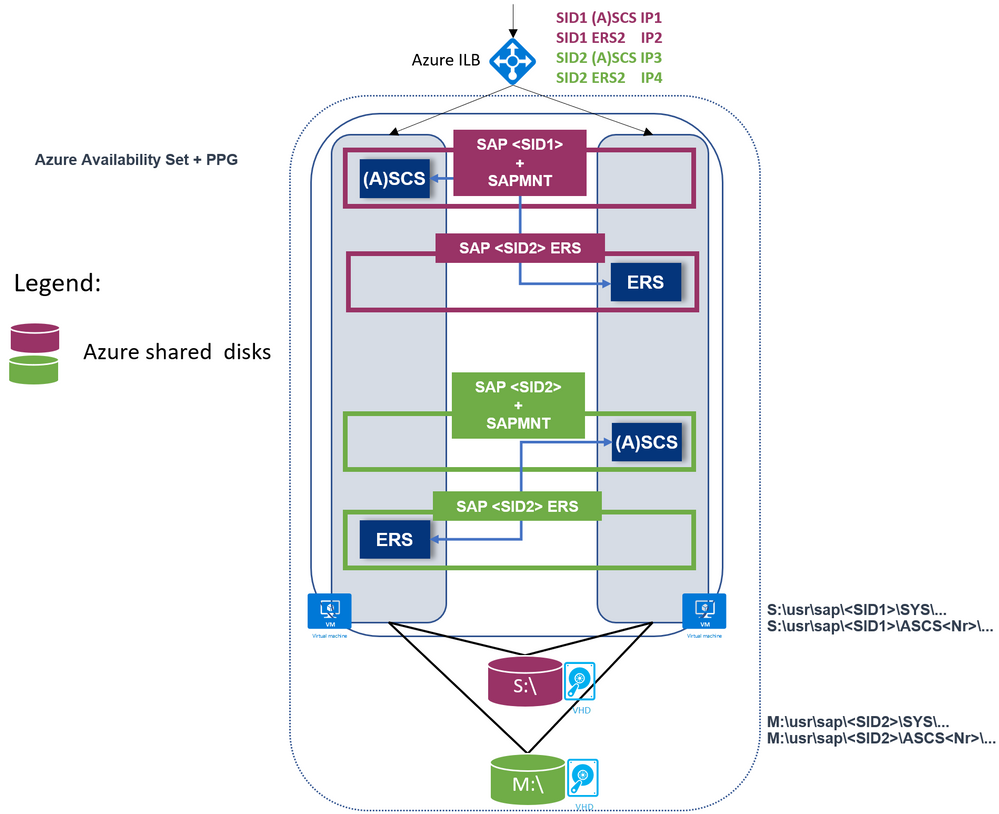
SAP Multi-SID is supported as well.
Each SAP SID has its own shared disks.
Here is an example with two SAP SIDs and ERS1:
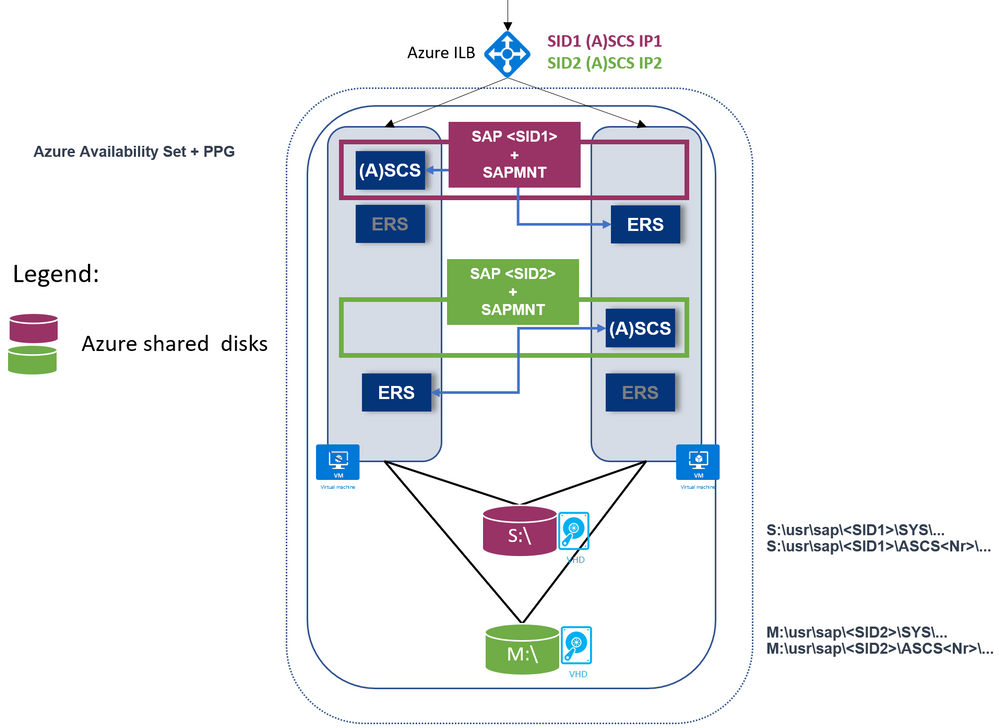
Another example with two SAP SIDs and ERS2:
- Supported with heterogeneous Linux clustering
You can use this solution for achieving high availability of the SAP ASCS/SCS even when using SAP HANA or any DB as the database layer, even if the database layer is running on Linux.
This is discussed in blog SAP on Azure High Availability Systems with Heterogenous Windows and Linux Clustering and SAP HANA
Please refer to official documentation for list of limitations.
Important: When deploying SAP ASCS/SCS Windows Failover cluster with Azure shared disk, be aware that your deployment will be operating with a single shared disk in one storage cluster. Your SAP ASCS/SCS instance would be impacted, in case of issues with the storage cluster, where the Azure shared disk is deployed.
You can find further information here:
The documentation above covers a manual procedure to deploy and prepare the infrastructure for the SAP ASCS/SCS using Azure Shared Disks.
With this Azure ARM Template , you can automate the infrastructure preparation for a single SAP SID with ERS1. The Azure ARM template will create two Windows Server 2019 or 2016 VMs, the Windows OS will be added to an existing Windows Active Directory domain, a shared disk will be created, attached to the VMs, and formatted with a drive letter; Azure Availability Set and Proximity Placement Group will be created and VMs will be added; Azure Internal Load Balancer will be created and configured; Azure cloud witness as a majority maker is created and configured etc.
by Scott Muniz | Sep 4, 2020 | Uncategorized
This article is contributed. See the original author and article here.
Many of you rely on databases to return correct results for your SQL queries, however complex your queries might be. And you probably place your trust with no questions asked—since you know relational databases are built on top of proven mathematical foundations, and since there is no practical way to manually verify your SQL query output anyway.
Since it is possible that a database’s implementation of the SQL logic could have a few errors, database developers apply extensive testing methods to avoid such flaws. For instance, the Citus open source repo on GitHub has more than twice as many lines related to automated testing than lines of database code. However, checking correctness for all possible SQL queries is challenging because of the lack of a “ground truth” to compare their outputs against, and the infinite number of possible SQL queries.
Even when we do know the result a SQL query is supposed to give and we get that result as expected, that does not mean the implementation is 100% correct in all possible variants of the query and input data. The challenge for a database team is in finding subtle edge cases where bugs might be introduced.
What are logic bugs in SQL, and why are they hard to detect?
There are 2 primary types of errors in databases:
- “raised” errors
- logic errors
“Raised” errors include syntax errors, panics, faults, and other crashes. Raised errors terminate the process abnormally or give you some signal of undesired behavior, making them immediately recognizable to you. In order to automatically detect (and then fix) raised errors, database providers widely use fuzzing tools for SQL. Fuzzing tools are random SQL query generators that strain the target database with complex commands until an error is raised.
Logic errors, on the other hand, are latent (or silent) errors that cause the database to produce inaccurate results without emitting any sign of unexpected behavior. Logic bugs are dangerous—neither the user, nor the database provider, nor the fuzzing tools might be aware of incorrect results being fetched from the database.
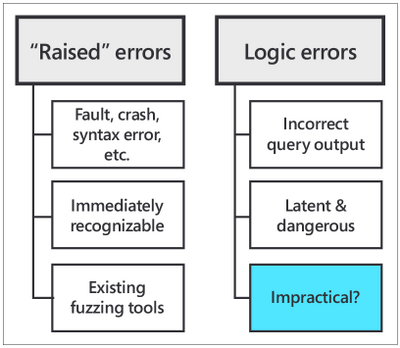
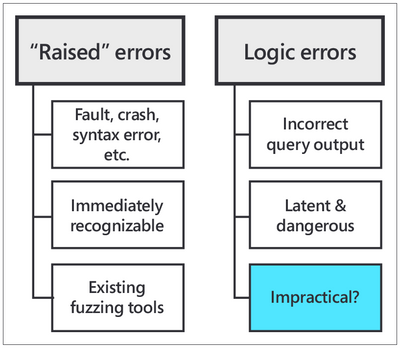 Fig. 1: “Raised” errors vs. logic errors
What if we could find a way to test the validity of SQL query output for a DBMS?
The recently launched open source SQLancer (Synthesized Query Lancer) tool gives you a way to test the validity of a database’s query responses. SQLancer is an automated Database Management System (DBMS) testing tool for detecting logic bugs. SQLancer’s testing approaches substitute the need for a ground truth in their correctness checks, by probing databases for self-consistency rather than agreement with some known behavior.
While SQLancer is still in the research prototype stage, it was released early on due to high demand from different companies, organizations, and developers. I first learned about SQLancer in June 2020 through a Quarantine 2020 Database Talk organized by Carnegie Mellon Professor of Databases Andy Pavlo.
The CMU talk by SQLancer creator Manuel Rigger was about Finding Logic Bugs in Database Management Systems. At the time of Manuel Rigger’s talk, SQLancer had already identified more than 175 bugs in 5 different SQL database management systems by using Ternary Logic Partitioning (TLP). Hence, Ternary Logic Partitioning became the SQLancer testing approach that was of most interest to our team at Citus.
If you are not familiar, Citus is an open source extension to Postgres that transforms Postgres into a distributed database. Since the Citus team was acquired by Microsoft last year, Citus is now available on Microsoft Azure as Hyperscale (Citus), a built-in deployment option on Azure Database for PostgreSQL.
During my software engineering internship the summer after my second year as an undergraduate at Stanford, I worked on the Citus open source team at Microsoft. My project was about incorporating correctness checks into our automated testing mechanisms, which led me to the CMU database talk on SQLancer. Keep reading to find out what excited us about SQLancer, how I developed an implementation of SQLancer that supports the Citus extension to Postgres, and the rewarding outcomes of my project.
SQLancer’s performance on Citus (& Postgres)
SQLancer proved itself useful for detecting logic bugs in Citus early on in my project, with the first error found within seconds of our initial SQLancer run after I had just finished implementing basic Citus support. And I found the first SQL logic bug within the first week.
By the end of my summer internship on the Postgres team at Microsoft, we had opened more than 10 issues in the Citus GitHub page for errors found by SQLancer, at least 3 of which qualify as SQL logic bugs. Moreover, I was also able to identify an error in PostgreSQL, which was then fixed by David Rowley and referenced by Thomas Munro—both of whom are PostgreSQL committers and part of the Postgres team at Microsoft.
 https://twitter.com/MengTangmu/status/1282909653530103813
With the Citus implementation of SQLancer, we were able to test more than 3 million SQL queries in 3 days. While logic bugs in SQL databases are rare, the speed of the SQLancer tool and its broad, complex test space allowed us to detect logic errors that exist in the DBMS implementation (or that might be introduced in the future with the addition of new features). Whether part of Continuous Integration (CI) tests or part of regular lengthy background runs, incorporating SQLancer into the automated testing procedures for the Citus extension to PostgreSQL will significantly improve the reliability and stability of Citus for our users.
A technical overview of SQLancer’s testing approach: Ternary Logic Partitioning (TLP)
Among three of the test oracles adopted by SQLancer, my project focused on the Ternary Logic Partitioning (TLP) approach, which can be used to test WHERE, GROUP BY, HAVING clauses, aggregate functions, and DISTINCT queries. TLP compares the result sets of two semantically equivalent yet syntactically different SELECT queries that are expected to be equal.
Let’s make an apples analogy: Say, you want to ‘fetch all apples’. You could also say that you want to ‘fetch all apples that are red,’ ‘fetch all apples that are not red,’ or ‘fetch all apples where the color is unknown.’ Both versions would be equivalent—the second one is only a more verbose way of saying the same thing by adding conditions related to “redness” and combining them in a way that makes the condition trivial.
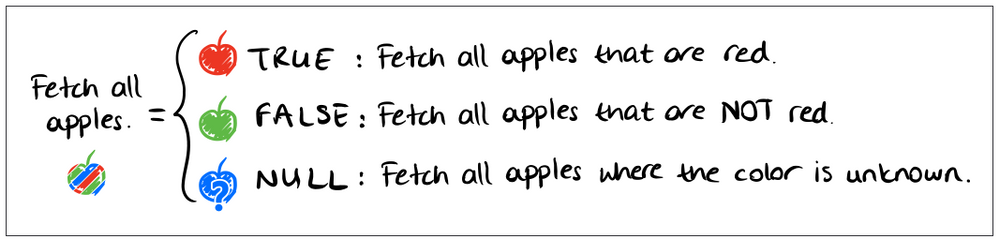 Fig 2. Ternary partitioning of a predicate, hand-drawn by Nazli Ugur Koyluoglu, inspired by TLP paper by Rigger & Su (https://www.manuelrigger.at/preprints/TLP.pdf)
For those of you who want to see the mathematical explanation for how TLP works, rather than rely on my apple analogy, here it goes:
Let Q be the original query. The semantically equivalent query Q’ would be a UNION of 3 queries that partition Q using ternary logic. These 3 queries are generated by randomly generating a boolean predicate ϕ, and appending a version of ϕ evaluated to TRUE, FALSE, and NULL to the end of Q, each in the form of a WHERE or HAVING clause. Since these 3 boolean values cover the universal set of states associated with the predicate, their union, Q’, must return the same result set as that returned by the query without the predicate, Q, i.e. ResultSet(Q) = ResultSet(Q’).
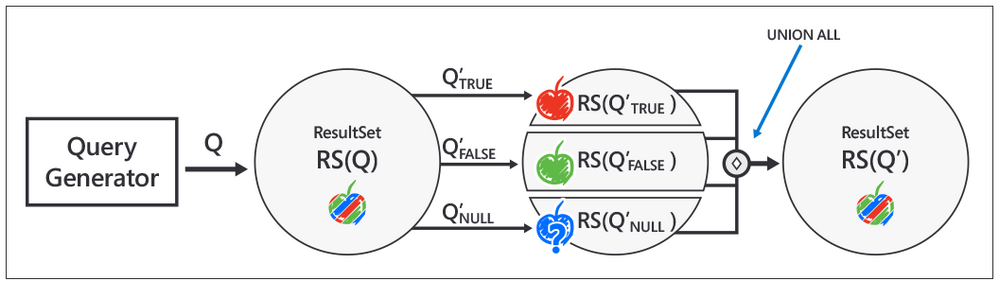 Fig 3. Implementation steps for Ternary Logic Partitioning, inspired by Manuel Rigger’s SQLancer talk at the CMU Quarantine 2020 Database talks: https://youtu.be/_LLHssTadKA
The steps for implementing the test oracle are as follows:
- Randomly generate the original query Q, in a similar fashion to random queries generated by fuzzers. To continue our apple analogy, Q would be ‘fetch all apples.’
- Randomly generate the boolean predicate ϕ. ϕ corresponds to the condition in our analogy, ‘to be red.’
- Create the semantically equivalent query Q’ using the Ternary Logic Partitioning (TLP) approach. In our analogy, Q’ corresponds to the verbose version of the command, to ‘fetch apples that are red,’ ‘that are not red,’ or ‘where the color is unknown.’
- Fetch and compare result sets for Q and Q’.
- Report a logic bug if there is a mismatch.
Ternary Logic Partitioning in SQLancer allows us to test a database like Postgres or Citus against itself, first by generating a (relatively) simple and a more complex version of a SQL query, and then by checking whether the added complexity introduces a logic bug. In other words, SQLancer’s TLP test oracle eliminates the need for a ground truth by designating the simpler SQL query as a heuristic for the expected output of the more complex query.
While there’s no guarantee that we can detect all logic bugs in a database like Postgres or Citus using query partitioning, SQLancer’s TLP has proven to be successful with the Citus extension to Postgres and with other databases as well.
Why care about the logic bugs SQLancer finds?
You might think, if SQLancer is testing super complex SQL queries that developers wouldn’t usually come up with (let alone users), why are these SQL queries important? Good question.
Well, while the logic errors are revealed by complex machine-generated SQL queries, it’s possible that the logic bugs themselves might lie in integral operations that affect behavior generally. For the Citus extension to Postgres in particular, the source of logic bugs has mostly been the parsing and deparsing of SQL queries during pushdown to the Citus worker nodes.
Another use case that highlights the usefulness of SQLancer: many of you probably use object-relational mappers (ORMs) to generate SQL queries rather than manually writing them, which makes it more likely that your computer-generated queries might wander into the error-prone zone tested by SQLancer.
Logic bug detection in Citus, at a glance
Running SQLancer to find logic bugs in your SQL involves 2 different phases of execution:
- The preparation phase. SQLancer initializes the test database with Citus support, creates local, distributed, and reference tables inside the database, and performs insertions, updates, deletes, and other modifications to the tables via the randomly generated SQL commands.
- The testing phase. SQLancer generates, executes, and compares the outputs of pairs of original and partitioned SELECT queries, in line with the TLP approach—until it finds a mismatch, i.e. logic bug.
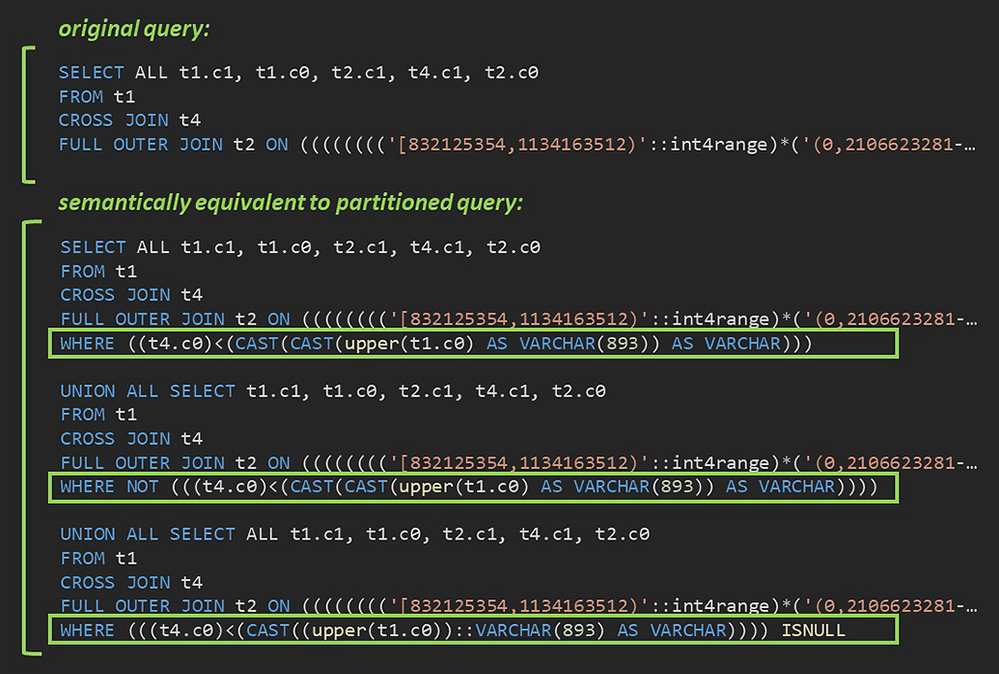 Fig. 4: A sample pair of original and partitioned queries generated by the Citus implementation of SQLancer.
In Figure 4 above, you can see the original SQL query and the partitioned query—a union of the 3 components with the predicates evaluated to TRUE, FALSE, and NULL, respectively—that failed to return identical result sets. As it turned out, Citus had a bug in its handling of explicit CROSS JOIN syntax when used in a complex join tree. Since cross joins are more commonly used in the implicit form (FROM t1, t4), this type of join tree had not come up in manual testing.
How I implemented SQLancer for the Citus extension to Postgres
I created the Citus implementation of SQLancer by reusing and extending components of the existing SQLancer support for PostgreSQL.
Programming a SQLancer implementation for Citus involved incorporating sharding across multiple nodes in the creation of test databases by SQLancer, expanding the test space by integrating Citus concepts and features such as distributed and reference tables, colocation, distribution key etc. into the database preparation phase, configuring the different types of JOINs supported by Citus in the SELECT statements generated during the testing phase, and adjusting the expected behavior to reflect Citus’ SQL coverage.
 https://twitter.com/AzureDBPostgres/status/1293663559801438208
A potential positive side effect of my project to the Postgres community: Building Citus support into SQLancer on top of the existing Postgres support required reworking the Postgres support to prepare its Java classes to be extended by new implementations. The improvements and modifications I contributed to the Postgres implementation of SQLancer have thus paved the way for future SQLancer applications for other PostgreSQL extensions, as well.
Special Thanks
I had an incredible experience working on the Citus extension to Postgres during my summer internship in the Postgres team at Microsoft. I had the chance to join the Citus open source project and work with some pretty amazing people. I would like to thank my mentor, Nils Dijk, for his commitment to my growth, especially in a remote setting with limitations imposed by COVID-19. I would like to thank my manager, Utku Azman, for his constant encouragement to take initiative.
Thank you to Onder Kalaci and Marco Slot, whose contributions to the vision for our implementation of SQLancer helped tailor my project to make my work even more useful for the Citus team. And I want to thank the Citus team as a whole for welcoming me with their unsparing help.
Special thanks to Manuel Rigger, the creator of SQLancer, for sharing our excitement about the development of a SQLancer implementation for Citus and his willingness to collaborate.
 https://twitter.com/sqlancer_dbms/status/1293277358783434752
 https://twitter.com/sqlancer_dbms/status/1293178256108081152
by Scott Muniz | Sep 4, 2020 | Azure, Technology, Uncategorized
This article is contributed. See the original author and article here.
One of the biggest challenges businesses face is how to integrate disparate data sources from many different sources, and how to turn valuable data into actionable insights. Big Data Clusters (BDC) is on the right choice for Big Data Analytics solutions.
As a cloud-native, platform-agnostic, open data platform for analytics at any scale orchestrated by Kubernetes, BDC works on Azure Kubernetes Service ( AKS ) – a fully managed Kubernetes service in Microsoft Azure cloud platform.
For security-critic customers who need a private environment, deploying BDC with AKS private cluster is a good way to restrict use of public IP addresses. Furthermore you can use UDR ( user-defined routes) to restrict egress traffic. You can do this with automation scripts are available on SQL Sample Github repo – private-aks.
Deploy AKS private cluster with automation scripts
Go to the Github repo to deploy AKS private cluster from here with your client in Linux OS or using WSL/WSL2. There are two bash scripts of you can use to deploy AKS private cluster:
You can use deploy-private-aks.sh to provision a private AKS cluster with private endpoint, and fto limitthe use of public addresses as well as egress traffic, use deploy-private-aks-udr.sh to deploy BDC with AKS private cluster and limit egress traffic with UDR ( User-defined Routes ).
Here we take more common case where a you deploy BDC with AKS private cluster. After downloading the script on the client environment, you can use the following command to execute the script :
chmod +x deploy-private-aks.sh
sudo ./deploy-private-aks.sh
Input your Azure subscription ID, the resource group name, and the Azure region that you wish to deploy your resource:

The deployment will take a few minutes. You’ll be able to find the deployed resources on your Azure portal after the deployment completes.
Access to AKS private cluster
After you deploy a private AKS cluster, you need to access a VM to connect to AKS cluster. There are multiple ways to help you manage your AKS private cluster, and you can find those at this link. Here we’re using the easiest option, which is to provision a management VM which installs all required SQL Server 2019 big data tools and resides on the same VNET with your AKS private cluster, then connect to that VM so you can get access to private AKS cluster as follows :

Deploy BDC with AKS private cluster with automation script
You can download the script deploy-bdc.sh to deploy BDC without a public endpoint:
chmod +x deploy-bdc.sh
sudo ./deploy-bdc.sh
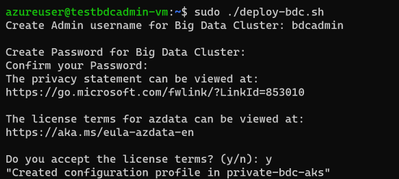
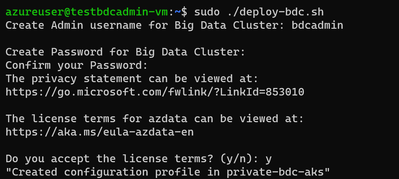
This requires you to set up the BDC admin username and password, and then it kicks off a BDC cluster deployment:
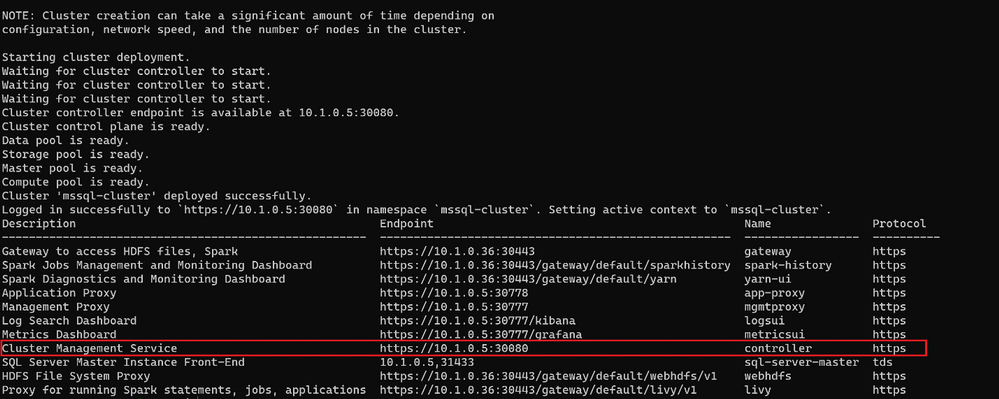
At the end of the deployment, the script will list all the BDC endpoints :
Connect to BDC in AKS private cluster
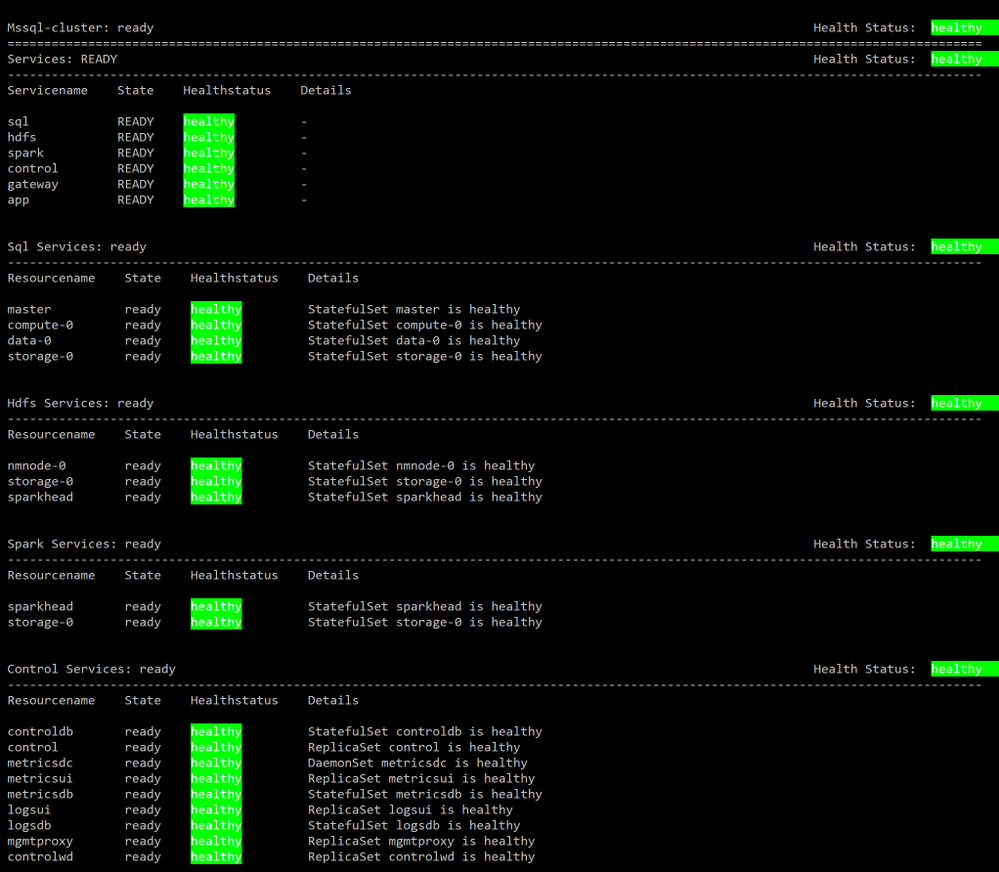
Make sure all components of your BDC cluster show a healthy status :
azdata bdc status show
If all goes well, you’ll get this output:
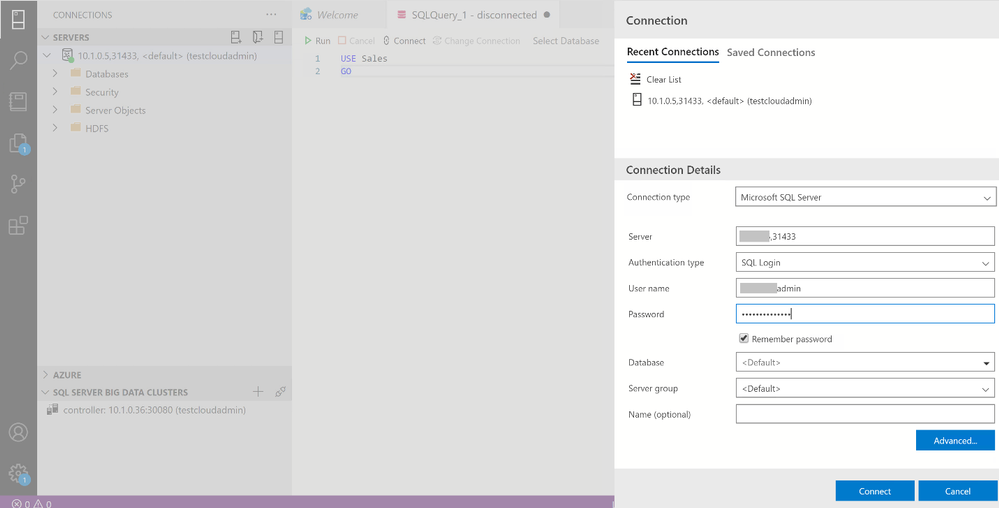
You can use the SQL Server master instance in the cluster endpoint to connect to BDC cluster with SQL Server Management Studio or Azure Data Studio as shown here :
Wrap up
As we saw in the first part of this article, businesses are looking for a secure, portable way to create value from multiple sources of data. Using SQL Server’s Big Data Cluster ( BDC ) in an Azure Kubernetes Service ( AKS ) private cluster, they get exactly that. You’ve seen how to use two variations of scripts that are available on our repository to fit your network environment and security requirements. You can also customize the scripts with your specific requirements for the information such as IP addresses range, flags to add or remove an AKS feature while creating AKS cluster before deploying in your environment.
by Scott Muniz | Sep 3, 2020 | Azure, Technology, Uncategorized
This article is contributed. See the original author and article here.
Sr. Customer Engineer Dave Newman here on a short post regarding Azure Site Recovery. Hope this helps you in your day to day cloud journey
When replicating Azure VMs from one Azure Region to another for DR purposes, the Mobility Service extension must be added to each protected VM. The extension installation is completed automatically during the “Enable replication” phase of protecting Azure VMs.
Periodically, the Azure Site Recovery (ASR) product group will release an Update rollup to include new features, component updates, support improvements and bug fixes. These are not always on a consistent cadence. Typically, there will be at least one each quarter but sometimes, the case of bug fixes there could be more than one. At the time of this writing there have been 8 releases in the last 12 months.
The ASR product team has created an automated process that will update the Mobility service extension on Azure VMs that are being replicated. When you establish a new Recovery services vault in your target region and select VMs from the source region to protect, the process of creating new resources on the target side includes the creation of a new Azure automation account that will manage this process. When enabled, the management of the agent versions is handled by a global runbook. A job is created in that Automation account that will initialize daily at midnight to check for the presence of a new agent version. If none is found, then the job completes with no action. If a new version is found, the extension will be updated on the VMs via an Azure Automation runbook to bring the systems into compliance with that latest version.
This seems great but there are a few issues. The new Azure Automation account is automatically named and there is no option to specify what that name will be. This will break naming convention. Good governance rules in Azure dictate that wherever possible that a naming convention should be followed. The way the ASR automatically chooses a name is that it takes the first 8 characters of the name of the Recovery service vault, appends a dash (hyphen) and three random alphanumeric characters and then appends the string “-asr-automationaccount”.
If your vault is currently named “AZWUSPRODRSV01”, then the name of your automation account would look something like “AZWUSPRO-a1b-asr-automationaccount”. (the “a1b” character set will be a randomly chosen alphanumeric string.) Not a very governance compliant name.
The second issue is that when creating an Azure Automation account, the default process for authenticating action is to use a “RunAs Account” as defined in the Automation account. This account is an Azure AD Service Principal that is granted a Role Based Access Control (RBAC) role by the creation process. The granted role is Contributor at the Subscription level. That means that the person creating the Automation account needs to have rights in Azure AD to create Azure AD Service Principals and have Owner or User Access Admin RBAC role at the subscription level. Other than User Access Admin, you cannot assign roles with greater privilege than you have been granted. If you are on the DR/Backup team at your organization, you may not have those permissions.
The question at hand is, how can you create a naming convention compliant Azure automation account and tell ASR to use that Automation account for the process of updating the Mobility service extension on protected Azure VMs?
Step one in this is to ensure that a naming convention compliant Azure automation account exists in the same location and resource group as your recovery services vault on the target side. The creation of an Automation account often requires coordination between the Identity team and the Azure team. As mentioned previously, the person creating this Azure resource needs to have the Owner RBAC role defined at the Subscription level. As a person on the DR/Backup Team you may need to work with someone else who has the appropriate permissions to have this resource created. The creation of the Azure AD Service Principal account is something that could be achieved by temporarily granting the built-in Azure AD role of Application Administrator or Application Developer to the user creating the Automation account. A tutorial for the creation of an Automation account can be found here.
Once the Automation account exists, the recovery service vault in the target region needs to be configured to use that account. This can either be done at the instantiation of the vault or can be done to an existing vault. Both methods will be shown.
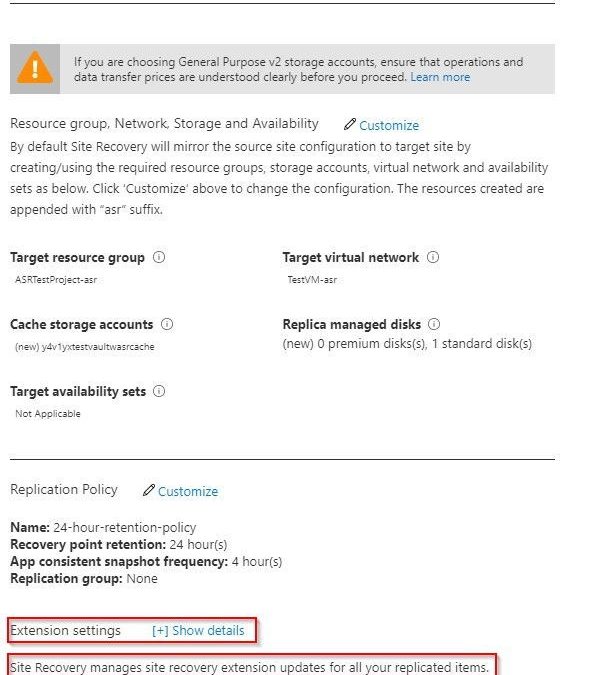
If you are building out your recovery services vault for the first time for Azure to Azure DR replication, you can follow the normal steps as outlined in this tutorial. Before you complete the tutorial, stop at the end of the Configure replication settings section. Do not click the Create target resources button just yet. The tutorial shows how you can customize the process so that you can use naming convention conforming target objects. There is another option visible on that blade that the tutorial does not cover. At the bottom of the blade there is an option for Extension settings with a [+] Show details link.

As you can see, it indicates that extension updates are being managed for you. But this is where it wants to do the collection of actions as mentioned earlier in this document that might fail because of permissions. If you open the Extension settings, you will see that there are a few options. You have the option to turn the process off and manage updates manually if you wish. This avoids the need for an Automation account but adds the manual effort of keeping the VMs updated as new versions become available.
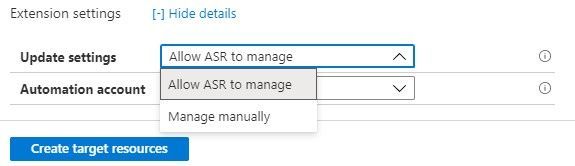
The other box allows you to choose a specific, pre-existing, naming convention compliant Automation account.
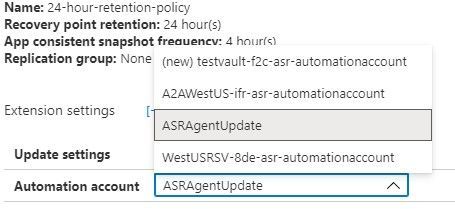
Once this has been defined you can Create target resources and the system will not attempt to create resources that do not line up with your well-defined Azure governance.
If you have already configured replication for VMs and have seen the process of creating that Automation account fail because of lack of permissions, we will now show how to resolve that issue.
For an existing recovery services vault that you want to either establish or reconfigure, you will need to navigate to the Manage section in the left side menu of your vault and choose the Site Recovery infrastructure option.
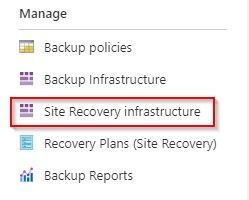
From the Site Recovery infrastructure blade, choose Extension update settings. This allows you to toggle on and off the automatic management of the extension updates. It also indicates the name of the Automation account being used if this function is turned on.
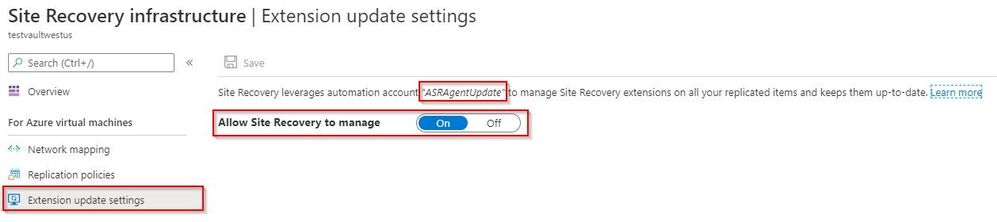
If the toggle is set to off because the automation account failed to create, and if a new automation account has already been created and is available in the same resource group and in the same Azure location as the vault, that automation account will display as the account the system wants to use. If that is the case, then all you need to do to resolve this issue is to flip this switch to On.
This document has shown how can you create a naming convention compliant Azure automation account and tell ASR to use that Automation account for the process of updating the Mobility service extension on protected Azure VMs.
The ask that I have heard many times on this issue up updating ASR is – can I do this for my on-premises to Azure VMware systems that have the Mobility Service agent installed. The short answer is that there is no automated process available from the ASR product team currently, but it is something on the product roadmap. 
Hope this helps you in your cloud journey for protecting your Azure VMs.


Recent Comments