by Scott Muniz | Sep 11, 2020 | Uncategorized
This article is contributed. See the original author and article here.
Today, I worked on a service request that our customer needs to avoid that some users could retrieve some rows depending on a specific role. In this situation, we are going to use Is_RoleMember function.
For example, we have an Azure Active Directory group called MyAADGroup that contains all the users that we will have access to the data.
1) We are going to create the group in Azure SQL Database, running the following query:
CREATE USER [MyAADGroup] FROM EXTERNAL PROVIDER
2) We’re going to create the role, for example, auditors that will assign to the group MyAADGroup, running the following command:
sp_addrolemember 'auditors','MyAADGroup'
3) The next step, would be to create the security function, running the following command:
CREATE or alter Function [dbo].[fn_securitypredicateOrder] (@UserName sysname)
returns table
with Schemabinding
as
return select 1 as [fn_securityPredicateOrder_result] where IS_ROLEMEMBER('auditors')=1
4) Finally, we need to create the security policy running the following command:
create security Policy fn_securitydata
add Filter Predicate
dbo.fn_securitypredicateOrder(suser_name())
on MyTableDummy
Enjoy!
by Scott Muniz | Sep 11, 2020 | Uncategorized
This article is contributed. See the original author and article here.
Today, I worked on a service request that our customer needs to avoid that some users could retrieve some rows depending on a specific role. In this situation, we are going to use Is_RoleMember function.
For example, we have an Azure Active Directory group called MyAADGroup that contains all the users that we will have access to the data.
1) We are going to create the group in Azure SQL Database, running the following query:
CREATE USER [MyAADGroup] FROM EXTERNAL PROVIDER
2) We’re going to create the role, for example, auditors that will assign to the group MyAADGroup, running the following command:
sp_addrolemember 'auditors','MyAADGroup'
3) The next step, would be to create the security function, running the following command:
CREATE or alter Function [dbo].[fn_securitypredicateOrder] (@UserName sysname)
returns table
with Schemabinding
as
return select 1 as [fn_securityPredicateOrder_result] where IS_ROLEMEMBER('auditors')=1
4) Finally, we need to create the security policy running the following command:
create security Policy fn_securitydata
add Filter Predicate
dbo.fn_securitypredicateOrder(suser_name())
on MyTableDummy
Enjoy!

by Scott Muniz | Sep 11, 2020 | Azure, Technology, Uncategorized
This article is contributed. See the original author and article here.

Project Server Permission Mode Vs SharePoint Permission Mode
Mohamed El-Qassas is a Microsoft MVP, SharePoint StackExchange (StackOverflow) Moderator, C# Corner MVP, Microsoft TechNet Wiki Judge, Blogger, and Senior Technical Consultant with +10 years of experience in SharePoint, Project Server, and BI. In SharePoint StackExchange, he has been elected as the 1st Moderator in the GCC, Middle East, and Africa, and ranked as the 2nd top contributor of all the time. Check out his blog here.

Start your DevOps pipeline in the Azure Cloud
James van den Berg has been working in ICT with Microsoft Technology since 1987. He works for the largest educational institution in the Netherlands as an ICT Specialist, managing datacenters for students. He’s proud to have been a Cloud and Datacenter Management since 2011, and a Microsoft Azure Advisor for the community since February this year. In July 2013, James started his own ICT consultancy firm called HybridCloud4You, which is all about transforming datacenters with Microsoft Hybrid Cloud, Azure, AzureStack, Containers, and Analytics like Microsoft OMS Hybrid IT Management. Follow him on Twitter @JamesvandenBerg and on his blog here.

ASP.NET Core 5: Make your options immutable
Anthony Giretti is a specialist in web technologies with 14 years of experience. He specializes in particular in Microsoft .NET and he is currently learning the Cloud Azure platform. He has twice received the Microsoft MVP award and he is also a certified Microsoft MCSD and Azure Fundamentals. Follow him on Twitter @anthonygiretti.

Starting with FIDO2 security keys With Azure Active Directory
Robert Smit is a EMEA Cloud Solution Architect at Insight.de and is a current Microsoft MVP Cloud and Datacenter as of 2009. Robert has over 20 years experience in IT with experience in the educational, health-care and finance industries. Robert’s past IT experience in the trenches of IT gives him the knowledge and insight that allows him to communicate effectively with IT professionals. Follow him on Twitter at @clusterMVP

Microsoft Flight Simulator 2020 running in Windows Virtual Desktop!
Freek Berson is an Infrastructure specialist at Wortell, a system integrator company based in the Netherlands. Here he focuses on End User Computing and related technologies, mostly on the Microsoft platform. He is also a managing consultant at rdsgurus.com. He maintains his personal blog at themicrosoftplatform.net where he writes articles related to Remote Desktop Services, Azure and other Microsoft technologies. An MVP since 2011, Freek is also an active moderator on TechNet Forum and contributor to Microsoft TechNet Wiki. He speaks at conferences including BriForum, E2EVC and ExpertsLive. Join his RDS Group on Linked-In here. Follow him on Twitter @fberson
by Scott Muniz | Sep 11, 2020 | Uncategorized
This article is contributed. See the original author and article here.
Welcome to the Governance and Management blog!
Summary
An important change has been released to policies in category Guest Configuration. The policy format has been updated to address customer feedback, to simplify the experience of auditing settings inside machines. Existing policies that were assigned prior to this release will continue to display accurate results and will not be deleted in the near future. For new policy assignments, only the updated definitions are available.
In the new experience, a single initiative handles all prerequisite requirements. Once the prerequisites are completed, Audit policies may be added/removed without needing to run remediation tasks.
Switching to the new experience requires assigning the new definitions.
TL/DR Engineering perspective on the change
Here is a full post-mortem on the change and why we have made it.
Background
Guest Configuration policies operate together with the Microsoft.GuestConfiguration resource provider (RP). The role of the RP is to map scenarios to machines. In the example below, the RP stores a “guest configuration assignment” that audits for groups/accounts that should not be members of the Administrators group.
"guestConfiguration": {
            "name": "AdministratorsGroupMembersToExclude",
            "version": "1.*",
            "contentUri": "https://oaasguestconfigeus2s1.blob.core.windows.net/builtinconfig/AdministratorsGroupMembersToExclude/AdministratorsGroupMembersToExclude_1.0.0.0.zip",
            "contentHash": "4D4AC73EE559B4B4C52BF123E6BE62A6901BC3E24750A238C32759DB366E433D",
            "contentType": null,
            "assignmentType": null,
            "configurationParameter": [
                {
                    "name": "[LocalGroup]AdministratorsGroup;MembersToExclude",
                    "value": "foobar"
                }
            ],
            "configurationProtectedParameter": [],
            "configurationSetting": null
        }
The Azure resource must be created when an Azure Policy is assigned for guest configuration scenarios. The information provided by the resource makes the scenario visible in the Azure Resource Manager API, which is how Azure Policy evaluates the results returned by the agent.
For the last two years, guest configuration policies have followed a pattern where each scenario included an initiative containing two definitions. Each definition played an important role:
- A Deploy If Not Exists definition that created the guest configuration assignment, and ensured the extension is installed for the machine and the machine has a system assigned managed identity.
- An Audit If Not Exists definition that would examine the results returned by the agent in ARM to make the compliance state available in the Azure Policy experience.
Challenge
The consequence of this design was that when the definitions were assigned to a scope with existing machines, a remediation task needed to be run for the guest configuration assignments to be created. Customer feedback told us that the notion of remediating an audit policy did not sound logical and was too confusing for a “day 0” experience.
Resolution
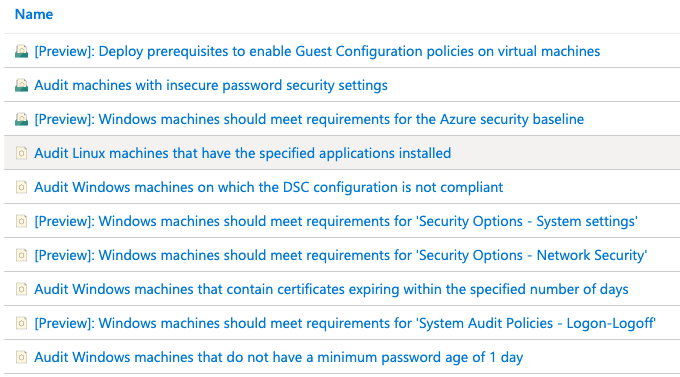
We have now launched a new policy experience for guest configuration definitions. Effective now, only the Audit If Not Exists definition is required. Customers will not need to assign Deploy If Not Exists definitions per scenario, and will not need to assign an initiative per scenario.
You can see the definitions in the Azure Portal by filtering to Category = Guest Configuration.

To handle creation of the guest configuration assignment resource, we have implemented an automation solution in our service. When Azure Policy performs a GET request to determine machine compliance, the automation will create the resource and return a state of Pending. Once the agent has performed the audit and calculated the compliance state, the service will write Compliant or NonCompliant as the state of the scenario per machine. This PUT activity triggers Azure Policy to evaluate the resource again, which means the state of the resource in Azure Policy will always be current with the latest compliance state of the machine (within 30 minutes).
IMPORTANT
To start using the new definitions you must create a new Policy assignment.
We took our time in releasing this change because we thoroughly investigated every possibility for migrating existing assignments to the new model. In every design proposal we were able to find edge cases where parameter values could be at risk. To ensure the highest degree of reliability, the only possibility is to release new policies and mark the existing policies as deprecated.
Existing definitions appearing as ‘Deprecated’
All existing guest configuration definitions will appear with the text “[Deprecated]” added to the beginning of the display name. This does not mean they have been deleted, or that they will be deleted near term. The only change is that they are not visible in the Azure Portal for new assignments. Where they are used for existing assignments, they will continue to function as they have in the past and they will show accurate results.
There is no date and time when customers using the previous Initiative/Deploy/Audit policy combinations must change to the new policies. The new experience is simplified and easier to use. When you would like to enjoy the new experience, you can assign the new policies. Having the “old” policies and “new” policies both assigned to the same or overlapping scopes is fine as long as they use the same parameter values.
Only one set of prerequisite definitions
To simplify handling all prerequisite requirements to perform an audit inside the machine, we now have an initiative named Deploy prerequisites to enable Guest Configuration policies on virtual machines. This initiative combines 4 definitions:
- Create a system assigned managed identity for machines with no identity
- Create a system assigned managed identity for machines with an existing user assigned managed identity
- Deploy the ‘AzurePolicyforWindows’ extension to Windows machines
- Deploy the ‘AzurePolicyforLinux’ extension to Linux machines
These policies will deploy requirements to new machines automatically and make remediation tasks available for existing machines. Once machines have been remediated for prerequisites, you do not need to run additional remediation tasks as you assign more audit policies.
Thank you
I know this change is inconvenient since it requires making a manual change. We have done our best to lessen the impact of the change, with intention to bring you the best experience possible. Thank you for your patience and I look forward to hearing your feedback.
To provide feedback or engage in discussion about guest configuration, I would suggest the following options.
* You are also welcome to direct-message me here with questions or feedback about guest configuration
Thank you!
Michael Greene
Principal Program Manager
Azure management services

by Scott Muniz | Sep 11, 2020 | Uncategorized
This article is contributed. See the original author and article here.

In this HLS Partner Plays webcast recording Randy Nale, Healthcare Technology Strategist at Microsoft, and Wes Wright, CTO at Imprivata, show how to boost efficiency in the demanding hospital setting using Imprivata Mobile and Microsoft 365.
Resources:
Thanks for visiting – Michael Gannotti LinkedIn | Twitter
 Michael Gannotti


Recent Comments