by Scott Muniz | Sep 18, 2020 | Uncategorized
This article is contributed. See the original author and article here.
The Intune Company Portal app allows you to access corporate data, apps, and resources. It’s important to keep your app up to date with the latest version of Company Portal. We recently had a change in enrollment certificates which required a Company Portal update for some users, and after talking with a few customers who weren’t aware of why and how to keep the company portal updated, we thought it would be good to provide this support tip.
Here are a few reasons to keep your Company Portal updated:
- Prevent security risks that can occur on older OS versions
- Certificate expirations which could prevent access
- New features, bug fixes, or changes to the UI
How to keep your device updated
When using Android devices, it is up to you as a user to keep the app updated. There are two options to keeping your Company Portal updated:
- Recommended: Turn on Auto-Updates within the Google Play store, this will ensure that you always have the latest version on your device.
- Ensure your notifications are turned on for Google Play Store to let you know when your app needs to be updated. (Don’t delay after seeing the notification or you might forget!)
Note: You won’t see a prompt within the Company Portal app that an update is needed.
How to update automatically
If you choose to turn on auto-updates follow these steps:
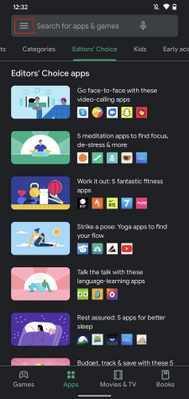
- Open Google Play store and select the Menu icon
- Select Settings
- Select Auto-update apps and choose one of the following:
- Over any network. Data charges may apply
- Over Wi-Fi only
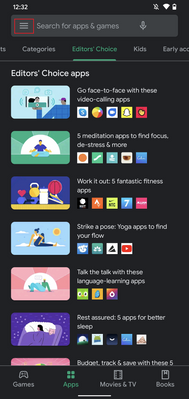 Fig 1. Google Play Store
 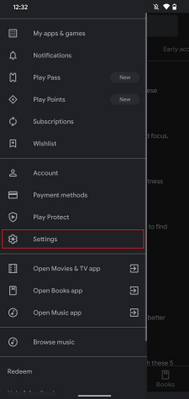 Fig 2. Google Play Store Settings
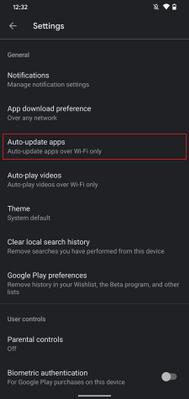 Fig 3. Auto-update apps
 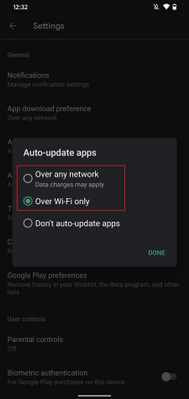 Fig 4. Auto-update apps options
If you choose to auto-update over Wi-Fi to save on possible data charges, see below on how to connect to Wi-Fi automatically.
How to update manually
If you decide to update manually by receiving Google Play notifications do the following:
- Open Google Play store and select the Menu icon
- Select My apps & games
- Select the Intune Company Portal app to update (or select Update All)
- If prompted, review App Permissions, then select Accept to proceed with the app update
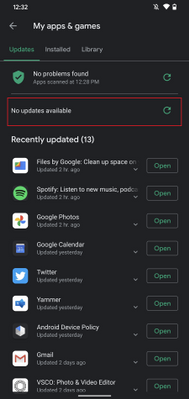 Google Play Store – Manually update apps
Set up your Wi-Fi to connect automatically
If your settings for updates are limited to Wi-Fi connections to prevent possible data usage, it’s helpful to set up your device to connect to Wi-Fi networks automatically:
- Open your device’s Settings menu
-
Select Network & Internet
-
Select Wi-Fi
-
Select Wi-Fi preferences
-
Turn on Connect to open networks
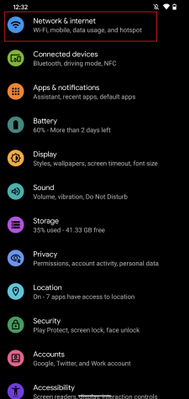 Android Settings
 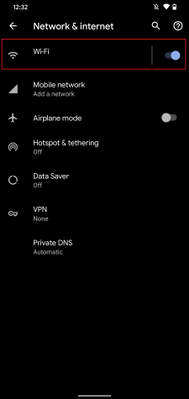 Android – Network & internet settings
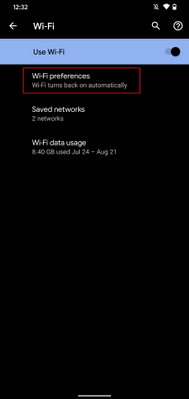 Android – Wi-Fi settings
 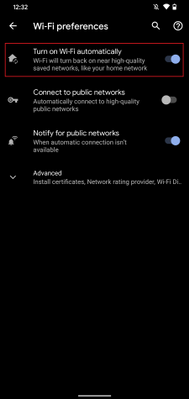 Android – Wi-Fi preferences
Administrative options for updating apps
Device restrictions
As an IT admin, you can also ensure your user has the latest Company Portal version by setting up device restrictions for users enrolled with fully managed, dedicated, and corporate-owned devices by following these steps:
- Navigate to Devices > Android > Configuration policy
- Click Create Profile
-
Platform: Android Enterprise
-
Profile: Select Device restrictions under Fully Managed, Dedicated, and Corporate-Owned Work Profile
<<Screenshot>>
- Open Applications within the accordion
- Set App auto-updates: Devices check for app updates daily. Choose when automatic updates are installed:
-
Not configured: Intune doesn’t change or update this setting.
-
User choice: The OS might default to this option. Users can set their preferences in the managed Google Play app.
-
Never: Updates are never installed. This option isn’t recommended.
-
Wi-Fi only: Updates are installed only when the device is connected to a Wi-Fi network.
-
Always: Updates are installed when they’re available.
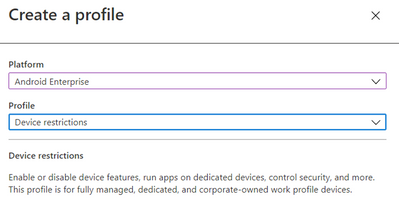 Android Enterprise – Device restriction profile
For more information on Device restrictions for Android Enterprise see this documentation. App auto-updates aren’t available for devices enrolled with Android device administrator or Android work profile.
Configure Conditional Launch
Another option as an IT admin is to configure a minimum Company Portal version within conditional launch settings to prevent users from accessing company resources if they need to update Company Portal. This can be configured by doing the following:
- Navigate to Apps > App protection policy
- Click Create policy and choose Android
- Under Conditional Launch > Device conditions, select Min Company Portal version
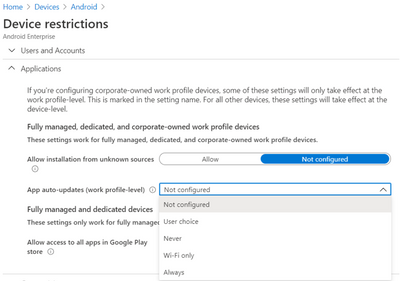 Android Enterprise – Device restriction profile settings
- Once selected, insert a minimum Company Portal version to Value
- Choose an action:
-
Block access: Prevent users from accessing company resources until Company Portal is updated.
-
Wipe data: The user account that is associated with the application is wiped from the device.
-
Warn: This will let users know that they need to update the Company Portal.
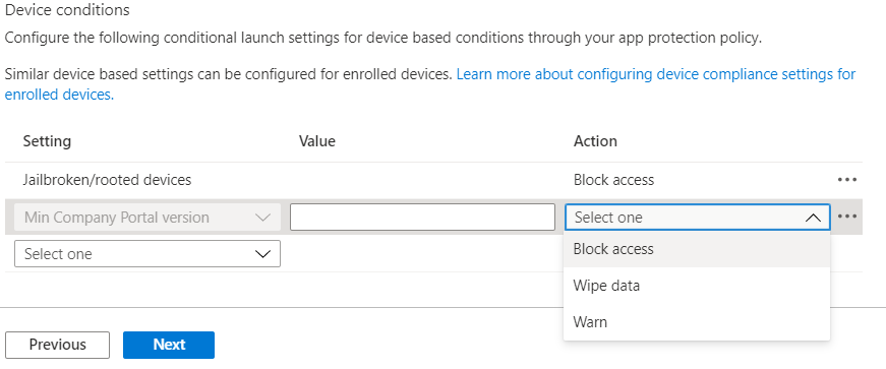
Note: If you choose Block access, forcing an update could lead to unexpected data charges at the time of the update. Learn more about Android app protection policy settings in Microsoft Intune.
We hope this support tip is useful for your users. For more on updating the Company Portal on Android devices, see this documentation:
Let us know if you have any additional questions on this by replying back to this post or tagging @IntuneSuppTeam out on Twitter!
by Scott Muniz | Sep 18, 2020 | Uncategorized
This article is contributed. See the original author and article here.
News this week includes:
Microsoft Ignite preparation is in full swing, with several resources on how what to expect from several produce teams: Microsoft 365, SharePoint, OneDrive, Planner, Stream, Teams for Education, Excel, and Endpoint Manager.
Yammer is rolling out reactions for every conversation or reply in the new Yammer. You can now express yourself through gratitude and celebration, laughter, and sadness-just like in real life!
The Microsoft Learn LTI application is now available. The application enables you to seamlessly embed modules and learning paths from the Microsoft Learn Catalog.
@Tieme Woldman is our Member of the Week, and a great contributor in the Access community.
View the Weekly Roundup for Sept 14-18th in Sway and attached PDF document.
by Scott Muniz | Sep 18, 2020 | Uncategorized
This article is contributed. See the original author and article here.
Microsoft Ignite will take place online, kicking off on the morning of September 22nd, at 8:00 AM in the Pacific Time Zone. The event programming will include live segments, digital breakout sessions, and Q&A, available across multiple time zones. Be sure to visit the Ignite home page to view the event agenda and additional details.
Fun news for developers will kick off on Day 1 with Julia White and her Invent with Purpose on Azure keynote and will be followed by Scott Hunter with The Future of .NET is .NET 5, followed with several additional rebroadcasts to accommodate a worldwide audience. On Day 2, Scott Hanselman and friends will keynote Are we there yet? App Development in Azure. It is a packed agenda, but don’t take my word for it –
Developers at home and at work are resilient and finding ways to adapt and continue to collaborate and be productive remotely, invent at speed and create amazing cloud-powered applications while having fun and helping everyone. Microsoft is unique in the industry and provides the world’s most comprehensive developer toolkit and platform to support your journey as a developer, no matter where you are.
The complete line up for Azure App Developer sessions is listed below:
|
Start Time (PDT)
|
Session name
|
Speaker(s)
|
|
Tuesday, 9/22: 11:15am – 11:30am
|
Key Segment Preview: Ride the Developer Cloud with Visual Studio +.NET, GitHub and Azure
|
Scott Hanselman
|
|
Tuesday, 9/22: 2:30pm-3:00pm
|
The Future of .NET is .NET 5 Digital Breakout
|
Scott Hunter
|
|
Tuesday, 9/22: 3:15pm-3:45pm
|
Ask the Expert: .NET Team
|
Scott Hunter
|
|
Tuesday, 9/23: 10:30pm-11:00pm
|
The Future of .NET is .NET 5 Digital Breakout
|
Scott Hunter
|
|
Wednesday, 9/23: 6:30am-7:00am
|
The Future of .NET is .NET 5 Digital Breakout
|
Scott Hunter
|
|
Wednesday, 9/23: 8:30am-9:00am
|
Are we there yet? App Development in Azure with Scott Hanselman and Friends
|
Scott Hanselman
|
|
Wednesday, 9/23: 1:00pm-1:30pm
|
Enterprise-grade Kubernetes on Azure Digital Breakout Session
|
Brendan Burns
|
|
Wednesday, 9/23: 1:45pm-2:15pm
|
Enterprise-grade Kubernetes on Azure Ask the Experts
|
Brendan Burns
|
|
Wednesday, 9/23: 2:30pm-3:00pm
|
Migrate, Modernize .NET applications on Azure Digital Breakout
|
Gaurav Seth, Daniel Roth
|
|
Wednesday, 9/24: 4:30pm-5:00pm
|
Are we there yet? App Development in Azure with Scott Hanselman and Friends
|
Scott Hanselman
|
|
Wednesday, 9/23: 7:30pm-8:00pm
|
Migrate, Modernize .NET applications on Azure Ask the Experts
|
Gaurav Seth, Daniel Roth
|
|
Wednesday, 9/23: 7:30-8:00pm
|
Ask the Experts: Visual Studio, GitHub, and Azure
|
Victoria Cushing
|
|
Wednesday, 9/23: 9:00pm-9:30pm
|
Enterprise-grade Kubernetes on Azure Digital Breakout Session
|
Brendan Burns
|
|
Wednesday, 9/23: 10:30pm-11:00pm
|
Migrate, Modernize .NET applications on Azure Digital Breakout
|
Gaurav Seth, Daniel Roth
|
|
Wednesday, 9/23: 11:15pm-11:45pm
|
Enterprise-grade Kubernetes on Azure Ask the Experts
|
Brendan Burns
|
|
Thursday, 9/24: 12:30am-1:00am
|
Are we there yet? App Development in Azure with Scott Hanselman and Friends
|
Scott Hanselman
|
|
Thursday, 9/24: 3:30am-4:00am
|
Migrate, Modernize .NET applications on Azure Ask the Experts
|
Gaurav Seth, Daniel Roth
|
|
Thursday, 9/24: 5:00am-5:30am
|
Enterprise-grade Kubernetes on Azure Digital Breakout Session
|
Brendan Burns
|
|
Thursday, 9/24: 6:30am-7:00am
|
Migrate, Modernize .NET applications on Azure Digital Breakout
|
Gaurav Seth, Daniel Roth
|
|
Pre-recorded On-demand
|
Best Practices of Running Cloud Native Applications on Azure
|
Sean McKenna
|
|
Pre-recorded On-demand
|
Event-driven Applications with Azure Functions & Logic Apps
|
Derek Li
|
|
Pre-recorded On-demand
|
Resilient DevOps Practices with Code to Cloud automation
|
Gopinath Chigakkagari
|
|
Pre-recorded On-demand
|
Code, collaborate, and ship from anywhere: Meet the Microsoft Developer Cloud
|
Leslie Richardson, Vix Rian
|
|
On-demand (overflow), will be available on Tuesday, 9/22 at 8 am
|
Empowering Ops with VS Code
|
Zachary Deptawa
|
|
On-demand (overflow), will be available on Tuesday, 9/22 at 8 am
|
Java on Your Terms with Azure
|
Martijn Verburg, Edward Burns
|
|
On-demand (overflow), will be available on Tuesday, 9/22 at 8 am
|
Building Cloud-Native Applications with Azure
|
Uche Nkadi, Kate Olszewska
|
|
On-demand (overflow), will be available on Tuesday, 9/22 at 8 am
|
Serverless APIs with Functions and API Management
|
David Barkol
|
Also check out the Tech community at https://techcommunity.microsoft.com. Here you can share experiences, engage, and learn from experts, while having conversations with the community about Microsoft Ignite.
SWAG? Did someone say SWAG? Yes, we also have an assortment of digital swag that you can take advantage of today:
- Buzzword Bingo: Listen for buzzwords and share your progress on social
- Tech Stretch: A quick visual guide for desk workers who need a break
- Kid’s Activity Pack: A printable pack of fun activities full of tech characters. Engaging kids while allowing caretakers to engage with sessions.
- Desktop wallpapers: Show off your desktop with branded wallpapers
- Digital badge: Let everyone know you participated by printing your all access badge
- Social backgrounds (LinkedIn, Twitter): Background images to use on all your social platforms
- Social stickers
- Microsoft Teams backgrounds: Become a presenter in your next meeting with branded backgrounds
Microsoft Ignite lasts 48-hours and be sure to register for the event. With registration, you can access the full learning experience, including digital breakout sessions and the Connection Zone. What are you waiting for? Take a look at our official session list and add it to your session schedule to be ready for 48-hours of non-stop programming on Tuesday, September 22-24th.
by Scott Muniz | Sep 18, 2020 | Azure, Technology, Uncategorized
This article is contributed. See the original author and article here.
Update: Friday, 18 September 2020 20:21 UTC
We continue to investigate issues within Application Insights Live Metrics. Root cause is not fully understood at this time. Some customers continue to experience issues viewing their Live Metrics data. We are working to establish the start time for the issue, initial findings indicate that the problem began at 9/18 7:00 UTC. We currently have no estimate for resolution.
- Work Around: None
- Next Update: Before 09/18 23:30 UTC
-Ian
![[Guest Blog] My Journey to Ethical AI](https://www.drware.com/wp-content/uploads/2020/09/large-628)
by Scott Muniz | Sep 18, 2020 | Uncategorized
This article is contributed. See the original author and article here.
This article by Humans of IT Student Ambassador Olivia Asemota, a Computer Science undergrad student from Xavier University of Louisiana is part of our Student Ambassador Spotlight series in the lead-up to Microsoft Ignite. Olivia shares about her passion for computer science and ethics, and her future aspirations to blend the two together in her future career.

My journey into the world of computer science and technology began quite differently from other people. For me, it began when I thought I broke the internet. I remember playing on my father’s computer, not really knowing what I was doing, but, nevertheless, pressing as many buttons as I could. I somehow got into the developer tools of the browser and deleted everything on the screen. I immediately froze – did I just break the browser, or worse, the entire Internet? My initial instinct was to get up, run, and never face my dad again, but a quick hit of the refresh button and everything was back to normal.
Though daunting, this slightly traumatic experience is what jumpstarted my fascination with technology. I didn’t know what I did, but curiosity got the best of me, and I began trying to replicate my actions in the days following. Those experiments introduced me to the world of programming and I immediately knew that I had to learn more. From there, I began to scour the internet for online courses so I could better understand what I stumbled upon. I found lessons in Python, Java, HTML, and JavaScript, and I quickly fell in love with the creativity of programming. I grew up thinking that I had to be an artist or actor in order to be creative, but coding taught me that this was not the case. I could write code to do whatever I set my young, imaginative, mind to. It was liberating and exciting.

Once I got to college, I knew Computer Science would be my major. I already had dreams of working at top tech companies or starting my own business. I knew I wanted to use the skills and knowledge I gained to help other people in the best way I could. However, during that first year in college, I discovered a new passion that I believe will tie closely with my software engineering endeavors. I discovered a deep love for philosophy and ethics.
I have always been aware of the good and bad sides of technology. I love how it has shaped our world and expanded our ability to connect with people who have similar interests and beliefs as we do. We have the ability to provide aid to people on the other side of the world whether it’s through monetary or vocal support. But I think there are certain ethical standards that we need to hold ourselves to, especially as it applies to AI and how it affects the lives of people around the world. Blending tech and philosophy was truly eye-opening for me.
My goal in the next 10 years of my life is to become a research scientist in Artificial Intelligence and Machine Learning. I want to help build ethical technology that benefits everyone. I believe this starts with learning about different ethical theories and how they can be applied to AI and ML. There are so many positive possibilities that these technological advancements can give us, and I’m excited to see how it continues to shape our world for the better. This is where my two passions meet. I want to help create better systems for more people, and I think it’s not far out of my reach. I truly believe to begin solving these problems, we need to understand how different aspects of our society affect the way we think and thus, the way we create. Our tools and platforms are a reflection of our thoughts and feelings and maybe this is where we should begin as we move forward.
I don’t have all of the answers. I believe this problem challenges us to reevaluate our connection with our environment and other people. But I do not think hope is lost. We just need to be bold and to take the right risks, and I’m optimistic that our society and way of living can be much better than ever before.
#HumansofIT
#StudentAmbassadors


Recent Comments