by Scott Muniz | Sep 23, 2020 | Azure, Technology, Uncategorized
This article is contributed. See the original author and article here.
Azure Synapse Analytics brings the worlds of data integration, big data, and enterprise data warehousing together into a single service for end-to-end analytics, at cloud scale. This week at Microsoft Ignite we announced several features that bring accelerated time to insight via new built-in capabilities for both data exploration and data warehousing.
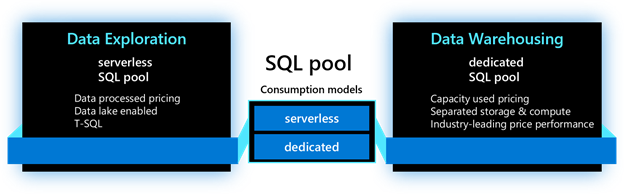
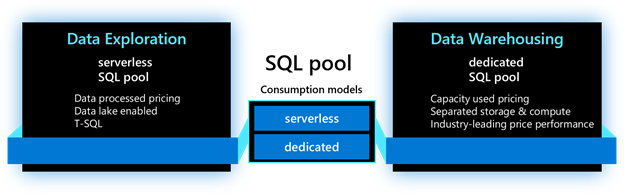
As we dive into each new feature, we will use the terminology below to identify where the feature is applicable. For the SQL capabilities in Azure Synapse Analytics, the main resource used is called a SQL pool. This resource has two consumption models: serverless and dedicated. The serverless model provides transparent compute consumption and is billed per data processed. The dedicated model allows use of dedicated compute, comes with capacity model and is billed per DWU-consumed. This new terminology will appear in the product soon.
Accelerate time to insight with:
-
Power BI performance accelerator for Azure Synapse Analytics (private preview)
Last year when we announced Azure Synapse Analytics, we promised to bring Microsoft’s data and BI capabilities together to deliver optimized experiences for our users. Today, we continue expanding on that promise with the announcement of the Power BI performance accelerator for Azure Synapse Analytics, a new self-managed process that enables automatic performance tuning for workloads and queries ran in Power BI.
As Power BI users run their queries and reports, the performance accelerator monitors those queries behind the scenes and optimizes their execution thus significantly improving query response times over the latest data. It analyzes all Power BI queries holistically and intelligently creates materialized views within the SQL engine while recognizing common query joins and aggregations patterns. As Power BI queries continue to execute, queries are automatically sped up and users observe increased query performance leading to quicker business insights. With new data being ingested into SQL tables, materialized views are automatically refreshed and maintained. Best of all, as more and more queries are being executed, the performance accelerator optimizes and adjusts the deployed materialized views to fine tune view design, all while reducing query execution times.
This feature can be enabled with a few clicks within the Synapse Studio. You can simply choose the frequency for executing the process and set the maximum storage to manage the size of the system-generated materialized views and it’s ready to start optimizing your Power BI workload.
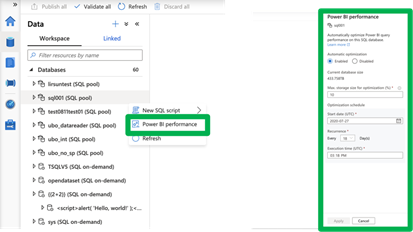
The Power BI performance accelerator for Azure Synapse Analytics delivers a zero-management experience. It helps system administrators manage materialized views while allowing Power BI users to gain quick and up-to-date business insights.
This feature applies to dedicated model. To participate, submit your request here.
-
Azure Synapse Link for Azure Cosmos DB now includes Synapse SQL (public preview)
Azure Synapse Link connects operational data stores with high performance analytics engines in Azure Synapse Analytics. Using Synapse Link, customers can perform near real-time analytics directly over their data managed in Azure Cosmos DB without impacting the performance of their operational workloads.
Today, we are announcing the public preview of Azure Synapse Link for Azure Cosmos DB using Synapse SQL. This functionality is now available to all customers and is deployed worldwide. Customers can now use a serverless SQL pool in Azure Synapse Analytics to perform interactive analytics over Azure Cosmos DB data enabling quick insights and exploratory analysis without the need to employ complex data movement steps. Thanks to the rich T-SQL support for analytical queries and automatic schema discovery for data, it has never been easier to explore operational data by running ad-hoc and advanced analytical queries. Best of all, due to the rich and out-of-the-box ecosystem support, tools such as Power BI – and others – are just a few clicks away.
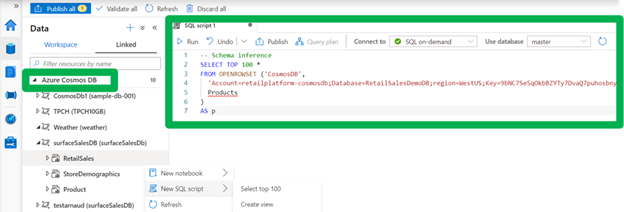
This feature applies to serverless model. To learn more, visit the Azure Synapse Link for Azure Cosmos DB documentation.
Note: this functionality will become available in the next few weeks.
-
Enhanced support for analyzing text delimited files (public preview)
Despite the availability and popularity of columnar file formats optimized for analytics, such as Parquet and ORC, most newly generated and legacy data is still in text delimited formats. With this in in mind, we are continuously improving the experience for delimited text data. To support immediate and interactive data exploration for this text data, the following enhancements are being introduced:
– Fast parser: The new delimited text parser (CSV version 2.0) provides significant performance improvement, ranging from 2X (querying smaller files) to up to 10X or more (querying larger files). This new performance improvement, based on novel parsing techniques and multi-threading, is available to all existing and newly provisioned Azure Synapse workspaces.
– Automatic schema discovery: With automatic schema discovery, OPENROWSET function can be used with CSV files without a need to define expected schema. As the system automatically derives the schema based on the data being queried, users can focus on the needed data insights leading to faster and easier data exploration.
– Transform as CSV: We have extended support for the CREATE EXTERNAL TABLE AS SELECT statement to enable storing query results in the delimited text format. This functionality enables multi-stage data transformation to be performed while keeping the data in delimited text format throughout its lifecycle.
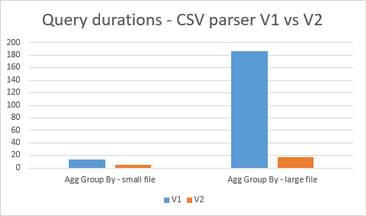
This feature applies to serverless model. To learn more, visit the Azure Synapse SQL documentation.
Improve data loading performance and ease of use with:
-
COPY command (Generally Available)
Loading data into your data warehouse may not always be the easiest task. Defining the proper table structure to host your data, data quality problems, handling incorrect data and errors, and ingestion performance are among some of the typical issues customers face. We designed the COPY command to tackle these problems. The COPY command has become the default utility for loading data into data warehouses within Azure Synapse Analytics. In addition to bringing the COPY command into General Availability state, we have also added the following features:
– Automatic schema discovery: The whole process of defining and mapping source data into target tables is a cumbersome process, especially when tables contain large numbers of columns. To help with this, we are introducing built-in auto-schema discovery and an auto-table creation process (auto_create_table option in preview within COPY). When used, the system automatically creates the target table based on the schema of the Parquet files.
– Complex data type support: COPY command now supports loading complex data types stored in Parquet files which eliminates the previous need to manage multiple computes. When used together with the automatic schema discovery option, complex data types will automatically be mapped to nvarchar columns.
These new functionalities are also supported in partner products as well. Azure Stream Analytics, Azure Databricks, Informatica, Matillion, Fivetran, and Talend are among the products and services that support the new COPY command.
This feature applies to dedicated model. To learn more, visit the COPY documentation.
-
Fast streaming ingestion (Generally Available)
With the rise of IoT devices, both the amount and velocity of the data produced has increased dramatically. To make that data available for analysis and to reduce the time it takes to load and query this data within your data warehouse environments, we are announcing the General Availability of high throughput streaming data ingestion (and inline analytics) to dedicated SQL pools in Azure Synapse using Azure Stream Analytics. This new connector can handle ingestion rates exceeding 200MB/sec while ensuring very low latencies.
With Azure Stream Analytics, in addition to high throughput ingress, customers can use SQL to run in-line analytics such as JOINs, temporal aggregations, filtering, real-time time inferencing with pre-trained ML models, pattern matching, geospatial analytics and much more. It supports common formats such as JSON, and custom de-serialization capabilities to ingress and analyze any custom or binary streaming data formats. More details can be found in the announcement blog.
This feature applies to dedicated model. To learn more about high throughput streaming ingestion, visit our documentation.
Secure your sensitive data using:
-
Column-level Encryption (public preview)
As data gets moved to the cloud, securing your data assets is critical to building trust with your customers and partners. Azure Synapse Analytics already provides a breadth of options that can be used to handle sensitive data in a secure manner. We are expanding that support with the introduction of Column Level Encryption.
Column-level encryption (CLE) helps you implement fine-grained protection of sensitive data within a table (server-side encryption). With CLE, customers gain the ability to use different protection keys for different columns in a table, with each key having its own access permissions. The data in CLE-enforced columns is encrypted on disk, and remains encrypted in memory, until the DECRYPTBYKEY function is used to decrypt it. Azure Synapse Analytics supports using both symmetric and asymmetric keys.
This feature applies to dedicated model. To learn more, visit the Column Level Encryption documentation.
Improve productivity with expanded T-SQL support:
-
MERGE support (public preview)
During data loading processes, often there is a need to transform, prepare, and consolidate data from different and disparate data sources into a target table. Depending on the desired table state, data needs to be either inserted, updated, or deleted. Previously, this process could have been implemented using the supported T-SQL dialect. However, the process required multiple queries to be used which was costly and error prone. With the new MERGE support, Azure Synapse Analytics now addresses this need. Users can now synchronize two tables in a single step, streamlining the data processing using a single step statement while improving code readability and debugging.
This feature applies to dedicated model. For more details, see our MERGE documentation.
Note: this functionality will become available in the next few weeks.
-
Stored procedures support (public preview)
Stored procedures have long been a popular method for encapsulating data processing logic and storing it in a database. To enable customers to operationalize their SQL transformation logic over the data residing in their data lakes, we have added stored procedures support to our serverless model. These data transformation steps can easily be embedded when doing data ingestion with Azure Synapse, and other tools, for repeatable and reliable execution.
This feature applies to serverless model.
Note: this functionality will become available in the next few weeks.
-
Inline Table-Valued Functions (public preview)
Views have long been the go-to method for returning queryable table results in T-SQL. However, views do not provide the ability to parameterize their definitions. While user-defined functions (UDFs) offer the power to customize results based on arguments, only those that return scalar values had been available in Synapse SQL. By extending support for inline table-valued functions (TVFs), users can now return a table result set based on specified parameters. Query these results just as you would any table and alter its definition as you would a scalar-valued function.
This feature applies to both serverless and dedicated models. For more details, visit the CREATE FUNCTION documentation.
Note: this functionality will become available in the next few weeks, post deployment.
Try Azure Synapse Analytics today
by Scott Muniz | Sep 22, 2020 | Azure, Technology, Uncategorized
This article is contributed. See the original author and article here.
For several years, Red Hat and Microsoft have partnered to create cloud solutions that enable enterprises to achieve more. Azure Red Hat Openshift, released in 2019, brought a jointly-managed enterprise-grade Kubernetes solution to Azure. Since 2016, Azure has offered Red Hat Enterprise Linux (RHEL) on virtual machines.
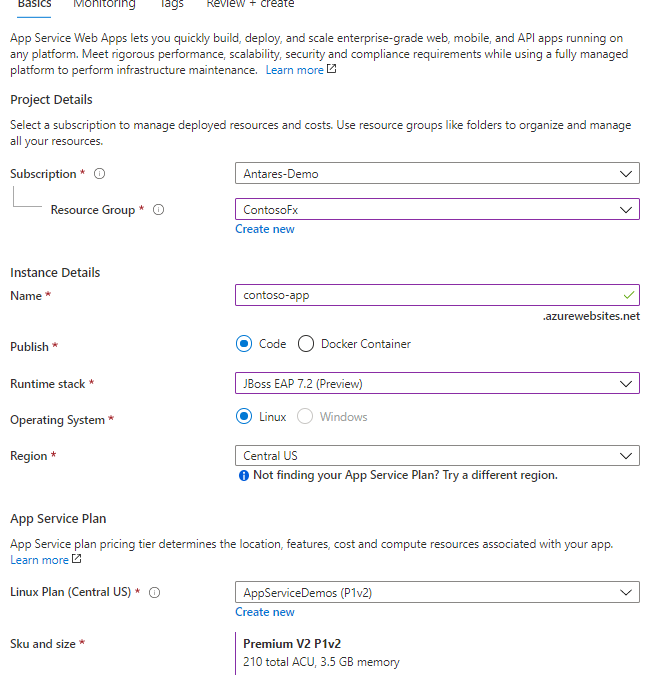
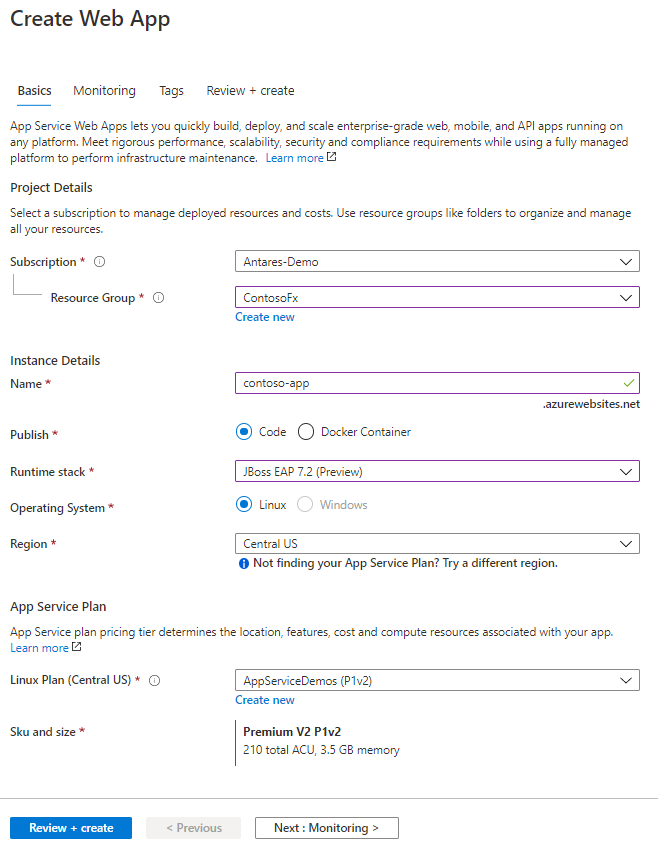
You can now run JBoss EAP on Azure App Service. For readers who are not familiar, Azure App Service is a managed hosting service for web and API applications, providing features for auto-scaling, networking, authorization, and more. With App Service, you can deploy WAR and EAR applications using App Service’s deployment API’s or CI/CD integration. Once your apps are deployed, set up auto-scaling to handle periods of higher load.
Whether your organization is running a heavily customized, clustered JBoss EAP deployment or has embraced container technologies, Azure has a cloud service to fit your needs. With RHEL on Azure Virtual Machine Scale Sets (VMSS), you can easily lift-and-shift your on-prem JBoss EAP deployments. Azure Red Hat OpenShift combines the innovation of enterprise Kubernetes with the world’s leading enterprise Linux platform, Red Hat Enterprise Linux. App Service now gives Jakarta EE developers the option to leverage a managed Platform-as-a-Service (PaaS) for their cloud migrations.
The JBoss EAP on Azure App Service experience has been jointly developed and supported by Red Hat and Azure. Once JBoss EAP on Azure App Service becomes generally available, any support cases concerning the JBoss server will be handled by the experts at Red Hat. Any cases concerning the App Service platform will be resolved by Azure support. In other words, your cases will be handled by the leading experts.
During the public preview, JBoss EAP 7.2 is offered on Red Hat Enterprise Linux 7 using OpenJDK 8. A version of JBoss EAP on Java 11 will be available later during the public preview. JBoss EAP on Azure App Service is at current prices. As a preview release, there is no commercial support offering and use of the preview is limited to development and testing of your applications. The General Availability release of JBoss EAP on App Service will include a service fee for the integrated technical support. If you create a JBoss EAP instance on App Service, you will receive an email notice prior to the GA release with more details on the pricing changes.
Get started today – try JBoss EAP on Azure App Service.
Resources:
by Scott Muniz | Sep 22, 2020 | Azure, Technology, Uncategorized
This article is contributed. See the original author and article here.
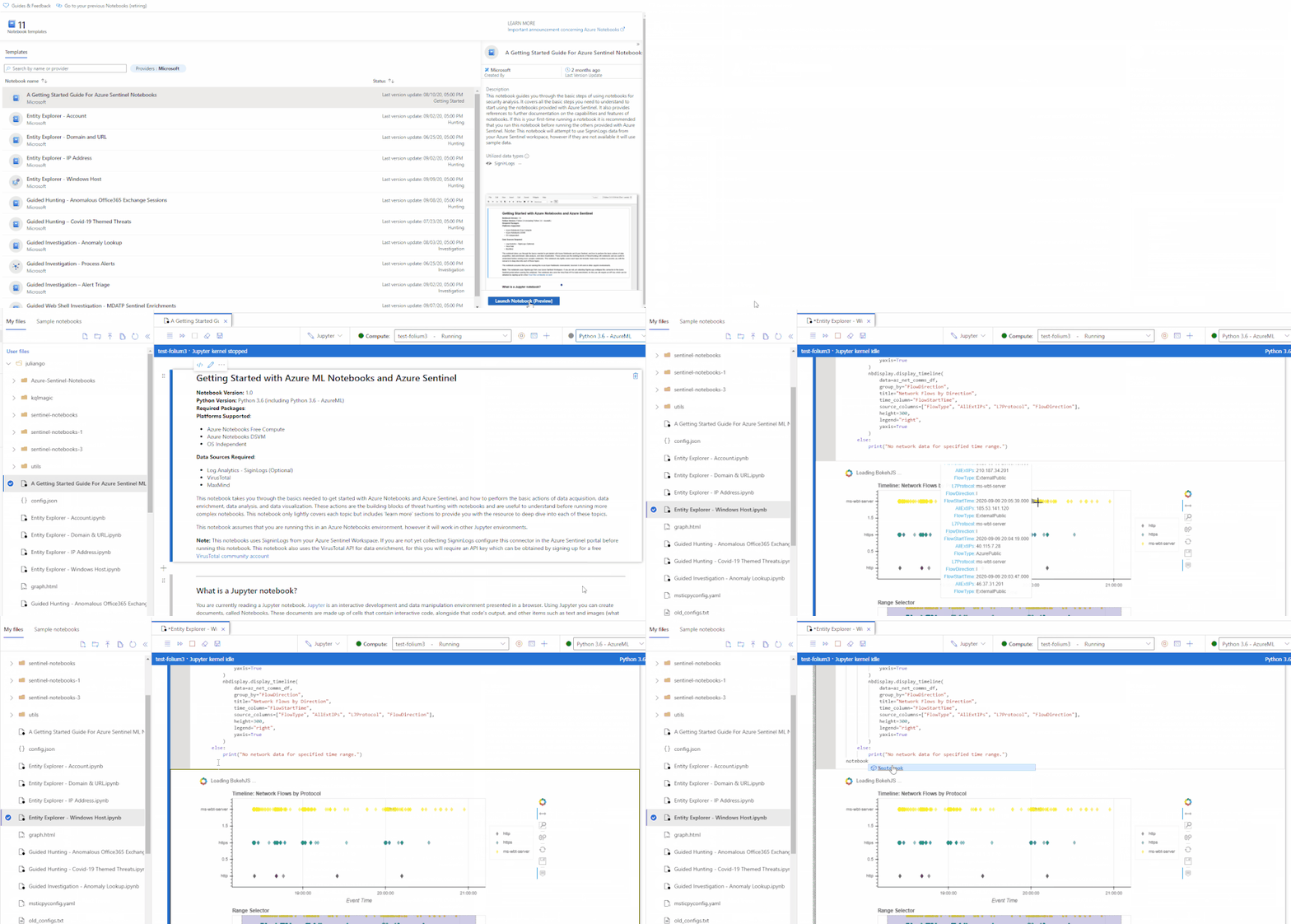
We are happy to announce the public preview for the new and revamped customizable Jupyter notebook experience running on the Azure Machine Learning (AML) platform for analyzing your security data, all within a secure Azure cloud environment!
The new user experience provides an updated interactive UI with Intellisense for improved productivity, support for existing Jupyter and JupyterLab experiences, dedicated notebook compute, as well as point-in-time notebook snapshots and a notebook file explorer for easy notebook collaboration. In addition, take advantage of built-in security analytics via Jupyter notebook templates and the MSTICPy Python library help jumpstart your security analytics and operations.
Whether you are a seasoned security analyst with extensive Python and Jupyter experience, or just starting out, you can immediately start experiencing these benefits by adding Jupyter notebooks to your threat defender arsenal.
We highly recommend you check out the Getting started with Azure Sentinel Notebooks video and the official documentation to get started.
New intuitive and approachable UI
A new UI experience based on the open source Nteract project. This simple and intuitive UI focuses on delivering simplicity and ease-of-use with full IntelliSense and inline error highlighting directly in your notebooks, drag-and-droppable cells, individual tabs for each notebook, inline toolbars and less clutter. Support for Jupyter and JupyterLab experiences and 10X faster Azure Sentinel notebook launch times.

Improved collaboration and versioning
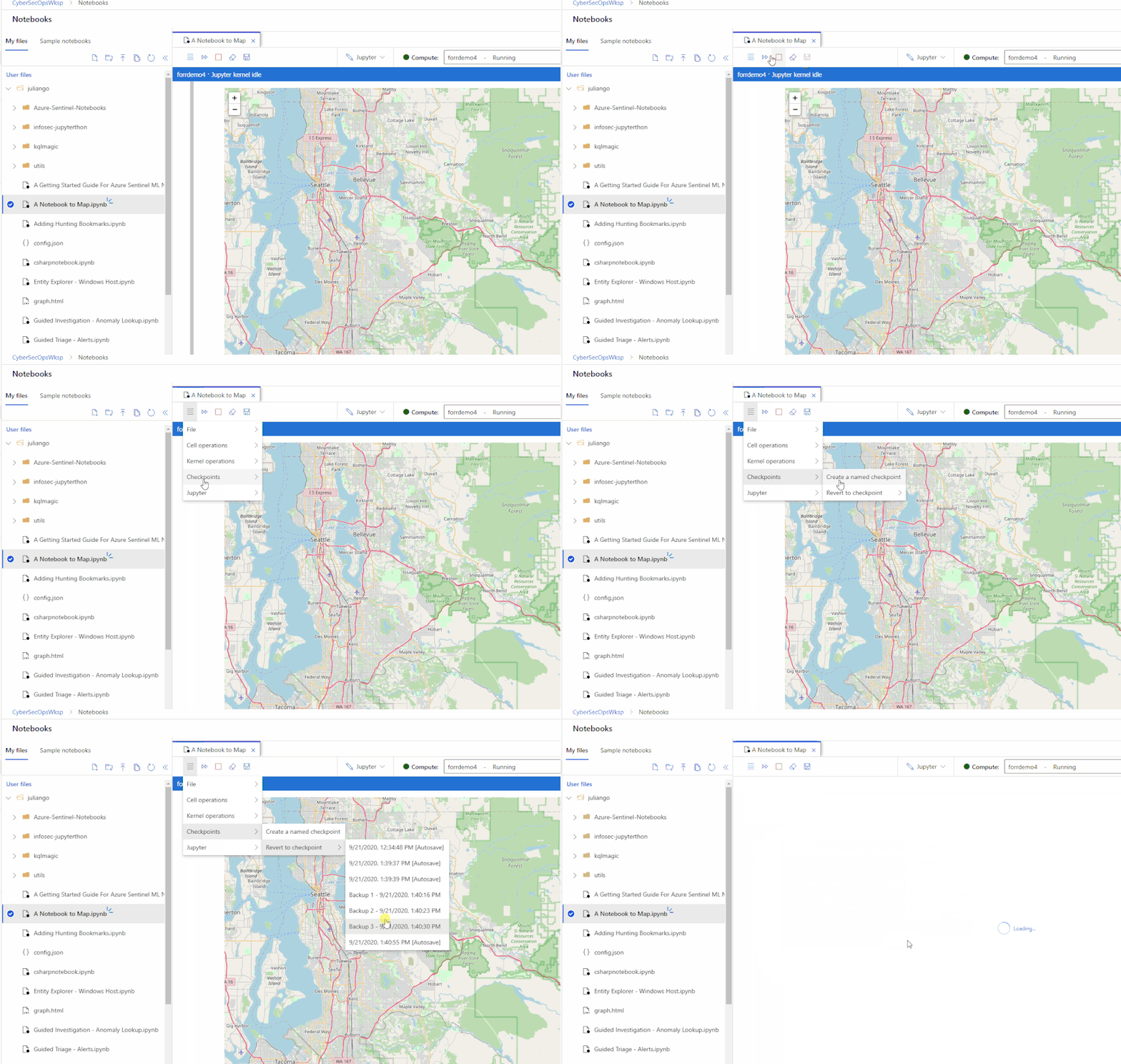
Easily share notebooks and other artifacts with other security analysts across your team and/or organization. A new notebook file explorer to browse your notebooks and your team’s notebooks in one place making it easier to collaborate. Revert changes or review prior data by using the new check-point feature to take point-in-time notebook snapshots.
Managed and flexible compute with additional security features
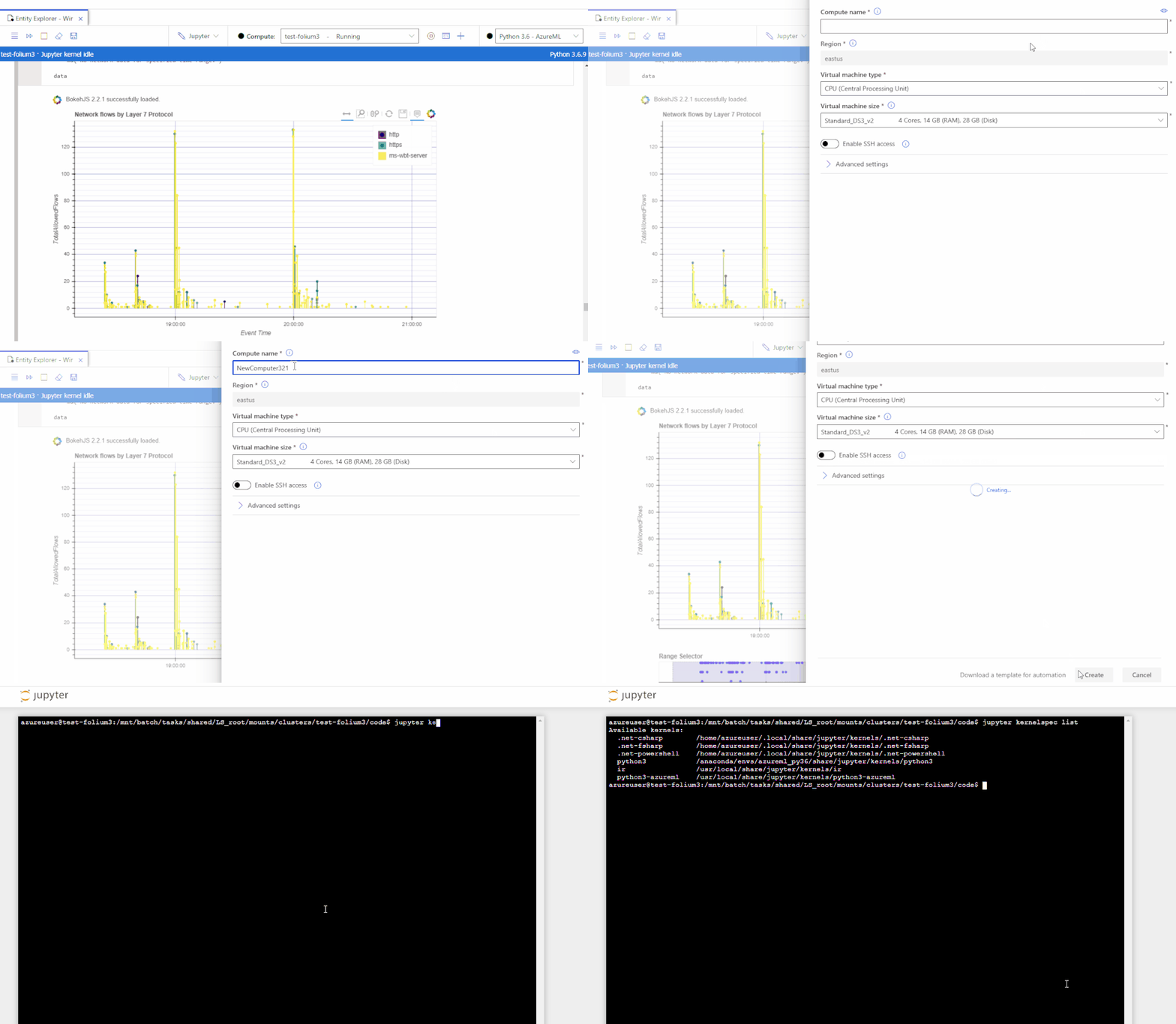
Pay only for the resources you consume with fully managed dedicated cloud-based compute for executing your notebook workloads. Terminal access to your notebook compute. Ability to install custom Jupyter kernels (such as PowerShell and C#). Azure Resource Manager (ARM) templates for compute deployments (article). Additional security features such as RBAC and SSH policy options available today with VNET support coming in the fall.
Happy threat hunting and investigation!
by Scott Muniz | Sep 22, 2020 | Uncategorized
This article is contributed. See the original author and article here.
Microsoft is launching the new Power Platform developer role to focus on implementing Power Platform solutions, and we need beta participants.
Do you design, develop, secure, and troubleshoot Power Platform solutions? Do you implement components of a solution that include application enhancements, custom user experience, system integrations, data conversions, custom process automation, and custom visualizations? Do you have strong applied knowledge of Power Platform services, including in-depth understanding of capabilities, boundaries, and constraints? If so, this beta exam is for you!
The new Microsoft Certified: Power Platform Developer Associate certification has one exam that is currently in beta: Exam PL-200: Microsoft Power Platform Developer.
To receive the 80% discount*, use code PL400Isin when prompted for payment.
This is NOT a private access code. You can use this code to register for and take the exam on or before 10/26/2020.
*The first 300 people who register can take these exams for an 80% discount! (Why beta exams are no longer free.) The seats are offered on a first-come, first-served basis. You must register for the exam on or before 10/26/2020. Take the exam as soon as possible, so we can leverage your comments, feedback, and exam data in our evaluation of the quality of the questions.
Preparing for Beta Exams
Taking a beta exam is your chance to have a voice in the questions we include on the exam when it goes live. The rescore process starts on the day that exams go live, and final scores are released approximately 10 days later. For updates on when the rescore is complete, follow me on Twitter (@libertymunson). For questions about the timing of beta exam scoring and live exam release, see the blog posts The Path from Beta Exam to Live Exam and More Tips About Beta Exams.
Remember, the number of spots is limited, so when they’re gone, they’re gone. You should also be aware that there are some countries where the beta code will not work (including Turkey, Pakistan, India, and China). You will not be able to take the beta exam in those countries.
Also keep in mind that these exams are in beta, which means that you will not be scored immediately. You will receive your final score and passing status after your exam is live.
Related announcements
Announcing three new Microsoft Certifications for Business Applications
Skill up and stand out, with new role-based training and certification!
New role-based certification and training is here, and we’re just getting started!
Catching up: continuing our journey with new role-based certifications and training
by Scott Muniz | Sep 22, 2020 | Azure, Technology, Uncategorized
This article is contributed. See the original author and article here.
Hosting SSRS databases in Azure SQL Managed Instance
This article outlines the spectrum of options available for migrating your solutions based on the SQL Server Reporting Services (SSRS) to Microsoft cloud, with focus on the newly-introduced support for hosting SSRS databases in Azure SQL Managed Instance.
Modernizing at your own pace
In times of uncertainty, it’s important to have a flexibility to take approach that makes the most sense for your business. Some organizations slow down to operate more cost-effectively and play as safe as possible, while others lean into new opportunities that didn’t exist before.
Same goes for the appetite for modernization while migrating to Microsoft cloud: you may decide to simply lift and shift your solutions, and still benefit instantaneously from certain capabilities available in cloud only, or you can aim for migrating to cloud native SaaS and PaaS solutions that may require adopting new concepts, but also may be way more rewarding in terms of the modernization, out-of-the-box capabilities offered, and new scenarios unlocked.
SQL Server vs. SQL Server database engine
Azure SQL as a family of managed, secure, and intelligent SQL database services is a good example of flexibility offered when migrating your solutions to Azure. The entire Azure SQL family is built upon the same SQL Server database engine, so your skills and experience transfer easily to the cloud. Still, you are in control of the level of change you want to introduce, by choosing one of the available database services – SQL Server on Azure Virtual Machine, SQL Managed Instance, or SQL Database.
However, your solutions may be leveraging SQL Server capabilities beyond its database engine as a core component. Let’s name a few most used ones:
Integration Services (SSIS) – platform for building data integration and transformation solutions,
Analysis Services (SSAS) – analytical data engine with tabular and multidimensional mode,
Reporting Services (SSRS) – tools and services for creating and managing paginated reports.
For each of these powerful and widely adopted SQL Server capabilities there is a choice of options for migration to Microsoft cloud: you can always opt for the simple lift-and-shift approach and host them on the SQL Server on Azure Virtual Machine, resembling the layout from your on-premises environment, or you can decide to leverage equivalent cloud native offerings.
When it comes to hosting SQL Server Reporting Services (SSRS) in the Microsoft cloud, there are two main options:
- Moving your SSRS paginated reports to the Power Bi Premium service
- Deploying SQL Server Reporting Services virtual machine
The second option has a couple of variations, and to be able to differentiate between the variations we should note that SSRS consists of two components: report server which is a stateless engine of the SSRS, and report server databases storing metadata and temporary report results.
SSRS uses two databases to separate persistent data storage from temporary storage requirements. The databases are created together during the installation of SSRS and bound by name. By default, the database names are ReportServer and ReportServerTempDB, respectively.
Earlier mentioned variations pertain to where report server databases are being hosted, and we’ll explain the difference as we go through the options.
Moving your SSRS paginated reports to the Power Bi Premium service
SSRS paginated reports are optimized for printing or PDF generation, providing you with the ability to produce highly formatted, pixel-perfect layouts. Typical use case for paginated reports are operational reports like sales invoice, or profit and loss statement.
In contrast, typical Power BI report is optimized for exploration and interactivity – you can easily slice and dice data, discover relationships and patterns, in other words it’s ideal for analytical reports.
Obviously, both types of reports remain important and having both types in one place, sharing the infrastructure of Power BI service, including the search, monitoring and auditing capabilities provides a great benefit. You can also drill through from the Power BI report to a paginated report, embed paginated report, or share its content through a Power BI app. Check the Paginated reports in Power BI FAQ for more details.
To migrate your existing paginated reports in the Report Definition Language (RDL), you can use RDL Migration Tool written by Microsoft and available on GitHub. More detailed guidance on the entire migration process is provided in the Migrate SQL Server Reporting Services reports to Power BI article.
There are currently few limitations that you may need to circumvent to be able to migrate your SSRS reports to Power BI. Also, note that publishing paginated reports in Power BI requires Premium subscription.
Deploying SSRS on SQL Server on Azure Virtual Machine
If you are rather interested in a quick lift and shift of your existing SSRS solution, you can simply deploy SSRS on Azure Virtual Machine, just like on any (virtual) machine on premises. Here you have a full freedom of choice among the supported version of Reporting Services, so you can even use the same version that you are using on premises.
You can reuse the same Azure Virtual Machine for SQL Server database engine to store report server databases. Choosing a local instance is useful if you have sufficient system resources or if you want to save on software licenses. On the other hand, running the report server databases on another instance of SQL Server can improve performance.
While SQL Server on Azure Virtual Machine offers some automated manageability features like automatic backups and security patching, note that other aspects like configuring and maintaining high availability through Always On Availability Groups are not provided by the platform.
(New) Hosting report server databases in Azure SQL Managed Instance
This leads us to the variation that you may find useful if you are fan of fully managed database services, eliminating need for managing the database engine manually. With this approach, your stateless report server installed on Azure Virtual Machine connects to report server databases hosted on Azure SQL Managed Instance. High availability of databases here comes out of the box, with 99.99% availability SLA. You can leverage auto-failover groups as a disaster recovery solution for the most critical solutions, or geo-restore capability for less critical ones. You can also use point-in-time restore (PITR) functionality to recover from accidental report changes.
If your SSRS reports are pulling the data from databases hosted on Azure SQL Managed Instance, it’s reasonable to host report server databases on the same instance, thus minimizing the database engine footprint.
SQL Server 2019 Reporting Services come with native support for hosting report server databases in Azure SQL Managed Instance – just point your SSRS to the instance during the setup, or re-point the existing installation using SSRS Configuration Manager. You can also restore a backup of your report server database from on-premises SQL Server on Azure SQL Managed Instance.
If you’d rather keep the older supported version of SSRS that you are using on premises, you can still host report server databases on Azure SQL Managed Instance. You should just configure the instance before installing legacy version of SSRS on Azure Virtual Machine. Configuration steps are very simple and ensure that some of the commands issued during the installation process by legacy versions of SSRS, that has been eliminated in SSRS 2019, are safely ignored by SQL Managed Instance:
-- Turn the advanced configuration options on:
sp_configure 'show advanced options', 1 ;
GO
RECONFIGURE;
GO

-- Enable suppression of error messages for recovery model change:
sp_configure 'suppress recovery model errors', 1 ;
GO
RECONFIGURE;
GO
Visit Suppress recovery model errors server configuration option to learn more about this configuration option.
Conclusion
There are multiple options to choose among when deciding on the approach for moving your SSRS solution(s) to Microsoft cloud. Options cover the entire spectrum from Infrastructure-as-a-Service (IaaS) solutions offering completely the same experience as with on-premises SQL Server enriched with some management automation options, through leveraging Platform-as-a-Service (PaaS) solution for hosting report server databases on Azure SQL Managed Instance (newly-introduced option), all the way to Software-as-a-Service (SaaS) solution with SSRS paginated reports in Power BI service. This flexibility allows you to modernize at the pace that makes the most sense for your business.


Recent Comments