
by Contributed | Jun 30, 2021 | Dynamics 365, Microsoft 365, Technology
This article is contributed. See the original author and article here.
Today, we’re announcing that use rights for Dynamics 365 Field Service (on-premises) will be retired on June 30, 2022. If your organization is currently using an on-premises version, this blog post gives you information to help you understand and plan for this change.
What is Dynamics 365 Field Service (on-premises)?
Dynamics 365 Field Service (on-premises) allows organizations to install and run Field Service version 7 and applications on computers located on site rather than as a service in the cloud. On-premises implementations of the Field Service application will no longer be supported after June 30, 2022.
How will this change affect my organization?
If your organization is currently using Dynamics 365 Field Service (on-premises), you’ll need to migrate to Dynamics 365 Field Service.
Are there any resources to help me move to the cloud?
Yes. The Dynamics 365 Migration Program is available to assist our customers with migrating from on-premises to the cloud. If you have questions specifically related to a Field Service migration, send us an email.
What will happen to the mobile app that works with Dynamics 365 Field Service (on-premises)?
Field Service Mobile (Xamarin) is also being retired June 30, 2022, and it will no longer be available. For more information about the Field Service mobile apps, go to the documentation.
What will happen with my organization’s Dynamics 365 Field Service (on-premises) license?
Licensing for Dynamics 365 Field Service (on-premises) is provided through dual use licenses, per the Dynamics 365 on-premises licensing guide. Organizations currently using Field Service licenses for on-premises implementations can use those same licenses for Field Service online.
When is this change taking place?
Availability of Dynamics 365 Field Service (on-premises) will end June 30, 2022.
When will the download package for the on-premises version become unavailable?
The download package to install Dynamics 365 Field Service (on-premises) will no longer be available after Dec 31, 2021.
What will happen to my Field Service (on-premises) implementation after June 30, 2022?
If you’ve already installed the on-premises version, it will still be available for your organization. However, new installations of Field Service (on-premises) will no longer be available from Microsoft. Also, the Field Service Mobile application that works with Field Service (on-premises) will be retired and no longer available after June 30, 2022.
I have a government implementation. Where is the Dynamics 365 sovereign cloud available?
The geographic regions where the Dynamics 365 sovereign cloud and Dynamics 365 Field Service are available is described in the Infrastructure and availability PDF.
Will I have to upgrade my version of Dynamics 365 Field Service when moving online?
Yes. The on-premises version will need to be updated through a proven upgrade process to the latest online version of Dynamics 365 Field Service.
Does this change also apply to other Dynamics 365 Customer Engagement (on-premises) apps?
No. This change does not apply to other Dynamics 365 on-premises apps.
Next steps
If you have any questions about this change, or need help with planning your Field Service (on-premises) migration, send us an email and we’ll connect you with the best resources to help you move forward.
Learn more about Dynamics 365 Field Service capabilities in the documentation.
The post Dynamics 365 Field Service (on-premises) use rights to retire on June 30, 2022 appeared first on Microsoft Dynamics 365 Blog.
Brought to you by Dr. Ware, Microsoft Office 365 Silver Partner, Charleston SC.
by Contributed | Jun 30, 2021 | Technology
This article is contributed. See the original author and article here.
Introduction:
Traditionally, one of the most powerful techniques used to accelerate query processing in data warehouses is the pre-computation of relevant summaries or materialized views.
The initial implementation introduced in Apache Hive 3.0.0 focuses on introducing materialized views and automatic query rewriting based on those materializations in the project. Materialized views can be stored natively in Hive or in other custom storage handlers (ORC), and they can seamlessly exploit exciting new Hive features such as LLAP acceleration. Then, the optimizer relies in Apache Calcite to automatically produce full and partial rewritings for a large set of query expressions comprising projections, filters, join, and aggregation operations.
In this document, we provide details about materialized view creation and management in Hive against the source parquet tables.
Materialized views creation:
The syntax to create a materialized view in Hive is very similar to the CTAS statement syntax, supporting common features such as partition columns, custom storage handler, or passing table properties.
Standard Syntax:
CREATE MATERIALIZED VIEW [IF NOT EXISTS] [db_name.]materialized_view_name
[DISABLE REWRITE]
[COMMENT materialized_view_comment]
[PARTITIONED ON (col_name, ...)]
[CLUSTERED ON (col_name, ...) | DISTRIBUTED ON (col_name, ...) SORTED ON (col_name, ...)]
[
   [ROW FORMAT row_format]
   [STORED AS file_format]
     | STORED BY 'storage.handler.class.name' [WITH SERDEPROPERTIES (...)]
]
[LOCATION hdfs_path]
[TBLPROPERTIES (property_name=property_value, ...)]
AS
<query>;
Example wrt Parquet source tables:
Table description:
0: jdbc:hive2://zk0-hdilla.xi2kmm3bon0engqedn> desc formatted hive_parquet;
+-------------------------------+----------------------------------------------------+-----------------------------+
|           col_name           |                     data_type                     |           comment           |
+-------------------------------+----------------------------------------------------+-----------------------------+
| # col_name                   | data_type                                         | comment                     |
| clientid                     | string                                             |                             |
| querytime                     | string                                             |                            |
| market                       | string                                             |                             |
| deviceplatform               | string                                             |                             |
| devicemake                    | string                                             |                             |
| devicemodel                   | string                                             |                             |
| state                         | string                                             |                             |
| country                       | string                                             |                             |
| querydwelltime               | double                                            |                             |
| sessionid                     | bigint                                             |                             |
| sessionpagevieworder         | bigint                                            |                             |
|                               | NULL                                               | NULL                       |
| # Detailed Table Information | NULL                                               | NULL                      |
| Database:                     | default                                           | NULL                       |
| OwnerType:                   | USER                                               | NULL                       |
| Owner:                       | anonymous                                         | NULL                       |
| CreateTime:                   | Mon Jun 21 11:38:49 UTC 2021                       | NULL                       |
| LastAccessTime:              | UNKNOWN                                           | NULL                       |
| Retention:                   | 0                                                 | NULL                       |
| Location:                     | abfs://hdillap-2021-06-09t16-52-55-399z@hiverepl.dfs.core.windows.net/hive/warehouse/managed/hive_parquet | NULL                       |
| Table Type:                   | MANAGED_TABLE                                     | NULL                       |
| Table Parameters:             | NULL                                               | NULL                       |
|                               | COLUMN_STATS_ACCURATE                             | {"BASIC_STATS":"true"} |
|                               | bucketing_version                                 | 2                           |
|                               | numFiles                                           | 1                           |
|                               | numRows                                          | 59793                       |
|                               | rawDataSize                                       | 657723                     |
|                               | totalSize                                        | 1419783                     |
|                               | transactional                                     | true                       |
|                               | transactional_properties                           | insert_only                |
|                               | transient_lastDdlTime                             | 1624275529                 |
|                               | NULL                                               | NULL                       |
| # Storage Information         | NULL                                               | NULL                       |
| SerDe Library:               | org.apache.hadoop.hive.ql.io.parquet.serde.ParquetHiveSerDe | NULL                       |
| InputFormat:                  | org.apache.hadoop.hive.ql.io.parquet.MapredParquetInputFormat | NULL                       |
| OutputFormat:                 | org.apache.hadoop.hive.ql.io.parquet.MapredParquetOutputFormat | NULL                       |
| Compressed:                  | No                                                 | NULL                       |
| Num Buckets:                 | -1                                                 | NULL                       |
| Bucket Columns:               | []                                                | NULL                       |
| Sort Columns:                 | []                                                 | NULL                       |
| Storage Desc Params:         | NULL                                               | NULL                       |
|                               | serialization.format                               | 1                           |
+-------------------------------+----------------------------------------------------+-----------------------------+
Example 1: Create materialized view on parquet table with partition on country column:
CREATE MATERIALIZED VIEW hivemv1
PARTITIONED ON (country)
STORED AS ORC
AS
SELECT * FROM hive_parquet;
Example 2: Create MV parquet table with partition on country column and sort defined on one column
CREATE MATERIALIZED VIEW hivemv3
PARTITIONED ON (country)
STORED AS ORC
AS
SELECT * FROM hive_parquet order by deviceplatform;
Other operations for materialized view management:
Currently we support the following operations that aid at managing the materialized views in Hive:
-- Drops a materialized view
   DROP MATERIALIZED VIEW [db_name.]materialized_view_name;
-- Shows materialized views (with optional filters)
   SHOW MATERIALIZED VIEWS [IN database_name] ['identifier_with_wildcards’];
-- Shows information about a specific materialized view
   DESCRIBE [EXTENDED | FORMATTED] [db_name.]materialized_view_name;
Example:
0: jdbc:hive2://zk0-hdilla.xi2kmm3bon0engqedn> show materialized views;
+------------+--------------------+-----------------+
| mv_name   | rewrite_enabled   |     mode       |
+------------+--------------------+-----------------+
| # MV Name | Rewriting Enabled | Mode           |
| hivemv     | Yes               | Manual refresh |
| hivemv1   | Yes               | Manual refresh |
| hivemv2   | Yes               | Manual refresh |
|           | NULL               | NULL          |
+------------+--------------------+-----------------+
Materialized view-based query rewriting:
Once a materialized view has been created, the optimizer will be able to exploit its definition semantics to automatically rewrite incoming queries using materialized views, and hence, accelerate query execution.
The rewriting algorithm can be enabled and disabled globally using the hive.materializedview.rewriting configuration property (default value is true) and at materialized view level as below:
ALTER MATERIALIZED VIEW [db_name.]materialized_view_name ENABLE|DISABLE REWRITE;
Materialized view maintenance:
When data in the source tables used by a materialized view changes, the rebuild operation for a materialized view needs to be triggered by the user. In particular, the user should execute the following statement:
ALTER MATERIALIZED VIEW [db_name.]materialized_view_name REBUILD;
Hive supports incremental view maintenance, i.e., only refresh data that was affected by the changes in the original source tables. Incremental view maintenance will decrease the rebuild step execution time. In addition, it will preserve LLAP cache for existing data in the materialized view.
FYI, Hive will attempt to rebuild a materialized view incrementally, falling back to full rebuild if it is not possible. Current implementation only supports incremental rebuild when there were INSERT operations over the source tables, while UPDATE and DELETE operations will force a full rebuild of the materialized view.
To execute incremental maintenance, following conditions should be met:
- The materialized view should only use transactional tables, either micromanaged or ACID.
- If the materialized view definition contains a Group By clause, the materialized view should be stored in an ACID table, since it needs to support MERGE operation. For materialized view definitions consisting of Scan-Project-Filter-Join, this restriction does not exist.
A rebuild operation acquires an exclusive write lock over the materialized view, i.e., for a given materialized view, only one rebuild operation can be executed at a given time.
Materialized view lifecycle:
If the materialized view uses non-transactional tables and hence, we cannot verify whether its contents are outdated, however we still want to use the automatic rewriting. For such occasions, we can combine a rebuild operation run periodically, e.g., every 5 minutes, and define the required freshness of the materialized view data using the hive.materializedview.rewriting.time.window configuration parameter, for instance:
SET hive.materializedview.rewriting.time.window=10min;
The parameter value can be also overridden by a concrete materialized view just by setting it as a table property when the materialization is created.
Please note: By default, hive.materializedview.rewriting.time.window will be set to 0min which means auto rebuild is disabled. To enable at global level add the same with specific time interval under Ambari -> Hive config -> Custom hive-site. Also, the change will be applicable to the MVs created post this change.
Post the rewrite window, the update with MV could be validated by `desc formatted mv_name`.
....
Rewrite Enabled:                 | Yes                                               | NULL
Outdated for Rewriting:         | Yes                                               | NULL
....
Example:
CREATE MATERIALIZED VIEW hivemv3
PARTITIONED ON (country)
STORED AS ORC
TBLPROPERTIES (hive.materializedview.rewriting.time.window"="10min")
AS
SELECT * FROM hive_parquet;
Examples with outputs:
Materialized view with sort on specific column
With distributed on or sort by on roadmap, to sort the data within materialized view – create the mv with order by clause with the select query.
CREATE MATERIALIZED VIEW hivemv14
PARTITIONED ON (country)
STORED AS ORC
AS
SELECT * FROM hive_parquet ORDER BY (devicemake);
The data stored in the ORC file is sorted and could be validated with command `/usr/bin/hive –orcfiledump -d <location_of_orc_file>`.
Refer: Attached sample ORC data file.
Description on the MV created: (desc formatted hivemv1)
+----------------------------------+----------------------------------------------------+-----------------------------+
|             col_name             |                     data_type                     |           comment           |
+----------------------------------+----------------------------------------------------+-----------------------------+
| # col_name                       | data_type                                         | comment                     |
| clientid                         | string                                             |                            |
| querytime                       | string                                             |                             |
| market                           | string                                             |                            |
| deviceplatform                   | string                                             |                             |
| devicemake                       | string                                             |                             |
| devicemodel                     | string                                             |                             |
| state                           | string                                             |                             |
| querydwelltime                  | double                                             |                             |
| sessionid                       | bigint                                             |                             |
| sessionpagevieworder             | bigint                                             |                             |
|                                 | NULL                                               | NULL                       |
| # Partition Information         | NULL                                              | NULL                       |
| # col_name                       | data_type                                         | comment                     |
| country                         | string                                          |                             |
|                                 | NULL                                               | NULL                       |
| # Detailed Table Information     | NULL                                             | NULL                       |
| Database:                       | default                                           | NULL                       |
| OwnerType:                       | USER                                               | NULL                        |
| Owner:                           | anonymous                                         | NULL                       |
| CreateTime:                     | Mon Jun 21 11:44:00 UTC 2021                       | NULL                       |
| LastAccessTime:                 | UNKNOWN                                           | NULL                       |
| Retention:                       | 0                                                 | NULL                       |
| Location:                      | abfs://hdillap-2021-06-09t16-52-55-399z@hiverepl.dfs.core.windows.net/hive/warehouse/managed/hivemv1 | NULL                       |
| Table Type:                     | MATERIALIZED_VIEW                                 | NULL                        |
| Table Parameters:               | NULL                                               | NULL                       |
|                                 | COLUMN_STATS_ACCURATE                             | {"BASIC_STATS":"true"} |
|                                 | bucketing_version                                 | 2                           |
|                                 | numFiles                                           | 88                         |
|                                | numPartitions                                     | 88                         |
|                                 | numRows                                           | 59793                       |
|                                | rawDataSize                                       | 39334953                   |
|                                 | totalSize                                         | 841901                     |
|                                 | transient_lastDdlTime                             | 1624275840                 |
|                                 | NULL                                               | NULL                       |
| # Storage Information           | NULL                                              | NULL                       |
| SerDe Library:                   | org.apache.hadoop.hive.ql.io.orc.OrcSerde         | NULL                       |
| InputFormat:                     | org.apache.hadoop.hive.ql.io.orc.OrcInputFormat   | NULL                       |
| OutputFormat:                   | org.apache.hadoop.hive.ql.io.orc.OrcOutputFormat   | NULL                       |
| Compressed:                     | No                                                 | NULL                       |
| Num Buckets:                     | -1                                                 | NULL                       |
| Bucket Columns:                 | []                                                 | NULL                        |
| Sort Columns:                   | []                                                 | NULL                       |
|                                 | NULL                                               | NULL                       |
| # Materialized View Information | NULL                                               | NULL                       |
| Original Query:                 | select * from hive_parquet                         | NULL                       |
| Expanded Query:                 | SELECT `clientid`, `querytime`, `market`, `deviceplatform`, `devicemake`, `devicemodel`, `state`, `querydwelltime`, `sessionid`, `sessionpagevieworder`, `country` FROM (select `hive_parquet`.`clientid`, `hive_parquet`.`querytime`, `hive_parquet`.`market`, `hive_parquet`.`deviceplatform`, `hive_parquet`.`devicemake`, `hive_parquet`.`devicemodel`, `hive_parquet`.`state`, `hive_parquet`.`country`, `hive_parquet`.`querydwelltime`, `hive_parquet`.`sessionid`, `hive_parquet`.`sessionpagevieworder` from `default`.`hive_parquet`) `hivemv1` | NULL                       |
| Rewrite Enabled:                 | Yes                                               | NULL                       |
| Outdated for Rewriting:         | No                                                | NULL                       |
+----------------------------------+----------------------------------------------------+-----------------------------+
Data validation on materialized view:
0: jdbc:hive2://zk0-hdilla.xi2kmm3bon0engqedn> select * from hivemv1 limit 5;
INFO : Compiling command(queryId=hive_20210621163758_1a523251-bfd0-40ca-a9fd-ef463120b3d8): select * from hivemv1 limit 5
INFO : Semantic Analysis Completed (retrial = false)
INFO : Returning Hive schema: Schema(fieldSchemas:[FieldSchema(name:hivemv1.clientid, type:string, comment:null), FieldSchema(name:hivemv1.querytime, type:string, comment:null), FieldSchema(name:hivemv1.market, type:string, comment:null), FieldSchema(name:hivemv1.deviceplatform, type:string, comment:null), FieldSchema(name:hivemv1.devicemake, type:string, comment:null), FieldSchema(name:hivemv1.devicemodel, type:string, comment:null), FieldSchema(name:hivemv1.state, type:string, comment:null), FieldSchema(name:hivemv1.querydwelltime, type:double, comment:null), FieldSchema(name:hivemv1.sessionid, type:bigint, comment:null), FieldSchema(name:hivemv1.sessionpagevieworder, type:bigint, comment:null), FieldSchema(name:hivemv1.country, type:string, comment:null)], properties:null)
INFO : Completed compiling command(queryId=hive_20210621163758_1a523251-bfd0-40ca-a9fd-ef463120b3d8); Time taken: 1.111 seconds
INFO : Executing command(queryId=hive_20210621163758_1a523251-bfd0-40ca-a9fd-ef463120b3d8): select * from hivemv1 limit 5
INFO : Completed executing command(queryId=hive_20210621163758_1a523251-bfd0-40ca-a9fd-ef463120b3d8); Time taken: 0.01 seconds
INFO : OK
+-------------------+--------------------+-----------------+-------------------------+---------------------+----------------------+----------------+-------------------------+--------------------+-------------------------------+----------------------+
| hivemv1.clientid | hivemv1.querytime | hivemv1.market | hivemv1.deviceplatform | hivemv1.devicemake | hivemv1.devicemodel | hivemv1.state | hivemv1.querydwelltime | hivemv1.sessionid | hivemv1.sessionpagevieworder |   hivemv1.country   |
+-------------------+--------------------+-----------------+-------------------------+---------------------+----------------------+----------------+-------------------------+--------------------+-------------------------------+----------------------+
| 11786             | 22:33:53           | en-US           | Android                 | Motorola           | Quench XT5           | Saint John     | 7.0328606               | 0                 | 1                             | Antigua And Barbuda |
| 11786             | 22:30:29           | en-US           | Android                 | Motorola           | Quench XT5           | Saint John     | 68.3177076             | 0                 | 0                             | Antigua And Barbuda |
| 11786             | 22:35:02           | en-US          | Android                 | Motorola           | Quench XT5           | Saint John     | 8.1046491               | 0                 | 2                             | Antigua And Barbuda |
| 11786             | 22:35:25           | en-US          | Android                 | Motorola           | Quench XT5           | Saint John     | 26.3155831             | 0                 | 3                             | Antigua And Barbuda |
| 11786             | 22:36:00           | en-US           | Android                 | Motorola           | Quench XT5           | Saint John     | 3.8841237               | 0                 | 4                             | Antigua And Barbuda |
+-------------------+--------------------+-----------------+-------------------------+---------------------+----------------------+----------------+-------------------------+--------------------+-------------------------------+----------------------+
5 rows selected (1.851 seconds)
Compute statistics:
One of the key use cases of statistics is query optimization. Statistics serve as the input to the cost functions of the optimizer so that it can compare different plans and choose among them.
analyze table hivemv1 partition(country) compute statistics for columns;
Table description post stats collection:
+----------------------------------+----------------------------------------------------+----------------------------------------------------+
|             col_name             |                     data_type                    |                     comment                       |
+----------------------------------+----------------------------------------------------+----------------------------------------------------+
| # col_name                       | data_type                                         | comment                                           |
| clientid                         | string                                             |                                                   |
| querytime                        | string                                             |                                                   |
| market                           | string                                             |                                                  |
| deviceplatform                   | string                                             |                                                   |
| devicemake                       | string                                             |                                                 |
| devicemodel                     | string                                             |                                                   |
| state                           | string                                            |                                                   |
| country                         | string                                             |                                                   |
| querydwelltime                   | double                                             |                                                   |
| sessionid                       | bigint                                             |                                                  |
| sessionpagevieworder             | bigint                                             |                                                   |
|                                 | NULL                                               | NULL                                              |
| # Detailed Table Information     | NULL                                               | NULL                                               |
| Database:                       | default                                            | NULL                                               |
| OwnerType:                       | USER                                               | NULL                                               |
| Owner:                           | anonymous                                         | NULL                                               |
| CreateTime:                     | Fri Jun 18 05:48:03 UTC 2021                       | NULL                                               |
| LastAccessTime:                 | UNKNOWN                                           | NULL                                               |
| Retention:                       | 0                                                 | NULL                                              |
| Location:                       | abfs://hdillap-2021-06-09t16-52-55-399z@hiverepl.dfs.core.windows.net/hive/warehouse/managed/hivemv2 | NULL                                               |
| Table Type:                     | MATERIALIZED_VIEW                                 | NULL                                               |
| Table Parameters:               | NULL                                               | NULL                                               |
|                                  | COLUMN_STATS_ACCURATE                             | {"BASIC_STATS":"true","COLUMN_STATS":{"clientid":"true","country":"true","devicemake":"true","devicemodel":"true","deviceplatform":"true","market":"true","querydwelltime":"true","querytime":"true","sessionid":"true","sessionpagevieworder":"true","state":"true"}} |
|                                 | bucketing_version                                 | 2                                                |
|                                 | numFiles                                           | 1                                                 |
|                                 | numRows                                           | 59793                                             |
|                                 | rawDataSize                                       | 45057355                                           |
|                                 | totalSize                                          | 737187                                             |
|                                 | transient_lastDdlTime                             | 1623995315                                         |
|                                | NULL                                               | NULL                                               |
| # Storage Information           | NULL                                               | NULL                                               |
| SerDe Library:                   | org.apache.hadoop.hive.ql.io.orc.OrcSerde         | NULL                                               |
| InputFormat:                     | org.apache.hadoop.hive.ql.io.orc.OrcInputFormat   | NULL                                              |
| OutputFormat:                   | org.apache.hadoop.hive.ql.io.orc.OrcOutputFormat   | NULL                                               |
| Compressed:                     | No                                                | NULL                                               |
| Num Buckets:                     | -1                                                 | NULL                                               |
| Bucket Columns:                 | []                                                 | NULL                                              |
| Sort Columns:                   | []                                                 | NULL                                               |
|                                 | NULL                                               | NULL                                               |
| # Materialized View Information | NULL                                               | NULL                                               |
| Original Query:                 | select * from hivesampletable                     | NULL                                               |
| Expanded Query:                 | select `hivesampletable`.`clientid`, `hivesampletable`.`querytime`, `hivesampletable`.`market`, `hivesampletable`.`deviceplatform`, `hivesampletable`.`devicemake`, `hivesampletable`.`devicemodel`, `hivesampletable`.`state`, `hivesampletable`.`country`, `hivesampletable`.`querydwelltime`, `hivesampletable`.`sessionid`, `hivesampletable`.`sessionpagevieworder` from `default`.`hivesampletable` | NULL                                               |
| Rewrite Enabled:                 | Yes                                               | NULL                                               |
| Outdated for Rewriting:         | No                                               | NULL                                               |
+----------------------------------+----------------------------------------------------+----------------------------------------------------+
Known limitations:
- Support defining a CLUSTERED ON/DISTRIBUTED ON+SORTED ON specification for materialized views – HIVE-18842
- Creation on partitioned ACID materialized view. The data movement fails with error `Write id is not set in the config by open txn task for migration` – HIVE-21678
References:
https://cwiki.apache.org/confluence/display/Hive/Materialized+views
https://docs.cloudera.com/HDPDocuments/HDP3/HDP-3.1.4/materialized-view/content/hive_alter_materialized_view_rebuild.html
https://cwiki.apache.org/confluence/display/Hive/StatsDev
by Contributed | Jun 30, 2021 | Technology
This article is contributed. See the original author and article here.
The Azure Maps team is happy to announce that the Azure Maps Android SDK is now generally available. The team worked hard to ensure good alignment of the core feature set in the Azure Maps Web SDK to create a consistent developer experience. If you don’t have an Azure Maps account, sign up now for free. Some of the key improvements added to this update include:
- Data-driven style expressions
- Vector tile support
- Additional rendering layers
- And much more!
Data-driven style expressions
Azure Maps SDK’s leverage the Mapbox style specification and uses MapLibre GL based libraries as an underlying rendering engine. Data-driven style expressions allow you to add business logic to individual styling options which take into consideration the properties defined on each shape in a data source. Data-driven styles can greatly reduce the amount of code required to write and define similar business logic using if-statements and monitoring map events. Additionally, these allow the business logic to be processed at render time and offloaded to the GPU for better performance.
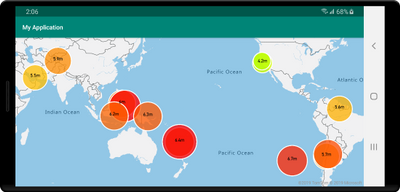
As an example, take into consideration earthquake data. Each data point has a magnitude property. To show the related magnitude of each data point on a map we might want to draw scaled circles using the BubbleLayer when the larger the magnitude of a data point, the larger the radius of the circle. The following code demonstrates how to apply data-driven style to the radius option in the BubbleLayer, which will scale the radius based on the magnitude property of each data point on a linear scale from 2 pixels, magnitude of 0 to 40 pixels, and the magnitude is 8.
BubbleLayer layer = new BubbleLayer(source,
      bubbleRadius(
             interpolate(
                   linear(),
                   get("magnitude"),
                   stop(0, 2f),
                   stop(8, 40f)
             )
      )
);
We could also apply a similar data driven style which defines the color of each circle and generate a map that looks like the following.
The Azure Maps Web SDK has similar style expression support, although in a JSON format. These JSON formatted expressions can be used with the Android SDK as well by serializing them as a string and passing them into Expression.raw method which will parse it for you. For example, the following two expressions do the same thing:
//Native Android expression class
Expression exp = Expression.get("title")

//Parsing a stringified JSON expression.
Expression exp = Expression.raw("['get','title']")
See the documentation to learn more.
Vector tile source support
Vector tiles are a newer geospatial data format that makes it fast and easy to render massive datasets on an interactive map while having full control of styling and interactions locally within the map.
Vector tile layers use the same tile pyramid system as tile layers but contain raw compressed vector data while tile layers render raster imagers. The data in a vector tile contain geographic features in the form of points, lines, and polygons. There are several advantages of using vector tile layers instead of raster tile layers:
- The file size of a vector tile is typically much smaller than an equivalent raster tile. As such, less bandwidth is used. It means lower latency, a faster map, and a better user experience.
- Since vector tiles are rendered on the client, they adapt to the resolution of the device they’re being displayed on. As a result, the rendered maps appear more well defined, with crystal clear labels.
- Changing the style of the data in the vector maps doesn’t require downloading the data again, since the new style can be applied on the client. In contrast, changing the style of a raster tile layer typically requires loading a new set tiles from the server.
- Since the data is delivered in vector form, there’s less server-side processing required to prepare the data. As a result, the newer data can be made available faster.
Azure Maps adheres to the Mapbox Vector Tile Specification, an open standard. See the documentation to learn more.
Additional rendering layers
The Azure Maps Android SDK already provides rendering layers for symbols, lines, polygons, and tile layers. With this update several additional rendering layers have been made available.
Bubble layer – easily render points as scaled circles on the map. Documentation
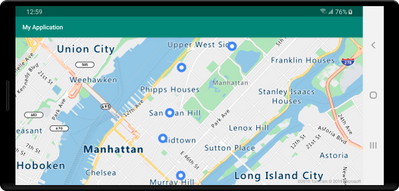 Map showing points on a map
Heatmap layer – show the density and “hot spots” of a set of points on the map. Documentation
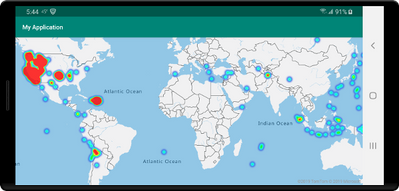 Map showing points as a heat map
Polygon extrusion layer – vertically stretch polygons to create bar charts or buildings. Documentation
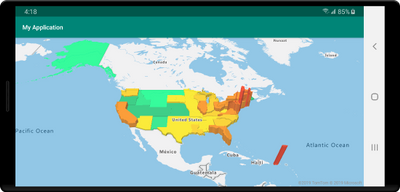 Map with extruded polygons or state boundaries
Image layer – overlay georeferenced images as a layer on the map. Documentation
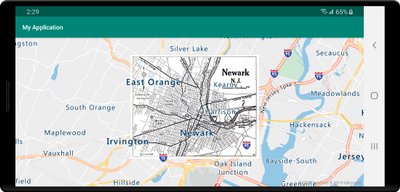 Map with an image of overlaid on top
Additional improvements
The following are some additional improvements that have been added.
- Clustering of point data in a data source.
- Easily import GeoJSON file into a data source.
- Improved traffic incident integration based on vector tiles for better performance. Also the ability to filter traffic incidents by category and magnitude.
- UI controls for zooming, pitching, and rotating the map, as well as a control for toggling traffic overlays on and off.
- New popup class similar to Web SDK.
- Easily modify the color of the built-in marker icon.
- Improved documentation with examples in Java and Kotlin.
We want to hear from you
We are always working to grow and improve the Azure Maps platform and want to hear from you. We’re here to help and want to make sure you get the most out of the Azure Maps platform.
- Have a feature request? Having an issue getting your code to work? Have a topic you would like us to cover on the Azure blog? Ask us on the Azure Maps forums.
- Looking for code samples? There’s a plethora of them on our Azure Maps Code Sample site. Wrote a great one you want to share? Join us on GitHub.
To learn more, read the Azure Maps documentation


Recent Comments