
by Contributed | Sep 14, 2021 | Dynamics 365, Microsoft 365, Technology
This article is contributed. See the original author and article here.
Consumers and businesses are increasingly turning to digital platforms for relevant product and service information, making it critical for companies to effectively meet and exceed customer expectations through digital services and technology. Microsoft Dynamics 365 is helping organizations meet this challenge by connecting and unifying commerce and marketing activities.
By bringing together solutions such as Dynamics 365 Commerce and Dynamics 365 Marketing, businesses can more effectively target and deliver engaging, intuitive, and user-friendly digital commerce buying experiences. These tools allow organizations to leverage machine learning models, artificial intelligence infused-personalization, and event and data-driven customer journeys, to deliver bespoke buying experiences across B2B and B2C markets.
Personalized and intuitive experiences
To effectively compete in omnichannel retail, businesses need technology solutions that allow them to deliver personalized and intuitive shopping experiences. Many customers want their shopping experience to be somehow personalized. Effective personalization can also increase store revenue. Yet, delivering personalized and intuitive experiences can be challenging for businesses that, despite multiple in-person interactions with customers and ongoing engagements with them online, cannot collect and connect the data from these experiences.
By unifying the data from every customer touchpoint, retailers can develop a more meaningful and holistic understanding of their customers. This deeper understanding can then be leveraged to quickly move customers from evaluation to purchase decision, regardless of the channel in which the customer chooses to engage. Ultimately, by delivering personalized and intuitive shopping experiences, retailers can improve overall conversion rates and maximize the lifetime value of their customers.
Ste. Michelle Wine Estates
One retailer that is seeing the benefits of delivering personalized and intuitive experiences is Ste. Michelle Wine Estates. Ste. Michelle Wine Estates, one of the largest premium wine companies in the United States, prides itself on superior consumer experiences. To unify its consumer data and provide opportunities for innovation, Ste. Michelle deployed Dynamics 365 Commerce across all of its wine brands.
“The more we know about the consumerand the more adept we can be at using that information in intelligent waysthe better we can make technology an enabler of consumer satisfaction.” Joe Gregg, Chief Information Officer, Ste. Michelle Wine Estates
Learn more: Ste. Michelle Wine Estates customer story
Seamless omnichannel services
Personalized digital customer engagement extends well beyond the confines of online marketplaces and digital storefronts. To deliver a fully seamless and frictionless buying experience, merchants must be able to effectively transition from online to brick-and-mortar and back againand do this without losing the personal touch.
Consumers are more likely to buy from retailers who reference past purchase experiences. These are easy feats for properly configured information systems in online environments, but transitioning to in-store, team member-led experiences can be tricky.
To be effective in this effort, retailers need to empower in-store team members with relevant and timely consumer data. Providing the correct data at the right time can be difficult when retailers are amassing a large amount of consumer data. Fortunately, Dynamics 365 Commerce can leverage AI and machine learning capabilities to deliver personalized recommendations, insights, and loyalty programs access directly into the hands of brick-and-mortar team members. Ultimately, by connecting digital, in-store, and back-office operations in a single retail platform, merchants can deliver the seamless purchase journeys that modern consumers and businesses have come to expect.
Signature Cosmetics & Fragrances
A retailer positioning itself to take advantage of the benefits of seamless omnichannel service is Signature Cosmetics & Fragrances. Signature Cosmetics & Fragrances, a leading cosmetics and fragrance group, understood the impact the COVID-19 pandemic and subsequent lockdowns would have on its network of more than 170 stores across South Africa, Botswana, and Namibia.
When the company began its modernization program by implementing Dynamics 365 Finance and Operations, it did not immediately consider the benefits of connecting its commercial activities in a seamless omnichannel service. As the project moved forward and they gained experience in e-commerce, they quickly grasped the value of such an approach. By implementing Dynamics 365 Commerce, Signature Cosmetics & Fragrances can now deliver a seamless experience across product categorization and loyalty programs in its brick-and-mortar stores and online. One example is that the company can now directly connect a customer’s online wish list with in-store sales opportunities.
“Part of the project plan is once we have all this data following through the productivity software in retail, e-commerce, and supply chain, we will have Power BI sitting above everything and drawing from various departments to present it as reports that really help us make decisions.” Akheel Pragjee, Managing Director of the Signature Group
Learn more: Signature Cosmetics & Fragrances customer story
Next steps
As we have seen, delivering a personalized digital customer engagement is a fundamental necessity for modern retailers. Dynamics 365 provides the ability to adapt and innovate with the only portfolio of business applications that empowers your organization to deliver operational excellence and delight every customer. Two of our solutions, Dynamics 365 Commerce and Dynamics 365 Marketing, combine to allow your company to provide a unified, or connected, commerce solution. Try our free Dynamics 365 Commerce trial today to get started creating personalized and friction-free digital commerce experiences for B2C and B2B businesses.
The post Deliver personalized digital customer engagement with Dynamics 365 appeared first on Microsoft Dynamics 365 Blog.
Brought to you by Dr. Ware, Microsoft Office 365 Silver Partner, Charleston SC.
by Contributed | Sep 13, 2021 | Technology
This article is contributed. See the original author and article here.
Today, we are excited to announce the integration of the Dynatrace Software Intelligence Platform in Azure Spring Cloud.
Over the past 18 months, we worked with many enterprise customers to learn about the scenarios they face. Many of these customers have thousands of Spring Boot applications running in on-premises data centers. As they migrate these applications to the cloud, they need to instrument them for application performance monitoring (APM) using solutions their developers are familiar with and have been using for years. In addition, they must ensure continuity for desktop and mobile applications that are already pre-instrumented for end-to-end monitoring using agents like Dynatrace OneAgent, which automatically discovers and maps all applications, microservices, and infrastructure as well as any dependencies in dynamic hybrid, multi-cloud environments. With the integration of Dynatrace OneAgent in Azure Spring Cloud, you can continue your journey and easily instrument your Spring Boot applications with Dynatrace.
Continue your Dynatrace journey. Most organizations that deploy Spring Boot applications today share a similar goal: maximize the benefits of running Spring Boot applications at virtually any scale, using automation and APM. While Azure Spring Cloud excels at abstracting away much of the toil associated with managing containerized workloads, the challenge of monitoring and maintaining the performance and health of these applications, or of troubleshooting issues when they occur, can be daunting—especially as organizations deploy these applications at massive scale. To help you succeed and continue your Dynatrace journey, we integrated and upgraded your ability to instrument, monitor and deliver observability using Dynatrace OneAgent across your Azure Spring Cloud instances. That begins with setting up instrumentation quickly and easily. Then you can analyze the performance and health of your applications, JVMs, transactions, and more.
“For Liantis, true hybrid monitoring across both our on-premises and cloud-based Spring Boot microservices is key, but we also require simple and straightforward implementation – which is in line with the true Azure Spring Cloud philosophy of abstracting complexity. Doing so allows Liantis to spend more time on developing innovative applications, rather than building and operating infrastructure, which enables us to deliver true value for our customers and employees. Building on our in-house expertise with both Spring and Dynatrace technology, combined with our previous investments, the Dynatrace integration with Azure Spring Cloud was the obvious choice for Liantis.” — Nicolas Van Kerschaver, CIO, Liantis
“Being able to scale is critical for today’s digital business, as organizations have made the shift to cloud-native workloads and microservices. While cloud-native technologies and microservices have tremendous advantages, dynamic environments bring complexity that makes it difficult to understand the relationships and dependencies across an organization’s cloud ecosystem. Dynatrace’s strategic partnership with Microsoft allows us to extend the impact of our automatic and intelligent observability even further to accelerate digital transformation. Through the Dynatrace integration with Azure Spring Cloud, we are enabling full visibility into application data for Spring Boot applications, which means more time innovating and a better product for end-users.” – Eric Horsman, Global Director of Strategic Alliances, Dynatrace
“At Microsoft, we are committed to helping our customers modernize their applications and innovate faster than ever before. By integrating a software intelligence solution like Dynatrace with Azure Spring Cloud, we can enable our customers with easy implementation of end-to-end observability, including automatic and continuous root-cause analysis, for their Spring Boot applications.” — Julia Liuson, Corporate Vice President, Developer Division, Microsoft
Instrument your Spring Boot applications. Run a “provisioning” automation pipeline for a complete hands-off experience to instrument and monitor any new applications that you create and deploy – using Terraform or ARM Template. Or you can run it on-demand using the Azure CLI for greater flexibility and control.
az spring-cloud app update --name customers-service
      --env DT_TENANT=<your-tenant> DT_TENANTTOKEN=<your-tenant-token>
      DT_CONNECTION_POINT=<your-connection-point>
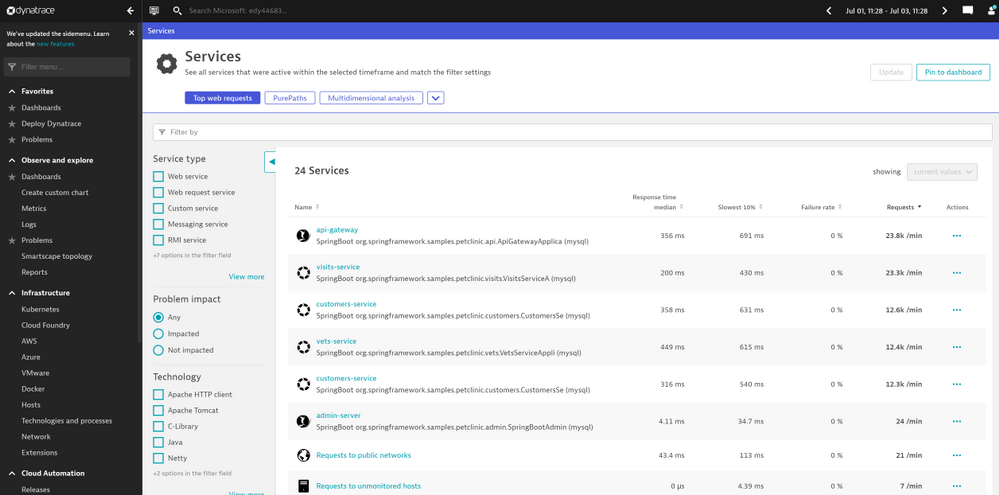
Automatic discovery and mapping of applications and their dependencies. To maintain real-time awareness in dynamic environments, Dynatrace automatically discovers and maps application components (including application servers, frameworks and microservices), databases, messaging and eventing systems, and their relationships. In the view shown below, the Dynatrace Portal shows all the Spring Boot applications running in a production workload.
Screenshot 1 – shows all the Spring Boot applications running in a production workload
End-to-end observability of Spring Boot applications’ complete HTTP/S transactional behavior to understand the effect on business outcomes and user experiences. In the example view below, Dynatrace provides developers with all the transaction traces implemented in code without any code change to applications.
Screenshot 2 – shows transaction traces implemented in code without any code change to applications
Endpoint monitoring, API monitoring, DB calls monitoring, end-user experience monitoring. Dynatrace captures all the database queries initiated by your Spring Boot applications, including Azure database services. In the example view below, Dynatrace Portal shows all the active REST API operations within a production workload.
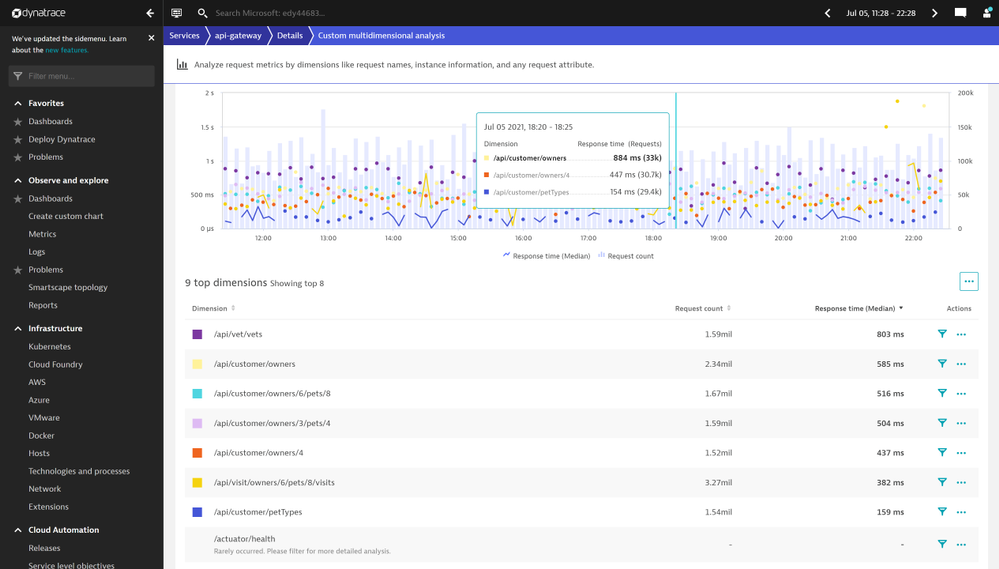
Screenshot 3 – shows all the active REST API operations within a production workload
In the example view below, the Dynatrace Portal shows all the database queries initiated by a production workload.
Screenshot 4 – shows all the database queries initiated by a production workload
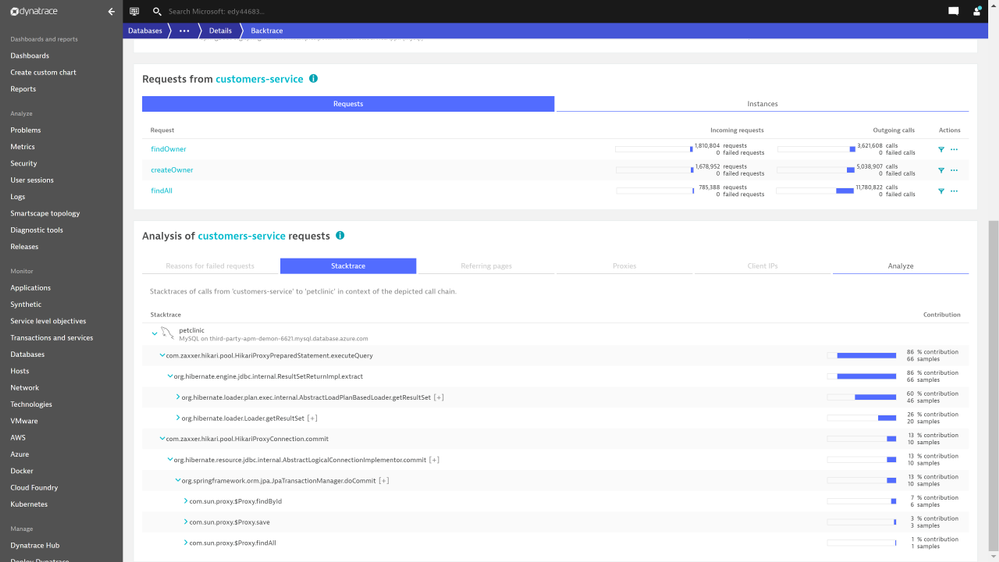
Root-cause and impact analysis of application performance problems and business outcomes for faster, more reliable incident resolution. Dynatrace provides deep-code level visibility with end-to-end traces and the integration provides AI-assisted problem detection and automatic root-cause analysis allowing you to stay on top of your deployments and distinguish between healthy and unhealthy applications.
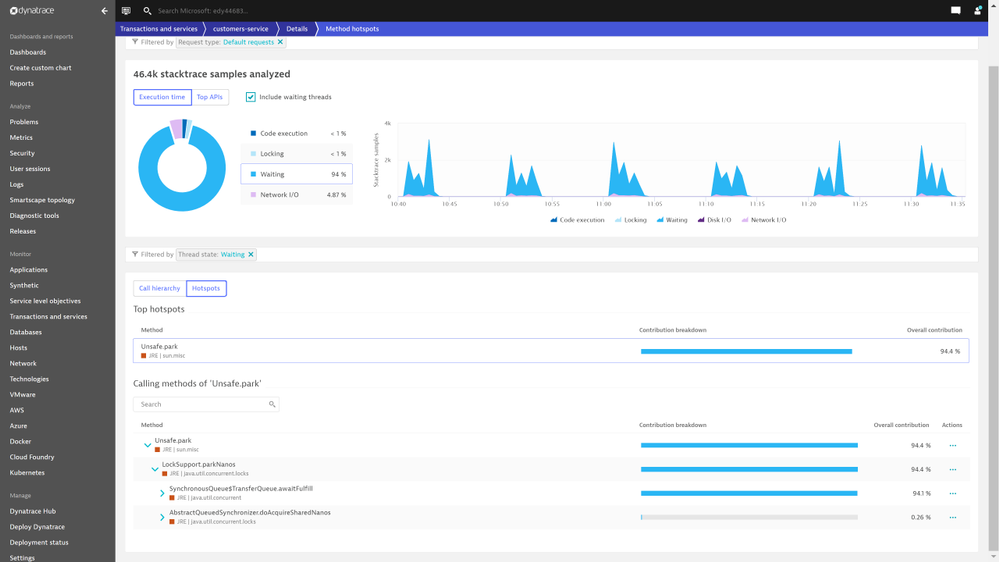
Screenshot 5 – shows results from stack trace analysis
Detect anomalies in your Spring Boot application instances. Dynatrace passes the collected data through an AI engine for automated root cause analysis, code level hotspot analysis, top database queries, and exception analysis. In the example screenshot below, Dynatrace automatically identifies code modules that are CPU intensive so that you do not have to dig through the data.
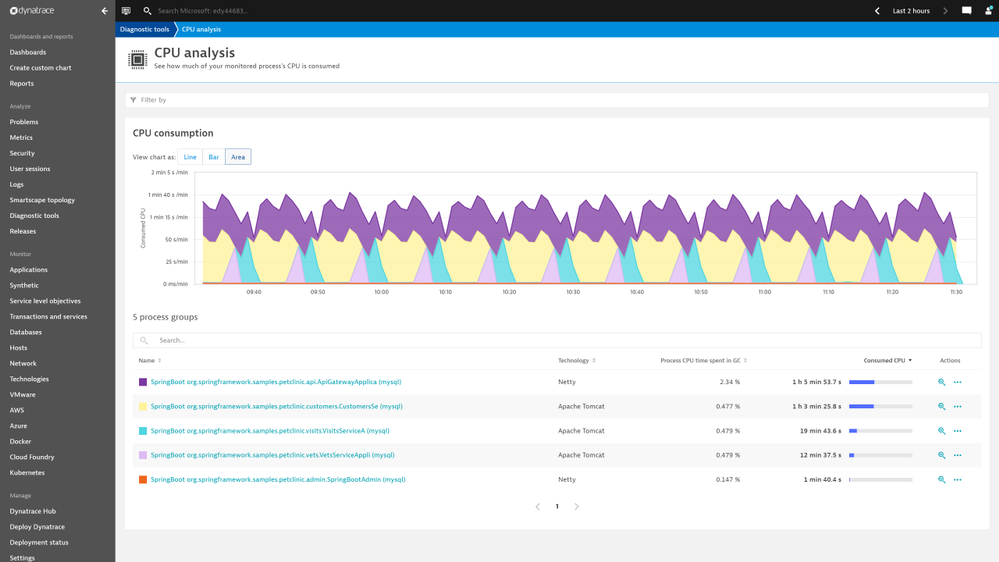
Screenshot 6 – code modules that are CPU intensive so that you do not have to dig through the data
You can find all the top database queries initiated, how expensive these queries are, and how many times these queries are called by applications. In the example screenshot below, Dynatrace shows top database queries initiated by a production workload.
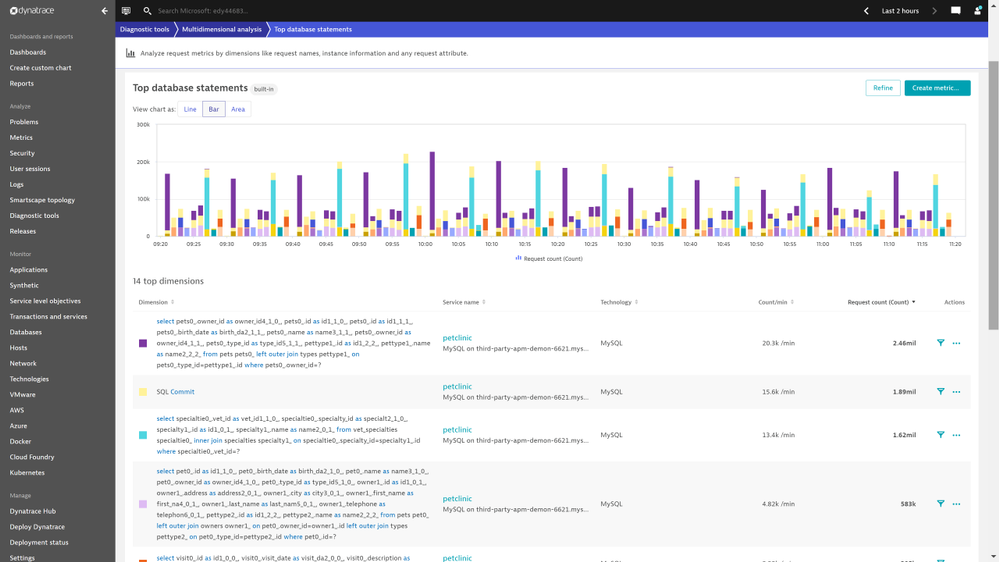
Screenshot 7 – shows top database queries initiated by a production workload
All application code level exceptions are logged along with many details into the stack traces of where the exception occurred. In the example screenshot below, Dynatrace portal shows the top exceptions thrown by a production workload.
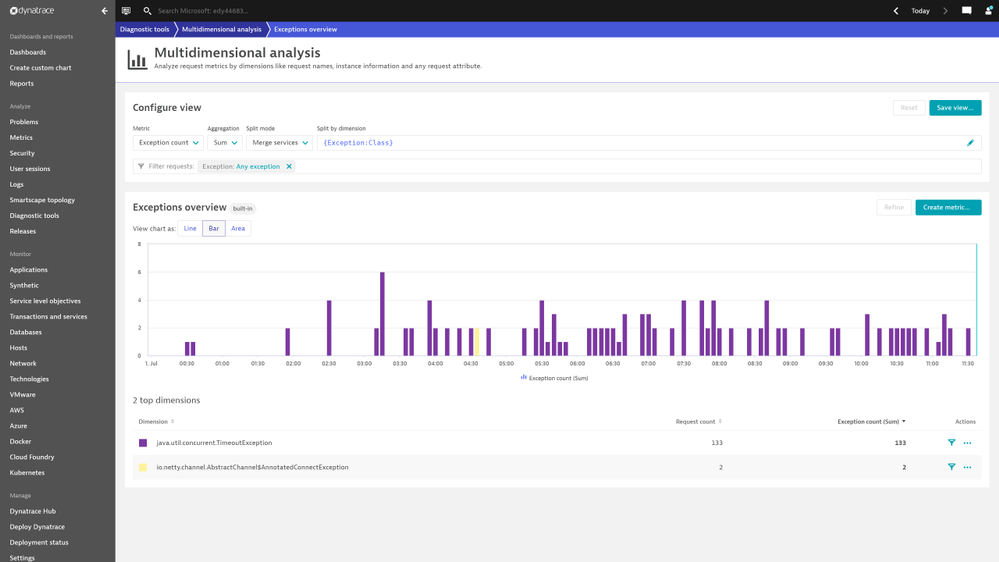
Screenshot 8 – shows the top exceptions thrown by a production workload
The Dynatrace Software Intelligence Platform automatically baselines all the performance metrics of Spring Boot applications. When the response times of an application increase beyond the auto detected baseline, the platform creates an alert with information like how much response times have breached from baselines. In the example screenshot below, Dynatrace shows response time degradation for a few services in a production workload.
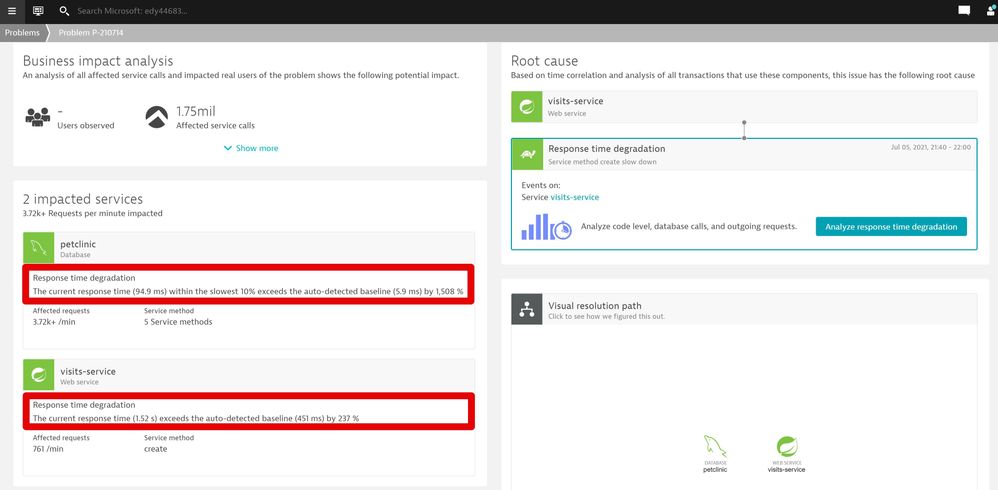
Screenshot 9 – shows response time degradation for a few services in a production workload
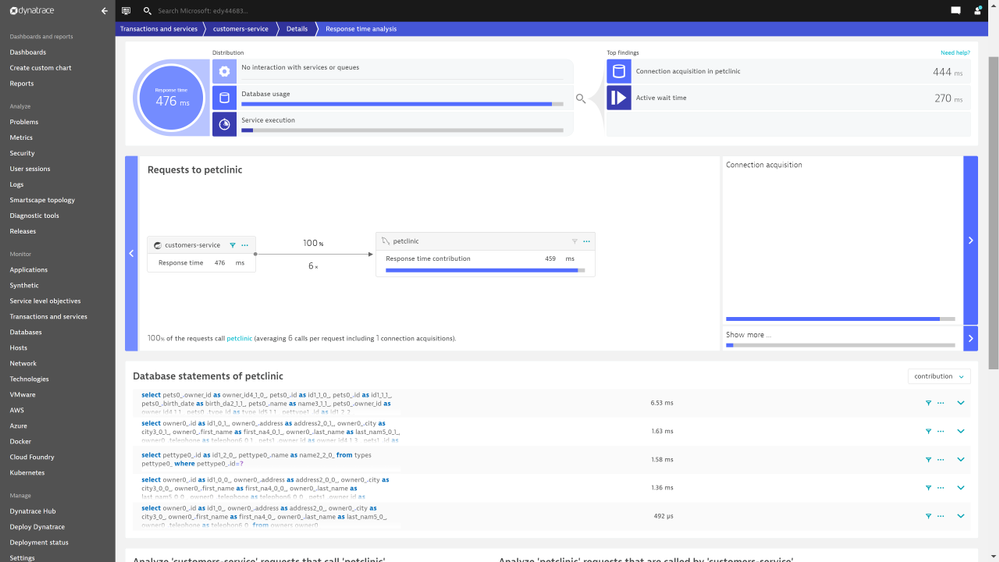
Dynatrace gives you insights on what caused these increases in response time, particularly the time taken to make a connection to a database service. In the example below, the Dynatrace portal calls out the time taken to make connections to a database.
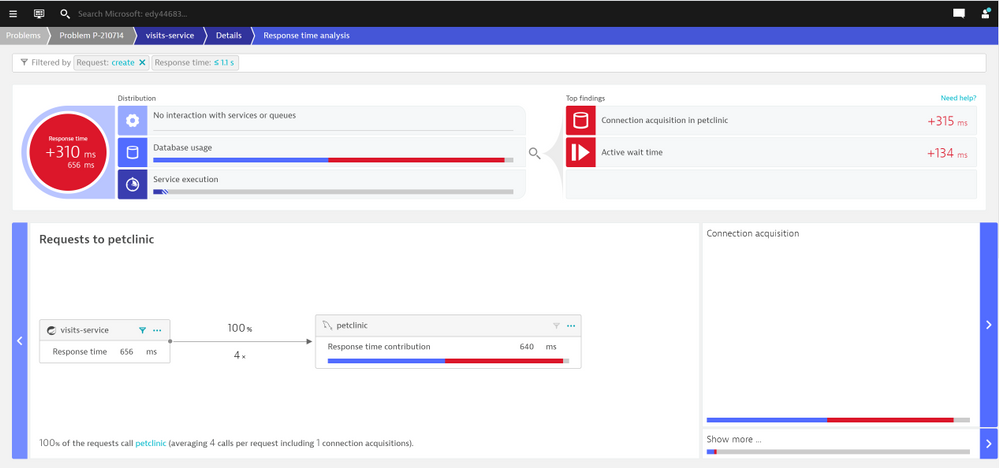
Screenshot 10 – shows time taken to make connections to a database
Dynatrace automatically detects all the failures. In the example below, Dynatrace signals an increase in failure rates to reach an external network.
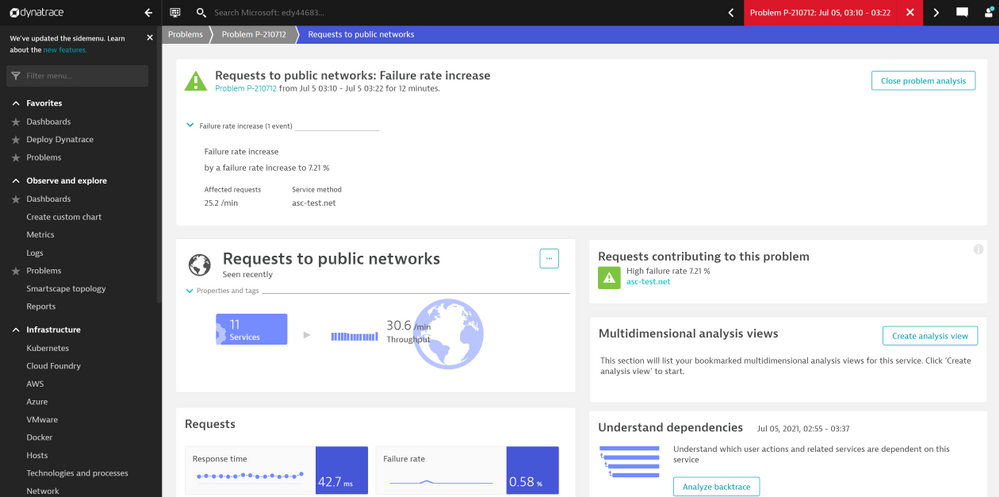
Screenshot 11 – signals an increase in failure rates to reach an external network
Focus on delivering value to your end-users. Once instrumented, as you scale out to multiple Spring Boot application instances, any new application instances are automatically monitored for you. Dynatrace enables application developers to observe Spring Boot applications end-to-end. You spend less time managing the agent installation and maintenance and more energy on identifying and resolving incidents faster. Azure Spring Cloud service is on-point for periodically updating the Dynatrace OneAgent.
Build your solutions and monitor them today!
Azure Spring Cloud is jointly built, operated, and supported by Microsoft and VMware. It is a fully managed service for Spring Boot applications that abstracts away the complexity of infrastructure and Spring Cloud middleware management, so you can focus on building your business logic and let Azure take care of dynamic scaling, patches, security, compliance, and high availability. With a few steps, you can provision Azure Spring Cloud, create applications, deploy, and scale Spring Boot applications and start monitoring in minutes. We will continue to bring more developer-friendly and enterprise-ready features to Azure Spring Cloud.
We would love to hear how you are building impactful solutions using Azure Spring Cloud. Start monitoring your Spring Boot applications with Dynatrace.
Resources
by Contributed | Sep 13, 2021 | Dynamics 365, Microsoft 365, Technology
This article is contributed. See the original author and article here.
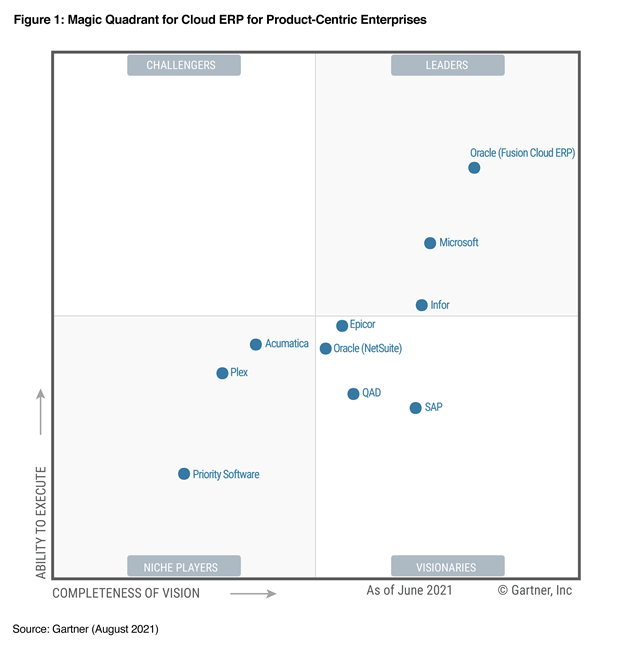
We are thrilled that Gartner has recognized Microsoft as a Leader in the 2021 Magic Quadrant for Cloud ERP for Product-Centric Enterprises for Microsoft Dynamics 365.
Dynamics 365 Supply Chain Management and Dynamics 365 Finance offer businesses two standardized enterprise resource planning (ERP) capabilities on a composable ERP platform, functioning as stand-alone solutions or as a tightly integrated and extensible system. As product-centric enterprises look to renovate their existing ERP platform to improve systems and processes by moving them to the cloud, Dynamics 365 is enabling the transformation and improving IT agility to deliver business outcomes in the process.
For example, Bel Fuse recently selected Dynamics 365 Finance and Dynamics 365 Supply Chain Management to move away from a legacy version of Oracle that was highly customized and difficult to update. Bel Fuse was able to unify its data and can now more easily manage its supply chain operations and finance processes, gaining more agility to respond quickly to changes in the market.
Dynamics 365 also delivers an enterprise SaaS application capable of providing data, analytical insight, and operational application services by running on the Microsoft Azure cloud. The Azure cloud enables clients to use Microsoft Power Platform for analytics and Microsoft Power Apps for low-code/no-code extensions, allowing organizations to improve operations with real-time, AI-based predictive insights across a broader ERP strategy.
An excellent example of a company leveraging these capabilities is GN Group. GN Group recently adopted Dynamics 365 Supply Chain Management and Dynamics 365 Finance to centralize all its ERP data in the cloud. With help from Microsoft Partner Network member SCALES Group, GN Group evolved its supply chain processes to be more agile and structured. It uses Dynamics 365 Finance to unify financial data and gain AI-based predictive insights in real-time. The company also adopted Microsoft Power Platform to extend its Dynamics 365 business applications. So far, GN Group uses Microsoft Power BI for reporting and analytics and Microsoft Power Apps to build a custom, vendor-managed inventory (VMI) solution that seamlessly connects to Dynamics 365 Supply Chain Management.
And we continue to invest and expand our capabilities. At the end of July, we acquired Suplari, a leading provider of supplier spend insights that enable companies to proactively manage supplier spend by transforming data from multiple sources, such as contracts, purchase orders, invoices, expenses, and supplier risk, into valuable insight. By bringing Suplari’s spend intelligence insights together with the existing Dynamics 365 capabilities, Microsoft is further helping organizations become insight-driven and enabling business leaders to take strategic action. In August, Dynamics 365 Intelligent Order Management became generally available. It enables enterprises to optimize and automate fulfillment using real-time inventory, AI, and machine learning. Organizations can truly gain the agility they need to quickly adapt to changing business models, support the latest fulfillment methods, add new order intake channels by seamlessly integrating their existing ERP systems to manage the entire order lifecycle from intake to fulfillment.
Request a demo or take a guided tour of Dynamics 365 Supply Chain Management and Dynamics 365 Finance.
* This graphic was published by Gartner, Inc. as part of a larger research document and should be evaluated in the context of the entire document. The Gartner document is available upon request from Microsoft.
GARTNER and Magic Quadrant are registered trademarks and service mark of Gartner, Inc. and/or its affiliates in the U.S. and internationally and are used herein with permission. All rights reserved. Gartner does not endorse any vendor, product or service depicted in its research publications, and does not advise technology users to select only those vendors with the highest ratings or other designation. Gartner research publications consist of the opinions of Gartner’s research organization and should not be construed as statements of fact. Gartner disclaims all warranties, expressed or implied, with respect to this research, including any warranties of merchantability or fitness for a particular purpose.
Gartner, Magic Quadrant for Cloud ERP for Product-Centric Enterprises, 24 August 2021, Tim Faith, Denis Torii, Paul Schenck, Dixie John, Abhishek Singh.
The post Gartner® Recognizes Microsoft as a Leader in the 2021 Gartner Magic Quadrant™ for Cloud ERP for Product-Centric Enterprises appeared first on Microsoft Dynamics 365 Blog.
Brought to you by Dr. Ware, Microsoft Office 365 Silver Partner, Charleston SC.
by Contributed | Sep 10, 2021 | Technology
This article is contributed. See the original author and article here.
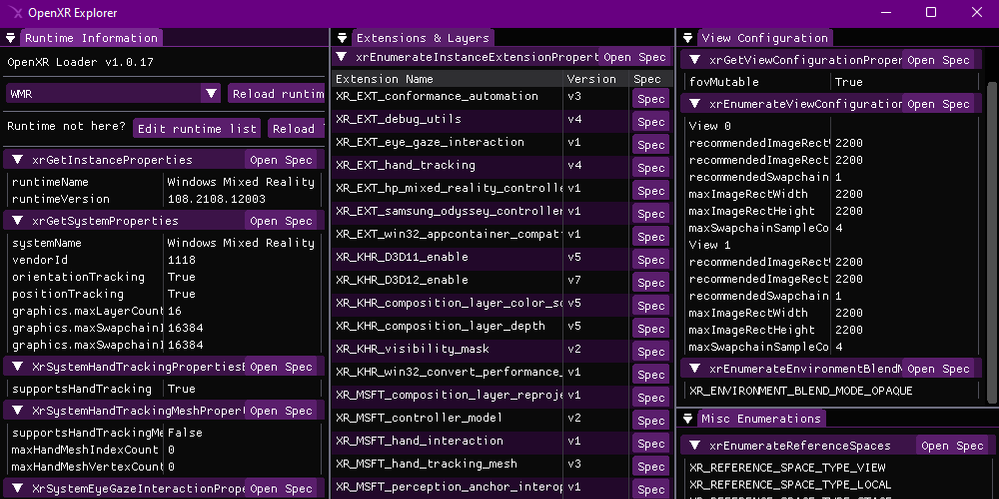
Screenshot of the OpenXR Explorer application.
If you’re a Unity or Unreal developer that’s building an experience atop OpenXR, or a lower level developer that might be interacting with OpenXR directly, then OpenXR Explorer is a tool that may be of interest to you! There are numerous OpenXR runtimes out there, and OpenXR Explorer can help you find your way around each of these separately maintained implementations.
OpenXR Runtimes
OpenXR is unfortunately not a singular library that simply handles all XR headsets, instead it’s a common API that many different companies agree upon and implement. There are currently 5 conformant OpenXR runtimes available on Windows alone! These runtimes do have to pass a conformance test that assures a base level of consistent behavior, and this means that a well designed OpenXR application should run on any OpenXR runtime it encounters on its target platforms!
In reality, this is easier said than done, especially once you consider extensions. Right now, much of the really interesting XR behavior is present in the form of optional OpenXR extensions. For example, XR_MSFT_spatial_anchor is a MSFT extension that’s currently only implemented in Microsoft OpenXR runtimes like Windows Mixed Reality! In time, extensions like these may graduate to KHR extensions, officially recognized by Khronos as a common, yet still optional extension. You can read about how extensions are adopted into the standard over in the spec.
For the thorough developer, this means a lot of testing. And for the developer working directly with OpenXR, understanding what differences to expect can help with designing your code. OpenXR Explorer helps you peek at information provided by each runtime, see the extensions it implements, as well as inspect some common properties and enumerations that can be queried. In addition to this, OpenXR Explorer provides some functionality for easily changing active runtimes, by a visual user interface, or via command line.
Runtime Switching
Each OpenXR runtime has its own way of setting itself as active! This is generally fine for normal users, but as a developer, it can be nice to have some options. On Windows, the active runtime is indicated using a registry key, and while you could modify this directly yourself, OpenXR Explorer provides a simple way to do this with just a click!
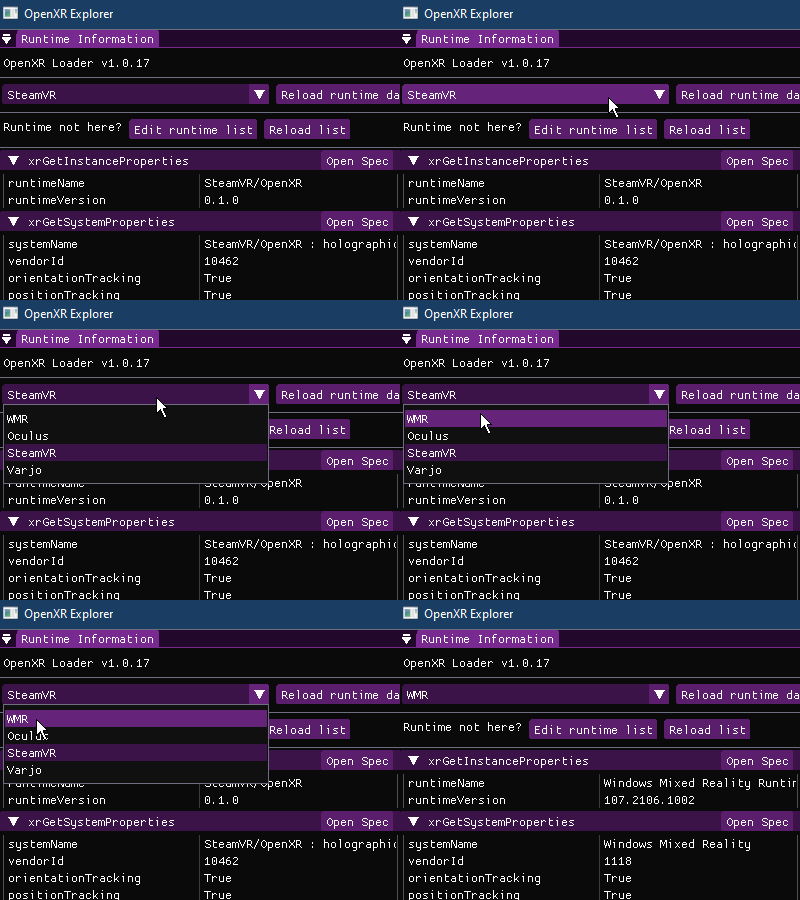 User changing runtime using the OpenXR Explorer GUI
Alternatively, you can use xrsetruntime.exe via the Command Prompt directly. Runtime switching is performed with a separate executable to prevent the main OpenXR Explorer application from requiring admin access to the computer when modifying the OpenXR registry key.
# To list all available OpenXR runtimes
xrsetruntime.exe --list

# From a Command Prompt with Admin permissions
xrsetruntime.exe -WMR
Extensions and Properties
A quick glance at a runtime’s extension support can tell you a lot about what to expect! For example, the Windows Mixed Reality runtime on Windows currently supports the XR_KHR_D3D11_enable and XR_KHR_D3D12_enable extensions, but not XR_KHR_opengl_enable, XR_KHR_vulkan_enable, or XR_KHR_vulkan_enable2. This would be an important thing to know about for a certain subset of developers!
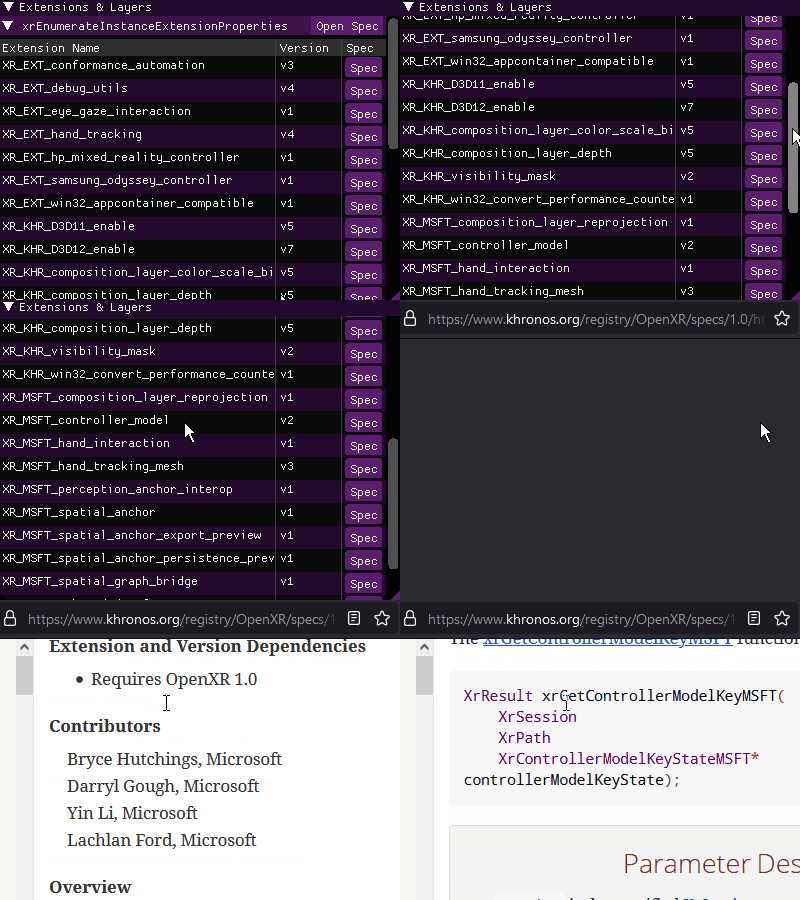 OpenXR Explorer’s extension view, with links to the spec
OpenXR Explorer can also attempt to spin up an instance of the runtime and query OpenXR for any easily accessible properties it provides. Knowing what the recommended display resolution is, or what type of positioning/reference spaces the runtime supports can also be quite handy! In addition, OpenXR runtimes often list enumerations in order of preference, so it can be quite insightful to see, for example, what swapchain formats are listed towards the top of the enumeration list.
And for those interested in the gritty details about the information they’re seeing, the GUI provides quick links to the relevant portions of the OpenXR specification! The spec is an invaluable resource for the native developer, or those curious about the exact behavior indicated by a particular enumeration.
OpenXR explorer also provides a Command Line Interface that will allow you to gather all the same information via the Command Prompt! When provided command line arguments, OpenXR Explorer will skip the GUI, and just print out information.
# To list what arguments are available
openxr-explorer.exe -help

# To show the runtime's extension list, you can pass in either the name of the
# function, or the structure that contains the data.
openxr-explorer.exe -xrEnumerateInstanceExtensionProperties
# Or
openxr-explorer.exe -XrExtensionProperties
Try it out!
You can download the latest Windows or Linux builds of OpenXR Explorer here. It’s also open source under the MIT license, and you can find the code as well as additional instructions here! We hope you’ll find this tool useful along your OpenXR journey, and welcome any feedback or contributions :)


Recent Comments