Enhance visibility with Dynamics 365 digital supply chain solutions

Enhance visibility with Dynamics 365 digital supply chain solutions

This article is contributed. See the original author and article here.

The concept of the global control tower first appeared on the radar of supply chain leaders around 15 years ago. As more and more companies pursued end-to-end visibility for increasingly globalized supply chains, the idea quickly gained momentum. IndustryWeek noted global control towers as one of the hottest supply chain buzzwords of 2008.1 Still, for an idea that has been buzzing for over a decade, many companies have been challenged to move from concept to reality.

Microsoft Dynamics 365 Supply Chain Management is helping companies overcome these challenges by equipping them with the tools necessary to create digital supply chains that are highly collaborative, coordinated, agile, and demand-driven. With these new supply chain solutions in place, businesses can achieve real-time, end-to-end visibility across the supply chain, breathing new life into concepts like supply chain control towers in the process.

This embed requires accepting cookies from the embed’s site to view the embed. Activate the link to accept cookies and view the embedded content.

This site uses cookies for analytics, personalized content and ads. By continuing to browse this site, you agree to this use.

Supply chain control towers

It has quickly become essential for businesses to invest in technology that can help them sense and predict supply chain constraints and disruptions and spikes and troughs in demand. From using advanced forecasting techniques to real-time collaboration between trading partners and commercial teams, business processes are increasingly geared to generate and proactively shape customer demand. Companies must also integrate the agility to continuously optimize supply and production plans in real-time, as forecast and predictions shift into actual customer order receipts. Supply chains control towers help in these efforts by building both agility and resiliency into the supply chain by delivering end-to-end operational visibility, all the way from planning to delivery and back.

Resiliency in this context is about driving business continuity. This can take the form of digitizing production in factories, automating operations on the shop floor, and providing unparallel transparency, in real-time, to leadership. By utilizing Dynamics 365 Supply Chain Insightspreview to create a digital representation of the physical supply chain, whether called a control tower, digital twin, or supply chain nerve center, businesses can reach new levels of agility and gain the ability to sense and proactively mitigate disruptions before they occur. And to respond faster when the inevitable happens, such as an unpredictable or unforeseen event.

McKinsey & Company estimates that a $10 billion business with a high-performing supply chain can reduce cost by as much as $50 million annually through digital initiatives such as supply chain nerve centers.2 This is because control towers enable supply chain organizations to blur the lines between planning and execution, allowing businesses to uncover and exploit improvement opportunities faster than ever before.

Building blocks

Visibility

Starting with the end in mind, regardless of the mixture of people, processes, data, organization, and technology used to erect a control tower, it must deliver end-to-end visibility across all supply chain nodes to be successful. This visibility should penetrate beyond tier 1 and tier 2 partners.

Agility

While visibility is the starting point, visibility by itself is not sufficient. Supply chain solutions must also deliver improvements to agility so companies can more effectively respond to changing customer demands. In practice, this means going beyond the ability to immediately grasp what is happening (system-wide visibility) and on to making predictions of what is likely to happen next. This way, business leaders can adapt and overcome challenges as they are identified in real-time.

Unified data

The value that a construct such as a supply chain control tower can deliver is proportional to the organizations’ ability to unify data from disparate sources. Enterprise resource planning (ERP) systems, legacy business applications, supplier systems of records, siloed hard drives, PLCs, and even IoT data streams all must be incorporated and unified.

Automation

Businesses also need supply chain solutions that incorporate rules-based orchestration to model and automate responses to fulfillment constraints. By leveraging automation in this manner, organizations can proactively address issues with actionable, data-driven insights, allowing them to adapt faster to disruptions and constraints.

Vision

At Microsoft, we see supply chain control towers as a shared service process that can be brought together from a mix of supply chain solutions. For example, a control tower can be assembled using Dynamics 365 Supply Chain Management, Dynamics 365 Intelligent Order Management, Dynamics 365 Supply Chain Insightspreview together with Microsoft Power Platform, and our rapidly growing ecosystem of digital supply chain applications.

A supply chain control tower enabled by Dynamics 365 in this fashion positions organizations to respond faster and more intelligently to disruptions and opportunities. With seamless integration to many market-leading API-enabled applications using our configurable pre-built partner connectors, businesses can convert the action signals from what-if analysis into directives sent to the applications that guide day-to-day operational execution.

Organizational benefits

When organizations use Dynamics 365 to create a supply chain control tower, they can realize the benefits of a single platform. One version of truth brings together internal and external stakeholders to visualize constraints and disruptions at any point in the value stream. Then, affected agents and authorities can work together to analyze the upstream or downstream impacts, collaborate in near real-time to formulate and enact optimal responsesall from one location and one pane of glass.

In this way, a supply chain control tower created with Dynamics 365 enables organizations to adapt quickly to demand shifts by deliberately blurring the lines between planning and execution and effectively creating a continuous digital feedback loop across entities and distinct business processes.

Let’s now look at how a customer, Breville Group, is creating a resilient supply chain of the future with Dynamics 365.

This embed requires accepting cookies from the embed’s site to view the embed. Activate the link to accept cookies and view the embedded content.

This site uses cookies for analytics, personalized content and ads. By continuing to browse this site, you agree to this use.

Looking forward

Dynamics 365 Supply Chain Management provides manufacturers, distributors, and retailers with the real-time visibility and intelligence they need to move from reactive to proactive. It unifies data and uses predictive insightsacross order fulfillment, planning, procurement, production, inventory, warehousing, and transportationto maximize operational efficiency, product quality, and profitability. And, with innovative technologies, such as AI and machine learning integrated into the solution, it helps organizations accelerate performance even further.

Learn more about how Microsoft Dynamics 365 Supply Chain Management, Dynamics 365 Intelligent Order Management, and Dynamics 365 Supply Chain Insights preview enable companies to strengthen and expand the Four Pillars of the Digital Supply Chain. To learn more, check out our recent webinar Create Agile and Digital Supply Chains with Dynamics 365, and join a panel of Microsoft Experts in the live Ask the Expert session scheduled for December 7, 2021, at 10AM Pacific Time.


1- IndustryWeek, A Guide to the Hottest Supply Chain Buzzwords of 2008, January 2008

2- McKinsey & Company, Building a digital bridge across the supply chain with nerve centers, January 2021

The post Enhance visibility with Dynamics 365 digital supply chain solutions appeared first on Microsoft Dynamics 365 Blog.

Brought to you by Dr. Ware, Microsoft Office 365 Silver Partner, Charleston SC.
Announcing the public preview of Microsoft Defender for Endpoint Mobile – Tamper protection

This article is contributed. See the original author and article here.

Mark a device non-compliant after 7 days of inactivity in the Microsoft Defender for Endpoint mobile app.


To be protected, customers must be confident that their end users’ devices are compliant with security policies. Today, end users are often able to bypass protections that are set by their organization. For example, users uninstall, disable settings/permissions, and force stop or clear storage of their Defender for Endpoint mobile app. Removing or disabling the Defender for Endpoint app can leave a mobile device more vulnerable to an attack.


We are excited to announce the public preview of tamper protection for mobile devices. This new feature helps ensure the retention of the Defender for Endpoint mobile app on users’ devices and helps protect devices persistently.  This feature detects devices that are out of protection for over 7 days, due to tampering with the Defender for Endpoint mobile app. These devices are marked non-compliant in Microsoft Intune (part of Microsoft Endpoint Manager).


Organizations can also set up Conditional Access policies to enforce the activation and use of the Defender for Endpoint mobile app. With these Conditional Access policies in place, users can access corporate resources only if their devices are in a compliant state. Blocked users can regain access only after the Defender for Endpoint mobile app is set up with all required permissions and the app is actively sending signals to Defender for Endpoint.


For this initial release we have scoped the detection of devices out of protection for 7 days. In upcoming releases, we plan to make this duration configurable by your security admin or your tenant admin.


How to get and configure this feature


  1. Share your Organization Tenant name and Tenant ID with Microsoft at atpm@microsoft.com, to be added to the public preview of this feature.

  2. Set up a Device compliance policy that requires Defender for Endpoint to be at or under the following machine risk score: Low (Your risk score can be set per your organization’s requirements)

  3. Set up a Conditional Access policy to block access to corporate resources on devices that are non-compliant with your device compliance policy.


 Try tamper protection for mobile devices out and let us know how it goes! We’re excited to share these new updates with you and continue to build on security capabilities across platforms. 


We look forward to hearing your feedback!  


Enhance visibility with Dynamics 365 digital supply chain solutions

Microsoft Ignite recap: Dynamics 365 news and announcements you may have missed

This article is contributed. See the original author and article here.

Thank you to everyone from across the globe who attended Microsoft Ignite last week. This year’s virtual event was packed with learning sessions, announcements, engaging conversations, and Q&Asfar too much content to absorb in just three days. To help you catch up on the news and content from Microsoft Ignite, we’ve rounded up the highlights for you.

To get started, we recommend watching three featured sessions. Start with Satya Nadella’s opening keynotean overview of trends and innovations across the Microsoft cloud that will transform your business. Then, watch the session, “Microsoft Ignite into Focus: Business Applications,” for a closer look at new and upcoming capabilities for Microsoft Dynamics 365 and Microsoft Power Platform. Also, learn about innovation across the Microsoft cloud that will allow every organization to build a hyperconnected business, providing the agility and flexibility for organizations and employees to thrive now and into the future.

Next, explore innovation across Dynamics 365 discussed in breakout and on-demand sessions during the event, starting with the highlights below.

Context IQ: Connect and collaborate in the flow of work with anyone, anywhere

We’re making it easier to connect with people, information, and conversations from Dynamics 365 workspaces, reducing the need to switch between apps to access who and what you need in the moment. At Microsoft Ignite, we announced Context IQ, a set of capabilities for Dynamics 365 and Microsoft 365 that make information, people, and conversations more accessible in the moment, reducing the need to switch between apps. Context IQ helps ensure business users can access documents and records, colleagues across the organization, and conversationsall in the flow of work, whether from within Dynamics 365 or Microsoft 365 applications.

Read a deep dive on the Dynamics 365 blog and watch the Microsoft Ignite sessionto see Context IQ in action.

Build deeper connections with Microsoft Customer Experience Platform

Organizations must be able to unlock the power of customer data to create experiences that build strong relationships. The Microsoft Customer Experience Platform, introduced at Microsoft Ignite, is a complete solution that puts organizations in control of their customer data to personalize, automate and orchestrate journeys during the entire customer lifecycle of awareness, to purchase, to service. With a deep understanding of customers and rich, out-of-the-box insights, organizations can now determine and predict intent to deliver the right content on the right channel and in the right moment.

Read a deep dive on the Dynamics 365 blog and watch the Microsoft Ignite session to see these capabilities in action.

Create an all-in-one digital contact center with Dynamics 365 Customer Service

At Microsoft Ignite, we announced the general availability of our first-party voice channel for Dynamics 365 Customer Service, built on the planet-scale communications platform that powers Microsoft Teams. The addition of the voice channel helps your organization provide consistent and personalized service to customers across all channels with one data-driven, AI-infused, end-to-end solutionno integration required.

The new first-party voice solutions join a host of other capabilities demonstrated at Microsoft Ignite, including conversational IVR, call transcription, sentiment analysis, proactive recommendations, and other built-in AI capabilities that empower your agents to resolve customer issues quickly.

Read a deep dive on the Dynamics 365 blog and watch the Microsoft Ignite session to see these capabilities in action.

Build a trusted and resilient supply chain

The current supply chain crisis spotlights the need for new levels of visibility across your entire supply chain. At Microsoft Ignite, we announced Dynamics 365 Supply Chain Insights, providing organizations with the visibility they need along with the intelligence to predict and proactively manage supply chain challenges.

We also announced updates to Dynamics 365 Supply Chain Management to optimize production processes. New capabilities enable your organization to innovate with intelligent manufacturing operations by easily adapting to new business models, improving planning agility, enhancing the visibility of your shop floor, and ensuring round-the-clock uptime and business continuity.

In addition, Microsoft introduced the preview of the Microsoft Cloud for Manufacturing, which connects experiences across the end-to-end product and service lifecycle and lights up the entire Microsoft cloud with capabilities specifically tailored to manufacturing.

Explore updates to Dynamics 365 Supply Chain Management, learn how to mitigate disruptions with Dynamics 365 Supply Chain Insights, and read about theMicrosoft Cloud for Manufacturing preview. Also, watch Microsoft Ignite sessions that take a deep dive into Dynamics 365 Supply Chain Insights, Dynamics 365 Supply Chain Management, and Microsoft Cloud for Manufacturing.

Bridge the physical and digital worlds with Dynamics 365 Connected Spaces

Announced at Microsoft Ignite, the preview of Dynamics 365 Connected Spaces, previously Dynamics 365 Connected Store, signals our expansion from retail scenarios to all spaces, from retail to manufacturing. With Dynamics 365 Connected Spaces, your organization can harness observational data (the data we generate as we move throughout the world), use AI-powered models to unlock insights about your environment, and respond in real-time to trends and patterns.

Learn more on the Dynamics 365 blog and watch the Microsoft Ignite session to see these capabilities in action.

Read more news from Microsoft Ignite

Be sure to catch up on all the news and sessions from Microsoft Ignite, now available on-demandincluding downloadable videos of sessions, transcripts, and related resources. If you need a roadmap, check out our guide to Microsoft Ignite.

The post Microsoft Ignite recap: Dynamics 365 news and announcements you may have missed appeared first on Microsoft Dynamics 365 Blog.

Brought to you by Dr. Ware, Microsoft Office 365 Silver Partner, Charleston SC.

Dynamics 365 Marketing is leading the way with personalized engagement

Dynamics 365 Marketing is leading the way with personalized engagement

This article is contributed. See the original author and article here.

Customer engagement professionals still need to build relationships, trust, and loyalty to be successful, but how we achieve these outcomes has fundamentally changed. Those changes offer the opportunity to be more effective than ever at driving these results.

To meet customer expectations, marketers are looking to create end-to-end customer experiences that are customer-led, highly personalized, and that reach their customers wherever they are, across all physical and digital channels. Data and AI make all these things possible and bring us into an exciting new frontierfrom the reactive to the predictive era.

Microsoft Dynamics 365 Marketing brings together the worlds of customer experience and marketing automation, empowering businesses to orchestrate individualized journeys across all touchpoints to strengthen relationships and earn loyalty.

With the 2021 release wave 2, we focused on improving processes and capabilities for creating moments-based customer journeys that span all customer touchpoints, and on taking personalization to the next level, all with less effort. Here are a few highlights of these exciting new innovations that will be releasing over the next few months and what they can mean for marketers and business users alike.

Engage your customers in moments that matter across all customer touchpoints

To truly embrace customer-led journeys you must be ready to engage and respond when the customer wants to engage, in the moments that matter to them. Here are new ways Dynamics 365 Marketing will help you do just that.

Send SMS messages using Twilio and TeleSign integration. Engaging customers in moments that matter means that connecting with mobile users is a must. Dynamics 365 Marketing enables you to utilize the SMS channel to send fast, transactional communications and marketing messages. In this release, we have extended these capabilities by enabling integration with Twilio and TeleSign for the ultimate level of flexibility.

Reach more customers with a 10X increase in the scale of interactions in real-time marketing journeys. To reach your customers in moments that matter to them, you must be able to scale. Prospects and customers are starting to take the lead on how frequently they want to interact with companies they do business with. Companies must be able to respond to customers whenever they want to engage. We now support up to 100 million outbound interactions (email, SMS, or push notifications) per month to a maximum of 20 million contacts using real-time marketing journeys. With the added interaction capacity, you can communicate as much as you need to help move prospects and customers along their buying journey.

Personalize engagement for each customer

Engaging your customers in an individually personalized way is easier than ever thanks to the innovative new capabilities added to Dynamics 365 Marketing.

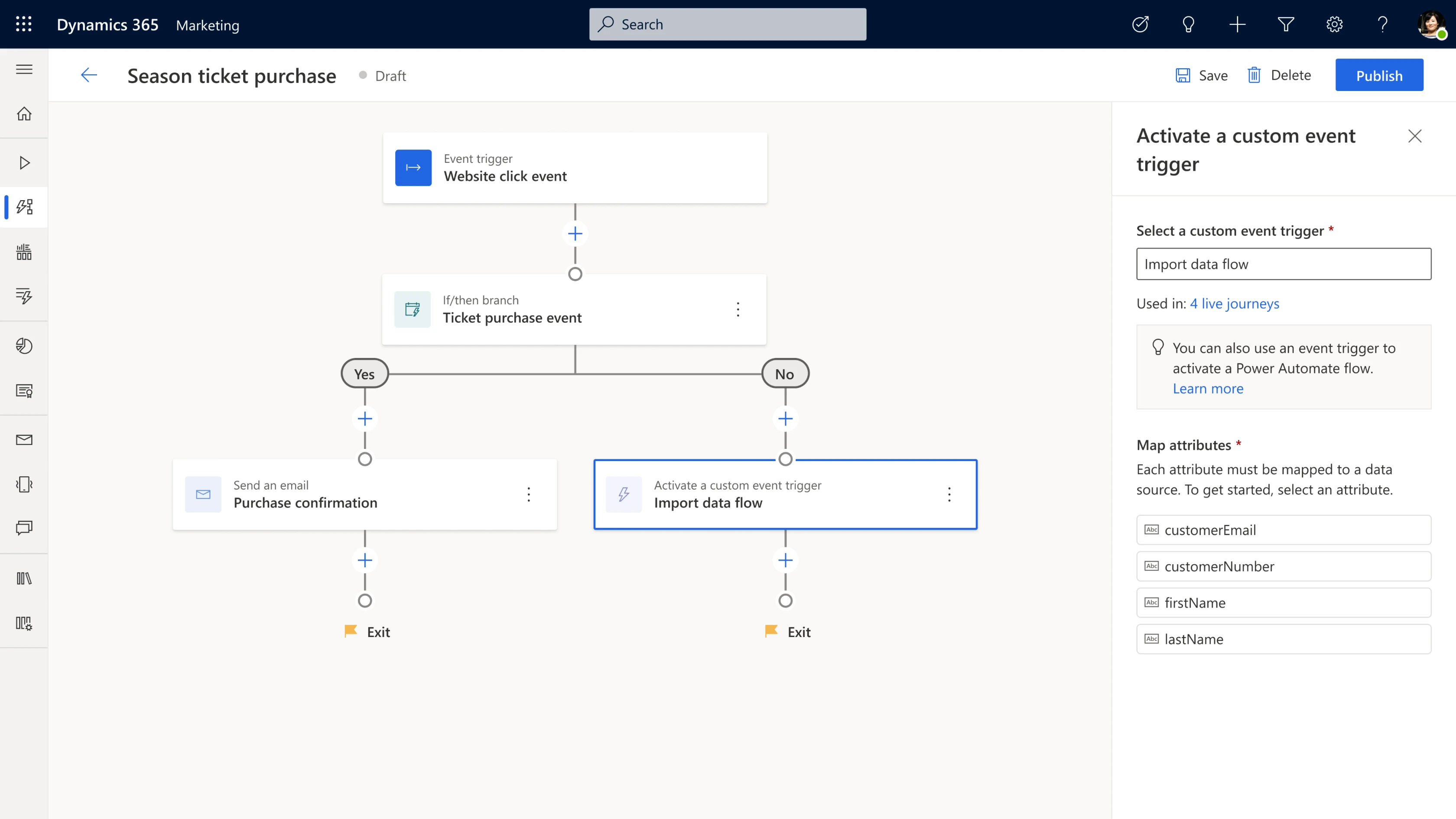
Deliver rich customer experiences by raising custom events from journey steps. Because every business is unique, you may need to define custom processes to enhance your journeys. By using Microsoft Power Automate Flows, you will have limitless customization and precise control of your customer experience.

You can call a Power Automate Flow from the journey canvas to connect with proprietary and external business systems. This end-to-end integration allows you to leverage the entire Power Automate ecosystem of connectors and controls to deliver the unique experience your customers demand. And what’s even better, is that anyone, from citizen marketing developers to pro marketing operations teams, IT professionals, or partners, can create very advanced custom scenarios in only a few clicks.

Power Automate flows can raise events that can trigger a journey or steps within a Dynamics 365 Marketing journey.

Personalize emails to include lists of related data. To save time and to further personalize your emails, you can now include lists of related data that are specific to the individual receiving the email. For example, you can add a list of sessions in a conference registration email or a list of items purchased in an order confirmation email. The ‘helper tool’ in real-time marketing generates the code for conditional statements and lists for you, making it easier to ensure your syntax is correct.

Gain more control over journey branching conditions through increased attribute support. Creating personalized journeys for customers based on their demographics and behaviors can help increase engagement. With this release, you can now create journey branches based on any attribute associated with the customer or event trigger that started the journey. In addition, for attributes based on date and time, you can create branches based on relative or partial dates.

Make faster and better decisions leveraging the power of analytics and AI

A deep understanding of your customer coupled with knowledge of what has worked before can bring amazing customer experiences to life.

Use AI-powered ideas to automatically generate content for emails. Looking for the right email copy to catch a customer’s eye? Use Content Ideas to help you get writing inspiration and move faster from concept to execution. No more needing to start from a blank screen. This new capability uses powerful AI technology to generate custom text ideas in your Dynamics 365 Marketing email editor.

We’re taking an intentional approach to integrating our responsible AI principles by building this experience with transparency and control, while boosting value for you. The automated ideas are based on your key points and recent emails sent by your organization. Now you can take advantage of this breakthrough technology to deliver the most impactful content to your audience.

AI-powered Content Ideas in the Dynamics 365 Marketing email editor can help you get writing inspiration and move faster from concept to execution.

Optimize the performance of emails in the new outbound marketing email editor with A/B testing. A good way to create an email that resonates with your audience is to test different versions with subsets of your recipients, and then analyze interaction records to determine which one is better received. The new editor in Dynamics 365 Marketing now can A/B test your emails, allowing you to optimize the performance of your emails.

Use natural language to create targeted segments. You can also use natural language sentences to build segments faster in Dynamics 365 Marketing. We introduced a preview of this capability in our previous release and have been working to refine, enhance, and continue the AI model training, so it’s better than ever before. Just use simple words to specify the attributes and logic for the segment you want to target, the AI-powered model does the rest for you. For example, using natural language, you can create a segment of “Contacts who were born between 1970 and 2000 and make more than $50K”, the correct query fields will be filled in for you and the segment will be generated automatically.

Use natural language sentences to build segments faster in then enhanced Dynamics 365 Marketing segment builder.

Leading the next generation of business applications

The innovations in this 2021 release wave 2 for Dynamics 365 Marketing support our Dynamics 365 vision to build data first, AI-enabled applications. Starting from data, we bring new insights and automation to your business processes and customer experiences. We power those processes and experiences with AI and next best actions while upholding Microsoft’s commitment to building AI responsibly, using our six principles as a lens for innovation. I’m excited to take you on this exciting journey with usas always, there will be more to come.

Learn more about Dynamics 365 Marketing

To learn more about how your organization can elevate your customer experiences, visit the Dynamics 365 Marketing webpage and sign up for a free Dynamics 365 Marketing trial to explore real-time customer journey orchestration and the other rich capabilities offered in Dynamics 365 Marketing.

The post Dynamics 365 Marketing is leading the way with personalized engagement appeared first on Microsoft Dynamics 365 Blog.

Brought to you by Dr. Ware, Microsoft Office 365 Silver Partner, Charleston SC.

Microsoft 365 Compliance audit log activities via O365 Management API – Part 2

Microsoft 365 Compliance audit log activities via O365 Management API – Part 2

This article is contributed. See the original author and article here.

In the previous part of this blog series- Microsoft 365 Compliance audit log activities via O365 Management API – Part 1, we discussed the importance of auditing and reporting for an organization’s security and compliance posture. We also discussed Microsoft auditing solutions, auditing architecture (and its components), as well as Microsoft Information Protection audit log schema


DLP-Activities Audit Log Schema


Let’s try to go over some of the audit log schema parameters for email and file events to make it clearer. Please note that the below is a cut-down list of the schema as most of the schema parameters are self-explanatory. For a full and updated list of DLP log schema, please visit Microsoft official documentation here, however, we will highlight a few schema parameters that we believe are important to explain what they mean and how can we use them. Below is an example of a DLP audit log:


{“CreationTime”:  “2021-11-02T21:52:10”, “Id”:  “1c446afc-5996-4236-845c-c6d28557bd78”, “Operation”:  “DlpRuleMatch”,”OrganizationId”:  “123456-8385-8539b47e6810”, “RecordType”:  13, “UserKey”:  “1153801120595078600”,”UserType”:  4, “Version”:  1, “Workload”:  “Exchange”, “ObjectId”:  “u003cBL0PR01MB52980905BA71DB19C194A324BA8B9@prod.exchangelabs.com”, “UserId”:  “user.one@nodomain.xyz”,”IncidentId”:  “3d3db700-9bea-643b-3000-08d99e4c1d8b”, “PolicyDetails”:  [{“PolicyId”:  “fad884cb-d5a5-4ad2-9dab-24283e4bb6cc”,”PolicyName”:  “Email X-Header Tagging”,”Rules“:  [{“Actions”:  [“ExSetHeader”,”ExModifySubject”], “ConditionsMatched”:  {“ConditionMatchedInNewScheme”:  true, “OtherConditions“:  [{“Name”:  “SensitivityLabels”, “Value”:  “OFFICIAL”} ,”ManagementRuleId”:  “edb9343d-fabe-47b4-a725-18f0cb031b54”, “RuleId”:  “ad484e0b-752f-4787-befd-bd14db5598d4″,”RuleMode”:  “Enable”,”RuleName”:  “Stamp the X-Header and Append the Subject [SEC=OFFICIAL]”, “Severity”:  “Medium”}], “SensitiveInfoDetectionIsIncluded”:  true, “ExchangeMetaData“:  {“BCC”:  [], “CC”:  [], “FileSize”:  18823, “From”:  “user.one@nodomain.xyz”, “MessageID”:  “u003cBL0PR01MB52980905BA71DB19C194A324BA8B9@prod.exchangelabs.com”, “RecipientCount”:  1, “Sent”:  “2021-11-02T21:52:09″,”Subject”:  “RE: Test new – 3rd Nov – 03  [SEC=OFFICIAL]”, “To”:  [“admin@nodomain.xyz”],”UniqueID”:  “32e0decc-4e67-4259-ef4b-08d99e4b052f”}}


DLP log event schema reference


Schema parameter


Description


Potential Values


Notes


DLP-Specific Base Schema


RecordType


The operation type indicated by the record


  • 11 = ComplianceDLPSharePoint

  • 13 = ComplianceDLPExchange

  • 33 = ComplianceDLPSharePointClassification

  • 63 = DLPEndpoint

  • 99 = OnPremisesFileShareScannerDlp

  • 100 = OnPremisesSharePointScannerDlp


For a complete updated list and full description of the Log RecordType, please refer to this article. Here we are only listing the relevant DLP Record types.


Operation


The operation type for the audit log (Referenced here as discussed above)


  • DlpRuleMatch

  • DlpRuleUndo

  • DlpInfo


  • DlpRuleMatch – This indicates a DLP rule was matched. These events exist in both Exchange and SharePoint Online and OneDrive for Business.

    • For Exchange it includes false positive and override information.

    • For SharePoint Online and OneDrive for Business, false positive and overrides generate separate events.


  • DlpRuleUndo – These only exist in SharePoint Online and OneDrive for Business. These events indicate a previously applied policy action has been “undone” – either because of false positive/override designation by user, or because the document is no longer subject to policy (either due to policy change or change to content in doc).

  • DlpInfo – These only exist in SharePoint Online and OneDrive for Business. These events indicate a false positive designation but no action was “undone.”


IncidentId


The DLP incident unique ID


  • String of text


DLP-Specific Extended Schema


PolicyId


The GUID of the DLP policy for this event


  • DLP Policy GUID


PolicyName


The friendly name of the DLP policy for this event


  • DLP Policy name (string)


RuleId


The GUID of the DLP rule for this event.


  • DLP Rule GUID


RuleName


The friendly name of the DLP rule for this event


  • DLP Rule name (string)


Actions


A list of actions taken because of a DLP RuleMatch event.


Examples only:


  • ExSetHeader

  • ExModifySubject

  • ApplyContentMarking

  • Encrypt

  • BlockAccess

  • NotifyUser


The DLP policy actions depend on many variables, such as, workload in scope (EXO, SPO, etc.) and conditions selected. Here we listed a few DLP policy action examples for the purpose of the article.


Severity


The severity of the rule match.


  • Low

  • Medium

  • High


DLP-Specific Extended SENSITIVE Schema (the SensitiveInformationDetections section of the log)


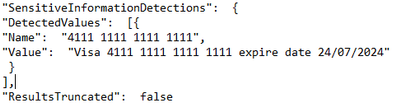
DetectedValues


An array of sensitive information that was detected.


  • Name

  • Value


  • DLP sensitive data is only available in the activity feed API to users that have been granted “Read DLP sensitive data” permissions.

  • Example from our tenant API (Teams DLP event):


Walid_Elmorsy_0-1636686147548.png


ResultsTruncated


Indicates if the logs were truncated due to large number of results.


  • True

  • False


  • DLP sensitive data is only available in the activity feed API to users that have been granted “Read DLP sensitive data” permissions.

  • See example above


DLP-Specific Extended SENSITIVE Schema (the ExceptionInfo section of the log)


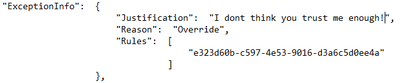
Reason


For a DLPRuleUndo event, which indicates why the rule no longer applies.


  • Override

  • Document Change

  • Policy Change


  • DLP sensitive data is only available in the activity feed API to users that have been granted “Read DLP sensitive data” permissions.

  • Example from our tenant API (Teams DLP event):


Walid_Elmorsy_1-1636686147550.png


Justification


If the user chose to override policy, any user-specified justification is captured here.


  • String of text


  • DLP sensitive data is only available in the activity feed API to users that have been granted “Read DLP sensitive data” permissions.

  • See example above


Rules


A collection of GUIDs for each rule that was designated as a false positive or override, or for which an action was undone.


  • DLP Rule GUID(s)


  • DLP sensitive data is only available in the activity feed API to users that have been granted “Read DLP sensitive data” permissions.

  • See example above


MIP/DLP in Office 365 Management API


So before knowing how to retrieve MIP and DLP logs via Office 365 Management API queries, we need to know first, where to look for them.


Below is a summary of each of the Office 365 Management API content blobs and what operations they contain. Please use this as a reference whenever you are performing a log search for a specific activity event for MIP and/or DLP.


Content Blob


Operation


Notes


Audit.AzureActiveDirectory


  • UserLoggedIn


Very useful in general for any investigation or reporting purposes.


Audit.Exchange


  • MIPLabel

  • DLPRuleMatch

  • AutoSensitivityLabelRuleMatch


Audit.SharePoint


  • DLPRuleMatch

  • DLPRuleUndo

  • DlpInfo

  • FileSensitivityLabelChanged


  • FileSensitivityLabelChanged is applicable to a document using:

    • Office on the Web


Audit.General


  • SensitivityLabelApplied

  • SensitivityLabelUpdated

  • SensitivityLabelChanged

  • SensitivityLabelRemoved

  • SensitivityLabeledFileOpened

  • SensitivityLabeledFileApplied

  • SensitivityLabeledFileRenamed

  • SensitivityLabeledFileRemoved

  • FileSensitivityLabelChanged

  • AutoSensitivityLabelRuleMatch

  • DLPRuleMatch

  • DLPRuleUndo

  • DlpInfo


  • SensitivityLabelApplied, SensitivityLabelChanged, SensitivityLabelRemoved are applicable to:

    • SPO/Teams sites

    • Emails and files activities from Microsoft 365 Apps Only


  • SensitivityLabelUpdated is applicable to a document using:

    • Microsoft 365 Apps.


  • SensitivityLabeledFileChanged is applicable to a document using:

    • Office on the Web

    • Auto-labelling policy.


  • SensitivityLabeledFileRemoved is applicable to a document using:


  • SensitivityLabeledFileOpened is applicable to a document using:

    • Microsoft 365 Apps


DLP.All


  • DLPRuleMatch

  • DLPRuleUndo

  • DlpInfo

  • MIPLabel


DLP events may include sensitive data (if configured)


Querying Management API


In this section, we will go over the configuration details in depth to prepare the environment before performing any API queries. As well as the “Compliance API” script that we have created to help querying and exporting the Microsoft 365 audit log activities via Office 365 management API.


Register your application in Azure AD


In order to be able to query the Office 365 Management API endpoints, you will need to configure your application with the right permissions. For a step-by-step guide, please visit the Microsoft official documentation here for more details.


Compliance-API Script


We have created a sample Office Management API script that enables administrators to access their tenant management API service (given all the prerequisites steps above have been completed). The script uses a few variables that you will need to update to be able to use it in your tenant (explained below). Also, the script mainly uses the “Get” function to export the log activities to a bunch of JSON files from the main 5 content blobs that we need. Now, let’s go through the script.


Script facts


  • We highly recommend using this script and testing it first in your testing environment. If you need to use it in your production environment, consider removing the hard-coded variables (as shown below) from the script. It is highly NOT RECOMMENDED to keep any passwords, secrets, etc. within files or scripts on endpoints. You may consider using secure string or Azure Key Vault with Azure functions/variables.

  • The script exports the log data to JSON files, due to the extensive information and attributes for each log event. The aim was to export all the Microsoft 365 audit logs so that they suit everyone’s needs (not only for MIP and DLP). For example, if there are MIG, eDiscovery, or Communication Compliance audit logs, these will be exported too. Further customization can be done to the script if needed to narrow the export scope, by applying export filters (i.e., Operation -eq, etc.). So, it is up to you to use it the way that works best for you.

  • The script checks content availability (i.e., notifications) that became available today, which means from 12:00 AM UTC to the current time. If you want to specify a different period (keeping in mind that the maximum period for which you can query is 24 hours), you can add the starttime and endtime parameters in the script to the URI in the last 24 hours from the time runs. Like the below (don’t forget to define the starttime and endtime parameters):


Invoke-WebRequest -Method GET -Headers $OfficeToken -Uri "$BaseURI/content?contentType=$Subscription&startTime=$Date022T00:00&endTime=$Date022T23:59&PublisherIdentifier=$TenantGUID" ErrorAction Stop


Script variables


The script defined variables are depicted below, you will need to update the following:


•$AppClientID = " The Azure AD registered application ID "
•$ClientSecretValue = " The application secret Value"
•$TenantGUID = " Tenant ID – you can get it from Azure AD portal"
•$tenantdomain = " Tenantname.onmicrosoft.com"
•$OutputPath = "Logs folder path – i.e., C:APILogs"
•$APIResource = Endpoint URI ($Enterprise, $GCC, $GCCH, $DOD)


MIP/DLP PowerBI (PBI) Reports


So now we have the MIP/DLP logs exported via the Office 365 management API to JSON files, what can we do with them?. We can use those JSON files in various ways, such as:


  • Import them to your 3rd party SIEM solution for reporting and analysis.

  • Use 3rd JSON reading tools to export/convert to other formats for further analysis.

  • Use PowerBI to create reports based on the data in those files.


Here we will show you an example on how to use PowerBI Desktop tool to create MIP/DLP audit report. We have selected to create a report for DLP policy incidents in the last 24 hours within our tenant


Configuration steps


  • Download the PowerBI Desktop client from here then install it on your machine. Run the client once the install is complete.

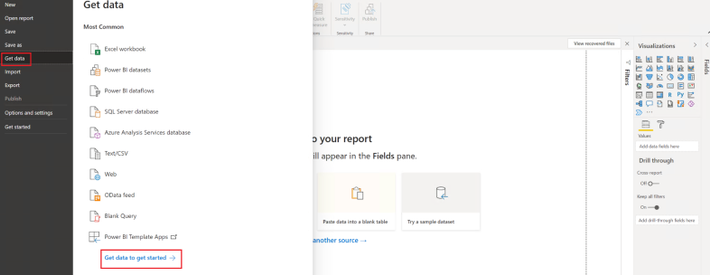
  • Once the client is running, click on File, then Get Data, then click on Get data to get started


Walid_Elmorsy_0-1636690526624.png


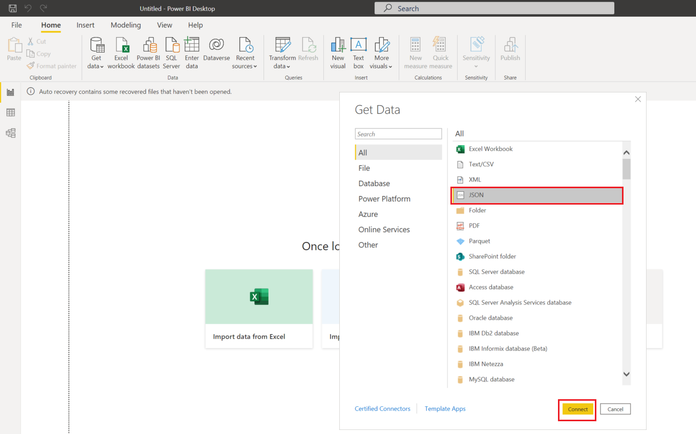
  • In the Get Data page, select JSON from the list, then click Connect


Walid_Elmorsy_1-1636690526635.png


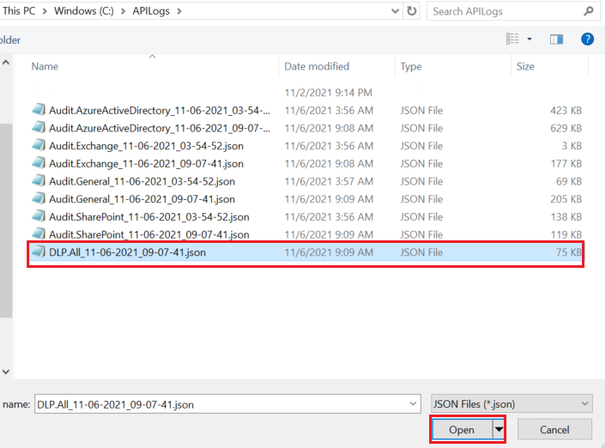
  • Select the JSON file(s) that you would like to create a report for, then click Open


Walid_Elmorsy_2-1636690526644.png


  • The Power Query editor page will open. Here you can modify the JSON file results’ view and data. You can rename column headers, remove columns/rows, and expand an array data into values to name a few.  For our report, this is what we have decided to do:

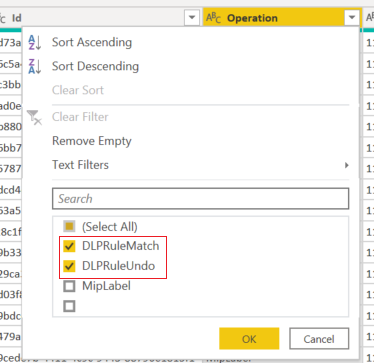
    • We have filtered the “operation” column to just show “DLPRuleMatch” and “DLPRuleUndo” operations


Walid_Elmorsy_3-1636690526647.png


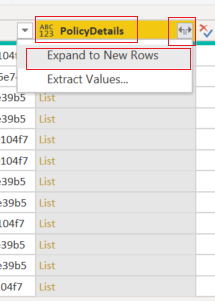
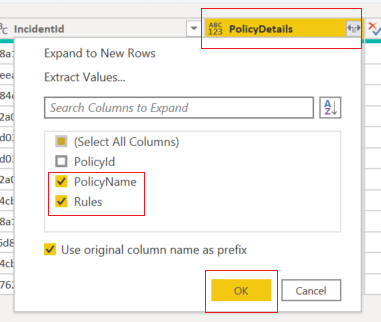
  • We have expanded all the “list” items to their original headers and values. The “list” items are the data into the complex (i.e., array) part within the audit log. Then we will select to show only the “PolicyName” and “Rules” headers.


   Walid_Elmorsy_5-1636690526651.png


Walid_Elmorsy_4-1636690526649.png


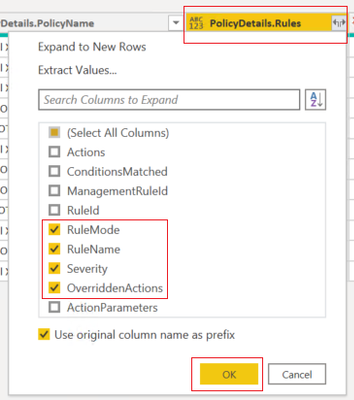
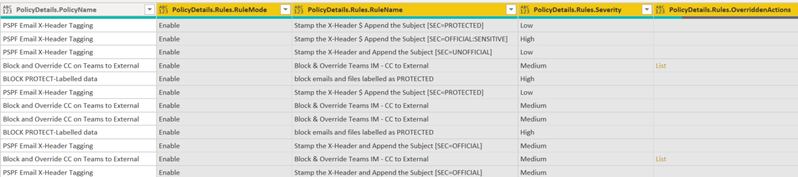
  • We will also expand the “Rules” data and show the ones selected below


Walid_Elmorsy_6-1636690526654.png


Walid_Elmorsy_7-1636690526661.png


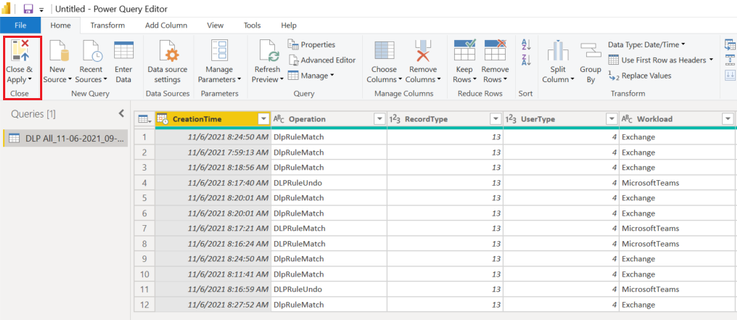
  • Then click on the close and apply to exit the query editor.


Walid_Elmorsy_8-1636690526670.png


Report examples


  • From the visualizations section, select the visualization that you would like to use, then drag and drop fields that you would like to create a report for. Below is what we have chosen to configure for our DLP incidents reporting:

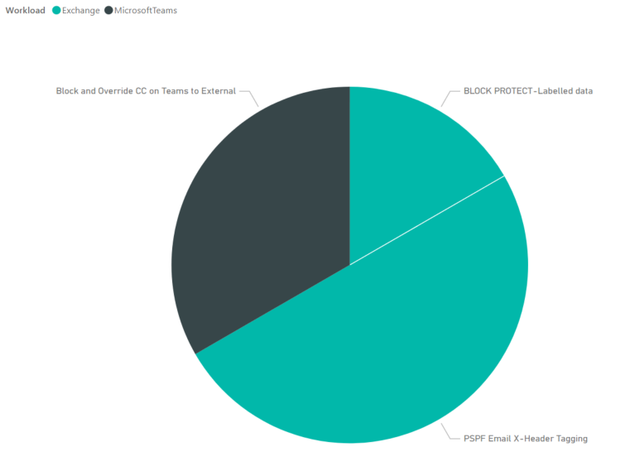
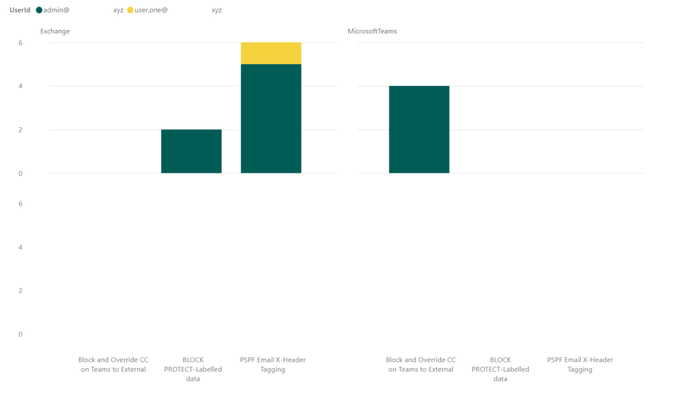
    • A simple report to report on DLP incidents in the last 24 hours, per workload, per DLP policy:  


Walid_Elmorsy_9-1636690526672.png


  • This report shows the number of DLP incidents, per user, per workload, per DLP policy:


Walid_Elmorsy_10-1636690526674.png


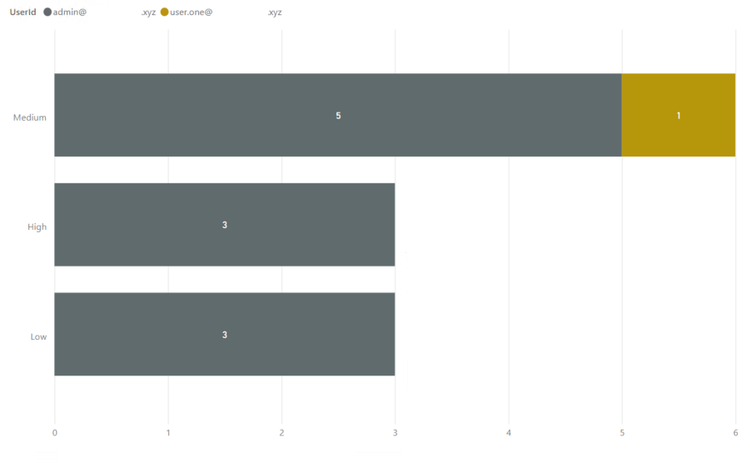
  • The last one has more details. This shows the DLP incident severity, per DLP Policy, per user, with visual count on bars, per workload (in the tooltip):


Walid_Elmorsy_12-1636690526678.png


References


Thank you.