by Contributed | Mar 20, 2022 | Technology
This article is contributed. See the original author and article here.
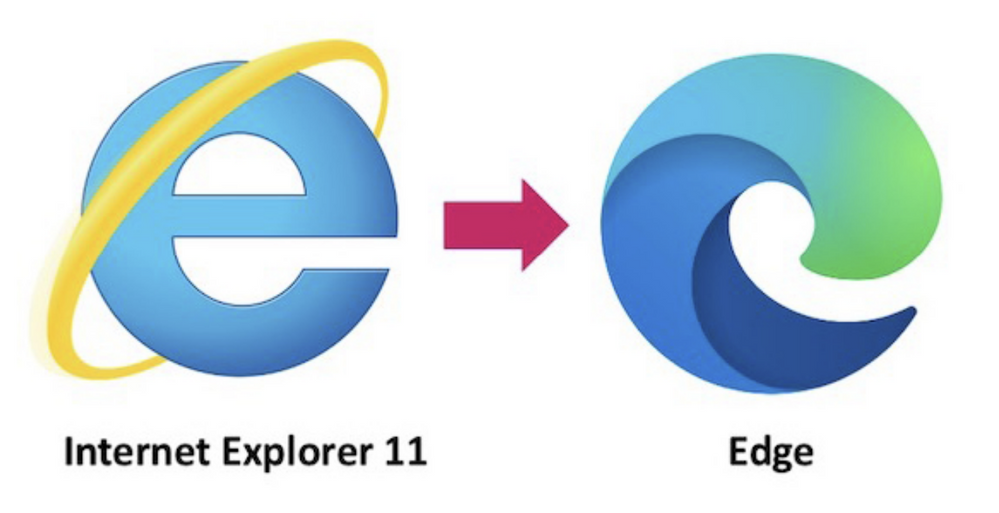
Greetings Access Community, I had a great question from Klaus Oberdalhoff in the Denver User Group last month, as well as numerous questions from the community on IE11 and its impending retirement. I wanted post this to help clear the air on these concerns.
Here is a quick set of Q&A we have put together on many of the questions we have seen across our MVPs and community.
Q&A on IE 11 retirement
Q: Is it true according to Microsoft, the old internet browser and thus the web browser control will soon be disabled / disconnected?
A: No this is not the case. The Webview (trident) control is still being supported as part of Windows. The MSHTML (Trident) engine is the underlying platform for Internet Explorer 11. This is the same engine used by IE mode and it will continue to be supported (in other words, unaffected by this announcement). Both WebOC and the MSHTA app will continue to be supported as they rely on the MSHTML engine which is unaffected by this announcement. If you have a custom or third-party app that relies on the MSHTML platform, you can expect it to continue to work. For future app development, we recommend using WebView2.
We recommend you review this detailed Q&A on the IE 11 Desktop App Retirement
Q: Does that mean that the existing Access applications that use the IE11 (Trident) web browser control no longer work?
A: No this does not mean existing applications no longer work. Existing applications will continue to be able to run using the MSHTML engine that is still supported
Q: Does this mean Access applications will be stranded without a new web browser control in place for Access using Webview2 aka Anaheim?
A: No. The MSHTML (Trident) engine is still supported until 2029. Eventually we will have a new browser control in place that supports Webview2.
Q: How long do I have before I have to worry about updating my Access applications to support webview2
A: You have until 2029 before the MSHTML (Trident) engine no longer supported. But once we have a new forms control supporting the new Webview2 browser control for Access we recommend all developers move to that in line with Microsoft guidelines to ensure your experience compliance with modern web standards and security.
Q: When are you going to have a new Access browser control that supports Edge and Webview 2?
A: We are planning and specing this work now working with teams across Office Platforms to enable a totally new browser control with Webview 2 support. Our hope is to have this done by the end of the 2022 calendar year or beginning of 2023. When this work is completed custom or 3rd party apps will be able to use either the legacy or new control. Once we release, we will recommend all apps move to the Webview2 control to ensure the most up to date technology and security.
We would love to get your feedback on what you need here and use cases you see we need to address in our new forms control as we are refining the specs now for this work.
Please send your feedback with the name “New Browser Control Feature Request” in the description title at Microsoft Q&A using the office-access-dev tag
by Contributed | Mar 18, 2022 | Technology
This article is contributed. See the original author and article here.
I am encountering two overriding themes when talking to data architects today about their data and analytics strategy – which take very different sides, practically at the extreme ends of the discussion about the future design of the data platform.
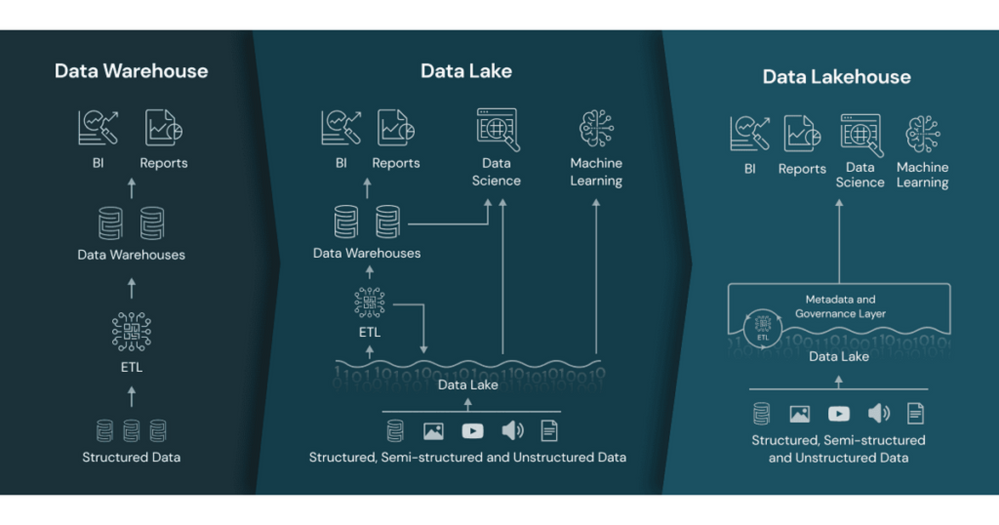
- The Data Lakehouse. The focus here is how traditional Data Lakes have now advanced so that the capabilities previously provided by the Data Warehouse can now be replicated within the Data Lake. The Data Lakehouse approach proposes using data structures and data management features in a data lake that are similar to those previously found in a data warehouse:
Databricks – What is a data lakehouse
- Snowflake as your data platform. Snowflake has quickly become a major player in the data warehousing market, making use of its cloud native architecture to drive market share. They have taken this a step further now though and are now pushing the concept of “Make Snowflake Your Data Lake”
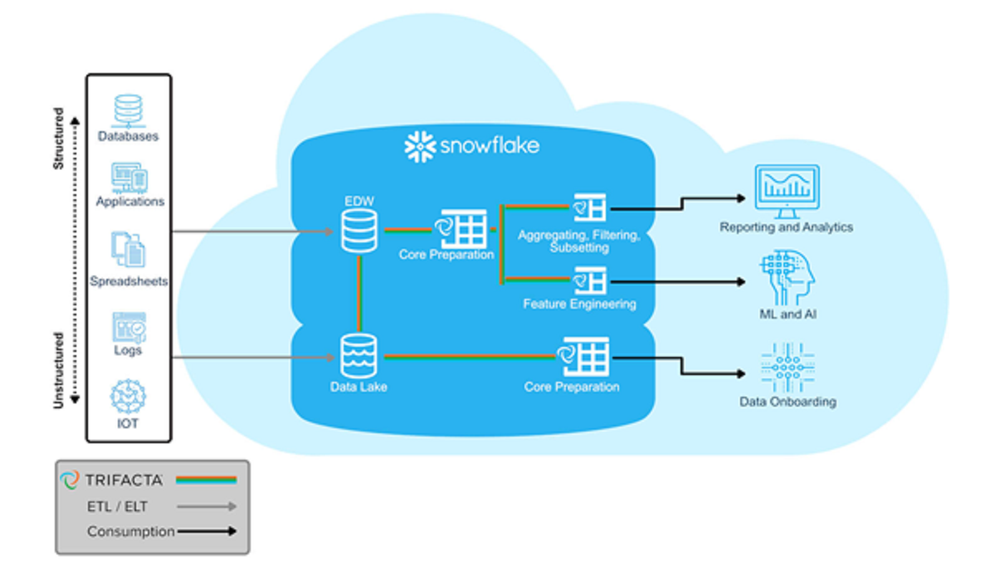 Snowflake for Data Lakes
So on one-hand, the Data Lakehouse advocates says “There is no longer a need for a relational database, do it all in the data lake”, while Snowflake is saying “Build your data lake in a relational database”. Is there really such a stark divergence of views about how to architect a modern data platform?
While both of these architectures have some merit, a number of questions immediately spring to mind. Both of these are driven with a focus on a single technology – which immediately should ring alarm bells for any architect. Both concepts also bring baggage from the past:
- the Data Lakehouse pitch feels uncomfortably close to the “Hadoop can do it all” hype from 10 years ago, which led to vast sums being spent by organisations jumping onto this big data bandwagon; they believed the hype, invested huge amount of money into this wonder platform, only to find that it wasn’t as effective as it promised and that many of the problems with the “data warehouse” were actually due to their processes and governance that were simply replicated in the new technology.
- some of the Snowflake marketing seems to be morphing into similar concepts of the Enterprise Data Warehouse vendors of 20-30 years ago – the concept of a single data repository and technology being all you need for all your enterprise data needs – which follows a very legacy logical architecture for a product that so heavily hypes its modern physical architecture.
So how do we make sense of these competing patterns? Why is there such a big disparity between two approaches, and is there really such a major decision needed between open (spark/delta) v proprietary code (snowflake/relational) bases and repositories ? I believe that if you drill into the headline propositions, the reality is that any architecture isn’t an “either/or” but a “better together” and that a pragmatic approach should be taken. As such, whenever starting any conversation today, I tend to lead with three areas of assessment:
- What data do you have and what are your big data, BI and advanced analytical requirements? An organisation that requires mainly machine learning and anomaly detection against semi-structured data requires a very different approach to one that has more traditional BI and next best action needs driven from structured data. Also consider what works well for your data; if it is mostly structured and sourced from relational systems, why not keep it that way rather than putting it into a semi-structured form in a Lake and then layering structures back over the top; alternatively for semi-structured or constantly changing data, why force this into a relational environment that wasn’t designed for this type of data and which then requires the data to be exported out to the compute?
- What skills base do you have in IT and the business? If your workforce are relational experts and have great SQL skills, it could be a big shift for them to become Spark developers; alternatively if your key resources are teams of data scientists used to working in their tools of choice, they are unlikely to embrace a relational engine and will end up exporting all the data back out into their preferred environments.
- Azure – and any modern cloud ecosystem – is extremely flexible, it redefines the way modern compute architectures work by completely disconnecting compute and storage and provides the ability to build processes that use the right tool for the right job on a pay for what you use basis. The benefits are huge – workloads can be run much faster, more effectively and at massively reduced costs compared to “traditional” architectures, but it requires a real paradigm shift in thinking from IT architects and developers to think about using the right technology for the job and not just following their tried and tested approaches in one technology.
The responses to these 3 areas, especially 1 and 2, should determine the direction of any data platform architecture for your business. The concepts from item 3 should be front and centre for all architects and data platform decision makers though, as getting the best from your cloud investment requires new ways of thinking. What surprises me most today is that many people seem reticent to change their thinking to take advantage of these capabilities – often through a combination of not understanding what is possible, harking back to what they know, and of certain technology providers pushing the concept of “why do you need this complexity when you can do everything in one (our) tool”. While using multiple tools and technologies may seem like adding complexity if they don’t work well together, the capabilities of a well-integrated ecosystem will usually be easier to use and manage than trying to bend a single technology to do everything.
Why does Microsoft propose Azure Synapse Analytics in this area? We believe that this hybrid approach is the right way forward – that enabling efficient and effective BI, Analytics, ML and AI is possible when all your data assets are connected and managed in a cohesive fashion. A true Enterprise Data platform architecture enables better decisions and transformative processes, enabling a digital feedback loop within your organization and provide the foundation for successful analytics. One constant area of feedback we received from customers though was that while building a modern data platform was the right strategy, they wanted it to be easier to implement. IT architects and developers wanted to spend less time worrying about the plumbing – integrating the components, getting them to talk to each other – and more time building the solution. We thus set out to rearchitect and create the next generation of query processing and data management with Synapse to meet the needs of the modern, high scale, volume, velocity, and variety of data workloads. As opposed to limiting customers only to one engine, Synapse provides SQL, Spark, and Log Analytics engines within a single integrated development environment, a cloud-native analytics service engine that converges big data and data warehousing to achieve limitless scale on structured, semi-structured, and un-structured data. Purpose built engines optimized for different scenarios enable customers to yield more insights faster and with fewer resources and less cost.
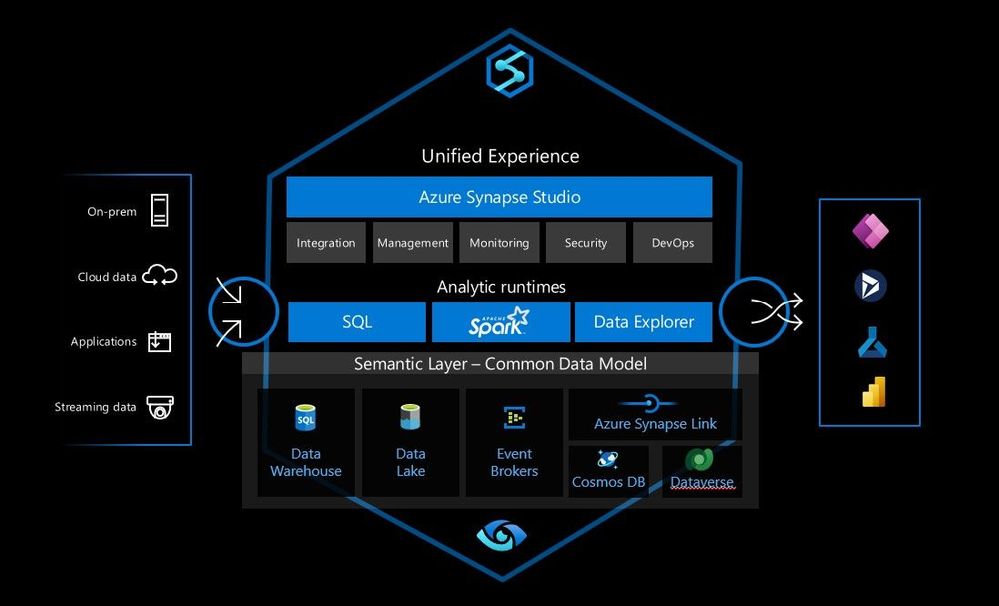 Azure Synapse Analytics
Azure Synapse Analytics is a limitless analytics service with a unified experience to ingest, explore, prepare, manage and serve data for immediate BI and machine-learning needs. So Azure Synapse Analytics isn’t a single technology, but an integrated combination of the different tools and capabilities you need to build your modern data platform, allowing you to choose the right tool for each job/step/process while removing the complexity of integrating these tools.
While Synapse can provide this flexible modern data platform architecture in a single service, the concept is open. Synapse provides Spark and dedicated SQL pool engines, but alternatively Databricks and Snowflake could replace these components within this architecture. Alternatively any combination of Synapse, other first-party, third-party, or open-source components can be used to create the modern data platform, the vast majority of which are supported within Azure.
This open combination of individual technologies should be combined within a Modern Data platform architecture to give you the ability to build the right modern data platform for your business. Take advantage of the flexibility of Azure and use the best tools and techniques to construct the most effective data platform for your business.
by Contributed | Mar 18, 2022 | Technology
This article is contributed. See the original author and article here.
This article is focused on creating an ARM template which will create a storage account resource in the resource group and will assign role at both RG (Resource Group) scope and created storage account resource level
This article is divided into following 5 sections.
- Fetch User Object ID
- Fetch Built-in Role ID
- Create ARM template to provision storage account
- Role assignment in ARM template
- Deploying ARM template to Azure Portal
Let’s start step by step as mentioned above, we will fetch the user object ID which will be used in deploying ARM template
- So firstly, lets fetch the user’s object id
Use the PowerShell script to fetch user’s object id by its email id.
PS Script: Get-AzADUser | Where-Object { $_.UserPrincipalName -eq “testuser@testdomain.xyz.com” }
This will show the user details like, DisplayName, Id, Mail, UserPrincipalName, Grab the Id and save it for further use
You can also fetch the user object Id from Azure Portal, Navigate to Azure Active Director > Users > Select the user you want to fetch the Id of > Copy the Object Id
- Similarly, we will fetch the built-in role Id using PowerShell script, for this article I will fetch the “Reader” role id but you can fetch your required role id,
PS Script: Get-AzRoleDefinition -Name Reader
This script will output few of the Role details, grab the Id from the output and save it for further use
- Now it’s time to create the ARM Template which will create the Storage account and assign user with Reader role to the created storage account also, we will assign user with Reader role to the Resource group using scope.
Follow the template mentioned below for creating storage account and role assignment.
Refer Microsoft documentation to know more on ARM Template syntax and details and to know more details on role assignment
{
“$schema”: “https://schema.management.azure.com/schemas/2015-01-01/deploymentTemplate.json#“,
“contentVersion”: “1.0.0.0”,
“parameters”: {
“AAD_Object_ID”: {
“metadata”: {
“description”: “Object ID of the User, Group or Service Principal”
},
“type”: “string”
},
“Role_Definition_ID”: {
“metadata”: {
“description”: “Identifier (GUID) of the role definition to map to service principal”
},
“type”: “string”
}
},
“variables”: {
“Full Role_Definition_ID”: “[concat(‘/subscriptions/’, subscription().subscriptionId, ‘/providers/Microsoft.Authorization/roleDefinitions/’, parameters(‘Role_Definition_ID’))]”,
“StorageAccountName”: “shrstrgacc”,
“StorageAccountAssignmentName”: “[concat(variables(‘StorageAccountName’), ‘/Microsoft.Authorization/’, guid(concat(resourceGroup().id), variables(‘Full Role_Definition_ID’)))]”
},
“resources”: [
{
“type”: “Microsoft.Storage/storageAccounts”,
“apiVersion”: “2018-07-01”,
“name”: “[variables(‘StorageAccountName’)]”,
“comments”: “Storage account used to store VM disks”,
“location”: “[resourceGroup().location]”,
“sku”: {
“name”: “Standard_LRS”
},
“kind”: “Storage”,
“properties”: {
“roleDefinitionId”: “[variables(‘Full Role_Definition_ID’)]”,
“principalId”: “[parameters(‘AAD_Object_ID’)]”
}
},
{
“type”: “Microsoft.Authorization/roleAssignments”,
“apiVersion”: “2017-09-01”,
“name”: “[guid(concat(resourceGroup().id), resourceId(‘Microsoft.Storage/storageAccounts’, ‘shrstrgacc’), variables(‘Full Role_Definition_ID’))]”,
“dependsOn”: [
“[resourceId(‘Microsoft.Storage/storageAccounts’, ‘shrstrgacc’)]”
],
“properties”: {
“roleDefinitionId”: “[variables(‘Full Role_Definition_ID’)]”,
“principalId”: “[parameters(‘AAD_Object_ID’)]”,
“scope”: “[resourceGroup().id]”
}
},
{
“type”: “Microsoft.Storage/storageAccounts/providers/roleAssignments”,
“apiVersion”: “2017-05-01”,
“name”: “[variables(‘StorageAccountAssignmentName’)]”,
“dependsOn”: [
“[resourceId(‘Microsoft.Storage/storageAccounts’, ‘shrstrgacc’)]”
],
“properties”: {
“roleDefinitionId”: “[variables(‘Full Role_Definition_ID’)]”,
“principalId”: “[parameters(‘AAD_Object_ID’)]”
}
}
],
“outputs”: {}
}
As you can see from the above ARM template, we have given 2 input parameters which are, “AAD_Object_ID” & “Role_Definition_ID”, so to give a brief about what this input parameter will hold, AAD_Object_ID will be the User object Id fetched from Step 1 and Role_Definitation_ID will be the built in Reader Role ID fetched from Step 2
To further drill down to the ARM Template resources, we will be using;
Type: Microsoft.Storage/storageAccounts to provision storage account with the mentioned properties in the ARM Template
Type: Microsoft.Authorization/roleAssignments to assign role at Resource group scope
Type: Microsoft.Storage/storageAccounts/providers/roleAssignments to assign role to the storage account resource
Also, save the above mentioned template code in a file with .json extension for example armtest.json and copy the file path as we will need it while deploying it to Azure in the final step
- Now it’s the time to deploy ARM Template to Azure Portal use the following script
#Connect to Azure Account
Connect Az-Account
# Use PowerShell command New-AzResourceGroupDeployment, this command deploys azure resources to the Resource group
Refer, Microsoft documentation on deploying using New-AzResourceGroupDeployment
New-AzResourceGroupDeployment -ResourceGroupName <your- resource-group-name>`
-TemplateFile <ARMTemplateFilePath > `
-AAD_Object_ID <user object Id> `
-Role_Definition_ID <Built in Reader role Id>
Note – Pass the copied path of the saved ARM Template file to the TemplateFile parameter in the script
Now it’s time to verify the outcome in the Azure Portal,
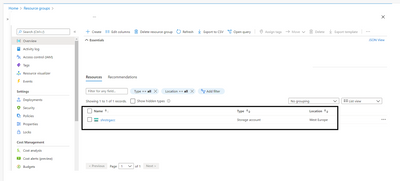
Wohoo, Storage is created in the Resource group mentioned in the New- AzResourceGroupDeployment
Fig 1.1: Storage Account created using ARM Template
Now, Lets check if the Reader role to the testuser is assigned to the Resource Group
Navigate to Azure Portal > Resource Group > Select the Resource group you added in the ARM deployment script > Access Control > Role Assignments
Wohoo, we can see the Reader role to the test user is assigned access to the Resource Group scope
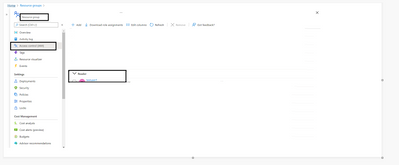
Fig 1.2: Role Assignment to the Resource Group using ARM Template
It’s time to verify the role access at the storage account resource level,
Navigate to Azure Portal > Resource Group > Select the Resource group you added in the ARM deployment script > Select the created storage account > Access control > Role Assignments
Wohoo, at storage account level we can see the reader role is assigned to the test user and the same is inherited from the Resource Group.
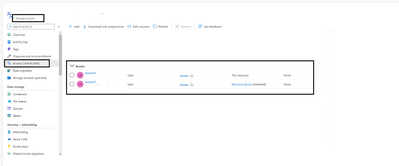
Fig 1.3: Role assigned to created storage account using ARM Template
I hope this article seems useful for all the Azure enthusiasts on how they can assign RBAC to the users/groups/SPNs/Managed Identities using ARM Template.
Keep Learning!
Keep Sharing!
by Contributed | Mar 17, 2022 | Technology
This article is contributed. See the original author and article here.
Web activity is helpful when invoking an external endpoint from within an ADF pipeline. While Azure Data Factory/ Synapse pipelines offer various orchestration activities, web activity helps provide extensibility when building data pipelines that span across different services.
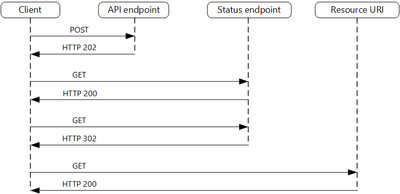
Web activities work exceptionally well with APIs that follow the asynchronous request-reply pattern, a suggested approach for building scalable web APIs/ services. In such scenarios, it automatically polls for the status endpoint (when it receives HTTP 202) till the API returns HTTP 200. It behaves synchronously and waits till the response is HTTP 200 before kicking off the down-stream activities.
Most Azure-based APIs are async request-reply pattern and gels with the existing web activity behavior.
Problem
But in case you have API endpoints that do not follow the above pattern and expect the caller to wait for a response till the processing/ actions are done. As default action, the web activity will timeout within 1 minute if it does not receive any response.
Improvement
We are introducing a response timeout property ‘httpRequestTimeout’ in Web activity that will let you provide larger timeouts for such synchronous APIs.
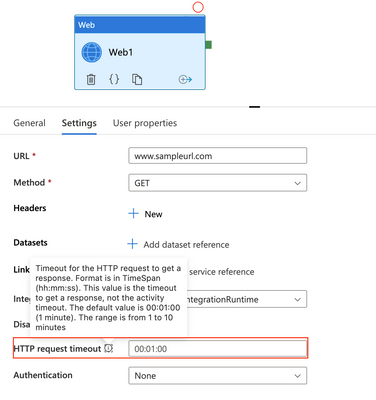
Reference:
Web Activity – Azure Data Factory & Azure Synapse | Microsoft Docs

by Contributed | Mar 17, 2022 | Dynamics 365, Microsoft 365, Technology
This article is contributed. See the original author and article here.
As discussed in our previous blog, Microsoft Dynamics 365 was recognized as a leader in Gartner’s 2021 Magic Quadrant for Cloud ERP for Product-Centric Enterprises. This month, we want to further substantiate our value proposition to customers by sharing the results of a recently commissioned Total Economic Impact (TEI) study conducted by Forrester Consulting on behalf of Microsoft. The study examines the potential return on investment (ROI) that enterprises may realize by deploying Microsoft Dynamics 365 Supply Chain Management.
Methodology and purpose
TEI is a methodology developed by Forrester Research to assist companies with technology-related purchase decisions by helping technology vendors effectively communicate the value proposition of their solutions. The purpose of a TEI study is to provide business decision-makers with a framework to evaluate the potential financial impact of implementing Dynamics 365 Supply Chain Management.
Forrester Consulting interviewed five organizations that used Dynamics 365 Supply Chain Management to conduct the TEI study. The characteristics of these businesses and the results of the interviews were then aggregated to develop a composite organization. The key findings of the study are based on the composite organization and are summarized below.
Key findings
Dynamics 365 Supply Chain Management is a solution that is helping product-centric organizations to revamp their existing enterprise resource planning (ERP) platform and it enables customers to considerably increase supply chain visibility. It also empowers users to plan better, improves organizational agility, and maximizes asset uptime, allowing companies to operate smoothly and profitably.
Forrester’s study revealed five quantifiable impact areas: increased production volume, reduced downtime, improved quality, reduced infrastructure cost, and increased developer productivity.
Let’s look at each of these areas in more detail to examine how Dynamics 365 Supply Chain Management delivers value across enterprise supply chains.
Increased production volume
Dynamics 365 Supply Chain Management empowers users to improve demand planning by enriching demand forecasting with AI. It also allows companies to deliver production schedule visibility to the shop floor and to dynamically rebalance production schedules based on real-time material, labor, and equipment availability. These improvements translate into more responsive planning and scheduling, an improved synchronization of supply and demand, and the identification and minimization of production bottlenecks. The result for customers is increased production throughput that was worth $24.3 million over a three-year time horizon.
Reduced downtime
Our solution also enables users to create a connected factory and proactively manage the shop floor using a real-time view of production and inventory. This is one reason why customers surveyed by Forrester reported substantial increases in data collection from their supply chains. This data improves visibility into asset utilization and resource availability and provides a systematic means of identifying root causes of machine downtime.
Dynamics 365 Supply Chain Management also provides the ability to rapidly respond to quality issues and parts obsolescence with engineering change management. The organizations in Forrester’s study leveraged these capabilities to reduce costly downtime of business-critical production equipment, which improved overall equipment effectiveness (OEE) and ensured that production lines can run as scheduled 24x7x365. For an organization with 500 manufacturing machines, this reduction in downtime was valued at more than $1.5 million over three years.
Improved quality
Interviewees further noted that Dynamics 365 Supply Chain Management allowed their organizations to uncover new pathways for improving product quality. In particular, real-time production data provided the means for understanding when variations in raw material quality or machine operating characteristics were impacting quality. And, because they were able to make immediate decisions, they could ensure that quality was maintained.
By taking actions to improve adverse conditions in real-time, scrap rates declined, and root causes were identified, allowing these organizations to avoid unnecessary losses while simultaneously improving production quality. Over three years, the improvements to product quality reduced costs by more than $6.8 million.
Reduced infrastructure cost
A critical improvement point for the organizations studied by Forrester were the gains realized by retiring multiple legacy applications that were often on-premises, highly-customized, disparate, and disconnected. By migrating systems and processes to a modern cloud-based solution, users were able to pay less for server maintenance and system administration as well as avoid the significantly higher cost that would have been incurred to scale their prior solutions. These infrastructure cost reductions totaled $11 million in three years.
Increased developer productivity
Dynamics 365 Supply Chain Management takes advantage of Microsoft Power Apps to reduce customization costs by utilizing low-code/no-code extensions. Plus, it delivers operational application services by running on the Microsoft Azure cloud, significantly reducing the need for developers and technical staff to focus on system administration. By freeing up these resources to deliver other, higher-value work, the financial impact of productivity improvements is projected to be approximately $0.7 million over three years.
Unquantified benefits
Study participants also reported other substantial organizational benefits that were unquantifiable in nature. These include increased flexibility to adapt, improved ability to deliver on-time, improved customer satisfaction, better forecasting capabilities for improved supplier collaboration and planning, and improvements to team members’ day-to-day work realized by breaking down siloes between teams and functions.
The big picture
As we have seen here, Forrester’s study uncovered five quantifiable impact areas as well as several unquantified benefits. When these are considered in combination, Dynamics 365 Supply Chain Management delivered a total economic impact of $44.33 million in financial savings over three years. At $23.27 million, the investment provided a ROI of 90 percent and took 22 months to pay back.
Read the full report: A Total Economic Impact of Microsoft Dynamics 365 Supply Chain Management
What’s next?
Dynamics 365 Supply Chain Management is an agile and composable ERP solution. It enables manufacturers, retailers, and distributors to create a connected, resilient, and digital supply chain by enhancing operational visibility, improving planning agility, and maximizing asset uptime. In addition, it unifies data from almost any source in real-time and generates intelligence by leveraging AI and machine learning to proactively detect opportunities and develop a long-term competitive advantage.
We recently sat down with an analyst from Forrester to discuss the Total Economic Impact of implementing Dynamics 365 Supply Chain Management. You can view the discussion in our on-demand webinar: Build a resilient and sustainable supply chain. If you are ready to see what our modern, cloud-based supply chain management solution can do for your organization, we invite you to start today with a free Dynamics 365 trial.
Sources:
Forrester. The Total Economic Impact of Microsoft Dynamics 365 Supply Chain Management. August 2021.
The post Total Economic Impact of Dynamics 365 Supply Chain Management appeared first on Microsoft Dynamics 365 Blog.
Brought to you by Dr. Ware, Microsoft Office 365 Silver Partner, Charleston SC.


Recent Comments