This article is contributed. See the original author and article here.
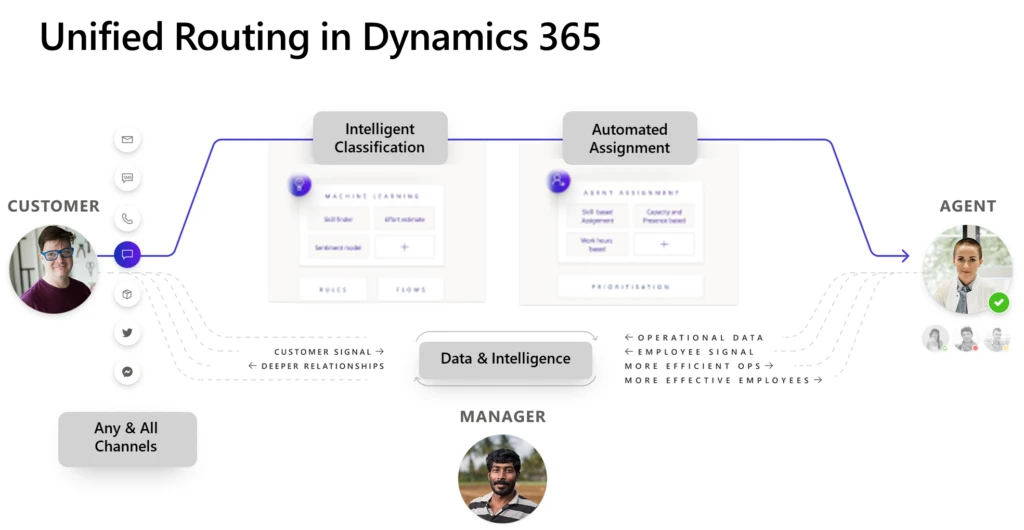
Automatic assignment of incoming service requests is one of the most powerful capabilities of unified routing, benefiting customers as well as agents and management. A common customer pain point is waiting for a long time to reach an agent, only to find out that the agent is unable to solve the issue. Precise automated assignment directly impacts key KPIs like first call resolution, customer satisfaction, and agent satisfaction. On the management side, the system can determine the best agent to assign to a case, removing the need for supervisors to constantly monitor queues.
How automatic assignment works
To assign incoming service requests from all channels to the best-suited agent, unified routing evaluates the following information until it finds a match:
Static characteristics of the agents, such as skills, proficiency, working hours, and location
The dynamic characteristic of real-time capacity
Aspects of the incoming work, such as answers to pre-chat questions, virtual agent interactions, customer journey context, and required skills
Unified routing first looks at the incoming service request and any responses to bots, IVR, pre-chat surveys, and so on, and classifies or “enriches” the service request using machine learning models or logical rules. This step helps in identifying details like incident category, severity, and priority; determining the best support center from the customer’s location; and recognizing related records.
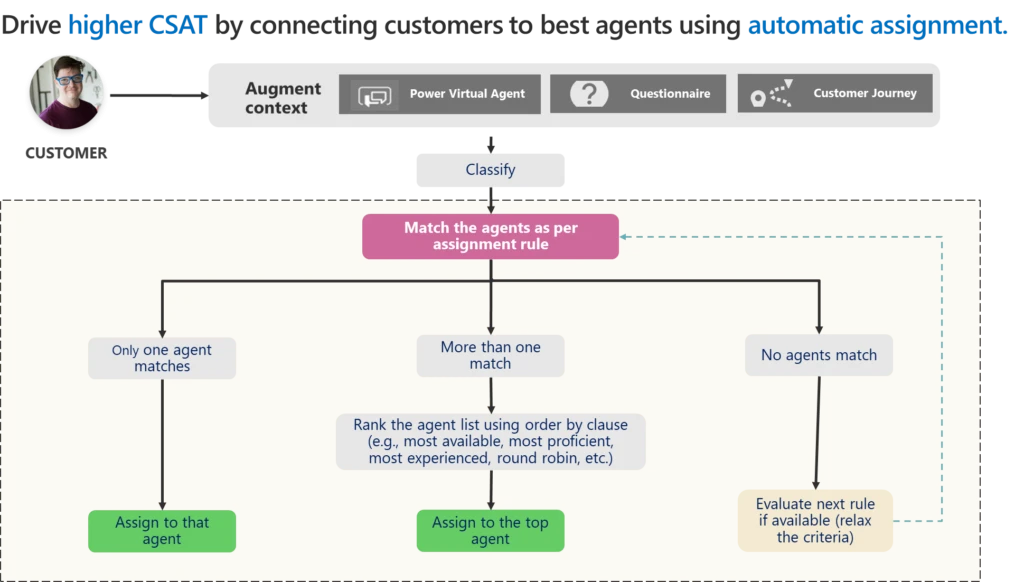
Next, the system uses the enriched information to find the most appropriate agent, as expressed in terms of assignment rules. Unified routing supports multiple assignment rules, executing them one after another until a suitable match is found. Matching can produce three results:
Only one agent matches all the criteria. The system assigns the work to the agent.
Multiple agents match the criteria. The system ranks them against one another, based on their capacity, proficiency, or experience, or simply assigns them in a round robin fashion.
No agents match the criteria. The system provides an option to relax the criteria, or constraints. We call this “gradual relaxation of constraints.” Unified routing evaluates the next matching expression, repeating the process until at least one agent matches.
What happens if the automatically assigned agent rejects the assignment or isn’t available? The system tries to reassign the work on its own, supplemented by supervisor intervention, when needed. Unified routing respects the supervisor’s assignment, so if a supervisor wants to step in and assign work to an agent, they can always do so.
With automatic assignment, unified routing helps improve CSAT while lowering the total cost of ownership, removing the need for constant queue supervision.
This article is contributed. See the original author and article here.
More and more companies are bringing their databases to the cloud, now you want to take this step too!? But what is the right way and which is the right target platform, how do we get our data there? How much power do we need for our application? This is exactly where I would like to start with this episode – the preparation – finding the right SKU for your target environment and how you get data with the help of the Azure Migration Assistant and the Azure Data Studio. In this episode of Data Exposed: MVP Edition, Bjoern Peters and Anna Hoffman show you how easy it is and how easy it is to get results.
This article is contributed. See the original author and article here.
Across the manufacturing industry, pressure continues to rise as organizations and their workforces balance unpredictable supply chains, complex regulatory and compliance requirements, advanced security threats, and heightened competition. At Microsoft, we are working to empower all manufacturing workers, from the factory floor to the customer’s door, with the solutions they need for sustainable growth and increased productivity.
This article is contributed. See the original author and article here.
Build collaborative app that connect people, data, and processes to help over 270M Teams users thrive with hybrid work. Rapidly build powerful apps, bots, flows with a single integrated development stack that seamlessly blends low and pro code with Power Platform. This session will focus on the opportunities and practices for building collaborative apps. Join Microsoft Cloud Advocates, MVPs, and product engineers as we go deeper into the tech announced at Microsoft Build and share what we’ve learned. Join our session at: MSFT Build: Unpacking the Tech: Innovate with collaborative apps and low code
Who is it aimed at? • Developers of all stripes • Entrepreneurs, industry leaders, and IT Pros looking to for the latest • Students or learning professionals interested in learning more about the newest tech
Why should you attend? Learn about the latest tech announced at Microsoft Build • Get a pulse at where the tech industry and Microsoft are headed • Share your thoughts on what you liked at Microsoft Build (and what you’d like to see more of) • Network with other professionals in our community
Microsoft Build: Unpack the Tech at the Reactors.
Everyone loves unboxing or unpacking that new phone or laptop or tech gadget. Like we’re unwrapping something new, unexpected, and meaningful…a gift to get excited about. Recently at Microsoft Build, we announced so many new products and opportunities! But if you’re a developer or an entrepreneur or industry leader, perhaps it can be difficult to decide what really matters to you. How to separate what’s experimental from what’s production-ready for your org? Where should you begin? What will make a real difference in your day-to-day work? Let’s unpack the tech of Microsoft Build and find out!
Speaker Bio Hadeel Shubair (Cloud Advocate) Hadeel is a Regional Cloud Advocate and Data Analytics Engineer for Microsoft, Middle East/Africa region. She holds a Master’s degree in Data Analytics and is passionate about learning and sharing her knowledge on tech topics including Data Analytics, AI, & ML. Before joining Microsoft, Hadeel held several appointments and roles including Google Women in Tech scholar through which she delivered several sessions to the community to motivate and empower young talents. Hadeel also served as part of the Data & Communications team overlooking the organization of the World Government Summit. On the other side, while at University, Hadeel chaired the Women in Engineering club, and was the Chief Editor of the Engineering Newsletter. As a Cloud Advocate for the Microsoft Reactor, Hadeel’s main goal is to take you on a journey to understand & learn more about Data and AI concepts and applications. She’s passionate about technology, education, & growing the Data & AI community across the region.
Someleze Diko (Cloud Advocate) Someleze is a young individual that is passionate about upskilling people from different communities using the different technologies at his disposal through being involved with initiatives that upskill and empower people. Today, he is an M365 and Power Platform Cloud Advocate at Microsoft focusing on upskilling students and communities through the Microsoft Power Platform. Before becoming a Cloud Advocate, Someleze was a Gold Microsoft Learn Student Ambassador in which he worked closely with other ambassadors to learn, upskill and empower students in different communities through hosting sessions that cover different Microsoft Technologies. He also served as a United Nations Peace Ambassador along side his team from Artpeace.
Gomolemo Mohapi (Cloud Advocate) Gomolemo is a young South African who is determined to make a long-lasting impact on the world through technology. In university, he took it upon himself to create multiple written programming tutorials for his peers which significantly assisted those who were struggling to grasp programming concepts. Thereafter, Gomolemo joined the Microsoft Learn Student Ambassador program where he gained advanced technical skills and eventually expanded to host workshops, hackathons and speaking at various conferences. Gomolemo eventually fell in love with the Power Platform, because it was a low-code platform which gave way for him to empower and upskill not just those with a technical background, but anyone from any industry who was looking to learn how to build applications. He has since co-authored a Power Platform Udacity course and is now a Cloud Advocate at Microsoft focused on Power Apps and Fusion Development.
This article is contributed. See the original author and article here.
We are excited to announce that Azure Video Indexer customers using paid ARM based accounts can now monitor their Audit logs (with Azure Monitor). This will allow you to gain deeper insights on the operations of your Azure Video Indexer resources and consume this data in flexible ways. This will allow users toanalyze data, troubleshoot issues, set alerts for failed operations, and monitor the usage and identities accessing the Azure Video Indexer resource. In November 2021, Azure Video Indexer introduced a new account type to public preview – ARM Based accounts. This enables users to better secure and monitor their accounts as well as many other benefits – see here to learn more. ARM Based accounts allow users to utilize many robust Azure native capabilities for Azure Video Indexer control plane while also enabling powerful integrations such as with Azure Monitor.
In this blog, we will help you get started by showing how to:
Set up Diagnostic Settings configuration using Azure portal.
Use Azure Log Analytics to monitor Azure Video Indexer Audit logs.
Use Kusto(KQL) queries to monitor Azure Video Indexer resources.
Set up Diagnostic Setting logs for the Azure Video Indexer account
To enable Diagnostic logs through the Azure Portal, take the following steps:
Use the search bar to look for “Azure Video indexer”
Select the relevant Video Indexer account
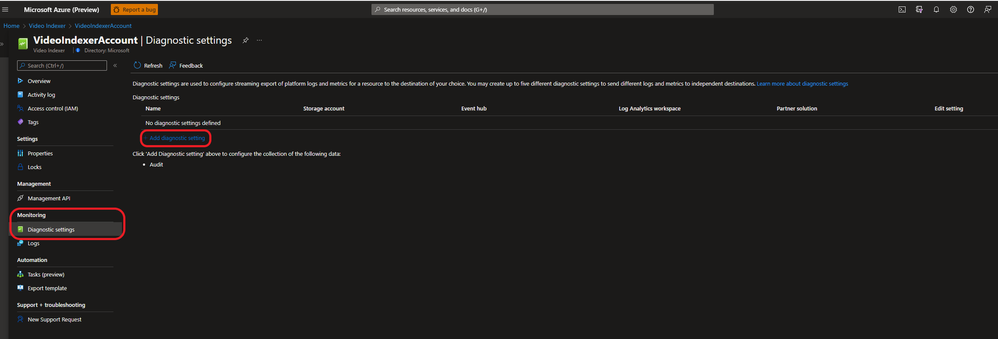
Under Monitoring choose Diagnostic settings.
Choose “Diagnostic settings” under the monitoring section in the Azure Video Indexer account.
Using Diagnostic settings, logs can be exported to several destinations: Event hub, storage account, third party solution or Azure Log Analytics. The following instructions are specific to exporting, configuring, and querying the logs using Azure Log Analytics.
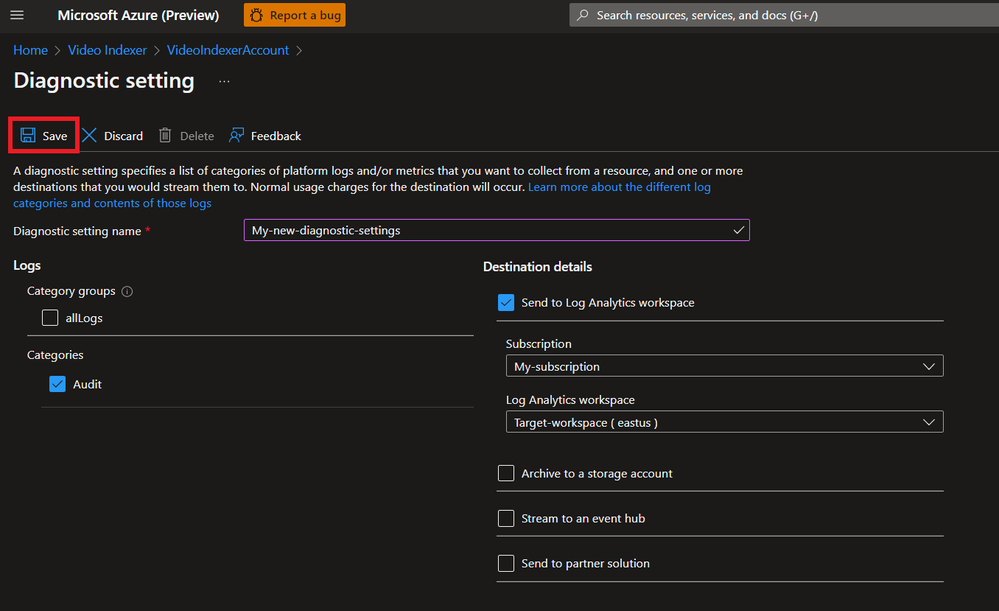
Enter a new name for the diagnostic settings connection you are going to create.
Select Audit from the categories and the Log Analytics workspace from the destination list.
Then choose the right subscription and ‘Target Log Analytics’ workspace and click the ‘Save’ button.
Set a connection to an Azure Log Analytics workspace
Congratulations, in a few minutes and depending on the actions you would perform on the account you should see logs using the ‘Logs’button through the Video Indexer resource or through the Log Analytics Workspace.
Using Azure Log Analytics to monitor Azure Video Indexer Audit logs
There are two ways to view and analyze logs produced by Azure Video Indexer:
Azure Video Indexer resource view – this includes only the logs of the specific Video Indexer instance. From Azure Video Indexer resource view – select the “Logs” icon in this view.
Log Analytics Workspace – this includes logs of all Video Indexer instances sending logs to the Log Analytics workspace. As multiple Video Indexer instances can send logs to a single Log Analytics workspace, this option is ideal when working with multiple Video Indexer instances and looking to view and query them in one workspace. From the Azure Portal, search for the Log Analytics Workspace you selected as the target destination when configuring the “diagnostic settings” (pervious section) and choose the ”Logs”. Results can be filtered out by account with the Account Name or ‘AccountId’ properties.
VIAudit
| where AccountId == "<YOUR ACCOUNT ID>"
| where  Status == "Failure"
| project TimeGenerated, OperationName,CorrelationId, _ResourceId
Useful Kusto(KQL) queries for monitoring Azure Video Indexer resources
Querying of audit logs is done through the Video Indexer resource or log Analytics Workspace using Kusto query language.
In order to query Azure Video Indexer Audit table efficiently, in Log Analytics or in the resource view, we recommend exploring the table’s structure here. To get started easily, we would like to share some basic KQL queries:
Example 1:
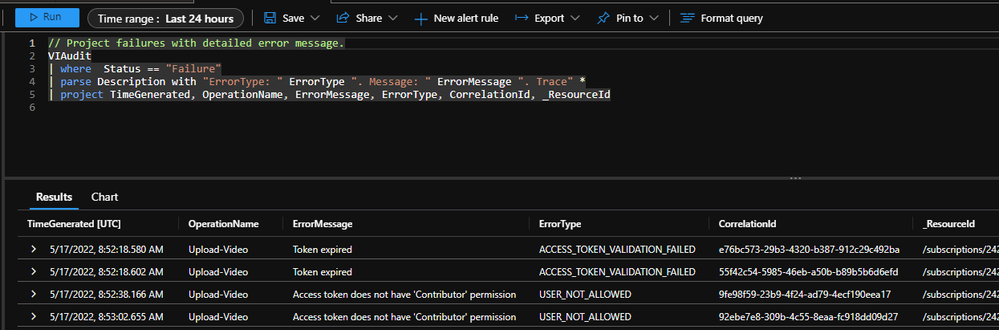
Use the following query to look for failed operations and their cause. As the examples show, in the last 24 hours, this account had four failures when attempting to upload a video. From the error message you can see the two different reasons for the failure. The first one is an access token that was expired, the second was due to an access token with wrong scope of permission.
Query sample:
// Project failures with detailed error message.
VIAudit
| where  Status == "Failure"
| parse Description with "ErrorType: " ErrorType ". Message: " ErrorMessage ". Trace" *
| project TimeGenerated, OperationName, ErrorMessage, ErrorType, CorrelationId, _ResourceId
Example 2:
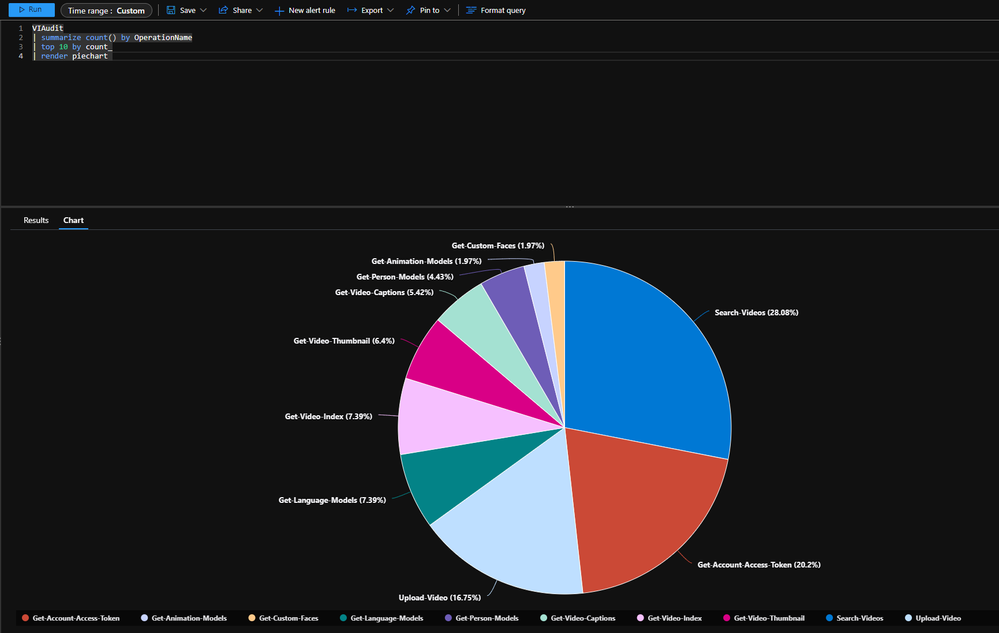
Search for the top 10 operations of the account: For the selected time range, 28% of the operations were searching for videos with in the account.
Query sample:
VIAudit
| summarize count() by OperationName
| top 10 by count_
| render piechart
Example 3:
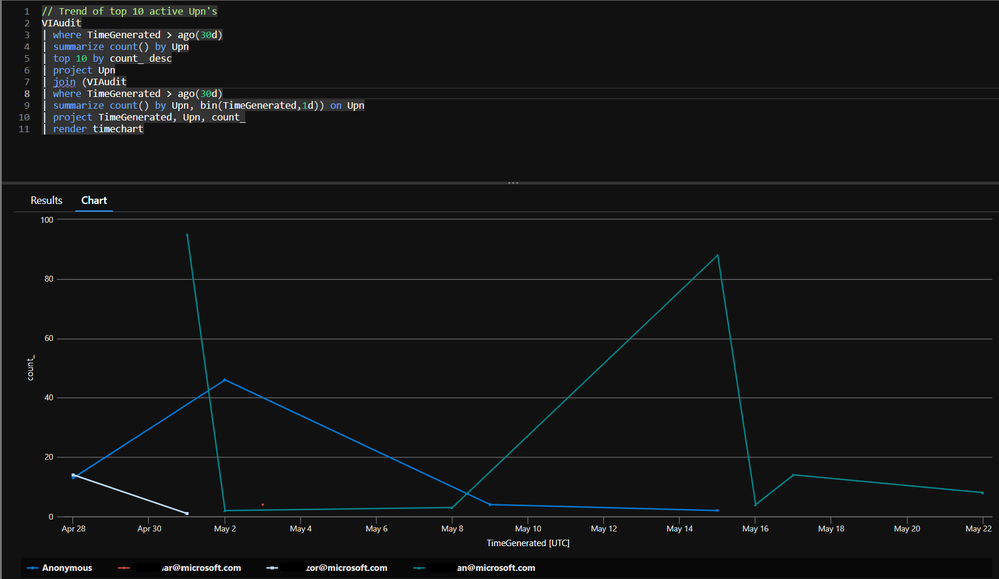
Query searching for top ten active user for an account.
Query sample:
// Trend of top 10 active Upn's
VIAudit
| where TimeGenerated > ago(30d)
| summarize count() by Upn
| top 10 by count_ desc
| project Upn
| join (VIAudit
| where TimeGenerated > ago(30d)
| summarize count() by Upn, bin(TimeGenerated, 1d)) on Upn
| project TimeGenerated, Upn, count_
| render timechart
For more information on how to get started monitoring your Azure Video Indexer resource visit our public documentation. For asks around monitoring Azure Video Indexer leave comments on this blog or visit our user voice page.
Join us and share your feedback
For those of you who are new to our technology, we encourage you to get started today with these helpful resources:
To report an issue with Azure Video Indexer (paid account customers) Go to Azure portal Help + support. Create a new support request. Your request will be tracked within SLA.





Recent Comments