This article is contributed. See the original author and article here.
Establishing trust around the integrity of data stored in database systems has been a longstanding problem for all organizations that manage financial, medical, or other sensitive data. Ledger is a new feature in Azure SQL and SQL Server that incorporates blockchain crypto technologies into the RDBMS to ensure the data stored in a database is tamper evident. In this session of Data Exposed with Anna Hoffman and Pieter Vanhove, we will cover the basic concepts of Ledger and how it works, Ledger tables, and digest management, and database verification.
This article is contributed. See the original author and article here.
There is no shortage of incident response frameworks in the security industry. While the processes may vary, there is relatively universal agreement on requirements to remediate an incident and conduct lessons learned. Remediation falls towards the end of the incident response cycle because security teams must fully analyze the incident to understand several dynamics:
Who is the attacker?
When did the incident occur?
Which user, asset, or data are being targeted?
Which attack techniques were leveraged?
Which of our defenses detected it?
Is this the full scope of the compromise, or are more factors involved?
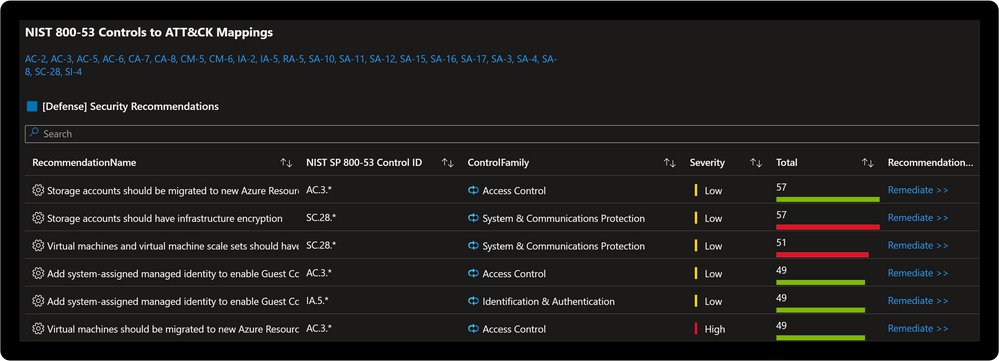
Security teams respond after understanding these and several organizationally aligned information requirements. The incident is closed when there is confidence the attacker was expelled from the environment and respective actions completed. The difference between a young Security Operations Center (SOC) and a mature one often lies in the way incident response teams conducts lessons learned. This process evolves from a “rinse and repeat” type approach to proactive threat modeling. Proactive threat modeling is critical to understanding where the attacker maneuvered through a network. The MITRE ATT&CK® framework allows security teams to understand the methods attackers employ against networks. Recently MITRE Engenuity published the NIST SP 800-53 Controls to ATT&CK Mappings which provides an actionable approach to implementing defenses based in the NIST SP 800-53 controls framework.
Microsoft Sentinel: Threat Analysis & Response Solution
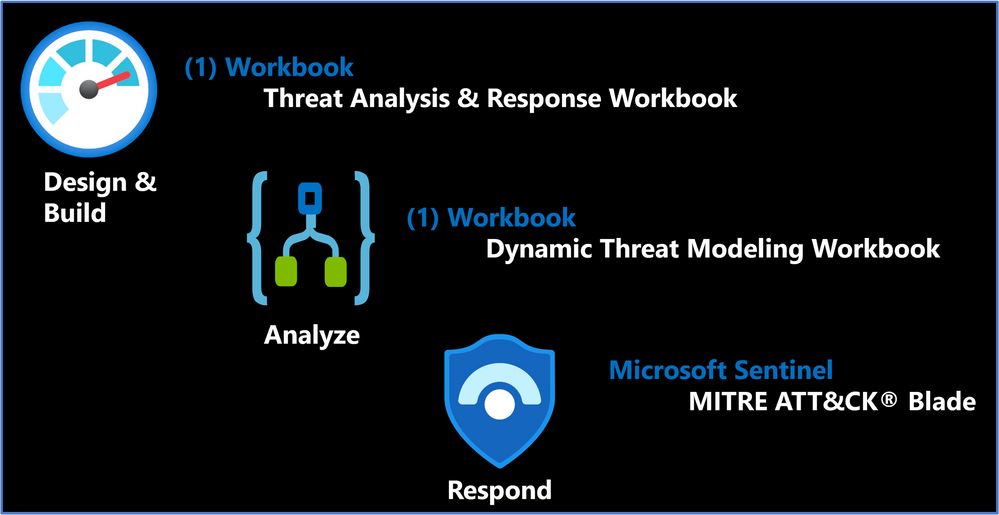
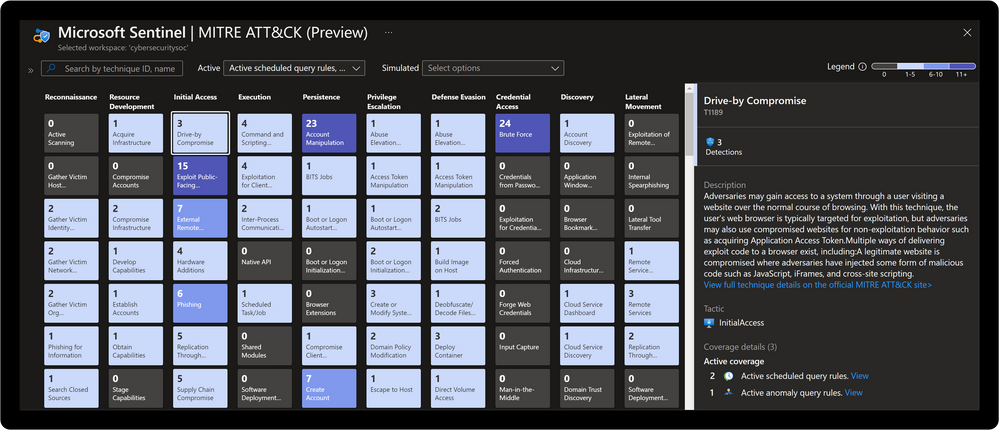
The Microsoft Sentinel: Threat Analysis & Response Solution takes this a step further with (2) new Workbooks designed to support development of threat hunting programs and dynamic threat modeling designed to identify, respond, harden, and remediate against threats. Microsoft Defender for Cloud is a Cloud Workload Protection Platform (CWPP) and Cloud Security Posture Management (CSPM) which provides powerful coupling with Microsoft Sentinel. Where Microsoft Sentinel provides incident response capabilities, Microsoft Defender for Cloud provides remediation actions aligned to respective regulatory compliance initiatives. Once the incident is fully remediated and cloud weaknesses are addressed there is also the ability to evaluate analytics coverage with the Microsoft Sentinel MITRE ATT&CK® blade. Check out the demo to see how.
Solution Benefits
Proactive threat modeling (red vs. blue)
Quantifiable framework for building threat hunting programs
Monitoring & alerting of security coverage, threat vectors, and blind spots
Response via security orchestration automation and response (SOAR) playbooks
Remediation with cloud security posture management (CSPM)
Compliance alignment to NIST SP 800-53 controls
Solution Content & Workflows
Solution Overview
Threat Analysis & Response Workbook
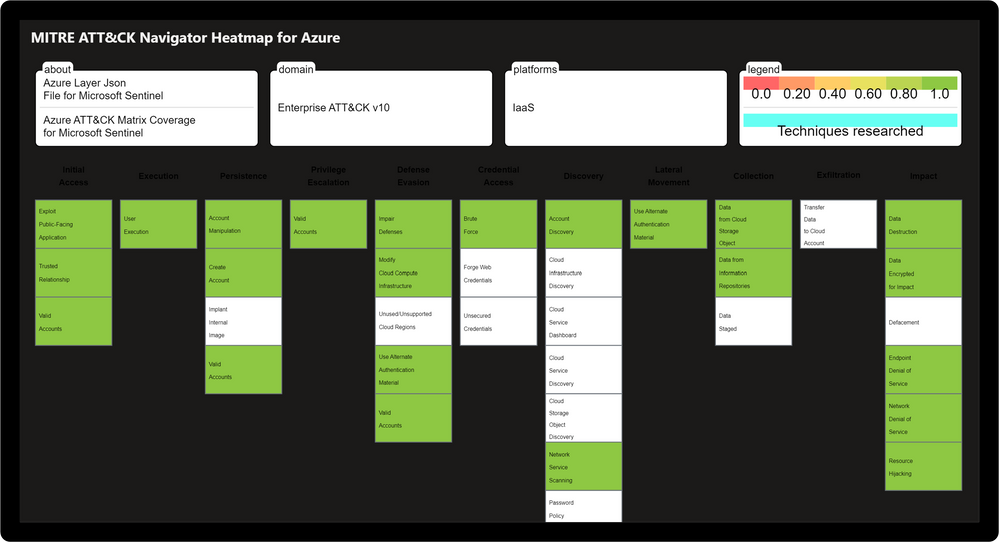
Designed by the Microsoft Threat Intelligence Center, the Threat Analysis & Response Workbook provides the foundation for building threat hunting programs. This workbook features recommended steps for getting started including resources for deploying analytics rules and hunting queries. Data Source Statistics provides an overview of which logs are ingested from respective sources which provides a starting point for determining utility of respective analytics rules. The Microsoft Sentinel GitHub section provides an overview of available analytics by alignment to respective tactics/techniques. MITRE ATT&CK Navigator Heatmap provides an assessment of coverage by tactic and technique areas which is valuable for evaluating the efficiency of organizational threat hunting programs.
Threat Analysis & Response Workbook
Dynamic Threat Analysis & Response Workbook
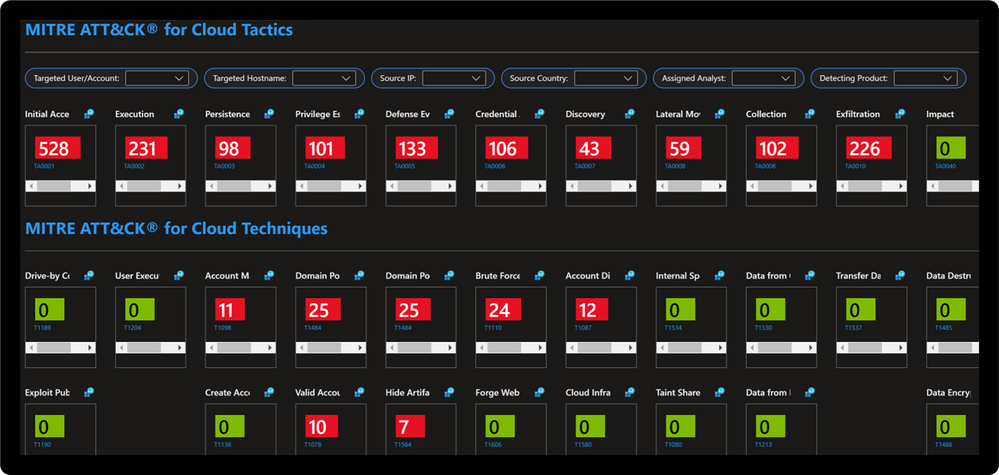
The Dynamic Threat Analysis & Response Workbook dynamically assesses attacks to your on-premises, cloud, and multi-cloud workloads. Attackers are categorized by the MITRE ATT&CK for Cloud Matrix and evaluated against Microsoft Sentinel observed Analytics and Incidents. This provides pivots to evaluate attacks against specific users, assets, attacking IPs, countries, assigned analyst, and detecting product. Each tactic provides a respective control area comprised of technique control cards.
Dynamic Threat Modeling & Response Workbook
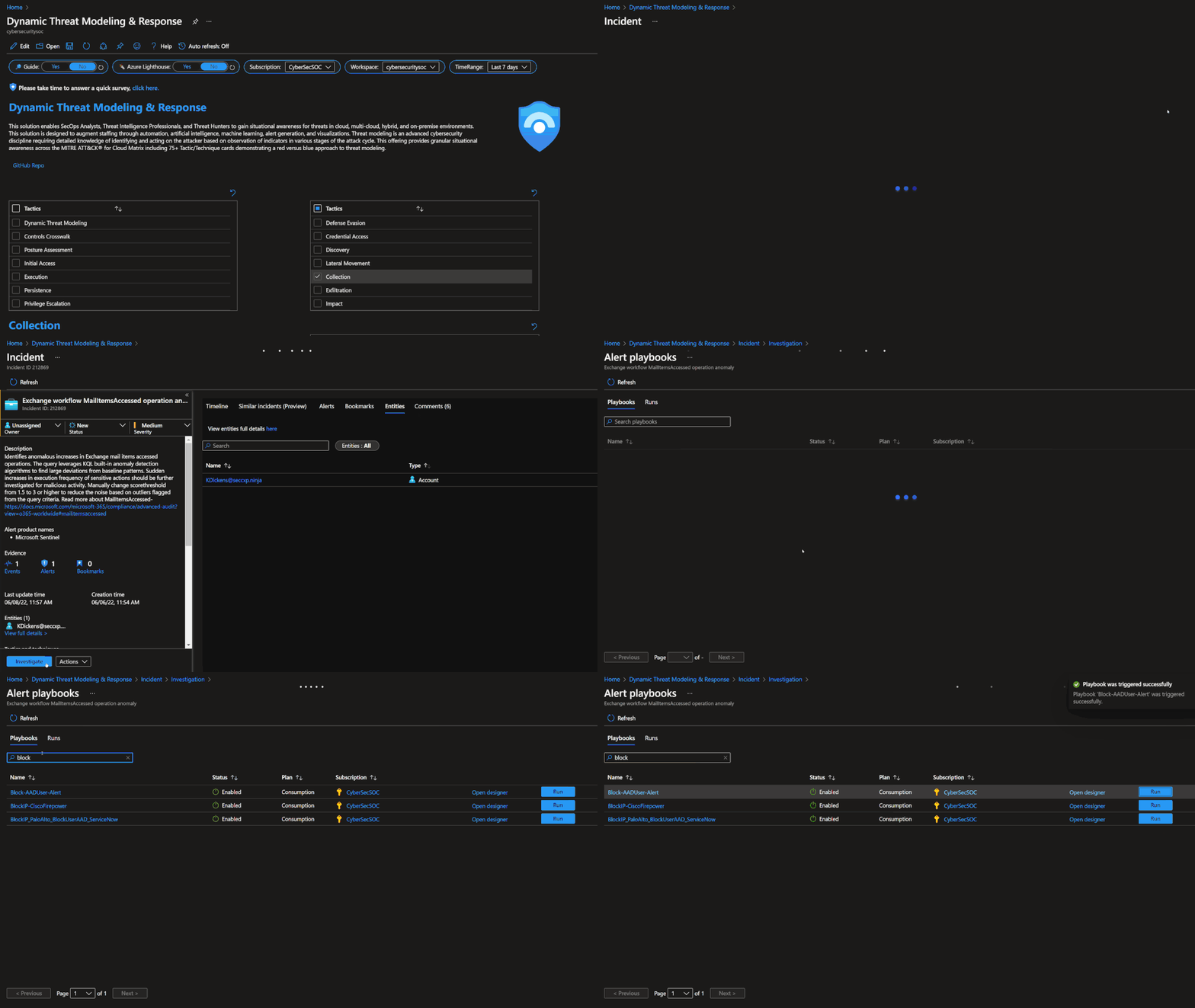
Technique Control Cards provide details of establishing coverage, evaluation of observed attacks, and defense recommendations aligned to NIST SP 800-53 controls. Observed attacks are addressed via Microsoft Sentinel Incidents for Investigation, Playbooks for Response, MITRE ATT&CK blade for Coverage, and Microsoft Defender for Cloud for Remediations.
Improve posture by implementing NIST SP 800-53 control recommendations with Microsoft Defender for Cloud
Microsoft Sentinel: MITRE ATT&CK Blade
MITRE ATT&CK is a publicly accessible knowledge base of tactics and techniques that are commonly used by attackers and is created and maintained by observing real-world observations. Many organizations use the MITRE ATT&CK knowledge base to develop specific threat models and methodologies that are used to verify security status in their environments. Microsoft Sentinel analyzes ingested data, not only to detect threats and help you investigate, but also to visualize the nature and coverage of your organization’s security status.
This solution demonstrates best practice guidance, but Microsoft does not guarantee nor imply compliance. All requirements, tactics, validations, and controls are governed by respective organizations. This solution provides visibility and situational awareness for security capabilities delivered with Microsoft technologies in predominantly cloud-based environments. Customer experience will vary by user and some panels may require additional configurations for operation. Recommendations do not imply coverage of respective controls as they are often one of several courses of action for approaching requirements which is unique to each customer. Recommendations should be considered a starting point for planning full or partial coverage of respective requirements.
This article is contributed. See the original author and article here.
Final Update: Tuesday, 07 June 2022 17:22 UTC
We’ve confirmed that all systems are back to normal with no customer impact as of 6/7, 15:55 UTC. Our logs show the incident started on 6/7, 14:00 UTC and that during the 2 hours that it took to resolve the issue 100% of customers in Australia Central region would have experienced data latency and/or data loss while publishing logs to their workspace
Root Cause: The failure was due to change that got deployed and was rolled back
Incident Timeline: 1 Hour & 55 minutes – 6/7, 14:00 UTC through 6/7, 15:55 UTC
We understand that customers rely on Azure Log Analytics as a critical service and apologize for any impact this incident caused.
This article is contributed. See the original author and article here.
Knowing how your sales organization engages with your B2B customers can help you spot changes in communication patterns and understand the state of your accounts and how your organization interacts with them. Microsoft Dynamics 365 Customer Insights brings together transactional, behavioral, and demographic data, Microsoft proprietary audience intelligence, and third-party resources to create enriched, multidimensional profiles for both individual consumers (B2C) and business accounts (B2B). Data enrichment using aggregated email and meeting insights from Microsoft 365 offers even more information to help you engage with your customers more effectively.
The value of data enrichment for engagement
There are endless ways to use customer engagement insights. For B2B environments, information about organizations or companies and their related contacts can be used on its own or combined with other business data previously ingested into Dynamics 365 Customer Insights. For example, you can create a segment of accounts that have not had any meetings or emails with your organization in the last 60 days. Engage and reactivate those stale accounts using a customer journey orchestration platform like Dynamics 365 Marketing.
Here is another example, one of our favorites. You can create a measure defined as the ratio between the combined time your sales team spends in meetings with an account and the anticipated revenue from the account. Use that measure to easily identify accounts that have the largest mismatch between effort and revenue. With that insight, you can make informed choices about how much time your organization spends with those accounts.
How to enrich your account profiles with engagement data
Next, set up your enrichment options to use data from Microsoft Office 365:
Select the email addresses for which Office 365 data will be aggregated.
Review and consent to use your organization’s aggregated data in Customer Insights data enrichment.
Run the enrichment process, or let the system run the enrichment automatically as part of a scheduled refresh.
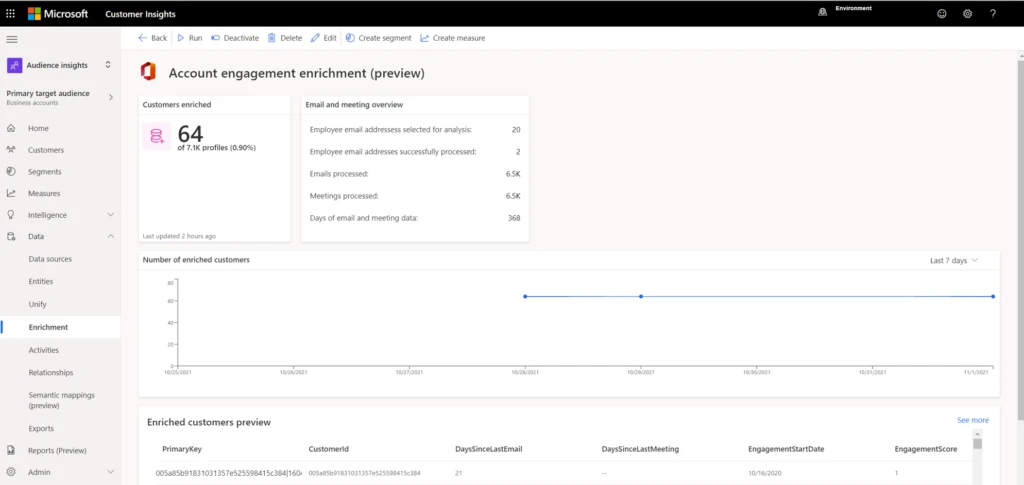
After the enrichment has finished, you can view the results, including the number of enriched customers and the number of processed emails and meetings:
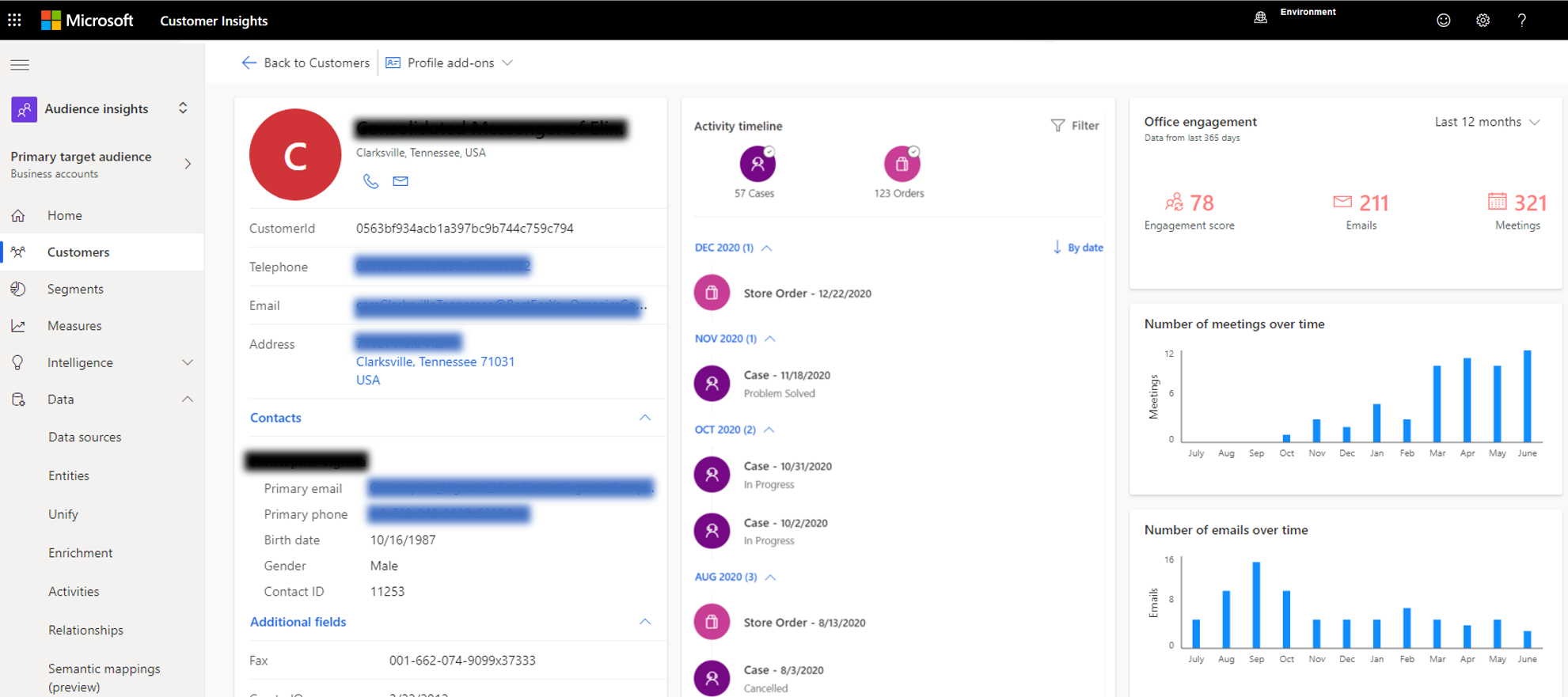
All data is aggregated at the account level. A system-calculated engagement score of 0 to 100 is assigned to every account. The engagement score captures the engagement your organization has with this account relative to all your other accounts.
You can view account engagement, including the engagement score, on the individual customer cards. Also shown are the total number of emails and meetings over the past year, along with charts that show the email and meeting history. These views make it easy to spot any changes in communication patterns over time:
Data enrichment captures more than 15 data points, including the average duration of meetings, the number of people associated with the account who attended the meetings, and the number of days since the last email and the last meeting. Check out the documentation for the full list of aggregated data that account enrichment provides.
Next steps
Learn how your company can gain the most comprehensive view of your customers by visiting Dynamics 365 Customer Insights.
This article is contributed. See the original author and article here.
Within hybrid work, organizations have been forced to adapt and reimagine how people will communicate and collaborate. Even with Microsoft Teams providing innovative solutions to hybrid work challenges, employees can often work with organizations outside of their own and occasionally need to join meetings from third-party meeting providers.
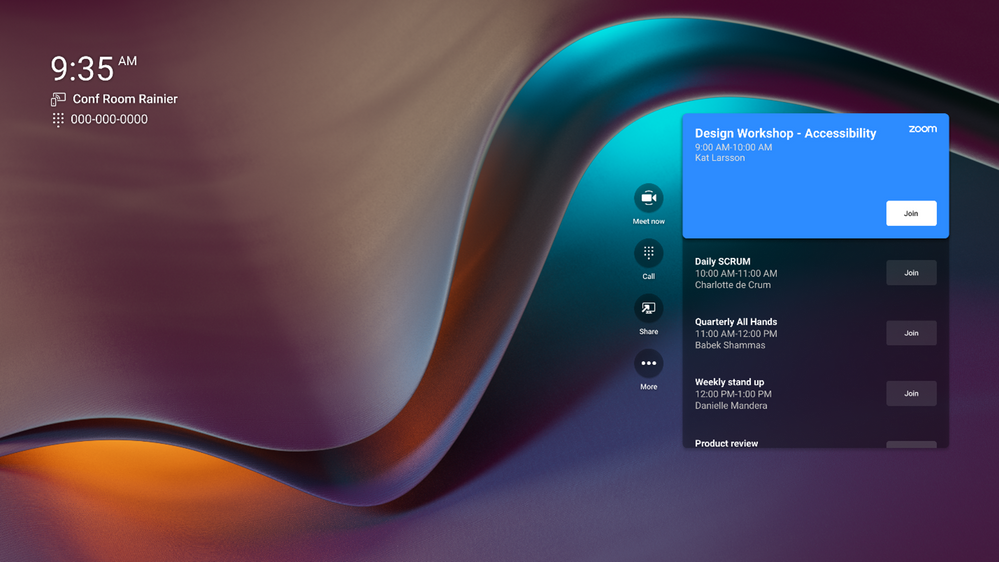
Today, Teams Rooms on Android offers Direct Guest Join, a one-touch experience that allows users to join a third-party online meeting from their Teams Rooms just as easily as they can join meetings hosted in Teams. This experience helps reduce friction when users are joining calls from external partners or clients who may not use the same meeting provider.
Teams Rooms on Android will initially offer interoperability with Zoom meetings, while Cisco Webex and other third-party partners are coming soon to the Android platform. This experience began to rollout on May 25 for Poly Teams certified devices, with Logitech and Yealink fast following, and additional device manufactures coming soon.
Under the hood Microsoft partnered with Zoom, Cisco, GoToMeeting, and BlueJeans to create an interoperability experience with Direct Guest Join. Third-party providers like Zoom provide an embedded web experience that temporarily allows Teams Rooms users to join third-party meetings and collaborate more freely. This web experience provides up-to-date software as well as enterprise-grade privacy and security. As this partnership grows, Direct Guest Join will continue to improve with new and exciting functionalities.
To learn more about the future of Rooms and its interoperability experience, be on the lookout for a joint webcast between Microsoft and Zoom, with Ilya Bukshteyn, VP of Teams Calling and Devices, and Jeff Smith, Head of Zoom Rooms and Whiteboard.


Recent Comments