What’s new in Microsoft Teams (free) | May 2023

What’s new in Microsoft Teams (free) | May 2023

This article is contributed. See the original author and article here.

As you might have seen, many new features have become available in Communities (beta) in Teams free on Windows 11, bringing it close to parity with mobile. You can now create and join communities on Windows 11, and invite others to your communities, too.


There’s also a significant change in Teams free meetings where previously all meeting participants joined meetings through lobby. We have now added a new option for invited participants to get directly to the meeting, in other words bypassing the lobby. This will be the default setting for all new Teams free meetings, making meeting joins more seamless for the invited participants, and keeping your meetings safe by having everybody else still joining through the lobby.


New features in Teams (free) on desktop and web


Create a community (Windows 11)


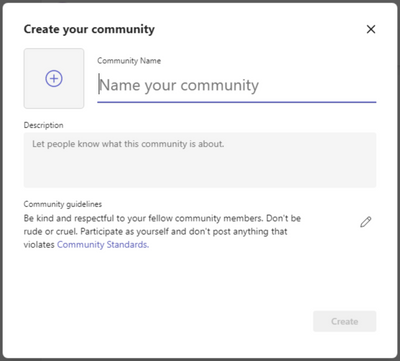
You can now conveniently create a new community from scratch in Teams free on Windows 11, very similarly as on mobile. You just need to fill in the community details like name, description, and community picture, and adjust community guidelines as needed. After community creation you can then invite new members or change further community details using mobile.


MiikkaOksanen_1-1685633683071.png


Invite members to your community (Windows 11)


It’s easy to invite others to your communities in Teams free on Windows 11 now. You can invite contacts already using Teams free or even those who have not yet got started using their email address or phone number. Learn how to invite and remove community members
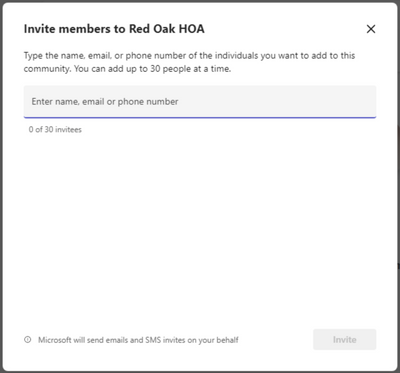

MiikkaOksanen_2-1685633719688.png


Create community events and view community calendars (Windows 11)


Community events are a core feature in communities and now it’s possible to create those and view community calendars in Teams free on Windows 11, too. Communities created on Windows 11 are visible on mobile and vice versa making it easy to join the meeting when it’s time. Learn more about community calendars and events


Notify community members about new content via email (Windows 11)


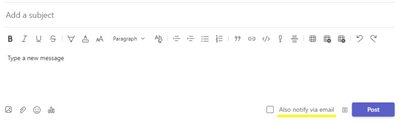
When creating a new community post, you can now notify community members about the new post via email. This new option available when posting in a community helps you to reach your community members quickly even when they are not in Teams. These emails link back to the original post making it convenient to read the new content. Learn how to post to a community

MiikkaOksanen_3-1685633740841.png


Use Microsoft Designer for community announcements (Windows 11)


Community announcements stand out from other community content and when posting a community announcement on Windows 11, you can now use Microsoft Designer to quickly create a gorgeous banner image for the announcement. Learn how to use Designer for announcement banners


New features in Teams (free) on mobile


Notify community members about new content via email


When creating a new community post, you can now notify community members about the new post via email. This new option available when posting in a community helps you to reach your community members quickly even when they are not in Teams. These emails link back to the original post making it convenient to read the new content. Learn how to post to a community


MiikkaOksanen_4-1685633774783.png


Block users from your community


In the event of a bad actor going rogue in your community, as the community owner you can now block them from the community. The same user will not be able to join the community again. We hope you won’t be needing this feature, but it’s now available should it be needed. You can remove a community member and block them from joining the community again by selecting them from the member list and selecting ‘Remove from community’. This will give you options to ‘Remove’ and ‘Remove & Block’. Learn how to remove and block users from your community


MiikkaOksanen_6-1685633830186.png


Bulk invite community members using mobile camera (iOS)


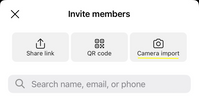
It’s now very easy to quickly get your community growing with the new bulk invite option on iOS. With this feature you can use your mobile camera on iOS to grab a picture of a list of email addresses and phone numbers which then will be validated and matched against the current member list of the community. You can update the list as needed and when ready, send invites to up to 50 persons in one go. Learn how to bulk invite community members on iOS

MiikkaOksanen_5-1685633809375.png


How to send feedback and suggestions?


We are always happy to receive feedback and suggestions to make our product even better. To participate in our feedback program and help us in our endeavor, please follow the steps below:


You can also sign up for a user panel, to get opportunities to connect directly with the product team, and help make Teams (free) better. Learn more

Build more connections with new communities in Microsoft Teams and GroupMe features

Build more connections with new communities in Microsoft Teams and GroupMe features

This article is contributed. See the original author and article here.

Today we’re announcing new updates to the free version of Microsoft Teams that will allow you to create communities from scratch, share and invite members, create and host events, moderate content with critical trust and safety features, and get notified about all important activities.

The post Build more connections with new communities in Microsoft Teams and GroupMe features appeared first on Microsoft 365 Blog.

Brought to you by Dr. Ware, Microsoft Office 365 Silver Partner, Charleston SC.

Generate and send SMS and Email using Azure OpenAI Services and Azure Communication Services

Generate and send SMS and Email using Azure OpenAI Services and Azure Communication Services

This article is contributed. See the original author and article here.

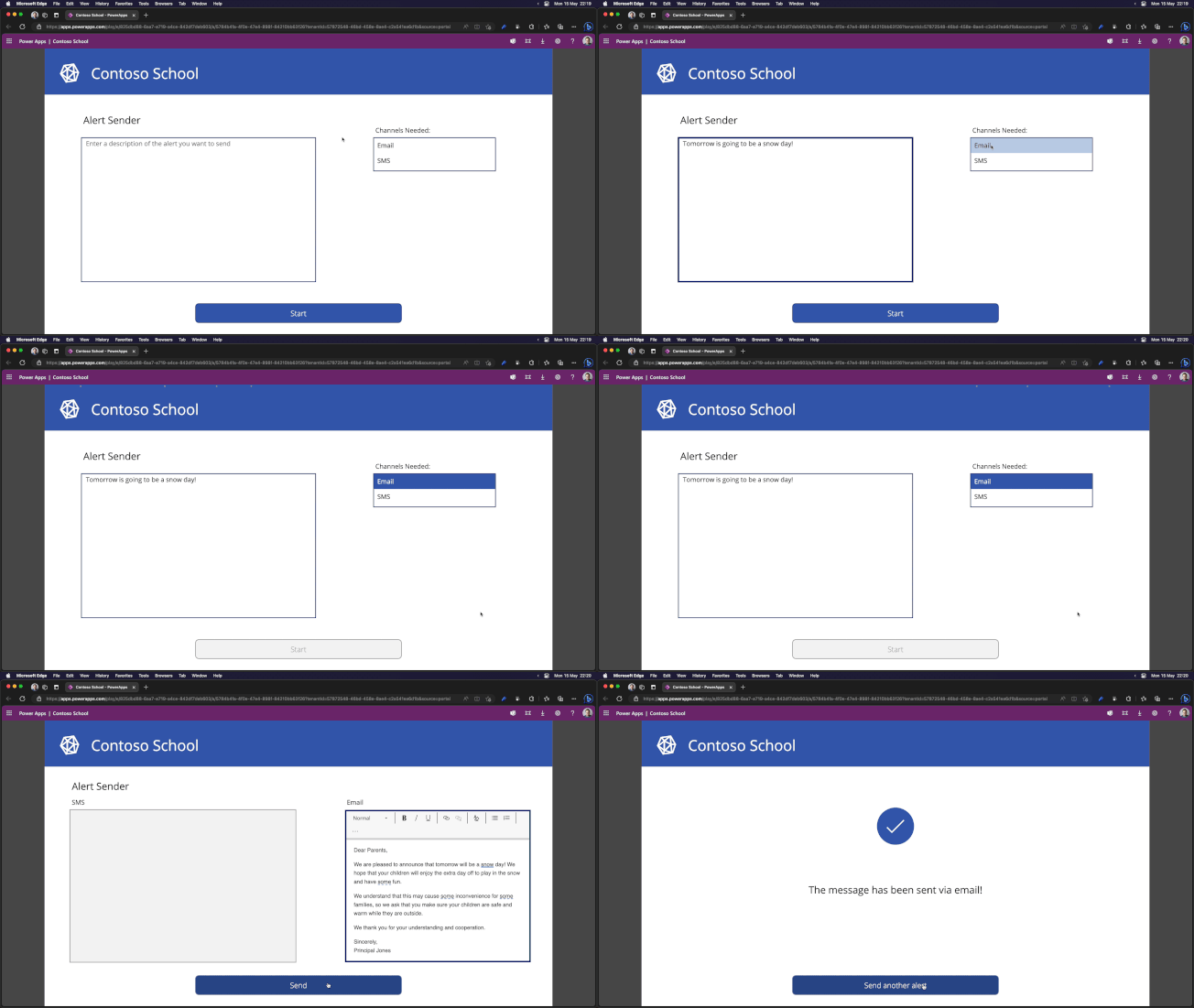
Many organizations, for example, schools during a significant weather event, need to rapidly communicate ad hoc updates via SMS or Email.  With Azure Communication Services and Azure OpenAI Services, we can simplify this experience to help you automatically generate templated messages for different communication channels and audiences. If this problem seems familiar, we have built a pre-built solution that can help you. See our manual for step-by-step instructions.


                                                      Contoso-School.gif


The solution uses the example of a a school administrator who needs to send a weather related alert and focuses on three main parts:


  1. Provide a secure app for school administrators using Power Apps. School administrators can configure the message they want to send to their contacts.

  2. Support multiple channels (SMS, Email) using Power Automate and Azure Communication Services. They can cover a variety of channels to ensure the recipients see the message in a timely manner.

  3. Auto-generate templates for each medium based on the message description using Power Automate and Azure OpenAI Services. Craft professional messages for a variety of mediums easily. You will not need to re-write the message for each medium.


Architecture overview


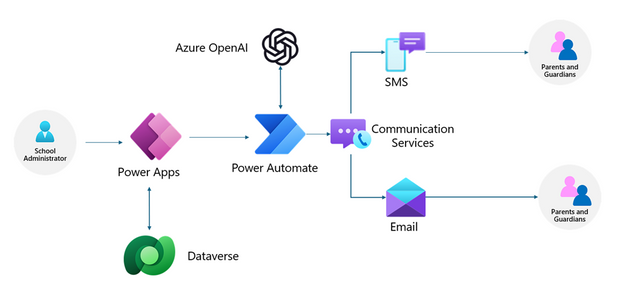
In our solution, to create and send messages to the contacts, we will leverage Power Apps and Power Automate to build the applications and flows. The Power App will enable the school administrator to configure the message they want to send out to contacts. It will be linked to a Dataverse table with contact information. The Power App will trigger a Power Automate flow which will use Azure OpenAI Services to create communication templates for each channel and Azure Communication Services to send SMS and Emails to the parents using contact information.


                                                         dayshacarter_1-1685550863843.png


Check out our pre-built solution or the step-by-step instructions to get started building your own application for SMS and email messages today.


If you would like to see more samples like this or would like to learn more about the process of building solutions with Azure Communication Services and Azure OpenAI Services, drop us a comment below.

Introducing extended planning and analytics for Dynamics 365 Finance

Introducing extended planning and analytics for Dynamics 365 Finance

This article is contributed. See the original author and article here.

In an era marked by increasing interest rates, high inflation, and economic uncertainty, empowering CFOs with financial planning tools and data analytics (FP&A) has become essential. These resources aid decision-making by providing comprehensive financial analysis, forecasting, and budgeting capabilities helping organizations to consolidate and analyze financial data, and create accurate financial models. At Microsoft, we are dedicated to delivering advanced FP&A solutions that seamlessly integrate innovative new features with traditional capabilities, empowering CFOs with impactful tools tailored for the modern era. Our objective is to usher in a new generation of planning capabilities for CFOs by unifying data across business processes, delivering near real-time insights to anticipate the future, and using the latest advancements in AI and natural language processing to provide a solution that goes beyond traditional FP&A solutions and redefining how finance operates.

Today, we are thrilled to announce significant strides toward realizing this vision. Microsoft is introducing a fully developed, customer-ready extended planning and analytics solution (xP&A). Our solution will provide Microsoft Dynamics 365 Finance customers with user-friendly and rapidly deployable modern xP&A capabilities. Empowered by our new solution, organizations can continuously plan, looking across the enterprise at timely operational and financial data with AI-assisted insights providing critical strategic direction to accelerate innovation and guide their businesses toward sustainable success.

Dynamics 365 Finance

Enhance your financial decision making

Finance executive analyzing data on a tablet.

Outdated and overly complex solutions hinder finance’s strategic execution

Over the past decade, CFOs have reaped the benefits of various FP&A tools offering invaluable support. However, these tools inherently possess limitations that impede their ability to meet the strategic demands of modern CFOs. Challenges such as integration complexities, restricted data sets, and infrequent data updates severely curtail their effectiveness, rendering agile planning difficult if attainable. Their implementation tends to be sluggish and costly, demanding advanced skill sets to derive actionable insights. Moreover, their inflexibility and reliance on rigid user interfaces constrain customization possibilities and do not cater to specialized customer requirements. Lastly, these tools, in their present state, often lack advanced analytics and AI capabilities to better predict and model scenarios to anticipate future needs.

Equipping Finance with the planning tools of the future

To address these challenges, our xP&A solution will utilize advancements across the Microsoft product portfolio. It seamlessly integrates access to unified, near real-time data innovations powered by the business performance analytics capabilities within Dynamics 365 Finance and incorporates automated insights obtained through recent acquisitions in critical business domains, such as AI-driven spend analytics and process mining. Additionally, our solution includes the latest advancements in natural language processing, enabling interactive and embedded AI experiences that actively guide finance and operations leaders toward better decisions. This unique combination of technologies positions Dynamics 365 Finance as a disruptive force in ERP (enterprise resource planning) and the opportunity to lead in the financial planning and analytics category. By embracing our solution, finance teams can confidently navigate the era of AI and may experience significant growth.

Traditional FP&A solutions with the innovation needed for success

While our xP&A solution aims to be visionary, we acknowledge the importance of meeting the foundational expectations established by industry-standard FP&A tools. In addition to offering these essential capabilities, our new xP&A solution provides access to a diverse range of customizable use cases and templates designed to address various financial requirements, facilitate a quick start for customers, and enable fast deployment.

Whether teams require support for budgeting and forecasting, sales and operations planning, cash flow forecasting, financial close, or workforce planning, our solution delivers proven workflows that are highly adaptable. Our solution prioritizes critical modern capabilities that are top of mind for today’s CFOs, such as predictive forecasting, zero-based budgeting, what-if analysis, and uncovering hidden drivers with AI-powered insights.

Dynamics 365 Finance xP&A capabilities go beyond traditional finance processes by extending the scope of data to encompass cross-domain datasets, including supply chain, human resources, sales, and more. This holistic approach supplies a comprehensive view of operational performance, empowering informed decision-making.

Familiar user experiences and the power of Microsoft Cloud

Most importantly, our xP&A solution provides customers with a familiar and user-friendly environment, delivered through the well-known and easily customizable experiences of Power BI and Excel. These applications have become ubiquitous among Finance users as their go-to analytics environment for daily work. Our solution allows them to seamlessly work within their preferred experiences without extracting and transforming data from their ERP. Gone are the days when finance teams were confined to rigid and outdated user experiences in traditional ERPs. With our solution, finance teams can fully embrace innovation from dedicated product teams while enjoying the familiarity and efficiency of the tools they have relied on for decades.

Finally, backed by the full power of the Microsoft Cloud and data platform, our xP&A solution will use innovations across the Microsoft portfolio. With robust collaboration capabilities embedded into Microsoft Teams and recently announced Dynamics 365 Copilot natural language processing functionality to deliver interactive insights embedded into the flow of work so users of all skill levels can securely access, share, and collaborate with timely data within the same tools they already rely on daily.

A new era of planning capabilities for the CFO

Today’s announcement of extended planning and analytics (xP&A) for Dynamics 365 Finance represents a significant advancement in providing CFOs with AI-driven financial planning tools and data analytics capabilities. Imagine a world where finance teams can engage with embedded natural language processing models in planning tools, enabling them to initiate what-if scenario planning iterations by asking critical questions and modeling their impacts. This empowers finance teams to anticipate and adjust for various outcomes proactively.

For instance, what if Finance users could prompt Dynamics 365 Copilot by asking questions like, “What is the predicted growth rate for product A and B?” These predictions are then seamlessly integrated into planning models, generating detailed scenarios that offer valuable insights into how the growth of specific products may influence staffing needs, revenue, and margins.

To address modern economic challenges, a new age of sophisticated planning and analytical tools is essential for CFOs to anticipate risk, drive innovation, and guide their businesses toward short-term and long-term success. With Dynamics 365 Finance, CFOs now have the tools to address these challenges and keep their organizations strong for the future.

Learn more

Begin your AI journey today! Learn more about Dynamics 365 Finance.

The post Introducing extended planning and analytics for Dynamics 365 Finance appeared first on Microsoft Dynamics 365 Blog.

Brought to you by Dr. Ware, Microsoft Office 365 Silver Partner, Charleston SC.

Building the future of Azure Stack HCI

This article is contributed. See the original author and article here.

Introduction


Our customers want a simple way to bring the power of the cloud into their real-world operations to transform their businesses. At Microsoft, our goal is to give businesses the ability to project Azure to wherever they need it, whether it be the cloud, a data center, or an edge location like a retail store.


However, we know operating even modern hybrid cloud environments can be a complex undertaking.   An array of disparate tools and technologies acquired over time and space often leaves customers to stitch it all together themselves. Our aim is to reduce that complexity with Azure-consistent infrastructure that simplifies the ability to take advantage of cloud-native technologies at the edge.


As part of this ambitious vision, we are evolving our flagship hyperconverged infrastructure offering, Azure Stack HCI, towards an increasingly cloud-native posture that leverages Azure Arc to meet the ever-changing needs of our customers. The result is a solution for businesses that simplifies operations, and allows our customers to use the same tools, app models, and control planes uniformly regardless of where their data and applications reside.


How Microsoft delivers a seamless cloud to edge solution with Azure Stack HCI


Unified and consistent operations across environments


  • Edge deployments are streamlined into a simplified turnkey experience driven centrally from the cloud, which minimizes the need for on-prem IT expertise.

  • Updates are one-click for the entire technology stack, closing the seams between hardware, firmware, drivers, OS, and agents. All updates are comprehensively validated for compatibility, interoperability, and reliability.

  • Support is at the solution level, providing a single point of contact experience for hardware, software, and cloud components.


Simplified application modernization


  • Applications are developed once and deployed and managed equally across environments.

  • Azure Arc-enabled Azure features and services such as Azure Kubernetes Services, Azure Virtual Desktop, Azure Arc-enabled data services, and Azure Arc-enabled VM Management easily extend from the cloud to the edge.


Centralized governance


  • On-premises resources are easily accessed, managed, and governed centrally through the Azure Portal.

  • Infrastructure is continuously monitored to ensure it stays in a validated state.

  • Azure’s policy management, threat protection, and security controls extend to on-premises infrastructure.


Announcing Dell APEX Cloud Platform for Microsoft Azure


To simplify the inherent complexity of cloud to edge, the unique breadth and depth of our partners extends Microsoft’s cloud services and software into customers’ environments around the world. With one of our key partners, we recently announced the Dell APEX Cloud Platform for Microsoft Azure, the first Azure Stack HCI solution of its kind, delivering integration and capabilities beyond the Validated Nodes and Integrated Systems in the Azure Stack HCI portfolio today.


Dell APEX Cloud Platform for Azure is the result of extensive engineering collaboration between Microsoft and Dell. It natively integrates with Azure Arc and Azure Stack HCI to provide a turnkey experience to customers, including simplified deployment, seamless management, and orchestration capabilities for hyperconverged infrastructure deployments. Building on Dell’s track record of delivering market-leading integrated infrastructure solutions with extensive software-driven management and orchestration (M&O) automation, this comprehensive solution enables IT admins and operators to focus less on managing the day-to-day operational tasks and more on innovation and achieving desired business outcomes. This integration gives customers a consistent operational model to run their application and data services across datacenter and edge and manage on-premises resources from the Azure portal with consistent security and governance.


Conclusion


We are excited for what’s to come with Azure Stack HCI as we keep building and transforming with our customers. To learn more about Azure Stack HCI, visit our page on Microsoft Learn.


For more information on Dell APEX Cloud Platform for Microsoft Azure, please visit Dell’s solution brief.