Understand your customers better with constrained speech recognition 

Understand your customers better with constrained speech recognition 

This article is contributed. See the original author and article here.

In today’s voice-first world, it’s not enough for systems to simply hear what users say. They need to understand it with precision.  In high-stakes environments like healthcare, finance, or enterprise IT, voice interfaces must balance natural conversation with strict control over vocabulary and intent. Many organizations rely on voice AI agents to collect critical information. This can include account numbers, credit card numbers, tracking codes, prescription identifiers, and more! Accuracy isn’t optional in these scenarios. Even a single misrecognized digit can derail a customer experience. Traditional speech recognition systems often struggle with these inputs, leading to frustration and costly errors. 

That’s why we’re introducing Constrained Speech Recognition, a new capability in Dynamics 365 Contact Center designed to deliver highly accurate recognition for structured voice inputs. Unlike open-ended speech recognition, which tries to interpret anything a user might say, constrained systems use grammars. Grammars are structured rules that define exactly what the system should recognize, making them ideal for structured workflows and regulated domains. These rules typically use the Speech Recognition Grammar Specification (“SRGS”) format, an industry standard used by enterprises worldwide, and can include logic for validation, positional constraints, and even checksum verification.

Grammars are ideal for: 

  • Alphanumeric strings like confirmation codes, member IDs, Vehicle Identification Numbers (VIN), and package tracking numbers 
  • Constrained lists such as department names or product SKUs 

Subsequently, this approach ensures: 

  • High containment, in which only expected inputs are recognized 
  • Improved accuracy, especially in noisy environments
  • Reduced error rates compared to traditional speech recognition systems 

As voice systems continue to evolve into agentic architectures with non-deterministic conversations, constraint will play a critical role in ensuring specific outputs remain accurate, secure, and user-friendly. If your business depends on precise voice input, Constrained Speech Recognition is your next step forward. It’s not just about hearing, it’s about understanding—reliably and securely.

Learn more 

Watch a quick video introduction.

To learn more about this modality of speech recognition, read the documentation: Use external speech grammars | Microsoft Learn

The post Understand your customers better with constrained speech recognition  appeared first on Microsoft Dynamics 365 Blog.

Brought to you by Dr. Ware, Microsoft Office 365 Silver Partner, Charleston SC.

Teams Phone extensibility for Dynamics 365 Contact Center generally available

Teams Phone extensibility for Dynamics 365 Contact Center generally available

This article is contributed. See the original author and article here.

We’re thrilled to announce today the general availability of Teams Phone extensibility for Microsoft Dynamics 365 Contact Center. This milestone marks the next chapter in our commitment to modernizing customer engagements and empowering organizations to deliver exceptional experiences at scale. 

The lines separating the unified communications as a service (UCaaS) and contact center as a service (CCaaS) markets are vanishing fast. As organizations accelerate their shift to the cloud, the convergence of these platforms is essential for modern service delivery. With Dynamics 365 Contact Center and Teams Phone extensibility, organizations can lead this transformation. When they harness the power of AI, automation, and unified data, they deliver faster, smarter, and more resilient customer service. 

“By consolidating our telephony on one platform with Teams Phone and Dynamics 365 Contact Center, we’re reducing complexity and improving operational efficiency. For example, our team is able to access customer data directly from Dynamics 365 without the need for additional integrations, and we’re able to simplify ongoing administration by standardizing on one phone system—all while taking advantage of Teams Phone enterprise features and its familiar management tools.” — Christopher Ehlo, Tech Lead, Sveriges Lärare 

Unified, seamless contact centers

Teams Phone extensibility for Dynamics 365 Contact Center is a cloud-native integration. It converges the front and back offices by bringing telephony into the heart of the contact center. In addition to unifying operations, it also simplifies telephony management, strengthens collaboration, and accelerates innovation. Now organizations can configure Teams Calling Plans, Direct Routing, or Operator Connect as their voice foundation. And they can do it within a single, unified CCaaS + UCaaS solution. This reduces silos and complexity, while extending the power of Microsoft’s collaboration and AI tools to every customer interaction. 

With Teams Phone extensibility for Dynamics 365 Contact Center organizations can: 

  • Enable telephony for Dynamics 365 Contact Center users by utilizing existing Teams Phone licenses. 
  • Take advantage of the extensive geographic reach of Teams Phone, with calling plans accessible in 36 countries, Operator Connect available in 96 countries, and Direct Routing offered worldwide. 
  • Utilize the familiar Teams management interface and access additional Teams Phone features. 

According to a commissioned Total Economic Impact™ study conducted by Forrester Consulting1, organizations using Teams Phone extensibility with Dynamics 365 Contact Center could see projected ROI and benefits PV as high as 345% and $3.5M respectively by year 3. Download the full report to learn more.  

A black text on a white background

1Projected benefits for a composite customer. New Technology: The Projected Total Economic Impact™ Of Microsoft Dynamics 365 Contact Center with Teams Phone extensibility, Forrester Consulting, Casey Sirotnak, Jonathan Lipsitz, August 2025 

Learn more

To get started, read the documentation: Configure Teams Phone in voice channel | Microsoft Learn 

The post Teams Phone extensibility for Dynamics 365 Contact Center generally available appeared first on Microsoft Dynamics 365 Blog.

Brought to you by Dr. Ware, Microsoft Office 365 Silver Partner, Charleston SC.
Boost productivity with precision wrap-up timers in Dynamics 365

Boost productivity with precision wrap-up timers in Dynamics 365

This article is contributed. See the original author and article here.

In modern contact centers, operational efficiency hinges on how quickly service representatives can transition between customer interactions. One often overlooked but critical phase is the wrap-up period—when service representatives finalize notes, update records, and prepare for the next engagement. Until now, wrap-up timers in Dynamics 365 Contact Center were limited to minute-level granularity. However, administrators were looking for more granular control to have a shorter wrap-up period after conversations. 

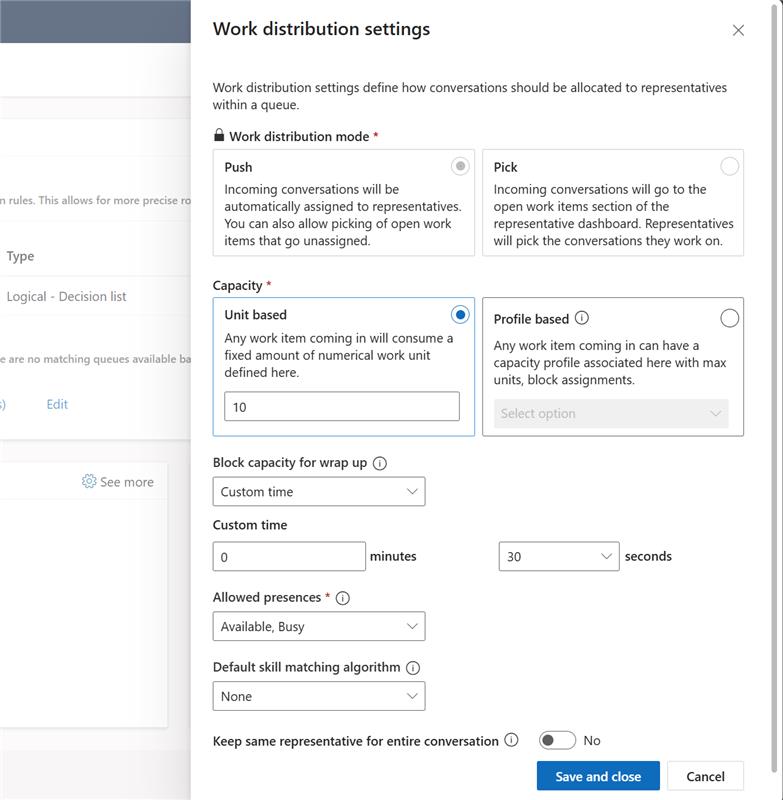
Administrators can now configure wrap-up timers in seconds. This means they have precise control over service representative availability. Additionally, they can streamline post-call workflows. 

Why it matters 

Contact centers vary widely in how much time service representatives need to wrap up after a conversation. For some, a full minute is excessive, leading to unnecessary idle time and reduced throughput. For others, shorter wrap-up periods can help meet aggressive service-level agreements (SLAs) and optimize resource utilization. 

Dynamics 365 Contact Center now allows organizations to set wrap-up time in seconds. This feature enables adaptation of wrap-up procedures to fit different operational requirements, accommodating both fast-paced settings and those needing additional flexibility. 

The enhanced wrap-up timer capability introduces configurable wrap-up durations starting at 30 seconds, down from the previous one-minute minimum. This flexibility allows contact centers to align wrap-up timing with service representative workflows and business goals. 

A screenshot of a computer

Sample scenario: High-volume retail contact center 

During a festive sale, a retail contact center faces a surge in webchat traffic. Previously, a 60-second wrap-up slowed service representatives’ availability. Now admins can set the timer to 30 seconds. This action lets them reclaim about 30 seconds per conversation without sacrificing note quality. 

Business benefits 

Organizations adopting second-level wrap-up timers can expect: 

  • Improved service representative availability, especially in high-volume environments 
  • Faster response times, helping meet SLA targets 
  • Reduced operational costs, by minimizing idle time and optimizing service representative utilization 

These enhancements not only improve agent productivity but also contribute to better customer satisfaction and SLA compliance. 

Learn more 

To explore this feature in detail, visit the official documentation: Understand conversation states | Microsoft Learn

The post Boost productivity with precision wrap-up timers in Dynamics 365 appeared first on Microsoft Dynamics 365 Blog.

Brought to you by Dr. Ware, Microsoft Office 365 Silver Partner, Charleston SC.