This article is contributed. See the original author and article here.
More Speaking in Ciphers and other Enigmatic Tongues with a focus on SCHANNEL hardening.
Hi! Jim Tierney here again to talk to you about Cryptographic Algorithms, SCHANNEL and other bits of crypto excitement. I have elucidated at length on this topic in this post which had been updated a few years back to the aptly titled, Speaking in Ciphers and other Enigmatic tongues…update!
I am creating this brand-new piece of content in this crypto space to further discuss different Microsoft supported methods that can be used to disable weak cipher suites and protocols.
The scenario we are addressing is that your company is doing a vulnerability and compliance assessment, and they just ran a scanning tool against all your Windows Servers. The software reports back that you have weak ciphers enabled, highlighted in RED and including a link to the following Microsoft documentation – KB245030 How to Restrict the Use of Certain Cryptographic Algorithms and Protocols in Schannel.dll: http://support.microsoft.com/kb/245030/en-us
You immediately open a case with Microsoft asking…. What can I do? What can I do?
There are two Microsoft supported methods of configuring cipher suites:
NOTE: We strongly suggest NOT modifying the real registry location. Instead, we recommend leveraging the Group Policy setting below to manage the list of ciphers supported in the Operating System. If the Microsoft development team supports a new cipher, they could end up putting back ciphers you removed from this default location if you do this.
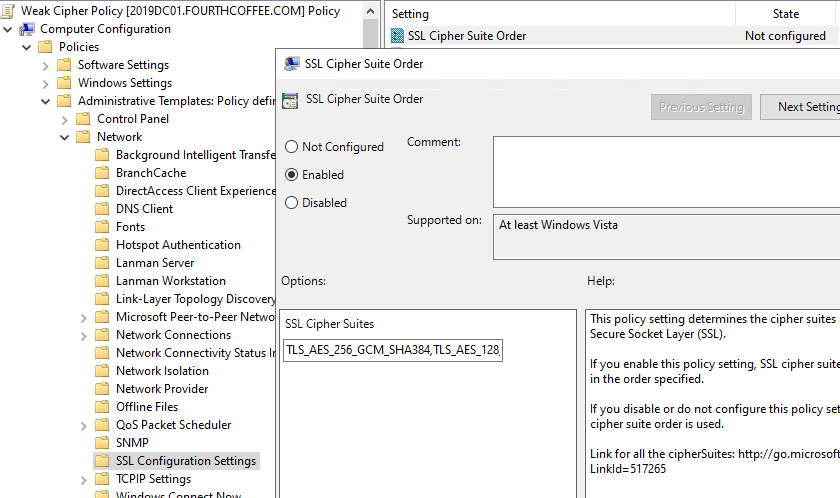
Configuring the Group Policy for Cipher suite ordering/content will overrule what is listed in this default location. Here is the location of the Cipher Suite ordering group policy:
Computer ConfigurationAdministrative TemplatesNetworkSSL Configuration SettingsSSL Cipher Suite Order
Remember, when configuring the Cipher suite order policy, If the 1023 size is passed, Cipher suites will be truncated because the list exceeds the 1023-character limitation for the
*In addition, Windows Server 2016 and newer do not require the _PXXX suffixes, so the list of cipher suites is a lot shorter. Please note that Win10/2016 and above solves this problem in 2 ways:
Elliptical Curve (EC) suffixes (also known as the _P values) are no longer part of the cipher suite names, therefore there is no more Cartesian explosion of cipher suite names (e. g. TLS_ECDHE_RSA_WITH_AES_256_CBC_SHA384_P256, TLS_ECDHE_RSA_WITH_AES_256_CBC_SHA384_P384, …)
In Windows 10, curves are prioritized separately from cipher suites, which means the cipher suite list in the GP Editor is much shorter.
NOTE: These EC suffixes ARE required for Windows Server 2012 operating systems to limit the ciphers on the OS. However, Windows 10/2016 OS DOES NOT support these cipher names. So, if you still need to support Windows Server 2012 (you have my sympathy) then you will need to have a GPO for this OS specifically, and then we would also recommend that the GPO be configured with a WMI Filter for the OS version.
Specifically for Windows PowerShell, the article below mentions how to update PowerShell scripts or the related registry settings to ensure 1.2 is used:
Restricting supported TLS / SSL Protocols that are used. If you have been using an old moldy script to configure SCHANNEL content on your Windows servers, you must seriously consider updating or rethinking this method and figure out the SCHANNEL protocols you want to disable on ALL these servers and configure ONLY WHAT YOU WANT DISABLED. TLS 1.2 is ENABLED by default in EVERY OS starting with WINDOWS 2012. YOU DO NOT NEED TO CREATE A REGISTRY SETTING FOR TLS 1.2
Enforcing the use of TLS 1.2 will require DISABLING any other protocol (i.e., TLS 1.0 and 1.1). Disabling SCHANNEL protocols and cipher suites can affect interoperability. Especially connectivity to applications, services and servers that are not current versions of their product.
What Ciphers should I leave enabled?
My advice regarding ciphers is to stick with the default cipher suites for their Windows version. These ciphers are carefully chosen and prioritized to provide a balance of interoperability, performance, and security. If there are specific security requirements, then a change to the list of the cipher suites and their priorities is needed. Some applications (third party, or Microsoft) may still need lesser TLS versions, so testing any SCHANNEL registry modifications is necessary.
Applications that might need older protocol versions.
WinINET – Typically this is a user base application like any Office application that runs as the user account logged onto the system. They are going to be applications that run with an interactive desktop. It would be Internet Explorer, Or Edge running in IE (Internet Explorer) Mode. It DOES not include Edge/Chromium browsers, however.
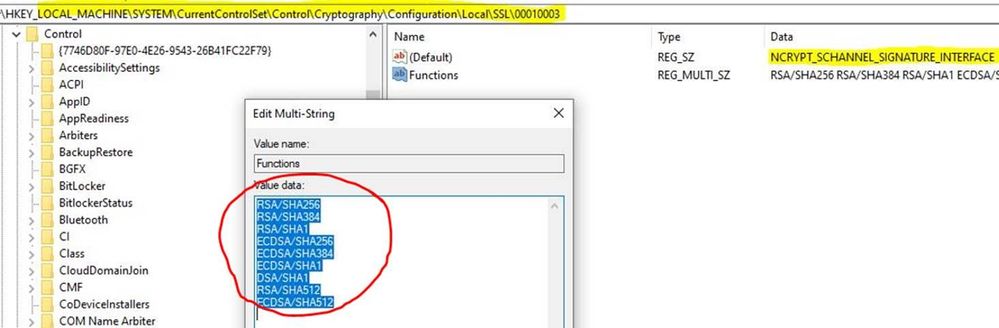
If you are still with me and have been poking around in the registry (on a test computer), you may have noticed the following location and would like some information regarding –
The value content of this location only affects TLS 1.2
Operating systems prior to Windows 2008 SP2 standard do not support this value item.
The data in the Functions value refer to the signature/hash combinations that are supported on TLS 1.2 certificate chains (excluding the root) as well as the signature/hash combinations that can be used when signing TLS 1.2 messages such as the ServerKeyExchange message and the CertificateVerify message.
The value in the (Default) location, NCRYPT_SCHANNEL_SIGNATURE_INTERFACE tells the server which signatures it can use to sign the ServerKeyExchange message and which signatures are allowed when verifying the server certificate chain.
These settings have nothing to do with disabling weak protocols or ciphers and should not be modifiedEVER!
I Just want the SCHANNEL Registry values to implement please.
If you are looking for just a quick list of SCHANNEL registry values to implement to help you pass a Security Scan/Audit here is an incredibly good list of values to implement to make sure the OS is not vulnerable to these older exploits.
You should use this as a guide for modifying the SCHANNEL protocols, list of default ciphers, and removing the weaker ones completely. It should be a favorite in your browser settings and currently be open in the tab right next to the one you are using to read this article
Regarding 3DES:
Sweet32 is a cryptographic attack against short block size (64-bit block) ciphers.
Vulnerability scanners will trigger this if a 3DES cipher suite is present. In Windows server, 3DES cannot be used as the only cipher but it is acceptable as an optional cipher suite for backward compatibility.
This is the minimum cipher in the negotiation list, so it is used only as a last resort.
TLS_RSA_WITH_3DES_EDE_CBC_SHA must not be offered on its own as it is considered inferior to the other cipher suites but should be offered for FIPS (Federal Information Processing Standards) constrained clients that do not have AES-based cipher suites available.
Microsoft also mitigates usage of this cipher by removing 3DES from available ciphers in the FalseStart list which prevents MiTM (Machine in the Middle) attack forcing encryption downgrade.
Vulnerability scanners should not be simply searching for registry keys indicating something is disabled (3DES). They should be reporting on configured Cipher Suites if they include 3DES.
Lucky Thirteen vulnerability mitigation
Disabling TLS 1.0 entirely.
The removal of all cipher block chaining (CBC) ciphers. EXAMPLE – TLS_RSA_WITH_AES_256_CBC_SHA256
There are a couple of CBC ciphers that are still supported in Windows 10
I made all the changes to the SChannel registry values, and even rebooted my server but some endpoints are still showing as vulnerable when I run my security scanning software again. Why did this not fix all my problems?
Keep in mind that Microsoft is not the only TLS implementation on the scene. Java and OpenSSL are just a couple of third-party SSL/TLS implementations that do not leverage the Microsoft SCHANNEL Security Support Provider Interface (SSPI) at all. If you have implemented the above registry values and rebooted the server and the scanning tool is still showing a vulnerability it is time to start thinking that this may not be an application that is using Microsoft implementation of SSL/TLS. To investigate this:
The first thing to do is look at your scan report and determine what network port or ports the scanning tool is indicating are still vulnerable.
On the computer being reported as vulnerable open an elevated command prompt and type: NetStat –ANOB > %ComputerName%_Netstat.txt.
Once it is done, then you can open the text file created, and search for the port determined from step 1.
It will give you the process name that is listening on that port. If it is Java.exe/Javaw.exe or OpenSSL.exe then this is not something Microsoft support is going to be able to help with. We will redirect you to the vendor of your 3rd party application.
If this is the case, you will need to contact those vendors to get those configured applications configured properly. Enabling verbose SCHANNEL logging may also help you determine what third party SCHANNEL applications are installed on your servers by configuring verbose logging. Verbose logging will show successful and failing connections providing the protocol and ciphers being used in addition to the computer from which the connection is coming from:
You should also be aware that Intune policy can also be leveraged to manage cipher suites as well. These settings may interfere with your SCHANNEL policies and configurations.
I trust you have found this content both illuminating and enjoyable in your efforts to secure your SCHANNEL environment without sacrificing the necessary functionality. If you should you encounter any hurdles along the way, please don’t hesitate to reach out to us for assistance. We’re here to support your continued success with Windows. Happy Hunting!
Jim “How I learned to stop worrying and ♥ Crypto” Tierney
This article is contributed. See the original author and article here.
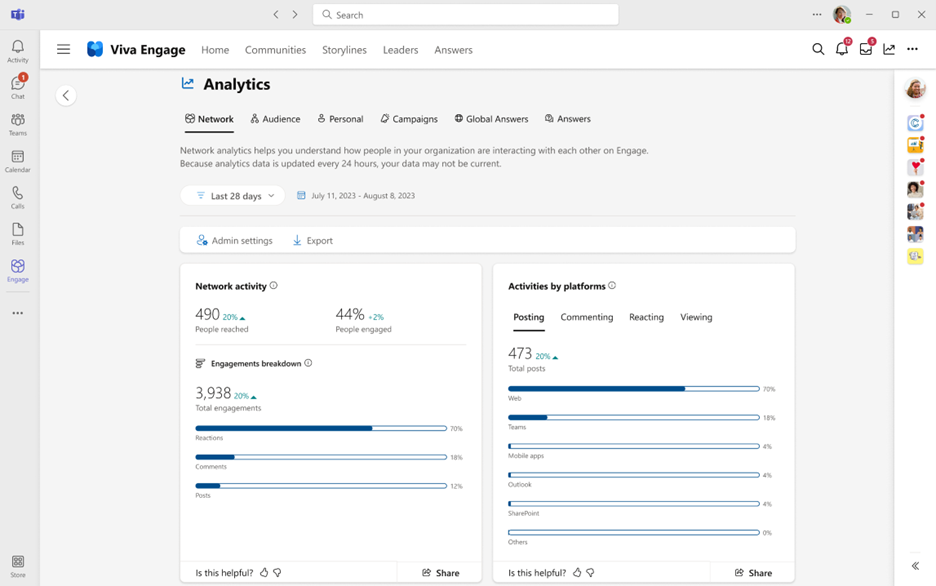
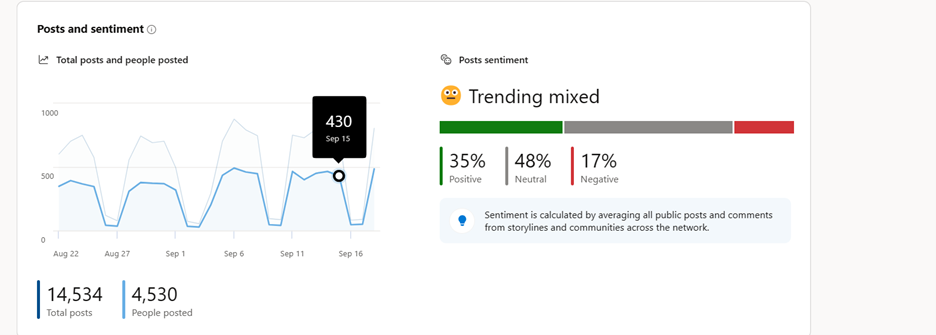
Listen to your employees, monitor their engagement, and understand the pulse of your organization better than ever before by using Network Analytics in Viva Engage. Network Analytics provides an at-a-glance overview of your organization’s top engagement trends across the entire network. This includes employee sentiment, cross-community insights and AI-powered conversation summarization to help you stay-up-to-date with all the activity happening in your network. Network admins and those assigned a corporate communicator role will be able to access these advanced analytics. In order to access Network Analytics, users must have a Viva suite or Employee Communications and Communities (C&C) license.
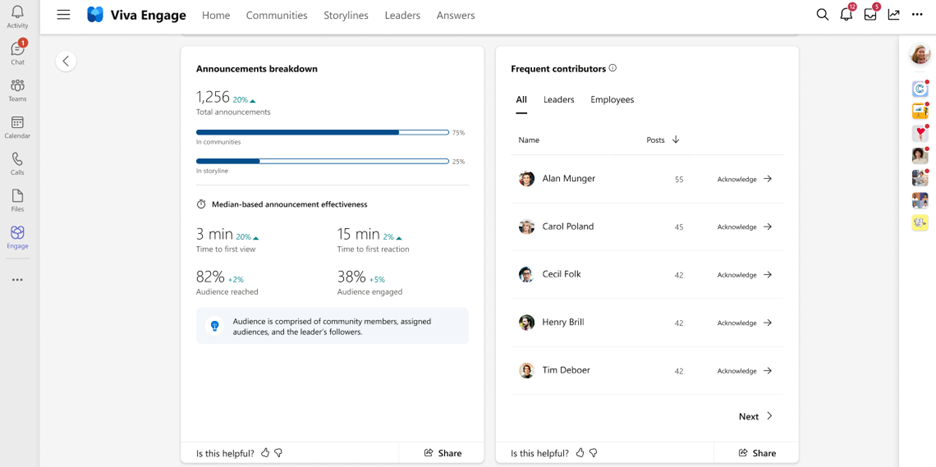
Gone are the days of manually searching for the most engaging conversations across your network or trying to tally up the most mentioned themes and hashtags. With Network Analytics, you can see detailed metrics that show you exactly where conversations are taking place, which themes employees are most passionate about, how effective announcements are, and which communities are most active.
Best Practices
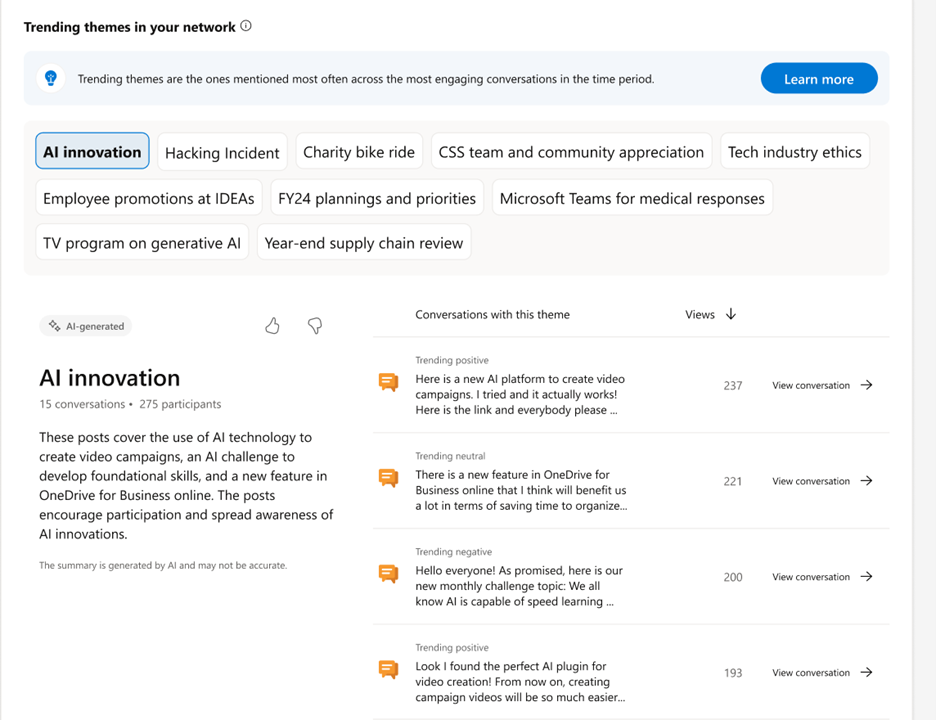
Review top themes and top conversations – we’ve made triaging these conversations across your entire organization easier than ever. Now you can deep dive into the conversations that are occurring within your organization and quickly review themes related to the most critical commentary.
Network analytics helps you easily identify themes, trends, and engagement across the network.
Understand the effectiveness of broad communications within your organization by analyzing the announcements breakdown. You can also review which leaders and employees are most active on Engage by reviewing the Frequent Contributors panel. Acknowledge these employees directly from Network Analytics by praising their contributions to the organization.
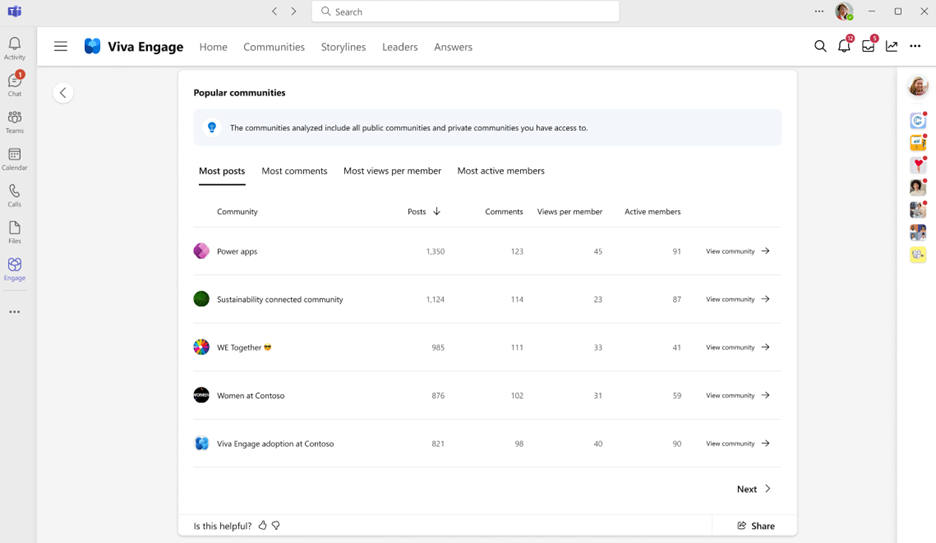
Finally, if you’d like to review which Communities are implementing best practices, look no further than the popular communities table. Here you can sort communities by those with the most posts, or most active members. Understanding which community rituals are leading to high engagement can be a great way to pass along helpful tips to other Community admins.
Get started today!
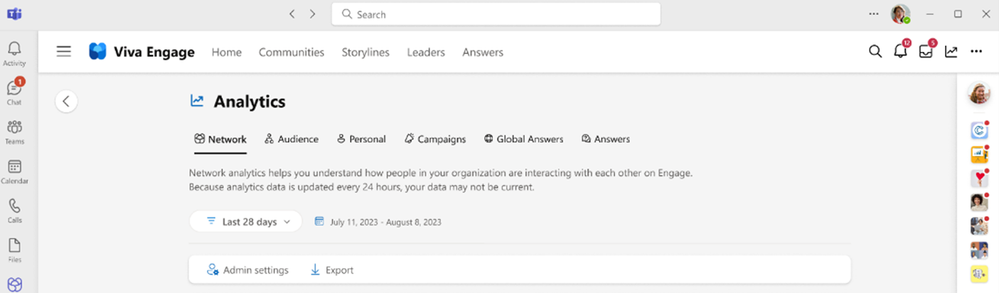
To access Network Analytics, select the global analytics entry point (at the top of the web browser) and click on the “Network analytics” tab:
If you cannot see the tab, confirm that you have either the network admin or corporate communicator role assigned to your user profile on Viva Engage. If you need to be assigned as corporate communicator, contact your network admin to help you gain access to the role.
New! Employee retention analysis – we’ll help you understand how employees who use Engage are more likely to be retained at your organization. The Viva Engage employee retention metric in Network Analytics shows the difference in the 28-day employee retention rates of employees who do and don’t use Viva Engage. Learn more about our retention analysis here Viva Engage Employee Retention – Microsoft Support
Resources
Watch the recording of the Deep Dive Webinar! Demos and lots of Q&A shared during the webinar as well!
How is sentiment analysis determined? Sentiment analysis is a Viva Engage premium feature that aggregates data across Viva Engage conversations to surface trends. To understand more, see Sentiment and theme analysis in Viva Engage – Microsoft Support
Who has access to view and manage network analytics? Access to the data in this dashboard is restricted to include only network admins and corporate communicators. These users can change settings via the Engage admin center.
What admin controls are available? Can analytics features be turned off? Yes, we provide the network admin and corporate communicator roles the ability to adjust which analytics features are enabled within the admin center.
What licensing requirements need to be met? Network analytics is only available to Viva Suite or Employee Communications and Communities licensed users.
How often is data refreshed? Analytics are refreshed daily. If you don’t see changes reflected immediately, check analytics the next day.
This article is contributed. See the original author and article here.
Introduction
In today’s dynamic work environment, managing employee leave and absence efficiently is crucial for maintaining a productive and harmonious workplace. For this reason, we are announcing the public preview of the Human Resources app for Dynamics 365 Human Resources on Finance and Operations environments.
With the announcement of the infrastructure merge, the Human Resources app will be the go-forward solution for the former Teams app for leave and absence.
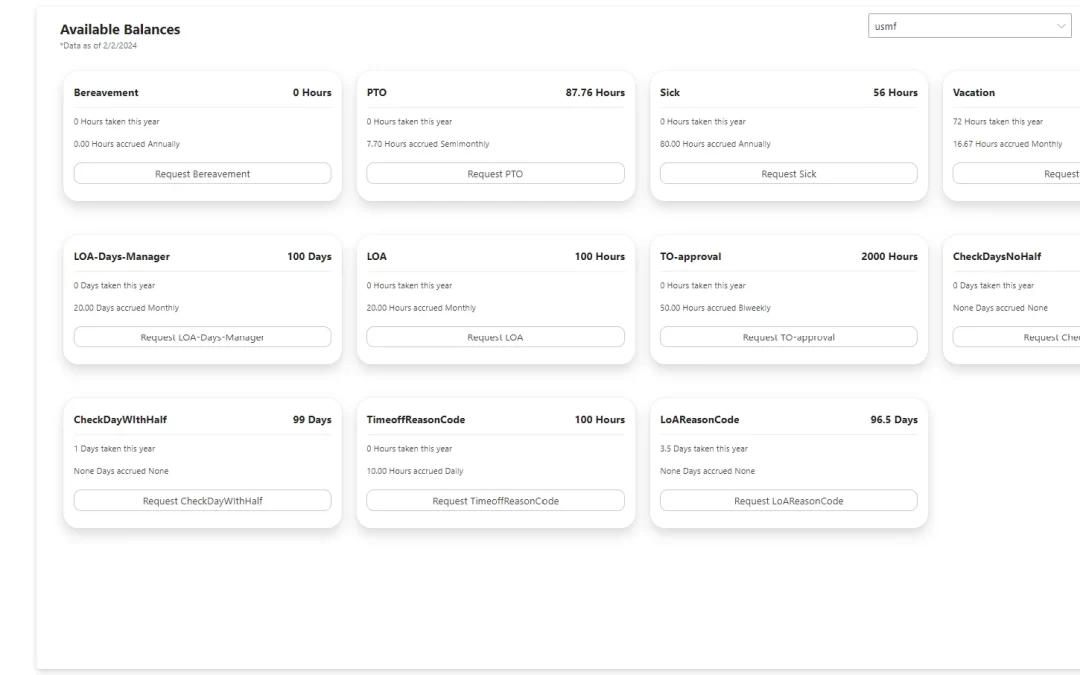
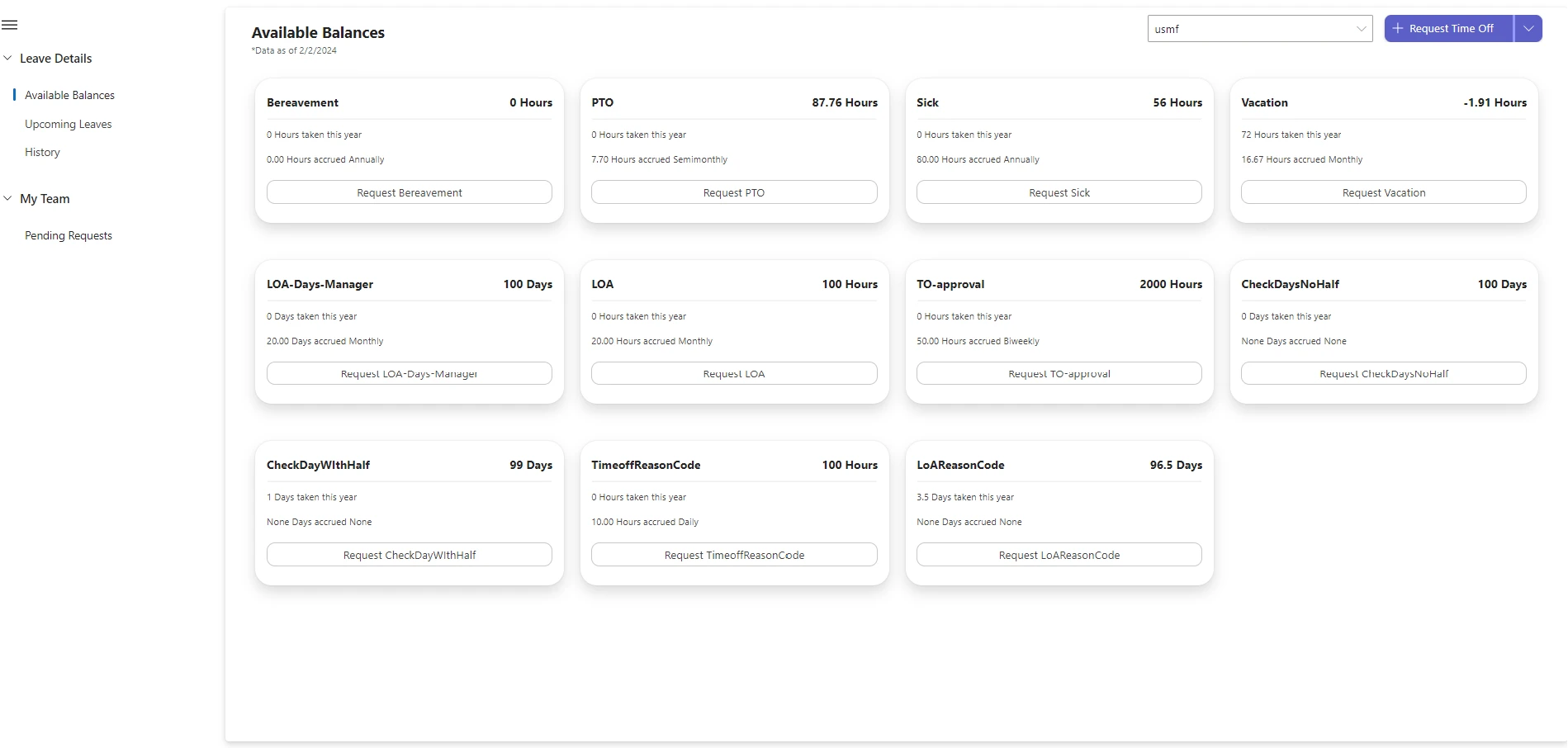
The application is designed to be used within Microsoft Teams or in a web browser and it provides an overall view of employees leave requests, leave balances, draft leave requests, and leave requests taken in the past.
The Human Resources app can be used both on Mobile and Desktop.
Benefits of the Human Resources app
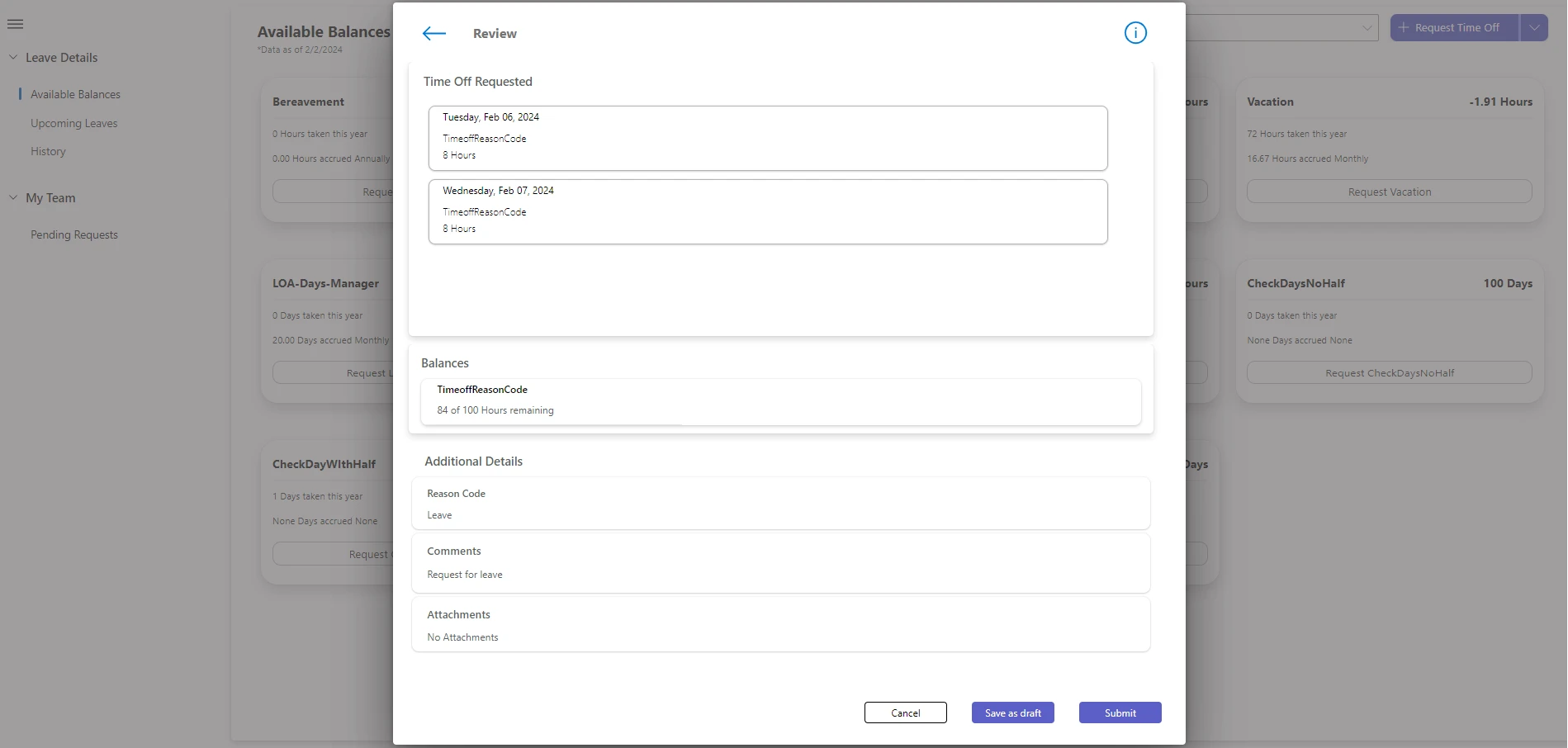
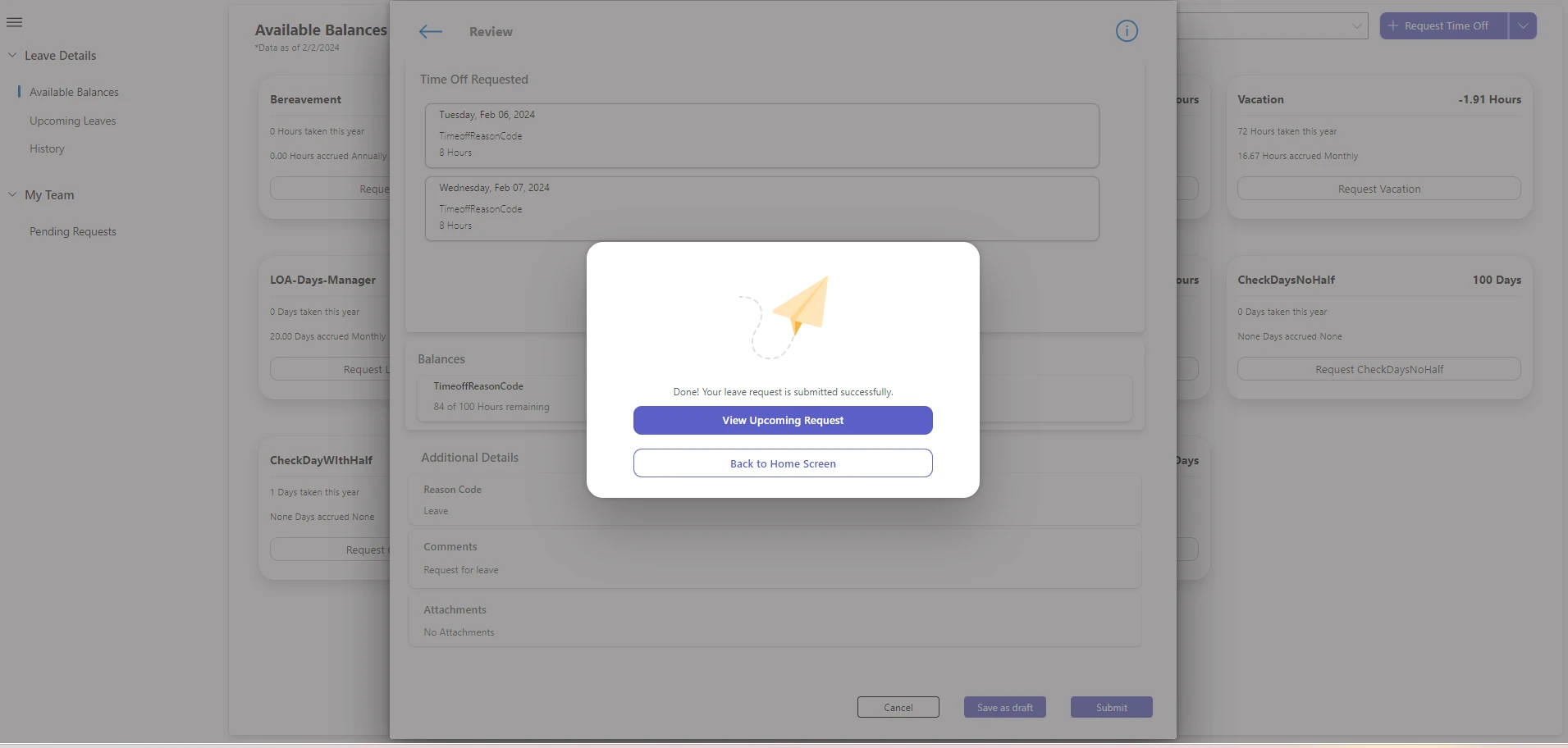
Human Resources is an app that is integrated with Dynamics 365 Human Resources on Finance and Operations environments. It is designed and developed for organizations to ensure their employees can request, edit, and cancel time off and leave of absence requests seamlessly. Employees can now view their leave balances, upcoming leaves and leave history using the same application. In addition to this, managers can also efficiently view and approve or reject requests in one intuitive interface.
Next Steps
The Human Resources app is now available for public preview and we’re looking forward to hearing your feedback and how the app is helping your organization. Enable the Human Resources (Preview) app for Dynamics 365 Human Resources from the AppSource.
To learn more about these exciting new capabilities and on how to use the app, refer to the Human Resources app.
This article is contributed. See the original author and article here.
Pursuant to Section 8 of Executive Order (EO) 14028, “Improving the Nation’s Cybersecurity”, Federal Chief Information Officers (CIOs) and Chief Information Security Officers (CISOs) aim to comply with the U.S. Office of Management and Budget (OMB) Memorandum 21-31, which centers on system logs for services both within authorization boundaries and deployed on Cloud Service Offerings (CSOs). This memorandum not only instructs Federal agencies to provide clear guidelines for service providers but also offers comprehensive recommendations on logging, retention, and management to increase the Government’s visibility before, during and after a cybersecurity incident. Additionally, OMB Memorandum 22-09, “Moving the U.S. Government Toward Zero Trust Cybersecurity Principles”, references M-21-31 in its Section 3.
While planning to address and execute these requirements, Federal CIO and CISO should explore the use of Cyber Data Lake (CDL). A CDL is a capability to assimilate and house vast quantities of security data, whether in its raw form or as derivatives of original logs. Thanks to its adaptable, scalable design, a CDL can encompass data of any nature, be it structured, semi-structured, or unstructured, all without compromising quality. This article probes into the philosophy behind the Federal CDL, exploring topics such as:
The Importance of CDL for Agency Missions and Business
Strategy and Approach
CDL Infrastructure
Application of CDL
The Importance of CDL for Agency Missions and Business
The overall reduction in both capital and operational expenditures for hardware and software, combined with enhanced data management capabilities, makes CDLs an economically viable solution for organizations looking to optimize their data handling and security strategies. CDLs are cost-effective due to their ability to consolidate various data types and sources into a single platform, eliminating the need for multiple, specialized data management tools. This consolidation reduces infrastructure and maintenance costs significantly. CDLs also adapt easily to increasing data volumes, allowing for scalable storage solutions without the need for expensive infrastructure upgrades. By enabling advanced analytics and efficient data processing, they reduce the time and resources needed for data analysis, further cutting operational costs. Additionally, improved accuracy in threat detection and reduction in false positives lead to more efficient security operations, minimizing the expenses associated with responding to erroneous alerts and increasing the speed of detection and remediation.
However, CDLs are not without challenges. As technological advancements and the big data paradigm evolve, the complexity of network, enterprise, and system architecture escalates. This complexity is further exacerbated by the integration of tools from various vendors into Federal ecosystem, managed by diverse internal and external teams. For security professionals, maintaining pace with this intricate environment and achieving real-time transparency into technological activities is becoming an uphill battle. These professionals require a dependable, almost instantaneous source that adheres to the National Institute of Standards and Technology (NIST) core functions—identify, protect, detect, respond, and recover. Such a source empowers them to strategize, prioritize, and address any anomalies or shifts in their security stance. The present challenge lies in acquiring a holistic view of security risk, especially when large agencies might deploy hundreds of applications across the US and in some cases globally. The security data logs, scattered across these applications, clouds and environments, often exhibit conflicting classifications or categorizations. Further complicating matters are logging maturity levels at different cloud deployment models, infrastructure, platform, and software.
It is vital to scrutinize any irregularities to ensure the environment is secure, aligning with zero-trust principles which advocate for a dual approach: never automatically trust and always operate under the assumption that breaches may occur. As security breaches become more frequent and advanced, malicious entities will employ machine learning to pinpoint vulnerabilities across expansive threat landscape. Artificial intelligence will leverage machine learning and large language models to further enhance organizations’ abilities to discover and adapt to changing risk environments, allowing security professionals to do more with less.
Strategy and Approach
The optimal approach to managing a CDL depends on several variables, including leadership, staff, services, governance, infrastructure, budget, maturity, and other factors spanning all agencies. It is debatable whether a centralized IT team can cater to the diverse needs and unique challenges of every agency. We are seeing a shift where departments are integrating multi-cloud infrastructure into their ecosystem to support the mission. An effective department strategy is pivotal for success, commencing with systems under the Federal Information Security Modernization Act (FISMA) and affiliated technological environments. Though there may be challenges at the departmental level in a federated setting, it often proves a more effective strategy than a checklist approach.
Regarding which logs to prioritize, there are several methods. CISA has published a guide on how to prioritize deployment: Guidance for Implementing M-21-31: Improving the Federal Government’s Investigative and Remediation Capabilities. Some might opt to begin with network-level logs, followed by enterprise and then system logs. Others might prioritize logs from high-value assets based on FISMA’s security categorization, from high to moderate to low. Some might start with systems that can provide logs most effortlessly, allowing them to accumulate best practices and insights before moving on to more intricate systems.
Efficiently performing analysis, enforcement, and operations across data repositories dispersed across multiple cloud locations in a departmental setting involves adopting a range of strategies. This includes data integration and aggregation, cross-cloud compatibility, API-based connectivity, metadata management, cloud orchestration, data virtualization, and the use of cloud-agnostic tools to ensure seamless data interaction. Security and compliance should be maintained consistently, while monitoring, analytics, machine learning, and AI tools can enhance visibility and automate processes. Cost optimization and ongoing evaluation are crucial, as is investing in training and skill development. By implementing these strategies, departments can effectively manage their multi-cloud infrastructure, ensuring data is accessible, secure, and cost-effective, while also leveraging advanced technologies for analysis and operations.
CDL Infrastructure
One of the significant challenges is determining how a CDL aligns with an agency’s structure. The decision between a centralized, federated, or hybrid approach arises, with cost considerations being paramount. Ingesting logs in their original form into a centralized CDL comes with its own set of challenges, including accuracy, privacy, cost, and ownership. Employing a formatting tool can lead to substantial cost savings in the extract, transform, and load (ETL) process. Several agencies have experienced cost reductions of up to 90% and significant data size reductions by incorporating formatting in tables, which can be reorganized as needed during the investigation phase. A federated approach means the logs remain in place, analyses are conducted locally, and the results are then forwarded to a centralized CDL for further evaluation and dissemination.
For larger and more complex agencies, a multi-tier CDL might be suitable. By implementing data collection rules (DCR), data can be categorized during the collection process, with department-specific information directed at the respective department’s CDL, while still ensuring that high value and timely logs are forwarded to a centralized CDL at the agency level, prioritizing privileged accounts. Each operating division or bureau could establish its own CDL, reporting on to the agency’s headquarters’ CDL. The agency’s Office of Inspector General (OIG) or a statistical component of a department may need to create their own independent CDL for independence purposes. This agency HQ CDL would then report to DHS. In contrast, smaller agencies might only need a single CDL. This could integrate with the existing Cloud Log Aggregation Warehouse (CLAW) a CISA-deployed architecture for collecting and aggregating security telemetry data from agencies using commercial CSP services — and align with the National Cybersecurity Protection System (NCPS) Cloud Interface Reference Architecture. This program ensures security data from cloud-based traffic is captured, analyzed, and enables CISA analysts to maintain situational awareness and provide support to agencies.
If data is consolidated in a central monolithic, stringent data stewardship is crucial, especially concerning data segmentation, access controls, and classification. Data segmentation provides granular access control based on a need-to-know approach, with mechanisms such as encryption, authorization, access audits, firewalls, and tagging. If constructed correctly, this can eliminate the need for separate CDL infrastructures for independent organizations. This should be compatible with role-based user access schemes, segment data based on sensitivity or criticality, and meet Federal authentication standards. This supports Zero Trust initiatives in Federal agencies and aligns with Federal cybersecurity regulations, data privacy laws, and current TLS encryption standards. Data must also adhere to retention standards outlined in OMB 21-31 Appendix C and the latest National Archives and Records Administration (NARA) publications, and comply with Data Loss Prevention requirements, covering data at rest, in transit, and at endpoints, in line with NIST 800-53 Revision 5.
In certain scenarios, data might require reclassification or recategorization based on its need-to-know status. Agencies must consider storage capabilities, ensuring they have a scalable, redundant and highly available storage system that can handle vast amounts of varied data, from structured to unstructured formats. Other considerations include interoperability, migrating an existing enterprise CDL to another platform, integrating with legacy systems, and supporting multi-cloud enterprise architectures that source data from a range of CSPs and physical locations. When considering data portability, the ease of transferring data between different platforms or services is crucial. This necessitates storing data in widely recognized formats and ensuring it remains accessible. Moreover, the administrative efforts involved in segmenting and classifying the data should also be considered.
Beyond cost and feasibility, the CDL model also provides the opportunity for CIOs and CISOs to achieve data dominance with their security and log data. This concept of data dominance allows them to gather data, quickly and securely, reduces processing time, which provides quicker time to respond. This quicker time to respond, the strategic goal of any security implementation, is only possible with the appropriate platform and infrastructure so organizations can get closer to real-time situational awareness.
The Application of CDL
With a solid strategy in place, it’s time to delve into the application of a CDL. Questions arise about its operation, making it actionable, its placement relative to the Security Operations Center (SOC), and potential integrations with agency Governance Risk Management, and Compliance (GRC) tools and other monitoring systems. A mature security program needs a comprehensive real-time view of an agency’s security posture, encompassing SOC activities and the agency’s governance, risk management, and compliance tasks. The CDL should interface seamlessly with existing or future Security Orchestration and Response (SOAR) and End Point Detection (EDR) tools, as well as ticketing systems.
CDLs facilitate the sharing of analyses within their agencies, as well as with other Federal entities like the Department of Homeland Security (DHS), Cybersecurity and Infrastructure Security Agency (CISA), Federal law enforcement agencies, and intelligence agencies. Moreover, CDLs can bridge the gaps in a Federal security program, interlinking entities such as the SOC, GRC tools, and other security monitoring capabilities. At the highest levels of maturity, the CDL will leverage Network Operations Center (NOC) and even potentially administration information such as employee leave schedules. The benefit of modernizing the CDL lies in eliminating the requirement to segregate data before ingestion. Data is no longer categorized as security-specific or operations-specific. Instead, it is centralized into a single location, allowing CDL tools and models to assess the data’s significance. Monolithic technology stacks are effective when all workloads are in the same cloud environment. However, in a multi-cloud infrastructure, this approach becomes challenging. With workloads spread across different clouds, selecting one as a central hub incurs egress costs to transfer log data between clouds. Departments are exploring options to store data in the cloud where it’s generated, while also considering if Cloud Service Providers (CSPs) offer tools for analysis, visibility, machine learning, and artificial intelligence.
The next step is for agencies to send actionable information to security personnel regarding potential incidents and provide mission owners with the intelligence necessary to enhance efficiency. Additionally, this approach eliminates the creation of separate silos for security data, mission data, financial information, and operations data. This integration extends to other Federal security initiatives such as Continuous Diagnostics and Mitigation (CDM), Authority to Operate (ATO), Trusted Internet Connection (TIC), and the Federal Risk and Authorization Management Program (FedRAMP).
It’s also pivotal to determine if the CDL aligns with the MITRE ATT&CK Framework, which can significantly assist in incident response. MITRE ATT&CK® is a public knowledge base outlining adversary tactics and techniques based on observed events. The knowledge base aids in developing specific threat models and methodologies across various sectors.
Lastly, to gauge the CDL’s applicability, one might consider creating a test case. Given the vast amount of log data — since logs are perpetual — this presents an ideal scenario for machine learning. Achieving real-time visibility can be challenging with the multiple layers of log aggregation, but timely insights might be within reach. For more resources from Microsoft Federal Security, please visit https://aka.ms/FedCyber.
Stay Connected
Connect with the Public Sector community to keep the conversation going, exchange tips and tricks, and join community events. Click “Join” to become a member and follow or subscribe to the Public Sector Blog spaceto get the most recent updates and news directly from the product teams.
This article is contributed. See the original author and article here.
If you are looking for a step-by-step guide on how to enable authentication for your Azure Kubernetes Service (AKS) cluster, you may have encountered some challenges. The documentation on this topic is scarce and often outdated or incomplete. Moreover, you may have specific requirements for your use case that are not covered by the existing resources. That is why I have created this comprehensive guide using the latest Azure cloud resources.
In this guide, you will learn how to set up an AKS cluster and provide authentication to that cluster using NGINX and the OAuth2 proxy. This guide is intended for educational purposes only and does not guarantee proper authentication as certified by NIST. It is also not a complete solution for securing your AKS cluster, which involves more than just authentication. Therefore, this guide should be used as a learning tool to help you understand how authentication works and how to implement it using Azure.
By following this guide, you will be able to set up an AKS cluster with authentication using NGINX, OAuth2 Proxy, and Microsoft Entra ID. You will not need a domain name as we will use a fully qualified domain name (FQDN). However, you can also use a domain name if you prefer. Additionally, we will use Let’s Encrypt for TLS certificates so that our application will use HTTPS.
Additionally, I have broken this guide into several parts. This is the first part where you will be guided through the creation of your AKS cluster and the initial NGINX configuration. I will provide the remaining parts in future posts.
To learn how to use NGINX with Oauth2 Proxy, I conducted thorough online research and consulted various tutorials, guides, and other sources of information. The following list contains some of the most helpful references that I used to create this guide. You may find them useful as well if you need more details or clarification on any aspect of this topic.
Before you begin, you will need to meet the following prerequisites:
Azure CLI or Azure PowerShell
An Azure subscription
An Azure Resource Group
Create an Azure Container Registry (ACR)
To create an Azure container registry, you can follow the steps outlined in the official documentation here Create a new ACR. An Azure container registry is a managed Docker registry service that allows you to store and manage your private Docker container images and related artifacts. For now I’ll set up an ACR using PowerShell:
The command above will configure the appropriate AcrPull role for the managed identity and allows you to authorize an existing ACR in your subscription. A managed identity from Microsoft Entra ID allows your app to easily access other Microsoft Entra protected resources.
Validate the Deployment
We will verify the deployment using the Kubernetes command line client. Ensure that you have this tool installed by running the following command.
Install-Module Az.Aks
Configure the kubectl client to connect to your Kubernetes cluster. The following command downloads credentials and configures the Kubernetes CLU to use them.
Verify the connection to your cluster by running the following command.
kubectl get nodes
You should see some output with the name of the nodes on your cluster.
NGINX Ingress controller configuration
Now that we have our AKS cluster up and running with an attached ACR we can configure our ingress controller NGINX. The NGINX ingress controller provides a reverse proxy for configurable traffic routing and TLS termination. We will utilize NGINX to fence off our AKS cluster providing a public IP address accessible through the load balancer which we can then assign a FQDN for accessing our applications. Additionally, we can configure NGINX to integrate with Microsoft Entra ID for authenticating users via an OAuth2 Proxy. Those details will be shared in a later post. You can follow the basic configuration for an ingress controller on the official documentation here Create an unmanaged ingress controller.
Before configuration begins, make sure you have Helm installed. Then run the following commands.
Now that you have configured and installed the NGINX ingress controller you can check the load balancer. Run the following command.
kubectl get services --namespace ingress-basic -o wide -w ingress-nginx-controller
You should see some output. When Kubernetes creates the load balancer service a public IP address is assigned. You can view the IP address under the column EXTERNAL-IP. Make note of this IP address. If you browse to that IP address you should get a 404 Not Found.
This wraps up the first part of this series. In the next part I will go over deploying two applications and creating the ingress routes to route to the applications. Then we will move on to setting up cert manager and getting things ready for our OAuth2 Proxy provider.





Recent Comments