This article is contributed. See the original author and article here.
In the previous series of articles, we learned about the basic concepts of AI agents and how to use AutoGen or Semantic Kernel combined with the Azure OpenAI Service Assistant API to build AI agent applications. For different scenarios and workflows, powerful tools need to be assembled to support the operation of the AI agent. If you only use your own tool chain in the AI agent framework to solve enterprise workflow, it will be very limited. AutoGen supports defining tool chains through Function Calling, and developers can define different methods to assemble extended business work chains. As mentioned before, Semantic Kernel has good business-based plug-in creation, management and engineering capabilities. Through AutoGen + Semantic Kernel, powerful AI agent solutions can be built.
Scenario 1 – Constructing a single AI agent for writing technical blogs
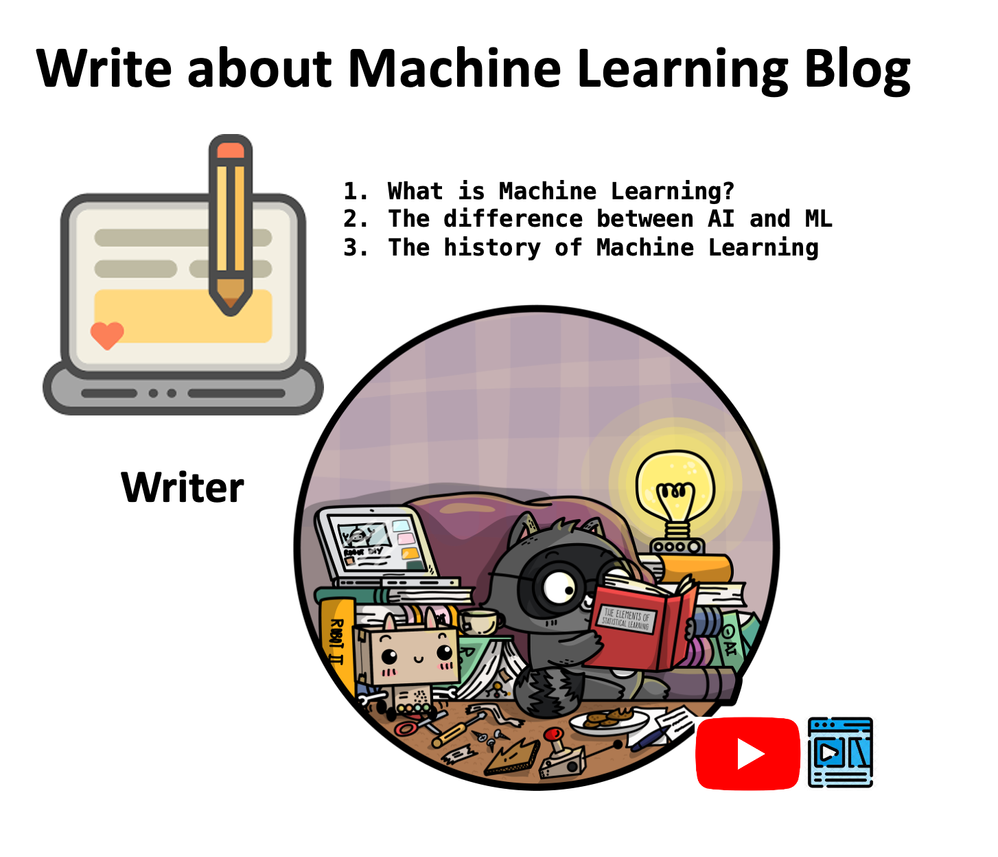
As a cloud advocate, I often need to write some technical blogs. In the past, I needed a lot of supporting materials. Although I could write some of the materials through Prompt + LLMs, some professional content might not be enough to meet the requirements. For example, I want to write based on the recorded YouTube video and the syllabus. As shown in the picture above, combine the video script and outline around the three questions as basic materials, and then start writing the blog.
Note:We need to save the data as vector first. There are many methods. You can choose to use different frameworks for embedded vector processing. Here we use Semantic Kernel combined with Qdrant. Of course, the more ideal step is to add this part to the entire technical blog writing agent, which we will introduce in the next scenario.
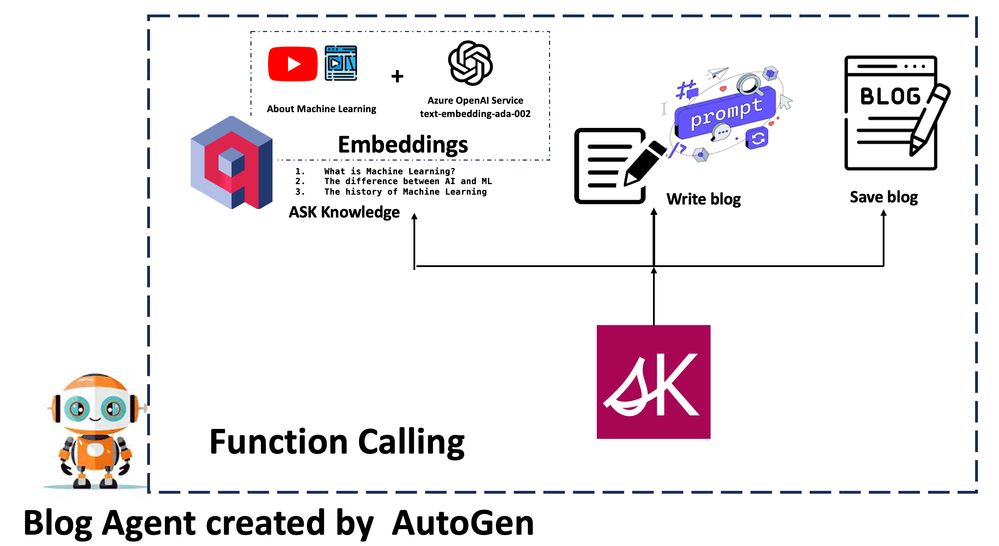
Because the AI agent simulates human behavior, when designing the AI agent, the steps that need to be set are the same as in my daily work.
Find relevant content based on the question
Set a blog title, extended content and related guidance, and write it in markdown
Save
We can complete steps 1 and 2 through Semantic Kernel. As for step 3, we can directly use the traditional method of reading and writing files. We need to define these three functions ask, writeblog, and saveblog here. After completion, we need to configure Function Calling and set the parameters and function names corresponding to these three functions.
Because this is a single AI agent application, we only need to define an Assistant and a UserProxy. We only need to define our goals and inform the relevant steps to run.
with Cache.disk(): await user_proxy.a_initiate_chat(
assistant,
message=“””
I’m writing a blog about Machine Learning. Find the answers to the 3 questions below and write an introduction based on them. After preparing these basic materials, write a blog and save it.
1. What is Machine Learning?
2. The difference between AI and ML
3. The history of Machine Learning
Let’s go
““”
)
We tried running it and it worked fine. For specific effects, please refer to:
Scenario 2 – Building a multi-agent interactive technical blog editor solution.
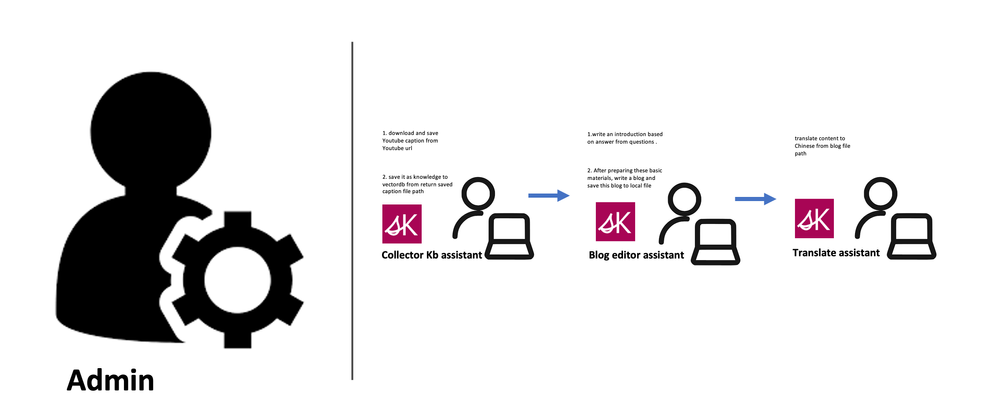
In the above scenario, we successfully built a single AI agent for technical blog writing. We hope that our technology will be more intelligent. From content search to writing and saving to translation, it is all completed through AI agent interaction. We can use different job roles to achieve this goal. This can be done by generating code from LLMs in AutoGen, but the uncertainty of this is a bit high. Therefore, it is more reliable to define additional methods through Function Calling to ensure the accuracy of the call. The following is a structural diagram of the division of labor roles:
Notice
Admin– Define various operations through UserProxy, including the most important methods.
Collector KB Assistant– Responsible for downloading relevant subtitle scripts of technical videos from YouTube, saving them locally, and vectorizing them by extracting different knowledge points and saving them to the vector database. Here I only made a video subtitle script. You can also add local documents and support for different types of audio files.
Blog Editor Assistant– When the data collection assistant completes its work, it can hand over the work to the blog writing assistant, who will write the blog as required based on a simple question outline (title setting, content expansion, and usage markdown format, etc.), and automatically save the blog to the local after writing.
Translation Assistant– Responsible for the translation of blogs in different languages. What I am talking about here is translating Chinese (can be expanded to support more languages)
Based on the above division of labor, we need to define different methods to support it. At this time, we can use SK to complete related operations.
Here we use AutoGen’s group chat mode to complete related blog work. You can clearly see that you have a team working, which is also the charm of the agent. Set it up with the following code.
await user_proxy.a_initiate_chat(
manager,
message=“””
Use this link https://www.youtube.com/watch?v=1qs6QKk0DVc as knowledge with collect knowledge assistant. Find the answers to the 3 questions below to write blog and save and save this blog to local file with blog editor assistant. And translate this blog to Chinese with translate assistant.
1. What is GitHub Copilot ?
2. How to Install GitHub Copilot ?
3. Limitations of GitHub Copilot
Let’s go
“
“”
)
Different from a single AI agent, a manager is configured to coordinate the communication work of multiple AI agents. Of course, you also need to have clear instructions to assign work.
AutoGen helps us easily define different AI agents and plan how different AI agents interact and operate. The Semantic Kernel is more like a middle layer to help support different ways for agents to solve tasks, which will be of great help to enterprise scenarios. When AutoGen appears, some people may think that it overlaps with Semantic Kernel in many places. In fact, it complements and does not replace it. With the arrival of the Azure OpenAI Service Assistant API, you can believe that the agent will have stronger capabilities as the technical framework and API are improved.
This article is contributed. See the original author and article here.
There was a recent erroneous system message on Feb 14th regarding the deprecation of Azure IoT Central. The error message stated that Azure IoT Central will be deprecated on March 31st, 2027 and starting April 1, 2024, you won’t be able to create new application resources. This message is not accurate and was presented in error.
Microsoft does not communicate product retirements using system messages. When we do announce Azure product retirements, we follow our standard Azure service notification process including a notification period of 3-years before discontinuing support. We understand the importance of product retirement information for our customers’ planning and operations. Learn more about this process here: 3-Year Notification Subset – Microsoft Lifecycle | Microsoft Learn
Our goal is to provide our customers with a comprehensive, secure, and scalable IoT platform. We want to empower our customers to build and manage IoT solutions that can adapt to any scenario, across any industry, and at any scale. We see our IoT product portfolio as a key part of the adaptive cloud approach.
The adaptive cloud approach can help customers accelerate their industrial transformation journey by scaling adoption of IoT technologies. It helps unify siloed teams, distributed sites, and sprawling systems into a single operations, security, application, and data model, enabling organizations to leverage cloud-native and AI technologies to work simultaneously across hybrid, edge, and IoT. Learn more about our adaptive cloud approach here: Harmonizing AI-enhanced physical and cloud operations | Microsoft Azure Blog
Our approach is exemplified in the public preview of Azure IoT Operations, which makes it easy for customers to onboard assets and devices to flow data from physical operations to the cloud to power insights and decision making. Azure IoT Operations is designed to simplify and accelerate the development and deployment of IoT solutions, while giving you more control over your IoT devices and data. Learn more about Azure IoT Operations here: https://azure.microsoft.com/products/iot-operations/
We will continue to collaborate with our partners and customers to transform their businesses with intelligent edge and cloud solutions, taking advantage of our full portfolio of Azure IoT products.
We appreciate your trust and loyalty and look forward to continuing to serve you with our IoT platform offerings.
This article is contributed. See the original author and article here.
Overview
A global enterprise wants to migrate thousands of Nutanix AHV or VMware vSphere virtual machines (VMs) to Microsoft Azure as part of their application modernization strategy. The first step is to exit their on-premises data centers and rapidly relocate their legacy application VMs to the Nutanix Cloud Clusters on Azure (NC2 on Azure) service as a staging area for the first phase of their modernization strategy. How can they quickly size NC2 on Azure to meet their workload requirements?
NC2 on Azure is a third-party Azure service from Nutanix that provides private clouds containing Nutanix AHV clusters built from dedicated bare-metal Azure infrastructure. It enables customers to leverage their existing investments in Nutanix skills and tools, allowing them to focus on developing and running their Nutanix-based workloads on Azure.
In this post, I will introduce the typical customer workload requirements, describe the NC2 on Azure architectural components, and describe how to use Nutanix Sizer to quickly scope an NC2 on Azure solution.
In the next section, I will introduce the typical sizing requirements of a customer’s workload.
Customer Workload Requirements
A typical customer has multiple application tiers that have specific Service Level Agreement (SLA) requirements that need to be met. These SLAs are usually named by a tiering system such as Platinum, Gold, Silver, and Bronze or Mission-Critical, Business-Critical, Production, and Test/Dev. Each SLA will have different availability, recoverability, performance, manageability, and security requirements that need to be met.
For the initial sizing, customers will have CPU, RAM, Storage and Network requirements. This is normally documented for each application and then aggregated into the total resource requirements for each SLA. For example:
SLA Name
CPU
RAM
Storage
Network
Gold
Low vCPU:pCore ratio (<1 to 2),
Low VM to Host ratio (2-8)
No RAM oversubscription (<1)
High Throughput or High IOPS (for a particular I/O size), Low Latency, Low Capacity, RAID policy, Redundancy Factor
High Throughput, Low Latency
Silver
Medium vCPU:pCore ratio (5 to 8),
Medium VM to Host ratio (10-15)
Medium RAM oversubscription ratio (1.1-1.3)
Medium Latency, Medium Capacity
Medium Latency
Bronze
High vCPU:pCore ratio (10-15), High VM to Host ratio (20+)
High RAM oversubscription ratio (1.5-2)
High Latency, High Capacity
High Latency
Table 1 – Typical Customer SLA requirements for Performance
The concepts introduced in Table 1 have the following definitions:
CPU: CPU model and speed (this can be important for legacy single threaded applications), number of cores, vCPU to physical core ratios.
Memory: Random Access Memory size, Input/Output (I/O) speed and latency, oversubscription ratios.
Storage: Capacity, Read/Write Input/Output per Second (IOPS) with Input/Output (I/O) size, Read/Write Input/Output Latency, RAID policy, RF policy.
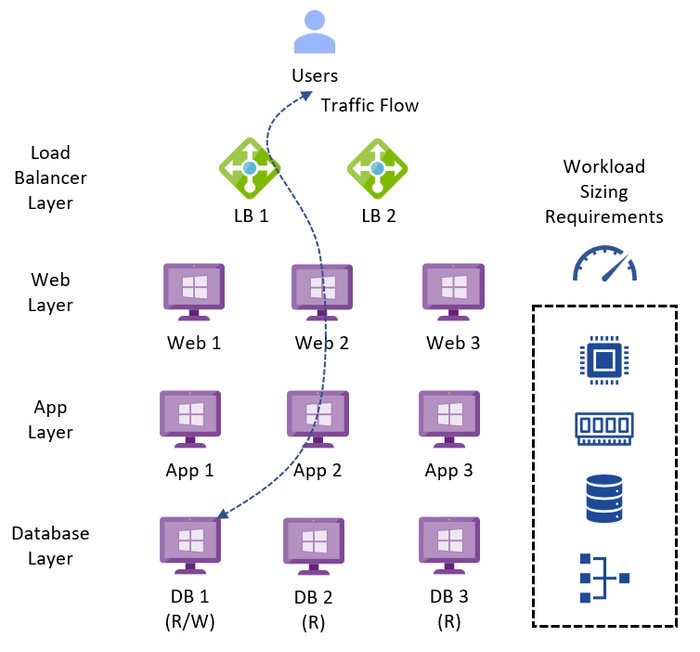
A typical legacy business-critical application will have the following application architecture:
Load Balancer layer: Uses load balancers to distribute traffic across multiple web servers in the web layer to improve application availability.
Web layer: Uses web servers to process client requests made via the secure Hypertext Transfer Protocol (HTTPS). Receives traffic from the load balancer layer and forwards to the application layer.
Application layer: Uses application servers to run software that delivers a business application through a communication protocol. Receives traffic from the web layer and uses the database layer to access stored data.
Database layer: Uses a relational database management service (RDMS) cluster to store data and provide database services to the application layer.
The application can also be classified as OLTP or OLAP, which have the following characteristics:
Online Transaction Processing (OLTP) is a type of data processing that consists of executing several transactions occurring concurrently. For example, online banking, retail shopping, or sending text messages. OLTP systems tend to have a performance profile that is latency sensitive, choppy CPU demands, with small amounts of data being read and written.
Online Analytical Processing (OLAP) is a technology that organizes large business databases and supports complex analysis. It can be used to perform complex analytical queries without negatively impacting transactional systems (OLTP). For example, data warehouse systems, business performance analysis, marketing analysis. OLAP systems tend to have a performance profile that is latency tolerant, requires large amounts of storage for records processing, has a steady state of CPU, RAM and storage throughput.
Depending upon the requirements for each service, the infrastructure design could be a mix of technologies used to meet the different application SLAs with cost efficiency.
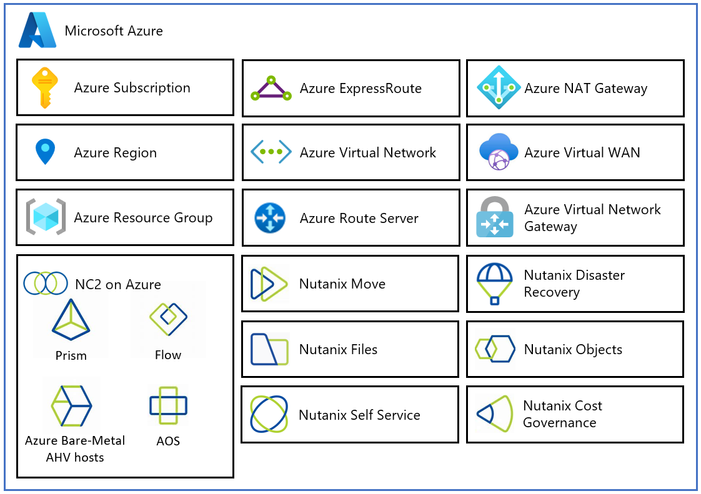
Azure Virtual Network (VNet): Private network used to connect Azure services and resources together.
Azure Route Server: Enables network appliances to exchange dynamic route information with Azure networks.
Azure Virtual Network Gateway: Cross premises gateway for connecting Azure services and resources to other private networks using IPSec VPN, ExpressRoute, and VNet to VNet.
Azure ExpressRoute: Provides high-speed private connections between Azure data centers and on-premises or colocation infrastructure.
Azure Virtual WAN (vWAN): Aggregates networking, security, and routing functions together into a single unified Wide Area Network (WAN).
In the next section, I will describe how to use the Nutanix Sizer to quickly scope the NC2 on Azure service for a customer workload.
Using the Nutanix Sizer
The Nutanix Sizer is available to Nutanix Employees and Nutanix Partners. If you are a Nutanix Customer, please reach out to your Nutanix, Microsoft, or Partner account team to engage an architect to size your NC2 on Azure solution. Customers also have access to Nutanix Sizer Basic.
Unless specified, all other settings can be left at the default values. Once the scenario is built, it can be later tweaked to meet the customer requirements.
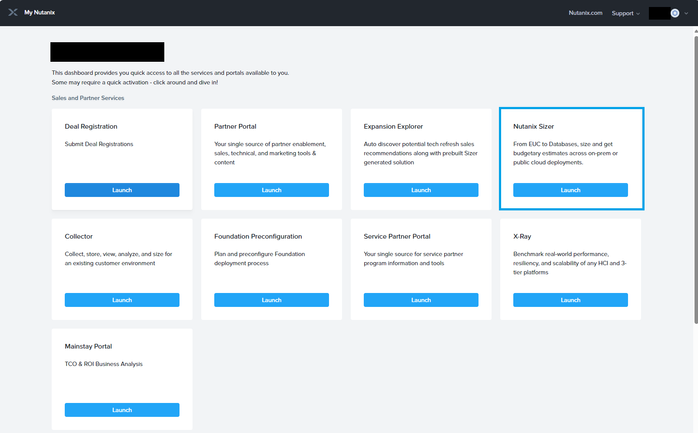
Step 1: Access My Nutanix and select the Nutanix Sizer Launch button.
Figure 3 – My Nutanix Dashboard
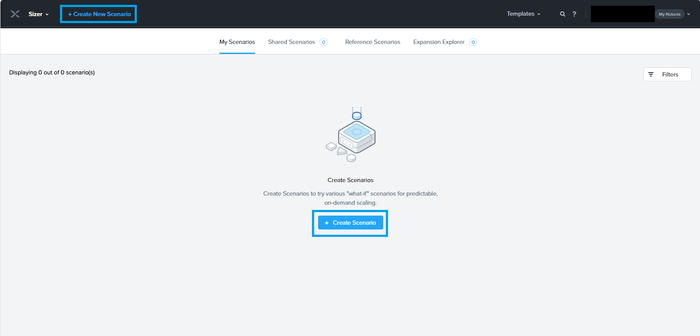
Step 2: Select the Create Scenario button.
Figure 4 – Nutanix Sizer My Scenarios
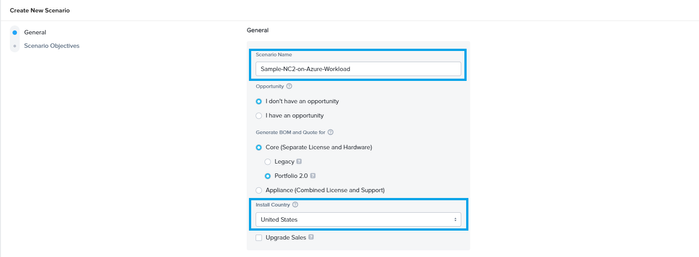
Step 3: Enter the Scenario Name, Install Country, and select the Create button.
Figure 5 – Nutanix Sizer Create New Scenario
Optionally, if you have a good understanding of the problem the customer is trying to solve, you can fill out the Scenario Objectives (Executive Summary, Requirements, Constraints, Assumptions, and Risks) to start building out the design. This will also allow you to use the advanced export features at the end of the sizing process.
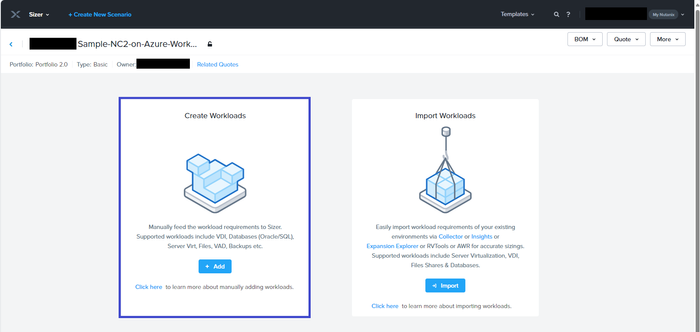
Step 4: Press the Add button in the Create Workloads pane. If you want Import a Nutanix Collector or RVTools files as the source file for workload, select the Import button instead.
Figure 6 – Nutanix Sizer Create Workloads
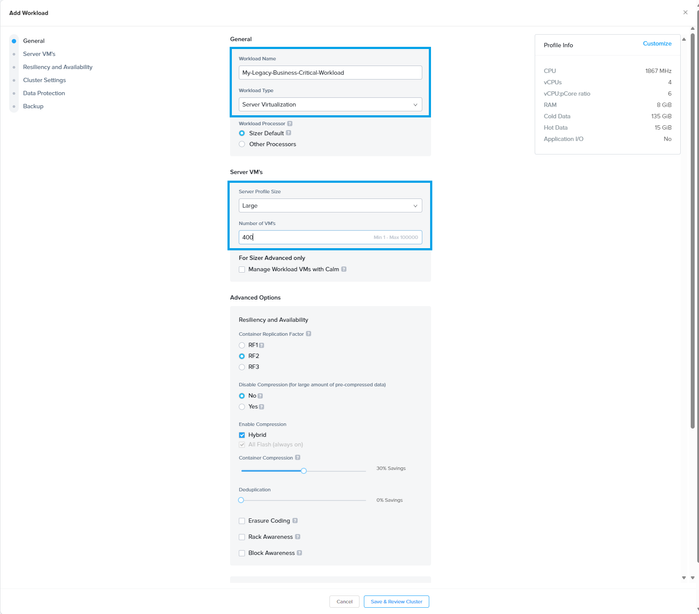
Step 5: Define the Workload Name, Workload Type, Server Profile Size, and Number of VMs. Then select the Save & Review Cluster button.
Figure 7 – Nutanix Sizer Add Workload
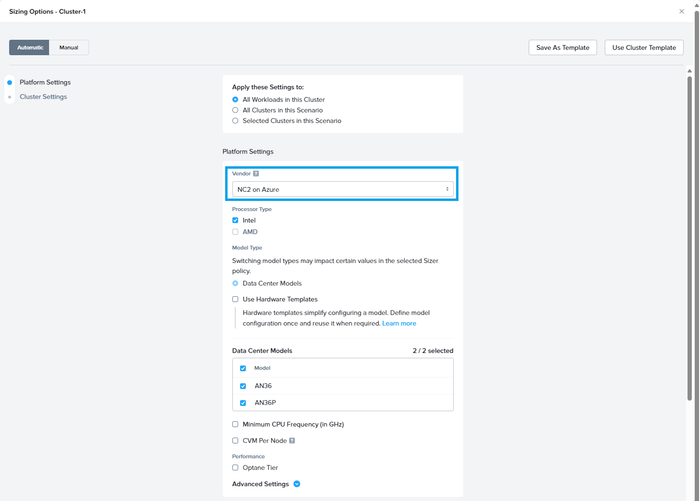
Step 6: Select NC2 on Azure from the Vendor section of the Platform Settings. Then scroll down to the Cluster Settings.
Figure 8 – Nutanix Sizer Platform Settings
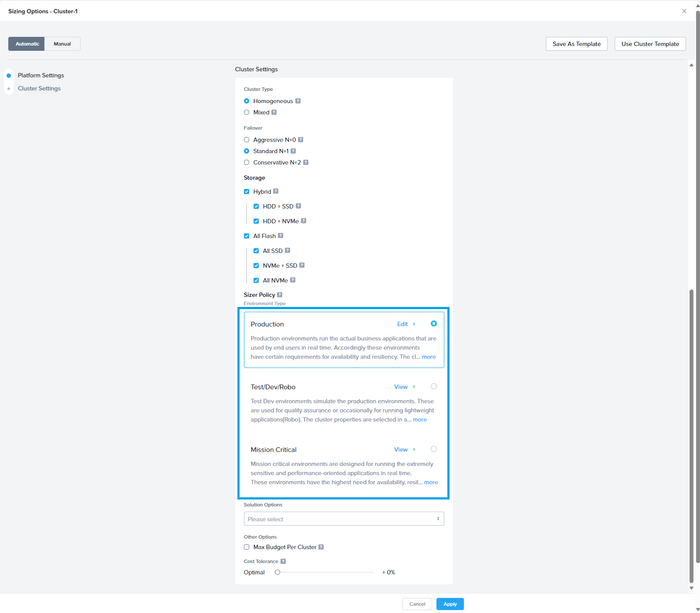
Step 7: Select the Environment Type from the Cluster Settings and press the Apply button.
Figure 9 – Nutanix Sizer Cluster Settings
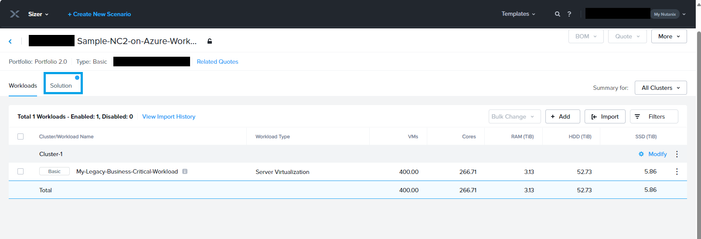
Step 8: In the Workloads Summary page, select the Solution tab.
Figure 10 – Nutanix Sizer Workloads Summary
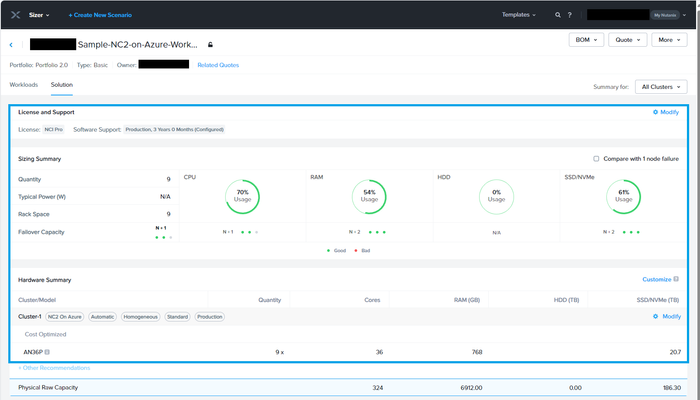
Step 9: In the Solution Summary page, verify the NC2 on Azure tag is present in each cluster.
Figure 11 – Nutanix Sizer Solution Summary
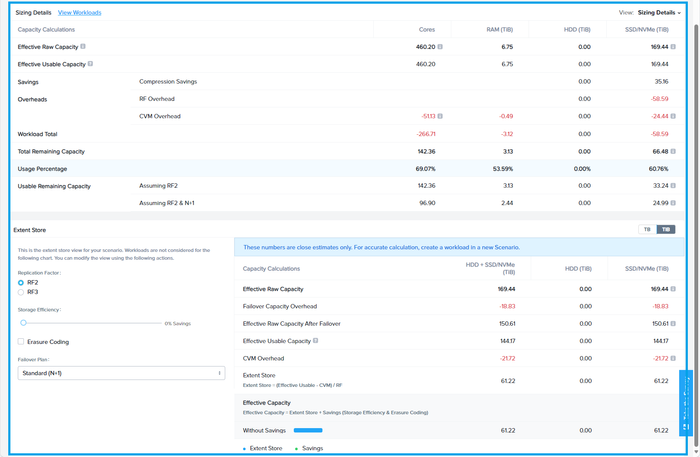
Step 10: In the Solution Summary page, scroll down to the Sizing Details for the detailed breakdown.
Figure 12 – Nutanix Sizer Solution Sizing Details
Step 11: To share the Scenario with others:
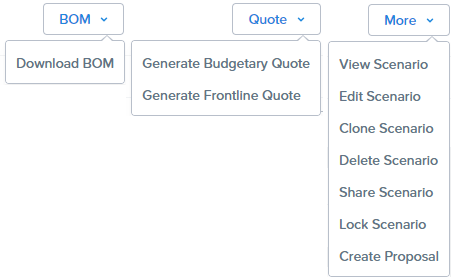
Select BOM, Download BOM
Select Quote, Generate Budgetary Quote or Generate Frontline Quote
In the following section, I will describe the next steps that need to be made to progress this high-level design estimate towards a validated detailed design.
Next Steps
The NC2 on Azure sizing estimate has been assessed using Nutanix Sizer. With large enterprise solutions for strategic and major customers, a Nutanix Solutions Architect from Azure, Nutanix, or a trusted Nutanix Partner should be engaged to ensure the solution is correctly sized to deliver business value with the minimum of risk. This should also include an application dependency assessment to understand the mapping between application groups and identify areas of data gravity, application network traffic flows, and network latency dependencies.
Summary
In this post, we took a closer look at the typical sizing requirements of a customer workload, the architectural building blocks, and the use of Nutanix Sizer to quickly scope the NC2 on Azure service. We also discussed the next steps to continue an NC2 on Azure design.
If you are interested in NC2 on Azure, please use these resources to learn more about the service:
René van den Bedem is a Principal Technical Program Manager at Microsoft. His background is in enterprise architecture with extensive experience across all facets of the enterprise, public cloud & service provider spaces, including digital transformation and the business, enterprise, and technology architecture stacks. René works backwards from the problem to be solved and designs solutions that deliver business value with the minimum of risk. In addition to being the first quadruple VMware Certified Design Expert (VCDX), he is also a Dell Technologies Certified Master Enterprise Architect, a Nutanix Platform Expert (NPX), an NPX Panelist, and a Nutanix Technology Champion.
This article is contributed. See the original author and article here.
Introduction
The recent unveiling of the D365 Warehouse Mobile App’s latest release, version 2.1.23, represents a significant stride forward in warehouse management technology. This update brings forth a plethora of enhanced features geared towards elevating user experience and streamlining processes. Notably, version 2.1.23 places a strong emphasis on authentication, stability, and user-friendliness, catering to the complex demands encountered by businesses striving to optimize their warehouse management practices. Here’s a closer look at the key enhancements introduced in this release cycle:
Enhanced Authentication
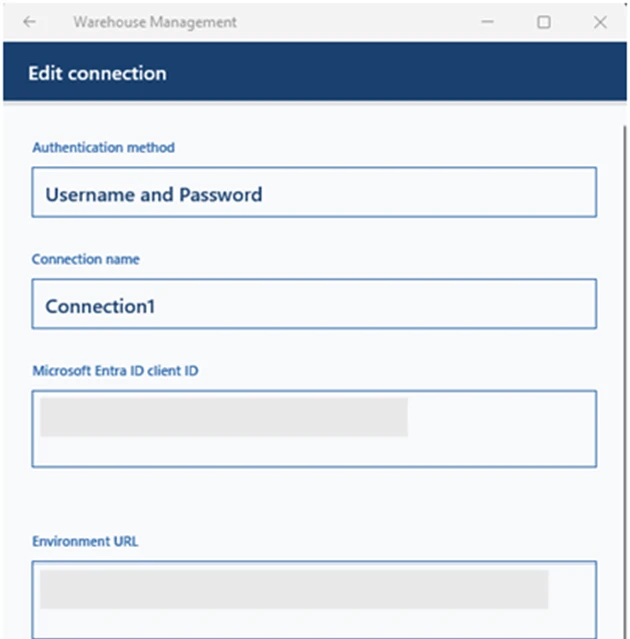
One of the key highlights of this version is the implementation of several authentication improvements. By adding support for username/password authentication and single sign-on (SSO), the app now offers more flexibility and security options for users. This not only simplifies the login process but also ensures that access to sensitive warehouse data is securely managed.
Image: Authentication Improvements
Improved Stability
With increased stability, users can rely on the app to perform consistently even in demanding warehouse environments. This means fewer interruptions and smoother operations, ultimately leading to higher productivity and efficiency.
Automatic Sign-In
The introduction of default mobile device user assignment enables automatic sign-in for workers, streamlining the authentication process further. This feature reduces the time spent on logging in, allowing employees to focus more on their tasks at hand.
Enhanced Support for Active Directory Federation Services (AD FS)
By improving support for AD FS, the app now offers better compatibility with Dynamics 365 Finance + Operations (on-premises) environments. This enables seamless authentication using device code flow, username/password, and SSO methods, ensuring compatibility with various IT infrastructures.
Usability Improvements
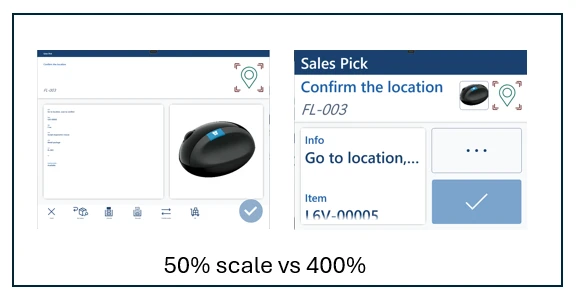
The update also brings several usability enhancements, including better support for scaling text and improved accessibility features. With text scaling, users can fit more information on the screen, enhancing readability and usability. Additionally, the app now supports the new “back” gesture in Android 13, providing a more intuitive navigation experience.
Image: Usability improvements
Business Benefits
Increased Efficiency
With smoother authentication processes and enhanced stability, employees can spend less time dealing with technical issues and more time on productive tasks. This leads to increased efficiency and throughput in warehouse operations.
Improved Security
The addition of authentication methods such as username/password and SSO enhances security, ensuring that only authorized personnel can access sensitive warehouse data. This helps mitigate the risk of data breaches and unauthorized access, safeguarding valuable business assets.
Enhanced User Experience
Usability improvements, such as text scaling and accessibility enhancements, contribute to a better overall user experience. Employees can navigate the app more easily and access information more quickly, leading to higher satisfaction and productivity.
Seamless Integration
With improved support for AD FS and Dynamics 365 Finance + Operations environments, the app seamlessly integrates with existing IT infrastructure. This ensures smooth deployment and compatibility, minimizing disruptions and facilitating adoption.
Conclusion
In conclusion, the release of D365 Warehouse Mobile App version 2.1.23 signifies a monumental leap forward in warehouse management technology. By prioritizing enhancements across authentication, stability, usability, and compatibility, this update revolutionizes the way businesses operate their warehouses. With streamlined authentication processes, bolstered stability, and intuitive usability features, users can expect a seamless experience that translates into heightened efficiency and productivity. Moreover, the fortified security measures instil confidence in data integrity, safeguarding valuable assets against potential threats. As businesses embrace these advancements, they pave the way for a future where warehouse operations are not only optimized but also poised for sustained growth and success.
This article is contributed. See the original author and article here.
In the ever-growing world of Microsoft Dynamics 365 Sales, there is always a host of capabilities that could be enabled to support sellers, complemented by monthly releases packed with innovations. In our commitment to empowering admin teams, we’re streamlining the process of discovering and activating these capabilities. Introducing a new overview page, complete with advanced search functionalities and feature notifications, promises to simplify the journey of adopting new features, swiftly placing them at the fingertips of sellers.
Navigating Dynamics 365 Sales admin settings
In a world of tight budgets and high sales team expectations on how technology can drive value we want to make sure there is every opportunity to make the most of the asset you have purchased. Frequently, we encounter overlooked opportunities where features could significantly enhance the sales process, often due to administrators being unaware of their existence. The revamped overview page, featuring a robust search function, paves the way for administrators to get started faster.
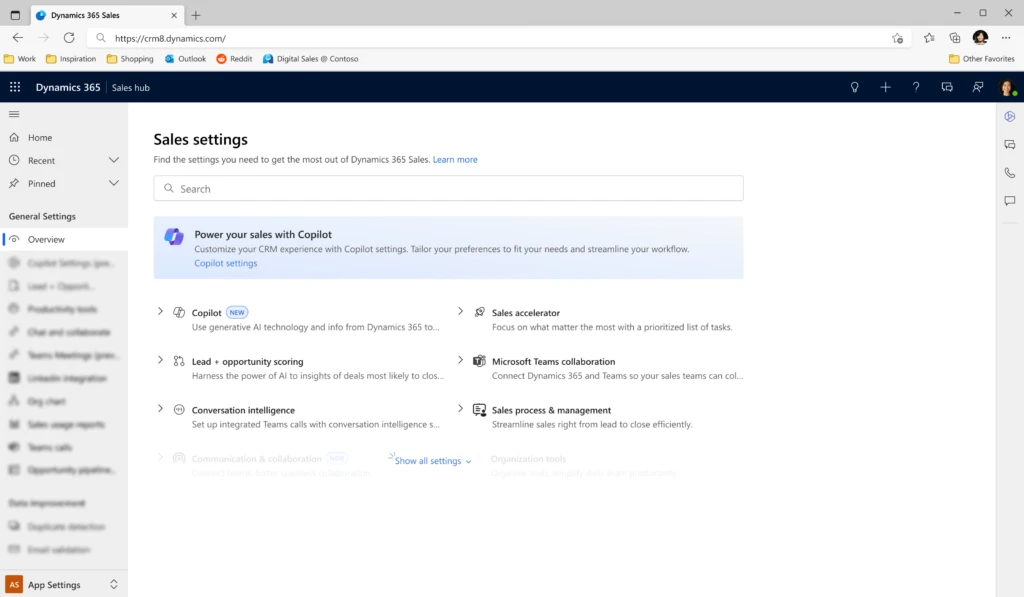
The new overview page experience
New overview page experience in Sales app
Empowering administrators with efficient tools is crucial. With the new overview page experience, administrators can experience the following immediate benefits:
The integrated search function enables administrators to quickly locate specific settings, reducing navigation time and enhancing efficiency.
The intuitive search functionality eases the learning curve for new administrators, reducing training time and costs.
The overview page now includes notifications for new features and settings, ensuring administrators are always aware of the latest updates to fully leverage the platform’s evolving capabilities.
This update not only enhances functionality but also improves user satisfaction through a more user-friendly interface and easy access to information, contributing to a more pleasant and productive administrative experience.
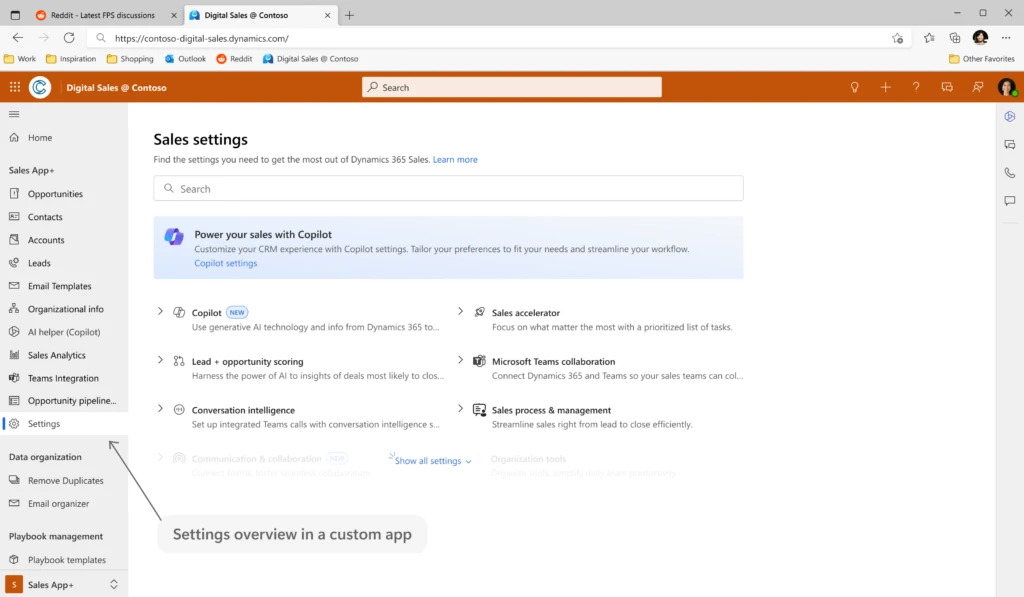
Enabling the new overview page in your custom app
New overview page experience in custom app
This update can even be applied to custom apps as well as to Sales hub as standard. To enable this new overview page into your custom app, follow these steps:
In the custom app edit page, from the Navigation section, hover over the group name for which you want to add the site map entry and then select New page.
In the New page dialog box, select an option according to your requirement. Here, we are adding the site map entry using a URL.
Select Next.
Enter the following URL information and a suitable title: /main.aspx?pagetype=control&controlName=MscrmControls.FieldControls.CCFadminsettings
Select Add.
Save and publish the custom app.
The site map entry is added to your custom app.
A leap in operational efficiency and productivity
The introduction of the new overview page in Dynamics 365 Sales marks a significant step forward in administrative efficiency and platform utilization. This update will simplify navigation and make it easier to access various features. It’s a straightforward yet effective change that will improve the day-to-day management of the platform and contribute to smoother operations and more effective use of its capabilities.
Embracing the future of Dynamics 365 Sales administration
As Dynamics 365 Sales continues to evolve, this update represents a commitment to continuous improvement and user-centric design. By simplifying navigation and enhancing feature discovery, Dynamics 365 Sales is set to become more accessible and powerful than ever before. For administrators, this means a future where managing the platform is less about tackling complexities and more about harnessing potential.



Recent Comments