This article is contributed. See the original author and article here.
Unlocking Value with the Power Platform
For years now, the Power Platform has been a low code tool that unlocks value across your business by accelerating application & automation development to meet business demand faster. Whether you’re a professional developer, an IT admin, business analyst, or a non-technical employee, low code empowers you to create solutions in a fast, secure, and compliant fashion. Now with the rise of AI, organizations are moving quickly to embrace AI in order to usher in a new wave of growth and value creation.
Introducing the Livestream Series: Let’s Learn Power: A Real-life AI + Power Platform Use Case
With that, I am excited to announce a 3-part livestream series which will be hosted on the Microsoft Reactor channel that focuses on bringing the Power Platform and AI together. The series is titled Let’s Learn Power: A Real-life AI + Power Platform Use Case and it explores the integration of the Power Platform with advanced AI models to create a dynamic application inspired by Kevin Scott’s Microsoft Build 2023 demo. This application makes it easy to generate a social media post promoting a new episode of your podcast. Starting from a podcast URL, we journey through speech-to-text transcription to generate a transcript of the podcast, given that transcript, we perform guest identification and guest bio retrieval, followed by social media post generation with image creation, and finally, posting to LinkedIn from Power Apps or Copilot Studio. All powered by Azure OpenAI Service and the Power Platform AND I will walk you through it all from start to finish.
As mentioned, there will be 3 episodes livestreamed on the following dates and times:
Episode 1: Laying the Foundation: Azure Open AI Service and Power Platform
Dive into the world of Azure OpenAI Service. We introduce the service, describe the models, and guide you through creating deployments. Setting the stage for seamless AI integration.
11 December 2023 | 9AM PST | 7PM SAST
Episode 2: Bridging the Gap: .NET APIs, Azure, and Custom Connectors
We take a step further from Episode 1 by creating a .NET API using the .NET Azure OpenAI SDK, creating Azure Resources with the Azure Developer CLI, deploying the API to Azure App Service and Azure API Management and Creating a Custom Connector from API Management.
12 December 2023 | 9AM PST | 7PM SAST
Episode 3: The Final Touch: Power Apps and Microsoft Copilot Studio Integration
The final episode brings it all together. We will build the Power App UI, connect to the Custom Connector, and publish the social media post to LinkedIn. As a bonus, we will also see how to implement this workflow with a Microsoft Copilot Studio custom copilot.
13 December 2023 | 9AM PST | 7PM SAST
You can register to watch all 3 livestreams here: Register Now! and can’t wait to see you there!
This article is contributed. See the original author and article here.
Embark on a Holiday Coding Adventure with GitHub Copilot
Hello students! Are you looking for a fun and engaging way to learn new coding concepts and languages over the holiday season? If so, you might want to check out Microsoft Copilot Adventures, a series of coding challenges powered by GitHub Copilot, an AI pair programmer that assists you in writing better code.
In this article, we’ll show you how to start your adventure, choose from different levels of difficulty and topics, and use GitHub Copilot hints to help you write your code. You’ll also learn how to share your solution with others and get feedback.
Whether you’re a beginner or an expert, Microsoft Copilot Adventures will help you improve your coding skills and have fun at the same time. So, what are you waiting for? Start your adventure today!
Welcome to Coding Adventure with GitHub Copilot
We are going to introduce you to an exciting series of coding adventures that will help you learn new concepts and languages over you holiday vacation period. This adventure experience and activities is brought to you by none other thanGitHub Copilot, an AI pair programmer that assists you in writing better code.
What is GitHub Copilot?
GitHub Copilot is a tool designed to assist you in writing code. It’s like having a pair programmer who’s always ready to help.Whether you’re a beginner just starting out or an experienced coder looking to learn a new language, GitHub Copilot can be a valuable companion on your coding journey
Once you’ve set up your environment, it’s time to choose your adventure.There are several adventures available, each designed to challenge your coding skills and help you learn new concepts
After choosing your adventure, you’ll be given a description, high-level tasks to perform, and GitHub Copilot hints to help you write your code. You can use any language you’d like.If you’re up for a challenge, try learning a new language.
Share Your Adventure
If you’d like to share your solution with others, you can publish your adventure solution to a GitHub repo. Then, visit theissues pageand select ‘New Issue’. Use the following naming convention for the issue title: ‘Solution for [Name of Your Adventure]’.Replace ‘[Name of Your Adventure]’ with the adventure name you chose to solve .
Conclusion
Embarking on a Holiday coding adventure with GitHub Copilot is a fun and engaging way to learn new coding concepts and languages. So, what are you waiting for? Start your adventure today!
This article is contributed. See the original author and article here.
Microsoft has separated all Czech-specific functionalities into distinct applications as part of the delocalization process of the Czech version of Dynamics 365 Business Central. The process intended to pave the way for the seamless integration of Czech local functionalities on top of the Worldwide (W1) version of the Business Central.
Technical Overview
Business Central has been undergoing major changes over the past few years and one of the strategy areas is application modularization, that includes localization layers. This led to critical changes in the Czech localization layer, which has now been converted into a suite of distinct localization apps. The suite contains the following apps: Core Pack, Advance Pack, Banking documents, Cash Desk, Compensation, Advance Payments, and Fixed Assets.
To ensure that both old and new Czech functionalities work in parallel in that transition period. Microsoft made sure that the old code integrated into the Base Application was gradually cleaned up. The last step is to remove Czech specific fields from the Czech Base Application.
In the next major release of Business Central 2023 wave 2 (version 23), the following Czech-specific fields will be removed from the tables, while primary keys will be updated:
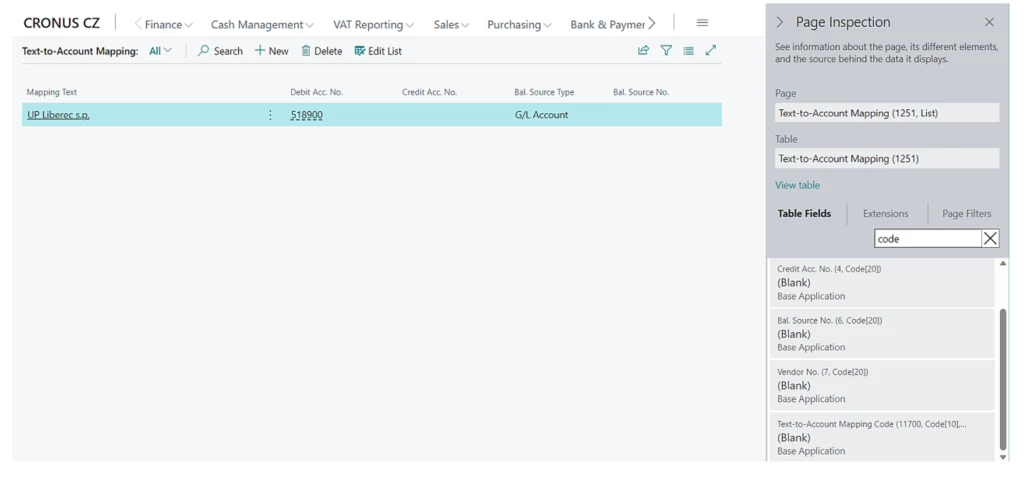
Table 1251 “Text-to-Account Mapping”, field 11700 Text-to-Account Mapping Code: Code[10]
Action Required: Upgrade to Business Central 2023 Release Wave 2
To ensure a successful upgrade to Business Central 2023 release wave 2 (version 23) Czech, perform a forced synchronization of the database schema. Microsoft will ensure a seamless upgrade process for users of the online version of Business Central. However, for those upgrading to this version using Business Central on-premises, it is necessary to set the “schemaUpdateMode” parameter in CZ Base Application to “ForceSync” to synchronize the data model.
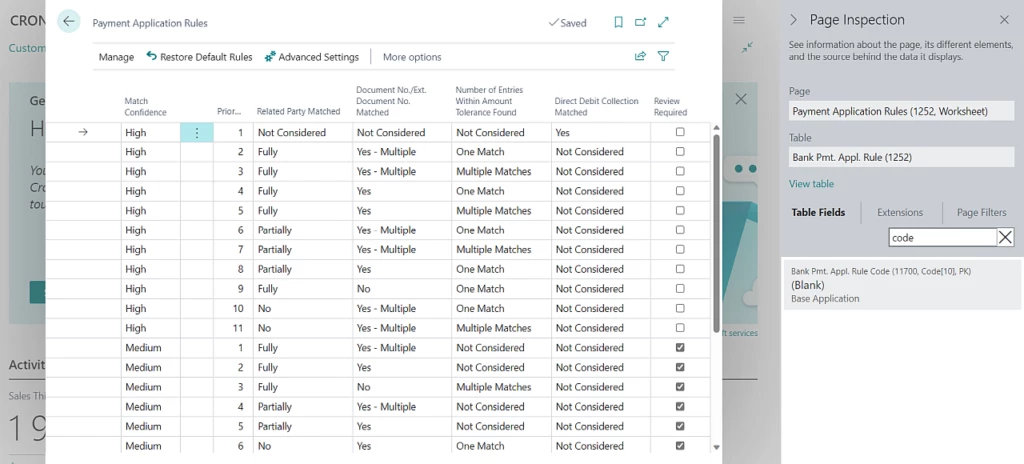
Users who are upgrading to the on-premises version of Business Central 2023 release wave 2 (version 23) Czech and higher must verify that there are no duplicate records in both tables 1251 “Text to Account Mapping” and 1252 “Bank Payment Application Rule” after the Czech fields have been removed from the primary key. This can be accomplished either by manually deleting the data or by upgrading to any version of BC 22.x where data modifications will be included as part of the upgrade procedures. It is highly recommended to back up the data in these tables before proceeding.
Summary
Czech-specific fields that were previously part of the primary key in Table 1251 “Text to Account Mapping,” specifically Field 11700 “Text-to-Account Mapping Code,” and in Table 1252 “Bank Payment Application Rule,” “Bank Payment Application Rule Code,” will be removed in this new version.
“Although it is a beginner-level document provided by Microsoft, it is difficult for all beginners to read such documents. Therefore, as someone who is also learning C# for the first time, I have organized the contents of this document into a video. I hope that beginner C# learners can learn C# more easily and enjoyably, and I want to share this content with many people.”
(In Korean, MS에서 제공하는 초급자 문서이지만, 모든 초급자는 이러한 문서 조차 읽기 어렵습니다. 그래서 저도 C#을 처음 배운다는 입장에서 해당 문서의 내용을 영상으로 정리하였습니다. C# 초급 입문자가 조금 더 쉽고, 즐겁게 C#을 배울 수 있기를 희망하며 이 컨텐츠를 많은 사람들에게 알리고자 합니다.)
“If we develop our own application that maintains unique usernames and passwords, the administrative burden becomes significant when adding or removing users across multiple applications. We also have to handle situations where a user forgets their email address. Alternatively, we can delegate this responsibility to a centralized ID provider, but many ID providers are very expensive. However, Microsoft’s authentication and authorization system is very affordable and easy to implement. Therefore, it’s content that many people should be aware of.”
(In Japanese, 独自のユーザー名とパスワードの情報を保持するアプリケーションを自分たちで開発した場合、複数のアプリケーションにまたがってユーザーを追加・削除するときに管理上の負担が大きくなります。またメールアドレスをユーザーが忘れた場合の対処も自分たちでしなくてはなりません。代わりにその責任を一元化された ID プロバイダーに委任できますが、多くの ID プロバイダーは非常に高額です。しかし、Microsoft の認証認可システムは非常に安価であり、簡単に実装もできます。そのため、多くの人に知ってもらいたいコンテンツです。)
Yutaro Tamai, Enterprise Mobility, Windows and Devices MVP, Japan
“In this eta, managing Windows devices is required for cloud-native management approach. This is good content to learn about device setup through Windows Autopilot. Why not start by getting familiar with Windows Autopilot and deepening your understanding of the latest device setup methods?”
(In Japanese: Windows デバイスの管理もクラウド ネイティブの管理手法が求められる時代です。その中で、Windows Autopilot によるデバイス セットアップの手法を学ぶに良いコンテンツです。まずは、Windows Autopilot に触れ、最新のデバイス セットアップの手法に理解を深めてみませんか。)
This article is contributed. See the original author and article here.
We are honored to announce that Gartner® has recognized Microsoft as a Leader in the 2023 Gartner® Magic Quadrant™ for Unified Communications as a Service (UCaaS)—this is the fifth consecutive year we’ve received this recognition.








Recent Comments