
by Scott Muniz | Sep 13, 2022 | Security, Technology
This article is contributed. See the original author and article here.
Official websites use .gov
A .gov website belongs to an official government organization in the United States.

Secure .gov websites use HTTPS
A
lock ( )
) or
https:// means you’ve safely connected to the .gov website. Share sensitive information only on official, secure websites.

by Contributed | Sep 13, 2022 | Technology
This article is contributed. See the original author and article here.
Across the globe we see the celebration of wonderful cultural moments. In living up to our mission statement – “to empower every person and every organization on the planet to achieve more”, we here at Microsoft provide solutions to empower organizations to celebrate these cultural moments with their employees throughout the year.
We are introducing Diversity and Inclusion (D&I) cultural site templates. Our second cultural template we are delivering celebrates Hispanic Heritage Month. There is a lot of content and structure that appears by default – to save you time – and all can be further customized to meet the unique needs of your organization.
The Hispanic Heritage Employee Resource Group site:
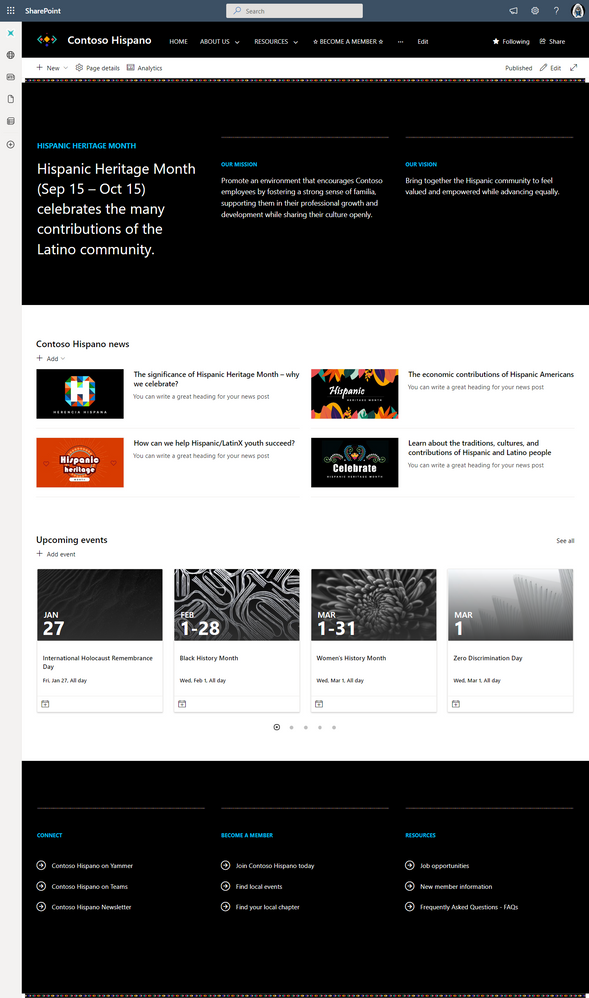
This leverages the modern experience built on SharePoint in Microsoft 365. The new site template is available for use from the SharePoint look book | Hispanic Heritage Employee Resource Group site.
The Hispanic Heritage Employee Resource Group site features:
- Home page with a unique theme
- Page template
- Pre-populated content and web parts
- Mobile ready
You will be able to quickly create communication to
Coming soon
Other cultural D&I site templates we are working on:
- National Disability Employment Awareness Month
- Native American/Indigenous Heritage Month
- Veteran’s Day
- International Day of Persons with Disabilities
To learn more about how to create the Hispanic Heritage Employee Resource Group site for your Microsoft 365 tenant, visit the related help article on docs.microsoft.com, “Overview of the Hispanic Heritage Employee Resource Group site template.“
by Scott Muniz | Sep 13, 2022 | Security
This article was originally posted by the FTC. See the original article here.
Brought to you by Dr. Ware, Microsoft Office 365 Silver Partner, Charleston SC.
by Contributed | Sep 12, 2022 | Technology
This article is contributed. See the original author and article here.
Are you or your end-users annoyed with update notifications? Do you struggle to reach compliance? Well fear not, because Microsoft has developed an optimization that applies a pending Microsoft 365 Apps update while a machine is in idle or locked mode, even if apps are running. We refer to this feature as update under lock, and it uses Click-To-Run technology.
Benefits of this feature
Update under lock helps you reach compliance within your timeframes without disrupting your internal users, and potentially reduces the need for abrupt forced updates, making updates more reliable by saving app state before closing. Zero notifications, zero disruptions!
How does it work?
If there are running Office apps, update under lock will try to shut them down only when safe to do so, apply the pending update, and restore any closed apps to their previous state. This process takes about four seconds.
A common scenario is for users to leave apps open on their device for extended periods of time. For example, if a user is working on a Word document at the end of the day, they may leave the document open and lock the device intending to continue working on it the next day. When users leave their documents open in this manner, it prevents Office from applying updates. With this feature, the user will come back to a machine in its previous state, but they will be running the latest bits.
Who does it affect?
Windows devices only for:
- Microsoft 365 subscriptions, Visio, Project, but not Microsoft Teams, which has its own update process
- Retail consumer/perpetual Office 2016, 2019, and 2021
All devices, regardless of update endpoint, that are receiving updates from:
- Current Channel: Version 2109 or later
- Monthly Enterprise Channel: Version 2112 or later
- Semi-Annual Enterprise Channel (Preview): Version 2202 or later
- Semi-Annual Enterprise Channel: Version 2208 or later (coming Jan 2023)
Safety and controls
Apps will not shut down if it is not safe to do so. For example, if macros are running or there are unsaved changes. If apps cannot shut down safely, updates are applied normally.
There are no admin controls for this feature. Microsoft is always optimizing your updates experience, and this thoroughly tested feature lives under the hood to make your life easier.
How to contact us
Continue the conversation by joining us in the Microsoft 365 Tech Community! Whether you have product questions or just want to stay informed with the latest updates on new releases, tools, and blogs, Microsoft 365 Tech Community is your go-to resource to stay connected!
by Scott Muniz | Sep 12, 2022 | Security
This article was originally posted by the FTC. See the original article here.
Brought to you by Dr. Ware, Microsoft Office 365 Silver Partner, Charleston SC.


Recent Comments