This article is contributed. See the original author and article here.
Oracle 19c is the terminal release for Oracle 12c. If you aren’t familiar with that term, a terminal release is the last point release of the product. There were terminal releases for previous Oracle versions (10.2.0.4, 11.2.0.7.0) and after 19c, the next terminal release will be 23c. Therefore, you don’t see many 18c, 20c or 21c databases. We’ve gone to yearly release numbers, but the fact remains that 19c is going to receive all major updates and continue to be supported unlike the non-terminal releases.
Oracle will tell you for support, you should be upgrading to 19c. Premier Oracle Support ended for December 1st, 2020 and as we discussed, not many are going to choose or stay on non-terminal releases, so 19c is it.
With that said, we must offer guidance on recommended practices for Oracle versioning and patching in Azure. Although I will list any bugs and document IDs that back up the recommendations I’m making, be aware that many of these will be behind Oracle Support’s paywall, so you’ll only be able to access them with an Oracle Support CSI. Let’s talk about the things not to do first-
Don’t Upgrade DURING Your Migration
I know it sounds like an awesome idea to upgrade to the latest database version while you are migrating to the cloud, but please, don’t do these two things- migrating to the cloud and upgrading the database/app at the same time. It’s a common scenario that I’m brought in after the Azure specialists are left scratching their head or scrambling to explain what has changed and then I come in to tell them to stand down because it’s the DATABASE THAT’S CHANGED.
Do Patch to the LATEST Patchset for Oracle
I am part of the crowd that often did the latest patchset -1 approach. We would always be one patchset behind and let others figure out how many bugs might be introduced by the patch that had sneaked through testing.
Not anymore… I have a few customers on 19.14, which should be safe, considering the previous practice I mentioned, but the sheer number of bugs and serious bugs that were experienced has changed my thinking to recommend going to the latest patchset.
I think it’s easy to think, “Oh, it’s just a small bug” but I’m in agreement with you, if it’s a small impact and it has an easy work around, that’s one thing, but these bugs I’m referring to are quite impactful and here’s how:
High CPU Usage
19.14 release, there were 11 bugs that caused high CPU usage for Oracle.
High CPU usage to the point of doubling the core count for the VM the database ran on in Azure.
Doubling the need for Oracle licenses for the database, even though it was a bug that was causing all the additional CPU usage.
At $47500 list price per processor license, this isn’t something I’d recommend letting go on.
For one customer that I was deeply involved in, the VM sizing required 20 vCPU to run the workload. I sized up to 32 vCPU for peak workloads and yet they were at 97.6% CPU busy with a 64-core machine. The workload hadn’t changed, and the CPU usage traced was out of control!
I would start here: After Upgrade to 19c, One or More of the Following Issues Occur on Non-Linux Platforms: High Paging/Swapping, High CPU, Poor Performance, ORA-27nnn Errors, ORA-00379 Errors, ORA-04036 Errors (Doc ID 2762216.1)
Killing Sessions in PDB Eventually Results in Poor Buffer Cache Performance Due To Miscalculating Free Buffer Count
Time Slip
This issue will often display an ORA-00800 error and you will need to check the extended trace file for details. It will include the VKTM in the error arguments.
…/trace/xxxxx_vktm_xxxx.trc
ORA-00800: soft external error, arguments: [Set Priority Failed], [VKTM], [Check traces and OS configuration], [Check Oracle document and MOS notes]
The trace file will include additional information about the error, including:
Kstmmainvktm: failed in setting elevated priority
Verify: SETUID is set on ORADISM and restart the instance highres_enabled
This refers to a bug and has two documents around time drift and how to address it-
This article is contributed. See the original author and article here.
The Same KPIs, Different Department
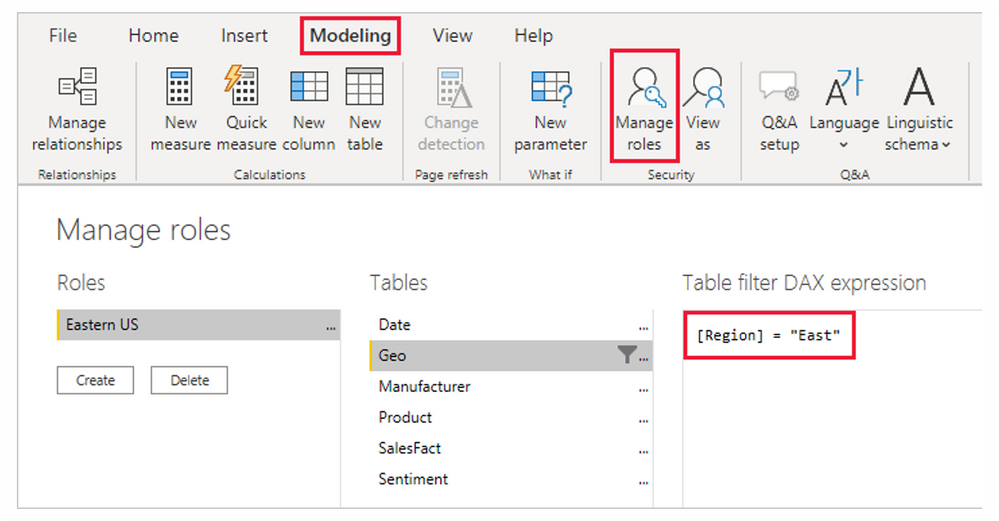
Scenario: You have different managers requesting to see the same KPIs (Customer Count, Revenue Generated, Products Performance, etc) for their different region. Data privacy requires that the various managers only see reports for their regions. A simple way to think about this is by creating different reports for the managers making a total of 3 Reports.
I am sure you will agree with me that this isn’t effective. more efforts and it is not scalable. what if it is a large multinational – country manager, regional manager, group manager, unit head, team leads all across the world? will you also build different reports for over 500 people? With Row Level Security, you can easily address this challenge by building a single Reports and set roles and rules to filter what everyone can see.
This article is contributed. See the original author and article here.
The sales accelerator in Dynamics 365 provides a tailored experience for sellers by minimizing the time spent searching for the best next customer to reach out to. It’s a workspace optimized with AI and suggested activities that guide sellers through customer interactions. The sales accelerator enables your sales team to prioritize their pipeline, reach out to prospects most likely to buy, and respond to recommendations, speeding up the sales process.
Our teams are constantly reviewing customer feedback and optimizing the experience. We have two new updates you’ll see immediately in your environments:
Sales Hub users now get out-of-the-box access to the sales accelerator workspace. (If you use a custom app, additional steps might be required to surface the capabilities.)
Sales engagement managers can discover and configure the sales accelerator in a newly streamlined onboarding process.
Let’s take a deeper look at these improvements.
Out-of-the-box access to the sales accelerator workspace
Sales Hub users will now be able to instantly access the sales accelerator from the left pane on the site map menu. As they access the sales accelerator, sellers will immediately see any activities scheduled for them in the worklist. Without navigating away from the screen, they can see who to contact next, filter and sort the records to their chosen priority, and then take the best next action.
Sales Hub is a Microsoft app that’s designed around the sales processes that most organizations follow. If you’re new to Dynamics 365 Sales and wondering whether to use the Sales Hub app or create a custom app, this comparison will help you decide.
The following improvements help sales engagement managers and admins discover and engage with the right options to implement and deploy the sales accelerator more efficiently:
Independently configured sales accelerator workspace and optimized assignment rules
Context-specific settings
Setup recommendations
Independently configure access to the workspace and assignment rules
Assignment rules enable new leads and opportunities to be automatically assigned to sellers or sales teams. This helps reduce the time and effort required to manually assign records, prevent the loss of unassigned records, and balance assignments among sellers.
Assignment rules can now be independently used or aligned to the use of the sales accelerator. This allows you to select the right options for your sellers and ensure they receive the records to work on, regardless of workspace area. We’ve introduced the ability to set security roles to separately control access to the sales accelerator workspace and assignment rules.
A security role defines how users may access different types of records. You can modify existing security roles, create new security roles, or change which security roles are assigned to each user. Learn more about security roles.
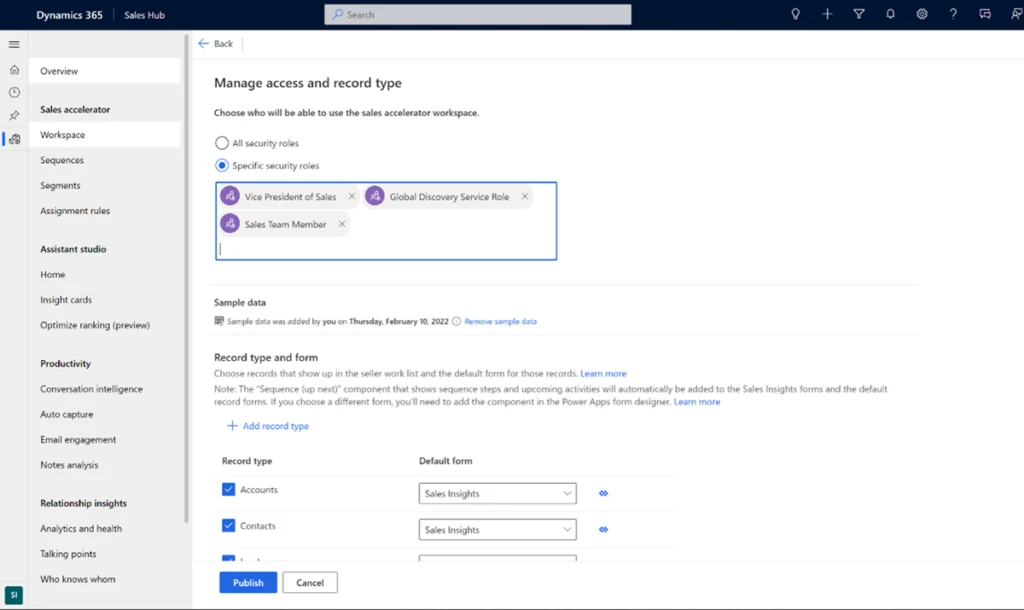
To configure access to the sales accelerator workspace, choose security roles in the Manage access and record type section of the workspace settings page.
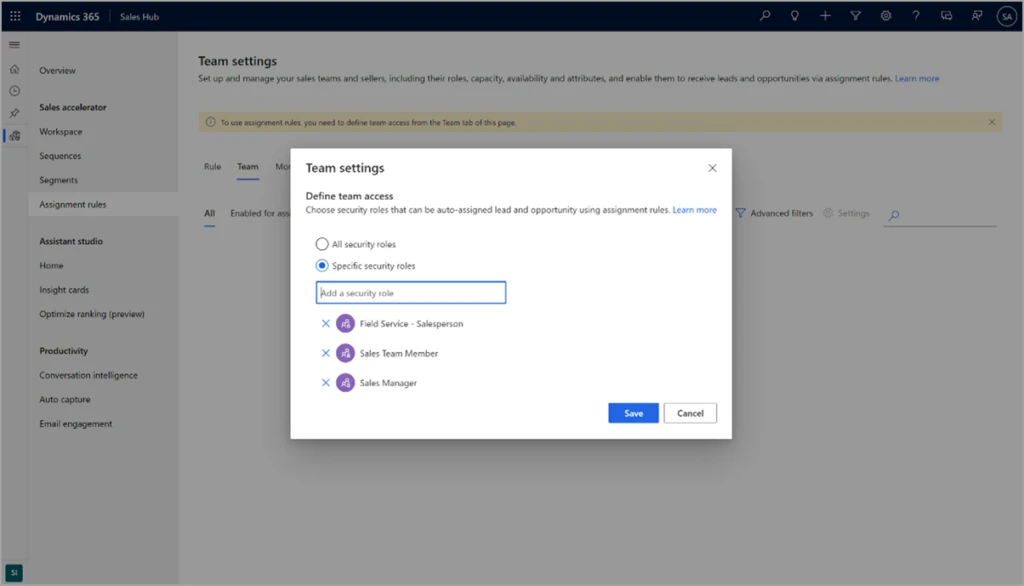
To configure access to assignment rules, choose security roles in the Team settings section of the assignment rules settings page.
Context-specific settings
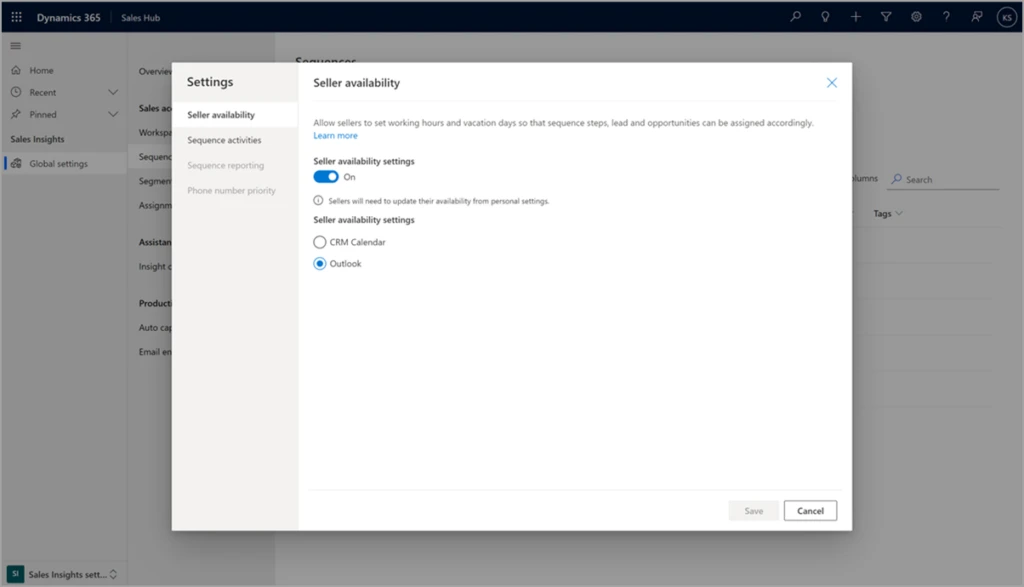
Advanced settings for sequences, assignment rules, and sales teams are now available in context, on the page, rather than requiring navigation to another settings area. This screenshot shows an example of the new in-context settings, using seller availability:
Personalize your workspace
To improve sellers’ productivity, we help them focus on who to engage next. To that end, you can now customize the workspace filters. For example, sellers might want to filter work items based on the lead source, such as website inquiry. Add a filter based on Lead as the record type and Leadsource as the field.
We encourage you to try out different capabilities to get the most out of the sales accelerator. To help you discover its capabilities, we show recommended next steps in workspace settings. Recommendations are tailored to the sales process and based on where your organization is in the setup process, taking away the guesswork and guiding you on a recommended path for a successful implementation.
Stay tuned for more exciting improvements to come, such as customizable worklist cards, advanced sorting, and a new sequence designer experience!
This article is contributed. See the original author and article here.
CISA has added one new vulnerability to its Known Exploited Vulnerabilities Catalog, based on evidence of active exploitation. These types of vulnerabilities are a frequent attack vector for malicious cyber actors and pose significant risk to the federal enterprise. Note: to view the newly added vulnerabilities in the catalog, click on the arrow in the “Date Added to Catalog” column, which will sort by descending dates.
Note: CISA previously added and then removed today’s addition, CVE-2022-26925, to the KEV Catalog after determining that remediations associated with this vulnerability would break certificate authentication for many federal agencies. Details:
CVE-2022-26925 was mitigated by Microsoft’s June 2022 Patch Tuesday update.
The Microsoft update also includes remediations for CVE-2022-26923 and CVE-2022-26931, which change the way certificates are mapped to accounts in Active Directory. These changes break certificate authentication for many federal agencies.
For this reason, CISA has also published a Knowledge Article that provides critical steps that must be followed to prevent service outages. Agencies should review thisKnowledge Articlecarefully before beginning the mitigation process.
Although BOD 22-01 only applies to FCEB agencies, CISA strongly urges all organizations to reduce their exposure to cyberattacks by prioritizing timely remediation of Catalog vulnerabilities as part of their vulnerability management practice. CISA will continue to add vulnerabilities to the Catalog that meet the specified criteria.



Recent Comments