Make every interaction count with customer journey orchestration

Make every interaction count with customer journey orchestration

This article is contributed. See the original author and article here.

Since the onset of the digital age, customer behaviors have radically evolved. As new technology emerges, customers’ expectations for brands continually align with digital evolution. However, the pandemic has brought along a significant, unexpected shift in both customer behavior and expectations. With lives upended and livelihoods being affected around the world, consumers have been forced to adopt completely new behaviors. This evolution was brought on through a trial by fire, throwing a decade’s worth of digital adoption in just a few months, which not only affected consumer behavior in digital spaces, but across brick-and-mortar as well.

Watch the customer journey orchestration webinar to learn more.

Emerging digital trends

So, what does this mean for brands looking to align with consumer trends? Today’s consumers perceive technology optimistically, as an intimate lifeline. They like to try new things and shop on a trial basis, while also looking for novelty. This demonstrates their desire for a sense of personal control and empowerment. While many of the former mentions aren’t surprising, one of the most interesting trends emerge from the pandemic is that consumers no longer distinguish between material life and immersive digital experiences, clearly a knock-on effect of the majority of the global population operating from home. Abandoning ingrained shopping habits, consumers are forcing businesses to innovate into the digital-first marketplace in real time.

The modern digital consumer demonstrates:

  • Willingness to experiment
  • Self-efficiency
  • Information savviness
  • Digital and physical integration
  • High device usage

The effect of the pandemic

However, the wow factor of new technology alone isn’t enough to engage consumers like it used to be. People are now more discerning and skeptical, and this has never been more pronounced than with the changes in consumer behavior brought on by the pandemic. Today’s customers expect brands to understand them and their needs, and the pandemic has caused a major shift in what those perceived needs are. A consumer’s last best experience becomes their expectation. Brands looking to stay ahead of competitors absolutely must shift their own approach to customers based on these emerging trends.

Brands need to shift and expand their tactics as they expect consumers to:

  • Worry more, spend (less) in new ways, and save more.
  • Be more ambivalent, contradictory, demanding, and mistrustful.
  • Accelerate their digital behaviors and demand more from digital interactions.

The customer-obsessed model

The confluence of the modern digital behaviors with the anxiety-led behaviors brought on by the pandemic presents a significant challenge for brands looking to continue growing and meeting customer needs. That’s why brands must first become customer-obsessed and work toward building a new operating model. A customer-obsessed enterprise operates differently, focusing its strategy, operations, and budget on the customer. It must be customer-led, insights-driven, fast, ultra-nimble, and connected to meaningful data.

The first place to start is to assemble a holistic ecosystem:

  • Recognition: Identity resolution at a personalized, individual level
  • Context: History merged with real-time contextual insight
  • Experience: Analytics to determine action, offer, content, or message
  • Orchestration: Delivery and dialog management at the appropriate touchpoint
  • Optimization: Insights for ongoing interactions and strategic planning

Looking toward the horizon

As new digital trends emerge and consumer behavior and expectations evolve, it’s critical for brands to evolve with them. For organizations to stay competitive, they must orchestrate a holistic end-to-end journey for each customer that adds value at every interaction and drives intent through seamlessly connected experiences in both the physical and digital worlds. To do so, many companies and industries are leveraging rich AI-powered segments and insights from Microsoft Dynamics 365 Customer Insights along with journey-orchestration capabilities in Microsoft Dynamics 365 Marketing.

Watch the customer journey orchestration webinar to learn more.

The post Make every interaction count with customer journey orchestration appeared first on Microsoft Dynamics 365 Blog.

Brought to you by Dr. Ware, Microsoft Office 365 Silver Partner, Charleston SC.

Experiencing Data Latency in Europe regions for platform logs – 08/17 – Investigating

This article is contributed. See the original author and article here.

Initial Update: Tuesday, 17 August 2021 17:09 UTC

Starting at 09:20 UTC on 17 Aug 2021 you have been identified as a customer using Azure Monitor who may be experiencing high latency for platform logs configured via Diagnostics settings.
  • Work Around: None
  • Next Update: Before 08/17 18:30 UTC
We are working hard to resolve this issue and apologize for any inconvenience.
-Chandar

Think stem cell therapy can treat your ailments? It may pay to think twice

Think stem cell therapy can treat your ailments? It may pay to think twice

This article was originally posted by the FTC. See the original article here.

People are living longer than ever before. As we age, it’s common to develop new aches, ailments, and illnesses — and then we often go online to learn about products and treatments to help maintain and improve our health. But a word to the wise: there’s a lot of false and misleading information out there, including what some promoters are saying about stem cell therapy. The truth is, stem cell products have not been shown to be safe or effective for most ailments, and could actually be harmful.

Today, the FTC and Georgia’s Office of the Attorney General (AG) filed a joint complaint against a current and former chiropractor and several of their companies, including Stem Cell Institute of America. The complaint says that the defendants falsely advertised that stem cell therapy could treat a variety of ailments and even replace approved treatments — when it couldn’t. The agencies also say that the defendants sold this scheme to other chiropractors and healthcare providers, teaching them to make the same claims about stem cell therapy and administer injections. According to the FTC and the Georgia AG’s Office, these claims that stem cell therapy could treat joint pain and other ailments were baseless.

If you’re looking to treat a medical ailment, here are a few things to keep in mind:

  • Don’t trust a website just because it looks professional, uses medical terms, or has success stories from “real people,” which can be made up.
  • Think critically about any claims you see, especially health claims about new procedures.
  • Do your research online. Search for the name of the company treatment, or procedure plus the words “scam,” “complaint,” and “review.”
  • Then, check out so-called treatments and claims with your health provider. Don’t make medical decisions based on advertising or marketing materials.

If you spot a scam, tell your state attorney general’s office and report it to the FTC at ReportFraud.ftc.gov.

Brought to you by Dr. Ware, Microsoft Office 365 Silver Partner, Charleston SC.

Azure VMware Solution Releases Placement Polices in Public Preview

Azure VMware Solution Releases Placement Polices in Public Preview

This article is contributed. See the original author and article here.

Co-Authored: Ashwin Kabadi, Senior Product Manager, Azure VMware Solution, Microsoft


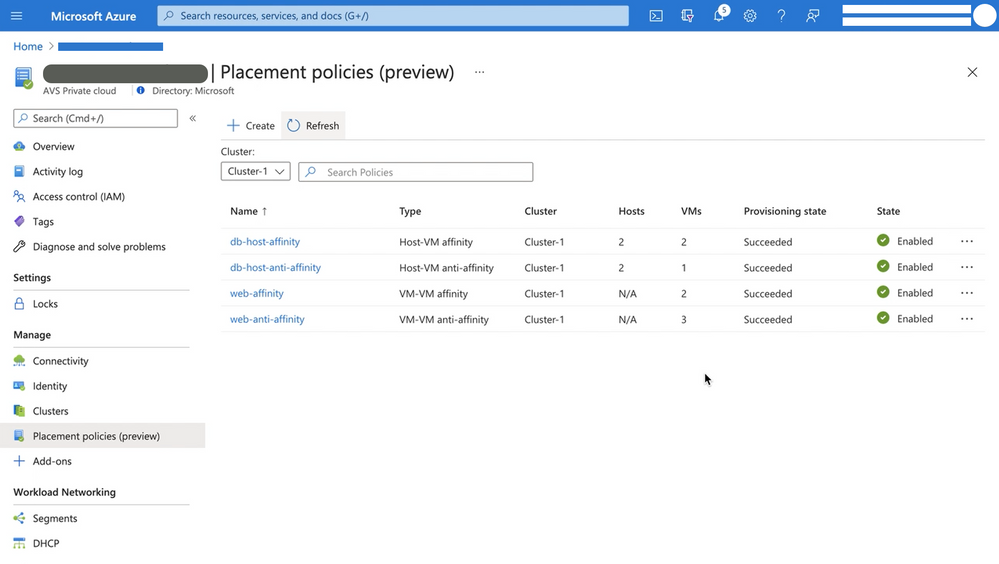
Placement policies enable admins to specify constraints or rules when allocating Virtual Machines within an Azure VMware Solution (AVS) private cloud. With this update the creation and assignment of vSphere Distributed Resource Scheduler (DRS) rules for running Virtual Machines (VMs) in an AVS SDDC has been simplified and is now executable directly from the Azure Portal for cloud admin roles.


Making updates to VM (Virtual Machine) groups and Host groups is a cumbersome operation, especially for hosts in a cloud environment where they can be more frequently cycled. In an on-premises environment, as hosts are replaced in the vSphere inventory, the vSphere admin must modify the host group to ensure that the desired VM-Host placement constraints continue to stay in effect. Placement policies in AVS take care of updating the Host groups when a host is rotated or changed. Similarly, if you scale-in a cluster, the Host Group is also updated automatically, as applicable. This eliminates the overhead of managing the Host Groups.


Placement policies essentially define constraints or rules that allow you to decide where and how the VMs should run within the AVS SDDC clusters. Placement polices are used to support VM performance and availability by grouping multiple VMs that communicate regularly on the same host.  policy and help mitigate the impact of maintenance operations to policies within the SDDC cluster. Placement polices in AVS also reduce the complexity and administrative burden of updating host groups via DRS rules in vSphere during SDDC maintenance operations.


Placement policies.png


When you create a placement policy, it creates a vSphere Distributed Resource Scheduler (DRS) rule in the specified vSphere cluster. It also includes additional logic for interoperability with Azure VMware Solution operations.


There are two basic placement policy types now supported:


  1. Virtual Machine to Virtual Machine: this refers to a policy that is applied to VMs with respect to each other.

    • VM-VM Affinity policies instruct DRS to try keeping the specified VMs together on the same host for performance reasons as an example.

    • VM-VM Anti-Affinity policies instruct DRS to try keeping the specified VMs apart from each other on separate hosts. It’s useful in scenarios where  you may want to spread your virtual machines across hosts to ensure availability of the applications.


  2. Virtual Machine to SDDC Host: this refers to a policy applied to selected VMs to either run on, or avoid  selected hosts  .

    • VM-Host Affinity policies instruct DRS to try running the specified VMs on the hosts defined.

    • VM-Host Anti-Affinity policies instruct DRS to try running the specified VMs on hosts other than those defined.


For more information on requirements for placement policies in Azure VMware Solution and how to create and apply them, see Microsoft Docs pages here.


Start using placement polices directly from the Azure Portal  today!