Closer together in Tokyo: How Microsoft Teams created a shared virtual experience

Closer together in Tokyo: How Microsoft Teams created a shared virtual experience

This article is contributed. See the original author and article here.

This year we have seen into each other’s homes, with surprise guest appearances from our kids and pets. We have learned about each other, how we can work effectively from home or from anywhere, and what we can achieve when we come together with purpose and empathy. Technology has been our enabler, bringing us closer together through a…

The post Closer together in Tokyo: How Microsoft Teams created a shared virtual experience appeared first on Microsoft 365 Blog.

Brought to you by Dr. Ware, Microsoft Office 365 Silver Partner, Charleston SC.

Chinese Gas Pipeline Intrusion Campaign, 2011 to 2013

This article is contributed. See the original author and article here.

This Advisory uses the MITRE Adversarial Tactics, Techniques, and Common Knowledge (ATT&CK®) framework, Version 9. See the ATT&CK for Enterprise for all referenced threat actor tactics and techniques.

Note: CISA released technical information, including indicators of compromise (IOCs), provided in this advisory in 2012 to affected organizations and stakeholders.

This Joint Cybersecurity Advisory—coauthored by the Cybersecurity and Infrastructure Security Agency (CISA) and the Federal Bureau of Investigation (FBI)—provides information on a spearphishing and intrusion campaign conducted by state-sponsored Chinese actors that occurred from December 2011 to 2013, targeting U.S. oil and natural gas (ONG) pipeline companies.

CISA and the FBI provided incident response and remediation support to a number of victims of this activity. Overall, the U.S. Government identified and tracked 23 U.S. natural gas pipeline operators targeted from 2011 to 2013 in this spearphishing and intrusion campaign. Of the known targeted entities, 13 were confirmed compromises, 3 were near misses, and 8 had an unknown depth of intrusion.

The U.S. Government has attributed this activity to Chinese state-sponsored actors. CISA and the FBI assess that these actors were specifically targeting U.S. pipeline infrastructure for the purpose of holding U.S. pipeline infrastructure at risk. Additionally, CISA and the FBI assess that this activity was ultimately intended to help China develop cyberattack capabilities against U.S. pipelines to physically damage pipelines or disrupt pipeline operations.

This advisory provides information on this campaign, including tactics, techniques, and procedures (TTPs) and IOCs. The TTPs remain relevant to help network defenders protect against intrusions. The IOCs are provided for historical awareness.

CISA and the FBI urge owners and operators of Energy Sector and other critical infrastructure (CI) networks to adopt a heightened state of awareness and implement the recommendations listed in the Mitigations section of this advisory, which include implementing network segmentation between IT and industrial control system (ICS)/operational technology (OT) networks. These mitigations will improve a CI entity’s defensive cyber posture and functional resilience by reducing the risk of compromise or severe operational degradation if the system is compromised by malicious cyber actors, including but not limited to actors associated with the campaign described in this advisory.

For more information on Chinese malicious cyber activity, see us-cert.cisa.gov/china.

Click here for a PDF version of this report.

In April 2012, CISA received reports about targeted attacks directed at multiple ONG pipeline sites; CISA (via a predecessor organization) and FBI provided incident response and remediation support to a number of victims from 2012 to 2013. CISA and FBI’s analysis of the malware and threat actor techniques identified that this activity was related to a spearphishing campaign. The U.S. Government identified and tracked 23 U.S. natural gas pipeline operators targeted in this campaign. Of the 23 known targeted entities, 13 were confirmed compromises, 3 were near misses, and 8 had an unknown depth of intrusion.

Threat Actor Activity

The spearphishing activity appears to have started in late December 2011. From December 9, 2011, through at least February 29, 2012, ONG organizations received spearphishing emails [T1566.002] specifically targeting their employees. The emails were at constructed with a high level of sophistication to convince employees to view malicious files [T1204.002]. Note: see the appendix for a table of the MITRE ATT&CK tactics and techniques observed in this campaign.

In addition to spearphishing, CISA and the FBI were made aware of social engineering attempts by malicious actors believed to be associated with this campaign. The apparent goal was to gain sensitive information from asset owners [T1598]. One asset owner reported that individuals in their network engineering department, including managers, received multiple phone calls requesting information about their recent network security practices. Other employees in other departments were not targeted. The asset owner also reported that these calls began immediately after they had identified and removed the malicious intruder from their network and performed a system-wide credential reset. The caller identified himself as an employee of a large computer security firm performing a national survey about network cybersecurity practices. He inquired about the organization’s policy and practices for firewall use and settings, types of software used to protect their network, and the use and type of intrusion detection and/or prevention systems. The caller was blocking his caller ID and when the targeted organization tried to return the call, they reached a number that was not in service.

During the investigation of these compromises, CISA and FBI personnel discovered that Chinese state-sponsored actors specifically collected [TA0009] and exfiltrated [TA0010] ICS-related information. The Chinese state-sponsored actors searched document repositories [T1213] for the following data types:

  • Document searches: “SCAD*”
  • Personnel lists
  • Usernames/passwords
  • Dial-up access information
  • System manuals

Based on incident data, CISA and FBI assessed that Chinese state-sponsored actors also compromised various authorized remote access channels, including systems designed to transfer data and/or allow access between corporate and ICS networks. Though designed for legitimate business purposes, these systems have the potential to be manipulated by malicious cyber actors if unmitigated. With this access, the Chinese state-sponsored actors could have impersonated legitimate system operators to conduct unauthorized operations. According to the evidence obtained by CISA and FBI, the Chinese state-sponsored actors made no attempts to modify the pipeline operations of systems they accessed. Note: there was a significant number of cases where log data was not available, and the depth of intrusion and persistent impacts were unable to be determined; at least 8 of 23 cases (35 percent) identified in the campaign were assessed as having an unknown depth of intrusion due to the lack of log data.

CISA and FBI assess that during these intrusions, China was successful in accessing the supervisory control and data acquisition (SCADA) networks at several U.S. natural gas pipeline companies.

Chinese actors also gained information specific to dial-up access, including phone numbers, usernames, and passwords [T1120]. Dial-up modems continue to be prevalent in the Energy Sector, providing direct access into the ICS environment with little or no security and no monitoring, which makes them an optimal vector for hold-at-risk operations. The exfiltrated data provided the capabilities for the Chinese cyber actors to access ONG operational systems at a level where they could potentially conduct unauthorized operations.

Exfiltrated Information and Assessed Motives

The Chinese actors specifically targeted information that pertained to access of ICSs. Searches were made for terms involving “SCAD*,” and the actors exfiltrated documents, including personnel lists, usernames and passwords, dial-up access information, remote terminal unit (RTU) sites, and systems manuals. The Chinese actors also exfiltrated information pertaining to ICS permission groups and compromised jump points between corporate and ICS networks. The totality of this information would allow the actors to access ICS networks via multiple channels and would provide sufficient access to allow them to remotely perform unauthorized operations on the pipeline with physical consequences.

CISA and FBI assess that these intrusions were likely intended to gain strategic access to the ICS networks for future operations rather than for intellectual property theft. This assessment was based on the content of the data that was being exfiltrated and the TTPs used to gain that access. One victim organization set up a honeypot that contained decoy documents with content that appeared to be SCADA-related data and sensitive organizational information. According to this organization, the SCADA-related decoy content was exfiltrated within 15 minutes of the time it was made available in the honeypot. Other sensitive decoy information, including financial and business-related information, was ignored.

CISA and FBI assess that this activity was ultimately intended to help China develop cyberattack capabilities against U.S. pipelines to physically damage pipelines or disrupt pipeline operations.

Indicators of Compromise

Table 1 lists indicators related to this spearphishing and intrusion campaign as of May 7, 2012, which are provided in this alert for historical completeness.

Table 1: IOCs from Chinese Gas Pipeline Intrusion Campaign, 2011 to 2013

Type Indicator Filename
Malware MD5:84873fae9cdecb84452fff9cca171004  ntshrui.dll  
Malicious email content, including any attachments and/or message body fpso.bigish[.]net  
Malware MD5:e12ce62cf7de42581c2fe1d7f36d521c  ntshrui.dll  

User agent string

Mozilla/4.0 (compatible; MSIE 6.0; Windows NT 5.2; SV1; .NET CLR 1.1.4322; .NET CLR 2.0.50727)  
User agent string Mozilla/4.0 (compatible; MSIE 8.0; Windows NT 5.1; Trident/4.0; .NET CLR 2.0.50727; .NET CLR 3.0.4506.2152; .NET CLR 3.5.30729)  
Named pipe ssnp  
Possible command and control (C2) domain

<xxx>.arrowservice[.]net

Where xxx is the targeted company name abbreviation

 
Malware MD5:7361a1f33d48802d061605f34bf08fb0   spoolsvd.exe
Malware 5e6a033fa01739d9b517a468bd812162 AdobeUpdater.exe
Malware e62afe2273986240746203f9d55496db ins.exe
Malware ed92d1242c0017668b93a72865b0876b px.exe
Malware 6818a9aef22c0c2084293c82935e84fe gh.exe
Malware fcbbfadc992e265c351e54598a6f6dfb fslist.exe
Malware 05476307f4beb3c0d9099270c504f055 u.exe
Malware 54db65a27472c9f3126df5bf91a773ea slm.exe
Malware a46a7045c0a3350c5a4c919fff2831a0 niu.exe
Malware 60456fe206a87f5422b214369af4260e ccApp1.exe
Malware d6eaadcbcf9ea9192db1bd5bb7462bf8 ntshrui.dll
Malware 52294de74a80beb1e579e5bca7c7248a moonclient2.exe
Malware e62afe2273986240746203f9d55496db inn.exe
Malware 5e6a033fa01739d9b517a468bd812162 kkk.exe
Malware 4a8854363044e4d66bf34a0cd331d93d inn.exe
Malware 124ad1778c65a83208dbefcec7706dc6 AcroRD32.exe
Malware 17199ddac616938f383a0339f416c890 iass.dll
Malicious email sender address “(name of victim company official)@yahoo.com”  
Malicious email content, including any attachments and/or message body “If not read this paper, pay attention.”  
Malicious email hyperlinked probable malware The hyperlink indicated a “.zip” file and contained the words “quality specifications” in reference to a particular component or product unique to the victim U.S. corporation.  
Malicious email signature block Contained the name, title, phone number, and corporate email address of an actual victim company official.  
Malicious attachment name   Project-seems-clear-for-takeoff.zip
Possible C2 domain <xxx>.arrowservice[dot]net
Where <xxx> may be the full name of the targeted company
 
Possible C2 domain <xxx>.federalres[.]org  
Possible C2 domain <xxx>.businessconsults[.]net
Where <xxx> may be the targeted company name abbreviation or full name
 
Possible C2 domain idahoanad[dot]org  
Possible C2 domain energyreview.strangled[.]net  
Possible C2 domain blackcake[.]net   
Possible C2 domain infosupports[.]com  
Malware 7caf4dbf53ff1dcd5bd5be92462b2995 iTunesHelper.exe 
Malware 99b58e416c5e8e0bcdcd39ba417a08ed Solarworldsummary.exe
Malware f0a00cfd891059b70af96b807e9f9ab8 smss.exe
Malware ea1b46fab56e7f12c4c2e36cce63d593 AcroRD32.exe
Malicious email content, including any attachments and/or message body  3d28651bb2d16eeaa6a35099c886fbaa Election_2012_Analysis.pdf
Possible C2 domain balancefitstudio[.]com  
Possible C2 domain res.federalres[.]org  
Possible C2 domain 18center[.]com  
Possible C2 domain milk.crabdance[.]com  
Possible C2 domain bargainblog[.com[.]au  
Possible C2 domain etrace-it[.]com  
Possible C2 domain picture.wintersline[.]com  
Possible C2 domain wish.happyforever[.]com  
Possible C2 domain mitchellsrus[.]com  
Possible C2 domain un.linuxd[.]org  
Malicious email content, including any attachments and/or message body    How_Can_Steelmakers_Compete_for_Growth_in_the_Steel_Sector_in_2012.zip
Malicious email content, including any attachments and/or message body    (Company Name)_Summary.zip
Malicious email content, including any attachments and/or message body  f5369e59a1ddca9b97ede327e98d8ffe Solarworldsummary.zip
Malicious email content, including any attachments and/or message body    (Company Name)_to_Sell_RNGMS_to_(Company Name).zip
Malicious email content, including any attachments and/or message body    Gift-Winter.zip
Malicious email content, including any attachments and/or message body    Happy_New_Year.zip
Malicious email content, including any attachments and/or message body    Debt_Crisis_Hits_US.zip
Malicious email content, including any attachments and/or message body    01-12-RATEALERT.zip
Malicious email content, including any attachments and/or message body  fni.itgamezone[.]net  

CISA and the FBI urge Energy Sector and other CI owners and operators to apply the following mitigations to implement a layered, defense-in-depth cyber posture. By implementing a layered approach, administrators will enhance the defensive cyber posture of their OT/ICS networks, reducing the risk of compromise or severe operational degradation if their system is compromised by malicious cyber actors.

  • Harden the IT/corporate network to reduce the risk of initial compromise.
    • Update all software, including operating systems, applications, and firmware, in a timely manner. Consider using a centralized patch management system.
    • Replace all end-of-life software and hardware devices.
    • Restrict and manage remote access software. Remote access tools are a common method for threat actors to gain initial access and persistence on target networks.
      • Manage and restrict users and groups who are permitted to access remote capabilities. Permissions should be limited to users that require the capability to complete their duties.
      • Require multi-factor authentication (MFA) for remote access.
      • Limit access to resources over networks, especially by restricting Remote Desktop Protocol (RDP). If RDP is operationally necessary, restrict the originating sources and require MFA.
    • Enable strong spam filters to prevent phishing emails from reaching end users.
    • Implement unauthorized execution prevention by:
      • Disabling macro scrips from Microsoft Office files transmitted via email. Consider using Office Viewer software to open Microsoft Office files transmitted via email instead of full Microsoft Office suite applications.
      • Implementing application allowlisting, which only allows systems to execute programs known and permitted by security policy. Implement software restriction policies (SRPs) or other controls to prevent programs from executing from common malware locations, such as temporary folders supporting popular internet browsers.
    • Filter network traffic to prohibit ingress and egress communications with known malicious IP addresses. Prevent users from accessing malicious websites by implementing URL blocklists and/or allow lists.
    • Set antivirus/antimalware programs to regularly scan IT network assets using up-to-date signatures.
  • Implement and ensure robust network segmentation between IT and ICS networks to limit the ability of cyber threat actors to move laterally to ICS networks if the IT network is compromised.
    • Implement a network topology for ICS that has multiple layers, with the most critical communications occurring in the most secure and reliable layer. For more information refer to National Institute of Standard and Technology (NIST) Special Publication 800-82: Guide to ICS Security.
    • Use one-way communication diodes to prevent external access, whenever possible.
    • Set up demilitarized zones (DMZs) to create a physical and logical subnetwork that acts as an intermediary for connected security devices to avoid exposure.
    • Employ reliable network security protocols and services where feasible.
    • Consider using virtual local area networks (VLANs) for additional network segmentation, for example, by placing all printers in separate, dedicated VLANs and restricting users’ direct printer access.
  • Implement perimeter security between network segments to limit the ability of cyber threat actors to move laterally.
    • Control traffic between network segments by using firewalls, intrusion detection systems (IDSs), and filter routers and switches.
    • Implement network monitoring at key chokepoints—including egress points to the internet, between network segments, core switch locations—and at key assets or services (e.g., remote access services).
    • Configure an IDS to create alarms for any ICS traffic outside normal operations (after establishing a baseline of normal operations and network traffic).
    • Configure security incident and event monitoring (SIEM) to monitor, analyze, and correlate event logs from across the ICS network to identify intrusion attempts.
  • Implement the following additional ICS environment best practices:
    • Update all software. Use a risk-based assessment strategy to determine which ICS network and assets and zones should participate in the patch management program.
      • Test all patches in off-line text environments before implementation.
    • Implement application allowlisting on human machine interfaces.
    • Harden field devices, including tablets and smartphones.
    • Replace all end-of-life software and hardware devices.
    • Disable unused ports and services on ICS devices (after testing to ensure this will not affect ICS operation).
    • Restrict and manage remote access software. Require MFA for remote access to ICS networks.
    • Configure encryption and security for ICS protocols.
    • Use a risk-based asset inventory strategy to determine how OT network assets are identified and evaluated for the presence of malware.
    • Do not allow vendors to connect their devices to the ICS network. Use of a compromised device could introduce malware. 
    • Maintain an ICS asset inventory of all hardware, software, and supporting infrastructure technologies. 
    • Ensure robust physical security is in place to prevent unauthorized personal from accessing controlled spaces that house ICS equipment.
    • Regularly test manual controls so that critical functions can be kept running if ICS/OT networks need to be taken offline.
    • Manage the supply chain by adjusting the ICS procurement process to weigh cybersecurity heavily as part of the scoring and evaluation methodology. Additionally, establish contractual agreements for all outsourced services that ensure proper incident handling and reporting, security of interconnections, and remote access specifications and processes.
  • Implement the following additional best practices:
    • Implement IP geo-blocking, as appropriate.
    • Implement regular, frequent data backup procedures on both the IT and ICS networks. Data backup procedures should address the following best practices:
      • Ensure backups are regularly tested.
      • Store backups separately, i.e., backups should be isolated from network connections that could enable spread of malware or lateral movement.
      • Maintain regularly updated “gold images” of critical systems in the event they need to be rebuilt.
      • Retain backup hardware to rebuild systems in the even rebuilding the primary system is not preferred.
    • Implement a user training program to train employees to recognize spearphishing attempts, discourage users from visiting malicious websites or opening malicious attachments, and re-enforce appropriate user response to spearphishing emails.

APPENDIX: Tactics and Techniques

Table 2 provides a summary of the MITRE ATT&CK tactics and techniques observed in this campaign.

Table 2: Observed MITRE ATT&CK tactics and techniques

Tactic Technique
Reconnaissance [TA0043] Phishing for Information [T1598]
Initial Access [TA0001] Phishing: Spearphishing Link [T1566.002]
Execution [TA0002] User Execution: Malicious File [T1204.002]
Discovery [TA0007] Peripheral Device Discovery [T1120]
Collection [TA0009] Information from Document Repositories [T1213]
Exfiltration  [TA0010]  
Partition Stream Analytics output and query it with serverless Synapse SQL

Partition Stream Analytics output and query it with serverless Synapse SQL

This article is contributed. See the original author and article here.

The use case is as follows: I have water meter telemetry I would like to do analytics on. 
Events are ingested from water meters and collected into a data lake in parquet format. The data is partitioned by Year, Month and Day based on the timestamp contained in the events themselves and not based on the time of the event processing in ASA as this is a frequent requirement.


Events are sent from the on premise SCADA systems to Event Hub then processed by Stream Analytics which then can easily:


  1. Convert events sent in JSON format into partitioned parquet.

  2. Portioning is based on Year/Month/Day.

  3. Date used for partitioning is coming from within the event.


The result can immediately be queried with serverless Synapse SQL pool.


Input Stream


My ASA input stream named inputEventHub is plugged into an Event Hub in JSON format.


Output Stream


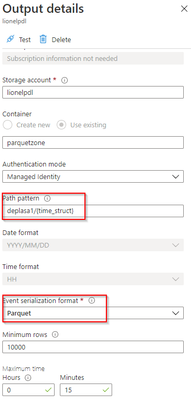
The output stream is the interesting part and will define the partition scheme:


lionelp_0-1624896450197.png


We see that its path pattern is based on a pseudo column named “time_struct” and all the partitioning logic is in the construct of this pseudo column.


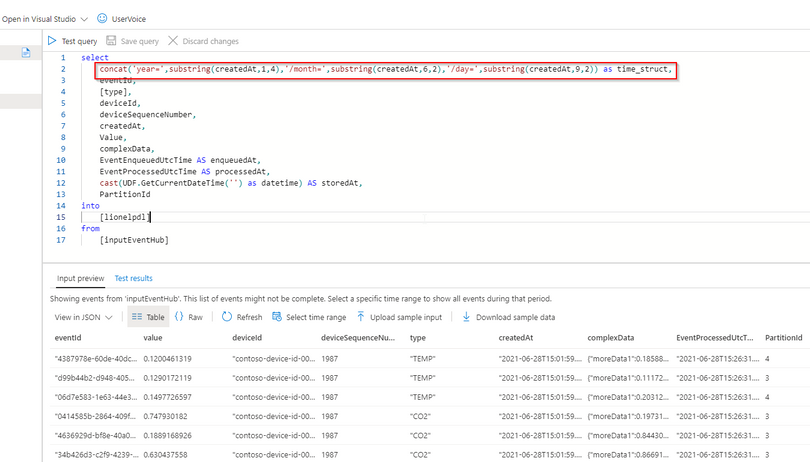
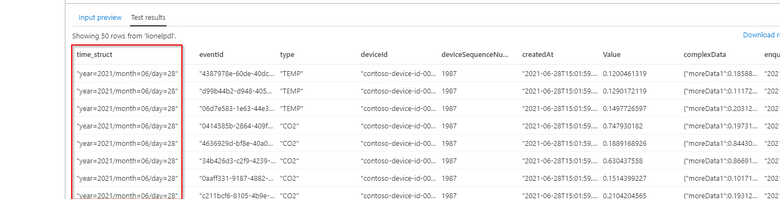
Let’s have a look at the ASA query:


lionelp_1-1624896696879.png


lionelp_2-1624896721550.png


We can see now that the pseudo_column time_struct contains the path, ASA understands it and processes it literally including the “/” sign.


Here is the query code:


select 
    concat('year=',substring(createdAt,1,4),'/month=',substring(createdAt,6,2),'/day=',substring(createdAt,9,2)) as time_struct,
    eventId,
    [type],
    deviceId,
    deviceSequenceNumber,
    createdAt,
    Value,
    complexData,
    EventEnqueuedUtcTime AS enqueuedAt,
    EventProcessedUtcTime AS processedAt,
    cast(UDF.GetCurrentDateTime('') as datetime) AS storedAt,
    PartitionId
into
    [lionelpdl]
from 
    [inputEventHub]


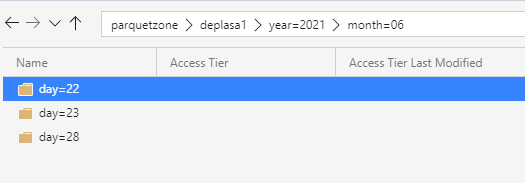
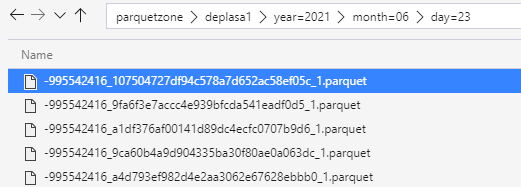
After few days of processing the output folder looks like this as a result:


lionelp_0-1624896848841.png


lionelp_1-1624896848841.png


Query results with serveless SQL and take advantage of partitioning


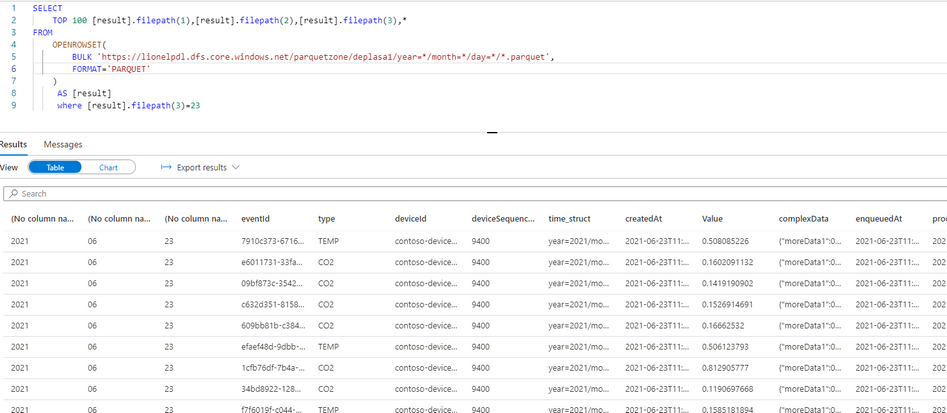
Now I can directly query my Output Stream with serverless SQL:


lionelp_0-1624898246159.png


We can also notice that the metadata functions are fully functional without any additional work. For example I can run the following query using filepath metadata function:


  SELECT top 100
    [result].filepath(1) AS [year]
    ,[result].filepath(2) AS [month]
    ,[result].filepath(3) AS [day]
    ,*
FROM
    OPENROWSET(
        BULK 'https://lionelpdl.dfs.core.windows.net/parquetzone/deplasa1/year=*/month=*/day=*/*.parquet',
        FORMAT='PARQUET'
    ) AS [result]

where [result].filepath(2)=6
  and [result].filepath(3)=23


Spark post processing


Finally, to optimize my query performance I can schedule a Spark job which processes daily all events from the previous day, compacts them into fewer and larger parquet files.


As an example, I’ve decided to rebuild the partitions with files containing 2 million rows.


Here are 2 versions of the same code:


PySpark notebook (for interactive testing for instance)


from pyspark.sql import SparkSession
from pyspark.sql.types import *
from functools import reduce
from pyspark.sql import DataFrame
import datetime

account_name = "storage_account_name"
container_name = "container_name"
source_root = "source_directory_name"
target_root = "target_directory_name"
days_backwards = 4 #number of days from today, typicaly, as a daily job it'll be set to 1
adls_path = 'abfss://%s@%s.dfs.core.windows.net/%s' % (container_name, account_name, source_root)

hier = datetime.date.today() - datetime.timedelta(days = days_backwards)
day_to_process = '/year=%04d/month=%02d/day=%02d/' % (hier.year,hier.month,hier.day)
file_pattern='*.parquet'

print((adls_path + day_to_process + file_pattern))

df = spark.read.parquet(adls_path + day_to_process + file_pattern)

adls_result = 'abfss://%s@%s.dfs.core.windows.net/%s' % (container_name, account_name, target_root)

print(adls_result + day_to_process + file_pattern)

df.coalesce(1).write.option("header",True) 
        .mode("overwrite") 
        .option("maxRecordsPerFile", 2000000) 
        .parquet(adls_result + day_to_process)


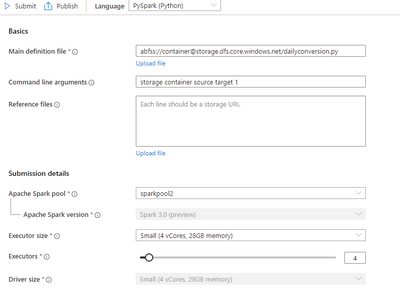
Spark job (with input parameters scheduled daily)


lionelp_0-1625501958062.png


import sys
import datetime
from pyspark import SparkContext, SparkConf
from pyspark.sql import SparkSession
from pyspark.sql.types import *
from functools import reduce
from pyspark.sql import DataFrame

if __name__ == "__main__":
	
	# create Spark context with necessary configuration
	conf = SparkConf().setAppName("dailyconversion").set("spark.hadoop.validateOutputSpecs", "false")
	sc = SparkContext(conf=conf)
	spark = SparkSession(sc)
	
	account_name = sys.argv[1] #'storage_account_name'
	container_name = sys.argv[2] #"container_name"
	source_root = sys.argv[3] #"source_directory_name"
	target_root = sys.argv[4] #"target_directory_name"
	days_backwards = sys.argv[5] #number of days backwards in order to reprocess the parquet files, typically 1

	hier = datetime.date.today() - datetime.timedelta(days=int(days_backwards))
    
	day_to_process = '/year=%04d/month=%02d/day=%02d/' % (hier.year,hier.month,hier.day)
	file_pattern='*.parquet'

	adls_path = 'abfss://%s@%s.dfs.core.windows.net/%s' % (container_name, account_name, source_root)

	print((adls_path + day_to_process + file_pattern))

	df = spark.read.parquet(adls_path + day_to_process + file_pattern)
	#display (df.limit(10))
	#df.printSchema()
	#display(df)
	adls_result = 'abfss://%s@%s.dfs.core.windows.net/%s' % (container_name, account_name, target_root)

	print(adls_result + day_to_process + file_pattern)

	df.coalesce(1).write.option("header",True) 
		.mode("overwrite") 
		.option("maxRecordsPerFile", 2000000) 
		.parquet(adls_result + day_to_process)


Conclusion


In this article we have covered:


  • How to easily use Stream Analytics to write an output with partitioned parquet files.

  • How to use serverless Synapse SQL pool to query Stream analytics output.

  • How to reduce the number of parquet files using synapse Spark pool.


Additional resources:


Manage your hybrid environments consistently with Azure Arc

This article is contributed. See the original author and article here.

Over 95 percent of Fortune 500 companies are transforming their businesses using Azure, relying on an enterprise-grade infrastructure and deep integration with the rest of the Microsoft Cloud.  The Azure Migration and Modernization Program (AMMP) has helped thousands of customers unlock the benefits of the cloud, with the right mix of expert guidance and best practices to migrate to Azure. We’ve learned through this journey that customer environments are diverse and complex – there are workloads that can be migrated and there are others that must stay on-premises due to regulatory, data sovereignty, and latency requirements. Whatever the reason, it’s clear that a hybrid approach is a reality for most companies.


Customers tell us that a key challenge with hybrid adoption is consistent management, governance, and security across distributed locations. With Azure Arc, you can organize, govern and secure your servers and Kubernetes clusters across data centers, the edge, and multi-cloud environments, in a consistent manner, along your migration journey.


To demonstrate this, today we are excited to share a new Microsoft Mechanics video with Matt McSpirit and Jeremy Chapman who will show how your resources in the Cloud can work seamlessly with resources on-premises under a single management plane enabled by Azure Arc. Check it out today!


Get started with Azure Arc


Turn attendees into loyal customers with Microsoft Teams and Dynamics 365 Marketing

Turn attendees into loyal customers with Microsoft Teams and Dynamics 365 Marketing

This article is contributed. See the original author and article here.

Change. Adapt. Grow. Words we have had to embrace over the past 15 months as we’ve had to change the way we do business. As we start to emerge from the pandemic’s isolation and restrictions, we’re entering a world of a new normal. As consumers, our expectations are higher. To meet ever-changing customer expectations, successful businesses are constantly going through the change, adapt, and grow cycle, especially when it comes to customer experience and virtual events. Many experts project that in-person events will gradually return but the prominence of virtual events is here to stay. And with that comes exciting new opportunities to elevate customer experiences.

To help businesses embrace those opportunities we are announcing the availability of enhanced integration of Microsoft Teams and Microsoft Dynamics 365 Marketing.

We are also announcing a special offer for Microsoft Teams webinar customers with commercial Office 365 E3/E5 or Microsoft 365 E3/E5 subscription with minimum 300 seats can take advantage of that integration by adding six months of Dynamics 365 Marketing at no additional cost to nurture up to 10,000 contacts with personalized emails and engaging customer journeys. This special offer is available through December 31, 2021. More details on the offer and eligibility can be found here.

Win customers and earn loyalty

The new Teams webinars capabilities are remarkable by themselves, but when you add the integration with Dynamics 365 Marketing, they are extraordinary. The power, flexibility, and unlimited possibilities that these two products working together can offer will change the way that you interact with your event attendees. Key capabilities include simplified event management, increased attendee engagement, and effortless follow-up to nurture relationships, win customers, and earn their loyalty faster.

Simplify event management

With the new Teams functionality, you have the power to host secure interactive meetings and webinars that include polls, video sharing, and reactions for up to 1,000 attendees.

You have the flexibility to organize your webinar your wayfrom within Teams or from within Dynamics 365 Marketing, the option is yours. Both ways are easy and intuitive and have improved capabilities.

If you already use event management from within Dynamics 365 Marketing, you will now see a more robust set of event management options that allow you to have better control over your webinar.
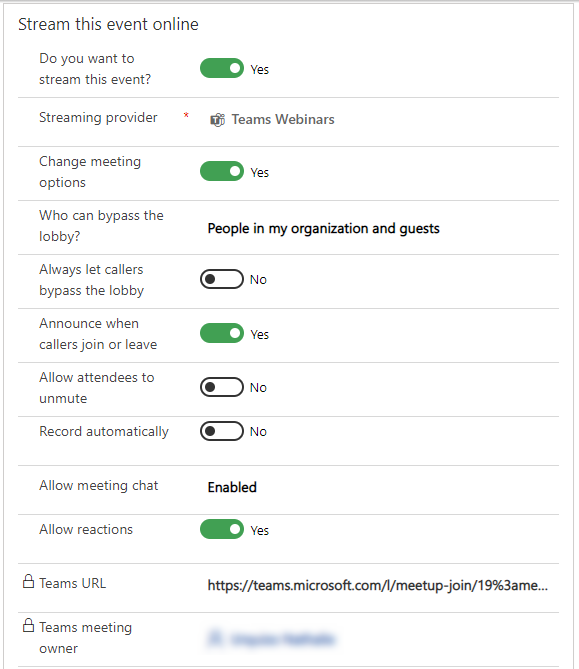
Event Management controls in Dynamics 365 Marketing

If you prefer to create events from within Teams, you will have the same high level of control, but you now have the optional integration and power of Dynamics 365 Marketing to use in elevating your customer journey experience.

Increase attendee engagement

Microsoft Teams makes it easy to catch the attention of your online audience and present like a pro. Use PowerPoint Live and Presenter Mode to deliver more impactful and engaging presentations, and take advantage of new innovations like Standout Mode which enables presenters to appear over content.

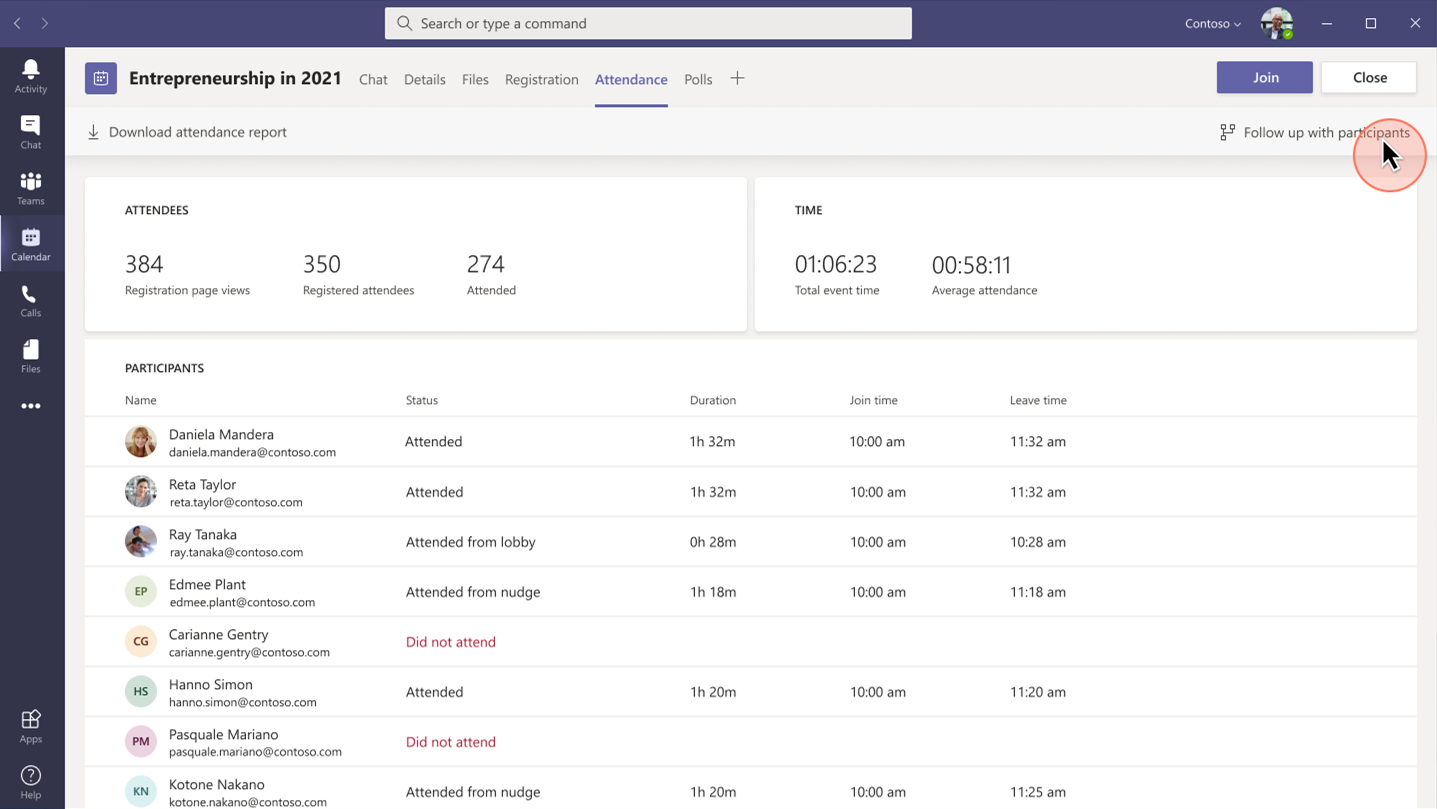
Whether it’s before, during, or after your event, you can easily gain insightful information from attendees with real-time polls and surveys from within Teams. Reports that track attendance are also readily available. Use that information to shape your presentation delivery and personalize post-event follow-up.
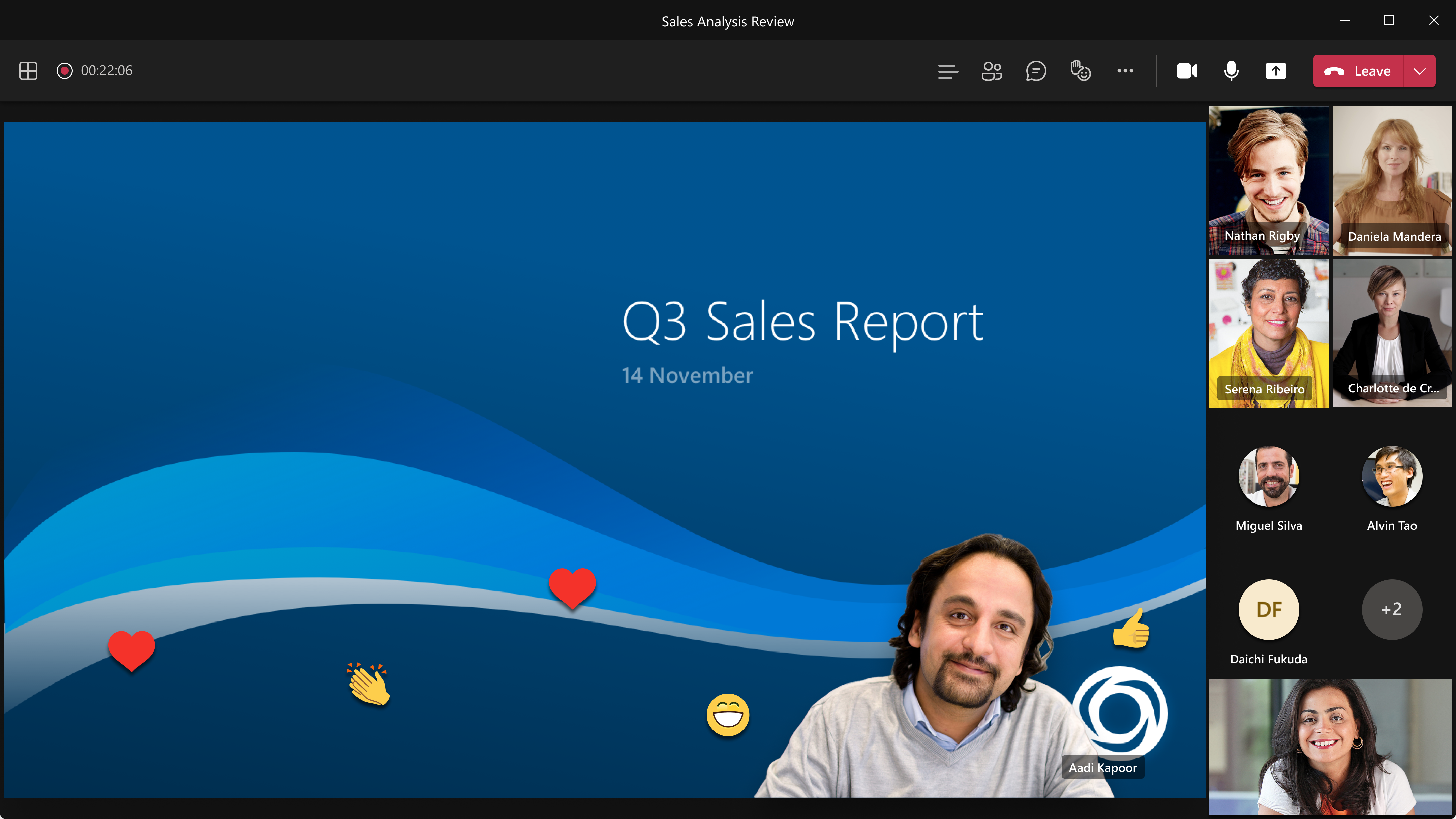
Standout Mode enables presenters to appear over content.

Follow-up to nurture relationships

Keep the lines of communication active after your Teams webinar concludes. With a single mouse click, attendee engagement data is transferred seamlessly into Dynamics 365 Marketing and automatically populated into pre-built, commonly used segments. Each of those segments corresponds to a built-in, ready-to-send, editable email template for personalized post-event communications and customer journey orchestration. Leverage the dashboards and analytics to gain insights about attendees to further personalize and drive post-event engagement.
Placeholder

Project Management Institute boosts events participation and member experience

Project Management Institute, Minnesota logo

“Since we were already familiar with Dynamics 365 and Teams, we were able to pivot quickly to provide virtual events for our members.With Dynamics 365, we’ve removed the struggle from our marketing efforts.”Glory Ikeata, Chair of Volunteer Services Committee, Project Management InstituteMinnesota

Project Management InstituteMinnesota (PMI-MN) provides value to members by sharing project management information and is among the largest PMI chapters in size and member events. PMI-MN aspired to further engage its members and inform them about seminars, certifications, and educational events.

To meet that aspiration, PMI-MN needed a way to centralize disparate member data and use that data to better understand how members interact with their organization. They worked collaboratively with cloud solutions provider TrimaxSecure to implement a comprehensive solution with Microsoft Dynamics 365, Microsoft Teams, and Microsoft Power BI to increase member engagement.

PMI-MN used Dynamics 365 Marketing to build sophisticated marketing journeys to connect with their members via relevant email marketing and the app’s event management capabilities to create event portals to simplify event management for members, volunteers, and speakers.

During the COVID-19 crisis, the chapter was able to shift from in-person to virtual events because it had reliable cloud-based tools to continue to engage its members. PMI-MN used Microsoft Teams for remote events and sent the Teams meeting links through email.

By connecting their event and email marketing efforts, PMI-MN now offers a richer member experience and increased participation in events and workshops. Staff can now quickly and easily manage member information. The chapter has seen retained events revenue increase by almost 90 percent.

Microsoft Core Marketing Engineering turns audiences into customers

Microsoft logo

“By carefully combining technology solutions in our events platform, including Dynamics 365 and Teams, we’ve enabled our marketing business to generate a 400 percent increase in attendees and a 500 percent increase in new known leads.”Vinh Nguyen, Principal Program Manager, Microsoft

The Core Marketing Engineering (CME) unit at Microsoft wanted to enhance event marketing capabilities, reduce operational complexity around in-person and digital events, and explore Microsoft technology for event management. The business unit accelerated the process when it needed to quickly shift from holding in-person events to hosting them digitally due to COVID-19.

It adopted Microsoft Dynamics 365 Marketing and used the event management capabilities to create an event management center. CME gets additional value from Dynamics 365 Marketing by combining it with Microsoft Teams event functionality, Azure Data Lake Storage, and Power Apps portals.

“By using Dynamics 365 and Teams together, we’ve centralized everything for our marketers, so they no longer have to spend time navigating to an outside system when they want to build a digital event,” says Sanarya Salah, Program Manager at Microsoft.

CME reduced its number of third-party tools, cutting costs and removing complexity for its marketers. It now creates more engaging and interactive events, which has led to better customer engagement and increased leads.

Strengthen customer relationships

The powerful integration of Teams and Dynamics 365 Marketing allows you to convert a single interaction into an ongoing relationship to win customers and earn their loyalty. The limited-time special offer for Microsoft Teams customers presents a unique opportunity to use that integration in your own environmentthe possibilities are extraordinary.

Get started with Microsoft Teams and Dynamics 365 Marketing today.

Learn more

We are always looking for feedback and would like to hear from you. Please head to the Dynamics 365 Community to start a discussion, ask questions, and tell us what you think.

The post Turn attendees into loyal customers with Microsoft Teams and Dynamics 365 Marketing appeared first on Microsoft Dynamics 365 Blog.

Brought to you by Dr. Ware, Microsoft Office 365 Silver Partner, Charleston SC.