by Contributed | May 11, 2021 | Technology
This article is contributed. See the original author and article here.
Hello folks,
Today, there is increased scrutiny and demand for oversight on your data. Furthermore, the requirements dictated by laws and regulations present a growing set of challenges to your organisation.
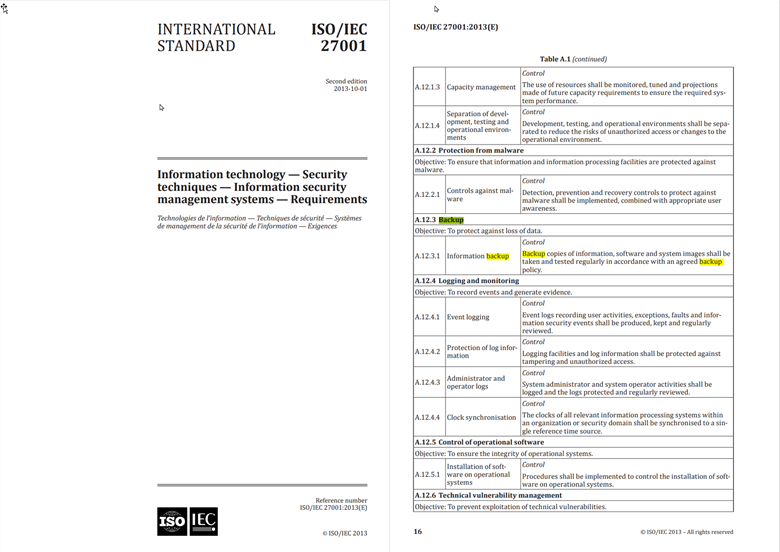
For example, the ISO/IEC 27001:2013(E) Information technology — Security techniques — Information security management systems — Requirements states in section A.12.3.1
“Backup copies of information, software and system images shall be taken and tested regularly in accordance with an agreed backup policy.”
Therefore, if your enterprise is subject to that standard or is in the process of obtaining certification, you’ll need to prove to auditors that you have a process to validate compliance and remediate outliers. Azure Backup Center (ABC) gives you those capabilities.
**Please consult your compliance officer for information on the requirements your enterprise is subject to.
ABC on top of providing you a way to see all the Protectable Datasources that remain unprotected, provides you with a single location to define, assign and track Azure policies for backup across all your supported resources in Azure. Bringing your organization to your desired backup goal state through seamless integration with Azure Policy. Azure Policy allows you to track compliance against policies and create remediations when resources get “Non-compliant”.
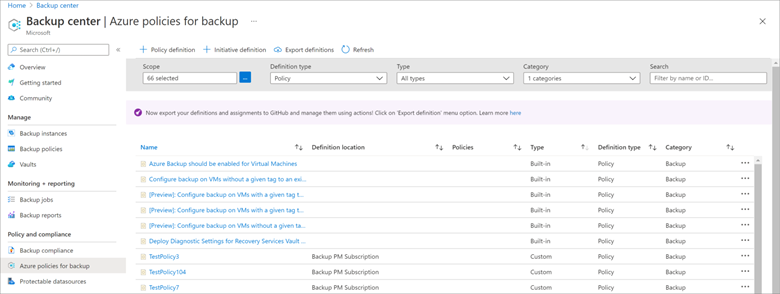
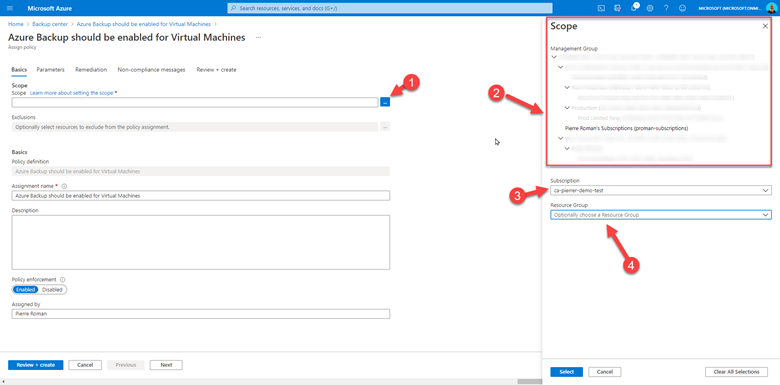
Because ABC integrates so well with Azure Policy you can define and assign different policy to different scopes. When going through the assignment process, you’ll be able to:
- Select the scope.
- pick a management group,
- or select a specific subscription,
- and optionally select a resource group.
There are multiple built-in policies to cover backups, and multiple effects defined in these policies. You need to decide what to do with your non-compliant resources. Your compliance officer will help with this. Each possible response to a non-compliant resource is called an effect. The effect controls if the non-compliant resource is logged, blocked, has data appended, or has a deployment associated to it for putting the resource back into a compliant state. That way you have the control to verify compliance without making any changes. At least you know where you stand.
The code for these policies are stored in Github, you can fork that repo and modify the policies to make your own as you please.
There you go. The Azure Backup Center gives you the tools to protect your environment, to maintain and govern that protection across all your environments.
For more information, please see the documentation on docs.microsoft.com or using the links below.
And as always,
Cheers!
by Contributed | May 11, 2021 | Technology
This article is contributed. See the original author and article here.
The Microsoft Teams Community has not been more exciting! In-person events and gatherings are close to being a reality and in some parts of the world have already begun. More and more user groups and community events are popping up, the activity in the Tech Community has never been stronger, and there’s all kinds of chatter around the many recent feature updates.
Here’s a few updates I’d like to share from the last month.
We would like to congratulate Theresa Lubelski who has been named the April Microsoft Teams Community Start Award winner. As Women in Teams Community kicked off earlier this year, we knew it’d take a village to make things run smooth, to host a vibrant online community, and monthly gatherings. Theresa jumped in with both feet in getting the community off the ground and has worked to make sure those in the community can collaborate with one another and have the opportunity to participate. She has brought her depth of SharePoint and has been a vital member of the planning team. Follow Theresa on Twitter @SharePointMadam or find her on LinkedIn. If you are interested in being part of the Women in Teams Community, we invite you to join us! The next monthly gathering is June 8th.
Anyone can nominate an individual for the Microsoft Teams Community Star Award.
There are some fantastic Community Events happening in the coming months, both virtual and in-person. You can find a list of regional and worldwide User Group and Events in the Microsoft Technical Community Event Listings. If you have your own UG or Event to share, please add it!
I hope you’ll join me May 12th at Teams Nation, a 100% free, 100% community based monthly meeting and community conference focused on Microsoft Teams, its underlying technologies and extensibility options. Its aim is to bring together Microsoft, Community Leaders and the Tech Community to share technical knowledge, provide opportunities for speaking and create a network of Teams enthusiasts the world over. @Allie Thompson and I will be speaking on ‘Solving the #MVPBuzz Mystery and how you can have a bigger impact on community’. There’s a packed schedule covering just about everything Microsoft Teams – check it out!
If you’re up for sunshine and a bit of travel, you can join us at the M365 Conference in Orlando! If you prefer to stay in the comfort of your home, you can do that too. M365 Conference is a hybrid event which means you can travel or not – but you won’t miss out on the great content delivered across all M365 technologies. This event is a precursor to the main event taking place late this year in Las Vegas.
Originally there were some in-person events scheduled this summer which have since pushed out to fall and I can’t WAIT to be a part of them. You won’t want to miss:
European SharePoint, O365 & Azure Conference – virtual in June, 2021
CommsVerse in UK – September, 2021
TeamsFest / SharePointFest in Washington DC – September, 2021
Thrive Conference in Slovenia – October, 2021
European Collaboration Summit – November, 2021
M365 Conference – Las Vegas, NV – December 2021
Finally, we’re always looking for bloggers like YOU to contribute to this space! If you’d like to share your knowledge in blog format with this community, please submit your topic!
What community activities are you participating in? What community support do you need? Let us know!
Until next month – Be well!
#CommunityRocks!
Laurie Pottmeyer
Community Lead, Microsoft Teams Engineering
@lauriepottmeyer
by Contributed | May 10, 2021 | Technology
This article is contributed. See the original author and article here.
Initial Update: Tuesday, 11 May 2021 02:30 UTC
We are aware of issues within Application Insights in Central US region and are actively investigating. Some customers may experience intermittent data latency, data gaps and incorrect alert activation.
- Work Around: None
- Next Update: Before 05/11 04:30 UTC
We are working hard to resolve this issue and apologize for any inconvenience.
-Anupama
by Contributed | May 10, 2021 | Technology
This article is contributed. See the original author and article here.
The 24th cumulative update release for SQL Server 2017 RTM is now available for download at the Microsoft Downloads site. Please note that registration is no longer required to download Cumulative updates.
To learn more about the release or servicing model, please visit:
Starting with SQL Server 2017, we adopted a new modern servicing model. Please refer to our blog for more details on Modern Servicing Model for SQL Server
by Contributed | May 10, 2021 | Technology
This article is contributed. See the original author and article here.
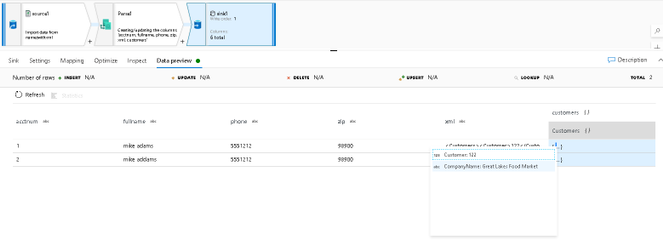
The Parse transformation in Azure Data Factory and Synapse Analytics data flows allows data engineers to write ETL data transformations that take embedded documents inside of string fields and parse them as their native types. For example, you can set parsing rules in the Parse transformation to handle JSON and delimited text strings and transform those fields into complex types. Now, we’ve updated Parse to also understand XML as a source type in your incoming string data.
In this example, I have a text delimited CSV data source. Since this is a simple text file, the embedded XML document in the column labeled “xml” is read as a string, so I am unable to treat it like a hierarchical structure. However, by adding the Parse transformation, I can select XML as my incoming embedded type and define the structure “customers” as the new column that is now hierarchical:


Recent Comments