by Contributed | May 12, 2021 | Technology
This article is contributed. See the original author and article here.
Today, I worked on a very interesting situation. Our customer wants to check a connection but instead of from a single application, they are trying to run a bunch of instance of the same application to simulate a workload.
In order to test this situation, I developed this small PowerShell Script doing a simple connection and executing “SELECT 1” command around for 10000 times, but using the option of multithreading of Powershell to execute the same PowerShell script in multiple instances.
Basic points:
- 10 processes running in parallel from a single PC.
- Every process will run 1000 running 10 times SELECT 1, running the powershell script DoneThreadIndividual.ps1
- In every execution we have the time spent in the connection (with/without connection pooling) and execution and save the information in a log file.
- Everything is customizable, in terms of numbers, number of connections and query to execute.
Script to execute a number of Process defined
Function lGiveID([Parameter(Mandatory=$false)] [int] $lMax)
{
 $Jobs = Get-Job
[int]$lPending=0

Foreach ($di in $Jobs)
{
   if($di.State -eq "Running")
   {$lPending=$lPending+1}
}
 if($lPending -lt $lMax) {return $true}
return {$false}

}

try
{
for ($i=1; $i -lt 2000; $i++)
{
  if((lGiveid(10)) -eq $true)
  {
   Start-Job -FilePath "C:TestDoneThreadIndividual.ps1"
   Write-output "Starting Up---"
  }
  else
  {
    Write-output "Limit reached..Waiting to have more resources.."
    Start-sleep -Seconds 20
  }
}
}
catch
   {
    logMsg( "You're WRONG") (2)
    logMsg($Error[0].Exception) (2)
   }
Script for testing – DoneThreadIndividual.ps1
$DatabaseServer = "servername.database.windows.net"
$Database = "dbname"
$Username = "username"
$Password = "password"
$Pooling = $true
$NumberExecutions =1000
$FolderV = "C:Test"

function GiveMeSeparator
{
Param([Parameter(Mandatory=$true)]
      [System.String]$Text,
      [Parameter(Mandatory=$true)]
      [System.String]$Separator)
  try
   {
    [hashtable]$return=@{}
    $Pos = $Text.IndexOf($Separator)
    $return.Text= $Text.substring(0, $Pos)
    $return.Remaining = $Text.substring( $Pos+1 )
    return $Return
   }
  catch
  {
    $return.Text= $Text
    $return.Remaining = ""
    return $Return
  }
}

#--------------------------------------------------------------
#Create a folder
#--------------------------------------------------------------
Function CreateFolder
{
  Param( [Parameter(Mandatory)]$Folder )
  try
   {
    $FileExists = Test-Path $Folder
    if($FileExists -eq $False)
    {
     $result = New-Item $Folder -type directory
     if($result -eq $null)
     {
      logMsg("Imposible to create the folder " + $Folder) (2)
      return $false
     }
    }
    return $true
   }
  catch
  {
   return $false
  }
 }

#--------------------------------
#Validate Param
#--------------------------------

function TestEmpty($s)
{
if ([string]::IsNullOrWhitespace($s))
  {
    return $true;
  }
else
  {
    return $false;
  }
}

Function GiveMeConnectionSource()
{
  for ($i=1; $i -lt 10; $i++)
  {
   try
    {
      logMsg( "Connecting to the database...Attempt #" + $i) (1)

      $SQLConnection = New-Object System.Data.SqlClient.SqlConnection
      $SQLConnection.ConnectionString = "Server="+$DatabaseServer+";Database="+$Database+";User ID="+$username+";Password="+$password+";Connection Timeout=15"
      if( $Pooling -eq $true )
        {
          $SQLConnection.ConnectionString = $SQLConnection.ConnectionString + ";Pooling=True"
        }
      else
        {
          $SQLConnection.ConnectionString = $SQLConnection.ConnectionString + ";Pooling=False"
        }

      $SQLConnection.Open()
      logMsg("Connected to the database...") (1)
      return $SQLConnection
      break;
    }
  catch
   {
    logMsg("Not able to connect - Retrying the connection..." + $Error[0].Exception) (2)
    Start-Sleep -s 5

   }
  }
}

#--------------------------------
#Log the operations
#--------------------------------
function logMsg
{
    Param
    (
         [Parameter(Mandatory=$true, Position=0)]
         [string] $msg,
         [Parameter(Mandatory=$false, Position=1)]
         [int] $Color
    )
  try
   {
    $Fecha = Get-Date -format "yyyy-MM-dd HH:mm:ss"
    $msg = $Fecha + " " + $msg
    Write-Output $msg | Out-File -FilePath $LogFile -Append
    $Colores="White"
    If($Color -eq 1 )
     {
      $Colores ="Cyan"
     }
    If($Color -eq 3 )
     {
      $Colores ="Yellow"
     }

     if($Color -eq 2)
      {
        Write-Host -ForegroundColor White -BackgroundColor Red $msg
      }
     else
      {
        Write-Host -ForegroundColor $Colores $msg
      }


   }
  catch
  {
    Write-Host $msg
  }
}


cls


  $sw = [diagnostics.stopwatch]::StartNew()


  logMsg("Creating the folder " + $FolderV) (1)
   $result = CreateFolder($FolderV)
   If( $result -eq $false)
    {
     logMsg("Was not possible to create the folder") (2)
     exit;
    }
logMsg("Created the folder " + $FolderV) (1)

$LogFile = $FolderV + "Results.Log"    #Logging the operations.

$query = @("SELECT 1")


  for ($i=0; $i -lt $NumberExecutions; $i++)
  {
   try
    {

      $SQLConnectionSource = GiveMeConnectionSource #Connecting to the database.
      if($SQLConnectionSource -eq $null)
      {
        logMsg("It is not possible to connect to the database") (2)
      }
      else
      {

       $SQLConnectionSource.StatisticsEnabled = 1
       $command = New-Object -TypeName System.Data.SqlClient.SqlCommand
       $command.CommandTimeout = 60
       $command.Connection=$SQLConnectionSource

         for ($iQuery=0; $iQuery -lt $query.Count; $iQuery++)
         {
           $start = get-date
             $command.CommandText = $query[$iQuery]
             $command.ExecuteNonQuery() | Out-Null
           $end = get-date
           $data = $SQLConnectionSource.RetrieveStatistics()
           logMsg("-------------------------")
           logMsg("Query                 :  " + $query[$iQuery])
           logMsg("Iteration             :  " +$i)
           logMsg("Time required (ms)    :  " +(New-TimeSpan -Start $start -End $end).TotalMilliseconds)
           logMsg("NetworkServerTime (ms):  " +$data.NetworkServerTime)
           logMsg("Execution Time (ms)   :  " +$data.ExecutionTime)
           logMsg("Connection Time       :  " +$data.ConnectionTime)
           logMsg("ServerRoundTrips      :  " +$data.ServerRoundtrips)
           logMsg("-------------------------")
          }
          $SQLConnectionSource.Close()

      }
    }
    catch
   {
    logMsg( "You're WRONG") (2)
    logMsg($Error[0].Exception) (2)
   }

}
logMsg("Time spent (ms) Procces :  " +$sw.elapsed) (2)
logMsg("Review: https://docs.microsoft.com/en-us/dotnet/framework/data/adonet/sql/provider-statistics-for-sql-server") (2)
Enjoy!

by Contributed | May 12, 2021 | Technology
This article is contributed. See the original author and article here.
The SharePoint community monthly call is our general monthly review of the latest SharePoint news (news, tools, extensions, features, capabilities, content and training), engineering priorities and community recognition for Developers, IT Pros and Makers. This monthly community call happens on the second Tuesday of each month. You can download recurrent invite from https://aka.ms/sp-call.
Call Summary:
SPFx v1.12.1 with Node v14 and Gulp4 support is generally available. Don’t miss the SharePoint sample gallery. Preview the new Microsoft 365 Extensibility look book gallery. Visit the new Microsoft 365 PnP Community hub at Microsoft Tech Communities! Sign up and attend one of a growing list of Sharing is Caring events. The Microsoft 365 Update – Community (PnP) | May 2021 is now available. In this call, quickly addressed developer and non-developer entries in UserVoice. We are in the process of moving from UserVoice to a 1st party solution for customer feedback/ feature requests.
A huge thank you to the record number of contributors and organizations actively participating in this PnP Community during April. Month over month, you continue to amaze. The host of this call was Vesa Juvonen (Microsoft) @vesajuvonen. Q&A took place in the chat throughout the call.
Featured Topic:
SharePoint Syntex: Product overview and latest feature updates – SharePoint Syntex – a new add on that builds on the content services capabilities already provided in SharePoint with an infusion of AI to automate and augment the classification of content – understanding, processing, compliance. Demos on building and publishing a document understanding model using UI and on downloading a sample model, publishing and processing content using PowerShell Commandlets or APIs.
Actions:
- Register for Sharing is Caring Events:
- First Time Contributor Session – May 24th (EMEA, APAC & US friendly times available)
- Community Docs Session – May
- PnP – SPFx Developer Workstation Setup – May 13th
- PnP SPFx Samples – Solving SPFx version differences using Node Version Manager – May 20th
- AMA (Ask Me Anything) – Microsoft Graph & MGT – June
- First Time Presenter – May 25th
- More than Code with VSCode – May 27th
- Maturity Model Practitioners – May 18th
- PnP Office Hours – 1:1 session – Register
- Download the recurrent invite for this call – https://aka.ms/sp-call.
You can check the latest updates in the monthly summary and at aka.ms/spdev-blog.
This call was delivered on Tuesday, May 11, 2021. The call agenda is reflected below with direct links to specific sections. You can jump directly to a specific topic by clicking on the topic’s timestamp which will redirect your browser to that topic in the recording published on the Microsoft 365 Community YouTube Channel.
Call Agenda:
- UserVoice status for non-dev focused SharePoint entries – 8:04
- UserVoice status for dev focused SharePoint Framework entries – 9:04
- SharePoint community update with latest news and roadmap – 10:35
- Community contributors and companies which have been involved in the past month – 11:56
- Topic: SharePoint Syntex: Product overview and latest feature updates – Sean Squires (Microsoft) | @iamseansquires – 15:28
- Demo: How to build and publish a document understanding model – James Eccles (Microsoft) | @jimdeccles – 24:52
- Demo: SharePoint Syntex integration and automation options – Bert Jansen (Microsoft) | @o365bert – 39:36
The full recording of this session is available from Microsoft 365 & SharePoint Community YouTube channel – http://aka.ms/m365pnp-videos.
- Presentation slides used in this community call are found at OneDrive.
Resources:
Additional resources on covered topics and discussions.
Additional Resources:
Upcoming calls | Recurrent invites:
“Too many links, can’t remember” – not a problem… just one URL is enough for all Microsoft 365 community topics – http://aka.ms/m365pnp.
“Sharing is caring”
SharePoint Team, Microsoft – 12th of May 2021
by Contributed | May 12, 2021 | Technology
This article is contributed. See the original author and article here.
Overview
Azure Event Hub provides the feature to be compatible with Apache Kafka. If you are familiar with Apache Kafka, you may have experience in consumer rebalancing in your Kafka Cluster. Rebalancing is a process that decides which consumer in the consumer group should be responsible for which partition in Apache Kafka. The error may occur when a new consumer joins/leaves a consumer group. When you use Azure Event Hub with Apache Kafka, consumer rebalancing may occur in you Azure Event Hub namespace too.
Consumer rebalancing would be a normal process for Apache Kafka. However, if the REBALANCE_IN_PROGRESS error continuously and frequently occurs in your consumer group, you may need to change your configuration to reduce the occurrence frequency of consumer rebalancing. In this post, I would like to share consumer configurations that may cause the REBALANCE_IN_PROGRESS error.
Azure Event Hub with Kafka
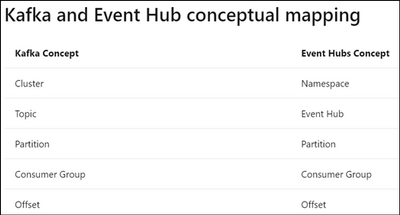
The concept for Azure Event Hub and Kafka may be different, please refer to the document Use event hub from Apache Kafka app – Azure Event Hubs – Azure Event Hubs | Microsoft Docs for Kafka and Event Hub conceptual mapping.
REBALANCE_IN_PROGRESS error

Reference : Apache Kafka
REBALANCE_IN_PROGRESS is a consumer group related error. It is affected by the consumer’s configurations and behaviors. Normally, REBALANCE_IN_PROGRESS error might occur if your session timeout’s value is set too small or application takes too long to process records in the consumer. During rebalancing, your consumer is not able to read any record back. In this case, you will find your consumer is not reading back any records and constantly seeing REBALANCE_IN_PROGRESS. Below are common examples for when rebalancing will happen :
- Scenarios 1
The read back records is empty and there is heartbeat expired error at the same time.
- Scenarios 2
The consumer is processing large records with long processing time and there’s timeout error.
Recommendations for REBALANCE_IN_PROGRESS error
- Recommendations 1 : Increase session.timeout.ms in consumer configuration

Reference : azure-event-hubs-for-kafka/CONFIGURATION.md at master · Azure/azure-event-hubs-for-kafka · GitHub
Heartbeat expired error is usually due to application code crash, long processing time or temporary network issue. If the session.timeout.ms is too small and heartbeat is not sent before timeout, you will see heartbeat expired errors and it will then cause rebalancing.
- Recommendations 2 : Decrease batch size for each poll()
If the time spent on processing records is too large, try to poll less records at a time.
- Recommendations 3 : Increase max.poll.interval.ms in consumer configuration and decrease the time spent on processing the read back records

Reference : azure-event-hubs-for-kafka/CONFIGURATION.md at master · Azure/azure-event-hubs-for-kafka · GitHub
You may need to add logs to track how long the code takes to process records, please refer to the below example. If processing these records exceed the max.poll.interval.ms, it may cause rebalancing.
Consumer< String, String> consumer = new KafkaConsumer<>(props);
consumer.subscribe(Arrays.asList(topic));
While (true) {
log.info("Message begin processing");
ConsumerRecords<String, String> records = consumer.poll(100);
for (ConsumerRecord<String, String> record : records) {
// do something
}
log.info("Message finish processing");
}
consumer.close()
by Contributed | May 12, 2021 | Technology
This article is contributed. See the original author and article here.
Welcome back to our second post in the “Microsoft Cloud App Security: The hunt” series!
If you haven’t read the first post by Sebastien Molendijk, head over to Microsoft Cloud App Security: The hunt in a multi-stage incident – Microsoft Tech Community to see how you can leverage advanced hunting to investigate a multi-stage incident.
As stated previously, this series will be used to address the alerts and scenarios we have seen most frequently from customers and apply simple but effective queries that can be used in everyday investigations.
The below use case describes an avenue to diagnose that an insider is posing risk to an organization. One of the key things to understand about insider risk is that it is an investigation regarding inadvertent or intentional risks posed by employees or other members of the organization. It often requires the ability to understand the context of the user and also to quickly identify and manage risks. The methods we describe are one common way to get at the risk to an organization from an insider who is planning to exit the company.
Every step of this investigation should be done in coordination with your organization’s HR and Legal departments, adhering to appropriate privacy, security and compliance policies as set out by your organization. In addition, there may be training of analysts to handle this kind of investigation with specific and careful steps in accordance with your organization’s commitment to its employees.
Use case
Contoso implemented Microsoft 365 Defender and is monitoring alerts using Microsoft’s security solutions. While reviewing the new alerts, our security analyst noticed a mass download alert that included a user named Julian Isla.
Julian is currently working on a highly confidential initiative called Project Hurricane. Knowing this, the analyst wants to conduct a thorough analysis in this investigation.
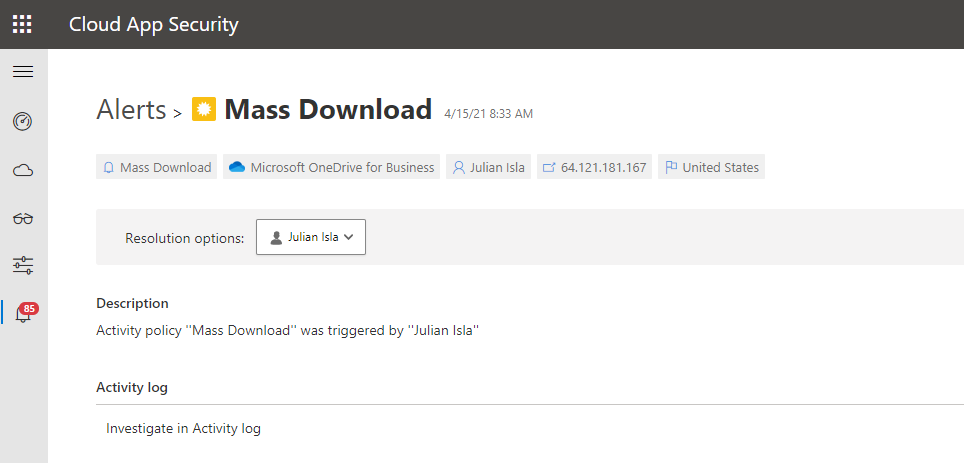
Our analyst can immediately see that Cloud App Security provides many key details in the alert, including the user, IP address, application and the location.
The first step for the analyst may be to gather details such as the device, the type of information downloaded, the user’s typical behavior and other possible activities that could mean data was exfiltrated.
Using the available details in the MCAS alert, and the initial questions and concerns of the investigation, we will showcase how to answer each step through an advanced hunting query and that the results of each query shape the follow-on query, allowing the investigator to piece together the full story from the activities logged.
Question 1:
|
Query Used:
|
What managed devices has this user logged in to?
|
DeviceInfo
| where LoggedOnUsers has "juliani" and isnotempty(OSPlatform)
| distinct Timestamp, DeviceId, DeviceName, OSPlatform, OSArchitecture
|
NOTE: The analyst was able to extract the Security Account Manager (This can be done by using Cloud App Security’s entity page.

NOTE: If the analyst wanted to display the entire LoggedOnUsers table, the column would look like this:
[{“UserName”:”JulianI”,”DomainName”:”CONTOSO”,”Sid”:”S-1-5-21-1661583231-2311428937-3957907789-1103″}]
Result:
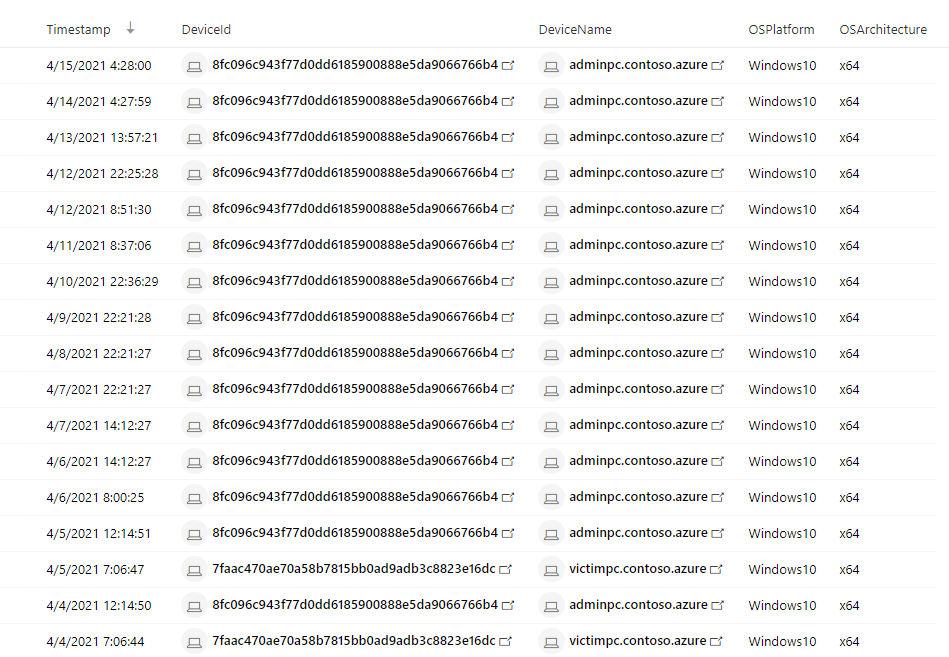
Using this query that surfaces Microsoft Defender for Endpoint (MDE) data, the analyst found that Julian used two devices today, adminpc.contoso.azure and victimpc.contoso.azure. More importantly, the analyst can see that Julian was on the adminpc device on the same day as the alert for a mass download was triggered.
Question 2:
|
Query Used:
|
Were the files downloaded to a non-managed device?
|
let AlertTimestamp = datetime(2021-04-15T23:45:00.0000000Z);
CloudAppEvents
| where Timestamp between ((AlertTimestamp - 24h) .. (AlertTimestamp + 24h))
| where AccountDisplayName == "Julian Isla"
| where ActionType == "FileDownloaded"
| project Timestamp, ActionType, AccountDisplayName, ObjectName, DeviceType, OSPlatform, UserAgent
|
Result:

By using the CloudAppEvents table, the analyst can now view the file names and the number of files and devices Julian used to complete these downloads. They can determine by the names of the files and the device details that Julian has downloaded important proprietary company data for Project Hurricane, a high-profile initiative for a new application that includes sensitive customer data and source code.
Question 3:
|
Query Used:
|
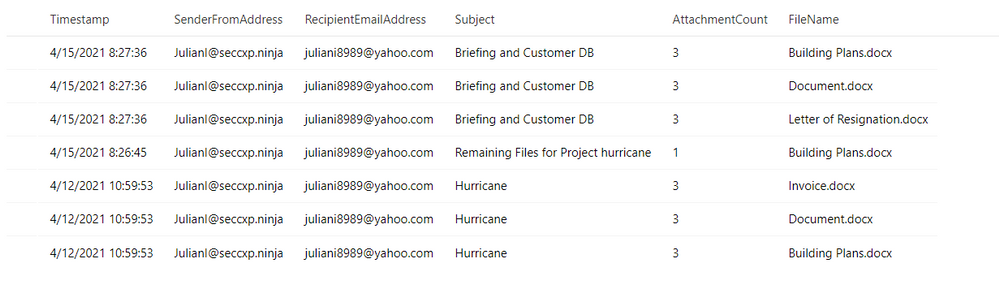
Has this user leveraged personal email in the past?
|
EmailEvents
| where SenderMailFromAddress == "JulianI@seccxp.ninja"
| where RecipientEmailAddress has "@gmail.com" or RecipientEmailAddress has "@yahoo.com" or RecipientEmailAddress has "@hotmail"
| project Timestamp, SenderFromAddress, RecipientEmailAddress, Subject, AttachmentCount, NetworkMessageId
| join EmailAttachmentInfo on NetworkMessageId, RecipientEmailAddress
| project Timestamp, SenderFromAddress, RecipientEmailAddress, Subject, AttachmentCount, FileName
|
Result:
Question 4:
|
Query Used:
|
Has this user been actively job searching?
|
DeviceNetworkEvents
| where Timestamp > ago(30d)
| where DeviceName in ("adminpc.contoso.azure”,  “victimpc.contoso.azure ")
| where InitiatingProcessAccountName == "juliani"
| where RemoteUrl has "linkedin" or RemoteUrl has "indeed" or RemoteUrl has "glassdoor"
| summarize event_count = count() by RemoteUrl
|
Result:
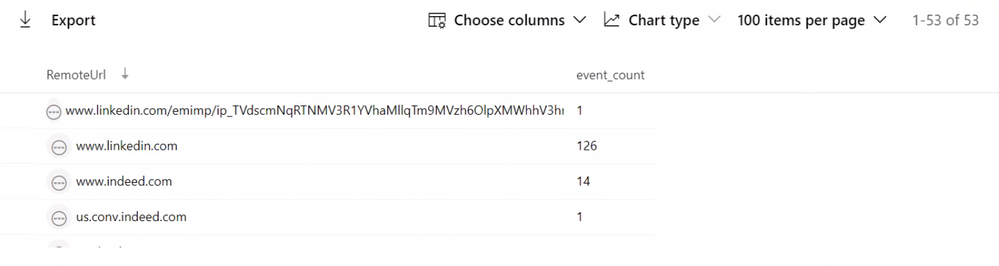
While investigating the DeviceNetworkEvents table to find if this user may have motivation to be conducting these types of activities, they can see this user is actively surfing job sites and may have plans to leave their current role at Contoso.
Question 5:
|
Query Used:
|
Does this user have a Letter of Resignation or Resume Saved to their local PC?
Does this user have a Letter of Resignation or Resume Saved to their personal OneDrive?
|
DeviceFileEvents
| where Timestamp > ago(30d)
| where InitiatingProcessAccountName == "juliani"
| where DeviceName in ("adminpc.contoso.azure”,  “victimpc.contoso.azure ")
| where FileName has "resume" or FileName has "resignation"
| project Timestamp, InitiatingProcessAccountName, ActionType, FileName


CloudAppEvents
| where Timestamp > ago(30d)
| where AccountDisplayName == "Julian Isla"
| where Application == "Microsoft OneDrive for Business"
| extend FileName = tostring(RawEventData.SourceFileName)
| where FileName has "resume" or FileName has "resignation"
| project Timestamp, ActionType, FileName
|
Result:
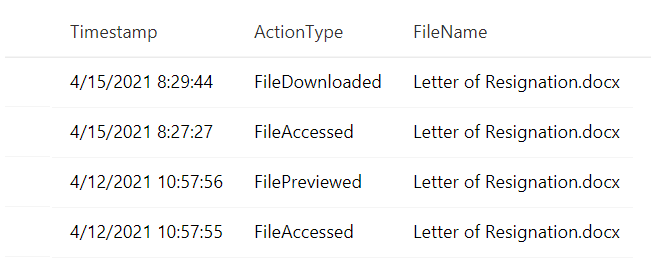
The analyst is attempting to establish the user’s planned trajectory of actions and sees that they currently have a letter of resignation saved to their desktop and have recently accessed and downloaded it.
Question 6:
|
Query Used:
|
Have any removeable media or external devices been used on the PCs we discovered?
|
let DeviceNameToSearch = "adminpc.contoso.azure";
let TimespanInSeconds = 900; // Period of time between device insertion and file copy
let Connections =
DeviceEvents
| where (isempty(DeviceNameToSearch) or DeviceName =~ DeviceNameToSearch) and ActionType == "PnpDeviceConnected"
| extend parsed = parse_json(AdditionalFields)
| project DeviceId,ConnectionTime = Timestamp, DriveClass = tostring(parsed.ClassName), UsbDeviceId = tostring(parsed.DeviceId), ClassId = tostring(parsed.DeviceId), DeviceDescription = tostring(parsed.DeviceDescription), VendorIds = tostring(parsed.VendorIds)
| where DriveClass == 'USB' and DeviceDescription == 'USB Mass Storage Device';
DeviceFileEvents
| where (isempty(DeviceNameToSearch) or DeviceName =~ DeviceNameToSearch) and FolderPath !startswith "c" and FolderPath !startswith @""
| join kind=inner Connections on DeviceId
| where datetime_diff('second',Timestamp,ConnectionTime) <= TimespanInSeconds
|
Result:

Luckily, the analyst can determine that files were not exfiltrated because there is no record of a removable media device data transfer from the user’s most recently used device.
Throughout the investigation, the analyst had many avenues to pursue and potential ways to mitigate and prevent further exfiltration of data. For example, using Cloud App Security’s user resolutions, the analyst could have suspended the user. Additionally, using Microsoft Defender for Endpoint integration, the analyst could have isolated the managed device, preventing it from having any non-related network communication.
In conclusion, in this test scenario, the Contoso employee, “Julian” had been violating company policy and exfiltrating proprietary data for Project Hurricane to his personal laptop and email account for some time. They also found that the user had been actively job searching and had a recently edited version of a letter of resignation saved to t. Using the initial MCAS alert, as well as logs across Microsoft Defender for Endpoint and Microsoft Defender for Office 365, the analysts have discovered and prevented further data loss for the company by this user.
This completes our second blog, please stay tuned for other common use cases that can be easily and thoroughly investigated with Microsoft Cloud App Security and Microsoft 365 Defender!
Resources:
For more information about the features discussed in this article, please read:
Feedback
We welcome your feedback or relevant use cases and requirements for this pillar of Cloud App Security by emailing CASFeedback@microsoft.com and mention the area or pillar in Cloud App Security you wish to discuss.
Learn more
For further information on how your organization can benefit from Microsoft Cloud App Security, connect with us at the links below:
Follow us on LinkedIn as #CloudAppSecurity. To learn more about Microsoft Security solutions visit our website. Bookmark the Security blog to keep up with our expert coverage on security matters. Also, follow us at @MSFTSecurity on Twitter, and Microsoft Security on LinkedIn for the latest news and updates on cybersecurity.
Happy Hunting!
by Contributed | May 11, 2021 | Technology
This article is contributed. See the original author and article here.
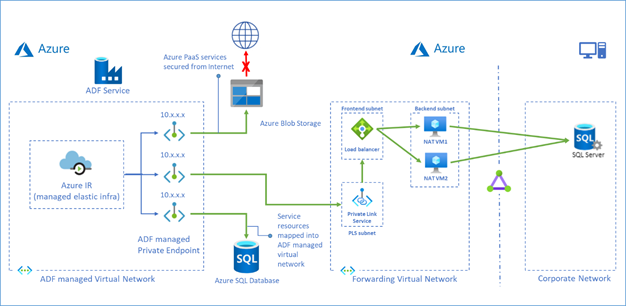
Azure Data Factory managed virtual network is designed to allow you to securely connect Azure Integration Runtime to your stores via Private Endpoint. Your data traffic between Azure Data Factory Managed Virtual Network and data stores goes through Azure Private Link which provides secured connectivity and eliminates your data exposure to the public internet.
Now we have a solution which leverages Private Link Service and Load Balancer to access on premises data stores or data stores in another virtual network from ADF managed virtual network.
To learn more about this solution, visit Tutorial – access on premises SQL Server.
You can also use this approach to access Azure SQL Database Managed Instance, see more in Tutorial – access Azure SQL Database Managed Instance.


Recent Comments