This article is contributed. See the original author and article here.
Build 2021 is soon upon us (May 25–27). The prudent attendee will take the time to plan their virtual session schedule. To help with your plan, we are highlighting nine key sessions across the platform that you won’t want to miss. These sessions share all the great new features and announcements that demonstrate how we’re empowering developers to build the next generation of collaborative apps. Build is a great way to see the art of the possible – so if you haven’t already registered, do so today and create your session schedule online. And remember – almost all sessions can be seen on demand so you can enjoy them even after Build is over. Let’s walk through these important sessions.
KEYNOTES
These sessions bring a lot of news together in a way so you can understand what the future is for hybrid work. We hope you leave these sessions with an informed perspective that you can share with your colleagues when they ask you about Microsoft and its plans for developers.
It’s clear that Hybrid work is here to stay – organizations everywhere are working hard to provide better tools. These hybrid workers have unique needs that are centered around collaborating with colleagues. Reimaging business processes to support them requires a new class of collaborative apps to get work done. Join Jeff Teper, Archana Saseetharan, Yina Arenas, and Mary Anne Noskowski as they share the latest on Teams, Graph, and Windows. Learn how you can use these surfaces to build the next generation of collaborative apps for hybrid workers.
Join our ‘Into Focus’ hosts Filisha Shah, Seth Juarez, and Scott Hanselman for a rapid-fire rundown of executive content, roundtable conversations, coding demos and more. Microsoft executives Scott Guthrie, Rajesh Jha, Kevin Scott, and an all-star lineup of special guests will be on hand to answer your audience questions and discuss the real-world impact of the developer news coming out of Microsoft Build.
BREAK OUTS
These sessions are the “one level down” focus sessions for the keynotes. They drill deeper into the topics and features that are important to you — while hearing from the people who design and code these capabilities.
As work continues to evolve, Microsoft Teams will shape how the doing gets done. Please join Nikita Bokil, Ojasvi Choudhary, Loki Meyburg, and Manpratap Suri to learn all that’s new on the Teams platform. You’ll hear about expanded features, customizable communications, APIs for hybrid scenarios and making interactions as inclusive and fun as can be. Teams is the future of work.
Hybrid work is here. And Microsoft Teams is fueling the innovation that will determine how collaborative – and productive – the next generation of experiences are. Learn from Erin Bailie and Trent Hazy as they discuss how customers and partners are building solutions on Teams that demonstrate the art of the possible. Hear customer success stories to inspire your own.
Join Karthig Balendran, Brian Nguyen, and Emily Chen to learn about the new developer tools available that simplify building apps on Microsoft Teams and the new experiences designed for admins and end users to accelerate adoption. They will cover how these new tools allow you to easily build, test, host, publish and manage apps. Speak to how admins can help increase adoption of your app. And how we’ve now provided new experiences and mechanisms for users to discover and purchase your app.
Tap into the full power of a Windows PC with your desktop applications! See how we’re unifying the developer platform through Project Reunion, enabling you to modernize without rewriting. You’ll also learn about our work on WinUI (the native UI stack in Windows), Win32 and .NET apps and more. For enterprise developers and ISVs targeting Windows, this is the tech you need to know.
We appreciate that you create many different solutions on Windows – and not all of them are targeted to the Windows platform. Join Kayla Cinnamon, Deondre Davis, and Craig Loewen as they present the innovations with Terminal and WSL2, performance improvements and delighters like Power Toys, and the Windows Package Manager. If you develop for web, cloud, or other platforms including Windows, this is for you.
Microsoft Graph is a powerful way to bring your solution’s data into Microsoft’s enterprise-scale apps and experiences. In this session we’ll show you how Microsoft Graph Connectors have evolved to provide even richer access for your data to enterprise search, eDiscovery and more. Presenters Jermey Thake and Rabia Williams will go a step farther and demonstrate how you can use that same connector-fed data to create powerful cross-application workflows using Adaptive Cards.
Microsoft is working hard to make it easy for you to enrich your apps with Microsoft Graph data. We are creating tools and services that make using Graph data simple, powerful, and efficient. Ayca Bas and Beth Pan will present a tour of the latest additions to the Microsoft Graph Toolkit. We will then introduce you to rich notifications for Exchange resources. Finally, we will share our new approach to web hooks with our new Event Hub.
And this is only just a portion of all the sessions and experiences we have planned for you at Build! Be sure to check out our interstitial programs, our on-demand sessions, our product roundtables, and we also have 1:1 app consults if you need to connect with a Microsoft subject-matter expert!
See you (virtually) at Build next week!
And if you want to download a deeper view of the content, grab our very convenient PDF with ALL of the sessions we think will be important to you.
This article is contributed. See the original author and article here.
Live Security and Compliance Ask Me Anything (AMA) with Microsoft Product Experts
Register Now: Tuesday, June 1, 2021, 11:00 AM – 11:45 AM CDT
Microsoft Security and Compliance thought leaders Matthew Littleton /@Matthew Littleton (CYBERSECURITY) (Microsoft Global Advanced Compliance Specialist, and Retired Navy Captain) and Matt Soseman /@Matt Soseman (Microsoft Senior Security Architect) will offer unique insights and a depth of knowledge around the Microsoft Security product suite during this 45 minute open forum Q&A.
These leaders will bring nearly 25 years at Microsoft to bear while answering questions pertaining to product capabilities and updates, feature availability, and applications for federal cybersecurity mandates such as the Cybersecurity Maturity Model Certification (CMMC) and DFARS 7012. Questions may cover the following and much more:
Data Loss Prevention
Microsoft Intune
Azure Active Directory and Conditional Access
Microsoft Cloud App Security
Microsoft 365 GCC & GCC High
In this Ask Me Anything (AMA) style session, Matt and Matt will address audience members and their respective scenarios deploying in the Microsoft Government Cloud to better prepare teams looking to protect corporate and US Government Data.
The goal of this session is to address contractors questions in light of the recent Cloud Security and Compliance Series event where both Matt and Matt have addressed topics such as “CMMC Compliance in the Microsoft Sovereign Cloud” and “Meeting CMMC Level 3 with Microsoft Intune / Meeting CMMC with Microsoft Information Protection (MIP)”.
Today, we are pleased to announce an update for Microsoft 365 Apps that will improve update manageability in Microsoft Endpoint Configuration Manager. Up until now the use of Automatic Deployment Rules (ADR) with Microsoft 365 Apps has been a challenge to manage, depending on the update channel(s) you support. Starting in late June, all future updates for Microsoft 365 Apps, including 2019 and 2021 volume license products, will receive an updated naming convention via the Title property. With this change you will be able to utilize the Title property within the search criteria of your ADR definition to easily target the necessary updates for your environment. This improvement should eliminate the need for IT admins to continually update their search criteria with each new release.
Overview
The updated Title property in the update catalog for Microsoft 365 Apps will include the following changes:
The release type will be included in the title, enabling you to easily specify which update you want to select without needing to include the specific version.
The Version number and architecture values have traded places.
Adding release type to the Title property should help simplify update management with your ADRs. If we look at the update history for Microsoft 365 Apps, there are three different release types:
Feature Update. This is the first release of the most recent fork. Feature updates will include new features, along with security and non-security updates.
Quality Update. These are subsequent releases of the most recent fork. Quality updates will include security and non-security updates.
Extended Quality Update. These are subsequent releases of the previous fork. Extended quality updates will include security and non-security updates.
A closer look at the upcoming changes
Refer to the following list of updates to illustrate what the upcoming changes look like on release:
Note that this list of updates is for demonstration purposes only and that the announced changes will apply starting in late June.
Before – Channel Name, Release Version, Architecture, Build.Version
Microsoft 365 Apps Update – Current ChannelVersion 2101 for x64 based Edition (Build 13628.20274) Microsoft 365 Apps Update – Current ChannelVersion 2101 for x64 based Edition (Build 13628.20380) Microsoft 365 Apps Update – Monthly Enterprise ChannelVersion 2012 for x64based Edition (Build 13530.20528) Microsoft 365 Apps Update – Monthly Enterprise ChannelVersion 2011 for x64 based Edition (Build 13426.20658) Microsoft 365 Apps Update – Semi-Annual Enterprise ChannelVersion 2008 for x64 based Edition (Build 13127.21216) Microsoft 365 Apps Update – Semi-Annual Enterprise ChannelVersion 2002 for x64based Edition (Build 12527.21594) Microsoft 365 Apps Update – Semi-Annual Enterprise ChannelVersion 1908 for x64based Edition (Build 11929.21008)
After – Channel Name, Release Type, Architecture, Release Version, Build.Version
Microsoft 365 Apps Update – Current ChannelFeature Update for x64based Edition Version 2101 (Build 13628.20274) Microsoft 365 Apps Update – Current ChannelQuality Update for x64 based Edition Version 2101 (Build 13628.20380) Microsoft 365 Apps Update – Monthly Enterprise ChannelFeature Update for x64based Edition Version 2012 (Build 13530.20528) Microsoft 365 Apps Update – Monthly Enterprise ChannelExtended Quality Update for x64based Edition Version 2011 (Build 13426.20658) Microsoft 365 Apps Update – Semi-Annual Enterprise ChannelFeature Update for x64based Edition Version 2008 (Build 13127.21216) Microsoft 365 Apps Update – Semi-Annual Enterprise ChannelQuality Update for x64based Edition Version 2002 (Build 12527.21594) Microsoft 365 Apps Update – Semi-Annual Enterprise ChannelExtended Quality Update for x64based Edition Version 1908 (Build 11929.21008)
Updating your Automatic Deployment Rules
With Configuration Manager, one of the best ways to automate update management for Microsoft 365 Apps is through the use of Automatic Deployment Rules (ADR). This feature helps reduce administrative overhead by automatically selecting, downloading and deploying updates based on the criteria you define. If you have implemented Monthly Enterprise Channel or Semi-Annual Enterprise Channel for Microsoft 365 Apps, an ADR can be challenging to manage due to the fact that both channels have a minimum of 2 versions available at any given time.
The following examples will illustrate how to use the updated Title property to simplify your ADR rules.
ADR search criteria for Monthly Enterprise Channel
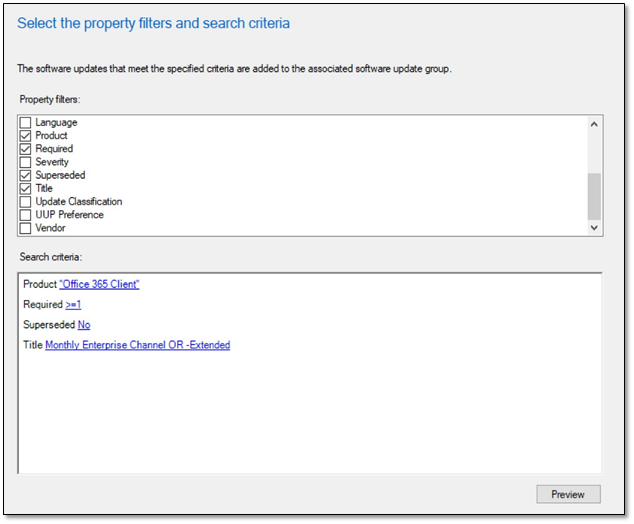
Monthly Enterprise Channel offers 2 releases: current and extended. You can leverage the release type value to select your desired update version. The screenshot below illustrates a set of search criteria that can be used to identify the current updates for Monthly Enterprise Channel by excluding the extended tag. If you require extended updates for this channel use the following value in the Title property: Monthly Enterprise Channel Extended.
The results from this search criteria will include the x86 and x64 non-extended updates for Monthly Enterprise Channel.
ADR search criteria for Semi-Annual Enterprise Channel
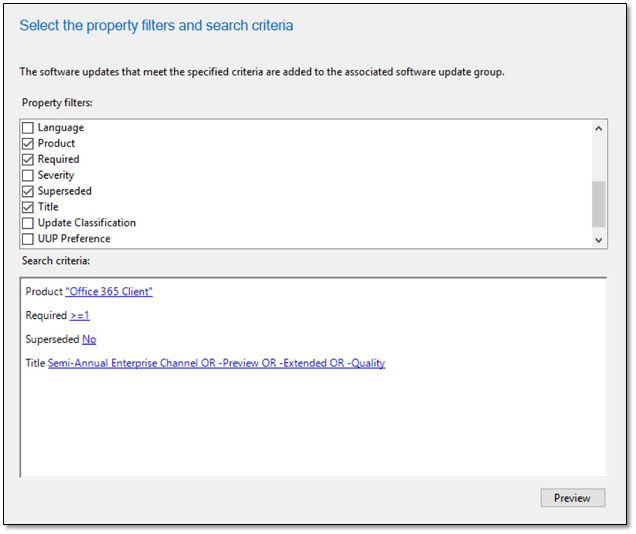
Semi-Annual Enterprise Channel offers 4 releases: preview, current, quality, and extended. You can leverage the release type value to select your desired update version. The screenshot below illustrates a set of search criteria that can be used to identify the current updates for Semi-Annual Enterprise Channel by excluding the preview, extended and quality tags.
The results from this search criteria will include the x86 and x64 non-extended updates for Semi-Annual Enterprise Channel.
Note: If you are on the current version of Semi-Annual Enterprise Channel and can maintain feature updates every 6 months, the search criteria outlined above will ensure devices update to the next version automatically without the need to update your ADR.
If you are on a version of Semi-Annual Enterprise Channel and need to remain on that version longer than 6 months, you will need to update your ADR search criteria between the months of January-February and July-August as the targeted version moves from Feature > Quality > Extended.
To select an alternate release type for Semi-Annual Enterprise Channel, update the Title property search criteria with a value from the following table:
Release
ADR Search Criteria – Title Property
Preview
Semi-Annual Enterprise Channel (Preview)
Quality
Semi-Annual Enterprise Channel Quality
Extended
Semi-Annual Enterprise Channel Extended
Additional Resources
For more information on the different update channels available for Microsoft 365 Apps, refer to the following articles:
This blog post is brought to you by Bob Clements, a Senior Customer Engineer and “Office Ranger” at Microsoft. Feel free to share your questions and feedback in the comments below.
This article is contributed. See the original author and article here.
Fujitsu Limited is a Japanese multinational information and communications technology equipment and services company, established in 1935 and headquartered in Tokyo. They are a world-leading digital transformation partner. Using a wide portfolio of trusted technology services, solutions and products, they work with customers to co-create solutions that help them on their journey to enterprise-wide digitalization.
Fujitsu Limited operates on the global market and it provides services to companies all around the world. As such, the company realizes that communication barriers caused by different languages and disabilities can have a significant impact on the life of many people. With the impact of COVID-19, which severely reduced the ability to interact with people in-person, this problem has become more severe, due to the high volume of remote meetings and interactions.
Introducing LiveTalk
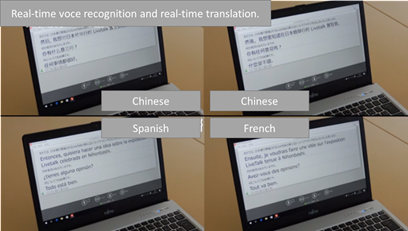
To overcome this challenge, Fujitsu Limited has developed an application called LiveTalk, which enables everyone to communicate without barriers. LiveTalk is able to instantly turn anyone’s conversation into text in real-time, no matter where they come from. LiveTalk, in fact, supports 43 languages, including Japanese and Chinese. It was designed with a real time voice recognition feature and real time subtitles for both in person meetings, as well as remote meetings and remote classrooms. It has been built to facilitate communication between deaf and hard of hearing people and hearing people, but its capabilities extend to real time language translation as well.
The application is targeting a very broad audience: from very young children to adults; from people who are learning Japanese as a second language to people with disabilities. The breadth of this project has introduced a few challenges:
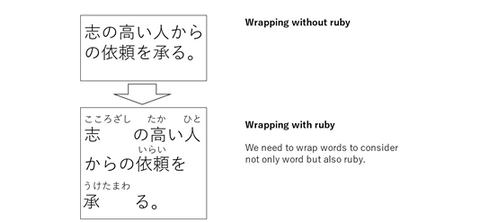
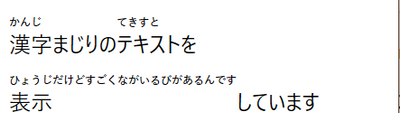
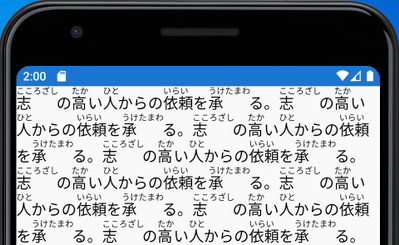
Japanese is based on three writing systems: hiragana, katakana andkanji. To make Japanese easier to learn, especially for very young children or people who wants to learn it as second language, Japanese includes special characters called ruby, which indicate how to pronounce the text. This makes the operation to render Japanese text in the application quite complex, because words must be wrapped considering the space taken by the Ruby feature.
Accessibility is a key requirement. The application must provide features like support to high-contrast mode, so that it can be proficiently used also by people with disabilities.
Since the audience can have different levels of familiarity with technology, the installation and update experience must be as simple as possible.
Fujitsu Limited was able to address all these challenges by leveraging WinUI, MSIX and Xamarin as foundation to the application.
Building a first-class experience with WinUI
WinUI was the natural choice to build a first-class experience on Windows, which could tackle all the challenges that the development team needed to address.
WinUI provides a powerful and extensible UI system, which enables developers to tailor the user experience based on their needs. The flexibility of the XAML framework enabled Fujitsu Limited to customize the TextBlock control, by integrating their own custom algorithm to render Ruby characters.
The application is now able to recognize the speech of the user and convert it into text using the standard Japanese characters. WinUI will do all the heavy work to add the Ruby characters on top and take in account the different spacing.
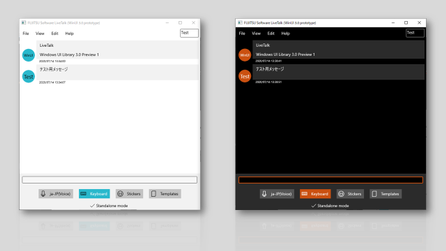
Another WinUI feature the development team took advantage of is built-in accessibility support. All the controls included in WinUI provides first-in-class accessibility features, by recognizing and adapting to the accessibility options that are available in Windows 10. Thanks to this feature, Fujitsu Limited has been quickly able to make the application theme aware, so that it can properly adapt to users who are using a light, dark or high contrast theme in Windows 10.
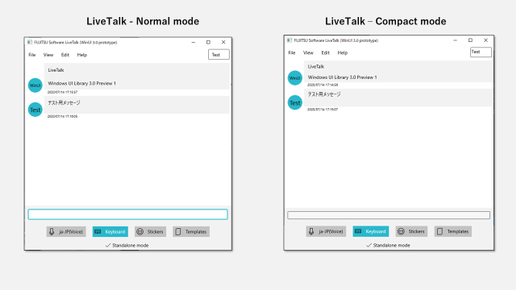
In the end, due to the flexible nature of LiveTalk, WinUI was the perfect choice to provide a user experience that spans across all the different scenarios where the app is used: from a traditional PC controlled by mouse & keyboard to a touch-enabled device like a 2-in-1 or a tablet. Thanks to the built-in support for multiple input experiences, Fujitsu Limited was able to quickly introduce specific modes to better support mouse, keyboard and touch.
Deploy and update the application with confidence using MSIX
MSIX, the innovative deployment solution for desktop applications on Windows 10, has helped Fujitsu Limited to provide a seamless and simple solution for all their users: consumers, enterprises, schools, etc.
By packaging the application with MSIX, Fujitsu Limited has published LiveTalk on the Microsoft Store, which enables a one-click experience to acquire the application. Additionally, thanks to the built-in automatic updates feature, users won’t have to take any manual action to make sure they’re using the latest and greatest version of LiveTalk. Windows 10 will take care of updating it automatically every time the Fujitsu Limited development team publishes a new version.
Reaching all the users with Xamarin
What makes LiveTalk a very powerful solution is its flexibility: it can be used during a live conference; during a remote meeting; or even just during an informal in-person chat with a colleague. As such, Fujitsu Limited needed to go outside the desktop to reach users wherever they are. Xamarin was the natural choice to bring the Windows application also to other platforms. By sharing a similar UI framework and the same .NET ecosystem as WinUI, Fujitsu Limited was able to reuse most of the investments they made to bring the application also on Android and iOS, including support for Ruby characters.
Microsoft understood our intentions better than we could and provided appropriate and specific advice. As a result, we were able to outperform our expectations for Ruby, minimize the impact of increased Ruby processing time, and plan that we can provide to the market with confidence. Regarding WinUI, the current situation and future vision became clear, and we were able to align Microsoft’s WinUI roadmap with our product roadmap.
Conclusion
Fujitsu Limited has now planned to align the product roadmap of LiveTalk with the roadmaps of WinUI and .NET. This choice has enabled the development team to have a clear plan on the evolution of the app. It will help them to continue researching new technologies for their product and to be confident that they will be able to quickly integrate all the latest enhancements in the Windows ecosystem.
This article is contributed. See the original author and article here.
If you peek inside your Microsoft Azure environment, you’ll see two different kinds of roles – Azure roles and Azure AD roles. Lets see how Tailwind Traders matches these roles to maintain their “least privilege” security principle.
Understanding the Microsoft Azure environment
When Tailwind Traders creates their first Microsoft Azure account, they receive an environment (also known as a tenant or tenancy) which contains:
One Azure Active Directory, with the user account for the owner of the environment.
One subscription, which is the billing entity for the resources they will create. This could be a trial or free subscription, an offer subscription like the Azure benefit for Visual Studio, an organization’s Enterprise Agreement subscription or a Pay-as-you-go subscription with your nominated credit card.
From here, they will create other Azure users inside Azure Active Directory, as well as other types of identities such as service principals, and they’ll add their domain name to this directory. They might even use this directory to synchronize accounts from an existing on-premises Active Directory environment. And they’ll create Azure resources (virtual machines, storage and networking, functions, AI & machine learning applications etc.) inside their subscription.
They may also create other directories and other subscriptions, but for now we’ll keep it simple at just one of each.
Organizational decisions regarding roles and access
Tailwind Traders always works on a “least privilege” principle – that is, all users have the lowest access rights needed to do their jobs. If someone works in a Helpdesk, they should be able to check that Azure resources are functioning and healthy, to help them troubleshoot problem calls, but they shouldn’t be able to create new resources inside Azure. In addition, some people in the Helpdesk are allowed to reset user passwords. Mapping these job functions to access requirements may be something that Tailwind Traders has already completed for their existing non-Cloud systems, that needs extending into Microsoft Azure.
Exploring the roles and their functions
AD roles
Starting with access to their Azure resources, Tailwind Traders reviews which of the built-in roles will give their Helpdesk staff the appropriate level of access. A role is made up of a name and a set of permissions. Each resource contains an Access Control (Identity and Access Management) blade which lists who (user or group, service principal or managed identity) has been assigned to which role for that resource. Resources can also inherit these role-based access control settings from their parent resource group, subscription, management group, Azure policy or blueprint.
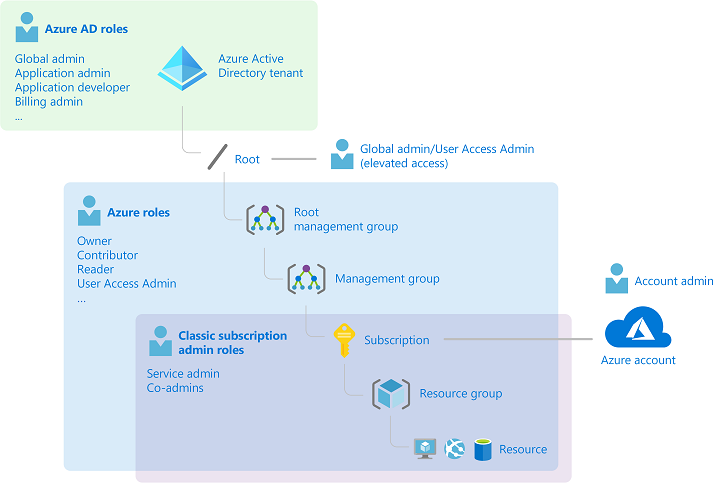
The four fundamental roles are: Owner – Full rights to change the resource and to change the access control to grant permissions to other users. Contributor – Full rights to change the resource, but not able to change the access control. Reader – Read-only access to the resource User Access Administrator – No access to the resource except the ability to change the access control.
There’s also an extensive range of other, more detailed built-in roles that Tailwind Traders can use for specific resource types and work tasks. For example, the Virtual Machine Contributor can only manage Azure virtual machine resources and cannot change storage accounts. Tailwind Traders can also create their own custom roles.
For our Helpdesk scenario, Tailwind Traders will assign the Helpdesk Staff group to the Reader role.
For a full list of the built-in roles and their permissions, visit Azure built-in roles.
Note: Role-based access control applies when someone tries to action a task against a resource using a method that hits the Azure Resource Manager. This does not apply to settings inside a virtual machine operating system or to application access.
Azure AD roles
Azure Active Directory has its own, unique set of roles, specific to identity and billing management. This means that Tailwind Traders can control who has permission to make changes to these tenant-wide components, without needed to grant them access to other Azure resources. There’s also a cross-over here with Microsoft 365, which uses Azure Active Directory as its Identity directory. These roles will be familiar to users of the Microsoft 365 Admin Center.
The Azure AD roles include: Global administrator – the highest level of access, including the ability to grant administrator access to other users and to reset other administrator’s passwords. User administrator – can create and manage users and groups, and can reset passwords for users, Helpdesk administrators and User administrators. Helpdesk administrator – can change the password for users who don’t have an administrator role and they can invalidate refresh tokens, which forces users to sign back in again. Billing Administrator – can make purchases and manage subscriptions.
For Tailwind Traders, the built-in Helpdesk administrator role is perfect. An advantage of using a built-in role is that it is maintained by Microsoft – if a detailed permission has a name change, for example, Microsoft will update all the built-in roles that have it listed, to match. In addition, users can have both Azure roles and Azure AD roles, giving them access to user administration and to Azure resources.
Azure roles and Azure AD roles mapped to Azure components
What about temporary elevated access?
Late one night, the helpdesk gets a call that a system is unavailable. On checking, there are some monitoring alerts that point to an Azure virtual machine that is currently stopped. A quick phone call to the sleepy Level 3 support tech and “try starting it” is the suggested approach. It would be great if the Helpdesk person could start the VM but that would require access that’s greater than their current Reader role, but only for the time needed to try starting this virtual machine.
The user can then activate the role and either provide Multi Factor Authentication, request manual approval or enter a business reason for the activation.
The user is then granted the role assignment and its associated permissions for a pre-configured time period.
In this case, Tailwind Traders could protect the Virtual Machine Contributor role with PIM, enabling on-call Helpdesk staff to elevate their access so they can start the Virtual Machine. This needs to be configured in advanced, but can be activated when required by the Helpdesk staff entering a business reason to justify it (which could include an internal support ticket number, for example). Or, Tailwind Traders could create a custom role with a subset of the Virtual Machine Contributor permissions (for example, Microsoft.Compute/virtualMachines/start/action) and protect that role with PIM, further refining what the Helpdesk staff would have access to do in their elevated role.
Regardless of how your organization is structured, take a look at Azure roles, Azure AD roles and Privileged Identity Management to remove widespread, high levels of access to your cloud resources and identities.











Recent Comments