How to retrieve analytics information for Pages in the “Site Pages”? using Graph Get itemAnalytics?

This article is contributed. See the original author and article here.

Step 1: Retrieve all the internal SharePoint ids of the all Pages in the “Site Pages” 


https://graph.microsoft.com/v1.0/sites('spotenant.sharepoint.com,df6ba610-0000-0000-0000-ba2733d0182e,e0dbcdc6-0637-0000-0000-49aaa1ce4d37')/lists('190b9516-0000-0000-0000-90fe7360d416')/items?select=sharepointids


Note: ‘190b9516-0000-0000-0000-90fe7360d416 This is the actual list GUID of your “Site Pages” library.


Sample Output:

{


            “@odata.etag”: “”6967cfed-0000-0000-0000-b480c1764375,3″”,

            “sharepointIds”: {

                “listId”: “190b9516-0000-0000-0000-90fe7360d416“,

                “listItemId”: “1”,

                “listItemUniqueId”: “6967cfed-0000-0000-0000-b480c1764375“,

                “siteId”: “df6ba610-0000-0000-0000-ba2733d0182e”,

                “siteUrl”: “https://spotenant.sharepoint.com/sites/TestSite105“,

                “tenantId”: “d6f932a7-0000-00000-0000-b27004970776”,

                “webId”: “e0dbcdc6-0000-0000-0000-49aaa1ce4d37”

            }

        },


Step 2: Select any Pages “listItemUniqueId” retrieved in Step 1 and make following call:


Note: You need to make sure the site you are requesting has the “Sharepoint Viewers” feature enabled: https://support.microsoft.com/en-us/office/allow-people-to-see-who-views-their-files-or-pages-ee26dde0-c30e-4eca-b1c3-38922c450967. This is required to give you expanded actors or users information. Please see sample out put below:


https://graph.microsoft.com/v1.0/sites('spotenant.sharepoint.com,df6ba610-0000-0000-0000-ba2733d0182e,e0dbcdc6-0637-0000-0000-49aaa1ce4d37')/lists('190b9516-0000-0000-0000-90fe7360d416')/items('6967cfed-0000-0000-0000-b480c1764375')/analytics/alltime?$expand=activities


Data returned below:


{


    “aggregationInterval”“None”,

    “startDateTime”“0001-01-01T00:00:00Z”,

    “endDateTime”“0001-01-01T00:00:00Z”,

    “isTrending”false,

    “access”: {

        actionCount345,

        actorCount6,

        “timeSpentInSeconds”0

    },

    “incompleteData”: {

        “missingDataBeforeDateTime”“2018-09-21T19:20:43Z”,

        “wasThrottled”false,

        “resultsPending”false,

        “notSupported”false

    },

    “activities”: [

        {

            “id”“00000”,

            “activityDateTime”“2021-04-12T17:59:12Z”,

            “location”: {

                “address”: {

                    “city”“”,

                    “countryOrRegion”“”,

                    “postalCode”“”,

                    “state”“”,

                    “street”“”

                }

            },

            “access”: {},

            “actor”: {

                “user”: {

                    “displayName”“Admin SPOTenant”,

                    “email”“admin@spotenant.onmicrosoft.com”,

                    “id”“faaa2e55-0000-0000-0000-c774a83bbbde”,

                    “userType”“Internal”

                }

            }

        },

       
{

            “id”“00001”,

            “activityDateTime”“2020-12-12T01:03:30Z”,

            “location”: {

                “address”: {

                    “city”“”,

                    “countryOrRegion”“”,

                    “postalCode”“”,

                    “state”“”,

                    “street”“”

                }

            },

            “access”: {},

            “actor”: {

                “user”: {

                    “displayName”“Alex Darrow”,

                    “email”“alexd@spotenant.onmicrosoft.com”,

                    “id”“e81cac19-0000-0000-0000-4c938b101a33”,

                    “userType”“Internal”

                }

            }

        }


    ]

}


Support Tip: Users unable to view passcode setup screen when enrolling devices through ADE

Support Tip: Users unable to view passcode setup screen when enrolling devices through ADE

This article is contributed. See the original author and article here.


Today we’re posting a known issue in the message center as a follow-up to a service health dashboard post. We will keep this blog post (it’s what’s referred to in the message center post) updated as needed!


Follow-up to IT256796 – Users unable to view passcode setup screen when enrolling devices through ADE


We recently posted IT256796 on your service health dashboard. Customers enrolling devices through Apple Device Enrollment (ADE) discovered that they couldn’t view the passcode screen and therefore setup a passcode during enrollment. Upon investigation with Apple, this is a known issue in the iOS/iPadOS release 14.5 and 14.5.1. There is a workaround, described below.


How this will affect your organization:


This will only affect you if you use ADE and configure an iOS/iPadOS ADE setup assistant profile to use the Show Passcode screen as part of the enrollment process.


What you need to do to prepare:


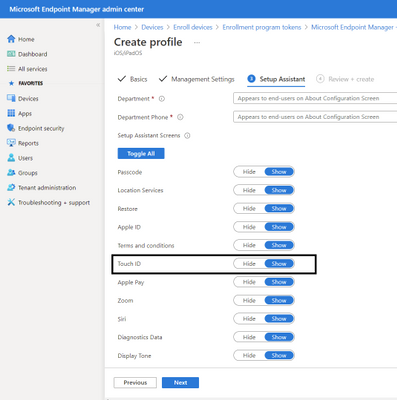
You can allow/show biometrics such as TouchID (which also enables FaceID) which will then present the passcode prompt. We will post this message to the Intune Customer Success blog (that’s this post!) as well and will keep the blog updated with the latest from Apple or if there’s any additional workaround Intune can implement. 


BTW – here’s where you configure TouchID for your setup assistant profile in the Microsoft Endpoint Manager console:
Create an ADE profile and show Touch IDCreate an ADE profile and show Touch ID


Plan your Microsoft Azure experience at Microsoft Build

This article is contributed. See the original author and article here.

Microsoft Build, our free digital event, starts next week and runs from May 25-27, 2021. We thought you might be interested to learn ways you can plan to experience the latest set of developer tools, platforms, and services helping you build amazing things on your terms, anywhere, with Microsoft and Azure. You’ll also have a chance to speak with Microsoft experts and have the opportunity to continue your technical learning journey.


Register to gain full access to all Microsoft Build has to offer—it’s easy and at no-cost to you.


Create the perfect event schedule


Explore the session catalog to find expert speakers, interactive sessions, and more. After registering, get started on your journey using the Build session catalogue.


Below are a set of featured Technical Sessions kicking off the key themes of Build 2021, with deeper related Breakout Sessions—all of which you won’t want to miss:


Increase Developer Velocity with Microsoft’s end-to-end developer platform:


Deliver new intelligent cloud-native applications by harnessing the power of Data and AI:


Build cloud-native applications your way and run them anywhere:


Follow #MSBuild


Explore the latest event news, trending topics, and share your point of view in real time with your community. Join us on Twitter and LinkedIn by using #MSBuild.


Join us on social >


Connection Zone


Only at #MSBuild can you strengthen your network with local connections and meet with Microsoft product teams to help influence the future of products and services.


Connect today>


Learning Zone


The Learning Zone is the center for training, development, and certification with Microsoft. Whatever your style of learning happens to be, you can find content and interactive opportunities to boost and diversify your cloud skills.


Explore trainings >


One-on-one consultation


Schedule your 45-minute, one-on-one consultation with a Microsoft engineer to architect, design, implement or migrate your solutions.


Schedule today >


Continue your learning journey


Discover more in-depth learning paths, training options, communities, and certification details across all Microsoft cloud solutions from one place.


Explore trainings >

Experiencing Data Access Issue in Azure portal for Log Analytics – 05/18 – Resolved

This article is contributed. See the original author and article here.

Final Update: Tuesday, 18 May 2021 20:15 UTC

We’ve confirmed that all systems are back to normal with no customer impact as of 05/18, 16:00 UTC. Our logs show the incident started on 05/18, 12:00 UTC and that during the 4 hours that it took to resolve the issue customers using Log Analytics in UK South  may have experienced intermittent data latency and incorrect alert activation for resources in this region.
  • Root Cause: After our investigation, we found that a backend scale unit become unhealthy due to an ingestion error. This ingestion is to process logging data for Log Analytics and caused alert systems to fail.
  • Incident Timeline: 4 Hours  – 05/18, 12:00  UTC through 05/18, 16:00 UTC
We understand that customers rely on Azure Log Analytics as a critical service and apologize for any impact this incident caused.

-Vincent

Your guide to Dynamics 365 and Power Platform at Microsoft Build

Your guide to Dynamics 365 and Power Platform at Microsoft Build

This article is contributed. See the original author and article here.

Microsoft Build is just around the corner! To help you make the most of the three-day digital event, we’ve rounded up some must-see sessions and speakersmore than two dozen technical sessions to help developers across roles and skill levels create amazing experiences with Microsoft Power Platform and Microsoft Dynamics 365.


The post Your guide to Dynamics 365 and Power Platform at Microsoft Build appeared first on Microsoft Dynamics 365 Blog.

Brought to you by Dr. Ware, Microsoft Office 365 Silver Partner, Charleston SC.