
by Contributed | May 4, 2021 | Dynamics 365, Microsoft 365, Technology
This article is contributed. See the original author and article here.
It’s amazing how much change we’ve seen across the world in a year.
One year ago, all of us were adapting to a world in lockdown. At today’s Microsoft Business Applications Summit, the worldwide community comes together still dealing with the ongoing effects of the COVID-19 pandemic.
Even as challenges continue to reverberate across industriesfrom supply chain disruptions to recurring restrictionsmost businesses are taking steps toward recovery. They’re taking stock of vulnerabilities and opportunities across their organizations, markets, and industriesand the steps needed to move forward into the future.
That’s why today’s Microsoft Business Applications Summit is so timely. As global business communities set sights on what’s next, today’s event is an opportunity for the Microsoft Dynamics 365 and Microsoft Power Platform community to come together, assess what we’ve learned over the past year, and explore ways to proactively reimagine every layer of business.
Building the agile digital business
Everyone joining the Microsoft Business Applications Summit plays an integral part in moving business forward. Today, we are sharing stories of people and teams transforming the way they do business to be more adaptable, innovative, and impactful.
This past year demonstrated that businesses with a strong digital foundation can push the boundaries of what’s possible and achieve more, even when faced with a global crisis. Without digital capabilities, it’s next to impossible to adapt to rapid change.
At Patagonia, a leader in outdoor clothing and gear, the pandemic accelerated a journey to deliver more meaningful customer experiencesin ways no one expected. Before the crisis, the organization was preparing to move its direct-to-consumer business and selling channels onto Dynamics 365. When lockdowns shut down physical locations, from offices and retail stores to call centers and warehouses, the team turned to Microsoft Teams to coordinate the launch and rapidly adapt operations to a new retail model. With retail locations closed to customers, the team leveraged distributed order management capabilities in Dynamics 365 to turn retail locations into mini-warehouses, keeping employees working and online orders fulfilled, followed by curbside pick-up.
Equipped with the right digital capabilities, the teams at Patagonia demonstrated incredible agility in the face of changepivoting complex operations nimbly and quickly to keep customers equipped with the outdoor gear they depend on.
New ways to connect with your community
Patagonia’s story reminds us that, together, as a team, we can accomplish great things. In a year defined by keeping one’s distance, it’s critical to help our community stay connected.
Today, more than775 user groups bring together more than 2.85 million active community members to connect, learn, and engage one another on topics related to Microsoft technologies. The Microsoft Power Platform and Dynamics 365 communities connect you directly with Microsoft, your industry peers, and high-value content in a diverse, supportive environment.
Today we are introducing a new user group experience with tools to help you find, join, start, and run local user groups for Dynamics 365 and Microsoft Power Platform.
We are supporting the user groups with an administrative team and connection to local Microsoft employees around the world. You can engage with experts to answer questions, learn about the latest innovations, and influence future product roadmaps.
Our goal is to enable a global network of local user groups that are Microsoft-supported and community-led. We invite you to explore the preview of the new experience and get started by creating or joining a local user group.
Helping you move business forward
It’s been a tough year. Every business has had to make difficult decisions, rethink plans, and readjust to conditions few could predict in advance. Moving forward means reshaping the business now to be prepared for future disruptions, large and small. That’s why we are dedicated to continuously providing the technology you need to build agility and resiliency into every layer of your business.
In April, we launched a six-month wave of hundreds of new capabilities, feature updates, and applications across Dynamics 365 and Microsoft Power Platform. This release wave continues our dedication to empower everyone to make an impact with technology that surfaces insights and guidance to the next best step, across every department. By harnessing the data generated across your business, everyone across the company can break through barriers to perform their best and focus on what’s best for the customer.
One way we are bringing this vision to life is by helping you deliver consistent, personalized customer experiences across every touchpoint, from the first point of awareness of your brand through purchase and service, both from the call center and in the field. Today at the Microsoft Business Applications Summit, we’ll catch you up on the latest marketing technologies that help you engage individual customers at scale.
In our keynote presentation, we will demonstrate how the Los Angeles Clippers are able to make game night more personalized by engaging fans with the experiences they prefer. They can now use Dynamics 365 Customer Insightsthe Microsoft customer data platform (CDP)to connect data from a variety of sources to gain a comprehensive view of fans’ preferences and use Dynamics 365 Marketing to orchestrate customer-led journeys in real-time to deliver hyper-personalized experiences for fans on game night. With the combined power of Dynamics 365 Customer Insights and Dynamics 365 Marketing, organizations can deeply understand customer behavior and intent and leverage real-time insights to personalize journeys at scale, unlocking new ways to attract, engage, and delight customers with a more human and empathetic approach.
With the new integration between Dynamics 365 Customer Insights and Microsoft Advertising, advertisers can now create and export limitless set of customer segments from Dynamics 365 Customer Insights into the Microsoft Advertising platform to target on the Microsoft Search Network and Microsoft Audience Network using Customer Match targeting. These segments can be also used on third-party destinations including Google Ads, Marketo, MailChimp, dotdigital, SendGrid, and Autopilot.
Learn more by joining sessions focusing on Dynamics 365 Marketing and Dynamics 365 Customer Insights, including the featured session, “Customer engagement transformed: hyper-personalize experiences to drive better business results.”
Microsoft Power Platform: Making your business more flexible
Innovation and problem solving doesn’t happen in a vacuum. Everyone in the business can play a role in moving the business forward with the right set of digital tools. Our vision for Microsoft Power Platform is to empower every creator in your company to build business solutions, increase collaboration between business and IT teams, and inject more flexibility into your business.
Humana, a U.S.-based healthcare innovation and community wellness company, is helping to bring this vision to life. In response to the COVID-19 pandemic, Humana used Microsoft Power Platform to rapidly build solutions catering to the needs of their millions of Medicare and specialty members and vulnerable communities during the COVID-19 pandemic. In our keynote presentation, we will demonstrate one of the solutionsa vaccine scheduler and community tracking applications to help members book vaccination appointments with local providers.
As part of this demo, we will also spotlight goals in Power BI, launching in preview today. Goals enables teams to easily curate business metrics that matter most and aggregate them in a unified view. From there, teams can measure progress against their goals, proactively share updates with their teammates, and dive deeper into their data when something needs further analysis. Attend today’s sessions on the Power BI roadmap and new features announcement, and read this overview to learn more.
With Microsoft Power Platform, anyone can solve business challenges with low-code apps, or automate common processesat scale, across departments, or on one’s desktop. Barriers that have blocked innovation and productivity for years are removed.
Join the conversation at Microsoft Business Applications Summit
There’s much more to explore at the Microsoft Business Applications Summit. In addition to the sessions above, we invite you to explore the full catalog of learning sessions and product roundtables. We also invite you to connect, learn, and share with peers and experts to ask questions, engage in discussions, and view content in the Microsoft Power Platform and Dynamics 365 communities.
For more details about what’s new for Dynamics 365 and Microsoft Power Platform, explore recent product updates and the 2021 release wave 1 plans.
The post Live from Microsoft Business Applications Summit 2021: Moving forward faster, together appeared first on Microsoft Dynamics 365 Blog.
Brought to you by Dr. Ware, Microsoft Office 365 Silver Partner, Charleston SC.
by Contributed | May 4, 2021 | Technology
This article is contributed. See the original author and article here.
By Wayne Bennett – Sr Program Manager | Microsoft Endpoint Manager – Intune
Using Microsoft Endpoint Manager – Microsoft Intune to set your company’s terms and conditions meets the requirements of many organizations. However, the Azure Active Directory (Azure AD) terms of use feature offers greater functionality— including terms of use in different languages and integration with Conditional Access in the form of grant controls. You can learn more about the differences between the two solutions in this blog post.
Potential to block access to Intune
If you’ve configured the Azure AD terms of use solution and set a grant control to require users to accept terms of use in your Conditional Access policy, you need to be aware of a configuration scenario that might unintentionally block access for your users when they try to enroll into Intune.
Typical configuration
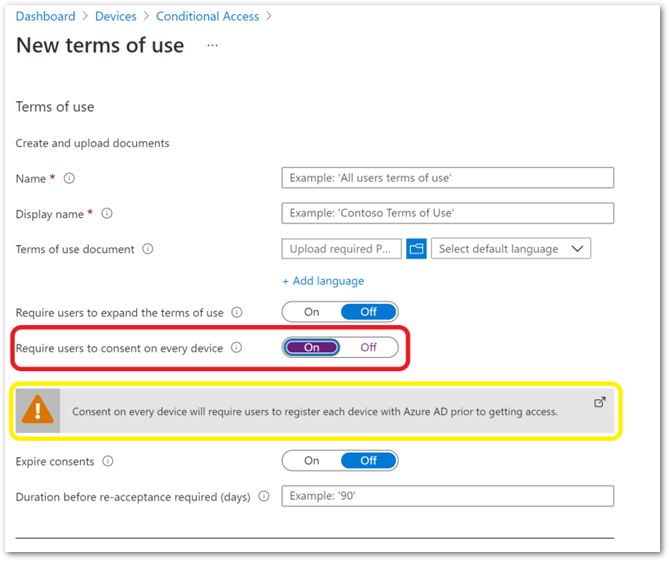
When creating an Azure AD terms of use policy, you have the option to select Require users to consent on every device. If you choose this setting, you will see the Consent on every device will require users to register each device with Azure AD prior to getting access warning. Once saved, you are unable to change this setting.
Example screenshot to register each device with Azure AD prior to getting access in a Conditional Access policy
After you create the terms of use policy, the next step is to create a Conditional Access policy. As shown in the following example, many organizations will target All Cloud Apps without configuring any exclusions.
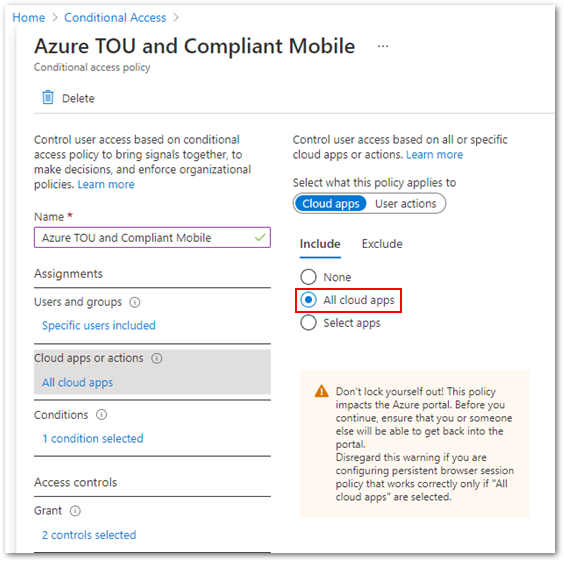 Example screenshot of targeting All cloud apps in a Conditional Access policy
Additionally, many organizations will select Require device to be marked as compliant grant controls and require users to accept the Azure AD terms of use policy.
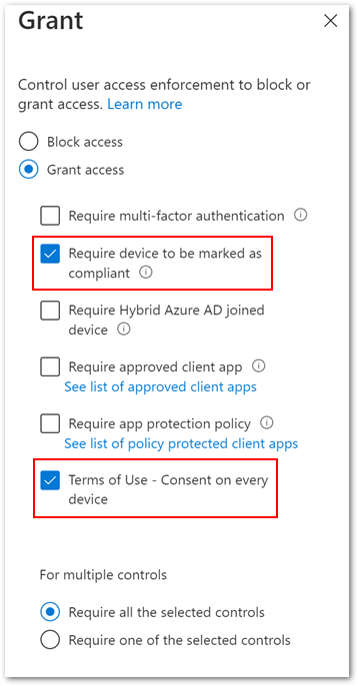 Example screenshot of configuring both the “Require device to be marked as compliant” and “Terms of Use” policies under the Grant control
Blocking enrollment issue
The combination of Azure AD terms of use requiring users to consent on every device, Conditional Access policy targeting All Cloud Apps, and the control requiring the user to accept the Azure AD terms of use results in the following unintended behaviour during the Intune enrollment process:
- Once the user has authenticated in the Company Portal, prior to Azure AD terms of use appearing, the Help us keep your device secure message will appear. The user will be prompted to install the Microsoft Authenticator app, Conditional Access controls will begin a continuous registration cycle, and the user will be unable to complete enrollment.
The issue is caused by selecting Require users to consent on every device, requiring users to register each device with Azure AD prior to getting access, as per the warning, when creating the terms of use policy.
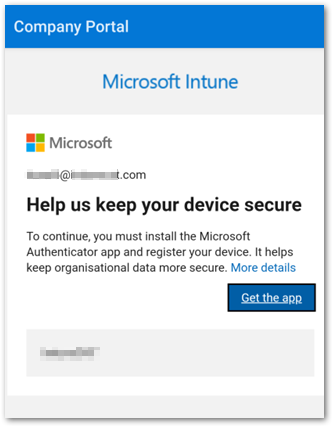 Example screenshot of the “Help us keep your device secure” message
Prevent Intune enrollment from being blocked
There are two methods to keep the enrollment blocking scenario from occurring:
Method 1: The Terms of use dialog
The first method is to ensure that Require users to consent on every device in the Terms of use dialog remains at the default Off setting when creating the Azure AD terms of use policy.
Note
Once the Azure AD terms of use policy is created, it is not possible to edit the Require users to consent on every device setting. You must create and target a new terms of use policy in the Conditional Access policy.
Method 2: Exclude cloud apps
The second method is to exclude certain cloud apps from Conditional Access targeting. The Per-device terms of use section of the Azure Active Directory terms of use documentation states that “The Intune Enrollment app is not supported. Ensure that it is excluded from any Conditional Access policy requiring Terms of Use policy.” However, excluding the Microsoft Intune Enrollment cloud app is not sufficient— as the example below shows, you must also exclude the Microsoft Intune cloud app.
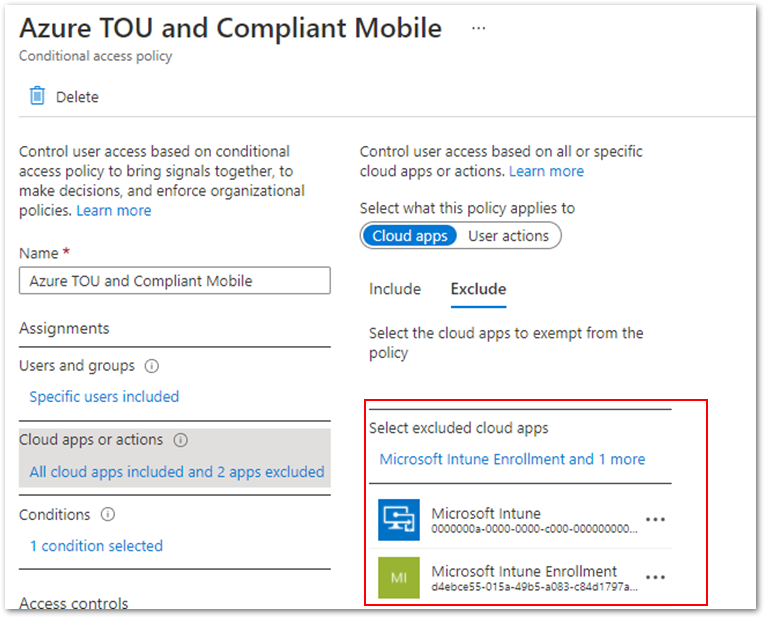 Example screenshot of excluding “Microsoft Intune” and “Microsoft Intune Enrollment” from the Cloud apps or actions list
Conclusion
Changing your configuration using either of the suggested methods will prevent the Intune enrollment blocking scenario. Before you make any change, be sure to evaluate the settings so you don’t impact any existing Conditional Access requirements.
More info and feedback
For further resources on this subject, please see the links below.
Plan an Azure Active Directory Conditional Access Deployment
Troubleshoot Conditional Access using the What If tool
What is Microsoft Intune
Conditional Access require terms of use
Cloud apps or actions in Conditional Access policy
Device compliance policies in Microsoft Intune
Let us know if you have any additional questions by replying to this post or reaching out to @IntuneSuppTeam on Twitter.
by Contributed | May 4, 2021 | Technology
This article is contributed. See the original author and article here.
Get ready to activate, adapt, and accelerate your business. And learn how training and certification helps to make it happen. With the worldwide community of Microsoft Power Platform and Dynamics 365 customers, partners, power users, evangelists, and implementers at Microsoft Business Applications Summit, you can find out the latest from Microsoft Learn—your destination for free, always-on learning. Join us at the summit today for a digital experience that includes keynotes, technical sessions, Q&A with experts, inspiring videos, and an opportunity to sign up for a fun Cloud Skills Challenge.
Announcing the new Microsoft Certified: Dynamics 365 Commerce Functional Consultant certification
Are you all about creating friction-free shopping experiences and uniting digital and physical commerce? If you’re a functional consultant, developer, information worker, or IT or business professional using Dynamics 365 Commerce in your organization, we have a new certification for you. Now you can validate your skills in configuring, deploying, and maintaining Dynamics 365 Commerce applications.
We’re happy to announce the Dynamics 365 Commerce Functional Associate certification available in beta in June 2021. To earn this certification, you’ll need to pass you’ll need to pass Exam MB-300: Microsoft Dynamics 365: Core Finance and Operations along with Exam MB-340: Dynamics 365 Commerce Functional Consultant. Exam MB-340 measures your ability to configure Dynamics 365 Commerce headquarters; configure and manage Dynamics 365 Commerce call centers; manage Point of Sale (POS) in Dynamics 365 Commerce; configure products, prices, discounts, loyalty, and affiliations; and manage e-commerce.
Now available on Microsoft Learn: Certification renewal features
A few months ago, we shared an update on renewing role-based and specialty certifications on Microsoft Learn. This feature is now available for 19 certifications, with more following in the near future. If your role-based or specialty certification expires within six months, you can take a certification renewal assessment online—at no cost and on your schedule—and extend your certification for a year at a time. Learn more about renewing your Microsoft Certification.
Microsoft Learn at Microsoft Business Apps Summit
Get ready for a day jam-packed with sessions and activities to boost your Business Apps skills. Explore ways to expand your horizons with Microsoft Power Platform and Dynamics 365 certifications, and get the most out of training on Microsoft Learn.
- Cloud Skills Challenge. Come to the Connection Zone to sign up for a fun and engaging gamified learning experience. We have the challenges you’re looking for, with four Microsoft Power Platform challenges and four Dynamics 365 challenges to choose from. Buckle up, and “May the skills be with you!” Invite your colleagues, teams, and communities to join the challenge. Try for prizes, including free mentoring sessions with well-known product experts.
- Learn Live sessions. We have a couple of “don’t miss” sessions for you. From 9:45–11 AM PT, drop by our Customer Insights session on the Dynamics 365 Customer Insights customer data platform (CDP), led by John Wiese and Tad Thompson of Microsoft. From 11:45 AM–12:45 PM PT, check out “Create bots with Power Virtual Agents,” led by April Dunnam and Gitika Gupta of Microsoft.
- Watch cool videos. You won’t want to miss our latest #ProudToBeCertified video, in which learners from around the globe share how certifications have given their career a boost. In addition, check out our videos on energizing your career with certifications in Microsoft Power Platform and Dynamics 365.
- Ask the Experts. During this Q&A session, 9:45–10:15 AM PT, experts from Microsoft, including Liberty Munson, Matthew Minton, Margo Crandall, and Sudarshan Krishnamurthi, take your questions on Microsoft Power Platform and Dynamics 365 certifications, exams, learning paths, and recently announced changes to certification extension and renewal.
- Event Desk. Drop by anytime to chat with Dona Sarkar, Microsoft Dev Advocate for Microsoft Power Platform, and Natahri Felton, Principal Program Manager, to learn about interviews, sessions, and keynotes. Catch engaging on-the-spot interviews “From the desk” with Heather Newman, Principal Program Manager, Microsoft Power Platform Engineering. There’s a lot going on, including a trivia game, and the folks in the booth are looking forward to meeting you.
- Social. To get the latest conference information, follow us on LinkedIn and Twitter (#MBAS, #CloudSkillsChallenge, #ProudToBeCertified, #MicrosoftCertified).
- Keep on learning. Continue learning with us after the event. Go to Microsoft Learn for more content, training options, communities, and Microsoft Certification details.
Now that you’ve discovered what we have in store for you, join us at the Microsoft Business Applications Summit today, as we explore how you can use Microsoft Learn as your destination for free, always-on learning about Microsoft Power Platform and Dynamics 365.
by Contributed | May 4, 2021 | Technology
This article is contributed. See the original author and article here.
Claire Bonaci
You’re watching the Microsoft U.S.health and life sciences, confessions of health geeks podcast, a show that offers Industry Insight from the health geeks and data freaks of the US health and life sciences industry team. I’m your host, Claire Bonaci. May is Mental Health Awareness Month. And I have the pleasure of interviewing Megan Lawrence, our senior accessibility evangelist, Megan describes the fluidity of mental health and the importance of normalizing mental health in the workplace. Hi, Megan, and welcome to the show. I’m so excited to have you with us for Mental Health Awareness Month.
Megan Lawrence
It’s incredibly great to be here. Thanks for having me.
Claire Bonaci
of course. So do you mind introducing yourself and sharing a little bit of why you feel normalizing mental health is so important.
Megan Lawrence
Yeah, so here at Microsoft, I am the senior accessibility evangelist working for our chief accessibility officer. But I’m also the Co-lead of employees with mental health conditions, and really building the community of support between and among the employees here at our company at Microsoft. You know, normalizing mental health is incredibly important in modern society. Most people don’t realize that, in fact, mental health is the number one disability in the world today. And so many of us are going to experience mental health throughout our life, you may have a permanent mental health disability like me, I have an anxiety disorder, you may see you have a temporary like postpartum depression, or even situational where maybe you worked 16 hours and didn’t get very good sleep and are really feeling like you don’t have that decision making power like you used to. So really, I think normalizing mental health means recognizing it’s just part of being human.
Claire Bonaci
I love that answer. And I love that Microsoft even has that role. So I’m so happy that you’re here at Microsoft with us. Do you feel that it’s still taboo? Or do you feel like in the workplace, it’s so hard or taboo to talk about mental health?
Megan Lawrence
So, you know, I think that one of the silver linings of COVID has been that we are more often checking in on one another. And the answer can honestly be today’s not a great day, and mental health and well being have become important topics for every company out there. And so even though I do believe that there’s still bias and stigma associated with mental health, I think we’re breaking down some of those barriers.
Claire Bonaci
I agree with that. I do think it’s getting better. And you’re right, that is the silver lining of the pandemic, finally, something that was good that came out of it. So do you mind telling us the story of why you created the mental health erg here at Microsoft?
Megan Lawrence
Yeah, so it’s incredible. I’ve worked with the disability community for 20 years. And really only until the last four did I start opening up about my own mental health disability. And I have to be honest with you, a lot of that came from my own shame and stigma that I felt about having a mental health condition. But I felt so lucky to find a group of people here at Microsoft that I began to talk to, that were supporting me in my journey with mental health. And I began to realize that that support system was critical for my success. And we wanted to extend that you can really create a strong community for over 160,000 people now that we have at this company. So Jen Emira and I, my co lead and I started this mental health community really to let people know, you’re not alone. And we’re here to support one another.
Claire Bonaci
I think that’s something that we need more of. And do you know, is this happening and other tech companies or other large companies? Are there more mental health ERG’s that are being started?
Megan Lawrence
You know, I don’t know exactly if there are specific groups around mental health. But I have reached out to many of my colleagues in the disability community. And there definitely is a growing communication among every kind of organization, whether you’re a nonprofit, whether you’re a bank, whether you’re a manufacturing company, that really we’re starting to begin to understand that the future of building a company to modernize to stay relevant during a changing marketplace, you have to support employees mental health and well being it’s critical.
Claire Bonaci
It is it is I love that you bring up just that in order to stay relevant companies do have to address this, you know, millennials, Gen Z, we’re entering the workforce, and they’re realizing that they want to work for a company that’s going to one support everyone but also be able to have those those ERGs or those resources to support everyone. So I’m, I’m so happy that Microsoft is already ahead of the curve with that. And my last question for you, I’ve heard you talk about nested identities before it Do you mind explaining this and the impact that it’s having right now?
Megan Lawrence
Yeah, so oftentimes, I think we get caught on you know, I’m a person with a disability. I belong to the blacklife community here at Microsoft But in reality, we are all a collection of, of nested identities. I’m a woman, I’m a dog Mom, I’m a woman with a disability. I’m, I’m a Steelers fan, sorry to all you Seattle people in Seattle here. Right? So it is this collection of my experiences in the communities that I exist in that create who I am and the way that I function in the world. And so again, this is where intersectionality becomes critical, as we begin to talk about mental health and the intersection of multiple identities, and really, ultimately, what that’s going to mean for technology.
Claire Bonaci
And what do you think that would mean for technology? I know, that’s a wildcard question, but what’s your opinion?
Megan Lawrence
So I truly believe that AI has the opportunity to be a force multiplier to reduce barriers for people with disabilities. But right now, we live in a disability data desert, we need more data about people with disabilities, we need need more data about people with disabilities, again, at the intersectionality of race, in our bipoc community, in our LGBTQI plus communities to make sure that what we create is culturally competent moving forward.
Claire Bonaci
I love that. And I actually have one more wildcard question for you. What advice would you give to someone external to Microsoft, but they’re interested in starting a mental health ERG at their company?
Megan Lawrence
Yeah, so um, ERG’s come in lots of different flavors. And so first of all, just get curious, start learning what kind of affinity groups I’ve heard them called Employee Resource Groups exist already? Is there one for disability? Here in Microsoft, the way we’re set up is we have an umbrella disability ERG. Now, I think we’ve got like, 24 different discussion groups underneath that. Um, so you know, I think it really depends on exploring what you have at your company, what the system looks like, and really just leaning in and recognizing that community pays dividends when it comes to creating a true sense of belonging at an organization. And that’s what true inclusion looks like.
Claire Bonaci
Perfect, and definitely those ERG’s are what builds connection and what what builds community within companies. So hopefully everyone out there that doesn’t already have a mental health ERG can start looking into how to start one. So thank you, Megan, for being part of the podcast. I’m really looking forward to having you on next time to talk a little bit more about mental health and technology.
Megan Lawrence
I love it. Okay.
Claire Bonaci
Thank you all for watching. Please feel free to leave us questions or comments below. And check back soon for more content from the HLS industry team
by Contributed | May 4, 2021 | Technology
This article is contributed. See the original author and article here.
After a year of practicing resiliency, building technology and self-management skills, and navigating emotional turmoil, students are preparing to return to a rigorous school experience without some of the skills they would have built in a normal year. A recent study from Stanford illustrated the flattened growth of Oral Reading Fluency during the pandemic. In a broad sample of districts, second and third graders performed about 30 percent behind expectations, with the most severe impact concentrated in already struggling schools. In an environment of continued disruption and uncertainty, we are excited to introduce Reading Progress as a resource to help build opportunities for students and educators to get back on track in a non-stigmatizing and highly customizable way.
Reading Progress in Teams supports students in building fluency through independent reading practice, educator review, and educator insights. Educators can upload a single reading fluency assignment or differentiate for their class’ many levels. Students read their passages out loud, creating an audio/video recording teachers can access and review at their convenience. Traditionally, tracking students’ fluency is irregular and time consuming because it requires one on one close listening, while somehow still managing the remainder of the class. Creating recordings allows educators to check students’ progress more regularly while also freeing up time for active instruction. By empowering students to complete their reading fluency assignments regularly and independently, Reading Progress keeps the focus on practice and growth, not performing under pressure. Now reading fluency practice can happen anywhere!
Whether educators used the Auto-detect feature for quick review, or manually code errors, valuable data is collected in Insights. Teams Education Insights dashboards help visualize class and individual progress. Insights provides a holistic view of trends and data including accuracy rate, correct words per minute, mispronunciations, omissions and insertions. Reading Progress also highlights actionable insights for educators including common challenges across the entire class or per student.
During our broad private preview, Reading Progress has been tested in a number of distinct use cases. We’ve seen the expected wide usage for ages 6-11 as well as utilization for middle and high school fluency checks, special education and dyslexia support, and for building English skills for non-native speakers, both in English dominant areas and where it’s taught as world language. We’ve also seen high interest for adult literacy scenarios. The stigma of reading out loud and lack of educator time has previously made consistent fluency practice in post-elementary education settings minimal. The implications of a private and regular space for older learners to practice fluency are immense. Here are two observations from some educators who have been part of the early private preview:
Joe Merrill, an educator from Lake Park Elementary, Florida, has been using Reading Progress in our private preview over the past few months with his class and he has this to say “Reading Progress takes all the nerves out of my student’s fluency checks. They are comfortable with its approach and I am able to collect data quicker and more efficiently than ever before. Now, I can devote more time to differentiated instruction rather than individualized assessments.”
Luis Oliviera, Director of Unified Arts and ELA from Middletown High School in Middletown, RI , has been using Reading Progress with his older English Language Learner students and has this to say: “Reading Progress has been such a time saver for assessing and analyzing my high school ELL students’ reading fluency. I am able to give a passage to the entire class and have them record their responses instead of having to individually assess the students. Cultural selections for the reading passages enhance their knowledge of important topics and current events. This allows more time to work directly with the students in addressing their needs.”
From the beginning, the creation and testing of this tool has been a and has been rooted in the science and literature of reading fluency. Our team has worked with hundreds of educators, literacy specialists and reading scientists. Early on, we had many interviews, brainstorming sessions and “design jams” with experts like Shaelynn Farnsworth, Lauren Taylor, Andrew Fitzgerald, Lauren Pittman, amongst many others. We’ve consulted with students, iterated on different designs, and have much more in store!
Four parts to the Reading Progress experience
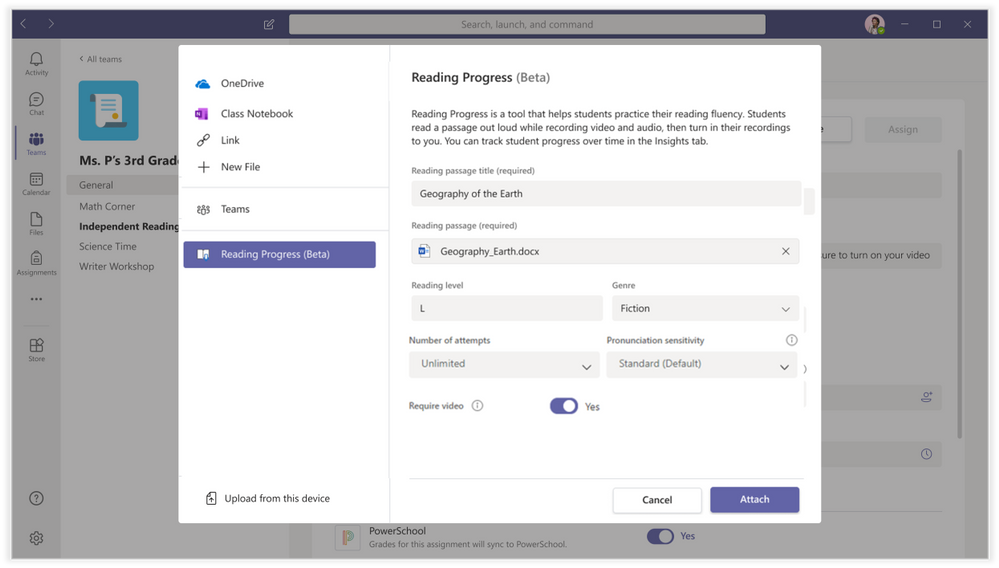
1) Assignment creation – Reading Progress is built directly into the free Teams Assignments experience. Once an educator selects Create>Assignment, the Add resource button now includes Reading Progress (Beta) for the private beta group. The educator then completes the creation of the assignment, including uploading the Word document of their choice. This summer educators can look forward to the addition of PDF capabilities and a partnership with ReadWorks that includes a small library of curated reading passages. The educator can also manually set the Reading Level, Number of attempts, Genre, and Sensitivity. I call this the “picky dial” – how picky would you like the software to be. For example, younger readers may need more relaxed pronunciation expectations, while older readers might be set to higher sensitivity. Note that this can be changed during the review experience as well.
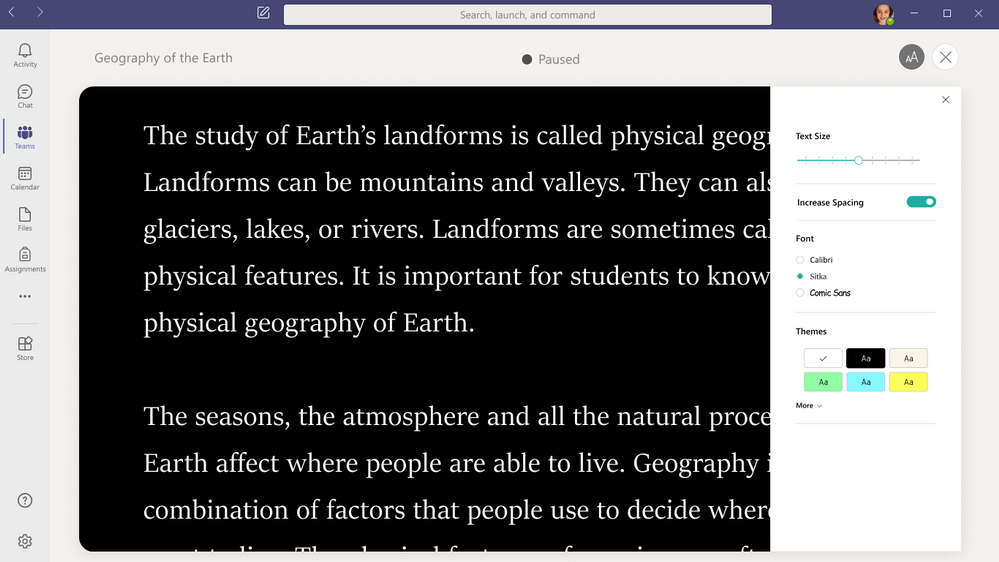
2) Student reading and recording: When students receive the Reading Progress assignment, they open it to see a recording experience. By default, video recording will be enabled, but teachers can approve audio-only if needed. Similar to Flipgrid, the student will start the recording, get a countdown, and then the reading passage will open for the student to read.
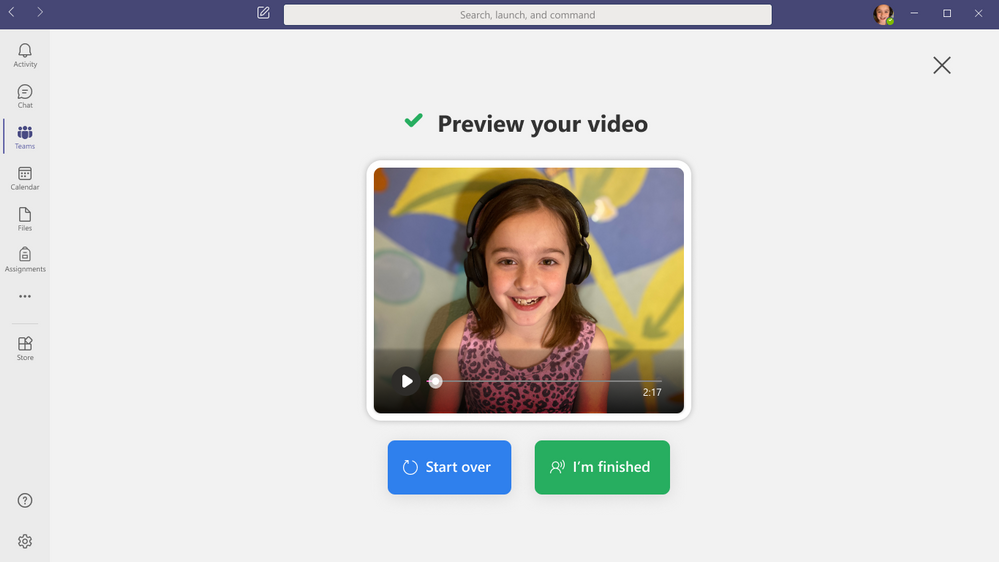
We’ve integrated aspects of the Immersive Reader into this experience to support students in customizing the way the passage looks before they start reading.
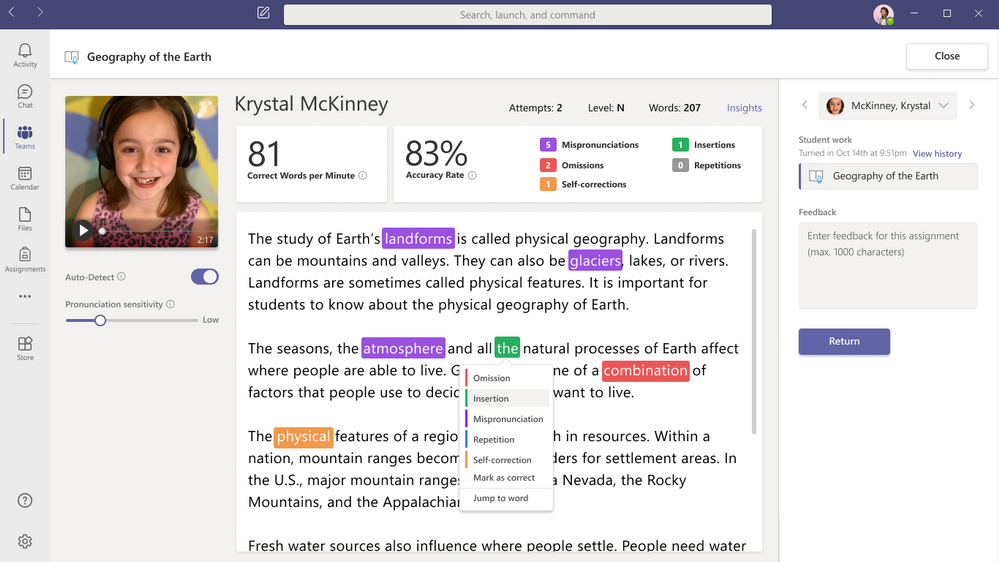
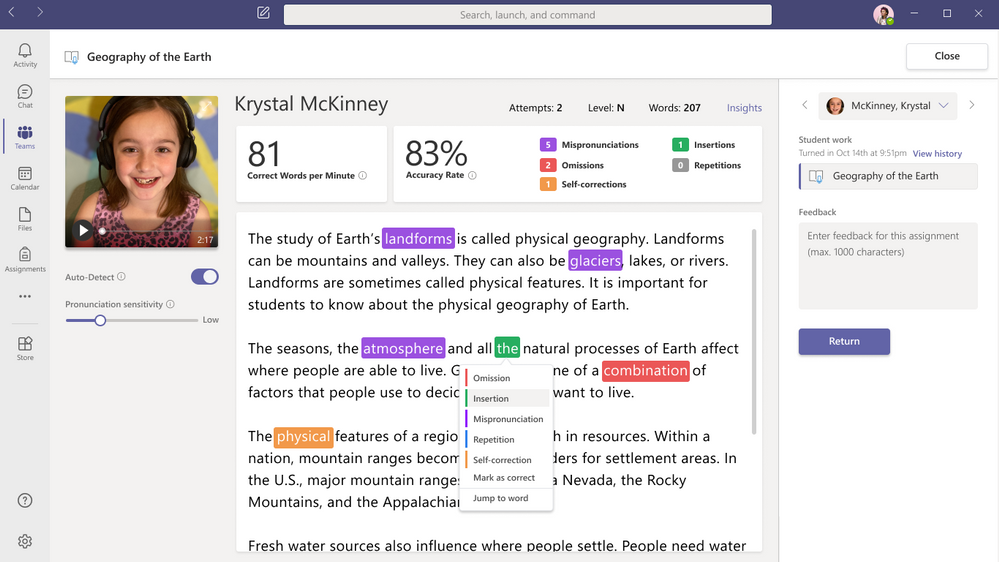
3) Educator review: One of the most powerful aspects for Reading Progress is the quick and easy review process, which simultaneously returns work to students and collects fluency data in Insights. This experience is built-in to the Teams grading and review experience. The review page pulls together the student’s reading recording, words per minute count, accuracy rate, and the ability to fine tune pronunciation sensitivity.
By default, the Auto-Detect feature is enabled, so you will see predicted mispronunciations, omissions, insertions, self-corrections, and repetitions. The educator can review the Auto-correct data, overriding any inaccuracies, or turn off Auto-detect to mark up the page manually as they listen to the recording, similar to how reading fluency checks are done with paper and pen. To account for different speech patterns and accents, the educator can change the pronunciation sensitivity analyzes results to make teacher review faster and more accurate. In addition, with a single click the educator can jump to any part of the recording to review detected words or passages.
4) Powerful insights to track student progress: Fluency data from Reading Progress is collected in Insights to support educators in taking evidence-based action for literacy in their classrooms. Insights dashboards help visualize progress and trends such as accuracy rate, correct words per minute, mispronunciations, omissions, and insertions. Reading Progress also highlights actionable insights for educators, synthesizing common challenges across the entire class or per student. Educators can share Insights dashboard access to collaborate with literacy coaches, speech pathologists, and reading specialists and more to holistically curate student-centered approaches.
Later this summer education leaders will be able to access Reading Progress data by opting into our new Education Insights Premium designed to compile organization-wide data for intentional and impactful leadership. which is designed for school leaders and organization-wide views. To learn more about this new Insights offering, visit the Education Insights Premium page.
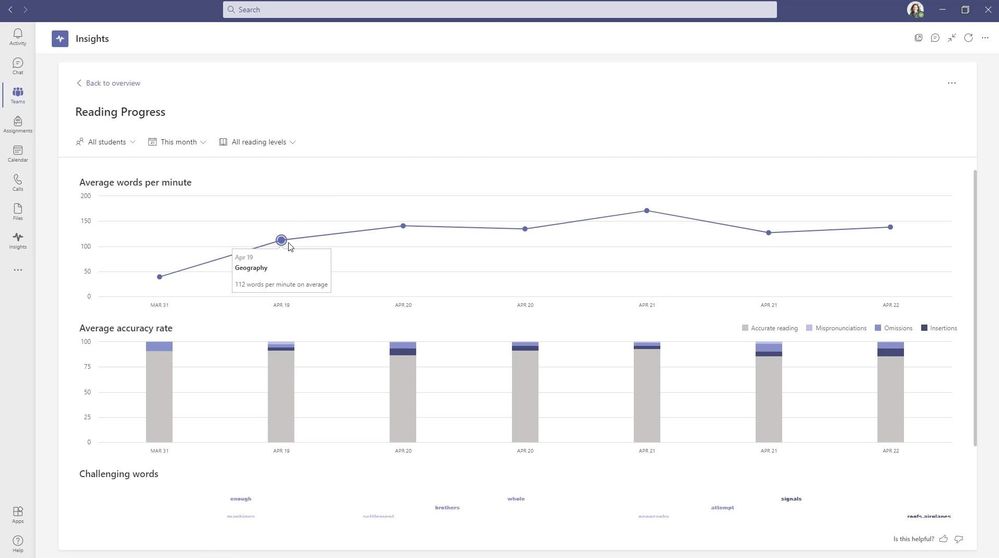
Average words per minute and accuracy across a class or by student
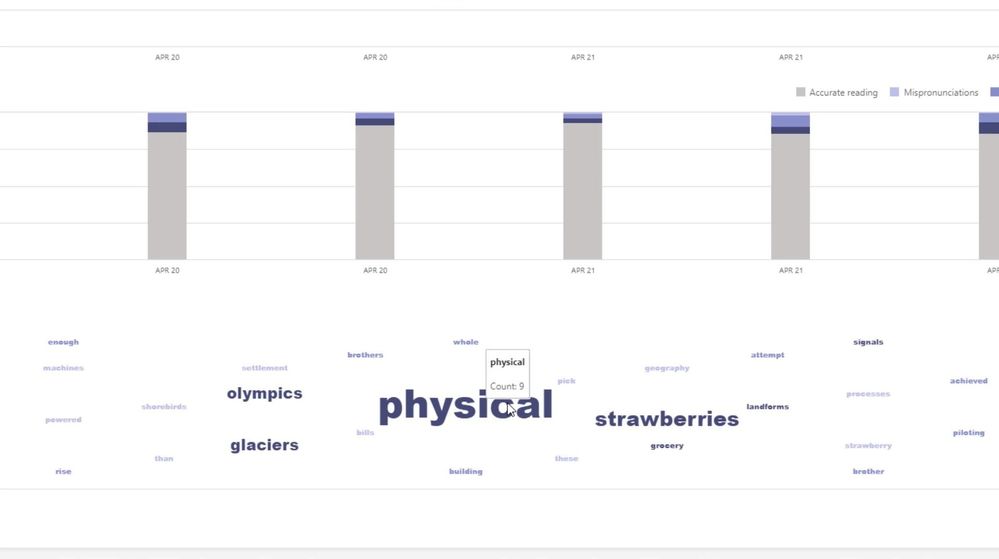
Word cloud of most challenging word across a class or by student
A Reading Progress end-to-end demo
We’ve put together a support materials as well as an end-to-end video showing the details of how the entire Reading Progress experience works in Teams for Education:
Kate Griggs, founder of CEO of Made by Dyslexia, has had access to our early versions of Reading Progress and has this to say “Reading Progress is a FANTASTIC resource for teachers of, and children with dyslexia. Reading aloud is something dyslexic students really struggle with and literally dread doing, even in small groups or 1:1 with a teacher. Reading Progress offers a great way for dyslexic students to demonstrate what they can do, without feeling embarrassed or nervous. This will be a game changer”.
Next Steps:
Reading Progress is currently in wide private testing with thousands of educators and is supported on Desktop, web, Mac, iOS and Android. We are actively listening to educator and student feedback and updating and improving the tool regularly to meet your needs. We will continue adding more schools to our private preview, and anticipate having Reading Progress at General Availability by late August of 2021, in time for back to school (Northern Hemisphere).
We have many improvements coming this summer, including support for PDF upload, iOS and Android video, a sample content library from ReadWorks, and the highly requested integration and roll up into Education Insights Premium. This will allow schools and districts to aggregate and roll up Reading Progress data into broader dashboards and analytics through the just-announced Education Insights Premium offering.
We also have a new Reading Progress page on the Microsoft Educator Center, and a MEC course coming later this summer.
A huge THANK YOU to all of the educators, students, and reading experts who have worked with us and given us feedback along this exciting journey. We look forward to collaborating with you as we continue!
Mike Tholfsen
Principal Product Manager
Microsoft Education


Recent Comments