by Contributed | Apr 20, 2021 | Technology
This article is contributed. See the original author and article here.
While back-to-back meetings have become a hallmark of the pandemic era, our recent research proves that even small breaks between meetings can have a positive impact on our stress levels and our ability to focus and engage in meetings.
New settings in Microsoft Outlook make it easy to automatically carve out these essential breaks between back-to-backs – and because we know that one size does not fit all, companies have two options.
- This past summer we released settings that allow individuals to set scheduling defaults that automatically shorten meetings they schedule.
- And based on our research and customer feedback, today we are releasing an additional new setting that allows our commercial customers to set organization-wide scheduling defaults that shorten meetings and create space for breaks for everyone at a company.
The organization-wide setting can be deployed by company administrators using PowerShell.
Administrators can set the meetings in their organization to start late or end early automatically, determining if the break happens at the beginning or end of meetings. From there, a company can also apply different settings to different meeting lengths – 60 minutes and over or under 60 minutes. For example, you can make all meetings under 60 minutes start late with a five minute break and all meetings 60 minutes or over start late with a 10-minute break.
Because we know flexibility is important, once the setting is deployed at the organization level, it is easy for individuals to adjust the setting for their needs – for individual meetings, or all meetings they schedule – by following these instructions.
How does it work?
Once the PowerShell cmdlet has been enabled, the following will happen:
- Individuals in the organization will see their meeting length reduced when creating an event in Outlook.
- If a user has already created an individual setup at any point, the company-wide policy will not apply to them.
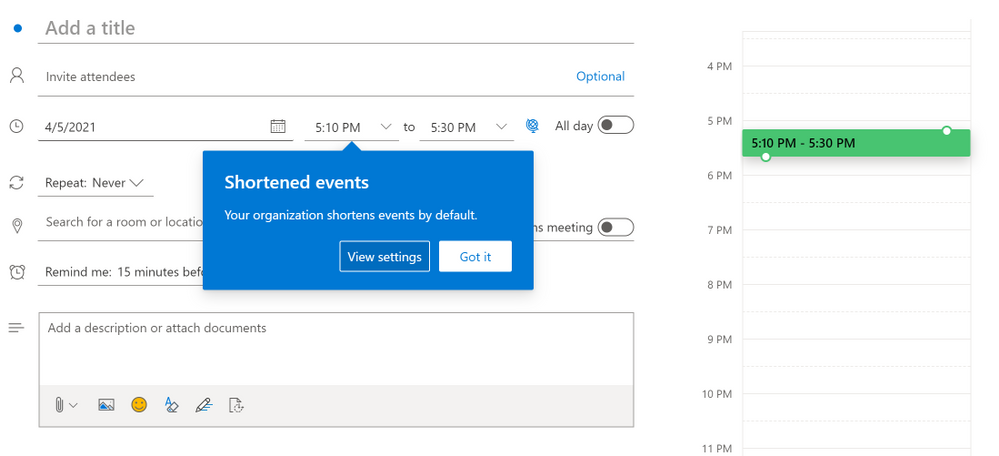
- For now, Outlook on the web will notify users that their organization has implemented a change in their meeting length
Outlook on the web users will see an in-app notification of the change
- The notification will come later to other Outlook clients and users will see it then
- If users have created an individual setup, they will not see the notification – since the change does not apply to them
- All Outlook clients in their latest version will respect the setting but for now only Outlook on the web will show the in-app notification of the change. For the most updated information on which versions respect the settings, read this article.
- Meetings scheduled from Microsoft Teams will not respect this setting at this time, but shortened events created in Outlook will show up in the Teams calendar with the shortened length. The capability will be coming to meetings scheduled from Teams in the future.
- We know that even in the same organization, teams and individuals have different needs so users can change their meeting length at any point and override the company setting by following the instructions in Make all your events shorter automatically – Office Support (microsoft.com)
How do I enable this?
For our main Microsoft Exchange Online PowerShell documentation, please go here. You can also follow the instructions below.
Admins can set the default settings for shortened events using Set-OrganizationConfig.
- [-ShortenEventScopeDefault <String | Uint32>]
The ShortenEventScopeDefault parameter specifies whether events start late or end early.
Possible values:
- None | 0: shortened events is OFF (i.e. unchecked in the UX) – This is the default value
- EndEarly | 1: end early
- StartLate | 2: start late
- [-DefaultMinutesToReduceShortEventsBy <Uint32>] – optional
The DefaultMinutesToReduceShortEventsBy parameter specifies the number of minutes to shorten events under 60-minutes long.
Possible values: 0-29.
Default value: 5.
This parameter cannot be set without the ShortenEventScopeDefault parameter.
- [-DefaultMinutesToReduceLongEventsBy <Uint32>] – optional
The DefaultMinutesToReduceLongEventsBy parameter specifies the number of minutes to shorten events that are 60-minutes or longer.
Possible values: 0-29.
Default value: 10.
This parameter cannot be set without the ShortenEventScopeDefault parameter.
Examples:
- (valid) All users in the organization start 5/10min late:
Set-OrganizationConfig -ShortenEventScopeDefault 2 (this uses the default length)
- (valid) All users in the organization have short (under 60 minutes) and long (60-minutes or longer) events start 5-min late:
Set-OrganizationConfig -ShortenEventScopeDefault 2 -DefaultMinutesToReduceLongEventsBy 5
- (invalid) All users in the tenant have events start 5 min late.
Set-OrganizationConfig -DefaultMinutesToReduceLongEventsBy 5 Invalid. Missing ShortenEventScopeDefault.
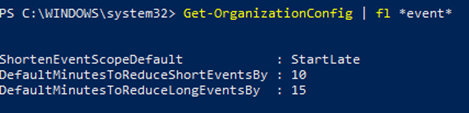
Note: Admins can see the current value of the settings using Get-OrganizationConfig cmdlet.
As always, your feedback helps us prioritize our work and understand better how we can help you, so stop by our UserVoice channel and share your ideas.
Thanks!
Gabriel

by Contributed | Apr 20, 2021 | Technology
This article is contributed. See the original author and article here.
This series highlights Microsoft Learn Student Ambassadors who achieved the Gold milestone and have recently graduated from university. Each blog features a different student and highlights their accomplishments, their experience with the Student Ambassadors community, and what they’re up to now.
Today we’d like to introduce Sabiha Shaik, who is from the United Arab Emirates and graduated last September from the Birla Institute of Technology and Science Pilani, Dubai Campus.
Responses have been edited for clarity and length.
When you became a Student Ambassador in the Fall of 2018, did you have any specific goals you wanted to reach, like attain a skill or work on a particular quality? What were they, and did being a Student Ambassador help you achieve them?
I wanted to form connections with others who are as passionate about technology as I was, learn about upcoming technologies, and have an opportunity to reach as many people as possible and create a greater impact in my local community. Through the program, I was able to achieve all the above and so much more.
I was able to learn more about two specific areas I wanted to develop myself in–digital accessibility and mobile and web development. Attending weekly office hours, asking questions to Cloud Advocates, and participating in topic-specific hackathons all really helped me push my technical knowledge further. With the resources available to improve soft skills and interacting with other Student Ambassadors, I was able to increase the impact in my community by growing attendance at events.
I met many Student Ambassadors and was able to collaborate with a few along with a Microsoft Most Valuable Professional to start the MSInspir YouTube Channel. Since the channel started in Aug 2019, it has gained 41,789 views and a subscriber count of 1.59K. It includes 114 videos to date consisting of workshops, interviews, podcasts, and quick tips on all aspects related to technology.
Overall, the program was exactly what I needed as a student. It offered me a supportive community where I could be myself, thrive, and work towards building something that was much greater than myself. This community has had a tremendous impact on me, especially during university because I felt a bit left out as I couldn’t find others who were as passionate or interested in technology as I was. This community gave me a chance to not only develop technical skills and soft skills but also have connections to cherish even after leaving the program.
You’ve mentioned some of your accomplishments, but what was one of the accomplishments that you’re proudest of?
If I had to pick one, it would be speaking at the Student Zone of Microsoft Build 2020 about Microsoft MakeCode Arcade, where I gave a hands-on tutorial introducing programming concepts while creating a simple sprite-based game. Being able to interact and speak to an audience consisting of a mix of young students and new and experienced programmers who were looking to getting started creating games with block coding was truly an amazing experience. Session evaluations showed that 77% of the attendees learned new skills, and 88% were likely to use the skills discussed. It was amazing to learn that the session had such a huge impact, one that I was aiming to create when I joined the program. The session recording was later uploaded to YouTube where it was able to reach many more youths interested in getting started with programming, games, and block coding.
You graduated several months ago. What have you been up to since then?
I joined as a Junior Developer at the Chalhoub Group, the leading partner for luxury across the Middle East for over 60 years. I’m helping to develop the internal learning experience platform that employees use to learn everything from retail, leadership, digital and enabling artsthrough interactive interactions and experiences using code!
I still plan to continue conducting sessions and give back to the community during my free time.
If you could redo your time in the program, is there anything you would have done differently?
I don’t think there is a lot I would have done differently as my time in the program was filled with so many opportunities that I got to experience. I would probably have been a bit more confident and assured that what I’m doing is on the right track and do the thing, no matter how scary it might seem at first!
If you were to describe the Student Ambassadors community to a student who is considering joining, what would you say to convince them to join?
Imagine waking up every day knowing there is a community of people you can share your ideas with, collaborate with and leave a lasting impact on the world. That’s the Student Ambassadors program. The opportunities in the program are endless – you get to develop your soft skills, event organization skills, and marketing skills on top of technical skills, and you get to expand your network. It’s a program that provides you a perfect blend of everything you might want to experience as a student.
And what advice would you give to new Student Ambassadors?
You’ll get as much out of the program as much work as you put in it. Seek as many experiences as you can in the program. Any given week there are plenty of things that are happening in the Student Ambassador community. Be active in the program.
Set goals and milestones for yourself in the program and think of how you can work on it by thinking of specific things you can do in the Student Ambassador community to achieve them.
Reach out to others in the program to learn from them and experiment with their tips for your local community. It’s not often that you have access to such a huge network of students from all across the world!
Finally, remember that it’s all about giving back and being proud of what you’ve accomplished, even if it’s just making that difference for one person in your community.
Do you have a motto in life, a guiding principle that drives you?
Do one thing every day (or week) that scares you! Growth comes from new challenges, and one way to ensure you keep growing is to keep doing things outside your comfort zone.
Lastly, on a lighter note, can you share one random fun fact about you that not many people know?
I enjoy art and painting in my leisure time, specifically sketching and acrylic painting. I was a part of the graphic design club at university where I designed posters for various events.
Thank you, Sabiha, and good luck to you in all your future endeavors! Learn more about the Student Ambassadors community and start your own journey today.
by Contributed | Apr 20, 2021 | Technology
This article is contributed. See the original author and article here.
The small island of Malta is about to become much bigger: April 24 is set to see scores of speakers and tech enthusiasts meet digitally for the country’s first-ever Data Saturday.
This Saturday’s event is scheduled to host the best speakers and technical sessions about Microsoft Data Platform available for free to the entire world.
The Maltese edition of Data Saturday, the larger event which enables the data community to run small regional events with little outlay or set-up difficulties, is made especially by the tech community for the tech community.
Co-organized by Data Platform MVP and Malta Microsoft Data Platform User Group member Dennes Torres, all speakers and organizers are volunteers, who expect to stay awake until late in the night to prepare an unforgettable learning experience.
Viewers, meanwhile, will play a part in deciding the conference itself: they will vote for the speakers and sessions.
For more information, visit the Meetup and Facebook pages.



Recent Comments