by Contributed | Mar 17, 2021 | Technology
This article is contributed. See the original author and article here.
The Service Broker component of Azure SQL Managed Instance allows you to compose applications from independent services, by providing native support for reliable and secure message exchange between the databases attached to the services.
Thanks to the support for cross-instance message exchange, which is in preview as of March 2021, Azure SQL Managed Instance can host a data tier of applications that distribute work across multiple instances that may reside in different Azure regions.
Establishing trust between instances
For two instances to be able to send messages to each other using Service Broker, you must exchange public keys of the certificates linked to their local Service Broker endpoints first. Installing a certificate with public key by authorized person constitutes a statement of trust in the other instance that holds the corresponding private key.
Traditionally, exchanging certificates between the instances of SQL Server was a manual operation that consisted of extracting the public key, providing it to the other instance in a secure way, and installing it on the other instance. With Managed Instance this process has been significantly simplified thanks to the Server Trust Groups.
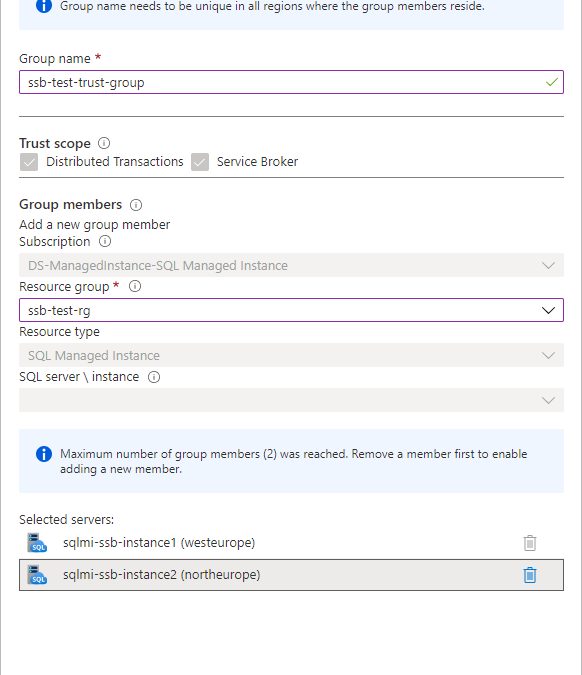
You establish the trust between the instances by creating server trust group starting from one instance and adding another instance to the group. It’s as simple as that.
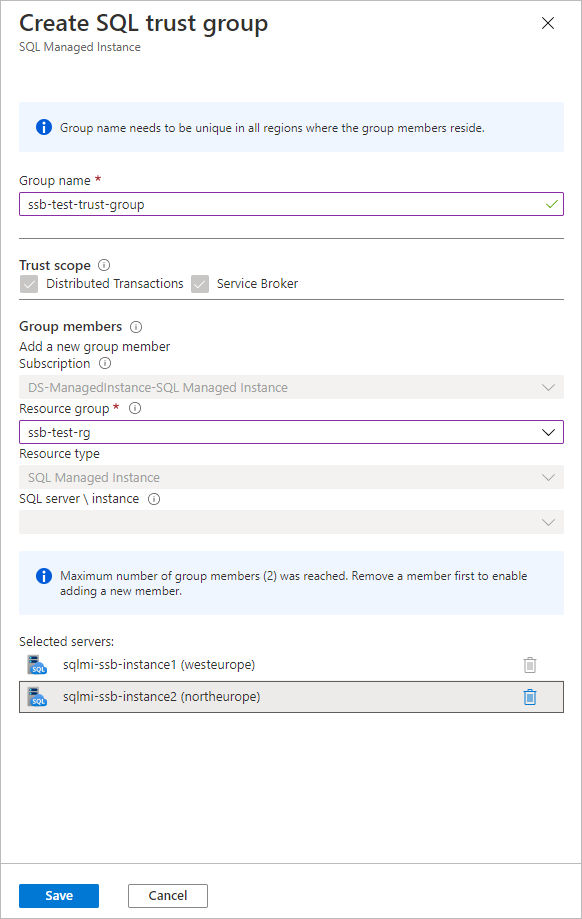
To establish trust among multiple instances, create new server trust group for each pair of instances. During the preview of server trust group feature, maximum number of members of group is limited to two.
Allowing network traffic between the instances
If your instances reside in the same virtual network subnet, there are no actions needed to allow the Service Broker traffic between them. If they are placed in different virtual network subnets, you need to enable both the inbound and outbound traffic between the subnets on a set of ports.
Service Broker connections always use redirect connection policy regardless of the connection type configured on the managed instance. Instance initiating the connection reaches to the gateway within the target instance’s subnet to obtain actual IP address and port of the target instance, and subsequent traffic flows directly to the target instance bypassing the gateway.
Gateway listens for incoming Service Broker connections on port 4022 which is default port for Service Broker endpoints. Connection is routed to gateway because the DNS name of managed instance from the Service Broker route resolves to the IP address of the gateway. Gateway then redirects connection to the actual IP address of instance and its automatically assigned port from the range 11000-11999. You cannot change the port used by gateway or instance for service broker traffic. To allow Service Broker traffic between the instances, port 4022 and port range 11000-11999 must be allowed both for the inbound and outbound traffic in both subnets.
Creating Service Broker objects
If you are working with Service Broker for the first time, you may be surprised by how many different objects you must create to be able to send a message. No worries, the entire concept is intuitive, and you will quickly adopt it. If you’d like to explore specific aspects of the feature, I’d strongly recommend you to start from here.
In this article we will cover the simplest case of message exchange between two instances that have trust relation already established and network traffic allowed.
Let’s start from creating the necessary objects on the first instance sqlmi-ssb-instance1:
--Create the message types
CREATE MESSAGE TYPE [//BothDB/2InstSample/RequestMessage]
       VALIDATION = NONE;
CREATE MESSAGE TYPE [//BothDB/2InstSample/ReplyMessage]
       VALIDATION = NONE;
GO

--Create the contract
CREATE CONTRACT [//BothDB/2InstSample/SimpleContract]
      ([//BothDB/2InstSample/RequestMessage]
         SENT BY INITIATOR,
       [//BothDB/2InstSample/ReplyMessage]
         SENT BY TARGET
      );
GO

--Create the initiator queue and service
CREATE QUEUE SQLMIQueue1;

CREATE SERVICE [//SQLMIDB1/2InstSample/SQLMIService]
       ON QUEUE SQLMIQueue1
       ([//BothDB/2InstSample/SimpleContract]);
GO

--Grant the access to the service to a specific user, or public for quick testing:
GRANT SEND
      ON SERVICE::[//SQLMIDB1/2InstSample/SQLMIService]
      TO [public]
GO

--Create route:
CREATE ROUTE SQLMIRoute1
WITH SERVICE_NAME = N'//SQLMIDB2/2InstSample/SQLMIService',
     ADDRESS = N'TCP://sqlmi-ssb-instance2.50d0d943a5ad.database.windows.net:4022';
Create the corresponding objects on the second instance sqlmi-ssb-instance2:
--Create the message types
CREATE MESSAGE TYPE [//BothDB/2InstSample/RequestMessage]
       VALIDATION = NONE;
CREATE MESSAGE TYPE [//BothDB/2InstSample/ReplyMessage]
       VALIDATION = NONE;
GO

--Create the contract
CREATE CONTRACT [//BothDB/2InstSample/SimpleContract]
      ([//BothDB/2InstSample/RequestMessage]
         SENT BY INITIATOR,
       [//BothDB/2InstSample/ReplyMessage]
         SENT BY TARGET
      );
GO

--Create the initiator queue and service
CREATE QUEUE SQLMIQueue2;

CREATE SERVICE [//SQLMIDB2/2InstSample/SQLMIService]
       ON QUEUE SQLMIQueue2
       ([//BothDB/2InstSample/SimpleContract]);
GO

--Grant send to [public] - because there is no remote service binding
GRANT SEND
      ON SERVICE::[//SQLMIDB2/2InstSample/SQLMIService]
      TO [public]
GO


--Create route
CREATE ROUTE SQLMIRoute2
WITH SERVICE_NAME = N'//SQLMIDB1/2InstSample/SQLMIService',
     ADDRESS = N'TCP://sqlmi-ssb-instance1.50d0d943a5ad.database.windows.net:4022';
Sending and receiving messages
Now we can finally send the message from the first instance:
--Send message:
DECLARE @InitDlgHandle UNIQUEIDENTIFIER;
DECLARE @RequestMsg NVARCHAR(100);

BEGIN TRANSACTION;

BEGIN DIALOG @InitDlgHandle
     FROM SERVICE [//SQLMIDB1/2InstSample/SQLMIService]
     TO SERVICE N'//SQLMIDB2/2InstSample/SQLMIService'
     ON CONTRACT [//BothDB/2InstSample/SimpleContract]
     WITH
         --ENCRYPTION = ON;
		 ENCRYPTION = OFF;
SELECT @RequestMsg = N'<RequestMsg>Hello other world!</RequestMsg>';

SEND ON CONVERSATION @InitDlgHandle
     MESSAGE TYPE [//BothDB/2InstSample/RequestMessage]
     (@RequestMsg);

SELECT @RequestMsg AS SentRequestMsg;

COMMIT TRANSACTION;
GO
Receive message on the second instance and reply to the first instance:
DECLARE @RecvReqDlgHandle UNIQUEIDENTIFIER;
DECLARE @RecvReqMsg NVARCHAR(100);
DECLARE @RecvReqMsgName sysname;

BEGIN TRANSACTION;

WAITFOR
( RECEIVE TOP(1)
    @RecvReqDlgHandle = conversation_handle,
    @RecvReqMsg = message_body,
    @RecvReqMsgName = message_type_name
  FROM SQLMIQueue2
), TIMEOUT 1000;

SELECT @RecvReqMsg AS ReceivedRequestMsg;

IF @RecvReqMsgName = N'//BothDB/2InstSample/RequestMessage'
BEGIN
     DECLARE @ReplyMsg NVARCHAR(100);
     SELECT @ReplyMsg =
        N'<ReplyMsg>Hello from the other world!</ReplyMsg>';

     SEND ON CONVERSATION @RecvReqDlgHandle
          MESSAGE TYPE [//BothDB/2InstSample/ReplyMessage]
          (@ReplyMsg);
END

SELECT @ReplyMsg AS SentReplyMsg;

COMMIT TRANSACTION;
GO
Specificities and limitations of Service Broker in SQL Managed Instance
Service Broker endpoint is automatically enabled on every Azure SQL Managed Instance and cannot be disabled.
Message forwarding cannot be enabled.
Port specified on every route created needs to be 4022
Route address cannot specify ‘TRANSPORT’
Remote service binding cannot be created
Resources
Server trust groups
Service broker documentation
by Contributed | Mar 17, 2021 | Technology
This article is contributed. See the original author and article here.
Overview
As the world’s first cloud-native SIEM with built-in SOAR and UEBA capabilities, Azure Sentinel has experienced a tremendous uptake in the market since its September 2019 launch. Today, Azure Sentinel is recognized as a Leader in the Forrester Wave’s Security Analytics Platforms report for Q4, 2020.
A key task that faces customers who continue to migrate from other SIEM solutions to Azure Sentinel is translating existing detection rules into rules that map to Azure Sentinel as accurately as possible. However, Azure Sentinel offers significant advantages around the analytics rules pillar that make SIEM migrations a worthwhile effort. Some of these features include four built-in rule types (discussed later in this blog), alert grouping, event grouping, entity mapping, evidence summary, and a powerful query language that can be used across other Microsoft solutions such as Microsoft Defender for Endpoint and Application Insights.
Event Grouping
This is one of the features in Azure Sentinel that will help you reduce alert noise. It accomplishes this by allowing you to determine how alerts are generated-either based on each event or based on several events for which you define the event threshold needed to trigger an alert. It can be useful to the SOC team if they are interested in tracking a particular entity across Azure Sentinel as they investigate an incident associated with it.
Alert Grouping
Like Event Grouping, Alert Grouping has the same fundamental goal of reducing alert fatigue. The feature allows you to group up to 150 alerts occurring within a given timeframe and offer three options for the grouping, i.e., if all entities match, by all alerts triggered by the scheduled rule, or if matches of specific entities are found.
Entity mapping
With the entity mapping features, SOC engineers can define entities which they would like to show up as part of the evidence to be tracked during the investigation. This also makes it possible for SOC analysts to take advantage of the intuitive Investigation Graph feature that significantly reduces investigation effort compared to legacy SIEMs.
Evidence summary
Once an analytics rule creates an incident, the evidence gathered is presented in an easy-to-use summary. This feature is within the incident preview pane and surfaces events, alerts, and any bookmarks associated with a particular incident. Additionally, entities and tactics also show up in the incident pane. This makes it much easier to conduct triage as the incident page provides a snapshot of essential details needed by an analyst to judge how to begin a particular investigation.
Kusto Query Language (KQL)
KQL is based on read-only requests to process data and return results. The request is sent to a Log Analytics database and is stated in plain text, using a data-flow model designed to make the syntax easy to read, author, and automate. Azure Sentinel stores data within a Log Analytics workspace. Given that several other Microsoft services also store data in Log Analytics or Azure Data Explorer, the learning curve needed to query or correlate with Log Analytics data, regardless of its source, is of significant benefit.
To help facilitate the migration journey for our customers and partners, this blog combines a range of resources to provide as much guidance as possible for migrating existing rules from ArcSight, QRadar, and Splunk into the analytics rules used by Azure Sentinel.
This blog discusses the important steps and best practices recommended when migrating your detection rules from ArcSight, Splunk, and QRadar (referred to from now on as third-party SIEMs) to Azure Sentinel. We share these steps and best practices hoping that they will facilitate your migration process in a structured and planned manner.
Components of a detection rule
Before we dive into the rule migration process, let’s discuss the components that make up a detection rule at a high-level. For example, let’s review the terminology differences between other SIEMs and Azure Sentinel. This section will help you understand how the terms you are familiar with in your previous SIEM translate into Azure Sentinel terminology.
This section is NOT a feature comparison between the SIEMs, but rather a mapping of terminology between Azure Sentinel and other SIEMs.
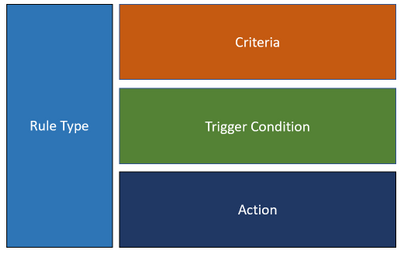
In general, a rule consists of the following main components:
Figure 1
Because every SIEM is different, the terminology and usage for each of the components are different too. Below is a summary of how each component maps into Azure Sentinel, ArcSight, QRadar, and Splunk. This mapping should help to clarify the concept of a rule in Azure Sentinel compared to other SIEMs.
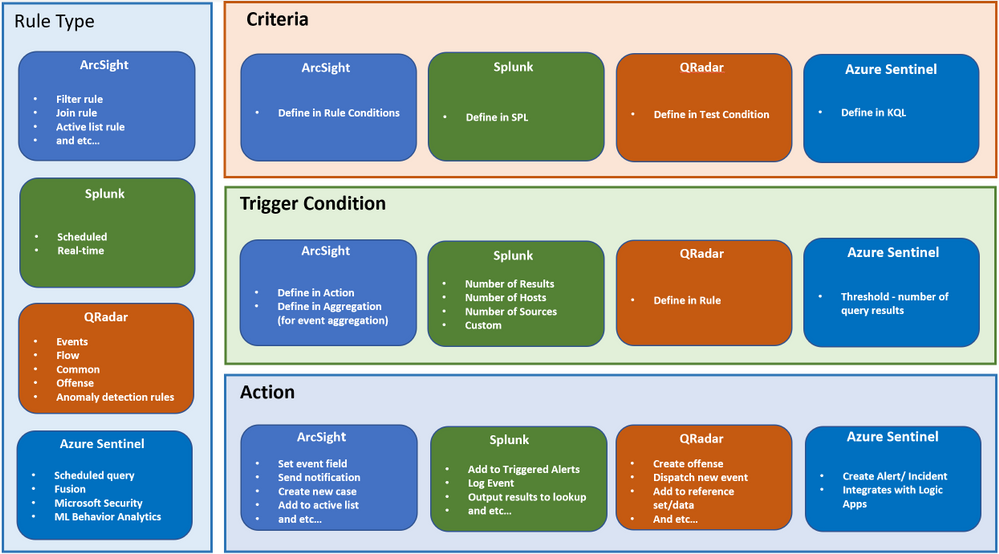
Figure 2
Rule migration flow
Rule migration across SIEMs is not a trivial task. It requires a clear strategy and a detailed implementation plan to achieve business goals while reducing the security risk of not having enough detection coverage.
The following rule migration process flow should help you identify the key elements in the migration, understand the interrelationships among the various steps, and evaluate the decision points. This will help you better strategize and prepare for the migration.
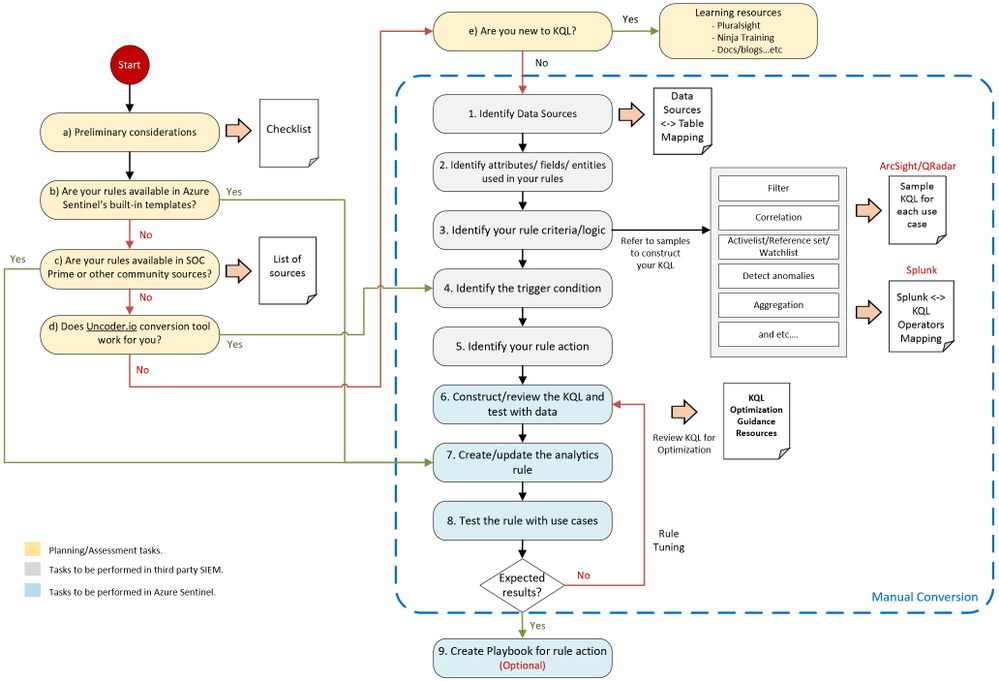
Figure 3
The steps in the migration process have the following categories:
- Planning / Assessment tasks.
- Tasks to be performed in third-party SIEM.
- Tasks to be performed in Azure Sentinel.
i ) “Planning and assessment tasks” provides a list of checklists and important points to consider before you begin with the rule migration steps. They also include useful resources to help you prepare for the journey.
ii ) “Tsks to be performed in third party SIEM” mainly captures the rule content. These steps are important to ensure the rules’ accuracy and quality to eliminate any discrepancies once they are moved to Azure Sentinel.
iii ) “Tasks to be performed in Azure Sentinel” is mainly related to creating the rule itself in Azure Sentinel.
As every SIEM works differently in terms of detection rules, we have provided sample rule mappings to help you understand the key differences and how a particular rule type in your legacy SIEM would look like in Azure Sentinel.
Keep in mind that the flow shown above is applicable to rule migration and for creating a new custom threat detection in Azure Sentinel.
Let’s dive into the process flow and discuss each step in detail.
Planning/ Assessment task
a) Preliminary considerations
There are a few key points to consider before making the effort to migrate your existing detection rules.
Azure Sentinel has built-in detection templates available, which users can enable with the pre-defined detection logic. Azure Sentinel also uses machine learning analytics to produce high fidelity and actionable incidents. Therefore, it is very likely that some of your existing detections are not required anymore because machine learning can do a better job (we will discuss the built-in detection templates in step b). Always review your rules, and be careful not to be too obsessed about getting all the rules or exact rule content migrated.
Below are some of the main considerations when migrating analytics to Azure Sentinel:
1. Do NOT migrate all the rules blindly. Focus on the quality of the rules, not quantity.
2. Avoid Reinventing the Wheel by leveraging available resources.
▪ Review all the Azure Sentinel built-in rules to identify out-of-the-box rules that can address your use-cases.
▪ Explore community resources such as SOC Prime Threat Detection Marketplace.
▪ We will discuss the above in more detail under steps b and c.
3. Confirm connected data sources and review data connection methods.
▪ Revisit data collection conversations to ensure data depth and data breadth across the use cases you plan to detect.
4. Build a candidate list of rules that have a high true positive rate. Use the following guidance as your checklist:
▪ Select use cases. To select use cases that justify rule migration, consider the question: What problems are we trying to solve? Consider use cases in terms of business priority.
▪ Review the detection efficacy of existing rules before deciding to migrate them into Azure Sentinel.
▪ Review your SOC metrics and consult your SOC team to identify alerts they routinely ignore without consequence.
▪ Review rules that haven’t triggered any alerts in the last 6 to 12 months to determine whether they are still relevant.
▪ Eliminate some of the low-level threats or alerts you routinely ignore. The more you can weed out alerts that you don’t act upon, the more likely the higher-value alerts will be acted upon.
5. Prepare a validation process.
▪ Define test scenarios and build a test script to be used for rule validation.
Here is the summarized checklist for your reference:
No
|
Item
|
Check Box
|
1
|
Review all the Azure Sentinel built-in rules to identify out-of-the-box rules that can address your use-cases. If there are built-in rules you can use, you’ll need to migrate fewer rules from your current SIEM.
|
☐
|
2
|
Explore community resources, such as the SOC Prime Threat Detection Marketplace, for additional rules you can use instead of migrating your current rules.
|
☐
|
3
|
Confirm connected data sources and review data connection methods.
|
☐
|
4
|
Identity and prioritize use cases to be migrated These should answer the question – What problems are we trying to solve?
Consider use cases in terms of business priority.
|
☐
|
5
|
Review the detection efficacy of existing rules before deciding to migrate them into Azure Sentinel. Only migrate those rules that are truly useful.
|
☐
|
6
|
Review your SOC metrics and consult your SOC team to identify alerts they routinely ignore without consequence.
|
☐
|
7
|
Review rules that haven’t triggered any alerts in the last 6 to 12 months to determine whether they are still relevant.
|
☐
|
8
|
Eliminate some of the low-level threats or alerts you routinely ignore. The more you can weed out alerts that you don’t act upon, the more likely the higher-value alerts will be acted upon.
|
☐
|
9
|
Define test scenarios and build a test script to be used for rule validation.
|
☐
|
b) Review built-in templates
Azure Sentinel provides out-of-the-box detection templates based on various data source types, which you can leverage to create alerts and respond to threats in your environment. Detection templates currently include the following types:
Microsoft security templates automatically create Azure Sentinel incidents from the alerts generated in other Microsoft security solutions in real-time. Use Microsoft security rules as templates to create new rules with similar logic. For more information about security rules, see Automatically create incidents from Microsoft security alerts.
Based on Fusion technology, advanced multistage attack detection in Azure Sentinel uses scalable machine learning algorithms. These can correlate many low-fidelity alerts and events across multiple products into high-fidelity and actionable incidents. Fusion is enabled by default. Because the logic is hidden and therefore not customizable, you can only create one rule with this template.
- Machine learning behavioral analytics (Public Preview)
These templates are based on proprietary Microsoft machine learning algorithms, so you cannot see the internal logic of how they work and when they run. Because the logic is hidden and therefore not customizable, you can only create one rule with each template of this type.
Scheduled analytics rules are based on built-in queries written by Microsoft security experts. You can see the query logic and make changes to it. You can use the scheduled rules template and customize the query logic and scheduling settings to create new rules.
Review the following templates to eliminate the number of rules or use-cases needed to migrate.
c) SOC Prime TDM and other community sources
SOC Prime Threat Detection Marketplace is a SaaS content platform that provides actionable threat detection content, including security rule packs for Azure Sentinel (some content is subject to a subscription plan).
You can deploy rules and hunting queries directly from SOC Prime TDM to Azure Sentinel by using the SOC Prime – Azure Sentinel integration. SOC Prime also has a free translation tool (uncoder.io), which helps convert rules from any SIEM and Sigma to Kusto Query Language (KQL). KQL is the query language used in Azure Sentinel’s analytics and hunting. We will discuss the tool further in the next step.
We also recommend that you watch the Microsoft Tech Community Azure Sentinel blog, which may include articles about use cases that are relevant to you. Besides that, here is another link to some additional use cases for your reference.
d) Uncoder.io translator
Uncoder.io is SOC Prime’s online conversion tool for SIEM search language. Uncoder.io can convert rules in Sigma or queries from other SIEMs to Azure Sentinel without the need to access the SIEM.
Once you get the translated query, you must review and test the query before using it on the analytics rule. This is to prevent queries that are not optimized or poorly written from being migrated. You can test the query by running it in your Azure Sentinel workspace (Logs page) with your data. Also, make sure to review the query against the below KQL optimization guides.
KQL optimization guides :
e) Learning resources for KQL
Azure Sentinel is built on top of the Log Analytics workspace, which uses Kusto Query Language (KQL). KQL is an integral part of Azure Sentinel, as you use KQL to create custom detection, hunting, visualization rules, and many more. If you are new to KQL, we recommend learning the basics before proceeding with the rule migration journey. In general, the language is not complex, and the logs interface is easy to use.
To help you with your learning journey, we have compiled a list of KQL learning resources below ordered by proficiency level. Whether you are a beginner or an experienced user, you should find content that suits you.
Tasks to be performed in third party SIEM
After you’ve gone through the planning/assessment steps, you should have identified a list of third-party SIEM rules that you want to migrate to Azure Sentinel.
Before you start creating the analytics rules in Azure Sentinel, you must gather information about your rules, such as the rule condition, entities, actions, and other relevant details for you to configure in Azure Sentinel.
Let’s revisit the flow diagram on the steps involved:
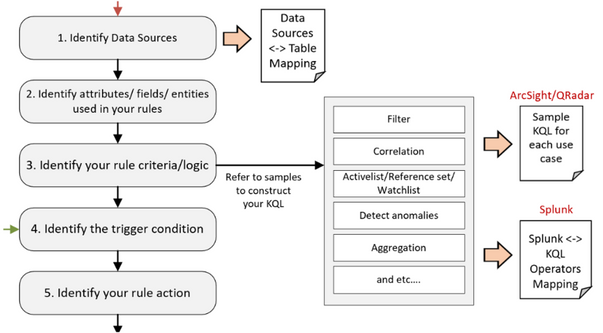
Figure 4
1. Identify Data Sources.
The first step is to identify the data sources of your rules, such as Windows events, firewall logs via Common Event Format, and so on. Knowing the data source allows you to target the correct table when constructing the KQL for your detection rules in Azure Sentinel. You’ll also need to ensure that the specific data source is being collected in Azure Sentinel.
Azure Sentinel is built on top of the Log Analytics workspace and contains multiple tables. Each table is defined by a unique set of columns for each data source.
Refer to the Azure Monitor security table reference for a list of built-in table names, schemas, and data structure.
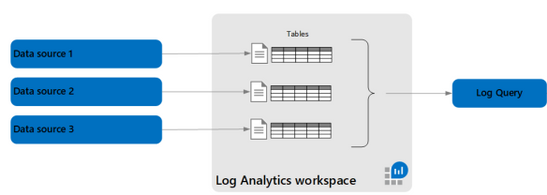
Figure 5
The table where data is stored for a specific data type also depends on the collection method. For example, Windows Security events collected by the Log Analytics/Azure Monitor agent are stored in the SecurityEvent table. However, if you use Logstash to collect Windows Security events, they are stored in a user-defined custom table.
To help you map between the data source and table, we have compiled a list of common data sources-table mappings in the following link. The mappings include the collection method for each data source.
2. Identify attributes/fields/entities used.
Next is to identify the attributes/fields used in your third-party SIEM rules, such as rule name, description, severity, the fields used for filtering, and so on. After you’ve identified the field names, find the corresponding columns in the Log Analytics table reference. You will use the Log Analytics columns in your KQL query when creating the rule.
You must also identify the entity types related to your rules, such as the user account and computer, if you are monitoring logon events. This allows you to configure entity mapping in Azure Sentinel and use the Azure Sentinel Investigation graph to display entity relationships across different data sources during an incident investigation.
3. Identify your rule criteria/logic.
Rule criteria are considered the most crucial part of the rule as it defines what to detect.
- Both Azure Sentinel and Splunk have the rule criteria defined in the query.
- ArcSight and QRadar configure their detection logic in the Rule Condition and Test Condition, which are UI-based settings.
Due to the differences between SIEMs, it can be challenging for SOC engineers to convert the rule criteria from a third-party SIEM to Azure Sentinel, especially from ArcSight and QRadar.
The following rule criteria mapping samples aim to guide how to convert some of the common logic found in ArcSight and QRadar to Azure Sentinel.
As Splunk is also a query-based SIEM, the following link shows sample queries in Splunk’s Search Processing Language (SPL) and their KQL equivalents for some of the commonly used operators.
4. Identify the trigger condition.
After you’ve identified the rule criteria, the next step is to determine the trigger condition. This is usually associated with the minimum requirement for the rule to trigger an action. For example, the number of matching events within X timeframe to generate an alert.
(We discuss Actions in the next step).
In Azure Sentinel, the minimum number of matching events is referred to as the threshold, while the X timeframe is the lookback period for the KQL query to search.
5. Identify your rule action.
The final information to collect is the action to take when your rule criteria match the trigger condition.
The default actions in Azure Sentinel are to create alerts, and optionally, incidents. You can also automate your responses or security orchestration with Playbooks by leveraging Azure Logic Apps.
Azure Logic Apps is Azure Sentinel’s automation and orchestration solution and provides a highly extensible architecture that enables scalable automation as new technologies and threats emerge. To build playbooks with Azure Logic Apps, choose from a growing gallery of built-in playbooks or from the Azure Sentinel Github repository.
One of the common actions is adding suspicious hosts to your Active List/Reference Set/Lookup (the terminology depends on the SIEM you are using). The equivalent in Azure Sentinel is the Watchlist. Here is a sample Playbook for adding a host to Watchlist.
Tasks to be performed in Azure Sentinel
We will focus on the KQL, analytics rules, and Playbooks for your migration rules in the next few steps. By the time you arrive at this stage, you should already have accomplished one of the following:
- Identified a list of third-party rules to migrate and gathered the relevant information about the detections. If you don’t yet have the KQL for your rules, proceed to step 6.
- Your rules are available in Azure Sentinel’s built-in templates. If this is the case, proceed to step 7.
- You found your use cases in SOC Prime TDM’s rule packs or community resources. If you have the KQL for your rules, proceed to step 7.
- You have the KQL query translated from the Uncoder.io conversion tool. If you have the KQL for your rules, proceed to step 6.
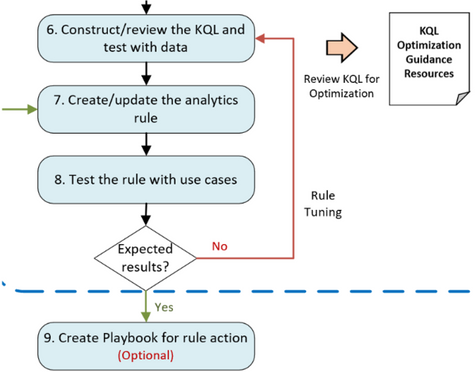
Figure 6
6. Construct/review the KQL and test with data.
At this step, you will mainly work on the KQL for your rules. If you have completed step 5, you will be constructing the KQL based on the samples in step 3 and KQL learning resources in step in Figure 3.
If you are here coming from step d, you should have the KQL from the Uncoder.io conversion.
Test your queries with data. In the Azure Sentinel Logs page, run log searches and tune accordingly. Before you finalize your detection queries, you must review the KQL to improve query performance. Although Azure Sentinel is a cloud-native SIEM that automatically scales resources as you need, it’s best to optimize your KQL queries.
Optimized queries will:
- Run faster, reduce the overall duration of the query execution.
- Have a smaller chance of being throttled or rejected.
As mentioned earlier, refer to the following links for KQL optimization guides :
7. Create/update the analytics rule.
Now it is time to create scheduled analytics rules or enable rule templates (from step b in Figure 3). This step includes automatically creating incidents from Microsoft security alerts.
When creating scheduled rules, you must specify the information that you gathered earlier, such as the KQL, entity mappings, threshold, and so on. Leverage the alert grouping feature to reduce alert noise.
8. Test the rule with use cases.
The newly created/enabled rules must be tested sufficiently to assess the outcome. It is important to define test scenarios and use cases to determine whether the rules met the requirements.
If a rule doesn’t fire any alert as expected, revisit the KQL query (step 6 in Figure 3) and the rule’s settings to ensure you have configured them correctly. Similarly, perform the same if your rule is too noisy.
9. Create a Playbook for rule action.
If a Playbook is part of the requirements (from step 5 in Figure 3), proceed with the Playbook creation by leveraging Azure Logic Apps.
Be sure to check out our extensive list of Playbook samples in the Azure Sentinel GitHub repository.
Summary
In this blog, we covered the preliminary considerations to make before undertaking a rule migration project, identified the key components that make up detection rules across ArcSight, Splunk, and Qradar, and then proposed a detailed roadmap for the conversion process.
A key takeaway is to always start by focusing on business priorities, which should define your use-cases. After you have use-cases clearly understood, the resources provided have a better chance of leading to a successful rule migration outcome.
We hope the steps and resources shared in this blog provide the guidance you need to simplify your migration journey into Azure Sentinel.
We welcome your suggestions and any feedback for further improvement, especially any input based on experiences using the resources described in this guide.
Note: Check out our webinar on this – Azure Sentinel webinar: Best Practices Converting Detection Rules
This blog and migration guidance resources were put together by Jeremy Tan, Innocent Wafula, and Naomi Christis.
With support from Javier Soriano, Younes Khaldi, and Hesham Saad.
Reviewers: Ofer Shezaf, Nicolas DiCola, and Batami Gold
Artifact/resource contributors: Kara Cole, Yaniv Shasha, Cristhofer Munoz, Rafik Gerges – Microsoft and Orhan Moye and Brett Kilroe from our partner – Cyberproof




Recent Comments