by Contributed | Mar 19, 2021 | Technology
This article is contributed. See the original author and article here.
As Universal Print is generally available, we wanted to provide resources to help you get started with using your new subscription benefit. I created a Lunch & Learn video series that walks you through the setup process and provides an overview if you are just getting started.
As a Senior Program Manager in the Microsoft Customer Experience Engineering organization, I work daily with customers that want to set up Universal Print. This series covers a range of topics that these customers want to talk about and that will guide IT administrators in setting up Universal Print for optimal use.
Video topics include:
Each video contains scenarios and screenshots so you can follow along in your setup. Please visit the Universal Print video hub and enjoy—or watch the first video in the series below!
And, don’t forget to visit the Universal Print documentation for Universal Print fundamentals. There, you will find overviews, quick starts, licensing information and more.
Let us know what other topics would be helpful to cover so we can add more to our Lunch & Learn series in the future!
by Contributed | Mar 19, 2021 | Technology
This article is contributed. See the original author and article here.
Build client web apps with “Prolog”
Jun-ichi Sakamoto is a Japanese MVP for Developer Technologies. The 10-time MVP title holder specializes in C#, ASP.NET, Blazor, Azure Web Apps, TypeScript. Jun-ichi’s publication of NuGet packages – like Entity Framework Core, helper, testing tools, Blazor components, and more – have been downloaded more than 18 million times. For more on Jun-ichi, check out his Twitter @jsakamoto

How to request to Azure Event Hubs with Apache JMeter™
Kuniteru Asami is an Azure MVP and core staff member of the Japan Azure User Group. Kuniteru has been providing technical consulting for Microsoft Azure for more than 10 years since its initial release. Moreover, the Japanese Azure expert is the CEO of a company with six Azure MVPs on its staff. Follow him on Twitter @kunyami

Microsoft Ignite 2021: Important Announcements and Updates
Mohamed El-Qassas is a Microsoft MVP, SharePoint StackExchange (StackOverflow) Moderator, C# Corner MVP, Microsoft TechNet Wiki Judge, Blogger, and Senior Technical Consultant with +10 years of experience in SharePoint, Project Server, and BI. In SharePoint StackExchange, he has been elected as the 1st Moderator in the GCC, Middle East, and Africa, and ranked as the 2nd top contributor of all the time. Check out his blog here.

A Brief MVP Summit History
Hal Hostetler is an Office Apps and Services MVP who has been in the MVP program since 1996. Now retired, Hal is a Certified Professional Broadcast Engineer and remains the regional engineer for Daystar Broadcasting and a senior consultant for Roland, Schorr, & Tower. He lives in Tucson, Arizona. For more on Hal, check out his Twitter @TVWizard

C#.NET: HOW TO COPY SYSTEM FOLDER(S)
Asma Khalid is an Entrepreneur, ISV, Product Manager, Full Stack .Net Expert, Community Speaker, Contributor, and Aspiring YouTuber. Asma counts more than 7 years of hands-on experience in Leading, Developing & Managing IT-related projects and products as an IT industry professional. Asma is the first woman from Pakistan to receive the MVP award three times, and the first to receive C-sharp corner online developer community MVP award four times. See her blog here.
by Contributed | Mar 19, 2021 | Technology
This article is contributed. See the original author and article here.
Which community project do you maintain?
Sharing is Caring
How does it help people?
It helps by providing guidance and confidence for community members to know how and where they can get more involved and collaborate.
It is co-maintained by Hugo, Emily and April.
What have you been working on lately?
Increasing the session topic spectrum and finding other ways for folks in the community to get involved, no matter what their skill and talent is.
What do you do at work?
Development and also provide guidance on M365 Architecture
Why are you a part of the M365 community?
I love the collaborative feeling and inclusiveness within the community.
What was you first community contribution?
List Formatting definition. Chris was amazing, helpful and supportive.
One tip for someone who’d like to start contributing
Don’t be afraid to ask others to collaborate. You will be amazed at the new friends you make!
by Contributed | Mar 19, 2021 | Technology
This article is contributed. See the original author and article here.
The Office Add-ins developer platform team has new updates to share this month on Office Add-ins Patterns and Practices. PnP is a community effort, so if you are interested in contributing, see our good first issue list.
Create custom contextual tabs on the ribbon
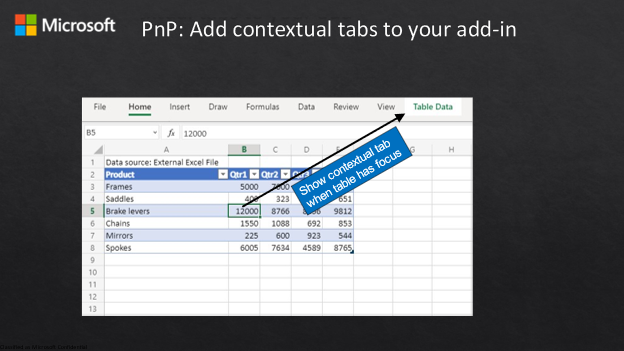
This sample shows how to create a custom contextual tab on the ribbon in the Office UI. The sample creates a table, and when the user moves the focus inside the table, the custom tab is displayed. When the user moves outside the table, the custom tab is hidden.
Contributors
Thank you to our contributors who are actively helping each month with the PnP-OfficeAddins community effort.
Want to contribute?
PnP is a community effort by developers like you. Check out our good first issue list as a great place to help with some samples. Feel free to contribute to existing samples or create new ones.
About Office Add-ins Patterns & Practices (PnP)
Office Add-ins PnP is a Microsoft-led, community driven effort that helps developers extend, build, and provision customizations on the Office platform the right way by providing guidance and help through official documentation and open source initiatives. The source is maintained in GitHub where anyone can participate. You can provide contributions to the samples, reusable components, and documentation. Office Add-ins PnP is owned and coordinated by Office engineering teams, but the work is done by the community for the community.
You can find code samples for Office Add-in development in the Office Add-ins PnP repo. Some samples are also documented in the Office Add-ins docs, such as Open in Excel.
Additional resources
Learn more by joining the monthly Office Add-ins community call.
by Contributed | Mar 19, 2021 | Technology
This article is contributed. See the original author and article here.
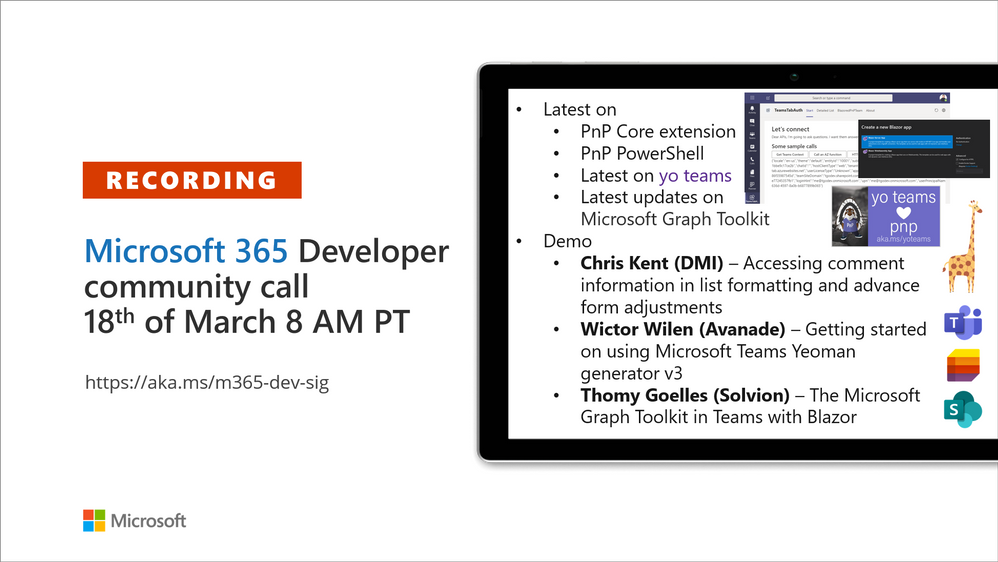
Recording of the Microsoft 365 – General M365 development Special Interest Group (SIG) community call from March 18, 2021.
Call Summary
Latest news from Microsoft 365 engineering and updates on open-source projects: PnP .NET libraries, PnP PowerShell, modernization tooling, on yo Teams, on Microsoft Graph Toolkit, and on Microsoft Teams Samples.
Announcing the GA release of SharePoint Framework v1.12 along with a host of other GA releases – PnP .NET Libraries – PnP Framework v1.3.0, PnP Core SDK v1.0.0 and PnP PowerShell v1.4.0. yo Teams generator-teams (apps generator) v3.0.3 GA and 3.1.0 Preview, yo teams-build-core (gulp tasks) v1.0.1 + v1.1.0 Preview, and msteams-react-base-component (React UI helpers) v3.1.0, have been released. In development – MSAL 2.0 provider and preview of OneDrive file components in Microsoft Graph Toolkit. Released new Microsoft Graph Toolkit training in Microsoft Learn, Register now for March/April trainings on Sharing-is-caring. The host of this call was Vesa Juvonen (Microsoft) | @vesajuvonen. Q&A takes place in chat throughout the call.
Actions:
Microsoft Teams Development Samples: (https://aka.ms/TeamsSampleBrowser)
“Hello Community”
Demos delivered in this session
Accessing comment information in list formatting and advance form adjustments – draw people’s attention to discussions around selected list items by more prominently displaying the number of comments on each item. Accomplish this by using CommentCount, a fluent UI icon and formatting. Be aware of and adjust for differences between how icon containing number renders slightly differently in forms, lists and tiles views. Use sample script in your list today!
Getting started on using Microsoft Teams Yeoman generator v3 – get newest Microsoft Teams App Project Generator – #YoTeams at the Repo. Presenter takes viewer from generator installation, project creation – scaffolding of files, to VS code and explains created files. Note: not using class based React components but using functional components and React hooks. Then create a build and install app – a configurable tab, in Teams. New V3 capabilities called out through demo.
The Microsoft Graph Toolkit in Teams with Blazor – more comfortable in C#, Server-side, .NET development as opposed to React, then this Blazor demo is for you. The demo focuses on using the Microsoft Graph Toolkit (MGT) in Server-side Blazor via SignalR in Teams App Dev. Authentication is handled by providers from MGT. Blazor components call Microsoft Graph functions to get list of teams, agenda, usernames and roles.
Thank you for your work. Samples are often showcased in Demos.
Topics covered in this call
Resources:
Additional resources around the covered topics and links from the slides.
General resources:
Upcoming Calls | Recurrent Invites:
General Microsoft 365 Dev Special Interest Group bi-weekly calls are targeted at anyone who’s interested in the general Microsoft 365 development topics. This includes Microsoft Teams, Bots, Microsoft Graph, CSOM, REST, site provisioning, PnP PowerShell, PnP Sites Core, Site Designs, Microsoft Flow, PowerApps, Column Formatting, list formatting, etc. topics. More details on the Microsoft 365 community from http://aka.ms/m365pnp. We also welcome community demos, if you are interested in doing a live demo in these calls!
You can download recurrent invite from http://aka.ms/m365-dev-sig. Welcome and join in the discussion. If you have any questions, comments, or feedback, feel free to provide your input as comments to this post as well. More details on the Microsoft 365 community and options to get involved are available from http://aka.ms/m365pnp.
“Sharing is caring”
Microsoft 365 PnP team, Microsoft – 19th of March 2021


Recent Comments