This article is contributed. See the original author and article here.
Azure Service bus ||change broker property of Azure Service Bus message using azure-spring-cloud-stream-binder-servicebus Library
Use Case:
To change broker property of Azure Service Bus message using spring-cloud-stream-binder-servicebus library.
Pre-Requisites:
Azure Service bus Namespace
Azure Service bus SAS connection string
Console Application to change the messageID of the service bus using spring-cloud-stream library.
Scenarios:
Set the custom MessageID of the Service bus message using the Spring-cloud-stream library.
Steps to follow:
At present azure-spring-cloud-stream-binder-servicebus library do not support setting the messageID.
MessageID/Broker properties are auto-generated from spring-cloud library and doesn’t use the properties from Service bus Message.
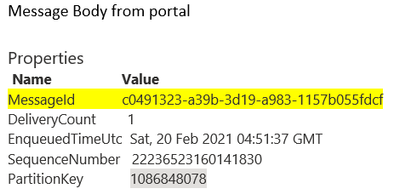
Here we are trying to set the MessageID of the Service bus broker message as ‘ce095552-b466-4d03-ac41-430ec9286806’, however post receiving the same message and checking the messageID, it will be different ‘c0491323-a39b-3d19-a983-1157b055fdcf’ as this is auto-generated by the spring-cloud library as shown below:
Code trying to set the MessageID of the broker message:
Code
Reference Code
Properties
Map<String,Object> accessorMap = new HashMap<>(); accessorMap.put(MessageHeaders.ID, “ce095552-b466-4d03-ac41-430ec9286806”); accessorMap.put(“messageId”, “ce095552-b466-4d03-ac41-430ec9286806”); accessorMap.put(MessageHeaders.TIMESTAMP, new Date().getTime()); accessorMap.put(MessageHeaders.CONTENT_TYPE,”application/json”);
com.microsoft.azure.servicebus.Message newMessage = new com.microsoft.azure.servicebus.Message(“ce095552-b466-4d03-ac41-430ec9286806”,MessageBody.fromValueData(streamMsg.toString()),”application/json”);
Refer the workaround, in following code, you can provide a subclass of ServiceBusTopicTemplate, and override the logic of how the message id is defined.
So, in the example below, you can set the header when building spring integration message.
@Bean public ServiceBusTopicOperation topicOperation(ServiceBusTopicClientFactory factory) { return new CustomizeMessageIdServiceBusTopicTemplate(factory); }
public static class CustomizeMessageIdServiceBusTopicTemplate extends ServiceBusTopicTemplate {
Running the above sample code, you should be able to set the MessageID of the Azure service bus using azure-spring-cloud-stream-binder-servicebus library.
This article is contributed. See the original author and article here.
Azure Policy lets you assess resources against certain criteria at different levels in your environment – from the top level management groups containing multiple subscriptions down to resource groups. So what happens if the policies at one level are different from the policies at another level in your environment hierarchy? Sonia explores some scenarios!
How Azure Policy assignments work
When you apply an Azure Policy at a certain level (known as assigning it to a scope), that assignment will be inherited by all the child resources under that scope. If I add a policy at the subscription level for example, all of the resources groups under that subscription will also be impacted by that policy. However, existing resources will not be modified by a Deny policy – they will be marked as non-compliant.
Azure Policy is an “explicit deny” system. This means that if any policy assignment in the hierarchy would deny a resource configuration, then it will be denied. To manage exceptions (say you want one resource group to be allowed resources of a larger size that aren’t allowed anywhere else in the subscription), you can exclude the resource group from the policy that is denying those resource sizes (known as SKUs), and you can assign a different allowed sizes policy to that resource group.
Scenarios with the Allowed virtual machine SKUs policy
My test environment started with the following:
Subscription level: No policy assignments
Resource group level: Allowed virtual machine SKUs set to standard_dc2s, standard_dc2s_v2, standard_dc4s, standard_dc4s_v2, standard_dc8_v2
VM in the resource group: Size Standard_DS1_v2
How can there be a VM in that resource group with a size that’s not listed in the allowed VM SKUs policy?
The policy is set to Deny, so that tells me that the policy was assigned to the resource group AFTER the VM had been created. Azure Policy is showing that there are some non-compliant resources in this resource group. Assigning a deny policy won’t modify existing resources, but it will show them as non-compliant. It will prevent existing resources from being resized to a SKU that’s not listed, and it will prevent new resources from being created with a SKU that’s not explicitly allowed.
So, what happens if I go and add an Azure Policy at the subscription level to allow the Standard_DS1_v2 SKU being used by that VM?
Once assigned and assessed, my VM is showing as compliant with the subscription-level policy but still non-compliant with the resource group level policy assignment.
Policy compliance and non-compliance at different assignment scopes
What happens if I now add a completely new resource group?
The new resource group will inherit the subscription level policy, which allows Standard_DS1_v2.
But if I then go and add an allow SKU policy at the resource group level, list Standard_D4s_v3 and try to create a new VM in that resource group with the D4s_v3 SKU – the creation of the VM will fail as it does not meet the more restrictive subscription-level policy.
Adding exclusions
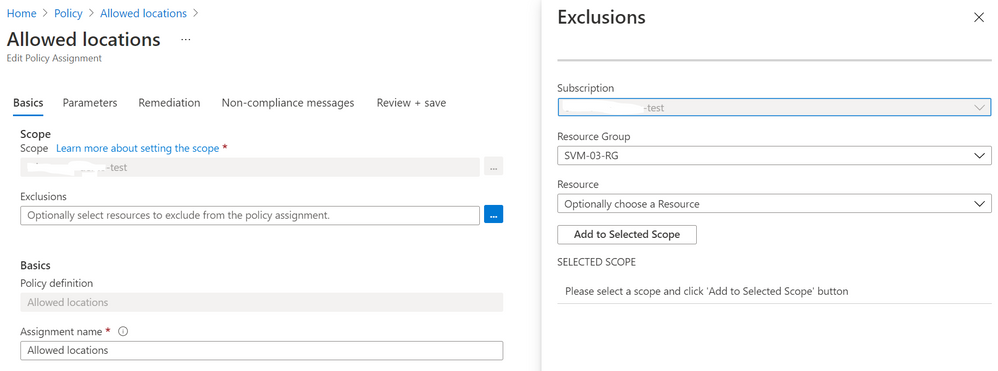
If I really want to enable a resource group to allow a SKU that’s not listed in the subscription level policy assignment, I can add the resource group to the exclusions at that subscription level. Then I can set a more permissive list of SKUs when I assign the policy at the resource group level. This will allow the creation of new resources that match the SKUS listed at the resource group level.
Exclude a resource group from an Azure Policy assignment
If I have existing resources in a resource group that I want keep at that size, but I don’t want any new resources to be created (or existing resources to be resized) to that SKU, I can exempt single resources from a policy assignment, at any level. This will prevent the resource from being evaluated against that policy. Exclusions are also useful if the resource is in a temporary state of non-compliance, or the policy condition is mitigated by some other method (for example, another vendor’s security product).
Scenario with the Allowed locations
My test environment is configured with:
Subscription level: Allowed location Australia East
Resource group level: Allowed location East US 2
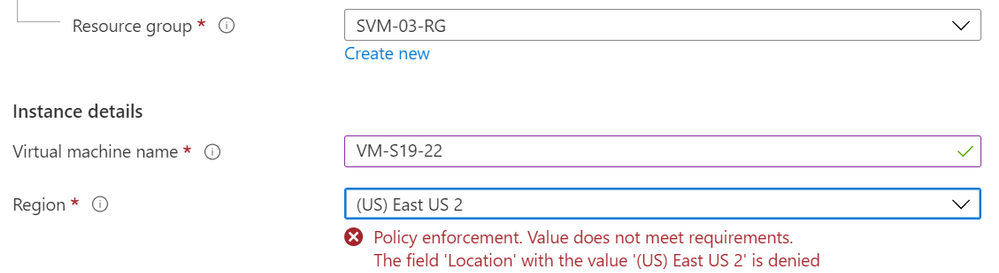
If I try to add a VM to the resource group and set its location to East US 2, the creation will fail due to that location not being listed in the subscription level’s policy assignment. Again, I’d need to add this resource group to the exclusion at the subscription level.
VM creation warning on location not meeting Azure Policy assignment
Triggering an Azure Policy compliance scan
Did you know that right in the Azure Portal you can trigger a compliance scan, using Cloud Shell (the first icon)?
Azure portal – CloudShell
There’s a PowerShell command for this, but it can take a little while to run on larger environments. So we don’t have to wait for it to finish before we get our CloudShell prompt back, we can run it as a job:
$job = Start-AzPolicyComplianceScan -AsJob
And to check the progress, we run $job
AZPolicyComplianceScan job status
Custom non-compliance messages
One of my favorite Azure Policy enhancements is the ability to add a custom message to be displayed when a resource change or creation is denied due to non-compliance against a policy assignment. You can use this to give more clarity to exactly which policy assignment is saying no (such as “Allowed SKUs in SVM-RG-09 are D series only”) or to direct people to who to contact for more information or an exemption (such as “Email SKUPolicyOwner@yourcompany.com for more info”)
Do you have any other scenarios?
These are just two little examples – do you have any other suggestions for scenarios where you may have a conflict with your Azure Policy assignments? Let us know if there’s anything you’d like to model through or discuss.
This article is contributed. See the original author and article here.
Join the Microsoft Advertising team to learn about exciting new features coming soon to the developer roadmap. We’ll explore features that are currently available as well as several that we’ll be piloting and releasing soon.
This webcast will provide you with a clear understanding of upcoming features and the value they can bring to your Microsoft Advertising campaigns. Along with a view of the features coming soon and those recently updated, we’ll also provide an estimated timeline as to when features will become available, so you’ll have the building blocks needed to develop the solution that works best for you.
You can register here for the webcast on March 30, 2021 at 11:00 a.m. U.S. Pacific Time.
In this webcast we will cover:
Multi-Factor Authentication Requirements
Dynamic Search Ads Mix Mode
Autobidding
Global Expansion
Retail Updates
Responsive Search Ads
Conversion Import
Dynamic Remarketing for new verticals
Google Import API
Scripts Updates
If you can’t make the live webcast, register to watch it on demand when it’s most convenient for you. The on-demand version is usually available 24 hours after the live event.
This article is contributed. See the original author and article here.
On January 28, 2021 Microsoft released its first Environmental Sustainability Report “A Year of Action” documenting progress the company made since announcing its 2020 commitments to become a carbon negative, water positive, zero waste company that protects more land than it uses by 2030. See a summary of the overall report in Part One of this blog series and learn more about the carbon negative commitment in Part Two. This third and final post will close out with a deeper look at the water positive, zero waste and ecosystems commitments, including the mysterious Planetary Computer.
Water Positive
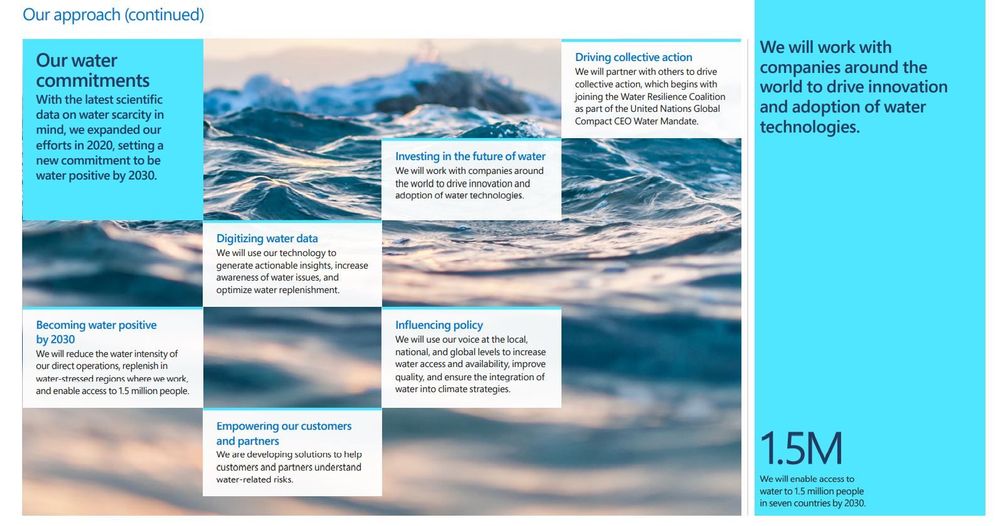
Microsoft’s water positive commitments at a glance
A company is water positive when it puts more water back into the environment than it consumes. Microsoft will accomplish this through a combination of reduction and replenishment (physically putting water back into the environment, like recharging groundwater aquifers).
Why is a tech company like Microsoft focused on water? The UN predicts that by 2030, the world may face a 40% shortfall in available freshwater. Climate change, pollution, industrialized animal agriculture and increased demand could reduce water availability in major cities more than 66% by 2050, and as we all know from Standing Rock, “Mni Wiconi” (water is life). But it’s not just freshwater: the oceans are in trouble too. The World Economic Forum estimates that there will be more plastic waste in the oceans than fish (by weight) by 2050 unless we take drastic action to stem the tide of pollution. Microsoft spent much of its 2020 attempting to standardize and digitize water data (where it exists at all), an unglamorous but extremely important baseline for improving the situation. And true to form, Microsoft examined the unique role that technological solutions like Artificial Intelligence (AI) can provide for better water management.
While not as flashy or headline grabbing as carbon reduction, water commitments are no less important. There are few things that all people, and most of life on Earth require, but access to water is one of them. This issue is deeply intertwined with human rights, especially Indigenous rights. Environmental racism means that black, brown and poor people around the world will often face the worst and most immediate effects of the climate crisis: at the top of that list is lack of access to reliable, clean drinking water. Becoming water positive, while working with a growing number of partner organizations including the United Nations Water Resilience Coalition, means making progress on all these front and addressing systemic inequity while improving the underlying environment we all depend on.
“Microsoft is taking responsibility for our own water use and developing technology to help others do the same.” – President Brad Smith
Zero Waste
Each year, humanity creates 11 billion tons of waste including plastics, e-waste and harmful chemicals that pollute our land, clog our waterways, deplete scarce natural resources and contaminate the air we breathe. Inefficiencies associated with a wasteful society also create a lot of unnecessary carbon emissions.
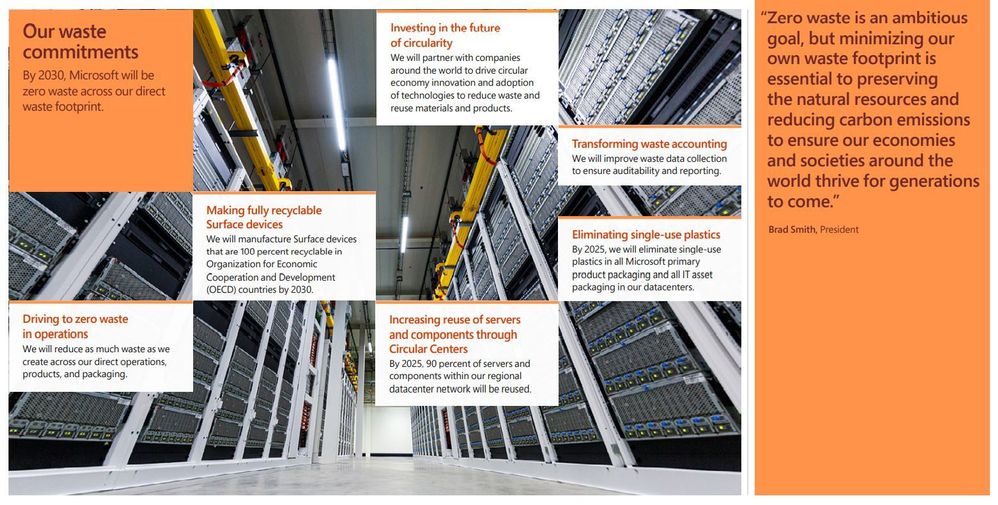
Zero waste is a set of principles focused on waste prevention that encourages the redesign of resource life cycles to reduce or eliminate waste generation. The goal is for no trash to be sent to landfills, incinerators or the ocean. In practice, for most individuals and companies, 100% waste diversion or elimination is simply not achievable, so the goal is 90% diversion from landfill to achieve TRUE Zero Waste certification. Microsoft has committed to becoming a zero waste company by 2030 and will eliminate single use plastics from its packaging by 2025.
The company spent much of 2020 working to accelerate the development of a circular economy, a system in which economic activity is decoupled from the consumption of scarce resources, waste is designed out and there is an emphasis on repair, disassembly and reuse. Waste data has many of the same challenges as water data: where it exists at all, it is often fragmented, unstructured, and hard to use. Here too the company made strides in the standardization and digitization of waste data (a necessary precursor for leveraging the power of AI).
On a personal note, I was surprised and delighted to see page 54 of the report: it referenced my Plastic Free Oceans Hackathon project! A small army of Microsoft volunteers created a scalable way to automate the recognition of plastic pollution in rivers using AI, which resulted in a multi-year partnership with The Ocean Cleanup. This is one of my proudest accomplishments at Microsoft and a clear example of the role technology (and technology companies) can play in creating solutions for the world’s most pressing environmental challenges.
“Waste is almost purely synonymous with opportunity.” – Microsoft Chief Environmental Officer Lucas Joppa
Ecosystems
Microsoft’s ecosystems goals at a glance
And last but certainly not least, ecosystems. This is perhaps the least obvious of the company’s four sustainability commitments: what does a tech company have to do with protecting ecosystems and biodiversity? A lot as it turns out!
We often know more about the rate of decline than we know about the overall health and wellness of a single species or the many species that comprise an ecosystem. Technologies like Artificial Intelligence and Machine Learning can help accelerate the collection and synthesis of large data sets, letting conservation researchers spend less time digging through data, and more time planning conservation with actionable insights. But why does protecting ecosystems and biodiversity matter?
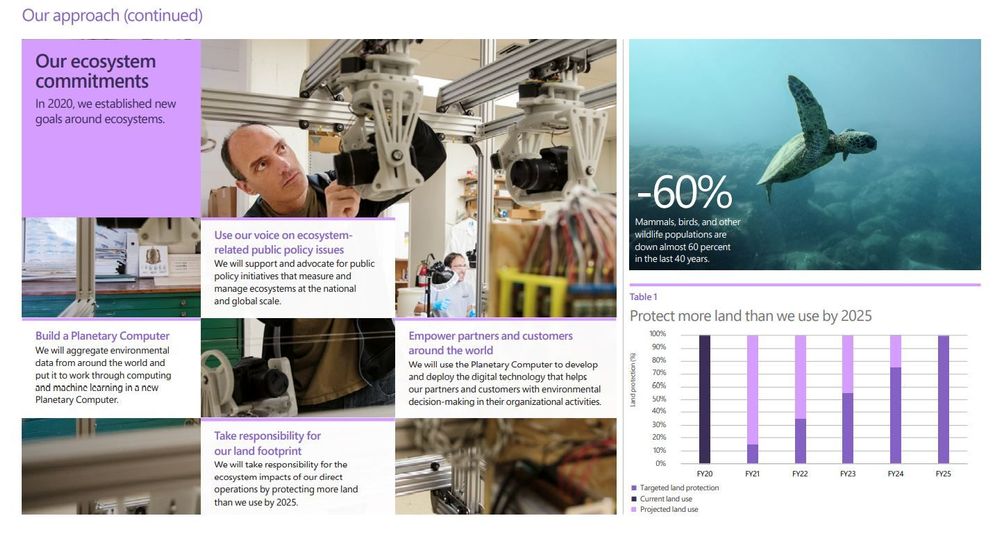
Nature, and the benefits that it provides, are the foundation of our society, cultures and the global economy. We depend on healthy and intact ecosystems for clean air, water, food, medicine, energy and resources. Simply put, there is no human civilization if we continue to destroy the complex web of life that supports us. For its part, Microsoft has committed to protecting more land than it uses by 2025 (which is 11k acres or 44,515 square meters), putting resources and technology in the hands of scientists and nonprofits working on conservation, and curiously, developing a Planetary Computer.
The Planetary Computer
Of all the things packed into the Year of Action report, none piqued my curiosity like the Planetary Computer. What is it? The report calls it “a platform that provides access to the world’s critical environmental datasets.” Think of it less as some kind of enormous supercomputer and more like open-source access to very large datasets and powerful computing resources for the environmental science community (you know, the people writing all the reports telling us how bad things are). According to Microsoft Chief Environmental Officer Lucas Joppa, the end goal is an answer to the most complex environmental science question of all “how do we manage Earth΄s natural resources to ensure a climate-stable future?”
Microsoft is a technology company, so it makes sense that technology solutions are the most meaningful contribution it can make to combatting the climate crisis, the degradation of Earth’s ecosystems and frightening loss of biodiversity we are currently experiencing. The goal is to better monitor, model and manage the world’s ecosystems.But don’t take it from me, this is the brainchild of Lucas Joppa who sits at the intersection of computer and environmental science.
“This won’t be built as a crystal ball. Instead, it will be a global portfolio of applications connecting trillions of data points to computing power and machine learning capable of converting that all into contextualized information.”
Conclusion
If we step back, zoom out and look at the moment in history we are in, it is precarious. Too many carbon emissions in our atmosphere are warming the planet and changing the climate in unpredictable and destabilizing ways; freshwater sources and oceans around the world have been degraded and filled with pollution; consumption of scarce resources continues to accelerate while waste piles up and contaminates the environment; and the living things that prop up our entire way of life, from soil microbes to whales, are going extinct faster than we can identify them.
Humans have fundamentally transformed the entire planet in just 250 years with the explosion of growth and technology ushered in by the first Industrial Revolution. But that progress has come at a cost, and we are now paying the price. Unless we drastically change the ways we power our civilizations, grow and transport our food and design and consume our products, we face a climate catastrophe. But it’s not too late to make meaningful change, and while not a cure all, technology has an important role to play.
Committing to become a carbon negative, water positive, zero waste company by 2030 is remarkable. There aren’t many organizations doing this, and none the size of Microsoft. But if these goals seem overly ambitious, consider that every organization on the planet will need to do the same thing, and sooner rather than later. As large as Microsoft is, it is barely a drop in the ocean when it comes to climate change. Its strategy – its moonshot – is that the rest of the world will want to do the same when they see it can be done, and along the way, the company will develop solutions it will sell to those organizations to become the world’s leading environmental technology solutions provider.
At the heart of these commitments is something more: a desire to do something, anything, to avert a climate catastrophe and a willingness to bring the full resources of a trillion-dollar tech company to bear to make it happen faster. These commitments, and the progress made to date, are a proportional and appropriate response to what the best available science is telling us needs to happen. Let’s hope it spurs companies and governments around the world to respond in kind, because ultimately, that is what’s required to make a meaningful difference.
See a summary of the overall report in Part One of this blog series and learn more about the carbon negative commitment in Part Two.
This article is contributed. See the original author and article here.
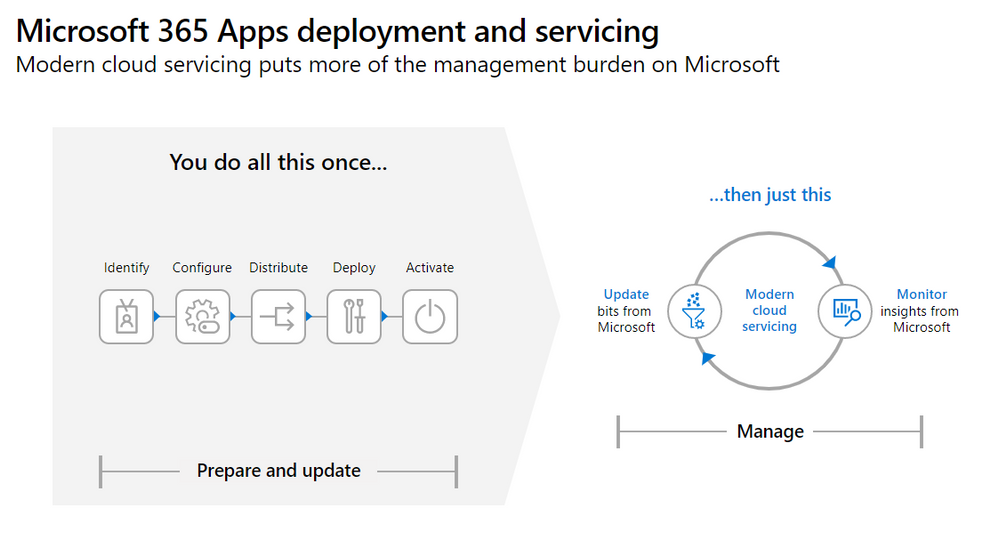
This webinar provides an overview of the Microsoft 365 Apps upgrade and the new management strategy, as well as servicing channel best practices and Microsoft Information Protection.
This webinar was presented on February 24, 2021, and the recording can be found here.
Attached to this post are:
The FAQ document that summarizes the questions and answers that came up over the course of both Webinars.
A PDF copy of the presentation.
Thanks to those of you who participated during the two sessions and if you haven’t already, don’t forget to check out our resources available on the Tech Community.
Thanks!
@Robin_Baldwinon behalf of the MIP and Compliance CXE team





Recent Comments